RSS
 

Archive for April, 2014

Small Space Hacks: 24 Tricks for Living in Tiny Apartments

29 Apr

[ By Steph in Design & Furniture & Decor. ]
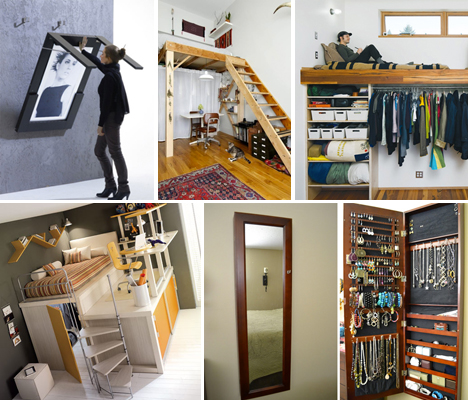
Small Apartment Hacks Main

Making the most of a tiny apartment is all about smart use of space, organization and multi-purpose furniture. Here are 24 examples of clever small-space hacks that pack in a ton of function while avoiding clutter, like lofted platforms, hidden jewelry storage, fold-down tables and DIY slide-out pantries.

Space-Saving Bedroom Sets

Small Apartment Hacks Bed 1

Small Apartment Hacks Bed 2

Small Apartment Hacks Bed 3

Compact bedroom sets can fit everything you need and more into a tiny room without even taking up the full space. The Matroshka All-in-One furniture set measures just 13 square feet when it’s all packed up, but pulls out into a double bed, bookshelves, a corner couch, a desk, a wardrobe, a dining table, four stools and additional storage. Another option is a couch that cleverly flips up into a bunk bed in one swift motion. Lofted bedroom sets (most often made for kids and teens) are available in a wide variety of colors and styles and often include desks and even extra beds for guests.

Elevated Platforms for Sleeping and Working

Space Saving Hacks Platform 1

Space Saving Hacks Platform 3

Small Apartment Hacks Wooden Platform bed

When faced with minimal square footage, we tend to focus on floor space and ignore all of the usable real estate on the walls. If you’ve got ceiling height, take advantage of it with lofted designs that lift beds, storage or work spaces, freeing up room on the floor. These designs can be built-in or portable like furniture. A Portland couple with a 704-square-foot home used vertical space to pack in a closet and other storage areas under a lounge and workspace. A bed tucked under the stairs could be a creative way to use what’s often wasted space, and a simple handmade free-standing wooden platform elevates a bed over a dining area.

Magnetic & Mason Jar Storage for the Bathroom

Space Saving Hacks bathroom

Keeping bathrooms clutter-free is a challenge when you’re dealing with tons of small items like cosmetics, toiletries, tweezers and bobby pins. Use an IKEA magnetic knife strip to corral metal items, or create a mason jar organizer for cotton balls, makeup brushes and more. An easy way to alter your medicine cabinet to fit more stuff involves simply placing a sheet of precut galvanized steel along its back wall and adding magnetic hooks and containers.

Maximizing Cabinet and Wall Space in the Kitchen

Small Apartment Hacks Kitchen Storage

Small Apartment Hacks Canned Food Organizer

A simple towel bar keeps pot lids out of the way, whether you mount it on the wall or inside a cabinet. Update Julia Child’s classic kitchen pegboard by painting it a custom color and use it for pots, pans, lids, tools and spices. That empty space next to your refrigerator is practically begging to be put to use; a simple DIY pantry on casters hides away a surprising amount of food. And if you’re not up to breaking out the hammer and nails, check out custom cabinet organizers like the Rev-a-Shelf swing-out pantry system.

Next Page – Click Below to Read More:
Small Space Hacks 24 Tricks For Living In Tiny Apartments

Share on Facebook


[ By Steph in Design & Furniture & Decor. ]

[ WebUrbanist | Archives | Galleries | Privacy | TOS ]


WebUrbanist

 
Comments Off on Small Space Hacks: 24 Tricks for Living in Tiny Apartments

Posted in Creativity


Projekt Riga – eine fotografische Fahrradtour

28 Apr

Ein Beitrag von: Tobias Teich

Die Fotografie kam zu mir in Form einer Minolta X500. Analog. Manueller Fokus. Zwar hatte ich mich schon vorher mit digitalen Kameras versucht, sie boten mir jedoch nicht das, was ich benötigte. Was das war, wurde mir erst klar, als ich die ersten Filme der Minolta entwickelte.

Die manuelle Funktionsweise, die Festbrennweite – all das passte anscheinend wesentlich besser zu mir. Die Ergebnisse waren deutlicher mehr an dem, was ich mit den Fotos zeigen wollte, als die digitalen.

Anfänglich war mein fotografisches Interesse auf den urbanen Raum begrenzt. Ich wollte die Stadt Braunschweig, in der ich lebe und studiere, so zeigen wie ich sie empfinde. Sehr schnell konzentrierte ich mich dabei auf die vielen Fahrradleichen, die überall in der Stadt zu finden waren.

© Tobias Teich

So entstand mein erstes Projekt „Tretmühlen“. Bald erweiterte etwas anderes meinen fotografischen Horizont: Der soziale Aspekt. Durch den Austausch mit Menschen, die den gleichen Zugang zur Fotografie hatten wie ich, bekam meine Arbeit einen sichtlichen Schub.

Zunehmend versuchte ich, meine Projekte schärfer zu fassen. Es erwuchs der Wunsch nach Portraits und dem „guten“ Bild, ohne dabei eine gewisse Lässigkeit nicht zu verlieren.

So drängte es mich – wohl unterbewusst, aber bestimmt – zu einem „großen“ Projekt. Ein Projekt, das mir in vielerlei Hinsicht neue Horizonte eröffnen würde.

© Tobias Teich

So erschuf ich Projekt#Riga als Ausdruck des Wunsches, mit Kamera und Fahrrad nach Riga, der Hauptstadt Lettlands, zu fahren. Noch nie war ich allein im Ausland gewesen – und das in einer Zeit, in der gefühlt jeder Jugendliche schon einmal monatelang durchs australische Outback gewandert ist.

Zudem sollte diese Reise dann in einem Bildband und einer Ausstellung münden. Sehr schnell wurde mir bei der Planung klar, dass die Kosten für das fotografische Equipment sowie für den anschließenden Druck des Bildbandes immens werden würden.

Projekt Riga © Tobias Teich

Ein Freund gab mir den Rat, mich über Crowdfunding zu informieren. Letztendlich meldete ich mich bei Startnext an und erstellte dort eine Crowdfunding-Kampagne.

Eine Freundin erstellte ein Logo, weitere Freunde halfen mir bei den nötigen Videobeiträgen. Mit dieser Kampagne erhielt mein Vorhaben eine ganz neue Ebene.

© Tobias Teich

Ich musste mich und mein Projekt bewerben, musste argumentieren, warum ein künstlerisches Projekt, das auf den ersten Blick nur mich selbst betraf, wert war, unterstützt zu werden.

Nun gab es kein Zurück mehr. Ich konnte das Projekt nicht mehr einfach im Sande verlaufen lassen. Ich musste mich der Aufgabe stellen.

© Tobias Teich

Das Feedback war dann überwiegend positiv und so dauerte es nicht sehr lange bis ich den Betrag, der zum erfolgreichen Abschluss der Kampagne nötig war, beisammen hatte.

Er wurde sogar deutlich überschritten. So konnte ich Kleinbild- und Mittelformatfilme kaufen. Mit Unterstützung der Familie wurde ein adäquates Fahrrad gekauft.

Am 14. April 2013 ging es dann auf die am Ende 1760 Kilometer lange Reise. Zuerst durchquerte ich die Uckermark, dann ging es über Stettin (Polen) an die Ostsee.

Projekt Riga © Tobias Teich

Weiter entlang der polnischen Küste gelangte ich schnell nach Danzig. Diese erste Reisewoche ging ich sehr sportlich an und spürte, dass ich erst noch meinen Rhythmus finden musste, um meinen fotografischen Ansprüchen zu genügen.

Viel zu leicht rollt man mit dem Fahrrad an lohnenden Motiven vorbei. So entschied ich mich, die russische Exklave Kaliningrad mit teilweiser Hilfe der Bahn zu umrunden.

Projekt Riga © Tobias Teich

Dies gab mir die Zeit, mehr auf die nun litauische und dann lettische Küste und Natur einzugehen. Nach 20 Tagen hatte ich Riga erreicht.

Unglaubliche Tage lagen hinter mir, atemberaubende Natur hatte ich durchquert und unendlich lange, mal mehr oder weniger stark befahrene Straßen hatte ich befahren, krasse gesellschaftliche Brüche und Unterschiede waren mir begegnet.

Projekt Riga © Tobias Teich

Projekt Riga © Tobias Teich

Polen und das Baltikum erfahren teilweise einen unübersehbaren Boom. Überall wird viel gebaut, vieles soll noch gebaut werden. Dabei stehen oftmals gleich auf der anderen Straßenseite noch bewohnte Häuser aus einer anderen Zeit.

All das Gesehene habe ich letztendlich in den Bildband gefasst. Mit einer dreiwöchigen Ausstellung in der Braunschweiger Galerie ein Raum 5-7 (und einer in eine Party ausufernden Vernissage) beschloss ich das Projekt.

Projekt Riga © Tobias Teich

Doch auch ein Jahr nach dem Start gen Osten ist die Tour noch immer sehr präsent. Vor Kurzem stellte ich einige Bilder des Projektes im LOT-Theater Braunschweig aus, einige stellte ich für eine studentische Arbeit zur Verfügung und ein Bild wurde für eine Werbekampagne verwendet.

Zusammenfassend kann ich mit Sicherheit sagen, dass mich dieses Projekt deutlich selbstbewusster gemacht hat. Fotografisch wie persönlich. Das nächste Projekt kommt bestimmt!


kwerfeldein – Fotografie Magazin | Fotocommunity

 
Comments Off on Projekt Riga – eine fotografische Fahrradtour

Posted in Equipment


9 Top Tips for Shooting Waterfalls, Creeks and Streams

28 Apr

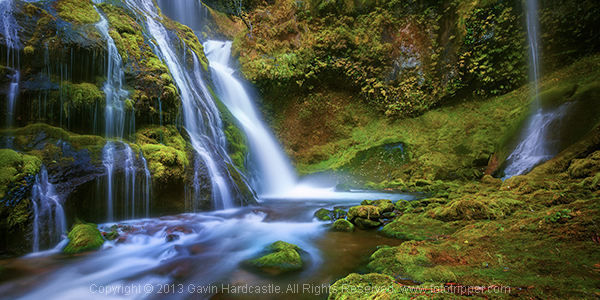
Waterfalls, creeks and streams are something of a photographic specialty for me. Aside from the fact that there are thousands of them at my Vancouver Island Headquarters, they’re also really easy to photograph and often result in magical images that stand the test of time. Whether it’s a moss speckled trickle or a colossal roaring deluge, moving water seems to be irresistible to photographers and when it’s done well, can be utterly gorgeous. Let me share with you my top tips on how to shoot waterfalls, creeks and streams.

Learn how to shoot waterfalls and creeks

1 – Shoot in all weather

I’ll shoot in any kind of weather except for sideways rain. With waterfalls, creaks and streams I have a silly little motto ‘The Wetter the Better’. When everything is drenched you’ll find that your shadows are nicely saturated to deliver powerful blacks. I also prefer the look of wet leaves over dry ones because they looks so much more vibrant and rich.

Rainy or overcast days will also give you softer light with lower contrast, meaning you won’t usually need to bracket in order to capture the dynamic range. If you’re lucky enough to get a cold spell and things get icy you’ll find your local waterfall turns into an enchanted winter wonderland overnight, just watch your footing.

bowen-park-nanaimo-gavin-hardcastle

2 – Don’t always choose a slow shutter speed

Sure, it’s nice to get those silky water shots and capture the motion blur of moving water, but there are times when it’s nice to also capture a frozen moment of action. I’ll usually take two exposures with different shutter speeds and then blend them in Photoshop to create a good mixture of frozen and blurred motion. A four second shutter speed will usually be enough for silky water shots and you can achieve that easily with just a polarizer and a narrow aperture like f/16, unless your scene is in harsh, direct sunlight.

For a quicker exposure that has less motion blur I’ll try and keep the shutter speed under one second by using a slightly wider aperture of f/11 and rotating the polarizer to allow in more light. It’s rare that I’ll require the use of an ND filter. My shot below is a single exposure of about a half second during a rainy day. I tried longer exposures but preferred this one because you can still see some individual water drops in motion instead of just a mushy blur.

How to shoot waterfalls

3 – Explore dark canyons

Don’t just explore those sun dappled streams that catch the light beautifully, that’s just too easy. Often it’s the darker, sun starved slot canyons that yield the most beautiful scenes. Armed with a study tripod you can shoot anything you want without caring about direct sunlight illuminating the scene. This opens up a new world of photo opportunities if you’re only used to shooting handheld.

4 – Bubbles turn into spirals

Whenever you see a river that produces a current of bubbles on the surface of the water, you’re in for a treat. With a shutter speed of four to six seconds (depending on water speed) those bubbles will create beautiful spirals in your long exposures. Be careful not to slow things down too much though as a ten second shutter speed will probably blur the motion too much to capture any definition. Here’s an example I shot last fall in Nanaimo, Vancouver island.

How to photograph waterfalls, creeks and streams

5 – Slap that polarizer on

I know I harp on about this all the time as you’ve no doubt read in my ‘Why You Must Use a Polarizer‘ article, but it really does make a huge difference when you’re dealing with wet rocks and reflections caused by water. Your polarizer will allow you to use longer shutter speeds, reduce reflections and make your colours POP!

6 – Avoid the sky

Do you really need a white triangle at the top of your image? Didn’t think so. Almost all of my workshop students suffer from some compulsion that dictates all images must have sky. I think I did the same thing when I was starting out. By omitting the sky completely, you’ll create a more intimate scene that dedicates the entire frame to what matters most and eliminates the triangle of pointlessness.

How to Photograph streams and rivers

7 – Go abstract

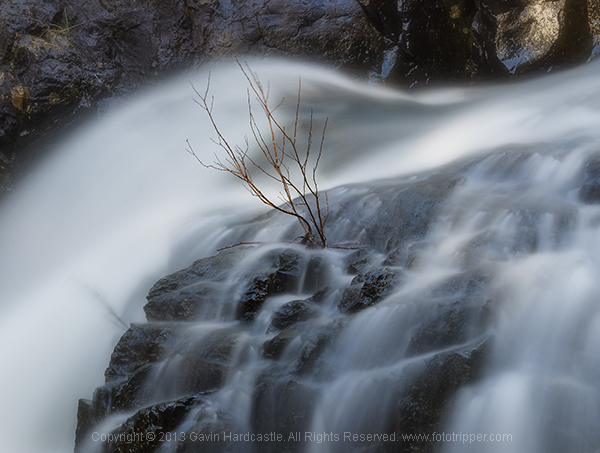
This is where you will have an advantage if you don’t have a full frame sensor camera. Rather than trying to fit the entire scene into your frame, it often pays to hone in on a smaller area of a waterfall or creek which removes the viewers sense of scale and direction.

Instead of a river flowing over some rocks and tree stumps, you’ll create an abstract scene of natural beauty that hypnotizes the viewer with an atmospheric study in motion and colour. Just like removing the sky, omitting the top and bottom of a waterfall from our frame leaves room for imagination.

gavin-hardcastle-abstract-waterfall-photography

8 – Perfect the “shoot ‘n swipe” technique

I’m not going to lie to you, shooting waterfalls, creeks and streams WILL result in a wet lens. When dealing with the spray from waterfalls, you’ll need to practice and perfect the “Shoot ‘n Swipe” method that requires a measure of patience. To do this well you’ll need a ball head with just ONE position clamp. If you’re rocking one of those ‘many handled’ tripods that look more like a tower crane control panel, forget it. Here’s how it works.

  1. Compose your shot and dial in all your camera settings to capture the shot. By now your lens will be well coated in spray from the airborne water particles of your waterfall.
  2. With everything perfectly in place and all setup, unwind the ball heads position clamp and point your camera to the floor, being careful only to allow vertical movement.
  3. Using a good quality lens cloth, wipe the lens thoroughly to remove the spray. If you have a filter in place be sure to rub in the opposite direction to the filter thread of you’ll be picking that filter up off the floor.
  4. Once dried, unwind the position clamp on the ball head, lift up the camera back into its previous position for your composition, tighten the clamp and take the shot. You’ll only get a few seconds before you’ll be all fogged up again.

Repeat this procedure until you get a shot that doesn’t have a fogged or water splattered lens. You have now perfected the “Shoot ‘n Swipe” technique (Patent Pending)

9 – Processing – go monochrome

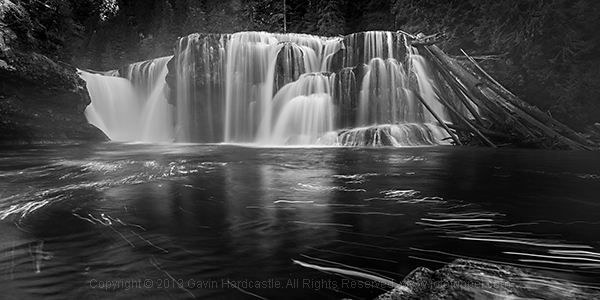
Sometimes it’s nice to convert images of moving water to black and white because often they feature a lot of white. If you find that your waterfall, river or stream shot is lacking punch because of boring light and a lack of colour in the scene, try converting it to black and white then get freaky with the Curves slider in Adobe Camera Raw to pop the contrast. Nice.

Black & White Landscape Photography

So there you have it, all you need to get out there and capture some lovely images of waterfalls, creeks, rivers and streams. Get creative and don’t be afraid of wet weather, just be careful on those slippery rocks.


The post 9 Top Tips for Shooting Waterfalls, Creeks and Streams by Gavin Hardcastle appeared first on Digital Photography School.


Digital Photography School

 
Comments Off on 9 Top Tips for Shooting Waterfalls, Creeks and Streams

Posted in Photography


28. April 2014

28 Apr

Ein Beitrag von: Martin Fellmann

Bibliothek © Martin Fellmann


kwerfeldein – Fotografie Magazin | Fotocommunity

 
Comments Off on 28. April 2014

Posted in Equipment


Apple patents 3D interactive hologram display system

28 Apr

appleholi1.png

AppleInsider has discovered another interesting Apple patent. This time the technology giant has patented a 3D-display system that projects digital images into a medium such as a non-linear crystal, using infrared lasers or similar technologies and accepts user input in the form of gestures. Learn more

News: Digital Photography Review (dpreview.com)

 
Comments Off on Apple patents 3D interactive hologram display system

Posted in Uncategorized


Getty Images now lets you hang iconic photos on your wall

28 Apr

David-Redfern-Gallery-537x368.jpg

In March, stock photography house Getty Images rocked the industry when it announced it would allow people to embed images for free on websites and other electronic uses. Clearly looking to monetize the vast collection of images currently gathering digital dust in its archives, it has launched Photos.com by Getty Images to sell prints directly to customers. Learn more

News: Digital Photography Review (dpreview.com)

 
Comments Off on Getty Images now lets you hang iconic photos on your wall

Posted in Uncategorized


Take a Hike!With Camping-Friendly Photo Gear

28 Apr

We love camping. The scenery is beautiful, the wildlife photogenic, the tent mishaps hilarious and the burnt marshmallows the best ones.

Don’t let Mother Nature with her water, dirt & total-lack-of-outlets stop you from photoing it all. Pack along these camping-friendly gadgets.

We field tested each one on a recent camping weekend in Big Sur. Check out this photo story of our trip, or scroll on down to see our favorite gear of the weekend.

Power Pot Stovetop Charger

The Power Pot turns heat from your campfire or stove into power to charge your phone, camera or any USB cable charged device!

Cook up your dinner and the power to snap a few more photos at the same time.

Learn More or Buy

DryZone Duffle

Like the little yellow rain slicker of your childhood, this waterproof bag will keep your camera bone dry. Plus, it’s super padded to keep your gear safe.

Pack the DryZone Duffle full of camera equipment (and dry socks) when you’re on the water.

Learn More or Buy

iPhone Super Suit

With the iPhone Super Suit your phone will have the ultimate protection from the elements … like water, sand and gravity.

This sleek case protects and leaves the buttons, screen, camera and headphones totally usable (even while underwater)!

Learn More or Buy

Spring Break Camera Strap

Take your camera on a hike with the Spring Break Strap.

It not only provides a comfy way to carry your most precious cargo, but it makes you look pretty good too.

Learn More or Buy

Gorillapod Mobile

The Gorillapod will hold onto your phone in any terrain. Its bendy legs will stand atop a mountain or hang onto a tree branch for great pics at just the right angle.

Use it as a tripod for self-timer selfies, group pics and shake-free videos.

Learn More or Buy

Now, check out the photos we snapped on our weekend camping trip to Big Sur RIGHT HERE!


© laurel for Photojojo, 2014. |
Permalink |
No comment |
Add to
With Camping-Friendly Photo Gear”>del.icio.us

Post tags:


Photojojo

 
Comments Off on Take a Hike!With Camping-Friendly Photo Gear

Posted in Equipment


Get more accurate color with camera calibration

28 Apr

D3x_02_Jordan_13_11_-_02.jpg

One of the ways in which you can minimize the amount of work you need to do in post-processing is to calibrate your camera. Many digital photographers are familiar with calibrating their computer monitor to help them get accurate results when adjusting images. But few think of calibrating their camera. Professional travel photographer Steve Davey explains why and how to set up a custom profile. Learn more

News: Digital Photography Review (dpreview.com)

 
Comments Off on Get more accurate color with camera calibration

Posted in Uncategorized


Graphic Stock’s 7-Day Free Download Extravaganza

28 Apr

As a photographer—whether an amateur or a pro—you know that you can more than appreciate having a huge supply of stock images ready to use. You usually never know when they can come in handy, but you know well how they can come in handy, more than you think. That’s why it’s a comforting thought to realize that Graphic Stock Continue Reading

The post Graphic Stock’s 7-Day Free Download Extravaganza appeared first on Photodoto.


Photodoto

 
Comments Off on Graphic Stock’s 7-Day Free Download Extravaganza

Posted in Photography


Photo of The Week – Valentines

28 Apr

Amanda Lim Photography

Thank you to everyone who contributed to this week’s Photo of The Week selection. We are so glad that we brought back this old favorite back to FashionPhotographyBlog.com because it reminded us that there is so much talent out there. We want to say a big congratulations to Amanda Lim for winning this week’s Photo Of The Week. It was a really close this week, where most of the week three photographers were neck and neck to take out the title. It was rather suspenseful. In the end Amanda’s photo was crowned.

We really love the way the photo encapsulated the theme of Valentines, with the hues of pink, but also the movement and drama created by the drapery flowing  effortlessly contrasted with the static contrapposto pose of the female model. She stands strong in the picture like a divine goddess while the fabric writhes around her like a serpent around her body. So much intensity in one photo.

I think the styling and the make up suits the photo perfectly – effortless, romantic and feminine (and by feminine, I mean a strong warrior woman). The model is standing her ground while chaos or whimsy is whipping around her. There is a powerful tone present in this photo but also a sense of serenity, and I find the contrast absolutely inspiring and exciting.

The lighting that’s shining top down on the model’s face places emphasis on her majestic cheek bones and beautifully highlights the tone in her arms, the sleekness of her figure, folds in the dress as well as catching the fabric flowing around her body.

We are proud to present the first winner of our revived Photo of The Week competition. As the winner of this week, Amanda is being featured here on FashionPhotographyBlog.com and have her work critiqued. Not only that she will also appear on our social media sites as well.

This coming week we have another round of Photo Of The Week and we are continuing the Valentines theme… why just celebrate for one day when February can be the “Month of Love”? To participate and vote, make sure you “like” our Facebook page.

You will then be able to for which photographer’s photo out of the selection that you want to be Fashion Photography Blog’s Photo of the Week in the Facebook comments section. The pic with the most vote’s by the end of the week will win Photo of the Week and win the great prizes. Since FashionPhotographyBlog.com is Google’s #1 site on fashion photography this could be your entry to some great exposure if you submit your photo and win.

Voting ends at the end of the week so make sure you get voting on our Facebook page here.

Tell us in the comments below, do you agree with how this week’s voting outcome? What is your critique on this photo?

We want to here from you!


Fashion Photography Blog

 
Comments Off on Photo of The Week – Valentines

Posted in Uncategorized