RSS
 

Archive for April, 2014

Spinning Zen: Real-Time Patterns Painted on a Potter’s Wheel

04 Apr

[ By WebUrbanist in Art & Sculpture & Craft. ]

spinning circle works of art

Like a hypnotist’s pendulum, this fifteen minute visual experience will charm you with its rich variety of mesmerizing patterns, all drawn by hand before your eyes.

An amazingly meditative trip, this work by Mikhail Sadovnikov is entirely dynamic and temporary. Each addition necessarily involves subtraction as new shapes continuously erase and overwrite what you see.

spinning hypnotic circle fingerpainting

Using the clay residue left on the wheel between throwing pots, the artist moves between a series of sequences set to music of various styles and speeds.

spinning potters wheel art

Sometimes symmetrical, other times abstract but always contained in a simple circle, the pacing and control are amazing – but you really have to watch the video to see for yourself and witness where sand mandala making meets fluid finger painting.

Share on Facebook


[ By WebUrbanist in Art & Sculpture & Craft. ]

[ WebUrbanist | Archives | Galleries | Privacy | TOS ]


WebUrbanist

 
Comments Off on Spinning Zen: Real-Time Patterns Painted on a Potter’s Wheel

Posted in Creativity


Using Daminion with Lightroom [for Advanced Users]

04 Apr

daminion-opener

If you have Lightroom you might assume that you have all you need for managing your images. That may not be the case and many professional and keen amateur photographers benefit from combining Lightroom with the image management software Daminion.

Daminion is an image management solution which helps you manage large image libraries. You can think of it as being the rough equivalent of the Lightroom Library module operating on steroids. Daminion’s biggest advantage is that it is true multiuser software so, with Daminion server installed, multiple users can access a single catalog. This is something that Lightroom is notoriously poor at doing and which Adobe has so far failed to address despite multi-user/multi-computer access being one of the top ten feature requests for Lightroom.

You can download a version of Daminion at Daminion.net using the Download link. At the time of writing the current release version is 2.5 and version 3 is still in beta. Daminion comes as both a standalone and a server version. The Daminion standalone Free version handles up to 15,000 images per catalog. The for fee versions are Basic, Standard and Pro which give you 25,000, 75,000 and unlimited images in a catalog respectively. There are also multiple Daminion server versions, one for noncommercial use and others for individual professionals and small teams. Daminion is available for the PC only and not for the Mac.

You can install both the server and client versions on the same computer – the server version will run faster than the client version so it has value when you have a lot of images in a catalog. When you consider that some Daminion users have catalogs of a million or more images, speed of accessing and filtering these images becomes important.

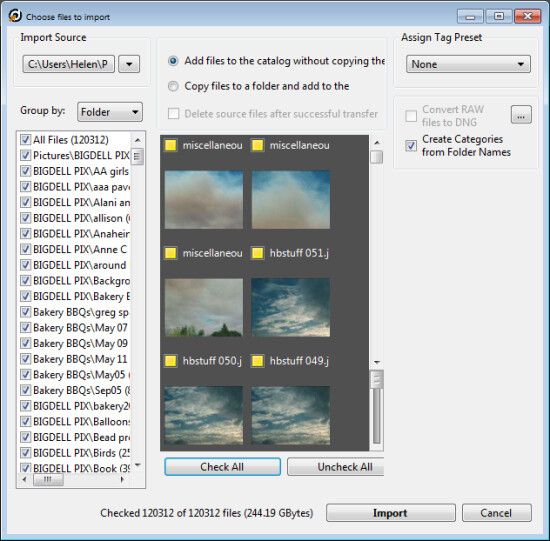
Once you have downloaded and installed Daminion, launch it and you can create a catalog. Like Lightroom you must import the images you want to manage with Daminion into the catalog. If the Add Files dialog doesn’t open automatically you can find it by choosing File > Add Files and then select the folders to import from.
daminion-import

While you can create and manage multiple catalogs in Daminion, like Lightroom, you can’t search across multiple catalogs so you should be careful about how you organize your images in catalogs. What makes sense in terms of catalog organization will depend on how you work with your images and if it makes sense to have them all in one catalog or in separate ones.

Daminion will recognize and manage a wide range of file types including common raster and vector formats as well as camera RAW images, video, music, and PDF formats. This gives it a broader scope as a management tool for digital media collections than Lightroom which is limited to photo and video formats only.

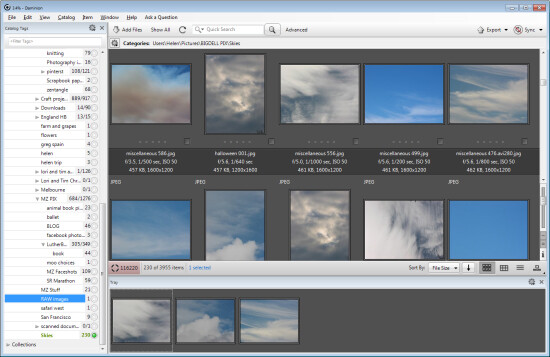
You can copy the images to another location on import or import them from their current locations. You can also group images by folder, date or file type on import. As the images are being imported you can begin to work with those already imported.
daminion-work-while-importing

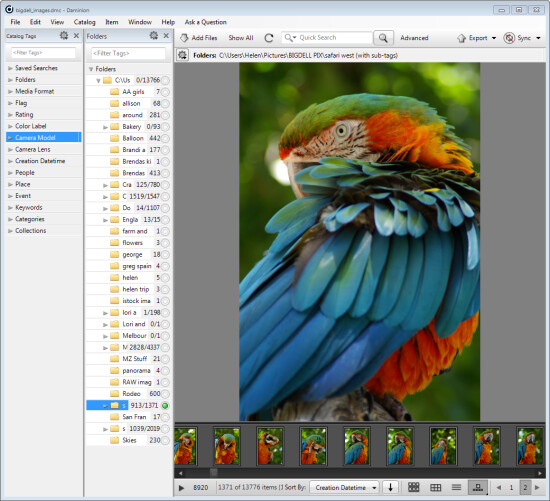
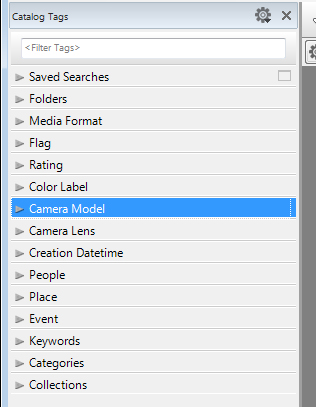
When you have some images imported into Daminion you can investigate the tools you have for managing and organizing them. The Catalog Tags panel on the left of the screen is pre-populated with tags. Some of these are created from the image metadata, such as Camera lens and Camera Model, and others are those that you may have applied to the images in other programs such as keywords, ratings and color labels.
daminion-catalog-tags

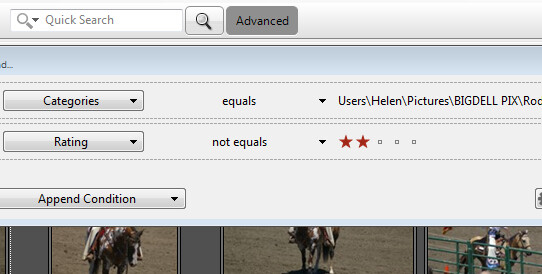
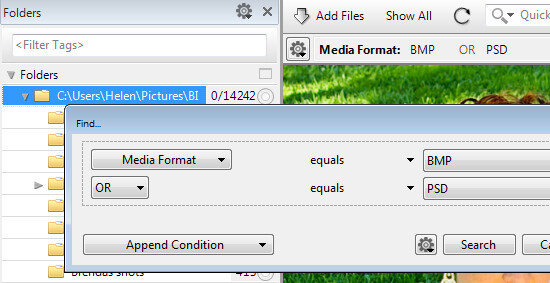
To filter the images by any catalog tag click the tag group and the tag to view and click the circle icon to view images that match that tag. You can perform AND and OR filtering using the Find dialog which you can find by clicking the Advanced link immediately to the right of the search box on the toolbar.
daminion-searches

You can also add tags and keywords to your images using the Catalog Tags panel. These can be written to the image XMP metadata so they will be accessible not only within Daminion but also in other applications such as Lightroom and Bridge.

There are benefits to using Daminion for image management and filtering in preference to Lightroom. Daminion provides multiple ways to categorize your images including Categories, Collections, Events, Places, People and more. It also supports hierarchical tags, with no limitation on nesting levels. So you can configure hierarchical tags for categories, people, places, keywords, events and so on whereas in Lightroom you can create hierarchical keywords only. You can also create your own custom user defined tags in Daminion to categorize images by criteria that are meaningful to you. Daminion can write metadata directly into the RAW images rather than needing to do so to sidecar .xmp files, and it makes it easy for you to filter your image collection by writing complex searches using Boolean (AND/OR) operators.
daminion-boolean

Viewing your images
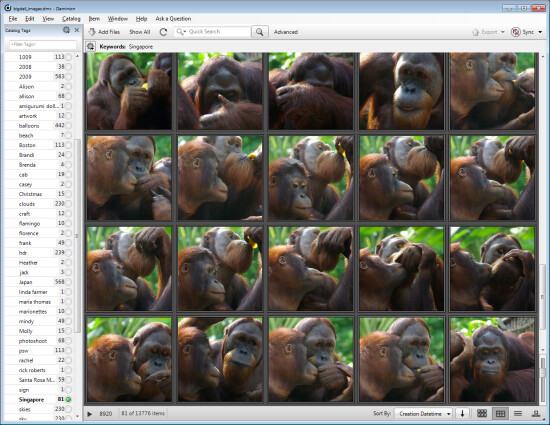
You can view your filtered images in one of a number of ways. You can sort them using a range of sort options including by shutter speed, file size, file name and so on. You can also view the images as thumbnails, using a compact view, details or filmstrip view.
daminion-compact

In Thumbnail view you can customize the information displayed above and below the image so it is easy to see the image properties that are meaningful to you. At any time you can view an image full screen by pressing Enter or click View.

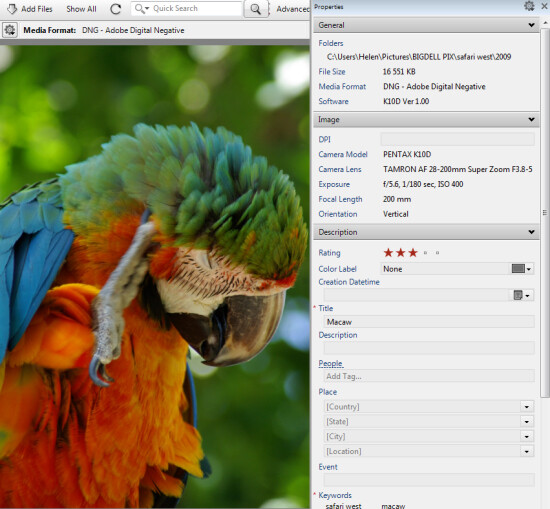
You can select any image and view and edit its properties using the Properties panel. And while Daminion is not an editor you can use it to rotate your images.
daminion-properties

As you work through your images you can drag images you want to do something with into the Tray. The Tray stores these images until you are ready to work with them such as by sending them to an external editor or using the multiuser checkout feature. The checkout feature helps you manage multiple people working with the same catalog, it maintains an audit history and gives you the ability to undo changes if, for example, a newer version of an image is replaced by an older version.

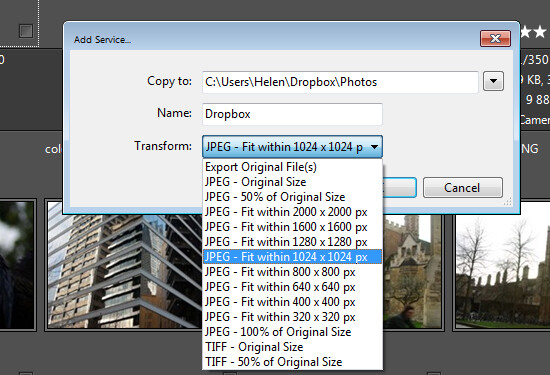
One handy feature of Daminion is the ability for you to publish images from Daminion direct to Dropbox so they are viewable on your iPad or other device. The Publish panel can be set up to convert and resize images including raw format images and then export them to a Dropbox folder on your computer. When this folder syncs to Dropbox the uploaded images can then be viewed on other devices.
daminion-publish

If you’re looking for a way to allow multi-user access to your image collection then Daminion is a great tool. It can be used along-side Lightroom for managing and organizing images which you then develop in Lightroom. The metadata changes made in either program can be easily viewed in the other program and the two work in tandem very well.

The post Using Daminion with Lightroom [for Advanced Users] by Helen Bradley appeared first on Digital Photography School.


Digital Photography School

 
Comments Off on Using Daminion with Lightroom [for Advanced Users]

Posted in Photography


Change Your Point of View – Literally

04 Apr
Canon Powershot G16; Exposure 1/60, f/1.8, ISO 640. Lens was zoomed all the way out to 6.1mm (28mm equivalent on a full-frame camera)

Canon Powershot G16; Exposure 1/60, f/1.8, ISO 640. Lens was zoomed all the way out to 6.1mm (28mm equivalent on a full-frame camera)

When starting out in photography, it’s easy to focus (pardon the pun) on the gear and learning about proper exposure, that you can overlook one of the easiest ways to improve your images, whether you use a DSLR, a point and shoot camera, or even just your cell phone’s camera.  It’s amazing how a simple change of your point of view can make a bland image, into something much more exciting.

Get off of the usual eye level

When presented with a scene, try and think of unique ways to view it.  Think about getting up high, getting as low as possible, or somewhere in between.  The main thing is, try to avoid viewing the scene, and shooting the scene, at eye level.  Everyone in the world sees things from eye level. To create a really eye catching photo, a good place to start is by getting out of most people’s eye level range. This can be as simple as dropping to one knee, laying on the floor, or getting up on a step ladder. Look through your viewfinder as you try different points of view. If you’re using a zoom lens, try zooming it over the entire range from these different points of view to see how that affects the image.  I find the combination of getting low and close, and then using a wide angle lens is a great way to get started.

Get down low

In the image at the top of this article, I used a Canon Powershot G16, and creeped in low and close to the birthday cake, to get my son’s expression as he blew out the candles. I wanted the glow of the candles on his face, and I wanted something with more impact than the standard eye level shot from a normal distance.  I wanted something with a little impact.  Is it the best shot I ever took? Definitely not.  But it’s probably the best “blow out your candles” shot I ever took!

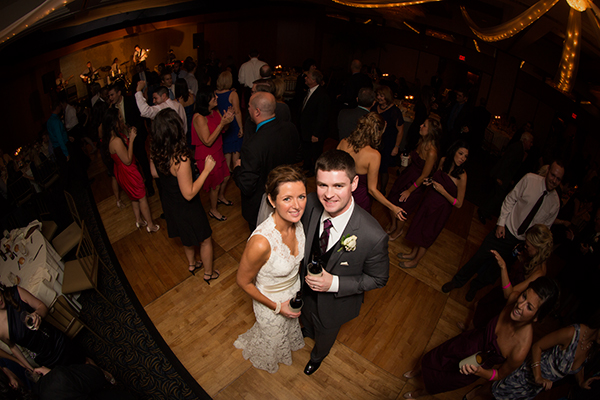
EOS 5D Mark III; with EF 8-15 f/4L. 1/60, f/4, ISO 800.

EOS 5D Mark III; with EF 8-15 f/4L. 1/60, f/4, ISO 800.

Take the high road

By the same token, getting a higher angle can also add some impact to your image. In the image above, I wanted to capture the newly married couple on the dance floor, surrounded by friends and family, and the jubilation that goes with a wedding celebration. To get this shot, rather than use a step ladder, I simply mounted the camera on a monopod with the Canon EF 8-15mm f/4L fisheye zoom.  I used the TC-80N3 remote to fire the camera. The wide angle accentuates the higher point of view and allows me to get plenty of background action as well. I mounted a flash on the camera, and the light falloff created a spotlight effect on the couple, and falls off softly toward the corners.  The wide angle also helps to ensure the subject is in the frame, since I am essentially doing this shot blind, unable to see the image through the viewfinder. Ultimately, the elevated point of view is one that most people don’t see, so it adds interest to the shot that wouldn’t be there had I simply been photographing from eye level.

EOS 1D Mark III, EF 24-105mm f/4L IS. 1/80, f/8, ISO 800.

EOS 1D Mark III, EF 24-105mm f/4L IS. 1/80, f/8, ISO 800.

The same is true with landscape photography as well. In the image above, I was able to get on one of the upper floors of the Hancock Tower in Boston, which gave a spectacular view of the city. The pattern created by this Back Bay neighborhood when viewed from above made a great scene through the viewfinder.  After that, it was just a matter of framing the shot, and getting the exposure right.

EOS-1D Mark III with EF 24-105 f/4L IS. 1/60, f/8, ISO 400.

EOS-1D Mark III with EF 24-105 f/4L IS. 1/60, f/8, ISO 400.

Look in all directions

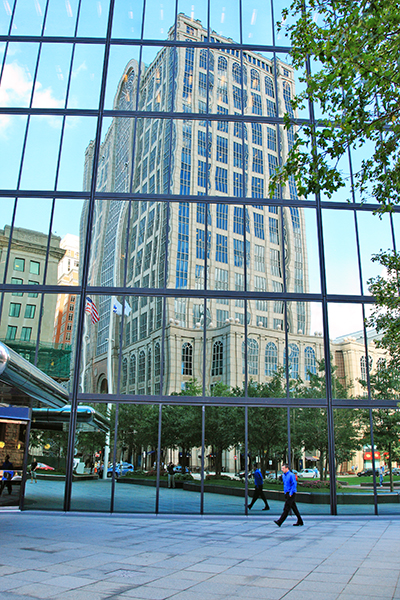
On that same day, as I was leaving the Hancock Tower, I was taken by the architecture of the building just across the street. However, I wasn’t thrilled with the scene overall, when looking directly at the building.  But then I turned around and looked at the building another way, through its reflection in the Hancock Tower. I happened to catch a businessman walking into the Hancock Tower, which added some interest as well.  The image to the left is what I captured.  By changing my point of view, through the reflection, I was able to take an average scene and add a little more interest.

Try to see these other points of view as much as possible. Make it a habit not to settle for your eye level as the only shot you take.  Look for ways to get high, or a lower angle that can really change perspective for you.  The more you force yourself to do this kind of exercise, the easier it will become for you to imagine these points of view before you even put your camera to your eye.

EOs 5D Mark II with EF 14mm f/2.8L II. 1/100, f/11, ISO 200.

EOS 5D Mark II with EF 14mm f/2.8L II. 1/100, f/11, ISO 200.

For more ideas on shifting your perspective try these articles:

  • The Power of Perspective in Photography
  • Perspective in Photography – Don’t just stand there move your feet!
  • Get Down Low For a Unique Perspective
  • Get a New Perspective By Getting High… with your Camera

The post Change Your Point of View – Literally by Rick Berk appeared first on Digital Photography School.


Digital Photography School

 
Comments Off on Change Your Point of View – Literally

Posted in Photography


4 April, 2014 – It’s All a Blur

04 Apr

This new article is about creating impressionistic images of subjects in motion. But before proceeding, a word of caution. These images were taken at a bull fight in Mexico. I am not a big fan of bull fighting, indeed I find them mostly unpleasant to watch. But, I accept that in some countries they are an established part of the culture and history. All of the images on this page are done in an impressionistic manner and deliberately none are gory. I have mainly focused on the horsemanship in this collection. If you are offended by the very thought of bull flighting, please do not go to this page, and also, whatever you do, don’t write to me with your complaints about it. 


The Luminous Landscape – What’s New

 
Comments Off on 4 April, 2014 – It’s All a Blur

Posted in News


MindShift Gear’s rotation180 Panorama Rotating Backpack – a Review

04 Apr
The rotation180 Panorama from MindShift Gearis designed around the needs of outdoor photographers.

The rotation180 Panorama from MindShift Gear is designed around the needs of outdoor photographers.

Last time I checked, I think I had something like 14 camera bags. I think it was when I got #8 or #9 that my wife asked me how many would be enough. I made the egregious mistake of replying with something along the lines of, “I don’t know. How many pairs of shoes will be enough?” Thankfully, I have quick reflexes and was able to dodge the flying stiletto and we’ve never spoken of our addictions again.

Seriously, though. Regardless of whether you are a professional photographer or an avid enthusiast, at some point along the way it becomes abundantly clear that a single camera bag is simply insufficient. Sometimes the bag that gets the gear to the gig is too big and cumbersome for the actual assignment. Sometimes you need to travel light with a bag that can handle a few essential pieces of equipment. Two of my bags don’t hold cameras or lenses at all, having been reconfigured for lights and cables. The point is, there’s no shame in being a camera bag addict. Between my shoulder bags, rolling bags, backpacks, and belt systems, I’m fairly well-covered for every eventuality. There is one type of bag, however, that I’ve wanted for a very long time. Unfortunately, it didn’t exist until just recently.

Photo backpacks are great for travel and location shooting, but they are rarely designed to allow room for anything but camera gear. Even when they are, though, you still have to deal with the inconvenience of stopping, taking off the backpack, getting the camera out of the bag, taking the shot, putting the camera back, closing the bag, putting it back on, etc. The backpack I’ve been craving can handle both the gear for a day’s photography outing, as well as plenty of room for a jacket, lunch, gloves, or other essentials…without having to stop and take the pack off my back.

Enter MindShift Gear and their rotation180° backpacks. Founded just a couple of years ago by the creators of Think Tank Photo and conservation photographer Daniel Beltrá, MindShift currently has two backpacks– the rotation180° Professional and the rotation180°Panorama– that solve the problem of accessing the gear without taking off the backpack or even missing a stride.

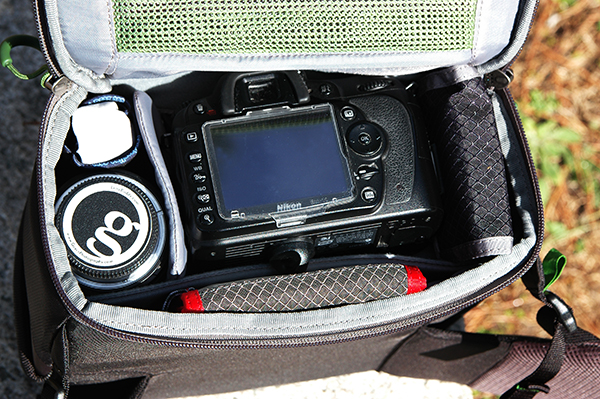
mindshift-panorama-camera-bag-dps-review-001

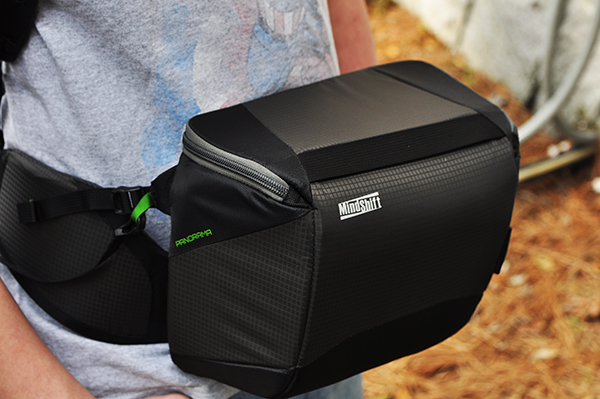
Panorama beltpack, containing Nikon D90 (85mm prime attached), 16-35mm lens, spare cards and batteries, lens cloth, and Hoodman Loupe (not shown).

rotation180° Panorama Backpack – the Specs

Weight

  • Backpack: 2.o lbs (0.9 kg)
  • Beltpack:  0.9 lbs (0.4 kg)
  • Total:  2.9 lbs (1.45 kg)

Dimensions

  • Backpack Exterior: 9.8″ W x 20.5″ H x 8.3″ L (25 x 52 x 21 cm)
  • Beltpack Interior: 9.4″ W x 7.5″ H x 4.7″ L (24 x 19 x 12 cm)
  • Beltpack Exterior: 9.8″ W x 8.2″ H x 5.1″ L (25 x 21 x 13 cm)

Volume

  • Backpack:  329 cubic inches or 5.4 litres
  • Beltpack:  1013 cubic inches or 16.6 litres
  • Total:  1342 cubic inches or 22 litres
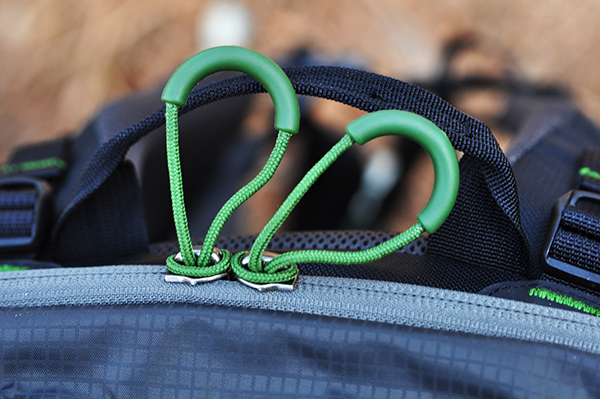
The zipper pulls are definitely high-quality and built to last, but got a little awkward while wearing gloves. Just took a little getting used to.

The zipper pulls are definitely high-quality and built to last, but got a little awkward while wearing gloves. Just took a little getting used to.

First Impressions

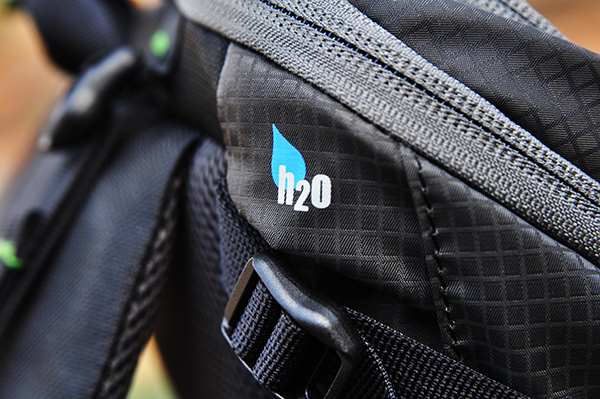
It’s obvious as soon as this bag comes out of the box that it boasts the same high-quality construction and attention to detail as its cousins at Think Tank. The all-fabric exterior is treated with a durable water-resistant coating, while the fabric underside is treated with polyurethane for superior water resistance when you put it down on a wet trail. While I’m not a huge fan of the zipper pulls on this bag – they were a little tough to grip with gloves on – the YKK zippers themselves are fairly indestructible, which is a huge plus. Available in either Charcoal or Tahoe Blue, it’s nice having a bag that goes beyond the basic black that takes up most of the space in my gear closet. With plenty of pockets and storage space, this bag seems to address every aspect I’ve been looking for in a photo day pack – especially the fully rotating beltpack and dedicated hydration pocket that can hold up to a three-litre reservoir.

mindshift-panorama-camera-bag-dps-review-003

The dedicated hydration pocket can hold up to a three-litre reservoir (not included)

The Beltpack

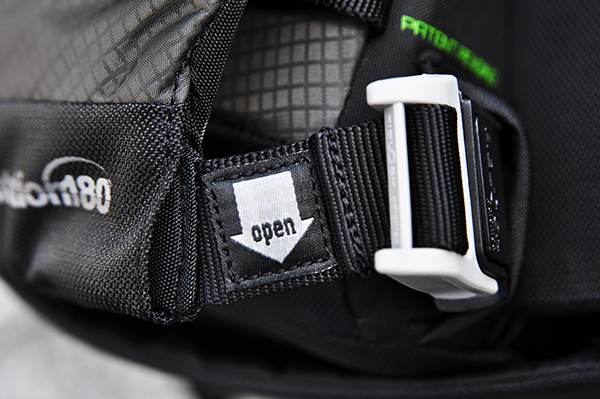
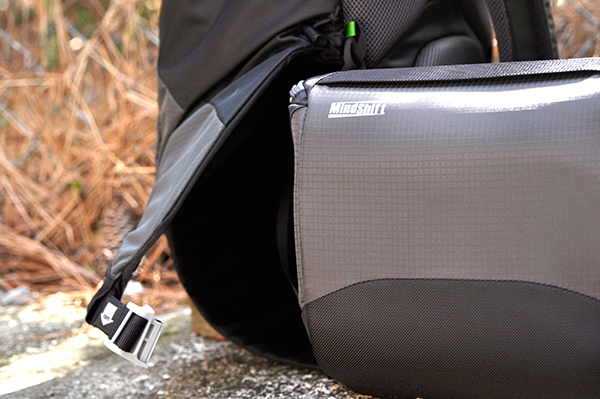
It’s the rotating beltpack that makes this bag really special. Without it, it’s just another camera backpack that doesn’t fully address my needs. Secured in the lower section of the backpack with a sliding magnetic clasp, retrieving your camera, binoculars, maps, or other essentials is as easy as unhooking the clasp and pulling the beltpack around to the front. As an added bonus, the beltpack can be completely removed and used by itself for shorter outings or location shooting.

mindshift-panorama-camera-bag-dps-review-005

The sliding magnetic clasp is easy to release, but holds the beltpack securely in place.

mindshift-panorama-camera-bag-dps-review-006

Hitting the Trails

Beyond the quality of its materials and components, it’s once the Panorama is loaded and on your shoulders that you realize just how comfortable it is. Obviously, this is a pretty important factor. If a bag is designed around the concept of not having to take it off as often, it had better be comfortable. Starting out at a lightweight 2.9 pounds empty, the Panorama includes load-lifter straps on both the beltpack and shoulder harness, as well as a breathable padded airflow harness and curved back panel for increased stability. All this translates into a bag that can hold a lot of stuff, while keeping the load balanced, comfortable, and secure.mindshift-panorama-camera-bag-dps-review-007

Additional Accessories

While the Panorama is an awesome bag straight out of the box, MindShift has obviously given a great deal of thought to the needs of outdoor photographers. There are several accessories available which have been designed to enhance the overall experience of this bag. Each is sold separately, including:

  • Photo insert that fits the upper compartment of the bag. providing additional padded gear storage.
  • Two-piece rain cover for the main bag and beltpack
  • Tripod suspension kit
  • Filter Hive
  • Lens Switch Case
  • Contact Sheet ground tarp
  • For more information on the rotation180° Panorama and accessories, check out the MindShift website.

mindshift-panorama-camera-bag-dps-review-008

Wrap-up

The best thing I can say about any product I review is that it does what it says it does, and does it well. The rotation 180° Panorama Backpack from MindShift Gear is just such a product. Designed around the special needs of outdoor photographers and enthusiasts, this bag is going to set a new standard–one that takes into account not only how you transport your gear, but also how you use it along the way.

Have a favorite bag? Or a wish list of features in your ideal bag? Share your comments with us below.

The post MindShift Gear’s rotation180 Panorama Rotating Backpack – a Review by Jeff Guyer appeared first on Digital Photography School.


Digital Photography School

 
Comments Off on MindShift Gear’s rotation180 Panorama Rotating Backpack – a Review

Posted in Photography


Gemischter Leibsalat

04 Apr

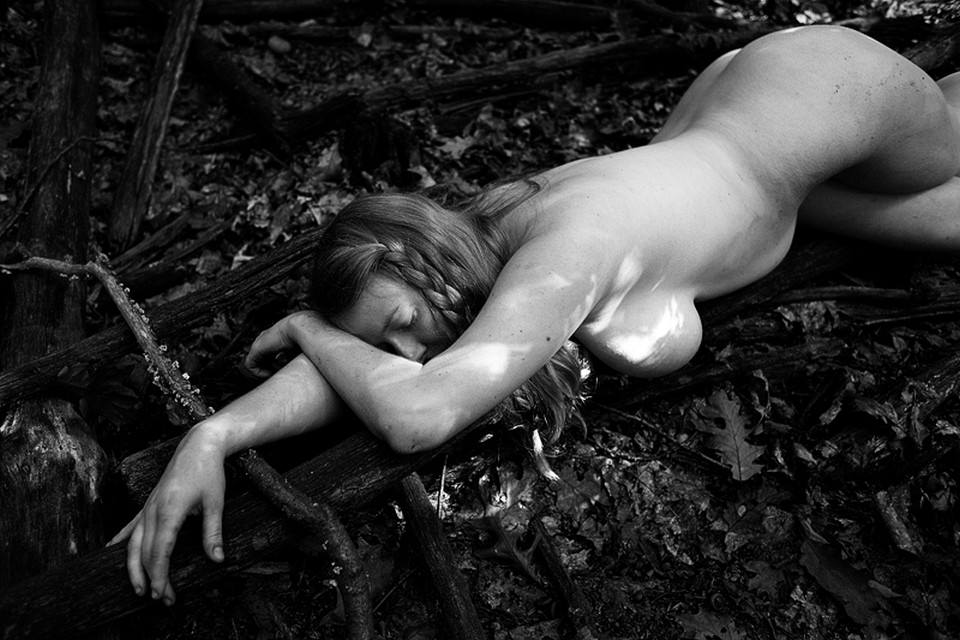
Marcel Pommer kennt Ihr vielleicht schon von ein paar ausgefallenen Rezepten im Augenschmaus. Er fotografiert Essbares aber auch zusammen mit nackten Frauen oder letztere ohne Gemüsebeilagen. Ausnahmsweise fällt es mir dabei schwer, zu beschreiben, was mich an diesen Bildern fasziniert, ohne festzustellen, dass alle anderen – auch die ach so großen Vorbilder im Genre – es einfach nicht gut genug machen.

Marcels Blick auf seine Modelle ist eindeutig in die Formen des weiblichen Körpers verliebt, aber ohne die ganz rosarote Brille, denn alle Speckrollen, Flecken und Streifen gehören auch dazu. Ebenso wie die Ironie, ohne die alle Angelegenheiten mit ein oder zwei nackten Personen schnell langweilig sind.

Man sieht die Damen also so klassisch schön oder auch unschön, wie sie eben sind. Abgebildet auf eine Weise, die die Realität betrachtet, ohne geifernd, lechzend oder – am anderen Ende der Skala – weichgezeichnet zu sein. Seine Modelle wiederum werfen mir als Betrachter, sofern ihre Gesichter zu sehen sind, keine „bitte nimm mich dringend“ sagenden Blicke zu, was mich enorm entspannt.

Das Ganze spielt oft in der Natur, aber nicht der friedrich-romantisch’schen, sondern gern mal im Walddreck gewälzt. Oder in Form von Obst und Zimmerpflanzen in geschlossenen Räumen, wo man den Balanceakt schafft, den lustigen Umstand, dass manche Körperteile Früchten ähneln, ohne (sichtbares) Kichern und Prusten in ästhetische Bilder zu bannen.

© Marcel Pommer© Marcel Pommer

© Marcel Pommer

© Marcel Pommer© Marcel Pommer

© Marcel Pommer

© Marcel Pommer© Marcel Pommer

© Marcel Pommer

© Marcel Pommer© Marcel Pommer

alien technology © Marcel Pommer

© Marcel Pommer© Marcel Pommer

© Marcel Pommer

© Marcel Pommer

Es bleibt sichtbar immer eine Inszenierung und spielt genau damit. Der Fotograf und das Modell schaffen eine Szene, die nicht so furchtbar angestrengt versucht, natürlich, beiläufig oder alltäglich daherzukommen. Sondern: Ja, wir machen Nacktfotos, die später andere anschauen und die auch mal seltsam sind. Danke, dass ich Betrachter mich nicht als Voyeur oder zu Autoerotik genötigt fühlen muss.

Wer zur wahrscheinlich kleinen Gruppe – warum gibt es sonst so wenig Ähnliches? – gehört, der derlei analoge Schwarzweiß-Fotografien gefallen, der findet diese und viele andere Arbeiten von Marcel Pommer auf seiner Webseite sowie bei Facebook, Flickr oder deviantART.


kwerfeldein – Fotografie Magazin | Fotocommunity

 
Comments Off on Gemischter Leibsalat

Posted in Equipment


Sneak Peak: Inside the Homes of 8 World-Famous Architects

03 Apr

[ By WebUrbanist in Design & Fixtures & Interiors. ]

inside famous architects homes

Where Architects Live, a special exhibit scheduled for Milan Design Week 2014, features a rare glimpse into the residences of leading designers including Shigeru Ban, Zaha Hadid, Daniel Libeskind,  Mario Bellini, David chipperfield, Massimiliano and Doriana Fuksas, Marcio Kogan, and Bijoy Jain of Studio Mumbai.

famous frank gehry home

Seeing what architects do to their own domiciles can provide a unique window into their work as well – for some designers, their own spaces become places of experimentation and discovery. These homes are where they have full artistic liberty – the only time they are their own clients. In some cases, like Frank Gehry’s wild residential remodel in Santa Monica (shown above), these projects can even be professionally pivotal – turning points for entire careers.

shigeru ban home japan

shigeru ban house interior

Famous for his light-touch, site-specific architecture of paper and cardboard, there is a contextual delicacy to Ban’s forest home in Japan. It is bright and open, and was designed specifically to avoid the need to cut down trees already on the property.

hadid house drawings models

hadid house abstract art

The abstract art and physical curves found in the home of Hadid should come as no surprise to those familiar with her work, which is also prominently on display in drawings and models around the house.

libeskind art materials closeup

liebeskind living room space

The home of Libeskind features an eclectic mix of furniture and objects, from conventional modern chairs art materials – nothing so aggressively angular as his typical architectural projects, but perhaps suggestive hints to be found in the relationship of chaos and order.

bellini bookcase scaffolding scene

bellini house interior piano

Bellini loves books, and it shows in the incredible multi-story scaffolding he has built in order to be able to climb up and interact with his huge personal library.

Next Page – Click Below to Read More:
Sneak Peak Inside The Homes Of 8 World Famous Architects

Share on Facebook


[ By WebUrbanist in Design & Fixtures & Interiors. ]

[ WebUrbanist | Archives | Galleries | Privacy | TOS ]


WebUrbanist

 
Comments Off on Sneak Peak: Inside the Homes of 8 World-Famous Architects

Posted in Creativity


3. April 2014

03 Apr

Ein Beitrag von: Sebastian

Untitled-©-Sebastian


kwerfeldein – Fotografie Magazin | Fotocommunity

 
Comments Off on 3. April 2014

Posted in Equipment


Roll with it: Official World Cup ball goes HD

03 Apr

brazuca_1.png

With the 2014 FIFA World Cup in Brazil just around the corner, Adidas is getting the ball rolling with an eye-catching video series. They’ve outfitted a match ball, also known as Brazuca, with six GoPro-style cameras for a unique point-of-view as Brazuca’s six ‘eyes’ provide a 360-degree view around the field from cleat-level. Watch Brazuca in action

News: Digital Photography Review (dpreview.com)

 
Comments Off on Roll with it: Official World Cup ball goes HD

Posted in Uncategorized


Up close: The beauty of butterfly wings

03 Apr

LindenGledhill1.jpg

Some look like impressionistic paintings, while other look like colorful ribbons. It’s hard to imagine the subjects of British photographer Linden Gledhill’s macro photos are actually butterfly wings. A biochemist by training, Gledhill says, ‘I’m completely enchanted by the physical world around me and obsessed by its natural beauty. My career in science has magnified this feeling of awe’. See gallery

News: Digital Photography Review (dpreview.com)

 
Comments Off on Up close: The beauty of butterfly wings

Posted in Uncategorized