RSS
 

Archive for April, 2014

The MagMod Speedlight Modifier – a Review

07 Apr
The MagMod speedlight modifier solves several problems and challenges posed by other systems.

The MagMod speedlight modifier solves several problems and challenges posed by other systems.

Until now, most speedlight modifiers on the market have been pretty inconvenient to use. I’m not talking about the quality of their output– just the lengths we’ve had to go in order to attach them to our flashes, and– perhaps more importantly– get them to stay on our speedlights over the course of a photo shoot. If your flash has a permanently attached strip of Velcro, or you have a collection of assorted straps, bands, tapes, attachment accessories, and other DIY solutions for your modifiers, you know what I’m talking about. If you’ve ever had a gel break, tear, bend, or just blow away in a stiff breeze, you’ve probably found yourself wishing for something better at least once or twice.

Enter the MagMod system. Made from high-quality silicone rubber, each piece of the MagMod system is compact, easy to attach, and gets the job done with minimal hassle.

The MagGrip

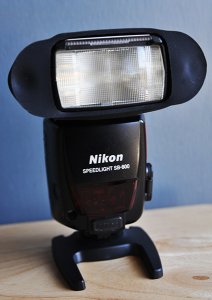
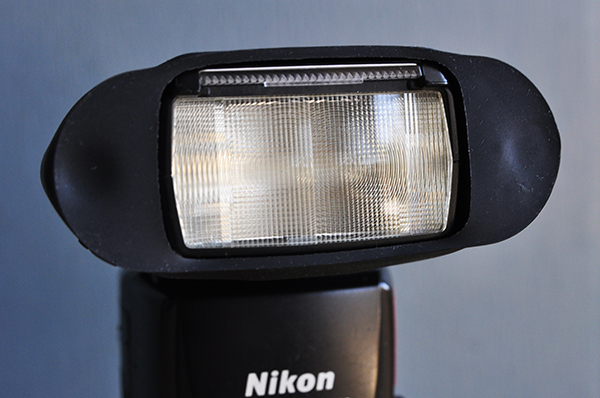
The MagGrip is the foundation of the MagMod system. Designed to fit virtually any hot shoe flash available, the MagGrip fits tightly and securely around the flash head. Despite my best efforts to shake it off or “accidentally” dislodge it from a Nikon SB800, it wouldn’t budge. At all. It’s easy enough to remove when you want it off, but there’s no need to worry about it while on a shoot.

Another key feature of the grip are the two neodymium (rare earth) magnets that hold the actual modifiers in place. I won’t bore you with the research I did into the science of these magnets. All you need to know is that they are the strongest type of permanent magnet commercially available, which means they’ll do their job without losing any of their magnetism over time.
madmod-review-dps-002

The MagGrid

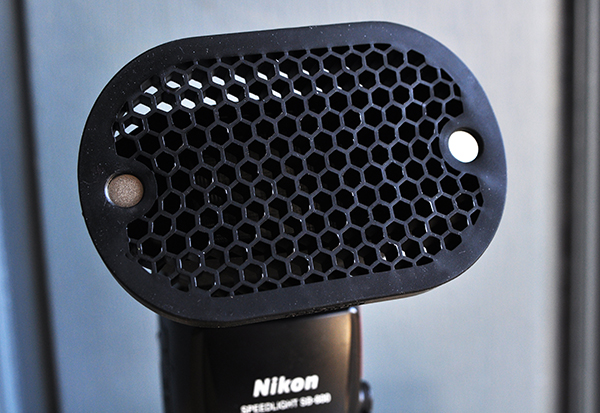
The basic purpose of a lighting grid is to give you more control over where the light falls, either on the subject or the background. It can be a useful tool for highlighting the subject, a specific part of the frame, or for creating interesting background effects. The MagGrid attaches magnetically to the grip in pretty much the blink of an eye. With no need for attachment straps or bands, I was able to spend more time on shooting and less on managing the equipment.

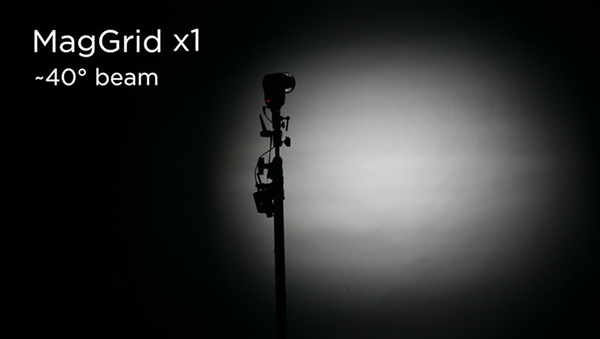
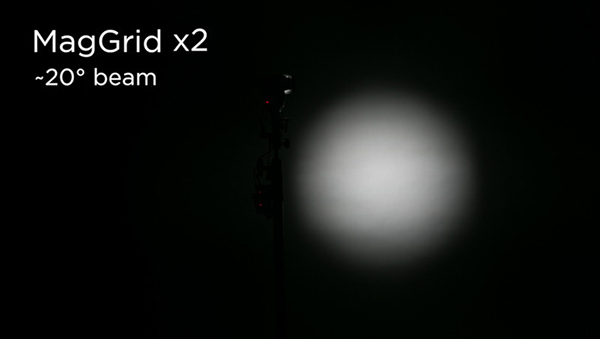
The single grid included in the basic kit casts a -40° beam with minimal spill and hot spots. The beam can be narrowed even further by attaching a second or third grid to the first. The grid is made from the same silicone rubber as the grip, which prevents the grid cells from cracking or chipping–a fairly common problem with hard plastic grids.
madmod-review-dps-003

The images below illustrate how stacking multiple grids affects your ability to concentrate the light precisely where you want it.
madmod-review-dps-008

madmod-review-dps-009

The MagGel Kit

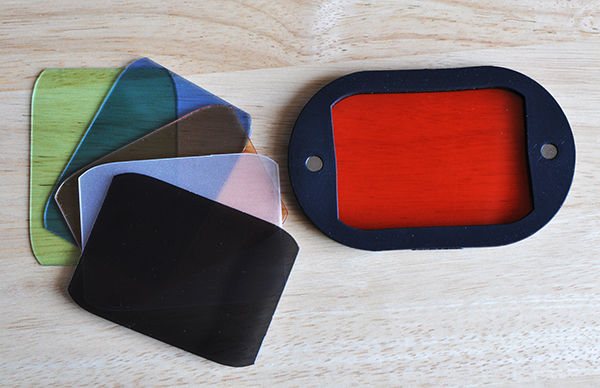
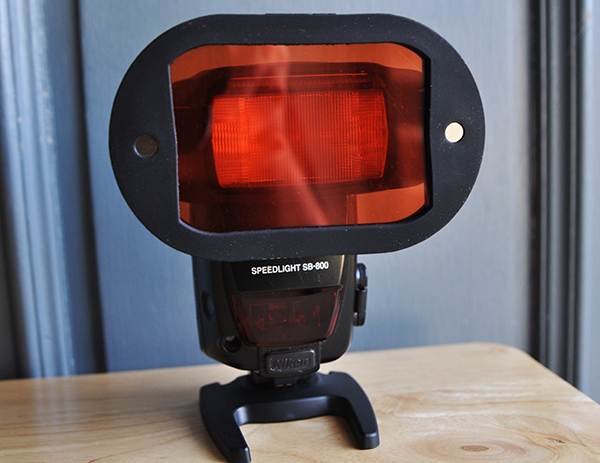
Let’s face it–gels are awesome, but they are also a pain. They help you fine-tune your lighting, but they are also flimsy, often difficult to attach, and need to be replaced fairly regularly. The rigid sheets of the MagGel Kit, however, are made to last and are held securely in place through tension and friction. They are also stackable, giving you more freedom to create different lighting effects.
madmod-review-dps-004

The Basic Gel Kit includes one of each of the following:

  • Full CTO (Rosco #3407)
  • 1/2 CTO (Rosco #3408)
  • 1/4 CTO (Rosco #3409)
  • 1/2 Blue (Rosco #3204)
  • 1/2 Tough Plusgreen (Rosco #3315)
  • 1/2 CT Straw (Rosco #3442)
  • 3-stop Neutral Density (Rosco E-211)
  • Opal Frost Diffuser
madmod-review-dps-006

Gel sheets from the Basic Gel Kit. The MagGel can hold multiple sheets at once. In this photo, it’s holding three warming gels.

The Creative Gel Kit includes one each of the following:

  • Purple
  • Blue
  • Teal
  • Green
  • Yellow
  • Orange
  • Red
  • Magenta
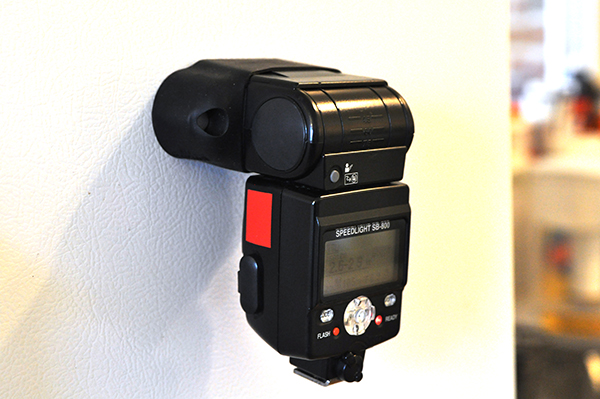
Probably not the smartest idea to use a speedlight as a refrigerator magnet, but you get an idea of how strong these magnets are.

Probably not the smartest idea to use a speedlight as a refrigerator magnet, but you get an idea of how strong these magnets are.

Wrap-up

Speedlights have become more powerful and versatile than ever before. When combined with a solid grasp of off-camera lighting techniques, speedlights can often narrow the technical and creative gaps between small flashes and their bulky studio counterparts. The MagMod system closes that gap even further, simply by making some of photography’s most basic lighting modifiers easier to use. Obviously, it doesn’t address every lighting scenario or every type of modifier. While the gel kit does include a diffuser, for instance, it’s certainly not going to address the needs of the photographer who relies heavily on softboxes or umbrellas for casting a wide spread of light. It does, however, address some of the most common lighting challenges facing photographers who depend on speedlights to tell their stories.

For more information, check out the MagMod website.

The post The MagMod Speedlight Modifier – a Review by Jeff Guyer appeared first on Digital Photography School.

Digital Photography School

 
Comments Off on The MagMod Speedlight Modifier – a Review

Posted in Photography


6. April 2014

07 Apr

Ein Beitrag von: Roger Albani

© Roger Albani


kwerfeldein – Fotografie Magazin | Fotocommunity

 
Comments Off on 6. April 2014

Posted in Equipment


Jesse Marlow: Melbourne in Farbe

06 Apr

Es stimmt tatsächlich: Jesse Marlow gehört zu meinen Vorbildern. Als ich seine hochkontrastigen Bilder zum ersten Mal in „Street Photography Now“* auf Seite 114/115 sah, prägten sie sich sofort ein. Marlow hat eines erreicht: Seine Fotos gingen in der täglichen Bilderflut nicht unter, die mich täglich überschwemmt. Im Gegenteil. Sie stachen heraus wie ein rotes Segelboot.

Der in Melbourne Geborene gerät ins Schwärmen, als ich ihn frage, warum er fotografiert. „Ich habe es schon immer getan. Im Alter von acht Jahren fing ich als kleiner Junge an, Graffiti zu fotografieren. Das war Mitte der Achziger.“ Von da an begann seine Leidenschaft für die Straßenfotografie zu wachsen. Der Grund dafür ist folgender:

Ich liebe die Unsicherheit der Straßenfotografie, insbesondere den Umstand, dass ich morgens das Haus verlasse und abends vielleicht mit einem Bild nach Hause komme, das mich für immer begeistern wird.

Und so auch mich.

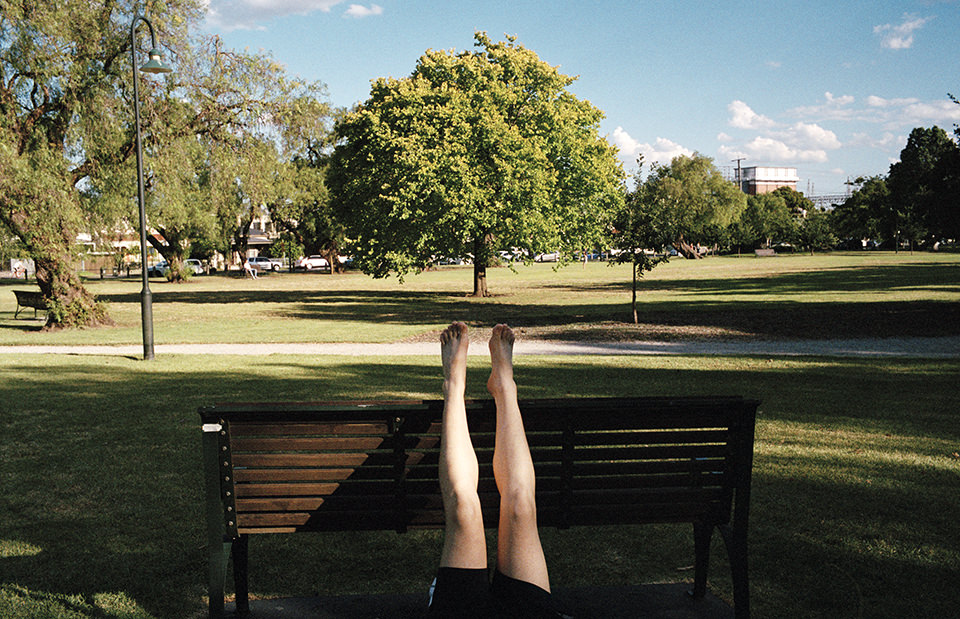
Eine Frau hat ihre Beine hochgestreckt. Melbourne, Straßenfotografie von Jesse Marlow.

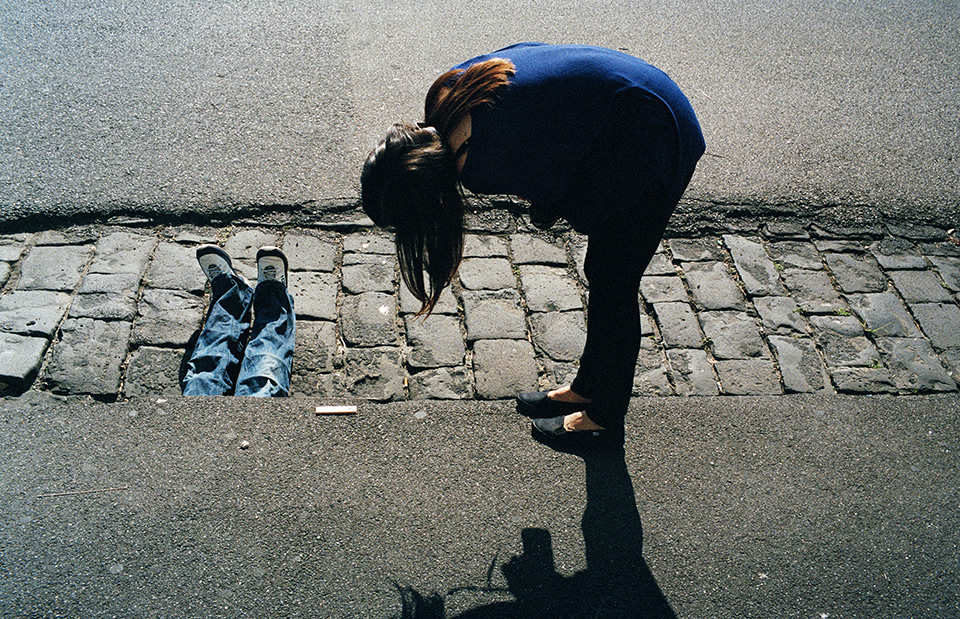
Eine Frau beugt sich und zwei Beine schauen unter Straße hervor. Melbourne, Straßenfotografie von Jesse Marlow.

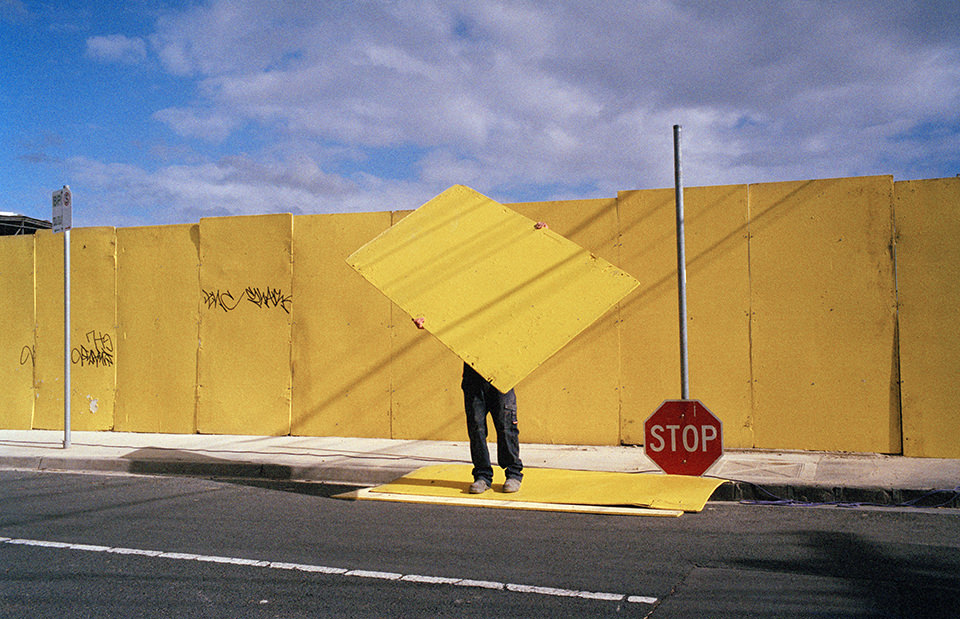
Ein Mensch hält ein gelbes Teil nach oben und steht auf der Straße vor einer gelben Wand. Melbourne, Straßenfotografie von Jesse Marlow.

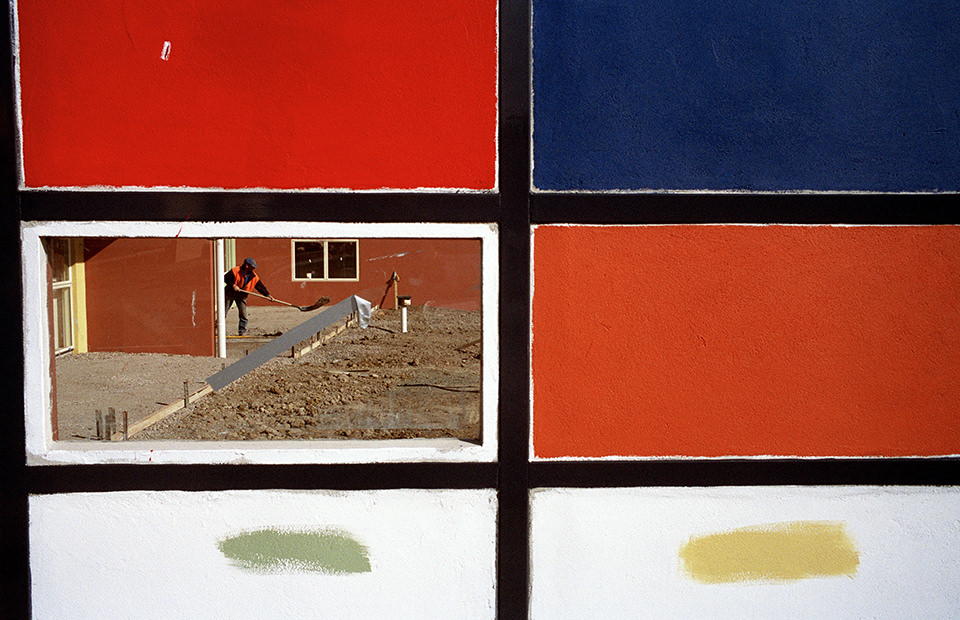
Ein Mann ist durch 6 Kacheln zu sehen. Melbourne, Straßenfotografie von Jesse Marlow.

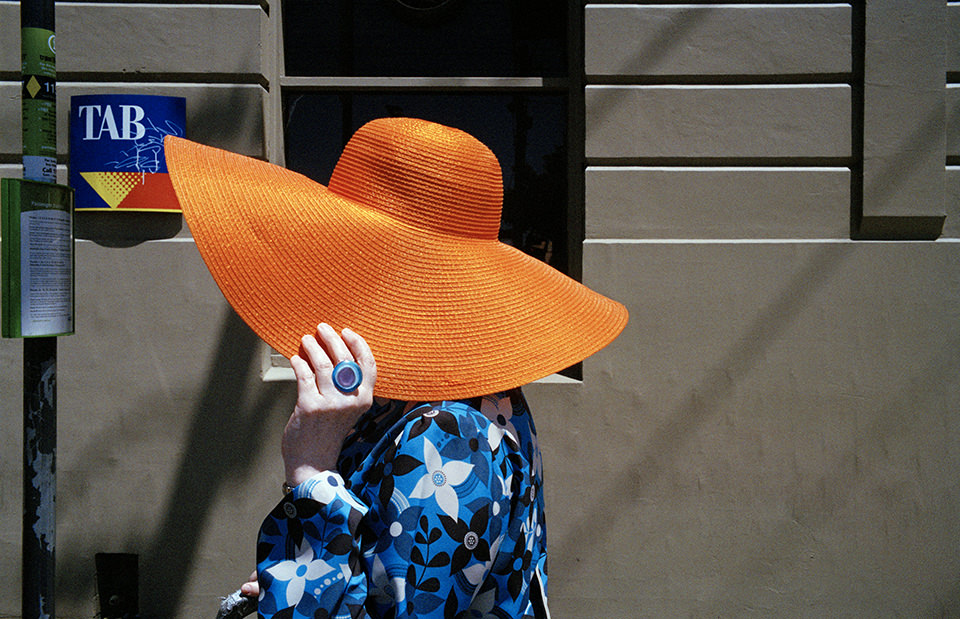
Eine Frau hat einen leuchtend orangenen Hut auf. Melbourne, Straßenfotografie von Jesse Marlow.

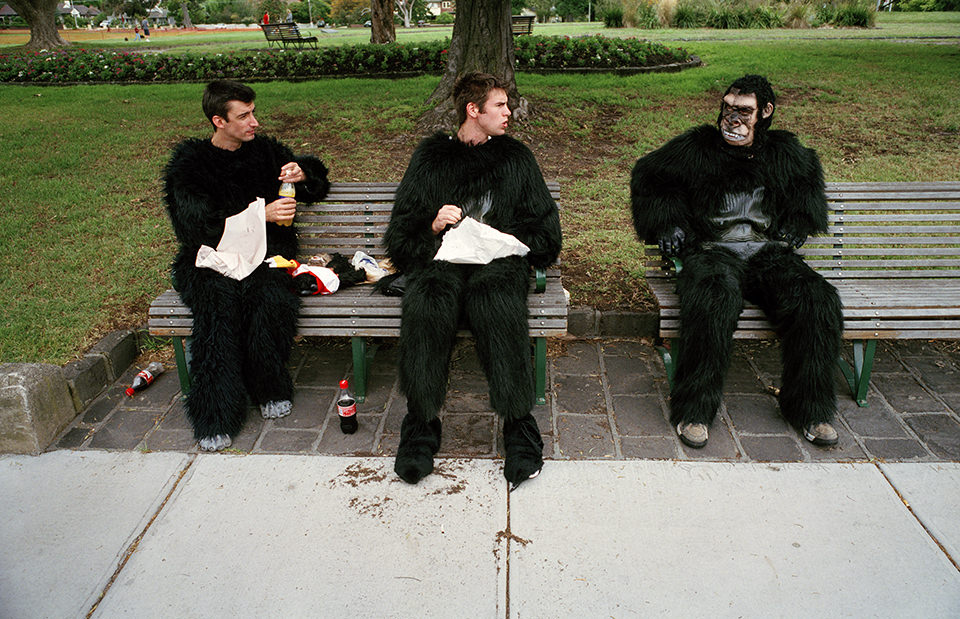
Drei Männer sitzen in einem Affenkostüm auf einer Parkbank. Melbourne, Straßenfotografie von Jesse Marlow.

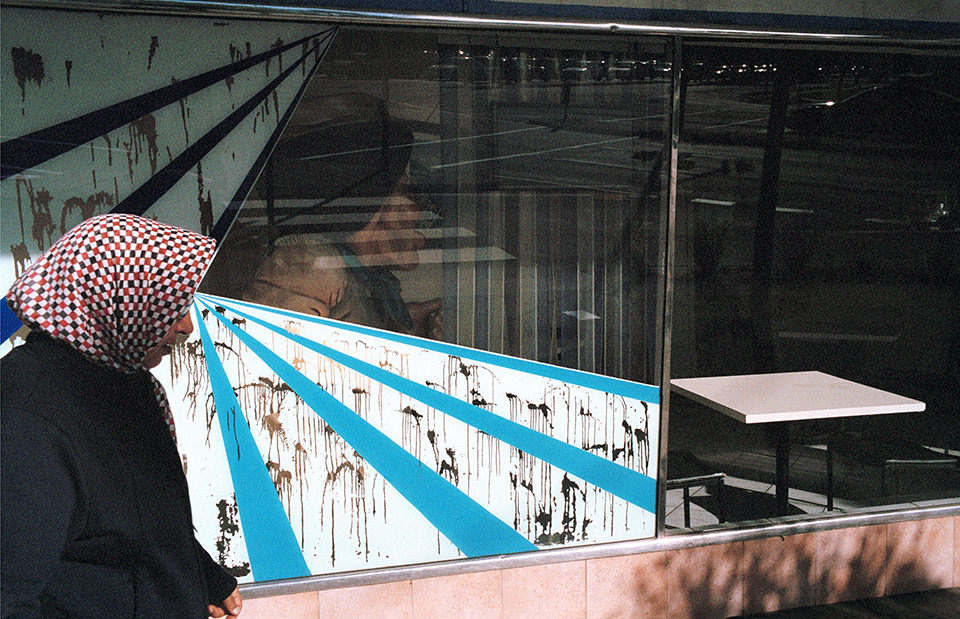
Eine Frau mit Kopftuch läuft direkt vor ein Fenster, das einen strahlenförmige Aufzug zeigt.Melbourne, Straßenfotografie von Jesse Marlow.

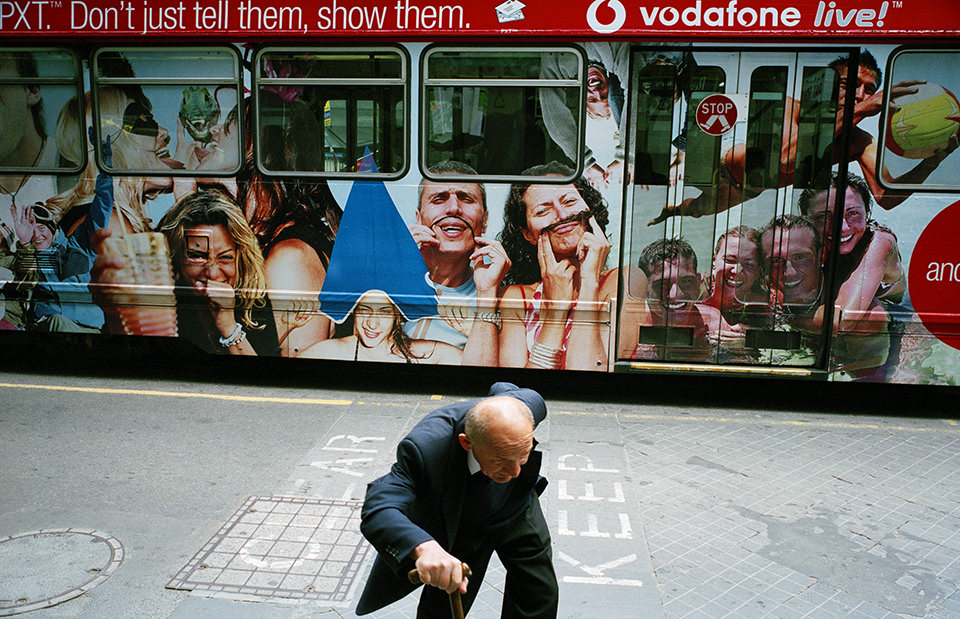
Ein Mann läuft gebückt auf die Kamera zu. Im Hintergrund steht ein Bus mit vielen Gesichtern drauf. Melbourne, Straßenfotografie von Jesse Marlow.

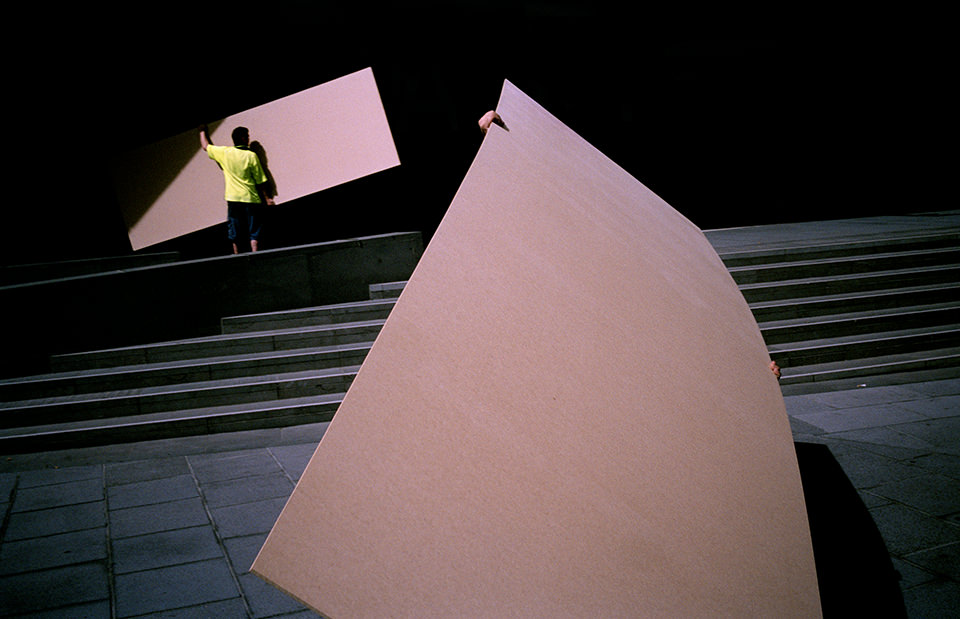
Zwei Männer tragen große Teile. Melbourne, Straßenfotografie von Jesse Marlow.

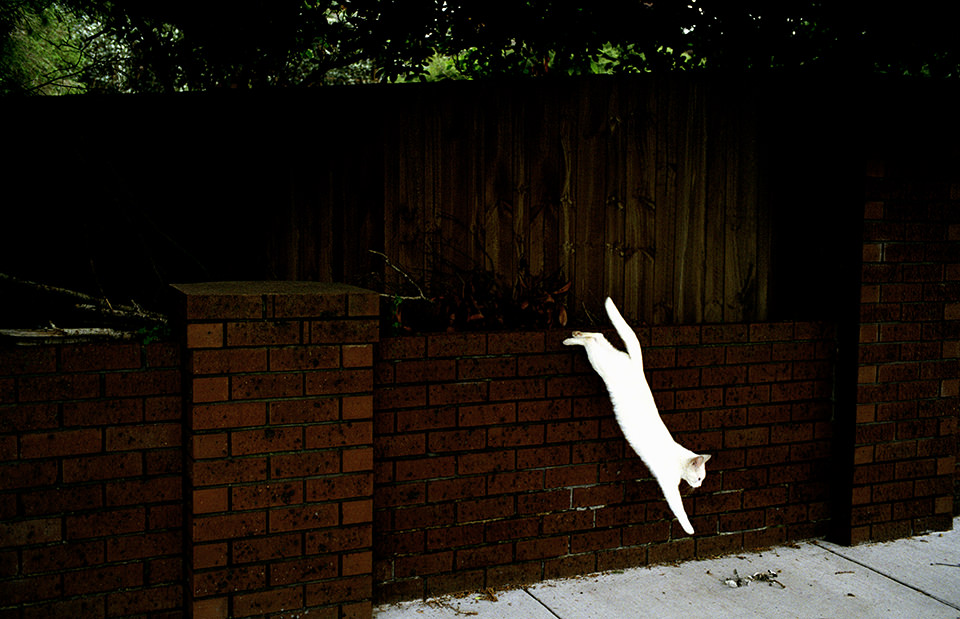
Eine weiße Katze springt eine Mauer hinunter. Melbourne, Straßenfotografie von Jesse Marlow.

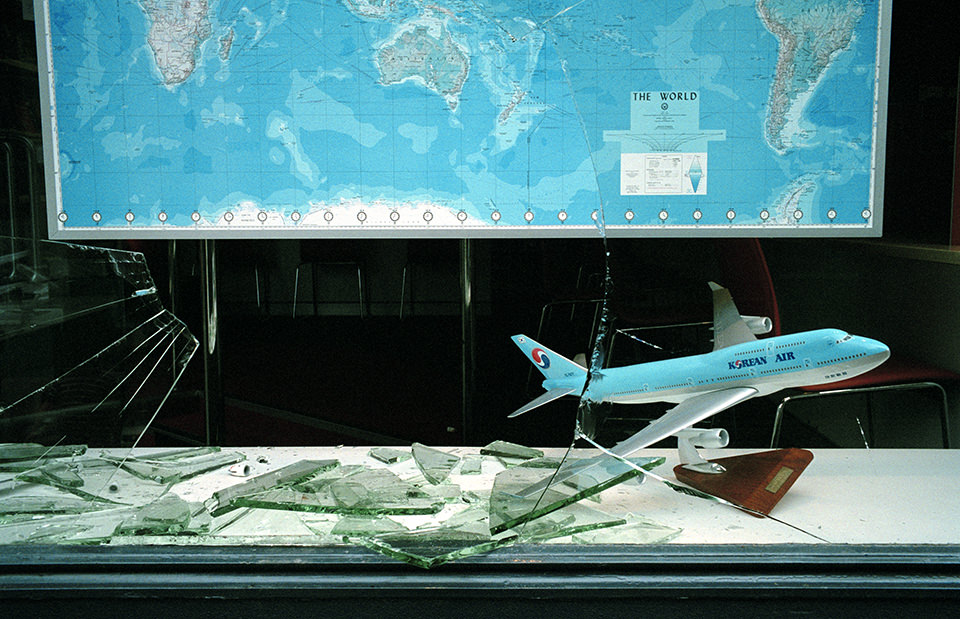
Wir sehen ein Flugzeug vor einer Landkarte in einem Reisbüro, dessen Scheibe eingeschlagen wurde. Melbourne, Straßenfotografie von Jesse Marlow.

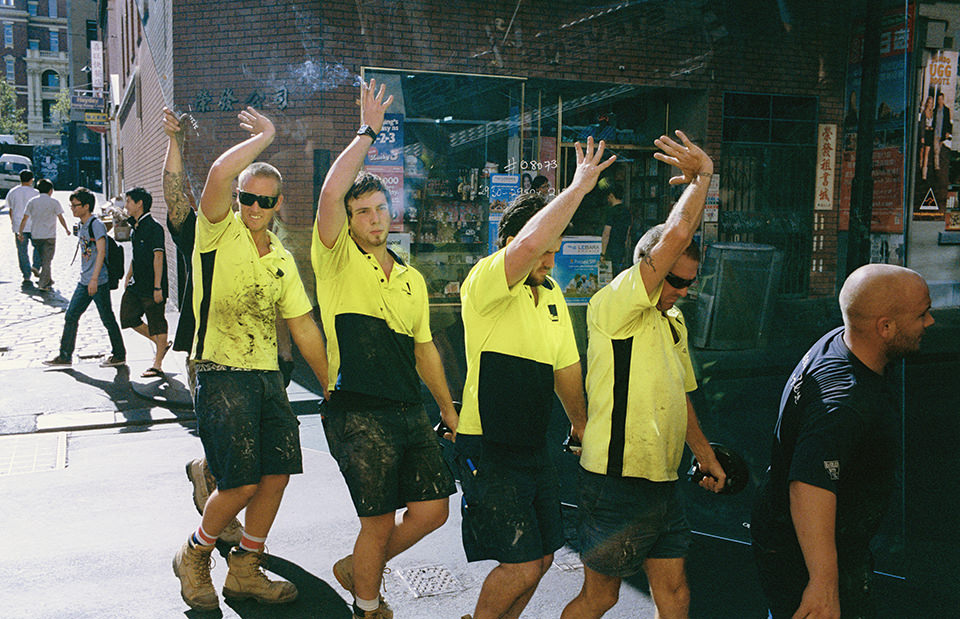
Viele Männer tragen eine Scheibe und halten ihre Hände komisch nach oben. Melbourne, Straßenfotografie von Jesse Marlow.

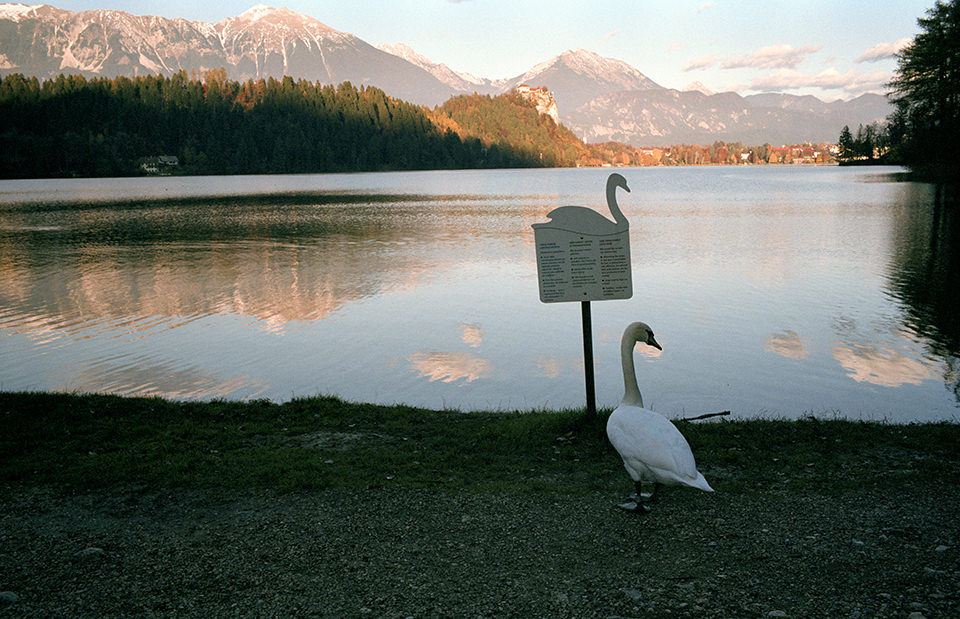
Ein Schwan steht an einem See vor einem Schild, das selbst auch ein Schwan ist. Melbourne, Straßenfotografie von Jesse Marlow.

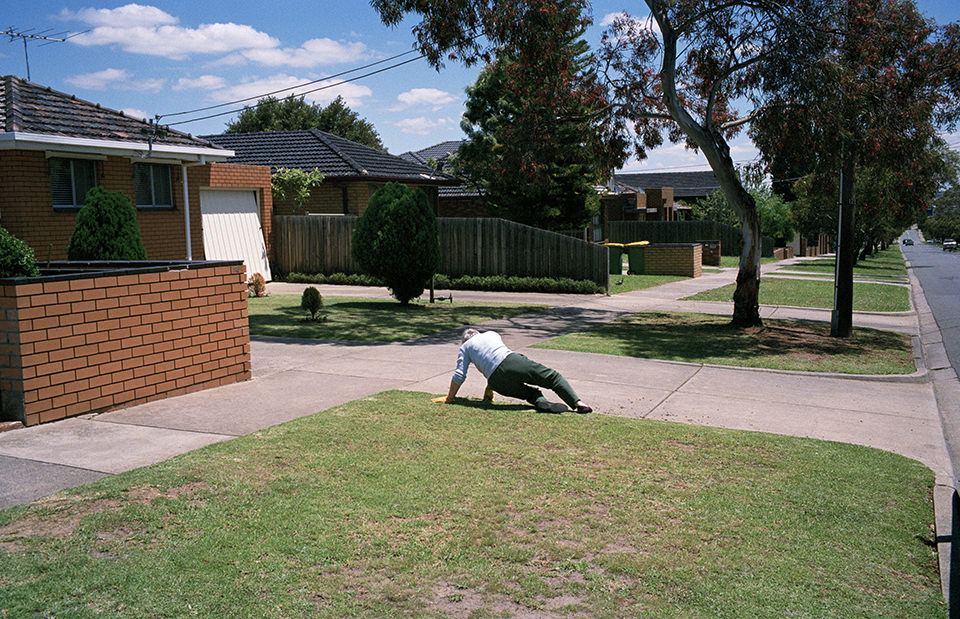
Ein Mann ist scheinbar gefallen. Melbourne, Straßenfotografie von Jesse Marlow.

Auf mein neugieriges Nachhaken, wie er denn fotografiere, schreibt Marlow, er hätte sich die ersten zehn Jahre immer wieder Zeitfenster freigeschaufelt, in denen er mit der Kamera unterwegs war. Doch das schien ihm mit der Zeit zu restriktiv, weil er sich unter Druck gesetzt fühlte, etwas Besonderes zu finden.

Heutzutage fotografiert er täglich auf Reisen, da er als Werbefotograf ständig unterwegs ist. Die Bilder der hier präsentierten Serie fasst er unter dem ebenfalls merk-würdigen Titel „Dont Just Tell Them, Show Them“ zusammen. Der Name entstammt von einem Schriftzug, der auf diesem Bild zu sehen ist. Sie ist seit März 2014 als Buch erhältlich und auf 1000 Stück limitiert.

Jesse ist desweiteren Teil des Straßenfotografie-Kollektives iN-PUBLiC und auch auf Facebook zu finden.

* Das ist ein Affiliate-Link zu Amazon. Wenn Ihr darüber etwas bestellt, erhält kwerfeldein eine kleine Provision, Ihr zahlt aber keinen Cent mehr.


kwerfeldein – Fotografie Magazin | Fotocommunity

 
Comments Off on Jesse Marlow: Melbourne in Farbe

Posted in Equipment


Meet the UK’s first female press photographer

06 Apr

Portrait_of_Christina_Broom.jpg

The Museum of London is celebrating the acquisition of a collection of images from Christina Broom, the UK’s first female press photographer. Self-taught, Broom photographed London life and British military from 1903 to 1939. She started small, learning on a borrowed camera, and in 1904 she became the official photographer for the Household Division. See gallery

News: Digital Photography Review (dpreview.com)

 
Comments Off on Meet the UK’s first female press photographer

Posted in Uncategorized


browserFruits April, Ausgabe 1

06 Apr

Habt Ihr schon an unserer aktuellen Leseraktion „Wesentliches“ teilgenommen und Eure Taschen für uns ausgeleert? Nur noch bis morgen habt Ihr dafür Zeit und es ist natürlich auch eine prima Gelegenheit, etwas Ordnung in das Handtaschenchaos zu bringen. Generell steht Frühjahrsputz momentan überall auf dem Plan. Unsere Schreibtische sind aufgeräumt und sortiert und auch viele neue Ideen formen sich, weil wir Altes ausrangieren und Platz schaffen. Also bleibt gespannt.


Fotospecial: Hinter dem Vorhang

Flickr

500px


Deutschsprachig

• Im Polaroidfieber ist er, der Normen Gadiel und auf der Suche nach zwei spezifischen Polaroid-Kameras. Und seine Bilder, die können was.

• Die Süddeutsche bekundet, was (eigentlich) schon lange klar ist: Smartphones machen Kompaktkameras Konkurrenz. Soso. Der Artikel hat jedoch für Einsteiger ein paar gute Tipps parat und ist deshalb lesenswert.

• „Wie fotografiert man das Grauen? Wann ist ein Bild vom Grauen gut? Und warum?“ Andreas Herzau schreibt darüber, warum er 1995 nach Ruanda gefahren ist.

• Für fotohistorisch Interessierte berichtet das Handelsblatt ausführlich über die Ausstellung „Subjektive Fotografie 2“ in Berlin.

• Michael Gelfert erklärt, was es mit dem Begriff „Bildrechte“ eigentlich auf sich hat und warum es keine gibt.

• Die Fotocummunity hat ein paar Tipps für gute Fotolocations in Berlin.


International

• So würden unsere Städte aussehen, wenn statt Werbung überall klassiche Malerei hängen würde.

• An was denkt Ihr, wenn Ihr an den Iran denkt? Sicherlich nicht an das, was diese Bilder zeigen.

• Man kann von Top-Listen halten, was man will, wir verweisen trotzdem darauf: Die Liste der 10 einflussreichsten aktiven Straßenfotografen auf Street Hunters wurde aktualisiert.

• Mit einer Linhof-Kamera im Rucksack erkundete der französische Fotograf Stéphane Lelarge Berlin und dokumentierte Menschen, die sich ihren ganz eigenen Platz zum Wohnen gesucht haben oder suchen mussten. Zum Beispiel in Zelten und Wohnwagen.

• Die russische Fotografin Katerina Plotnikova nutzt für ihre konzeptuellen Portraits echte Tiere: Von Schlangen bis zu Bären. Die Bilder sind ohne Frage bezaubernd, der Umgang mit den Tieren macht uns jedoch Bauchschmerzen.

• Nachrichtenbilder vom Erdbeben in Chile.


Neuerscheinungen und Tipps vom Foto-Büchermarkt

Buchtipps

• Bei Powerhouse Books, die sich auf Kunst spezialisiert haben, ist ein Fotoband von Alexandra Crockett erschienen, der den Namen „Metal Cats“ trägt. Gezeigt werden Heavy-Metal-Musiker, u. a. von Isis und Napalm Death, die zusammen mit ihren Katzen für die Kamera posieren. Die wundervoll skurrile Kombination aus Lederjacken, Tattoos, Nieten und süßen Katzen wird ab Mai für nur 10 € erhältlich sein.

• Das Magazin „Die Nacht“ ist mit der 15. Ausgabe erschienen und für 7 € erhältlich. Einen guten Einblick in die enthaltenen Werke bekommt man ebenfalls auf der Homepage.


Zitat der Woche

We don’t see things as they are, we see them as we are.

Anais Nin –

Mehr Zitate


Videos

Kann sich jemand von Euch an Adobe Photoshop 1.0. erinnern? Dann könnt Ihr bei diesem Video in Erinnerungen schwelgen oder einfach dankbar sein, dass es immer weiter entwickelt wird.


* Das ist ein Affiliate-Link zu Amazon. Wenn Ihr darüber etwas bestellt, erhält kwerfeldein eine kleine Provision, Ihr bezahlt aber keinen Cent mehr.


kwerfeldein – Fotografie Magazin | Fotocommunity

 
Comments Off on browserFruits April, Ausgabe 1

Posted in Equipment


Developing a Creative Eye – be Careful Before Deleting Your Photos

06 Apr
PhotoA Good Eye

Photo A: ‘Reflections On Land’ by Patrick Elliott

DEVELOP A CREATIVE EYE

The more you get out and use your camera, the more proficient you become as a photographer. In the process of learning and using your camera, you will develop a better eye from a creative perspective. It is important that you put this “creative eye” to use on a regular basis, not only to maintain it, but also to improve it.

Taking pictures isn’t the only time you have to use your creative eye. You can use it by looking at other people’s pictures to see what you could have done differently, or what factors you will take from their pictures to add to your photography. As you go through your daily routine, you can imagine that you are constantly looking through a viewfinder or LCD screen, and as your eye develops, you will have more and more ideas for creative shots everywhere you go.

You can especially put your eye to use by looking at your pictures before the editing process. Developing this creative eye will benefit you as you are sorting through the pictures after a photo shoot. Put your eye to use by carefully looking at all of your images before deleting any of them. Let me tell you why.

DELETE IT OR KEEP IT?

It is very common to come back to your computer after a photo shoot, dump the images into your computer, and start deleting all the “bad” shots. Or, you may be the type who deletes the “bad” shots in the camera before importing them into your computer. Either way, be careful as you do this because you could overlook a good thing in those shots. The photo above (Photo A) isn’t a planned shot that I took during a photo shoot. It is the result of using my eye before deleting a bad shot. If you look at the photo below (Photo B), it is a bad shot that was not the model’s fault. We were outdoors and the lighting kept changing constantly because the sky was rapidly going through changes. She was in the process of getting prepared for a shot, and I was taking test shots while adjusting my settings to get the correct exposure.

As I got the images from that photo shoot to my computer, the photo that you see below (Photo B) was a “bad” shot that would normally go to the trash bin. But, before deleting it, I put my creative eye to use by carefully looking over it and something caught my eye. I saw a photo within the photo, and decided to open it up in my photo editor to bring this vision to life. I put my crop tool to use, and the result was the photo that you see above (Photo A).

PhotoB Bad Shot

Photo B: Carefully look over a bad shot like this before deleting

HOW SHARP IS YOUR EYE?

Do all that you can to develop a creative eye. I have mentioned a few techniques for you to practice so that your eye can become sharper. It is more than likely that photography may have you spending more time sitting down at the computer rather than the actual photo shoot. Use that time to really put your eye to use. What ways do you develop your creative eye? Have you ever seen something special in a picture before deleting it?

PhotoC Bad Shot

A test shot that would normally be deleted

PhotoD Good Eye

‘Living Outside’ by Patrick Elliott. Using the creative eye to make good use of a ‘bad shot’ you see in the image just above.

The post Developing a Creative Eye – be Careful Before Deleting Your Photos by Patrick Elliott appeared first on Digital Photography School.

Digital Photography School

 
Comments Off on Developing a Creative Eye – be Careful Before Deleting Your Photos

Posted in Photography


Hybrid Desk & Storage Rise Up to Meet Suspended Staircase

06 Apr

[ By WebUrbanist in Design & Fixtures & Interiors. ]

steel wood staircase design

Playing tricks on the eye, this split-style stairway merges a desk and storage below with a framework of steps hanging down from above, all with a daunting-looking gap left in the middle.

steel busy staircase use

steel steps top view

steel wood hanging steps

Dutch designer Mieke Meijer hand-crafted this hybrid interior system for the home of Just Haasnoot in The Hague, inspired in part by the black and white photography of Bernd and Hilla Becher.

steel wood open desk

steel wood skylight chair

The frame-based structure was made to save space and maintain a sense of openness. The unfolding angular geometries add elements of visual interest to a toned-down space while accommodating various storage surfaces, nooks and crannies.

steel wood steps risers

steel wood alternating design

The use of alternating steps allows for a steep incline to be safely traversed, though some might still question the absence of a hand rail (which would be mandated by building code in most locations).

steel wood back view

steel window sill sitting

steel stairs design framework

This approach seems particularly well-suited to places with less-used upstairs spaces – as the photographs show, it would be easy to let certain steps simply become shelves most of the time, then be cleared off when guests come to stay in the spare attic bedroom.

Share on Facebook


[ By WebUrbanist in Design & Fixtures & Interiors. ]

[ WebUrbanist | Archives | Galleries | Privacy | TOS ]


WebUrbanist

 
Comments Off on Hybrid Desk & Storage Rise Up to Meet Suspended Staircase

Posted in Creativity


[MODIFIED] Google Gmail – Add a Smiling Face or other Emoji (Emoticon)

06 Apr

Brighten up your email with emoticons such as smiling faces, weather symbols, and food items.

Need another way to express yourself when sending e-mail via Google Gmail, and changing the text color just won’t do?

You can insert all sorts of emoji / emoticons, such as smilies, stars, exclamation points, and mini clip-art of objects such as a computer, cell phone, or baseball. Some even animate such as laughing faces, dancing hearts, and ringing bells! Inserting emoticons is simple:…

Read more at MalekTips.
New Computer and Technology Help and Tips – MalekTips.Com

 
Comments Off on [MODIFIED] Google Gmail – Add a Smiling Face or other Emoji (Emoticon)

Posted in Technology


Eine tiefere Aufmerksamkeit

05 Apr

Manche Fotos treffen mich unmittelbar und erzeugen innerhalb von Sekundenbruchteilen ein intensives Gefühl. Und dann gibt es Fotos, die auch direkt wirken, mich jedoch mehr beanspruchen. Ich meine damit Bilder des kanadischen Fotografen, der unter dem Namen new legs auf Flickr sein Unwesen treibt.

Für seine Aufnahmen muss – und will – ich mir Zeit nehmen. Zeit, sie wirken zu lassen, Assoziationen zu entwickeln und mich in sie hineinzuvertiefen.

Da finde es ich es doch direkt interessant, dass der Künstler selbst sagt, „die Fotografie macht mich viel aufmerksamer und offener für den Reichtum, der stets um mich herum ist“.

Ob er nun auf einer tropischen Insel, einer majestätischen Gebirgskette oder in einer Großstadt sei, das Praktizieren der Fotografie bedeute für ihn das Einüben, für seine Umgebung eine tiefere Aufmerksamkeit zu entwickeln.

© New Legs

© New Legs

© New Legs

© New Legs

© New Legs

© New Legs

© New Legs

© New Legs

© New Legs

© New Legs

© New Legs

© New Legs

Diese Form der Aufmerksamkeit führt bei new legs dazu, dass seinen Worten nach „dieses Ding, das wir Leben nennen, zur echten Kunst wird“.


kwerfeldein – Fotografie Magazin | Fotocommunity

 
Comments Off on Eine tiefere Aufmerksamkeit

Posted in Equipment


Four Ways to Improve Your Photos With the Clarity Slider in Lightroom

05 Apr

Using the Clarity slider in Lightroom

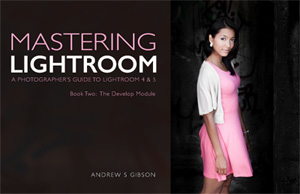
Andrew S. Gibson is the author of Mastering Lightroom: Book 2 – The Develop Module. There’s a special deal on now at Snapndeals, get 40% off for a limited time only.

The Clarity slider is one of the most useful in Lightroom when it comes to giving your images extra punch and impact. Today I’m going to show you several ways you can use it to improve your photos. But first, let’s take a look at exactly what the Clarity slider does, and how it differs from its cousin the Contrast slider.

This photo is ideal to demonstrate the difference:

Using the Clarity slider in Lightroom

Using the Clarity slider in Lightroom

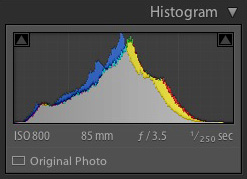
It was taken on an overcast day and the light was very flat. This is confirmed by the histogram, which has gaps on both the left and right-hand sides (screen capture image to the right).

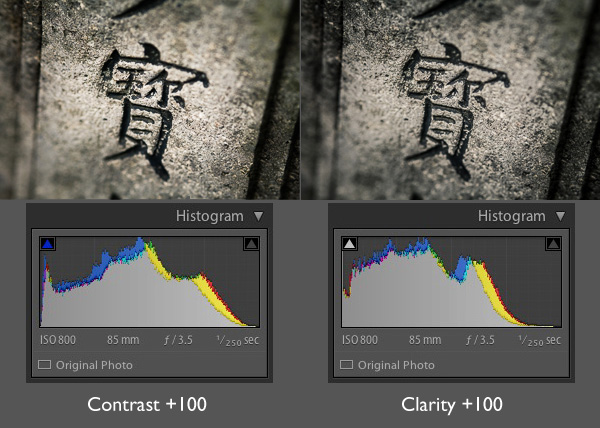
Now let’s see what happens when we set the Contrast slider, and then the Clarity slider, to their maximum settings of +100:

Using the Clarity slider in Lightroom

The most obvious difference at this scale is that the Contrast slider has a more far reaching effect. It makes both the shadows darker and the highlights brighter, stretching the histogram in the process.

The Clarity slider works differently. It increases contrast, but in the mid-tones only. The highlights aren’t affected, and if anything the photo becomes darker as the Clarity slider has a greater effect on dark tones than the Contrast slider.

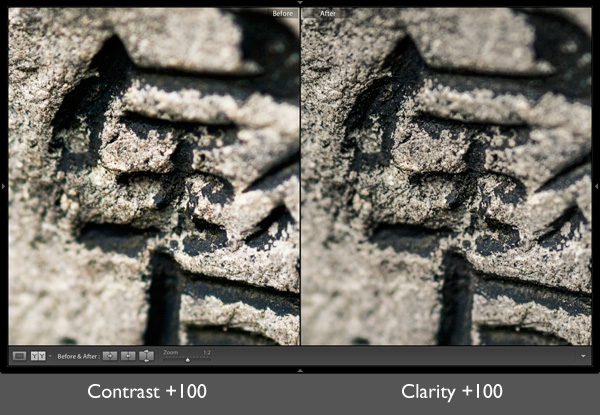
Here’s a close-up of both images so you can see the effect in more detail. Look closely and you’ll see that the Clarity slider brings out more texture than increasing Contrast.

Using the Clarity slider in Lightroom

That’s the key to using this slider successfully. Increasing mid-tone contrast brings out texture and detail, increasing the tactility and apparent sharpness of the image. That’s what the Clarity slider is designed to do. Now I’m going to show you some practical applications.

1. Emphasizing texture

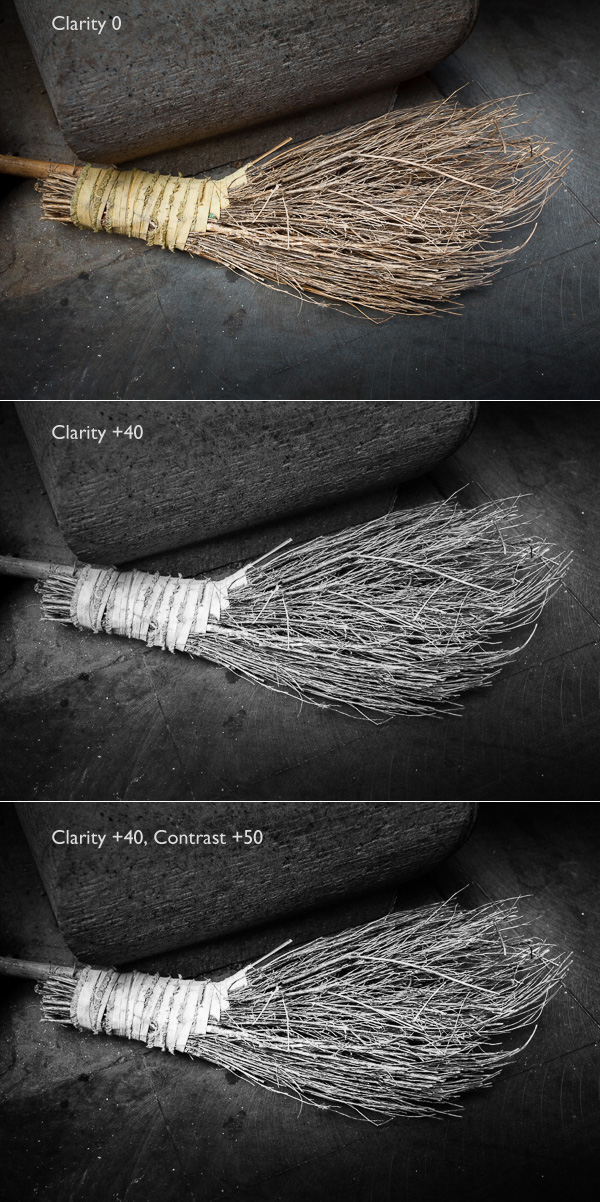
The Clarity slider in the Basic panel is a  global adjustment – meaning that, moving this slider affects the entire image. A small but subtle boost to Clarity can lift just about any image. Photos with more texture, such as the one below, may benefit from a larger increase in Clarity to bring out the texture and detail. This technique is especially effective in black and white. Plus, there’s nothing to stop you increasing contrast as well, especially in black and white, which usually benefits from higher contrast than colour images.

Using the Clarity slider in Lightroom

2. Emphasising texture locally

There is a theory in photography called visual mass that states that certain elements pull the viewer’s eye more than others (you read more about it in my article Composition, Balance and Visual Mass). One of these elements is sharpness. The eye goes to sharp parts of the image before it goes to unsharp, or out of focus areas.

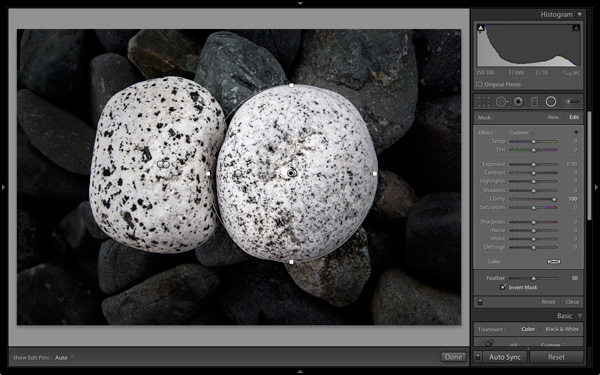
You can use this to your advantage by making local adjustments to Clarity rather than global ones. In the example below, I wanted the white stones to be the centre of attention. The principle of tonal contrast ensures that they are, and I emphasixed it here by placing Radial filters over the stones and setting Contrast to +100 in each one.

Using the Clarity slider in Lightroom

Note: The Radial filter is new to Lightroom 5. If you have an older version of Lightroom you can use the Adjustment Brush tool instead.

3. Emphasize the eyes in a portrait

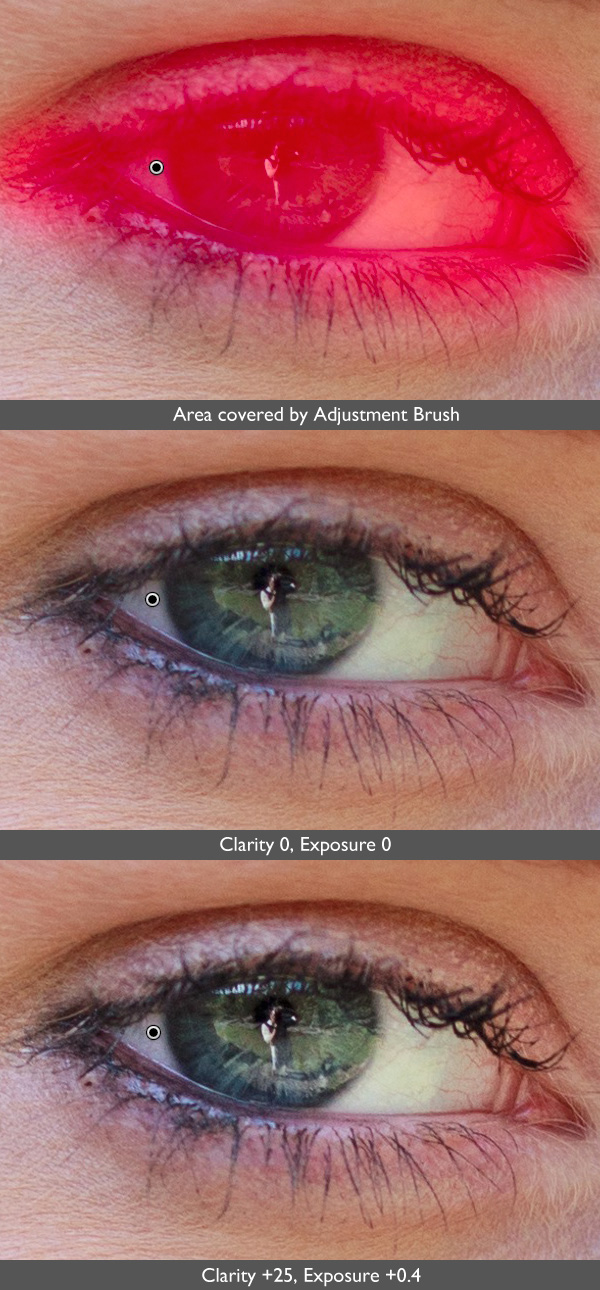
There’s another area where increasing Clarity locally can make a huge difference and that’s in portraiture. Use either the Radial filter or Adjustment Brush to increase the Clarity of your model’s eyes. Again, it’s a subtle, but often effective change. You can also do the same with your model’s mouth to emphasize the lips. Remember that as Clarity tends to make things darker, you’ll probably need to increase Exposure a little as well.

Using the Clarity slider in Lightroom

4. Soften skin

So far we’ve just looked at what happens when you increase Clarity, but you can also go the opposite way and decrease it in order to obscure detail, or soften part of the photo. You do have to be careful with this as the result can look a little false. A light touch is essential.

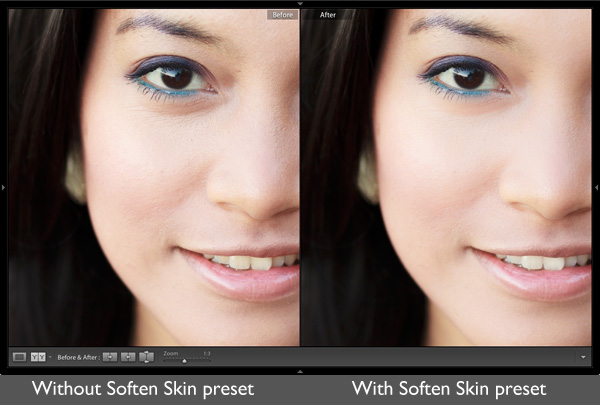
You can use negative Clarity as a kind soft focus effect in portraits. The most effective way is to increase Sharpness at the same time that you decrease Clarity. This helps retain realistic looking texture in the skin and avoids the false effect I spoke of earlier.

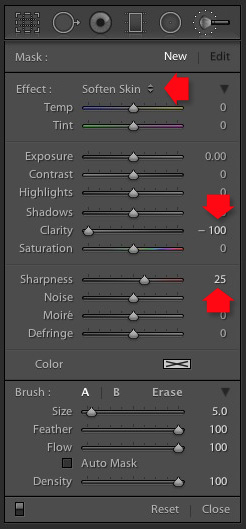
Lightroom has a built-in Adjustment Brush preset called Soften Skin which does exactly that. You can see the effect here. It’s subtle, look at the area under the model’s eyes if you’re not sure what the difference is:

Using the Clarity slider in Lightroom

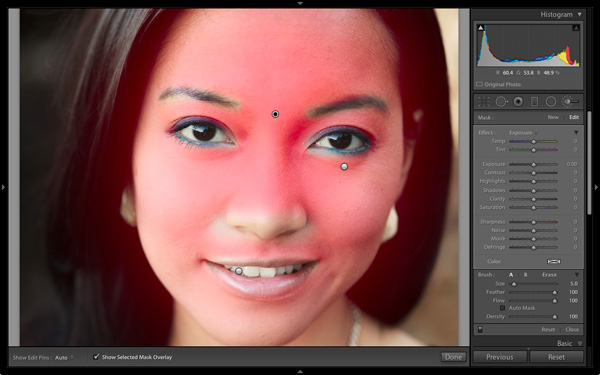
To use the Soften Skin preset, start by activating the Adjustment Brush and paint in the area you want to apply the preset to (shown in red below). Leave the eyes, eyebrows, mouth and tip of the nose alone as you don’t want to soften those areas.

Using the Clarity slider in Lightroom

Select Soften Skin from the Effects menu. Lightroom sets Clarity to -100 and Sharpness to +25.

Using the Clarity slider in Lightroom

Using the Clarity slider in Lightroom

This is the strongest Soften Skin preset. If it’s too strong, you can reduce it by hovering the mouse over the Adjustment Brush pin until the double arrow icon (left) appears. When you see it, hold the left mouse button down and move the mouse left. Lightroom reduces the Clarity and Sharpness settings proportionally. Moving the mouse left, reduces the settings, moving it right increases them. Let go when it looks good to your eye. (You can also adjust the sliders manually)

Your turn

How do you use the Clarity slider? I’m curious to see what applications you have come up with for it.

Let us know in the comments, and feel free to share your photos so we can see what you have done.


Mastering Lightroom: Book Two

Mastering Lightroom: Book Two – The Develop Module ebookMy new ebook Mastering Lightroom: Book Two – The Develop Module teaches you how to process your Raw files in Lightroom for spectacular results. Written for Lightroom 4 & 5 it takes you through every panel in the Develop module and shows you how to creatively edit your photos. It’s now 40% off at Snapndeals for a limited time only.

The post Four Ways to Improve Your Photos With the Clarity Slider in Lightroom by Andrew S. Gibson appeared first on Digital Photography School.

Digital Photography School

 
Comments Off on Four Ways to Improve Your Photos With the Clarity Slider in Lightroom

Posted in Photography