RSS
 

Archive for April, 2014

7 April, 2014 – Isle Of Skye – Scotland Workshop

08 Apr


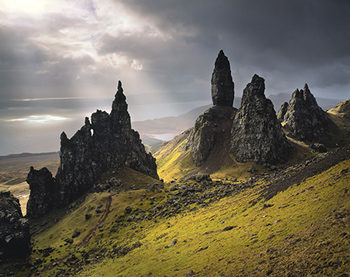
There are many special places on this planet and one of the most special for photographers is Isle Of Skye in Scotland.  Come join Kevin Raber, Steve Gosling and Joe Cornish on an amazing photographic adventure to this amazing landscape.  It gets even better as this is being held with the cooperation of Phase One as a PODAS workshop and each participant will receive a Phase One camera system to use for the duration of the workshop. 

There aren’t too many better places to slow your photography down and to work the landscape as Isle Of Skye.  There isn’t a better camera system to do that with than the Phase One camera and digital back.  Spaces will go fast for this workshop.  Your workshop fee provides you with an all expenses paid worry free trip. All you need to do is get to the Inverness airport.  Learn more about this amazing week of photography HERE.

If you can’t make this workshop check out our other workshops.  We have an amazing small ship cruise in July to The Land Of The Polar Bear.  We have only select berths left for this trip so please inquire.   And our August Palouse Harvest workshop is filling fast. There are still a few berths left for our second Antarctica Workshop next January. 

Mark your calendars for December of this year in New Zealand, details coming soon and a most amazing adventure next April aboard the True North sailing the Kimberley region of Western Australia.


The Luminous Landscape – What’s New

 
Comments Off on 7 April, 2014 – Isle Of Skye – Scotland Workshop

Posted in News


Origami Microscope: Fifty-Cent Design is Crazy Durable

08 Apr

[ By Steph in Gadgets & Geekery & Technology. ]

Origami Microscope 1

Not only is this a microscope made of paper, costing a total of fifty cents to produce, it can stand up to being thrown, stomped on and dunked in water. And it comes in a flat-pack of yardstick that takes just a few minutes to assemble. Foldscope by Manu Prakash has the potential to transform the way disease is identified and diagnosed in developing parts of the world.

Origami Microscope 3

Demonstrated in a 2012 TED talk, the Foldscope is about the size of a bookmark and based on the principles of origami. It has no mechanical moving parts and it’s cheap enough to disseminate for free and incinerate after use to safely dispose of infectious biological samples.

Origami Microscope 2

It might not seem like a lens this tiny would be powerful enough to identify samples of microbes like Giardia or malaria, but the unique optical physics of a spherical lens held close to the eye can magnify samples up to 2,000 times. The lens is about the size of a poppy seed and costs about 17 cents. It can be press-fit into a small hole in the center of the slide-mounting platform on the paper microscope body.

Origami Microscope 4

More sophisticated version have multiple lenses or even combinations of colored LED lights powered by a watch battery. Other additions include the capability to project images on the wall of a dark room. Prakash plans to give away 10,000 of the DIY origami microscopes to citizen scientists with the most inspiring ideas for their use. Prospective users can apply for a Foldscope kit by emailing Signup@foldscope.com.


Share on Facebook


[ By Steph in Gadgets & Geekery & Technology. ]

[ WebUrbanist | Archives | Galleries | Privacy | TOS ]


WebUrbanist

 
Comments Off on Origami Microscope: Fifty-Cent Design is Crazy Durable

Posted in Creativity


JVC Kenwood joins Micro Four Thirds with 4K Super 35 prototypes

08 Apr

6325180910.jpg

Update: Consumer electronics maker JVC Kenwood has joined the Micro Four Thirds standard and said it will develop products for the system. The company is showing two prototype 4K-capable cameras, including a compact, handheld model at NAB in Las Vegas. We stopped by the JVC Kenwood booth and got a first glimpse of the cameras on display. Interestingly, the company says both cameras will have Super 35 sensors (around 21 x 12mm), which is wider than the original Four Thirds sensor format which the standard was designed around. Learn more

News: Digital Photography Review (dpreview.com)

 
Comments Off on JVC Kenwood joins Micro Four Thirds with 4K Super 35 prototypes

Posted in Uncategorized


Seven Pieces of Advice for New Lightroom Users

08 Apr

Lightroom Develop module

Andrew S. Gibson is the author of Mastering Lightroom: Book 2 – The Develop Module. There’s a special deal on now at Snapndeals, get 40% off for a limited time only.

A Digital Photography School poll held earlier this year revealed that the majority of readers carry out their post-processing in Lightroom. Lightroom is attracting users all the time as it is not just a photo processor – it helps you organize, search and view your photos as well. If you are new to Lightroom then these tips will help you get started.

1. Understand the Lightroom Catalog

The Lightroom Catalog is a database containing all the information that Lightroom holds about your photos. It includes metadata, records of any edits you have made, star ratings, keywords, Collections and the locations where your photos are saved.

***An important note: the Catalog doesn’t contain any photos, just information about them.***

The Catalog is important, and for maximum peace of mind you should set Lightroom to make a backup copy every time you close the program. Do this by going to the General tab in Lightroom > Catalog settings and setting Back up Catalog to Every Time Lightroom Exits:
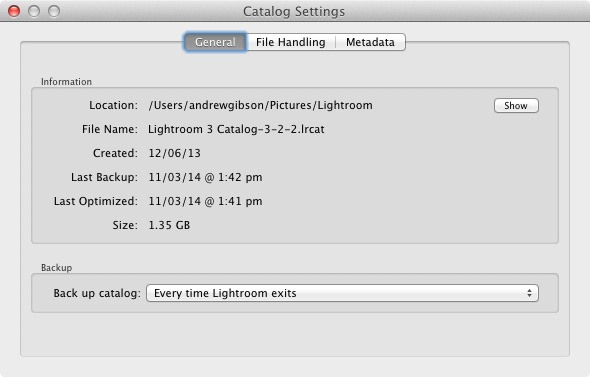
Lightroom Catalog settings

The next time you exit Lightroom it will give you the choice where to save the backup – it’s a good idea to save it on a separate hard drive to the one containing your Lightroom Catalog (located on the computer’s main hard drive). If the backup and the original Catalog are on the same hard drive, and it fails, you will lose both.

2. Appreciate the advantages that using Lightroom gives you

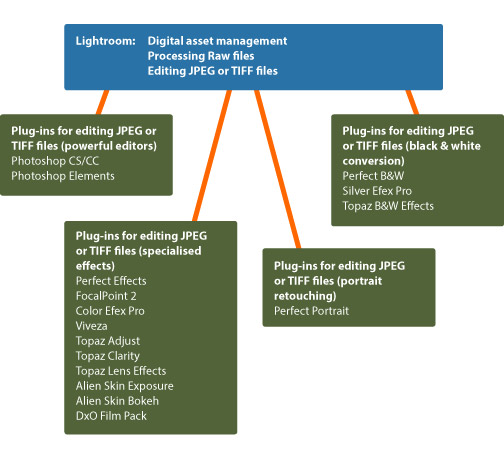
The main benefit of using Lightroom is that it becomes the heart of your post-processing workflow. You can do most of what you need in Lightroom: including viewing, organizing, searching and key-wording photos, through to post-processing and exporting. If you need to finish a photo in Photoshop or another program you can export it from Lightroom first, then bring it back into Lightroom when it’s done, where the two versions will exist side by side.

This diagram shows the workflow:
Lightroom workflow

Another advantage is that Lightroom saves you hard drive space. Think about what happens if you process a Raw file in Photoshop. You start by converting it in Adobe Camera Raw, then open the file as a 16 bit TIFF in Photoshop itself, before finally saving it. Depending on what format you save it in, you end up with either a Raw file and a JPEG, or a Raw file and an 8 bit or 16 bit TIFF.

In Lightroom, on the other hand, all the edits you carry out on your photos are saved as text commands in your Lightroom Catalog. This takes up a lot less space and you only need to export your files into another format (JPEG, TIFF etc.) when you actually need them for something.

You can save even more hard drive space by converting your Raw files to the DNG format when you import them into Lightroom. This also makes Lightroom run faster. This is covered in more detail in my article Make Lightroom Faster by Using DNG.

3. Learn what you can and can’t do in the Develop module

Lightroom is primarily for processing Raw files, although it can also be used for editing JPEGs and TIFFs. All this is done in the Develop module. Even if you are processing a Raw file with the intention of exporting it to another program (like Photoshop or a plug-in) it is a good idea to do as much editing as you can in Lightroom first.

Why? The main reason is that using Lightroom saves you hard drive space, as mentioned earlier. When you export a photo to use in a plug-in, Lightroom converts it to a 16 bit TIFF (or other format of your choice) first. This negates the benefit of using Lightroom to save hard drive space, so you should avoid it where possible.

Things you can’t do in the Develop module are anything involving layers, creating HDR images by tone mapping, exposure blending, adding textures, creating composite images or adding fancy borders. For these you will need Photoshop or another program.

4. Retouching portraits in Lightroom

There are lots of Lightroom plug-ins available designed to help you retouch portraits. Indeed, there are so many that it’s difficult to know which are any good, especially as some cost more than Lightroom itself.

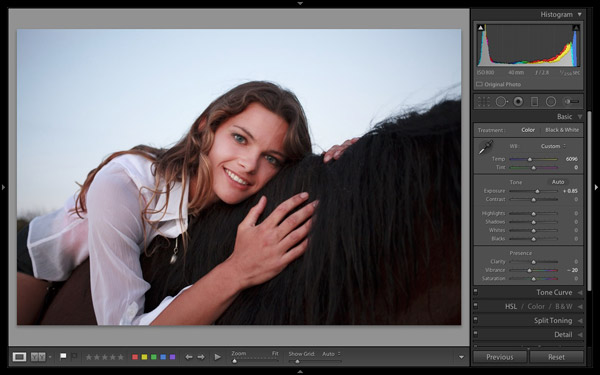
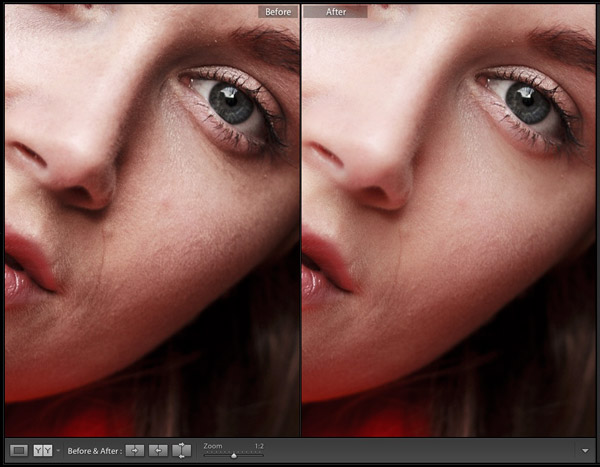
While you may need a plug-in (or Photoshop) for high-end retouching work, Lightroom has a built in Adjustment Brush preset that will do the job for you. It’s called Soften Skin and is a quick and easy way to retouch a portrait.

This before (left) and after (right) comparison shows what you can achieve in Lightroom:
Lightroom portrait retouching

This is a good example of learning what you can achieve within Lightroom, saving yourself time, hard drive space and the expense of purchasing another plug-in in the process.

For more on retouching portraits in Lightroom see: How to professionally retouch portraits in Lightroom

5. Learn to organize your images in the Library module

If you are new to Lightroom you will be accustomed to organizing your photos into folders on your hard drive. In Lightroom though, things are different. There’s only one module (Library module) that gives you direct access to the folders on your hard drive. The others all use Collections instead.

Lightroom is set up that way because Adobe wants you to organize your photos in Collections. The advantage of working this way is that a Collection can contain images that reside across a multitude of folders and bring them together in a way that makes sense for you. You can organize your images by date, subject matter, people’s names or any other way that is useful. My article Use Lightroom Collections to Improve Your Workflow goes into this in more detail.

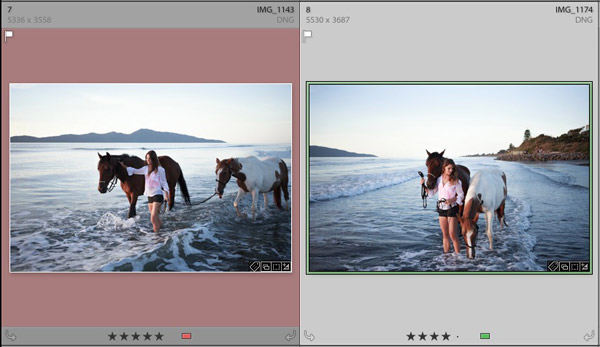
6. Decide how to use colour labels, star ratings and keywords from the beginning and stick with it

This is the hardest piece of advice to follow because when you are starting out you’re still figuring how to use these features. As your understanding of Lightroom grows, you will work out how to use these things in a way that suits you. Just be aware that consistency is your friend. If you start out using (for example) colour labels one way, then change your mind after a few months, it has the potential to cause confusion.
Lightroom colour labels and star ratings

For help with keywords, read my article Creative Ways to Use Keywords in Lightroom 5.

7. Put all your Raw files in a single folder on an external hard drive

This makes it easy to back them up. If you need help with deciding on a file structure then my article Organising Photos for Lightroom will help. The main benefit of keeping all Raw files in a single folder is that it is easy to back up. I recommend that you back your Raw files up to at least two different hard drives. Given that hard drive failure is inevitable (it is always a question of when, not if, even if the when is years into the future) it is wise to have multiple copies. That way if the worse happens it is an inconvenience, not a disaster.

Over to you

Now it’s your turn. What advice would you give to new Lightroom users? What do you wish you had known from the start?


Mastering Lightroom: Book Two
Mastering Lightroom: Book Two – The Develop Module ebookMy new ebook Mastering Lightroom: Book Two – The Develop Module teaches you how to process your Raw files in Lightroom for spectacular results. Written for Lightroom 4 & 5 it takes you through every panel in the Develop module and shows you how to creatively edit your photos. It’s now 40% off at Snapndeals for a limited time only.

The post Seven Pieces of Advice for New Lightroom Users by Andrew S. Gibson appeared first on Digital Photography School.


Digital Photography School
 
Comments Off on Seven Pieces of Advice for New Lightroom Users

Posted in Photography


Canon PowerShot G1X Mark II real-world gallery

08 Apr

IMG_0101.jpg

Now that we have our hands on not one, but two PowerShot G1 X Mark IIs, we’ve running around out taking photos like crazy. This first installment of 22 photos – some of which may look familiar – should give you a taste of what the camera can do, and there are plenty of additional samples on the way. See gallery

News: Digital Photography Review (dpreview.com)

 
Comments Off on Canon PowerShot G1X Mark II real-world gallery

Posted in Uncategorized


Destination Design: 12 Forward-Thinking Modern Hotels

08 Apr

[ By Steph in Destinations & Sights & Travel. ]

Hotel Architecture Main
Whether by totally transforming a city’s skyline, subverting old standards of hotel architecture or creatively reclaiming historic structures, these 12 unusual modern hotel designs have become destinations in and of themselves. These aren’t just cool-looking concepts that may or may not ever become reality – they’ve actually been built and are open for business.

Bella Sky Hotel by 3XN

Hotel Architecture Bella Sky 1
Hotel Architecture Bella Sky 2

Two wedge-shaped towers connected by a small skybridge taper down to the ground at 3XN’s Bella Sky Hotel, a new landmark in Copenhagen. Not only does this unusual design transform the city skyline, it also has the benefit of giving all 814 guest rooms view of the surrounding landscape.

Hotel Marques de Riscal, Spain by Frank Gehry

Hotel Architecture Riscal Gehry

Whether they’re world-class museums or relatively small hotels in the Spanish countryside, architect Frank Gehry’s designs are anything but ordinary. The City of Wine complex for the Marques de Riscal Winery in Elciego, northern Spain features a wavy metallic exterior meant to reflect the colors of the winery’s signature bottles with their silver foil and gold mesh covering. The building houses a five-star, 43-room hotel as well as a restaurant, a spa offering ‘wine therapy,’ a wine shop and a viticulture museum.

ParkRoyal Hotel by WOHA

Hotel Architecture Park WOHA 1
Hotel Architecture Park WOHA 2

Terrace after terrace of vivid greenery characterizes WOHA’s Parkroyal Hotel in central Singapore. A series of towers is elevated above a wavy, sculptural ground-level platform characterized by breezy courtyards that blur the boundaries between indoor and outdoor spaces.

Fogo Island Inn by Saunders Architecture

Hotel Architecture Fogo Island

A cantilevered dining hall reaches out over the rocky coastline of Fogo Island, Newfoundland in Canada. The Fogo Island Inn, by Saunders Architecture and the Shorefast Foundation, is a contemporary 29-room hotel merging traditional craftsmanship with modern aesthetics for a dramatic look that pays proper tribute to the landscape.

Next Page – Click Below to Read More:
Destination Design 12 Forward Thinking Modern Hotels

Share on Facebook


[ By Steph in Destinations & Sights & Travel. ]

[ WebUrbanist | Archives | Galleries | Privacy | TOS ]


WebUrbanist

 
Comments Off on Destination Design: 12 Forward-Thinking Modern Hotels

Posted in Creativity


Light it up: Phottix Mitros Flash for Canon review

08 Apr

Phottix-Mitros-Feature.jpg

The Phottix Mitros flash is a high-end TTL flash designed to compete with Canon’s 580EX II at well over half the price. The Mitros for Canon shares many features with the 580EX II, including high-speed sync and built-in IR triggering with Master and Slave modes. But is the Mitros mighty enough to match one of Canon’s most beloved flash models? Find out in our review

News: Digital Photography Review (dpreview.com)

 
Comments Off on Light it up: Phottix Mitros Flash for Canon review

Posted in Uncategorized


7. April 2014

08 Apr

Ein Beitrag von: Kay Fochtmann

Unbenannt-©-Kay-Fochtmann


kwerfeldein – Fotografie Magazin | Fotocommunity

 
Comments Off on 7. April 2014

Posted in Equipment


Aperitif: Diese Woche auf kwerfeldein

07 Apr

In der nächsten Woche geht es im weitesten Sinne um Landschaften. Solche, an die Ihr jetzt beim Lesen dieses Wortes denkt – Berge und Wälder – sowie solche im übertragenen Sinne, die Arrangements auf Tischen sind, gänzlich ausgedacht und in Bilder gefasst und Gedanken- oder Körperlandschaften.

Wir machen also Abstecher in ein paar spannende Ecken der Welt. Zum Beispiel war unsere Redakteurin Laura in Lappland unterwegs und hat von dort einen Techniktest ohne viel Technikgeschwurbel, sondern mit Eindrücken aus der Praxis mitgebracht. (Und Bilder mit Schlittenhunden, natürlich!)

Außerdem tummeln wir uns in den teilweise schneebeckten Bergen des Südtirol, schön großformatig im Vollbild. Und wir lassen uns in der Serie „Fotogenes Deutschland“ den Pfälzerwald vorstellen. Da gibt’s auch Berge, die sich aber mit allen Farben aus der Herbstpalette sowie in Nebelmeeren präsentieren.

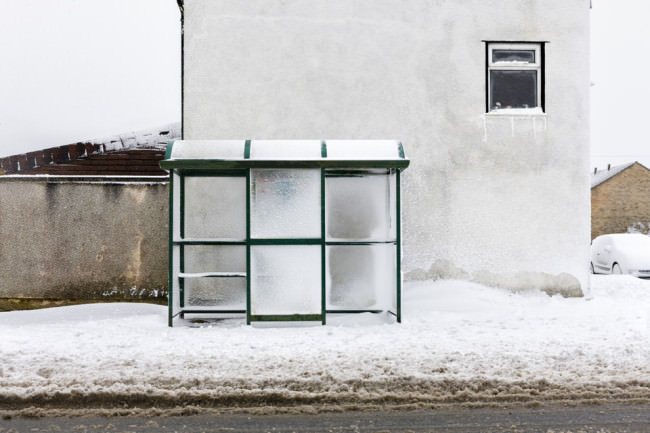
Dann gibt es da noch diesen besonderen Mikrokosmos, den Martin für Euch aufgetan hat: Bushaltestellen in Wales. Klingt erst einmal langweilig. Dachte auch der Fotograf, der seit Ende 2011 damit beschäftigt ist, sie akribisch zu fotografieren und damit eine erstaunliche und skurrile Serie geschaffen hat.

Eine Bushaltestelle im Winter

still haunting me © Inpluvia Tenebrae

Körperlandschaften haben wir auch noch für Euch. Das klingt erst einmal furchtbar kitschig und abegriffen, aber keine Angst: Die Umsetzung ist sehr ästhetisch und angenehm nicht sexuell aufgeladen. Und für alle Freunde von Polaroids präsentiert Marit ein gerade abgeschlossenes Jahresprojekt.

Wir stellen Euch noch einen russischen Stilllebenfotografen vor, der fantastisch moderne und schön surreale, sehr unkonventionelle Arrangements erstellt. Und eine junge, polnische Künstlerin, die ebenso wundersame, aber wieder ganz eigene Welten in Schwarzweiß erschafft.

Morgen philosophiert unsere Redakteurin Aileen aber erst einmal darüber, wie sie versucht, aktiv die eigene Stilfindung voranzutreiben und was für persönliche Stolpersteine sie dabei gerade überwindet. Zu sehen gibt’s eine neue Serie, die dabei zwischen Momenten des Zweifelns entstanden ist.

Und am Samstag zeigen wir wie versprochen unserer Auswahl Eurer Taschenfotos. Wer jetzt denkt: „Hä? Taschen?“, bitte hier entlang, denn bis heute um Mitternacht könnt Ihr noch bei unserer kleinen, feinen, aktuellen Leseraktion namens „Wesentliches“ mitmachen.


kwerfeldein – Fotografie Magazin | Fotocommunity

 
Comments Off on Aperitif: Diese Woche auf kwerfeldein

Posted in Equipment


[MODIFIED] Google Chrome – Clear Browsing Data including Cookies, Flash Cookies, Cache, History, and Saved Passwords

07 Apr

For privacy, clear the data Google Chrome stores regarding your browsing history.

Even though Google Chrome supports “Incognito” browsing where history information is not kept and cookies are removed after browsing (press CTRL + SHIFT + N to open an “Incognito” window), you might accidentally forget to use this mode. You might also wish to remember cookies for a few hours while checking e-mail, chatting on social networking, or accessing your bank account online, then later decide to clear your tracks for privacy.

Google Chrome supports a feature where without the use of any extensions, you can clear browsing and download histories, the cache, cookies, Flash cookies, saved passwords, saved form data, and/or other details….

Read more at MalekTips.
New Computer and Technology Help and Tips – MalekTips.Com

 
Comments Off on [MODIFIED] Google Chrome – Clear Browsing Data including Cookies, Flash Cookies, Cache, History, and Saved Passwords

Posted in Technology