RSS
 

Archive for January, 2014

Urban Farm Kit: Modular Chicken Coops, Planters & Benches

27 Jan

[ By WebUrbanist in Design & Furniture & Decor. ]

urban kit of parts

A solution for all seasons and regions, the premise is simple: every would-be urban farmer has space, weather and other growing constraints, and yet draws from the same set of essential needs.

urban farming exploded axon

For some folks the focus may be raising chickens and a few hardy outdoor plant varieties that can stand the shifts in weather.

urban farm detail box

For others, perhaps in colder climates, built-in storage compartments (that helpfully double as benches) and miniature greenhouse spaces may be the essential or desired accessories.

urban farm modules benches

urban farm planting platforms

urban farm system parts

A series of wooden slats rhythmically wrap the exterior, creating both material continuity between sections as well as a way to hide joints between separate pieces in plain sight.

urban farm wood wire

urban famr chicken coop

urban farming module prototype

The currently-built prototype features dark-stained natural wood and examples of most of the potential modules, demonstrating their feasibility. It includes the wired outdoor area and indoor coop for chickens, for instance, as well as a planter and a secret storage bench section.

Share on Facebook


[ By WebUrbanist in Design & Furniture & Decor. ]

[ WebUrbanist | Archives | Galleries | Privacy | TOS ]


WebUrbanist

 
Comments Off on Urban Farm Kit: Modular Chicken Coops, Planters & Benches

Posted in Creativity


Opening 2014 Paddling Season on the South Platte River

27 Jan

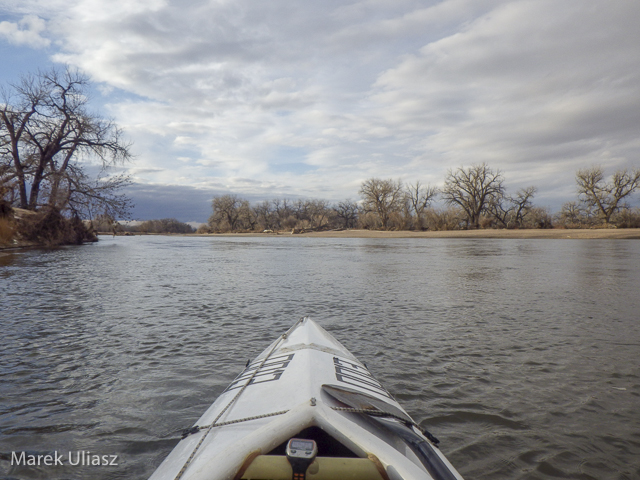
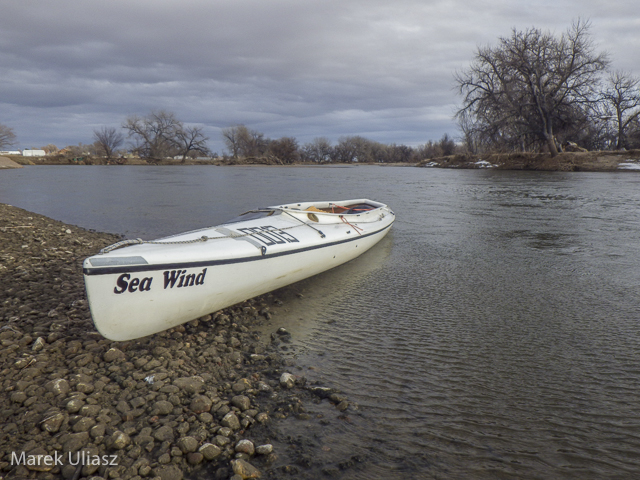
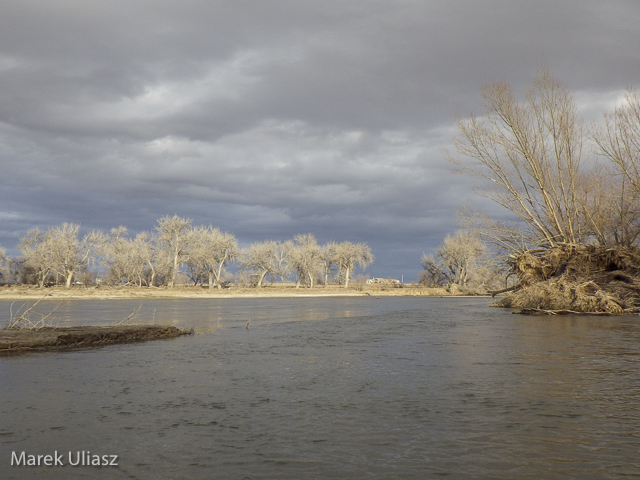
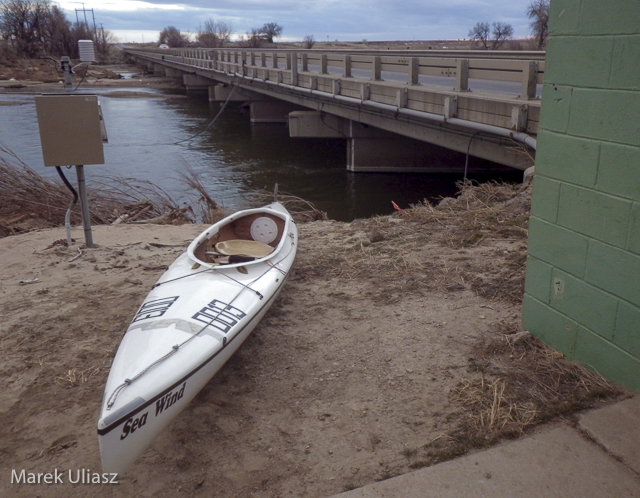
January 21, 2014. Finally, I started my paddling season for the year 2014. I took the Sea Wind canoe to Kersey and paddled upstream to the confluence with the Poudre River and back. It was my first paddling on the South Platte after last year flooding. There are a lot of signs of that flooding on shores, but the river remains the same – wide open without any new obstacles.

The river flow was ~950cfs at Kersey. There is a new station near Greeley – PLAGRECO. I don’t know its exact location yet, but it may be pretty useful for planning paddling trips since it shows the river flow not affected by subtraction and addition of water between Greeley and Kersey (2 diversion dams and the Poudre River).

I will be doing more training runs at different locations on the South Platte during winter time if anybody would like to join me. Most of the time I will paddle the Sea Wind canoe which is my first choice boat for this year Missouri River 340 race. I am hoping also for some downriver SUP runs. You can expect updates to my South Platte River guide.

south-platte-river-kersey-012114-3

paddling upstream the South Platte River above Kersey, Colorado

paddling South Platte River near Kersey, Colorado

Sea Wind canoe on the South Platte River

south-platte-river-kersey-012114-2

looking downstream the South Platte River

south-platte-river-kersey-012114-1

launching/landing spot on the downstream side of Kersey bridge

Related posts:
South Platte River below Denver – GPS/photo river guide
12th Annual South Platte River All Club Paddle
Opening 2013 Paddling Season with Badfish SUP on the South Platte River


paddling with a camera

 
Comments Off on Opening 2014 Paddling Season on the South Platte River

Posted in Photography


Masters of Photography – Yousef Karsh Portrait Photographer

27 Jan
Karsh-self-portrait

Self portrait of Yousef Karsh from his official website

This is the next instalment of my series on the masters of photography, last time we looked at The Decisive Moment with Henri Cartier-Bresson. Something that my photography instructors gave me was an appreciation and love for the history of photography. If you are not familiar with some of the masters I will be featuring one now and then to help you become acquainted with some of the best in history.

Today we’re going to look at a man that was considered to be the world’s premiere portrait photographer in his time, perhaps of all time, and his images still stand among the best today. The word “iconic” is often used when speaking of his images of people like:

  • Winston Churchill
  • Ernest Hemmingway
  • Princess Elizabeth (later Queen)
  • Elizabeth Tailor
  • Albert Einstein
  • Georgia O’Keefe
  • Mother Teresa

Just to name a few! If you haven’t already guessed, or read the title, yes I’m talking about the legend, Yousef Karsh.

Yousef Karsh 1908-2002

I’m not going to give you his bio or list his accomplishments here. I want you to do your own research. Google his name and find his famous portraits. Study them. Watch the interview below (ignore the age and quality of this video, instead really focus and listen to what he says). What can you learn from him?

As I ultimately found myself doing portraits and weddings early in my photography career Karsh was highly influential on my style. I wanted to created the dramatic lighting he used on his subjects, but more than that I wanted to strive to connect with the person in front of my lens the way he did. He was not only a master of lighting, he was a master of getting the expression and making his subject feel at ease.

Watch and learn from Mr. Karsh!

Keep in mind this is Part One of this interview. Make sure to view Part Two and Part Three as well.

Want to take better portraits? Well you are in luck! Starting tomorrow, over the next two weeks we will be doing a Portrait Photography Deep Dive. What that means is we’ll be publishing articles on all things portrait related by both regular and guest authors. Make sure you’re signed up for the newsletter so you don’t miss anything!

If you want to read some past articles on portrait photography you can try these:

  • Reflectors: Your Secret Weapon for Amazing Portrait Photography
  • Portrait Tutorial Feast – Best of dPS 2013
  • Our 14 Best Portrait Photography Tutorials of 2012

Want to read more about Karsh and see his stunning portraits?

Here are a few books. I personally have the middle three in my library!


The post Masters of Photography – Yousef Karsh Portrait Photographer by Darlene Hildebrandt appeared first on Digital Photography School.


Digital Photography School

 
Comments Off on Masters of Photography – Yousef Karsh Portrait Photographer

Posted in Photography


Results of the post-processing poll

27 Jan

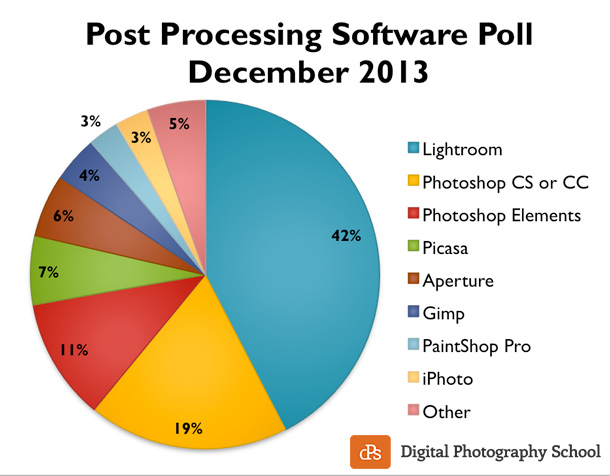
A few weeks ago I started a new poll on what post-production software you use most often. If you want to add your vote you still can here. We have run this poll twice in the past, every two years, so it will be interesting to see if the results have changed at all from 2009, to 2011 to 2013. Let’s look at the current results first.

Results – what post-processing software is used most often in December 2013

With over 27,000 votes at the time of this summary the overwhelming winner was Lightroom with a whopping 42% share. Now let’s see how these numbers compare to 2011 and 2009.

post-processing-poll-2013-dPS

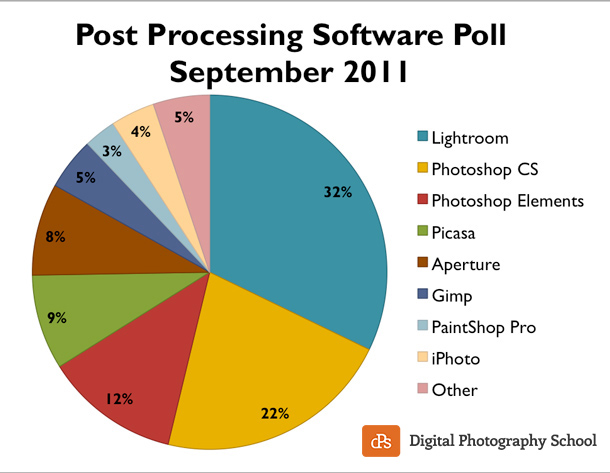
Survey results from 2011

Interesting! Lightroom has certainly catapulted to the top in a big way:

  • Lightroom is up 10% from two years ago to 42% currently, that’s a huge chunk of users
  • Photoshop and Photoshop Elements combined are down from 34 to 30% (-4%)
  • Picasa is down 2%
  • Aperture is down 2%
  • Gimp down 1%
  • PaintShop Pro held steady at 3% share
  • iPhoto was down from 4% to 3% share
  • Other was constant at 5%

These results are from 23414 votes in the 2011 poll.

post-processing-poll-2011-dPS

 Way different results from 2009!

According to Wikipedia Lightroom Version 1 was released in January 2007. Within two years (as seen below) it had taken almost 20% of the post-processing market share. Not bad! But compare those stats to the current one and Lightroom has become the clear front runner for photographers in the processing arena.

Quick comparison of the big two by Adobe

  • 2009 Lightroom had 19%
  • 2009 Photoshop (all versions of CS) had 36%
  • 2009 Photoshop including Element had 49%
  • 2013 Lightroom at 42%
  • 2013 Photoshop down to 19% (pretty much reversed)
  • 2013 Photoshop inc. Elements 30%

Most of the “also rans” stayed pretty steady in terms of their percentage, within a point or two. I’d say it’s fair to say that Lightroom has taken over in four short years and has become the “go to” software of choice for most photographers (amateur and professional).

post-processing-poll-2009-dPS

Want to learn how to use Lightroom and get on board?

First, grab a copy of Lightroom 5 if you haven’t got it already, or upgrade if you’re still using version 4.

Next check out some of these tutorials:

Lightroom tips and tutorials

The post Results of the post-processing poll by Darlene Hildebrandt appeared first on Digital Photography School.


Digital Photography School

 
Comments Off on Results of the post-processing poll

Posted in Photography


No Life Support: 10 Abandoned Ambulance & EMS Stations

27 Jan

[ By Steve in Abandoned Places & Architecture. ]

closed condemned abandoned ambulance EMS stations
Silence the sirens and be careful out there… these abandoned, closed and condemned ambulance & EMS stations no longer respond to medical emergencies.

Condemned In California

condemned AMR ambulance substation Tracy CA(images via: Tracy Press, Glenn Moore)

The condemned former American Medical Response substation at at 455 Beverly Place in Tracy looks pretty good for an abandoned building. Then again, these photos from the November 29th, 2013 edition of the Tracy Press were taken less than a week after the doors slammed shut. Supposedly, the station was condemned due to the presence of a large tree on the property that might fall over in a gale. It’s worth noting that the station’s owner condemned the building; city inspectors found no serious structural damage and thus no justification for closing it.

condemned ambulance substation Tracy CA (images via: Tracy Press, Glenn Moore and Tracy Press, Glenn Moore)

Ahh, the eternal struggle between wanting your local EMS station to be as close as possible and wanting your local EMS station to be as QUIET as possible. Sorry friends, never the twain shall meet. The eardrum conundrum evidently proved too frustrating for one resident who in 2010 declared (in a drunken, late-night tirade in front of Tracy City Council) that having an ambulance station near his home has turned his life into “13 years of hell.” He must be in heaven now.

But Socialism!

closed abandoned ambulance station Wiltshire England(image via: Number Of The Month)

The UK’s NHS (National Health Service) has been praised and vilified to the extreme – often by the same people depending on whether they need its services or have just read the latest tale of wasted taxpayer’s money. Tongues are wagging once again due to the NHS’s (supposed) money-saving plans to close dozens of ambulance stations across the UK and consolidate their functions at larger “hub” stations. The plan may indeed save money but anyone and everyone will end up waiting longer for an ambulance as a result. Thanks, Obama!

Ghostbusters Of OZ

old Queensland ambulance service station(images via: The Queensland Times, Claudia Baxter and The Ipswich Advertiser)

If the original Ghostbusters drove a modified ambulance and had their HQ in an old firehouse, one would assume their Australian counterparts (being “down under”) would park their customized firetruck in an old ambulance station. Good thing, as the old Queensland Ambulance Service station complex on Downs Street in North Ipswich is said to be haunted by the ghost of WC Tomkins. The former station superintendent lived upstairs at the station and passed away in his bed one night in 1934… and, some say, he’s still there.

old Queensland ambulance station haunted Sims(image via: The Queensland Times, David Nielsen)

“This ghost has never hurt anyone and I don’t think he would,” states renowned hauntings historian Jack Sim (above). “He founded the ambulance in Ipswich and he is a nice bloke.” Perhaps the station’s supposed supernatural aura helped keep it on the auction block for the better part of six years. All good things must come to an end, however, and Beetlejuice himself couldn’t stop the station from finally being sold in March of 2013 for a cool one million smackers.

Chairman Of The Boarded Up

Hull old boarded-up ambulance station(images via: Hull and Hereabouts)

Since the old ambulance station on Osborne Street in Hull, England closed, the only emergencies occurring at the site concern Phil Jude’s 24-hour Emergency Boarding Up Service… or so the sign above states. Take it from Phil, they’re “probably the cheapest in the area.”

Next Page – Click Below to Read More:
No Life Support 10 Abandoned Ambulance Ems Stations

Share on Facebook


[ By Steve in Abandoned Places & Architecture. ]

[ WebUrbanist | Archives | Galleries | Privacy | TOS ]


WebUrbanist

 
Comments Off on No Life Support: 10 Abandoned Ambulance & EMS Stations

Posted in Creativity


26. Januar 2014

26 Jan

Ein Beitrag von: Iris Kramp

© Iris Kramp


kwerfeldein – Fotografie Magazin

 
Comments Off on 26. Januar 2014

Posted in Equipment


browserFruits Januar, Ausgabe 4

26 Jan

Ein Regenschirm kann nicht nur nützlich sein und für einen trockenen Kopf sorgen, er ist zudem auch wunderbar fotogen, wie unser Fotospecial zeigt. Wir empfehlen, die Augen offen zu halten, um Alltagsgegenstände neu zu entdecken. Neues gibt es auch in unserem sonntäglichen Früchtekorb: Ab jetzt findet Ihr hier immer ein Zitat der Woche, das natürlich etwas mit der Fotografie zu tun hat. Und wer Zitate mag und nicht genug davon bekommen kann, der darf gern einen Blick auf unsere Zitateseite werfen.


Fotospecial: Regenschirm

Flickr

500px


Deutschsprachig

• Spiegel Online hat den Fotografen und Bergsteiger Robert Bösch interviewt, der seine beiden Leidenschaften miteinander verbindet.

• Wenn Ihr selbst Kinder habt, die sich für Fotografie begeistern, ist diese Kölner Veranstaltung in den Osterferien (NRW) vielleicht etwas für Euch bzw. Eure Kinder: Abenteuer im Bilderdschungel, eine einwöchige Reise durch die Geschichte der Fotografie für 8- bis 12-Jährige.

• Auf emerge gibt es eine beeindruckende Serie über Mongolische Nomaden von Sven Zellner.

• derStandard.at im Interview mit dem italienischen Fotografen Luca Faccio über Gemeinsamkeiten und Unteschiede von Nord- und Südkorea und darüber, warum die westlichen Medien keine Fotos des nordkoreanischen Diktators Kim Jong-un mehr zeigen sollten.

• Elena Shumilova hat erst 2012 angefangen, zu fotografieren. Jetzt macht sie magische Portraits von ihren Kindern zusammen mit den Tieren auf einer Farm.

• Batmans Abenteuer könnt Ihr hier verfolgen. Gelungene Spielzeuginszenierungen.


International

• „Don’t Take Pictures“ hat in einem Artikel die grundsätzliche Vorgehensweise für Fotografen, die ihre Arbeiten in einer Galerie unterbringen wollen, zusammengetragen.

• Schön? Nicht schön? Auch eine Frage von Licht, Perspektive, Pose, dem richtigen und vorteilhaften Moment. Die Fotografin Gracie Hagen hat das Phänomen in ihrer spannenden Serie „Illusions of the Body“ untersucht.

• Wunderschön und beeindruckend: Noch ungeborene Tiere im Bauch ihrer Mütter.

• Wir sind entzückt: Ratten, die mit Teddybären schmusen.

• Zwei Bilder, die zusammen Kritik über den Fotojornalismus auslösen.

• Nach einer Fotomanipulation feuert die Nachrichtenagentur AP den Pulitzer-Preisträger Narciso Contreras.

• Unglaublich sind diese Aufnahmen eines Vulkanausbruchs in Chile.

• Der Fotograf Steve Rosenfield bat verschiedene Menschen, ihre größten und intimsten Unsicherheiten auf ihre Haut zu schreiben, um sie damit zu portraitieren.

• Laut Complex sollen dies die „50 besten zeitgenössischen Straßen-Fotografen“ sein. Und naja, solche Listen immer einseitig, haben jedoch den Vorteil, dass man dadurch eine Menge neue Fotografen zu sehen bekommt. Wer fehlt Eurer Meinung nach?

• Es folgen 25 (sehr gute) Nahaufnahmen von Tieren.

• Harold Feinstein: Warum es Sinn macht, Fotos, die man „früher“ gemacht hat, immer wieder zu sichten. Und seine Bilder unterstreichen das, was er sagt, mehr als deutlich.

• Nachgestellte Kinderbilder sind nichts Neues, aber diese sind doch wieder schön und lustig.


Neuerscheinungen und Tipps vom Foto-Büchermarkt

Buchtipps

• In „One circle“* zeigt Fred Hüning intime Bilder einer Familie. Seine Triologie erscheint erstmalig in einem Bildband und ist für 40 € erhältlich. Einen Einblick ins Buch bekommt Ihr hier.

• Beeindruckende Tierportraits von Fotograf Tim Flach zeigt das Stern Portfolio in seiner Nummer 74: Tim Flach – Evolution*. Die Sternbände sind immer eine Empfehlung wert und mit einem Preis von 18 € auch vergleichsweise günstig.


Wettbewerbe

• Noch bis zum 31. Januar könnt Ihr Euch für den Leica Oskar Barnack Preis 2014 bewerben, wenn Ihr (angehende) Berufsfotografen seid.


Zitat der Woche

Welches meiner Fotos mein Favourit ist? Das, was ich morgen machen werde.

Imogen Cunningham –

Mehr Zitate


Videos

In diesem Musikvideo zum Song „Nouveau parfum“ wird die Sängerin von Boggie sozusagen live retuschiert.


Auf die U-Bahn warten, kann so interessant sein. In slow motion.


Ausstellungen

OBSCURA: 121 Blicke – 121 views
Zeit: 31. Januar – 11. Februar 2014
Ort: Galerie Pflüger68, Pflügerstraße 68, 12047 Berlin
Link

Robert Herrmann: Monotony
Zeit: 15. Januar – 11. Februar 2014
Ort: FENSTER61, Torstr. 61, 10119 Berlin
Link

Christoph Zellweger – Rituals of Self Design
Zeit: 19. November 2013 – 2. Februar 2014 (verlängert!)
Ort: Overbeck-Gesellschaft, Königstr. 11, 23552 Lübeck
Link

the critical camera – Fotografie an Brennpunkten der Welt
Zeit: 30. Januar – 29. März 2014
Ort: Wissenschaftspark Gelsenkirchen, Munscheidstr. 14, 45886 Gelsenkirchen
Link

Bruno Bisang
Zeit: 21. Januar – 27. Mai 2014
Ort: Monika Mohr Galerie, Mittelweg 45, 20149 Hamburg
Link

Mehr aktuelle Ausstellungen


* Das ist ein Affiliate-Link zu Amazon. Wenn Ihr darüber etwas bestellt, erhalten wir eine kleine Provision, Ihr bezahlt aber keinen Cent mehr.


kwerfeldein – Fotografie Magazin

 
Comments Off on browserFruits Januar, Ausgabe 4

Posted in Equipment


Russian Mother captures atmospheric photos of sons on farm

26 Jan

animal-children-photography-elena-shumilova-1.jpg

Elena Shumilova’s atmospheric photographs show a special bond between her sons Yaroslav and Vanya and their animals, on the family farm in rural Russia. Her images are deliberately dreamlike and highly evocative, capturing the bond between her young sons and their animal playmates. See gallery

News: Digital Photography Review (dpreview.com)

 
Comments Off on Russian Mother captures atmospheric photos of sons on farm

Posted in Uncategorized


Portrait Plus Retouching Software – A Review

26 Jan
Portrait Plus from ArcSoft packs powerful facial retouching tools into a user-friendly program.

Portrait Plus from ArcSoft packs powerful facial retouching tools into a
user-friendly program

One of the most difficult tasks in Photoshop is also one of the most common. Since we are in the business of making people look good, solid portrait retouching skills are perhaps some of the most important tools in your digital bag of tricks. A couple of months ago, I wrote an article detailing one of my favorite techniques for basic skin smoothing in Photoshop. It’s a pretty straightforward approach to smoothing skin and removing blemishes and I use it all the time. As convenient as it is, though, it can have an impact on editing time, particularly when I’m dealing with a lot of photos at once.

Portrait Plus from ArcSoft is a portrait retouching program that works as a stand-alone application (Windows and Mac) or as a Photoshop plug-in under the filters menu (Currently Windows only). It has a simple, user-friendly interface designed for efficient, seamless integration with your portrait workflow.

How does it work?

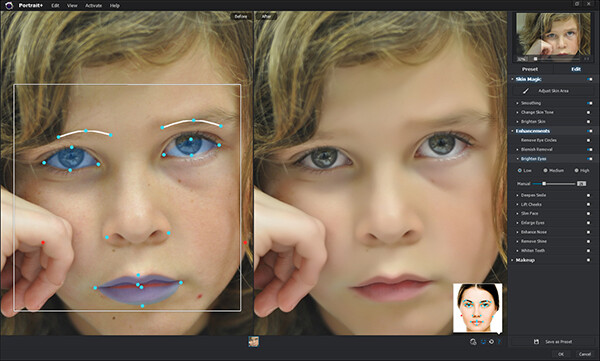
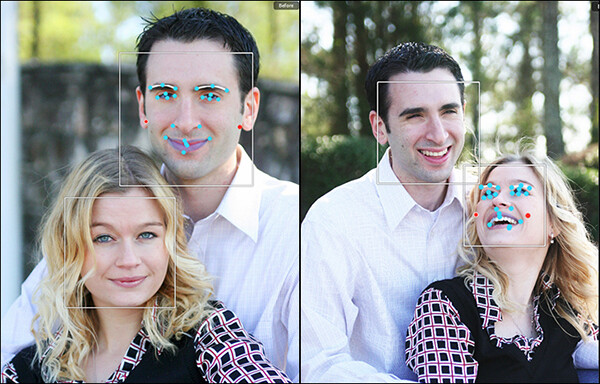
Simply put, Portrait Plus automatically detects the faces in your photos, and then identifies 24 key facial features. While this auto-detection is really pretty amazing, it’s not always perfect (and therefore my only real complaint).  Profiles turned too far away from the camera and semi-obscured features (think bangs over the eyes) will throw auto-detection for a loop. I had a couple of images where the auto-detection did not work, requiring me to manually select the facial features and target areas. While a bit frustrating, I don’t view this as that much of a negative, since you are likely to manually adjust the target areas yourself anyway as you become more comfortable with the software.

The overlay on the left shows the facial features automatically detected by the software.

The overlay on the left shows the facial features automatically detected by the software.

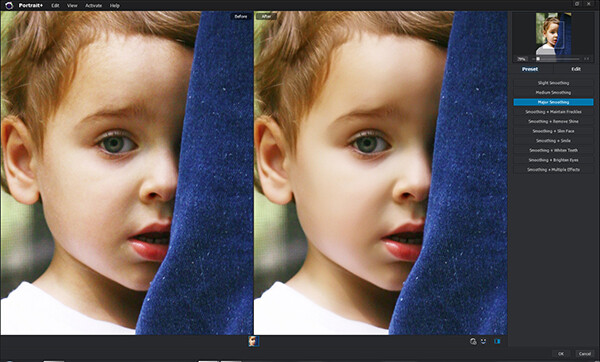
Once an image has been imported, you have a choice of using one of the program’s ten presets, or editing the photo manually, with the option of saving the results as a preset for future retouching work. While the manual editing tools are very extensive, and allow users to select specific areas and facial features, many of the test photos I ran through Portrait Plus for this review achieved excellent results with the presets alone. Facial retouching that could take several minutes or longer can be drastically reduced down to just one or two clicks of the mouse. In order to ensure consistency throughout the photo, Portrait Plus also detects all visible skin, giving the editor as much or as little control over the final image as possible.

Powerful editing tools

Here is a breakdown of the manual retouching tools.

Skin

Some skin retouching software simply blurs over the imperfections.  By identifying very specific areas of the face, however, Portrait Plus gives you extensive control over what to repair and to what degree, for a more natural-looking result. By taking this targeted approach, Portrait Plus eliminates deep scars, pimples, scratches, and other imperfections, while restoring or maintaining one of the most important aspects of all–original skin tone.

  • Skin smoothing
  • Skin tone
  • Brighten skin
Original on the left. Skin-smoothed on the right.

Original on the left – skin-smoothed version on the right

Enhancements

If you’ve ever wanted to get in touch with your inner plastic surgeon, here’s your chance. By giving the user control over specific areas like the mouth, cheeks, eyes, and nose, reshaping and fine-tuning facial features has never been easier. Tools included are:

  • Remove eye circles
  • Blemish removal
  • Brighten eyes
  • Deepen smile
  • Lift cheeks
  • Slim face
  • Enlarge eyes
  • Enhance nose
  • Remove shine
  • Whiten teeth

Makeup

Depending on your lighting and camera settings, makeup does not always have the look you were going for in the final image. By having the ability to make these adjustments in post-production, you can either save your original idea, or go in a new direction. You’ve got to be very careful with this set of tools, however–a single mouse click can be the difference between a subtle adjustment and “alien eyes”. Effects included:

  • Blush
  • Lipstick
  • Colored contacts
  • Eye color
  • Eye lashes
  • Eye liner
  • Eye shadow
  • Shape eyebrows

Comparison

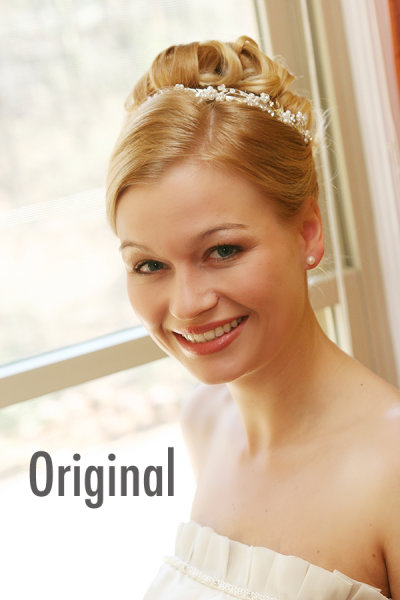
The original version of this portrait is straight off the camera, only edited for size. In the Portrait Plus version, you can see how edits like basic skin smoothing, along with a wider smile, slimmer face, whiter teeth, and digital lipstick provide subtle, but significant changes.

portrait-plus-dps-review-007

portrait-plus-dps-review-006

Many of the effects in this software package would take months to learn, and years to perfect if you were to attempt them yourself in Photoshop. While Portrait Plus does have a bit of a learning curve, it is far less steep than what you’d experience by trying to learn all of these edits on your own.

Multiple Faces

Portrait Plus does a great job of detecting multiple faces within the same image.

Portrait Plus does a great job of detecting multiple faces within the same image.

While I’ve not yet tested it on photos with more than two faces, ArcSoft’s website claims that Portrait Plus can detect up to 20 faces in a single image. This can come in particularly handy for event photographers, who often find themselves editing photos of large groups of people. Portrait Plus also allows you to “lock” faces, selecting which faces in a photo are retouched and which are left alone.

Supported file formats

The Windows stand-alone version can import JPEG, TIFF, PNG, and BMP images of 24 bits per pixel, while the Mac stand-alone imports JPEG, TIFF, PNG, and RAW files with 24 bits per pixel. Both Windows and Mac export JPEG and TIFF files. The Photoshop plug-in will import and export all Photoshop-supported file formats.

Wrap-up and recommendations

As a portrait photographer, I strive to get everything as close to perfect in the camera as I possibly can. While even the best portraits can always use a tweak or two, the reality is that some portraits require significant retouching. As important as the editing is, though, so is time with my family. So, whatever I can do to cut down on my editing time is a bonus. As good as I am at retouching, Portrait Plus is a bit of a game-changer. An intuitive, user-friendly Photoshop plug-in, Portrait Plus can seamlessly add a whole new dimension to any photographer’s editing arsenal.

Portrait Plus is available for download on the ArcSoft website.  Enter coupon code Portrait45 at check-out for a 45% discount. Valid through March 31, 2014.

The post Portrait Plus Retouching Software – A Review by Jeff Guyer appeared first on Digital Photography School.


Digital Photography School

 
Comments Off on Portrait Plus Retouching Software – A Review

Posted in Photography


12-County Coalition: Building the Great Green Wall of Africa

26 Jan

[ By WebUrbanist in Global & Travel & Places. ]

green wall trees desert

The clock is ticking for the collaborative creation of a living green wall to span nearly 5,000 miles across the African continent, designed to slow or even stop the relentless spread of desertification. The scope of this unique organic building project is unprecedented, as is its urgency.

green wall project africa

China took over 1,000 years to construct their Great Wall, but scientists believe Africa may only have a few decades before the Sahara Desert engulfs more than two thirds of its arable land. Hence the Great Green Wall of the Sahara, set to stretch from coast to coast, west to east.

green wall planting example

The cooperation of the twelve contiguous African countries involved is as impressive as their challenge is daunting – participating nations include: Senegal, Mauritania, Mali, Burkina Faso, Niger, Nigeria, Chad, Sudan, Eritrea, Ethiopia, and Djibouti.

green wall small large

The idea to create a ‘green front’ to protect Africa is almost half a century old, but the plan began to be taken more seriously starting just over ten years ago. Since being ratified by participating countries, the program has raised billions of dollars in pledges from international organizations.

great green wall tree

From AtlasObscura: “Leaders point out that the Great Green Wall is about more than just protection from windblown sand. The project will bring thousands of jobs to impoverished communities, and has already transformed otherwise unusable land into gardens scattered with tree nurseries. The influx of tourists, scientists, and medical professionals has also brought attention and resources to a neglected region in which aid is scarce and doctors are not readily available to needy populations.”

Share on Facebook


[ By WebUrbanist in Global & Travel & Places. ]

[ WebUrbanist | Archives | Galleries | Privacy | TOS ]


WebUrbanist

 
Comments Off on 12-County Coalition: Building the Great Green Wall of Africa

Posted in Creativity