RSS
 

Archive for January, 2014

Blickfang: Cucurbita

14 Jan

Cucurbita ist der lateinische Name für Kürbis. Denkt man an diese große, schwere Pflanze, würde man nicht auf die Idee kommen, dass ihre Ranken unglaublich grazil und ästhetisch aussehen können. Karl Blossfeldts Aufnahmen zeigen immer wieder die Schönheit der Natur.

Seine Fotos entstanden eigentlich als Unterrichtsmaterial. Die Fotografie war für ihn nur ein Werkzeug, dennoch gilt er als Vertreter der Neuen Sachlichkeit in der Fotografie. Seine Schüler im Fach „Modellieren nach Pflanzen“ zeichneten die Bilder ab, sie dienten als Vorlagen für Ornamente in der Kunstgießerei.

Curcubita © Karl Blossfeldt

Meine Pflanzenurkunden sollen dazu beitragen, die Verbindung mit der Natur wieder herzustellen. Sie sollen den Sinn für die Natur wieder wecken, auf den überreichen Formenschatz in der Natur hinweisen und zu eigener Beobachtung unserer heimischen Pflanzenwelt anregen.

Dies schreibt er im Vorwort zu seinem Buch „Wundergarten der Natur“. Ich selbst besitze die günstige Alternative aus dem Verlag TASCHEN*. In ihr wird das Gesamtwerk Blossfeldts gezeigt. Es beinhaltet „Die Urformen der Kunst“ von 1928, „Wundergarten der Natur“ von 1932 und „Wunder in der Natur“, das erst nach seinem Tod 1942 erschien.

Blossfeldts schwarzweiße Fotgrafien von Pflanzen lassen mich die Natur anders betrachten. Immer, wenn ich das Buch zur Hand nehme, bekomme ich Lust, mich an Stillleben zu versuchen, rauszugehen und nach den schönsten, symmetrischsten Blüten Ausschau zu halten. Ich achte mehr auf Details und die Schönheit der kleinen Dinge.
 
Informationen zum Buch

Karl Blossfeldt: The Complete Published Work*
Seiten: 255
Abbildungen: schwarzweiß
Sprache: Deutsch / Englisch / Französisch
Verlag: Taschen
Preis: 9,99 €
 
* Das ist ein Affiliate-Link zu Amazon. Wenn Ihr darüber etwas bestellt, erhalten wir eine kleine Provision, Ihr zahlt aber keinen Cent mehr.


kwerfeldein – Fotografie Magazin

 
Comments Off on Blickfang: Cucurbita

Posted in Equipment


The Ugly Truth About Image Theft: How to Protect Yourself

14 Jan

Back in the Middle Ages, you could have your ears or hands cut off as a punishment for theft. Though in today’s civilized society, lots of things have changed, and we no longer deprive people of the parts of their body. Instead, we, in the worst case, put them to jail, with their ears safe! While theft is an issue Continue Reading

The post The Ugly Truth About Image Theft: How to Protect Yourself appeared first on Photodoto.


Photodoto

 
Comments Off on The Ugly Truth About Image Theft: How to Protect Yourself

Posted in Photography


DxOMark recommends lenses for the Pentax K-3

14 Jan

DxOMark-logo-520.jpg

The Pentax K-3 was a justified winner in our reader poll for the Best DSLR of 2013, and now our friends and collaborators over at DxOMark have been looking into how various lenses score on it. In the process, they’ve also reviewed many of Pentax’s lovely ‘Limited’ primes in their latest ‘HD’ incarnations. See DxOMark’s latest reviews

News: Digital Photography Review (dpreview.com)

 
Comments Off on DxOMark recommends lenses for the Pentax K-3

Posted in Uncategorized


Balancing Color for Flash and Ambient Light using Gels

13 Jan

Flash with 1 CTO plus 1/8 CTOIn the last article Balancing Flash and Ambient Light Using an Incident Light Meter I did not mention color temperature or any correction for the colorcast in the background. There were however requests for it in the comments section, so in this article we will cover three ways of balancing color for flash and ambient light (tungsten yellow/orange which is approximately 3200°K, flash which has a color temperature close to daylight or 5500°K).

Color Temperature Explained

Before you go into the process of correcting color imbalance you will need to understand color temperature. A basic description of color temperature is based on the color characteristics of visible light from warm (yellows) to cool (blues) and the ability to measure this in degrees Kelvin (°K). Degrees Kelvin is a numerical value assigned to the color emitted by a light source. Visualize a lamp filament that is heated using an electric current. It starts off as black and starts getting hot. At a particular point it will become hot enough to start glowing, typically a dark red. As it gets hotter, it will change from dark red to orange to yellow to practically white. It is important to understand that technically, red light has a lower color temperature but is described as warm, while blue light is a higher color temperature but is described as cool. So remember that the terms warm and cool describe color, not temperature. This is a fairly extensive topic but for a quick explanation this should help.

Read more on White Balance and color temperature:

  • Practical White Balance and Why You Should Learn It!
  • Introduction to White Balance

Since warm and cool are colors, we can change their characteristics by modifying color. In lighting we achieve this modification by using various colored gels of varying densities. Lets examine the first and simplest method.

Method One – Using Color Gels on the Flash

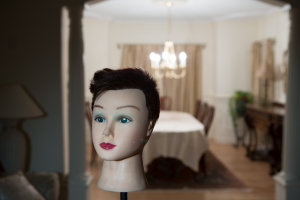
Here are two images of the same scene, one using Auto White Balance (AWB) and the next using Daylight White Balance (WB). The daylight WB is 5200°K while the AWB applied 3200°K. Clearly the Daylight WB is too yellow.
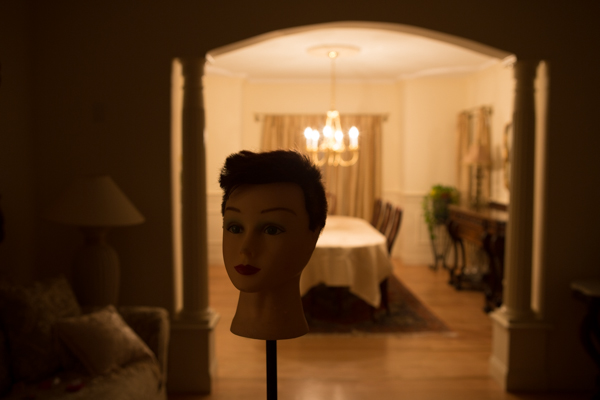
Auto WB

Image captured with camera set to Auto White Balance (AWB)
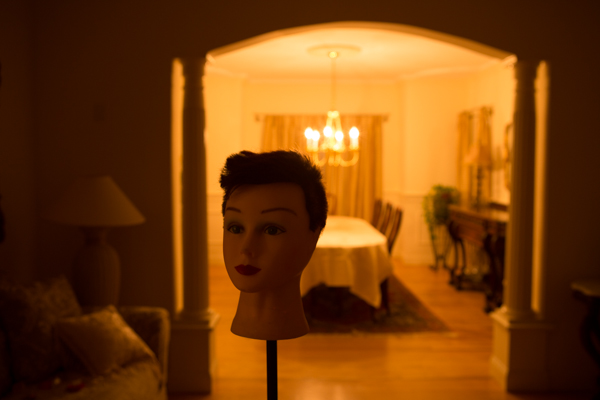
Same scene as above captured with the camera set to Daylight White Balance

Same scene as above captured with the camera set to Daylight White Balance

The Problem

The background room is lit by tungsten bulbs (typically around 3200°K). We will use a flash to light the main subject (approximately 5500°K).  This is a considerable difference that you will need to resolve. So if you can make both the light sources match in color temperature, you can then set the WB on your camera to that, and get a perfectly balanced image.

The Solution

To achieve this balance, you will use a color correction gel on your flash, to match the orange color of the tungsten bulbs. Theoretically both sources will now produce the same color. So if you set your camera’s WB to “tungsten” you will capture the background without any colorcast and it will look neutral. What about your primary subject? Since the flash output has been color modified to “tungsten”, the entire scene will look natural and devoid of any colorcast as long as the lights are close to the color temperature of tungsten.

Color correction is achieved using gels. These gels are manufactured by companies like Roscoe, Lee and ExpoImaging. Gels come in all sizes from large rolls to precut sheets. My preferences are the Rogue Gels made by ExpoImaging as they are the perfect size for flash heads and are attached using an elastic band. Each gel is marked for its strength and light loss. As a starter, for under $ 10 you can buy sample packs from most lighting supply stores.

Gels that create yellow/orange light are known as CTO gels (Color Temperature Orange). These gels are available in various strengths as follows:

  • 1/8 CTO Converts 5500°K to 4900°K
  • 1/4 CTO Converts 5500°K to 4500°K
  • 1/2 CTO Converts 5500°K to 3800°K
  • 3/4 CTO Converts 5500°K to 3200°K
  • Full CTO Converts 5500°K to 2900°K

I recommend you start with a full CTO and adjust by adding or reducing the color temperature correction by either combining gels or using gels of lesser strength. Since these gels add color they also reduce the amount of light transmitted. Based upon the gel that you are using, you will need to compensate for the loss of light. The typical light loss is mentioned in “f” stops with each gel strength. This information is typically imprinted on the gel or provided on a backing sheet of paper. You should use this information as an initial guideline for compensating your exposure.

This method will work reasonably well. However, it is not the most accurate, as it relies purely on a visual color correction. See the result in the following image:
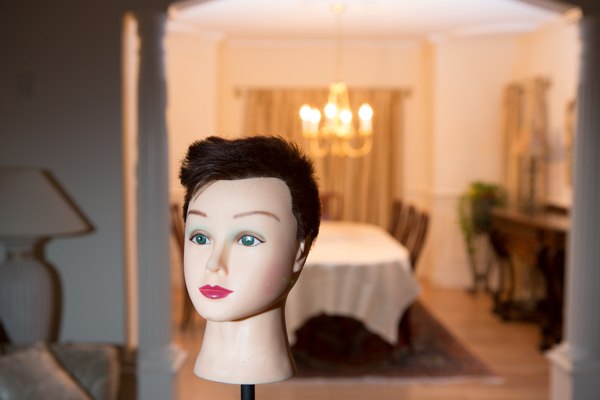
The camera White Balance is set to Tungsten and the flash is gelled using a Full CTO

The camera White Balance is set to Tungsten and the flash is gelled using a Full CTO

Notice that the color of the subject is fairly accurate but the background is still a bit yellow/orange. The color temperature of the lights in the background may not be true 3200°K.

Method Two – Gels on the Ambient Light Source

In the second method, you will use gels over the offending lights if at all feasible. In this example consider it not feasible. However, you can use additional flash heads to overcome the problem of the tungsten colorcast. You do this by applying an opposing color gel to one or more flash light sources to fill the background. Keep in mind that based upon the size or the area and the intensity of the ambient light in the background, this too may not always be feasible. Take the additional flashheads (make sure they can be fired as slaves) and put a CTB (Color Temperature Blue) gel on each. What you are attempting to do is to negate the effect of the Tungsten by adding blue light to the ambient environment. Test your exposure and set the camera to “flash” white balance. Once again, you may need to add or subtract the gel intensity.
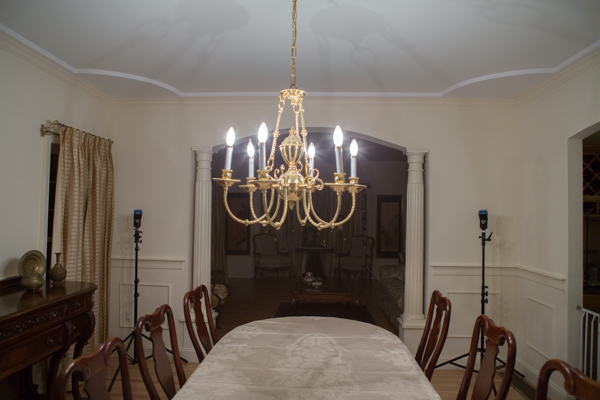
The set up. Note how the flash heads are concealed from view

The set up: note how the flash heads are concealed from view and pointed into the room that is the background

The CTB gels like CTO gels are available in multiple strengths as follows:

  • 1/8 CTB Boosts 3200°K to 3300°K
  • 1/4 CTO Boosts 3200°K to 3500°K
  • 1/2 CTO Boosts 3200°K to 3800°K
  • 3/4 CTO Boosts 3200°K to 4100°K
  • Full CTO Boosts 3200°K to near daylight

Once you are satisfied with the background color, go ahead and photograph the primary subject. Do not gel the main flash and leave the white balance on “flash”.
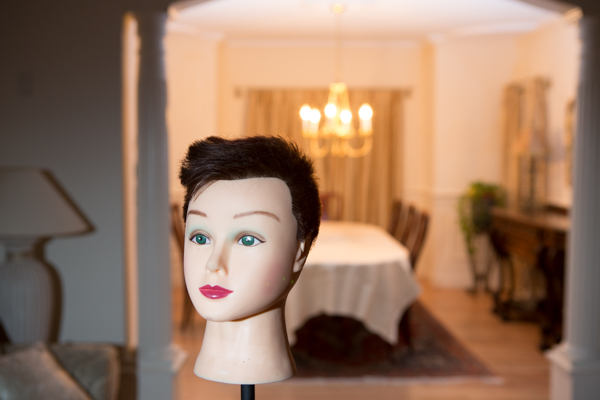
Color Bal

Color Correction using blue gels in the background

In each of the cases above there is still some color cast in the final image. This is because the lights in the background are not true 3200°K and we have been relying on tungsten color temperature for our corrections.

Method Three – Custom White Balance for Background and Matching Gels on Flash

Here you use custom white balance to establish an exact white balance setting for the ambient light. It is best to use a “white balance card” or a device like the X-Rite Color Checker Passport.

Color Checker Passport in Ambient Light

Image captured of  a Color Checker Passport in ambient light

Zoomed in for creating a Custom White Balance

Color Checker Passport – Zoomed in for creating a Custom White Balance

Image of the Color Checker Passport after Custom White Balance was established

Image of the Color Checker Passport after Custom White Balance was established

If possible, bring that image into Lightroom or Adobe Camera Raw and determine the actual color temperature. In this case, it is 2400°K, which, as you can see, is vastly different from the 3200°K tungsten. No wonder there was still a yellow colorcast in the first method. Use this measurement to establish the gel strength needed for the primary flash. If you cannot use Lightroom or any other software to obtain an accurate color temperature reading, you will need to do a bit of trial and error to determine how much CTO to use. In this case we need to get to 2400°K. A full CTO will drop 5500°K to 3200°K and a 1/8 CTO will drop an additional 600°K bringing the correction to 2600°K which is fairly close to what we need. Leave the camera set to the custom WB and gel the flash with one Full CTO gel and one 1/8 CTO gel to get a well balanced image.
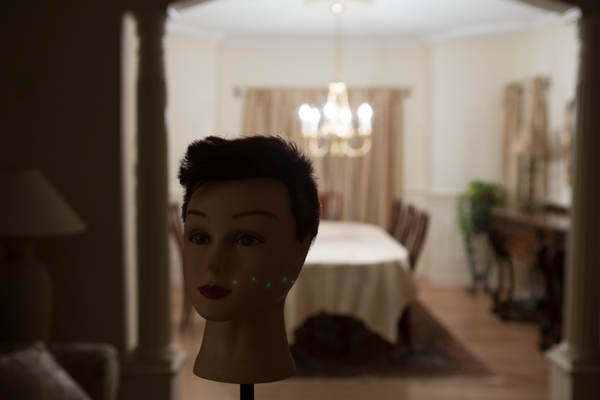
The correct White Balance for the background
The correct White Balance for the background


Using a Full CTO on flash head
Using a Full CTO on flash head

Flas with 1 CTO plus 1/8 CTO

Flash with a Full CTO plus a 1/8 CTO – a well color balanced image
One full CTO and one 1/4 CTO – the subject is a bit warm

One full CTO and one 1/4 CTO – the subject is a bit warm

In Conclusion

Always keep a set of color correction gels in your bag if you use flash on location.  Not only will you need them for indoor flash photography but the CTO gels are a ideal when using flash for portraiture at sunrise or sunset.

The post Balancing Color for Flash and Ambient Light using Gels by Shiv Verma appeared first on Digital Photography School.


Digital Photography School

 
Comments Off on Balancing Color for Flash and Ambient Light using Gels

Posted in Photography


Take Photos All Day WithThe Power Boost Keychain

13 Jan

Extra photos for bloggers: 1, 2, 3

A smartphone with no battery power is like bread with no butter. Inedible. Also, you can’t take pictures with it. Boo.

With the Power Boost Keychain in your pocket, you’ll always have the power you need to photograph all that you behold. Yay!

No plug? No prob. It’s a backup battery ready to give your iPhone or Android a 30% boost.

All the cables are built right in, so you’ve always got the right connector to give your phone a charge.

And since it lives on your keychain, it’s always ready to replenish your picture-taking power.

Learn More About the Power Boost Keychain
$ 40 at the Photojojo Shop

Now someone invent a butter keychain, plz.


© laurel for Photojojo, 2014. |
Permalink |
No comment |
Add to
The Power Boost Keychain”>del.icio.us

Post tags:


Photojojo

 
Comments Off on Take Photos All Day WithThe Power Boost Keychain

Posted in Equipment


13. Januar 2014

13 Jan

Ein Beitrag von: Lukas Leonte

Safety And Hope © Lukas Leonte


kwerfeldein – Fotografie Magazin

 
Comments Off on 13. Januar 2014

Posted in Equipment


Mount St. Helens images found decades later

13 Jan

772191_Reids_lost_roll_18a_r770x495.jpg

New images of Washington’s Mount St. Helens have been recently discovered. Reid Blackburn, a staff photographer for the The Columbian newspaper, took photographs in a flight over the volcano in April 1980. When he got back to the paper’s studio his roll was set aside and never developed. Until now. Learn more

News: Digital Photography Review (dpreview.com)

 
Comments Off on Mount St. Helens images found decades later

Posted in Uncategorized


zwei|sekunden – Ein iPhone-Fotoprojekt

13 Jan

Ein Beitrag von: Martina Woll

Mit dem iPhone knipse ich seit circa zwei Jahren. Eigentlich hatte ich es mir damals nur wegen der Kamera und Hipstamatic gekauft – ideal als Immer-Dabei-Kamera – naja, und die Sucht eines Fotografen – Ihr kennt das vielleicht.

Und ich war begeistert von der Idee, die Bilder je nach App nicht mehr nachbearbeiten zu müssen und gleich online stellen zu können. Mit der Zeit gesellten sich viele weitere Foto-Apps hinzu, sei es zur Bildbearbeitung oder diverse Retro-Kamera-Apps. Anfangs war es reine Knipserei, die so nach und nach ernster und „seriöser“ wurde.

© Martina Woll

Ich fotografiere fast alles, was mir über den Weg läuft, egal mit welcher Kamera. So auch mit dem iPhone, von Alltagsszenen bis hin zu Portraits. Ich mag das Experimentelle in der Fotografie; bei mir darf es gern mal unscharf, verwackelt und unperfekt sein.

Nach diversen App-Experimenten wurde ich auf „Slow Shutter Cam“ aufmerksam, mit der man die Belichtungszeit beliebig einstellen kann. Da ich ein Fan von Langzeitbelichtungen bin, musste ich auch diese App haben.

© Martina Woll

Zunächst machte ich im Stehen Aufnahmen von meiner Umgebung, indem ich die Kamera leicht umher bewegte, während sie in der eingestellten Zeit aufnahm. Und das freihand – so ganz und gar unnatürlich für Langzeitbelichtungen, für die man normalerweise ein Stativ benutzt, damit das Bild nachher auch scharf ist.

Denn jede kleine Bewegung ist da tödlich. Aber gerade das Unscharfe interessierte mich. Ich fotografiere, weil ich nicht malen kann, aber hier wollte ich „malen“. Meine Bilder mache ich mittlerweile hauptsächlich, während ich im Auto sitze. Als Beifahrer knipse ich gern während der Fahrt die Landschaft, die an mir vorbeizieht, ob Natur- oder Stadtlandschaft.

Irgendwann tat ich das mit der neuen App und die Bilder bekamen durch die zusätzliche Bewegung des Autos eine noch stärkere Bewegungsunschärfe als die Aufnahmen, die während des (langsamen) Gehens oder Bewegens entstanden waren.

© Martina Woll

© Martina Woll

Mit der Belichtungszeit von zwei Sekunden habe ich dann die für mich ideale Zeit gefunden, um die Motive schön verwischen zu lassen. Bei der ersten Version der App war das Display während der Aufnahme schwarz und man musste sich vom Ergebnis überraschen lassen.

Mit der aktuellen Version lässt sich auf dem Display die Aufnahme verfolgen, man kann das Bild also bewusst mitgestalten und beeinflussen. Ich liebe es beispielsweise, Häuser im Vorbeifahren mitzuziehen, damit man sie noch leicht erkennen kann. Es darf aber auch abstrakt werden!

Trotz dieser Kontrolle bei der Aufnahme sind die Bilder immer noch Zufallsprodukte. Oft ist viel Ausschuss dabei und dann erwische ich Tage, an denen ich jedes einzelne Bild verwenden könnte und möchte. Zu Beginn habe ich noch jedes gute Bild ausgewählt, bearbeitet und hochgeladen.

© Martina Woll

Mittlerweile selektiere ich mehr und versuche nur noch die wirklich besten zu zeigen, auch um eine gewisse Qualität zu erhalten und die Leute, die meinen Arbeiten folgen, nicht zu sehr mit Bildern zu überfluten. Manchmal gelingt mir das, oft eher nicht – aber ich arbeite dran.

Langweilig wird das Ganze für mich nicht, auch wenn es fast nur Häuser und Landschaften sind, die ich für dieses Projekt fotografisch festhalte. Aber es gibt so viele Häuser und Landschaften, so dass immer wieder unterschiedliche Bilder mit ganz eigener Wirkung entstehen.

© Martina Woll

© Martina Woll

Eine weitere Möglichkeit, etwas Pepp in das Ganze zu bringen, ist, die Bilder nachts bzw. im Dunkeln zu machen. Es liegt vielleicht an der Jahreszeit, dass ich überhaupt auf die Idee kam. Denn momentan ist es ja recht früh dunkel und die Straßen und Häuser sind schön beleuchtet, was wieder einen etwas anderen Effekt auf die Bilder hat.

Dennoch gefallen mir die Ergebnisse, die im Hellen entstanden sind, etwas besser. Gelegentlich nutze ich die App auch für Experimente während meiner Portraitshootings oder bei Selbstportraits.

© Martina Woll

Ich werde von meinen Modellen zwar meist müde und ungläubig belächelt, wenn ich das iPhone zücke, aber von den Ergebnissen sind sie meist dann doch positiv überrascht. War es ursprünglich nur eine Spielerei mit einer App, ist es zu einem Fotoprojekt geworden, das mir sehr ans Herz gewachsen ist und das ich so schnell vermutlich nicht beenden werde.

Das iPhone habe ich schließlich immer bei mir. Außerdem entwickelt man sich ständig weiter und so entwickelt sich vielleicht auch diese Serie weiter und es kommen andere Motive hinzu.


kwerfeldein – Fotografie Magazin

 
Comments Off on zwei|sekunden – Ein iPhone-Fotoprojekt

Posted in Equipment


UFO Abducted My GoPro Camera …

13 Jan

Phantom 2

UFO showed up over my backyard yesterday afternoon …

Phantom 2

it landed …

Phantom 2

abducted my GoPro camera …

Phantom 2 flying with GoPro camera

…and, flew away,

Phantom 2

disappearing in clouds. Well, almost …

Phantom 2

Will it return back?


paddling with a camera

 
Comments Off on UFO Abducted My GoPro Camera …

Posted in Photography


Battle of the titans: Top ball heads tested

13 Jan

introgroup.jpg

There is no denying the advantages of a tripod for improving your images in the studio or in the field, but a tripod is only three legs. It’s the tripod ball head that lets you point it wherever you’d like. There are a variety of head types that can improve your experience with the best set of tripod legs. We reviewed 10 similar ball heads. Find out which one best fits your needs. Learn more

News: Digital Photography Review (dpreview.com)

 
Comments Off on Battle of the titans: Top ball heads tested

Posted in Uncategorized