Month: October 2013

  • 3 Tips for Creating Dramatic Images using Motion

    motion-dps-09

    There is a common misconception that if your image isn’t tack sharp and free of motion blur then it isn’t a good image. I’d like to show you three ways you can use motion blur to add drama and interest to your photography.

    Misconception: motion blur in photography = a bad image

    I would disagree and say, not necessarily so! It really depends on the subject you are shooting and your intention as the photographer and artist. Using blur can add interest and show implied movement in the image. It can help add a feeling of speed. If your are shooting a subject like sports, for example, you have use a fast lens and fast shutter speed to freeze motion at the peak of the action. OR you can introduce intentional motion blur by using a slower shutter speed to add a sense of speed. Neither is right or wrong, they’re just different. You get to choose and if you aren’t sure, do both!

    Three tips for adding motion to your images

    • panning a moving subject
    • long exposures for affect
    • zooming or moving the camera during the exposure

    Let’s look at each in more detail.

    PANNING

    DandC-Feb2013-0011-PPT

    Panning is a technique for photographing moving subjects which allows you to get the subject relatively sharp, and blur the background. This adds a sense of speed and works particularly well when you have a background that is unattractive or distracting. The basics behind panning is you choose a slow shutter speed, and move your camera to follow the subject. Here are some tips on setting your camera for panning and giving it a try.

    • use high speed or “burst” shooting mode to take multiple images while holding down the shutter button
    • select Shutter Priority on your mode dial
    • start with 1/30th of a second and adjust slower and faster as necessary
    • practice following the moving object after it passes by
    • just like in golf, follow through is the key. Point your camera towards the approaching subject, shoot and follow them as they move through your field of view, and keep following their motion even after you stop shooting.

    It takes a little bit of practice and a lot of trial and error but can result in some really stunning and creative images. Try shooting the same subject using a fast shutter speed and freezing the motion, then try panning and compare. It’s not something you will use for every subject, but it’s a good technique to have in your bag of tricks!

    Here are a few examples of panning.
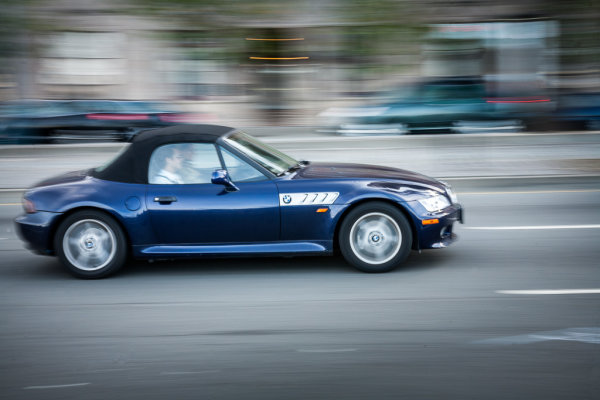
    SanFran-2012-1090-PPT

    1/25th of a second panned

    DandC-June13-0092-PPT

    1/30th of a second, panned

    SanFran-2012-0893-PPT

    1/25th of a second, panned

    LONG EXPOSURES

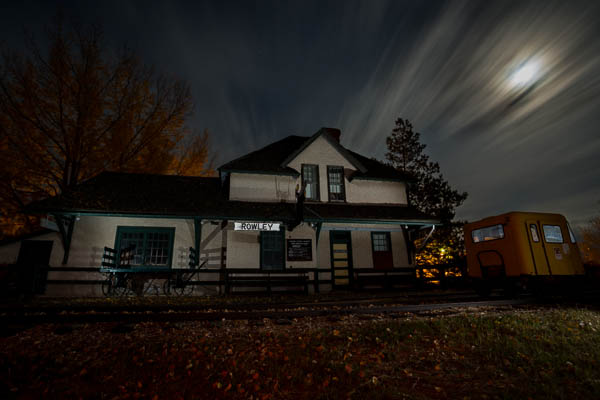
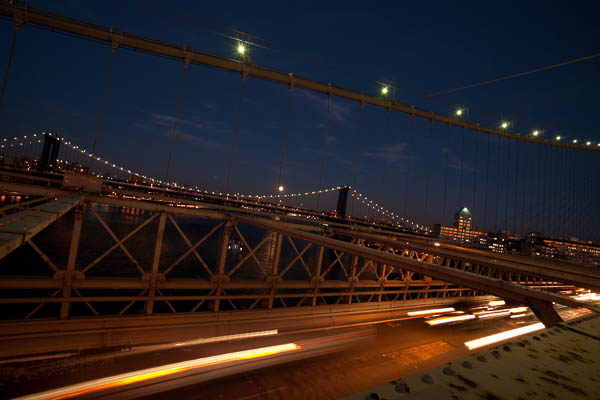
    By long exposures I’m taking about a shutter speed slower than you would usually be able to hand hold the camera. There are many reasons to use long exposures including: moving water, capturing star trails at night, car headlights moving through your scene, and night photography in general. You will need a sturdy tripod, a remote trigger to fire your camera and time. I say time for two reasons: one you will have to wait for some really long exposures sometimes, especially star trails; and two because you will need time to shoot, adjust and correct. A lot of photography is trial and error and in this age of digital photography we have the huge benefit of being able to have instant feedback so we can correct or adjust in the field and continue shooting.

    Here’s an example of the same subject photographed at different shutter speeds. Which do you prefer?

    1/5000th of a second
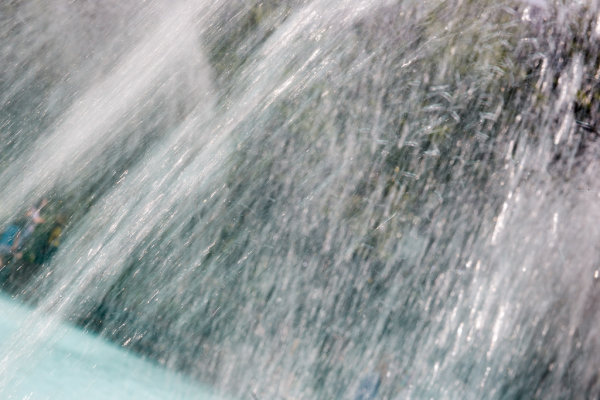
    1/5000th of a second

    1/40th of a second

    1/40th of a second

    Besides night photography another common reason to use long exposures during the day is to photograph waterfalls and moving water. Keep in mind neither approach is right or wrong, you just yield different results based on the choice you make. A faster shutter speed will freeze the water in mid air (like the first image above). A long exposure will blur the water, and if you use a long enough exposure it can even disappear or become misty looking. Here’s a comparison:
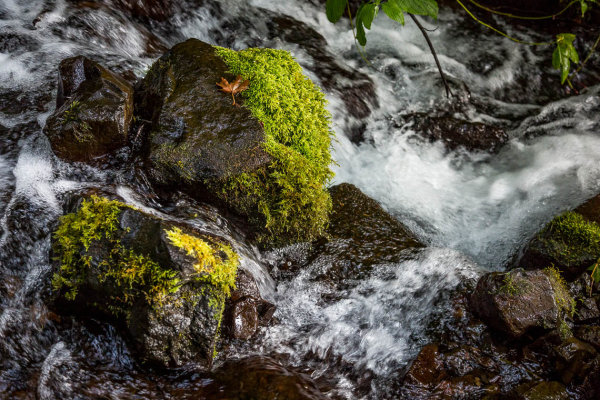
    1/100th of a second
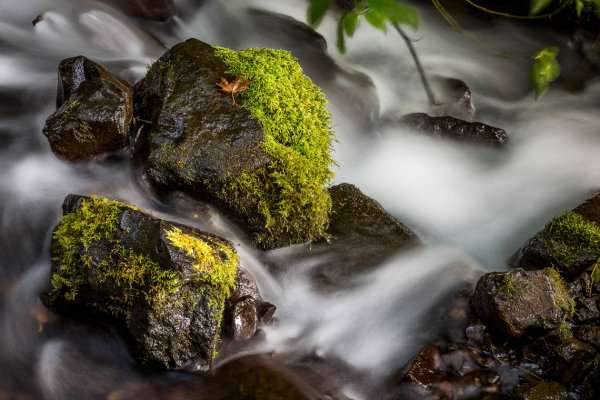
    1/100th of a second

    2.5 seconds

    2.5 seconds

    With moving water, there also comes a point where doing a longer exposure doesn’t look any different. Compare the image below a 5 seconds, to the one above at 2.5 seconds. The water looks pretty similar, but what did happen was the tree above was blurrier in the 5 second one, so I chose to use the 2.5 exposure.
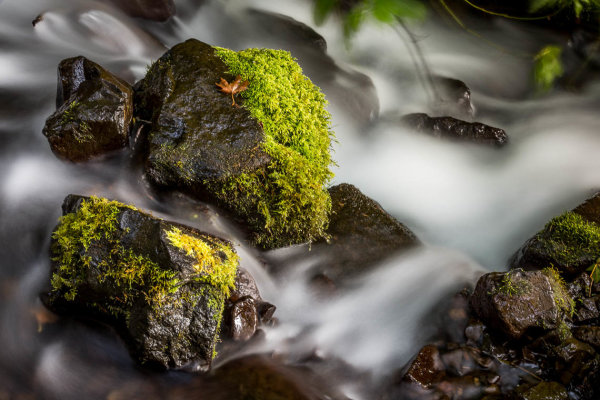
    5 seconds

    5 seconds

    Here are a few more examples of long exposures.

    Do you see the motion in the images below? What is moving in each?
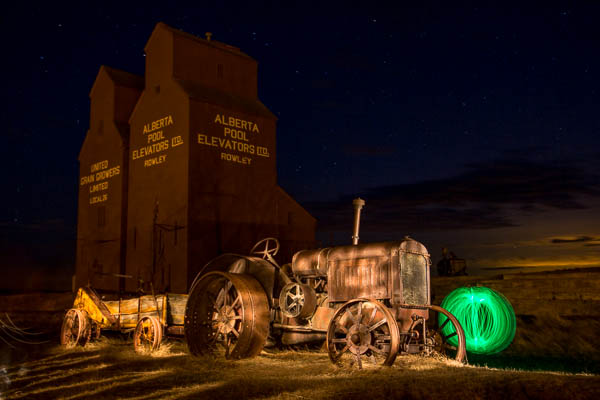
    motion-dps-01 motion-dps-02 motion-dps-03 motion-dps-04 motion-dps-05

    For more information on how to shoot these types of scenes read:

    • 15 Tips for Successful Fireworks Photography
    • Three Special Effects for Night Photography

    ZOOMING

    Last but not least, you can add motion by zooming your lens during the exposure. Basically what you do is physically rotate your zoom lens to change the focal length during a long exposure. This works really well and gives some really neat affects on night scenes with lights, neon signs, and even fireworks. But try it during the day too and see what you can create. It often results in a rather abstract image, sometimes completely obscuring the subject to make it unidentifiable. But that’s okay! Experiment and play with this idea. Have fun with it and get creative.

    Some tips for zooming during your exposure:

    • Zoom in first to focus and lock it there so it doesn’t shift when you press the shutter button. You can use focus lock (a bit cumbersome), use autofocus and then turn it off, or use your camera’s back button focus capability. Whichever you choose just make sure you’ve focused with the lens at the longest focal length where it’s more critical than a wide one
    • Practice rotating the zoom mechanism on your lens. Get comfortable with which way to turn it, and how to turn it smoothly without making a bumpy mess.
    • Use an exposure of one second or longer. It’s pretty hard to do this a a/100th of a second!
    • Experiment with different zoom speeds (how fast you rotate the lens) and timing. The image will look different if you pause at the beginning and then zoom quickly, versus zoom slowly at the beginning and pause at the end of the exposure.

    Here are a few examples of zoomed exposures
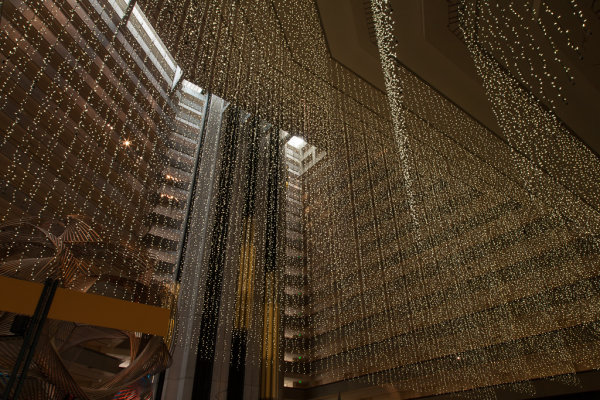
    No zoom

    No zoom. Notice all the small lights in this hotel lobby.

    2 seconds

    2 seconds

    Also 2 seconds, notice how different they are? That's the zoom timing.

    Also 2 seconds, notice how different they are? That’s the zoom timing.

    2.5 seconds. Abstracted image of the sculpture in the first non-zoomed image (bottom left corner)
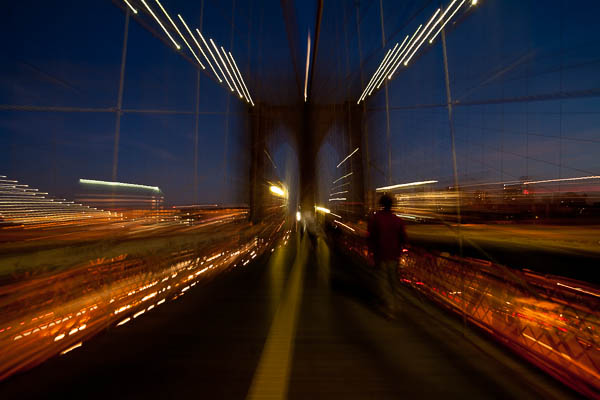
    2.5 seconds. Abstracted image of the sculpture in the first non-zoomed image (bottom left corner)
    motion-dps-06

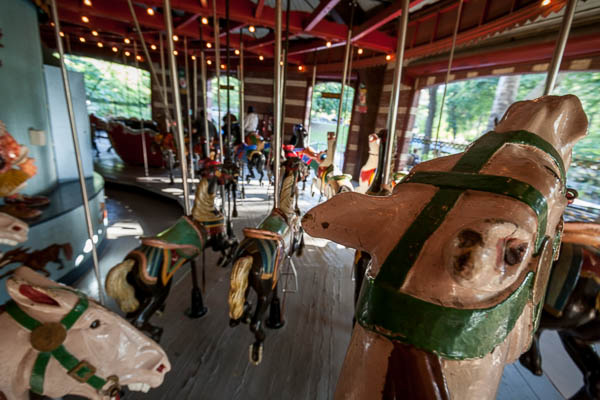
    No zoom, I thought it was boring so I played with panning and zooming while on the carousel. Parents were looking at me funny after my 4th time around.
    No zoom, I thought it was boring so I played with panning and zooming while on the carousel. Parents were looking at me funny after my 4th time around.

    motion-dps-08

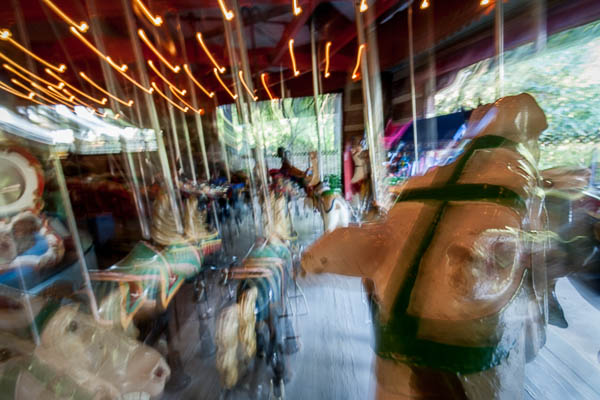
    Zoomed version. Is it better? Debatable but it’s the process of playing that leads to creating great images. Always continue to play.

    ACTION PLAN

    If you haven’t really played with long exposures much, I challenge you to try some of these techniques. Find some moving subjects and blur them on purpose. Or find something that will make an interesting abstract and blur it by zooming.

    The point is that not every image has to be tack sharp and some have absolutely nothing in focus and they’re still great images. Don’t get stuck on technical things like sharpness and try experimenting with out of focus for a while. Add some motion using these tips, or maybe even shoot completely out of focus on purpose. Come back and share your images and experience with us.

    Have you got some great motion blur images? Do share those as well in the comments below.

    Got another tip you want to add to the list?  Please do!

    Cheers,

    Darlene-1-250x130


    Post originally from: Digital Photography Tips.

    Check out our more Photography Tips at Photography Tips for Beginners, Portrait Photography Tips and Wedding Photography Tips.

    3 Tips for Creating Dramatic Images using Motion

    The post 3 Tips for Creating Dramatic Images using Motion by Darlene Hildebrandt appeared first on Digital Photography School.


    Digital Photography School

  • Augenschmaus: Herzhafte Muffins mit Basilikum

    Ein Beitrag von: Aileen Wessely

    Muffins sind eine tolle Erfindung, nicht nur, weil sie lecker schmecken, sondern auch, weil sie (meistens) sehr schnell gemacht sind und eine handliche Sache für Mitbring-Partys sind. Aber ganz ehrlich: Nach einem süßen Muffin ist mein Zuckerbedarf meistens für eine Woche gedeckt. Deshalb heute eine herzhafte Variante.

    Wenn man diese Basilikum-Muffins im Ofen hat, riecht es schon ganz wunderbar. Schließt man die Augen und zieht nur den Duft ein, könnte man meinen, da brutzelt eine Pizza im Ofen. Und so ähnlich schmecken sie dann auch: Nach Süden, deftig komprimiert in einer Handvoll Gebäck.

    © Aileen Wessely

    Portionen: 12 Stück
    Zeit: ca. 1 Stunde (inklusive Backen)

    Zutaten

    300 g Mehl
    400 ml (Pflanzen-)Milch
    100 ml Olivenöl
    1 Tüte Backpulver
    2 EL braunen Zucker
    1 TL Salz
    1 TL Pfeffer
    20 g frische Basilikumblätter
    18 schwarze Oliven
    6 eingelegte, getrocknete Tomaten

    Wer eine eigene große Basilikum-Pflanze hat, kann gern auch die bis zu vierfache Menge frisches Basilikum verwenden – einzeln gekauft ist das nur recht teuer. Die Muffins werden dann richtig grün und schmecken auch umso intensiver. Pfeffer und Salz am besten auch frisch gemahlen verwenden.

    © Aileen Wessely© Aileen Wessely

    Zubereitung

    Den Backofen auf 200 °C vorheizen und das Muffinblech fetten oder die Formen mit 12 Muffinpapieren bestücken. Die Oliven und Tomaten in kleine Stücke schneiden. Die Basilikumblätter sehr fein hacken. Wenn Du dafür eine Küchenmaschine verwendest, kannst Du das zerkleinerte Basilikum gut mit der Milch aus dem Gefäß spülen.

    Die trocknen und flüssigen Zutaten jeweils getrennt gut vermischen. Alles zusammengeben und zügig (nicht zu lange) vermengen. Die Oliven und Tomaten dazugeben und nur kurz unterheben. Den Teig gleichmäßig in der Form verteilen, die Muffins für 15 – 20 Minuten backen und danach etwas auskühlen lassen. Noch warm schmecken sie am besten.

    © Aileen Wessely

    Fotorezept

    Zugegeben, diese Fotos sind sehr improvisiert, morgens in der Küche, als es eigentlich noch etwas zu dunkel war. Da kommen mir das lichtstarke 50mm f/1.4 und das gute Rauschverhalten der 5D II sehr entgegen. Die starken Schlagschatten vom einzigen Fenster im Raum habe ich mit einem Reflektor etwas abgemildert. Die aufeinandergelegten zwei Papiersorten ergeben einen Horizont, an dem sich Basilikum-Zypressen oder Muffin-Räder aufreihen lassen.

    ~

    Du hast auch ein leckeres Rezept und die passenden Food-Fotos dazu, die einem das Wasser im Munde zusammenlaufen lassen? Dann werde einfach selbst Teil von „Augenschmaus“!


    kwerfeldein – Fotografie Magazin

  • Posing 101: How to Pose in Pictures Like the Hottest Model Anywhere

    In most of the photos that you see yourself in, whether candid or professional, there will always be a feature of them that you point out in dislike. Whether there are couple of lumps and bumps on show, the universally hated ‘double chin’, or that you believe that you’ve picked up two clothing sizes as soon as that shutter button Continue Reading

    The post Posing 101: How to Pose in Pictures Like the Hottest Model Anywhere appeared first on Photodoto.


    Photodoto

  • Stephen Leslie und sein Tagebuch

    Ein Beitrag von: Stephen Leslie

    Soweit ich es verstanden habe, ist eine der Hauptfunktionen des menschlichen Gehirns, die Menge an Informationen, die wir empfangen, zu filtern. Es ist unmöglich, alle Impulse, die auf uns an einem einzigen Tag einprasseln, zu verarbeiten und deshalb selektiert das Gehirn, was wichtig ist und verwirft den Rest. So ungefähr sehe ich die Fotografie.

    Damit filtere ich vom alltäglichen Wirrwarr und Chaos das heraus, was für mich interessant ist. Ich versuche, aufgrund meines Instinktes das zu fotografieren, was nur für kurze Zeit zu sehen ist.

    Busted at the bus stop © Stephen Leslie

    Wenn das Foto funktioniert – wunderbar. Dann habe ich ein Bild, das ich in den kommenden Jahren studieren und mich daran erfreuen kann. Wenn es missraten ist, bleibt es einfach weiter Teil des üblichen Chaos.

    Das ist auch der Grund, warum ich noch immer auf Film fotografiere und ich mag es, darauf zu warten, bis die Bilder entwickelt sind. Digital würde ich dieses nervöse Gefühl der Antizipation vermissen und das könnte dem gesamten Prozess die Magie rauben.

    Multiplicity © Stephen Leslie

    Vor ungefähr 14 Jahren begann ich, ein visuelles Tagebuch zu führen. Das bedeutete, jeden Tag ein Foto zu machen.

    Weil das alles noch vor dem Internet war – oder zumindest vor Massen-Fotoseiten wie Flickr – druckte ich jedes Foto aus und klebte es in ein kleines schwarzes Buch, gespickt mit Aufnahmedatum und ein paar Notizen über das Foto: „Selbstportrait auf der Toilette“ oder „Tollwütige Katze attackiert Schulpicknick“.

    Alle drei Monate fertigte ich ein neues Buch an und machte weiter. Für ganze zwei Jahre habe ich so mein Leben dokumentiert. Am Ende der Zeit war ich zwar fertig mit dem Projekt, jedoch ganz und gar der Fotografie verfallen – hauptsächlich der Straßenfotografie.

    This can only end badly © Stephen Leslie

    Obwohl ich mich aktuell nicht mehr diszipliniere, jeden Tag ein Foto zu machen, gehe ich niemals ohne Kamera aus dem Haus und sehe meine Fotos immer noch als Tagebuch. Sie zeichnen mein Leben auf; nichts davon ist gestellt oder geplant und ich fotografiere einfach, was mir begegnet.

    Vielleicht ist das auch der Grund dafür, warum ich selten speziell unterwegs bin, um zu fotografieren. Die große Mehrheit meiner „Arbeit“ mache ich, während ich auf dem Weg zur Arbeit bin, einkaufen gehe, reise oder mit meinem Sohn zum Spielplatz gehe.

    Almost... © Stephen Leslie

    Ich hänge niemals herum oder warte ab, dass irgendwas passiert. Sondern ich halte fest, was ich sehe, während ich unterwegs bin.

    Außerdem arbeite ich nicht wirklich an spezifischen Projekten, obwohl sich über die Jahre bestimmte Themen und Besonderheiten aufgetan haben: Große Oberlippenbärte, Dinos, Hunde, alte Menschen, alles Bizarre oder was offensichtlich fehl am Platze ist.

    He's in for a long wait © Stephen Leslie

    Ich strebe immer an, dass das Foto einen zentralen Bezugspunkt hat und, falls möglich, witzig ist. Auf Flickr gebe ich allen meinen Aufnahmen Titel und manche Leute denken, dass das vom Bild ablenkt, aber ich möchte das Foto aufwerten und eine zusätzliche Bedeutungsebene oder Humor einbauen.

    Sobald wir ein Foto aufnehmen, arbeiten wir an der Realität und für mich ist das Hinzufügen eines Titels schlicht die Fortführung dieses Vorgangs.

    ~

    Vor Kurzem habe ich angefangen, Portraits auf der Straße mit einer Mittelformatkamera aufzunehmen. Ich mag diese plötzliche Formalität verglichen mit üblicher Straßenfotografie. Es bringt einen dazu, mit den Menschen zu interagieren und fordert heraus, was immer eine gute Sache ist.

    Street Portrait © Stephen Leslie

    Obwohl ich das alles nun 14 Jahre lang mache, sehe ich mich immer noch als Einsteiger. Obwohl mein größter Wachstums-Schritt ist, es auch zu schätzen, ein Foto nicht zu machen. Dies ist ein weiterer Vorteil der Arbeit mit Film: Es ist teurer und so denkt man mehr über jedes einzelne Foto nach.

    Dieser Artikel wurde von Martin Gommel aus dem Englischen übersetzt.


    kwerfeldein – Fotografie Magazin

  • Your Real Estate Agent Would Like Some Free Photography, Please

    Please pardon the detour today. I need to rant. I'd like to share with you the ballsiest request for free picture use that I have ever gotten…

    Read more »
    Strobist

  • Back from the dead: Fujifilm boosts X100 with major firmware upgrade

    x100.jpg

    Following recent updates to the X-Pro1 and X-E1, Fujifilm has released a major upgrade to the X100, the original (now-discontinued) X-series model, which was announced back in 2010. Since its release, the X100 has benefitted from a series of major firmware improvements, and the latest – likely to be the last – offers faster startup time, and improvements to automatic and manual focus. Firmware v2.0 is available for download today. Click through for our opinion on this announcement, and the official press release.

    News: Digital Photography Review (dpreview.com)

  • Fujifilm XQ1 puts X-Trans sensor into an ultra-compact body

    X-Q1_Black_Front_Right_Wide.png

    Fujifilm’s new XQ1 enthusiast compact takes the fast lens and slim design from last year’s XF1 and adds a 12 megapixel 2/3″ X-Trans II CMOS sensor with hybrid AF. The XQ1 features a 25-100mm (equiv.) F1.8-4.9 lens with optical image stabilization and claimed focus times as fast as 0.06 seconds. Other features include a 3-inch LCD, lens control ring, focus peaking, Raw support, 1080/60p video, and Wi-Fi. You’ll be able to pick one up for yourself this month for under $ 500.

    News: Digital Photography Review (dpreview.com)

  • Fujifilm announces X-E2 – second generation mid-level mirrorless

    X-E2_Silver_Front_18-55mm.png

    Fujifilm has announced the X-E2 – its latest mid-range mirrorless interchangeable lens camera. The X-E2 gains many of the upgrades seen in the X100S, including on-sensor-phase-detection that underpins the company’s unique digital-split-image focus aid. Beyond this the 16MP X-Trans camera has received a series of hardware adjustments and revisions in response to feedback about the X-E1.

    News: Digital Photography Review (dpreview.com)

  • X-Trans in your pocket: First Impressions Review of Fujifilm’s XQ1

    XQ1.jpg

    The Fujifilm XQ1 – the follow up to the stylish XF1 – is the company’s latest attempt to make a splash in the high-end compact camera segment. The big change on the XQ1 is its use of the X-Trans II sensor with on-chip phase detection, which promises higher photo quality and snappy focusing. If that sounds intriguing, then read our initial thoughts in our first impressions review of the Fuji XQ1.

    News: Digital Photography Review (dpreview.com)

  • First Impressions Review of Fujifilm X-E2 midrange mirrorless ILC

    X-E2preview.jpg

    The X-E2 represents the start of Fujifilm’s refresh of its X-series mirrorless interchangeable lens cameras. It features a 16MP X-Trans CMOS II sensor that gains on-sensor phase detection over the one used in previous models. This and a 1.04m dot LCD are the major hardware changes – the X-E2 is mainly about handling and operations tweaks. We’ve got to grips with the camera’s handling to see how it’s changed, compared to the X-E1. Click through to find out more.

    News: Digital Photography Review (dpreview.com)