RSS
 

Archive for July, 2013

4 Quick Tips For Getting The Most Out of Lightroom Presets

25 Jul
Image created with Daylight to Sunset preset

Image created with Daylight to Sunset preset

This post was written to coincide with my latest deal over at the DPS sister site – Snapndeals. Over the years I’ve created and stockpiled tons of presets in Lightroom, just for personal use. I finally made them available to the public earlier this year at the request of many of my blog readers and the feedback has been amazing! The collection on Snapndeals includes all of the presets I have released (80 total in 7 different groups) and they are all, of course, fully customizable. I put a ton of work into these and I really think you will love them!

So Lightroom presets are something I’ve become really obsessed with. I use them with pretty much 100% of my family photos and about 70-80% of my other images. Sometimes it’s just one click and I can take an image from it’s RAW state to a completely post processed and finished image. Other times I can apply a preset and be about 80-90% finished. From there it’s just a few minor adjustments to get the image looking great but the total time saved by adding the preset is still incredibly valuable. So here’s a few tips for using my new JamesB Lightroom Presets to help your workflow and create amazing images. Let’s go!

1) Spend Some Quality Time Familiarizing Yourself With The Presets

I’ve found that using presets becomes more efficient the more you use them. If you use them rarely, you aren’t very familiar with the presets you own. Therefore, when it comes time to use one you have to wade through them all to find the right one which can take a lot of time (especially with a collection of 80 presets like this one). When you use presets regularly you memorize where each one is, you know where your favorite presets are and how to get to them fast, you know which presets will work better for certain images. When you get into this mindset, your workflow in Lightroom really becomes optimized. And who among us doesn’t need more time on our hands?

I broke the presets into 7 different groups and each group has presets that were specifically designed for different genres/styles of photography. That doesn’t mean you can’t use a portrait preset on a landscape image, I’ve done that several times. But more often that not, I use travel presets for travel images. Portrait presets for portrait images.

2) Create A New Folder For Your Absolute Favorite Presets

Screen Shot 2013-06-21 at 10.10.11 AMOver time, you’ll discover that there are certain presets that you use quite often. Feel free to create a new folder in your presets catalog and the drag your favorites into that one. A few of my favorites are Day At The Zoo and Bright and Sunny from my “Family Lifestyle” set, B&W Film Grain and B&W High Contrast from my “Monochrome” set, Sweet Pea Vintage in my “Nostalgia Film” set and Rome in my “Travel” set.

Creating a new folder in the presets panel is easy, although not very intuitive if you haven’t done it before. Clicking the + mark at the top right won’t do it, that’s just for creating new presets. You have to hover over your presets and right click, choose New Folder and then give the folder a name. Then it’s as easy as dragging the presets from one folder to another.

3) Don’t Be Afraid To Fine Tune

The Develop module can be pretty intimidating to those who haven’t used it before. There are a LOT of options over there. A lot of ways to make a photo look great, and a lot of ways to make a photo look terrible! When you add a preset, you’ll be able to see the changes that it made over on the right side of Lightroom. If the photo doesn’t look just how you were hoping, go over and play around with the sliders a bit to get it just where you want it. The truth is, there’s no preset out there that will work perfectly for every photo, so most of the time you will have to make slight adjustments.

4) Create Your Own!

Once you’ve used presets for a while, you will start to get more and more comfortable tweaking and fine tuning them to your taste. The more comfortable you get, the more you will start using certain looks time and time again. Feel free to use some of my presets as a base or a starting point. Then add to it, change it up, tear it down and rebuild it, then create new preset that’s all your own. I do this quite often and not only is it a great learning experience, to see how much work goes in to creating a great preset, it’s also a lot of fun!

Be sure to grab a set of the presets for yourself, I promise you’ll love them!

A Few Samples Of Images Created Using My Presets

_MG_2302 1DS_3478 1DS_5603 1DS_6004 Death_Valley_Cactus-X3


Post originally from: Digital Photography Tips.

Check out our more Photography Tips at Photography Tips for Beginners, Portrait Photography Tips and Wedding Photography Tips.

4 Quick Tips For Getting The Most Out of Lightroom Presets


Digital Photography School

 
Comments Off on 4 Quick Tips For Getting The Most Out of Lightroom Presets

Posted in Photography


5 Tips for Staying Infatuated With Photography

25 Jul

It takes a lot to hold my interest.  Scratch that—it takes a lot to get my interest, then hold it, and finally (and especially) to keep it.  This makes my dating life quite hard.  And sometimes my relationship with photography even harder.  And with less Happy Hours and coffee dates.  One bad shoot and I’m ready to sell my equipment and call it good.  And go work at Starbucks, where there are benefits and free coffee and cool mandatory aprons.  In my career that has spanned a decade, I have quit, retired, and ran away more times than Brett Farve.  (This comparison really only makes sense if you live in the States, but if you don’t just imagine David Beckham retiring a bunch of times, changing his mind and coming back, and you get the general idea.)

I always come crawling back to photography.  Like a moth to a flame.  Or a crazy ex-girlfriend to your doorstep in the middle of the night, begging for another chance.  Since I’m trying not to do that anymore (both the faux retirement and the crazy ex-girlfriend thing), I have come up with a couple of things that allow a little reset to my photography passion.  Or a jolting wake-up call to remind me of exactly what I love about photography.  Here are 5 of my favorites.  My 6th favorite: completely freak-out and skip town in the middle of the night never to be heard from again, is pretty self-explanatory.

PHOTO ONE

1. Take a Photography Vacation

Not the kind where you take your camera with you for beach sunsets and lively Main Street scenes of locals.  The kind where you go nowhere and your camera gets locked up safe and sound in a closet.  It may sound extreme, but a good week (or two…..or three) away may be just what the doctor ordered.  And what’s fair is fair: this means no Photoshop, no point and shoots, and no saying “if only I had my camera”.  Instead you get to think: how cool that I am seeing this with my own eyes this time and not through a lens.  I will permit an occasional cell phone photo, but only because if I make that off limits, you’ll just rebel anyway.  A week or two away and you’ll crave photography again with rested eyes and fresh ideas.

PHOTO TWO

2. Donate your Services and Skills

This one is my go-to and not only recharges me, but almost always brings me back good energy in some form.  There is no wrong way to do it—compassionately and with great tact, offer up your services to a family that is going through a rough time and may not be able to afford to document their lives at this time.  Or call a non-profit service and brainstorm a way that you taking a few shots could help their efforts in marketing.  Contact a nursing facility and ask if they would like you to donate an hour of your time on their next family day to photograph loved ones with people they don’t get to see often for free.  Hospice organizations, humane societies and animal shelters, and wildlife rehabilitation centers are always thrilled when a photographer is willing and interested in donating their special skill set to their cause.  The photo above is an Executive Director of a homeless outreach program and one of her beloved clients.  It has been featured in gallery shows, used for marketing collateral for their organization, and been auctioned for donation.  I did not receive a penny in compensation for it, but what I did get out of it both personally and professionally is vast and grand and worth more than any fee I’ve ever charged.

PHOTO THREE

3. Flip to the other Side

I am fascinated by this cell phone “selfie” phenomenon on social media right now.  And by “fascinated”, I mean terrified.  I’m not a fan of the other side of the lens in the first place, but you can darn well bet I sure don’t want to be on that other side, blindly taking a self-portrait with a bad camera phone in a bar or a car or whatever.  Not in a house, not with a mouse, not in a box, not with a fox.  However (and I hope you said that “however” with a big giant sigh like I wrote it), not only can it be helpful to getting back in a solid mindset but beneficial in many other ways.  I find that I seem to need a recent photo of myself often as a photographer.  And, let’s be fair here; if I’m not willing to have my picture taken once in a while how can I justify asking others to let me take theirs?  It’s a bit humbling, but also gives me new ideas to try when I’m on the other side.  The photo above (and also by my byline below) was taken by my 9 year old son.  He is darling and thoughtful and creative and perfect and takes after me.  Photography is just a basic part of our lives, so when I asked him to take a picture of me I could use professionally, it wasn’t that big of a deal to hand over two thousand dollars in equipment to a kid that had just used my hair dryer to try to power some Lego contraption he made.  I ended up with a couple of pictures that I like very much, but more than that, I got a bit of confidence and a lovely reminder of how great it feels to look at a picture of yourself you like.  I have the ability to do that for people.  And sometimes I need a little smack in the face to remind myself to stop being a whiney brat and be grateful for my abilities.  Or at the very least, to start renting out my kid.

PHOTO FOUR

4. Photograph something Different than you usually Do

This is a tough one for me, as I got into photography only because I like photographing people.  If you asked me how to take a great picture of a sunset, I would likely try to tell you a very long story about sunsets in hopes that you forgot what we were talking about in the first place.  I have zero interest in taking pictures that don’t involve people.  But I do have a pretty fancy camera and more editing knowledge stored in my brain than song lyrics and that’s saying something.  I also have a need to challenge myself.  For all I know, my best abilities lay in photographing bugs, but I’m never going to find that out if I don’t try.  (But let’s just assume I don’t have any abilities in bug photography and move on, you know?)  One time in a desperate attempt to detour a throwing-my-camera-out-the-window moment of frustration, I came across the picture above.  Taken on vacation a few years ago in Oregon.  And while the raw image is nothing that a true landscape photographer would even look twice at, a little editing and it’s become a photo I’m proud of.  It hangs in my home as the only non-people image allowed to grace the walls and I smile every time I walk past it.  It’s not fancy art.  But it serves as a great reminder that I have a good eye.

PHOTO FIVE

5. Get an Assignment

I’m not what you would call a “self motivator”.  I need things like deadlines and the promise of a cookie when I’m done to get me to actually finish a task.  I actually have to utilize an app that keeps my internet frozen for set times just so my mind doesn’t wander a bit while I’m waiting for a word to come to me and then BAM: I just blew an hour on Pinterest looking at pulled pork recipes and I don’t even eat pork.  When I find myself in a little photographic coma, I sometimes ask a friend to give me an assignment.  Maybe they need a picture of a yellow flower for their yellow flower bathroom.  Maybe they want a picture of their house for a keepsake.  Maybe they can’t think of anything either but know me well and are kind enough to lie to me and come up with something.  Either way, getting an assignment from someone else feels important.  It’s no longer about not feeling like shooting today; it’s about this friend needs this from me and I want to come through for them.  And usually what happens in this little scenario is that I realize I take terrible flower pictures and I need to get back out there and take the kind of pictures I’m good at.

And just like that, I’m recharged, ready, and back in the saddle.  Because to keep retiring gets exhausting.

Post originally from: Digital Photography Tips.

Check out our more Photography Tips at Photography Tips for Beginners, Portrait Photography Tips and Wedding Photography Tips.

5 Tips for Staying Infatuated With Photography


Digital Photography School

 
Comments Off on 5 Tips for Staying Infatuated With Photography

Posted in Photography


CTRL+Console: One Cool Video & Photo Editing App

24 Jul
CTRL+Console - Video and Photo Editing App

CTRL+Console – Video and Photo Editing App

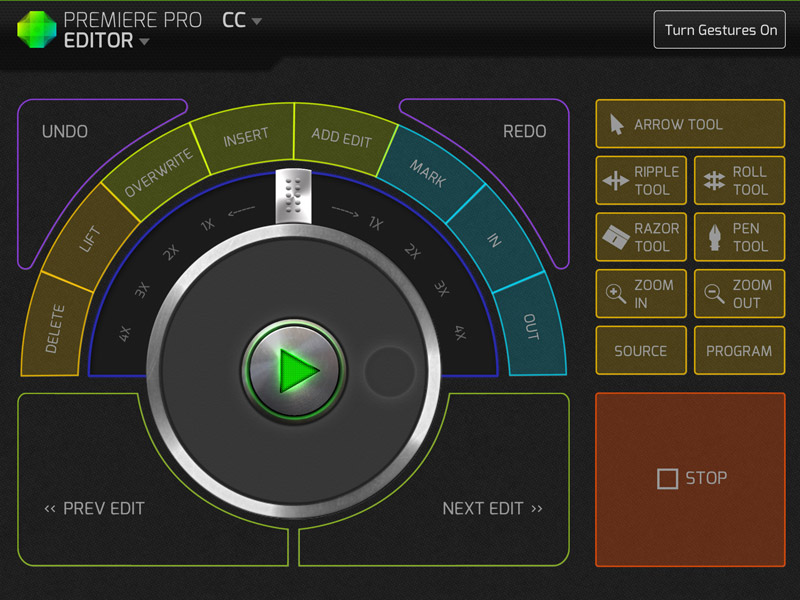
I have become a huge fan of Kickstarter and every so often you find a real gem of a project. Sometime ago I stumbled on to the CTRL+Console app (download link) and loved the idea. If you’re unfamiliar with the project check out CTRL+Console Kickstarter page, but not it is no longer active. In short the app acts as a GUI to a variety of shortcuts in Adobe Premiere Pro, Final Cut Pro, Quicktime and soon for Lightroom.

CTRL+Console - Adobe Premiere Pro Editor

CTRL+Console – Adobe Premiere Pro Editor

While a lot of Kickstarter projects feel or look like a do it yourself project this one is quite polished. The app was released yesterday on the Apple iTunes store and is now public. It is free to download with the Quicktime console being accessible out of the gate, but you’ll need to purchase/unlock additional editors with in the app. For the app to communicate with the programs on your computer you do need to download a program, but it’s of minimal effort to set up. Overall I think its a great concept and has been extremely well executed. To ground expectations though it did just come out and there are a couple of bugs for Windows users I hear, but they’re being tackled quickly.

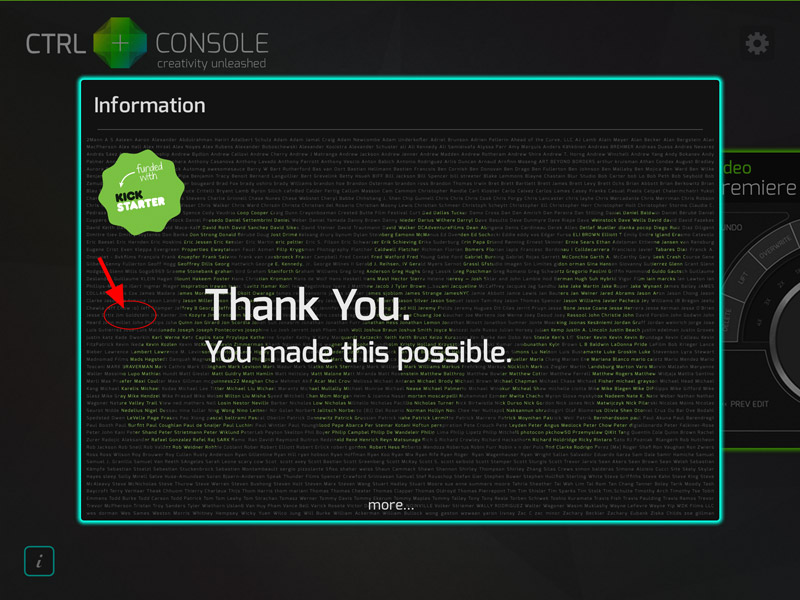
One of the nicer touches that was included in the app for those that took part in funding the project was this very nice Thank You page in the app. Much to my surprise I actually found my name listed pretty quickly. A nice touch by Jeff Chow who made the app!

CTRL+Console - Thank You Page, That's Me

CTRL+Console – Thank You Page, That’s Me


Copyright Jim M. Goldstein, All Rights Reserved

CTRL+Console: One Cool Video & Photo Editing App

The post CTRL+Console: One Cool Video & Photo Editing App appeared first on JMG-Galleries – Landscape, Nature & Travel Photography.


JMG-Galleries – Landscape, Nature & Travel Photography

 
Comments Off on CTRL+Console: One Cool Video & Photo Editing App

Posted in Equipment


Extra images added to Sony Cyber-shot RX1R Samples Gallery

24 Jul

Screen_Shot_2013-07-24_at_10.16.37_AM.png

We’ve just added several more photographs to our gallery of real-world samples from the new Sony Cyber-shot RX1R. The RX1R shares the same feature set as its forebear the RX1, but its 24MP full-frame CMOS sensor lacks an AA filter for additional sharpness. We’ve been impressed by the RX1R’s image quality as we work through our usual studio and real-world testing, and we’ve added more samples (both JPEG and converted Raw) to our gallery for you to take a look at. Click through for a link. 

News: Digital Photography Review (dpreview.com)

 
Comments Off on Extra images added to Sony Cyber-shot RX1R Samples Gallery

Posted in Uncategorized


Mansions to Mines: 7 Abandoned Wonders of Modern Africa

24 Jul

[ By Steph in 7 Wonders Series & Global. ]

Abandoned Places in Africa Ghost Towns

Ranging from eerie, remote desert settlements in the hottest place on earth to perfectly pastel modern ghost towns, Africa’s standout abandonments are as diverse and fascinating as the continent itself. A Star Wars set is slowly swallowed by the sand in Tunisia, skeletons of ships serve as warnings to sailors on the coast of South Africa, and a vast Chinese-built housing development waits for half a million new residents in Angola.

Tattooine: Abandoned Star Wars Set, Tunisia

Abandoned Africa Star Wars Set 1

Abandoned Africa Star Wars Set 2

(images via: fastco)

Left to dry out in the blazing desert sun for over 35 years, the Lars Homestead set from Star Wars Episode IV was recently rediscovered by New York-based photographer Rä di Martino. An area of Tunisia near the oasis city of Tozeur has been used as a dramatic backdrop for many films, including Raiders of the Lost Ark and The English Patient. In addition to Luke Skywalker’s childhood home, di Martino found several other Star Wars sets, documented in a series she calls Every World’s a Stage.

Tunisia was used as a location for scenes in every Star Wars movie except Episode V, including Ben Kenobi’s hut, Grand Dune where R2-D2 and C-3PO crash in Episode IV, the Slave Quarters Row and the canyon where Luke meets Ben. Pictures taken by fans who make pilgrimages to the set have revealed that, in time, it will be swallowed up by the desert sands.

Abandoned Mining Town of Kolmanskop, Namibia

Abandoned Africa Kolmanskop 2

Abandoned Africa Kolmanskop 1Abandoned Africa Kolmanskop 3

Abandoned Africa Kolmanskop 5

(images via: wikimedia commons, geoftheref, coda)

The sands have already claimed one abandoned village in Namibia. Kolmanskop was once a bustling mining village filled with German diamond miners who built mansions in the style of their home country. It had a hospital, ballroom, power station, school, theater, sport hall, casino, the first x-ray station in the Southern Hemisphere and the first tram in Africa. But after World War I, the diamonds were gone, and the miners began to leave. Kolmanskop was abandoned altogether by 1954, and since then, winds have swept knee-high drifts of sand into the open doors and windows of the architecture left behind. Some homes are almost entirely buried. The ghost town is now a popular tourist destination.

Next Page:
Mansions To Mines 7 Abandoned Wonders Of Modern Africa

Share on Facebook


[ By Steph in 7 Wonders Series & Global. ]

[ WebUrbanist | Archives | Galleries | Privacy | TOS ]


WebUrbanist

 
Comments Off on Mansions to Mines: 7 Abandoned Wonders of Modern Africa

Posted in Creativity


Extra images added to Sony Cyber-shot RX1R Samples Gallery

24 Jul

Screen_Shot_2013-07-24_at_10.16.37_AM.png

We’ve just added several more photographs to our gallery of real-world samples from the new Sony Cyber-shot RX1R. The RX1R shares the same feature set as its forebear the RX1, but its 24MP full-frame CMOS sensor lacks an AA filter for additional sharpness. We’ve been impressed by the RX1R’s image quality as we work through our usual studio and real-world testing, and we’ve added more samples (both JPEG and converted Raw) to our gallery for you to take a look at. Click through for a link. 

News: Digital Photography Review (dpreview.com)

 
Comments Off on Extra images added to Sony Cyber-shot RX1R Samples Gallery

Posted in Uncategorized


24. Juli 2013

24 Jul

Ein Beitrag von: Olivia Harmon

© Olivia Harmon


kwerfeldein – Fotografie Magazin

 
Comments Off on 24. Juli 2013

Posted in Equipment


Unified Color Technologies introduces HDR Expose 3 and 32 Float v3

24 Jul

HDR_Expose_3_box_shot_hi_res.png

Unified Color Technologies has announced HDR Expose 3 and 32 Float 3 – the latest versions of its HDR software. HDR Expose is the company’s stand-alone software, which works in the company’s ‘Beyond RGB’ 32-bit color space and attempts to manipulate chroma and luminance data separately, while 32 Float is a Photoshop plugin built on the same principles. The latest versions gain improved tone mapping tools that attempt to retain local contrast while increasing the overall range of tones included in the final image, along with upgraded alignement and de-ghosting.

News: Digital Photography Review (dpreview.com)

 
Comments Off on Unified Color Technologies introduces HDR Expose 3 and 32 Float v3

Posted in Uncategorized


60 Awesome Pinterest Boards Every Photographer Should Follow

24 Jul

If you’re a photographer you may think, why should I care about Pinterest? The answer is quite simple. Everyone who have risen to the top will tell you that it’s all about who you know and who knows you, just as much as it’s about talent. Pinterest is one of the fastest and influential social-media platforms today. It’s not just Continue Reading

The post 60 Awesome Pinterest Boards Every Photographer Should Follow appeared first on Photodoto.


Photodoto

 
Comments Off on 60 Awesome Pinterest Boards Every Photographer Should Follow

Posted in Photography


Canon introduces two all-in-one Pixma printers

24 Jul

printer.png

Canon has introduced two Pixma printers, the  MG2420 All-in-One and MG3520 Wireless Photo. The Pixma MG3520 supports printing via WiFi networks as well as Apple’s AirPrint feature, allowing direct printing from many iOS devices. It also offers auto duplexing and Canon’s FastFront ink and paper loading. Both models provide Full HD Movie Print with compatible Canon cameras and ship with My Image Garden photo organization and sharing software. Click through for the full press release and pricing.

News: Digital Photography Review (dpreview.com)

 
Comments Off on Canon introduces two all-in-one Pixma printers

Posted in Uncategorized