RSS
 

Archive for June, 2013

Accidental Art: Apple Maps Glitches Create Surreal Scenes

27 Jun

[ By Steph in Art & Photography & Video. ]

Apple Maps Glitch Art 1

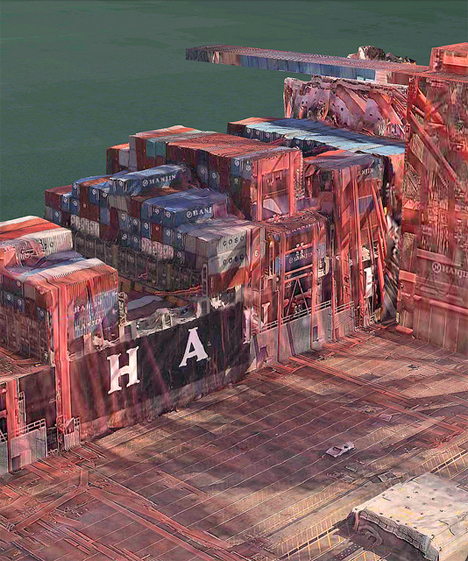
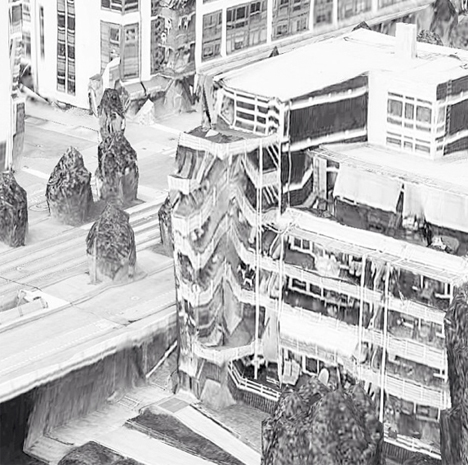
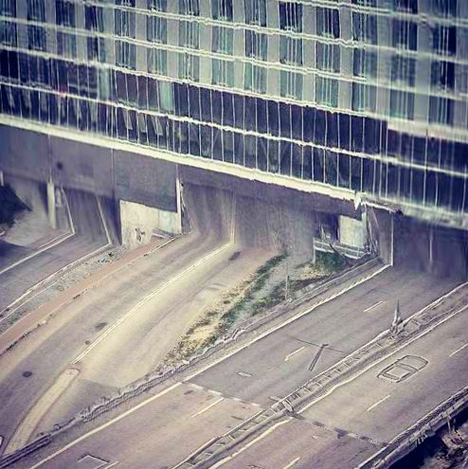
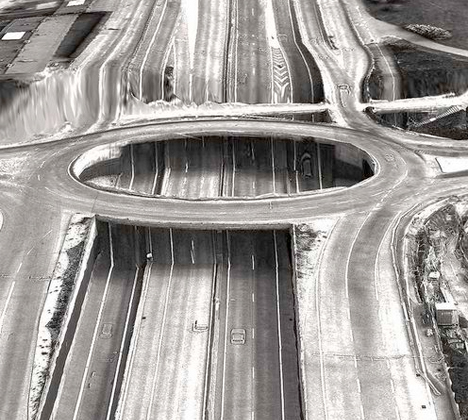
All of the notorious glitches on Apple’s Maps app make it incredibly frustrating to use for practical purposes, but it still has value – as accidental art. When two-dimensional images are incorrectly mapped onto three-dimensional topography, the results can be fascinating, creating landscapes and architecture that look alien and futuristic.

Apple Maps Glitch Art 2

Apple Maps Glitch Art 3

Peder Norrby, founder of graphics company Trapcode, has collected the many glitches on the Apple iOS Maps app into a trippy gallery on Flickr. Houses in Barcelona appear to be puking trees from their windows. A vortex has opened in the middle of a Stockholm highway. Skyscrapers and stacked shipping containers look like they’re melting.

Apple Maps Glitch Art 4

Apple Maps Glitch Art 5

In this parallel universe, the laws of physics have apparently been suspended. Norrby explains that some structures, like bridges, viaducts, tunnels and roller coasters, are too complex for the app’s algorithms to handle. While criticism of Apple’s Maps app has increased reliance on its competitors, Google Maps isn’t entire free of glitches, either.

Apple Maps Glitch Art 6

Apple Maps Glitch Art 7

The mesmerizing beauty of glitches has led to an entire genre of art revolving around reproducing their eerie effects on purpose. Glitch art creates digital or analog image errors by intentionally corrupting files, or mimicking their appearance in traditional artistic media like paintings and sculptures.

Share on Facebook


[ By Steph in Art & Photography & Video. ]

[ WebUrbanist | Archives | Galleries | Privacy | TOS ]


WebUrbanist

 
Comments Off on Accidental Art: Apple Maps Glitches Create Surreal Scenes

Posted in Creativity


Dropbox adds multiple photo sharing to mobile app

26 Jun

TS520x0~cms_posts_5600359952_dropbox.PNG

File hosting and sharing service Dropbox is becoming an increasingly popular choice for photographers who use the platform to share images. An update launched yesterday for Dropbox’s free iOS app now lets users share multiple photos at once – see what else is new on connect.dpreview.com.

News: Digital Photography Review (dpreview.com)

 
Comments Off on Dropbox adds multiple photo sharing to mobile app

Posted in Uncategorized


Chindogu: 14 Hilarious and Strange Japanese Inventions

26 Jun

[ By Steph in Design & Products & Packaging. ]

Chindogu Bizarre Inventions Main

The first rule of Chindogu is, Chindogu inventions are essentially useless. The Japanese art of creating bizarre and funny tools for everyday life aims to solve basic problems in ways that are as impractical as possible. To qualify as Chindogu, these inventions can never be patented or sold, but they must exist in physical form, and, as rule #2 states, the creator must be able to hold them in his or her hand and think “I can actually imagine someone using this. Almost.”

Train Nap Cap

Chindogu Train Nap Cap

No need to worry about slumping over and drooling on a stranger if you fall asleep on the train or subway. The Train Nap Cap uses a suction cup attached to a hat to hold your head upright.

Sweep Shoes

Chindogu Sweep Shoes

Need to clean up a small mess? Slip on a special pair of ‘sweep shoes‘, with broom and dust pan attached. The logical next step (if logic can be applied to Chindogu) would be to take the dustpan shoe off the dump its contents, but it’s more fun to imagine the wearer contorting in ballet-like movements to empty it into the trash.

Butter Stick

Chindogu Butter Stick

To smear butter on a piece of toast, you could simply peel back the wrapper a little bit, and voila. You’ve got a butter stick. Or, you could put it in a totally unnecessary plastic tube that pushes the butter up like lip balm.

Toilet Roll Hat

Chindogu Toilet Paper Roll Hat

Isn’t it annoying when you’ve got a drippy nose, and you have to constantly wipe it? The Toilet Roll Hat takes care of that problem, keeping wipes right where you need them. For those times when you’re so sick, you don’t care that you’ve got a roll of toilet paper on your head.

Baby Mop

Chindogu Baby Mop

What do babies do, anyway? They just lay around and get bodily fluids all over every surface in the house. Make them earn their keep with the Baby Mop. Maybe they’ll at least clean up their own messes while they’re crawling around looking for things to destroy.

Next Page:
Chindogu 14 Hilarious And Strange Japanese Inventions

Share on Facebook


[ By Steph in Design & Products & Packaging. ]

[ WebUrbanist | Archives | Galleries | Privacy | TOS ]


WebUrbanist

 
Comments Off on Chindogu: 14 Hilarious and Strange Japanese Inventions

Posted in Creativity


Nikon issues firmware update for D7100

26 Jun

front-001.jpg

Nikon has released a firmware update for its Nikon D7100 digital SLR. Firmware version C 1.01 corrects errors in how certain kinds of shooting data is displayed, and aims to resolve other issues relating to live view shooting of stills and video. Click through for more details and a link to download the latest D7100 firmware.

News: Digital Photography Review (dpreview.com)

 
Comments Off on Nikon issues firmware update for D7100

Posted in Uncategorized


Get 2 dPS eBooks For the Price of 1: This Week Only!

26 Jun

The middle of 2013 is fast approaching (can you believe it!?) and it has been a fun year here on dPS so far.

We know that many of our northern hemisphere readers are out and about enjoying your summer (while the rest of us freeze) and so we thought that we’d offer a little extra incentive to take your camera along that we’d put together a great deal on some of our popular photography training eBooks.

For the next week we’re offering you as a dPS reader the chance to pick up two dPS eBooks for the price of one.

Screen Shot 2013-06-26 at 3.40.09 PM

That’s right – if you pick up one of our eBooks this week you can select any other eBook from our range that is either equal to or less than the value of the eBook that you’re paying for and we’ll give it to you for free.

So you can effectively bundle any two of our eBooks and save up to 50%!

For example

  • If you want to improve your portraiture you might pick up a copy of our Portraits: Making the Shot eBook and then choose our Kids Photography eBook to get for free.
  • If you’re wanting to get to know what your camera is capable of you might choose to bundle up Photo Nuts and Bolts with Photo Nuts and Shots (the perfect combination for getting creative control of your camera.
  • If you’re going to be travelling pick up our Travel Photography eBook and bundle it with our Natural Light eBook (so you don’t need to pack a flash)

Choose the eBooks you wish to bundle here.

The choice is yours as to the combination you choose to bundle together – the possibilities are endless!

But don’t delay – this deal ends in just one week.

Post originally from: Digital Photography Tips.

Check out our more Photography Tips at Photography Tips for Beginners, Portrait Photography Tips and Wedding Photography Tips.

Get 2 dPS eBooks For the Price of 1: This Week Only!


Digital Photography School

 
Comments Off on Get 2 dPS eBooks For the Price of 1: This Week Only!

Posted in Photography


26. Juni 2013

26 Jun

Ein Beitrag von: Kai

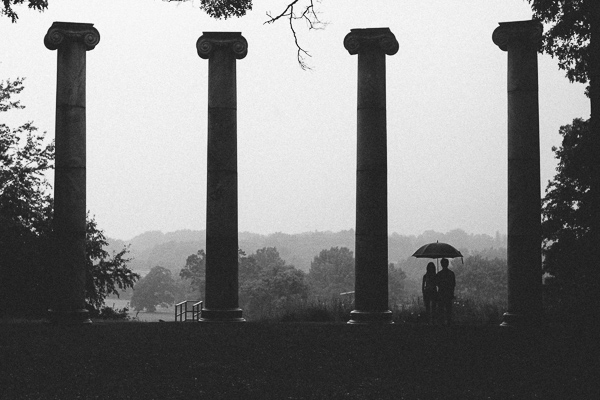
Summer Rain © Kai


kwerfeldein – Fotografie Magazin

 
Comments Off on 26. Juni 2013

Posted in Equipment


20 of the Absolute Best Photography Posts From Around the Internet

26 Jun

The best thing about the internet? TONS of information at your fingertips, available instantly and on-demand. The worst thing about the internet? SIFTING through that information. But worry not, fellow photographers, we’ll do our best to make it easy on you this week. We’ve spent some time researching some of the best photography posts from several excellent sources online, and Continue Reading

The post 20 of the Absolute Best Photography Posts From Around the Internet appeared first on Photodoto.


Photodoto

 
Comments Off on 20 of the Absolute Best Photography Posts From Around the Internet

Posted in Photography


Das ist Patagonien

26 Jun

Ein Beitrag von: Helmut Steiner

Gletscher, die eisblaue Seen speisen, raue Berge, die steil in die Höhe ragen und weite Landschaften voller Flora und Fauna. Das ist Patagonien. Im Süden von Argentinien und Chile liegend, ist es für mich eines der landschaftlich beeindruckendsten Gebiete dieser Erde. Im Rahmen meiner einjährigen Weltreise bat sich mir die Möglichkeit, dieses Naturjuwel per pedes zu erkunden.

?El Calafate war der Ausgangspunkt für die Reise durch Patagonien. Von hier aus ging es ins ewige Eis, zum Gletscher Perito Moreno. Er zählt zu den größten Touristenattraktionen in Argentinien.

Dies ist auch begründet: Das laute Knacken des Eises, wenn der Gletscher kalbt, die schiere Größe und der Kontrast zwischen den dunklen Bergen und der gleißend hellen Gletscherzunge mit ihren schroffen Eisformationen sind atemberaubend. ??

Patagonien: Perito Moreno Gletscher © Helmut Steiner

Nachdem ich in Bolivien bereits Erfahrungen mit Eisklettern und dem Umgang mit Steigeisen bei der Besteigung des Huayna Potosi (6088 Meter) sammelte, stellte die Wanderung keine große Herausforderung dar. Unser Guide Leonardo, selbst Hobbyfotograf und Everestbesteiger, war eine große Hilfe. Wir fingen an, über das Bergsteigen, Fotografieren und das Leben in Patagonien zu philosophieren.

Dank des guten Verhältnisses war es auch kein Problem, mich weiter von der Gruppe zu entfernen als üblich, um Fotos des Gletschers und eine Zeitraffer-Aufnahme zu machen. Ein kleiner Tipp von Leonardo: Wer sich rechtzeitig eine Bewilligung beim zuständigen Ministerium holt, kann auch ohne Touranbieter auf die eisige Gletscherzunge und spart so viel Geld.

?Nach fast einer Woche Dauerregens hielt ich es nicht mehr im Hostel aus und fuhr nach Chaltén, wo das Wetter erfahrungsgemäß immer eine Spur schlechter ist als in El Calafate. Der Gipfel des Mount Fitz Roy lag tief in den Wolken. Einen Blick auf seine Silhouette zu erhaschen, war schon das höchste der Gefühle.

Patagonien: Mount Fitz Roy Trail © Helmut Steiner

Patagonien: Mount Fitz Roy Trail © Helmut Steiner

Während der Wanderung zu dessen Fuße lernte ich Nico, einen jungen deutschen Studenten kennen. Wir verstanden uns auf Anhieb und verabredeten uns, gemeinsam den W-Trek im Torres del Paine Nationalpark, Chile, zu gehen. Die Rundtour war auf Grund der Schneemassen auf der Nordseite des Parks noch nicht freigegeben und unpassierbar.

Gemeinsam konnten wir uns nicht nur die Ausrüstung (Zelt, Gaskocher, …), sondern auch die Mietkosten und vor allem das Gewicht beim Wandern teilen.

Patagonien: Mount Fitz Roy Trail © Helmut Steiner

„Don’t ask us about the weather. We don’t know it. This is Patagonia!“ Diese Worte, die bei einer Rangerstation zu lesen waren, beschreiben das Wetterphänomen im Nationalpark Torres del Paine wohl am besten.

Ob Schneetreiben, Regen, Hagel oder Sonnenschein – alle fünf Minuten wechselten die Bedingungen. Auf der Westseite des Parks herrscht ein unberechenbares Mikroklima, das durch das Meer im Westen und die Bergformation im Osten entsteht.

Die einzige Konstante war der extrem starke Wind, der uns den Niederschlag waagrecht ins Gesicht blies. Dank der Orkanböen waren auch meine Versuche, brauchbare Zeitrafferaufnahmen zu machen, von Misserfolg gekrönt.

Mein Gorillapod, den ich zwischen Felsen einklemmte, konnte die Kamera nicht stabilisieren. Auch der Versuch, sie am schweren Rucksack festzuschnallen, blieb ohne Erfolg, da der Wind an der erhöhten Position am Felsen den gesamten Rucksack bewegte.

Patagonien: Torres del Paine, Gletschersee © Helmut Steiner

Mit gefrorenen Fingern und unverrichteter Dinge kehrten wir nach über einer Stunde zurück in unser Zelt. Ein heißer Tee mit Rum und eine kleine Kerze im Zelt halfen Wunder …??

Es wurde eine stürmische Nacht inmitten der wir unsanft geweckt wurden. Schreie und das Licht von Taschenlampen durchbrachen die Nachtruhe.

Das Zelt unserer Nachbarn war vom Wind abgerissen und komplett zerstört worden, während sie darin schliefen. Zum Glück handelte es sich um eine größere Reisegruppe. So fanden sie rasch Unterschlupf bei ihren Freunden.?? Die beste heiße Schokolade hatten wir am folgenden Tag.

Nicht, weil der Kakao aus dem Automaten besonders gut schmeckte, sondern weil sie ein Dankesgeschenk einer älteren Dame war:? Der Wind war über Nacht noch stärker geworden und hatte nun Spitzen von bis zu 120km/h erreicht.

An einem besonders exponierten Hügel, der am Rückweg des ersten Tagesmarsches lag, saß Marguerite mit ihren beiden Rucksäcken und konnte nicht voran. Wir passierten den Hügel, Nico bewachte unser Gepäck und ich lief gegen den Sturm zurück zu Marguerite.

Das Laufen gegen den Wind ähnelte jedoch mehr einem Stillstand. Endlich bei ihr angekommen, nahm ich das Gepäck und wir machten uns Schritt für Schritt gemeinsam auf den Rückweg. Als wir Nico erreichten, teilten wir die Rucksäcke auf und begleiteten Marguerite zur nächsten Schutzhütte ins Tal.

?Hütte ist etwas untertrieben. Die Unterkünfte im Nationalpark ähneln eher voll ausgebauten Hotels: Samt Bar, Speisesaal und jeglichem Komfort, den man sich denken kann.

Dieser Komfort hat jedoch seinen Preis und da man auf einer langen Reise aufs Geld schauen muss, konnten wir uns diesen Luxus nicht gönnen. Marguerite lud uns als Dank für unsere Hilfe auf die besagte heiße Schokolade ein.

Lange konnten wir jedoch nicht verweilen, da wir noch etliche Kilometer Fußmarsch vor uns hatten, um zur nächsten Station zu kommen.

Bei einem See erlebten wir ein besonderes Naturspektakel. Windhosen tanzten meterhoch auf der Wasseroberfläche. Das aufgewirbelte Wasser reflektierte und brach die Sonnenstrahlen, was wiederum Regenbögen inmitten der Windhosen erzeugte. Ein beeindruckendes Schauspiel.?

In den folgenden Tagen änderte sich das Wetter schlagartig. Wo wir zuvor noch dick eingepackt im regenfesten Wintergewand unterwegs waren, liefen wir nun in T-Shirts. Die Waldidylle im Tal wurde immer wieder von lautem Grollen unterbrochen. Der Sonnenschein ließ den Schnee auf den Gipfeln schmelzen und löste Lawinen aus.

Diese Naturgewalt live mitzuerleben, war faszinierend und respekteinflößend zugleich. Wir gönnten uns immer wieder Pausen, um das herrliche Wetter zu genießen.

Patagonien: Torres del Paine © Helmut Steiner

Patagonien: Torres del Paine © Helmut Steiner

Nico war ein äußerst geduldiger Reisebegleiter und ich bin ihm zu tiefstem Dank verpflichtet. Wer schon einmal mit einem Fotografen unterwegs war, weiß, wovon ich spreche. Ich blieb ständig stehen, um Panoramen zu schießen. Bei 360°-Aufnahmen mit jeweils um die 60 Fotos kann das schon etwas dauern.?

Patagonien: Torres del Paine © Helmut Steiner

?Am letzten Tag ging es früh morgens hoch zu den Torres del Paine („Türme des Schmerzes“), die dem Nationalpark seinen Namen geben. Das erste Sonnenlicht am Morgen lässt diese steile Felsformation in orange-rotem Licht erstrahlen. Ein herrlicher Anblick und jegliche Anstrengung wert.?

Patagonien: Torres del Paine © Helmut SteinerStitched Panorama

Der technische Teil

Ich arbeitete fast ausschließlich im manuellen Modus. Bei den Panoramen wählte ich den Fokus vor aus und passte die Belichtung an die hellsten Teile des Bildausschnittes an (Histogramm beachten), um keine Spitzlichter in den Wolken oder im Schnee zu haben. Die Panoramen wurden freihändig aufgenommen, ohne Stativ, da dies auf einer einjährigen Reise doch etwas unhandlich ist.

Mittlerweile sind Stitching-Programme dermaßen ausgereift, dass das automatische Zusammensetzen der Bilder auch so sehr gute Ergebnisse liefert. ?Autopano Pro/Giga von Kolor ist hier wohl eines der besten Tools am Markt.

Im Gegensatz zu Photoshop ist mit ihm auch das Erstellen von 360°-Panoramen möglich, ganz abgesehen von der Live-Vorschau und vielen weiteren nützlichen Hilfsmitteln. Die weitere Bearbeitung der Fotos geschah fast ausschließlich in Lightroom. Ganz selten musste ich auf Photoshop zurückgreifen.

Bei einigen meiner Bilder kann man (zurecht) sagen, dass sie überzeichnet und stark bearbeitet sind. Dies ist jedoch von mir bewusst so geschehen, da ich meine Gefühle und das Erlebte damit widerspiegeln möchte.

Der hohe Kontrast ist Ausdruck für das unwirtliche Wetter und den orkanartigen Wind, der uns ständig ins Gesicht peitschte und das Vorankommen teils zur Herausforderung, teils zur Qual machte.?

Patagonien: Torres del Paine, Flussbett © Helmut Steiner

?Ein großes Dankeschön geht an die Familie Albornoz Mansilla in Puerto Natales, bei der Nico und ich für über eine Woche couchsurften. Es war eine herrliche Zeit und ich danke allen, die diese Reise so besonders gemacht haben.


kwerfeldein – Fotografie Magazin
 
Comments Off on Das ist Patagonien

Posted in Equipment


How to Use Film Simulator Presets in Lightroom

26 Jun

20130620 dPS 000  tri x
processed using VSCO’s Kodak TRI-X film preset

Those of you who think Instagram and its ilk are pushing us towards the end of “real photography” can quit reading right now.  For everyone else, the following paragraphs will show you how to get that ever-so-trendy, faded, slightly desaturated, vintage, “look” that is so prevalent from both professionals and hobbyists.  I’m going to let you in on a secret that professionals have been utilizing for awhile (many use it secretly!) to give their photos that added edge. 

Specifically, I am going to cover the use of film simulation presets to develop your RAW files in Lightroom.  Why use film simulation at all?  As evidenced by the popularity of mobile apps like Instagram, emulating the look of traditional film stocks has become a rather trendy and prevalent practice in photography and can be a useful tool in your post-processing arsenal.  Your clients may not specifically request a certain film, but they may ask you to give them a specific look & feel that is a result of simulating film, i.e. “Can you give my engagement photos that faded, vintage-y feeling?”, or “Make my photos look like they were taken with Instagram”.  I’ve had several clients ask for that style of processing without realizing it was the result of emulating a 50-year old film stock.  Film simulators answer the question: “What would this digital image look like if I took it with Kodak TRI-X film?”.
 
In short, film simulation presets are designed to process your camera’s specific RAW files into images that emulate the look provided by some classic film types.  Before I discovered these plugins, I foolishly spent countless hours playing with various Lightroom sliders attempting (and failing) to get that look I wanted to emulate.  After trying a number of these, my favorite by far is VSCO Film, created by a company called Visual Supply Co (VSCO for short).  They create a number of plug-ins for Lightroom, Adobe Camera Raw, and Aperture, that all do the same thing; make your digital image look like it was taken with an old-school film camera. We’ll be covering how to use these in Lightroom though they should have the same effect in ACR or Aperture.  It should be mentioned that I do NOT work for VSCO and / or receive payment in any way from them.

VSCO Logo

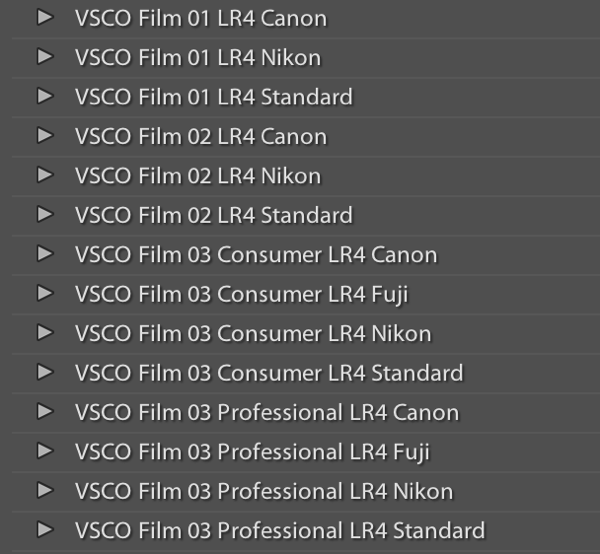
VSCO’s film packs come as downloads from their website and installation is as easy as running the downloaded installer and booting up Lightroom afterwards. You will then find several new groups of presets once you’re in Lightroom’s Develop module. 

VSCO Presets

Once you’ve installed the presets, applying them is as easy as selecting the image(s) you want to process, and clicking on the desired preset on the left.  If you mouse-over the list of presets, you’ll notice that the Develop module’s Navigator window will show you a preview of the preset’s effects on your image.  You’ll find that each different film type will give you varying effects on color, contrast, brightness, and will alter the tone curve of the image.  Some film presets will introduce subtle changes, while others do dramatic things, and covert your image to B&W, add grain, and reduce the dynamic range of the image by resetting the tone curve. 

Frankly, I am unsure if there is anything a VSCO filter can do that you can’t do manually, however, it is an incredible time saver if you don’t want to spend hours re-creating the look of specific film stocks.  VSCO’s team has already done the research into the settings to emulate popular film types, and all you need to do choose which ones you like.  You’ll also notice that each preset has  “-”, “+”, “++” versions of each film, representing the degree to which you’d like the particular film’s effects applied.  Film presets work like any other preset and the develop settings can be copied and pasted from image to image or applied to a large batch of images at once.

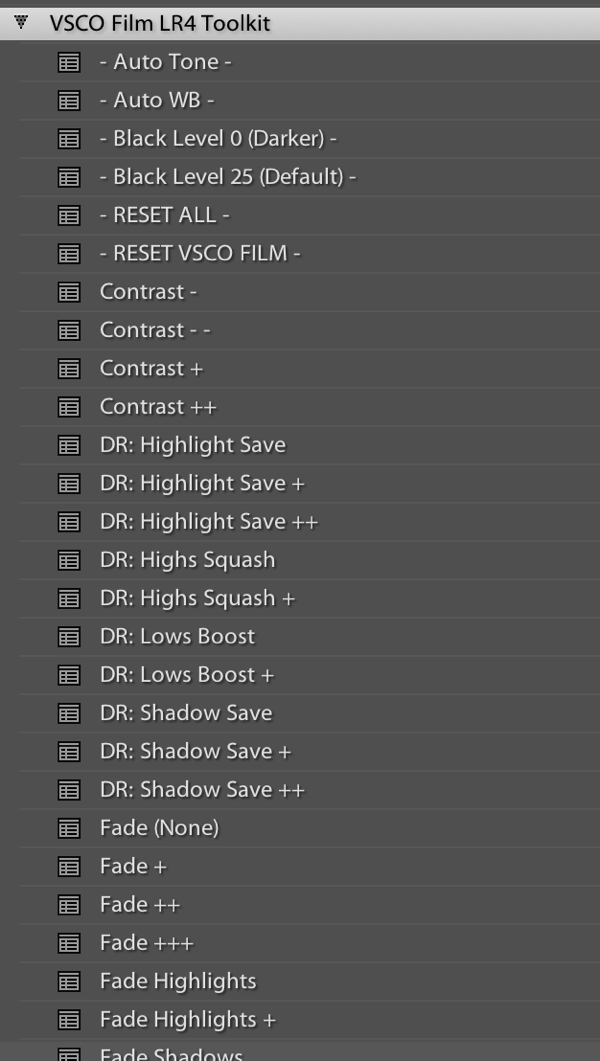
However, the beauty of VSCO (and similar presets), is that once you’ve selected a film stock that you like, you can then tweak it to your heart’s content.  For example, you can start off with a baseline Kodak Portra 400+, and decide that you’d want to bring up the shadows, add some grain, and saturate the blues.  Save those settings as a new preset, and boom, you’ve developed your own, unique look.  VSCO’s film pack also comes with “Toolkit” presets that will help you fine-tune your image.  With a click of a button you can add grain, bring up the shadows, save your highlights, or fix Chromatic Aberration.  Again, these are all things that you can do manually, but the presets will save you quite a bit of time.
VSCO Toolkit

VSCO has now released three different film packs, each with its own set of films, with the latest film pack focusing on a variety of instant (Polaroid!) films.  The film packs are not cheap, at $ 119 / pack, but existing customers will receive a discount on subsequent film pack purchases.  I’d suggest buying VSCO 01 and only adding the others if you really like the first pack.  Don’t feel like ponying up the dough or only use your iPhone to take pictures?  VSCO actually has an iOS app called VSCO Cam. 

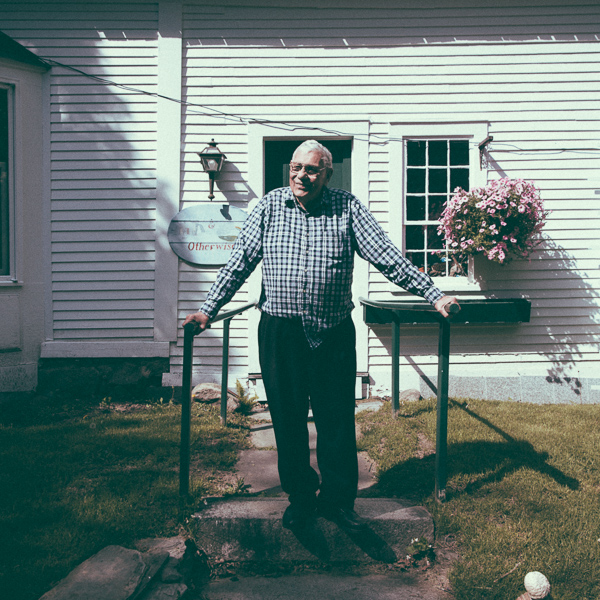
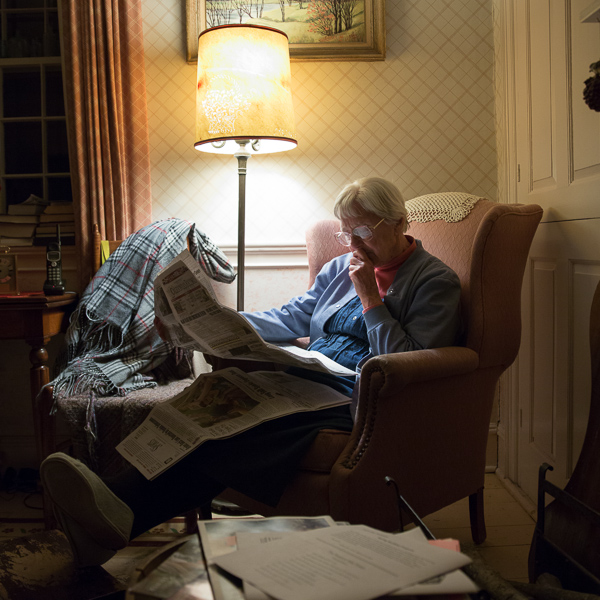
So that’s all there is to it! I will leave you with some quick before & after examples that may help demonstrate how powerful these presets can be.  Each of these following images will be presented in two forms, the “before”, sans preset and without any major Lightroom modifications, and the “after”, with a specific preset applied. For the sake of this demonstration, I have picked films with a relatively dramatic effect on the original image.

Before:
20130620 dPS 001??After, with a “Polaroid 690 cold” preset applied:

20130620 dPS 001  polaroid 690 cold

Before:

20130620 dPS 002

After, with a Polaroid 669 preset applied:

20130620 dPS 002  polaroid 669

Before:

20130620 dPS 003

After, with a “Polaroid 690 cold” preset applied:

20130620 dPS 003  polaroid 690 cold

Before:

20130620 dPS 000

After, with a Kodak TRI-X filter applied:

20130620 dPS 000  tri x

Frank Wang is a NYC photographer specializing in portrait and architectural photography. You can find him online at www.frankwangphotography.com and www.framephotographics.com. Connect with him via witter / Instagram: @frankwangphoto

Post originally from: Digital Photography Tips.

Check out our more Photography Tips at Photography Tips for Beginners, Portrait Photography Tips and Wedding Photography Tips.

How to Use Film Simulator Presets in Lightroom


Digital Photography School

 
Comments Off on How to Use Film Simulator Presets in Lightroom

Posted in Photography


Insanely Ingenious: Longboard Stroller for Daredevil Parents

26 Jun

[ By WebUrbanist in Technology & Vehicles & Mods. ]

longboard stroller prototype

Insane, ingenious, or both, this design combines an alternative way to commute with your kids, assuming you can get past the skateboarding aspect and feel safe moving at speed while pushing your child in this contraption.

The most obvious (and essential) question: how secure is it? While it is hard to say for sure, a wide wheel base makes it  more stable than a conventional skateboard, and the lower center of gravity from the weight of the child should help with balance.

longboard strollers urban travel

The push-bar element of a traditional stroller becomes a handlebar, also allowing for more control by the parent. This same bar wraps around to form a kind of roll cage in case of spills.

longboard stroller roll cage

While it is still a prototype at this point, the Longboard Stroller‘s creators at Quinny are working with Studio Peter van Riet to realize a fully-functional and marketable version of the design. Whether actual adults will buy the finished product and ride it with their children remains to be seen.

longboard stroller stacked prototypes

From its daring designers: “Quinny believes that you don’t have to leave the city when you become a parent; that for parents with a positive attitude and the right solutions, the city is a place full of opportunities. Quinny wants to create these solutions; seamless mobility solutions, so urban parents  have the freedom to move . The longboard stroller is completely fitting this mindset; it’s a concept thought, a different way of thinking  on how parents can move. It’s an alternative solution which makes it easy to travel longer distances in a nice, environmentally friendly way.”

Share on Facebook


[ By WebUrbanist in Technology & Vehicles & Mods. ]

[ WebUrbanist | Archives | Galleries | Privacy | TOS ]


WebUrbanist

 
Comments Off on Insanely Ingenious: Longboard Stroller for Daredevil Parents

Posted in Creativity