RSS
 

Archive for June, 2013

Serienvorstellung: „Kunstgeschichte“

06 Jun

Ein Beitrag von: Paul Meussling

Vor einiger Zeit ist Marit auf meine Serie „Kunstgeschichte“ aufmerksam geworden. Sie bat mich, für kwerfeldein etwas darüber zu erzählen.

Für die Serie fotografiere ich meine Kommilitonen aus dem Fachbereich Kunstgeschichte. Die Studienrichtung ist dabei erst einmal nebensächlich. Viel mehr befasse ich mich fotografisch mit den Übereinstimmungen und Unterschieden von Interessengruppen. Es geht um Erwartungshaltungen und um Enttäuschung.

Allzu oft hört man in Gesprächen von Verallgemeinerungen, die von einem bestimmten Typus ausgehen: Zielstrebige Medizinstudenten, autistische Mathematiker und Maschinenbauer, die nur Flanell-Karo-Hemden tragen. Gerade in diesem Zusammenhang ist der Studiengang Kunstgeschichte interessant, da mir hier auf Anhieb keine gängigen Klischees einfielen.

Je mehr ich mich mit Fotografie beschäftige, desto größer wird das Verlangen, nicht nur ästhetische Anforderungen zu erfüllen, sondern auch inhaltlich an Relevanz zu gewinnen. Der einfachste Weg, tiefer an ein Thema heranzugehen, ist sicherlich ein serieller. Serielles Arbeiten hat den Vorteil, mehr Sätze zur Verfügung zu haben, um sich auszudrücken. Nicht immer ist es möglich, in einem Bild auszusagen, was mich in vielen Fragen bewegt.

Auch im Vorfeld zur Serie „Kunstgeschichte“ habe ich mir viele Fragen gestellt, die überhaupt erst zum Entstehen der Serie geführt haben. Im Grunde sind es die Fragen nach Identität und Wirkung auf andere, die mich fast täglich beschäftigen.

IMG_0002

Geschlechterklischees gehören da genauso dazu, wie die Frage nach heteronormativen und stabilen Lebensumständen. In diesem Sinne ist die Arbeit als sehr sozialwissenschaftlich zu betrachten. Gibt es einen Typ Studenten? Gibt es einen Typ Kunstgeschichte? Kann man verallgemeinern? Ist es möglich, von Äußerlichkeiten auf die Persönlichkeit zu schließen? Wenn ja, inwieweit beeinflusst die Persönlichkeit die Studienwahl? Kann man vom Umfeld auf die Person schließen?

Als ich überlegt habe, wie ich die Frage nach sozialwissenschaftlichen Kriterien ins Visuelle übertragen kann, kam mir die Idee des Vergleichens. Möglichst viele Portraits mit ähnlichen Kriterien aufgenommen – dazu gehört bei mir, dass ich alle Studenten bei sich in der eigenen Wohnung oder WG sitzend frontal und quasi aus dem Alltag gerissen fotografierte – würden eine optische Schnittmenge bzw. eine Statistik aus Bildern ergeben.

Also ein Bilderhaufen, in dem sich vergleichen lässt, in dem Vorahnungen bestätigt, aber auch widerlegt werden. So viel zum Plan. In den nächsten Wochen fragte ich diverse Kommilitonen an und machte Termine aus. Teilweise verbrachte ich den ganzen Vormittag bei ihnen, zum Teil machte ich aber auch nur das Foto und ging dann schon wieder.

Zur Technik will ich nicht allzu viele Worte verlieren, da kennen sich einige Leser sicherlich besser aus. Bisher sind die Fotos alle mit einer Mamiya RB 67 und dem wunderbaren Kodak Portra 400 entstanden. Außerdem habe ich mich für ein 65mm-Objektiv entschieden, da ich ja auch etwas vom Umfeld zeigen wollte.

IMG

Im Prinzip steckt die Serie noch in den Kinderschuhen. Bisher sind nur acht Leute portraitiert. Zwar können die Portraits auch gut für sich allein stehen, dennoch plane ich bereits weitere Fotos und überlege, wie ich die Serie fortführen kann. So könnte ich mir auch vorstellen, das Projekt auf andere Studiengänge auszuweiten.

Besonders spannend am Projekt waren bisher die Bekanntschaften, die ich gemacht habe. Bei den Portraitierten handelt es sich sowohl um Freunde, mit denen ich sowieso viel Zeit verbringe, aber auch um Leute, die ich nur vom Sehen kannte und einfach angesprochen habe. Somit war es auch für mich interessant zu sehen, wie meine Kommilitonen leben.

Christoph beispielsweise lebte bis vor Kurzem in einer Wohngemeinschaft, in der niemand sein eigenes Zimmer hatte. Sie hatten die Räume nach unterschiedlichen Themen eingerichtet. So gab es zum Beispiel einen Multimediaraum mit Beamer und Anlage, aber auch einen komplett weiß gestalteten Meditationsraum.

8431380701_e98809027e_c

Marie wohnt mit ihren 19 Jahren schon in einer 2,5-Zimmerwohnung mit ihrem Freund zusammen. Und Johanna ist über Umwege in einem Zimmer bei einem entfernten Bekannten in einer unsanierten Altbauvilla untergekommen. Große Ähnlichkeiten lassen sich hier also nicht finden. Im Prinzip war mir klar, dass sich eine Gruppe von Menschen nicht über einen Kamm scheren lässt, nur, weil sie das gleiche studieren. Dennoch fand ich die Bestätigung interessant.

Ein Klischee habe ich dann doch finden können und zum Teil wurde es auch bestätigt. Viele Kunstgeschichtsstudentinnen und Studenten wissen noch nicht so genau, was ihr eigentliches Studienziel ist. Kunstgeschichte bietet sich hier als Studienwahl an, da das Studium wirklich sehr umfassend ist und lehrt, wie man sich objektiv und analytisch mit dem Schaffen anderer auseinandersetzt.

Interessant wäre hier auch ein Vergleich mit der Betriebswirtschaftslehre, da die Voraussetzungen wohl relativ ähnlich sind, das Ziel jedoch ein völlig anderes ist. Es geht nicht um Orientierung, sondern um den größtmöglichen Nutzen für den weiteren Berufswerdegang.

Ich bin sehr gespannt, wie es nun weiter geht, das neue Semester beginnt in wenigen Tagen. Ich hoffe, dass das Projekt noch einige Zeit weiterläuft und ich noch möglichst viele Studenten vor die Linse bekomme, da ich glaube, dass die Menge für den Hintergrund der Serie ein maßgebliches Kriterium ist.


kwerfeldein – Fotografie Magazin

 
Comments Off on Serienvorstellung: „Kunstgeschichte“

Posted in Equipment


Quick Hands-On: $100 “Polaroid” PL135 Bare-Bulb Flash

06 Jun

Has the venerable Sunpak 120J bare bulb flash been reincarnated? By a world-famous company, no less?

Well, no. Not exactly. It's no Sunpak 120J (doesn't have the extra stop of power) and, strictly speaking, it's not really a Polaroid flash per se. Keep reading for the bare facts (rimshot!) on the Polaroid PL-135.

Read more »
Strobist

 
Comments Off on Quick Hands-On: $100 “Polaroid” PL135 Bare-Bulb Flash

Posted in Photography


Black and White Conversions: An Introduction to Luminosity

06 Jun

A Guest Post by Nick Rains.

Black and white conversion luminosityWarningthe following is quite advanced (even geeky) and I must assume the reader has a working knowledge of channels, levels, curves, blending modes, tools etc as well as how the main color models work (RGB, Lab, HSB).



Much has been written about converting colour to Black and White: we all know that there are a great many different ways to do this, some more effective than others. Differences between the various methods are usually explained in terms of visual appeal or the ability to blend the various colour channels to emulate traditional B+W filters. What has not been mentioned is exactly why different greyscale conversions give different results, and more importantly, the fact that this principle can be used to make more accurate adjustments to colour images.

This last point seems quite contradictory; what has greyscale conversion got to do with colour adjustments? Well, quite a lot really when you remember that all RGB colour images are comprised of three different ‘channels’ of greyscale information, each of which represents the lightness values of each of the three colours and that it’s the relationship between them which give us the illusion of ‘colour’.

If you alter a colour image by, say, using the dodging or burning tools, you are actually altering 3 greyscale channels at the same time and unless the relationship between those 3 channels stays exactly the same, there will be a shift of hue or saturation which is of course not the aim of the adjustment. Many of Photoshop’s tools, used at face value, operate on a composite of all three channels – not an ideal situation.

How we see Luminosity

Photoshop very rarely uses the term Luminosity. It is not Brightness in the Hue, Saturation, Brightness (HSB) colour model. It is not the Lightness channel in Lab mode and it is not the K value when you use the colour picker in Greyscale mode.

Luminosity is the perceived brightness of a colour, not it’s numerical or measured value under the above colour models. Look at this image – 3 patches of full strength RGB. Each has a 100% Brightness and a 100% Saturation, all that differs between them is the Hue. However, I think all would agree that the green is perceptually lighter, or more luminous, than the red which is in turn lighter than the blue. So, whilst the numbers show a 100% Brightness, you see quite different tones.

ColourPatch

Here is the same image converted to B+W using Image > Adjust > Desaturate. All the colour contrast disappears because the Hue (colour) is removed and the new lightness of the greys in the top row is exactly 50% (127) because the Saturation and Brightness are both equal.

ColourPatchDeSat

Here is the image converted another simple way : Image > Mode > Greyscale. This is better because the conversion is a little more like our eye sees colour with an emphasis on the Green. In fact the colour weighting is very close to 60%G 30%R and 10%B where the Green lightness as double that of the Red, much like our eyes see and tipping a nod to the fact that there are double the number of Green sensels on a camera’s Bayer array as compared to Red and Blue. The conversion still looks a little lacking in contrast however, and good B+W images really need good impact or contrast to look their best.

ColourPatchGrayscale

Even the Lightness channel in Lab, shown below, does not really depict the relative tones of the colours as we experience them. It is actually a lot closer to the perceived luminance but is perceptually ‘lighter’ overall than the simple Mode > Greyscale conversion.

ColourPatchLab

The most accurate conversion is via the Channel Mixer using these values taken from the sRGB definitions developed by Hewlett Packard (http://www.w3.org/Graphics/Color/sRGB)

71%G 21%R and 8%B.

ColourPatchChMixAdvanced

This gives a slightly more punchy look and it is a good starting point for converting your images to B+W. The Red looks a little dark to my eye, and the Blue a bit dark, but since there is very little pure colour in nature, this combination works well in the real world.

So why the fuss? Why do we need to know all these different methods?

The point to understand is that when you are removing colour information and having your image rely only on greyscale tones you need to control how those tones relate to one another. Do you want the blue of the sky to become a darker greyscale tone than the green grass? Or vice versa.

As an example, for the Australian flag – which greyscale version looks better?

Australian flag

Australian flag desat

Australian flag ChMix

There is no definitively correct answer – it’s the one which looks best. Personally, I think the one with the darker blue looks best because it maintains the perceived brightness of the blue as well as keeping good contrast between the blue and the red.

You need to take control and make sure the colours in the original capture translate to good meaningful contrast in the B+W version. This is the secret of good B+W conversions – not the precise method, but being aware of the tonal distributions and which greyscale value a colour is converted to relative to the other colours’ subsequent greyscale values.

Just to leave you with an advanced ‘teaser’…

What if you duplicated a colour layer and added a monochrome channel mixer adjustment layer to that new layer? You could then change the new layer’s Blend Mode to Luminosity and use the Channel Mixer to adjust the Brightness and Saturation of the colours in the image without affecting the Hue in any way.

If you try doing this directly with Curves or Levels you’ll get a small Hue shift as you adjust the Brightness and Saturation. If you don’t believe me try setting the Info Tool to HSB instead of RGB and read off colours as you make a direct Curves adjustment. You’ll see all three numbers change, including the Hue.

I’ll discuss this further in a future article.

Portrait 1

Portrait 2

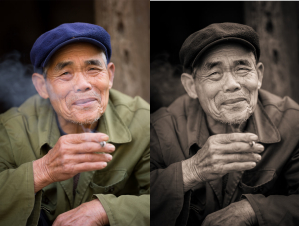
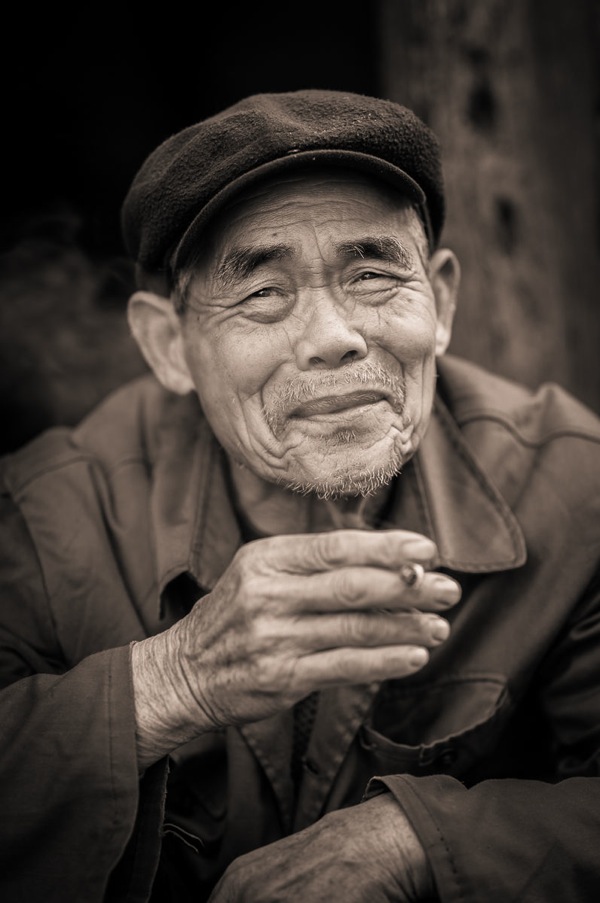
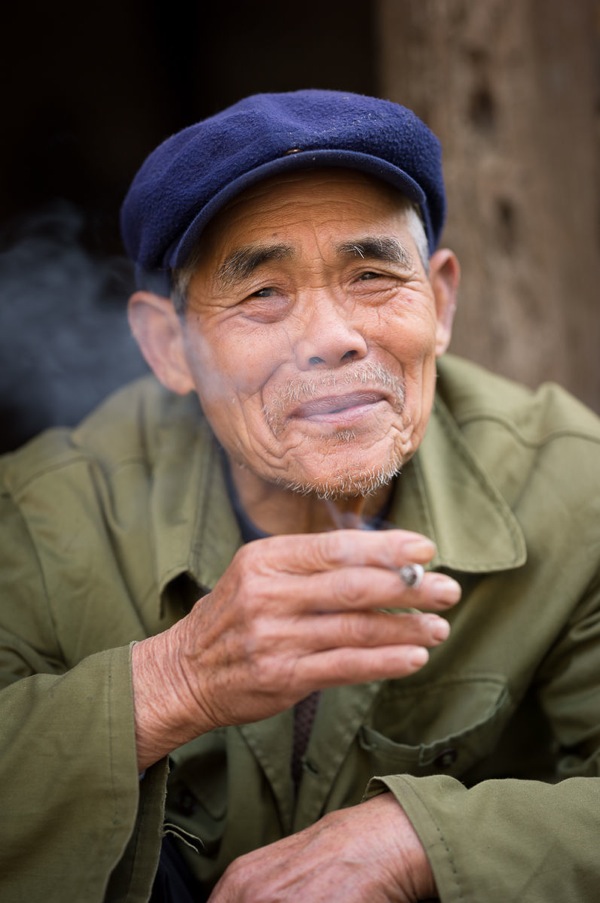
In converting to B+W the green of the jacket and the blue of the cap have darkened whilst the red skin tones have slightly lightened. The face and hands now stand out far better – a good example of a situation where the colours in the original were simply a distraction, adding nothing to the shot, and so were removed.

Nick Rains is a Queensland based photographer who has been shooting professionally since 1983 and has seen first hand many changes in the photographic industry, from manual to auto focus in the late 1980s through to the shift to digital in the past decade or so.

Nick currently shoots feature work for companies like Australian Geographic and Orion Expeditions as well as writing for magazines and blogs around the world. Nick is both a Canon training consultant and a Leica Ambassador, as well as a Master Photographer with the AIPP and a national judge. You can see more of his work at www.nickrains.com or add him to your circles on Google Plus.

For more in-depth photography writing, try Nick’s iPad app “Photique”. It’s a free download.

Post originally from: Digital Photography Tips.

Check out our more Photography Tips at Photography Tips for Beginners, Portrait Photography Tips and Wedding Photography Tips.

Black and White Conversions: An Introduction to Luminosity


Digital Photography School

 
Comments Off on Black and White Conversions: An Introduction to Luminosity

Posted in Photography


Canon announces EF-M 11-22mm f/4-5.6 IS STM wide zoom

06 Jun

efm-11-22-news.png

Canon has announced the EF-M 11-22mm f/4-5.6 IS STM – an image-stabilized wideangle zoom for its EOS M mirrorless camera. It’s Canon’s first wide zoom with IS, promising three stops of stabilization for stills and ‘Dynamic IS’ for video. A linear stepper motor offers silent autofocus during movie shooting, and a retractable barrel design makes the lens about the same size as the 18-55mm kit zoom. It should be in shops at the end of June, at an MSRP of £379.99 / €399. A firmware update for the EOS M (v.2) will give full compatibility with the 11-22mm, and faster autofocus with all lenses.

News: Digital Photography Review (dpreview.com)

 
Comments Off on Canon announces EF-M 11-22mm f/4-5.6 IS STM wide zoom

Posted in Uncategorized


Just posted: Our Canon EF-M 11-22mm f/4-5.6 IS STM preview

06 Jun

1122.png

Just posted: Our hands-on preview of the Canon EF-M 11-22mm f/4-5.6 IS STM. Canon’s third lens for its EOS M mirrorless camera is its first image-stabilized wideangle zoom, and first with a collapsible barrel design. With an 18-35mm equivalent angle of view and silent STM focusing, it could be an interesting option for photographers wanting the wider view but looking to travel light. Click through for our first look.

News: Digital Photography Review (dpreview.com)

 
Comments Off on Just posted: Our Canon EF-M 11-22mm f/4-5.6 IS STM preview

Posted in Uncategorized


Living Architecture: Evolving Pavilion Made by Silk Worms

06 Jun

[ By Steph in Art & Sculpture & Craft. ]

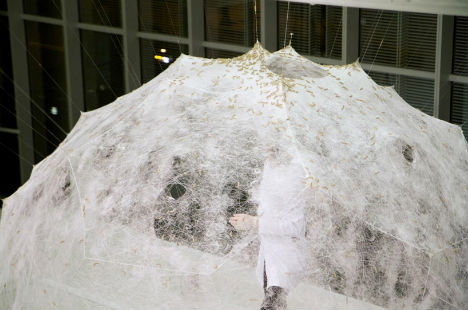
Silk Worm Pavilion 1

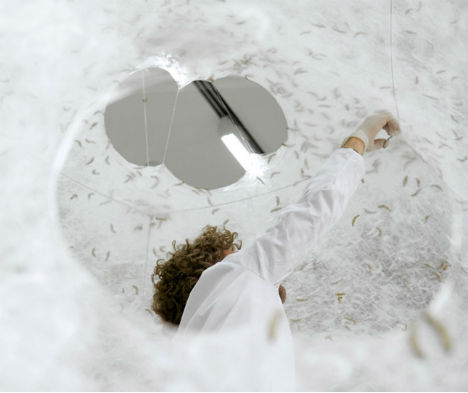
Growing and transforming like a living organism, the Silk Pavilion created by the MIT Media Lab is a collaboration between digital and biological fabrication. The basis of the pavilion is a network of silk threads made by a CNC machine, which has become a cloud-like structure with the addition of natural netting from the dozens of silk worms that squirm all over its surfaces.

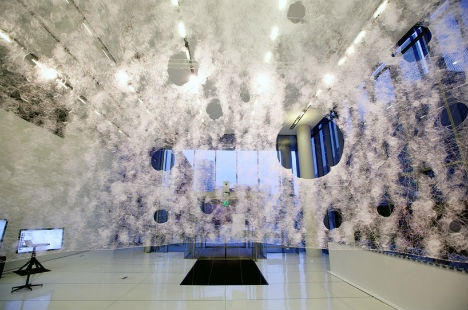
Silk Worm Pavilion 2

Twenty-six polygonal panels with silk thread stretched between them form a sort of scaffolding that enables the silk worms to work their magic of naturally produced architecture. The geometry of the base structure was created using an algorithm that routes a single continuous thread across the open sections to provide varying degrees of density.

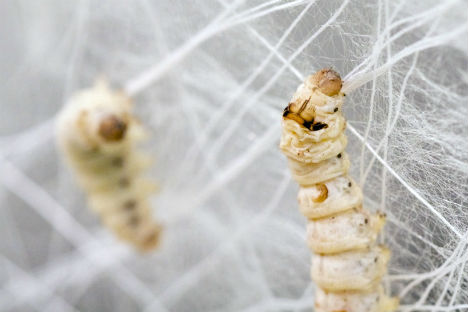
Silk Worm Pavilion 3

The silkworms were deployed as a biological ‘printer’ to create the secondary structure. If the sculpture, which is installed at MIT, were allowed to remain in place indefinitely, the moths could produce 1.5 million eggs with the potential of constructing up to 250 additional pavilions.

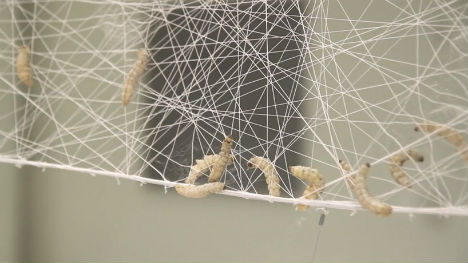
Silk Worm Pavilion 4

“Affected by spatial and environmental conditions including geometrical density as well as variation in natural light and heat, the silkworms were found to migrate to darker and denser areas. Desired light effects informed variations in material organization across the surface area of the structure. A season-specific sun path diagram mapping solar trajectories in space dictated the location, size and density of apertures within the structure in order to lock-in rays of natural light entering the pavilion from South and East elevations.”

Silk Worm Pavilion 5

“The central oculus is located against the East elevation and may be used as a sun-clock. Parallel basic research explored the use of silkworms as entities that can “compute” material organization based on external performance criteria. Specifically, we explored the formation of non-woven fiber structures generated by the silkworms as a computational schema for determining shape and material optimization of fiber-based surface structures.”

via design boom

Share on Facebook


[ By Steph in Art & Sculpture & Craft. ]

[ WebUrbanist | Archives | Galleries | Privacy | TOS ]


WebUrbanist

 
Comments Off on Living Architecture: Evolving Pavilion Made by Silk Worms

Posted in Creativity


Canadian Travelogue – Newfoundland – Spillars Cove

06 Jun

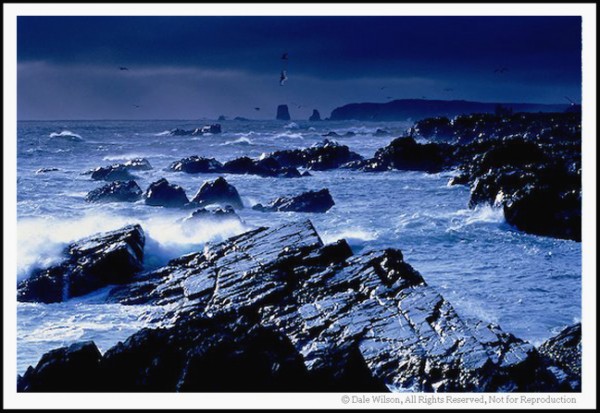
Spillars Cove lies at the tip of Cape Bonavista, with Bonavista Bay behind you and Trinity Bay ahead as you face east awaiting sunrise. For most of my many visits there the weather has been unbelievable: hurricane force-winds, driving rain and sleet — did I mention wind? Only a handful of times have I been blessed with a calm day, with bright sunny skies and temperatures hovering around 20 degrees; you know, the kind of day that is great for mosquitoes. I’ll take the wind, thank you very much.

In fact, the stronger the winds the better. This mean and rugged coastline lies generally northwest to southeast —perfect for photographs of the sunrise—and strong winds only add to the beauty. Use from two to four stops of graduated filter of various colours to add even more drama to the sky, or, alternatively, underexpose your bracketed frames in full-stop increments for masking via several post production techniques.  This incredible shoreline is typically far enough distant to permit lens apertures of f/5.6, to give shutter speeds high enough to keep the crashing waves from blurring while maintaining an acceptable depth of field.

When the light or weather is not cooperating you have to dig deep into that bag of tricks. In this case I have used a tungsten colour correcting filter (80A) to add some colour to an otherwise grey day.

When the light or weather is not cooperating you have to dig deep into that bag of tricks. In this case I have used a tungsten colour correcting filter (80A) to add some colour to an otherwise grey day.

There are several access roads leaving the Trans-Canada Highway between Clarenville and Port Blandford that meander toward Cape Bonavista, and if time is not a concern you should explore the bi-ways that will usually always lead to salt water and a tranquil and quaint fishing village. Once you reach the township of Bonavista be prepared to get lost, planned urban development and ease of transport were unheard of in the 17th century – streets simply followed the coastline and houses were built … wherever. But this is a part of the charm of rural Newfoundland. If you follow your nose and a few scattered signs you should easily find the lighthouse. A few hundred metres before the ocean sentinel there is the gravel Lance Cove Road to your right that leads to “The Dungeon,” a provincial natural attraction. Take this road and drive south east for about two kilometres along the coast and you will see the Spillars Cove shoreline, as seen above, unfold in the distance.

Should the wind be blowing hard—and it often is—keep your tripod as close to the ground as you can, to minimize camera movement. Once you have composed the image in your viewfinder you can use your body as a wind shield during the exposure. Should the wind be particularly aggressive, the coastline here is firm enough that you can drive your vehicle close to the edge and position it as a wind block to ensure the tripod mounted camera is rock steady. Back absolutely certain the marsh is dry enough to support your car first, and stay safely back from the edge of the cliff however by walking it first.

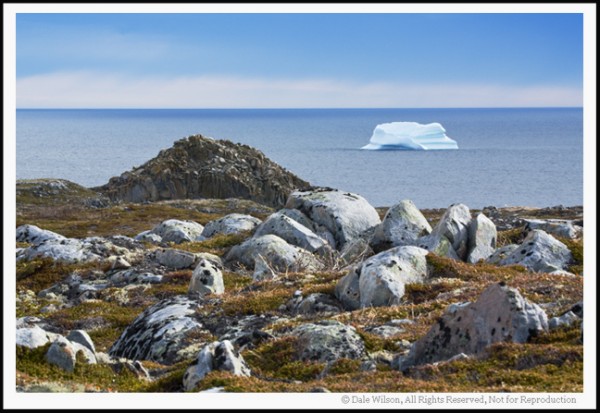
Another great nearby location for incredible seacoast images is Cable John Cove. From the Dungeon continue driving the gravel road south for another ¾ kilometre until you reach the paved Highway 235 (Bonavista Bay Hwy), and turn left, heading east. Simply drive this road for about one kilometre until the road ends, at which time you can walk the additional 200 metres to the shoreline. Once at the water’s edge simply continue walking the coastline to your left and once atop the little knoll you will see a large and impressive sea stack that begs to be photographed. Be careful when walking along this shoreline – the moss and rocks can get slippery if wet, and the fall to the depths below will be unforgiving.

Certainly not an award winning image, but a snapshot to show what can potentially await the adventuring photographer as seen from atop the highlands of Cable John Cove.

Certainly not an award winning image, but a snapshot to show what can potentially await the adventuring photographer.  As seen from atop the highlands of Cable John Cove.

Another great side trip should be to nearby Elliston. Once in the community ask anyone for directions to the puffin site at Elliston Point. There are about 300 nesting pair of Atlantic puffin at this site and if the wind is blowing in the right direction you should easily be able to striking portraits with a 200mm lens.

If you happen to really lucky and are in this area in early summer ask the locals if they know of any icebergs in the area. You shouldn’t be surprised if there are a couple hidden in some cove; you are, after all, on the banks of Iceberg Alley.

Post originally from: Digital Photography Tips.

Check out our more Photography Tips at Photography Tips for Beginners, Portrait Photography Tips and Wedding Photography Tips.

Canadian Travelogue – Newfoundland – Spillars Cove


Digital Photography School

 
Comments Off on Canadian Travelogue – Newfoundland – Spillars Cove

Posted in Photography


Classic lines when clients want you to work for free

06 Jun

543946_10151279575903740_1208216722_n.jpg

If you’ve ever spent any time as a self-employed photographer, you’ve not doubt heard countless rationales from clients about why you should work for free, or at least lower your rate. PhotographyTalk.com posted a pitch-perfect list of five classic lines that not only ring true to those of us on staff with freelance backgrounds, but would be perfect punchline setups in an Aaron Johnson ‘What The Duck’ comic strip. Click through to see if any of them sound familiar. (via PhotographyTalk.com)

News: Digital Photography Review (dpreview.com)

 
Comments Off on Classic lines when clients want you to work for free

Posted in Uncategorized


Why Aren’t Search Engines Making Better Use of Their Social Networks for Image Search?

06 Jun

One thing I’ve noticed more and more over the past few years is what a poor job traditional image search engines do vs. social networks.

By using social information around photos (likes, faves, comments, +1s, etc.), social networks typically produce much superior image search results than traditional image search.

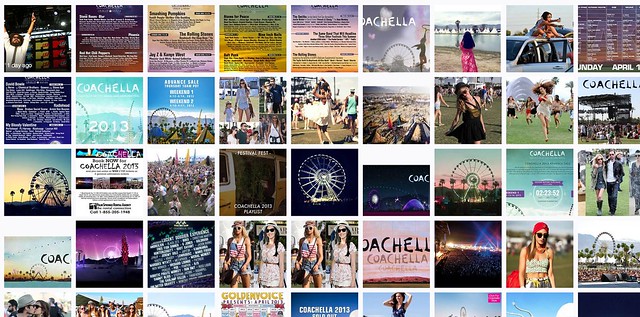
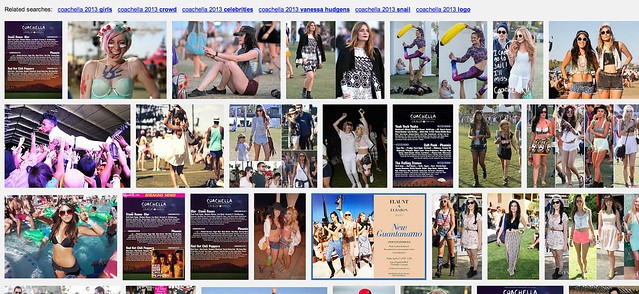
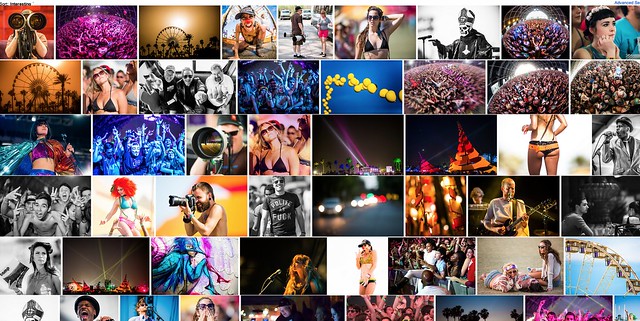
Take this search of Coachella 2013 for example.

Screen Shot 2013-06-05 at 10.45.53 AM
Yahoo Image Search: “Coachella 2013″

Screen Shot 2013-06-05 at 10.46.24 AM
Google Image Search: “Coachella 2013″

Screen Shot 2013-06-05 at 10.47.28 AM
Flickr Image Search: “Coachella 2013″

The first image comes from Yahoo (or is it Microsoft these days, I can’t keep it all straight). It’s not very good. It shows too many images of just the lineup vs. actual fun interesting photos of the event itself.

Google’s image search results are better, but still not as good as many of the images I find on social networks.

Now I may be biased (as I shot this particular event) but I think Flickr’s search results are *far* better than either Google or Yahoo Image search.

I’m working on a project right now to photograph the 100 largest American cities. When I’m researching things to photograph in these cities I almost always go first to Flickr (because it’s the largest database of highly organized quality photos on the web). I will also look at Google+ too, sometimes. Google+ doesn’t have as many high quality images in the total database as Flickr, yet, but I find some pretty good stuff there sometimes still. Most of Flickr’s advantage here over Google+ just has to do with the fact that they are older and have more images indexed.

Lately I’ve also played around with graph search on Facebook for images — I haven’t been very impressed there at all though.

The one place I hardly ever go is to the actual Google or Yahoo image search engines — because the results are so inferior.

Here’s what I don’t get: *why* are the results at Yahoo and Google Image search inferior? Google and Yahoo have access to proprietary internal social data around photos in their social networks, why isn’t that coming through better in the signal for high quality images.

On my example search using Coachella 2013, not a single Flickr photo appears on Yahoo’s first page image search and not a single Google+ image appears on Google’s first page image search.

Shouldn’t these search engines be better mining organically and socially ranked superior content? It’s not that these engines don’t index it, they do, it’s just not ranking well.

Beyond just better image search, Google and Yahoo *should* have another significant incentive to better include their social images into image search.

All things being equal, assuming you could improve image search results, wouldn’t you want to drive more traffic to your own internal social network, rather than to some unrelated destination — and wouldn’t you want to reward the best photographers on your social network with more traffic vs. some random SEO rigged site somewhere?

Why aren’t image search engines doing a better job with social?

Another added benefit to driving image search traffic to your social network, is that the presentation there is usually better, more uniform and consistent. When I’m tempted to go further on an image from Yahoo or Google, I may end up at some odd sized photo, in some odd format. With a G+ or Flickr result I get a strong consistent image experience that I’m familiar with.

As an unrelated topic dealing with image search on Flickr — the best social image search on the web today — Flickr needs to give us the ability to block certain users from our search results. Many popular photographers will pollute image search on Flickr by falsely tagging things that are not in their popular photos, just to try to garner traffic.

Take this search on Flickr for dog for example. So many of the first page results are not photos of dogs at all. Flickr should allow us to block certain users from our search results in order to better refine them. When we block people from our search results, this should also be a signal to Flickr that this user should rank much worse in search. If users get the message that they will be penalized for purposely mistagging their photos, they will be less likely to try and game the system this way, resulting in better image search on Flickr for all of us.


Thomas Hawk Digital Connection

 
Comments Off on Why Aren’t Search Engines Making Better Use of Their Social Networks for Image Search?

Posted in Photography


Mastering Photoshop Textures to Create Powerful Imagery

05 Jun

Photoshop has done for photography what the road did for the wheel! That’s quite a bit in case you’re wondering… This union has made photography the worlds 2nd most popular past time… Because let’s face it; creating exciting images is indeed thrilling, and most of all, highly addictive! One such addiction is a single technique: Simple to grasp,hard to master! Continue Reading

The post Mastering Photoshop Textures to Create Powerful Imagery appeared first on Photodoto.


Photodoto

 
Comments Off on Mastering Photoshop Textures to Create Powerful Imagery

Posted in Photography