RSS
 

Archive for June, 2013

browserFruits Juni #2

09 Jun

Habt Ihr schon unsere neue Serie Augenschmaus entdeckt? Jeden Freitag zeigen wir Euch hier leckeres Essen zusammen mit dem Rezept zum Nachkochen und einem kleinen Einblick, wie die Bilder entstanden sind. Wenn Ihr auch die Foodfotografie für Euch entdeckt habt und noch dazu gut kochen könnt, dann freuen wir uns über einen Beitrag von Euch. Wie das geht, erfahrt Ihr hier.


Fotospecial: Portraits und wilde Tiere

Flickr

500px


Deutschsprachig

• Sebastian Magnani hat seine Underdogs-Serie, die wir auch schon vorgestellt haben, fortgesetzt. Seht selbst.

• Ab und zu erreichen uns E-Mails mit der Frage, ob wir nicht dies und das vorstellen könnten. Klar, wenn wir es gut finden und Potenzial erkennen, wie bei Enecco, einer neuen Plattform für Sportfotografen.

• Sehr gute neue Portraits von Kajetan Kandler haben wir drüben bei Blickfang entdeckt.

• Die Chicago Sun-Times hat alle ihre bisher festangestellten Fotografen entlassen.

• Anlässlich seiner Ausstellung in Bochum inteviewt der Deutschlandfunk den niederländischen Fotografen Anton Corbijn. Das Interview gibt es zum Nachlesen oder zum Nachhören.


International

• Die 17-jährige Jessica Trinh portraitiert ihren Hund auf ganz unterschiedliche Weisen.

• Ein unglaubliches Foto aus Mexiko. „Little boxes on the hillside, little boxes made of ticky-tacky, little boxes, little boxes, little boxes…“

• Das ist Kunst auf Tellern: Großartige Food-Bilder.

• Nochmal Foodfotos: Zusammen mit Portraits von Großmüttern in ihren Küchen rund um die Welt hat der italienische Fotograf Gabriele Galimberti eine wunderbare Serie mit dem Titel „Delicatessen With Love“ geschaffen.

• Bilder der Hochwasserkatastrophe in Europa.

• Zukunftsmusik: The Wired verkündet mit breiter Brust das Ende der DSLRs. Und Digital Trends stellt sich der Frage, ob es bald „Professionelle Instagrammer“ geben wird.

• Auch die Queen hat mal ein Fotoshooting. Ein kleiner Blick hinter die Kulissen.

• Drei Tipps, wie man in Portraits den Charakter und die Energie der Personen reflektieren kann.

• Ein Foto aus Australien findet sich in Istanbul als Streetart wieder.


Neuerscheinungen und Tipps vom Foto-Büchermarkt

tipps

• Herausgeber Martin Gommel ist angetan von diesem italienischen Bildband* mit Fotos des Schweizer Fotografen René Burri, der unter anderem wichtige Persönlichkeiten seiner Zeit wie Che Guevara, Picasso und andere gekonnt fotografierte.

• „Randgänge der Photographie“* von Bernd Stiegler ist ein etwas anderes Buch zur Fotogeschichte, in dessen Mittelpunkt nicht die allseits bekannten Klassiker stehen, aber gleichwohl wichtige Fragen.


Videos

Photoshop-Künstler Erik Johansson (unser Interview) shopt live und amüsiert damit überraschte und irritierte Wartende an einer Bushaltestelle.


Wozu die ganzen seltsamen Modi der Kamera sind? Hier erfahrt Ihr die ganze (lustige) Wahrheit.


Foodbilder: Diese Hot Dogs sehen so unglaublich lecker aus. Welcher wäre Euer Favourit?


Ausstellungen

Fünf Jahre Photo Edition Berlin – Gruppenausstellung
Zeit: 01. Juni – 29. Juni 2013
Ort: photo edition berlin, Ystaderstr. 14a, 10437 Berlin
Link

Yuichi Hibi – Salt of the Earth
Zeit: 30. Mai – Ende Juli 2013
Ort: Only Photography, Niebuhrstr. 78, 10629 Berlin
Link

Zum 50sten Geburtstag von Markus Schirmer, fotografiert von Christian Jungwirth
Zeit: 11. Juni – 6. Juli 2013
Ort: Atelier Jungwirth, Opernring 12, Graz
Link

antonius, jörg rubbert – “new york city limits”
Zeit: 8. Juni – 7. Juli 2013
Ort: aff Galerie, Berlin
Link

R(h)einFormate – „Große Gefühle“
Zeit: 30. Juni – 28. Juli 2013
Ort: Galerie Kunsthaus Rheinlicht, Remagen
Link

René Burri – Doppelleben
Zeit: 05. Juni – 13. Oktober 2013
Ort: Museum für Gestaltung Zürich
Link

Andy Spyra – Exodus
Zeit: 6. Juni – 16. August 2013
Ort: FREELENS Galerie, Steinhöft 5, 20459 Hamburg
Link

CAMERA WORK rocks
Zeit: 8. Juni – 17. August 2013
Ort: CAMERA WORK, Berlin
Link

Franz Wanner – Gift – Gegengift. Krankheitsbilder einer Stadt.
Zeit: 14. Juni – 18. August 2013
Ort: Museum für Photographie, Torhäuser, Helmstedter Straße 1, Braunschweig
Link

Mehr aktuelle Ausstellungen


* Das ist ein Affiliate-Link zu Amazon. Wenn Ihr darüber etwas bestellt, bekommen wir eine kleine Provision, Ihr bezahlt aber keinen Cent mehr.


kwerfeldein – Fotografie Magazin

 
Comments Off on browserFruits Juni #2

Posted in Equipment


An Introduction to Bird photography

09 Jun

A Guest Post by Lithuanian Photographer Tadas Naujokaitis.

Birds are very interesting creatures, but it’s not so easy to photograph them. Wild birds usually don’t pose where you want and, moreover, it’s often difficult to get close enough to take quality pictures. But if you know some basics of bird photography, it becomes much easier to capture amazing moments of the birds’ life.

Equipment

It’s not necessary to have an expensive camera of lens, however the proper equipment lets to take bird photos easier.

Lens
Most birds are quite shy, so you need at least 200mm (300mm is better) to take pictures of them. Longer focal length not only lets to photograph birds from larger distance, it also gives more blurred background. However more millimeters (or larger aperture) means more expensive, larger and heavier lens. Knowing all that, I think that 400mm f/5.6 lens is the best, if you want to have as much millimeters as possible, not too small aperture and still want to be mobile. Of course, you can make magnificent bird images with 100mm or less, just you should find more courageous birds or compose them to landscape.
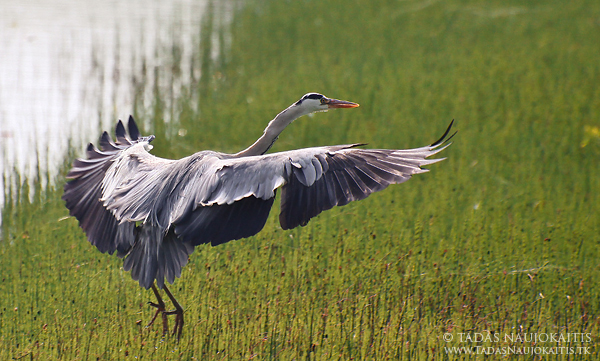
Grey Heron is landing far enough where it feels safe, but with 400mm it’s possible to capture it with all the details.

Camera
In bird photography, almost all DSLR’s will make a good job. However, if you’re planning to photograph birds in flight, pay attention to fps (frames per second), high ISO results and AF (autofocus) system’s accuracy. If you don’t have a DSLR camera, then bird photography becomes a bit more difficult (especially due to slow AF), but don’t give up – a good photographer, I believe, will make better bird photos with mobile phone than a poor one with the most expensive equipment.

Tripod, monopod, flash, even remote control sometimes help much, but usually aren’t necessary.

Camera settings

It’s very important to know what settings to choose in certain situation to get most from your camera.

Exposure
In bird photography lens with long focal length are usually used, so it’s very important to set not too long exposure, if you don’t want that camera shake would cause blurry pictures. The rule is to set expose not longer than focal length of your lens. For example, if your lens focal length is 400mm, you need to set at least 1/400 exposure to get sharp images. However, it is valid only if you have a full-frame camera. If your have a DSLR with smaller sensor (e.g. APS-C DSLR – with 1.6 crop factor), you need to multiply millimeters of your lens from the crop factor. This time that would be (400 x 1.6 = 640) 1/640 exposure. If you don’t have a DSLR, you usually won’t need to multiply anything – the focal length, written on your camera lens, usually already is multiplied (actually it’s 35mm equivalent). Today, most lens or cameras have image stabilization (IS, VR…), and that helps much in low light conditions. Using it, you can set as many steps longer exposure, as you find in your lens/camera specifications, and get sharp images. For instance, if there is a 2 steps 400mm lens stabilizer, you can set 2 steps longer exposure (1/400-1/200-1/100, with APS-C camera: 1/640-1/320-1/160). When using tripod, of course, these rules to minimize camera shake are not so important.

If you want so freeze action, set 1/1000 or shorter exposure, if you would like to show movement, use 1/60 or longer.

Aperture
As you may already knew, aperture controls DOF (depth of field). That means, if you want a more blurred background, set the largest aperture (the smallest number). However, when using telephoto lens, some parts of bird’s body may appear out of focus, so pay attention where exactly you are focusing (that usually is the bird’s eye). If necessary, close aperture a bit.
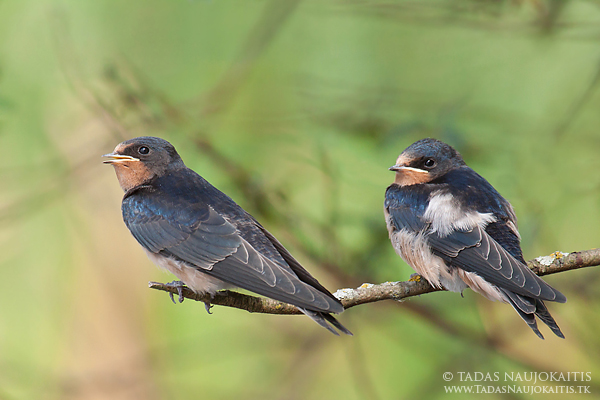
When photographing these young Swallows I needed to set f/8 aperture to get both birds in focus.

ISO
In bird photography, as in anywhere else, the lower ISO speed, the better. However, it’s much better to set ISO 800 or 1600 and get a sharp picture, than ISO 200, and get the blurry one.
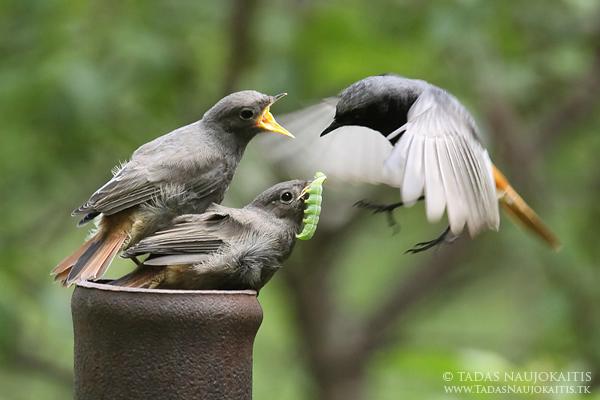
This photo of Black Redstart was made with ISO 2000, because there wasn’t much light, and I believe it was worth it.

Some other notes
When photographing birds, three modes work the best. If you want to control aperture (depth of field), choose Av (aperture priority) mode. For shutter speed controlling (especially useful when photographing birds in flight) use Tv (shutter priority) mode. If you exactly know what settings you need, choose M (manual) mode.

If you photograph dark bird in light background or want to get more details from dark areas, set the positive exposure compensation value, if you want to avoid overexposed areas, set the negative one.
I recommend you to always shoot in RAW, if possible, because later you can easily fix such things as WB (white balance) with computer.

Ways to photograph birds

The next step is to learn, how to get to the birds closer, so then you will be able to take quality pictures of them.

So you can:

Don’t do anything exceptional
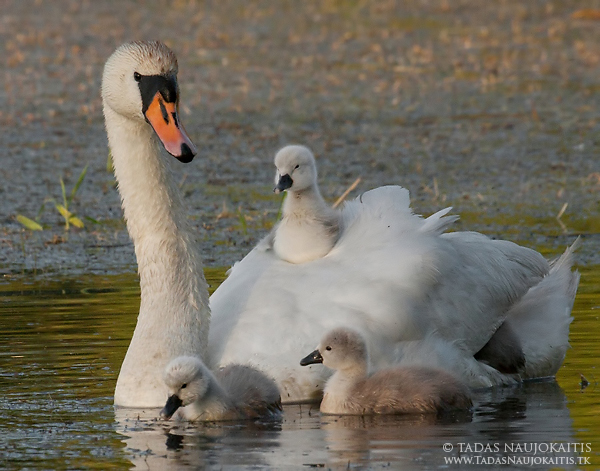
Some birds are courageous and let you to come close enough. The best example is Mute Swans.
Move carefully
Many birds let you to come close enough if you simply don’t make any sudden movements.

Stalk
Sometimes this really works, just make sure that bird doesn’t see you when you are getting close and then, very carefully, take picture.

Lie without any movements
Birds sometimes come surprisingly close, when you lie. Just find a good place or put some food and be patient!

Hide
When photographing a shy bird or wanting a small bird to come very close for a quality photo this is the best technique. You can hide using hunting blind, camouflage net or the blind you made yourself from surrounding materials. The lower is blind, the more courageous birds feel. If you use surrounding materials to camouflage the blind or to hide yourself, that is another advantage. You can hide near various objects, which attracts birds. Also, you can put some food where you want for birds to come. Sunflower’s seeds are the best food in most cases. If you want that bird would sit on the twig or something similar before taking food, put that twig above the food.
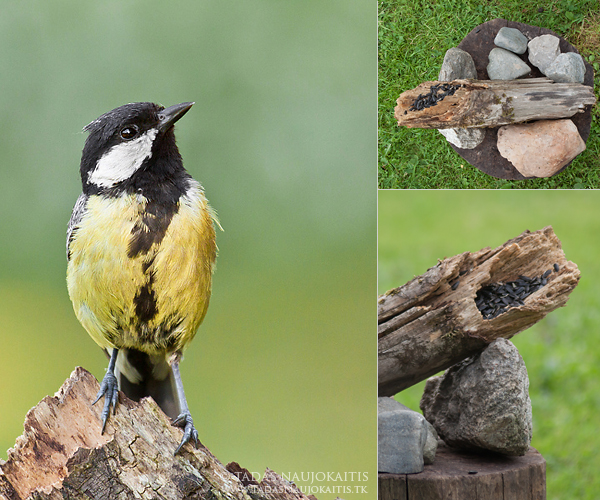
Here you can see the photo of Great Tit and how it was made.
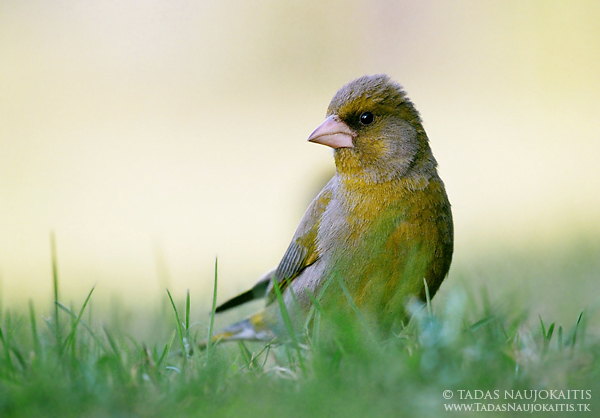
Sometimes it’s enough to put some sunflower’s seeds on the grass! And this is the result.

It doesn’t matter which way you choose, be patient. Don’t wander from one bird (birds) to other (others), if you didn’t succeeded from the first time. Sometimes it’s a good idea to go back next day and try again.

The Image

Now, lets talk about the image itself. We know what equipment we need, what camera settings to choose, how to get to the bird closer, now it’s time to find out how to make the image of the bird look attractive.

The light
Everything starts with a good light. The best time for photography is morning or evening because the light is soft and has a pleasant hue, shadows are not so distinct, it’s easier to get details from very bright and dark areas.
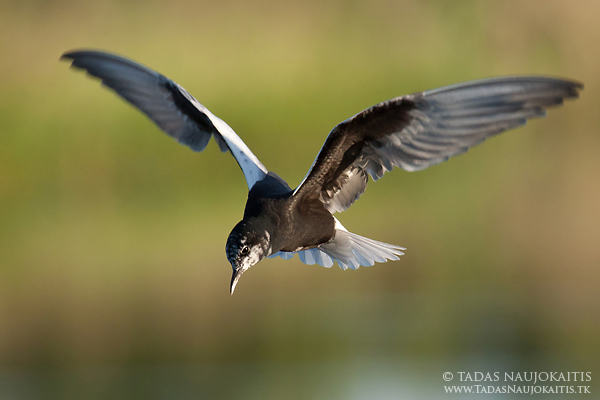
In this example you can see that this White-winged Tern has both black and white feathers, but because it was photographed in the evening, there are no pure white or black areas.

Composition
It is usual to leave some space in the direction the bird is looking or flying. Rule of thirds sometimes helps too. Simply try some different framing to see when you get the best result. In addition, try to avoid any distracting elements, when you are taking the picture. And one more thing to mention: when you are taking the photo of the bird, try to be in it’s eye level.

The bird’s sitting place and the background
It’s the best, when the place, where the bird sits, shows bird’s natural habitat. It can be almost anything because birds live in very different habitats. The background shouldn’t be distracting and usually it looks better when it isn’t the sky (but not always!).
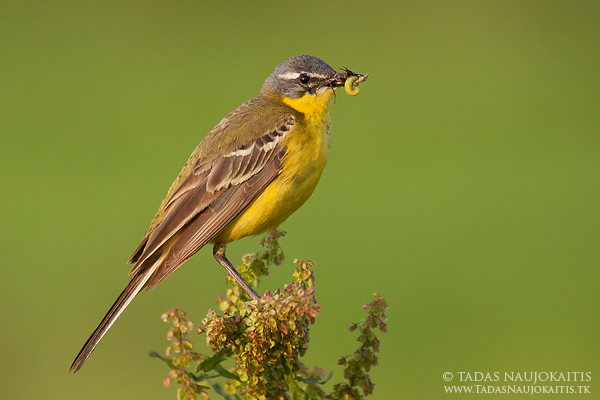
Capture something more
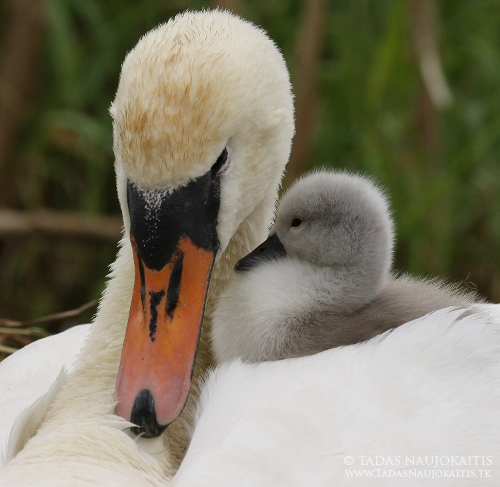
Ethics of bird photography

Birds are wonderful creatures. When you are taking photos, don’t harm them. I strongly advice you not to photograph birds near nests (except when the distance is large and bird isn’t sensitive to disturbance – there are only very few such species). Even if you don’t harm birds, you can show the place of the nest for predators. The life of bird is more important than a photo.

Conclusion

Bird photography is exciting and full of adventures. I hope after this article it will be easier for you to take beautiful bird photos.

About the Author: Tadas Naujokaitis lives in Lithuania. See more of his work at www.tadasnaujokaitis.tk and connect with him on his Facebook page.

Post originally from: Digital Photography Tips.

Check out our more Photography Tips at Photography Tips for Beginners, Portrait Photography Tips and Wedding Photography Tips.

An Introduction to Bird photography


Digital Photography School

 
Comments Off on An Introduction to Bird photography

Posted in Photography


Exposing to the Right on Your EOS Camera

08 Jun

01.jpg

By Andrew S. Gibson – the author of Understanding Exposure: Perfect Exposure on Your EOS Camera (currently 36% off at SnapnDeals).

Over the years that I’ve worked as a photography writer I’ve noticed that people keep asking the same questions about exposure on their EOS cameras.

One of the most common is why doesn’t the camera doesn’t get the exposure right every time?

This is a reasonable question. Modern digital SLRs are advanced machines with built-in microprocessors that can handle complex calculations. So just why do they get exposure wrong?

Part of the reason is that the light meter inside a camera measures reflected light. If a scene is darker or lighter than average, the camera may return an incorrect reading.

02.jpg

Optimum exposure

But think about this for a moment. Who gets to say whether a given exposure is correct or not? I don’t like using the word correct in relation to exposure because it implies that there is only one right answer.

I prefer the term ‘optimum exposure’. This is the exposure setting that is best suited to the scene that you are photographing and the medium you are using.

Imagine that you are photographing the same subject with four different cameras. One is loaded with black and white film, another with colour transparency film, the third with colour negative film and the last is a digital camera. Each has the same lens and frames the subject the same way. The quantity of light falling on the subject is also the same.

Potentially, the scene could require four different exposure settings. That’s because each camera is using a different medium which reacts to light in a slightly different way. Film users will know that black and white film, slide film and colour negative film all need to be treated differently. The same goes for digital cameras.

Put simply, the optimum exposure depends as much on the medium you are using as the quantity of light falling on the subject.

That’s another reason why cameras get exposure wrong. The metering system has yet to be invented that takes into account the medium being used as well as the amount of light entering the lens.

JPEG vs. RAW

Even with digital cameras, the optimum exposure may be different depending on whether you are using the JPEG or Raw format. In JPEG, the aim is to get the exposure as precise as possible. That’s because there isn’t much leeway in post-processing to make the image darker or lighter, and you certainly can’t bring back shadow or highlight detail lost due to poor exposure.

In Raw the aim is different. The idea is to create a file containing as much information as possible in preparation for converting to the JPEG or TIFF formats in Raw processing software. That may require different exposure settings.

Exposing to the Right

Exposing to the right (often referred to as ETTR online) is a technique used by photographers to create a Raw file containing the maximum amount of possible information.

The technique is simple – you use the exposure settings that allow the maximum amount of light possible to reach the sensor without clipping the highlights. The result is a histogram with a graph that is as close to the right hand side of the graph as possible without crossing it.

The main benefit of exposing to the right is that it reduces noise levels in your photos. It also ensures that you capture as much shadow detail as possible, without losing any highlight detail.

Lets take a look at how this works in practice:

03.jpg

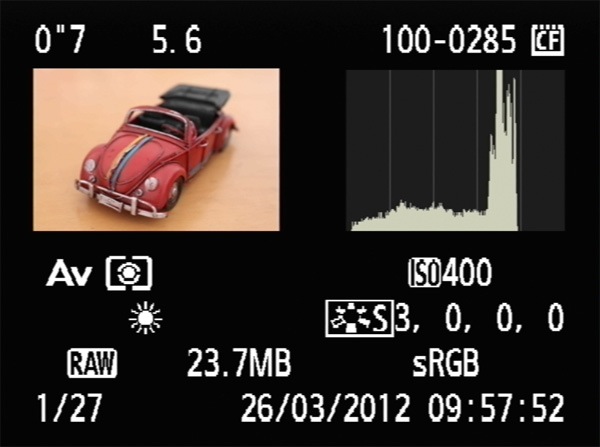
Here’s a photo take at my camera’s recommended exposure settings. It doesn’t cover the full range of the graph. The right hand fifth is empty. This tell us we can increase exposure without clipping any highlights.

04.jpg

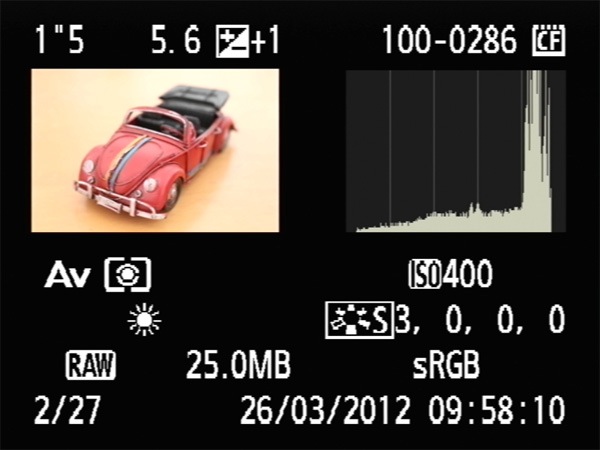
Here, I increased the exposure by a stop using exposure compensation. The histogram is further to the right, but no highlights have been clipped. These are the optimum exposure settings.

05.jpg

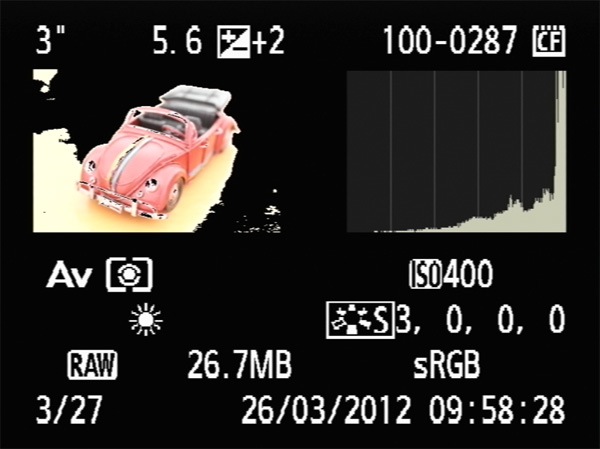
This is what happens if you increase exposure by too much. Here, I increased exposure by two stops. The histogram is cut off on the right hand side and the highlight alert (black region of photo) shows the clipped areas.

Exposure Technique

So, what’s the best way to put the exposing to the right technique into action?

A lot depends on what you are photographing. If your subject is static (such as a still life or a landscape) you have time to take a photo, look at the histogram, then change the exposure settings and take another one if necessary.

If you are shooting something like portraits or street photography you probably don’t have the luxury of time. But you should still check your histogram every now and then to see how your exposure is doing. If you notice that your camera is consistently under- or over-exposing the image, you can make an adjustment using exposure compensation. You may even find it easier to switch to manual mode. It’s your call – the most appropriate response depends on the situation.

High Contrast Scenes

The effectiveness of exposing to the right really depends on the contrast range of the scene that you’re photographing.

If you’re shooting a high contrast scene then you may find that you can’t successfully capture all the tones that you would like to, let alone use a technique like exposing to the right. The most common scenario where this might occur is in landscape photography, as the sky may be much brighter than the land.

If this happens to you, ask yourself whether the high contrast is a signal that you are shooting in the wrong light. It may be that you need to come back when the sun is lower in the sky. The quality of the light will be better and the contrast will be lower.

If the light is good, then there are two good options for dealing with the excessive contrast.

One is to use a graduated neutral density filter to reduce the brightness of the sky.

The other is to set the camera on a tripod and take two separate exposures, one for the sky and the other for the land, then merge the correctly exposed parts in Photoshop afterwards.

06.jpg

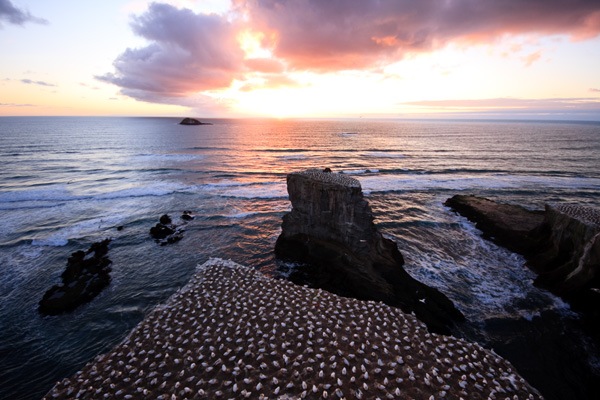
Here’s a landscape with a bright sky.

07.jpg

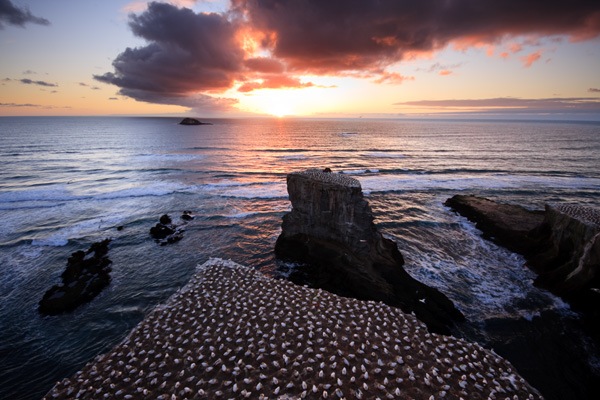
I created this version by taking separate images for the sky and the land and blending the two in Photoshop.

Flat lighting

If the light is flat then your camera will have no trouble capturing all the tones of your subject. The histogram occupies just part of the graph, and you can push it to the right by increasing exposure.

08.jpg

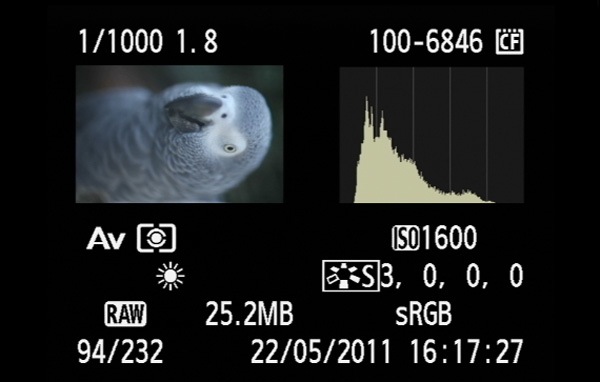
In this photo you can see that the histogram occupies just part of the graph. It is possible to increase exposure and push the histogram to the right to create a better quality Raw file.

Where Histograms come From

Finally, it helps to understand where the histogram comes from. When you take a photo on your EOS camera, even if you have selected the Raw format, the camera embeds a JPEG version of the photo you have just taken in the Raw file. The JPEG file is processed by the camera using the Picture Style and White Balance settings you have selected. The camera displays the JPEG file on your camera’s LCD screen when you play back your images.

The important thing to understand is that the histogram is generated from the JPEG file, not the original Raw file. This is significant for two reasons.

The first is that Raw files contain more highlight detail than JPEG files. If the histogram indicates that there are clipped highlights, that just means that the clipped highlights exist in the JPEG file. The highlight detail might be intact in the Raw file.

Some photographers may use this fact to encourage you to increase exposure to the point where the histogram shows clipped highlights, on the basis that you can pull back the lost detail when you process the Raw file. You can try that if you wish, but you’re taking bit of a risk, as you never really know at what point your highlights will clip.

The other thing to be aware of is that if you go into your Picture Style settings and increase the contrast, that only affects the JPEG thumbnail and not the Raw file. The more you increase contrast, the less accurate the histogram becomes in relation to the Raw file.

Understanding Exposure

09.jpg

My ebook Understanding Exposure: Perfect Exposure on Your EOS Camera covers everything you need to know in relation to exposure on your EOS camera. It’s on special now for a limited time at Snapndeals.

Post originally from: Digital Photography Tips.

Check out our more Photography Tips at Photography Tips for Beginners, Portrait Photography Tips and Wedding Photography Tips.

Exposing to the Right on Your EOS Camera


Digital Photography School

 
Comments Off on Exposing to the Right on Your EOS Camera

Posted in Photography


Useful Billboards? Advertisements Extend Into Urban Space

08 Jun

[ By Delana in Design & Guerilla Ads & Marketing. ]

smart ideas for smarter cities awning billboard

At its best, advertising is entertaining, even useful. At its worst, it is invasive, abrasive, and perhaps even offensive. IBM’s new campaign from Ogilvy France skirts the line, featuring public objects that are useful but which somewhat invade the urban space.

ogilvy france bench billboard

The Smart Ideas for Smarter Cities campaign includes three billboards that extend out from city walls and into the urban environment. One is an awning of sorts, providing a dry space for residents to get out of the rain or a bit of shade to get out of the sun.

ibm ramp billboard

Another is a small bench which gives weary pedestrians the chance to sit down for a moment. The last is a ramp that covers a portion of a small staircase, letting cyclists or luggage-wheeling residents take an easier route.

The campaign is meant to inspire viewers to think differently about their cities and how some elements could be tweaked to be more useful for residents. It’s something of a risk, however, since this invasion of the urban environment may not be welcomed by residents who think that advertising is already too ubiquitous on city streets.

(images via: Fast Company)

Share on Facebook


[ By Delana in Design & Guerilla Ads & Marketing. ]

[ WebUrbanist | Archives | Galleries | Privacy | TOS ]


WebUrbanist

 
Comments Off on Useful Billboards? Advertisements Extend Into Urban Space

Posted in Creativity


Converging Lines: Weekly Photography Challenge

08 Jun

This week we published a tutorial on using converging lines in the composition of your photos so today we thought it might make a good theme for our weekly challenge.

Empty road

So – your challenge is to grab your camera and head out to find some converging lines to shoot – and then to share those photos with us.

You can see some examples of converging lines in shots in the post from earlier in the week but as you get out and about you’re sure to see them all around you – once you start looking you’ll be amazed how many they are.

Once you’ve taken your converging lines photo upload it to your favourite photo sharing site either share a link to them even better – embed them in the comments using the our new tool to do so.

If you tag your photos on Flickr, Instagram, Twitter or other sites with Tagging tag them as #DPSCONVERGE to help others find them. Linking back to this page might also help others know what you’re doing so that they can share in the fun.

Also – don’t forget to check out some of the great shots posted in last weeks Critique Yourself challenge – there were some great shots submitted.

Post originally from: Digital Photography Tips.

Check out our more Photography Tips at Photography Tips for Beginners, Portrait Photography Tips and Wedding Photography Tips.

Converging Lines: Weekly Photography Challenge


Digital Photography School

 
Comments Off on Converging Lines: Weekly Photography Challenge

Posted in Photography


Ergebnisse der Leseraktion: Bearbeitungsexperimente

08 Jun

Vor zwei Wochen hatten wir Euch zwei Fotos zur Verfügung gestellt, an denen Ihr Euch kreativ austoben durftet und solltet. Eure Bildbearbeitungskünste waren gefragt! Heute zeigen wir Euch, was dabei herausgekommen ist.

Wir waren wieder einmal erstaunt, wie viele tolle Einsendungen dabei waren und auf welche Ideen Ihr gekommen seid. Es bestand ja doch die Gefahr, dass viele bei einem Bild in die selbe Richtung gehen, aber Ihr habt uns das Gegenteil bewiesen. Außerdem war es sehr spannend zu lesen, wie jeder einzelne an die Bearbeitung herangegangen ist. Da kann man auch gleich noch etwas voneinander lernen!

Wir konnten natürlich nur die Beiträge berücksichtigen, die ausschließlich nachgewiesen freigegebenes Fremdmaterial verwendet haben, aber bei den meisten hat das ja gut geklappt.

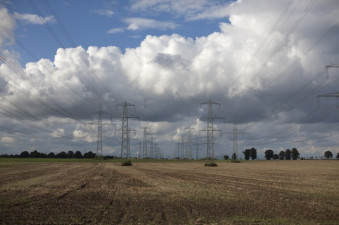
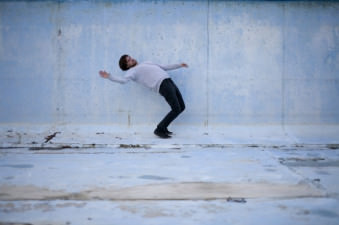
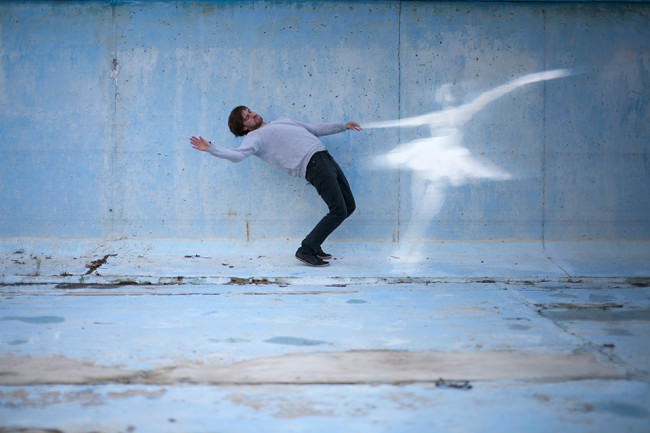
Zum Vergleich hier noch einmal die beiden Ausgangsbilder:

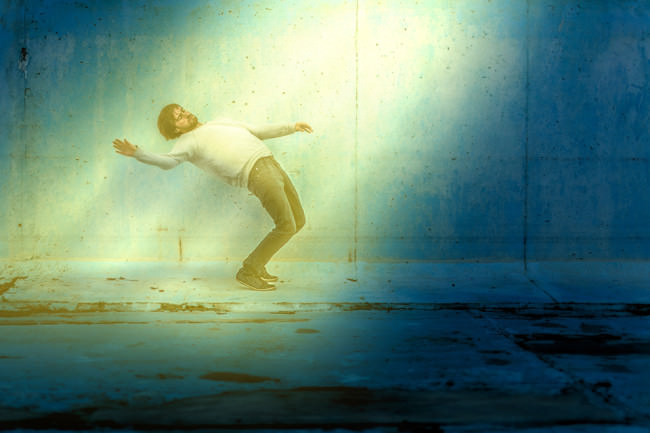
© Aileen Wessely © Normen Gadiel


Nun aber endlich zu Euren Kunstwerken!


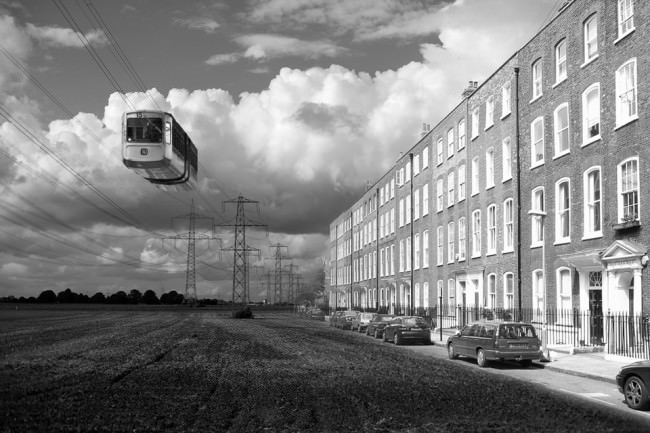
© Torsten Geiger

Torsten schrieb:

Wow, eine tolle Idee! Auch wenn ich durchaus ein Anfänger bin, wollte ich mir das nicht entgehen lassen. Ich hoffe, dass die Idee hinter dem Bild heraus kommt. Ich wollte aus dem freien Feld eine kleine Zukunftsvision machen. Da immer mehr freie Landschaft der Betonwüste zum Opfer fällt, könnte dies ja auch dem Feld geschehen.

Quellen: Schwebebahn, Straßenzug


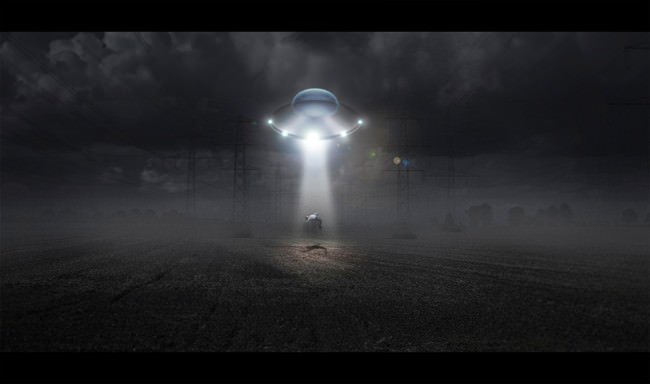
Alienforschung © Christoph Trabert

Christoph schrieb:

Wenn man von mir verlangt, dass ich ein Bild stärker bearbeite als sonst, dann nehme ich das wörtlich.

Das Landschaftsbild erinnerte mich sofort an ein total altes Foto, dass ich 2005 oder ’06 in Köln auf einem Festival gemacht habe.
Man sieht darauf Strommasten im Sonnenuntergang und weit entfernt ein Flugzeug, so schlecht erkennbar und an beiden Flügelenden leuchtend, dass man es für ein Ufo halten könnte.
Ich stehe auf Science Fiction, also wurde es heute eine Entführung mit Forschungszweck.

Zur Bearbeitung:

Erstmal habe ich die beiden Ausgangsbilder durch Lightroom gejagt.
Kontraste raus, bei der Landschaft die Belichtung runter, damit war ich auch schon durch.
Dann Photoshop auf, mit Gradationskurven eine nächtliche Stimmung erzeugt, das Bild etwas beschnitten (die hellen Wolken oben haben mich genervt), den Typen schonmal freigestellt und eingefügt.
Dann habe ich erstmal ein neues Dokument erstellt um das Ufo zu malen.
Ein paar graue Flächen mit Verläufen und kleinen Effekten durch Ebenenstile, mehr ist das auch nicht.
Zurück in’s Hauptbild, Ufo einfügen, Lichtstrahl drunter, Lichter an’s Ufo malen…
Das arme Entführungsopfer einen Schatten werfen lassen, via dodge & burn ‘ne homogene Lichtstimmung auf ihm erzeugen und natürlich den Lichtkegel am Boden nicht vergessen.
Dann noch Nebel malen, den Hintergrund etwas entschärfen, alles entsättigen und eine 5%ige Farbebene über alles legen.
Ähm, was habe ich noch vergessen? Achja, heutzutage geht ja nichts mehr ohne Lensflares. Hab’ dabei sehr schnell aufgegeben, weil die 2GB Arbeitsspeicher in meinem Rechner mir nicht erlaubt haben das etwas schöner zu machen – egal.
Zum Schluss habe ich eine Kornebene über alles gelegt, so fügen sich einzelne Elemente viel besser zusammen und wirken nicht so eingesetzt.
Joa… zwischen den einzelnen Schritten immer wieder mal an Details gefeilt wie dem Licht am Ufo, der Unschärfe des Beamopfers etc.


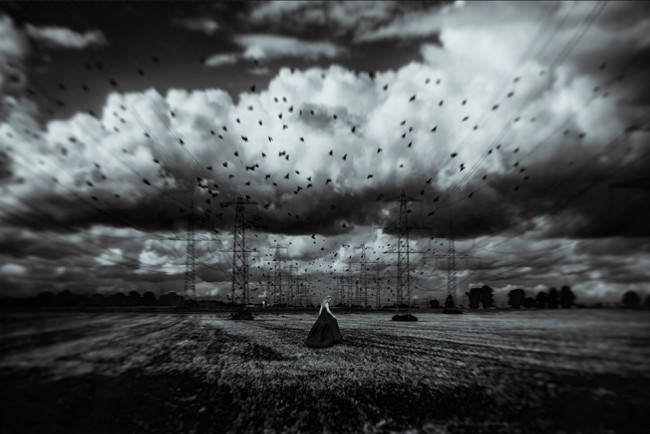
Revenge © Manuela unterbuchner

Manuela schrieb:

Das ist die perfekte Aktion für das miese Wetter gerade!
Als ich das Ausgangsfoto sah, wusste ich sofort, was ich damit machen wollte. Der dramatische Himmel und die Symmetrie sollten für eine düstere Stimmung sorgen, in deren Mittelpunkt eine Person steht, getrieben von Rache und Wut.
Alle Bearbeitungen erfolgten in Photoshop, die Schwarzweißkonvertierung der Einfachheit halber mit dem Silver Efex Plugin. Den Großteil der Stimmung machen eine alte Backpapiertextur im Modus Differenz sowie eine Verlaufsumsetzung mit den Farben orange und blau im Modus Weiches Licht aus. Die Weichzeichner (Iris und radial) sorgen für Dramatik und lenken den Fokus aus das Mädchen. Stockfotos sind von der lieben faestock (Frau) und Selunia (Vögel).


© Katja Buehler

Katja schrieb:

so sieht das aus, wenn ich tanzen geh…


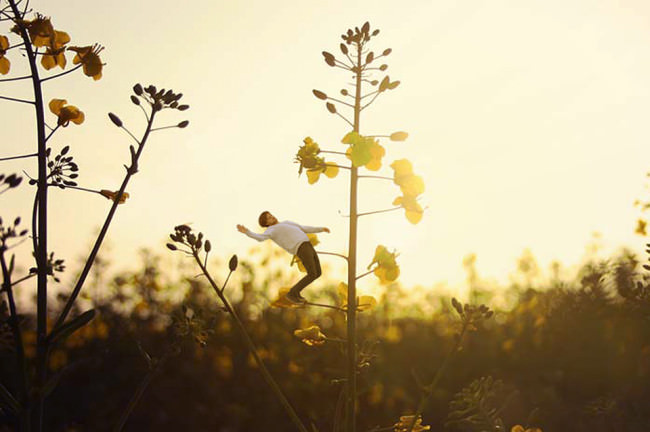
© franziska

Franziska schrieb:

Die Entscheidung für ein Bild fiel mir auch recht leicht und ich wusste auch sofort was ich machen wollte. Ich war letztens zum Sonnenuntergang im Rapsfeld und habe eins dieser Bilder genommen und den Schwimmbadmann dort eingefügt und farblich angepasst. Ein, zwei zusätzliche Farbverläufe darüber gelegt und fertig ist das Bild. Ich für meinen Teil bin zu frieden damit.


© Mr. Kendrix

Mr. Kendrix schrieb:

Als ich das Bild „Mann im Trockendeck“ sah, hatte ich sofort ein Titel parat: „Per Anhalter durch die Galaxis … wartet, ich hab mein Handtuch vergessen!“
Für die Umsetzung nahm ich zuerst Korrekturen in Camera Raw vor und trimmte alles auf HDRI-Look, um Bild etwas Dramatik zu verleihen. Weiter ging es im Photoshop. Paar Pinselstriche für`s Lichtkegel und eine Einstellebene für Tonwertkorrektur und Dynamik, kam Bonbonfarbendes und “etwas” nach Photoshop stinkendes dabei raus.


Berlin © Michel Picard

Michel schrieb:

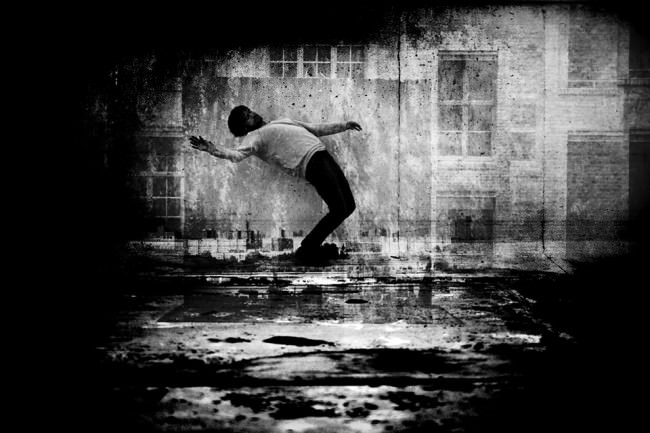
Meine Herangehensweise bei all meiner Kunst ist sehr intuitiv und spielerisch und genauso ist das Bild auch entstanden.
Ich mache oft Collagen aus meinen eigenen Bildern, mal manuell (dazu fehlten mir jetzt aber Zeit und Drucker) oder, wie in diesem Fall, digital.
Ich habe das Original mit zwei meiner eigenen analog entstandenen Fotografien unterlegt, mit den Ebenen und Kontrasten jongliert und dabei festgestellt, dass es mich an das wackelige Leben in Berlin erinnert. Benutzt hab ich übrigens meinen guten, alten cs2.


Diese Auswahl der Redaktion ist wie immer rein subjektiv. Einfach, welche Bilder uns persönlich am besten gefallen haben. Ihr könnt Euch gern noch einmal alle Beiträge anschauen und uns Eure Favoriten verraten.


kwerfeldein – Fotografie Magazin

 
Comments Off on Ergebnisse der Leseraktion: Bearbeitungsexperimente

Posted in Equipment


What The Duck #1402

08 Jun

wtdlogo_big.jpg

We’ve been fans of Aaron Johnson’s comic strip ‘What the Duck’ for years. ‘WTD’ is one of the best satirical comic strips in the world, and it’s published here every week, as well as being included in our weekly newsletter. Barbed, topical and always amusing, we hope you enjoy WTD as much as we do. Click through for this week’s strip.

News: Digital Photography Review (dpreview.com)

 
Comments Off on What The Duck #1402

Posted in Uncategorized


Northern lights play over the USA

08 Jun

Screen_Shot_2013-06-07_at_2.58.55_PM.png

Photographers and star-gazers in the upper United States were treated to a rare display of Aurora Borealis when the ‘Earth passed through a region of south-pointing magnetism in the solar wind,’ according to spaceweather.com. More aurorae are expected in the late hours of June 8 or early June 9, with NOAA forecasters estimating a 65% chance of geomagnetic storms. Click through for images and more details.

News: Digital Photography Review (dpreview.com)

 
Comments Off on Northern lights play over the USA

Posted in Uncategorized


Nokia EOS rumors abound: A look at what’s likely

08 Jun

EOS.png

Rumors are flying about a supposed Nokia EOS smartphone that would surpass even the 41-megapixel Nokia 808 PureView model. Reports indicate that the ‘EOS’ will sport the same size sensor that made the Nokia 808 so remarkable. Photos of a purported EOS prototype also show a similar raised camera profile as the 808. See what other speculations are likely by clicking through to connect.dpreview.com.

News: Digital Photography Review (dpreview.com)

 
Comments Off on Nokia EOS rumors abound: A look at what’s likely

Posted in Uncategorized


Koloid app offers digital darkroom experience

08 Jun

koloid.png

A new app asks users to step back into the darkroom as it offers digital equivalents of the developing process. Koloid (available for $ 0.99 in the iOS App Store) is inspired by 19th century’s wet-plate collodion photography. The app creates a unique texture and exposure on a black and white image. Koloid takes a little longer than most camera apps but it also gives the satisfaction of using something other than a one-touch filter. We give it a go on connect.dpreview.com.

News: Digital Photography Review (dpreview.com)

 
Comments Off on Koloid app offers digital darkroom experience

Posted in Uncategorized