RSS
 

Archive for June, 2013

Lens reviews update: DxOMark data for Nikon-fit full frame wideangles

18 Jun

lensreview-thingsmall1.png

DxOMark has just reviewed Nikon’s latest budget full frame wideangle lens, the AF-S Nikkor 18-35mm f/3.5-4.5G ED. As part of our ongoing collaboration we’ve added the test results to our lens comparison widget, along with other Nikon-fit full frame wide zooms. You can compare it to its predecessor, the AF Nikkor 18-35mm f/3.5-4.5D IF ED, the AF-S Nikkor 16-35mm f/4G ED VR, the AF-S Nikkor 14-24mm f/2.8G ED, and the Tokina AT-X 16-28mm f/2.8 Pro FX. Click through to see how they compare on both DX and FX cameras, with links to view the results in our lens widget, and for the full data on DxOMark.

News: Digital Photography Review (dpreview.com)

 
Comments Off on Lens reviews update: DxOMark data for Nikon-fit full frame wideangles

Posted in Uncategorized


Adobe releases subscription-only Photoshop CC

18 Jun

PS-CC.jpg

Adobe has released the latest version of Photoshop: CC for ‘Creative Cloud’. It’s the first to be made available solely though the company’s controversial subscription-only model, that requires users to pay an ongoing monthly charge of £17.58 /$ 19.99 for access to the software. New features include a revised ‘Smart Sharpen’ function, a ‘Camera Shake Reduction’ filter, and the ability to apply Camera Raw edits as layers. The latest versions of other Creative Cloud apps such the video editor Premier Pro are also now available to download.

News: Digital Photography Review (dpreview.com)

 
Comments Off on Adobe releases subscription-only Photoshop CC

Posted in Uncategorized


How to Shoot Portraits without People

18 Jun

Here’s a riddle! Or the toughest photo assignment ever.

How do you shoot a portrait without any people in it? Or a landscape without any land?

While thinking about how Ansel Adams might shoot that second one is fun, we’re totally enamored with Camilla Catrambone’s response to the first.

She shoots portraits of people not by having them sit for her but by laying out a person’s belongings and photographing that instead!

Camilla shows us her grandfather with an old rotary phone, a watch, a well-worn leather briefcase. Her grandmother — a red comb, a collection of silver spoons, a pearl necklace.

It’s the things we choose to surround ourselves with that tell the story of who we are.

Photographing a person’s possessions is a way of bringing that person to life. What a way to solve a riddle.

Also, see: Scanography — self portraits via scanner and What’s in your bag?

Portraits of My Family by Camilla Catrambone

Related posts:

  1. How to Shoot Impromptu Street Portraits This weekend, spend some time outdoors, explore a new neighborhood,…
  2. How to Shoot Dreamy Double Exposure Portraits + 5 Awesomely Inspirational Photographers Haunting, dreamy, and gorgeous all at once, double exposures of…
  3. Did Simon Hogsberg Shoot the Widest Photo Ever Taken? The trouble with photographers like Simon Hoegsberg is that it’s…


Photojojo

 
Comments Off on How to Shoot Portraits without People

Posted in Equipment


Improving Composition with Tonal Contrast

18 Jun

A contribution by Andrew S. Gibson author of Understanding EOS: A Beginner’s Guide to Canon EOS Cameras.
Tonal contrast 1

If you were to ask me for two ways that you could improve the composition of your photos, the first piece of advice I would give you is to keep the composition as simple as possible. Eliminate anything that isn’t part of the story from the frame.

The second part of the answer is to focus on tonal contrast. Now, many discussions of composition tend to concentrate on the basics, such as the rule-of-thirds, leading lines, use of colour and so on. Not many people seem to be talking about tonal contrast. That’s a shame, because it’s an element that can really improve your composition.

What is Tonal Contrast?

Tonal contrast is created when light tones and dark tones lie alongside each other. Here’s an example:

Tonal contrast 2

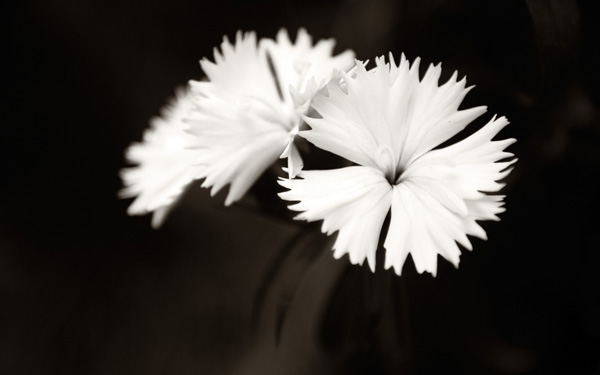
The tonal contrast in this photo is created by the difference in brightness between the white flower and the dark green background.

In any photo it is natural for the eye to go straight to the highlights. That is what is happening here – the viewer’s eye is pulled by the lightest tones in the image, the flower, and then travels slowly around the rest of the image, taking in the detail. It sets up a kind of visual dynamism between the light and dark tones.

Here’s another example of tonal contrast in action:
Tonal contrast 3

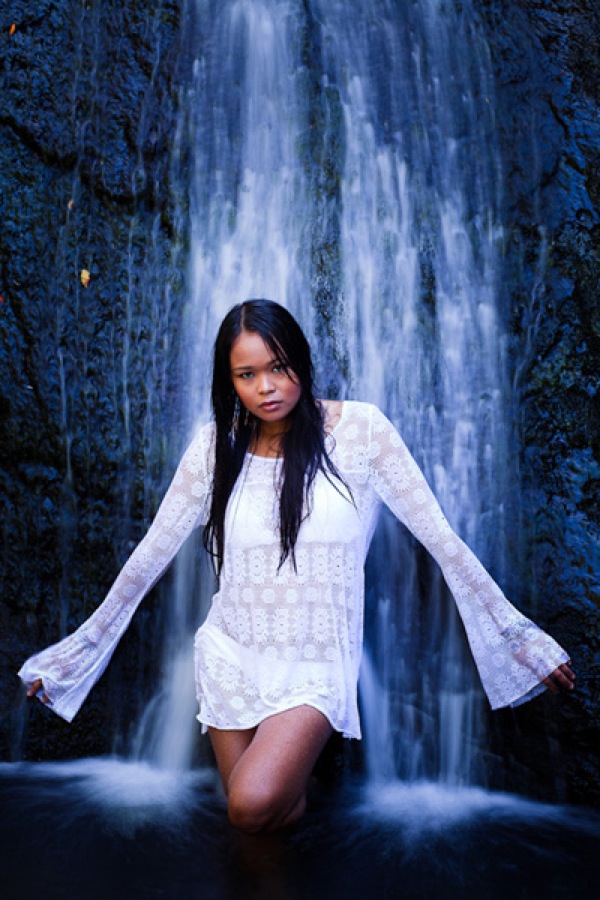
Here, the tonal contrast is provided by the difference in brightness between the white parts of the waterfall and my model’s clothing, and the dark tones of the water and the rocks.

Working in Black and White

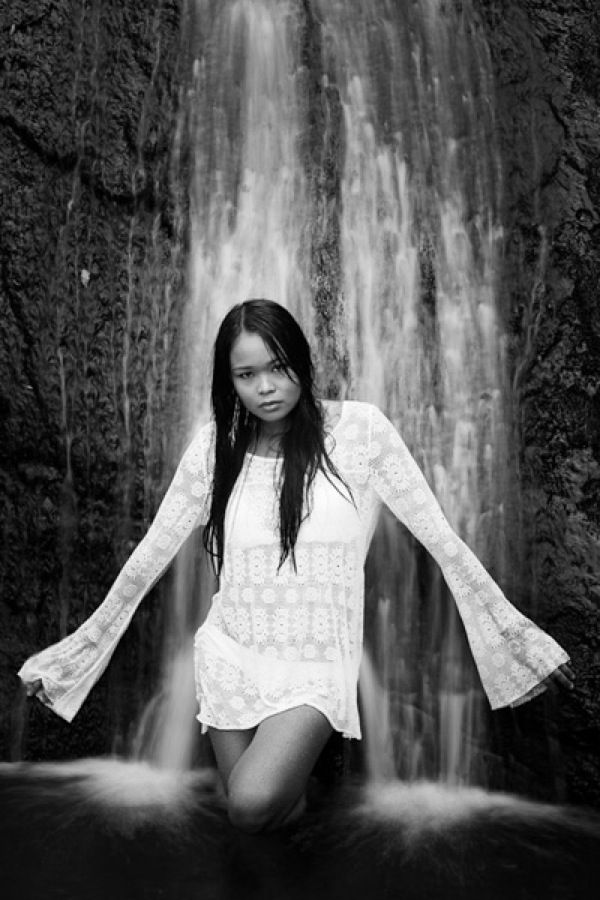
Tonal contrast is the basis of many successful black and white images. Indeed, if you need help to see the tones in your colour photos an easy way to do so is to open them in Photoshop and reduce the colour saturation to zero. This is what happens to the two photos above when we do that:

Tonal contrast 4

Tonal contrast 5

It is easier to see tonal contrast in black and white images because there is no colour to distract your eye from the brightness values within the photo.

You will also notice that the composition of these images is very simple. Simplicity helps improve composition by eliminating distractions.

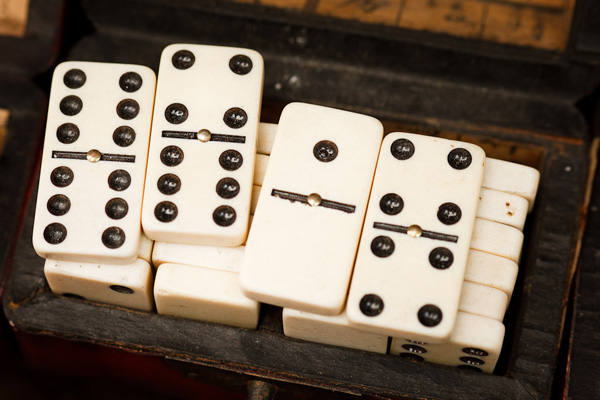
Let’s look at another example:
Tonal contrast 6

This is a photo that I took in an antiques market in Shanghai. You can see my two principles of composition in action here:

Simplicity: I moved in close to concentrate on the dominoes.

Tonal contrast: The ivory coloured dominoes are offset by the dark tones of the box they are in.

Tonal contrast 7

Here is the desaturated version. The tonal contrast is even clearer in this image.

There are a few more points I’d like to make here:

  1. Tonal contrast is a great basis for a successful black and white image. The desaturated versions of the above photos all work fairly well. It won’t take much more work to turn them into striking monochrome images.
  2. Images with strong tonal contrast tend to work well in both black and white and colour. An interesting exercise you could try is to go back through photos that you have already taken and select some that feature strong tonal contrast. Then convert them to black and white. I think you will be able to create some strong monochrome images if you do this.
  3. Keeping your compositions simple helps make the most out of tonal contrast. If you include too much within the frame, the impact of any tonal contrast is lessened.

Finally, please note that reducing the colour saturation to zero is usually not the best way to convert a colour image to monochrome. The aim here is purely to make the tones easier to recognise by eliminating the distraction of colour.

Does that mean that every image requires tonal contrast to be successful? No, it doesn’t. It is merely one tool of many at your disposal. The key concept to understand is that learning to recognise and utilise tonal contrast helps you create stronger photos.

For example, if you have arranged a photo shoot with a model in a location with a dark background, you could ask her to wear something light in order to set up tonal contrast between her clothes and the background.

Lack of tonal Contrast

There are times when tonal contrast is not evident in a photo, yet the composition is still successful. Here’s an example:
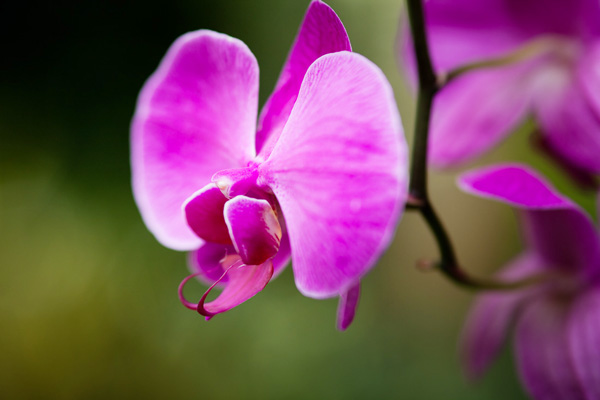
Tonal contrast 8

Now let’s look at the desaturated version:
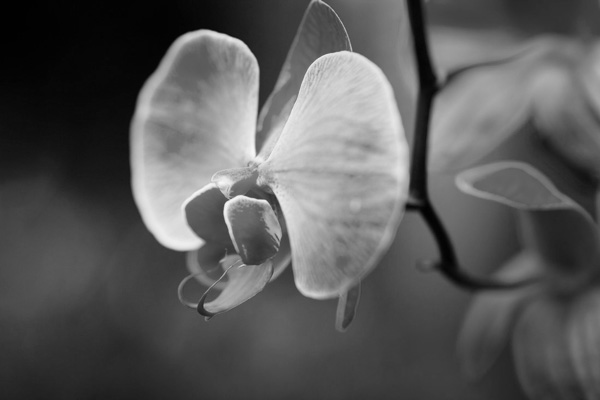
Tonal contrast 9

You can see that there isn’t much tonal contrast. Yet the photo works because the purple flower is complemented nicely by the green background. This is called colour contrast and in this image more than compensates for the lack of tonal contrast.

Andrew S. Gibson is the author of Understanding EOS: A Beginner’s Guide to Canon EOS Cameras. He is a professional writer and photographer based in Wellington, New Zealand.

Post originally from: Digital Photography Tips.

Check out our more Photography Tips at Photography Tips for Beginners, Portrait Photography Tips and Wedding Photography Tips.

Improving Composition with Tonal Contrast


Digital Photography School

 
Comments Off on Improving Composition with Tonal Contrast

Posted in Photography


77% of dPS Readers Take A Camera Everywhere [POLL Results]

18 Jun

Last month we asked readers whether they took their camera with them everywhere in a poll. The results are in!

Screen Shot 2013 06 17 at 12 47 40 PM

If you include the camera in your phone… 77% of the almost 20,000 people who responded take a camera with them everywhere.

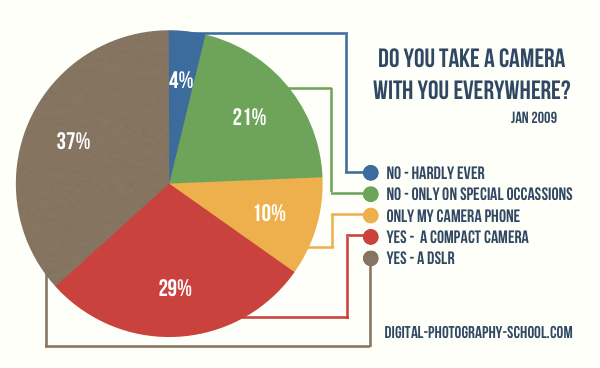
What I find interesting is that we ran this exact same poll in January 2009 so we can track how things have changed over the last 4 years among our readers. Here are the 2009 results (the results were from around 18,000 readers at that time).

Screen Shot 2013 06 17 at 12 47 22 PM

While the changes have only been subtle there are a few interesting observations to make.

Firstly – more people are relying upon the cameras in their phones to capture their everyday events. This is no wonder – back in 2009 the iPhone had been out for a couple of years but since then the camera in iPhone (and other phones) have improved significantly (in fact a segment of our readership ONLY use camera phones).

Secondly the rise in camera phone use has come at the expense of compact camera solutions and those who only took cameras on special occasions.

What surprised me most was the slight rise in those taking DSLRS everywhere because there’s been such a push of late from camera manufacturers to improve their offerings in the compact camera space.

How have your camera usage habits chanced in the last 4 years?

Post originally from: Digital Photography Tips.

Check out our more Photography Tips at Photography Tips for Beginners, Portrait Photography Tips and Wedding Photography Tips.

77% of dPS Readers Take A Camera Everywhere [POLL Results]


Digital Photography School

 
Comments Off on 77% of dPS Readers Take A Camera Everywhere [POLL Results]

Posted in Photography


Bildvorstellung: Thomas

18 Jun

Heute möchte ich Euch ein Bild vorstellen, das ich von und mit einem Freund aufgenommen habe. Na, wer kommt auf seinen Namen? Platzierung des Modells, Lichtsituation und Bearbeitung – auf all das werde ich im folgenden Artikel eingehen.

Mein innerer Drang, mich zu verbessern, brachte mich dazu, einen guten Freund zu fragen, ob er mir als Modell zur Verfügung stehen würde. Er wollte und es gab von mir erst einmal nur die Anweisung: „Zieh Dir mal was Schickes an.“ Und so trafen wir uns bei mir zu Hause in meinem kleinen „Heimstudio“ und ich überlegte, was ich mit den vorhandenen Mitteln für ein Foto machen könnte.

Es sollte ein Low-Key-Foto werden, bei der die eine Gesichtshälfte im Schatten liegt. Es war also wichtig, dass ich das Licht nur von einer Seite auf die Person werfe.

© Normen Gadiel

So sah der Aufbau aus. Für das Licht zur Aufhellung des Gesichts nutzte ich einen weißen Stoff, um es etwas weicher zu gestalten. Das andere, von rechts oben kommende Licht setzte ich ein, um die Haare etwas aufzuhellen. Das war auch ganz gut so, weil das Endresultat doch sehr dunkel wurde und das Portrait dann doch nicht komplett absäuft.

Damit die Pose halbwegs natürlich wirkt, bat ich Thomas, sich schräg hinzusetzen und den Blick leicht über die Schulter schweifen zu lassen. Ein Blick in die Kamera wäre unpassend gewesen, weil ich nicht mit dem Modell interagieren, sondern aus der Rolle eines stillen Beobachters heraus das Bild aufnehmen wollte.

Da mich der feine Anzug und die dunkle Stimmung an einen Mafiosi erinnerten, bat ich Thomas noch, eine Zigarette zu rauchen, um diese Assoziation ein wenig zu befördern.

© Normen Gadiel

Da ich bei meiner Kamera grundsätzlich alle internen Einstellungen wie Kontrast, Sättigung und Farbton auf 0 gesetzt habe, sieht das Ausgangsbild für die spätere Bearbeitung sehr flau aus.

Leider habe ich die genauen Arbeitsabläufe zu dem Bild nicht mehr im Kopf, aber in der Regel fange ich immer damit an, das Bild nachzuschärfen. Für diesen Arbeitsschritt habe ich vor einiger Zeit eine sehr nützliche Photoshop-Aktion gefunden, die ich seitdem immer benutze, da sie mir bei der Bearbeitung Zeit spart und sehr gute Ergebnisse liefert.

Danach habe ich mich der Farblichkeit gewidmet. Hierfür nutzte ich die Werkzeuge Farbbalance und die selektive Farbkorrektur. Die Anpassung der Kontraste realisiere ich immer mit Gradationskurven. Bei vielen meiner Portraits nutze ich Dodge & Burn, um damit markante Stellen im Gesicht hervorzuheben. Bei Männern lässt sich so mittels Abdunkeln etwa die kantige Gesichtsform etwas herausarbeiten.

Zum Abschluss habe ich den noch sichtbaren Hintergrund abgedunkelt, sodass alles um Thomas herum schwarz ist. Als Bonbon gab es am Ende dann noch etwas Qualm für die Zigarette, hierfür nutzte ich einen Rauchpinsel, den ich auf einer separaten Ebene eingefügt habe.

Hier das fertige Bild:

© Normen Gadiel

Am Ende bin ich mit dem Ergebnis zufrieden und es zeigte sich einmal mehr, dass es gut ist, sich etwas vorzunehmen, anstatt auf der Couch zu lümmeln.


kwerfeldein – Fotografie Magazin

 
Comments Off on Bildvorstellung: Thomas

Posted in Equipment


Colorful Contrast: Geometric Street Paintings in France

18 Jun

[ By Steph in Art & Street Art & Graffiti. ]

Geometric Street Paintings France 1

A broad stripe of bright paint in a zig-zag pattern contrasts with muted, understated urban surroundings in the latest urban art installation by artist duo Sabina Lang and Daniel Baumann. Working together since 1990 as Lang-Baumann, the artists bring unexpected visuals to public spaces. Street Painting #7 in Rennes, France will be visible in the heart of town until May 25, 2014.

Geometric Street Paintings France 2

Geometric Street Painting France 6

Geometric Street Paintings France 3

The installation was applied directly to the asphalt using road marking paint, introducing a new sense of vibrancy and modernity to this historic city block. The painting obliterates expectations for the type of public art that’s acceptable for this kind of setting.

Geometric Street Paintings France 4

Geometric Street Paintings France 5

Six previous geometric street paintings have graced smaller, even quainter communities like the picturesque Vercorin, Switzerland, as well as major cities like Moscow.

outside-stairs-stairway-heaven

Other works by Lang-Baumann are similarly disruptive, including inflatable parasitic sculptures clinging to the sides of buildings, and terrifying stairs to nowhere that will make your stomach drop just from looking at the photos.

Share on Facebook


[ By Steph in Art & Street Art & Graffiti. ]

[ WebUrbanist | Archives | Galleries | Privacy | TOS ]


WebUrbanist

 
Comments Off on Colorful Contrast: Geometric Street Paintings in France

Posted in Creativity


Richard Prince on Appropriating “The Catcher in the Rye”

18 Jun

The Catcher in the Rye, by Richard Prince

In 2011, Richard Prince republished a 500 run first edition of the classic JD Salinger novel Catcher in the Rye, under his own name. The reproduction was identical in every way except the author’s name was swapped from J.D. Salinger to Richard Prince.

The production value of the book was astonishingly high, a perfect facsimile of the original, right down to the thick, creamy paper stock and classic typeface. The text on the dust jacket—replete with the same iconic line drawing of the angry red horse—began, “Anyone who has read Richard Prince’s New Yorker stories, particularly A Perfect Day for Bananafish, Uncle Wiggly in Connecticut, The Laughing Man, and For Esmé–with Love and Squalor, will not be surprised by the fact that his first novel is full of children.” It was a dead-ringer through and through —not a word was changed—with the exception that the following disclaimer was added to the colophon page: “This is an artwork by Richard Prince. Any similarity to a book is coincidental and not intended by the artist.” Most shockingly, the colophon concluded with: © Richard Prince.

After the publication Sonic Youth’s Kim Gordon interviewed Prince.

Kim Gordon: But what about the change, putting your name on the J.D. Salinger…

Richard Prince: Well, oh. That’s just a favorite book. I’m aware of the implications. It’s kind of the Disneyland of book publishing. You don’t mess with images from Disney. You don’t near it. And Catcher in the Rye is also on lockdown; it’s almost become an institution, it’s very sacred. It’s very rare to get a great first-edition copy.

I reread the book. If you have a book in your collection, it has to be a well-written book. I don’t collect books just because other people collect them, and I’m not going to have books in my collection if I think it’s badly written. Unless it’s deliberately bad or it has to do with the culture. I love deliberately badly written books. But when I reread Catcher I realized how contemporary the writing was, and then I was talking, I had the idea of putting it out again. And I think the idea of republishing Catcher, my contribution to that book was simply—and I know this is going to sound terrible, or maybe it’s not—but I just wanted to double the price.

Kim Gordon: To make it have the value you think it ought to have?

Richard Prince: Yeah, I just wanted to make sure, if you were going to buy my Catcher in the Rye, you were going to have to pay twice as much as the one Barnes and Noble was selling from J.D. Salinger. I know that sounds really kind of shallow, and maybe that’s not the best way to contribute to something, but in the book collecting world you pay a premium for really collectible books. I thought, we charged, I think on the book flap it’s $ 62. There’s a certain kind of adolescent thinking there that I can’t seem to get away from. And I don’t know if I should get away from it, but I certainly acknowledge that it might not be the most interesting way to contribute to the making of that particular object, but I like the fact that the price is twice as much. And it’s enough.

Source


Thomas Hawk Digital Connection

 
Comments Off on Richard Prince on Appropriating “The Catcher in the Rye”

Posted in Photography


Canon EOS Rebel SL1/100D studio samples and good light samples gallery

18 Jun

ShawnGallery.jpg

Just Posted: Canon EOS Rebel SL1/100D studio samples and good light samples. We’ve just got a production version of Canon’s miniaturized DSLR and, as part of the process of reviewing it, have shot our standard studio scene. We’ve also taken it out to see how it performs away from the studio lighting and have put together a series of daylight samples. Click through to see how it fares.

News: Digital Photography Review (dpreview.com)

 
Comments Off on Canon EOS Rebel SL1/100D studio samples and good light samples gallery

Posted in Uncategorized


MetaRaw plugin offers Photoshop and Elements users broader Raw support

18 Jun

metaraw.png

The Plugin Site has created the MetaRaw plugin for Photoshop and Photoshop Elements that allows the conversion of Raw files not supported by the associated version of Adobe Camera Raw. The MetaRaw plugin offers access to three Raw conversion methods – ACR, DNG Converter or its own, dcraw-based converter. It also allows Elements 10 and 11 users to access ACR’s lens correction and chromatic aberration tools.

News: Digital Photography Review (dpreview.com)

 
Comments Off on MetaRaw plugin offers Photoshop and Elements users broader Raw support

Posted in Uncategorized