RSS
 

Archive for June, 2013

Leica announces $1300 special edition ‘G-Star RAW’ D-Lux 6

20 Jun

Screen_Shot_2013-06-19_at_2.35.59_PM.png

Leica has announced a special edition of its D-lux 6 high-end compact camera, in collaboration with clothing manufacturer G-Star RAW. The special D-Lux 6 (itself arguably a ‘special edition’ Panasonic Lumix DMC-LX7) will be available from Leica Stores and Boutiques worldwide, and is expected to cost around $ 1300. What do you get for your money? Well, ‘a new dot structure on the leather body trim’ and a leather case with ‘exclusive carrying strap’. Excited? Click through for more details. 

News: Digital Photography Review (dpreview.com)

 
Comments Off on Leica announces $1300 special edition ‘G-Star RAW’ D-Lux 6

Posted in Uncategorized


Lytro unlocks Wi-Fi with firmware update, introduces iOS app

20 Jun

Intro-001-1.jpg

Lytro has released a firmware update that enables the Wi-Fi chips inside its 8GB and 16GB light field cameras. The San Fransisco-based company has also announced a new iOS companion app called Lytro Mobile, which allows you to browse images from the camera on an iOS smartphone or iPod Touch. Replicating some of the functionality of Lytro’s existing desktop app, the mobile app allows you to refocus and change the perspective of your images and share the ‘living pictures’ via social media. Click through for more details. 

News: Digital Photography Review (dpreview.com)

 
Comments Off on Lytro unlocks Wi-Fi with firmware update, introduces iOS app

Posted in Uncategorized


Get 31% Off Neil Creek’s Night Photography Course

20 Jun

NewImageOne of the most popular deals in last years ’12 Deals of Christmas’ promotion that we ran here on dPS was a discount on Neil Creek’s ‘Night Photography Unlocked’ video course.

This week I’m excited to say that we’ve brought the deal back and you can now pick up this fun course at 31% off the normal price over at our sister site – SnapnDeals.

Neil is the author behind our best selling Photo Nuts series of eBooks and is a great teacher.

His beginners course will help you open up a whole new world of photographic possibilities as you learn to shoot in low light.

You’ll learn:

  • The main problems you face when taking photos at night.
  • The camera settings you need to understand to take great night photos.
  • How different types of cameras perform at night.
  • Getting the most out of your camera.
  • Getting creative with night photography.
  • Processing photos taken at night.
  • This video course is for those who own all types of cameras and is delivered to you in 21 great tutorials with over 4 hour of teaching.

    Get more information and pick up your discounted enrolment in Night Photography Unlocked here today.

    Post originally from: Digital Photography Tips.

    Check out our more Photography Tips at Photography Tips for Beginners, Portrait Photography Tips and Wedding Photography Tips.

    Get 31% Off Neil Creek’s Night Photography Course


    Digital Photography School

     
    Comments Off on Get 31% Off Neil Creek’s Night Photography Course

    Posted in Photography


    Take Your Music With You on the Go With the JBL Charge

    20 Jun

    JBL Charge-1

    Recently I was given a JBL Charge to check out. I’m a fan. The JBL Charge is a small speaker system, about the size of a can of Tecate, that wirelessly hooks up via blue tooth to your tablet, computer or smart phone. Setting the speaker up is easy — you just turn bluetooth on on your phone and push a button on the speaker, and smooth, rich sound comes pouring out.

    Last weekend I drove from San Francisco to Los Angeles and back for the Father’s Day weekend and used the Charge driving both ways to listen to music from my phone rather than the car radio. The speaker is louder than the stereo system in my car and the lithium battery built into the Charge lasted for the 10 hour ride down (highway 101) and the 6 hour ride back (highway I5). According to the specs, the battery can last about 12 hours, which is usually going to be enough for an outing. You can also charge your cell phone via USB or other devices using the Charge as a back up battery.

    It was nice to be able to listen to my own tunes on my phone rather than the radio while driving. I could adjust the volume of the charge either on the charge itself or on my phone. I just kept the Charge in the center console of the car in one of the cup holders while I drove.

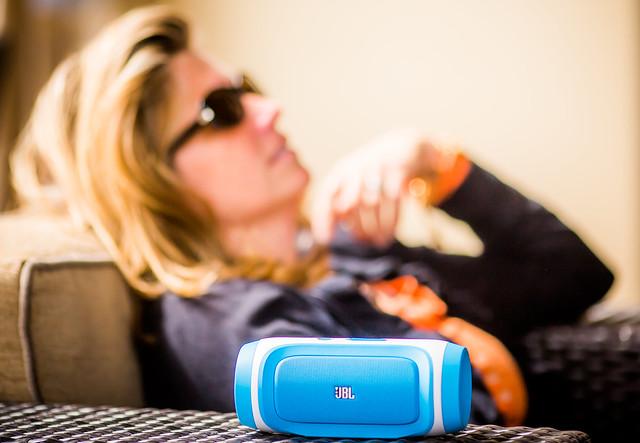
    I also used the Charge to play my wife’s favorite playlist while hanging out down at my parent’s pool on Saturday night (that’s her in the photo above). It was great having such a portable music system for us to listen to while we watched the kids swim.

    JBL Charge Portable Wireless Bluetooth Speaker (Blue). You can get the charge at Amazon for about $ 150. It comes in different colors, but I like the light sort of neon blue the best. The charge is small enough that it’s easy to take around with you and it fits conveniently right into one of the lens spots in my camera bag — a great product that will spend many years on the road with me as a travelling companion going forward.


    Thomas Hawk Digital Connection

     
    Comments Off on Take Your Music With You on the Go With the JBL Charge

    Posted in Photography


    15 of the World’s Weirdest Low-Tech Film Cameras

    19 Jun

    [ By Steph in Technology & Vintage & Retro. ]

    Unusual Cameras Main

    A pistol that shoots photos instead of bullets, a harness for pigeons, a cane and a human skull are among the unexpected objects that have been turned into film cameras since the dawn of photography in the 19th century. Here are 15 strange and unusual cameras, including historic collector’s items and new experiments in low-tech techniques like pinhole photography.

    Miniature Pigeon Camera

    Unusual Cameras Pigeon Surveillance

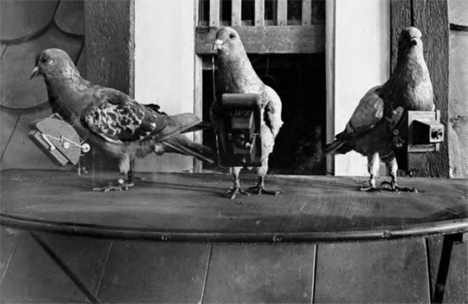
    Inventor Julius Neubronner’s tiny harnesses fitted with cameras were received with understandable skepticism when he first unveiled the idea in the early 20th century, but once he put the photos taken by pigeons on display, his idea took off, and even the military took interest. But it wasn’t long before the invention of the airplane made the need for pigeon photographers null and void for reconnaissance purposes. Each pigeon was trained to wear the harness and fly to a specific location, and a timer in the camera took care of the rest.

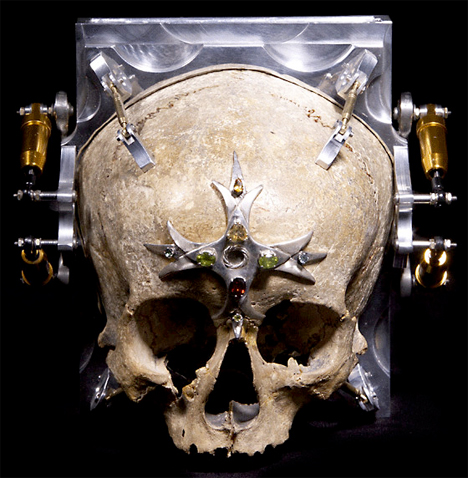
    Skull Camera

    Unusual Cameras Skull 1

    Unusual Cameras Skull 2

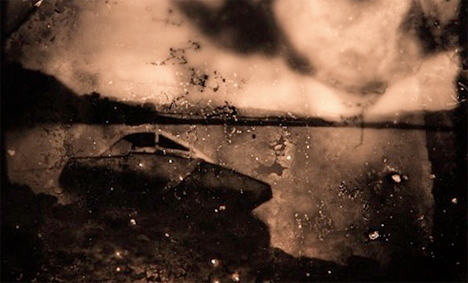
    Photographs taken from inside a human skull are suitably eerie and nightmarish. The Third Eye Camera by Wayne Martin Belger is made from the 150-year-old skull of a 13-year-old girl. It’s a pinhole camera, with a hole drilled between the eyes letting light hit a piece of photo paper placed inside.

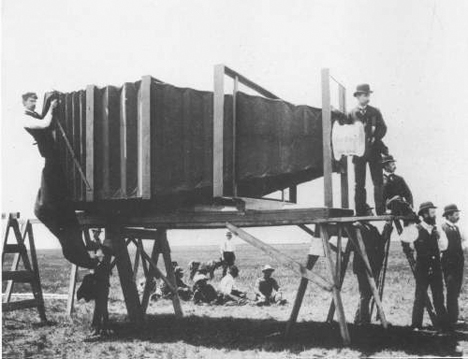
    900-Pound Camera from 1900

    Unusual Cameras Mammoth Oversized

    The world’s largest camera at the time, this monster made by Chicago camera builder J.A. Anderson weighed 900 pounds and required 15 men to load it onto a horse-drawn van for transport. And it’s all because the Chicago & Alton Railway company wanted to show off their new train to the world. The camera had a 8-by-4.5-foot glass plate to take the largest possible photo of the train, which was displayed at the Paris Exposition in the year 1900.

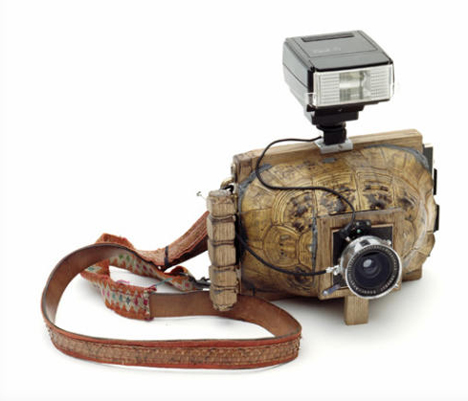
    Turtle Shell Camera

    Unusual Cameras Turtle Shell

    Virtually any hollow object can be turned into a pinhole camera, as demonstrated by Taiyo Onorato and Nico Krebs in their two-volume series of books, “As Long as It Photographs” and “It Must Be a Camera.” The pair found their turtle shells, taxidermy animals and other objects at flea markets.

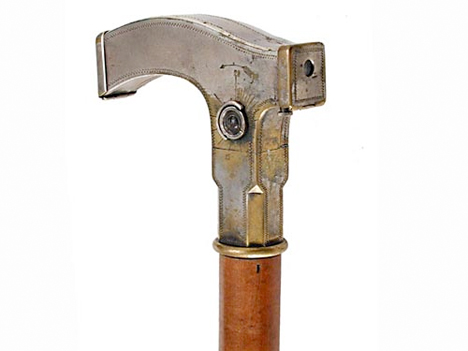
    Cane Handle Camera, 1903

    Unusual Cameras Cane Handle

    Made in 1903, the Ben Akiba cane handle camera features a shutter released by pulling a knob below the handle. When a roll of film is exposed, you just remove the side face of the handle to pull it out, and a new roll pops up from a storage area inside the cane. Both originals and replicas of this odd camera are in demand these days, with one selling for $ 27,000 in 2002.

    Next Page:
    15 Of The Worlds Weirdest Low Tech Film Cameras

    Share on Facebook


    [ By Steph in Technology & Vintage & Retro. ]

    [ WebUrbanist | Archives | Galleries | Privacy | TOS ]


    WebUrbanist

     
    Comments Off on 15 of the World’s Weirdest Low-Tech Film Cameras

    Posted in Creativity


    In Camera Veritas

    19 Jun

    Show of hands, who knew that the cameras we use every day are named after a room?

    The latin word for room is camera, which makes sense when you realize the first objects for recording light were cameras obscura.

    And in this case instead of the room being the camera, the camera is in fact the light modifier.

    Read more »
    Strobist

     
    Comments Off on In Camera Veritas

    Posted in Photography


    Capture Objects on the Move: 77 Awesome Panning Photography Ideas

    19 Jun

    Panning in photography is the act of capturing objects on the move. It’s like in sports or action photography. Your target is moving at the moment of exposure. As a result, you get a picture with a subject clearly caught on camera. However, the rest remains blurred in the background. To be honest, panning is nothing new. Panning has been Continue Reading

    The post Capture Objects on the Move: 77 Awesome Panning Photography Ideas appeared first on Photodoto.


    Photodoto

     
    Comments Off on Capture Objects on the Move: 77 Awesome Panning Photography Ideas

    Posted in Photography


    Fotogenes Deutschland – Hornisgrinde

    19 Jun

    Ein Beitrag von: Daniel Bollinger

    Auf 1163 Metern thront die Hornisgrinde als seine höchste Erhebung über dem Nordschwarzwald. Sie ist mein „Hausberg“, den charakteristischen Sendeturm des SWR kann ich seit Jahren von meinem Fenster aus sehen. Und auch, wenn ich ab und zu denke: „Nicht schon wieder“, so zieht es mich – nicht oft, aber regelmäßig – zurück auf das vertraute Terrain.

    Als Naherholungsziel und Teil des Westweges ist der Berg vor allem am Wochenende überlaufen von Spaziergängern und Wanderern aus nah und fern. Doch je später der Tag und je unfreundlicher das Wetter, desto mehr leert sich das Plateau. Spätestens in der Nacht hat man es dann für sich allein. Ein etwas seltsames, aber für mich überwiegend erhebendes Gefühl.

    Im Sommer präsentiert sich die Hochebene, die einen Teil des Naturschutzgebietes Hornisgrinde-Biberkessel bildet, als idyllisches Hochmoor, dessen Grasdecke in der Abendsonne geradezu zu glühen beginnt.

    Der wahre Reiz entfaltet sich für mich allerdings eher bei weniger schönem Wetter. Wenn im Winter alles unter eine windgepeitschten Schneedecke verschwindet oder sich im Frühjahr und Herbst Nebel über dem Moor und zwischen den Bäumen ausbreitet, dann verändert sich der Charakter der Landschaft. Sei es in Richtung einer endlosen Weite im schneebedeckten Moor oder zu einer wilden Schroffheit im sich selbst überlassenen Bannwald.

    Auch der am Fuß des Berges gelegene, sagenumwobene Mummelsee entwickelt dann einen besonderen Charme, wenn Wolkenfetzen wie Geister über das Wasser schweben.

    Doch nicht nur der Berg selbst bietet interessante Motive. Er ist auch eine – im wahrsten Sinne des Wortes – hervorragende Basis für Fotos der umliegenden Gegend. Gerne packe ich hier das Tele auf die Kamera und fotografiere in die Rheinebene oder das Spiel der Wolken in den Baumkronen und zwischen den benachbarten Gipfeln. Bei klarer Sicht reicht der Blick (nicht nur) von einem der beiden Aussichtstürme bis zur Schwäbischen Alb, zu den Vogesen auf der anderen Rheinseite und im Süden bis zum Feldberg. Sogar die Alpen sind manchmal sichtbar.

    Ein besonders atemberaubender Anblick bietet sich ab und an bei Inversionswetterlage. Wer das Glück hat, bei diesem Phänomen abends auf dem Berg zu sein, wird Zeuge des Schauspiels, bei dem die Sonne im rotgefärbten Wolkenmeer versinkt.

    Hornisgrinde © Daniel Bollinger

    Hornisgrinde © Daniel Bollinger

    Hornisgrinde © Daniel Bollinger

    Hornisgrinde © Daniel Bollinger

    Hornisgrinde © Daniel Bollinger

    Hornisgrinde © Daniel Bollinger

    Hornisgrinde © Daniel Bollinger

    Wer den Ausflug zur Hornisgrinde, der sich entspannt an einem halben Tag bewerkstelligen lässt, zur Ganztagestour ausbauen will, dem sei der Besuch eines der zahlreichen nahegelegen Wasserfälle empfohlen. Über einige davon werden wir in dieser Reihe bei Gelegenheit auch noch etwas mehr erfahren.


    kwerfeldein – Fotografie Magazin

     
    Comments Off on Fotogenes Deutschland – Hornisgrinde

    Posted in Equipment


    Master These Five Lightroom Sliders and Your Photos Will Pop

    19 Jun

    a Guest Contribution by John Davenport from Phogropathy

    Have you ever opened up Lightroom (or any other professional level editing program) and said, “Oh my – where do I start?” If so then this post is probably right up your alley.

    Today I’m going to show you how to take the process out of processing photos and how you can get some great results simply by learning how a handful of sliders work. After you learn these basics you can start to dig deeper into the program and learn how to bring out even more of the hidden details in your photographs.
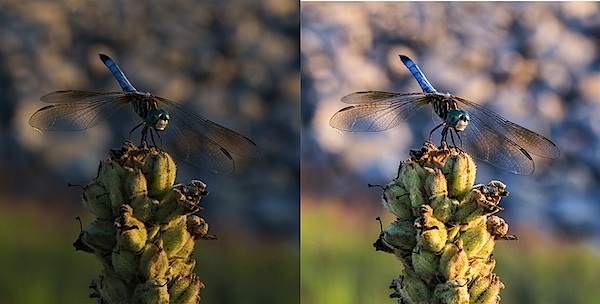
    before&after1.jpg

    The Seven Lightroom Sliders to Master First

    Lightroom is filled with all sorts of options from drop down menus to sliders and all this can make get started for the first time overwhelming, especially if you’ve had no editing experience in the past, so today we are going to look at the very basics of Lightroom.

    When you break it down there are five key parts of almost every photo that you’re going to want to adjust and those are as follows: mid-tones, shadows, highlights, sharpness and white balance. We will tackle all of these areas by using just a handful of sliders in the basic tab of Lightroom. To get here simply click on “Develop” and then if it isn’t opened already click on the “Basic” tab.

    Now let’s get started!

    Exposure

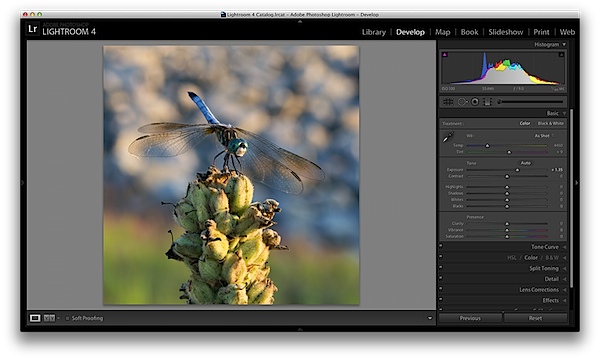
    When I process photos I like to start with the exposure slider, as it’s a good overall adjustment to get started. It is designed to adjust the mid-tones of the photo and therefore will help to add or reduce to the overall brightness of the scene. To lighten an underexposed photo simply slide the exposure slider to the right – if you’d like to reduce the brightness then slide it to the left.

    Watch your histogram and you’ll start to see the data shift from side to side as you make the changes. In the photo below I added just a small bit to the exposure to brighten it up slightly.
    exposure.png

    Contrast

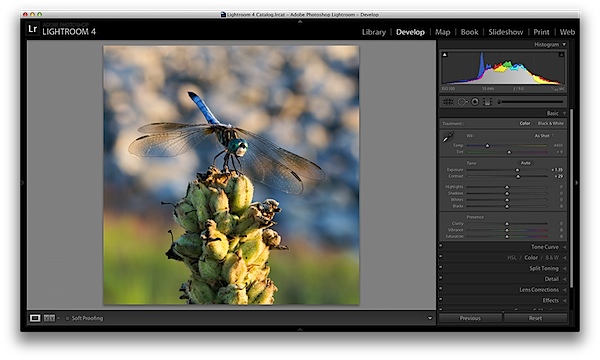
    Next up is the contrast slider, which will help to define the areas of lightness and darkness. In the vast majority of my photographs I’ll end up increasing the contrast slightly as it tends to help bring out details and make the photo “pop” a bit more.

    As you watch the histogram you’ll notice that the data will either get stretched out or be pushed together depending on which way you go. The more contrast you apply the more defined the difference between lights and darks will get which can be observed in the stretching of the histogram.

    In my dragonfly photo I pushed the contrast up slightly which helps to get the subject separated from the background a bit more and adds a bit more crispness to the photo.
    contrast.png

    Shadows/Highlights

    One of the best features in Lightroom 4 are the Shadows and Highlights sliders. (Note: if you’re using an older version of Lightroom you’ll do something similar with the Fill Light and Recovery sliders, but they’re not nearly as powerful).

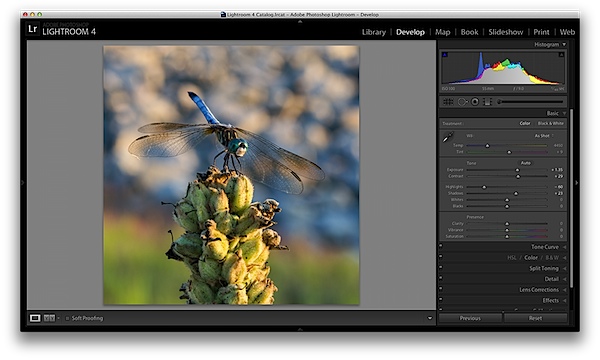
    These two sliders work in opposite directions. The more detail you want in your highlights the lower you’ll drop the slider, for more detail in the shadows you’ll increase the slider. Make sure you’re aware that these do come at costs and you’re not going to be able to get detail out of blown out or completely black areas of your photo – there must be data there to recover for these to work.

    Again as you watch the histogram when you make the changes you’ll notice that the shadows slider has an effect on the data towards the left side of the mid-tones and the highlights slider will work on an area to the right. The black and white sliders (which we aren’t talking about today) will have an effect on the very edges of the histogram in much the same manor.
    HighlightsShadows.png

    Clarity

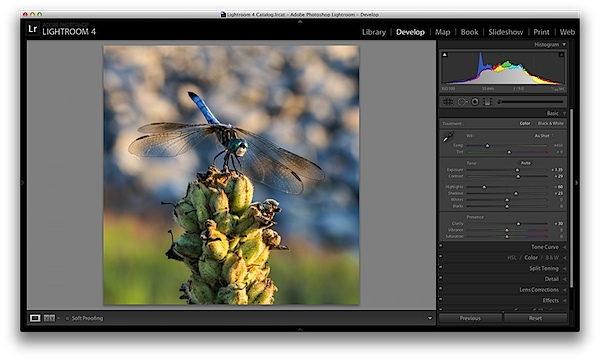
    There is an entire area of Lightroom dedicated to sharpening your images, but the clarity slider is a good place to start with if you’re trying to keep things simple. You won’t have as fine of control over the process, but you will be able to help crisp up your images a bit by using one simple slider.

    As you’ll notice when you start moving this slider around it works in much the same way as the contrast slider, just on a finer detailed level. Again, in the vast majority of my photos I’ll be adding a bit of clarity to give the photo the punch it needs, but often times in portraits you might end up toning down the clarity to give that soft look to your subject’s face.
    clarity.png

    White Balance

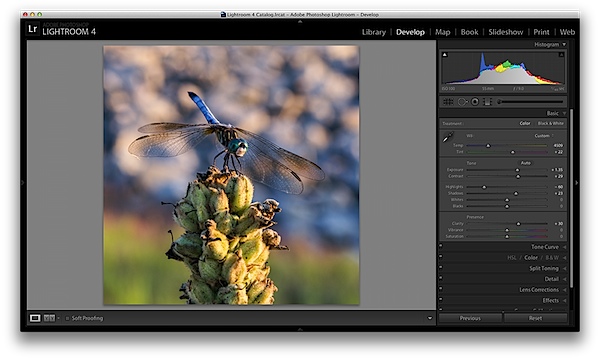
    Finally the temperature and tint sliders control the white balance of your photo. For the time being I’d suggest just using the Lightroom presets as they do a decent job of getting into the ballpark and make it a lot easier to deal with than trying to figure out the right amount of warmth and tint to add or subtract.

    However, if you want that little extra control in your hand then use the “Temp” slider to adjust the color temperature of your photo. Moves to the right will produce a warmer scene and to left will cool your scene off.

    The “Tint” slider is used more for minor adjustments to remove or add unwanted green or magenta colors from the scene and will often be used to get skin tones correct. However, there are people who use this slider for more artistic purposes (play with it and you’ll see what I mean).
    whitebalance.png

    One Small Note

    If you’re photographing in RAW you’ll see more options available to you and have more control over the final outcome of your image, if you’re a JPEG shooter some options I talked about today will be limited as a result of the smaller file sizes and the compression that has already taken place in your camera. You can read more about RAW photography here.

    A Few More Before and Afters

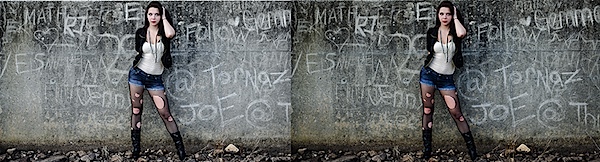
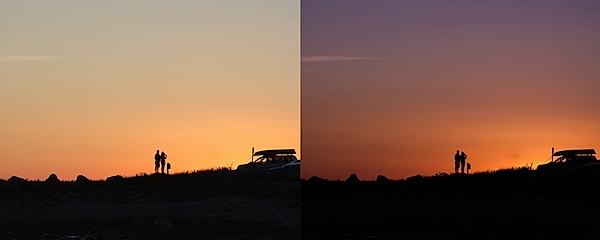
    Here are a few more before and after images that I processed in a similar manner using only the techniques talked about in this post. It’s truly amazing how much just a few minor tweaks can change your photo and just imagine what can be done once you dig a bit deeper. If you’d like more tips on Lightroom editing feel free to subscribe to my YouTube channel.
    before&after2.jpg

    before&after3.jpg

    before&after4.jpg

    John Davenport is an avid photographer and blogger who shares his photography on his Facebook page and runs a weekly video series on how to edit photos in Lightroom.

    Post originally from: Digital Photography Tips.

    Check out our more Photography Tips at Photography Tips for Beginners, Portrait Photography Tips and Wedding Photography Tips.

    Master These Five Lightroom Sliders and Your Photos Will Pop


    Digital Photography School

     
    Comments Off on Master These Five Lightroom Sliders and Your Photos Will Pop

    Posted in Photography


    Unauthorized Installations: The Fine Art of Urban Subversion

    19 Jun

    [ By WebUrbanist in Art & Street Art & Graffiti. ]

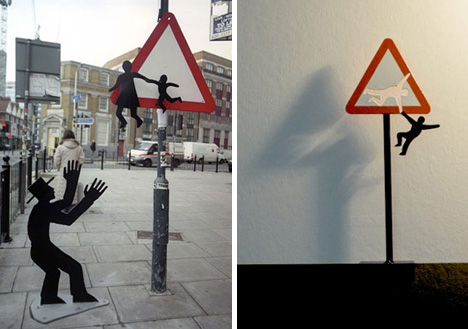
    street art brad downey

    Brad Downey is familiar with both sides of the art world, with a fine arts degree and gallery exhibitions, on the one hand, and run-ins with the authorities about his sometimes-unsanctioned street art on the other.

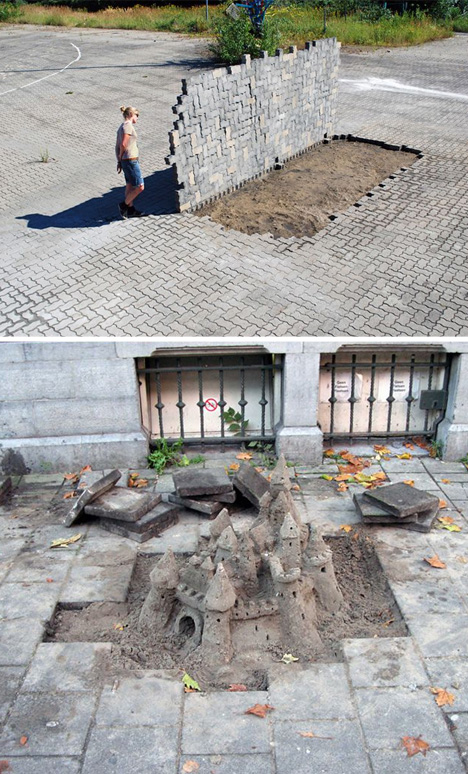
    street sidewalk ripped up

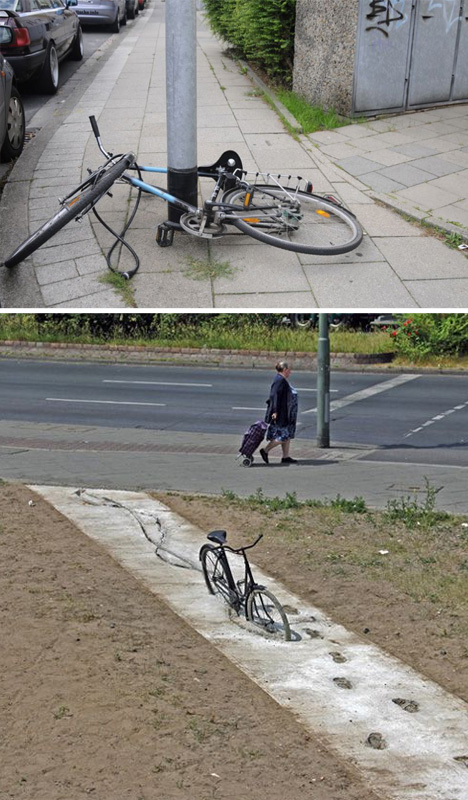
    His work is harder to describe that it is to simply see, since it is often in the most public places you could imagine (or documented via extensive photography) – erupting from sidewalks, disrupting bicycle lanes or literally ripping up cobbled streets

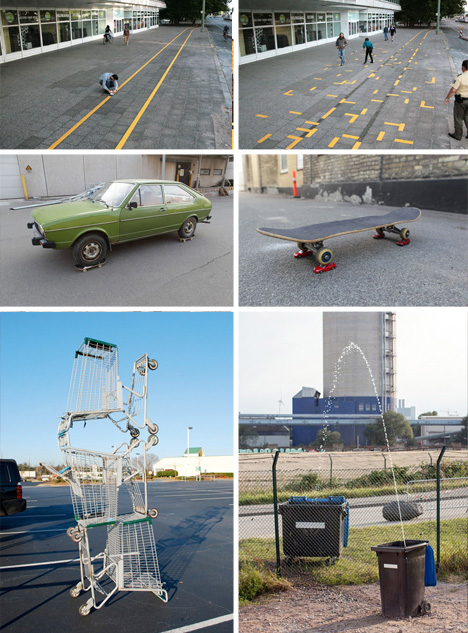
    street art object manipulations

    Per the pictures, sometimes these installations transpose ideas and objects from other contexts, but they also frequently warp existing everyday objects like bicycles, cars, signs, benches, shopping carts and garbage cans.

    street alley art wedging

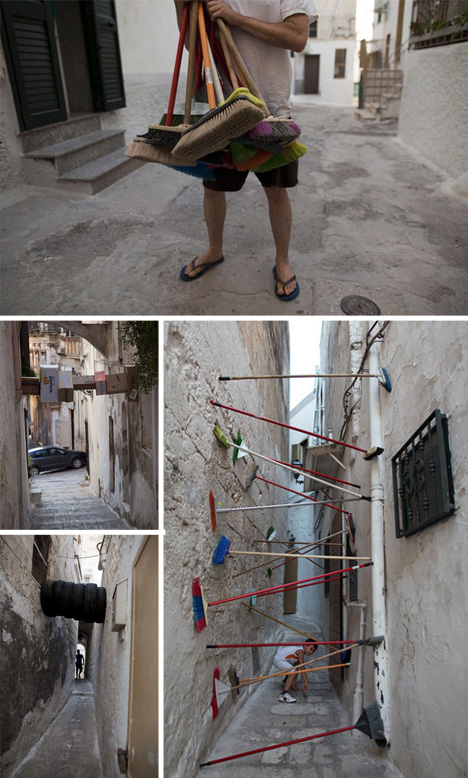
    Sometimes he works alone – sometimes collaboratively. Some of his pieces are stand-alones and one-offs while others form sets, like Wedging (shown above), which is a series of experiments of balance and obstruction in alleys with ordinary household items.

    street art impossible bicycles

    He has had run-ins with police while working in cities ranging from London to Amsterdam, on both art and guerrilla marketing projects performed in that gray area of public and possible vandalism.

    Share on Facebook


    [ By WebUrbanist in Art & Street Art & Graffiti. ]

    [ WebUrbanist | Archives | Galleries | Privacy | TOS ]


    WebUrbanist

     
    Comments Off on Unauthorized Installations: The Fine Art of Urban Subversion

    Posted in Creativity