RSS
 

Archive for June, 2013

A Guide to Shooting Outdoors in Low Light Conditions

22 Jun

A Guest Post by James Farley.
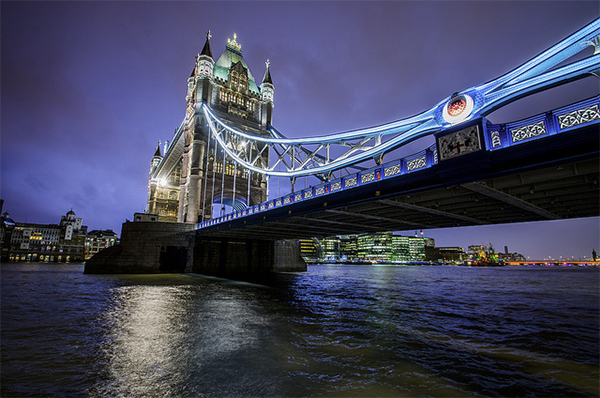
1

Shooting in low light as for many other forms of photography requires a bit of thought beforehand in order to get the most from the time you have, first and foremost will be making sure you have the right equipment with you.

Besides your camera and lenses, top of the list of things you will need will be a tripod, sturdier the better as exposures can get up to 30 seconds and sometimes even longer which is where even the slightest vibration or movement of the camera can ruin a shot.
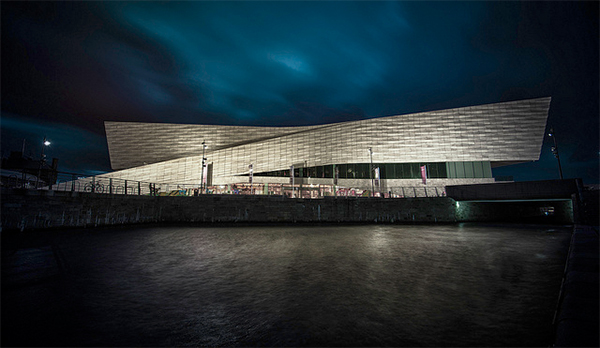
2

Other items that you can get by without but if you have them will be very helpful include:

  • Remote release, these come in many forms, infra-red/wired/wireless, I’ve used all of them at some point or another and would now always opt for a wireless trigger, can be inexpensive and give you a good mix of reliability and range.
  • ?There are now also apps that you can use on your smartphone with a suitable cable that act as a release and can offer some great features above and beyond being a simple trigger, one I’ve used that is worth a look is called TriggerTrap

  • A torch – trying to get your camera to autofocus in very low light can be a right headache at times, shining a torch on your desired area of focus will allow it to lock on quickly (but remember to switch to manual focus when it has!)
  • ?Also useful for changing settings on camera and just generally seeing your way around!
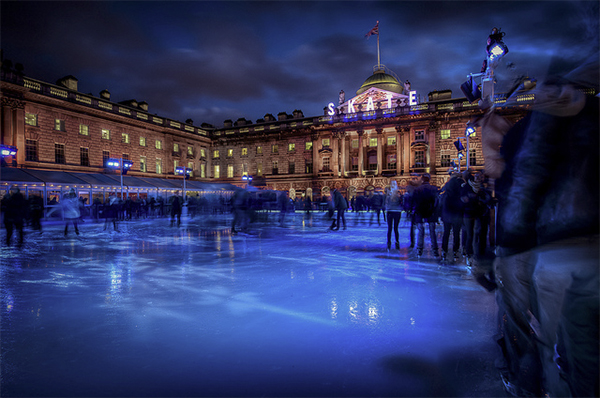
  • ND Grad filters – by no means essential, but if still a bit of colour in the sky these can be helpful to ensure things in foreground are correctly exposed, particularly if already in shadow when beginning to shoot.
  • Warm clothes! Depending on where you are in the world, it can get very cold very quickly as it goes dark, nothing worse than standing round shivering as your 60 second exposure ticks very slowly by!

3

Personal safety is also very important to mention if you are out to shoot in limited light conditions, ideally take someone along with you, not least to give you someone to talk to, can get very boring waiting for long exposures to finish!, or at least tell someone where you plan to go and what time you expect to return. Carry a mobile phone and try not to make it obvious you have valuable equipment with you where possible.
You will probably already have locations in mind that are suitable for low light photography, I tend to find that cities offer the best opportunities and will set out with the intention of shooting specific buildings from various viewpoints, and then improvise as the night progresses and other things present themselves.
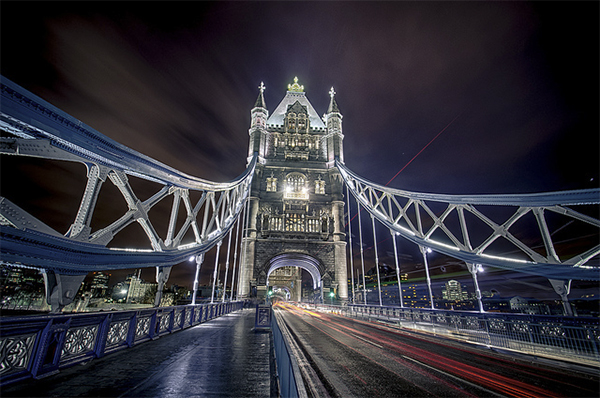
4

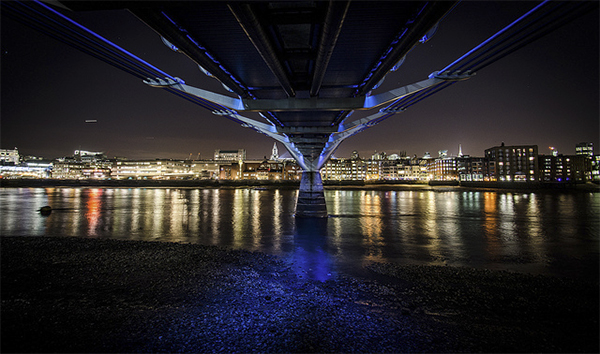
Artificial lighting can greatly enhance a dark scene, and if you use a narrow aperture, f/16 for example you should capture lights with a starburst effect to add some drama to the image.

Once you have found the composition you like the look of, set your tripod up ensuring it’s not in the way of others, if it has a bag hook as some do then hang your camera bag from it to give you a bit more stability.

Compose the scene in your viewfinder and use the torch as mentioned if needed to focus, then switch to manual focus which will stop the lens from ‘focus hunting’. At this point I will wait for any moving light sources such as vehicles to leave the composition so I can check the settings selected by the camera before then plugging these into the cameras manual mode to ensure they do not change when shutter is triggered.
5

If the scene is very dark, it may be the case that your camera cannot meter it sufficiently well to give a correct exposure (DSLR’s generally will not automatically select an exposure longer than 30 seconds), if this is the case, you will need to go into manual mode, choose your aperture and then select the cameras ‘Bulb’ mode which will open the shutter when you use the remote release, and keep it open until you press it again, this is where guesswork comes into it, you will need to try out some exposure times until the image is sufficiently exposed, use the histogram on back of camera to give you some idea of how far under/over your exposure is.

Longer exposures can also produce ‘noise’ within an image, similar to when using higher ISO’s, to reduce this most DSLR’s will have some sort of ‘long exposure noise reduction’ setting somewhere within the menu system, if you turn this on when you have taken your image, the camera will then close the shutter and take a similar length exposure. You won’t see this second exposure and it doesn’t get saved to your memory card, but the camera will use it to subtract any hot pixels showing from your original image which can greatly reduce noise, can get annoying though as every exposure will then take double the time to capture!

White balance can be tricky in low light with all kinds of artificial light spilling across your scene, for this reason I would suggest shooting in RAW to give you the flexibility to adjust this later, plus it will capture more detail in the image which can sometimes be an issue in very dark areas.

Don’t let rain put you off either, wet surfaces can look brilliant as light bounces off them!

And if you are feeling really creative, timelapse sequences can look fantastic as the light slowly disappears, this clip was made from about 140 photographs taken on Tower Bridge in London.

Now just grab your coat and get out there!, love to see what you get if you’d like to share some links in the comments below.

James Farley is a semi professional photographer in the UK covering a wide range of genres, recently including wedding photography, and a self confessed ‘kit geek’.
More of his work can be found on Facebook and at www.jamesfarley.co.uk

Post originally from: Digital Photography Tips.

Check out our more Photography Tips at Photography Tips for Beginners, Portrait Photography Tips and Wedding Photography Tips.

A Guide to Shooting Outdoors in Low Light Conditions


Digital Photography School

 
Comments Off on A Guide to Shooting Outdoors in Low Light Conditions

Posted in Photography


Wired.com shares tips on photographing the Supermoon

22 Jun

supermoon_2.jpg

This Sunday, June 23rd, the moon will be closer to earth than at any point during the year. It just so happens that on Sunday the moon will be full, too, creating what is commonly known as a ‘Supermoon’ which if there are no clouds in the way, will appear larger and brighter than normal. A great opportunity for some backyward astrophotography, in other words. Wired.com’s Raw File blog has published a short article containing tips for capturing this Sunday’s Supermoon in all its glory. Click through for extracts and a link to the full article. 

News: Digital Photography Review (dpreview.com)

 
Comments Off on Wired.com shares tips on photographing the Supermoon

Posted in Uncategorized


The Google Reader Apocalypse is Upon Us. Here’s How to Migrate.

22 Jun

Despite much weeping and gnashing of teeth in the online world, Google is unceremoniously killing what many consider to be the best RSS reader on the planet. If you are one of the 300,000+ readers who access Strobist through Google Reader, here are three good choices to keep the party rolling.

Read more »
Strobist

 
Comments Off on The Google Reader Apocalypse is Upon Us. Here’s How to Migrate.

Posted in Photography


What The Duck #1407

22 Jun

wtdlogo_big.jpg

We’ve been fans of Aaron Johnson’s comic strip ‘What the Duck’ for years. ‘WTD’ is one of the best satirical comic strips in the world, and it’s published here every week, as well as being included in our weekly newsletter. Barbed, topical and always amusing, we hope you enjoy WTD as much as we do. Click through for this week’s strip.

News: Digital Photography Review (dpreview.com)

 
Comments Off on What The Duck #1407

Posted in Uncategorized


Low Light: Weekly Photography Challenge

22 Jun

1To followup on our post earlier today on Low Light Photography we thought it might be a good topic for this weeks challenge.

So – your challenge is to take and share a photo taken in low light.

You’re welcome to take any approach to this that you like. You might want to try shooting some star trails (also check out this post on star trails) or night skies, do some candle light photography, do a night time streetscape or shoot some light trails – really it is totally up to you.

Once you’ve taken your Low Light photo upload it to your favourite photo sharing site either share a link to them even better – embed them in the comments using the our new tool to do so.

If you tag your photos on Flickr, Instagram, Twitter or other sites with Tagging tag them as #DPSLOWLIGHT to help others find them. Linking back to this page might also help others know what you’re doing so that they can share in the fun.

Also – don’t forget to check out some of the great shots posted in last weeks Converging Lines challenge – there were some great shots submitted.

PS: Don’t forget Neil Creek’s Night Photography Course is 31% off this week – it’d be a great way to explore this topic.

Post originally from: Digital Photography Tips.

Check out our more Photography Tips at Photography Tips for Beginners, Portrait Photography Tips and Wedding Photography Tips.

Low Light: Weekly Photography Challenge


Digital Photography School

 
Comments Off on Low Light: Weekly Photography Challenge

Posted in Photography


Kim Jong Il Leaves an Unusual Architectural Legacy

21 Jun

[ By Steph in Architecture & Offices & Commercial. ]

Ryugyong Hotel North Korea 1

Started in 1987 and still not complete, North Korea’s Ryugyong Hotel is perhaps its most potent architectural symbol, and an odd legacy for an odd and secretive leader. The 105-floor, pyramid-shaped hotel has towered over the city of Pyongyang in a mostly abandoned state since 1992, when construction was halted due to a period of economic crisis after the fall of the Soviet Union.

Ryugyong Hotel North Korea 4

The 1,080-foot-tall (330-meter) tower was slated to be completed this year, but it retains its title as the tallest unoccupied building in the world. It was initially intended to be complete by the 13th World Festival of Youth and Students in June 1989, at which point it would have been the world’s tallest hotel; however, it was eclipsed in 2009 by the spire atop the Rose Tower in Dubai.

Ryugyong Hotel North Korea 5

For the sixteen years in which the tower was abandoned, it was a glaring concrete eyesore. Called “The Worst Building in the History of Mankind” by Esquire Magazine, the 3,000-room hotel has sucked up more than two percent of North Korea’s gross domestic product, while a large number of the nation’s citizens go hungry. Why would Kim Jong Il have believed that this city, which is so poor it can’t afford to light up the streets at night, would need to accommodate so many visitors?

Ryugyong Hotel 1
Ryugyong Hotel North Korea 2

(all images via: Wikimedia Commons)

Construction resumed on the hotel in 2008, and in 2011, the mirrored facade was finally completed thanks to an influx of $ 180 million from an Egyptian telecommunications company. The group that reportedly manages the hotel has refused to give an expected completion date, saying “Market entry is not currently possible.” The fate of the hotel remains unclear.
Share on Facebook


[ By Steph in Architecture & Offices & Commercial. ]

[ WebUrbanist | Archives | Galleries | Privacy | TOS ]


WebUrbanist

 
Comments Off on Kim Jong Il Leaves an Unusual Architectural Legacy

Posted in Creativity


Capture One Pro 7 update extends raw support to multiple new cameras

21 Jun

COP7_icon.png

Phase One has released 7.1.3 of its Capture One Pro software, which includes extended raw support for a number of new cameras, including the Canon EOS-1D C and mirrorless models from Nikon, Panasonic and Sony. It also includes a beta version of a new catalog importer. Click through for a full list of newly supported cameras.

News: Digital Photography Review (dpreview.com)

 
Comments Off on Capture One Pro 7 update extends raw support to multiple new cameras

Posted in Uncategorized


Posing Guide for Photographing Women: 7 More Poses to Get You 21 Different Photos [Part II]

21 Jun

A post by Kaspars Grinvalds from Posing App.

If you haven’t read the first article in this series, I would kindly recommend you to start with Posing Guide for Photographing Women: 7 Poses to Get You 21 Different Photos – Part I where we started with 7 standing poses.

Let’s continue this time with 7 sitting poses for female subjects and their possible variations in order to get at least three different shots for each pose.

Pose 1

Pose1

Nice and simple pose to start with. Ask your model to sit comfortably with knees placed together. One hand relaxed on the knees while the other hand placed near the neck. And remind her to straighten the spine.

7poses2 1

Photo 1 – This basic starting point provides you with many different choices to continue with. But in the very beginning you may want to just test different shooting angles and heights and check what works best for your model.

Photo 2 – After I got the first shot similar to the sample, I asked the model to lower both arms and rest them on the knees.

Photo 3 – And finally I returned to the initial pose and took a close-up portrait shot.

Pose 2

Pose2

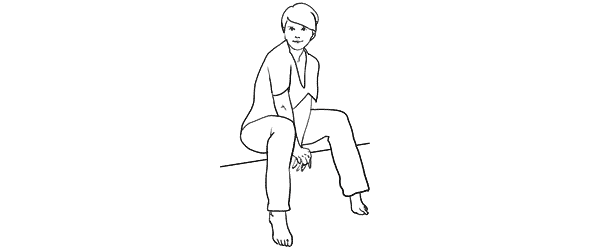
Another easy pose with hands placed together between the legs. Notice that arms should not be completely straightened, rather slightly bend at the elbows. Also in the sample pose it is illustrated that toes should be straightened in order to raise the knees slightly up.

7poses2 2

Photo 4 – The model easily recreated the sample pose and we could move on with some variations.

Photo 5 – This shot is exactly the same pose just taken from a side. Minor change but already different result.

Photo 6 – And again one more close-up portrait shot but this time the model is looking down her own body.

Pose 3

Pose3

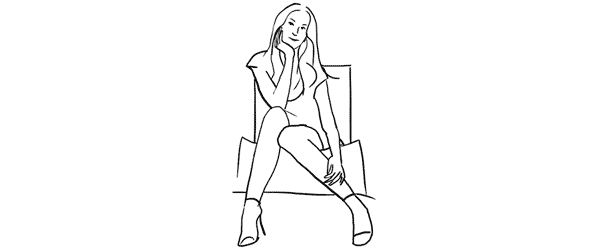
Another very simple pose with one leg crossed over the other. And I have to say here that including the legs in the frame can be challenging because it doesn’t work with all body types. If your model is curvy, consider framing closer comps (for example as in photos with the previous pose).

7poses2 3

Photo 7 – My model was with slim body type, nice legs and stylish shoes, so I chose to go for a full height frame.

Photo 8 – In exactly the same manner as with the previous sample I simply took this shot from a different angle. The model didn’t change anything, just turned her head to the camera.

Photo 9 – After that we repeated the already tested posture with one hand close to the neck. This hand movement is a very nice variation and works in many posing scenarios.

Pose 4

Pose4

This pose however is even more demanding than the previous one because it is all about the legs and thus there is no point of cropping them out. And nice shoes are a must.

7poses2 4

Photo 10 – Recreating it isn’t hard as the pose is fun and creates nice and playful mood to the photo.

Photo 11 – Here the model is looking down and kind of fixes her shoe. Very subtle changes but completely different photo.

Photo 12 – And once again the same pose but taken from a side creates one more variation.

Pose 5

Pose5

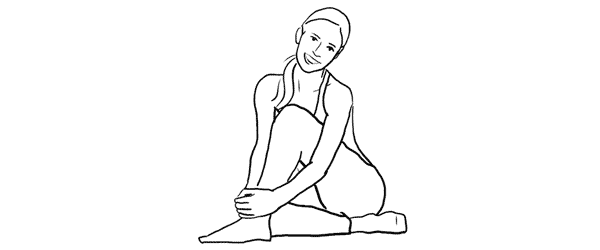
Simple and easy pose for the model sitting on the ground. And to my mind, in contrast to the previous on the chair poses, sitting on the ground works better barefoot.

7poses2 5

Photo 13 – The pose is kind of very natural and is easy to recreate. And as a result the model looks really relaxed.

Photo 14 – After recreating the initial pose, different hand placement options are available. Here for example the model raised them and connected on the knee.

Photo 15 – Only two minor adjustments to the initial pose were made here. Putting one hand up in the hair and slightly curving upper body part to the side. This also lowers the raised knee. The result is another friendly and natural looking pose.

Pose 6

Pose6

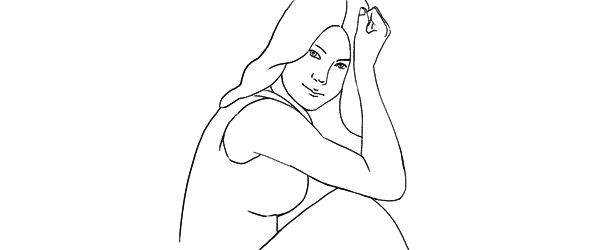
Another easy sitting on the ground pose. Very suitable for different close-up portrait shots.

7poses2 6

Photo 16 – While sitting in the initial pose try making two different versions with only the front arm and then with both arms raised on the knees. Both versions works well.

Photo 17 – A slight hand placement variation. This variation works very well for tight crops.

Photo 18 – And don’t be afraid to be spontaneous from time to time. This photo was just an improvisation on the go while sitting in the initial pose.

Pose 7

Pose7

And finally I purposely chose also one simple portrait pose for the sitting samples. Despite the fact that only face is visible in the frame, it’s more comfortable for the model to recreate it while being seated.

7poses2 7

Photo 19 – Here I tried to illustrate the previous statement and showed the sitting position. You may visualize how it would work cropped only around the face.

Photo 20 – Keeping the “portrait with hands around the face” concept in mind, try different variations by moving hands around and making different head tilts.

Photo 21 – In order to achieve the most natural postures in the image ask the model to really move hands around. In this particular example she moved her hand through her hair and I made several shots and afterwards chose the best hand position.

So, this was a process of using 7 sample poses as the starting point to create 21 different photos. I encourage you to try this approach to posing your subjects in a similar workflow and most probably you will find your own and even better ways to achieve some great results.

All of these illustrations and many more posing samples are available on Posing App for your mobile devices.

Kaspars Grinvalds is a photographer working and living in Riga, Latvia. He is the author of Posing App where more poses and tips about people photography are available.

Post originally from: Digital Photography Tips.

Check out our more Photography Tips at Photography Tips for Beginners, Portrait Photography Tips and Wedding Photography Tips.

Posing Guide for Photographing Women: 7 More Poses to Get You 21 Different Photos [Part II]


Digital Photography School

 
Comments Off on Posing Guide for Photographing Women: 7 More Poses to Get You 21 Different Photos [Part II]

Posted in Photography


21. Juni 2013

21 Jun

Ein Beitrag von: Sabine Fischer

Morning-©-Sabine-Fischer


kwerfeldein – Fotografie Magazin

 
Comments Off on 21. Juni 2013

Posted in Equipment


Augenschmaus: Beeren-Baiser-Kuchen

21 Jun

Ein Beitrag von: Lisa Nieschlag

Zwei Küchen, zwei Kontinente – eine gemeinsame Leidenschaft: Liz & Jewels alias Lisa Nieschlag und Julia Cawley eint die Liebe zum Kochen und zum Kreativen. Jede Woche treffen sich die beiden in der Küche und kochen, stylen und fotografieren ein Gericht. Aber weit weg voneinander und jede auf ihre Art: Liz in Münster, Jewels in Brooklyn! Die Ergebnisse werden online ausgekostet und diskutiert.

Portionen: großer Kuchen oder 6 – 8 kleine
Zeit: Aufwändig, bestimmt 45 Minuten und mehr.

Zutaten und Zubereitung

Für die Kuchen:
50 g Butter
50 g Rohohrzucker
2 Eigelb
1 Tl Vanille-Extrakt
75 g Mehl
1 Tl Backpulver
ca. 50 ml Milch

Den Backofen auf 180°C vorheizen. Eine kleine Backform (Durchmesser etwa 15 cm) auf dem Boden mit Backpapier auslegen und die Seiten einfetten. Alternativ eine Silikonbackform nehmen, da sie das Herauslösen der Kuchen erleichtert. Die zimmerwarme Butter mit dem Zucker und einem Handrührgerät schaumig rühren. Eigelb und das Vanille-Exrakt dazugeben und verrühren. Das Mehl mit dem Backpulver mischen und nach und nach zur Butter-Mischung geben. Die Milch ebenfalls unterrühren und die Hälfte des Teiges in die Backform verteilen.

Für das Baiser:
2 Eiweiß
65 g Feinster Zucker

Das Eiweiß mit dem Zucker steifschlagen und die Hälfte auf dem Teig in der Backform verteilen. Den verbleibenden Eischnee kalt stellen. Die Form in den Ofen geben und zwischen 15-20 Minuten backen, bis sich das Baiser goldgelb färbt. Die Backform aus dem Ofen nehmen und kurz abkühlen lassen. Den Kuchen aus der Form lösen und auf einen Teller geben. Die Form spülen und mit der anderen Hälfte des Rührteiges und des Eischnees einen zweiten Kuchen backen. Nach dem Backen ebenfalls abkühlen lassen.

Für die Füllung:
150 ml Sahne
Johannisbeeren oder Himbeeren oder Blaubeeren …

Für die Füllung die Sahne steif schlagen und auf dem ersten Kuchen verteilen. Einige Beeren dazugeben. Den zweiten Kuchen darauf geben und mit Beeren garnieren.

Fotorezept:

Liz: Das Thema meines Settings ist „all-white“. Dazu wählte ich ganz bewusst weiße Props aus. Auch Rückwand und Untergrund sind weiß und hell. Dadurch wird der Fokus noch stärker auf den Kuchen und die kräfig-roten Beeren gelenkt.

Jewels: Ich wollte gerne etwas Moodiges machen und lieber viele kleine Kuchen als einen großen, weil ich an dem Tag Besuch hatte und lieber kleine Törtchen servieren wollte.

~

Du hast auch ein leckeres Rezept und die passenden Food-Fotos dazu, die einem das Wasser im Munde zusammenlaufen lassen? Dann werde einfach selbst Teil von „Augenschmaus“!


kwerfeldein – Fotografie Magazin

 
Comments Off on Augenschmaus: Beeren-Baiser-Kuchen

Posted in Equipment