RSS
 

Archive for May, 2013

DSLR Camera Reviews 2013: Which DSLR To Buy?

03 May

The goliaths of the digital SLR world are Canon, Sony and Nikon. When progressing to this photographic level of awesome picture taking, deciding on your first Professional DSLR is a very important decision. And due to all the varying DSLR camera reviews available on the internet it can prove to be a somewhat daunting one! It’s All About The Loyalty Continue Reading

The post DSLR Camera Reviews 2013: Which DSLR To Buy? appeared first on Photodoto.


Photodoto

 
Comments Off on DSLR Camera Reviews 2013: Which DSLR To Buy?

Posted in Photography


Wabi-Sabi

03 May

Ein Beitrag von: Susan Brooks-Dammann

Das erste Mal habe ich von Wabi-Sabi gehört, als ich einen Artikel in einer Frauenzeitschrift las. An den Inhalt des Artikels, in dem es nicht um Fotografie ging, kann ich mich nicht mehr erinnern. Allerdings war es gar nicht der Artikel selbst, der mich damals fasziniert hat, sondern die Philosophie, die dort vorgestellt wurde.

Wabi-Sabi ist hier in Deutschland recht unbekannt und wird schnell in die Esoterik-Ecke abgeschoben, wie ich erfahren musste, als ich anderen davon erzählte. Doch das ist nicht so.

Ich habe angefangen, mehr darüber zu lesen und dabei erfahren, dass Wabi-Sabi aus dem Japanischen kommt und eine Kombination aus zwei unterschiedlichen Wörtern ist. Wabi bedeutet so etwas wie „Einsamkeit“ oder „Enthaltsamkeit“.

Sabi ist eine Bezeichnung für das „Alte“, die „Patina“, jedoch ist es, anders als hier, ein positiver Begriff. Zusammengesetzt ist Wabi-Sabi ein Lebensentwurf, der auf Bescheidenheit, Zurückhaltung und Meditation abzielt. Gleichzeitig ist es aber auch ein ästhetisches Konzept.

Hierzulande wird die Ästhetik des Wabi-Sabi oft als „Ästhetik der Unvollkommenheit“ begriffen, was nicht ganz richtig ist. Wie mir eine japanische Künstlerin erklärt hat, ist der Kern von Wabi-Sabi für Japaner die Bescheidenheit, während Perfektion für Japaner eine vollkommen andere Bedeutung hat als für uns: Perfektion entsteht nämlich erst durch Fehler, die den Rest des Werkes umso vollkommener erscheinen lassen.
© Susan Brooks-Dammann

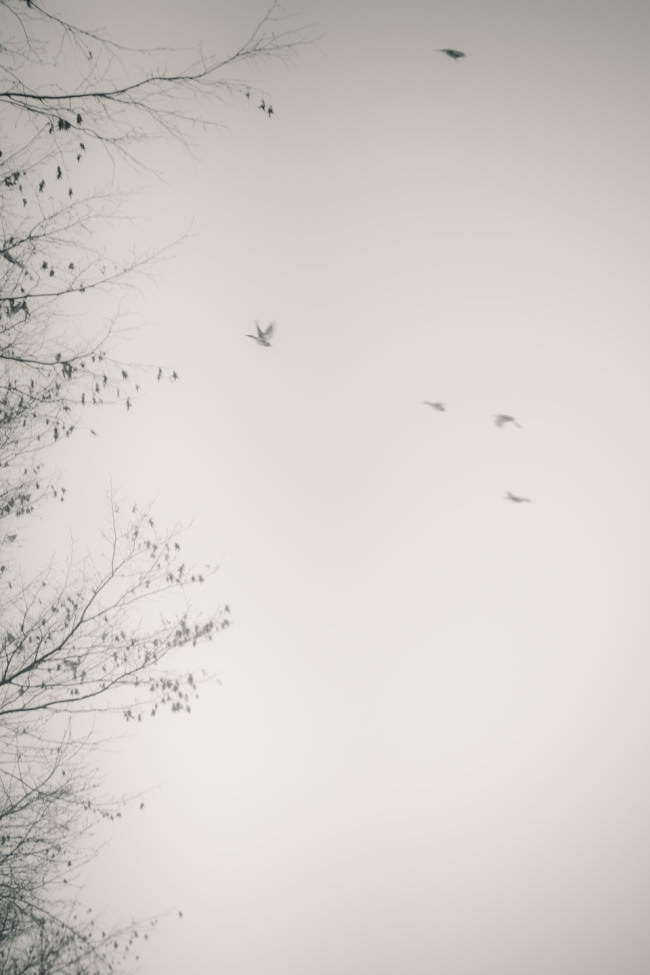
Wabi-Sabi ist eine sehr zurückhaltende Ästhetik, die sich einem erst auf den zweiten Blick offenbart. Die Motive, die ganze Bildsprache sind geprägt von Reduktion. Es sind nicht die großen, auffälligen und sensationellen Motive, sondern die kleinen und unbeachteten Dinge, die Wabi-Sabi ausmachen. Nicht der grandiose Sonnenuntergang, sondern das Spinnennetz am Wegesrand, das im richtigen Licht seine eigene Schönheit entwickelt, ist Motiv im Wabi-Sabi.

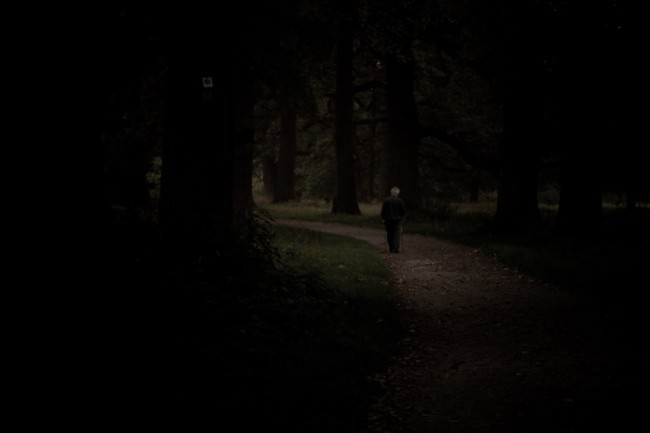
Apropos Licht. Es ist nicht das Licht, das im Wabi-Sabi wichtig ist, sondern der Schatten. Hier in Europa wollen wir unsere Bilder ausleuchten. Wir versuchen, den Schatten auszumerzen, ihn so zu kontrollieren, dass er nur durch ein feine Modellierung das eigentliche Motiv unterstützt. Aber wir sehen kaum, dass Schatten auch eine eigene Qualität besitzt.

Um wieder auf das Spinnennetz zurückzukommen: Dieses kommt doch auch erst im Schatten zur vollen Geltung, indem einige wenige Lichtstrahlen sich darin brechen. Wird es ins Licht gesetzt, ist es gar nicht mehr zu sehen.

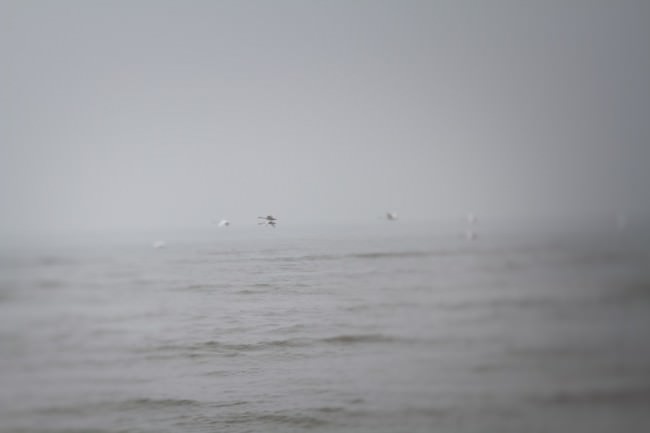
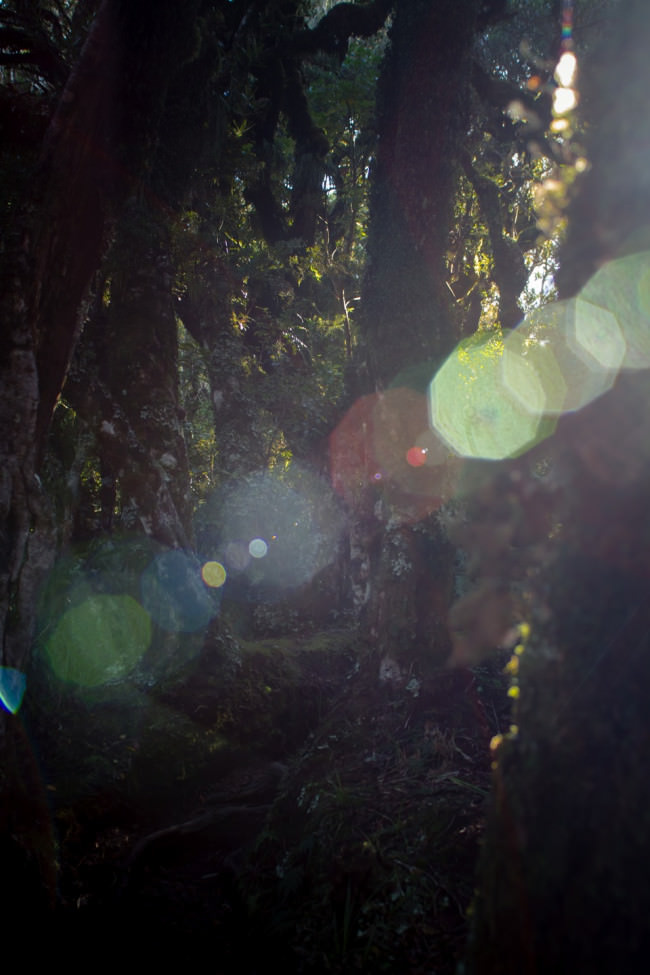
Ein weiteres Element des Wabi-Sabi ist das Nicht-Perfekte und Fehlerhafte. Fotografische Fehler werden nicht eliminiert, wie wir es in der Regel tun. Im Gegenteil, der Fehler wird als künstlerisches Element in das Bild mit einbezogen. Erst das Nicht-Perfekte ist es, das dem Bild seine Aussagekraft verleiht. Es ist gerade das Linsenflirren oder das Ertrinken im Schwarz, das die Bildwirkung noch verstärkt.

© Susan Brooks-Dammann

Das Knifflige dabei ist, dass der auftretende Fehler nicht einfach nur davon herrührt, dass man Knipserei als Kunst verkaufen will, sondern dass er bewusst ins Bild eingebaut wird. Wir gehen im Wabi-Sabi also den umgekehrten Weg, indem wir nicht fragen, wie wir den Fehler ausmerzen, um das Bild perfekt (im Sinne von schön) zu machen, sondern wie wir den Fehler einbauen, um das Bild zu perfektionieren, so dass es in der Lage ist, den Betrachter emotional zu berühren. Somit wird dieser in seiner Eigenschaft ins Gegenteil gesetzt und als Bereicherung angesehen.

Weiterhin geht es im Wabi-Sabi auch um Leere. Es ist nicht der Minimalismus, den wir kennen, in dem es darum geht, so wenig wie möglich bildwürdig in Szene zu setzen, sondern der Wunsch, nur noch die wesentlichen Elemente als Bildinhalte zu haben, damit diese durch die umgebende Leere in ihrer Aussagekraft verstärkt werden.

Die Aussage im Wabi-Sabi ist dabei eher als Wirkung und intuitives Fühlen zu verstehen anstatt als konkrete Bedeutung. Und damit wären wir auch schon beim wichtigsten Element der Fotografie im Sinne des Wabi-Sabi: Das Wichtigste ist, nicht zu zeigen, dass man als Fotograf die Technik vollkommen beherrscht und perfekte Fotos macht, sondern, dass man versucht, etwas im Bild einzufangen.

Was dieses „Etwas“ ausmacht, das ist allerdings individuell. Die Franzosen bezeichnen es als „je ne sais quoi“. Etwas, das nicht bezeichnet werden kann, das aber dem Bild erst seine Wirkung gibt. Bilder im Wabi-Sabi sollen berühren, etwas im Betrachter anklingen lassen.

© Susan Brooks-Dammann© Susan Brooks-Dammann

Ich weiß nicht, wie es Euch geht, aber ich vermisse dieses emotionale Element häufig, wenn ich mir Fotografien anschaue. Überall im Internet und in Zeitschriften sehe ich Fotos, in denen ich bemerke, dass sich der Fotograf bemüht hat, möglichst perfekt zu fotografieren. Fehler werden ausgemerzt, jeder Pixel wird überprüft, ob er an der richtigen Stelle sitzt und wenn das Foto nicht überwältigend genug aussieht, dann wird mit Photoshop nachgeholfen.

Wenn ich mir ein Buch über Fotografie zur Hand nehme, dann habe ich den Eindruck, dass Fotografie nicht über die heilige Dreieinigkeit von Blende, Belichtungszeit und ISO-Zahl hinausgeht.

Um ehrlich zu sein, empfinde ich das inzwischen als geradezu langweilig. Geht es in der Fotografie wirklich nur noch darum, die korrekten Messungen auszuführen? Oder darum, immer sensationellere Fotos zu machen, die lautstark nach Aufmerksamkeit verlangen? „Hier, schau mich an!“, schreit das eine HDR, „Nein, hierhin!“, brüllt das andere. Geht es nur um Objektive, die richtige Kamera, die richtigen Filter?

Als ich angefangen habe zu fotografieren, wollte ich natürlich auch möglichst perfekte Fotos machen, wer will das nicht? Doch das Vertrackte am Perfektionswahn ist, dass man sich selbst in ein Hamsterrad begibt. Man macht Fotos, ist unzufrieden, man lernt, man macht „bessere“ Fotos. Doch da man gelernt hat, genauer zu gucken, ist man immer noch unzufrieden, will noch bessere Fotos machen und so weiter…
© Susan Brooks-Dammann

Ich war also permanent unzufrieden mit meinen Fotos, die immer irgendwie nicht gut genug wirkten. Gleichzeitig fand ich, dass die Bilder, die ich machte, genau so aussahen wie hunderttausend andere Bilder auch. Irgendetwas fehlte.

Im Nachhinein kann ich sagen, wo mein Problem lag. Nämlich darin, dass ich gar nicht versucht habe, „mein eigenes Ding“ zu machen, wie man das so schön sagt. Ich wollte alles so machen wie andere auch, weil ich Angst vor Ablehnung hatte. Ganz banal.

Wenn man versucht, mit anderen mitzuhalten, versucht man doch automatisch, genau das zu machen, was andere machen, nicht wahr? Alles, was anders aussieht, wird doch nicht wirklich anerkannt … so meinte ich jedenfalls.

Inzwischen habe ich mich davon freigemacht, hauptsächlich, weil die Fotografie mir so keinen Spaß mehr gemacht hat. Der Spaß kam erst wieder, als ich angefangen habe, weniger auf das zu schauen, was andere machen und weniger auf das zu geben, was andere darüber sagen.

Über Wabi-Sabi zu lesen, hat mir klargemacht, dass es auch andere Wege der Fotografie gibt. Vielleicht waren es die Elemente des Wabi-Sabi, die Kombination aus Reduktion, Einfachheit, Intuition und Natürlichkeit, die mich angesprochen haben. Diese entsprechen viel mehr meiner Persönlichkeit als diese verbreitete verrückte Kombination aus Technikverliebtheit, Perfektionswahn und Aufmerksamkeitsstreben.

Ich liebe es, Leere und viel Raum um mich herum zu spüren. Dann kann ich atmen. Ich liebe es, durch die Natur zu gehen und die kleinen Wunder zu finden, die sich im Schatten verstecken. Ich finde es faszinierender, im Bild nur anzudeuten, statt konkret zu zeigen. Vor allem aber erlaube ich mir nun, dank Wabi-Sabi, Fehler zu machen.


kwerfeldein – Fotografie Magazin
 
Comments Off on Wabi-Sabi

Posted in Equipment


Is This the Future of Umbrellas?

03 May

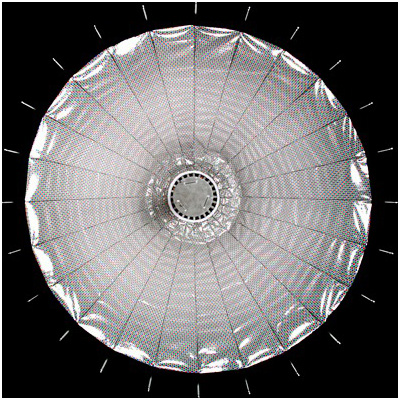
See this umbrella? It's very different than the typical reflector in one very specific way. And it's being touted as being way better for digital sensors.

Can you tell what's different about it? Probably not without looking at it close-up…

Read more »
Strobist

 
Comments Off on Is This the Future of Umbrellas?

Posted in Photography


What’s In My Bag- Landscapes

03 May

I’m often asked by beginning photographers about what I use to shoot my photos, whether it’s landscapes, portraits, sports, or some other subject.  Most often, they are referring to the camera used, the lenses, maybe the flash. But the truth is that there’s more to taking great photos than just the camera.  The truth is, the contents of my bag changes dependent on what I plan to be shooting. I’ve compiled a list of items that are always in my bag when I’m on a landscape photo outing, along with how they’ve helped me in my quest for better photos.

1. My Three-Legged Friend

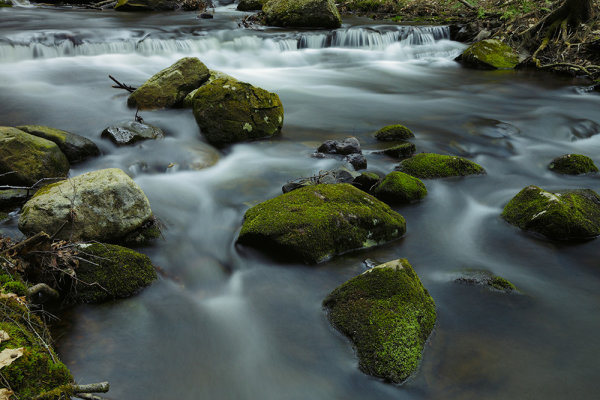
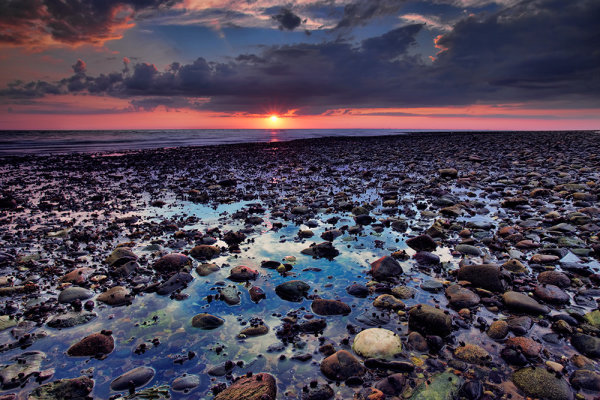
Without a tripod and neutral density filters, I couldn't possibly hope to capture this image. Using a 6-stop ND filter, exposure was ISO 100, 10 seconds, at f/16.

Without a tripod and neutral density filters, I couldn’t possibly hope to capture this image. Using a 6-stop ND filter, exposure was ISO 100, 10 seconds, at f/16.

The truth is, I’d be lost without a tripod on a landscape outing. I currently have two I use regularly. Which ones I use is far less important than the process of choosing a tripod. Too often, beginning photographers skimp on the tripod purchase, going for something cheap that doesn’t suit their needs, and in the end, their images suffer. First and foremost, a tripod needs to support the weight you plan to put on it. This means taking the total weight of your camera and heaviest lens, and making sure your tripod will support that weight.  The fact is, a heavy tripod will better support the weight you put on it, but in today’s world a premium is put on lighter weight. Carbon fiber tripods are lighter weight and generally support heavier loads than aluminum tripods, but at a higher expense. One of the tripods I use is a Manfrotto XPro B, with an Arca Swiss B1 ball head.   This tripod and head combination weighs over 6 lbs., but is rock solid in any conditions. The tripod legs are rated to support 15.4 lbs, and the head is rated to support over 90 lbs! My other tripod is a Gitzo 1541T Traveler with an Acratech GPss ball head. The legs are rated to hold 17.6 lbs, and the head is rated to hold 25 lbs.  This is a smaller setup that folds down to about 20″, and weighs less than 3 lbs. This is what I use when I fly, or when I am hiking longer distances. The thing to realize about a tripod is that a good one is built to last. If you take care of it, a tripod can last a lifetime of shooting.

2. Stepping Up A Level

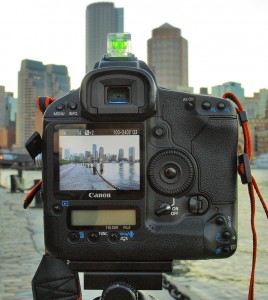
My trusty bubble level always reminds me to be sure my camera is straight. Nothing annoys me more than a crooked horizon line!

My trusty bubble level always reminds me to be sure my camera is straight. Nothing annoys me more than a crooked horizon line!

These days, just about every DSLR out there has a built-in electronic level, a feature I simply LOVE.  However, sometimes in the heat of the moment I will simply forget to level my camera properly, since the built-in level isn’t always visible on the screen.  Because of this, I still carry a hot-shoe mounted spirit level in my bag.  It’s hard to miss it sitting on top of the camera, and it always reminds me to be sure the camera is level.  And yes, while some tripods do have levels built-in, they aren’t always easy to see, and depending on where they are mounted, it may indicate the legs are level, but doesn’t mean the camera is level because the head can still tilt.

3. Filters

I’m a big fan of using neutral density filters and graduated neutral density filters for landscape work.  I have a set of Schneider filters that I use with a Lee filter holder. The Schneider filters are not cheap.  They are optical glass, heavy, and high quality. There are more economic options available in Lee-style filters, including Cokin, Formatt, and Lee.  The filters I use are 4×5 size, which allows me to adjust the horizon on the graduated filters based on my composition. My kit consists of 3-, 4-, 5-, and 6-stop ND filters, and 2-,3-, and 4- stop grads, which come in both hard and soft-edged styles.  Which style you use is dependent on the scene in front of you.  I also have a circular polarizer I use often for controlling reflections and cutting haze.

4. Flashlight

I often find myself shooting before the sun rises, and after the sun sets. This means hiking to and from my location in the dark. A flashlight can be a lifesaver in these situations.  In addition, at times I go out to shoot night landscapes, to get stars in the sky, or the moon. If there’s no light in the foreground and I’d like some, a flashlight is the perfect way to paint some light back in.  I also carry a headlamp in my bag so I can work handsfree and have a light on while digging around in my bag.

5. Step-Up Rings

When you have lenses that have different diameter front elements, it can be maddening to have to buy filters for each lens. An easy workaround for this is to buy step-up rings.  I have a complete set that covers from 52mm up to 82mm.  I then simply purchase the filter for the largest lenses I own and use the step up rings for smaller lenses. Much easier and more cost effective than buying filters to fit each lens.

For this image, I used a 4-stop hard edged ND grad, to bring the sky back within the dynamic range of the camera. I used the hard edge here because there was nothing intersecting the horizon from the foreground, which made it very easy to line up the darkened edge with the horizon out on the bay. Exposure was 1.3 seconds, ISO 100, f/16. EOS 5D Mark II with EF 17-40 f/4L.

For this image, I used a 4-stop hard edged ND grad, to bring the sky back within the dynamic range of the camera. I used the hard edge here because there was nothing intersecting the horizon from the foreground, which made it very easy to line up the darkened edge with the horizon out on the bay. Exposure was 1.3 seconds, ISO 100, f/16. EOS 5D Mark II with EF 17-40 f/4L.

Post originally from: Digital Photography Tips.

Check out our more Photography Tips at Photography Tips for Beginners, Portrait Photography Tips and Wedding Photography Tips.

What’s In My Bag- Landscapes


Digital Photography School

 
Comments Off on What’s In My Bag- Landscapes

Posted in Photography


All-in-One Bicycle Helmet: Sleek Integrated Lights & Signals

03 May

[ By WebUrbanist in Technology & Vehicles & Mods. ]

bike helmet signals

Bicyclists need this. Incredible design is not just about looking good (which this does) or working well (which this does), but weaving the solution so that each seems the natural outcome of the other.

bike helmet light controls

With a headlight on the front, break light on the back, and two swooping turn signals on the sides, this streamlined helmet (the result of numerous design iterations) puts signalling up high for maximum visibility and uses universally recognizable symbols and colors for clear communication.

bike helmet design diagrams

Balázs Filczer created this award-winning (IBDC 2013 – International Bicycle Design Competition) design with both style and everyday usability in mind. A Bluetooth handlebar controller lets the rider signal changes as simply and easily as possible. Rechargeable batteries slide into and pop out of the top for easy charging. And the four built-in lights are not just classy (helpful in promoting actual adoption) but useful as well.

Share on Facebook


[ By WebUrbanist in Technology & Vehicles & Mods. ]

[ WebUrbanist | Archives | Galleries | Privacy | TOS ]


WebUrbanist

 
Comments Off on All-in-One Bicycle Helmet: Sleek Integrated Lights & Signals

Posted in Creativity


More pictures leak of purported Olympus PEN ‘E-P5’

03 May

PEN-front.png

Detailed images on a Chinese blog may reveal more about the next-generation Olympus PEN. Although no official announcement has been made, the extent of the leaks about the camera make its existence an open secret. Rumors suggest the camera will be called the E-P5, and suggest it will have Wi-Fi capabilities (both of which seem plausible, based on the company’s naming scheme and recent industry trends).

News: Digital Photography Review (dpreview.com)

 
Comments Off on More pictures leak of purported Olympus PEN ‘E-P5’

Posted in Uncategorized


Photographer turns camera on teenage ‘freighthoppers’

03 May

Photographer-Mike-Brodie-Captures-Freight-Train-Hitchhikers-10.jpg

Mike Brodie spent five years riding freight trains across America, returning with an astonishing visual record of the teenage ‘freighthoppers’ that travel the USA illegally, by rail. Brodie had no formal training in photography, but began  documenting his experiences after finding a discarded Polaroid camera behind a car seat. Brodie’s images are collected in his new book ‘A Period of Juvenile Prosperity’. Click through for more details and a selection of images.

News: Digital Photography Review (dpreview.com)

 
Comments Off on Photographer turns camera on teenage ‘freighthoppers’

Posted in Uncategorized


Lightroom for your tablet? A mobile version could be in works

02 May

TS80x80~cms_posts_6365066828_Lightroom.png

Adobe product manager Tom Hogarty yesterday offered a tantalizing sneak peek into future Lightroom functionality. On Scott Kelby’s web show, The Grid, Hogarty demoed an iOS app that allows a wide range of raw file edits on the iPad that can sync back to your Lightroom catalog. You can watch it in action on connect.dpreview.com.

News: Digital Photography Review (dpreview.com)

 
Comments Off on Lightroom for your tablet? A mobile version could be in works

Posted in Uncategorized


10 Shortcuts of the Commonly Used Features in the Library Module of Lightroom 4

02 May

Introduction

This tutorial has been transcribed from the SLR Lounge Lightroom 4 Workshop on DVD, a 14 hour Lightroom 4 A – Z guide with over 130 tutorials for mastering Lightroom from start to finish. The Digital download can be purchased from SLR Lounge while the physical copy is available through Amazon Prime.

Overview

This quick article will go over 10 shortcuts of the commonly used features in the Library Module of Lightroom 4. Knowing these simple shortcuts can greatly speed up your workflow!

(Note:  Apple users, just pretend that “CTRL” is “CMD”.  😉

1. Lightroom 4 Module Shortcuts

There are a total of 7 Modules in Lightroom 4 and each corresponds with numbers 1-7. To switch to a Module, hit “Ctrl + Alt + 1-7.”

“1” is the Library Module, “2” is the Develop Module, “3” is the Map Module, and so forth. For example, if you want to go to the Develop Module, hit “Ctrl + Alt + 2.”

01_lightroom-module-shortcuts

Another quick way to get to the Develop Module is by simply hitting “D.” You can also get to the Library Module through the different Library View Modes, which brings us to our next shortcut.

2. Library View Modes

There are 4 Library View Modes in Lightroom 4: Grid View Mode, Loupe View Mode, Compare View Mode, and Survey View Mode. To access the Grid View, hit “G.” To get to the Loupe View, hit “E.” Hit “C” for Compare View and “N” for Survey View. If you are in a module other than the Library Module, hitting any 4 of these Library View Mode shortcuts will bring you back to the Library Module.

3. Import/Export Shortcuts

To import images into Lightroom, hit “Ctrl + Shift + I.” This will bring up the Import Dialogue Box. Hit “Ctrl + Shift + E” to bring up the Export Dialogue Box to export your images out of Lightroom.

4. Photoshop Shortcut

Sometimes we need to finish editing our images in Photoshop. We can take our images from Lightroom into Photoshop by selecting the image and then hitting “Ctrl + E.” Once you are done with your image in Photoshop, hit “Ctrl + W.” This will bring you back into Lightroom, where you will see both your Photoshop copy and Lightroom copy of your image in your Lightroom catalog.

5. Left/Right Panels Shortcuts

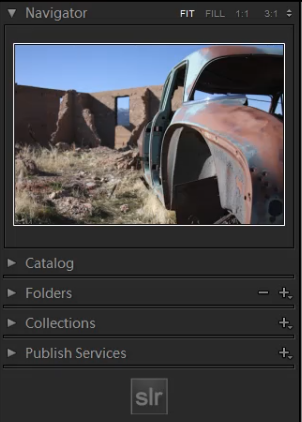
The boxes on the right and left sides of Lightroom 4 are referred to as Panels. Like the Modules, the Panels also correspond to a number. The Left Panels correspond with the numbers “0-4” and include the Navigator Panel, the Catalog Panel, the Folders Panel, the Collections Panel, and the Publish Services Panel.

To expand or collapse a Left Panel, hit “Ctrl + Shift + 0-4.” The Navigator Panel is “0,” the Catalog Panel is “1,” the Folders Panel is “2,” and so on. Below, you can see that only the Navigator Panel is expanded and the remaining Panels are collapsed.

02_lightroom-left-side-panels-shortcuts

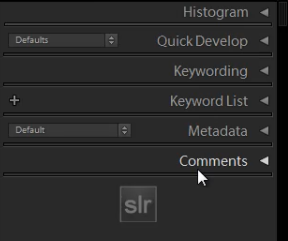
The Right Panels correspond with the numbers “0-5.” To expand or collapse a Right Panel, hit “Ctrl + 0-5.” The Right Panel includes the Histogram Panel, the Quick Develop Panel, the Keywording Panel, the Keyword List Panel, the Metadata Panel, and the Comments Panel. The Histogram Panel is “0,” the Quick Develop Panel is “1,” the Keywording Panel is “2,” and so forth. As you can see below, none of the Panels have been expanded.

03_lightroom-right-side-panels-shortcuts

6. Target Collection Shortcuts

Since we just discussed the Panels shortcuts, we will go over a Target Collection, which can be found in the Collections Panel (“Ctrl + Shift + 3”) in the Left Panel. A Target Collection is a useful tool because it helps us organize our photos quickly by using a hotkey. You can set a previous collection as the Target Collection, or you can create a new collection and set it  as the Target Collection.

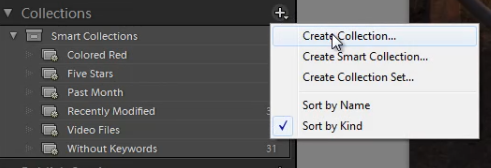
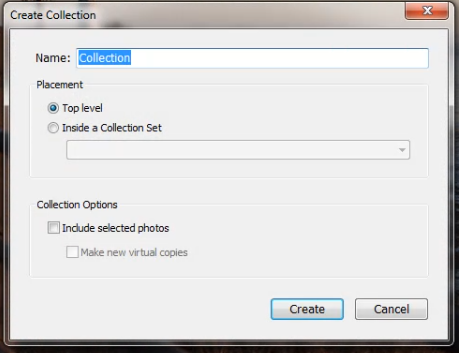
To create a new collection, click on the “+” sign next to Collections in the Left Panel. Select “Create Collection.”

04_create-new-collection

Once you have hit “Create Collection,” the Create Collection Dialogue Box will appear. Once you have named your collection, hit “Create.”

05_create-collection-dialogue-box

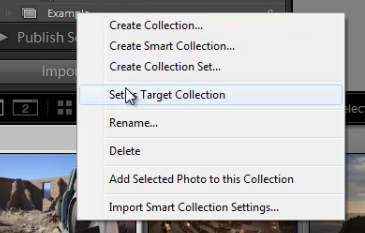
Right-click on a collection and hit “Set as Target Collection” to set the collection as your Target Collection.

06_set-as-target-collection

Once you have selected a collection to be your Target Collection, a “+” sign will appear next to the collection you have selected to remind you which collection is your “target” for the Collection hotkey. Now, simply hit “B” to add any image to your Target Collection!

For example, you might have created a collection for your portfolio images. Set that collection as your Target Collection, and then whenever you are looking through your latest photo shoot and you see one that is portfolio worthy, just hit “B” to add it to your portfolio!

7. Rotate Left/Right Shortcuts

To rotate multiple images at once, go to the Grid View (“G”). Once you are in the Grid View, select your images by holding down “Ctrl” while clicking on your images. To rotate your images to the left, hit “Ctrl + [.” To rotate your images to the right, hit “Ctrl + ].” You can also rotate individual images by using the same shortcuts.

8. Flag Shortcuts

Some people use flags as their culling system. For example, selecting an image as a pick means that we will deliver the image. Rejecting an image means that we will not deliver the image. Simply hit “P” to flag an image as a “pick.” If you want to remove the flag, hit “U.” To reject an image, hit “X.”

Or, to simply increase or decrease the flag status of an image, just hit Ctrl and either the up or down arrow.  This is by far the fastest way to go go from image to image and flag keepers (with just one hand!) by using the left and right arrows to navigate and the Ctrl-up/down key combination to pick or reject your images…

9. Star Rating Shortcuts

The following are the shortcuts for the Star Rating in Lightroom 4.

  • “1” = 1 star
  • “2” = 2 stars
  • “3” = 3 stars
  • “4” = 4 stars
  • “5” = 5 stars

Simply select an image and hit “1-5” to give the image a star rating. To reset Star Ratings on your images, hit “0.”

10. Color Label Shortcuts

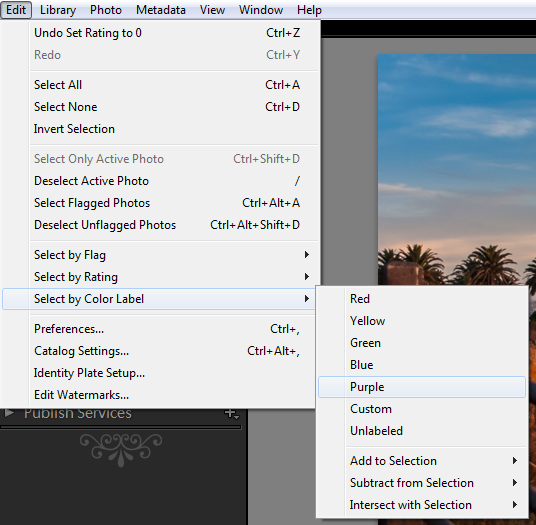
The Color Labels in Lightroom 4 correspond with the numbers six thru nine. Red is “6,” Yellow is “7,” Green is “8” and Blue is “9.” There is also a Purple Color Label but to label an image Purple, you need to go into the Edit Menu, as shown below.

07_lightroom-purple-color-label

If you want to remove a Color Label, hit the corresponding number again. So for example, if your image is already color labeled Green, hit “8” again to remove this Green Color Label.

Learn More with the Lightroom 4 Workshop Collection!

This was a sample tutorial from the Lightroom 4 A to Z DVD which is one of the DVDs in the Lightroom 4 Workshop Collection. A collection of nearly 30 hours of video education teaching everything from Lightroom basics to advanced raw processing techniques.

The LR4 Workshop Collection also includes the critically acclaimed Lightroom 4 Preset System which is designed to enable users to achieve virtually any look and effect within 3-5 simple clicks. From basic color correction, vintage fades, black & white effects, tilt-shift effects, faux HDR, retouching, detail enhancing, and so much more. Click the links above to learn more.

Post originally from: Digital Photography Tips.

Check out our more Photography Tips at Photography Tips for Beginners, Portrait Photography Tips and Wedding Photography Tips.

10 Shortcuts of the Commonly Used Features in the Library Module of Lightroom 4


Digital Photography School

 
Comments Off on 10 Shortcuts of the Commonly Used Features in the Library Module of Lightroom 4

Posted in Photography


Algae-Fueled Building: World’s First Bio-Adaptive Facade

02 May

[ By WebUrbanist in Architecture & Public & Institutional. ]

algae powered building

Bio-reactors and micro-algae sound like the stuff of science fiction, but this is the real deal: biomass built into panel glass is both generating heat and acting as a responsive light and sound barrier, all in one brilliant new building in Hamburg.

bio facade algae building

Arup has long been predicting incredible innovations in architecture, but they are also keen to show that their designers and engineers are actually working toward world-changing technologies.

algae biomass building design

Bright sunlight causes the bio-reactors to grow faster and supply more shade on demand. The resulting biomass captures solar heat as well, and can be harvested and used as a source of energy itself. It is, in essence, an architectural ecosystem in which all parts of the process are not only sustainable but multi-functional and fully integrated.

algae energy fuel source

There is always talk of futuristic building technologies, but few firms are able to break new ground in some of the most promising directions. If there is to be a new ‘living architecture’ movement involving micro-climates, bio-chemical processes and responsive materials, Arup continues to prove itself on the forefront of its exploration.

Share on Facebook


[ By WebUrbanist in Architecture & Public & Institutional. ]

[ WebUrbanist | Archives | Galleries | Privacy | TOS ]


WebUrbanist

 
Comments Off on Algae-Fueled Building: World’s First Bio-Adaptive Facade

Posted in Creativity