RSS
 

Archive for May, 2013

Macro Photographer Teresa Franco Shares Her Best Phoneography Tips!

07 May

Scenario: A ladybug turns your shoulder into its new resting spot. What do you do?

Some might say Make a wish. Teresa Franco? She’d say Take a photo.

Snapping a photo of something so tiny can be a challenge. Do not let your camera phone deceive.

You can use your phone to get great macro shots of the tiniest objects, from crystal-ball-esque dew drops on a leaf to a caterpillar snacking on a blade of grass.

Teresa Franco is living proof. Have you seen her macros? They’re the best of the best on Instagram!

We asked her how she does it, and she shared all her favorite phone lenses, apps, and tips for getting fantastic photos of nature’s tiniest details.

So the next time a bug takes a liking to your shoulder, you’ll be set.

Phoneography Tips with Teresa Franco

p.s. WE ARE HIRING A WEB DEVELOPER. If you love photography and San Francisco and codes, APPLY HERE.

p.p.s. WE ARE ALSO HIRING AN EVANGELIST/BIZ DEV HERO. Creative deal-maker types, APPLY HERE.

Who’s Teresa?

Teresa first caught our eye with her undeniably legit macro skills.

Once we realized she wasn’t using a DSLR or a 3-piece lighting setup — that was when we were really impressed.

Teresa’s a nursing student who happened upon her awesome talent for macro while perusing Instagram one day.

That’s when she discovered the Olloclip, a three-in-one phone lens that lets you shoot fisheye, wide-angle, and macro photos on your phone.

When she’s not studying up on medical stuffs, she’s chasing grasshoppers and fungi to get the best macro photos ever.

The advantage to shooting macro on your phone?

Its small size and light weight makes it very easy to maneuver around tight spaces like under a tiny mushroom or between blades of grass.

It also allows me to free up one hand to use to stabilize a flower or a branch when it’s windy.

What’s in your phoneography camera bag?

before

  • Microfiber lens cleaning cloth — gotta keep my lenses clean
  • Snacks
  • My iPhone
  • Squidcam, Photojojo, and Olloclip macro lenses
  • I love my i.Trek Super Mount (a phone tripod adapter). I use it by itself. It’s great for stabilizing your iPhone when you’re very low on the ground.
  • iPhone charger
  • iPhone earphones with remote

What apps do you use? Do you edit your photos?

before
My go to camera app is Camera Awesome (for iOS).

It has a “Fast Burst” option that comes in very handy when I’m taking photos of flying/jumping/crawling bugs. I also love that you can lock in the focus. I use both of these features all the time.

The biggest problem I have with macro photography is lighting. So when I edit my photos, I usually just increase the “brightness” in Snapseed (works for both Android & iOS).

I also like VSCO CAM (iOS) and Vintique filters (iOS). I try not to edit my photos too much because I lose a lot of important details.

How many shots does it take to get that one photo? before

Before, I used to follow a bug and blast the camera button like crazy and just hope that one of the hundreds of photos that I took will come out decent.

Now, I’m more patient and can usually anticipate their next move. I’m proud to say that I can take 1-3 photos of a bug and walk/run away very happy.

Your top 3 fave Instagrammers?

before

  • @tanaka_tatsuya creates miniature worlds using household items and tiny little figures. I just want to shrink myself and live in his world.
  • @alozor lives in the same city as me, but when I see his photos, I always think “Where in San Diego is this??” “I’ve been living here for fifteen years, how come I’ve never seen this??”. He also knows when and where to catch the best California sunset.
  • @movable takes us behind the streets of Shanghai. He knows how to make grungy post-apocalyptic street alleys look so elegant.

What are your top 3 macro things to shoot?

I love sharing photos of the little things in nature that people don’t usually pay attention to. Photographers tend to go for the most colorful flower.

I want to show people that beauty can be found in the most mundane. My favorite subjects:

  1. Little seedlings and sprouts
  2. Dry petal curls
  3. Mushrooms- there’s something magical about them

Your advice for aspiring macro photographers.

beforeDon’t be discouraged if your first few photos come out blurry.

Everything in life takes practice. 

If you want to take photos of flying/crawling/hopping bugs, experiment with different camera apps that have fast shutter speeds. 

Have patience. A lot of it! I promise it will yield rewarding results.

So like, any extra editing tips?

beforeI would suggest to try as much possible to keep the tones of your photos consistent.

It makes for a pretty and attractive gallery. If you like using filters, use photo editing apps such as “Vintique” that let you adjust the settings of each filter — that way you can still make a style of “your own” even when you’re using pre-set filters.

Your top 3 places to shoot macro photos.

beforeIf I want to take photos of mushrooms, usually go to the park early in the morning before sunrise.

I also love going to local nurseries because they have a wide variety of flowers, plants, and trees on display.

The best thing about living in California is that there is green EVERYWHERE you go, all year round. If you’re ever in San Diego and you see a girl with an iPhone out in public on her elbows and knees, it’s probably me.

How do you get out of a creativity rut?

beforeI look at photos of my favorite photographers — Instagram, Flickr, online portfolios, photography books.

I also love watching sci-fi and japanese animation. Hayao Miyazaki is definitely the inspiration behind my whimsical photographs of moss forests and toadstools.

More Phoneography Tips & Inspiration

before

  • Photojojo’s 10 great tips to improving your phone photos (pictured above!)
  • Read up on tips from awesomesauce phoneographer, Dirk Dallas
  • Bring your phone photos into *real life* — 5 ideas here

Related posts:

  1. Dirk Dallas Shares His Favorite Phoneography Apps, Tips & More! Extra photos for bloggers: 1, 2, 3 If a photo…
  2. 10 Tips to Make Your Phone Photos Amazing;
    Plus, Our New Phoneography Blog! Phoneography is the best. No matter where you go, you’ve…
  3. How To Make Macro Photos Without Buying An Expensive Macro Lens! Extra photos for bloggers: 1, 2, 3 Photography: it can…


Photojojo

 
Comments Off on Macro Photographer Teresa Franco Shares Her Best Phoneography Tips!

Posted in Equipment


Ultimate Time-Lapse Photography Giveaway Results

07 May

Last week was the conclusion of my Ultimate Time-Lapse Photography giveaway and today I’m happy to announce the winners.

A huge THANKS goes out to eMotimo and Dynamic Perception for donating the grand prize!  If you haven’t already please follow and thank eMotimo and Dynamic Perception on Facebook .  Thanks to BorrowLenses.com, GuraGear, and Lexar for providing great bonus prizes and most importantly everyone that took part.

By now I’m sure you’re itching to know who has won, so without further delay here are
the winners:

Adobe Photoshop CS6 Extended – Thomas O’Brien

Adobe After Effects CS6 – Michael Brown

Adobe Premiere Pro CS6 – Marc Donahue

Apple iPad 3 Retina Display (16GB WiFi) – Brittany Chasteen

Lexar 16GB 1000X CF Card – Jack Fusco

Gura Gear Camera Bag – Mehmet Yesiltas

$ 100 BorrowLenses.com Gift Certificates
Jimmy Arcade
Felicia Cracchiolo
Sean Parker

Grand Prize
eMotimo TB3 Black & Dynamic Perception Stage 0 Dolly System with a Quick Change 8 RPM & 21 RPM with MX2/AT2 Controller
Tim Clark

Thanks again to everyone for taking part and congratulations to the Tim Clark the grand prize winners.

Copyright Jim M. Goldstein, All Rights Reserved

Ultimate Time-Lapse Photography Giveaway Results

The post Ultimate Time-Lapse Photography Giveaway Results appeared first on JMG-Galleries – Landscape, Nature & Travel Photography.


JMG-Galleries – Landscape, Nature & Travel Photography

 
Comments Off on Ultimate Time-Lapse Photography Giveaway Results

Posted in Equipment


Lichtstimmungen in der Toskana

07 May

Ein Beitrag von: Andreas Bobanac

Ich fotografiere seit 1998 mit großer Begeisterung und bin in das digitale Fotografieren frühzeitig reingewachsen. Besondere Lichtmomente und starke Kontraste faszinieren mich immer wieder.

In Italien, vor allem in der Toskana, sind für mich immer wieder atemberaubende Landschaften und Lichtstimmungen festzustellen. Gern fotografiere ich dort und nutze dabei jede Jahreszeit mit ihren Eigenheiten. Stundenlang kann ich dabei zusehen, wie sich die Stimmung verändert und richte mich beim Fotografieren entsprechend darauf ein.

Im November stehen die Chancen auf Nebelstimmungen und auf eine grüne Landschaft sehr gut, Oktober wäre auch denkbar, aber da ist die Toskana landschaftlich durch die Ernte karg und völlig braun.

Das erste Licht © Andreas Bobanac

Eines meiner Wunschmotive erfüllte sich in der hügeligen Landschaft: Eine Schafherde, die ich gesucht und mit viel Glück gefunden habe. Meine italienischen Sprachkenntnisse halfen mir weiter, von Einheimischen Tipps zu erhalten.

Toscana © Andreas Bobanac

Die Toskana fasziniert mich mit ihren harten Kontrasten. Dieser Aufnahme gab ich den Titel „Das erste Licht“. Wenn die Sonnenstrahlen über den Horizont und den Bergkamm ihren Weg durch die Hügel finden, entsteht in den Senken ein faszinierendes Licht- und Schattenspiel.

Toscana © Andreas Bobanac

Diese Aufnahme habe ich in allerletzer Minute fotografiert. Hierbei wählte ich zwei Graufilter mit 16 Blendenabstufungen und erreichte eine Belichtungszeit von 4,5 Minuten. Eine zweite Aufnahme war nicht mehr möglich, da innerhalb von zwei Minuten das Licht mit den langen Schatten verschwunden war. An weiteren Tagen bot sich mir diese Gelegenheit bei diesem Wetter und dieser Lichtstimmung leider nicht mehr. Glück gehabt.

Toscana © Andreas Bobanac

Die Toskana hat eine faszinierende Größe und Weite. Diese Motive würden ihre Wirkung mit einem Weitwinkelobjektiv viel zu klein darstellen. Die meisten meiner Landschaftsaufnahmen entstehen mit einer Brennweite von 400mm und höher, damit werden Motive wie diese in den Hügeln sichtbar.

Toscana © Andreas Bobanac

Motive, die mich architektonisch und grafisch in schwarzweiß begeistern. Dieser Tag war sehr verregnet mit zeitweiligen Unterbrechungen. Die Toskana habe ich bereits zum dritten Mal besucht. Für mich war es die richtige Wahl, diesen Ort an diesem Tag zu besuchen.

Natürlich möchte ich die Bilder so perfekt wie möglich haben und kann erst beim Auswerten am PC sagen, ob ein Bild dabei ist, das mir gelungen erscheint.


kwerfeldein – Fotografie Magazin

 
Comments Off on Lichtstimmungen in der Toskana

Posted in Equipment


8 Photo Projects in Your Own Backyard

07 May

A Guest Post by by Kim Manley Ort

One of my photography mentors, Freeman Patterson, says, “If you do not see what is around you every day, what will you see when you go to Tangiers?”

This one line has transformed my photography. As a matter of fact, I enjoy photographing from my home base as much as or more than my travels.

The mark of a great photographer is not what equipment they have, but how well they see. Patterson teaches visual design for photography, and the first step is to really pay attention and see the underlying form of what is actually there.

You can start in your own backyard (or anywhere around you if you don’t have a backyard) to develop this capacity for seeing.

Your travel photographs will never be the same again.

Here are 8 ideas for photography projects that can be done in your own backyard.

1. What Strikes You?

1-Hosta.jpg

Sit or stand in a favorite spot in your house or yard and just notice what is around you.

What catches your eye?

It could be the way the sun reflects on your deck, or squirrels playing in the trees. It could be the color or shape of a piece of fruit on your table.

Spend 15 minutes photographing what strikes you from different angles and perspectives.

To add to this exercise, think about why it struck you. What do you like about it? What does that say about you? Yes, the photograph always reflects the photographer. But, that’s a whole other story.

For me, I loved the color and curving lines in this image. I was struck by the way the new hosta leaf was cradling the crinkled, dead leaf. I moved in closer so that the color would fill the screen.

2. Photograph the light

2-Vase.jpg

Pay attention to the light. Light is the main tool for photography. It can make or break your image. So, a good photographer will always be noticing the light. Dusk and dawn are great times for checking out the light.

    What is its quality (soft and hazy or sharp and direct)?

  • What direction is it going?
  • What type of shadows is it creating?
  • What is it highlighting?

Photograph these highlights and shadows rather than objects.

I am fascinated by reflections and there was so much going on in the water in this vase. The monochromatic tone of the whole image caught my eye too, with the little touch of green leaves added.

3. Shoot from a different perspective

3-Sunflower.jpg

Do you have a dog or cat? Try photographing from their perspective. Get at their level and try to figure out what they see.

If you don’t have an animal, pick an ant or a squirrel or a plant or a tree or a bird. This will get you trying new angles and heights.

In this case, I got down low, and used a shallow depth of field to get the soft background of sky and trees, and photographed the sunflower from the side.

4. What’s growing?

4-TreeSeasons.jpg

What is growing right now in your yard? Trees are a wonderful subject any time of the year. If it’s too cold to go outside, photograph your indoor plants or buy flowers and spend time indoors photographing them.

A long-term project is to photograph a tree every day for a year. Put all of the photographs together in a slideshow, speed it up and watch the changes before your eyes.

In this collage, I photographed my favorite tree in the neighborhood in all four seasons and then stitched together this grouping. I’m so glad I did this project, as this tree was recently cut down to make way for a new house.

5. Where’s your favorite place at home?

5-Books.jpg

Everyone has one. Photograph your favorite place and show what makes it special. Spend ten or fifteen minutes capturing what you love about it.

Here I photographed the books on my bedside table. I have a few favorite reading places in my house, and each one has a pile of books, either in process or waiting to be read. I get nervous if the pile gets too small.

6. Find lines and shapes.

6-Lines.jpg

Inside or outside your house, photograph lines (or specific shapes) anywhere you find them.

This is a really fun exercise because lines and circles are everywhere. They are the building blocks of visual design, so this project is good training for seeing the underlying form of what you’re photographing.

It also helps you take the labels off of things and see them in new ways. Here, we know this is a computer keyboard, but what attracted me were all of the lines I could see, as well as the squares around each key.

7. What do you eat?

7-RedCabbage.jpg

Photograph your meals: the ingredients, the preparation process, the final plate or a particular food. Fruits and vegetables are especially good subjects.

Food is sensual. Try to capture that in your photography.

My bi-monthly organic produce delivery always provides great photographic subjects, like this red cabbage. Here, I was drawn to the color and shape, rather than the object as a whole. It gave me new appreciation for this vegetable that doesn’t get a lot of love.

8. What’s up?

8-BlueSkyCloud.jpg

This is an easy project. Just look up, wherever you are. What do you see?

Photograph the sky from your front or back door. Try this for a week or more and notice the different views you are presented with every single day. You’ll find that it is vastly different every single day.

Looking up doesn’t have to mean just the sky. It could a light fixture, a roofline, or a ceiling fan. It could be the tops of the trees as you lie flat on your back. Use your imagination.

Well, what are you waiting for? Get shooting!

Kim Manley Ort photographs in her own backyard in Indianapolis, Indiana. She is a member of Art IN Hand Gallery, a cooperative of 20+ artists in Zionsville, Indiana.

Her favorite quote is by Hui Neng, “The meaning of life is to see.” You can follow her blog and upcoming workshops at Be Inspired.

http://365daysofinspiration.com/
http://twitter.com/kimmanleyort
http://facebook.com/kimmanleyort

Post originally from: Digital Photography Tips.

Check out our more Photography Tips at Photography Tips for Beginners, Portrait Photography Tips and Wedding Photography Tips.

8 Photo Projects in Your Own Backyard


Digital Photography School

 
Comments Off on 8 Photo Projects in Your Own Backyard

Posted in Photography


Abandoned Asylums in Focus: Photos by Jeremy Harris

07 May

[ By Steph in Abandoned Places & Architecture. ]

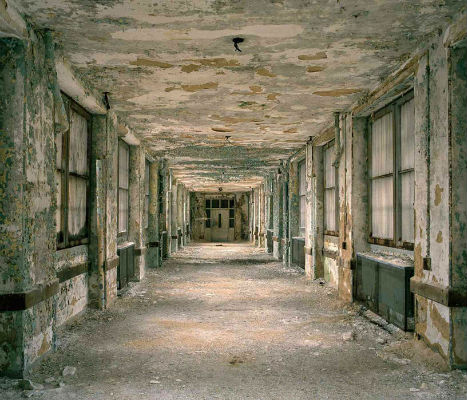
Abandoned Asylum Photos 1

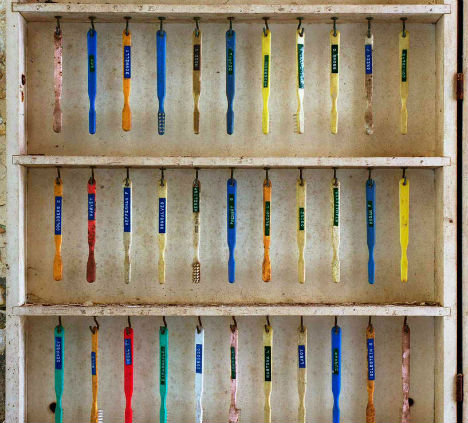
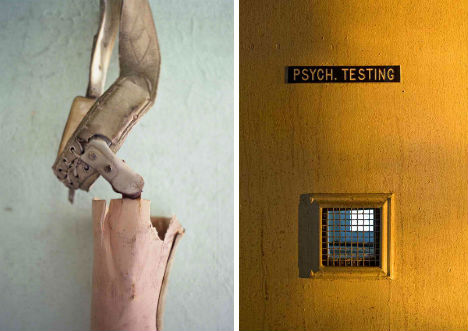
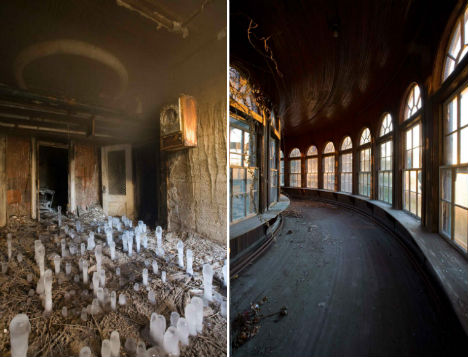
It’s not just the morbid and macabre horror movie ambiance of abandoned psychiatric facilities that makes them so haunting and fascinating; it’s the shadows of the people who often lived their entire lives there. Toothbrushes hanging on hooks, bedding still wadded on cots, wheelchairs and patient records are stark reminders of the humanity that once existed between these walls. Photographer Jeremy Harris has documented many of the structures still standing in a series called ‘Abandoned American Asylums: The Moral Architecture of the Nineteenth Century.’

Abandoned Asylum Photos 2

Abandoned Asylum Photos 4

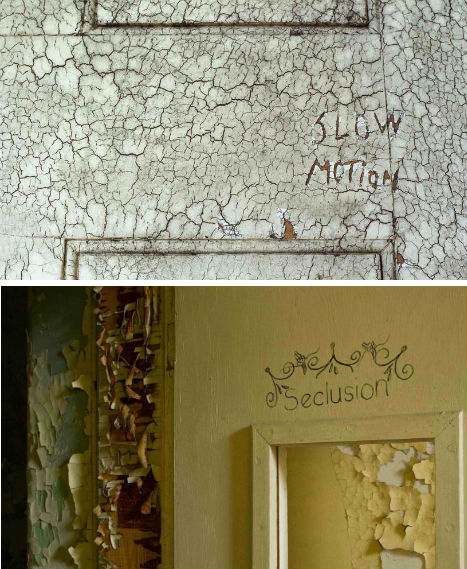
Harris has been sneaking into abandoned asylums since 2005 to take his photos. The series includes just about everything you’d expect: peeling paint, foreboding hallways and a whole lot of rusting metal. But there are also faded murals, grand theaters and bowling alleys.

Abandoned Asylum Photos 3

In the 19th century, a large number of people – whether seriously mentally ill or not – were institutionalized against their will, often left in hospitals their entire lives without visits from family. At the time, mental illness was often thought of as a moral or spiritual failing. Circumstances improved by the 20th century, in most facilities.

Abandoned Asylum Photos 5

Mother Jones produced a video about the photo project. You can also read more about early psychiatric hospitals and asylums at the U.S. National Library of Medicine, and see the rest of the photos at Jeremy Harris’ website.

Share on Facebook


[ By Steph in Abandoned Places & Architecture. ]

[ WebUrbanist | Archives | Galleries | Privacy | TOS ]


WebUrbanist

 
Comments Off on Abandoned Asylums in Focus: Photos by Jeremy Harris

Posted in Creativity


Resurrecting a WWII optic with scraps and a 3D printer

07 May

bcamcrop3.jpg

Falling into the interesting photo experiments category, Patrick Letourneau adapted a Kodak Aero Ektar 178mm F2.5 lens, a surplus lens originally used during World War II in bomber-mounted cameras, to use with his Panasonic GH2. A Thorium-oxide coating was used on the Aero Ektar’s rear element to improve its refraction index, a fact that adds a sense of intrigue to the unique project. Click through for more details, and pictures. 

News: Digital Photography Review (dpreview.com)

 
Comments Off on Resurrecting a WWII optic with scraps and a 3D printer

Posted in Uncategorized


How Many dPS Readers Have Had Photography Training? POLL RESULTS

07 May

Last week on dPS our reader poll asked readers if they’d ever done any kind of photography training (a class or course). The results from over 66,000 readers are in and interestingly over 60% of us have never done any formal training (whether it be online or offline).

Photography courses

Those of you who have done some training – what was it and how did you find it?

Those of you who have never done any training – where did you learn? Was it just through practice, magazines, websites, friends, books… or something else?

Post originally from: Digital Photography Tips.

Check out our more Photography Tips at Photography Tips for Beginners, Portrait Photography Tips and Wedding Photography Tips.

How Many dPS Readers Have Had Photography Training? POLL RESULTS


Digital Photography School

 
Comments Off on How Many dPS Readers Have Had Photography Training? POLL RESULTS

Posted in Photography


Next Version of Adobe Photoshop to Be Branded Photoshop CC, Includes Awesome New Motion Blur Sharpening Tool

07 May

Today Adobe announced a new branding of their flagship Photoshop product to be released later this year, Photoshop CC. The new version will only be available via a monthly subscription to Adobe’s Creative Cloud and will not be sold as a traditional boxed application that consumers can purchase.

Probably the most anticipated new feature in the next iteration of Photoshop is a revolutionary new image sharpening tool that focuses on fixing camera shake issues.

The new tool analyzes images that are out of focus due to the slight movement or motion that takes place while a shutter is open. There are lots of reasons why photographers may find camera shake in their images. Many images shot slower than about 125th of a second are susceptible to camera shake unless you’re on a tripod or have a very steady hand. Telephoto shots, especially can be problematic.

With the new version of Photoshop CC, Adobe uses an algorithm to try and detect which direction the camera was moving that produced the shake. They then try to account for the movement back into the direction of a steady image without camera shake. This new sharpening tool won’t help you with other types of focal blur issues, like lens position, but it does address a fairly common issue dealt with by photographers.

Adobe had previously offered a sneak peak of this new technology in a video that they posted to Youtube. Watch the video and you’ll be impressed.

What makes this interesting to me is that there are a lot of old images that I’ve taken in the past that now will suddenly become salvageable.

This new technology advancement should be yet another reminder to photographers why they should save ALL of their images, even the bad ones that they don’t think they can use. With technology advancements in image processing, I’m finding more and more images that I’d previously dismissed due to problems. Whether previous Adobe noise reduction tech or newer tech like this new sharpening tool, it pays to save all of your images no matter what. Storage is cheap and you never know when you may need that image that you never knew you needed at the time. Even years after you are dead, those images may be important to someone, somewhere for some reason.

While the camera shake feature is the sizzle of the new Photoshop upgrade, there are several other enhancements they have made to the program as well including, smart Sharpen (new technology promising more realistic sharpening without halos or noise) and new upsampling tech (this helps make your photos look better when you make them larger than you processed them).

The biggest news though is Adobe’s moving Photoshop 100% into the Cloud and 100% by subscription. You’ll still be able to purchase Photoshop CS for the time being, but it won’t have the new features available in CC.

Pricing varies by type of customer but starts at $ 49.99 a month per person for individuals. Existing Creative Suite customers, students, and teachers will get a discount to $ 29.99 a month. Creative Cloud has a lot more applications than just Photoshop and also includes Lightroom and a whole suite of other Adobe Creative applications. It also includes integration with Behance, a portfolio site for creatives that Adobe recently purchased.


Thomas Hawk Digital Connection

 
Comments Off on Next Version of Adobe Photoshop to Be Branded Photoshop CC, Includes Awesome New Motion Blur Sharpening Tool

Posted in Photography


Fujifilm releases X100S firmware 1.02, correcting OVF brightness bug

07 May

fujifilm_x100s.png

Fujifilm has announced the availability of new firmware for its X100S fixed-lens compact camera. Firmware version 1.02 corrects an issue where the framelines in the camera’s viewfinder did not automatically adjust brightness at ISO 1600 and higher. Fujifilm has also issued firmware updates for its ZS2000EXR, HS50EXR, F820EXR and F900EXR compacts. Click through for more details and links. 

News: Digital Photography Review (dpreview.com)

 
Comments Off on Fujifilm releases X100S firmware 1.02, correcting OVF brightness bug

Posted in Uncategorized


Adobe moves to subscription-only future for Photoshop and other creative tools

07 May

shared:AdobeLogo.png

Adobe has said it will no longer be developing its Creative Suite range of software, leaving its subscription and cloud-based Creative Cloud as the only way of accessing the latest version of Photoshop. Adobe has been trying to encourage users away from the traditional one-off payment licenses and on to a monthly payment model, with features such as online storage and syncing between devices. This latest move ups the ante by making it the only option for future versions of the software.

News: Digital Photography Review (dpreview.com)

 
Comments Off on Adobe moves to subscription-only future for Photoshop and other creative tools

Posted in Uncategorized