RSS
 

Archive for March, 2013

Slam Drunk: 12 Weird, Wild & Wacky Basketball Courts

04 Mar

[ By Steve in Architecture & Cities & Urbanism. ]

12 Weird, Wild & Wacky Basketball Courts
These 12 jaw-dropping basketball courts stretch the limits of Dr. James Naismith’s original vision far beyond the prescient gym teacher’s wildest hoop dreams.

Inges Idee’s 3D² Court

Inges Idee Munich 3D basketball court(images via: 22 Words/Marcus Buck)

We’re not sure if the Occupational School Center Munich in Germany even has a basketball team but if they don’t, they should, since their decidedly out of the ordinary three-dimensional court takes the concept of home field advantage to absurd levels.

Inges Idee 3D Munich basketball court(images via: de-zen)

Titled 3D² by artist Inges Idee and created in 2006, the regulation-sized basketball court incorporates several of the existing lamp posts that – besides providing light – add an extra dimension of difficulty to any attempted game. According to Idee, playing on the computer-designed court “requires creative engagement for its use.” No kidding.

Space Jammed

Dubrovnik Croatia basketball court(image via: SloTraveller)

Space is at a premium in the ancient seaside city of Dubrovnik but so is the desire to go one-on-one with one’s fellow dribblers. Captured magnificently by Flickr user SloTraveller, this otherwise unremarkable clay court shoehorned between centuries-old buildings is a favorite photographic subject aided by some spectacular points of view.

Ducks Dunks Deluxe

University Oregon Ducks pine basketball court(images via: GoDucks.com and Siamese NYC)

“Riding the pine” took on a new and better meaning for members of the University of Oregon Ducks when, in 2011, their strikingly stenciled new basketball court was unveiled to the public. “We wanted to design the most iconic television presence possible for the University of Oregon,” explained Nike’s vice president for design and special projects Tinker Hatfield, “by conjuring up a highly unique and visible basketball floor design” at Matthew Knight Arena. We’d say they succeeded.

University Oregon pine basketball court(image via: North By Northwestern)

Intended to reflect the view of someone looking skyward from a Pacific Northwest forest floor, the court is made from 6,944 square feet of sustainably-harvested Northern Hard Maple weighing approximately 45,000 total pounds. The graphics were completed by Idaho Falls, Idaho -based United Services using almost 2 miles of stencil material and requiring 2,500 man hours of labor.

Share on Facebook


[ By Steve in Architecture & Cities & Urbanism. ]

[ WebUrbanist | Archives | Galleries | Privacy | TOS ]


WebUrbanist

 
Comments Off on Slam Drunk: 12 Weird, Wild & Wacky Basketball Courts

Posted in Creativity


Win One of Two Photography Courses from New York Institute of Photography

03 Mar

NewImageOver the last two years here at dPS we’ve run very popular competitions with the New York Institute of Photography to give away to lucky dPS readers some of their great photographic teaching.

Due to popular demand – we’re doing it again this week!

This year NYIP is giving away two prizes

Fundamentals of Digital Photography

Fundamentals of Digital Photography

These two prizes are designed to be helpful for two different levels of photographers. Each will be won by a different dPS reader. Here’s what you could win:

  • Fundamentals of Digital Photography – worth $ 499
  • Complete Course in Professional Photography – worth $ 1499
Complete Course in Professional Photography

Complete Course in Professional Photography

Both courses include comprehensive and illustrated lesson books, CD Audio Guides, DVD Video Training, Photo Projects and Professional Evaluation and Personal Student Advisers. Learn a little more about how New York Institute of Photography works in this video:

How to Win

To win this competition you’ll need to:

  • visit the above two course information pages and choose which of the two courses suits your needs more. Choose one that you’d like to win.
  • leave a comment below and tell us which one you’d like to win and WHY you’d like to participate in the course. Please note: there is a limit of 1 entry per person.
  • do this in the next 8 days and on Tuesday 12th March the team at NYIP will choose the best 2 answers and we will announce the winners in the following days.

By ‘best’ – we’re looking for people who have an understanding of what the course offers and how it suits their needs. So you’ll need to check out the course pages to put yourself in the best position to win.

There’s no need to write essay length comments to win – but we’re looking to hear what you like about the course and how it would help your development as a photographer.

This competition is open to everyone around the world no matter where you live – but there is only one entry per person.

To enter – simply leave your comment below.

Post originally from: Digital Photography Tips.

Check out our more Photography Tips at Photography Tips for Beginners, Portrait Photography Tips and Wedding Photography Tips.

Win One of Two Photography Courses from New York Institute of Photography


Digital Photography School

 
Comments Off on Win One of Two Photography Courses from New York Institute of Photography

Posted in Photography


Making Sharper Wildlife Photographs – [Part 1 of 2]

03 Mar
Canon EOS Digital Rebel, Canon 100-400 F4.5-5.6L IS lens @400mm, 1/800th of a second at F8, ISO 400 - Hand held

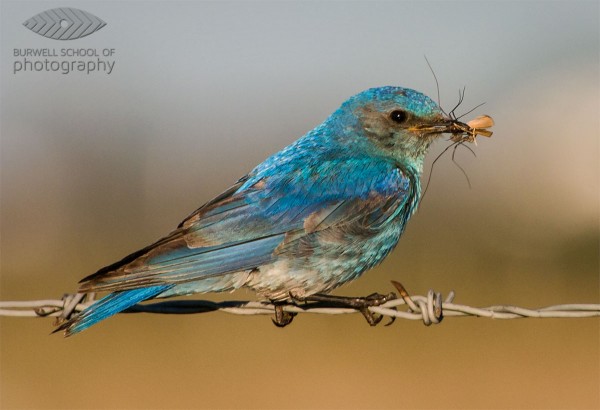
Mountain Bluebird with prey: Canon EOS Digital Rebel, Canon 100-400 F4.5-5.6L IS lens @400mm, 1/800th of a second at F8, ISO 400 – Hand held

A contribution by Paul Burwell from Burwell School of Photography

If there is one area that seems to flummox more aspiring wildlife photographers it is the subject of making sharp images. You’d think that with today’s modern cameras and equipment that there’d be no problem going home with sharp images after each wildlife encounter. Un fortunately, that isn’t the case and I’m going to provide you with some tips and tricks to make sure you’ve got the best possible chance of making sharp images.

Lenses

One of the truisms in wildlife photography is that it is virtually impossible to have too much lens. This means it is extremely rare that the wildlife critter you are trying to photograph is too big in your viewfinder and in fact the opposite is much more common. Not everyone can afford one of the prime super-telephoto lenses that the major manufacturers produce. These lenses in the range of 300mm to 800mm can set you back anywhere between $ 5,000 and $ 11,000 respectively. Unless you’re a pro or a serious amateur with a healthy bank balance, these lenses aren’t feasible for the average user.

So, what’s a person to do? My recommendation is to purchase the largest telephoto lens you can afford. And when you’re looking at telephoto lenses, you want the biggest number of millimetres that you can afford. Common lens lengths include 200mm, 300mm and 400mm.

If you end up purchasing a zoom lens, look for one that has the shortest range possible. Why? Because in general, the more extreme the range the lens covers, the lower the quality at all those ranges. Therefore, I’d choose a lens that gives a range of 70-300mm over a lens that gives a 35-3500mm range every time. You also want to purchase the fastest lens you can afford. All lenses have a maximum aperture they can photograph at.

A lens rated at F2.8 is two stops faster than a lens rated at F5.6 and allows four times as much light to reach the camera’s sensor. Because wildlife is often photographed under challenging lighting conditions, a faster lens allows for faster shutter speeds which equals sharper images.

Long-tailed Weasel pauses outside of ground squirrel burrow: Canon EOS Digital Rebel,  Canon 500mm F4L IS, 1.4x Extender II @ 700mm, 1/500th of a second at F7.1, ISO 200 - Hand held

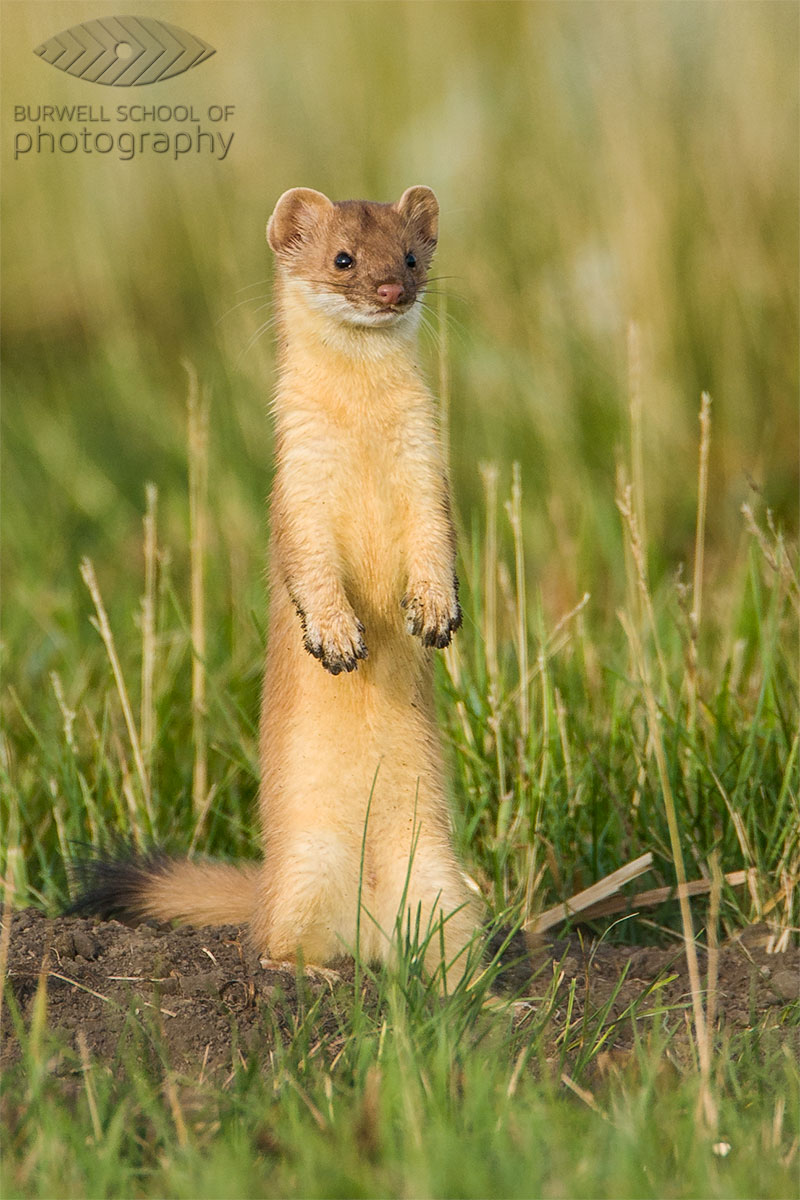
Long-tailed Weasel pauses outside of ground squirrel burrow: Canon EOS Digital Rebel, Canon 500mm F4L IS, 1.4x Extender II @ 700mm, 1/500th of a second at F7.1, ISO 200 – Hand held

Teleconverters/Extenders

I also recommend purchasing a teleconverter (or extender). Teleconverters are rated by the number of times they magnify your lenses range. So, if you’re using a 1.4x teleconverter on a 300mm lens, you’ve now got yourself a 420mm lens. Unfortunately, this comes at the cost of some light and so if your 300mm lens was rated at F2.8, a 1.4x teleconverter will cost you one stop of light and it will effectively become a 420mm F4.0 lens. Stay away from the two-times (2.0x) teleconverters unless you happen to own one of those multi-thousand dollar prime super-telephoto lenses we were discussing earlier.

You’ll often hear that teleconverters degrade the quality of the image and this is true, but there is a trick for overcoming this problem. The solution? Stopping down up to a full stop. If you’re not familiar with the terminology, stopping down means using a smaller aperture setting (smaller aperture == larger f-stop number).

While it is a general practice to photograph wildlife wide open (at the lenses largest opening or smallest f-stop) to separate the subject from the background, I recommend practicing with your lens/teleconverter combination to see how much you need to stop down to make sharper images. Depending on the lens I’m using, I find I need to stop down between 1/3 of a stop up to a full stop.

Support

What else can you do to get sharper images? Use some sort of support. I’ve met a few photographers who have no problem making sharp images hand-holding over 6.5kg (14 pounds) but the majority of people will make sharper images using support. Buy the highest quality tripod you can afford. Make sure the tripod is rated to support at least the amount of weight you’re going to put on it. High quality tripods can be pretty pricey but another alternative to consider that will also give your camera/lens combinations great support is a monopod.

These handy devices also provide excellent support for even the heaviest equipment and they are a lot easier to pack and move about. If you want to save some money, (and who doesn’t), consider purchasing aluminum tripods and monopods over carbon fibre. They aren’t quite as light and they get cold as heck in the winter, but they are strong and a whole lot more affordable.

So, now that you’ve got yourself the best wildlife photography equipment your pocket book will allow, stay tuned for my next column (next week) where I’ll give you the tips and tricks you’ll need to make the sharpest photographs possible.

Until then, get out there and practice, practice, practice!. Photograph ducks at the local pond or go to a dog park and capture some of the action there. Regardless of whether you are in a remote location or on your own back deck, the more familiar you are with your equipment, the better chance you’ll have of making an award winning shot.

Paul Burwell is the owner Burwell School of Photography

Post originally from: Digital Photography Tips.

Check out our more Photography Tips at Photography Tips for Beginners, Portrait Photography Tips and Wedding Photography Tips.

Making Sharper Wildlife Photographs – [Part 1 of 2]


Digital Photography School

 
Comments Off on Making Sharper Wildlife Photographs – [Part 1 of 2]

Posted in Photography


Premier announces new facility for Emily Carr University

03 Mar

A few nice visual art images I found:

Premier announces new facility for Emily Carr University
visual art
Image by BC Gov Photos
Premier Christy Clark announced that the B.C. government will invest in a new visual, media and design facility for Emily Carr University of Art + Design at the Great Northern Way Campus.

Learn more: www.newsroom.gov.bc.ca/2013/01/premier-announces-new-faci…

Premier announces new facility for Emily Carr University
visual art
Image by BC Gov Photos
Premier Christy Clark announced that the B.C. government will invest in a new visual, media and design facility for Emily Carr University of Art + Design at the Great Northern Way Campus.

Learn more: www.newsroom.gov.bc.ca/2013/01/premier-announces-new-faci…

 
Comments Off on Premier announces new facility for Emily Carr University

Posted in Photographs


Nikon 1 V2 Review

03 Mar

Nikon 1 V2 Review white.jpg

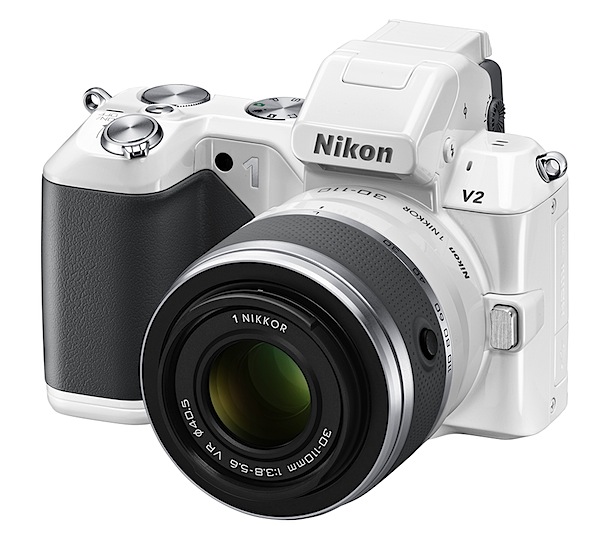
Straight out of the box I have to say the Nikon 1 V2 is the sexiest camera I’ve ever wrapped my mitts around.

In ivory, with a finish reminiscent of a highly polished car’s enamel, the camera is a stand out. Unlike most other mirrorless interchangeable lens cameras (MILC) the Nikon 1 V2 has a pronounced speed grip that is so effective it rivals even that of high end DLRs. The body is possibly pocketable but maybe not so easily with a lens mounted, but overall the body is quite small. And there’s a black body if your dress style is more modest.

Nikon 1 V2 Review.jpg

Nikon 1 V2 Review back.jpg

Nikon 1 V2 Review top.jpg

The body is quite a departure from the launch Nikon 1 model which also was less endowed pixel-wise at 10.1 million pixels capture; unlike the newcomer, it had no internal flash while the new model also now offers a command dial.

The latter, set into the top deck right next to the electronic turret viewfinder, offers access to auto plus PASM exposure modes; to the right are the power toggle, shutter button, video record and command dial.

The rear surface presents four buttons that take you to replay, menu, display options and trash. Off to the right is the four way jog dial that has options to apply exposure compensation, continuous shooting and self timer plus flash options. Note: to the rear of the flash is a Nikon 1 i-TTL hot shoe port, allowing the use of optional lighting and camera accessories.

The CMOS captures 14.2 million pixels and a maximum image size of 4608×3072 or 39x26cm as a print.

MPEG4 video can be recorded at Full HD res of 1920×1080 pixels. You can’t capture stills while in movie mode and I found also in movie mode the auto focus does not track while you’re recording … so you have to tap the shutter button occasionally to bring it to heel! Perhaps the Nikon 1 lenses designed specifically for this camera behave differently.

Nikon 1 V2 Features

The camera is fairly feature full and indicates that Nikon is dead serious in pursuing the MILC portion of the market.

Nikon 1 V2 Menu.JPG

For one thing, the hybrid auto focus system relies on a 73 point AF array to deliver accuracy and very precise focus, even on moving subjects.

Continuous shooting is a stand out: photographers can capture approximately 15 up to 45 fps; you can also shoot a run of 40 frames at approximately 60 fps. Taking it further, you can shot at 400 or 120 fps with a size limitation of 640×240 or 320×120 pixels respectively. The camera’s internal memory can store up to 100 successive images.

A novel mode is the Enhanced Motion Snapshot Mode which saves a four second movie file plus a separate JPEG image; alternatively you can save a 10 second movie file without a separate JPEG image.

And there’s Best Moment Capture Mode, an advanced creative mode that allows you to ‘slow down’ a moment while you are shooting. By pressing the shutter button halfway down when focused, photographers can capture approximately 1.33 seconds of live action, while the subject is displayed at five times slower than real time. Helps you catch that instant when things are happening real fast.

Cars 1.JPG

Cars 3.JPG

Then there’s Smart Photo Selector, where you can capture up to 20 shots with a single tap on the shutter button: the camera will then automatically select the five best images, based on optimum exposure, focus and facial recognition. You can also shoot simultaneous Full HD video and high res stills of a subject.

Viewing is via a turret finder and the rear 7.5cm LCD screen: I found the top finder to be useful only as a sighting tool, with the image quality very poor. Rear screen? FIne!

Lenses

The camera was supplied with an AF-S Nikkor f1.8/50mm lens that was fixed to the camera with the FT1 optional adaptor: the end result was a somewhat bulky piece of kit but at least the adaptor did provide a secondary tripod mount in its base. This 50mm translated to a 135mm optic in 35 SLR terms, so it was far from ideal.

As it was not a VR lens, it provided no vibration reduction, which made video shooting a tricky challenge. To find out exactly what lenses can be used: http://imaging.nikon.com/lineup/acil/accessories/mount_adapter_ft1/compatibility.htm

When purchasing the V2 you can get a twin lens kit with a 10-30mm and a 30-110mm. More info on Nikon 1 compatible lenses can be found here.

Nikon 1 V2 ISO Tests

Nikon 1 V2 ISO 160.JPG

Nikon 1 V2 ISO 800.JPG

Nikon 1 V2 ISO 1600.JPG

Nikon 1 V2 ISO 3200.JPG

Nikon 1 V2 ISO 6400.JPG

All the way up to ISO 3200 I considered the camera to be on top of its game. By ISO 6400 noise and lack of definition to be past a useful level.

Nikon 1 V2 Review Verdict

Quality: impressive.
Why you’d buy the V1: access to Nikkor lenses; small form factor.
Why you wouldn’t: no vari-angle finder.

There’s a lot to like in this model. It will please many Nikon fans. A classic Nikon.

Nikon 1 V2 Specifications

Image Sensor: 14.2 million effective pixels.
Metering: Matrix, centre-weighted and spot.
Lens Mount: Nikon 1 mount.
Exposure Modes: Program AE, shutter and aperture priority, manual.
Effective Sensor Size: 13.2×8.8mm CMOS.
35 SLR Lens Factor: 2.7x.
Shutter Speed (stills): 30 to 1/4000 sec (mechanical) or 30-1/16,000 sec (electronic) plus Bulb and Time (with optional remote). Flash sync: 1/250 sec (mechanical shutter) or 1/60 sec (electronic).
Continuous Shooting: 5 fps as well as 10, 30 or 60 fps using the Electronic (Hi) shutter.
Memory: SD/SDHC/SDXC cards.
Image Sizes (pixels): Stills: 4608×3072 to 2304×1536.
Movies: 1920×1080/60i and 30p; 1280×720, 640×240, 320×120.
Viewfinder: 12mm (1,440,00 million pixels); 7.5cm LCD screen (921,000 pixels).
File Formats: JPEG, NEF (RAW), JPEG+NEF, MPEG4.
Colour Space: sRGB, Adobe RGB.
ISO Sensitivity: Auto, 160 to 6400.
Interface: USB 2.0, HDMI mini, audio input, accessories.
Power: Rechargeable lithium ion battery, DC input.
Dimensions: 107.8×81.6×45.9 WHDmm.
Weight: 337 g (inc battery and card).
Price: Get a price on the Nikon 1 V2 Body Only or Nikon 1 V2 with a 10-30mm VR 1 NIKKOR Lens or Nikon 1 V2 with a 10-30mm & 30-110 VR 1 NIKKOR Lens.

Post originally from: Digital Photography Tips.

Check out our more Photography Tips at Photography Tips for Beginners, Portrait Photography Tips and Wedding Photography Tips.

Nikon 1 V2 Review


Digital Photography School

 
Comments Off on Nikon 1 V2 Review

Posted in Photography


browserFruits März #1

03 Mar

Dieses Mal wird es etwas philosophisch, ja sogar abstrakt. Dekonstruktion. Verfall, zerlegen, die Einzelteile von etwas erkennen. Diese zu etwas Neuem zusammenbauen. Aus dem Ganzen Stücke machen, diese Stücke wieder zu etwas Ganzem machen. In den Teilen etwas erkennen, was vorher nicht da war.

Fotospecial: Dekonstruktion

Flickr

500px

Deutschsprachig

• Trotz schwerer Krebskrankheit begann die 20-Jährige Nana für Fotoshootings Modell zu stehen. Mit ihren Bildern machte sie anderen Krebspatienten Mut. Nachdem sie den Kampf gegen ihre Krankheit verlor, gründeten ihre Eltern den Verein Recover your Smile e.V., der Betroffenen kostenlose Schminkkurse mit anschließenden Fotoshootings ermöglicht.

• Für die Auszeichnung Kultur- und Kreativpiloten Deutschland 2013 werden noch einfallsreiche Köpfe mit einer kulturellen oder kreativen Unternehmensidee gesucht.

• Kennt Ihr die Krimmler Wasserfälle in Österreich? Ein paar schöne Fotos davon gibt es bei Benijamino zu bewundern.

• Photoshop Touch für iPhones und Android Smartphones ist da.

• „Von Griechenland nach Deutschland“ heißt die Fotoreportage von Joanna Nottebrock auf emerge. – „In dieser Geschichte geht es um das Ankommen und den Alltag nach der Entwurzelung, um Veränderung, Überforderung, die Neudefinition von Heimat und das Schaffen und Neuordnen sozialer Strukturen.“

• FREELENS unterbindet YAHOO Bildersuche.

~

International

• Wir wissen, Ihr hättet bei uns gern mehr Tutorials. Eine tolle Adresse für Photoshop-Tricks, Behind-the-Scenes-Videos, Lichtsetups und alles andere ist PHLEARN mit über 400 kostenlosen Episoden voll mit geballtem Wissen, Tipps und Inspiration.

• Über Wales fliegen die Stare in wunderschönen Formationen. Der Fotograf Keith Morris hat sie gekonnt aufgenommen.

• Über Zen-Künstler und Intellektuelle: Ein anregendes Gespräch mit Saul Leiter findet Ihr beim TIME Magazine.

• Das Instagram-Blog stellt Junanto Herdiawan vor, der sich in aller Welt schwebend fotografiert. Mit dem iPhone.

• Eine Sammlung herzerwärmender Tieraufnahmen auf 500px.

• Bewegend: Christopher Renfro friert Licht in seinen Bildern ein. In diesem Video auf dem Flickr-Blog erzählt er, warum.

• Ein ausführliches Interview mit Jan Scholz gibt’s in der flickr-Gruppe The Portfolio Pro zu lesen.

• Camera Porn.

~

Neuerscheinungen und Tipps vom Foto-Büchermarkt

• Der PhotoEditor rezensiert Pieter Hugos Fotoband „There’s a hell for me & my friends“* und reflektiert dabei polemisch (aber amüsant) die große Frage des Kopierens, die wir hier auch schon diskutierten.

• Anna Lechners Ara – Die Welt zwischen Istanbul ist eine Liebeserklärung an den Bosporus und die Bewohner der Stadt.

~

Videos

Wie setzt man ein Messer am besten in Szene? Hier die Antwort von Michal Tomaszewicz.


Topmodel Lily Cole spricht über Perfektion. Gute Worte, mit einem leicht faden Beigeschmack, da es sich dabei leider um Autowerbung handelt. (via LesMads)

~

Ausstellungen

Portraits – Dvorah Kern, Marit Beer
Zeit: 2. – 24. März 2013
Vernissage: Freitag, 1. März 2013, 19 Uhr
Ort: aff-Galerie, Friedrichshain, Berlin
Link

Ezgi Polat
Zeit: 2. März 2013, Vernissage um 20 Uhr
Ort: BASE MENT, Spreewaldplatz 8, Berlin
Link

„A Humanist Gaze“ – Retrospektive Joseph Rodriguez 1986–2005
Zeit: 2. März – 6. April 2013
Vernissage: Samstag, 2. März 2013, 18 Uhr in Anwesenheit des Fotografen
Ort: HARDHITTA GALLERY, Lindenstraße 19, 50674 Köln
Link

Abschlusspräsentation der Klasse von Eva Bertram
Zeit: 9. März – 21. April 2013
Ort: Neue Schule für Fotografie, Brunnenstraße 188-190, Berlin
Link

Jodie Bieber – Between Darkness and Night
Zeit: 24. Februar – 26. Mai 2013
Ort: Museum Goch, Ulm
Link

Mehr aktuelle Ausstellungen

* Das ist ein Affiliate-Link zu Amazon. Wenn Ihr darüber etwas bestellt, bekommen wir eine kleine Provision, Ihr bezahlt aber keinen Cent mehr.


kwerfeldein – Fotografie Magazin

 
Comments Off on browserFruits März #1

Posted in Equipment


Cool Visual Art images

03 Mar

A few nice visual art images I found:

MONA 1of 7 photos
visual art
Image by Urban Woodswalker
MONA – Trash Chaos Vessel – OOAK

Mona Lisa, and a tiny handmade clay human head in the bottom of the interior. This is amongst my favorites. The "Trash Chaos Vessel" series are a commentary about society: our over stimulating culture, bombardment of visual "noise" and attention deficits, as well as being graphic, eye catching conversation pieces made from trash usually thrown out in the garbage.

"MONA" measures 5.5" wide by 4.25" wide, and 3.5" deep.

Mona 2 of 7 photos
visual art
Image by Urban Woodswalker
MONA – Trash Chaos Vessel – OOAK

Mona Lisa, and a tiny handmade clay human head in the bottom of the interior. This is amongst my favorites. The "Trash Chaos Vessel" series are a commentary about society: our over stimulating culture, bombardment of visual "noise" and attention deficits, as well as being graphic, eye catching conversation pieces made from trash usually thrown out in the garbage.

"MONA" measures 5.5" wide by 4.25" wide, and 3.5" deep.

 
Comments Off on Cool Visual Art images

Posted in Photographs


Meet The Photographers Who Write For Digital Photography School ~ Helen Bradley

03 Mar

You’ve been reading their articles for months or years, have you ever wondered “Who are the photographers who write for dPS”? Today we meet Helen Bradley, a long time writer on the site.

helenbradley_image3

1. How long have you been shooting?

I have been shooting seriously for about ten years. I started quite by accident. I needed some slides for an art class so I borrowed a Pentax K-1000 film camera, got some quick instructions on how to use an SLR and headed out shooting. It was love at first click!

hb red hair smaller2. Do you have a full time job or are you a full time photographer?
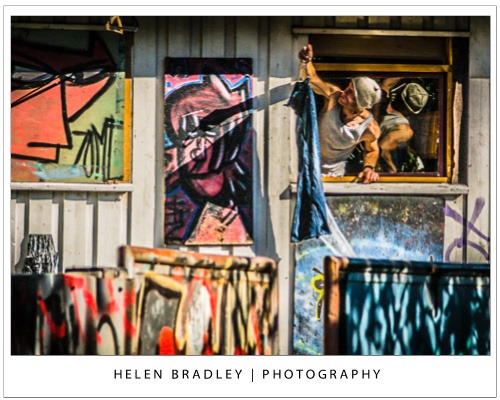
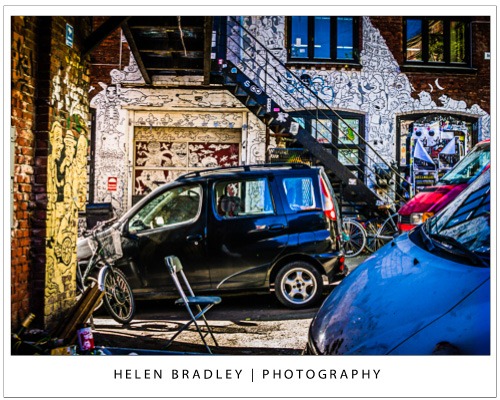
I am a full time freelance lifestyle writer and part of what I do is to write tutorials, and produce videos and books about photography, Photoshop and Lightroom.

I also write about Microsoft Office and iPad apps so I get to include my photographs in what I do every day. If my photos aren’t the subject of a photography or post production tutorial, they’ll be illustrating a tutorial on some application or other.

3. If you had to limit yourself to one genre of photography, what would it be and why?

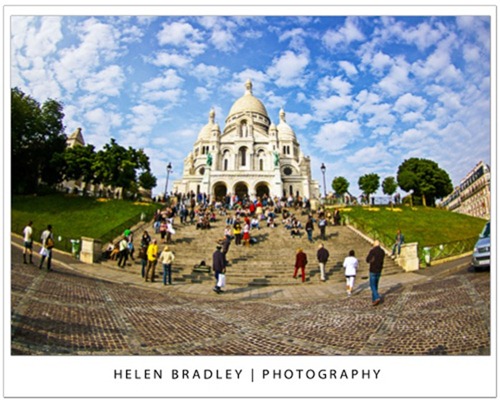
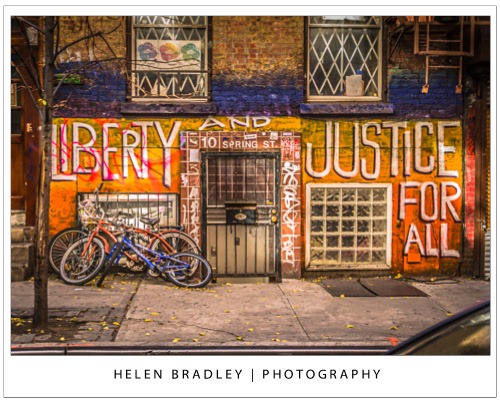
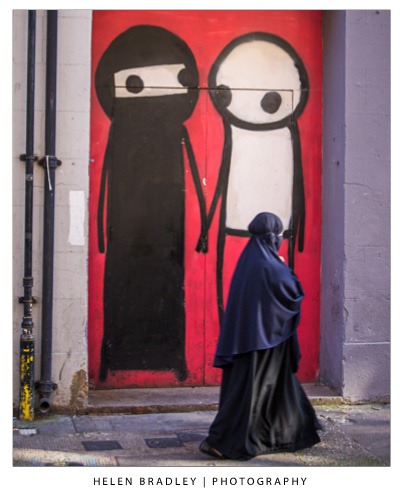
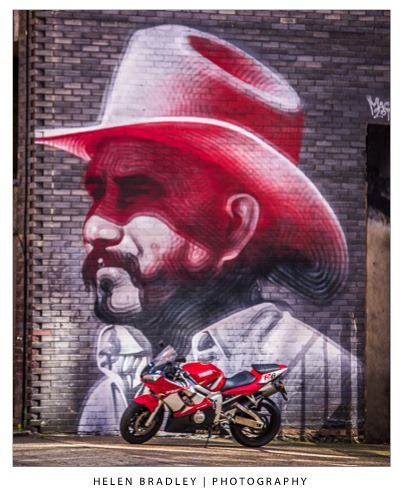
It would have to be street photography. I love city streets and the noise, dirt and bustle of big cities. I get a thrill from finding a really great piece of street art, stencil art or cool person to shoot. I like the buzz of shooting on the streets and interacting with people that I meet. I’ve met some really interesting people whom I’ve either photographed or spent time talking with because they too have a camera in their hand – or a paintbrush.

4. When did you start writing for dPS and why?

I started writing for dPS in December 2008. I’d seen a note saying Darren was looking for writers and being an Aussie I felt that that might tip the balance in my favor. I love writing about fun and interesting stuff. I’m a strong believer in something I once heard Guy Kawasaki say – that you should eat like a bird and poop like an elephant. He meant you should learn and absorb everything you can then spread the information far and wide. This is what I live to do so dPS was a logical fit for me.

5. What do you shoot with and what’s your favorite lens?

I am a camera junkie. I have boxes of film in my fridge, I own a Holga, a refurbished Polaroid land camera, a point and shoot converted for IR capture, a Lens Baby and my trusty Pentax K-7 and a bag of lenses.

My favorite lens is a 28-200 3.8-5.6 Tamron lens. It’s a great everyday lens – it’s the only lens I carry when I am out on the streets, it can capture pretty much anything and it’s not too heavy or awkward to hand hold.

6. What would be your number one tip to any new photographer?

Carry your camera with you. All the time. Everywhere. It’s really, really difficult to take a photograph without one.

7. What’s your next big project?

Thank you for asking! I’ve just launched a book in the 57 Secrets series. The book is 57 Secrets for Working Smarter in Photoshop and you can learn more about it at http://www.57secrets.com/photoshop.htm. It is available as a Kindle ebook and a printed book from Amazon.com http://www.amazon.com/57-Secrets-Working-Smarter-Photoshop/dp/161038010X/ref=sr_1_2?ie=UTF8&qid=1357091649&sr=8-2&keywords=57+secrets+photoshop

8. Where can people go to find out more about you and your work?

My web site and blogs are all at: http://www.projectwoman.com

I have a craft blog at: http://www.craftinggoodness.com

Find me on Facebook: http://www.facebook.com/projectwoman

Twitter: http://www.twitter.com/helenbradley

YouTube channel: http://www.youtube.com/user/HelenLBradley

Google Plus: https://plus.google.com/116149445148279071329/posts

I also offer classes on Photoshop, Photoshop Elements and Lightroom and one on one training. Details here: http://projectwoman.com/articles/44PhotoshopTraining.htm

helenbradley_image1

helenbradley_image2

helenbradley_image4

helenbradley_image6

helenbradley_image5

helenbradley_image7

helenbradley_image8

helenbradley_image9

helenbradley_image10

helenbradley_image11

helenbradley_image12

Post originally from: Digital Photography Tips.

Check out our more Photography Tips at Photography Tips for Beginners, Portrait Photography Tips and Wedding Photography Tips.

Meet The Photographers Who Write For Digital Photography School ~ Helen Bradley


Digital Photography School

 
Comments Off on Meet The Photographers Who Write For Digital Photography School ~ Helen Bradley

Posted in Photography


Les brouillages / Scrambled – 06

03 Mar

Some cool visual art images:

Les brouillages / Scrambled – 06
visual art
Image by jlndrr
This series is part of an ongoing research on visual ways to dissolve pornographic imagery in abstraction and absurd.

For the Scrambled series, using video footage downloaded from Internet, I exploit the artifacts, errors, blurs inherent to heavy digital compression and incomplete files.

Dozens of snapshots are generated. Here, the creative process in itself rely on selecting the right images : identifiable as pornographic, but somehow deactivated.

 
Comments Off on Les brouillages / Scrambled – 06

Posted in Photographs


2. März 2013

03 Mar

Ein Beitrag von: Manfred Schröder

Moléson-sur-Gruyères


kwerfeldein – Fotografie Magazin

 
Comments Off on 2. März 2013

Posted in Equipment