RSS
 

Archive for March, 2013

Editor’s opinion: Nikon’s AF-S Nikkor 80-400mm F4-5.6G ED VR

05 Mar

new80-400mm-001.jpg

Nikon’s AF-S Nikkor 80-400mm F4.5-5.6 G ED VR will be eagerly welcomed by many enthusiast and professional Nikon photographers who’ve been waiting for a replacement for its 12 year-old predecessor. The original 80-400mm was Nikon’s first lens to offer vibration reduction but the intervening years have left it looking rather long in the tooth. The latest version boasts a new optical design, built-in SWM focus motor and much improved vibration reduction. In this short article, Barnaby Britton gives his opinion. 

News: Digital Photography Review (dpreview.com)

 
Comments Off on Editor’s opinion: Nikon’s AF-S Nikkor 80-400mm F4-5.6G ED VR

Posted in Uncategorized


Just posted: Hands-on preview of the Nikon Coolpix P330

05 Mar

specspage.jpg

We’ve just posted a hands-on preview of Nikon’s latest small form-factor compact, the Coolpix P330. Externally almost identical to its predecessor the P310, the P330 features a larger 1/1.7″ BSI-CMOS sensor and raw capture mode – two additions that should make it much more popular with enthusiasts, as well as putting it in direct competition with Canon’s popular PowerShot S110. We’ve spent a little time with the P330, and for more details, images and specifications, click through to read our hands-on preview. 

News: Digital Photography Review (dpreview.com)

 
Comments Off on Just posted: Hands-on preview of the Nikon Coolpix P330

Posted in Uncategorized


Just Posted: Nikon Coolpix A preview – hands on with the DX compact

05 Mar

coolpixA.png

We’ve had a chance to use the Nikon Coolpix A – the company’s DX-format, fixed-lens compact. The Coolpix A features a 16MP APS-C sensor with no optical low-pass filter and a 28mm equivalent F2.8 prime lens. Nikon has done a lot of work to make the Coolpix A consistent with its DSLRs, from its interface to its compatibility with accessories. Click through to find out more.

News: Digital Photography Review (dpreview.com)

 
Comments Off on Just Posted: Nikon Coolpix A preview – hands on with the DX compact

Posted in Uncategorized


5 Tips to for Getting Sharper Images

05 Mar

An important element of photography is getting sharp, crisp images. You may be struggling with focus, especially if you are fairly new to DSLR photography. It is extremely frustrating to go out shooting, assuming you’ve got nice clear, sharp images, only to get home to find out they aren’t quite as sharp, or even in focus, as you had hoped.

There are several things you can do to improve your chances of getting sharper images. Here are a few to get you started, if you have other tips please share them in the comments below.

Five steps for achieving sharp images

#1 Pick the focus point manually

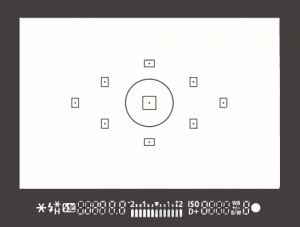
focus-pointsOn most SLRs, and some of the mirrorless or four thirds cameras, there is an option of selecting what point it uses to focus. Meaning, when you look through the camera and see some flashing dots or squares (or something similar to the image on the right), those are your focus zones or spots. Make sure it is NOT set for the camera selecting which of those spots are targeted for focusing. When the camera chooses where to focus it can often pick the wrong thing. If you have a subject that is behind something in the foreground the camera will usually pick the closest object, which is not your intention, and you’ll end up with the wrong thing in focus.

Find the setting that allows you to adjust which target focus zone the camera uses to focus. Depending on the camera make and model, that can usually be adjusted with a dial or joy stick on the back of the camera, while you are looking through the view finder. This frees you to choose the most appropriate zone or spot for your subject or scene.

#2 Select the right focus mode

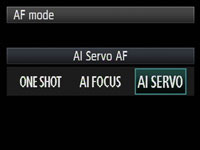
Canon-focus-modesMost cameras have a few different types of focus modes. On Canon you’ll see them as Single (One Shot), AI (stands for Artificial Intelligence) Focus and AI Servo. On Nikon the modes are AF-S, AF-C and AF-A.  Choose the one that bests fits for the subject you’re photographing.

Single (or AF-S) means that the camera will focus and lock on a single object and will not refocus until you release your finger from the shutter button. AI Servo (AF-C) is for continuous focusing when you have a moving subject.  In this mode when you depress the shutter button half way, the camera will continue to focus on the subject as it moves away or towards you. It does not lock focus until you press the button down fully and take the photo. In AI Focus (AF-C) the camera will choose between the previous two based on whether the subject is moving or not.

#3 Set your minimum shutter speed accordingly

min-shutter-speedThere is much debate about this subject in terms of how slow is too slow for hand holding your camera. Some instructors will say 1/60th of a second, I tend to use another rule of thumb which is 1 over the focal length of your lens. So if you are shooting with a 200mm lens, then 1/200 is how fast you need to be shooting to get rid of blur caused by camera shake. The longer lens you select, the more amplified any movement will become. If you are shooting with a cropped sensor camera, remember that 200mm is now acting like a 350mm so that changes your minimum shutter speed to 1/400. If you use a lens that has image stabilization then you can often stretch it a little bit more, say one or two stops, depending on how steady your hands are. You also want to make sure you are holding your camera in the most stable position with your left hand UNDER the body and lens (sort of cupping it) and both elbows in tight to your body. Then, hold your breath and shoot!

#4 Make use of back button focusing

Another much debated topic is whether or not to use the back button focusing option now available on most DSLRs. I’m not here to get into that debate, if you want to know more about it you can read 3 Reasons Why You Should Switch to Back Button Focus by James Brandon. The basic idea is that instead of using your shutter button to focus, you separate the focus function to a button on the back of the camera, that you press with your thumb.

Taken using back-button focus

Taken using back-button focus

I use it for many things including; portraits where I want the subjects off centre and don’t want to do “focus, lock, recompose” for every frame, any time I want to focus on a moving target (you have a better chance of getting it sharp this way than with the shutter button focus), for HDR photography when I’m bracketing and don’t want the focus to shift accidentally between shots, for night photography when I focus with the assistance of a flashlight and don’t want it to move afterwards (other option is switch to manual focus every time but it’s too easy to forget to focus at all then).

It does take a little getting use to, but after a friend of mine that shoots sports for the local newspaper showed me how to use it properly I never looked back. So when she says it’s better for action focus on critical, fast moving subjects, I listen cause she knows what she’s talking about!

#5 Use a tripod and remote trigger or release

Tri-pod = three legs. Three is better than two right? In some the case of photography – yes! The tripod is your friend.

I think you know what they are and what they’re for, but not many photographers own one or use it. Placing your camera on a tripod will help you get sharper images, if you’re doing it right. Get a good sturdy one, don’t cheap out on a $ 49 tripod on sale at the big box store and put your $ 2000 SLR on it. Do you put cheap tires on your high end sports car – I think not! A flimsy tripod won’t do you any good if it can’t hold the weight of your camera and is constantly slipping or loosening. Worse case scenario has your whole rig crashing to the ground, not good. Invest in a good one, do some research, make sure it is made for still photos not video, and it can hold the weight of your camera. A lightweight one made of carbon fibre is a good option, but expect to pay more for that option.

In addition to a tripod I also suggest getting a remove trigger or shutter release. They come in a few varieties including ones that attach directly to the camera, wireless ones, and even fancy programmable ones for doing timed exposures and auto exposure brackets. Like anything, the more fancy shmancy features you want, the more $ $ $ you will pay. But do get one, because it allows you to fire the camera without touching it, thus reducing any possible vibrations during the exposure. I also tell my students to turn of the IS (or VR) on their lens once the camera is on tripod. This is because the IS/VR runs a little motor inside the lens that vibrates it to help compensate for camera shake. On tripod you do NOT want your lens vibrating, even a tiny bit. The camera manufacturers would like us to believe that their cameras are smart enough to know when that’s happened and turn off the IS automatically. Maybe they are. Maybe they aren’t. I like to take no chances, so I just turn it off.

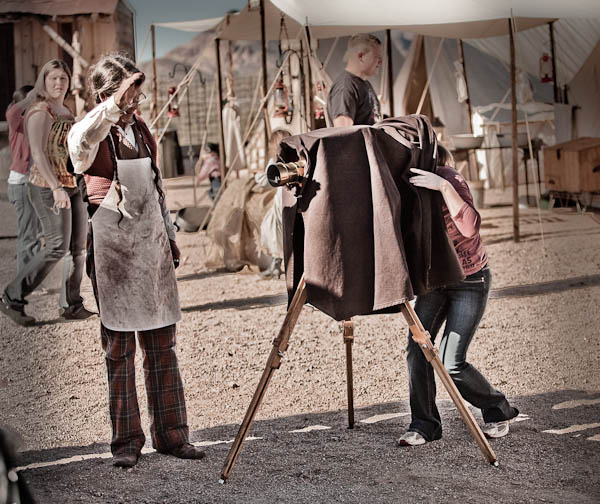
Me playing with a view camera at a mock western town in AZ. The guy posing as the photographer let me have a look through it, for old times sake.

Me playing with a view camera at a mock western town in AZ. The guy posing as the photographer let me have a look through it, for old times sake.

When I started photography school (technical college) the first camera they allowed us to use was a 4×5″ view camera. If you’ve ever seen one you’ll know it’s not possible to use it without a tripod. In hindsight, some 25 years later, I think those photo school instructors were actually pretty smart! At the time I just thought they wanted us to suffer hauling all this heavy gear around. By putting the camera on a tripod you will instantly slow down and put more time into setting up your shot. With the advent of digital and the popularity of SLRs and now even micro four thirds and mirror-less cameras, it’s become so easy to just grab the camera and fire off a few images. So besides the obvious benefit of stabilizing your camera so you can shoot at slower shutter speeds then we discussed in #3 above (if you want to do night photography it’s essential), using a tripod also forces you to put a little more time and effort into it. I find when that happens it often results in a better image aesthetically as well as technically.

Well this was a longer tip than I expected to write, whew!  To sum up, if you are having trouble with blurry images, try these tips out for yourself. I’m pretty sure you’ll have a bit more success.

So give it a go, and let me know how it’s working for you!

Post originally from: Digital Photography Tips.

Check out our more Photography Tips at Photography Tips for Beginners, Portrait Photography Tips and Wedding Photography Tips.

5 Tips to for Getting Sharper Images


Digital Photography School

 
Comments Off on 5 Tips to for Getting Sharper Images

Posted in Photography


Harvest Energy from Power Lines to Recharge Your Batteries

05 Mar

[ By Steph in Gadgets & Geekery & Technology. ]

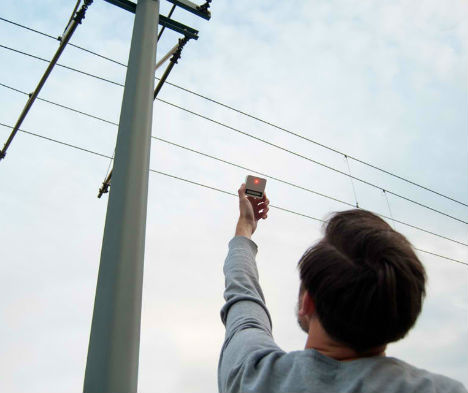
Energy Parasite Gadget 1

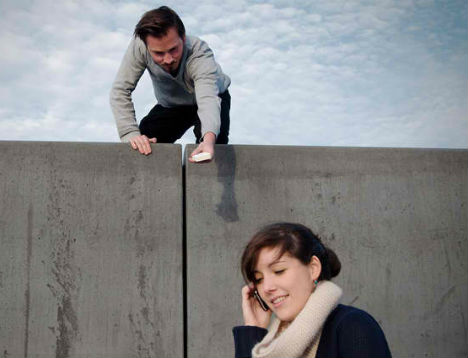
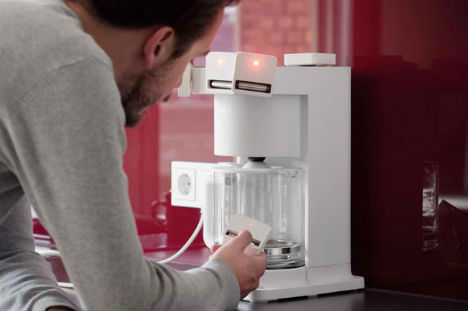
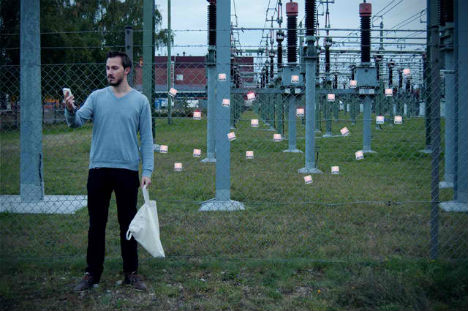
The entire city is your power source with an innovative gadget by designer Dennis Siegel that harvests energy from electromagnetic fields and instantly recharges batteries. These ‘energy parasites’ make use of electromagnetic fields produced as a result of information transfer, or as byproducts of electric equipment, from power lines to coffee machines.

Energy Parasite Gadget 2

In a series of images, Siegel holds out the device to gather energy from home appliances and power plants, even hovering creepily beside a cell phone user. An LED light on top of the device will let you know that electromagnetic fields are nearby, and even how strong they are.

Energy Parasite Gadget 3

The energy gathered is stored in a conventional battery, so you can gain ‘redundant’ energy from the power supply of all kinds of electronics and then use the battery to power something else.

Energy Parasite Gadget 4

Siegel created two types of harvesters, one suitable for frequencies below 100Hz, like those produced by home electronics and appliances, and one for higher frequencies like radio broadcast, Bluetooth and WLAN. Imagine if this capability could be built into devices like smartphones, so you never had to worry about losing your charge while out and about.

via Pop Up City

Share on Facebook


[ By Steph in Gadgets & Geekery & Technology. ]

[ WebUrbanist | Archives | Galleries | Privacy | TOS ]


WebUrbanist

 
Comments Off on Harvest Energy from Power Lines to Recharge Your Batteries

Posted in Creativity


First Instagrams out of North Korea after opening of 3G network

05 Mar

korea.png

Last week North Korea started to allow foreigners to use a 3G mobile network from inside its borders. This means that tourists and visiting professionals alike can now tweet and upload instagrams from Pyongyang. However, access to mobile networks is still limited for locals. Two of the most notable Instagrammers in North Korea are Associated Press journalists Jean Lee and David Guttenfelder. Since the change, the journalists have used their accounts to present life inside North Korea. Click through to see their images.

News: Digital Photography Review (dpreview.com)

 
Comments Off on First Instagrams out of North Korea after opening of 3G network

Posted in Uncategorized


Understanding Colour on Your Digital Camera

05 Mar

This is the third in a series of articles by Andrew S Gibson, the author of Understanding EOS: A Beginner’s Guide to Canon EOS cameras.
01

Joel Meyerowitz once asked ‘If the world is in colour, why shoot it in black and white?

Okay, I can think of plenty of good reasons for working in black and white, but it seems that most photographers work in colour a great deal of the time. And when you work in colour, you naturally want to configure your camera to give the best possible results. To do so, it’s important to understand how your digital camera records colour.

You may be wondering why this matters. Surely, digital cameras just accurately record the colours of the subject? Well, the truth is it doesn’t work like that. To understand why, we need to look at the nature of digital capture.
02

Digital capture

The creation of a digital photo occurs in two stages.

The first step happens when you take a photo. The shutter opens, light reaches the sensor, and then the shutter closes again. The sensor’s photodiodes react to the light that hits them and this information is converted to electronic form in a series of millions of bits and bytes.

The second step depends on the file format setting you have selected on your camera.

When you select Raw, the data captured by the camera’s sensor is compressed and recorded onto the memory card as a Raw file. The camera also generates a small JPEG file that is embedded in the Raw file so that you can preview it on your camera’s LCD screen.

When you select JPEG, the camera converts the information captured by the sensor into a JPEG file and then ditches the information captured by the sensor. The main aim of the JPEG format is to save memory card space (the file sizes are smaller) and to give you a file that doesn’t need any post-processing.

When the camera creates a JPEG file, it does so using the colour settings that you have dialled into the camera. Changing those settings alters the way the camera records colour.

03

Colour settings

There are two colour related settings you need to know how to use. One is white balance (I’ll tackle that in the next article in this series).

The second setting has a different name depending on the camera you have. It is called Picture Style on my Canon EOS cameras. It’s the term I’m accustomed to so it’s the one I’m going to use in the article.

Nikon calls it Picture Control.

Sony calls it Creative Style.

Pentax calls it Custom Image.

Olympus calls it Picture Mode.

Fuji calls it Film Simulation Mode. I like this name as it describes exactly what the settings do – emulate the look of various Fuji film types.
04

What’s the purpose of Picture Styles?

The purpose of Picture Styles, believe it or not, are to imitate the effects of using different films in the camera. Let me elaborate (I realise that this will seem a little abstract to anybody who hasn’t used a film camera).

If you use film, then you would select a film type that records the subject in a way that suits the subject.

For example, the film of choice for many years for most landscape photographers was Fuji Velvia. This was a high quality slide film that recorded deeply saturated colours. It emphasised hues like green and blue, making it ideal for creating punchy landscape photos.

On the other hand, if you are taking photos of people, Fuji Velvia is a poor choice of film. You would be better off using something like Kodak Portra. This is a colour negative film designed to give a softer, less saturated image with good skin tones.

In digital cameras, the idea that photographers should be able to change the colour settings to suit the subject they are photographing led to the development of Picture Styles. The same principle applies – you set the Picture Style that is most appropriate to the subject that you’re shooting.

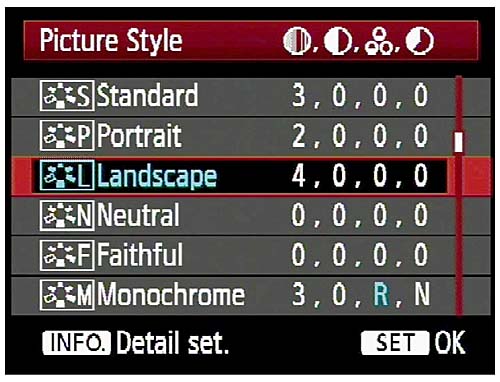
Let’s take a look at the default options on EOS cameras (check your camera’s manual for details if you own a different brand):
05

Out of the six, the three you would use most often are:

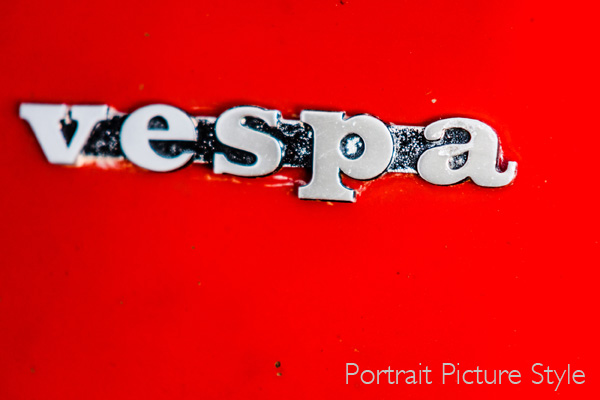
Portrait: For when you’re taking portraits. Obvious enough really. This Picture Style is designed to give warm, flattering skin tones.

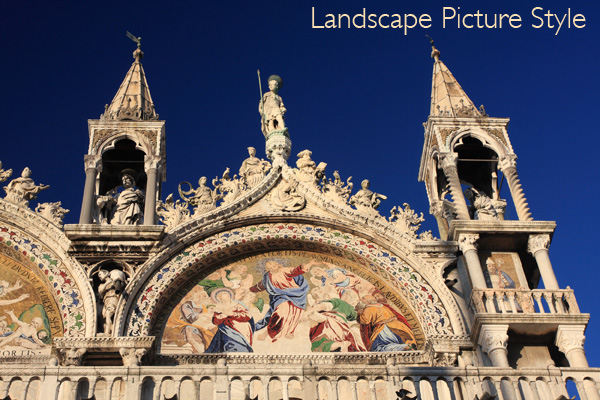
Landscape: Also straightforward. This Picture Style gives slightly sharper images than the portrait Picture Style and deeply saturated blue and green tones. It’s intended for landscape photos.

Standard: This is what you would use for just about every situation that isn’t a portrait or a landscape. It gives deeply saturated reds.

Neutral and faithful: These two Picture Styles are nearly identical and are designed to give soft, neutrally coloured JPEG files that are intended to be processed further in Photoshop. Given that most photographers who want to post-process now shoot Raw, these have virtually become redundant.

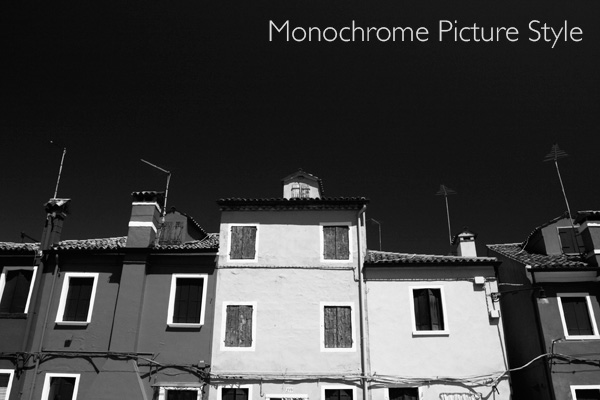
Monochrome: For black and white images. If you’re serious about black and white photography you’ll get much better results by shooting in Raw and converting the colour image to monochrome in post-processing. But, this Picture Style may come in useful if you want to dabble or simply don’t like to process images on a computer (not everybody does).
06

What is a Picture Style?

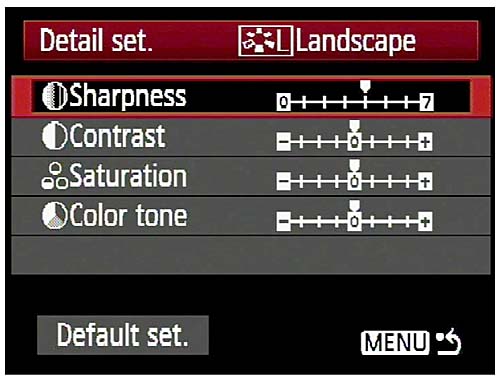
On Canon cameras, a Picture Style is made from four different settings. They are sharpness, contrast, colour saturation and colour tone. You can change any of these in the camera’s menu to alter the way a Picture Style works. This gives you a lot of control over the way your photos turn out.

Moving beyond Picture Styles

The Picture Style control is very useful if you use the JPEG format. But, as I touched on before, a lot of photographers now use the Raw format. Raw processing software has improved over the years to the point where the benefits in terms of image quality are too great to be ignored.
07

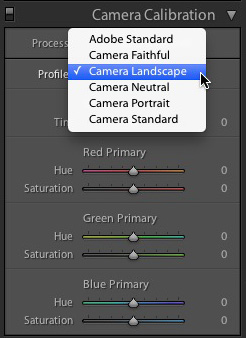
If you shoot Raw you don’t have to select the Picture Style at the time you take a photo. The Raw processing software lets you select the Picture Style at the time you process the file (the screenshot above is from Lightroom 4). That means you can select the Picture Style that most suits the image, and switch between the different options to see which you prefer.

Advanced workflow

If you use a program like Lightroom to process your Raw files, it has so many options for controlling and altering colour that the initial Picture Style you select may become irrelevant if you make lots of changes. If you use Lightroom presets to process your files the Picture Style hardly matters at all.

The same goes for Photoshop if you use Photoshop actions to change the look of your photos. Picture Style is just a starting point, and the result of the actions you use will have a much greater effect on the final result than the Picture Style you started with.

Conclusion

In short, the usefulness of the Picture Style setting depends very much on your shooting style and workflow.

If you use the JPEG format, then Picture Style is very useful as (along with the white balance setting) it determines the way in which your digital camera records colour.

If you use the Raw format, the Picture Style may not be very relevant at all. It provides a starting point and you may choose to use your Raw processing software to create a completely different look.

Did you know that the white balance setting is just as important as Picture Style when it comes to colour photography? I’ll explain why in my next article.

Previous articles

These are the earlier articles in the series:

Introducing the Creative Triangle

Finding Your Way Around the Mode Dial

08

Understanding EOS

Andrew S Gibson is the author of Understanding EOS: A Beginner’s Guide to Canon EOS cameras. The use of Picture Style is one of many topics explored within the ebook.

Post originally from: Digital Photography Tips.

Check out our more Photography Tips at Photography Tips for Beginners, Portrait Photography Tips and Wedding Photography Tips.

Understanding Colour on Your Digital Camera


Digital Photography School

 
Comments Off on Understanding Colour on Your Digital Camera

Posted in Photography


San Francisco Behind Bars: Alcatraz and Golden Gate Bridge at Sunset

05 Mar

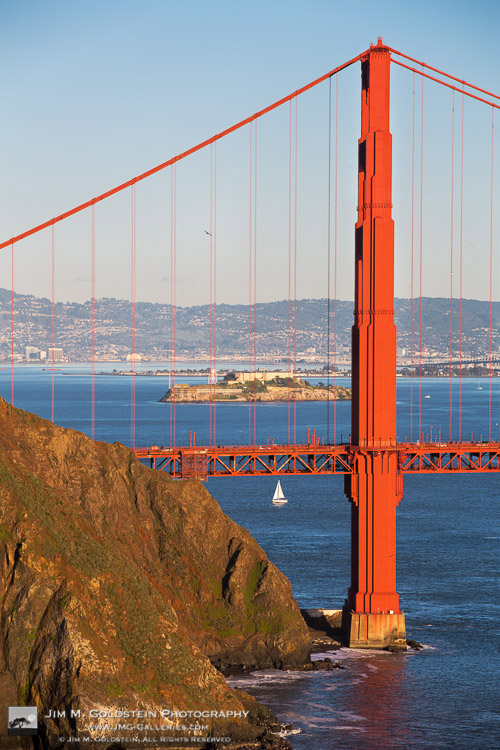
Alcatraz Seen Through the Golden Gate Bridge – San Francisco, California

San Francisco is no stranger to photography icons. As you drive across the Golden Gate Bridge it’s quite easy to see Alcatraz sitting in the middle of the entry to the San Francisco Bay, but its not as easy to see both Alcatraz and the Golden Gate Bridge in clean alignment. One such low angle view does exist and its quite fun to see Alcatraz of all places behind bars… I mean the cables of the Golden Gate Bridge. Insert great sunset light, a sailboat and a pelican and it rounds the scene out to a rather fun photo.

Copyright Jim M. Goldstein, All Rights Reserved

San Francisco Behind Bars: Alcatraz and Golden Gate Bridge at Sunset

The post San Francisco Behind Bars: Alcatraz and Golden Gate Bridge at Sunset appeared first on JMG-Galleries – Landscape, Nature & Travel Photography.


JMG-Galleries – Landscape, Nature & Travel Photography

 
Comments Off on San Francisco Behind Bars: Alcatraz and Golden Gate Bridge at Sunset

Posted in Equipment


Wacom to release multi-touch mobile tablet in summer 2013

05 Mar

Wacom.png

Graphics tablet maker Wacom has announced on Facebook it will launch a mobile multi-touch tablet this summer. While it has not posted any details about this device, Wacom’s social media post says it will include a pressure-sensitive pen, multi-touch options, an HD display and ‘other valuable features that you haven’t seen in other tablets’.

News: Digital Photography Review (dpreview.com)

 
Comments Off on Wacom to release multi-touch mobile tablet in summer 2013

Posted in Uncategorized


Canon develops high sensitivity full-frame CMOS sensor for video

05 Mar

canon_videosensor.png

Canon has developed a 35mm full-frame CMOS image sensor designed for low-light video capture. The 16:9 sensor features a 1920×1080 pixel array, meaning each pixel measures a huge 19 microns along each edge – 7.5 times larger than the ones in the EOS-1D X. The large pixels and low readout-noise circuitry allow the sensor to capture light around 10 times less bright than current CCDs used for astronomy. The sensor will first be shown in public at a security show in Japan.

News: Digital Photography Review (dpreview.com)

 
Comments Off on Canon develops high sensitivity full-frame CMOS sensor for video

Posted in Uncategorized