RSS
 

Archive for February, 2013

Using AutoPano Giga To Create Panoramas With Gigapan Heads Or Freehand Shooting Grids

04 Feb

I know, it’s a long title but I want to show how easy it can be to assemble panoramas with either a Gigapan head or by shooting freehand, gridded panoramas. AutoPano Giga has been my panorama product of choice after starting with huggin, a free option that does quite well it its own right.
One ability AutoPano Giga excels at is the ability to take images and information from a number of automated shooting heads, such as Kolor’s own PanoGear or even other brands, such as the GigaPan EPIC Pro, which I reviewed for DPS two years ago. I noted in that post that Gigapan’s software was in its first stages and was quite basic and while the software has been upgrade over the intervening two years, it’s still not as robust as Kolor’s AutoPano Giga. Plus, it can not handle freehand panoramas

Utilizing AutoPano Giga to produce stunning panoramas shot with Gigapan’s heads (mine were shot with the EPIC Pro) is fairly simple.

Shoot

Shooting with the Gigapan EPIC Pro is explained in the previously mentioned post. That much hasn’t changed.

Import

Bringing images into your computer is no different than your normal shooting method. The nice thing about AutpoPano Giga is it will understand your RAW files no problem, so there is no need to convert (but you can if you are impatient and want smaller file sizes). I have found it handy to shoot panoramas, especially large ones, on a separate memory card reserved just for panoramas. That makes finding the files all the easier.

With all your panorama files in one location, it is time to use the stitching wizard in AutoPano Giga.

Wizard

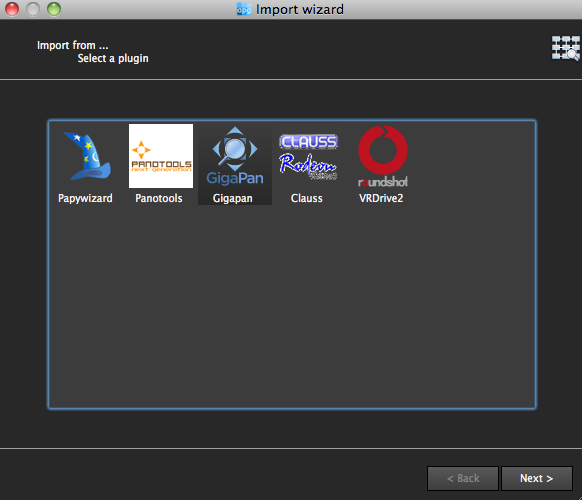
The first step in the wizard is to pick the device that was used, in this case we select Gigapan.
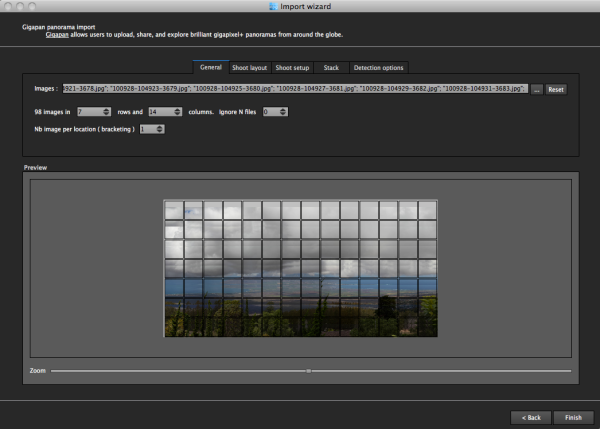
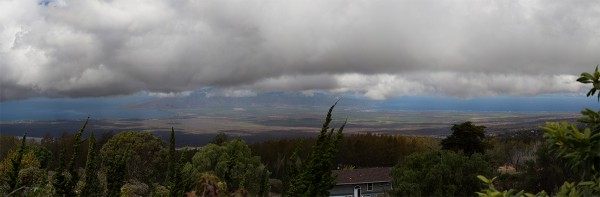
The next screen asks for input. If your shot went off without a hitch and you have a nice grid of images, AutoPano should know this. For instance, when I select the 98 images from my demonstration shot from Maui, Hawaii at the Ali’i Kula Lavender Farms, AutoPano knows this shot was 7 rows and 14 columns. The nice thing about this method is there is no need to import a control file that explains the grid to the software. This is also why, with careful execution, freehand panoramas can be imported.
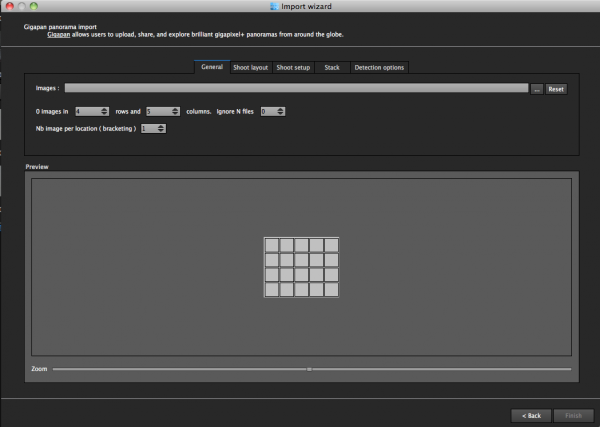
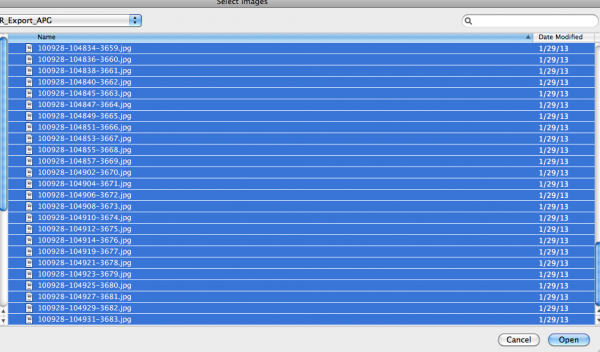
With a straightforward shot like this, there is little else for me to do, but let me show you what the other screens do, if you are curious.

The next screen allows for changing of the panorama shooting direction. One thing I wish this screen had is the ability to pick a grid shot top to bottom, then back up the next column, down the next, and so on, for those times when I shoot a panorama freehand, such as this 2.2 gigapixel image of the Taj Mahal (shot without a tripod and head because they are restricted).
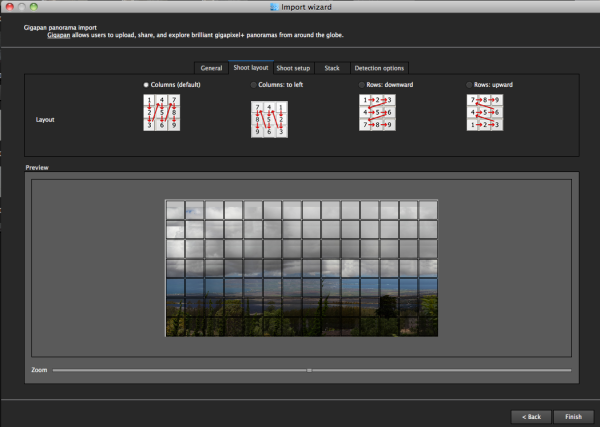
After that screen, custom overlap or forcing a 360 degree view can be selected.
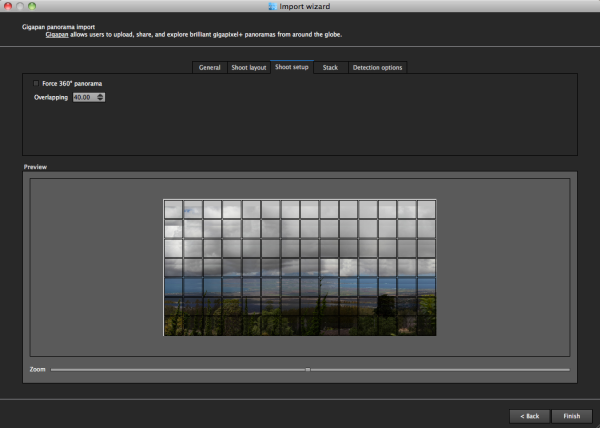
The last two screens deal with control points and that can be left on auto unless you have a particularly good reason to change them. This software works quite well on auto (with some manual tweaks to come).

Press “Finish” and AutoPano takes you to the main screen and starts detecting and stitching. I like that, while I can tell the program the pattern of a shoot and the amount of overlay, it will still automatically detect control points and I can even set this number to 200 by default, to ensure the best matching.
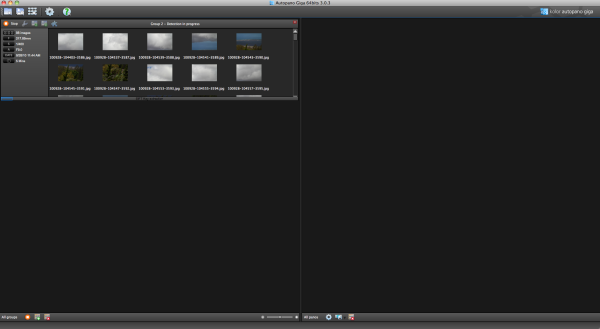
Output

Things aren’t always perfect right out of the box because the software doesn’t know which type of projection you want. Below you will see the resultant output on the right, which has a planar projection.
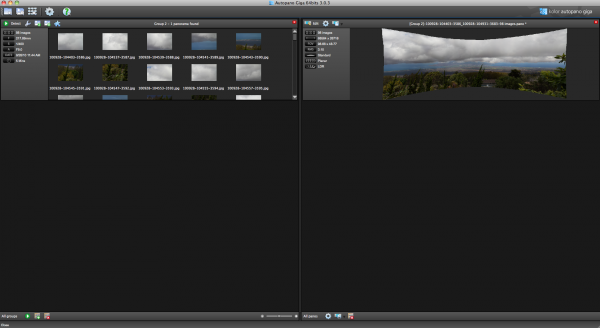
This is easily changed in the Edit screen, where a number of adjustments can be made if desired. I decided on a spherical projection to keep my sides straight.
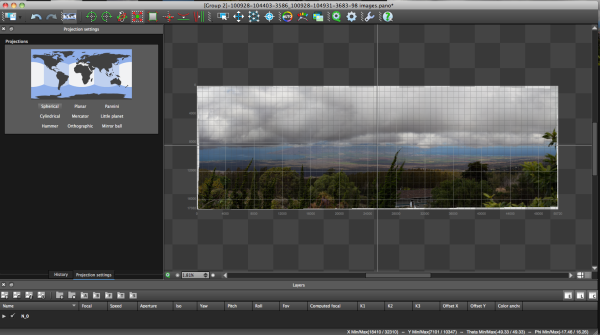
From there, the only change I saw that needed to be made was to crop the image, which is dead easy: click on the crop tool and it automatically selects the crop dimensions. Changes are made by dragging corners or sides and rotations can be made (in case your tripod wasn’t level when shooting).
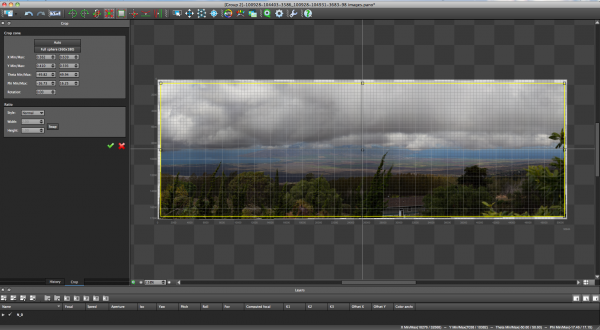
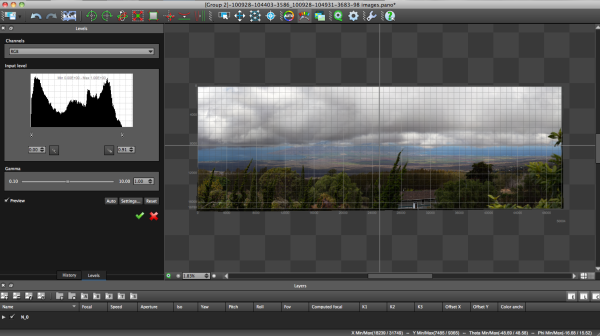
The last bit of editing I tend to do in the program is to set the levels, which is as easy as setting them in Photoshop or other programs.
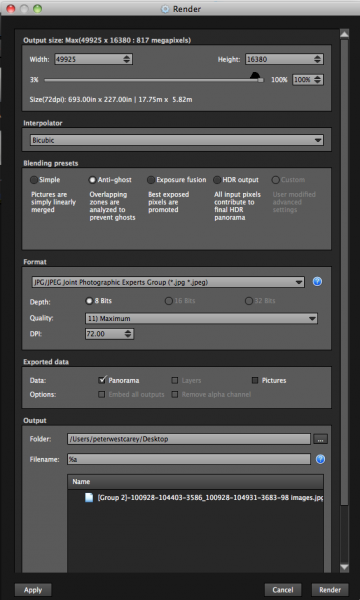
Before being completely done, we need to get the resultant image out of AutoPano Giga and that is done by clicking on the gear in the main screen in order to render the image. Settings on this screen allow for the resizing of the image once rendered (handy if you are sending this out as a JPEG as the max dimension for those is 30,000 pixels) as well as file type, compression, color depth and more.
What Else Can Be Done?

AutoPano Giga is a robust panoramic creation and editing program. This post is not intended to be a complete review of all the features as that list is rather long. Some of the highlights include:

  • Ability to handle HDR bracketed shots (it is available in the first screen of the wizard and is labeled Nb image per location (bracketing)
  • Manual removal of ghosts via masking(although the automatic option works well)
  • Saving results in a variety of file types, including .PSB and .TIFF
  • Batch processing
  • Editing vanishing points and pitch, roll and yaw

Results

How did it come out? Great! But…unfortunately DPS isn’t set up to show case large panoramas but I have hosted the resulting image on my blog. The final image is 43MB large and will take a little time to download with the amount of traffic DPS typically sees.

Click here to be taken to the image. Zoom in and use Full Screen mode for the best experience. Can you spot the airplane taking off? What about people surfing?

For references sake, the panorama was made with a Canon 7D and 28-300mm L lens. It was composed of 98 images shot in Manual Mode at ISO 100, 135mm, f/9, 1/400. The Gigapan EPIC Pro was lent to me from Borrowlenses.com.

AutoPano Giga is available for free trial download here.

Post originally from: Digital Photography Tips.

Check out our more Photography Tips at Photography Tips for Beginners, Portrait Photography Tips and Wedding Photography Tips.

Using AutoPano Giga To Create Panoramas With Gigapan Heads Or Freehand Shooting Grids


Digital Photography School

 
Comments Off on Using AutoPano Giga To Create Panoramas With Gigapan Heads Or Freehand Shooting Grids

Posted in Photography


#WUDC: Ice Prince, FREEZE & DJ Xclusive Tear Up 96.9 Cool FM!

04 Feb

COMMENT, LIKE THE VIDEO & SUBSCRIBE TO OUR CHANNEL! Checkout Ice Prince hanging out with FREEZE, DJ Xclusive and the crew at 96.9 Cool FM in Lagos, Nigeria. Watch out for Ice Prince’s debut album, “Everybody Loves Ice Prince”. Out October 4th, 2011! Follow Ice Prince on Twitter: www.twitter.com Follow DJ Xclusive on Twitter: www.twitter.com Follow us on Twitter: www.twitter.com © 2011 Mävrik Films Media

Halo 2 Walkthrough: Delta Halo [Mission 8] Part 17 of my Lets Play series from Halo 2 As promised expect to see these coming at you all thick and fast throughout the coming week. I would like to get this series finished well in time for the launch of Halo Anniversary so will be recording the final few Episodes on Saturday/Sunday to get them to you all over the next week or two. Thanks for continuing to support this series like you have and if you enjoy this as before leave a rating either way, always helps me out! Playlist: www.youtube.com Follow me on Twitter: www.twitter.com
Video Rating: 4 / 5


Nice Visual Art photos

04 Feb

A few nice visual art images I found:

Selma Burke, American sculptor, 1900-1995, in her studio
visual art
Image by Smithsonian Institution
Description: Selma Hortense Burke is one of the few African-American women sculptors who achieved a high level of national recognition during her lifetime. She received national recognition for her relief portrait of Franklin Delano Roosevelt which was the model for his image on the dime. She was committed to teaching art to others, so she established the Selma Burke Art School in New York City and opened the Selma Burke Art Center in Pittsburgh, PA.

Creator/Photographer: Peter A. Juley & Son

Medium: Black and white photographic print

Dimensions: 8 in x 10 in

Culture: American

Persistent URL: http://photography.si.edu/SearchImage.aspx?id=5828

Repository: Smithsonian American Art Museum, Photograph Archives

Collection: Peter A. Juley & Son Collection – The Peter A. Juley & Son Collection is comprised of 127,000 black-and-white photographic negatives documenting the works of more than 11,000 American artists. Throughout its long history, from 1896 to 1975, the Juley firm served as the largest and most respected fine arts photography firm in New York. The Juley Collection, acquired by the Smithsonian American Art Museum in 1975, constitutes a unique visual record of American art sometimes providing the only photographic documentation of altered, damaged, or lost works. Included in the collection are over 4,700 photographic portraits of artists.

Accession number: J0100404

Molten Metal meets wood at the Iron Pour
visual art
Image by bettlebrox
Pouring Molten Metal on Wood at MassArt’s Spring 2009 Iron Pour.

www.eworksfestival.com/index.php?page=events/4_10
The Iron Pour has a strong history at Massachusetts College of Art, beginning as a fundraiser for the Metals Department, it has grown into a celebration of art, music, and performance. Recently, the Iron Corps., the group that organizes the event, has been working in conjunction with Eventworks, who will be kicking off their annual Art Festival. This spring, we will be invoking themes of outer space and the explosive demise of stars and planets . Aside from the spectacular sculptural performances by the Iron Corps. , activities will include face painting, fire dancing, visual shows, and four musical acts throughout the course of the night.

 
Comments Off on Nice Visual Art photos

Posted in Photographs


Reflections with Samantha

04 Feb

Samantha and I decided to explore the SLC Photocollective and see if we could come up with something original in one of Utah’s most photographed locations. Judge the results for …
Jake Garn Photography

 
Comments Off on Reflections with Samantha

Posted in Uncategorized


Kit Harington on Working with Animals @ San Diego Comic-Con 2011 [Game of Thrones]

04 Feb

Kit Harington talks about working with animals at the San Diego Comic-Con for the Game of Thrones panel. Photos: www.flickr.com Camera: Nikon D5100 Nikkor 70-200mm f/2.8G ED VR II AF-S Special thanks to Borrowlenses.com
Video Rating: 5 / 5


3. Februar 2013

04 Feb

Ein Beitrag von: Francesco Futterer

© Francesco Futterer


kwerfeldein – Fotografie Magazin

 
Comments Off on 3. Februar 2013

Posted in Equipment


Meet The Photographers Who Write For Digital Photography School ~ James Maher

04 Feb

You’ve been reading their articles for months or years, have you ever wondered “Who are the photographers who write for dPS”? We thought it would be a good time to introduce them to you through a series of interviews.

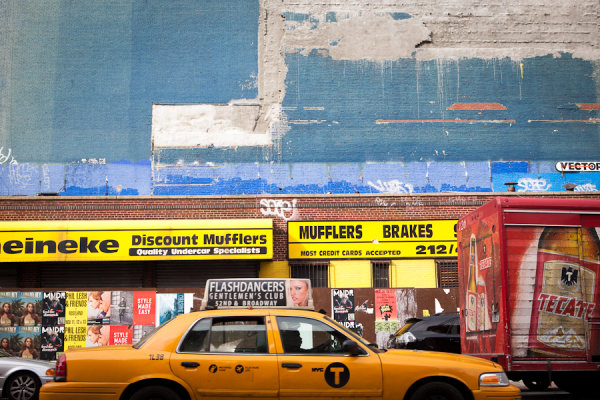
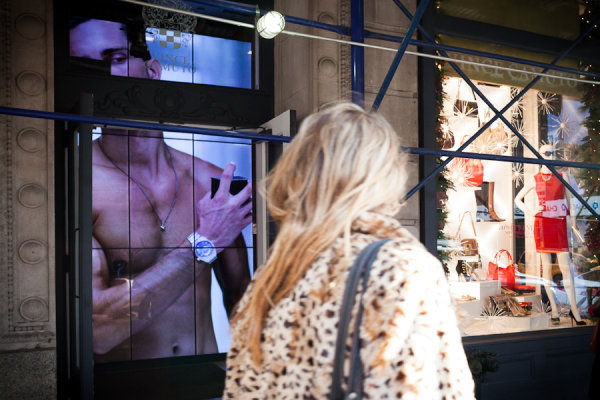
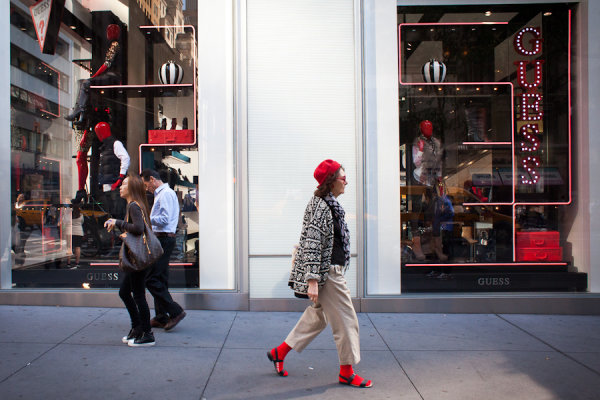
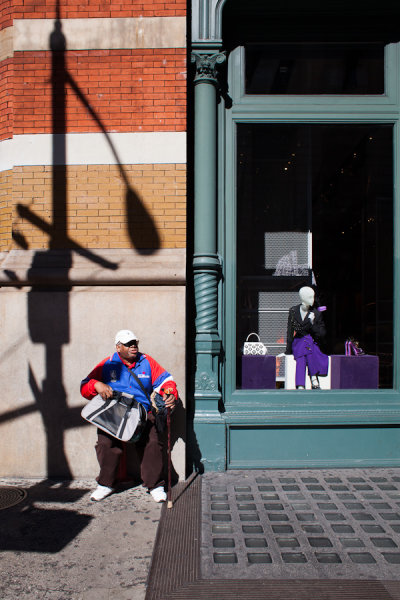
Today meet James Maher, New York City based photographer and author of The Essentials Of Street Photography.

1. How long have you been shooting?

James Maher

I became interested in photography in 2002 and enrolled in photography courses in 2003.  I assisted for a commercial photographer in 2005 and 2006 and started my business soon after that.

2. Do you have a full time job or are you a full time photographer?

I’ve been on my own as a full time photographer since late 2006.  The first couple of years were fairly lean times, but I’ve steadily grown a clientele since then and business has begun to take off over the last four years.  Because of the rent here in Manhattan, I operate my ‘studio’ out of my apartment, which has a lot of benefits and a lot of downfalls – the biggest downfall being that our refrigerator is about 20 feet from where I work.  It would be nice to have more space for portraiture, but I make do.  And honestly, the beautiful streets outside of my apartment make for stunning backgrounds with so many unique colors and textures.

3. If you had to limit yourself to one genre of photography, what would it be and why?

I’m not sure I could do that to be honest.  I have the most fun with street photography, where I get to walk around and explore.  That’s how I got started with photography in the first place, because I had so much fun walking around and seeking out interesting places and people.  I love to people watch.  However, I love portraiture as well and connecting with people and learning about them.  I guess if I have to pick one, it would be any type of photography that has to do with meeting or observing interesting people.

4. When did you start writing for dPS and why?

I wrote my first article for DPS in November of 2010, titled 14 Tips to be a Successful Freelance Photographer.  I generally try to write for myself and then hope that other people connect with it.  That article was a personal reminder of all the mistakes I’ve made and things I’ve learned to help me from falling back into the traps that I used to fall into.  I find each article to be a learning experience.  I’ve always loved to write and when I first found DPS I knew that I wanted to work with them.  I can’t believe it’s been that long since the first article.

5. What do you shoot with and what is your favorite lens?

I shoot with a Canon 5D Mark II.  My three primary lenses are the Canon 24-70mm, the Canon 70-200mm, and the Canon 28mm prime.  I love them all, but I couldn’t live without the light 28mm.  That’s my street photography lens and it’s so light and easy to use and 28mm is one of my favorite focal lengths.  It’s not what I will use on most paid photo jobs, but it’s my everyday walk around lens.

6. What would be your number one tip to any new photographer?

Wow, only one tip – that’s tough.  I guess it would be to spend a lot of time looking at photography and art.  You need to develop your eye.  Educate yourself.  Go to galleries, hang out in bookstores or go to the library, and search through photographer portfolios on the web.  Spend a lot of time doing this and maybe even make a digital scrapbook of your favorite photos to come back to over time.  Also, this is a second tip, but don’t be afraid of failing or people not liking your work.  Most good artists take criticism pretty hard but they’re not afraid of putting themselves in a position where they might fail.  It can take years of failure to become a success.

7. What’s your next big project?

Last year’s big project was writing a book, so I’m a little burned out on big projects at the moment.  I want to buckle down and allocate more time for shooting and writing.  But I guess my next big project will be to focus myself to do more of my own portraits, where I control the outcome.  When you become a photographer, your portraiture tends to only be done for clients who want to look as good and happy as possible.  When you do portraiture for yourself, you can do whatever you want.  So I guess my next big project is to spend more time and resources on this.  I stopped doing this over the last five years as I focused on building a business.

8. Where can people go to find out more about you and your work?

Everything is on my website. You can view my street photography, my urban landscape and travel work, my portraiture and commercial work, join my mailing list, and learn more about my book.  And if you have any questions, feel free to send me an email.


Post originally from: Digital Photography Tips.

Check out our more Photography Tips at Photography Tips for Beginners, Portrait Photography Tips and Wedding Photography Tips.

Meet The Photographers Who Write For Digital Photography School ~ James Maher


Digital Photography School

 
Comments Off on Meet The Photographers Who Write For Digital Photography School ~ James Maher

Posted in Photography


Trailer: Nikon School: A Hands-On Guide to Creative Lighting

04 Feb

Professional photographers Bob Krist and Joe McNally are featured in what is far-and-away the best resource to date on Nikon’s speedlight system and how to use CLS effectively. It starts with Krist in the studio teaching you the basics — and nuts-and-bolts control how-to’s — then goes out into the field. There, Bob takes on the roll as the color man to Joe’s lead as they work together to pull off a variety of sophisticated shots using Nikon speedlights. Congrats to Nikon for significantly dialing up the educational portion video as compared to the “Speed of Light” DVD of a few years ago. Yes, it is specific to the Nikon system and designed to help sell gear. But the educational content is there — they show everything you would need to know. (Uploaded with permission from Nikon.)
Video Rating: 4 / 5

[HD] Enjoy this release of some of our past and present clients of 2011! We have 1000’s of photos of our clients so we cant put them all in, but we will be releasing videos now and then showing some of our work, so you may be in the next one… stay tuned! BodyIllusions Tattoo Studio is the finest studio in the area with prices that cannot be challenged by any studio in the area… we don’t overprice our tattoos. Check out the others and their portfolios of their work, then come see us and you will see why more and more clients are coming in to get their next piece of eternal artwork on them with one of our experienced artists! We cover all types and styles of tattoos from blackwork, greywork, portraits to coverups and custom pieces. We will also tattoo your artwork and designs, just bring them in and talk to one of the artists at BodyIllusions Tattoo Studio 🙂 BodyIllusions Tattoo Studio also performs all types and styles of brandings, cuttings, scarification and of course every body piercing available with the most eperienced body piercer in the area with over 20+yrs of experience, so you can feel confident with our epert work and high success rate in healings. The cleanest studio around, check us out. Thanks to all the clients in the video, we appreciate the honor of you allowing us to create your piece of art. We look forward to seeing you again in 2012… Thanks for watching and subscribe if you want to be updated on our future video releases. Seasons Greetings
Video Rating: 4 / 5


Latest Nikon 1 Series Mirrorless Cameras: Nikon S1, J3 and V2

04 Feb

The new Nikon 1 series cameras are Nikon’s latest line of small mirrorless interchangeable lens cameras (MILC) targeting at photo enthusiasts. Visit us at www.squidoo.com for all the details. Nikon 1 S1 the portable, unique and advanced high-speed AF mirrorless interchangeable lens camera. Nikon S1 features a relatively large 10.1 effective megapixel CX-format CMOS sensor combined with super-high speed EXPEED 3A engine. The S1 has a wide ISO range of 100 to 6400, which allowing photo enthusiasts more freedom and capabilities to capture objects in low-light conditions. It allows simultaneously recording of full HD 1080 p videos and full-resolution still images in any lighting situations. There are two new accessories for the Nikon 1 S1 camera:1 NIKKOR VR 6.7-13mm f/3.5-5.6 and the VR 10-100mm f/4-5.6 lens. Here to order the compact, fast AF, 15 fps Nikon 1 S1: tinyurl.com More details on Nikon 1 J3 MIL camera, visit: www.squidoo.com More advanced hybrid autofocus Nikon 1 J3 is Nikon latest J series of compact mirrorless cameras targeted at videographers.The Nikon J3 has a 14.2 MP CX format image sensor. J3 has a continuous drive mode which will allow video shooting of up to 60 fps. Transferring of images and video to smart devices through wireless adapter, WU-1b Wi-Fi adapter. Nikon 1 J3 is so easy to control with a simple flick of the thumb. Nikon 1 J3 has very high image quality. To order Nikon 1 J3 mirrorless camera: tinyurl.com For the latest Nikon 1 V2 details, visit
Video Rating: 0 / 5

 
Comments Off on Latest Nikon 1 Series Mirrorless Cameras: Nikon S1, J3 and V2

Posted in Nikon Videos


Windows Zero: 9 Telecom Infrastructure Buildings

03 Feb

[ By Steve in Architecture & Offices & Commercial. ]

Telecom Infrastructure Buildings
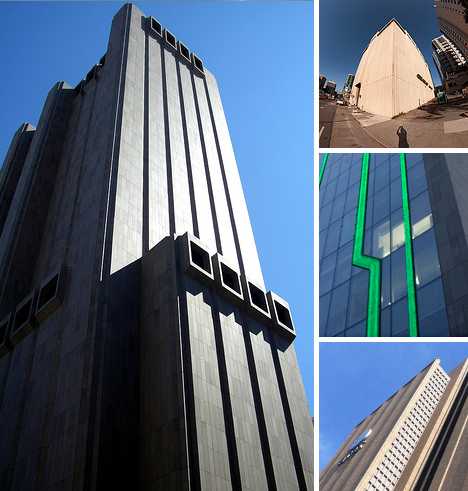
They may not have windows, workers or office space yet telecom infrastructure buildings are an essential part of the urban megalopolis. Their lack of an obvious human presence, though, has made these towering, nondescript boxes of wire and machinery the subjects of mystery, wonderment and conspiracy theories.

AT&T Long Lines Building (33 Thomas Street), Manhattan

AT&T Long Lines building Manhattanhttp://euphues.tumblr.com/post/2837253379/an-image-of-at-ts-long-lines-building-i-took-this

The AT&T Long Lines Building, or as it’s known now by its street address: 33 Thomas Street was designed by architect John Carl Warnecke and opened in 1974. The building was built to last with the expectation that its granite-over-concrete exterior and integral power generators would protect the machinery inside from a nuclear explosion.

AT&T Long Lines Building Manhattan(image via: Michaeln3)

The 550 ft (167.5 m) tall building has only 29 floors because each story has ceilings 18 ft (5.5 meters) high. Odd tubular protrusions on the 10th and 29th floors are for the purpose of ventilating the considerable heat that can build up inside. While often praised for its no-nonsense style that complements other buildings in the area, the stark Brutalist design is a favorite of photographers who wait for lighting conditions that accentuate its “inhuman” aspects.

AT&T Long Lines Building, Kansas City

AT&T Long Lines building Kansas City(images via: Eric Bowers, Wikipedia and KCMeesha)

Another AT&T Long Lines Building, another city, a different design philosophy. Opened in 1976, AT&T’s Kansas City, Missouri telecom building once housed 1,700 workers who manned call centers and helped route the bulk of the region’s long distance phone calls. These days a mere handful of employees rub shoulders with AT&T’s switching equipment in the underutilized yellow brick fortress.

AT&T Long Lines building Kansas City(image via: KCLUVSKC)

At 298 ft (91 meters) and rising 26 stories, the AT&T Long Lines Building at 1425 Oak St. is the 16th-tallest building in Kansas City, so it’s got that going for it, which is nice.

Digital Beijing Building, China

Digital Beijing Building(images via: Galinsky and Coolest Gadgets)

While the USA is still the champ when it comes to wired and wireless telecommunications, the new century has brought new challengers such as China where the Digital Beijing Building offers a new perspective on buildings for non-humans. Designed by Chinese architect Pei Zhu of Studio Pei Zhu/Urbanus, the building opened in 2007 only to be immediately overshadowed by the spectacular neighboring structures built for the 2008 Beijing Summer Olympic Games.

Digital Beijing Building(images via: Oobject and We Make Money Not Art)

The 187 ft (57 meter) tall building wasn’t built for show and compared to its neighbors not everyone is a fan of the structure, either. “It is shaped, cheesily, like a mainframe computer from the 1960s, cut with linear glass strips evoking a circuit board,” sneers Tom Dyckhoff of Times Online. “Four gloomy stone slabs, divided by glass atria, do an excellent Orwellian Ministry of Truth impression. It’s slightly less spirit-crushing inside.” Harsh.

Next Page:
Windows Zero 9 Telecom Infrastructure Buildings

Share on Facebook


[ By Steve in Architecture & Offices & Commercial. ]

[ WebUrbanist | Archives | Galleries | Privacy | TOS ]


WebUrbanist

 
Comments Off on Windows Zero: 9 Telecom Infrastructure Buildings

Posted in Creativity