RSS
 

Archive for January, 2013

Queen Mary 2 Time Lapse Leaving Newport, Rhode Island

07 Jan

Short time-lapse of the Queen Mary 2. Leaving Newport, Rhode Island on September 28 2011. A few dolly moves using my hybrid dynamic perception dolly. Music “The Cabin” by stockfinster Shot with Nikon D300 Nikon D200 Edited on a HP 8560w mobile workstation with Adobe CS 5.5
Video Rating: 5 / 5

 
Comments Off on Queen Mary 2 Time Lapse Leaving Newport, Rhode Island

Posted in Nikon Videos


Dave Gruentzel Photography | 2009-10-19 Jess Vergon – Bay View

07 Jan

Photo shoot with model Jess Vergon and photographers Dave Gruentzel, Alvin Arzaga, and Rob Gustafson in Bay View Wisconsin. www.davegruentzel.com

Time lapse Birch buds opening and forming new leaves in spring. Filmed in my studio over a period of a month. Music “Middle England” by Debbie Wiseman Filmed by Neil Bromhall copyright www.complete-gardens.co.uk Nikon D300 with 55mm lens with growlight and studio flash.


Canon EOS – Black & White Photography with Craig Golding

07 Jan

Professional Photographer, Craig Golding, talks about Black & White Photography (or Monochrome Photography) as well as his EOS Photo5 2010 brief and gives great tips for creative photography. Join in, find the inspiration for your photography and share at www.canon.com.au/worldofeos


ColorTime Out Photoshops Photoshop On Mobile

07 Jan

If you love mobile device camera filters and special effects, you need not keep reading. This post takes a look at a new photo app for iOS (sorry Android users, it’s not ported there yet) devices that got me to switch off of using Photoshop Express, my previously preferred image editing app.

The app is called ColorTime. Yes, a little campy, but it’s what’s on the inside that counts. At first ColorTime looked to me to be yet another gimmicky app to ‘play’ with photos and then share them to the world. I don’t need one of those so I ignored it….then kicked myself when I saw what it can do for my mobile photos.

How It Works
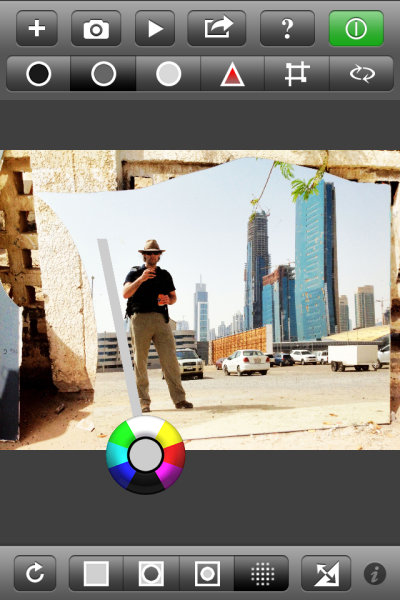
While a fine, free app in its own right, what I find most lacking with Photoshop Express is the ability to control different areas of the image differently. It’s an all or nothing proposition, much unlike all of Adobe’s programs for desktop/laptop computers. I can’t bring up shadow detail or tone down highlights. I also can’t adjust the color temperature in shadows, something Adobe introduce in its latest version of Lightroom 4.0.

ColorTime achieves the ability to control different tonal areas while also attempting to simplify the process. A problem with adding too much functionality into a mobile app, especially for a phone, is the real estate available for controls. Think of all the icons for tools in Photoshop CS6, for instance, and then try to fit those on an iPhone screen. ColorTime skirts around this problem by allowing for multiple controls with one tool. It looked like this:

That circle allows for cooling or warming of colors as well as lightening and darkening of tones. It is fairly simple to use and once over the initial understanding of the function, it is fun to use. Tap once on the screen and then move around the circle to emphasize each color or tone. Drag away from the circle to increase that effect. Stack changed on top of each other with first applying one, then tapping and applying another effect.

The icons across the top allow users to adjust shadows, midtones and highlights. There is also “play” button where a range of changes will be shown as something of a movie and users can stop the show at any point when they see a rendition they like, without having to figure out all the enhancements to get there. Also on the top panel are tools to adjust saturation and to perform crops.

Along the bottom are icons to select the whole image, edges or just the middle areas. Photographers can also paint an area they want to change with the circle tool and it’s this function that has me switching sides away from Adobe. I can paint in an area where I want to increase the brightness, but leave the rest of the image alone. This is a more finite way to adjust than using only the Highlight tool at the top. I really like this feature and it is what I have been waiting for from Adobe.
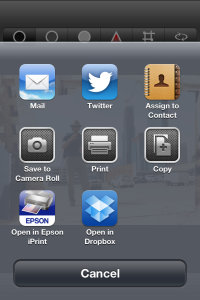
The ‘camera’ part of the app simply uses the iDevices built in app to take pictures. Nothing ground breaking here and on par with Photoshop (although Photoshop Express does have some extra features that can be purchased). Sharing functions use the standard set of iOS tools to push your images onto the world.

In Real Life
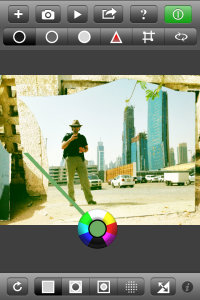
I haven’t had a lot of time to shoot with ColorTime, just about a week, but I certainly have a large amount of photos to edit on my phone. And that’s the joy in using this app. I have been wary of most apps as they rely heavily on filters and flat out changing the original image toward anything that is not what appeared before the camera. That’s not ColorTime.

ColorTime fills my desire to edit images closer to what I saw when shooting. This is, of course, highly subjective territory but having that control to change just one area or the other, fixing what y iPhone’s camera didn’t get right the first time, is key for me. It’s not for every user. If you’re looking for more wonkiness, you can surely create it with ColorTime but that’s not where this app excels.

Some Gripes

Nothing’s perfect and there are some improvements I would like to see come to ColorTime.

1) The ability to undo. Right now, as far as I can see, I have to start completely over with the Reset tool. I can’t just take one step back after making a mistake.

2) I’m not always a straight shooter. I want the ability to rotate my images. Just a little. Or a lot.

3) Sometimes it’s easy to do the wrong thing. Such as, I don’t know what I want to change the very moment I put my finger to the screen, I end up waiting a fraction of a second too long and I activate the “Select” tool to paint in an area instead of using the selection I just had. This took some practice before I was accustomed to the flow.

Examples

Now then, what can it do? All these shots are starting with the iPhone 4s camera. I will first show the original and then my edit. I used a mixture with every image; selecting one area for adjustment then changing saturation differently for different areas. Removing some blue or magenta color cast by selecting the opposing color to highlight.

At the Taj Mahal, Agra, India.

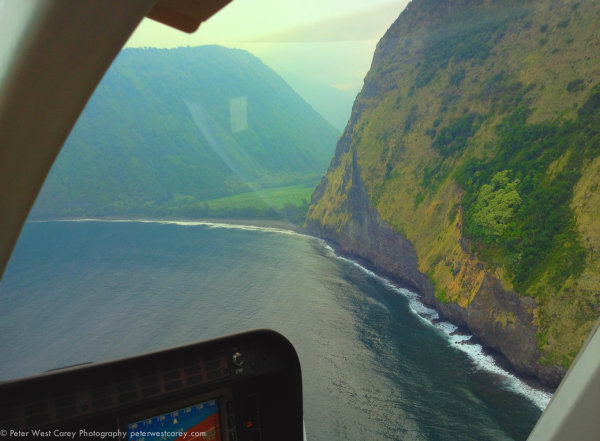
Waipio Valley, Hawaii, The Big Island
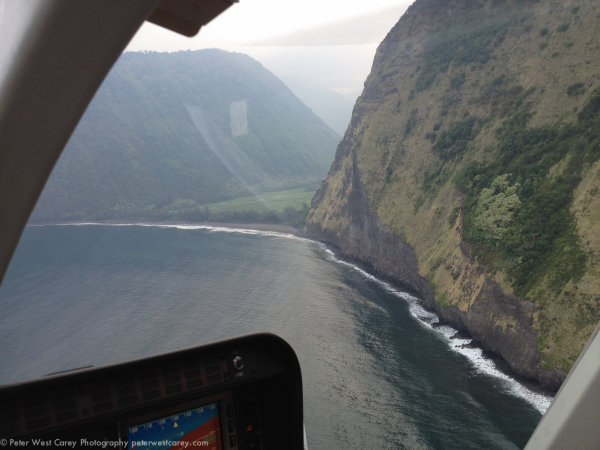
Kilauea Caldera, Hawaii, The Big Island

Conclusion

ColorTime is something I have been waiting for. Mind you, I’m the type of guy who doesn’t like 5,000 filters and effects. I want to adjust the light and dark areas differently and make somewhat finite changes. Colortime gives me control over my images on my iPhone in a way that is intuitive and useful.

You can find ColorTime for free at the Apple App Store.

Post originally from: Digital Photography Tips.

Check out our more Photography Tips at Photography Tips for Beginners, Portrait Photography Tips and Wedding Photography Tips.

ColorTime Out Photoshops Photoshop On Mobile


Digital Photography School

 
Comments Off on ColorTime Out Photoshops Photoshop On Mobile

Posted in Photography


How Shivali and Shahir Met plus some Wedding footage (HD)

07 Jan

A video I made to be played at our wedding when people arrived. I’ve added on some footage and photos from the night at the end as well. (footage is in HD, so click the little ‘Watch in HD’ button) A huge thank you to everyone who helped organise the event, and to everyone who attended – you all made it an incredible night for us. To people who couldn’t make it – we really missed having you there, but would love to catch up with you all some time soon – Shivali and Shahir (For the geeks out there, the video was shot on the Sony EX1 camera – at 720p with a Letus Extreme adaptor and Nikkor lenses. Our photographer was Rob Driessen, and videographers were cameramen extraordinaires Rico Humphreys and Mark Hutchings – edited on Adobe Premiere, motion graphics in Adobe After Effects, some stock material from Andrew Kramers fantastic collection on videocopilot.net. Music from Jon Brion’s Punch Drunk Love soundtrack and The Ruby Sun’s Sea Lion – which is the best album of 2008)
Video Rating: 4 / 5


Penny Wise: 12 Cool Copper-Clad Buildings

06 Jan

[ By Steve in Architecture & Cities & Urbanism. ]

copper_clad_main
Copper’s fiery glow, relative abundance and famed durability have served civilization well for countless centuries. The metal‘s many attributes have also endeared it to architects of all ages, from all ages. Now a new breed of urban designers have warmed to copper‘s practical beauty, employing it to clad buildings of all sizes and why not: it doesn’t just make cents.

//hapo Museum – Tshwane, South Africa

copper-clad //hapo(images via: Phaidon and Freedom Park)

The //hapo Museum (“//hapo” means “hope” or “dream” in the Khoi language) was designed by GAPP, Mashabane Rose Architects and MMA to showcase over 3 billion years of South African history. The 11,000-square-meter (118,405 sq ft) building complex is clad with custom-made copper panels that are meant to age naturally, displaying a rich patina in response to the effects of sun, wind and weather.

copper-clad //hapo(images via: ZArchitecture and Inhabitat)

As the centerpiece of the Freedom Park located in Tshwane, near Pretoria, the //hapo Museum’s core design concept is meant to echo that of a traditional healer’s garden with faux rock outcrops enclosing story-telling areas. “With walls and roof all clad in copper sheeting,” state the architects, “the ‘outcrop’ will, with time, rust to green and merge with the natural landscape.”

Fujitsubo Beauty Parlor – Tokyo, Japan

copper-clad fujitsubo tokyo(images via: The Motor, Architizer and Dezeen)

Should not a beauty parlor itself be beautiful? Call it an exercise in zen philosophy if you like but the Fujitsubo (“barnacle” in Japanese) beauty parlor in Tokyo’s trendy Omotesando district is gorgeous any way you slice it. Credit Japanese architects Archivision Hirotani Studio with this exciting example of copper cladding applied continuously from rooftop to ground level.

copper-clad fujitsubo tokyo(image via: Designboom)

Copper sheeting laid in an overlapping shingle pattern climbs the parlor’s triple-pyramid roof in horizontal layers while the vertical walls show off the traditional staggered brickwork design to best advantage. Bright and reflective when applied, the copper is expected to age incrementally to degrees dependent upon the varying amounts of sunlight and rain received at different areas of the structure.

Evesham Leisure Centre – Worcestershire, England

copper-clad Evesham Leisure Centre UK(images via: Wychavon and Leisure Property)

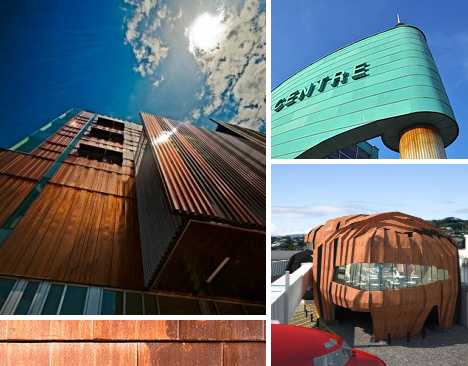
The Evesham Leisure Centre in Worcestershire, England, was designed by Limbrick Limited: Architecture and Design (now part of Roberts – Limbrick Architects) and opened in late 2009. The complex features two swimming pools, a climbing wall, a 100-station fitness room and a beauty salon but it was the building’s striking sea-green copper-clad exterior that garnered it the Vale of Evesham Civic Society’s Merit Award for 2011.Browse our partner-sponsored Glasses, with a variety of options to suit every taste and budget, available to buy online

copper-clad Evesham Leisure Centre UK(image via: TECU Consulting UK)

In keeping with Evesham’s long, intimate and occasionally tempestuous relationship with the River Avon which runs through (and occasionally into) the town, the architects chose to apply pre-patinated copper cladding to portions of the building so that its final tinting would be set from the start. As copper is the longest-lasting exterior construction component in use today, the decision to “go green” from the get-go is perfectly understandable.

Waipolu Gallery and Studio – Oahu, Hawaii

copper-clad Waipolu Gallery Hawaii(images via: Architype Review and PCS)

Completed in 2010, the Waipolu Gallery on the Hawaiian island of Oahu was designed by Peter Bohlin of Bohlin Cywinski Jackson, with “Dirty Penny™” copper cladding provided by Zahner of Kansas City. Stately, subdued but possessed of an ageless solidity, the structure appears as if it grew naturally out of the island’s primordial volcanic substrate.

copper-clad Waipolu Gallery Hawaii(image via: Zahner)

By installing pre-patinated copper, the Waipolu Gallery gets a jump start on the long road to antique verdigris while in the meantime, shows respect for the serious and subdued tone required by a facility of the Waipolu Gallery’s reputation.

Next Page:
Penny Wise 12 Cool Copper Clad Buildings

Share on Facebook


Next Page:
Penny Wise 12 Cool Copper Clad Buildings

[ By Steve in Architecture & Cities & Urbanism. ]

[ WebUrbanist | Archives | Galleries | Privacy | TOS ]


WebUrbanist

 
Comments Off on Penny Wise: 12 Cool Copper-Clad Buildings

Posted in Creativity


Nikon D3000 + Nikkor 18-55 + Nikkor 70-300

06 Jan

Video Rating: 3 / 5

‘Making video’ showing the process to shoot wine glasses along with refraction @ available room (window) light. the final processed photograph can be viewed here on flickr: www.flickr.com
Video Rating: 5 / 5


Agniputhri – Agniputhri 05-10-12

06 Jan

Agniputhri 05-10-12


Nice Visual Art photos

06 Jan

Some cool visual art images:

ICON : MUSCAT INTERNATIONAL ( SEEB ) AIRPORT : The Sultanate of OMAN : A wonderful airport, great facilities and ever expanding in size and quality! Very ENJOYABLE! Great for connections too! WORLD : SENSE : ENJOY! 🙂
visual art
Image by || UggBoy?UggGirl || PHOTO || WORLD || TRAVEL ||
Visit Oman Airports = Muscat

View AVIATION : DETAILS On Black

MUSCAT INTERNATIONAL AIRPORT:

Muscat International Airport (formerly Seeb Airport) (IATA: MCT, ICAO: OOMS) is the main airport in Muscat, Oman. It is the hub for the national carrier Oman Air. The distance from Old Muscat is 30 km and it is 15km from the main residential localities. At the moment the airport is being expanded and modernized. The airport will be upgraded to 12 million-passenger capacity during the initial stage and subsequently to 48 million. The initial stage is scheduled for completion in 2011. The airport was renamed on 11 February 2008 from the previous name, Seeb, to Muscat International Airport.

BY
WIKIPEDIA = MUSCAT INTERNATIONAL AIRPORT

Thoughts about Photography…..

There is a difference between looking at photographs–which has become a common cultural practice in connection with reading newspapers–or seeing the image. The latter refers to reconstructing the photograph by exploring the deep structure of the image–which involves the application of practical knowledge and creative insights and relies on the cultural or historical consciousness of the reader. Looking is the visual routine of readers, seeing is the visual practice of the literate. The professional or artistic disposition of photographers reflects a commitment to the image as an expression of ideas or feelings that are beyond words.

– Hanno Hardt

jitterbug
visual art
Image by maartje jaquet
– featured in:

videoooooh
an exhibition of short video works exploring visual representations, comments, ideas and observations about sport from a wide range of multi- cultural perspectives.
opening if you happen to be in london, the slade school of fine art and the one minutes invite you to the private view on monday 23 july 2012, 6.00pm – 8.00pm!

when and where?
tuesday 24 july – friday 3 august (including weekend 28/29 july)
open to the public 12.00 noon – 5.00pm
slade research centre ucl
woburn square
london wc1h 0ab
www.ucl.ac.uk/slade

four of my videos will be shown at this exhibition:
perseverance
jitterbug
want to dance?
good bye, feet
that last one was made by anna antonova (from russia) and me

– This oneminute was also selected for the ‘Waar Geschiedenis Begint Show’ on november 28th, 2010, in Amsterdam. A Historic event full of videos about Dutch history. Your host of the evening is Steven de Jong. For tickets: www.paradiso.nl

oneminute splitscreen
for the museum of national history
made with archive material

 
Comments Off on Nice Visual Art photos

Posted in Photographs


6. Januar 2013

06 Jan

Ein Beitrag von: ikonoblast


kwerfeldein – Fotografie Magazin

 
Comments Off on 6. Januar 2013

Posted in Equipment