RSS
 

Archive for January, 2013

Just posted: Canon EOS 6D test data and further impressions

18 Jan

canon_eos6d.png

We’ve just posted an extra six pages to our Canon EOS 6D coverage including data and analysis from all our key tests. We’re working towards completing our review and wanted to publish this information as we know a lot of readers are interested in this camera. We’ve had the camera in the office for a couple of weeks and have used this time to expand our impressions of the camera. This will be the last update before the full review is published very soon.

News: Digital Photography Review (dpreview.com)

 
Comments Off on Just posted: Canon EOS 6D test data and further impressions

Posted in Uncategorized


Nikon D3100 Depth of Field.wmv

18 Jan

This video was shot with the Nikon D3100. Lens: Nikon AF-S Nikkor 50mm f1.4 G Visit us at www.artoftheimage.com for more on the Nikon D3100
Video Rating: 4 / 5


4 Uses for Lightroom’s Graduated Filter Tool

18 Jan

The Graduated Filter tool in Lightroom 4 allows you to apply edits across an even gradient. In this article I will explain 4 ways to use the Graduated Filter tool to enhance your photos.

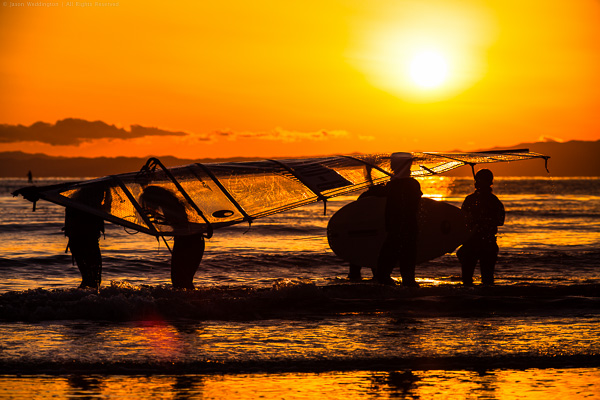
Sunset in Kamakura Japan

I used a Graduated Filter to adjust exposure on the left side of this photo. Read on to see how.

Adding a Graduated Filter to a Photo

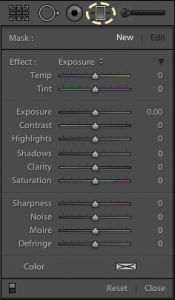
Graduated Filter Controls

  1. Click the Graduated Filter tool, or use keyboard shortcut ‘M’
  2. Dial in the desired settings (exposure, color temperature, etc)
  3. Drag your mouse across the image, starting at the point where you want the filter to be the strongest. An easy way to remember this is that you start dragging your mouse from the area of the photo that you want to change. Create as large a gradient as you need to make the transition subtle.
  4. Adjust the size, position, and angle of the gradient, as well as its settings until you get the result you need.

4 Uses for the Graduated Filter Tool

1. Changing exposure on one side of the frame

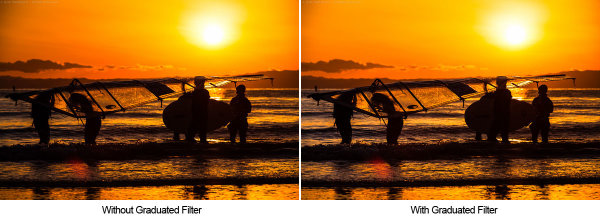
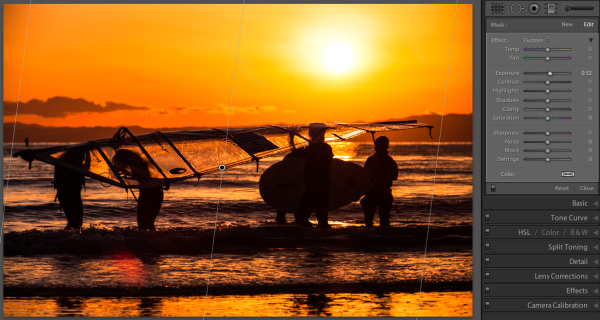
In my own workflow, I use the Graduated Filter to change exposure more than for any other purpose. In Lr4 with the 2012 Process, you can control overall exposure, or target just the shadows or highlights. For this image of some sailboarders on a beach in Kamakura, Japan, I added a Graduated Filter to increase the exposure on the left side of the photo by about half of a stop.

Graduated Filter used to change exposure

I used a graduated filter to increase the exposure on the left side of the image.

Graduated filter to change exposure

This Graduated Filter increases the exposure on the left side of the image by about 1/2 stop

2. Reducing atmospheric haze

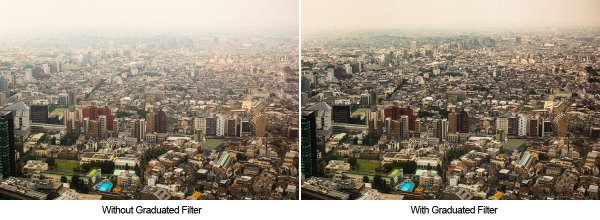
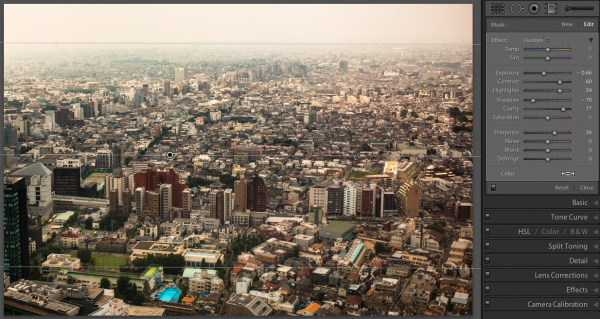
Another good use for the Graduated Filter is in reducing haze in the distance for landscapes and cityscapes. I’ve found that increasing contrast, clarity, and sharpness across a vertical gradient can help reduce haze. Here, a Graduated Filter helps make the best of this image, shot on a particularly hazy day from the Metropolitan Government Building in Tokyo.

Graduated filter used to reduce haze

I used a Graduated Filter to reduce some of the haze and produce a final image with more detail.

Graduated filter to help remove haze

This Graduated Filter helps reduce the haze in the air.

3. Selectively Adjusting White Balance

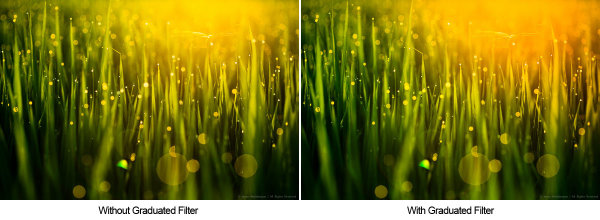
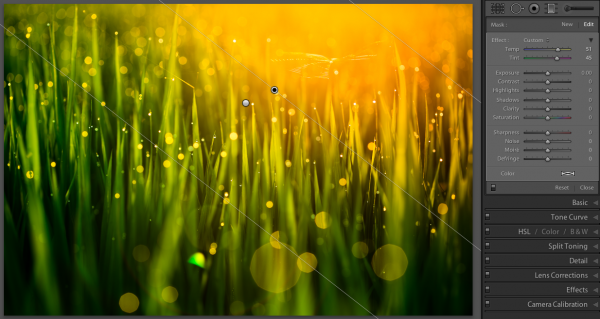
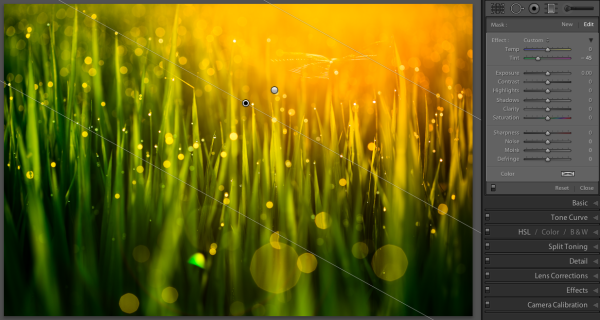
Using the Temp and Tint controls in the Graduated Filter settings, you can adjust white balance across a gradient. This is an image of morning dew on rice plants in Takasaki, Japan. I used two Graduated Filters to separately enhance the sun flare and the rice grass.

Graduated Filter used to selectively change white balance

I used two Graduated Filters to separately emphasize the yellow and green tones.

Graduated Filter to adjust white balance

This Graduated Filter enhances the yellow and pink in the sunrise

Graduated Filter to adjust white balance

This Graduated Filter makes the grass more green.

4. Customizing a vignette effect

This technique builds on #1 above, because we are actually manipulating exposure. But I mention it separately because it’s a combination of two Lightroom effects. In some portraits, I like to use a subtle vignette to draw the eye to the subject. But the standard post-crop vignette is not effective at drawing the eye toward one side of the frame.

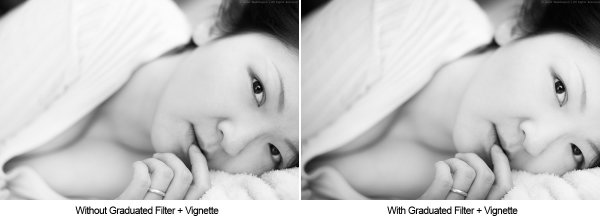
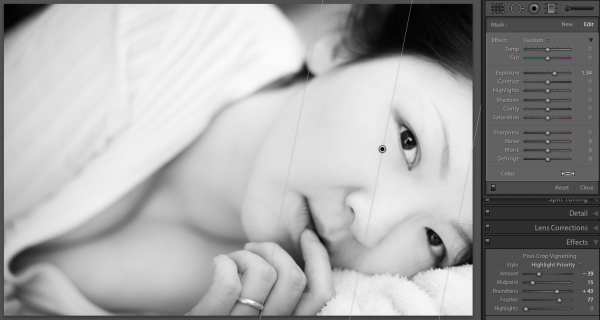
In these cases you can use a Graduated Filter to selectively modify the vignette, as in the natural light portrait below. A strong vignette darkens the outside of the frame, while an exposure gradient lightens the right side of the frame over the model’s face. This has the effect of pulling the viewer’s eye to the subject’s face.

Graduated filter combined with a vignette

I used a Graduated Filter to remove the vignetting on the right side of the frame

This Graduated Filter counters the vignetting on the right side

This Graduated Filter counters the vignetting on the right side

I hope this article has been interesting and informative, and has given you a few ideas about how to use the Graduated Filter tool to enhance your images. I appreciate feedback, please comment below or feel free to connect with me through Facebook or Google+. I’ll do my best to answer questions and reply to comments.

Post originally from: Digital Photography Tips.

Check out our more Photography Tips at Photography Tips for Beginners, Portrait Photography Tips and Wedding Photography Tips.

4 Uses for Lightroom’s Graduated Filter Tool


Digital Photography School

 
Comments Off on 4 Uses for Lightroom’s Graduated Filter Tool

Posted in Photography


What DSLR Cameras I use for My Photography Jobs

17 Jan

bro.mo-am.com https www.facebook.com The big question, seeing as i started off my video blog with that question ‘What cameras i use for videos’. I thought it would be fitting to also let you guys know what cameras i use for my photography jobs. Also i gripe on what shit thing some photographer said to me at a past photo shoot. Let me know of any questions you may have or any shit photographer stories. Peace Music by TecBloc ‘Infidel’
Video Rating: 4 / 5


Inventionland Offices: From Tree Houses to Race Tracks

17 Jan

[ By Steph in Architecture & Offices & Commercial. ]

Inventionland Creative Offices Main

If your office was a pirate ship, would you be more or less likely to slack off? The incredible offices of Inventionland design factory in Pittsburg, Pennsylvania look more like a theme park or movie sound stage than a workplace, keeping their employees inspired to come up with creative ideas of their own. Inventionland invents nearly 2,000 new items every year, putting out one product every three days.

Inventionland Race Track Office

Inventionland Race Track Office 2

Inventionland Cave Office

The 70,000-square-foot space is divided into 16 different ‘sets’, each with a unique theme of its own. There’s a race track with a distinctive checkered pattern, elevated like a miniature arena, with the desks in the center. Caves provide peaceful work spaces for those who need isolation to perform at their best.

Inventionland Castle Office

Inventionland Castle Office 2

Inventionland Treehouse Office

Inventionland Treehouse Office 2

A massive castle has a sense of highly polished Disney-esque luxury, while a treehouse and a waterfall offer tranquil getaways of the sort most cubicle-dwellers only dream of.

Next Page:
Inventionland Offices From Tree Houses To Race Tracks

Share on Facebook


[ By Steph in Architecture & Offices & Commercial. ]

[ WebUrbanist | Archives | Galleries | Privacy | TOS ]


WebUrbanist

 
Comments Off on Inventionland Offices: From Tree Houses to Race Tracks

Posted in Creativity


? Dead Rising 2: Off The Record – Walkthrough Part 27 – Mail Order Zombrex

17 Jan

See The Full Dead Rising 2: Off The Record Show Here!!! ? goo.gl ? Dead Rising 2: Off The Record – Walkthrough Part 27 – Mail Order Zombrex In this episode Chris Jay takes on a crazy mail man with packages that just blow up in your face….how sexy. =-=-=-=-= Director =-=-=-=-= By Chris Jay: http: goo.gl/IBKzm =-=-=-=-=-=-=-=-=-=-=-=-=-= ?Dead Rising 2: Off The Record ? At Captivate 2011, Capcom’s annual press show, the company announced that it was releasing Dead Rising 2: Off the Record, as a reinterpretation of the game with Frank West from the original Dead Rising as the main character. The game was released for the same consoles on October 11 in North America, October 13 in Japan, and October 14 in Europe for a discount retail price. Off the Record is intended as a complete reimagining of Dead Rising 2, with new missions, cutscenes, environments, enemies, and weapons. The photography mechanic from the first Dead Rising is also included. There are technical and system upgrades, such as optimization of loading times and improved network performance. Off the Record also features a new sandbox mode. This allows players to explore Fortune City without the obstacle of time. Off The Record has received mostly positive reviews, with the changes and additions both praised and panned. Developer ? Capcom, Blue Castle Games Publisher ? Capcom Genre ? action-adventure horror-comedy Release Date ? October 11th, 2011 Platforms ? Xbox 360, PS3, Microsoft Windows


fifty two heartbeats [verse one]

17 Jan

A few nice visual art images I found:

fifty two heartbeats [verse one]
visual art
Image by the|G|™
fifty two heartbeats [a requiem for 2009]

the entire 8 here:
www.flickr.com/photos/the-g-uk/sets/72157622990446749/

a new decade. new directions. new connections.

this is a beat poem for the eyes in eight parts.

some sections have been considered, some are purely accidental.

fifty two pieces. diverse. from landscape to dada to abstract to portrait. and beyond.

the people, the artists, have made my year better. their gift to me.

this is a visual echo to them. to you.

a new decade.

may it treat you well.

the|G|™

[NB]

this work is in not in ‘absolute’ order of preference.

though of course, from the beginning, i thought about those who have a deep connection for me, so there is a modicum of ‘hierarchy’.

however, i suddenly remembered people who are dear to me toward the end of the process!! you cannot read too much into your ‘placing’ in the mosaics, and that is as it should be.

if you are not in the mix, i can only apologise. it was quite a lengthy process 😮
i will certainly have forgotten people [i can think of several now] who should have been a part of this process, but a year only contains a finite number of weeks.

you are not forgotten.

the best to all my contacts.

should you be interested in the fundamental reasons for many of my contacts being held in high esteem and great regard, please feel free to cast an eye over my new year video. it explains much with regard to how i view my contacts:

www.flickr.com/photos/the-g-uk/4232387716/

once again.

thank you all, for being who you are.

the|G|™

1. Untitled, 2. Revolutionary Artist, 3. Volumes were written before, 4. China diner, 5. Roma, 6. loco_motion

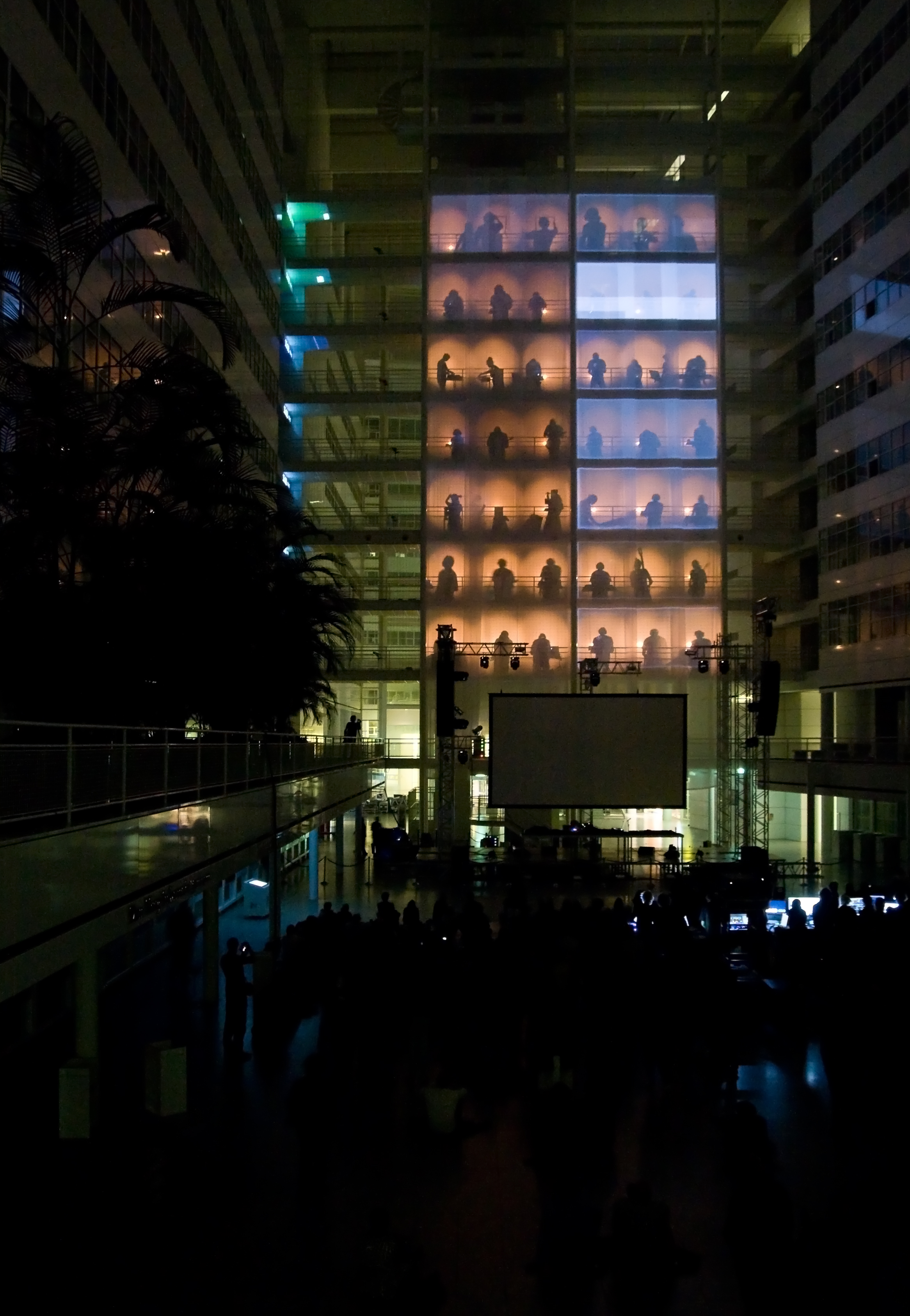
TodaysArt 2010 – Structet
visual art
Image by Haags Uitburo
Eén van de meest geslaagde optredens tijdens TodayArt was de indrukwekkende audiovisuele performance van Structet in het Atrium van het Stadhuis.

Structet is a fluctuating formation constisting of 52 visual and sonic improvisers from the ArtScience Interfaculty and other departments of the Royal Conservatoire in The Hague. The group reformed in september 2010 to develop and perform the sequel to their performance at TodaysArt in 2006.
In the Atrium of the The Hague Town Hall Structet presented a monumental, architectonic vertical matrix of improvised electronic music and projections. An army of hidden musicians on laptops and custom built instruments formed an electronic orchestra that performed on seven floors. A ‘conductor’ behind a mixing board for both image and sound transformed the different inputs into one single piece of music and projections.
Structet adapts itself to the building or spatial structure where it performs, with a preference for the vertical dimension. The structure of the improvisation is based on a study of the proportions, scale, colour, history and function of the location of the performance. This performance was based on a study of architecture of the Town Hall by Richard Meier.

mi 2do libro / my second book: Camino Vegetal – Vegetal Road

visual art
Image by Natalia Romay
ON SALE NOW / YA A LA VENTA!!!!

A book that invites you to immerse yourself in another skin… offers a visual journey through the sensations associated with the vegetal world, with a different harmony. An autonomous universe parallel to our own lives, without stiffness, free. A natural journey to feel.

Se trata de un libro que invita a sumergirse en otra piel… propone dar un paseo visual experimentando un camino de sensaciones ligadas a un mundo vegetal, a una armonía diferente. Un universo autónomo, que se desarrolla paralelamente al nuestro, sin rigidez, libre. Una travesía natural para sentir.

Preview book – previsualizarlo online: www.blurb.com/books/933112

Online store – comprar online: www.blurb.com/bookstore/detail/933112

 
Comments Off on fifty two heartbeats [verse one]

Posted in Photographs


Nikon 28mm, 50mm, & 85mm 1.8G

17 Jan

Read Full Article: btobey www.btobey.com Music By: SpeakerFeature www.speakerfeature.com Brief discussion on the new Nikon 1.8G prime lens lineup. The 28mm 1.8G, the 50mm 1.8G and the 85mm 1.8G.
Video Rating: 4 / 5


30 Examples of Amazing Shadow Art

17 Jan

Making shadow puppets on the wall is something that we are all familiar with, but some people take it to a whole other level. But even beyond the shadow puppets and elaborate hand gestures lies another aspect of playing with shadows. A photographer knows the value of light and darkness, of shadow and depth. These examples show some amazing and Continue Reading

The post 30 Examples of Amazing Shadow Art appeared first on Photodoto.


Photodoto

 
Comments Off on 30 Examples of Amazing Shadow Art

Posted in Photography


Vattenfall Fotopreis 2012

17 Jan

Noch im August hatten wir die Ausschreibung zum Vattenfall Fotopreis beworben. Nun stehen die Gewinner fest und werden am 24. Januar bei C/O Berlin im Postfuhramt ausgezeichnet und ausgestellt. Wir freuen uns, Euch vorab einen kleinen Einblick in die Gewinnerarbeiten geben zu dürfen.

Über 290 Einsendungen machten es der Jury nicht leicht. Am Ende entschieden sie sich für die Arbeiten von:

1. Preis: Stephanie Steinkopf
2. Preis: Hajime Kimura
3. Preis: Karina-Sirkku Kurz
Preis für das beste Einzelfoto: Philipp Plum


Foto: Stephanie Steinkopf, Manhatten – Straße der Jugend, 2011

In einer Serie von acht bis zehn Fotografien sollte das Thema „Spannung“ interpretiert oder metaphorisch ausgelegt werden. Die vier Gewinner haben dies in ihren Arbeiten inhaltlich facettenreich und visuell ansprechend umgesetzt.

Stephanie Steinkopf dokumentiert das Leben in der Plattenbausiedlung Manhattan im Oderbruch – ein ehemaliges Prestigeobjekt der DDR, das heute im Zerfall begriffen ist.


Foto: Hajime Kimura, His traces, 2011

Hajime Kimura fängt bildliche Erinnerungsfetzen an seinen verstorbenen Vater ein.

Karina-Sirkku Kurz visualisiert die Versuche von Menschen mit Essstörungen, auf unterschiedliche Arten ihre inneren Konflikte zu lösen.


Foto: Karina-Sirkku Kurz, Shiftings, 2011

Das Projekt „Berlin Bouncer“ von Philipp Plum versammelt ausgewählte Türsteher und Selekteure aus dem Berliner Nachtleben.

Die Gewinner erhalten neben dem hochdotierten Preisgeld eine Ausstellung, die vom 25. Januar bis zum 24. Februar 2013 bei C/O Berlin präsentiert wird.


Foto: Philipp Plum , Berlin Bouncer, 2012


kwerfeldein – Fotografie Magazin

 
Comments Off on Vattenfall Fotopreis 2012

Posted in Equipment