RSS
 

Archive for December, 2012

Does A Point & Shoot Camera Still Make Sense For You?

17 Dec

With the increase in capability of smartphone cameras, the argument for purchasing a point and shoot camera is quickly becoming moot. This year’s Black Friday sales figures tell the tale, with a reported 36% drop in unit sales compared to 2011, even when the price of devices stayed essentially the same (moving from an average of $ 101 in 2011 to $ 106 in 2012). The writing may be on the wall.

On the other side of the coin, for ‘experienced’ photographers, are the shortcomings with current generation smartphones:

  • Non-variable aperture
  • Little or no optical zoom
  • Poor noise performance at high ISO (very small sensor size)
  • Less pixels (noting that this is not a sole reason to purchased one camera over another)
  • Supplemental lighting (flash) is often sub-par
  • Dynamic Range suffers

Camera companies are already struggling as competition increases year after year and the market shifts. Phones, after all, are more easily updated via firmware (apps) and have the advantage of almost always being in a pocket when a photo needs to be taken. Plus they are currently light-years ahead on the grounds of ‘share-ability’ and connectedness that a new generation of owners seems to be demanding.

I have been without a point and shoot camera since I acquired my iPhone 4s this last Spring. It can’t do everything I want in a Point and Shoot. I want to shoot in RAW and I want optical zoom. But the hurdle to get me to buy a second device, at around $ 300 for the model I would want (likely a ‘tough’ camera for my type of travel and use by my daughter), is too high at this point in time.

What can the camera manufacturers do to entice people like me back to Point and Shoot cameras?

1) Keep making the ‘tough’ models. This will likely be my next purchase.

2) Make sharing very easy. I know this is difficult without putting a cell phone in the camera, but maybe that is the way to go. Or tether the camera off existing cell phones via Bluetooth or Wifi.

3) Keep the form factor small. They have this going for them as smartphones seem to be growing with a desire for bigger screens.

4) GPS is quite handy for me, but not for everyone.

5) The flash on Point and Shoots almost always rivals smartphone flashes. This needs to be highlighted and retained and is a reason I would use one in dark settings, instead of a smartphone.

What about you?

Would you buy a point and shoot camera this year or would you prefer to switch to a smartphone?

And what about those of you who own both? Do you use one more than the other?

Post originally from: Digital Photography Tips.

Check out our more Photography Tips at Photography Tips for Beginners, Portrait Photography Tips and Wedding Photography Tips.

Does A Point & Shoot Camera Still Make Sense For You?

Digital Photography School

 
Comments Off on Does A Point & Shoot Camera Still Make Sense For You?
Posted in Photography


Nikon 28-300mm ED Zoom lens

17 Dec

The 28-300 is the FX version of the wildly popular (and fabulous) 18-200 DX Lens. See it here: goo.gl Here I talk about the IQ, compare images and go through its features. Video shot on D5100: goo.gl (Amazon: goo.gl ) 85mm 1.4g: goo.gl (Amazon: goo.gl ) Join our Flickr forum: www.flickr.com www.facebook.com www.thatnikonguy.com
Video Rating: 4 / 5


Festival of Illuminations, in Roq La Rue Gallery

17 Dec

A few nice visual art images I found:

Festival of Illuminations, in Roq La Rue Gallery
visual art
Image by rougenoirphoto
Live visuals by Jinx ’75 Live Visual Studio (Jonathan Womack), a member of Videa, a Seattle visual art collective.

Festival of Illuminations, in Roq La Rue Gallery
visual art
Image by rougenoirphoto
Live visuals by Jinx ’75 Live Visual Studio (Jonathan Womack), a member of Videa, a Seattle visual art collective.

 
Comments Off on Festival of Illuminations, in Roq La Rue Gallery

Posted in Photographs


Correcting For Under Exposure and Boosting Dynamic Range with an Environmental Portrait in Lightroom 4

17 Dec

Introduction

This tutorial is a demonstration of the SLR Lounge Lightroom 4 Preset System. With over 200 presets, the LR4 Preset System has been critically acclaimed as the most powerful and intuitive preset system available for Lightroom 4. DPS users can get 10% off by using the DPS10 coupon code upon checkout. Click the link above to learn more/purchase.

Overview

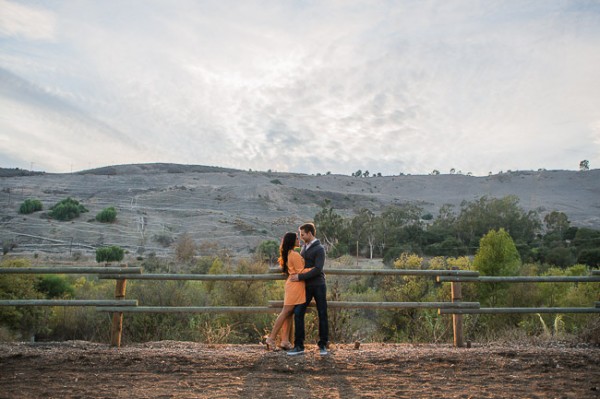
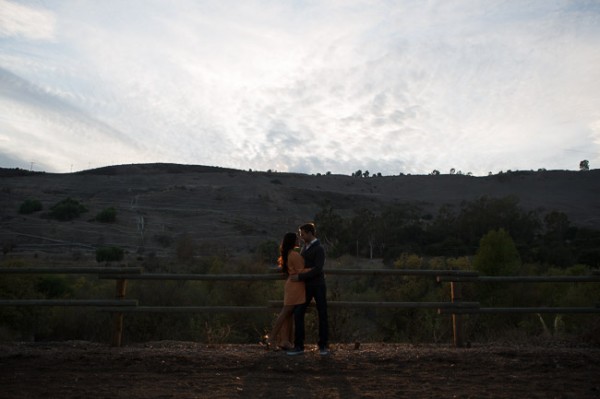
Often times when shooting environmental portraits we “expose to the right”, meaning we are pushing our highlights to the right of the histogram without blowing out too much of our highlights, or clipping too much of our shadows. Depending on the type of scene, this can lead to what looks like an underexposed image directly out of the camera since we are trying to preserve the majority of our highlight detail. However, since most of the range in the highlights and shadows are still retained, we can bring it out through post production. In this step-by-step tutorial, we will demonstrate how to not only correct the exposure in this type of portrait, but also how to increase its dynamic range.

Lightroom 4 Preset System Mixology

This effect can be achieved quickly in under a minute with the SLR Lounge Lightroom 4 Preset System, If you don’t own the preset system, please skip to Step 1 to learn how to do it manually.

1. MY MIXOLOGY > 25 HDR Strong
2. BASE ADJUSTMENTS > 23 Light Soften Skin (Detail)
3. BASE ADJUSTMENTS > 34 Medium Boost (Contrast)
4. BASE ADJUSTMENTS > 62 Light Noise Reduction (Noise Reduction)
5. Add +.30 Exposure
6. 13 Nature | Color Adjustment Brush
7. 12 Sky | Cloud | Ocean Adjustment Brush

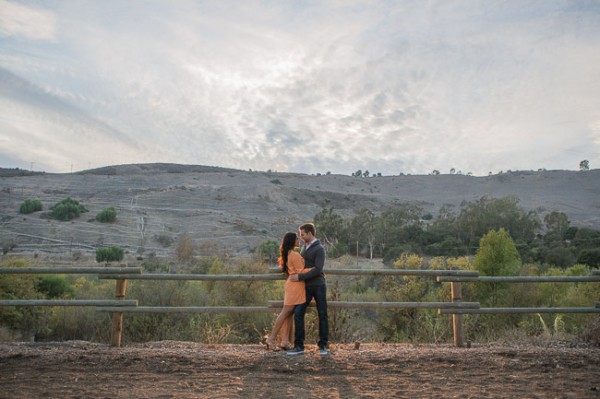
The Original Image

Step 1. Applying our Basic Adjustments

What we usually recommend when working in Lightroom is to work your way down the Develop Module Panels starting from the Basic Adjustment Panel.

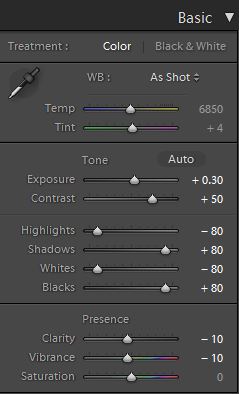
Because the image is underexposed, one of the first steps that we need to do is to correct the exposure by adding +0.30 stop to Exposure. In order to increase the dynamic range, we are also going to bring down the Highlights and Whites by -80 and lift up the Shadows and Blacks by +80. When applying this technique to your own photos, you may be better off dialing in your Highlights, Whites, Shadows and Blacks and then adjusting the Exposure as necessary.

At the same time, when we increase the dynamic range, the contrast flattens out, so we do need to add Contrast to compensate.

Because we are working with a portrait, we want to have nice, smooth skin tone that is not overly saturated, so let’s decrease Clarity and Vibrance by -10. Your Basic Panel adjustment and image should look like the following:

02 Basic Adjustments

Step 2. Adding Additional Contrast via Curves

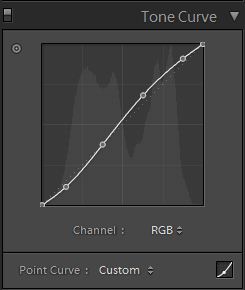
The image can still use some more contrast, so let’s add a subtle contrast-boosting “S” curve.

03 Tone Curve

Step 3. Sharpening and Noise Reduction

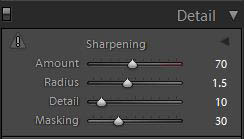
With the SLR Lounge Preset System, we typically apply the following Sharpening setting to our image:

Detail

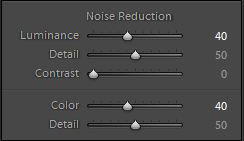
We are also going to add Noise Reduction because we to smooth out any noise that is introduced from the dynamic range boost. We use this setting for Noise Reduction:

Noise-Reduction

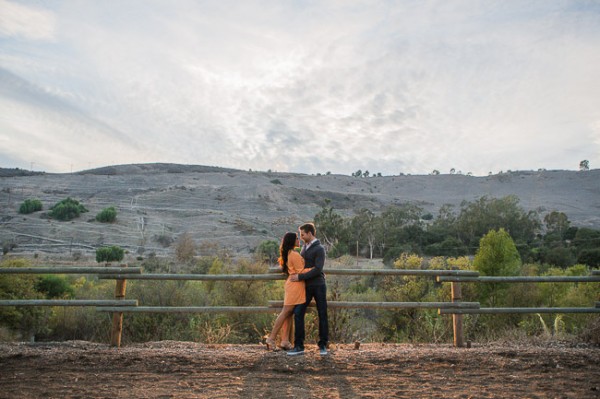
Here is how your image should look like after applying all of these adjustments.

04 Detail

Step 4. Using Adjustment Brushes for Sky and Landscape

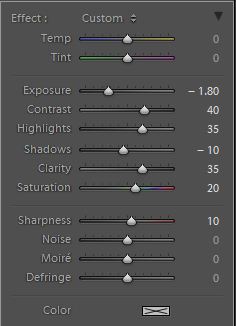
Even though we boosted the dynamic range of this image, the sky is still overblown. The LR4 Preset brush we use for the sky is called “Sky | Cloud | Ocean.” This brush lowers the exposure, highlights, and shadows, and increases contrast, clarity, and saturation in the sky. Here is our settings for this brush.

Sky Cloud Ocean Brush

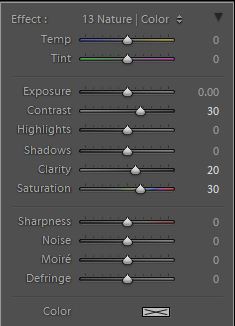
Finally, we want to add more midtone contrast and saturation to the foliage in order to make them pop. Here is how the settings look like for the “Nature | Color” LR4 Preset Brush that we applied to the landscape. This also increases contrast, clarity, and saturation.

Nature Color Brush

Now that all our adjustments have been applied, let’s take a look at the before and after images to compare the original underexposed image against the final image.

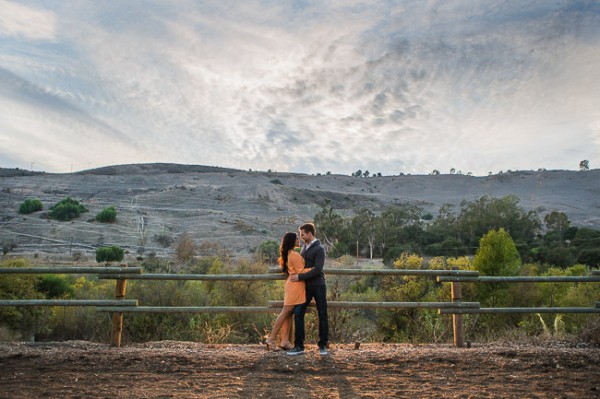
ORIGINAL

HIGH DYNAMIC RANGE PORTRAIT

05 Finished

The Lightroom 4 Preset System

The SLR Lounge Lightroom 4 Preset System is designed to enable users to achieve virtually any look and effect within 3-5 simple clicks. From basic color correction, vintage fades, black & white effects, tilt-shift effects, faux HDR, retouching, detail enhancing, and so much more. The sky is the limit with what has been dubbed the most powerful and intuitive preset system available. Click the link above to learn more/purchase.

Post originally from: Digital Photography Tips.

Check out our more Photography Tips at Photography Tips for Beginners, Portrait Photography Tips and Wedding Photography Tips.

Correcting For Under Exposure and Boosting Dynamic Range with an Environmental Portrait in Lightroom 4


Digital Photography School

 
Comments Off on Correcting For Under Exposure and Boosting Dynamic Range with an Environmental Portrait in Lightroom 4

Posted in Photography


Blog Project: Your Best Photos From 2012

17 Dec

As has become a tradition on the JMG-Galleries blog I’d like to invite you to take part in the 6th annual best photos of the year blog project. This is by far my most popular blog project. Year over year this project has continued to rapid increase in participation with last years participation hitting 289 participants (see Best Photos of 2011, Best Photos of 2010, Best Photos of 2009, Best Photos of 2008 and Best Photos of 2007). Around this time of year people start to ask if I’d be running this project again. The answer clearly is YES! 1. I love this project and I love that so many people get excited about it. 2. It’s a great way exercise to improve your photography (10 Ways to Top Your Best 20xx Photographs). So with out any further delay here is how you take part to submit your best photos of 2012.

How to Participate (Read Carefully)

  1. Review & select your best photos from 2012.
    Note: Photo edit carefully narrowing down your results to your best 10 or 5 photos. Reference Pro Tips: Photo Editing with Gary Crabbe for pointers.
  2. Create a blog post on your web site or a Flickr/500px set containing your best photos from 2012.
  3. Complete the form below by Saturday JANUARY 5th at 11:59PM PST to take part. The following Tuesday I’ll post a link to all submitted sites and photos on my blog. Through out the week I’ll also share the results across all my social media accounts.

Spread the Word!
Feel free to spread the word of this project on Twitter, Facebook, Google+, photo forums you frequent and/or your blogs. All who are interested in taking part are invited.


Thanks again for taking part and spreading word of this years Best Photos of 2011 blog project.

Copyright Jim M. Goldstein, All Rights Reserved

Blog Project: Your Best Photos From 2012

The post Blog Project: Your Best Photos From 2012 appeared first on JMG-Galleries – Landscape, Nature & Travel Photography.


JMG-Galleries – Landscape, Nature & Travel Photography

 
Comments Off on Blog Project: Your Best Photos From 2012

Posted in Equipment


Casemate Europe – COLORWAYS – Case Review – For The iPhone 4

17 Dec

Spread The Word By Clicking On the Link Provided on Twitter (Automatic) : clicktotweet.com Casemate Europe Website : www.case-mate.eu.com Recommended Price: £19.99 MobileFun.co.uk : www.mobilefun.co.uk iPhone 4 Colorways case is all about rediscovering wonder: Reliving your “firsts.” Inspired by perhaps the first time you put a puzzle together? The first time you played with toys? The first time you painted and realized blue+yellow=green?This is a fun, playful, interactive case that is sure to catch the eye of everyone around you! Follow Casemate Europe on Facebook : www.facebook.com Twitter : @CasemateEurope YouTube : www.youtube.com Thank’s forbeing interested in my content,Enjoy the video,Thank’s for watching,Cheer’s 🙂 Follow me on Twitter : twitter.com Subscribe to my Channel : www.youtube.com Email Me @ : pimpyouriphone3g@gmail.com If you have any question’s ?, Then please don’t hesitate to get in touch,I will do my best to answer and help in what ever way i can,Cheers.

www.gopro.com Check out the info about this great camera In this video I tried to re-create the mount designed byKillersushi99(here is the link to his original video ) www.youtube.com I used my GoProHD Hero2 camera with a great option (when you record upside down, you can switch to upside down mode and your video will be automatically flipped). Threfore I could mount the camera upside down and get a very low angle. I tested it on some of my favorite obsticles (long drift, Gateball, Doughnut and Vortex. The mount did great and I am happy to recommed this Idea to you! Thank you all for watching. Don’t hesitate to send me a message. If you wish to talk, you can do so here on the YouTube or come and visit my Facebook page 🙂 www.facebook.com If you would like to keep up with my latest videos, please SUBSCRIBE!!! Car: Chassis – Yokomo Drift package Basic with Stage 2 upgrade Yokomo’s Front One Way Body – HPI’s Mazda RX-8 Tires – SURGING SDT-002C D60 for carpet High speed steering servo (FUTABA BLS-451) Transmitter is also Futaba (4PL-2.4G) NO D box! Original music by MSPDawgs/Kezo
Video Rating: 5 / 5


FRaNCiS MaGaLoNa ? MgA PRaNinG (7 PiNoY SCaNDaL)

17 Dec

Paalam Francis Magalona (1964-2009) In MeMoRy oF Francis Durango Magalona (October 4, 1964 – March 6, 2009) or as he is also known FrancisM, Master Rapper, and The Man From Manila is credited as being the first Filipino rapper in the Philippines to successfully crossover to the mainstream. He is also popularly known as the “King of Pinoy Rap” and is one of the most idolized, celebrated and influential rappers within the genre. A sibling of nine brothers and sisters, Francis Magalona is the son of late Philippine movie screen legends Pancho Magalona and Tita Duran. The late Senator Enrique Magalona was his grandfather. Starting out as a breakdancer in the early 1980s, he followed in his parents footsteps and ventured out into acting, appearing in several Filipino movies; he branched out to emceeing and released the groundbreaking album Yo! in 1990 garnering the nationalistic hit Mga Kababayan (My Countrymen), making Yo! the first commercially released Pinoy rap album in the Philippines.[1] While rapping politically conscious and thought-provoking rhymes in both English and Tagalog, the album was a total success and helped instantly catapult Filipino hip hop from underground to mainstream status and also marked the birth of Makabayang or Nationalistic rap in Filipino hip hop. Francis M. remains one of the most respected emcees within Pinoy RapIn 1992, Francis Magalona released Rap Is FrancisM (1992), which is highly regarded as one of the greatest Pinoy Rap albums. With
Video Rating: 4 / 5


FXOpen Drift Challenge – Minsk 2011 | teaser

17 Dec

FXOpen Drift Challenge Belarus, Minsk 26.06.2011 Full video coming in few days on that channel – www.youtube.com music : Saltillo – A Necessary End www.youtube.com Kris Kross – Jump www.youtube.com camera: canon 550d, canon 60d, EF-S 17-85 mm f/4-5.6 / zenitar 2/50, Soligor 85-205 3.8, Nikkor 35mm f/2.0s, Kaleinar-5N f/2.8 100mm, rig. filmed by: Pavel Gurin Nalivaev Nikita edit: adobe premiere CS5, after effects CS5
Video Rating: 4 / 5


Edit this RAW File – Portrait Photography

17 Dec

froknowsphoto.com This weeks RAW edit brings us this well composed and exposed portrait that just has one issue which is unfortunate. How would you correct the problem in this photo, try your hand at editing the RAW file. froknowsphoto.com click to edit the RAW file
Video Rating: 4 / 5


Park It Up – Laughter

17 Dec

Reckless Tortuga presents… Park It Up Lenny gives stand-up comedy a try… Directed By: Clark Huff Produced by: Luke Baybak Alex Barad Written by: Alex Barad Luke Baybak Michael Jedrzejewski Starring: Luke Baybak Michael Jedrzejewski Justin Mooney Crew: Clark Huff – Director of Photography Davan Firinn- Production Assistant Davan Firinn – Sound Davan Firinn – Props Callan Stokes – Wardrobe Russell Kato – Editing Special thanks to: Alexander Mirecki