
Tutorial which shows how to create stereoscopic content with the Postproduction Plug-in using Adobe® After Effects®. The spatial view is created by re-using multi-ocular material in addition with 3D layers (eg for Text or Logo).
Video Rating: 0 / 5
Tutorial which shows how to create stereoscopic content with the Postproduction Plug-in using Adobe® After Effects®. The spatial view is created by re-using multi-ocular material in addition with 3D layers (eg for Text or Logo).
Video Rating: 0 / 5
Lightroom presets enhance or simplify your develop time with your photographs. Here are a few websites for Lightroom presets that (mostly) offer free presets to be used in Lightroom. If you know of any other sites that I have not listed please comment below and I will add the sites you suggest.
Presetsheaven
Pretty Presets for Lightroom
onOne Software
Lightroom Killer Tips
Ultimate Collection of The Best Adobe Lightroom Presets
Presetpond
Adobe Exchange
Inside Lightroom
Wonderlandpresets
get totally rad
speckyboy
Presetopia
Rule of Thirds Photography
Flickr Discussing Presets
Kubota Image Tools
Camera Dojo
Prophotoshow
Mcg Studios
Rebecca Lily
Gantico
Any suggestions, ideas? Feel free to comment on this article!
Back to Top
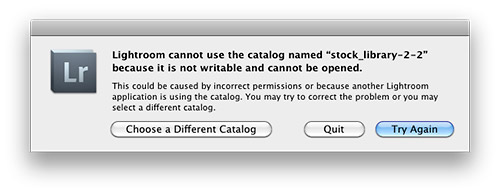
If you use Adobe Lightroom then let me warn you, the following dialog box is the last thing you want to see when all is configured correctly (permissions are correct and another application is not using the catalog). Why? Because it means that your catalog file is inaccessible and may have big problems. The net result being lost work and time to fix the problem. Alas there is something you can do before this ever appears that will save you from spontaneously cursing late in the evening and/or instantly turning your hair white, but first a short story…
Learn From My Experience
This past Friday night at 11pm I was that guy in a darkened room being warmed by the glow of my monitor and cursing at the dialog box pictured above. Innocently enough I thought I’d work on an image or two before bed and brought up Lightroom 3.4.1, but the Zen-like activity of working on an image or two (cue the sound of water trickling over a cascading slope of river rocks with birds chirping above) was abruptly cut short (cue sound of a needle scratching on a record). Panic didn’t set in right away because I backup my Lightroom library on an external hard drive (see my drive setup) and I also employ Apple’s Timemachine backup function for my primary hard drive that houses my Lightroom catalog.
Note: It’s best practice to not keep your working Adobe catalog on an external drive due to degraded performance.
Remembering that I had these two backup mechanisms in place I thought, “Keep it together Jim. Let’s see if we can retrieve things to make this a quick fix before bed.” Then 30 milliseconds later my inner voice countered, “Shit! You’ve avoided backing up your Lightroom library for a at least 2 weeks so you could shut down your computer more quickly. Good job Jim, considering you just made a bunch of new smart collections and keyworded hundreds of photos.” Sure enough I looked and my last catalog backup via Lightroom was made to my external hard drive over two weeks before all my recent work had been completed. Backup plan #1 was a failure purely because I was lazy and impatient.
I then started sorting through my Timemachine drive to find my Lightroom catalog date stamped Thursday (the day before this mess happened). There were multiple backups for Thursday and Friday so I was starting to feel relieved, but then I noticed the file size was half what it should be. I loaded the catalog and sure enough it was what my Lightroom catalog looked like not days or weeks ago, but several months ago. I’ll spare you the cuss filled thoughts that were shooting through my brain at this point. I opened backup after back up for the past week or two and Timemachine had not updated my catalog for what seems to be months…seemingly just duplicating an older copy.
As you can imagine the thought, “Holy shit!” kept repeating in my mind. Instantly I opened a browser window and I started searching on Google “Lightroom cannot use the catalog named” and what I found was limited, very limited in fact. Most of the posts were for version 2 and not version 3. The one thing that was consistent advice was to delete the lrcat.lock file that comes up next to your catalog file ending with lrcat. (Note: Do not delete your catalog file ending in .lrcat that is having problems!!!!) I deleted the lrcat.lock file and reloaded Lighroom but kept getting the same result, seeing that dreaded dialog box. I was resigned to having to eat the loss of a lot of work at this point. At best I’d have to copy and paste metadata from exported files made the past 2 weeks to get back to where I was before my catalog had problems.
Finally as a last resort I decided to restart my computer. The lrcat.lock file was removed and the catalog file didn’t show any signs of corruption you might visually see on a Mac. After my restart I loaded Lightroom and…
everything came up normal. So with out any hesitation I quit Lightroom and at the prompt backed up my catalog via Lightroom’s backup function. I then made a triple backup by copying the verified working catalog to a thumb-drive I carry on my keychain.
Lessons Learned, Please Take Note:
Left Wondering
Granted I didn’t look at every forum entry when searching for a solution to this problem, but those that came up at the top of the search results were not helpful and dated. I was surprised I couldn’t easily find something in the Adobe Labs forum about this that was relevant to version 3.x either. While things are working again I’m not 100% satisfied and I’m going to be researching further what exactly caused my catalog to become inaccessible. Seeing that my Lightroom catalog now spans content on 4 drives and contains information for 110,000 image I’m not keen to risk losing it all.
Technorati Tags: Adobe, Lightroom, backup, error, best practice
.gif)
Copyright Jim M. Goldstein, All Rights Reserved
Adobe Lightroom Lesson to Learn – Backup Your Library

JMG-Galleries – Jim M. Goldstein Photography
Interactively straighten or un-straighten a photograph via Windows Live Photo Gallery 2011
Windows Live Photo Gallery 2011 can quickly attempt to straighten a photograph by pressing one button (“Edit” tab of the Ribbon, “Quick Adjustments” section, “Straighten” button), useful if you don’t perfectly line up subjects in your digital camera’s viewfinder or LCD screen. However, this one-click tool may not always work as desired. For example, you may have a photograph with multiple conflicting elements – if one element appears straight, the others may appear crooked, and you may want a particular element straightened and Photo Gallery 2011 has other ideas.
Alternatively, for artistic reasons you may want to “un-straighten” a perfectly straightened photograph to make elements appear crooked for visual effect. For example, a city skyline photograph may be adjusted by skewing the horizon line to the left or right. In some cases, such as if the photo was taken from the top of a large building, this can make the photo appear as if it was taken from the air by helicopter – some may call this taking an artistic license :)…
Read more at MalekTips.
New Computer and Technology Help and Tips – MalekTips.Com
Sony has announced the WX30, a 5x zoom camera with 16.2MP backlit CMOS sensor. The lens covers a 25-125mm equivalent zoom and uses the company’s ‘By Pixel Super Resolution’ image processing to provide the ‘Clear Image Zoom’ feature claimed to double the effective zoom range at full resolution. It also gains the same ‘Picture Effect’ image filters as the TX55, along with a 3.0" (7.5cm) 920,000 dot, touch-sensitive LCD screen. It uses the CMOS chip’s fast read-out to provide 10 fps continuous shooting in a burst of up to 10 shots as well as 1080i50 HD movie shooting (on the European variant).
News: Digital Photography Review (dpreview.com)
Preston made an adaptation/mash-up of the various versions of the Hatupatu legend for his Major Project 2005. Maori legend kick ass!

2002 – This video is a 3D animation and tells a story about a cyborg/boy trying to get to his cyborg/girl. The girl lives in a self-contained environment – a fort surrounded with deep security gaps. Through a high-tech video-computer system she monitors all outside movement, including the boys’ attempts to get into her fort. He is trying and trying and at last with an incredible inner power he leaps over the fort’s wall and walks into her mansion realizing that now he is locked inside and she is experiencing freedom. Credits: Testtube Productions Lyrics: So lost in a place with no colors no hands Nothing but the light when they land They came from above with a message from you Sent from Venus with ‘Bye, I’m gone for good.’ This small piece of paper and a vision I see Nor one or another I need What’s wrong with my pride my courage my style What’s your reason to disappear from my life Well, I could be loved but to you an enemy I could be an angel but you’d like the beast I could get down on my knees and be your little babe you’d go to Venus an’ I’m here to stay ’cause I don’t know the way (no I don’t) I’m left with a smell and her voice in my head All songs laying torn on the floor I seek thru the dark whether they’ll come again Though stuck with a thought I’ll see them no more My drawings in sand represent my alert Hoping they’ll deflect up to her My smile is defending what inside is poor I’m not gonna stop looking for you Well, I could be loved but to you an enemy I could …
The 3D Film Factory’s stereoscopic 3D production demo – “Wild Africa 3D”. For more information on 3D production and 3D camera systems visit www.3DFilmFactory.com To view in 3D use anaglyph (red/blue) glasses. Produced in conjunction with Foster Brothers Production and filmed on location in South Africa & Costa Rica. Stereoscopic production services and 3D camera rigs provided by 3D Film Factory.
Kids of all ages love learning division by performing along with DJ Doc Roc. Positive lyrics, cool rap music, and high-energy action generate lots of excitement as students learn to solve division facts quickly and accurately. With these fun video songs, kids discover what division is all about, solve story problems, use remainders, and even work long division problems. Once they’ve mastered the basics, learners practice solving division facts with divisors up to nine before hearing the answers. This is the perfect way to learn division concepts and develop speed and accuracy for solving basic division facts. The comical, animated characters help students acquire a strong grasp of the concepts behind division. Students are especially excited to learn the relationship between division and multiplication. Awards: Parents’ Choice Award, Parents’ Guide to Children’s Media, National Parenting Center’s Seal of Approval, and Coalition for Quality Children’s Media Kids First! Endorsement. “This marvelous educational program comes from the company that has been at the forefront of using music to teach and reinforce lessons for so many years now. The video teaches kids tricks to help master division. Cute animated characters give problems both verbally and visually and then allow the child to calculate the answer before revealing it. Talk about instant gratification! Best of all the entire experience is set to upbeat songs that are both catchy and memorable. Several testers told us …
Video Rating: 0 / 5
This is a video slide show of some pictures I took with my D70s, which was the successor to the D70. I got this camera a couple of weeks ago as a backup for my D90. I went to London yesterday and thought I would take some pictures and see how this 5 year old D70s performs. I was actually really pleased with its performance. Every picture that was taken was a handheld shot, and I used ISO 200 during the day, and ISO 800 for the night shots. The only lens used for all the pictures was the 18-70mm nikon kit lens. The D70s has been known to shoot 13 to 14 times what it’s been rated, some have even shot over 150000 shots with it and it’s still going. I have to say this camera is built like a tank.

Some of my Shootings 2010 www.p-foto.net Thanks to my Models Corel; Shooting; Available Light; Strobist; Model; Outdoor; Location; Fotoshoot; Photoshoot; Indoor; Studio; Akt; Nude; One Light Shoot; SB-900; SB-800; SB-600 Nikon D700; D300; Nikon; Amateur; Girls; Luxembourg; Luxemburg; Freichel; p-foto.net; California Sunbounce Keywords: Corel; Shooting; Available Light; Strobist; Model; Outdoor; Location; Fotoshoot; Photoshoot; Indoor; Studio; Akt; Nude; One Light Shoot; SB-900; SB-800; SB-600 Nikon D700; D300; Nikon; Amateur; Girls; Luxembourg; Luxemburg; Freichel; p-foto.net; California Sunbounce,
Video Rating: 5 / 5