Category: Uncategorized

  • Google+, A Bold Step Forward in the World of Social Photo Sharing

    Note: If you are a photographer and on Google+, leave a link to your Google+ url in the comments.

    I’ve spent the past two days playing around in Google’s new social network Google+. Thanks to Brian Rose who works in Google photos for the invite!

    A lot of people have asked me if I have invites to send out. I don’t right now, but I suspect that I will in the near future. They turned invites on last night (when I wasn’t paying attention) but then turned them back off because the demand was so high.

    Most of my initial observations about Google+ will have to do with how it impacts photo sharing, and here I think Google has pushed the envelope to create a compelling photo sharing experience to accompany this new social network. Photo sharing in Google+ is very slick and very polished and works very well.
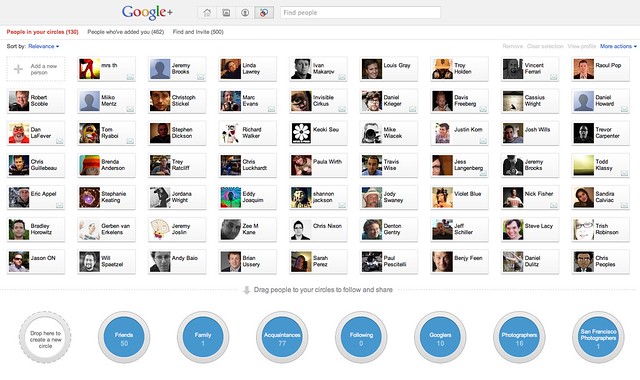
    Adding People to Circles on Google+
    Circles on Google+ are very easy to create and drag people into.

    Observation #1, Circles.

    Everybody and their brother/mother/sister is talking about Circles in the new Google+. Today on Flickr you can only categorize and filter your contacts in two ways, contacts or friends/family. This blows. It feels so 2004.

    Unlike Yahoo/Flickr who seemingly hates innovation, Google+ allows you to categorize and filter your contacts in as many ways as you want. I have a friends circle, a family circle, an acquaintances circle — but I also have a photographers circle, a San Francisco photographers circle… you get the idea.

    The ideas on ways to categorize your contacts are limitless. You can have a bucket for graffiti photographers, and neon photographers, wedding photographers, nature photographers, professional photographers, bloggers, you name it.

    Once you have these circles made you can filter recent activity by that circle. When you add somebody to a circle they don’t know what circle you are adding them to (by design), they just know that you’ve added them. So when I add someone to my “Haters Gonna Hate” circle, they only know that I’ve added them as a contact generically.

    This function is very useful for filtering down photography and photo oriented people on Google+ that you want to follow. I haven’t seen a directory of photographers on Google+ yet, but if you are a photographer and on Google+, leave a link to your Google Profile Page in the comments and I and others can add you and follow your stuff.
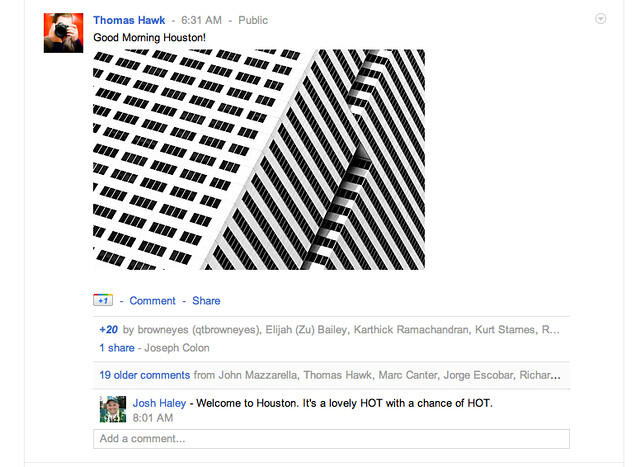
    Thumbnail View on Google+ in Your Stream Looks Awesome!
    What a photo shared on Google+ looks like in an activity stream.

    Lightbox View on Google+ Looks Awesome!
    What a photo in lightbox view looks like in Google+
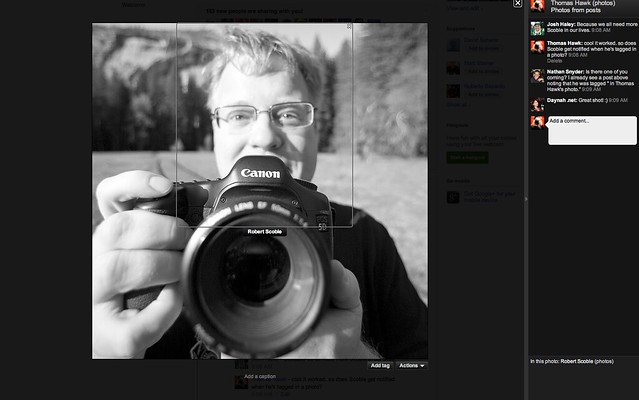
    Peopletagging on Google+
    “Tagging” = Peopletagging in Google+

    Observation #2, Photos shared on Google+ look *awesome*.

    When you upload a photo to Google+ it looks stunning. Your contacts see a nice big oversized thumbnail. It’s not too big and not too small. People can comment or +1 (Google’s version of a “like” or “fave”) the photo from the thumbnail post.

    But the magic happens when you click on the big oversized thumbnail. A huge giant version of the photo comes up and it comes up fast, instantly, no delay at all. This looks better than Facebook’s lightbox view, better than Flickr’s lightbox view, it fills the whole page and is the biggest lightbox view I’ve seen online yet. It’s on a black background and looks *very* elegant. All of the comments are on the right side of the photo and you can click on details to get basic camera EXIF data.

    There is also a button to “tag” the photo, but I think this needs a little more work. Right now when you tag a photo in Google+ it’s more like peopletagging in Flickr or tagging in Facebook. It’s a tool to say who is in the photo. There is no way to add more generic text descriptor tags though or keywords. Also keyword metadata does not seem to be imported anywhere with the photo when you publish it to Google+.

    When you post a photo to Google+ it also puts a copy of the photo into a Google+ album for you in your Picasa account. From what I’ve heard there is no limit (at least yet) to the number of photos you can share on Google+. I’m not sure what Google does if the number of photos posted to Google+ go over your storage limits at Picasa. I haven’t run into that problem yet and I’m pretty close to my cap on a free Picasa account. I suspect that for now at least, Google will let people go over their Picasa storage limits with photos posted to Google+.
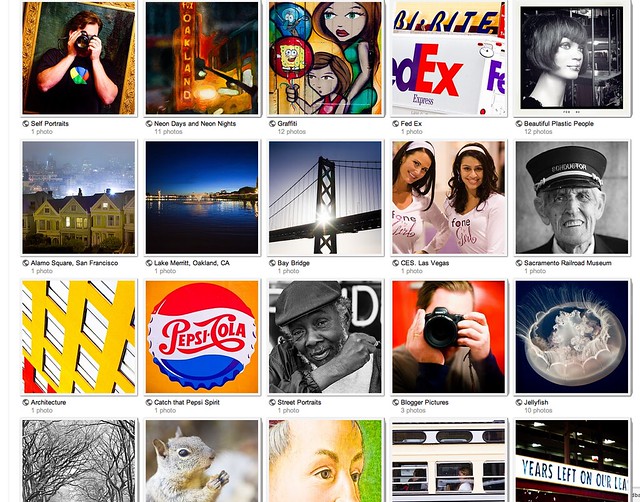
    Album Thumbnail View on Google+
    Under the photos tab you can see Picasa Albums on Google+
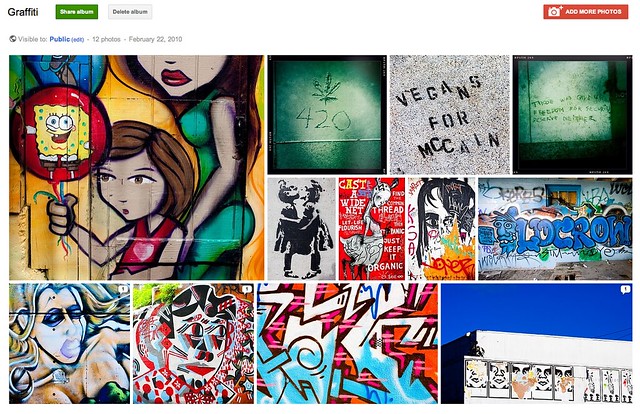
    Album Detail View on Google+
    When you click on an a Picasa album you get a nice mosiac layout on Google+

    Observation #3, Picasa sets shared on Google+ look awesome.

    I love the way Google+ shows your Picasa albums under the “your albums” tab in the photos section. Albums are given bright big thumbnails and if you click through the photos are all resized and sort of fit together on one page in a mosaic like display. This is a very nice, quick way to show an album. If you click through on any of the photos in the album, it takes you back to that big huge lightbox view on black.
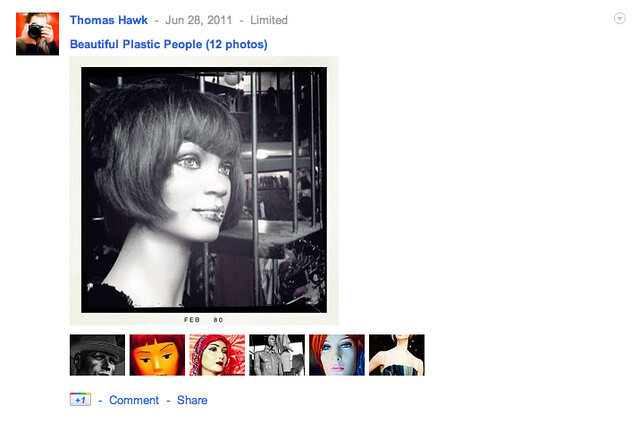
    What a Picasa Album Looks Like When Shared on Google+
    What a shared Picasa album looks like in your activity stream in Google+
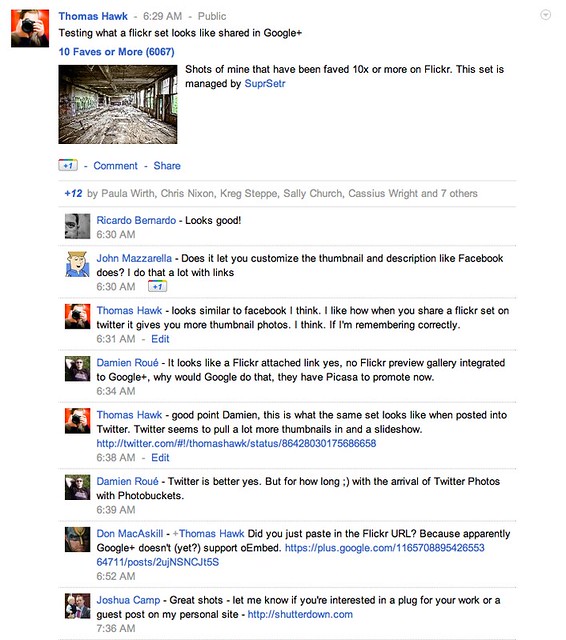
    What a Flickr Set Looks Like When Shared on Google+
    What a shared Flickr set looks like in your activity stream in Google+

    Observation #4, A total lack of Flickr integration.

    I suspect that this is by design, but there seems to be no way to automatically pipe your flickrstream or account into Google+ — not just Flickr, but Twitter, or Facebook, or really any other site. In this way Google+ is very different than from aggregator’s like Friendfeed and Google Buzz. The most you can do to share Flickr data is to manually enter a url. When you manually enter a Flickr url there is no real integration with that set or photo like there is with Twitter. When you share a Flickr set url on Twitter (for example) you get a bunch of thumbnails and even a slideshow of that set, right on Twitter. Not with Google+ though.

    By contrast the Picasa albums shared look very nice, are more interactive with more thumbnails, and also then get shared in your photos section on Google+ as well.

    This seems to me to be a very concerted effort by Google to incent you to host your photos at Picasa instead of Flickr, at least to the extent that you want to promote them on Google+.
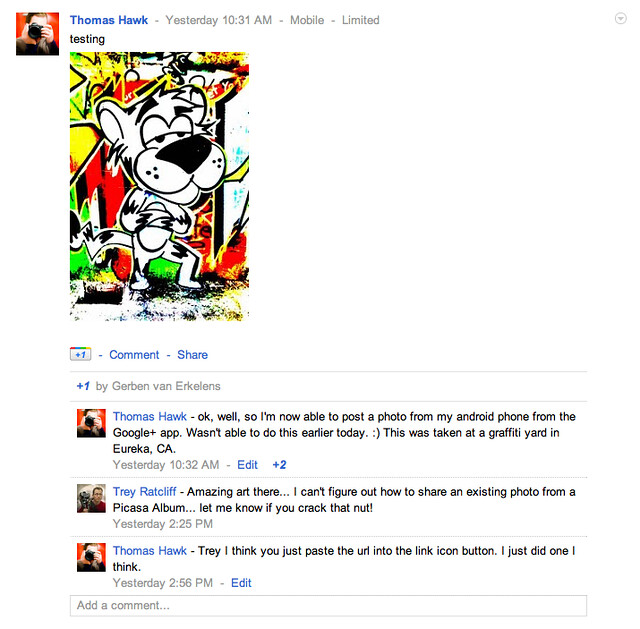
    Directly Sharing a Photo from My Android Phone on Google+
    A photo shared from my Android phone to Google+

    Observation #5. A compelling mobile experience.

    I haven’t tried the iPhone app yet, but the Android Google+ app is *slick*.

    Under the photos tab it has photos from your circles, photos of you, your albums, and from your phone.

    It also has an “instant upload” option where all photos taken on your phone are instantly uploaded to Google+ when you take them. Don’t worry Anthony Weiner, the photos are put into a “private” album where you can later select which ones you want to share and with whom. So if you want to, later you can send some of them just to the “hot chicks who dig me” circle and not to the whole entire world or your “conservative bloggers who hate me” circle.

    Overall I’ve found Google+ to be a compelling way to share photos in an exciting new social network. Google+ is like Google Buzz, Friendfeed and Facebook, except all grown up. The offering is slick and the design is elegant.

    If you want to follow me on Google+ you can do that here. I suspect that I’ll be spending more and more time playing around with photos on Google+ and that it will take away some of my Flickr time going forward.
    Thomas Hawk Digital Connection

  • Would it Be Ok for Me to Sue Scott Kelby for Libel and Settle for $32,500?

    “The guy who did it, who originally did it, was his old roommate.”

    Yesterday afternoon I noticed some unusual comments coming in on my blog. The comments were around a couple of opinion pieces that I’ve written on the Jay Maisel vs. Andy Baio case.

    The comments being directed at me were accusatory and wanting to know why I had not disclosed the fact that Andy Baio and I were college roommates prior to writing my pieces defending him against what I felt was an unwarranted lawsuit by Jay Maisel.

    At first I couldn’t imagine where these allegations were coming from. Andy Baio and I were never college roommates, as one commenter was suggesting. Andy Baio and I didn’t even go to the same college. What’s more, I’ve had very little interaction with Andy Baio in my entire life.

    I seem to recall that I did meet him once at one of these tech press sort of junkets years ago. But I’d hardly characterize Andy Baio and I as “good friends” and I most certainly have never been his roommate.

    But all of this made sense last night when I listened to Scott Kelby’s latest video broadcast which addressed both the Maisel vs. Baio case as well as the blog posts that I’d written.

    And so I was surprised when listening to the video broadcast to hear Kelby state, “the guy who did it (the alleged infringer Andy Baio), who originally did it, was his (Thomas Hawk’s) old roommate.”

    Now as a blogger or journalist full disclosure is important. It’s everything actually. It’s your entire reputation. For me to write strong opinion pieces supporting Andy Baio *without* disclosing that we were good friends and had even formerly *lived together*, well that would be a pretty big omission. It makes me look bad as a blogger not to have disclosed such an important and key piece of information — which is what commenters would rightly be calling me out on in my comments if Kelby’s reporting was true.

    Except that Kelby’s report is blatantly false.

    Not only is it blatantly false, but it’s easily verifiably false in a court of law.

    Certainly as a journalist, and an important one especially in the community of my blog readers, Kelby understands libel laws. Certainly he knows that you cannot report things as fact that are not true and in fact could be verified as false in a court of law. This is not Kelby expressing an opinion. It’s Kelby stating something absolutely as fact about me and my character which is provable as false in a court of law.

    So, would it be ok for me to sue Scott Kelby for libel? Or would the better approach be to simply say, hey, the guy made a mistake, no big deal, and let it go?

    In Kelby’s video show he gives his opinion that Jay Maisel was just defending his copyright when going after Andy Baio with his lawyers and their whopping $ 32,500 settlement. At one point he even reads a viewer comment on the show saying that Maisel settled for too little, that he should have gone for more!

    Kelby would seem to think that if the law allows it, it’s fair game. Andy’s type of use, or the fact that his use was possibly fair use and at worst a simple mistake doesn’t matter. Jay did the right thing by going after him for a pretty hefty settlement.

    Just because the law says you can do something and profit from it, doesn’t always mean that you should do something and profit from it.

    So answer me this. Would suing Scott Kelby for libel simply be me defending my livelihood as a blogger? Would that lawsuit simply be another source of revenue that I ought to be able to count on? Or did Kelby (or his fact checkers) just make a sloppy mistake and one that I should just chalk up to as sloppy journalism and let it slide?

    Thomas Hawk Digital Connection

  • Testing Out Twitter’s New Photo Sharing Feature

    Testing Out Twitter's New Photo Sharing Feature

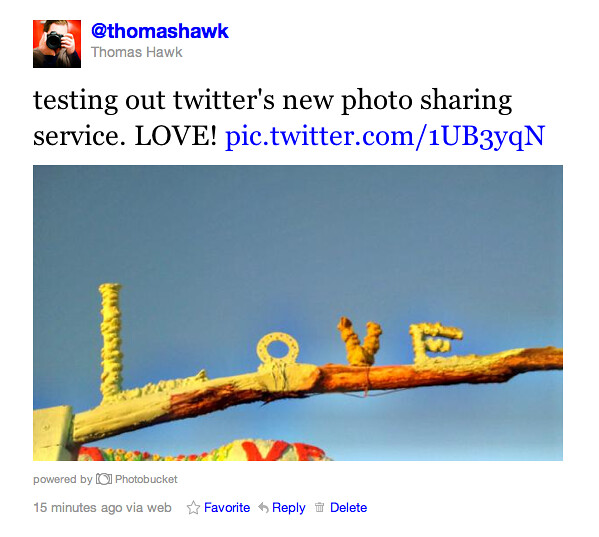
    I just sent my first tweet with Twitter’s new integrated photo sharing feature. I was one of the lucky ones to get early access today to the new feature. :)

    The feature seems pretty straightforward. If you click on the message box there is a little camera icon right below it and you just click that to add a photo. You can then attach a photo and send it to your Twitter. So easy, even a Congressman could use it.

    The first photo I tried didn’t take, because it only supports photos 3MB or smaller. It’s not really meant to be a replacement for Flickr or anything in that regard (Flickr allows photos up to 20MB in size — and some more forward thinking photosharing sites like 500px actually allow photos up to 30MB in size, time to step up your game Flickr) — but with most phone photos being smaller then 3MB, this shouldn’t really be a problem for mobile uploads.

    The second photo I tried sending was a smaller one that I’d taken with my phone (pictured above) and it worked just fine.

    I was impressed with the speed at which the photo had uploaded to Twitter. In the past I’d had problems with twitpic hanging on me when trying to upload, but the photo to Twitter’s own service was fast and flawless.

    The photos are hosted at photobucket, but you don’t have to have a photobucket account to use the service.

    I updated my Android Twitter app on my Samsung (piece of crap) phone to the most current version, but when I clicked on add a photo using that it still sent the photo to twitpic, not to to the new twitter service — so I don’t know if the new service supports the Android app yet — I don’t think it does.

    Supposedly the new Twitter photo service is integrated with the new IOS5 on the iPhone though — which I suppose will be one more reason to ditch my horrible piece of crap Samsung phone and go back to the iPhone when the new ones come out this Summer or Fall — although I’m sure Twitter probably plans on integrating the photo sharing feature into their Android app too at some point in the future.

    I also tried downloading “Snapbucket” to my Android phone (which was the app that the photobucket promo page suggested). I was able to get the app installed (you have to set up a photobucket account) and tried to send a photo to Twitter with it, but it seemed to take a long time. I sent the photo to photobucket (and it’s in my account) about ten minutes ago, but I told it to send it to Twitter and it’s not posted to twitter yet for me. I’ll probably still continue using mobypicture to share mobile phone shots directly until either Twitter updates their Android App or I move over to the iPhone.

    One thing that is nice about this new Twitter photo sharing service, is that like all of your text tweets, the photos that you upload to it belong 100% to you. This is in stark contrast to the sleazy move by Twitpic to try to try and actually sell people’s Twitpic photos (keeping 100% of the money for themselves and giving the photographers 0%). There’s a certain sense of satisfaction that comes with knowing that this new photo sharing service by Twitter is going to end up putting Twitpic and their sleazy photographer rip offs out of commission.

    Overall I’d say the new service is a win for Twitter. It simple, easy to use, and most importantly FAST! Nice work Twitter! This new service is just what I need to upload all those awesome new shots of my buffed out totally waxed new body.

    More on the new service from TechCrunch here.

    Thomas Hawk Digital Connection

  • Treasure: Weekend Photography Challenge

    treasure.jpegThis weekend your photography challenge is to take and share an image on the theme of ‘Treasure’.

    Interpret it anyway that you wish – but the idea was suggested by a couple of readers who suggested photographing something that you view as being a treasure of yours.

    It could be a person, a possession, a place or anything else. I’m sharing the shot to the right because its my son (my treasure) with one of his treasures (Buzz).

    I’m looking forward to seeing some creativity on this one.

    Once you’ve taken your ‘Treasure’ Images – choose your best 1-2, upload them to your favourite photo sharing site and either share a link to them or – embed them in the comments using the our new tool to do so.

    If you tag your photos on Flickr, Instagram, Twitter or other sites with Tagging tag them as #DPSTREASURE to help others find them. Linking back to this page might also help others know what you’re doing so that they can share in the fun.

    Also – don’t forget to check out some of the great shots posted in last weeks Black and White challenge – it was a massive week with hundreds of submissions.

    Post from: Digital Photography School’s Photography Tips. Check out our resources on Portrait Photography Tips, Travel Photography Tips and Understanding Digital Cameras.

    NYIP_DPschool468x60.jpeg

    Treasure: Weekend Photography Challenge


    Digital Photography School

  • If Ikea Made a Ring Flash

    Is there a hole in your life that only a light with a hole in it can fill?

    Are you pining for a ring flash but have neither the money for an Orbis nor the DIY skills to roll your own?

    You may be in luck. The folks over at DIY Photography have just come out with a hybid version. And, as the headline suggested, this is one you assemble yourself.

    It’s made out of the same flexible vinyl material you’ll find in folders and binders, so it is reasonably sturdy but by no means indestructible. I have played with one, and the quality of light is very good. (There is progressive ND filtration at the bottom and the light levels are pretty consistent around the ring.)

    It is a universal (or nearly so) fit. It’s also cheap, at . The only thing it doesn’t come with is an allen wrench and a weird, quasi descriptive Ikea name like Reng Flösh, or maybe Reh Dyye.
    __________

    :: DIY Lighting Kit Ring Flash ::

    -30-


    Strobist

  • South Platte River in Eastern Colorado – Paddling near Masters

    I love paddling the South Platte River in eastern Colorado. The further downstream from Denver the better. Evans to Kersey to Kuner is a popular river segment which can be paddled year around. Below Kuner the river is getting more interesting to me, but it is more difficult to find enough water there due to numerous diversion dams. The South Platte is filling up some big reservoirs including Empire, Riverside, Jackson and North Sterling. Frequency of dams is not really higher than between Evans and Kersey, but they can take much more water.

    Weather and water permitting I am going to extend my South Platte River paddling guide all the way to the Cooper Bridge below Fort Morgan. I have never managed to paddle further downstream. Every 10 miles or so the river is crossed by a highway or county road, so there are many access points. However, planning a paddling trip below Kuner requires checking flow data and some flexibility.

    South Platte River near Masters

    On February 14, 2011 I did a couple mile paddling upstream starting from Masters. You can launch under the bridge (right shore upstream) on county road 87. You need to go over a bridge rail, but not over a fence. This is a new bridge with a plenty of room for parking, In my old reports I was talking about old very narrow bridge and road.

    South Platte River near Masters

    Here, I am looking upstream from the bridge at water flow about 500 cfs. The nearest water gauge is downstream at Weldona.


    The same view of the river at a lower water level, ~300 cfs at Weldona. Six year ago (February 20, 2005), I paddled my Sisson Nucleus kayak down the river from Masters to Orchard. There were sandbars everywhere and water was much clearer. Paddling was rather slow (average moving speed: 5.1 mph), but I had to walk over shallows only once or twice.

    South Platte River near Masters
    South Platte River near Masters
    South Platte River near Masters

    1/4 mile upstream of the bridge there is a diversion dam for the Jackson Reservoir canal. I believe that there is an underwater structure (gate) across the river there which can be lifted, but I have never seen it in an upright position.

    South Platte River near Masters

    Eagle nest just above the bridge. Two bald eagle couples were sitting on trees or flying in the vicinity.


    ch_client = “mmuliasz”;
    ch_type = “mpu”;
    ch_width = 550;
    ch_height = 120;
    ch_color_title = “3c78a7”;
    ch_color_site_link = “3c78a7″;
    ch_non_contextual = 4;
    ch_vertical =”premium”;
    ch_sid = “Chitika Premium”;
    var ch_queries = new Array( );
    var ch_selected=Math.floor((Math.random()*ch_queries.length));
    if ( ch_selected < ch_queries.length ) { ch_query = ch_queries[ch_selected]; }

    Related posts:
    10th Annual Spring Kickoff South Platte Paddling Trip
    New Year Paddling – 22 Miles to Fort Morgan on the South Platte River
    South Platte River below Denver, Colorado – GPS/photo river guide
    Flow Data for South Platte River Basin in Northern and Eastern Colorado
    2009 Rotten Egg Race – Results, Pictures, Handicap System
    2009 South Platte River Marathon
    Paddling on Wet Sand: Discovering the South Platte River in Eastern Colorado
    30+ miles of South Platte River in eastern Colorado
    2010 New Year Paddling – 22 Miles to Fort Morgan on the South Platte River


    paddling with a camera

  • Two Speedlight Grid Spot Systems: Flashpoint and Rogue


    If you need to create a tight beam of light, it’s as easy as wrapping a little cardboard around your flash head. Bam — instant cheapo snoot, to go.

    But what you’ll find with a snoot is that the edges of the beam can be a little abrupt. If you want a nice, feathered transition to that edge, you’ll want a grid.

    I have long been a user of the Honl grids. But there are a couple of other interesting grids floating around that deserve consideration, depending on your particular needs.

    Inside, a quick look at speedlight grids from Flashpoint and Rogue.
    __________

    One key feature both grids have in common, which makes the pretty interesting: They are both convertible, offering multiple beam spreads. This is a neat development, and the Flashpoint and Rogue grids go about it in completely different ways.

    The Flashpoint Snoot Grid


    Leading off is Flashpoint’s version. Flashpoint is an Adorama house brand, so one has to assume this is something they had especially created OEM, just for them, in the magical far east.

    Weighing in at , it is actually a snoot (complete with those rougher beam edges) with two grid attachments (for feathered edges) that cap onto the front. So you have a three-way flexibility designed right into the system.

    IN SYNC:

    1. Good build quality. This thing is metal, and will take some abuse.
    2. Multiple beam widths, done with two small caps that you swap out.

    OUT OF SYNC:

    1. It’s big, and does not collapse down — a little bigger than a loaded-up, jumbo-sized waffle cone. (Mmmmm… waffle cone…)
    2. It is not a universal fit. There are two different sizes, which could be an issue depending on your mix of speedlights.

    SUGGESTED HACK:

    It ships with a rubber band to help the velcro/plastic mount stay on firmly against the flash. I have already ditched this in favor of pieces of sticky craft foam attached to the inside of the mount. One less thing to lose, and very stable.

    More info: Flashpoint Snoot Grid Size A and Size B
    __________

    The Rogue Grid


    This is an interesting combo which gives you three different beam spreads. It is , but it’s a lot of versatility in a small package.

    IN SYNC:

    1. Triple threat: A (45 degrees) B (25 degrees) and A+B (16 degrees)
    2. Universal fit: One size fits all (although I do not know if it’ll fit a monster-head Vivitar 285; prolly not).
    3. It’s small.

    OUT OF SYNC:

    1. At , it is priced at a premium to the Honl grid. You do get multiple beams, but you could also get a 1/4 and 1/8 Honl grid and cover two flashes for a little more. A pick ’em, I guess.
    2.This is a judgement call, but I really would simplify the mount. It is a grippy elastic band that forms into a skirt that then you slide into a ridge around the grid holder.

    I am already thinking about that hack for mine, which brings us to …

    SUGGESTED HACK:

    I plan to drill my mounting flange and attach elastic bands — a typical hack for me. I’ll probably need to build up a little lip on the grid holder (with some gaff) to offset the ridge on the top of my SB-800 face.

    Instant on, instant off, very secure.

    More info: Rogue Grid


    Strobist

  • Waterproof Duffels, Canoe Paddle and Hat …

    I am trying to shoot some paddling oriented pictures in my home studio. Here is the recent composition: two Watershed waterproof duffels with a wooden canoe paddle and a hat. I am going to take it set up outdoors and add a river.

    waterproof duffel, canoe paddle

    You can find more pictures of paddling gear and boats available for purchase (licensing and prints) in my stock photography portfolio.

    Waterproof duffels

    I bought these two Watershed Yukon duffles for the 1994 Watertribe Everglades Challenge, and used them also in the 2006 Ultimate Florida Challenge, two Missouri River 340 races and numerous overnight trips. They fit very tightly side by side in a cockpit of my Sea Wind canoe behind a seat and serve three purposes:
    1. my main cargo storage with an easy access
    2. extra flotation
    3. a “bed” to lay down back to rest or take a nap on water or land

    After years of use and abuse they are still in a good shape, waterproof and airtight.The only drawback, especially for racing: a long seal is somewhat time consuming to close. Watershed has several models in different sizes.

    Hat

    This is my cold season head cover. I like it especially for paddling a kayak with a wing paddle which splashes a lot of water onto paddler’s head.

    Paddle

    I paddle my canoes with Zaveral racing paddles. They are great for paddling, but not so great for photography. The nice wooden Bending Branches Cruiser paddle above travels with me only as a spare in the Sea Wind canoe and appears in action mostly for photography like here on the South Platte. It is much more photogenic than black carbon fiber.


    Buy GoPro HERO Camera at GoPro.com


    paddling with a camera