The post Image Size and Resolution Explained for Print and Onscreen appeared first on Digital Photography School. It was authored by Helen Bradley.
One of the most confusing things for a new photographer is understanding image size, resolution, and printing.
So in this article, I’ll explain what these terms mean.
And I’ll show you how to resize your images depending on what you want to do with them.
Let’s get started.
What is resolution in digital cameras?
When talking about digital cameras, resolution refers to the number of megapixels produced by an image sensor.
This, in turn, generally corresponds to the amount of detail a camera can capture.
So if your camera packs 20 megapixels (often written as 20 MP), it captures less detail than a camera with 30 megapixels, which in turn captures less detail than a camera with 40 megapixels.
But what is a megapixel, really? And how does it affect your ability to print and display photos?
Megapixels and photo size
Technically, a megapixel is equal to 1,048,576 pixels; in reality, camera manufacturers round this number to 1,000,000 when stating how large of an image the camera will capture.
So my camera, for example, captures 14.6-megapixel images, which is around 14,600,000 pixels per image (14.6 x 1,000,000). This information tells you nothing about the actual pixel dimensions of the image – it only tells you the total number of pixels that make up the image.
My camera, like most DSLRs, captures images with an aspect ratio of 1.5. So the ratio comparing the number of pixels along the long edge of the image to the short edge of the image is 3:2.
Each of my full-sized RAW images is 4672 x 3104 pixels in dimension. So by multiplying the number of pixels along the image width by those along the image height, we get the actual number of pixels in the image (4672 x 3104 = 14,501,888). You and I might call this 14.5 MP, but camera manufacturers round this up and call it a 14.6 MP camera.
You can check the width and height of an image using your photo editing software. In Photoshop, you can open your image, then choose File > File Info > Camera Data. The image above shows the resulting information dialog box.
Now, a pixel itself is a single picture element – and for our purposes, it’s the smallest element that your photo can be divided up into. A pixel can only be one color, and a photograph is made up of a grid of thousands of pixels, each of the different colors that together make up your image.
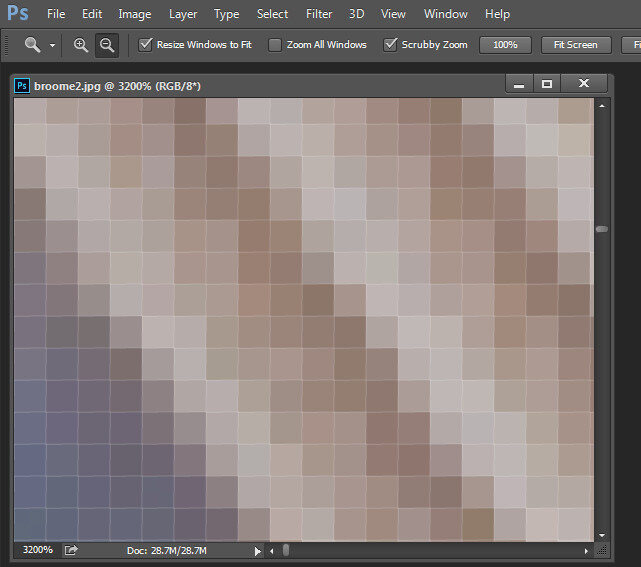
You can see these pixels if you open a photo and zoom in until you see single blocks of color (as shown below). Each of these blocks is a pixel:
Why size is important when printing
When you’re printing an image, you may encounter the term PPI or pixels per inch. This literally refers to the number of pixels in an inch-long line of an image.
Most printing services, and indeed your own printer, will require a certain density of pixels in the image (PPI) to be able to render a print that looks good (i.e., with smooth color transitions so you can’t see each individual pixel).
Typical printing PPI values range from 150 to 300 PPI, although some high-end magazines may require images that are 1200 PPI.
So for example, if you want to print a 4 x 6 inch image at 300 PPI, then you need a file that has at least 4 x 300 (1200) pixels along its short side and 6 x 300 (1800) pixels on the long side. In other words, it needs to be at least 1200 x 1800 pixels in size.
To print an 8 x 10 inch image at 300 PPI, use the same math:
Multiply the printed image’s width and height in inches by 300 pixels. The result is 2,400 x 3,000 pixels, which is the image resolution you need to print an 8 x 10 image at 300 PPI.
Therefore, when cropping and sizing an image for printing, you’ll need to know what PPI the image should be. Your printer manual or printing service should be able to tell you this.
Below is a screenshot from the MpixPro.com website, showing their optimal and minimum image sizes for standard print sizes. Their printer outputs at 250 PPI (but can handle 100 PPI images), though other services may differ, so always check before preparing your images.
Use the crop or resize feature in your software to size your image to the desired width and height and the desired PPI resolution.
Here, an image cropped to a size of 3000 x 2400 pixels is being adjusted from 72 PPI to 300 PPI in preparation for printing at 300 PPI. There is no resampling required, as the image is already the correct dimensions and only the resolution requires adjusting.
Photoshop, like other applications, will also crop an image to a fixed size and resolution if you type your desired values into the options bar when you have the crop tool selected (see below). If your image is smaller than the typed dimensions, then the image will be enlarged using the default resampling method. While it isn’t generally advisable to enlarge images, provided the image is already close to the desired size, enlarging it a little generally won’t cause a noticeable loss of quality.
Sizing for the screen
When it comes to displaying images on the screen, you need far fewer pixels than you do for printing.
This is because the density of pixels on the screen is far less than what is required for printing. For example, a typical monitor is 1920 x 1080 pixels in size; to fill the monitor, you only need an image that is 1920 x 1080 pixels in size. That’s about the same size image you need for a 4 x 6 print at 300 PPI – yet the 1920 x 1080 pixel image displays perfectly on a 23-inch monitor.
The post Image Size and Resolution Explained for Print and Onscreen appeared first on Digital Photography School. It was authored by Helen Bradley.
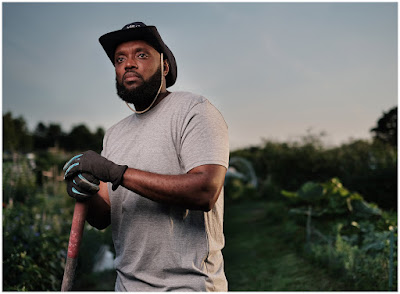
At first glance: a simple, one-light portrait of activist gardener Janssen Evelyn.
Dig deeper: a look at tonal mapping via specular highlights, stretching the range of your modestly powered flash, and how to discover your next project.
The post The World’s First Completely AI-Powered Photo Editor Will Debut Before the Year Is Out appeared first on Digital Photography School. It was authored by Jaymes Dempsey.
Skylum’s Luminar AI, billed as “the first image editor fully powered by artificial intelligence,” will come available before the year is out.
Already, the image editor has created controversy among photographers thanks to its automated, AI-based approach to image editing, with some claiming that Luminar AI’s easy, no-experience-necessary approach is problematic – or even cheating.
And while we don’t know exactly how the program works, Skylum has released several videos showing off some of Luminar AI’s standout features.
Highlights include:
Composition AI, which automatically straightens your images and suggests cropping based on compositional guidelines and feedback from professional photographers
Face AI and Skin AI, which automatically retouch your subjects’ faces for improved teeth, lips, skin, and much more
Sky AI, which allows you to instantly swap skies while automatically adjusting for changes in lighting and color
Atmosphere AI, which lets you enhance your images with weather effects (such as haze, steam, drizzle, fog, and mist)
To see some of these AI effects in action, check out Skylum’s latest video:
While Luminar AI will be offered as a standalone editing program, Skylum’s most up-to-date software, Luminar 4, already packs some AI-based features (including a popular sky-replacement option). But Luminar AI promises to take AI editing to the next level, opening up advanced post-processing effects to a much larger audience.
Will Luminar AI do everything for you?
It doesn’t seem like it. As Skylum explains, you have to make creative choices; Luminar AI will do a lot of editing work for you, but you’ll remain at the helm.
As for the Luminar AI release:
The date is currently unknown, but Skylum promises a “holiday season” release. I’d expect an early December debut, though mid-December or late November certainly isn’t out of the question.
In terms of price, you can currently preorder Luminar AI for a discounted rate:
$ 74 USD for a standard copy of Luminar AI, or $ 139 USD to download both Luminar AI and Luminar 4.
So if Luminar AI’s simple approach to editing appeals to you, make sure you take a look while the discount still lasts! You can view the software here.
Now over to you:
What do you think about Luminar AI? Do you like the idea of AI-based editing? Or does it feel like cheating? And will you purchase the program? Share your thoughts in the comments!
The post The World’s First Completely AI-Powered Photo Editor Will Debut Before the Year Is Out appeared first on Digital Photography School. It was authored by Jaymes Dempsey.
The post Photographing Stars Using a Kit Lens appeared first on Digital Photography School. It was authored by Adeel Gondal.
Nikon D5100 | 18mm | 20 sec | f/3.5 | ISO 1600
Have you seen those amazing starry sky and Milky Way photographs from professional photographers and wondered how to create similar results? Have you never tried because you thought you didn’t have the proper equipment?
Let me tell you, “You are wrong!”
If you own a normal DSLR or mirrorless camera, you can create stunning star photos with only a kit lens.
In this article, I will explain the whole process of photographing stars with your kit lens. I’ll give you step-by-step instructions in the easiest possible way – so that, even if you don’t have much technical knowledge, you can start capturing star photos like a pro.
Let’s dive right in.
The star photography basics
To get started, you need to have following points in mind:
You must shoot in a place away from the city lights. The less light pollution you have, the more chance you’ll have of getting clear stars.
You’ll want a moonless night. Stars can also be shot on a full-moon night, but the brighter the moon is, the more light pollution it creates, and the stars will not be as prominent.
You’ll need a normal DSLR or mirrorless camera with a standard 18-55mm kit lens (such as this Canon lens or this Nikon lens).
You’ll also want a tripod.
You can Google your surroundings to find locations that are far away from the city (check out Dark Sky for a helpful interactive map).
You should know beforehand in what direction, and at what time, the moon is going to rise. That will help you a lot with the composition of your images.
However, a moonless night is always best to shoot stars – so I recommend checking the current moon phase before heading out.
Additionally, you can use a compass app on your smartphone to locate the North Star for star trails. To get an idea of the stars above your location, you can download an app called Star Chart (for iOS or for Android) or Google Sky. Both of these apps also show you the direction of the Milky Way, so you can shoot it directly and get amazing results.
I also recommend checking out PhotoPills; this app offers an incredible suite of features for the beginner (or more advanced!) night sky photographer.
Anyway, these apps are pretty accurate. With their help, you can see Mars, even with your naked eye (I’m sure you’ve seen Mars before, but were likely unable to differentiate it from the surrounding stars).
If you want to plan a future shoot or look for an appropriate time to shoot the Milky Way in your location, you can download the desktop app Stellarium. Just pop in your coordinates, and it will show you the direction of the Milky Way at a specific date and time.
Thanks to Stellarium, you can know the exact time of year the brightest part of Milky Way will be above your location (so you can do some amazing star photography!).
Nikon D5100 | 18mm | 20 sec | f/3.5 | ISO 1600
Key camera settings for photographing stars
Now let’s get to the important part of photographing stars with a kit lens:
Camera settings.
You will need to take control of your camera, so you’ll want to keep it in Manual mode.
Change the shooting mode to Manual and adjust your setup to the following settings:
Focal length
Set your focal length to the widest possible option. In the case of a kit lens, this will often be 18mm.
While you can technically choose any focal length you want, the more you zoom in, the fewer stars you will be able to capture.
Plus, your optimum exposure time before star trails start to develop will decrease as you increase your focal length (see the 500 Rule, discussed in the shutter speed section below).
Aperture
Setting your aperture to the widest option is key here; for my kit lens, this is f/3.5.
By using the widest aperture your lens allows, more light will enter through your lens.
And this will result in brighter stars and a brighter Milky Way!
Shutter speed
If you are only shooting stars and the Milky Way, I recommend a shutter speed of 20 seconds.
Why 20 seconds?
Here’s the answer:
A shutter speed of under 20 seconds will result in less light reaching the camera sensor.
And a shutter speed of over 20 seconds will start to create star trails. In other words, the stars will move visibly across the sky.
In fact, there’s a handy equation for calculating your shutter speed, called the 500 Rule:
The optimum exposure before you start getting star trails is calculated by dividing 500 by your focal length (you’ll need to divide the answer once more, by around 1.5, if you are using a cropped sensor.)
So in the example of an 18mm lens on a cropped sensor, divide 500 by 18, for an answer of 27.78. Then divide this again, by 1.5, to get 18.52, which is roughly 20 seconds.
Make sense?
Nikon D5100 | 18mm | 20 sec | f/3.5 | ISO 1600
ISO
Start by keeping your ISO at 1600. You can then increase it later, depending on your results.
But keep in mind:
The greater the ISO, the more noise there will be in your image.
Now, this does depend on the signal-to-noise ratio of the camera body you are using; high-end cameras tend to offer the best high-ISO noise performance, and even modern consumer cameras feature decent results at high ISOs. But try to boost the ISO on an older camera, and you’ll end up with all sorts of unwanted noise.
Remote shutter release
You’ll want to have a remote shutter release to avoid camera shake from hitting the shutter button.
If you don’t have a shutter release, just use your camera’s 2-second or 10-second timer.
That will minimize any blur in the picture due to camera shake.
You should also switch off any “vibration reduction” or “image stabilization” technology included in your camera or lens, because this technology can actually increase blur during long-exposure images.
Focusing your lens to infinity
After dialing in all these settings, here’s the only important thing left to do:
Focus your lens to infinity.
Now, a kit lens doesn’t have an infinity marker on it, so you’ll need to use hyperfocal distance values to focus your lens.
Here’s what you do:
Mount your camera and lens on a tripod, and focus on any bright object at a distance of 20 feet or more.
(If you are in the dark and struggling to focus, you can point a flashlight toward your camera and use this as a point of focus.)
Once the lens is focused beyond 20 feet, its hyperfocal distance will project to infinity and your stars will be sharp. This will also help get everything in the foreground sharp, too.
Don’t forget to switch your lens to manual focus; otherwise, it will start to hunt for focus when the shutter is pressed.
You may be wondering:
Why is focusing to infinity so important?
If your lens is not focused to infinity, you will capture a Milky Way image. However, the stars will not be as sharp and they’ll appear bigger, like this:
My lens was not focused to infinity.
And this:
My lens was not focused to infinity.
And this:
My lens was not focused to infinity.
You’ll get a similar result if you use a too-long shutter speed and produce star trails.
So make sure you pay careful attention to both your settings and your point of focus.
A quick tip for photographing stars
Once you reach your location, it’s better to first sit in the dark for at least 15 minutes to let your eyes adjust to the surroundings. This will help you see a lot of stars (and even the Milky Way) with your naked eye. It will also help you compose your images better – because it’s easier to create beautiful compositions when you can see!
Plus, enjoying your surroundings for a while is better than simply shooting as soon as you reach the site.
Post-processing your star photos
When it comes to post-processing your star images, there are two things you should know:
First, always shoot in RAW. This will give you a lot of room for post-processing (that won’t affect the image quality).
Second, some post-processing is always needed to get optimum results. You can find many tutorials on how to post-process Milky Way images, including some here on dPS!
Capture stunning star trails
If you are satisfied with your shots, the next step is to capture star trails.
Simply locate the North Star using the Star Chart app discussed above.
Then keep the North Star in your composition, because this is the star that all other stars rotate around.
For star trails, all camera settings will remain the same, except that you can increase the shutter speed to 30 seconds.
Alternatively, you can go with faster shutter speeds (i.e., 20 seconds or faster, especially if there are lights in the area and 30 seconds results in overexposed images).
Keep your camera on its continuous shooting mode, and let it capture as many exposures as possible. The more pictures you have, the more clear your star trails will be. Of course, continuous shooting will only create a series of short star trails; later, you can join all the exposures in Photoshop or use special software to create full trails (such as StarStaX).
For instance, this shot is a combination of 18 separate exposures:
Alternatively, you can capture one shot of the stars and make star trails with it using the HM Technique:
Star trail created in Photoshop using the HM Technique
And you’re also free to have fun with Photoshop:
Fun in Photoshop!
Once you’ve nailed photographing the Milky Way, try including foreground objects for better compositions:
Nikon D7000 | 18mm | 20 sec | f/3.5 | ISO 1600
Photographing stars using a kit lens: conclusion
You’re all set to shoot your own stars!
With the help of a kit lens, you can create some beautiful star photography – the kind that’ll make you happy and impress your friends, too.
You could even try creating panoramas to get more of the Milky Way in your composition, like this:
So happy shooting, and keep me updated with your results! And if you need any help, let me know down in the comments.
The post Photographing Stars Using a Kit Lens appeared first on Digital Photography School. It was authored by Adeel Gondal.
The post Food Photography Techniques and Tips appeared first on Digital Photography School. It was authored by Jonathan Pollack.
Editor’s note: This article was updated in October 2020.
I originally wrote this article in 2009 when I was beginning to take pictures for my wife’s baking blog and various local magazines. Since then, I’ve had a lot of practice, and I’ve honed my food photography techniques.
I’m thrilled to update everyone with what I’ve learned, and I hope that you find the information here helpful when taking pictures of your food.
Food styling
When you’re taking pictures of food, it’s critical that your subject looks as good as it hopefully tastes. If you don’t have the budget to hire a food stylist, it’s important to know some basic styling techniques that can make food look its best.
Make more food than you think you’ll need, and always photograph the examples that look the best. You cannot make a burnt waffle or soggy asparagus look appetizing.
Props can help you set the mood for your food photos. I have a basement full of plates, platters, chargers, cups, glassware, utensils, napkins, tablecloths, surfaces, and cutting boards at my disposal. With those, I can pull together what I need to set a table (or a portion of a table) for a picnic setting, a fine-dining scene, or something in between.
While you don’t need to have a ton of food photography props, I recommend that you at least have a few place settings and utensils, as well as a nice surface to photograph on.
Plating your dish properly can elevate it from mundane to extraordinary. If you aren’t working with a professional chef or food stylist, I recommend you read articles and watch video tutorials about plating as a starting point.
Think about ingredient placement, creating height or depth, adding color, or increasing contrast.
Here are a few plating tips to improve your food photography:
Plate an odd number of the item you’re photographing.
Add garnish where appropriate, such as with soups.
Lean longer flat items against those with some height.
Use edible flowers or fresh herbs to add some contrasting color to your plate.
Food photography composition
When taking pictures of food, you have the advantage of a subject that is stationary. This means you have complete control over the camera’s position and angle, and how close or far away the camera is from the scene.
To get the best composition, I recommend you start with a few food photography techniques:
Use the traditional rule of thirds to yield strong compositions if you don’t have a lot of experience. Mentally divide your frame into a 3×3 grid and place key elements at the gridlines or intersections. Once you’re familiar with the rule of thirds and you can see how it can lend power to your scene, treat it as a suggestion and experiment.
Draw the viewer into your composition. Show part of the plate in your photo rather than the entire dish. Use utensils or napkins to help guide the viewer’s eyes to what you want them to focus on. And remember that the same contrasting elements that help you style a plate will also work in your favor when it comes to composition.
Use negative space to make a powerful photo. Clutter in your scene causes visual confusion, so remove it. The less your viewer is drawn to, the better.
Think of how the dish would best be viewed. Head-on views, overhead shots, and views looking slightly down into the dish are always preferable to looking down at a plate from a 45-degree angle.
Keep your camera level. Early in my food photography career, I felt that angles conveyed a sense of excitement to the viewer. They did – because they made it look like the food was falling off the plate! I stopped rotating my camera, and my photos became much stronger overnight.
Zoom with your lens and your feet. There are times when macro photos of food work well, and there are times when a wider shot conveys a better sense of place and atmosphere. See if background compression helps remove distractions from your dish. Try a number of options with your food and see what works best.
Food photography lighting and exposure
While you don’t need the absolute best equipment to photograph food – I’m using camera equipment that’s a decade old! – you do need to think about how your choice of lighting, exposure, and even camera equipment affect your photo.
Placing your dish with natural light to the side and behind generally yields great results, but it’s also not consistent or reproducible; a passing cloud or thunderstorm can suddenly destroy all of your styling and composition efforts.
If you’re working on taking photos over the span of a few hours and you want them all to look similar, I highly recommend that you use artificial light of some sort. Most food photos I’ve taken indoors are photographed using flashes with diffusion from behind or off to the side of the food. I use reflectors to bounce some light back to the front of the dish, if needed.
If you’re working within a budget, consider getting inexpensive work lights and putting white linens between the lights and your food.
Learn how to use the exposure triangle whether you’re using natural or artificial lighting, and start setting everything on your camera manually. Aim to blur out your background while keeping the foreground nice and sharply focused. And, of course, make sure everything is lit just right.
Equipment for food photography
The best camera equipment in the world won’t help if you haven’t learned what to do with it. I always advise people to start by renting equipment or buying cheap, used gear.
To start off, I recommend a tripod, a camera body that supports detachable lenses, and a medium zoom lens. I encourage you to learn to shoot and edit RAW photos, as you can adjust far more in post-production with them than you can with JPEG images.
If you’re ready to move on from your basic camera setup, I recommend you buy color calibration equipment and lighting. And when you feel confident that you have a good understanding of all of the gear you have and you feel that your current gear is holding you back, finally commit to a full-frame camera system and professional lenses.
Food photography techniques: conclusion
What food photography techniques have worked for you? What techniques have been problematic? Please let me know in the comments!
The post Food Photography Techniques and Tips appeared first on Digital Photography School. It was authored by Jonathan Pollack.
The post Weekly Photography Challenge – Silhouette appeared first on Digital Photography School. It was authored by Sime.
This week we’re looking forward to not seeing the subject of your photographs because the theme is ‘Silhouette’ we hope you’re up for it! #dPSSilhouette is the hashtag we’d like you to use (add it to your post wherever you post it: details at the end of the post)
See ALL of our weekly challenges right here
Not sure how to make a silhouette photograph? Have a look at these articles!
Photograph silhouettes in eight easy steps
18 Shape defining silhouette images
Perfect outdoors silhouettes
Great! Where do I upload my photos?
Simply upload your shot into the comments field (look for the little camera icon in the Disqus comments section) and they’ll get embedded for us all to see. Or, if you’d prefer, upload them to your favourite photo-sharing site and leave the link to them.
Share in the dPS Facebook Group
You can also share your images in the dPS Facebook group as the challenge is posted there each week as well.
If you tag your photos on Flickr, Instagram, Twitter or other sites – tag them as #DPSSilhouette to help others find them. Linking back to this page might also help others know what you’re doing so that they can share in the fun.
Follow us on Instagram?
The post Weekly Photography Challenge – Silhouette appeared first on Digital Photography School. It was authored by Sime.
The post Photography Equipment for Beginners: What to Buy When Starting Out appeared first on Digital Photography School. It was authored by Rick Ohnsman.
You’ve decided you want to get more serious about photography, move beyond just making snapshots with your cellphone, and perhaps even pursue making money from your hobby. You’re ready to start shopping for a better camera and the accessories that go with it.
Many articles about photography equipment for beginners will immediately start recommending makes and models. Or, if you walk into a traditional brick-and-mortar photo store, a salesperson might start showing you equipment, eager to make a big sale.
Your needs should dictate what to buy. Might a simple point-and-shoot be a good starter camera, or will you need a full-frame DSLR with a long lens and a big tripod? Don’t just buy what a salesperson or someone else tells you is “the best.” Ask yourself some important questions.
Ask other photographers, “What should I buy?” and many will launch into a list of equipment they like, probably favoring the make and model of the gear they own.
(Stay far away from “fanboys,” people who will tell you Brand X is the only way to go and only idiots would buy anything else.)
I’m here to suggest that, rather than immediately seeking a make/model answer to the “What should I buy?” question, you should instead start by asking yourself some more general questions.
Assessing your needs
Cameras and associated equipment will not make you a great photographer, any more than buying an expensive sports car will instantly make you a winning race car driver. To take that analogy further, why would you plunk down the big bucks for that exotic sports car when all you need is something to drive to the grocery store?
The same goes for simply buying the “latest and greatest” gear because that’s what other photographers are excited about, or because that make/model is the buzz of trade magazines and online photo sites. Porsche sports cars have a great reputation, but do you need one? The new mirrorless cameras from the big-name camera manufacturers are exciting, but are they right for you?
If money is no object (I wish that were my situation!), does that mean you should buy the most expensive, sophisticated camera and all the lenses and goodies to go with it? Will that guarantee you have the “best” and most capable gear that will ensure you make stellar photos?
I hope you don’t just reach for your wallet. Instead, do a little self-assessment and homework first.
You could just buy the top-of-the-line flagship camera from one of the big-name companies and figure it would do everything you’d ever need. But when you’re still learning, the plethora of buttons, dials, knobs, and menus would likely overwhelm you. Then you’d be paying for things you won’t use or understand. The “best” is not always what is best for you.
So, let’s explore the questions you should be asking yourself as we dive into photography equipment for beginners.
What do you already know about photography?
If you’re looking for photography equipment for beginners, here’s the first question you should ask:
What do you already know about photography?
How much knowledge and experience do you already have? Have you only made some “pretty pictures” with a single press of the shutter button on your cellphone? Have you heard of the exposure triangle? Do you understand what ISO, shutter speed, and aperture are and how they interact to control exposure, depth of field, and motion capture? Have you had or might you have an interest in pursuing formal instruction to better learn both the artistic composition of photos and the technical operation of the camera?
What do you already know about photography? Do you understand the exposure triangle? When exploring photography equipment for beginners, your pre-existing knowledge, as well as your interest in learning, should be factors in deciding the right gear for you.
Sure, you can buy a fancier, more expensive camera with the idea that you will “grow into it.” Of course, that more sophisticated camera with buttons, knobs, dials, and cryptic menus could also overwhelm you as a beginner. Sometimes simpler is better, especially when you’re still learning.
On the flip side, a cheap point-and-shoot, highly automatic camera might be easy to learn, but can very quickly create limitations for you as you grow as a photographer.
The real question here is, “How serious are you about photography?”
Do you simply want a camera you will use on occasion, perhaps take on vacation, and that will make good photos with its automatic modes? Or do you plan to make this a serious hobby in which you will invest time, study, and frequent practice? Do you want to dig in and really learn?
What type of photos will you be making?
Cameras don’t make photographs; photographers do. A camera is simply a tool a photographer uses to create a photograph.
In any endeavor, having the right tool for the job makes the work easier and gives improved results. So, when choosing the right camera for your photography, an essential question is, “What kind of photographs do I intend to make?”
I purposely use the word “make” rather than what many people say about “taking photos.” Snapshooters might take photos, seeing something of interest and quickly, without much thought, snapping a shot. Serious photographers, however, are craftspersons, thinking about composition, camera settings, and many other things involved in creating and “making” a photograph.
Whether you just want to take snapshots or make photographs will also influence what kind of equipment you should buy.
So what kind of photos do you want to make? What subject matter is your favorite?
I hear some saying, “I’d like to make all kinds of photos of whatever catches my eye.” So let’s ask the question this way: “What kind of photos do you envision making 80% of the time?” Photos of your kids as they grow up? Formal portraits? Landscapes? Vacation photos? Wildlife photos? There are hundreds of photo genres to explore and, while some camera and lens combinations might be able to handle a greater variety of these, expect to pay more for such photography equipment.
Specialized kinds of photography, such as bird or wildlife shooting where fast camera responsiveness and long lenses are required, will take more specialized gear. Perhaps you want to take photos of your kids playing soccer or engaging in other sports. You might consider an inexpensive point-and-shoot camera, but even if it does have a built-in 10x “superzoom,” will the lag-time between when you press the shutter and when it fires cause you to frequently miss the action? Will the tiny built-in flash have enough power to light your kid at the other end of the basketball court as he hits the winning shot at the buzzer?
Finding the balance between spending enough to have the most versatile equipment and yet not paying for things you will never or only rarely use can be hard. Back to the “80% factor” I mentioned: Buy the gear that will accommodate 80% of your needs. If you suddenly get to photograph that African safari and don’t have the equipment you need, then you can upgrade or, better yet, rent the equipment to handle that unique opportunity.
How will your photos be used?
Before digital photography and the internet, a photograph meant a print. Today, it’s becoming rarer and rarer to see printed photos. Some of these statistics are from 2017, so they’re already dated, but still amazing to consider:
An estimated 1.3 trillion photos are taken each year
75% of those photos are taken with cellphones
Less than 13% of photos are taken with dedicated digital cameras
Approximately 121.5 million digital cameras were sold in 2010; that dropped to 14.8 million in 2019
Over 1.3 trillion photos are being taken each year, the vast majority with cellphone cameras. Just a small percentage of those are printed. If you don’t plan to make prints, do you need a high-megapixel camera?
Do you wonder why companies such as Olympus have folded and even the largest digital camera makers are struggling? Sure, you’re reading this because you intend to continue pursuing digital photography, but the question I’m heading toward is, “What percentage of your images do you intend to print?”
Do you need a high-megapixel camera?
Top-end camera manufacturers like to boast about the high-megapixel cameras they are producing and, yes, these can produce some amazing images. Cameras from the top manufacturers now tout specs showing sensors between 40 and 60 megapixels (with prices to match).
The question is: If the vast majority of the images you shoot are only for display on your monitor or online, do you need such high megapixel counts? You can print a beautiful 300 DPI 16” x 20” print with a 4800 x 6000 pixel (28.8 MP) image.
At the time of writing, the Sony A7R IV is the highest megapixel full-frame camera, and it produces a 9504 x 6336 pixel (60.2 MP) image. Printing that at 300 DPI would give you a nice 20″ x 30″ print, and it would be quite easy to go far bigger than that.
On the other hand, if the largest you’d ever print is 8″ x 10″ (about an A4 size using European standards), a 7.2-megapixel image would be just fine. Most current smartphones produce higher resolution images than that.
If you do intend to make prints, think about how large you’d like to make them. My Canon Pixma Pro-100 can print up to 13″ x 19″. To print at 300 DPI, that means I need a 3900 x 5700 pixel image. My Canon 6D is a 20.2-megapixel camera with a maximum resolution of 5472 x 3648 pixels. 13” x 19” is about the maximum I can go with good quality. There are ways to go larger, but give consideration to your printing needs when purchasing a camera.
I don’t mean to confuse you with math. But I want you to ask yourself the question, “Do I expect to be printing my photos and, if so, how large might I print them?”
Do you need an expensive, full-frame, high-megapixel camera if all you’ll ever do is share your work on social media?
My first digital camera was the 1.2 MP Nikon Coolpix 950. I still have it.Here’s a slightly-cropped image from the Nikon Coolpix 950. The maximum resolution for that camera was 1600 x 1200 pixels, just enough to make a 4″ x 6″ print. If all I wanted to do was post images online or to social media, however, that still would be plenty of resolution. What you intend to do with your photos should be an important consideration when purchasing a camera.
The little Coolpix 950 excelled at macro shots.
Size, weight, and environmental factors
You’ve heard the saying, “The best camera is the one you have with you.” I suppose the corollary to that is, “The worst camera is the one you left at home” (or in your car, or anywhere that is not with you). If you buy a camera (and lenses, and tripods, and other equipment) that becomes a nuisance to bring along, or makes you wish it were smaller and lighter, you’ve probably bought the wrong gear.
Interestingly, many people believed the way to save on size and weight was to move to the latest mirrorless cameras. Yes, mirrorless cameras are marginally smaller and lighter, but lenses for them are not appreciably smaller and lighter. Many mirrorless cameras also draw more battery power, and so the weight saved with smaller equipment is offset by having to carry more batteries. About the only thing that has grown appreciably lighter are photographers’ wallets, because the new smaller, lighter cameras often carry a premium price.
Something else to be considered when shopping for photography equipment for beginners is where and how the camera and accessories will be used. If you’re taking a camera on vacation for travel photos, how much equipment do you want to pack and carry around all day? If you’re a backpacker or outdoorsman, do you want to take a tripod? An array of lenses? Might one of the more sophisticated bridge cameras be a better option for a travel camera?
Another consideration might be the operating environment in which you intend to make photos. If you will frequently be in dusty environments, you may not want a camera with interchangeable lenses. Maybe you frequently shoot in the wet, rain, snow, or in other inclement weather. If so, a camera that is weather-sealed might be worth considering.
Upgradability
If you intend to pursue photography for many years, you will want to give consideration to upgrading your equipment as you improve, as new innovations come along, as you diversify in your shooting, or even as equipment wears out.
Photographers who shoot with interchangeable lenses often find that they soon have more money invested in good lenses than their camera bodies. “Good glass” that can still be used when a camera body is replaced becomes a good investment. Because camera manufacturer lens mounts are usually proprietary to that brand, once you select a make and purchase a few lenses, you will likely want to stick with that manufacturer in the future, rather than sell off everything and start all over.
Once you start buying lenses and accessories, you will soon have invested more than the price of your camera body. Because each camera make typically has its own proprietary mount, picking and sticking with a camera brand makes upgrades less expensive. You’ll be reluctant to switch brands if it means selling off everything and starting over.
New, used, or refurbished?
Some people only want to buy new equipment and, if paying full-price for equipment to get factory-fresh gear with a full warranty is worth it to you, go for it.
But sometimes, when researching photography equipment for beginners, substantial savings can be had by buying well-cared-for, used equipment (with stress on well-cared-for). Here’s a good article from Jaymes Dempsey about considerations when buying used photo equipment, and here’s another by Tom Mason. I have had generally good experiences buying used equipment because I:
Buy from photographers I personally know who take good care of their gear, or
Buy from top resellers such as B&H, Adorama, KEH, and others that check and give their used equipment full inspections, ratings, and even limited warranties, or
Buy directly from manufacturers who service, inspect, sell, and warranty refurbished equipment.
Do you need the “latest and greatest” as a beginner? Do you need new equipment, or might a slightly used and well-cared-for earlier model save you some money and be more than adequate for you?
Excellent savings can often be had by purchasing used when new equipment is just coming out. Photographers with GAS (Gear Acquisition Syndrome) just have to have the latest, greatest thing. Many of these shooters, eager to trade up, are willing to sell their slightly used equipment for bargain prices.
Now, as a beginning photographer, you don’t need the newest cutting-edge equipment, because you likely still have to master the basics. If last year’s top (and now slightly used) camera can be had, helps you learn the basics, allows you to better understand your needs, and fits the bill at a reduced price, so what if you only have it a short while before you upgrade?
Who to purchase from?
Some good advice about buying photo equipment (or anything else for that matter) is the Latin phrase caveat emptor. You likely know that means let the buyer beware.
It used to be that you could walk into a camera store and deal face-to-face with the store owner or at least a salesperson. Even then, you always had to be wary of the unscrupulous salesperson who, once you were pegged as a beginner without much knowledge, would try to upsell you into purchasing far more gear (or more expensive gear) than you really needed. You hoped instead that you’d get a dealer who really wanted to understand your needs and outfit you with the best equipment suited to your budget and needs. This second type of dealer would ask the kinds of questions we’re exploring here, knowing that a satisfied customer would tell others of their good experience and thus bring in more business.
Sadly, these kinds of brick-and-mortar camera stores are becoming rare (the last dealer in my town closed shop about a month ago after 74 years in the photo business). That doesn’t mean there aren’t reputable online dealers who offer good customer service on photo equipment. You just have to do your research. Talk to experienced photographers and ask them where they buy their equipment, who gives good deals, who provides good advice and service, and who honors warranties.
Idaho Camera had been the camera store in my town for 74 years. They closed permanently this past month, a victim of changing economic times, competition with online dealers and, finally, the Covid-19 crisis.
Always be cautious of dealers who have questionable reputations and, even more so, offer deals that are too-good-to-be-true. Often photo equipment manufacturers will require all dealers to offer their equipment at the same price, and so where you shop won’t change the price. Some dealers will thus come up with their own incentives and offer packages of accessories they throw in to sweeten the deal. Look carefully at whether this is really worthwhile. You might get a cheap cleaning kit, a worse-than-nothing tripod, or a shoddy camera bag, stuff that’s not worth it if it tempts you to do business with a shady dealer.
Also, beware of the dealer who tries high-pressure tactics to get you to add on stuff you didn’t initially intend to buy or a questionable “extended warranty.” And beware of “gray market” equipment, which most manufacturers won’t warranty at all.
Using online buying guides
I have refrained from suggesting any specific makes or models targeted as specific photography equipment for beginners. If, after asking yourself the questions I’ve outlined, you think you’re ready to begin looking at specific gear, there are some great places to check out.
Here on the Digital Photography School (dPS) site, check out the Cameras & Equipment section.
Check out the Cameras & Equipment section here on dPS for good information and reviews of photo equipment.
Another place I particularly like is the Digital Photography Review site (DPReview.com) and their Buying Guides section. The Cameras by Use Case pages are great for helping suggest makes and models based on how you intend to use your camera.
I’ve primarily discussed cameras, but if you’re shopping for tripods, lighting equipment, or any other kind of photo accessories, places such as dPS and DPReview offer a wealth of information. There are also forums where you can learn from other photographers about the ins-and-outs of specific gear.
Do be cautious, however. Fanboys and trolls like to hang out in places like that, so don’t just go with the first opinion you read.
The Digital Photography Review site. Cameras by Use Case is great for helping you explore photography equipment for beginners and is specifically geared toward how you intend to use your equipment.
Photography equipment for beginners: The questions to ask
I’ve thrown out a lot of stuff here, so let’s summarize with a list of questions to ask yourself:
What are my needs for a camera (or other photo gear)?
How much do I know about photography?
How serious do I intend to get? Will I pursue learning opportunities?
How often will I use this equipment?
What kind of photos will I be making (use the 80% rule)?
Do I want to specialize in a particular photo genre/subject?
How will I use my photos? (Online? Print? Sell?)
How much resolution (megapixels) do I need?
Is size/weight an important factor?
Where will I use my gear (environmental factors)?
Do I plan to upgrade, add lenses, and add accessories?
Do I want new gear, or might I consider used or refurbished equipment?
Who should I buy from? A store, an online dealer, or a private individual?
Have I done research (via buying guides, and/or discussions with trusted photographers)?
Here, take my money! I guess if money is no object, you might just buy what someone else tells you is the “best.” But, for most of us, research will help you get what you need, and what will be the best tool for the job at the best price.
Now take my money
Some people aren’t much for researching purchases and simply want someone to tell them what to buy. It’s easy to find salespeople perfectly willing to tell you what you “need” and take your money.
I suspect that, if you’ve read this article, you are not one of those people.
So, in writing this guide to photography equipment for beginners, my aim is not to tell you what to buy, but rather to have you ask yourself the right questions. If you do that, you can best make a wise purchase and get the photo tools that best suit your task.
The ultimate objective is that you learn and grow as a photographer, enjoy photography, and make increasingly better photographs. Best wishes!
The post Photography Equipment for Beginners: What to Buy When Starting Out appeared first on Digital Photography School. It was authored by Rick Ohnsman.
The post Manual Exposure Cheat Sheet for Beginners: How to Expose Manually appeared first on Digital Photography School. It was authored by Kevin Landwer-Johan.
Photographers are visual people. Learning is often made easier for us with the help of graphics and images. In this article, I want to break down this classic manual exposure cheat sheet:
Beginner photographers, and even more experienced ones, often think that Manual mode is complicated.
It’s not.
But to learn how to use Manual mode well, you need to understand a few basics. These are the three camera controls that manage exposure:
Aperture
Shutter speed
ISO
You also need to use the exposure meter, LCD, or viewfinder to assist you in choosing the best settings. If you read the light, you can then set your exposure.
This manual exposure cheat sheet will help you understand these few essentials.
All modern cameras have a built-in exposure meter. This tool indicates when you have your settings balanced to achieve a good exposure. In most cameras, it looks something like this:
Some cameras use a number system and a + or – symbol to show the exposure value.
Whatever display method your camera uses, you are aiming to have the meter read “0.” This is the indication you have a good exposure. If the display indicates the exposure is toward the – side, your photo will be underexposed. If it’s showing that the exposure is toward the + side, your photo will be overexposed.
This is a very simplified explanation of the metering system. To gain a more in-depth understanding of how it works, please read this article: Understanding Exposure Metering Modes.
With many cameras, you can also use the rear LCD to help you determine the best exposure settings. Additionally, mirrorless cameras allow you to see the effect of changes you make via the viewfinder.
To discover if your camera has this function, turn on Live View and set your camera to Manual mode. Now adjust your aperture and/or shutter speed. Can you see the brightness value of the LCD change as you do this? If so, you can use your LCD screen and/or viewfinder to help you manage your exposure settings. If you are new to using Manual mode, this method will make learning easier.
Whether you look at the exposure meter graphic or use your viewfinder/LCD to help you choose your settings, treat these as a guide. Your camera does not know what the main subject of your composition is. You must control the exposure so the most important part of your image is well exposed.
Every lens has an aperture. This is an adjustable diaphragm that controls how much light can enter the lens. Each aperture setting corresponds to an f-stop.
A smaller f-stop number indicates more light will enter the lens. A higher number means the opening is smaller and less light will enter.
On this manual exposure cheat sheet, you can see there is a range of aperture settings. The smallest aperture setting, on the left, is f/16. To the right of the graphic is the widest setting, at f/1.4. Not all lenses have the same aperture settings. Some will have wider or narrower minimum and maximum settings.
Along with governing the amount of light that enters the lens, the aperture setting influences depth of field (DOF).
DOF is the amount of the photo that is acceptably sharp. The wider the aperture setting you choose, the shallower the DOF will be. You can see this on the cheat sheet graphic of the person and tree. At f/16, both the person and tree are sharp. At f/1.4, the person is sharp and the tree in the background is out of focus.
A narrow aperture setting allows less light to enter the lens. It also means you’ll have more of your photo in focus. A wide aperture setting allows more light into the lens and the DOF is shallower.
You can adjust the aperture setting to help balance your exposure and control how much of your composition is in focus. The amount of DOF can be used creatively in your photographs.
Inside your camera, there’s a shutter. This typically consists of two “blinds” that open and close when you press the shutter release button. Opening the shutter exposes the camera sensor to light, which allows it to create an image.
The duration the shutter is open for controls how much light will affect the sensor. If the shutter is open for too long, the photo will be overexposed. If the shutter is open for a duration that is too short, the photo will be underexposed.
Your choice of shutter speed can also affect how sharp your photos will be.
If you choose a shutter speed that’s too slow and your camera moves during the time the shutter is open, your photo will be blurred. This is known as camera shake.
If you have a moving subject and use a slow shutter speed, your subject will be blurred. This is known as motion blur.
Using a faster shutter speed will help you avoid camera shake and unwanted motion blur.
In the manual exposure cheat sheet, you can see the graphic of a person running. At a shutter speed setting of 1/1000s, the figure is sharp. At a setting of 1/60s, the figure is blurred a little. At a shutter speed of 1 second, the figure is very blurred. The relationship between how fast your subject is moving and the shutter speed will determine how much blurring occurs.
You can adjust the shutter speed to help balance your exposure and to control blur from camera shake or motion. Motion blur and camera shake, or a lack thereof, can be used creatively in your photography.
ISO settings control how responsive your camera’s sensor is to light. A low number means your sensor is going to be less responsive than when you use a high number.
I prefer to use my ISO as a foundation for my exposure. I generally only adjust it when lighting conditions change significantly.
Outside on a sunny day, you will want to choose a low ISO. Inside or at night, you will want to choose a high ISO.
Unlike your other two exposure settings, ISO has no creative influence on your photos. It will affect the technical quality, though. At higher ISO settings, digital noise will start to appear in your photos. The color and contrast will also tend to flatten out.
In the manual exposure cheat sheet, you can see that lower ISO settings mean the sensor is less responsive compared to higher ISO settings. To avoid seeing digital noise in your photos, always aim to use the lowest ISO setting you can.
Each incremental change indicated by the manual exposure cheat sheet is one “stop.” The term “stop” in photography is the measurement of exposure. Plus one stop means the exposure is doubled. Minus one stop means the exposure is halved.
A stop can be controlled by aperture, shutter speed, or ISO. If you adjust one setting by plus one stop, you can always achieve the same initial exposure by adjusting another setting by minus one stop, and so on.
As you can see on the cheat sheet, the increments I have used for the shutter speed and ISO are clearly half or double the adjacent numbers. The f-stop numbers appear a bit random, however. This is because they indicate the aperture opening size in relation to the lens focal length. But each f-stop setting is either half or double the setting on either side of it.
Manual exposure of your photographs is not so complicated. All you need to do is manage the relationship between the three exposure settings.
The relationship between aperture settings, exposure, and depth of field is plain to see on this cheat sheet. How your choice of shutter speed affects both exposure and blurring is also well illustrated. Keep your ISO in mind and make it as low as you can. But don’t hesitate to alter it when you need to.
Print the manual exposure cheat sheet to make learning and mastering Manual mode a little easier. It will not happen without some commitment and practice.
But once you become familiar with Manual mode and manage your exposures well, your photography will become more creative.
The post Manual Exposure Cheat Sheet for Beginners: How to Expose Manually appeared first on Digital Photography School. It was authored by Kevin Landwer-Johan.
The post 3 Lightroom Tools to Enhance Your Nature and Wildlife Photography appeared first on Digital Photography School. It was authored by Shreyas Yadav.
Do you want to bring out texture in your images of flowers, butterflies, plants, or macro subjects?
Are you looking to remove haze from your beautiful landscape images?
Do you want to reveal fine detail in your wildlife images?
Then you’re in the right place.
Because today I am going to share with you three Lightroom tools for nature photography. I use these three tools to enhance my own nature and wildlife images. And I am sure these tools will be helpful to you, as well.
And the best part is?
All of these Lightroom tools are easy to apply. It doesn’t matter if you are a beginner or an intermediate-level photographer; you can pick up these tools and start enhancing your nature images right away.
Note that these three Lightroom tools can be applied to an overall image (as a global adjustment) or to a targeted area of the image (as a local adjustment).
Let’s do this!
The 3 Lightroom tools for nature photography
Here are the three Lightroom tools that will instantly enhance your nature photos:
Texture
Clarity
Dehaze
To access these tools, head to the Develop Module, find the Basic Panel, and scroll down to Presence:
The Texture, Clarity, and Dehaze sliders in Adobe Lightroom.
Texture
Texture has a subtle sharpening effect. It brings out the finer details.
You can use the Texture tool in Lightroom to subtly add sharpening to flowers, patterns, plants, and more.
By default, the Texture slider is set to “0.” Drag the texture slider to the right to increase the texture effect.
Or drag the Texture slider to the left to reduce its effect.
Here is an example of the Texture slider in action. First, take a look at this chameleon photo without any added texture:
Before applying the Texture slider.
Then, as you increase the texture, the chameleon details appear sharper:
After applying the Texture slider.
Here’s a final before and after:
The effect of the Texture slider (before and after).
Clarity
The effect of the Clarity slider is more prominent than the effect of the Texture slider.
What does Clarity do?
It primarily increases the midtone contrast.
Now, the Clarity slider is set to “0” as a default.
To add Clarity, drag the slider to the right:
The Clarity slider is a useful Lightroom tool for nature photography.
To reduce the effect, drag the Clarity slider to the left.
Since the effect of the Clarity slider is strong, make sure you use Clarity in moderation.
If you capture a well-exposed image with a relatively centered histogram, then the Clarity slider will improve the midtone contrast and can bring out additional details in your picture.
Here’s an image without the Clarity slider applied:
Before applying the Clarity slider.
As well as its corresponding histogram:
The histogram before applying the Clarity slider.
And here’s the image with the Clarity slider applied:
After applying the Clarity slider.
And its corresponding histogram:
The histogram after applying the Clarity slider.
As Clarity increases, the midtone contrast increases, too; notice how the center of the histogram has expanded.
Additionally, after increasing the Clarity, details on the bird have begun to pop.
Dehaze
The Dehaze slider is quite helpful for landscape images.
When out photographing, you may end up with haze in the atmosphere. Additionally, fog or rain will make an image look hazy.
You can use the Dehaze slider to reduce the haze.
To apply the Dehaze effect (and reduce the haze), drag the Dehaze slider to the right:
The Dehaze slider in Lightroom.
To reduce the Dehaze effect (and increase the haze), drag the Dehaze slider to the left.
As you increase the Dehaze effect, haze in the picture will be reduced, and the overall saturation of the image will increase. If the saturation increases too much, then bring down the Saturation slider slightly.
Note that the Dehaze slider will shift the histogram to the left (toward the side of the histogram representing the darker tones in the image).
When I was photographing the scene below, there was mist and drizzle over the forest valley. Here’s the image prior to applying the Dehaze effect:
Before applying Dehaze.
And here’s the same image, but with the Dehaze effect applied:
After applying Dehaze.
As I increased the value of the Dehaze slider, the haze was reduced. The difference between the original and edited images is quite significant.
You can also use the Dehaze slider for early-morning images, wildlife during the winter season, photos captured in the rain, and wildlife captured from a distance.
The elephants pictured below were moving along the riverbank. I was photographing them from a boat at a far distance, it was evening, and there was a slight fog in the atmosphere, hence the image appears a bit hazy:
Before applying Dehaze.
But, thanks to the Dehaze slider, the haze in the picture is reduced:
After applying Dehaze.
The Lightroom tools for local adjustments
There you go!
Those are the three Lightroom tools for nature photography that will instantly enhance your photos.
But here’s one more thing you should know:
Texture, Clarity, and Dehaze aren’t only available as global adjustments. They’re available as local adjustments, too.
You can apply local adjustments using a Graduated Filter, a Radial Filter, or an Adjustment Brush.
As you apply your local adjustments, you can shift the Texture, Clarity, and Dehaze sliders.
Let me give you an example. Here’s an unedited image:
After making global adjustments in Adobe Lightroom, I used a local (targeted) adjustment on the sky:
On the stormy clouds:
And on the road passing through the grassland:
Note that these local adjustments include the Texture, Clarity, and Dehaze sliders.
Here is the final image:
The final, post-processed image.
So you can use these three tools when adding local adjustments, too!
Lightroom tools for nature photography: Conclusion
I hope these three Lightroom tools will help you enhance your nature and wildlife images.
Now I would like to hear from you:
Which of these Lightroom tools for nature photography are you going to try first?
Let me know by leaving a comment below.
The post 3 Lightroom Tools to Enhance Your Nature and Wildlife Photography appeared first on Digital Photography School. It was authored by Shreyas Yadav.
One of the most common questions we get from photographers that are just starting out is about photo editing software and which one they should use. Most people have heard of Adobe and its Photoshop and Lightroom software but are confused to what the differences between them are and exactly which one they should be using. Let’s take an in Continue Reading
The post Using Lightroom vs Photoshop: A Quick Reference Comparison appeared first on Photodoto.