Category: Photography

  • How to Find Animals for Wildlife Photography Beginners

    Wildlife photography may seem like an attractive field of photography to you, but one of the most daunting things for beginners is how to actually go about finding the animals in the first place. Thanks to mankind’s destructive nature we’re used to seeing fleeting glimpses of animals, often far away, prompting heated debates between groups as to what is that winged black speck in the distance.

    5 Beginner Tips to Help You Find Animals for Wildlife Photography

    Two female red grouse amongst the heather on a British moorland.

    As a newcomer to wildlife photography, you may find yourself wondering how on Earth you are supposed to get even remotely close enough for a picture. Sure, you can maybe settle for an atmospheric habitat shot, with the subject small in the frame, but you’d be forgiven for wanting close-up portraits of animals too.

    So let’s look at some of the ways you can achieve those super detailed close-up shots, showing every part of fur or feather.

    1. Wildlife Parks and Reserves

    5 Beginner Tips to Help You Find Animals for Wildlife Photography

    One of the first pictures I ever took was in a wildlife reserve, and of this slightly soft Mandarin Duck.

    One of the first places I visited when I first embarked on my journey as a wildlife photographer was a small wetland reserve. This reserve had some birds kept in open enclosures, as well as a river which was host to many wild ducks. Ducks tend to move slowly, at least when swimming casually along and are fairly easy to get close to (especially in a reserve frequented by well-intended people).

    The best attraction for me, though, was the woodland hide. Situated in a quiet clump of trees, this woodland hide looked over a feeding station for wild birds. It was visited by mainly small passerines, such as great tits and bullfinches, but occasionally the odd predator would drop in such as a sparrow hawk.

    5 Beginner Tips to Help You Find Animals for Wildlife Photography

    Even small woodland birds are interesting and exhibit great behavior if you watch for a long time.

    If you can find yourself a local reserve like this one, or just a public wildlife hide in a good spot, put in the hours and try to think outside the box. You’ll most likely come away with some decent images that you can be proud of.

    2. Get a Wildlife Blind

    Not happy with a public hide? Get your own wildlife blind – a camouflage tent, if you will – and set it up wherever you think wildlife may frequent. This might even be in your backyard, and if you set up a small feeding station there you could have all sorts of birds and small mammals visiting. Bird feeders filled with sunflower seeds will quickly attract small passerine birds, with squirrels most likely making a visit there too.

    5 Beginner Tips to Help You Find Animals for Wildlife Photography

    Wildlife blinds can get you close to all sorts of rare animals, like this black grouse.

    Working in hides requires a lot of patience. In the past, I spent 15 hours a day for two weeks in a hide waiting for brown bears make an appearance. But even with animals that are visiting regularly, you’ll need to put in the hours to capture interesting behavior and something more than just a simple “bird on a stick” portrait shot.

    3. Try Using a Trail Camera

    If you’re really stuck for ideas or want to track down something a little more interesting, try setting up a small Bushnell trail camera in likely locations for animals. Such locations might be runs in a woodland (trodden down trails in the grass you can see, where animals move regularly). The camera will sit and watch 24/7 for you, triggering when something moves by. They’ll record video or take photos that you can later review, unveiling the secrets of a particular area to you.

    5 Beginner Tips to Help You Find Animals for Wildlife Photography

    Track down regular haunts of hard-to-spot animals like foxes by using a trail camera.

    Some animals are nocturnal, and in those cases, you could even try setting up a DSLR camera trap, although these are usually used by more practiced wildlife photographers. I wouldn’t recommend trying out this technique just yet if you are very new to the game, and instead, stick to the trail cameras for finding locations.

    4. Practice Your Fieldcraft Techniques

    If you want to be a successful wildlife photographer, then you need good fieldcraft skills. You need to learn how to remain concealed, and silently approach animals without them noticing you. This involves learning to properly observe your subject. Only move when they are distracted. You should never approach an animal that is clearly alert and wary that something is nearby. Wait until they’re relaxed and unaware, before continuing to move closer.

    5 Beginner Tips to Help You Find Animals for Wildlife Photography

    Practicing your fieldcraft skills lets you get closer to animals without the need for a blind.

    But learn the limits. There’s going to be a point you need to stop, otherwise, you would be standing nose to nose with a moose or something similar. You’ll need to practice stalking techniques, with many failures no doubt, before you get it just right. Simple things like thinking about the material your clothes are made of, in order to prevent loud noises when your walk, will make all the difference.

    Once you’ve done that, you’ll find yourself able to spot an animal at a distance and get closer and closer. It takes time, but it’s great fun and it definitely makes the final image more worthwhile thanks to the hard work you put in. I love to try stalking red deer – they’re big, charismatic subjects but they’re really wary of people. They’ll happily stare at you standing still, but once they spot you moving towards them they’ll run a mile.

    5. Keep Alert

    Many of my wildlife photos are opportunistic. It doesn’t hurt to drive around with your camera in the passenger’s seat, keeping your eyes peeled for wildlife. In an ideal world, you’d have someone driving for you so you can pay 100% attention to the surrounding areas, rather than having to focus on the road.

    5 Beginner Tips to Help You Find Animals for Wildlife Photography

    Using your car as a hide can be a great way to find wildlife over a large area, like I did with this cuckoo bird.

    Cars can be the best wildlife blinds available. Animals are so used to seeing them that they are mostly ignored. While you may get a photo from your car, this is also a great way to find the regular haunts for a particular animal. Dawn and dusk are the best times to start exploring when animals are generally most active.

    Conclusion

    Do you have any other tips for doing wildlife photography and finding animals to photograph? Please share in the comments below.

    The post How to Find Animals for Wildlife Photography Beginners by Will Nicholls appeared first on Digital Photography School.
    Digital Photography School

  • Lighting 103: Use Color to Evoke Time and Place

    It can be scary to add a lot of color to your light. But it’s easy to underestimate how much color it takes to transform a scene and set a mood. Don’t be shy. Those gels won’t bite.

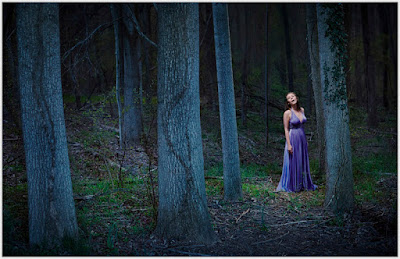
    This nighttime portrait of soprano Alexandra Rodrick was a big step for me. It was made about five years ago, when I was just starting to realize how color-fluid real light could be. I kinda knew it, but I still didn’t have the nerve to actually do it.

    So I took a deep breath and threw way more blue into the environment than I normally would. And not only did I come out alive on the other side, but I ended up pretty happy.
    __________

    I prevsiouly wrote in more detail about how we made the photo in On Assignment. It’s a two-part post, if you’re interested. So I won’t fully rehash that here.

    We wanted to evoke nighttime, but you can’t really shoot this photo at night. Especially with the PhaseOne camera I shot this with. (You can see a full-sized version here.) The Phase effectively maxes out at ISO 100, and we wanted to get some depth and detail going way back into the scene. So we shot at twilight, and underexposed the ambient before adding three light sources into the mix.

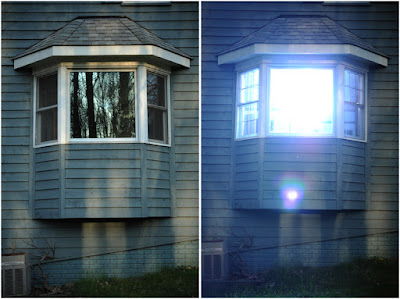
    Looking back, this photo was big leap forward for me. I took a chance and pushed a lot of CTB into the scene—full CTB, to be exact. We had to move the lights way back to light the scene evenly. In fact, here’s my fill light coming from my second floor dining room, here:

    Before this point, I would have weenied around with a 1/2 CTB, or even a 1/4 CTB.
    The result would have been very much muted. Safer, maybe. But not nearly as evocative.

    This is the first time I had really tried to connote the feeling of full night in a photo and actually had been willing to push some real color. Am I fully happy with it now? Not totally, and more on that in a minute.

    But my advice is, while it is very tempting to try partial/interim color shifts, do yourself a favor and experiment with pushing some real color density into your frame. You may be pleasantly surprised at the result.

    In the past I tried lesser color densities and ended up with pictures that were okay, but didn’t really live up to what I pictured in my mind’s eye. (Fortunately, no one else had access to my mind’s eye, so my comparative failures were private affairs.)

    What I am learning going forward is that the 1/4- and 1/2-measure color shifts come across as subtle in the final image. In fact, in many cases they would only be noticeable in their absence via side-by-side comparison.

    And that subtlety is actually pretty cool and useful. Because as we have seen with portraiture, you can define what is in shadow with color as much as you can with density.

    Think about it. By using a 1/2 CTB (maybe with a little green in there) in the shadows of a portrait against a 1/2 CTO key light in the highlights, you are defining shadows with color as much as you are with light levels.

    This means you can not only get a more evocative palette of light on your subject, but you can vastly expand the range of visible detail in your photo. Because it is the color of light that is informing you in the shadow, rather than a harsher underexposure—and a corresponding lack of detail.

    Our brain reads that relatively subtle blue shift also as signaling the transition to shadow. So if you are going to shift a whole scene to evoke a time and place—night in the woods, for instance—you’d better be willing to bring more color density to the party.

    Don’t be shy. Take a chance. You can always back off if you don’t like it.

    What I Would Do Differently Now

    Back to Alexandra, I look at this frame and see that I was being relatively couragious (for me, then) in some parts of the photo, and a weenie in other parts.

    Let’s talk about the light on her face, courtesy a 1/4 CTO’d speedlight in a China ball.

    Yes, it separates from all that blue night woodsy light. But why is it warm? I told myself at the time that it felt more theatrical (warm spotlight in cool environment and all). But really, it was also me long being comfortable throwing a warm light at my subject’s face.

    If I were shooting this today, I’d be more looking to integrate that key light into the scene. Less spotlight, more moonlight. As if she was catching a moon ray in the clearing.

    I’d probably start with a 1/4 CTB. Cool her down, but but as much as the night woods. After all, moonlight is just reflected daylight.

    And to that 1/4 CTB, I might consider adding a little green. Maybe 1/4 PlusGreen? Dunno, until I try it. But the idea would be to blend the moonlight with the influence of the green grass and leaves that would be filtering/reflecting it.

    Would it be scary to try? Yeah, a little. I’m not used to blue-green faces in my photos. Not even a little bit. But it wouldn’t be nearly as scary now as it would have been for me back in 2012.

    And to be honest, 2017 me thinks the slight blue-green face would look better. Which is the point of taking chances with your light, finding new things that work and the result being growth as a photographer.

    This is the most recent post in Strobist’s Lighting 103 module. New installments publish on the first and third Thursday of each month. If you would like to be notified as they become available, please sign up here.
    Strobist

  • Quick and Dirty Method of Using the Photoshop Spot Healing Brush Tool

    Let’s say you use Lightroom and you’ve tried and tried to get rid of those distracting spots using Lightroom’s Spot Removal Tool but no matter how you set it – using Clone or Heal or changing the Opacity or increasing the Feather – you have a giant, obvious repair on your image. Not good!

    Photoshop Spot Healing Brush Tool - wild horses

    This is my final, processed image but I had to dive into Photoshop to get there.

    You’re a good photographer

    For kicks, let’s agree that in addition to knowing your way around Lightroom, you’re a skilled photographer. You also subscribe to Adobe CC, but honestly, you don’t use Photoshop much. Perhaps you’re even a little bit afraid of it. You loaded the software and update it whenever Adobe tells you to but other than the PS icon looking cool and professional in your dock, you don’t actually use it.

    You just don’t use Photoshop

    I mean, Layers, Masks, Blending? Ugh. I know. I do 90% of my work in Lightroom. No one has ever called me out on that so I keep on keepin’ on with Lightroom. I love Lightroom but – and it’s a great big but – LR’s Spot Removal Tool is no match for Photoshop’s Spot Healing Brush Tool.

    Because I know this issue affects so many of us, I’m going to teach you the quick and dirty method for how to Spot Heal in Photoshop. No layers. No tricky stuff. Just easy, quick simple repairs for the problem areas in your images.

    Practice as you read this

    Grab an image that has a problem area that you can’t seem to fix in Lightroom and follow along with me. Practice is the best way to learn so repeat these steps a few times today. After you Spot Heal a few images in PS, it will naturally become part of your image processing tool kit.

    Step #1 – Process the image in Lightroom

    In Lightroom, process your image as normal. Here’s my RAW  image before I’ve made any adjustments.

    Photoshop Spot Healing Brush Tool - raw image

    Canon 7D Mark II, 70-200 plus 1.4x @ 280mm, f/6/3, 1/1600, ISO 400.

    Below is a screenshot of all the adjustments I’ve made on my image. I started with a pretty aggressive crop. You can see the White Balance and Basic adjustments but I also dropped in several Radial Filters to add clarity and brightness to key elements like the horses’ eyes. However, I struggled to get rid of the flecks of mud around the black horse’s eye.

    Photoshop Spot Healing Brush Tool - Lightroom adjustments

    Step #2 – Edit in > Photoshop

    Right-click on your image. Select Edit in Adobe Photoshop CC.

    Photoshop Spot Healing Brush Tool - Edit in Photoshop

    It is very important that you don’t skip this step. Do not open your image directly in Photoshop. For the down and dirty method to be most effective, you must start this process in Lightroom.

    NOTE: If you haven’t updated to PS CC 2017 or if you use an older version of PS, you might need to modify these steps. Instead of Edit in Adobe Photoshop CC 2017, you might see Edit a Copy in PS.

    Step #3 – Select the Spot Healing Brush

    It takes a minute, but eventually, your image will appear in the Photoshop window. Here’s the image I’m working on. Check and make sure your screen looks pretty similar to mine.

    Photoshop Spot Healing Brush Tool - PS interface

    Click on the Spot Healing Brush Tool. It looks like a band-aid except that it has a little semi-circle handle over it.

    Photoshop Spot Healing Brush Tool - band-aid icon

    If you can’t find this tool, count seven icons down on the tools pallet and right-click on that. Once you right-click, you should see the rest of the tools. Hover your cursor over the band-aid icon that says Spot Healing Brush Tool. Click to select it. It will now show as the active tool.

    Step #4 – Setup the Spot Healing Brush

    Review the settings for the tool bar that runs across the top of your Photoshop window.

    Photoshop Spot Healing Brush Tool - mode and type

    If your Spot Healing Brush Tool doesn’t default to these settings, change them to:

    • Mode = Normal
    • Type = Content Aware

    Step #5 – Zoom in

    Zoom in and increase the size of your image so you can see the problem area more clearly. Click the Command/Alt key and the + (plus) key simultaneously. Click again to zoom in more. If you’ve zoomed in too far, click the Command/Alt Key and the – (minus) key simultaneously to zoom back out. Grab the drag bars on the bottom and right side of the image to reposition the problem area so that it’s in the middle of the screen and easy to see and repair.

    Photoshop Spot Healing Brush Tool - zoom in

    Zoomed into 200%, I can see the problem area clearly.

    Step #6 – Size the Brush Tool

    Hover the Spot Healing Brush Tool over the problem area. You may need to change the size of the brush. The easiest way to do that is to use the square bracket keys on your keyboard.

    • Click the Left Bracket Key [ to decrease the size of the brush.
    • Click the Right Bracket Key ] to increase the size.

    Notice that as you click on the bracket keys, the Size number in the bar that runs across the top of your image increases or decreases. (If you click on that number, you’ll get more tool options. Don’t worry about those for now.)

    Photoshop Spot Healing Brush Tool - 20px brush

    Using the Left Bracket Key, I adjusted my Spot Healing Brush Tool to 20 pixels and started making small repairs around the eye.

    Step #7 – Brush over the bad area

    After you’ve adjusted the size of your brush, start clicking on the area of your image that you want to repair. You can also drag the brush to make short strokes.

    Photoshop is smart and should fill in the area with an appropriate selection but if it doesn’t, click Edit > Undo Spot Healing Brush in the top menu (or Cmd/Ctrl+Z will also undo). That will undo the last thing that you did.

    If you want to undo multiple things, go to Edit and click Step Backward repeatedly till you’re at the last point that you liked. Step Backward does have limitations so work slowly and check your repair work often. Note: you can aslo open the History panel and go back to any previous step.

    Photoshop Spot Healing Brush Tool - undo

    Step #8 – Save

    Evaluate your work. Do you like the repairs? If Yes, go to File > Save in the top menu. Photoshop defaults to saving images as a TIFF file. If it doesn’t, select the TIFF option if/when the menu pops up. This will also import the newly edited image into Lightroom.

    Photoshop Spot Healing Brush Tool - save

    If you don’t like the repairs you made, quit Photoshop without doing anything. Photoshop will ask if you want to save your work. Just say No. Go sip some coffee and try again another day when you’re fresh.

    Step #9 – Head back to Lightroom

    Almost done!

    Go back to Lightroom. You’ll still be in the Develop Module with the original RAW image that you were working on still open. Press G for Grid which will take you to the Library Module. Check to make sure that next to your original RAW file is a new TIFF file. Select the two images and view them in Survey Mode so that you can look at them side by side (N on your keyboard).

    If the two files don’t show up right next to each other in Lightroom resort your images by Capture Time (or file name), or drag and drop so that they do.

    Photoshop Spot Healing Brush Tool - compare

    Side by side of RAW file adjusted in LR (on the left) and TIFF with the addition of spot healing (on the right).

    Wait, don’t you have to use layers in Photoshop?

    That’s the down and dirty part. When you’re doing simple fixes like this, you don’t need to worry about layers. Why? Well, layers are excellent if you’re doing quite a few things to your image and you want to be able to turn different effects on and off. They’re also important so that you preserve your original image in a background layer (non-destructive editing).

    But with this method, you still have your original RAW file. That’s why you want to start in Lightroom and then open your image from there into Photoshop. Lightroom sends a copy of your image to Photoshop. When you save your work in Photoshop in step #8, Photoshop generates a totally separate image file. That new TIFF file shows up in your Lightroom catalog next to your original RAW file.

    NOTE: If you haven’t updated to PS CC 2017 or if you use an older version of PS, you might need to modify these steps. You might need to select “Edit a copy” and not “Edit Original.”

    Photoshop Spot Healing Brush Tool - final image

    This is a wild horse so I didn’t go too crazy fixing every little thing, but the distracting mud around the eye and on the neck is cleaned away nicely, don’t you think?

    What if the down and dirty method doesn’t work?

    This might not work for your image. Some repairs are finicky and this is definitely a hack method that won’t work for everything. My advice is to experiment. Remember the other tools that were grouped with the Spot Healing Brush Tool? Try one of those. Or, keep using the Spot Healing Brush Tool but change the Mode from Normal to Replace or even Multiply.

    Remember when we clicked the Size number? Click that again and adjust the Hardness of the brush or the Roundness. Make only one change at a time and make notes on what each change does. If something works, click File, then Save and remember what you did. If nothing works, exit out of Photoshop without saving (and go have more coffee).

    You can always experiment again another day because you still have your RAW image. It’s cataloged in Lightroom right next to the TIFF file. As long as you always start in Lightroom, you’ll be able to try again later.

    Photoshop Spot Healing Brush Tool - Essaouira cafe

    In this image of an outdoor seafood market in Essaouira, I experimented with a variety of tools to zip out the distracting bit of tree on the left, the construction equipment and the light posts. The RAW image, with Lightroom only adjustments, is on the left. The spot-healed TIFF is on the right.

    Share with the dPS community: What hack or down and dirty methods do you use when you process your images?

    The post Quick and Dirty Method of Using the Photoshop Spot Healing Brush Tool by Lara Joy Brynildssen appeared first on Digital Photography School.


    Digital Photography School

  • Concert Photography 101: Cameras and Lenses for Beginners

    If you’ve ever wondered how to become a concert photographer, one of the very first steps is to acquire the right gear. You’ve probably been to a concert or festival and seen music photographers hauling tons of equipment such as two camera bodies and enormous lenses. While it’s certainly ideal for a professional to have this much stuff (and then some), most beginners or amateurs absolutely don’t need this much gear to get started. Read on for some of my suggestions on how to gear up as a beginning doing concert photography.

    Concert Photography 101: Cameras and Lenses for Beginners

    Concert photography rules

    Before we get into gear, let’s discuss your typical concert photography setting. Whether you’re shooting a big arena show or a small, casual performance in a bar, concert photography rules are more or less the same. You get to shoot for the first three songs only, and cannot use a flash or strobe of any sort. With these two rules in mind, this means that you need gear that allows you to adjust and shoot quickly and pull off shots in a low lighting setting.

    What kind of camera do you need?

    First off, invest in a solid DSLR camera. While there are point and shoot cameras that could arguably get the job done, you need the lens choices that come with DSLRs. It doesn’t really matter what brand you choose. What does matter is being comfortable using it and knowing that you have a wide variety of lenses to pair with it. Canon and Nikon are two of the biggest camera brands that are among the most popular for concert photographers.

    Crop Sensor or Full Frame?

    When researching DSLR camera options, you’ll have a choice between investing in a crop sensor or full frame camera. The differences between the two types of DSLR cameras is best explained in this article.

    To quickly summarize, crop sensor cameras are typically smaller in size and much cheaper than full frame cameras. The main disadvantage to crop sensor cameras has to do with their smaller sensor sizes that will impact available ISO options, thus resulting in slightly noisier or grainy photos than full frame cameras. In short, start out with a crop sensor camera if you’re on a budget, and aim to upgrade to a full frame camera the further you get in your concert photography career.

    Concert Photography 101: Cameras and Lenses for Beginners

    Canon 5D Mark III (full frame) on the left and a 6D on the right.

    Suggested concert photography cameras

    Full Frame

    • Canon EOS 6D
    • Canon 5D Mark IV
    • Nikon D810
    • Nikon D750
    • Nikon D610

    Crop Sensor

    • Canon 7D Mark II
    • Canon 77D
    • Canon 80D
    • Canon EOS Rebel T6i
    • Nikon D500
    • Nikon D7500
    • Nikon D5600
    • Nikon D3400

    What are the best concert photography lenses?

    After you’ve invested in a DSLR, be sure to budget for the purchase of accompanying lenses, which can end up being just as expensive as the camera body. Generally speaking, you shouldn’t use the kit lens that automatically comes with your DSLR camera.

    Most of these kit lenses are fine for shooting in ample lighting conditions, but they won’t perform well in the low light settings of concerts. Instead, what you want is a fast lens with a wide aperture (or f-stop) of between f/1.2-f/2.8. This will help you capture moving subjects in dark settings.

    Concert Photography 101: Cameras and Lenses for Beginners

    Canon 24-70mm f/2.8 and 70-200 f/2.8.

    Start with prime lenses

    For beginning concert photographers on a budget, prime lenses are your best bet. While these lenses have fixed focal lengths, meaning you can’t zoom with them, their low f-stops mean they will shoot better in low light. Prices and exact lens models will vary according to which camera brand you’ve chosen. Since I’m a Canon shooter, these lenses are geared toward Canon.

    • 50mm f/1.4 (or the cheaper 50mm f/1.8) – for Nikon try the 50mm f/1.8G
    • 85mm f/1.8 – for Nikon try the 85mm f/1.8G
    • 35mm f/1.4  – for Nikon try the 35mm f/1.4

    Put these lenses on your wish list

    Pretty much every professional concert photographer will have two go-to lenses on hand: a 24-70mm f/2.8 midrange zoom lens, and a 70-200mm f/2.8 telephoto lens. Neither of these lenses is cheap and should definitely be considered a long-term investment. But if you can afford one or both, don’t hesitate to add these lenses to your concert photography kit.

    Concert Photography 101: Cameras and Lenses for Beginners

    Keep an eye on third party brands

    While it’s certainly ideal to purchase lenses in the same brand as your DSLR camera manufacturer, there are many third party companies producing cheaper and sometimes even better options. Great lens options exist from Sigma, Tamron, and Tokina, to name a few. Again, the specific options will depend on the DSLR camera body you’ve chosen, but here are a few possible options for Canon shooters:

    • Tokina 11-16mm f/2.8 (for Canon EF-S/crop sensor or Nikon DX)
    • Sigma 17-50mm f/2.8 (for Canon EF-S/crop sensor or Nikon DX)
    • Sigma 24-70mm f/2.8

    If you’re on a budget

    It’s a reality that concert photography equipment isn’t cheap. But there are some ways to score more affordable camera gear. First, look into used or refurbished camera bodies and/or lenses. As long as you purchase from an accredited source, you can save hundreds of dollars on gear.

    On the flip side, keep in mind that camera gear retains its value as long as you take care of it. So if you buy a lower-end camera or lens and want to upgrade later on, it’s pretty easy to sell off your old gear to help you invest in newer options.

    Finally, look for older models or previous versions of gear. For example, you could spring for the brand new Canon 5D Mark IV camera body, or you can save over $ 1,000 by investing in the older yet still very functional Canon 5D Mark III. The same is true for many other camera bodies and lenses on the market. It all depends on your budget and what kind of features you absolutely need to have.

    Concert Photography 101: Cameras and Lenses for Beginners

    In Conclusion

    Consistently pulling off pro-quality concert photos often requires investing in pro-grade camera gear. But it’s best to start small and to upgrade over time as your skills and budget increase. What are your go-to concert photography cameras and lenses? Let me know in the comments below!

    Concert Photography 101: Cameras and Lenses for Beginners

    The post Concert Photography 101: Cameras and Lenses for Beginners by Suzi Pratt appeared first on Digital Photography School.


    Digital Photography School

  • 7 Travel Photography Tips I’ve Learned from People in the Industry

    Like any profession, over the years and countless hours of working and talking to people in the industry, you will pick up tips, advice and even things to avoid. This will ultimately help you improve and possibly make your photography business more profitable. Here are some of the main tips that I have picked up over the years from people in the travel photography industry.

    7 Travel Photography Tips I've Learned from People in the Industry - new zealand

    #1 – Blue Sells

    If you were to line up a whole load of travel magazines next to each other, you will notice that the vast majority of their front covers have something in common, the color blue. Whether it is the sky or water, magazine covers tend to feature photos of gorgeous sunny days rather than moody, dark and atmospheric conditions.

    I had always noticed that my “gorgeous sunny weather” shots outsold the photos with other types of conditions. But it wasn’t until the editor of a travel magazine told me the reason that I understood why. They found that historically, issues with beautiful sunny shots on the front cover sold much better than issues with dark and moody conditions. The reason is that most people going about their day aspire for tranquil and beautiful holiday conditions. So, while a stormy landscape photo might look more dramatic and striking, the average holidaymaker doesn’t want to go somewhere and experience a storm.

    7 Travel Photography Tips I've Learned from People in the Industry - Scotland

    #2 – Avoid “Tourist” Shots

    I remember asking a picture editor once for the single biggest piece of advice they could give me and they responded with, “Don’t send me tourist shots.” But what does that mean? After all, if you are in a city and have to photograph the most famous landmark then how do you avoid tourist shots. Once I delved in a little deeper, I realized what he meant was that he didn’t want just another shot of the famous landmark taken at eye level because he could get thousands of them through any stock agency.

    Instead, he wanted to see a photo that demonstrated an experience, feeling or mood. This was a few years back and more and more I have been asked by picture editors and stock agencies I work with to try to show these “experiences” in the photos. So rather than taking a photo of the landmark, it might be worth photographing a couple enjoying an ice cream in its shadow. The key is to look beyond the obvious shot and look for a moment or composition that can convey an emotion.

    7 Travel Photography Tips I've Learned from People in the Industry Turkey

    #3 – Give Them People

    Often the easiest way to capture unique photos that don’t look like tourist shots is to include people. But including people in your photos can also convey a sense of scale, portray an emotion or a feeling and often tell a much more intriguing story. One of the best bits of advice I was given was that including people can also help you capture different types of shots from the same location. That, in turn, means you can maximize your stock shots from a single location.

    For example, take any scene in front of you. If you capture that scene with a couple admiring the view holding hands it tells a completely different story than capturing the scene with someone running or cycling. So you suddenly go from one photograph per location to three. Move slightly around the scene and capture a few different scenarios and you can suddenly end up with a whole load of different stories from practically the same spot. As any stock photographer will tell you, it’s a numbers game and the more photos you have the better your chances of selling some.

     7 Travel Photography Tips I've Learned from People in the Industry Turkey

    Taken from the same location as the photo above but a completely different message.

    #4 – Check Every Photo, Every Time

    Photography is a competitive industry. You are often competing with pretty much everyone with a camera to try and get work or make sales. The last thing you want to happen is to have a photo that has been chosen by a client come back to you because it isn’t focused properly or you haven’t removed the dust particles. Not only is it embarrassing, but it can also hurt your chances of working with that client further down the line.

    So don’t try and cut corners. You worked hard to capture the photo so do it justice and make sure it looks its best when it’s going in front of someone else. Check every inch of the photos you intend to send out to clients. View them at 100% in post-production and make any corrections or edit as necessary. Be professional in your approach from start to the finish.

    7 Travel Photography Tips I've Learned from People in the Industry

    #5 – Face the Opposite Way

    It doesn’t matter where you are in the world, there will usually be a spot marked “sunset viewpoint” or similar where everyone will go to capture their photos. Often this is because that particular spot offers the best view. But sometimes it is because it is the easiest and most convenient place for lots of people to get to or stand.

    One bit of advice that has been floating around for many years and has been said by numerous photographers, is that when you get to one such location, face the other way. Go against the crowd and photograph what is behind everyone. Clearly this advice shouldn’t be taken literally as sometimes photographing the other way wouldn’t give a good photo. The point is to look beyond the first and most obvious location and viewpoint.

    If you are prepared to do your research beforehand and are willing to put more of an effort in than the average tourist, you will undoubtedly end up with better photos.

    7 Travel Photography Tips I've Learned from People in the Industry

    #6 – Step Closer

    The world famous war photographer, Robert Capa said, “If your pictures aren’t good enough, you aren’t close enough.”. This is something that most amateur photographers struggle with for travel photography and photographing people. It often means having to get close to your subject and they then might notice you.

    The truth is that usually, the worst that can happen is that the person you want to photograph will just say no. But getting closer means having to be right in the middle of the action and that you also have to engage with that person and build a connection, if even briefly. This, in turn, will transfer into your photographs and give you a much better and more intimate photo than if you were standing 300 yards away with a telephoto lens.

    7 Travel Photography Tips I've Learned from People in the Industry - Italy

    #7 0 Don’t Be Shy

    One of the biggest things that you may realize as a photographer is how accommodating and intrigued most people are about your profession. I have not kept a tally of the number of conversations I’ve had with total strangers all based around photography, but it’s been a lot. One thing I learned is that sometimes when you have a camera on your shoulder it can work to your advantage (and sometimes it can work against you) as people may help you capture the photo that you want to take.

    But you have to be willing to ask. If you don’t ask you will not get. For example, one of the best places to take photographs of a city is from your hotel room. I’ve lost count of the number of times that I have been upgraded to a room with a better view by simply asking and explaining the reason for it. This extends to if you want to photograph people, places, and so on. Don’t be shy, just ask. The worst that could happen is being told no.

    7 Travel Photography Tips I've Learned from People in the Industry Thailand

    I took this photo of the Bangkok skyline from my hotel room.

    Conclusion

    Over the years you will pick up your own tips and advice that you have been given or have derived from your own experiences. In the meantime, hopefully, the ones above can be as helpful to you as they have been for me.

    Do you have any other bits of advice that you have been given? Please share below.

    The post 7 Travel Photography Tips I’ve Learned from People in the Industry by Kav Dadfar appeared first on Digital Photography School.


    Digital Photography School

  • How a Compact Camera Can Help You Shoot Stunning Images While Traveling on a Budget

    Vacations can be a great time to capture some of the most captivating photos ever, and it doesn’t even require using an expensive equipment to do so. In fact, whether your vacation involves hiking, skiing, snorkeling, a safari, mountain biking, or a scenic road trip, a compact camera can also provide stunning results while traveling, with little effort and without Continue Reading

    The post How a Compact Camera Can Help You Shoot Stunning Images While Traveling on a Budget appeared first on Photodoto.


    Photodoto

  • 5 Tips for Location Scouting Before a Photo Session

    Maybe by a show of virtual hands, how many of us have ever been in a situation where we have gone to a location for a photoshoot only to find out that something unexpected like a marathon, construction or worse demolition, is going on that prevents you from using the space as you intended? And I am being very serious in the demolition example!

    One of my favorite local parks went through a complete revamp a couple of years ago and for months the only thing I could see was demolition equipment all around. The dirt paths that I loved so much had all gone and tar biking paths took their place!

    5 Tips for Location Scouting Before a Photo Session

    The dirt path with the cover of trees in the background was one of my favorite spots in this local park. The light would filter through the trees and the dirt path would act as a natural reflector and bounce golden light back to my subjects! – now this whole area is a parking lot that leads up to the trees!

    I am a natural light outdoor photographer for the most part. Hence, I rely on outdoor locations for 75% of my photoshoots including the weddings I photograph. More often than not, my clients, the bride and groom, look to me for suggestions on natural outdoor locations for their bridal portraits and family formals. Even my lifestyle family photo shoot clients love suggestions on the best locations for beautiful family photos especially in the fall when the leaves all change colors. To that end, I am always on the look out for clean, beautiful and unique outdoor locations for my photoshoots.

    Here are a few tips on how to scout and find the perfect location for your next photo shoot.

    #1 Know your clients

    Every client is different and every photoshoot is unique. It behooves us photographers to really get to know our clients so we can tailor the photo shoot to fit their personality. This not only ensures that they will have a good time but also that they will be more relaxed and happy during their photoshoot. This means you will get pictures that they are bound to love and hence recommend you to all their friends and family. It’s a win-win for everyone.

    For my wedding clients, I have a formal questionnaire that they fill out to describe their style and that of their wedding. This helps me plan out locations and poses that will reflect their style and personality. For my family photos, I have a conversation with the family to see what type of photos they gravitate towards. Do they want to have fun outside in a park? Or do they want to hang out at home with each other? The family photo session is tailored around their needs.

    5 Tips for Location Scouting Before a Photo Session

    My lovely clients wanted a location in nature among the trees. She told me her outfit choices ahead of time so I chose this park with a small waterfall. It seemed to fit their personality and the theme of the shoot ‘The quiet before the storm” quite well.

    5 Tips for Location Scouting Before a Photo Session

    This session, on the other hand, took place at my client’s home. During our consultation, she mentioned that she wanted to use her 2.5-acre backyard for photos. I knew the green of the grass and the trees would add a lot of color cast to my subjects so I recommended neutral colored clothing. We also waited until the sun passed behind some clouds to take some of these shots to prevent too much color cast on their faces.

    #2 – Scout at different times of the day

    When I look at potential locations for my photo shoots, I always try and visit the place at multiple times during the day. This gives me an idea of the lighting at different times. Does the location get direct sunlight or is it shaded and hence gets only directional light? Is it a busy street and with potentially lots of people that might be walking around and getting in my shots? What are the traffic patterns to get to the location? All these little details are really important for me to be able to plan my day and photoshoot so that I can get the best possible pictures in the time I have at the location with my clients.

    Tip: If you cannot get to a location ahead of time, use Google maps and sunset/sunrise times to figure out where the sun will be at the time of day you are photographing. This will help you be a little prepared when you get to your location.

    5 Tips for Location Scouting Before a Photo Session

    For a bridal editorial shoot at a beautiful historic location, I scouted the location a few days ahead of time and realized that the area where I wanted to photograph was full sun at 2:00pm (on the left)). So I knew that if I moved the photo shoot to the morning, this area would be in the shade and be evenly lit. Sure enough, the light was gorgeous for my editorial photo shoot! Had I not scouted the location, I would have been scrambling to find the right spot in the afternoon.

    #3 Pay attention to details

    One of the biggest problems that most photographers face is related to light. Not all light is equal and photographing in different lighting conditions will lead to different results.

    Early morning light is generally soft and subtle. The afternoon light is often harsh, especially if you place your subject in full sun. Evening light tends to be more warm and golden hue. Post-sunset light is blue. You can photograph in each of these lighting conditions provided you know how to position, pose, and light your subject in each of instance.

    Quality of light matters

    When scouting a location, pay attention to details around the quality of light at different times of the day. Another thing to keep in mind is color casts from surrounding objects. This is quite prominent around trees, colorful buildings and graffiti walls. Try and find natural reflectors (eg. a white wall) that will bounce light back onto your subjects or use reflectors that do the same thing and balance off the color cast. You can always fix it in post-processing if all else fails.

    5 Tips for Location Scouting Before a Photo Session

    A location in historic prairie preserve is a photographer’s favorite in my town. But I find that photographing inside the front patio adds a color cast from the yellow ceilings and directional light (photo on right). Yes, in a pinch I will take the shot and fix it in post-processing. But I prefer to either photograph my clients sitting at the edge of the patio on the steps where they are still in the shade of the patio arch but don’t have any color cast.

    Karthika Gupta Memorable Jaunts DPS Article Importance of Location Scouting For a Photoshoot-06

    So instead of dealing with the color cast from the porch, I took my client outside along the dirt path by the house and photographed her there. The concrete and the dirt path acted as natural yet neutral reflectors and bounced soft white light back onto her face, eliminating any color casts.

    #4 – Tap into other resources

    I belong to several photographer groups online and offline and we constantly share tips/tricks and location ideas amongst the groups. These groups exist to help each other out and everyone is open and welcoming. If you are photographing in an area that you are not familiar with, try finding a local photographer group for that region and ask around. Be friendly and genuine in your requests, and you may find some unique and off-the-beaten-path locations from the locals in the area.

    #5 – Take a road trip

    I love road trips! It is the best way to explore new areas and scout potential photography locations that will suit you and your specific needs. I generally take my family along so it is a fun-for-all experience. In a pinch, my kids will also act as models helping me test the light and background ahead of my client photo shoots.

    A few years back I had a high school senior’s photo session and her mom wanted to find a unique spot where we could see the fall colors. I drove around my area for a few hours but was not finding anything that I really liked. I stopped by a local farm to pick up some fresh fruits and realized that the farm had everything I was seeking for my photo shoot. So I walked up to the owner and got permission to photograph there the next day. The senior’s mom got the photos she wanted and I found a unique location for my fall photos.

    5 Tips for Location Scouting Before a Photo Session

    The red of the trees does add a little color cast to my subject’s face but she really wanted the backdrop of the fall colors.

    What are your tips to find the perfect location for your photos?

    The post 5 Tips for Location Scouting Before a Photo Session by Karthika Gupta appeared first on Digital Photography School.


    Digital Photography School

  • Auto White Balance: Yay or Nay?

    So what exactly is white balance and why is it so important to digital photography?

    The rudimentary answer is that light (the foundation of photography) has variable color temperatures at different times of the day. Your eyes are much better at processing color than a digital camera. Thus a white object will always appear white to you, despite the conditions. White balance is the process that the camera uses to remove color casts produced by these different color temperatures and helps your camera emulate whaty our eyes do naturally when dealing with white.

    Auto White Balance: Yay or Nay?

    Auto White Balance sometimes give very close results to what you see with your eyes.

    Auto White Balance: Yay or Nay?

    Daylight White Balance can be used to enhance the existing colors of your scene.

    Auto White Balance (AWB)

    The Auto White Balance (AWB) setting helps your camera “guess” the best option or choose the one closest to what your eyes might see. Many times AWB works better when you are outdoors dealing with natural lighting, than with more complex lighting situations.

    The White in White Balance

    To understand when AWB works well and is applicable, it is also important you understand the different White Balance presets your camera offers. They include; Daylight, Cloudy, Shade, Tungsten, and Fluorescent. Added to these are Flash, Kelvin and Custom White Balance. Of note, the Custom White Balance Mode is used when you have especially challenging lighting conditions and need to lock in your whites based on those conditions. It is an under-used option that gives great results, so check your manual and experiment with it sometime.

    Auto White Balance: Yay or Nay?

    Delicate Arch, Utah – shot with the AWB setting.

    Auto White Balance: Yay or Nay?

    Delicate Arch, Utah – edited with a Custom White Balance setting.

    The Auto White Balance setting assesses your scene and chooses the brightest part of your image as the white point, which unfortunately can vary from one shot to the next. Over the years though, significant improvements have been made to AWB systems and the results are getting better. Even with these developments, it is difficult for Auto White Balance to correct certain kinds of lighting (e.g. artificial or combination lighting setups). Another instance where it’s not recommended to use AWB is when doing panoramic shots, as you run the risk of varying light on your stitched image.

    Auto White Balance: Yay or Nay?

    Boats shot with a Custom WB. In a panoramic shot, if AWB is used, it can vary from shot to shot

    The opposite problem exists as well – when AWB corrects color casts you do not want it to, such as when you are shooting a sunset or any scene where the color of the light is essential to the image. Some of the White Balance presets listed above, are set in-camera to provide some level of correction to typical lighting scenarios. Here you tell the camera the right setting for the occasion and take more control over your final image.

    RAW Power

    If you shoot in RAW, you are probably aware that RAW files retain all the color data captured by your camera. This retention allows you to change or choose a different White Balance setting while post-processing your RAW files. Some argue that even with this handy feature, AWB does not give you the best colors.

    Auto White Balance: Yay or Nay?

    Shot with Daylight WB (camera) vs processed Daylight WB (Photoshop)

    Another perspective of setting White Balance in camera ensures that in the processing stage, your color rendition is consistent across all your shots (e.g. when shooting a wedding). Also of note, AWB can give you different results within the same scene. So you can go from one set of colors in a wide-angle shot to a different set of colors when you zoom in. Both of these are examples of losing the harmony when you are working on a series of images.

    Taking Control

    You may use AWB because it is easier to let the camera figure out the white balance based on the scene in front of you. However, as stated before, it is useful when you know how and when to use it. Setting white balance is not as daunting as it sounds though and when the conditions are not variable, you only need to set your white balance once (for those conditions).

    Auto White Balance: Yay or Nay?

    Using RAW and WB to take control of the appearance of your results.

    So, if you are outdoors on a sunny day, set your white balance to Daylight or Sunny. If it is cloudy, choose the Cloudy white balance and similarly if you are in shade, choose Shade. These are very straightforward to remember based on the easy naming convention. When indoors, for incandescent lights, choose Tungsten (or Incandescent) and when shooting an area with fluorescent lights, choose Fluorescent. This is called setting your white balance to match your shooting conditions.

    You can also set your white balance to modify your existing conditions. Once you start experimenting with white balance and understand how it affects your images, use it to get creative or make your image look either warmer or cooler.

    Auto White Balance: Yay or Nay?

    White Balance used to make the image look cooler.

    Conclusion

    Auto White Balance is a handy setting to have when you are unsure of what white balance would work for your scene. If you shoot in RAW, you can easily change your White Balance after the fact to find the best option.

    If you want more control of your results, choose one of the camera white balance presets, already tailored for specific conditions, or create your own (custom white balance). Setting your white balance eliminates that extra post-processing step of fixing it from scene to scene and gives you more consistent results.

    What is your go-to white balance and are you a fan of using AWB? Tell me in the comments below.

    The post Auto White Balance: Yay or Nay? by Nisha Ramroop appeared first on Digital Photography School.


    Digital Photography School

  • 7 Different Ways to Approach Macro Photography

    Macro photography is one a genre that many people love. But the expense of buying a top lens to take close up photos can make it restrictive or impossible to do. However, there are many ways of approaching this kind of photography, and not all of them have to break the bank.

    Here are seven different approaches to macro photography. We’ll start with what most people think of, and cover other ways to help you do macro photography when you don’t have a big budget to do what you love.

    7 Different Ways to Approach Macro Photography - orange flower

    105mm Macro lens with auto-focus. I have used the same flower for all the photos. They were taken as close to the flower as the lens would allow for focusing. A full frame camera was used to take the images, except for the last one.

    #1 – Dedicated Macro Lens

    Getting yourself a macro lens is one if the best ways of doing close-up photography. These lenses are specifically designed to allow you to focus very close to your subject. With most macro lenses, you can get as close as about four inches or 10 centimeters (compared to “regular” lenses which close focusing distance is usually around 12 inches or more). That is with autofocus on, but if you turn it off you will be able to focus even closer.

    Manual focusing seems to be the preferred way of doing macro photography. If do some reading, you will find a lot of photographers prefer to use their macro lenses this way. It allows them to get even closer. This, then, might be where you ask the question, “Why should I bother buying a macro lens that has autofocus?”

    Many of the top lenses manufacturers make options for macro photography. They are high-end, and the quality is as you would expect those brands to produce. However, they are also very expensive and you can expect to pay quite a bit for a dedicated macro lens.

    Many other companies are now also making macro lenses. Some don’t have autofocus, but if you are happy using manual then they may be a better (or less expensive) alternative for you. They are often around half the price of the big brands, so if you can’t afford one of the top models, then this could be a much better fit for you.

    7 Different Ways to Approach Macro Photography

    Shot with a 105mm Macro lens using manual focus.

    #2 – Zoom Lenses

    When many people start doing macro photography they often start with a zoom lens and do their best to get as close as possible. Depending on the focal length of your lens you can get pretty close to your subject. You may not get tiny bugs on your flowers from the garden, but you will get whole flowers.

    There are some zoom lenses that also have a macro ability which makes it easier for you to get great photos and it allows you to focus in closer. Often zoom lenses will only focus if you are a few feet away from your subject. If you have one with the ability to get closer, then you will be able to get fairly good “almost macro” images.

    7 Different Ways to Approach Macro Photography

    Image taken with a zoom lens and the focal length was 300mm.

    #3 – Lensbaby Velvet 56

    The Velvet 56 by Lensbaby is a special lens that can be used for taking normal photos, but what a lot of people use it for is macro photography. It looks like a normal prime lens, but it has a very short depth of field, which makes it ideal for macro photography. You can change the aperture to give you very little in focus or a lot.

    A lot of macro photographers who start using the Velvet 56 fall in love with it and find it difficult to use other lenses again.

    7 Different Ways to Approach Macro Photography

    This image was taken with the Lensbaby Velvet 56.

    #4 – Lensbaby Composer Pro and Optics

    This is a unique system where the first part, the Lensbaby Composer Pro, fits onto your camera like a lens. It is made up of two parts which are connected by a ball-like socket so you can move the outer part around to put your focus point and plane where you want. Into this, you put an optic that will give you the desired effect you want. There are many different types of optics, however, the Sweet 35 and Sweet 50 are the most popular ones for macro photography.

    The Composure Pro and optics gives you a lot of opportunities to get some interesting and different effects. You can change the point of focus to anywhere you want in the image. You can also decide what depth of field you want to get. Macro images that are very different to what you can achieve with other types of macro lenses are possible with this system.

    Read my overview of the Lensbaby system here: Overview of the Lensbaby System – Is it for you?

    7 Different Ways to Approach Macro Photography

    This image was achieved by using the Lensbaby Composer Pro with a Sweet 50 optic.

    #5 – Extension Tubes

    You can also get extension tubes that will fit in between your camera and your lens. These will make your lenses get closer to your subjects (and shift the focusing distance). Your 50mm lens with extension tubes, and you can start taking photos that are very close to those from a macro lens. It should be noted that there are differences though, and a dedicated lens for close ups is easier to use.

    Extension tubes are usually bought in a group of three, you get a 12mm, 20mm and a 36mm. You can use them individually, or combine together. You can get one that will not allow the lens to communicate with your camera, they are usually much cheaper. So look for what they call automatic rings, with Autofocus. I use Kenko Automatic Extension Tubes.

    You have to be careful with the rings as they are not very heavy and if you put a big hefty lens on your camera and don’t give it enough support, then you risk damaging the connection between the lens and camera.

    7 Different ways of approaching macro photography

    Shot with a 50mm lens on its own.

    7 Different Ways to Approach Macro Photography

    Shot with a 50mm lens and a 36mm extension tube.

    #6 – Close-Up Filters

    There are many filters available for your lenses and you can also get ones that help you get really close to subjects. They are called close-up filters and are like magnifying glasses. You are quite limited in what you can do with them, and they can be hard to use.

    When you go looking for close-up filters you will find different levels of magnification. It would be tempting to get lots of them, but you really only need a couple. The one I have is a +5 from B+W.

    I also use the close-up filters on my macro lens as it allows me to get even closer to the flowers I’m trying to photograph. Sometimes you have to use everything you have to get as close as possible.

    7 Different Ways to Approach Macro Photography

    105mm macro lens with a +5 close-up filter.

    #7 – Phone

    Most cell or mobile phones have quite good cameras now and you can get some really good images with them, including macro photography. You can find the option for macro photos in your settings. Though my Samsung Galaxy S7 Edge doesn’t have a specific macro one, there are some that will help you get better photos.

    With the phone, you can get just as close to your subject as you can with most macro lenses. That makes it great, however, it can be much harder to get a good image. It is very hard to hold the phone steady enough to get good photos. It takes a lot of practice to get good images.

    Many companies now produce lenses that you can use with your phone including a macro lens which can be a great way for doing this kind of photography.

    7 Different Ways to Approach Macro Photography

    This macro image was taken with the Samsung Galaxy S7 Edge Phone.

    In the end

    There are so many different approaches, and while seven have been mentioned here, there may be a lot more. Whichever way you choose to go, you have to find the method fits within with your budget and the amount of time you want to spend photographing subjects at a macro level.

    What do you use to do macro photography? Do you have a different approach you can share with us?

    The post 7 Different Ways to Approach Macro Photography by Leanne Cole appeared first on Digital Photography School.


    Digital Photography School

  • 19 Lush Green Images of Summer

    Summertime is here in many parts of the world. The grass is green, as are many things in nature.

    Here are a few examples:

    By Tatiana T

    By Jackie Allen

    By Tokkes

    By Appalachian dreamer

    By Rolf Brecher

    By Jaros?aw Pocztarski

    By Matthew Fang

    By Cheng I

    By Neville Nel

    By Hammad Asghar

    By fs999

    By Toni Martín

    By tanell_85

    By Rodney Topor

    By Carolina Valtuille

    By Eileen McFall

    By Andreas Levers

    By Etienne

    By eLKayPics

    The post 19 Lush Green Images of Summer by Darlene Hildebrandt appeared first on Digital Photography School.


    Digital Photography School