RSS
 

Archive for the ‘Equipment’ Category

Photoshop Scratch Disk Help

04 Jun

The Photoshop scratch disk is your hard drive. Photoshop uses your hard drive as temporary “swap” space, or virtual memory, when your system does not have enough RAM to perform an operation. If you only have one hard drive or partition in your computer, then the scratch disk will be the drive where your operating system is installed (the C drive on a Windows system).

Setting Up Scratch Disks
You can change the scratch disk location and add multiple scratch disks from Photoshop Preferences. Many power users like to create a dedicated hard drive partition for the Photoshop scratch disk. Although Photoshop will function with a single scratch disk on the system partition, you can improve performance by setting the scratch disk to be the fastest drive in your system. Other useful guidelines for setting scratch disks are to avoid using the same drive where your operating system is installed, avoid using a drive where the files you edit are stored, and don’t use network or removable drives for a scratch disk.

Delete Photoshop Temp Files
If Photoshop is shut down improperly or crashes in the middle of an editing session, this can leave fairly large temporary files behind on your scratch disk. Photoshop’s temp files are typically named ~PST####.tmp on Windows and Temp#### on Macintosh, where #### is a series of numbers. These are safe to delete.

Clear Disk Space
If you’re getting an error message that the scratch disk is full, it usually means you need to clear some space on whatever drive is defined as the scratch disk in Photoshop Preferences, or add additional drives for Photoshop to use as scratch space.

Defragment Your Hard Disk
It is also possible to get the “scratch disk is full” error, even if the scratch disk drive has free space. This is because Photoshop requires contiguous, unfragmented free space on the scratch disk drive. If you are getting the “scratch disk is full” error message and your scratch disk drive does show a good amount of free space, you may need to run a disk defragmentation utility.

Scratch Disk Errors When Cropping
If you are getting a “scratch disk full” error when attempting to crop an image, it’s likely that you inadvertently have size and resolution values entered in the options bar for the crop tool, or you entered values in the wrong units. For instance, entering dimensions of 1200 x 1600 when your units are set to inches instead of pixels is going to create a huge file that could trigger the scratch disk full message. The solution is to press clear in the options bar after selecting the crop tool but before dragging a crop selection.

Any suggestions, ideas? Feel free to comment on this article!

Back to Top

BlogPhoto

 
Comments Off on Photoshop Scratch Disk Help

Posted in Equipment


Let Your Digital SLR Breathe New Life Into Old Lenses

29 May

It may not seem to make much sense at first but read on and be surprised with what you can do with some "old time" lenses.

First off I do want to mention that using film SLR lenses on a digital SLR camera body can range anywhere from very easy to very challenging and the way these lenses "behave" on a digital body may be quite different from its performance on a film camera.

You need the correct adapter or mount, available from …

Digital Shot

 
Comments Off on Let Your Digital SLR Breathe New Life Into Old Lenses

Posted in Equipment


Warum sind das so komische Zahlen?

28 May
Sebastian KiernerDies ist ein Gastartikel von Sebastian Kierner aka Grauverlauf (flickr). Sebastian ist 20 Jahre alt und kommt aus der Nürnberger Umgebung. Er fotografiert seit etwa 1,5 Jahren überwiegend Landschaften.
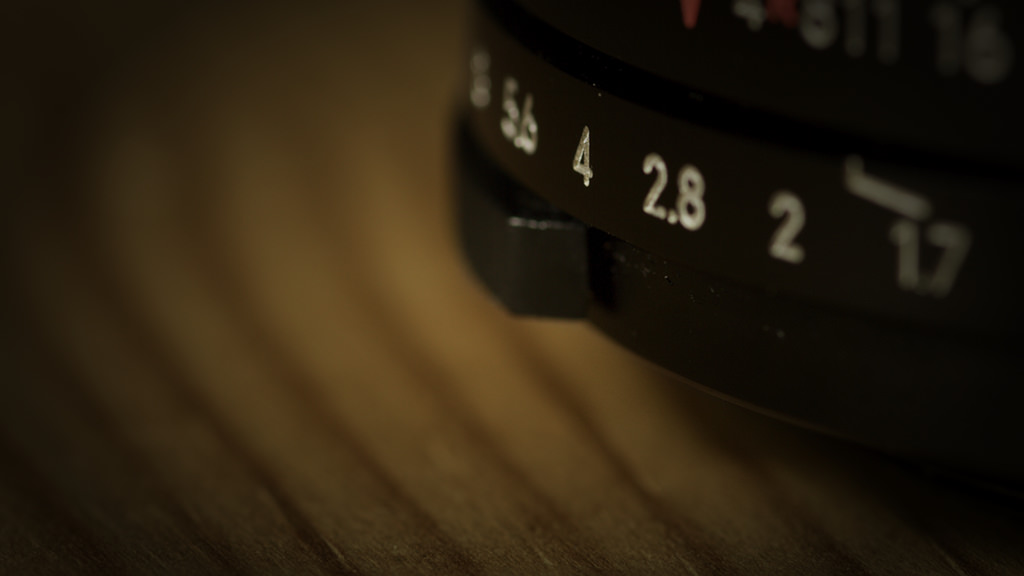
2.8; 3.5; 4; 5.6; 6.3 – um nur einige zu nennen – sind alles Blendenzahlen, die dem Fotografen in Fleisch und Blut übergehen, sobald er mal einige Zeit ernsthaft fotografiert. Wir alle Wissen natürlich, dass das runde Loch im Objektiv (auch Blende genannt) kleiner wird, wenn man die Blendenzahl höher einstellt, so dass weniger Licht bis zum Sensor durchkommt.

Blendenring eines Objektivs

Als ich gerade mit dem Fotografieren angefangen hatte, hab ich in einem Forum gelesen, dass es von Blende 5.6 bis Blende 8 nur eine einzige Blende Unterschied ist. Das heißt, dass bei Blende 5.6 genau doppelt so viel Licht auf den Sensor (oder auch Film) fällt, wie bei Blende 8. Demnach braucht man bei Blende 8 eine doppelt so lange Belichtungszeit wie bei Blende 5.6.

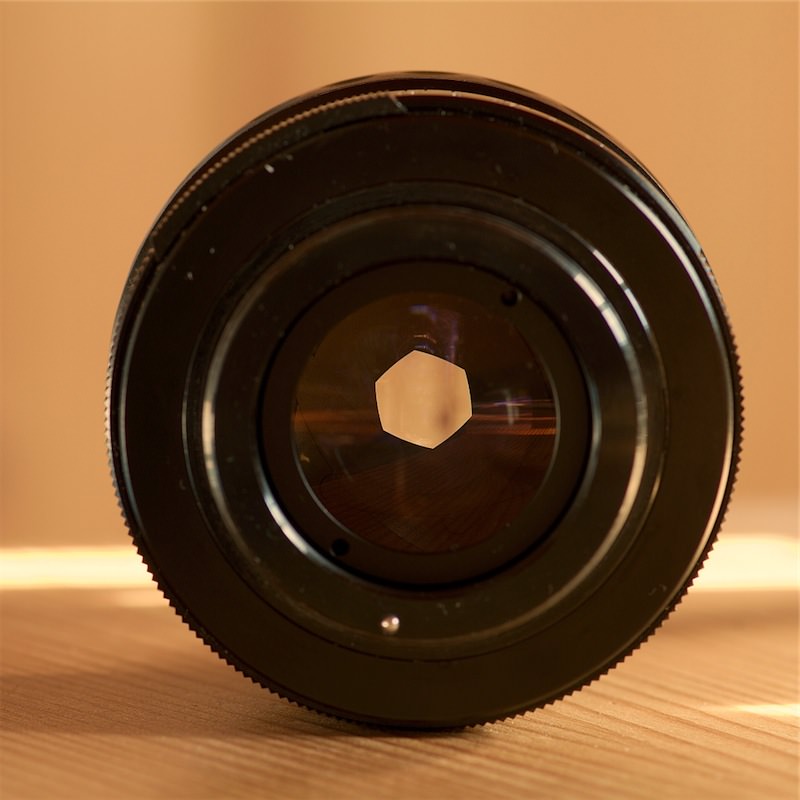
Blende eines ObjektivsDamals hab ich die Welt nicht mehr so recht verstanden und war ehrlich gesagt total perplex. Mir schwirrten Gedanken im Kopf herum wie: “Blende 5.6 + 1 Blende = Blende 6.6 und nicht 8″ oder “nach 5.6 kommt doch erst mal 6.3″.

ABER: Ganz so dumm wollte ich natürlich nicht bleiben und deshalb hab ich über die Sache nachgedacht und recherchiert und dieses Wissen möchte ich jetzt mit Euch teilen. Noch mal zur Erinnerung: Die Blendenzahl hat keine Einheit, sie ist schließlich nicht die Angabe des Durchmessers in Millimeter, sondern der Quotient aus Brennweite und Durchmesser der Kreisöffnung. Das heißt:

Blende Brennweite Öffnungsweite

Damit sich von Blendenstufe zu Blendenstufe die Belichtungszeit verdoppeln bzw. halbieren kann, muss logischerweise halb bzw. doppelt so viel Licht auf den Sensor fallen. Die Fläche des Kreises, durch den das Licht fällt muss also verdoppelt bzw halbiert werden.

Das würde man aber nicht erreichen, wenn man den Durchmesser der Blendenöffnung verdoppeln oder halbieren würde. Die Blende ist im angenommenen Idealfall kreisrund. Um die Fläche des Kreises, durch den das Licht fällt zu verdoppeln bzw. zu halbieren muss man den Durchmesser des Kreises mit der Wurzel aus 2 (also rund 1,4) multiplizieren/dividieren.

Und jetzt ein Beispiel

Na? Klingelts? 1,4 hab ich doch schon mal irgendwo gehört!! Na klar! 1,4 ist natürlich eine Blende in der Blendenreihen. Blende 1.0 würde bedeuten, dass die Brennweite des Objektivs (also zum Beispiel 50mm) genau dem Durchmesser der Blendenöffnung entspricht. Die Fläche, durch die das Licht auf den Sensor fällt wäre 19,63 cm².

Wenn man jetzt den Durchmesser der Blendenöffnung durch 1,4 (Wurzel aus 2) teilt, hätte die Blendenöffnung nur noch ca 36 mm Durchmesser und die Fläche, durch die das Licht scheint wäre mit 9,82 cm² halb so groß wie vorher es kommt deshalb auch genau halb so viel Licht durch. Wir haben jetzt eine Blende von Blende 1 auf 1,4 abgeblendet. (Puh, man kann sich das abblenden aber auch ganz schön schwer machen 😉 )

Daraus ergibt sich folgende Reihe der ganzen Blenden:

Blendenreihe

Die Reihe lässt sich natürlich beliebig fortsetzten.

Und woher kommen jetzt die Zwischenschritte?

Die Zwischenschritte sind schnell verstanden, wenn man den Rest schon kapiert hat. Bei Blende 4,5 ist die Fläche, durch die Licht auf den Sensor fällt um ein Drittel größer als bei Blende 4. Deshalb kommt natürlich auch ein Drittel mehr Licht durch. Bei manchen Objektiven hat man keine Drittelblenden-Rasterung sondern eine Halbblenden-Rasterung bzw. man kann das in der Kamera umstellen. Ältere Linsen kann man nur auf ganze Blendenstufen einstellen.

Für mich ist dieses Wissen nur ein Nice-to-know-Wissen, aber wenn jetzt jemand fragt: “Du bist doch Fotograf, erklär doch mal…”, muss ich nicht mehr ratlos mit den Schultern zucken. An den Fotos, die man macht, ändert es aber meiner Meinung nach nichts, wenn man es weiß. Mich hats nur irgendwie gezwickt, weil ich da was nicht kapiert habe.

Ich hoffe, dass ich diese extrem trockene und seit langem erste technische Thematik einigermaßen verständlich vermitteln konnte. Wenn Ihr noch Fragen habt, könnt Ihr diese gerne als Kommentar hinterlassen!

***
Werbepause: Buchtipp – Vom Alltäglichen zum Besonderen!


KWERFELDEIN | Digitale Fotografie

 
Comments Off on Warum sind das so komische Zahlen?

Posted in Equipment


Free Program Keeps Track Of Digital Photographers’ Time On Projects

27 May

If there's a need for you to know how much time you spent on a given project, or during a certain time period, then I've got a great little free program for you.

This software enables anyone to track time spent using various programs, such as graphics programs, in the case of a digital photographer, which makes it easier to determine how much to bill a client.

You can also use this program to track time spent researching a project which could be …


Digital Shot

 
Comments Off on Free Program Keeps Track Of Digital Photographers’ Time On Projects

Posted in Equipment


untitled

24 May

photo ©2010 kim mcalear

FILE Magazine

 
Comments Off on untitled

Posted in Equipment


untitled

23 May

untitled

anonymous*

*Far too often, due to the vagaries of Gmail or our own sheer incompetence (usually the latter), we lose track of the artist behind a photo that we want to publish. Help us give the photographer the credit they deserve. Let us know if you know whose photo this is.

FILE Magazine

 
Comments Off on untitled

Posted in Equipment


Pentax K-x Digital SLR Now Available In Designer Colors

15 May

Pentax always struck me as a fairly conservative company that builds appealing, quality products that boast an understated, but sophisticated look.

This is not to say that the company lacks imagination, to the contrary, Pentax has been responsible for many important firsts in photography, and it seems that now, in the digital camera age Pentax has decided to a bit of a designer camera thing.

The popular Pentax model K-x digital DSLR will now be available in designer colors, which are listed as …


Digital Shot

 
Comments Off on Pentax K-x Digital SLR Now Available In Designer Colors

Posted in Equipment


True Love

15 May

true love, originally uploaded by dontcallmeikke.

Catchy Colors Photoblog

 
Comments Off on True Love

Posted in Equipment


peek-a-moo

14 May

peek-a-moo, originally uploaded by {this life photography}.

Catchy Colors Photoblog

 
Comments Off on peek-a-moo

Posted in Equipment


Meandering Stream

12 May

. : LIGHT and SHADOW : .

 
Comments Off on Meandering Stream

Posted in Equipment