RSS
 

Archive for the ‘Equipment’ Category

Paul Rand Wisdom to Live By For Artists

27 Jul

Paul Rand was an incredible American graphic designer and in this video he shares some of his wisdom that is easily applicable to other art forms including photography. I highly recommend watching this video multiple times as he talks about the confusion created by some teaching efforts versus just creating (10 min), solving complex problems with simplicity, and his view on the merits of interactivity in design .

My favorite quotes:

Don’t try to be original. Just be good.
– Paul Rand

Very fitting to hear this this week as I just conveyed the same sentiment to a friend who is in a rut. My broader recommendation to my friend  throw it all to the wind and take photos you like just to get out and get one’s creative juices flowing. More simply put by Mr. Rand…

If you think it’s good, you feel good
– Paul Rand

Now I need to rewatch this again.

Technorati Tags: art, design, Paul Rand, photography

Copyright Jim M. Goldstein, All Rights Reserved

Paul Rand Wisdom to Live By For Artists

flattr this!


JMG-Galleries – Jim M. Goldstein Photography

 
Comments Off on Paul Rand Wisdom to Live By For Artists

Posted in Equipment


Photography Mega Tutorials

27 Jul

Here is a list of websites with hundreds of fantastic tutorials.

Best Photoshop Tutorials
Design Reviver
Photoshop Website
Abduzeedo
Tv Adobe
Six Revisions
Photosharpstar
Blue Bots
Creativecloseup
Vodix
Psdlearning
Elite by design
Designm.ag
10steps.sg
Designshard
Photoshoplady
Photoshoproadmap
Psd.tutsplus
Good-tutorials
Tutorialsphere
Pxleyes
Photoshoptutorials
Pixel2life
tutorial9
Photoshopninja
Blog.reflexstock
Tutorial Park
Adobe
Tutorials Garden
Photoshopcandy
Onlyphotoshop
Photowalkthrough
Photoshopsupport
Graphic-design
Picturecorrect
11amdesign
Tutorialoutpost
Domenlo
Tutorialkit
Dezinerfolio
Photoshop-tutorials
Planetphotoshop
Brilliantdays
Cbtcafe
Rnel
Pstutorialsblog
Layersmagazine
I will be adding more from your comments and also my searching around the web.

Any suggestions, ideas? Feel free to comment on this article!

Back to Top

BlogPhoto

 
Comments Off on Photography Mega Tutorials

Posted in Equipment


Eintauchen in andere Welten

24 Jul
Das ist ein Artikel von Anja Stiegler, die in der Nähe von Gifhorn lebt und beruflich Konzepte für Multimediaanwendungen entwickelt. Sie schafft mit ihren Bildern surreale Welten, in die der Betrachter eintauchen und sich von ihnen mitreißen lassen kann. Mehr von ihr gibt es auf flickr und deviantArt.

Ich mag es, mit meinen Bildern Emotionen beim Betrachter zu wecken. Dabei spielt es für mich keine allzu große Rolle, ob meine Bilder realistisch oder eher surrealistisch sind. Wobei Letzteres häufiger der Fall ist.

© Anja Stiegler

Ich möchte den Betrachter meiner Bilder gern für einen kurzen Augenblick aus seiner gegenwärtigen Situation herausholen. Ihn einfach von seinen Gedanken treiben, sich besser fühlen, frei sein, noch einmal Kind sein lassen.

Dabei kann er sich selbst aussuchen, was er in meinen Bildern sehen möchte. Ich gebe dabei nur einen Ansatz. Ich habe schon oft von anderen, die sich meine Bilder angesehen haben, gehört, dass sie sich danach irgendwie besser fühlten. Und genau das macht mich glücklich. 🙂

© Anja Stiegler

„Instrumente“ zur Ideenfindung
Um Ideen für meine Bilder zu finden, lasse ich mich überwiegend von Musik inspirieren. Musik transportiert Stimmungen, von denen ich mich mitnehmen lasse. Ich mag zum Beispiel viele Stücke von Yann Tiersen, Moby oder Air, um nur ein paar zu nennen.

Es ist allerdings nicht so, dass ich mich hinsetzen kann, Musik höre und warte bis ich eine Idee habe. 🙂 Nein, die Ideenfindung passiert ganz nebenbei im Alltag. Habe ich eine Idee für ein Bild, kritzle ich sie mir auf Stück Papier oder irgendetwas, das ich gerade zur Hand habe, damit ich sie nicht wieder vergesse. Diese Ideen sammle ich in einem kleinen Notizbuch.

Da ich berufstätig bin, habe ich leider nicht mehr so oft Zeit, ein Bild umzusetzen. Wenn ich sie jedoch habe, schaue ich hin und wieder in mein kleines Notizbuch und suche mir eine Idee aus, auf die ich gerade Lust habe, sie zu realisieren. Ich suche mir dann im nächsten Schritt die Dinge zusammen, die ich für das Bild benötige.

© Anja Stiegler

Bildmaterialbeschaffung – Eigen- oder Fremdleistung?
Meistens ziehe ich mit meiner Kamera und allem, was ich brauche los und fotografiere selbst. Ich bin dabei fast immer draußen, da die Natur meiner Meinung nach die besten Kulissen bietet und ich natürliches Licht am liebsten für meine Bilder mag.

Wenn ich keine Zeit oder Möglichkeit habe, eines oder mehrere benötigte Objekte zu fotografieren, suche ich mir Stock-Bilder im Internet, mit denen ich mein Vorhaben umsetzen kann. Ich muss jedoch dazu sagen, dass ich eigentlich kein riesengroßer Fan von Stock-Bildern bin.

Doch genau durch diese Stock-Bilder konnte ich meine Photoshop-Kenntnisse stark ausbauen. Hat man eine Idee für eine Fotomontage, bekommt man eigentlich alles, was man dafür an Bildmaterial benötigt im Internet. Allerdings kann die Suche danach mitunter recht mühsam sein.

Denn zum einen ist es für eine Fotomontage wichtig, dass alle für das Bild relevanten Objekte unter den gleichen Lichtbedingungen fotografiert worden sind. Beachtet man das nicht, wird man bei der Montage feststellen, dass irgendetwas nicht so richtig passt.

Und zum anderen muss man bei Stock-Bildern auf die Lizenzen achten. Das kann es einem ganz schön schwer machen. Letztendlich ist es immer besser, eigene Bilder zu verwenden.

© Anja Stiegler

Nachfolgend möchte ich zur Veranschaulichung einen groben Überblick über meine Arbeitsweise in Photoshop geben.

Bildaufbau
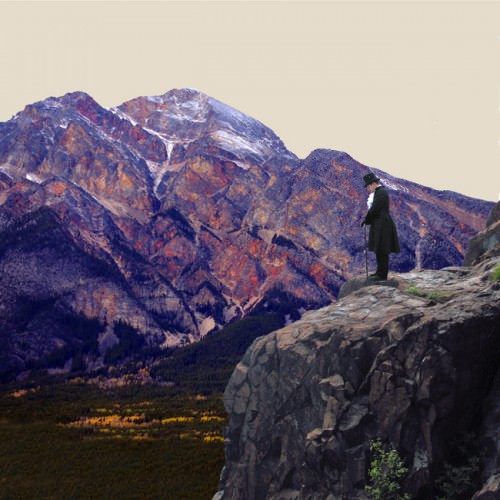
Wenn ich alle Objekte, die ich für die Umsetzung eines Bildes benötige, zusammen habe, stelle ich sie frei und positioniere sie da, wo sie am Ende sitzen sollen.

© Anja Stiegler © Anja Stiegler

Details und Sättigung
Ist dieser Teil abgeschlossen, füge ich Details hinzu. Das können zum Beispiel Schatten der Objekte, Wolken, Sonne, Sterne sein. Danach beginnt für mich der Moment, in dem ich dem Bild (je nach Bildinhalt) eine Farbstimmung gebe. Dafür verringere ich im ersten Schritt die Sättigung des gesamten Bildes.

Farbkleckse und Feinheiten
Danach spiele ich mit der Farbbalance, der selektiven Farbkorrektur, mit Farbverläufen oder/und den Tonkurven. Man sollte immer darauf achten, dass die Farben nicht zu extrem sind, sonst wirkt es schnell kitschig.

Habe ich die passende Farbstimmung gefunden, füge ich zum Schluss meistens noch eine Vignette ein, um den Blick des Betrachters in eine bestimmte Richtung zu lenken.

Letzter Feinschliff
Hin und wieder gibt es einem Bild noch das letzte i-Tüpfelchen, wenn man eine Textur hinzufügt. Dabei sollte man aber aufpassen, dass sie nicht zu dominant auf dem Bild liegt und so das eigentliche Bild zerstört, sondern lediglich als kleines Detail wahrgenommen wird.


© Anja Stiegler © Anja Stiegler

Zu guter Letzt
Abschließend kann ich sagen, dass neben der eigentlichen Bildidee (und deren sauberer Umsetzung natürlich) die Farbgebung für mich eine wichtige Rolle spielt, denn Farben bzw. Farbkombinationen wecken ebenso wie Musik Emotionen und Assoziationen. Ich weiß vorher meist noch nicht ganz genau, welche Farbstimmung mein Bild bekommen soll – aber das sagt mir mein Gefühl, sobald ich an den Farbreglern spiele. 🙂

Ich hoffe, ich konnte euch einen kleinen Einblick in meine Arbeitsweise geben. Ich habe mir vorher nie allzu viele Gedanken darüber gemacht, wie ich bei der Erstellung meiner Bilder vorgehe. Hier habe ich es zum ersten Mal niedergeschrieben. Also falls es noch Fragen, Anregungen etc. gibt, stehe ich gern dafür zur Verfügung.


KWERFELDEIN | Fotografie Magazin

 
Comments Off on Eintauchen in andere Welten

Posted in Equipment


Wesentliches: Eine Aktion auf KWERFELDEIN

24 Jul


Martin, 30, Herausgeber, Hochzeitsfotografie

Viele von Euch kennen bestimmt das Persona Projekt von Jason Travis auf flickr. Das Ding macht ja schon seit geraumer Zeit die Runde und wurde auch hier bei uns schon in einem Artikel vorgestellt.

Zu Recht, wie wir finden. Jedes Foto ist sehr ähnlich, aber durch die unterschiedlichen Gegenstände doch anders. Die abgebildeten Dinge lassen viel Spielraum, um sich ein Bild von der Person hintern den fotografierten Gegenständen zu machen. Und da wir gern mehr über Euch Leser erfahren würden, haben wir uns Folgendes gedacht:

Fotografiert die wesentlichen Gegenstände, die Ihr meistens bei Euch habt, beziehungsweise die Euch wichtig sind. Es müssen nicht unbedingt Dinge sein, die Ihr immer mit Euch rumschleppt. Wir meinen, man kann dem Ganzen ruhig ein bisschen mehr Freiraum lassen. Wenn Ihr also ohne einen Toast mit Nutella am Morgen nicht in die Gänge kommt, könnt Ihr auch einen solchen mit fotografieren. Ein paar Regeln gibt es aber schon.

  • Die Gegenstände möglichst senkrecht von oben fotografieren.
  • Im Format 3:2.
  • Das Foto muss mindestens 800 Pixel breit sein.
  • Nur minimal bearbeiten. Kontraste anziehen, ein wenig nachschärfen.
  • Bitte postet einen Link zum Foto in das Kommentarfeld und schreibt drei kurze Infos über Euch dazu: Name, Alter und Tätigkeit.
  • Solltet Ihr ein Blog betreiben, könnt Ihr natürlich alternativ auch einen eigenen Blogartikel daraus machen und einen Trackback setzen.
  • Einsendeschluss ist diesen Montag, 25. Juli um 23:59.

In einer Woche werden wir an dieser Stelle eine Auswahl der Fotos vorstellen, die wir am interessantesten finden. Damit Ihr Euch vielleicht auch ein besseres Bild von uns machen könnt, folgen jetzt schon mal unsere “wesentlichen Dinge”, ein kleiner Einblick in die Taschen der Redaktion.


Aileen, 24, Studentin


Katja, 26, Studentin


Holger Lückerath, 35, Redakteur & Fotografierer


Robert, 28, Entwerfer, Fotograf

Wir wünschen Euch viel Spaß und freuen uns schon auf Eure “Einsendungen”. 😉


KWERFELDEIN | Fotografie Magazin

 
Comments Off on Wesentliches: Eine Aktion auf KWERFELDEIN

Posted in Equipment


Recommended: “Photoshop & You” Events

24 Jul

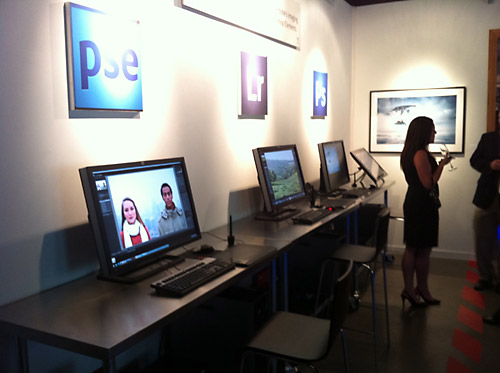
Today Adobe has opened a pop-up store called “Photoshop & You” here in San Francisco near Union Square. The store is open from Saturday, July 23 through Saturday, August 6 and is going to be a hub of some amazing events:
Photoshop & You Schedule of Activities

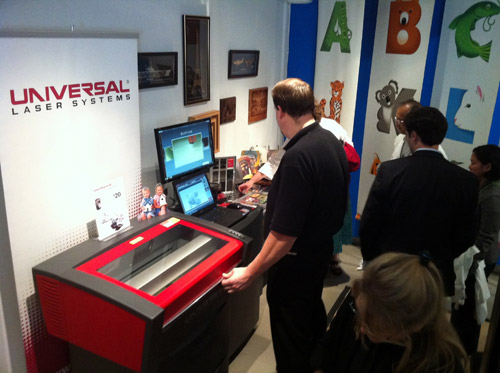
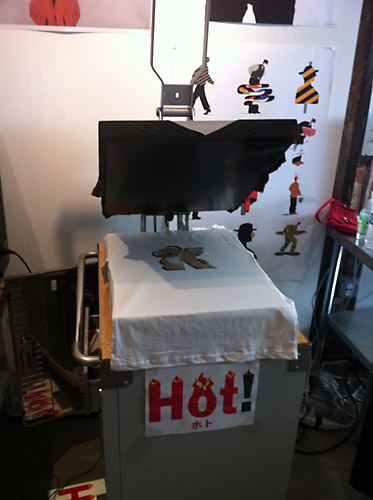
I was able to check out the “Photoshop & You” store at the VIP opening last night and it’s really cool. See photos below.

The pop-up store is home to some very cool image installations including a large display of Bert Monroy’s “Time Square” famous for being the largest Photoshop file containing 750000 layers! (Pano of it with Robert Scoble saying “Hi”) In addition the store will be a central hub for educational events and social activities. The back room is dedicated to Russell Brown’s Extreme Imaging Lab where there is laser etching, t-shirt screening and large format printing.

You can check out the Photoshop & You pop-up store at…
Location: 550 Sutter Street, San Francisco CA 94102

Extreme Imaging Lab

Technorati Tags: Photoshop, Adobe, activities, San Francisco, California

Copyright Jim M. Goldstein, All Rights Reserved

Recommended: “Photoshop & You” Events

flattr this!


JMG-Galleries – Jim M. Goldstein Photography

 
Comments Off on Recommended: “Photoshop & You” Events

Posted in Equipment


Free Online File Convertors

22 Jul

All2Convert – A fast way to convert videos from Youtube– a popular video sharing site.

Any Video Converter – Any Video converter provides support for conversion of almost all video file tyes like AVI, DivX, FLV, RM and more. Users are also provided with transfer options to devices like iPod and PSP.

Apple iPod Video Converter – Apple’s DVD2iPod allows users to convert DVD files to iPod, WMV, AVI and MPEG files.

AVS Video – A quality converter for DVD and VCD file formats.

Cellsea – Cellsea is an online video editor converting video files from desktop or online locations. It provides video conversion support for sites like Break.com, iFilm.com, Youtube.com, Metacafe.com, Google Video to name a few.

Convert Tube – Convert Tube is a quick online video converter for conversion to MP3, MP4, MOV and 3GP.

Easy Video Converter – A powerful utility for converting between video file formats like AVI, Realmedia, WMV/ASF, Quicktime, 3GP, MP4, FLV etc.

Flvix.com – An online free video converter for converting YouTube, Googlevideos into format compatible with PC, Mobile, iPod etc.

Hey Watch! – Hey Watch! Is an online video conversion utility for iPod like devices.

Koyote – Koyote can convert FLV,DIVX and other video formats into an iPod ready video format.

Media Convert – A cool media conversion utility which enables the users with various options for videos.

MediaConverter – A web-based video conversion utility including conversion from sites like YouTube.

SOSTV.de – A Weblog about German Cable and Pay TV, Films and addictive Series.

Movavi – Movavi allows users to convert video files to formats like AVI, Mpeg, iPod, PSP video, 3gp etc.

Reganam – 3GP Converter – A 3GP converter with support for conversion for various video files like MP3, QuickTime, AVI, Real Media and MPEG.

Tubefish – Tubefish video converter is a powerful video conversion service for converting videos to MPEG, AVI, MOV, 3GP and Divx.

Vconvert – Vconvert is an online converter for flv file format and YouTube videos. It converts videos to compatible formats for iPod/iPhone and mobile phone.

VIDEO4IPOD.ORG – A video and movie conversion utility for Apple’s Video iPod.

Video codezone – Simply enter the video URL which needs to be converted and choose the file format like iPod, 3GP, Quicktime, FLV, m4, AVI, mp3.

Vixy – A conversion utility allowing users to convert web-based Flash application to other video formats.

Xconv – Xconv offers free file conversion support for multiple file formats: word, wmv, PowerPoint, real audio, jpeg etc.

You convert it – A multi-purpose conversion utility with conversion support for images, audio, video and units.

Zune Online Audio-Video Converter – An online file converter with support for Zune compatible formats in audio and video.

Enjoy converting your videos online and drop us a line if one of the services listed above i not working anymore. Sometimes the servers are running out of traffic and the services are stopped until the end of the month. The Video converters are free of charge at the time we wrote this article. If a video conversion service changed to charging money for the video conversion please write a note in our comments. We do not remove the Video Converters but we want to mark them as commercial service.

Any suggestions, ideas? Feel free to comment on this article!

Back to Top

BlogPhoto

 
Comments Off on Free Online File Convertors

Posted in Equipment


Free Productivity Tools

14 Jul

Simpler Web viewing: Remember when the Web was add less and clutter-free? A browser add-on called Readability takes you back to those times by stripping any page down to its main article. No ads. Minimal navigation menus. Almost no clutter. It’s great for creating printer-friendly pages, and for distraction-free reading.

Isolation booth: For distraction-free writing in Windows, I love WriteMonkey. While you write, this minimalist writing app hides all of the formatting menus and just about everything else by expanding to full-screen mode and filling your screen with the soothing background color of your choice.

Intelligent notepad: At your PC or on your tablet or phone, Evernote lets you capture Web clippings, text notes, audio notes, and pictures. It then syncs them across all your devices, and indexes them so they’re easy to find later.

Mind mapper: When you want to capture complex ideas, few methods are as effective as a mind map for visualizing the many related parts of a project. Xmind gives you simple, powerful mind-mapping tools that rival those of the most expensive apps around.

Office alternative: Want a powerful productivity suite without the expense of Microsoft Office? Oracle’s free OpenOffice.org has a robust word processor, spreadsheets, databases, and presentations with support for Microsoft Office file formats.

Screen sharing: Whether you’re the unofficial tech support person for your company or the go-to techie for your family and friends, LogMe­In Free simplifies the process of sharing your screen with a remote user or of taking control of that person’s screen in real time.

Search simplifier: An alternative to the ubiquitous Google, newcomer Blekko takes a hand-curated approach, relying on slash tags that allow you to refine your searches and get more-relevant results. To see re­­sults for “Windows tips” sorted by date, for instance, type Windows tips /date.

List manager: To-do lists don’t have to be complicated. For simple, effective lists that you can share with friends and access from any mobile browser, try 37Signals’ Ta-da List.

Easy presentations: Need to whip up a snazzy presentation fast? Log on to SlideRocket via your Google account, and use its slick templates to embed images, Flash objects, videos, and audio. Then export your presentation as a PowerPoint slideshow or PDF.

E-mail postponer: When you get an e-mail message that you need to act on but don’t have to deal with quite yet, NudgeMail serves as a smart snooze button. Forward the message to, say, tomorrow@nudgemail.com or June2@nudgemail.com, and the e-mail will reappear in your inbox when you do need to see it.

File converter: Want to convert a MOV video file to WMV format, or a Word document into an ePub book for your e-reader? Online Convert transforms a wide selection of formats, and it doesn’t require you to download or install any new software.

Streamlined PDF viewer: Adobe’s Acrobat Reader has evolved dramatically over the years, and it has grown a little bloated along the way. For quicker PDF viewing that won’t hog your system’s resources, give the free Sumatra PDF a try.

Any suggestions, ideas? Feel free to comment on this article!

Back to Top

BlogPhoto

 
Comments Off on Free Productivity Tools

Posted in Equipment


What’s New In Photoshop CS5

13 Jul

Touch apps for Photoshop 12.0.4 or later
Mix color swatches, select and manage Photoshop tools, and paint watercolor images using three iPad apps. See Using Adobe Color Lava, Using Adobe Nav, and Using Adobe Eazel.

Easier interface management with live workspaces
Automatically store task-specific workspaces that reflect your workflow, and quickly switch between them. See Save and switch workspaces.

Intelligent selection technology
Extract subjects from backgrounds more quickly and accurately, creating realistic composites. See Refine selection edges.

Content-aware filling and healing
Easily remove image elements and replace them with content that seamlessly integrates into its surroundings. See Content-aware, pattern, or history fills and Retouch with the Spot Healing Brush tool.

HDR Pro
Apply greater tone-mapping power, creating high dynamic range images that range from photorealistic to surreal. Or apply an HDR look to standard images with the HDR
Toning adjustment. See Merge images to HDR and Adjust HDR toning.

Extraordinary painting effects
Take advantage of realistic painting effects, mixing colors on the canvas and simulating bristles to produce results that rival traditional painting media. See Paint with the Mixer Brush and Bristle tip shape options.

Puppet Warp
Radically transform specific image areas, while anchoring others in place. See Puppet Warp.

Automated lens correction
Quickly fix distortion using installed profiles of popular lenses, or custom profiles of additional models. See Correct lens distortion and adjust perspective.

Easy extrusions with 3D repoussé
Convert 2D text and artwork into 3D objects, and then extrude and inflate their surfaces. See Create 3D repoussé (Photoshop Extended).

Enhanced 3D performance, workflow, and materials
Quickly optimize performance with dedicated 3D preferences. Get faster previews and rendering with the improved Adobe Ray Tracer engine. Apply materials interactively with Material Load and Drop tools. See 3D panel overview (Photoshop Extended) and 3D Materials settings (Photoshop Extended).

Streamlined creative reviews
Collaborate with colleagues and quickly get client feedback with CS Review, an online service that accelerates the review process. See CS Review.

Integrated media management
Take advantage of improved watermarking, web galleries, and batch processing in Adobe Bridge CS5. Access assets directly in Photoshop using the Mini Bridge panel. See Adobe Bridge and Mini Bridge.

State of the art Camera Raw processing
Remove noise in high ISO images while preserving color and detail. Add creative effects like film grain and post-crop vignettes. Or precisely sharpen images with minimal artifacts. See Correcting lens distortions in Camera Raw, Sharpening and noise reduction in Camera Raw, and Vignette and grain effects in Camera Raw.

Dozens of customer-inspired productivity enhancements
Boost your efficiency with countless workflow improvements. Selected highlights let you:

  • Create layers by dragging files from Windows or Mac OS. See Create a layer from an existing file.
  • Straighten images with the Ruler tool. See Straighten an image.
  • Protect detail with the Sharpen tool. See Sharpen image areas.
  • Apply a graduated neutral density filter. See Apply a gradient fill.
  • Reverse the direction of a clone source. See Retouch with the Clone Stamp tool.
  • Customize defaults for layer styles. See Change style defaults to custom values.
  • Paste in the same relative location, or into or outside selections.
    See Understanding the copy and paste commands.
  • Store image-specific print settings. See Print images.

New GPU-accelerated features
Harness increased hardware power with features like brush previews, a color sampler ring for the Eyedropper tool, and a Rule Of Thirds grid for the Crop tool. See Choose a color while painting and Crop an image using the Crop tool.

Faster performance with cross-platform 64-bit support
Complete day-to-day imaging tasks at least 10% faster on 64-bit versions of Mac OS and Windows. See Memory and performance.

Any suggestions, ideas? Feel free to comment on this article!

Back to Top

BlogPhoto

 
Comments Off on What’s New In Photoshop CS5

Posted in Equipment


Security Freebies

08 Jul

Simple security: In last year’s roundup of best free stuff, the beta version of Microsoft Security Essentials 2 impressed us. Since then, Microsoft has officially released the utility to the public, and our admiration has only grown. With its combined antivirus, antispyware, and firewall protection, Security Essentials provides a solid layer of protection against the most common threats without hobbling your PC or nagging you with annoying update reminders.

File killer
: When you delete files from your PC via the Windows Recycle Bin, Windows marks them as erased and hides them from view; eventually it fills the drive space they occupied with newly created or downloaded content. To get rid of data right away, use Eraser, a free file-deletion utility that works with DoD-grade algorithms to overwrite deleted data repeatedly until it’s practically unrecoverable.

Facebook defense
: Facebook is fun, but it’s also rife with malicious links that can damage your PC and compromise your private data. Defensio for Facebook intercepts those threats and alerts you before they can do any harm.

Software updater: Now that almost every PC application can access the Internet, dozens of potential security holes lie scattered across our systems. Secunia Personal Software Inspector helps mitigate the risk by searching for important security patches for every program on your PC. When I ran it, PSI found seven outdated programs on my machine, and pointed me straight to the download links for the updates I needed. Suddenly I feel much more secure.

USB protection: How much do you trust the USB drive that your friend wants to plug into your PC? If you use Panda USB Vaccine, you don’t have to take anything on faith. This simple utility automatically neutralizes common flash-drive threats to keep malware from making the jump to your hard drive.

Password keeper: You want to get to the Websites you use without stopping to recall a dozen unique passwords every day, but using the same password at multiple sites is a good way to compromise your data. Password Safe gives you the best of both worlds by storing all your logins and dropping them into the sites you visit as needed. As a result, you can maintain as many different, complex passwords as you need while having to remember only one master password to rule them all.

Any suggestions, ideas? Feel free to comment on this article!

Back to Top

BlogPhoto

 
Comments Off on Security Freebies

Posted in Equipment


!efatima’s photostream

08 Jul
Dear Mom,Dedicated to Kees De VossWhat comes to your mind when you see this?Nunu time ZzzzzzzzStrangerMew - Happy Birthday Uncle Hamood
Mommy... I'm sad without you.....Momquick stop @ appleCourageSunsetDust Tsunami Hit Kuwait March 25th 2011 causes zero visibility (photos: 25-Mar-11, 6:00pm)
Dust Tsunami Hit Kuwait March 25th 2011 causes zero visibility (photos: 25-Mar-11, 6:00pm)Dust Tsunami Hit Kuwait March 25th 2011 causes zero visibility (photos: 25-Mar-11, 6:00pm)Dust Tsunami Hit Kuwait March 25th 2011 causes zero visibility (photos: 25-Mar-11, 6:00pm)Dust Tsunami Hit Kuwait March 25th 2011 causes zero visibility (photos: 25-Mar-11, 6:00pm)Dust Tsunami Hit Kuwait March 25th 2011 causes zero visibility (photos: 25-Mar-11, 6:00pm)Dust Tsunami Hit Kuwait March 25th 2011 causes zero visibility (photos: 25-Mar-11, 6:00pm)

!efatima’s photostream on Flickr.

Catchy Colors Photoblog

 
Comments Off on !efatima’s photostream

Posted in Equipment