Blog

  • A mother shares her love of adventure with her son

    Sarah-Jane “SJ” Staszak is suspended from a cliff with her son Hamish. (Photo courtesy of Benjamin Von Wong)

    Benjamin Von Wong is at it again, this time partnering with digital artist Karen Alsop on a Heart Project to give a paralyzed mother another opportunity to share her love of adventure with her 8-year old son Hamish.

    Von Wong and Alsop teamed up to give former outdoor education instructor SJ Staszak a chance to create some magical images with Hamish. Staying true to their individual artistic approaches, Von Wong set up a shoot where SJ and Hamish were suspended off a cliff (as were Von Wong and the lighting equipment) and Alsop used digital manipulation to edit studio photos of the mother-son duo.

    ‘Tunnel of Life’ (photo courtesy of Karen Alsop)

    Read Von Wong’s post for more photos and behind-the-scenes footage

    Articles: Digital Photography Review (dpreview.com)

  • We shot the Boeing 737 Max 9’s first flight with a Sony Cyber-shot RX10 III

    The Boeing 737 Max 9, shortly after landing. There’s enough latitude in the RX10 III’s Raw files to allow for moderate shadow and highlight adjustment.

    28mm (equiv) F4.5, ISO 100

    As has been amply demonstrated in the past, I’m an aeroplane nerd. So when Boeing offered us the chance to shoot the first flight of its brand new Boeing 737 Max 9 last month, I jumped at the chance. I might even have pushed a couple of my colleagues out of the way.

    In the end, three of us headed over to Boeing Field in Seattle for the first flight – Dan, (who couldn’t care less about aeroplanes), with a Panasonic FZ2500; me, the super-nerd with the Sony RX10 III, and Carey, an impartial observer, with a Panasonic GH5 (to film me and Dan arguing). We’ll be publishing a longer article comparing our results soon, but in the meantime, with the 737 Max 9 just (temporarily, hopefully) grounded, we thought you might like a sneak preview.

    The 737 Max 9 at the end of the runway at Boeing’s Renton assembly plant, seconds before starting its takeoff roll.

    400mm (equiv) F4, ISO 100

    I am on record as having described the Sony RX10 III’s lens as being ‘made of magic’. I just don’t understand how a 24-600mm lens built into a compact (ish) camera can be as sharp as it is. Since as Arthur C. Clarke so memorably said, any sufficiently advanced technology is indistinguishable from magic anyway, and bearing in mind that I’m no expert in advanced optical technology, magic is the explanation I’m sticking with.

    It was for that reason that when the question came up of which cameras we should bring, I grabbed the RX10 III from our stockroom. I might even have pushed Dan out of the way…

    As well as 20MP stills, the RX10 III also shoots 4K video. Because we were trying to compare two cameras, and Boeing didn’t seem too keen on our suggestion that the Max 9 take off at least five times for accurate side-by-side tests (sorry Rishi, we did ask), we decided not to worry about shooting any video. The RX10 III takes nice-looking video, and if you’re curious you can see several examples of its footage in our full review.

    Grant Hindsley is too tall. It’s an unfair advantage.

    24mm (equiv) F4, ISO 100

    First flights are always a bit of a lottery in terms of timing. I’ve shot a couple of them, and things rarely go exactly according to schedule. The 737 Max 9 takeoff was delayed by a couple of hours, which we spent standing around, stamping our feet to stay warm and teasing Grant Hindsley from the Seattle PI (above) about his great height. When the plane started to taxi, things happened very quickly. No time for comparing how mode x compared to mode y – we just had to start shooting.

    In high speed capture mode, the RX10 III can shoot at up to 14 fps, in Raw + JPEG, with focus locked. Since we were shooting a large airplane, pretty much at infinity, moving from infinity to infinity by way of infinity, having focus locked (at infinity) was fine.

    What I hadn’t anticipated is that when focus is locked, so is the RX10 III’s zoom. It makes complete sense when you think about it, but the lens won’t zoom with the shutter button half pressed. For this reason, I had to zoom and recompose a couple of times during the Max 9’s takeoff run, but even with this interruption, I still captured a lengthy sequence of sharp images of the plane rocketing past our position, and into the sky.

    The 737 Max 9 lifts off from the runway at Renton, for its first flight.

    400mm (equiv) F4, ISO 100

    While the RX10 III can be a somewhat frustrating camera to use (I really dislike its fussy user interface and I can’t wait for the inevitable Mark IV to finally clean it up) that lens really is something. From 24mm right through to 600mm, I took home images that are sharp and contrasty from edge to edge, and free from noticeable distortion. Having such a wide (and usable) zoom range in a single camera allows for incredible versatility.

    Zooming out to a medium focal length of 50mm let me capture one of the members of the assembled press taking a quick shot on his iPhone as the 737 Max 9 was towed to its gate after the flight…

    50mm (equiv) F4 ISO 100

    Dan and I we were shooting alongside photographers from various news outlets and picture agencies (and of course slightly beneath Grant, from the PI) and while they juggled with huge telephoto primes, swapping for wides for crowd shots and then back again, I just nudged the RX10 III’s zoom rocker switch in the desired direction.

    The 737 is on final approach? Nudge.. nudge… to 600mm. It’s taxiing into the gate below our balcony? No problem. Nudge… nudge… back to 50mm. And then out again to 600mm for a shot of the pilot waving from her window. Done.

    … and moments later, zooming in let me capture Boeing’s chief deputy test pilot Captain Christine Walsh waving from the window of the 737 Max 9 as it taxis to the gate after the first flight.

    600mm (equiv) F5, ISO 100

    We’ll be publishing Dan’s images from the Panasonic FZ2500, and a short video from the day very soon. For now, take a look at the gallery, which includes out of camera JPEGs and converted Raw files, as well as Raw files for download.

    Sony Cyber-shot RX10 III sample gallery

    $ (document).ready(function() { SampleGalleryV2({“containerId”:”embeddedSampleGallery_2851627643″,”galleryId”:”2851627643″,”isEmbeddedWidget”:true,”standalone”:false,”selectedImageIndex”:0,”startInCommentsView”:false,”isMobile”:false}) });
    Articles: Digital Photography Review (dpreview.com)

  • Huawei Mate 9 quick review

    The Huawei Mate 9 comes with specifications that are in many ways very similar to the slightly newer P10 model. However, as the Chinese manufacturer’s current flagship phablet, the Mate 9 offers a Full-HD display that is, at 5.9″, quite a lot larger than the P10’s 5.1″ equivalent and is overall a chunkier and heavier device.

    Like on all recent Huawei high-end models, the Mate 9’s dual-camera was co-developed with German camera manufacturer Leica. It comes with a 20MP monochrome sensor that is combined with a 12MP RGB chip to achieve better image results than conventional cameras. Both lenses feature an F2.2 aperture, complemented by a 6-axis optical image stabilization system and a 4-in-1 hybrid AF that combines contrast detection, phase detection, laser time-of-flight measurements and depth information. The Mate 9 can also record 4K video and has a front camera features an 8MP sensor and F1.9 aperture.

    In terms of imaging features, the Mate 9 offers everything you would expect from a true high-end smartphone. The camera app’s Pro mode gives you manual controls and DNG Raw capture. There are panorama and HDR modes and some dual-cam based features, such as a portrait mode with a simulated shallow depth-of-field effect. 

    The Mate 9 camera app allows you to adjust all essential shooting parameters using virtual sliders.

    The rest of the specification is all worthy of a flagship model as well. Android 7.0 and Huawei’s EMUI 5.0 launcher are powered by the in-house Kirin 960 chipset and the large 4000mAh battery comes with Huawei’s own quick-charging system.

    Key specifications:

    • Dual-cam with 12MP RGB sensor and 20MP monochrome sensor
    • F2.2 apertures on both lenses
    • Optical image stabilization 
    • Hybrid AF with contrast detection, phase detection and laser measurement
    • 4K video
    • Manual control over shutter speed
    • DNG Raw capture
    • 8MP / F1.9 front camera
    • 5.9″ LCD IPS display with 1080p
    • Android 7.0
    • Kirin 960 chipset
    • 4GB RAM
    • 64GB storage and microSD-slot
    • 4000mAh battery with quick charging

    Image quality in good light

    In good light the Mate 9 camera captures images with good exposure and pleasant colors that are vibrant but still natural. The dual-cam setup is also capable of maintaining better highlight detail than many competitors, making the Huawei a good choice for shooting in high-contrast situations. 

    The Leica lenses provide very good sharpness across the frame and into the corners. When viewing the Huawei’s low-ISO image output at a 100% there are no artifacts such as chromatic aberrations, color bleeding or moire but blue skies show noticeable luminance noise. Fine low-contrast textures, such as distant vegetation, are a little smeared by noise reduction but overall the Huawei captures very good detail. 

     ISO 50, 1/1751 sec

    In the scene below the Mate 9 camera maintains very good highlight detail in the bright sunshine.

     ISO 50, 1/1307 sec

    The Huawei Mate 9 colors are vibrant but not quite as punchy and unnaturally saturated as on some competitors.

     ISO 50, 1/1715 sec

    In the portrait scene below the camera does a very good job at balancing exposure between in the bright sunlit background and the shaded subject.

     ISO 50, 1/428 sec

    Image quality in low light conditions

    In low light the Mate 9 camera performs very well across the ISO range. Color response and white balance are good, even in mixed light situations, and the camera produces good exposures down to very low light levels. 

    Noise and the effects of noise reduction become more intrusive as the ISO value goes up but the Huawei always maintains a good balance between noise reduction and detail retention. Chroma noise is well under control and grain tends to be fine and less intrusive than on some competitors. Even shots captured in very dark scenes still show some finer textures and decent edge detail. Overall the Mate 9 camera performs very well in low light, letting the Huawei compete with the very best in dim conditions. 

    At ISO 100 a very minor reduction of detail is just about noticeable but you have to zoom in to a 100% view to see. Color and exposure are very good. 

     ISO 100, 1/100 sec

    The ISO 250 shot below was captured in a tungsten-lit interior. The white balance system is doing a good job at producing a fairly neutral color response that preserves some of the scene’s warm atmosphere. At full-size view luminance noise becomes visible but the grain size is very small and much less intrusive than the smeared ‘noise blobs’ on some other cameras.

     ISO 250, 1/33 sec

    The camera does a good job in the difficult light conditions of the indoor scene below. The optical image stabilization usually keep things steady but, like on most smartphone cameras, at slow shutter speeds even minor subject motion leads to slight softness.

     ISO 640, 1/17 sec

    For the night scene below the camera’s auto mode selected ISO 1250. In these difficult conditions noise is visible even at smaller image sizes and a lot of fine detail has been eradicated by noise reduction. However, in comparison to many competitors the Mate 9 is still doing a very good job. Some low-contrast textures are preserved and noise levels are comparatively low. The auto exposure system is also doing an excellent job at balancing the bright portions of the scene against the darker elements. 

     ISO 1250, 1/4 sec

    Flash

    The Mate 9’s dual-LED flash performed well in our testing. When using the flash the camera tends to keep ISO pretty low, allowing for good detail and low noise levels. Exposure is good with subjects across the table but can get a little too dark at slightly longer distances. Auto white balance usually ensures natural skin tones, even in mixed light situations. 

     ISO 320, 1/25 sec

    Front camera

    The Mate 9’s front camera comes with an 8MP resolution and resolves good detail in bright light. It also offers better dynamic range than most front cameras we have seen and deals very well with bright backlit scenes, such as the one below. As you would expect, image quality starts suffering as light levels get lower but a display flash function allows for self-portraits even in very dark situations.

     Front camera, ISO 50, 1/1427 sec

    Panorama mode

    The Mate 9’s panorama mode works in the same way as on other recent Huawei high-end models. You can capture both vertical and horizontal panoramas and a guide line helps you keep things as straight as possible during recording. 

    At usually just over 10,000 pixels wide the Mate 9’s panorama images are quite a bit smaller than on recent iPhones or Samsung Galaxy models and only cover a 180 degree angle of view. However, image detail is pretty good, there are only minor stitching errors and the mode deals well with moving subjects in the scene. 

    Vertical panorama, 11274 x 3072 pixels

    DNG Raw capture

    When shooting in its Pro mode you can set the Mate 9 camera to save DNG Raw files in addition to JPEG images. 

    Out-of-camera JPEG, ISO 50, 1/1000 sec

    The Raw sample below was converted in Adobe ACR. We applied some negative digital exposure compensation and slightly lifted the shadow areas for an overall more natural tonal distribution and applied some small-diameter sharpening. If you click through to the full-sized version you can see that by doing so you can achieve noticeably better detail and reduce highlight clipping on some of the brighter elements in the scene (though the better highlight roll-off has as much to do with being able to access ACR’s cleverness as anything the phone is contributing). 

    DNG Raw file, converted in Adobe ACR

    Video

    The Huawei Mate 9 can capture video in up to 4K resolution and 120 fps slow motion clips at 720p. The 1080p Full-HD sample below shows good color and detail but panning is not quite as smooth as the best in class. The quality of the stereo sound recording is good in most situations. 

    Conclusion

    The Huawei Mate 9 comes with high-end components that are wrapped up in a solid metal body with a premium look and feel, a comprehensive imaging feature set, a well-structured camera app and very good image quality across all light levels. In bright light the Mate 9 camera lags very slightly behind the best in class in terms of image detail and noise but delivers excellent dynamic range, making it a great camera for shooting in high-contrast situations.

    In lower light the camera maintains an excellent balance between noise reduction and detail retention at all light levels and even images taken in very low light still show some fine textures, making the Huawei an excellent choice for mobile photographers who like shooting in dim conditions. Panning in video mode is not quite as smooth as on the iPhone or Google Pixel devices but if video is not too high up your list the Huawei Mate 9 is a very powerful tool for mobile photography.

    If you prefer smaller smartphones you should have a closer look at the Huawei P10, which offers very similar all-around specifications in a noticeably smaller package. 

    Huawei Mate 9 sample gallery

    $ (document).ready(function() { SampleGalleryV2({“containerId”:”embeddedSampleGallery_4391473475″,”galleryId”:”4391473475″,”isEmbeddedWidget”:true,”standalone”:false,”selectedImageIndex”:0,”startInCommentsView”:false,”isMobile”:false}) });
    Articles: Digital Photography Review (dpreview.com)

  • Dirty Car & Truck Art: Moscow Street Artist Adds Critters to Filthy Vehicles

    [ By WebUrbanist in Art & Street Art & Graffiti. ]

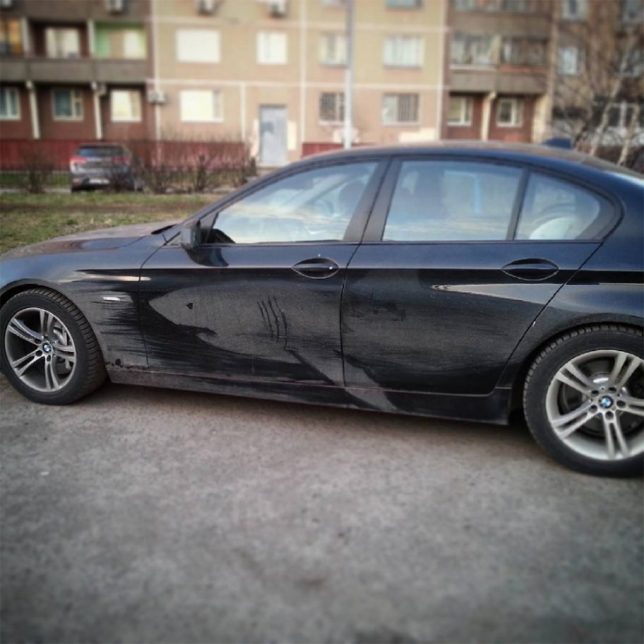
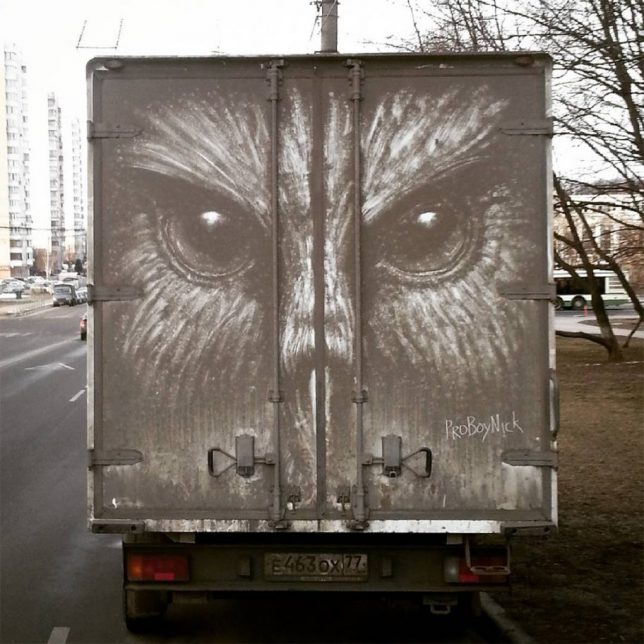
    Massive deep sea monsters, jungle predators and swamp creatures lurk in the grimey shadows on the backs of trucks, thanks to interventions by illustrator Nikita Golubev. Most of the featured critters are of the potentially creepy variety, including a deep-sea angler fish, octopus, shark, alligator, lion, owl and orangutan.

    Based in Russia, the artist works on cars sometimes as well, but finds the broad doors and long sides on larger vehicles particularly inviting as blank canvasses for light-on-dark works of art.

    As a subtractive strategy, there is less risk associated with these impermanent pieces as well — at worst, some truck driver may be less than amused to find their dirty vehicle highlighted in such a way.

    Reverse graffiti is nothing new, but most artists who work in that vein operate at smaller scales, cleaning up sections of door and rear windows rather than tall trucks. Naturally, these pieces are all temporary, destined to come off in the wash or rinse out in the rain (but live on in photographs).

    Share on Facebook


    [ By WebUrbanist in Art & Street Art & Graffiti. ]

    [ WebUrbanist | Archives | Galleries | Privacy | TOS ]


    WebUrbanist

  • 2017 Roundup: Interchangeable Lens Cameras around $500

    Entry-level interchangeable lens cameras have never been so affordable or more capable. There are plenty of choices around the $ 500 mark that will take better pictures than most cameras ever made.

    They don’t always have the very latest sensors or the premium build quality of their more expensive midrange siblings – and their controls tend to err on the side of simple, rather than extensive – but they tend to be excellent value and comparatively easy to use.

    All of these cameras – both mirrored and mirrorless – produce good image quality, offer respectable performance and can record Full HD video. The majority have Wi-Fi to make it easier to share images to a smartphone. Many of them are targeted toward beginners, with ‘help’ systems that point out the best settings to use for various shooting situations.

    Those unfamiliar with DSLR and mirrorless cameras may be wondering what advantages and disadvantages each brings to the table. DSLRs are larger cameras, with a more ‘traditional’ shape and control layout, as well as an optical viewfinder. While they’re great for shooting stills, they’re not as well suited to video capture, and focusing using live view tends to be sluggish. Mirrorless cameras are typically smaller and are very capable video shooters, and live view focusing is much faster than most DSLRs. Two negatives about mirrorless cameras are that battery life isn’t nearly as good as a DSLR and – especially true in this class – they often lack a viewfinder.

    Let’s take a look at several entry-level ILCs, with US MSRPs in the $ 500 region, kit lens included:

    • Canon EOS M10
    • Canon EOS Rebel T6
    • Fujifilm X-A3
    • Fujifilm X-A10
    • Nikon 1 J5
    • Nikon D3400
    • Olympus PEN E-PL8
    • Sony Alpha a5100
    • YI M1

    Articles: Digital Photography Review (dpreview.com)

  • Canon 6D II rumors and a B&W medium format back: ‘Fro rounds up the week’s news

    In this his most recent photo news ‘fix’, Jared Polin, AKA ‘Fro Knows Photo’ tackles rumors of a forthcoming replacement for the Canon EOS 6D, and the announcement of Phase One’s pricey new 100MP black and white back. What would you buy with $ 50,000? Fro wants to know.

    Articles: Digital Photography Review (dpreview.com)

  • This video from an action cam strapped to a dog will make you laugh or make you sick, possibly both

    Few things are as unshakable as the bond between humanity and our canine companions, except, perhaps, the bond between those canine companions and some good old tennis balls. Of course, the Sony X3000 action camera has optical stabilization, so it should be pretty unshakable too, but you’ll just have to watch the video to find out how it does. 

    The video is part of an action camera roundup The Wirecutter did earlier this year, which includes the GoPro Hero5 Black, the Sony FDR-X3000 that’s used above, and the Yi 4K Action Camera, which was actually one of our favorites.

    For the full scoop, head on over to the The Wirecutter, or catch the highlights on Engadget.

    Articles: Digital Photography Review (dpreview.com)

  • FilmLab is a film negative scanning app for smartphones

    Thanks to cheap secondhand cameras and a general ‘retro trend’ film photography is experiencing a true revival. However, most photographers who shoot film still need digital versions of their images to show them off online or send to friends and family, which is why film-scanning hardware and software is a necessary part of the equipment.

    Software developer Abe Fettig has found current solutions too expensive and slow and has therefore used his spare time to start working on the FilmLab app as a side-project. FilmLab now exists as a prototype and is impressively simple. Negatives or slides of any size have to be placed on a light table and can then be scanned using your smartphone. 

    Pointing the app at the roll of film automatically identifies the images, corrects for distortion and converts negatives into positives. A tap on the shutter then records several Raw files which are merged for optimal image quality. Alternatively, if you want better image quality and/or higher resolution, you can also load images taken with a DSLR or other camera into the app for conversion into digital positives.

    Abe is now hoping to work full-time on the app for a while to iron out the bugs and make it work with more types of film stock and phones. You can support this project by donating $ 3 to the app’s development and getting access to ongoing updates, or by donating $ 18 for access to the first Beta builds that will let you be among the first users to try out new features.

    The plan is to offer the app as a $ 2/month subscription service once it is finished, with a one month free trial period. This would make it inexpensive, or even free, for those users who do a short-term project digitizing film. You can find out more about the project and see some scanning samples on the FilmLab Kickstarter page.

    Articles: Digital Photography Review (dpreview.com)

  • StarTech.com releases two new USB 3.0 CFast card readers

    StarTech.com has released two new card reader/writers for CFast 2.0 and 1.0 memory cards with data transfer speeds up to 5Gbps over USB 3.0 (USB 3.1 Gen 1). The new readers feature a compact and portable design and come in either USB-C or USB-A versions. They connect to laptops, desktops or compatible mobile devices via an integrated cable. 

    Both readers support hot-swap and plug-and-play and are backwards compatible with USB 2.0 and 1.x standards. They will retail in the US for $ 61.99. More information is available on the Startech.com website. 

    Articles: Digital Photography Review (dpreview.com)

  • Week in Review: Hungry Birds

    Sony a9 Raw support arrives

    We started the week in much the same way as the previous one ended, with more coverage of Sony’s new a9 mirrorless monster. Thanks to a prerelease version of Adobe Camera Raw, we were able to go back and process the a9’s sample photos ‘to taste’. 

    You can view our updated gallery, and read some analysis about the IQ, right here.

    Interview with Panasonic’s Yosuke Yamane

    Recently, Yosuke Yamane, the Director of Panasonic’s imaging business, stopped by the DPReview offices to talk about the GH5, the wonders of 8K, rumors of downsizing and more. Read the full interview.

    Olympus firmware updates

    If there’s one thing you can say about Olympus it’s that they take care of their customers – even those with cameras now several years old. We saw that with last Monday’s major firmware updates for the E-M1 (original and Mark II), E-M5 II and PEN-F. In addition to adding support for Profoto’s wireless flash system (the TTL-O transmitter is pictured above), improvements ranged from selecting autofocus points to EVF color reproduction. Two lenses, the 12-100 F4 and 300mm F4, also received an update.

    Sigma 100-400mm F5-6.3 DG OS HSM gallery

    Do you like bird photos? Sure, we all do. DPR’s Sam Spencer drove halfway across the country with the Sigma 100-400mm F5-6.3 lens and sent back some shots of cardinals chowing down at the feeder. Our initial sample gallery is now available for viewing, and look for more photos from the Sigma 100-400 in the days and weeks to come.

    Sony 100mm F2.8 STF GM OSS gallery

    The Sigma 100-400 wasn’t the only telephoto lens gallery this week. We also posted a gallery from Sony’s 100mm F2.8 STF lens, which promised smooth, ‘buttery’ bokeh. According to our own Rishi Sanyal, the bokeh might be a little too smooth for some people. You’ll find our 46-image gallery plus Rishi’s analysis right here.

    Panasonic DC-GX850 / GX800 review

    There was some sadness in the office last year when it appeared that the Panasonic GM series had been left to die. The good news is that it’s back, mostly, in the form of the GX850/GX800. The bad news? It didn’t knock our socks off. Read the review to find out why.

    Throwback Thursday: Eye Control AF

    Part of the fun of writing Throwback Thursday articles is going back and finding cameras with some really unusual features. We jumped back to the film era for this one, but we think you’ll agree with Dale Baskin about how clever (though not always reliable) Canon’s Eye Control AF was. You might not agree with Dale’s desire to see it return on modern ILCs (which has a likelihood in the neighborhood of zero).

    Jump back to the days of the EOS Elan II E in this week’s TBT.

    Budget ILC roundup

    Over the last month we’ve been going back and updating our camera roundups. This week we looked at nine interchangeable lens cameras that sell for around $ 500. You might be surprised which cameras offer the most bang for the buck. If you’re looking for the perfect Mother’s Day gift, then the $ 500 ILC roundup might be a good place to start.

    Watch for additional updates to our roundups over the next several weeks!

    Articles: Digital Photography Review (dpreview.com)