Blog

  • Making Sense of the Exposure Triangle – ISO, Aperture, and Shutterspeed Made Simple

    The post Making Sense of the Exposure Triangle – ISO, Aperture, and Shutterspeed Made Simple appeared first on Digital Photography School. It was authored by Jackie Lamas.

    making-sense-of-the-exposure-triangle

    Ever hear other photographers talking about shooting in manual mode, and using terms like ISO, aperture, and shutter speed and have no idea what they’re talking about? Then this article is for you. While making sense of the Exposure Triangle may seem overwhelming, you’ll learn everything there is to know so that you can get shooting in manual mode quicker!

    Image: Canon 6D, 28mm, f/5.6, 1/250, ISO 400

    Canon 6D, 28mm, f/5.6, 1/250, ISO 400

    Everything in photography has to do with light

    All three settings, ISO, aperture and shutter speed are collectively called the Exposure Triangle. They work together to allow more or less light to enter the camera depending on the light that you see with your eye in a given situation.

    making-sense-of-the-exposure-triangle

    For example, the brighter the light outside, the less you need to enter your camera to record the image. The less light around you, the more light you’ll need the camera to capture in order to make the image visible.

    Each part of the Exposure Triangle works together to create a good exposure while controlling the camera fully to suit your creative direction.

    What is ISO?

    When making sense of the exposure triangle, you first need to understand ISO. ISO is the light sensitivity of the camera’s sensor.

    So, think of this as your eye. When it’s really bright outside, your eyes tend to be less sensitive and need to strain less to focus, see, and look at the world around.

    Image: When it’s particularly bright outside, like in this photo, use a lower number ISO.  Cam...

    When it’s particularly bright outside, like in this photo, use a lower number ISO.  Camera settings: f/5.0, 1/800, ISO 200, 85mm shot on Canon 6D.

    On the other hand, when you’re in a dark location with little to no light, your eyes strain and become more sensitive to any lights in the scene, helping you see better at night as well.

    The same thing happens to a camera’s sensor. The more sensitive, the more light you’ll be able to pick up. The less sensitive, less light will enter the camera.

    making-sense-of-the-exposure-triangle

    ISO is measured in numbers ranging from 50 to 25,600 on some models. There is usually a button on your camera that is labeled ISO. This is where you’ll be able to change the ISO depending on the lighting situation.

    Image: Here, we used auto mode to get an idea of the exposure we would need to take a photo of these...

    Here, we used auto mode to get an idea of the exposure we would need to take a photo of these stuffed animals setting the ISO at 100.

    The ISO also affects the quality of the image, so be careful when you’re using higher ISO numbers. They tend to record a lot of digital noise (or grain points) that you see when zoomed in.

    Image: As you can see in this photo, using a high ISO added more light than we needed.

    As you can see in this photo, using a high ISO added more light than we needed.

    Using a higher ISO can help you in low light situations when you want to keep a relatively fast shutter speed to avoid camera shake. However, you need that boost in light to help expose correctly.

    Image: When you use a high ISO, your camera is more sensitive to light and causes digital noise – li...

    When you use a high ISO, your camera is more sensitive to light and causes digital noise – little points on your image that make it look grainy.

    Aperture

    When making sense of the exposure triangle, you need to understand aperture next. Aperture, is the opening and closing of the lens. Measured in F-numbers, it affects both the amount of light entering the camera, and the depth of field in your image.

    making-sense-of-the-exposure-triangle

    Camera settings f/2.5, 1/100, IS0 400, 50mm. In order to get the baby’s hand in focus and nothing else, we had to use an open aperture of f/2.5.

    The depth of field is how much is in focus from foreground to background. A lower f-number will open your lens and let more light in, but it will also give you a narrower focus range (a shallow, or small depth of field). While a higher f-number will close your lens, and lessen the light entering, it will give you a wider focus range (a wide, or large depth of field).

    making-sense-of-the-exposure-triangle

    This is especially important to keep in mind when taking portraits so that you can determine how much you want in focus.

    For an individual portrait, any f-number between f/2.8 and f/5.6 works great. You still have your subject in focus but you do get some bokeh (blurry background due to a low f/number).

    making-sense-of-the-exposure-triangle

    Here we have a more open aperture and therefore less is in focus.

    For groups of people, you’ll want a high f-number like f/8 or f/11 because, at a lower f/number, you have less depth of field. This means your plane of focus is narrower. If you have people standing outside the plane of focus, they will be blurry. Therefore, in order to have everyone in focus, a high f/number is best because it gives you a wider plane of focus.

    making-sense-of-the-exposure-triangle

    Here we are using a closed aperture, allowing more to be in focus.

    Again, opening and closing of the lens affects how much light enters the camera. Eventually, in manual, you’ll have to compensate with one of the other two settings to make up for the lack of light or excess of light entering your camera.

    Image: To capture the bird and the landscape surrounding it, we used an aperture of f/9. Other camer...

    To capture the bird and the landscape surrounding it, we used an aperture of f/9. Other camera settings are ISO 400, 1/250, at 28mm.

    Use Av or A mode on your camera to play with aperture. The camera will set the shutter speed for you to maintain correct exposure. However, you’ll be able to see a noticeable difference in your depth of field and in light entering your camera.

    Shutter speed

    When making sense of the exposure triangle, shutter speed is the next thing you need to know. Shutter speed dictates the length of time that the shutter is open.

    Image: To get a silhouette, you’ll need a fast shutter speed. This image has a shutter speed o...

    To get a silhouette, you’ll need a fast shutter speed. This image has a shutter speed of 1/1000, f/16, ISO 400, 28mm.

    Shutter speed is measured from seconds to fractions of a second (slow to fast shutter speeds). The slower the shutter speed, the longer it stays open to capture light. The faster it opens and closes, the less light is captured to make your photo.

    making-sense-of-the-exposure-triangle

    For example, on a really bright afternoon, use faster shutter speed in order to create a good exposure. In a low light situation, like a nighttime scene or a dark cafe, a slower shutter speed can help capture enough light to make the photo.

    making-sense-of-the-exposure-triangle

    In these two photos, we only changed the shutter speed and kept the other camera settings the same. You can see a significant difference in light.

    Keep in mind, the slower the shutter speed, the more chance of camera shake occurring. Camera shake is an accidental blur due to the camera shaking, either in your hands, or due to some other force.

    At slower shutter speeds, usually 1/125th of second or slower you are more likely to get camera shake. At faster shutter speeds this isn’t a problem as the camera opens and closes too quickly to register the shake.

    making-sense-of-the-exposure-triangle

    Using a slow shutter speed can give you interesting images with movement. Camera settings f/6.3, 1/13, ISO 400, 50mm.

    Shutter speed also allows you to show movement in your photos or freezes moments. Slow shutter speed will show more movement, for example, a child running or playing. While a faster shutter speed will freeze the moment or action that you’re capturing.

    Manual Mode

    Manual mode is where you have to set all three adjustments manually, therefore, giving you complete control of the light and look of your photo.

    Think of these three as a pulley system, all working together. When one is moved, one or both of the other settings must also adjust and compensate.

    making-sense-of-the-exposure-triangle

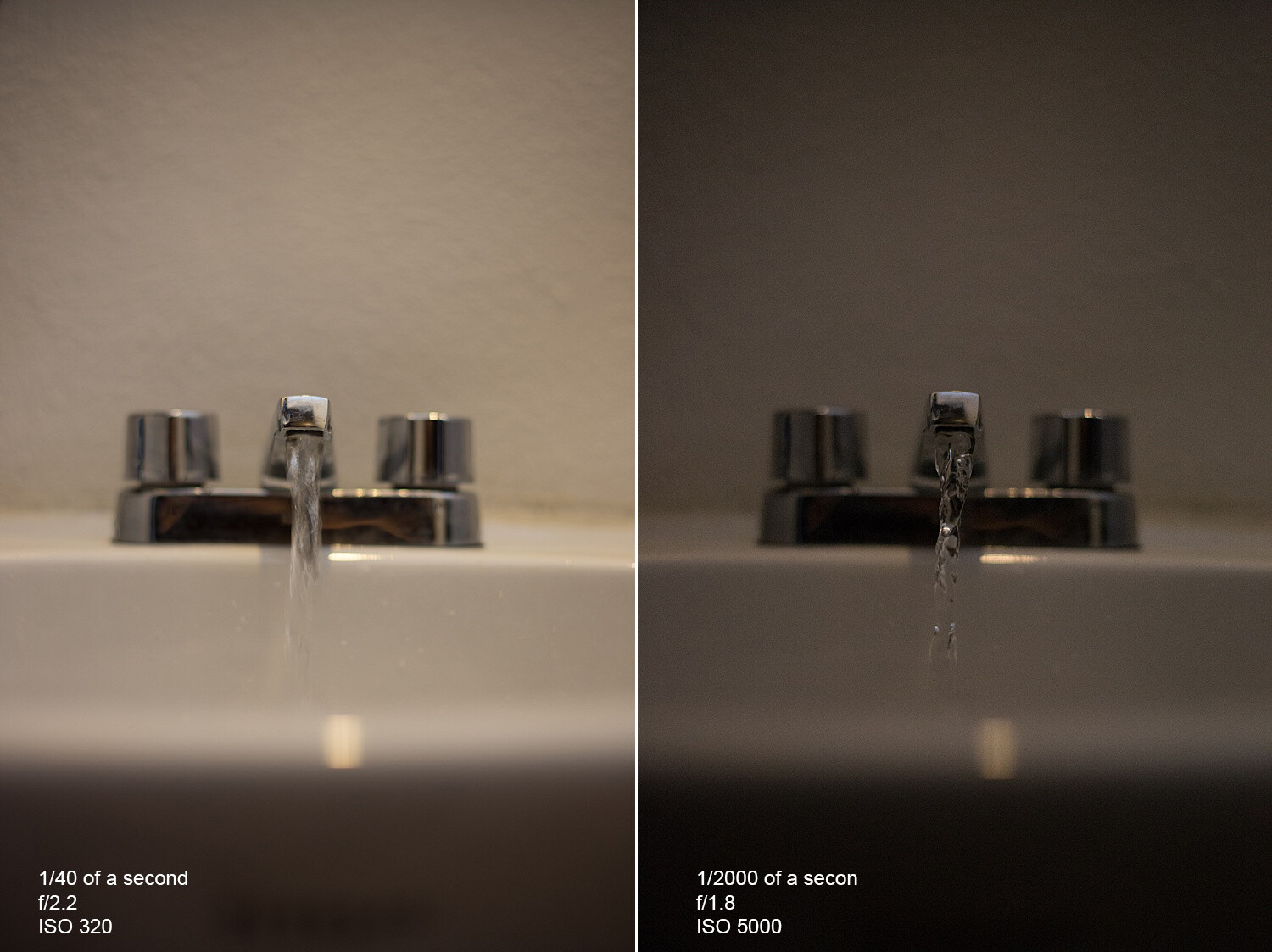
    The photo on the left has a slow shutter speed, an open aperture, and low ISO. The slow shutter speed and open aperture help light enter. It also allows the camera to pick up the movement of the water.

    In the photo on the right, we get more of an action shot of the water. This is because we have now changed the ISO to 1/2000 sec – a pretty fast shutter speed. With this fast shutter speed, we had to compensate for the loss of light from the fast shutter speed. So, we added light by using a higher ISO and a more open aperture. Even so, it wasn’t enough to get a correct exposure as the photo is a little dark.

    The best way to get started in manual mode is to think about what kind of photo you want to make. Are you shooting still life? Is there enough light? Do you want to control your focus range? Is this a portrait? All of these things can help you to determine where to start.

    making-sense-of-the-exposure-triangle

    For example, you’re taking photos of your kid’s soccer game in the early evening, and there is still a lot of light left, but it’s not harsh. You want to freeze the action of the game, and so you’d start by setting a fast shutter speed first.

    If you’re taking a portrait of someone, then you’d start with the aperture in order to control your depth of field. Then you’d adjust the other two settings accordingly.

    Image: Camera settings f/5.6, 1/100, IS0 400, 53mm.

    Camera settings f/5.6, 1/100, IS0 400, 53mm.

    For landscapes, you’d likely start with aperture and shutter speed. You may need a small aperture (eg f/11) to capture a wide plane of focus. Depending on whether there is water in your landscape, you may want to freeze the water or give it a silky look by slowing your shutter speed right down.

    Knowing what you’re shooting and type of light will give you a starting point

    Also, in manual mode, there is a built-in light meter. This meter looks like a tiny ruler either at the bottom of the live view or inside the viewfinder. It helps you determine if your photo is too bright (metering to the right), or too dark (metering to the left).

    When the line is in the middle, or at zero, you’ve got what the camera considers a perfectly-exposed photo.

    making-sense-of-the-exposure-triangle

    The ruler at the bottom of the live view, or through the viewfinder, can help you expose your photos correctly. To the right of the ruler your photo will be brighter, and to the left, it will be darker.

    Aim to keep it in the middle as you practice in manual mode. Sett one of the adjustments and then move the other two to add or take away light accordingly until the meter is in the middle.

    It’s all about practice and really getting to know what each setting does on its own before switching to full manual. This can feel overwhelming, so try using one of the other modes, like Tv/S or Av/A modes first. Doing so may give you a better understanding of the settings and more control over your photos.

    making-sense-of-the-exposure-triangle

    Camera settings f/22, 30 seconds, ISO 200, 28mm.


    Image: Camera settings f/10, 1/640, ISO 400, 50mm.

    Camera settings f/10, 1/640, ISO 400, 50mm.

    Conclusion

    The technical side of photography can sometimes seem overwhelming and it seems like there is always something new to learn before feeling confident. Making sense of the exposure triangle will set your creativity free and give you full control of your camera.

    The post Making Sense of the Exposure Triangle – ISO, Aperture, and Shutterspeed Made Simple appeared first on Digital Photography School. It was authored by Jackie Lamas.


    Digital Photography School

  • Fujifilm X-T4 pre-production sample gallery

    $ (document).ready(function() { SampleGalleryV2({“containerId”:”embeddedSampleGallery_6038378949″,”galleryId”:”6038378949″,”isEmbeddedWidget”:true,”selectedImageIndex”:0,”isMobile”:false}) });

    The sensor inside the new Fujifilm X-T4 is a known quantity – as it’s straight from the X-T3 – and that’s a good thing, since it’s excellent. Check out our pre-production sample gallery to see how the image quality looks on the X-T4.

    Fujifilm has requested that Raws not be published from this pre-production camera.

    View all Fujifilm X-T4 launch content

    Articles: Digital Photography Review (dpreview.com)

  • Viewing Images in Lightroom – What Are The Options?

    The post Viewing Images in Lightroom – What Are The Options? appeared first on Digital Photography School. It was authored by Kevin Landwer-Johan.

    viewing-images-in-lightroom-options

    Digital photographers can tend to take tons of photos. Viewing images in Lightroom can be a tedious and time-consuming task if you are not familiar with the various tools available to you. In this article, I’ll outline some techniques and tools to help improve your post-processing workflow.

    Lightroom Grid View - Viewing Images in Lightroom

    Viewing many images in Lightroom

    The most common way of viewing images in Lightroom is by using the Grid View option. You can also use the Filmstrip option.

    In Grid View, your main panel in Lightroom is populated with the thumbnails of photos stored in the folder you have open. To select the folder with images you’d like to view, open the left module panels. To do this, you can press F7 on your keyboard, or click on the triangle to the left of your main panel. Then navigate in the Folders tab to the folder you want to open.

    Alternatively, you can use the Filmstrip. This shows up below your main panel when you press F6 or click the triangle at the bottom. Using the Filmstrip module, you are limited to viewing the thumbnails at only one size.

    In Grid view, you are able to alter the size of the thumbnails. Three ways you can do this are by:

    1. Using the Zoom slider below the main panel and to the right
    2. Using the + and – keys
    3. Holding down the Ctrl key (cmd on Mac) and scrolling your mouse wheel.

    Below the main panel, you will also find the option for choosing how Lightroom sorts your images. By default, it uses Capture Time, but you might find it more convenient at times to change this. There are lots of options including File Name, File Type or Label Color.

    Lightroom Grid View Options

    You can customize the way your Grid View looks.

    To do this, go to View in the top menu then click on View Options. Alternatively, you can press Ctrl+J (or cmd+J on a Mac). Here you have a lot of control over how the information about your photos is displayed. It may seem overwhelming if you are new to viewing images in Lightroom, but keep in mind these options. They will be good to visit again later when you are more familiar with the software.

    Selecting and viewing more than one image in Lightroom

    There are various options for ways to view images in Lightroom when you want to compare images. To select the photos you want to compare, click on one, and then, while holding down the Ctrl (Cmd on Mac) key, click on the other photos you want to select.

    When you have selected more than two photos, you can press the “N” key. This will bring you into Survey View, where you will only see the photos you have selected. I use this feature often when I am initially culling my photos. Being able to view a limited number of images helps compare them and then select the best one.

    Compare viewing images in Lightroom

    If you select only two images, you can use the “C” key to bring you into Compare View. This can help you see the differences between two very similar photos. You can view the images side-by-side, full size, and you can zoom in. When you are zoomed, you can use the hand tool to drag around and view different parts of the photos. Both images will move together when you do this. You are also able to change the Candidate image using the arrow keys at the bottom right.

    Viewing images with Loupe View

    Viewing images in Lightroom using Loupe View allows you to see them much larger. Loupe View gets its name from the magnifying loupe used to view slides and negatives on an old fashioned lightbox. To switch to Loupe View from Grid View, use the “E” key or the spacebar.

    Old Fashion Loupe and Lightbox

    When you are in this mode, you can view other images in Lightroom by using:

    • The arrow keys
    • The scroll wheel on your mouse (when you are not zoomed in)
    • Or the film strip panel

    You can zoom in on an image using the slider under the main panel. Or you can hold down Ctrl (Cmd on a Mac) and use the scroll wheel on your mouse. Once you are zoomed in, you can use the hand tool to move the image around.

    You can also choose to show a Grid overlay on your images in Loupe View. This option is at the bottom right. If you cannot see one of these options, click on the triangle to the lower right to bring up the panel to display the available tools.

    Viewing images in Lightroom Develop Module

    The Lightroom Develop Module is where you make adjustments to the way your photographs look. In this module, it’s’ good to be familiar with some of the ways you can view your photos.

    One of the functions I use the most in the Develop Module is the “\” key. Hitting this backslash key will show you what your original image looked like prior to you making any adjustments. This helps you see what you are doing and guide you towards further steps you might take.

    Another similar option is to use the “Y” key. When you’ve made some changes in the Develop Module, hitting the “Y” key will bring up your original image alongside one with the changes you have made. Once again, when you are zoomed in, you can move the images around in tandem using the hand tool.

    Before and After Viewing images in Lightroom

    Viewing image information

    One more handy tip is to use the “I” key to bring up a display of image information about the photo you are currently viewing. This will show you EXIF data from the image.

    You can control and change what you see. To do this, go to View in the top menu and then click on View Options. In either the Loupe View or Develop option panel, check the boxed for the information you’d like displayed.

    options for viewing images in Lightroom

    Conclusion

    I hope you’ve picked up at least two or three useful tips from this article. I’m sure there are many more ways of viewing images in Lightroom. Please share some of the techniques you employ in your regular Lightroom workflow.

    The post Viewing Images in Lightroom – What Are The Options? appeared first on Digital Photography School. It was authored by Kevin Landwer-Johan.


    Digital Photography School

  • DPReview TV: Fujifilm X-T4 first impressions

    The Fujifilm X-T4 makes some big promises, but can it deliver? Chris and Jordan put it to the test and tell us if this is the Fujifilm camera we’ve all been waiting for.

    Subscribe to our YouTube channel to get new episodes of DPReview TV every week.

    • Introduction
    • Sample photos
    • X-T3 and X-T4 controls compared
    • In-body image stabilization (IBIS) performance
    • Battery life
    • Software improvements
    • Sensor
    • Autofocus
    • Video performance
    • Conclusion

    Sample gallery from this episode

    $ (document).ready(function() { SampleGalleryV2({“containerId”:”embeddedSampleGallery_0557387404″,”galleryId”:”0557387404″,”isEmbeddedWidget”:true,”selectedImageIndex”:0,”isMobile”:false}) });
    Articles: Digital Photography Review (dpreview.com)

  • Fujifilm X-T4 initial review

    $ (document).ready(function() { SampleGalleryStripV2({“galleryId”:”3686938719″,”isMobile”:false}) })

    Sample photoSample photoSample photoSample photoSample photo

    All product photography by Dan Bracaglia

    The Fujifilm X-T4 is the company’s latest high-end photo and video APS-C mirrorless camera. It brings in-body stabilization, faster shooting, improved autofocus and a larger battery to the already very capable X-T3.

    Fujifilm says that the X-T4 is a sister model to the X-T3, rather than a replacement, which is borne out by the specs and pricing. It’s a 26MP camera capable of 20 fps shooting and 4K capture at up to 60p.

    Key specifications

    • 26MP BSI CMOS sensor
    • In-body image stabilization (up to 6.5EV correction)
    • 20 fps shooting with AF (15 with new mechanical shutter)
    • 4K video (DCI or UHD) at up to 60p
    • 1080 video at up to 240 fps, output as 4-10x slow-motion footage
    • Fully articulated rear touchscreen
    • 3.68M-dot OLED electronic viewfinder (up to 100 fps refresh rate)
    • New NP-W235 battery rated to give 500 shots per charge
    • Dual UHS-II card slots
    • USB-C type connector allowing USB PD charging
    • 12 Film Simulation modes, including Eterna Bleach Bypass

    The X-T4 will be available body-only at a price of $ 1699, which represents a $ 200 premium over the original list price of the X-T3. It will also be available as a kit with the 18-55mm F2.8-4.0 OIS lens for $ 2099 or with the 16-80mm F4 OIS WR for $ 2199.

    The X-T4 is expected to ship this Spring.


    What’s new and how it compares

    Image stabilization, a bigger battery and faster continuous shooting, but also a bigger price tag. How does the X-T4 measure up to its rivals?

    Read more

    Body and controls

    There have been a number of tweaks and refinements made to the X-T4’s body. We take a look and compare with the X-T3.

    Read more

    Video capabilities

    The biggest difference is the addition of stabilization but there are a few more tweaks to the video side of the camera.

    Read more

    Initial impressions

    The X-T4 splits the difference between the X-T3 and the older X-H1. It might be videographers that most benefit from upgrading.

    Read more

    Sample gallery

    We’ve been shooting with the X-T4 for the past few days. Here’s some of what it can do.

    See more

    Articles: Digital Photography Review (dpreview.com)

  • Slideshow: Here are the 2020 World Press Photo nominees

    Slideshow: Here are the 2020 World Press Photo nominees

    Today, the World Press Photo Foundation announced the nominees for its 63rd annual contest. 4,282 photographers from 125 countries entered 73,996 images for consideration as either singles or stories across 8 categories. The nominees are 44 professional photographers based in 24 countries: Algeria, Australia, Belarus, Belgium, Canada, Denmark, Ethiopia, France, Germany, Hungary, Ireland, Italy, Japan, Lithuania, Mexico, Poland, Peru, Russia, South Africa, South Korea, Spain, Turkey, United Kingdom, and the United States.

    17 photography professionals, chaired by Lekgetho Makola, made up the jury. Protests, political uprisings, and environmental issues were especially prevalent this past year as reflected in the nominations. In 2019, a new category was introduced: the World Press Photo Story of the Year.

    The three nominees for the World Press Photo Story of the Year are:

    • ‘Hong Kong Unrest’
      Nicolas Asfouri (Denmark), Agence France-Presse
    • ‘Ethiopian Airlines Flight 302 Crash Site’
      Mulugeta Ayene (Ethiopia), Associated Press
    • ‘Kho, the Genesis of a Revolt’
      Romain Laurendeau (France)

    The jury shortlisted six nominees for World Press Photo of the Year:

    • ‘Relative Mourns Flight ET 302 Crash Victim’
      Mulugeta Ayene (Ethiopia), Associated Press
    • ‘Clash with the Police During Anti-Government Demonstration’
      Farouk Batiche (Algeria), Deutsche Presse-Agentur
    • ‘Straight Voice’
      Yasuyoshi Chiba (Japan), Agence France-Presse
    • ‘Awakening’
      Tomek Kaczor (Poland), for Gazeta Wyborcza
    • ‘Injured Kurdish Fighter Receives Hospital Visit’
      Ivor Prickett (Ireland), for The New York Times
    • ‘Nothing Personal – the Back Office of War’
      Nikita Teryoshin (Russia)

    The jury also nominated 3 single images and 3 stories across all eight categories: Contemporary Issues, General News, Environment, Nature, Long-Term Projects, Portraits, Spot News, and Sports. Winners will be announced at the Awards Show taking place on April 16th in Amsterdam. The World Press Photo Festival, featuring meetups and workshops, will follow on the 17th – 18th.

    Starting April 18th, prize-winning entries will be exhibited throughout the year in 120 cities spanning 50 countries. The series of events is expected to draw at least 5 million people. A full calendar can be viewed here. For more information, visit www.worldpressphoto.org or follow the organization on Facebook, Instagram, Twitter and YouTube.

    2020 World Press Photo of the Year Nominee: ‘Injured Kurdish Fighter Receives Hospital Visit’ by Ivor Prickett (Ireland), for The New York Times

    Caption: Ahmed Ibrahim (18), a badly burned SDF fighter, is visited by his girlfriend at a hospital in Al-Hasakah, Syria, on 20 October. She had at first been reluctant to enter the room, as she was horrified by his injuries, but a nurse persuaded her to go in to hold Ahmed’s hand and have a short conversation.

    Story: By early 2019, the territory held by the Islamic State group (IS) in Syria had reduced to a four-square-kilometer patch in the southeast, centered on the village of Baghuz. The IS retreat from northern Syria had been under the onslaught of the combined militias of the Syrian Democratic Forces (SDF), led by the Kurdish People’s Protection Units (YPG) and supported by an international coalition of primarily US troops.

    As IS drew back, tens of thousands of people emerged from the enclave, many of them the wives and children of foreign IS fighters. Numerous IS fighters themselves surrendered or were captured. The Kurds were left with the conundrum of what to do with so many prisoners, many of them under 18 and orphaned or separated from their families. Then, at the beginning of October, US president Donald Trump ordered US troops out of northern Syria.

    On 9 October, Turkey—which had long seen Kurdish forces on its border as a security threat, given the decades-long Kurdish insurgency against Turkey—invaded northern Syria, aiming to end Kurdish control over the territory. As Kurdish forces refocused their attention on a new opponent, the fate of the many thousands of prisoners grew even more uncertain.

    2020 World Press Photo of the Year Nominee: ‘Relative Mourns Flight ET 302 Crash Victim’ by Mulugeta Ayene (Ethiopia), Associated Press

    Caption: A relative of a victim of the crash of Ethiopian Airlines Flight ET302 throws dirt in her face as she grieves at the crash site of Ethiopian Airlines Flight ET302, outside Addis Ababa, Ethiopia, on 14 March 2019.

    Story: On 10 March, Ethiopian Airlines flight ET302, a Boeing 737 MAX, disappeared from the radar six minutes after take-off from Addis Ababa airport and crashed into a field, killing all 157 people on board. The impact was so great that both engines were buried in a crater 10 meters deep, and any human remains were almost impossible to identify.

    On 14 November, eight months after the crash, the site of the impact was covered and the unidentified remains of victims buried in rows of identical coffins. Comparisons were made with the crash of a Lion Air aircraft, also a 737 MAX, 12 minutes after take-off from Jakarta in October 2018. Countries across the world, initially with the exception of the US, grounded the 737 MAX.

    First reports showed that pilots had been unable to prevent the plane repeatedly nosediving, despite following procedures recommended by Boeing. It appeared that in both cases pilots were struggling to deal with an automated safety system designed to prevent stalling, which was repeatedly pushing the nose of the plane down. It seemed that the system was being activated, possibly due to a faulty sensor, even though nothing was wrong.

    It later emerged that American Airlines pilots had confronted Boeing about potential safety issues with the MAX. Boeing had resisted their calls but promised a software fix, which had not been done by the time Flight ET302 crashed. Planes remained grounded into 2020.

    2020 World Press Photo of the Year Nominee: ‘Clash with the Police During an Anti-Government Demonstration’ by Farouk Batiche (Algeria), Deutsche Presse-Agentur

    Caption: Students scuffle with riot police during an anti-government demonstration in Algiers, Algeria, on 21 May.

    Story: Algeria had been embroiled in protests since February. Initially, protests had been aimed at ousting long-time president, Abdelaziz Bouteflika, an 81-year-old veteran of Algeria’s independence struggle who had been in ill-health and not seen in public for some time. Bouteflika resigned in April, handing over to a military-backed caretaker government, but demonstrations continued.

    Protesters demanded the cancellation of the presidential elections set to take place on 4 July and a return to civilian democracy. They also called for the departure of government officials associated with the Bouteflika administration, including the interim president and prime minister. Protests continued into 2020 without successful resolution.

    2020 World Press Photo of the Year Nominee: ‘Straight Voice’ by Yasuyoshi Chiba (Japan), Agence France-Presse

    Caption: A young man, illuminated by mobile phones, recites a poem while protestors chant slogans calling for civilian rule, during a blackout in Khartoum, Sudan, on 19 June.

    Story: Protests had begun in the eastern city of Atbara in December 2018, reportedly against the tripling of the price of bread, but then broadened in focus and had spread rapidly throughout the country. By April 2019, protesters were staging a sit-in close to army headquarters in the capital Khartoum, and demanding an end to the 30-year rule of dictator Omar al-Bashir.

    On 11 April, al-Bashir was removed from office in a military coup, and a transitional military government was established. Protests continued, calling for power to be handed to civilian groups. On 3 June, government forces opened fire on unarmed protesters. Scores of people were killed and many more subject to further violence. Three days later the African Union suspended Sudan, in the midst of widespread international condemnation of the attack.

    The authorities sought to defuse protests by imposing blackouts, and shutting down the internet. Protesters communicated by text message, word of mouth and using megaphones, and resistance to military rule continued. Despite another severe crackdown on 30 June, the pro-democracy movement was eventually successful in signing a power-sharing agreement with the military, on 17 August.

    2020 World Press Photo of the Year Nominee: ‘Awakening’ by Tomek Kaczor (Poland), for Du?y Format, Gazeta Wyborcza

    Caption: A 15-year-old Armenian girl who has recently woken from catatonic state brought on by Resignation Syndrome, sits in a wheelchair, flanked by her parents, in a refugee reception center in Podkowa Le?na, Poland.

    Story: Resignation Syndrome (RS) renders patients passive, immobile, mute, unable to eat and drink, incontinent and unresponsive to physical stimulus. It affects psychologically traumatized children in the midst of lengthy asylum processes, and seems most common in Roma and Yazidi children as well as those from the Balkans.

    It was first noted in the late 1990s, and was thought to be confined to Sweden, though cases have since been reported in the offshore refugee detention center run by the Australian government in Nauru. Remission and gradual return to normal function occurs after life circumstances improve. The Armenian girl succumbed to RS while her family were trying for asylum in Sweden, but recovered eight months later after they had been deported to Poland.

    2020 World Press Photo of the Year Nominee: ‘Nothing Personal – the Back Office of War’ by Nikita Teryoshin (Russia)

    Caption: A businessman locks away a pair of anti-tank grenade launchers at the end of an exhibition day, at the International Defence Exhibition and Conference (IDEX) in Abu Dhabi, United Arab Emirates, on 18 February.

    Story: IDEX is the biggest defense exhibition and conference in the Middle East, and one of the biggest arms trade-fairs in the world. No official attendance figures are released, but according to UAE state media the event drew 1,200 global defence specialists, 1,300 exhibitors and more than 105,000 visitors.

    Attendees include defense ministers, military chiefs of staff and key government decision-makers, who interact in conference halls, social events and back-office meetings. War is staged in an artificial environment where mannequins and screen images take the place of real people, and with outdoor demonstrations and daily choreographed battle displays on water.

    2020 World Press Photo Story of the Year Nominee: ‘Hong Kong Unrest’ by Nicolas Asfouri (Denmark), Agence France-Presse

    Caption: A man holds a poster in Shatin, Hong Kong, as people gather to sing a protest song, on 11 September 2019.

    Story: Protests began to be held in Hong Kong at the end of March in response to government proposals to amend existing legislation and allow extradition to mainland China. Anti-government demonstrations gathered momentum over the following weeks as pro-democracy groups united, with students playing a large role in protests and in human-chain rallies.

    On 12 June, tens of thousands of demonstrators gathered around the Legislative Council building ahead of a debate on the extradition laws, and met with violent opposition from police. Protests continued to escalate, both in frequency and size, as did police counter-measures. The authorities banned the wearing of face masks, and at a demonstration on 1 October, the day marking the 70th anniversary of the declaration of the People’s Republic of China, police fired live ammunition at protesters for the first time.

    After initially proposing postponements and amendments to legislation, Chief Executive of Hong Kong Carrie Lam eventually announced that she would withdraw the bill. This was done on 23 October, but protesters’ demands had broadened to include implementation of genuine universal suffrage and release of arrested protestors, and unrest continued into 2020.

    2020 World Press Photo Story of the Year Nominee: ‘Hong Kong Unrest’ by Nicolas Asfouri (Denmark), Agence France-Presse

    Caption: Students cross a road to school after participating in a human-chain rally, in Hong Kong, on 12 September 2019.

    Story: Protests began to be held in Hong Kong at the end of March in response to government proposals to amend existing legislation and allow extradition to mainland China. Anti-government demonstrations gathered momentum over the following weeks as pro-democracy groups united, with students playing a large role in protests and in human-chain rallies.

    On 12 June, tens of thousands of demonstrators gathered around the Legislative Council building ahead of a debate on the extradition laws, and met with violent opposition from police. Protests continued to escalate, both in frequency and size, as did police counter-measures. The authorities banned the wearing of face masks, and at a demonstration on 1 October, the day marking the 70th anniversary of the declaration of the People’s Republic of China, police fired live ammunition at protesters for the first time.

    After initially proposing postponements and amendments to legislation, Chief Executive of Hong Kong Carrie Lam eventually announced that she would withdraw the bill. This was done on 23 October, but protesters’ demands had broadened to include implementation of genuine universal suffrage and release of arrested protestors, and unrest continued into 2020.

    2020 World Press Photo Story of the Year Nominee: ‘Hong Kong Unrest’ by Nicolas Asfouri (Denmark), Agence France-Presse

    Caption: A woman holds up an umbrella (a symbol of protest) during protests in the Causeway Bay district of Hong Kong, on 1 October 2019.

    Story: Protests began to be held in Hong Kong at the end of March in response to government proposals to amend existing legislation and allow extradition to mainland China. Anti-government demonstrations gathered momentum over the following weeks as pro-democracy groups united, with students playing a large role in protests and in human-chain rallies.

    On 12 June, tens of thousands of demonstrators gathered around the Legislative Council building ahead of a debate on the extradition laws, and met with violent opposition from police. Protests continued to escalate, both in frequency and size, as did police counter-measures. The authorities banned the wearing of face masks, and at a demonstration on 1 October, the day marking the 70th anniversary of the declaration of the People’s Republic of China, police fired live ammunition at protesters for the first time.

    After initially proposing postponements and amendments to legislation, Chief Executive of Hong Kong Carrie Lam eventually announced that she would withdraw the bill. This was done on 23 October, but protesters’ demands had broadened to include implementation of genuine universal suffrage and release of arrested protestors, and unrest continued into 2020.

    2020 World Press Photo Story of the Year Nominee: ‘Kho, the Genesis of a Revolt’ by Romain Laurendeau (France)

    Caption: An old man sits on a staircase in Bab el-Oued, Algiers, Algeria, on 31 May 2014.

    Story: Young people make up more than half of Algeria’s population, and according to a UNESCO report 72% of people under 30 in Algeria are unemployed. Pivotal moments in Algerian history, such as the ‘Black October’ revolt of 1988, have had angry youth at their core. Black October was harshly suppressed—more than 500 people were killed in five days—and was followed by a ‘black decade’ of violence and unrest. Thirty years on, the effects of that decade are still present. In a traumatized country, high unemployment leads to boredom and frustration in everyday life and many young people feel disassociated from the state and its institutions.

    In neglected working-class neighbourhoods such as Bab el-Oued in Algiers, young people often seek refuge in diki—private places that are ‘bubbles of freedom’ away from the gaze of society and from conservative social values. But the sense of community and solidarity is often not enough to erase the trials of poor living conditions. In February 2019, thousands of young people from working-class neighbourhoods again took to the streets in what became a nationwide challenge to the reign of long-time president Abdelaziz Bouteflika.

    Kho (the word means ‘brother’ in colloquial North-African Arabic) is about the genesis of a revolt. It is the story of the deep unease of youth, who, by daring to challenge authority, inspired the rest of the population to join their action, giving birth to the largest protest movement in Algeria in decades.

    2020 World Press Photo Story of the Year Nominee: ‘Kho, the Genesis of a Revolt’ by Romain Laurendeau (France)

    Caption: Football fans sing during a championship match in the 5 July 1962 Stadium in Algiers, Algeria, on 22 December 2015.

    Story: Young people make up more than half of Algeria’s population, and according to a UNESCO report 72% of people under 30 in Algeria are unemployed. Pivotal moments in Algerian history, such as the ‘Black October’ revolt of 1988, have had angry youth at their core. Black October was harshly suppressed—more than 500 people were killed in five days—and was followed by a ‘black decade’ of violence and unrest. Thirty years on, the effects of that decade are still present. In a traumatized country, high unemployment leads to boredom and frustration in everyday life and many young people feel disassociated from the state and its institutions.

    In neglected working-class neighbourhoods such as Bab el-Oued in Algiers, young people often seek refuge in diki—private places that are ‘bubbles of freedom’ away from the gaze of society and from conservative social values. But the sense of community and solidarity is often not enough to erase the trials of poor living conditions. In February 2019, thousands of young people from working-class neighbourhoods again took to the streets in what became a nationwide challenge to the reign of long-time president Abdelaziz Bouteflika.

    Kho (the word means ‘brother’ in colloquial North-African Arabic) is about the genesis of a revolt. It is the story of the deep unease of youth, who, by daring to challenge authority, inspired the rest of the population to join their action, giving birth to the largest protest movement in Algeria in decades.

    2020 World Press Photo of the Year Nominee, Nature Singles: ‘Roadrunner Approaching the Border Wall’ by Alejandro Prieto (Mexico)

    Caption: A greater roadrunner approaches the border wall at Naco, Arizona, USA on 28 April.

    Story: The wall along the US border with Mexico, championed by US president Donald Trump, will run through one of the most biologically rich and diverse regions of North America, disrupting animal corridors, their habitats and access to water and food. More than 1,000 km of the 3,100 km-long border is closed by such barricades, with the president proposing a further 800 km by early 2021. The US Fish and Wildlife Service has warned that the impermeable barrier, associated human activity, and all-night bright lights could negatively impact 23 endangered and at-risk species.

    2020 World Press Photo of the Year Nominee, Contemporary Issues Singles: ‘Hitler’s Birthday / Easter Weekend’ by Mark Peterson (United States), Redux Images for New York

    Caption: Members of the white supremacist group Shield Wall Network celebrate Hitler’s birthday, on Lake Dardanelle, Arkansas, USA, on 20 April.

    Story: Right-wing extremist activity has grown in the US over the past decade, according to a study published by Washington-based think-tank the Center for Strategic and International Studies (CSIS). The study points to the rise in internet and social media use by far-right groups, connections between local and international groups, and political developments in the US as major contributing factors.

    Although the rise began before Donald Trump began campaigning for the US presidency, the study suggests that individuals have been energized by his election. In September, US Homeland Security named white supremacy a leading terrorist threat. FBI director Christopher Wray later told the House Judiciary Committee that far-right activity posed a steady threat of violence to the US.

    2020 World Press Photo of the Year Nominee, Sports Singles: ‘Liverpool Champions League Victory Parade’ by Oli Scarff (United Kingdom), Agence France-Presse

    Caption: A trophy-shaped balloon floats over the crowd in Liverpool, England, as football fans line the streets on 2 June during the open-top bus parade celebrating Liverpool’s win against Tottenham Hotspur in the UEFA Champions League final.

    Story: Some 750,000 fans turned out for the parade, according to Merseyside Police. The 2-0 win at the Metropolitano Stadium, Madrid, Spain, the day before, delivered the first trophy for Liverpool since winning the English Football League Cup in 2012, and the first win in seven finals for coach Jürgen Klopp. Liverpool last won the UEFA Champions League in 2005.

    2020 World Press Photo of the Year Nominee, Environment Singles: Battling the Marsh Fire by Noah Berger (United States), for Associated Press

    Caption: Firefighters battle the Marsh Complex Fire, near the town of Brentwood, California, USA on 3 August.

    Story: The Marsh Complex Fire began near Marsh Creek Road in Contra Costa County on 3 August and burned until 7 August, laying waste to more than 300 hectares of land. Roughly 81,000 hectares (200,000 acres) burned state-wide in California in 2019, compared with 765,000 in 2018, and 525,000 in 2017. California usually has a fire season in the fall, when strong winds blow across forests and brushland that has dried out from summer heat and not yet experienced winter rains.

    Many scientists attributed the early fires to the climate crisis, saying that a warmer atmosphere means that the vegetation is drying out more than it did a century ago. Old, faulty equipment belonging to the state’s largest electricity companies has also been blamed for sparking fires in windy weather. President Donald Trump accused the Californian state government of bad forest management, saying that was the cause of the fires.

    Articles: Digital Photography Review (dpreview.com)

  • Video: Making cyanotype prints from 120-year-old glass negatives found inside a time capsule

    Photographer, YouTuber and self-proclaimed weird lens aficionado Mathieu Stern is back at it again, this time with an interesting new video showing how he developed a number of 120-year-old photographs he found hidden within a time capsule in a family home.

    In speaking with DPReview, Mathieu says he ‘found a box dating from around 1900 judging by the objects and the technic of the photos found inside.’ To help bring the negatives to life, Mathieu decided to develop the images using a time-appropriate method of making prints, cyanotype.

    The six-minute video first walks through the discovery process of the time capsule and the items within. From there, Mathieu shows the process he used to create the cyanotype prints and concludes the video with an overview of all the images he found.

    It’s an unassumingly touching video that shows how seemingly simple snapshots can oftentimes have some of the most profound emotions behind them.

    You can find more of Mathieu’s work on his YouTube channel.

    Articles: Digital Photography Review (dpreview.com)

  • YouTuber uses AI to turn historic 1911 New York trip footage into colorized 4K/60p video

    In 1911, Swedish company Svenska Biografteatern captured footage of a trip to New York, resulting in more than eight minutes of video that, in its original form, is quite low resolution with a low frame rate.

    Various efforts over the years have attempted to improve the resolution, frame rate, colors and other details with different results, but one of the best edits thus far comes from Denis Shiryaev, who recently shared the edited video on Reddit.

    According to the video’s description, as well as a comment left by Shiryaev on Reddit, the project involved four neural networks, including DeOldify. In all, the various neural networks managed to increase the framerate to 60 fps, increase the resolution to 4K, bump up sharpness and even colorize. This is one of multiple videos Shiryaev has upscaled and improved; other examples include a video from the Apollo mission and ‘Arrival of a Train at La Ciotat’ from 1896.

    Articles: Digital Photography Review (dpreview.com)

  • Laowa 65mm f2.8 2X Ultra-Macro APO Lens Review

    The post Laowa 65mm f2.8 2X Ultra-Macro APO Lens Review appeared first on Digital Photography School. It was authored by Matt Murray.

    Laowa-65mm-f2.8-2X-Ultra-Macro-APO-lens-review

    When I was offered the chance to review the Laowa 65mm f2.8 2X Ultra-Macro APO lens, I must admit I wondered what all the fuss was about. From a quick look, it appeared roughly the same size and price as the Fujifilm 60mm f2.4 R macro lens – but it is a manual focus lens.

    Then I realized I had misread the specs – this is not a 1:2 macro like the Fujifilm XF 60mm f2.4 R lens, where objects appear half their size on the sensor. Nor is it a true 1:1 macro like the Fujifilm XF 80mm f2.8 R LM OIS WR lens, where objects appear their actual size. The Laowa Ultra Macro lens boasts 2:1 magnification. That’s right! It can take photos where objects appear up to twice their actual size.

    Laowa-65mm-f2.8-2X-Ultra-Macro-APO-lens-review

    The Laowa 65mm f/2.8 2x Ultra Macro APO lens mounted on my Fujifilm X-T2.

    In this gear review, I put the Laowa 65mm f2.8 2x Ultra Macro APO lens through its paces on my Fujifilm X-T2. If you’re not a Fujifilm shooter, keep reading anyway, Laowa has released lenses for many full-frame and APS-C mount systems.

    Background

    Venus Optics has made Laowa lenses in China since 2013. Most of the lenses they’ve created so far have been for full-frame cameras. Their line-up boasts an impressive range of lenses, including fisheye (fancy a 4mm f2.8 lens?), probe, ultra-wide, and ultra-macro lenses for a variety of camera systems.

    Laowa-65mm-f2.8-2X-Ultra-Macro-APO-lens-review

    These flowers are tiny, measuring less than 10mm (3/8 inch) across. I found the bokeh of the lens to be very pleasant. Fujifilm X-T2 with Laowa 65mm f2.8 2X Ultra-Macro APO lens.


    The Laowa 65mm f2.8 2X macro APO is the first macro lens that Venus Optics has launched for non full-frame cameras. While this review is for the Fujifilm X-Series mount lens, it’s also available for two other mirrorless camera systems: the Sony E-mount and Canon M-mount.

    Laowa specs

    Let’s take a look at the specs for this lens, the Laowa 65mm f2.8 2x Ultra Macro APO.

    • The focal length is 65mm, which is approximately 97.5mm in a full-frame equivalent when you take into account the 1.5 crop factor of APS-C cameras.
    Image: A light blue soldier crab on the beach. It’s a wonder I managed to get a shot like this, thes...

    A light blue soldier crab on the beach. It’s a wonder I managed to get a shot like this, these little guys move so fast, and they don’t like people! I had to prefocus before the crab came into view. Adults measure 25mm (1 inch). Fujifilm X-T2 with Laowa 65mm f2.8 2X Ultra-Macro APO lens.

    • 2x Ultra Macro refers to the magnification of this lens – it’s possible to take images where objects appear twice as large on the sensor as real life.
    • Typically, a macro lens is considered a true macro when it achieves 1:1 magnification. So with double that magnification, it seems the Laowa offering is worthy of the title “ultra macro.”
    • APO stands for apochromatic optical design. The lens has 14 elements in 10 groups, including three extra-low dispersion glasses to minimize chromatic aberrations across the frame.
    • Apertures range from f/2.8 to f/22, which you control via the aperture ring on the lens. It focusses from 17cm (2X life-size) to infinity.
    Image: Close up of the peeling paintwork on a boat. Even when shooting at f/16, you won’t be able to...

    Close up of the peeling paintwork on a boat. Even when shooting at f/16, you won’t be able to achieve a wide depth of field at such a short working distance with macro lenses. Fujifilm X-T2 with Laowa 65mm f2.8 2X Ultra-Macro APO lens.


    The Laowa is slightly bigger in size and weight to Fujifilm’s 60mm macro lens, but is still very compact. It measures 57mm in diameter, 100 mm long, and weighs 335g. It takes 52mm filters.

    What’s in the box

    The lens comes attractively packaged in a sturdy box. Rather oddly, the lens seems to have two different names. On the website, it’s the Laowa 65mm f2.8 2X Ultra-Macro APO lens. On the packaging and on the lens itself, it’s the CF 65mm F2.8 CA-Dreamer Macro 2X.

    Laowa-65mm-f2.8-2X-Ultra-Macro-APO-lens-review

    The lens is attractively packaged and is all metal, apart from the plastic lens cap.

    Removing the sleeve from the box, there’s an illustration of the lens on the lid. Inside the box, there’s plenty of foam to protect the lens, which comes wrapped up in a plastic bag with a drawstring.

    Build quality

    The build quality of the lens – especially at this price point – is excellent. Unlike many other lenses at this price point that are plastic, this lens is an all-metal construction. Even the lens hood is metal, with only the lens cap being plastic.

    Using the lens

    The Laowa 65mm f2.8 2X macro APO is a manual focus lens – there’s no communication between the lens and the camera body. You achieve focus by rotating the lens until the subject comes into focus.

    Given that the lens has quite a wide range of magnification (from infinity to 2x life-size), sometimes it feels like you are twisting the barrel quite a lot to get your subject in focus at different distances.

    Laowa-65mm-f2.8-2X-Ultra-Macro-APO-lens-review

    Select your aperture on the lens and twist the barrel to achieve focus.

    If you’re new to manual lenses, don’t be put off. A lot of macro photography work is done using manual focus, anyway.

    At first, I did find it difficult to determine exactly what was in focus and what wasn’t, but this is more due to my eyesight more than anything else. As soon as I turned on focus peaking on my X-T2, things became much easier. I did find that at very close distances, focus peaking didn’t seem to work at all.

    When using the lens, remember to check the barrel to see which aperture you’re using. As there’s no communication between the lens and the camera body, this won’t show up in your viewfinder display.

    You may also want to keep notes on which apertures were used for your images, as these won’t record in the metadata either.

    The lens has a nice click as you change aperture across the range. My only issue is that the settings for f/16 and f/22 do look a little alike at first glance due to the design of the indicators.

    Depth of field at even the narrowest aperture of f/22 is very shallow when shooting up close. You may want to consider focus stacking to get a sharp image across the frame.

    There are some stunning sample images on Laowa’s website, but I’d guess they achieved them with both focus stacking and possibly even extension tubes.

    Image: Boats on the beach. I’m really happy with the sharpness, colors, and contrast of the images t...

    Boats on the beach. I’m really happy with the sharpness, colors, and contrast of the images taken with this lens. Fujifilm X-T2 with Laowa 65mm f2.8 2X Ultra-Macro APO lens.

    Image quality

    I’m really impressed with the image quality of photos taken with this lens. As well as being sharp, they display good color and contrast.

    I took the lens down to my local beach and took a lot of images of boats, items on the beach, as well as very fast-moving soldier crabs. I took the images of the boats handheld but shot the close-up images using a tripod and remote release. These two items are essential when working at such close distances, where shutter speeds may be slower than 1/60 second, and where any tiny movement may blur the shot or change focus.

    Laowa-65mm-f2.8-2X-Ultra-Macro-APO-lens-review

    Boat close-up shot. Fujifilm X-T2 with Laowa 65mm f2.8 2X Ultra-Macro APO lens.

    Laowa-65mm-f2.8-2X-Ultra-Macro-APO-lens-review

    Rope detail. For this second shot, I moved my tripod to the minimum focus distance to get this shot. Fujifilm X-T2 with Laowa 65mm f2.8 2X Ultra-Macro APO lens.

    Value for money

    The lens sells for around $ 399 USD. This is very good value considering the image quality, and build quality, and the fact that you’re unable to achieve this magnification with any other lens available at present.

    Conclusion

    The Laowa 65mm f2.8 2X Ultra-Macro APO lens boasts some impressive specifications. The most impressive, of course, is its ability to produce images of objects that are up to twice their actual size.

    Image quality is very good, I’m happy with the results the lens gave me on my Fujifilm X-T2. Photos were sharp and displayed good color and contrast.

    The lens is light and compact, has an excellent build quality, and is competitively priced.

    Although I’m not a specialist macro photographer, I really enjoyed using the lens. If you enjoy shooting macro images, I’d recommend giving it a go. It’s certainly a great lens for flora and fauna enthusiasts, keen to get up close to the action.

    Image: I took the lens down to my local beach to see what I could photograph up close. Pine cone on...

    I took the lens down to my local beach to see what I could photograph up close. Pine cone on the beach. I was impressed with the results from this lens. Fujifilm X-T2 with Laowa 65mm f2.8 2X Ultra-Macro APO lens.

    You may also like:

    • Review: Laowa 17mm f1.8 Lens with Micro-Four-Thirds Mount
    • Review of the Venus Laowa 15mm F/4 Wide Angle Lens for Landscape Photographers


    The post Laowa 65mm f2.8 2X Ultra-Macro APO Lens Review appeared first on Digital Photography School. It was authored by Matt Murray.


    Digital Photography School

  • Elinchrom launches ELC 125 and 500 studio strobe lights for preorder

    Elinchrom has launched two new studio strobes for preorder, the ELC 125 and ELC 500. Both products are wired lights that feature TTL with manual lock, HSS up to 1/8000s and support for 100V and 240V AC power sources. The two models share a number of other features, as well, including a metal tilt-head, Smart Pro-Active Cooling, Auto-On from standby mode and support for powering the lights down to 7 watts.

    The two products vary in size and capabilities. The smaller ELC 125 model features a 7 to 131W power range with 5 F-stops, +/- 150K color stability across the power range, 2kg (4.4lbs) weight, 23 x 16.7 x 26.30cm (9 x 6.5 x 10.3in) dimension and a recycle time that varies based on the power source.

    At 120V, Elinchrom says the ELC 125 features a recycling time of 0.1 to 0.8s, a duration that drops to 0.06 to 0.45s at 230V.

    The ELC 500 model is similar, but with larger dimensions at 28.0 x 16.7 x 26.3cm (11.2 x 6.57 x 10.35in), 2.5kg (5.5lbs) weight, 7 to 522 watts power range with 7 F-stops, and +/- 200 color stability over the power range. This model also features a recycle time that varies based on power: from 0.09 to 1.9s at 120V to 0.06 to 1.1s at 230V. The ELC 125 has a flash duration of 1/7750s and the ELC 500 of 1/9430s.

    Other mutual features between the two products include a customizable Favorite button, 120W-equivalent daylight 20W 92 CRI LED modeling lamp, auto power dumping, a cooling fan, group color indicators built into the side logos and what Elinchrom calls an intuitive interface.

    The ELC 125 and ELC 500 studio strobes are available to preorder from retailers like B&H Photo now for $ 619 / €529 and $ 899 / €769, respectively.

    Articles: Digital Photography Review (dpreview.com)