Blog

  • Freefly Systems announces Astro quadcopter, hints at new 4K camera

    Freefly Systems recently introduced the Astro, a quadcopter capable of carrying a two-pound payload on a 3-axis gimbal for up to 30 minutes. While the company is following in the footsteps of fellow American manufacturer, Skydio, by primarily marketing its latest offering to the public sector and enterprise, it’s worth noting that the Astro allows you to capture 61MP aerial photos with the Sony a7R IV camera.

    ‘My priority with my drones is being able to shoot good landscapes and cityscapes. Being able to fly my a7R IV and a7S III will be huge,’ says Drew Armstrong, a professional remote pilot and realtor. ‘I had a (DJI) M600 I was using with my Sony a 7R II. It worked but being able to adjust exposure while in the air was very difficult. I have also flown the M600 with the aerial specific package for the Phase One camera. That is a sweet ($ 50,000+ USD) setup,’ he adds.

    The Astro starts at $ 7,995 for the standalone frame. The Base Kit includes a hard case, battery pair, charger, and remote for $ 9,995. The High Res Mapping configuration which includes everything in the Base Kit plus the Sony a7R IV payload retails for $ 14,995. For comparison’s sake, the DJI Inspire 2 kit equipped with a Zenmuse X7 camera starts at $ 10,995 – but you’ll only get 24MP photos. Freefly’s Alta series of drones, built for high-end cinematography and industrial work, start at $ 17,495.

    The Astro is foldable and is being touted as ‘4K in your backpack.’ This is a bit curious. Sony’s a7R IV can record 4K video in full-frame but it’s not the best camera for obtaining crisp, clear footage. ‘Yes, for sure we want to support a7S III. We can mount and fly it, just uncertain as to whether Sony will allow us to have access to full camera controls just yet,’ Freefly’s CEO, Tabb Firchau, tells DPReview.

    When asked if there were plans to make other cameras compatible with the system, Firchau revealed ‘yes, we will be supporting a variety of other cameras over time. [It] is set up to be modular and easy to incorporate new cameras…including our first camera [for the Astro] ‘Wave’ that we are launching on Wednesday.’

    The launch event for Wave will be taking place via livestream on Wednesday, October 7th, at 10:00 am PST. The Astro is currently available for pre-order and they plan on shipping out units in Q4.

    Articles: Digital Photography Review (dpreview.com)

  • Dell announces $5K 31.5-inch UltraSharp HDR display with 2K mini-LED dimming zones, two other monitors

    Dell has announced three new monitors, including a new 4K (3840 x 2160, 16:9) 31.5″ UltraSharp HDR PremierColor display with a 2,000-zone mini-LED array and built-in color calibrator.

    The Dell UP3221Q is the first display with 2,000 mini-LED direct backlit dimming zones, beating out both the Asus ProArt PA32UCX (1,152 zones) and Apple’s Pro XDR Display (576 zones). The IPS display is VESA certified for DisplayHDR 1000, has a maximum brightness of 1,000 cd/m2, a 60Hz refresh rate, a claimed HDR contrast ratio of 1,000,000:1 and has a 178-degree viewing angle.

    As for color, the display covers 99.8% of DCI-P3, 93% of Adobe RGB and 83% of BT.2020. To ensure colors stay accurate, the UP3221Q features a built-in Calman Powered colorimeter that can calibrate itself without the need for a PC. Should you choose to use an external colorimeter, you can do so as well with a USB-A port on the bottom of the display.

    Additional I/O options include two Thunderbolt 3 ports (only one supports daisy-chaining other Thunderbolt 3 products), two HDMI 2.0 (HDCP 2.2) ports, a DisplayPort 1.4 (HDCP 2.2) port and two USB 3.2 Gen 1/2 ports.

    The 31.5-inch UltraSharp HDR PremierColor display is set to go on sale November 5 for $ 5,000.

    Dell UltraSharp 24 USB-C Hub monitor (model U2421E)

    Dell has also released the UltraSharp 24 USB-C Hub monitor (model U2421E), a 24″ WUXGA (1,920 x 1,200 pixel) monitor that’s the first to feature Dell’s ComfortView Plus technology — a hardware-based solution that reduces blue light output of the display while maintaining color accuracy. The U2421E display is available starting today for $ 450.

    Dell UltraSharp 34 Curved USB-C Hub Monitor (model U3421WE)

    Last up is the Dell UltraSharp 34 Curved USB-C Hub Monitor (model U3421WE). Featuring a 21:9 aspect ratio, the 3,440 x 1,440 pixel screen offers 99% sRGB coverage, 99% Rec.709 coverage and 95% DCI-P3 coverage. It supports USB-C connectivity with 90W Power Delivery (PD) and has a slew of I/O ports for connecting multiple computers and accessories at once. The U3421WE display is set to ship October 21 for $ 800.

    Articles: Digital Photography Review (dpreview.com)

  • Video: The impact of hand-colorized photos on photography in 19th century Japan

    For many years, photography was strictly a monochromatic medium. While images offered people detailed depictions of people and places, without color, some people found photographs to be incomplete. In a new video, Vox shares the history of colorized photos and the important role Japan played in the colorization of black and white images.

    Japan’s role in the international economy throughout the 18th and 19th centuries was tumultuous, at best. For over 200 years, Japan had closed itself off from the rest of the world, forbidding many from entering the island country. However, a United States naval expedition of warships arrived on Japanese coasts in 1854 and the US forced Japan to open its ports to foreign enterprise and visitors. Travelers and enterprising individuals from around the world traveled to Japan to visit and open businesses. As Vox notes, photography became a burgeoning industry.

    Foreign photographers such as Felice Beato and Baron Raimund von Stillfried opened photo studio operations in Japan. Rather than sell customers monochrome images, which were all they could produce with their cameras of the day, photographers like Beato and von Stillfried hired local artists from the ukiyo-e woodblock industry to apply watercolors to black and white prints. Eventually, some of these artists branched out their own.

    Time doesn’t stand still, and photography technology became more affordable and amateurs were able to capture their own images, leading to a downturn in the Japanese souvenir photo industry. However, the hand-colored photos from 19th century Japan have had a long-lasting impact. In the video below, Vox shares insight into the history of colorized photos in Japan and shows off beautiful examples that highlight what made, and continues to make, colorized images from Japan so desirable but also potentially problematic in informing a complicated understanding of Japan in the 19th century.

    As the video above showcases, when Japanese apprentices branched out from foreign-owned photography studios, some opted to create elaborate depictions of historic Japanese culture to sell to foreigners. One of these apprentices that started his own photography operation was Kusakabe Kimbei. In his work, it’s clear how meticulously crafted some images were, with Kimbei even going so far as to simulate rain using scratches on glass plates and pinning a subject’s clothing to the background to create the appearance of wind. These techniques and resulting images draw on various tropes in traditional Japanese fine art. There are many similarities in composition and subject matter between traditional ukiyo-e woodblock prints and 19th century colorized photos.

    The topic brings to light a very interesting discussion on how photography shapes the understanding of a place and time. People often think about photos as realistic representation, whereas a painting doesn’t carry the same weight nor birth the same expectations. However, the early era of the Japanese photo industry was, of course, a for-profit endeavor. Photographers, both foreign and Japanese, wanted to sell a certain idea of Japan to outsiders, and this meant staging scenes, relying on outdated dress and even capitalizing on stereotypes.

    If you’d like to learn more about this intriguing topic, Vox offers suggested reading. A Good Type: Tourism and Science in Early Japanese Photographs by David Odo. Sites of ‘Disconnectedness’: The Port City of Yokohama, Souvenir Photograph, and its Audience by Mio Wakita-Elis. Photography in Japan 1853-1912 by Terry Bennett. To view more videos from Vox, including other videos in their ‘Darkroom’ series which shares insight into the history of photography, click here.

    Articles: Digital Photography Review (dpreview.com)

  • How To Find Your Lens’ Sweet Spot: A Beginner’s Guide to Sharper Images

    The post How To Find Your Lens’ Sweet Spot: A Beginner’s Guide to Sharper Images appeared first on Digital Photography School. It was authored by Dena Haines.

    How To Find Your Lens' Sweet Spot: A Beginner's Guide to Sharper Images

    Are you tired of blurry images?

    It’s time to learn how to capture sharper images by finding your lens’s sweet spot. This will give you more confidence, save time, and help you take better photos.

    In this article, you’ll learn:

    • How to find your lens’s sweet spot (for sharper images)
    • Why you should shoot in Aperture Priority mode (and how to use it)
    • How to perform a test to get the sharpest image every time
    • How important your lens’s sweet spot really is

    Mid range aperture sharper than wide open

    In the above images of the clock, the one on the right is sharper. Look closely at the words. The f/9 image is sharper throughout because it was shot using my lens’s sweet spot. The f/3.5 one was not.

    First, take a look at your lens

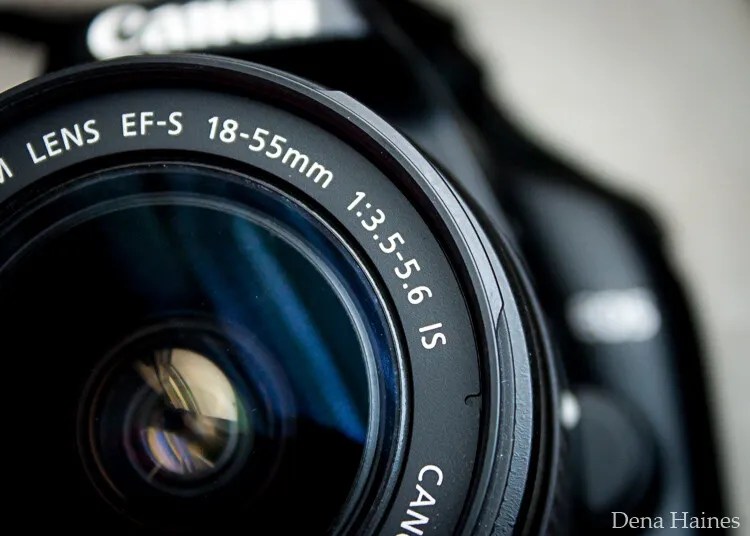
    In this beginner’s guide, we’ll use an entry-level zoom lens as our example. Most kit lenses (the basic lens that comes with a DSLR) generally shoot their sharpest at a mid-range aperture setting. To determine the mid-range aperture of your lens, you’ll need to know its widest (or maximum) aperture setting. This is located on the side or end of the lens and will look something like 1:3.5-5.6.

    For example, here it is on my Canon 18-55mm zoom lens:

    Lens aperture range

    This means that when my lens is zoomed all the way out to 18mm, its widest aperture is f/3.5. When zoomed all the way in to 55mm, its widest aperture is f/5.6.

    The rule for finding that mid-range sweet spot is to count up two full f-stops (aperture settings are called f-stops) from the widest aperture. On my lens, the widest aperture is f/3.5. Two full stops from there would bring me to a sweet spot of around f/7.1.

    Use this chart to count your f-stops:

    Robin Parmar

    By Robin Parmar

    There is some wiggle room in what counts as mid-range, so anything from f/7.1 to f/10 will capture a sharp image. Once you know the mid-range aperture of your lens, you can do an easy test to get your sharpest image. To perform the test you’ll need to shoot in Aperture Priority mode.

    Take control with Aperture Priority mode

    Shooting in Aperture Priority allows you to choose the aperture setting you want, which gives you more creative control than Auto mode.

    By controlling the aperture setting, it’s much easier to get a sharp image. And because your camera still chooses the ISO (if it’s set to Auto ISO) and the shutter speed automatically, it’s very easy to use.

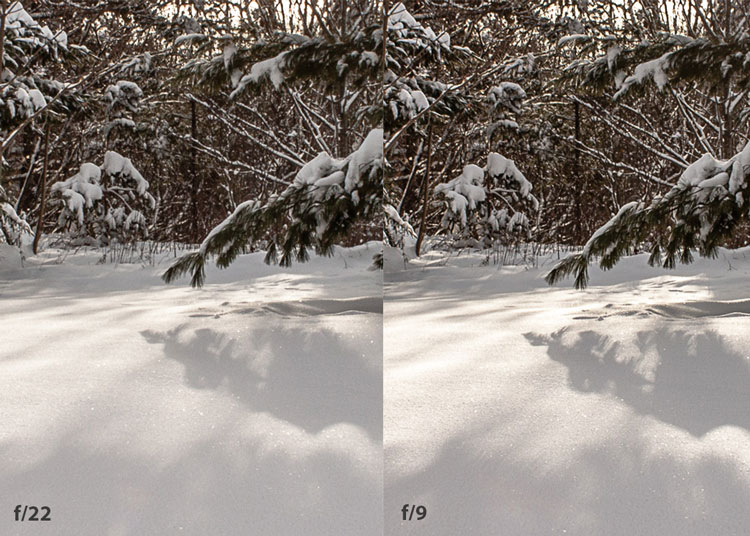
    You’ve probably heard that apertures like f/16 and f/22 are best for keeping everything in focus. While that can be true, focus does not always equal overall sharpness. Choosing a mid-range aperture will give you sharper images throughout. You can improve your photos even further by reducing camera shake by way of a tripod and a remote shutter release (or your camera’s self-timer).

    Here’s an example of how shooting in your lens’s sweet spot will give you sharper images:

    Sharp images shot in lens sweet spot

    Mid range f stop sharper than small f stop

    In the above image, the f/9 shot is sharper than the f/22 one. The needles and shadows are not as soft or blurry as in the f/22 shot (look at the crispness and sparkles in the snow, too).

    Switching from Auto to Aperture Priority mode

    To take your camera off of Auto and put it in Aperture Priority, just turn the large mode dial to Aperture Priority. This is what that looks like on my Canon (on Nikon and other brands look for the “A”).

    Aperture priority on canon mode dial

    Auto mode is the green rectangle; Aperture Priority mode is the Av (or A on a Nikon). Once your camera is in Aperture Priority mode, turn the smaller main dial (shown here on the top of my Canon) to choose your f-stop.

    Main dial canon

    As you turn that dial, you’ll see the f-number changing on your screen. In the next picture, it’s set to f/9.5:

    Aperture setting on canon LCD screen

    Perform a lens sweet spot test

    Once you have your camera set up on a tripod, performing a sweet spot test only takes a couple of minutes. To begin, put your camera in Aperture Priority mode, then compose your shot and take photos at varying apertures. Start with a shot at the widest aperture, then rotate that main dial a couple of times (to narrow the aperture) and take another shot. Keep doing that until you’ve taken seven or eight photos.

    Upload your photos to your computer and zoom in. You’ll quickly see which aperture settings gave you the sharpest overall image.

    This next photo of my daughter was shot using natural light. Shooting in my lens’s sweet spot gave me a pretty sharp image, even in this low light setting:

    Mid range aperture sharp image low light

    Find your lens sweet spot for sharper images

    The close-up of the mug shows the advantage of shooting in the lens’s sweet spot. Whenever you want to make sure you get the sharpest capture possible, take a shot at each mid-range setting: f/7.1, f/8, f/9, and f/10.

    Getting your sharpest images

    Now that you know your lens’s sweet spot, it’s time to practice. I hope you’re as pleased with the results as I’ve been!

    Mid range aperture for sharper images

    I love shooting in natural light, and learning how to capture sharper images in low light has made me so much happier with my photos.

    Tips for capturing the sharpest images

    • Shoot in Aperture Priority mode
    • Choose a mid-range aperture (usually f/7.1 to f/10)
    • Use a tripod and a remote shutter release (or your camera’s self-timer) to reduce camera shake
    • Take a series of shots at f/7.1 through f/10 when a sharp capture is especially important

    But don’t stop there. Keep playing with settings in Aperture Priority mode. It’s awesome to get images that are sharp throughout, but there’s a lot more to aperture than that.

    Learn more about aperture and depth of field here.

    The post How To Find Your Lens’ Sweet Spot: A Beginner’s Guide to Sharper Images appeared first on Digital Photography School. It was authored by Dena Haines.


    Digital Photography School

  • NVIDIA Research develops a neural network to replace traditional video compression

    NVIDIA researchers have demonstrated a new type of video compression technology that replaces the traditional video codec with a neural network to drastically reduce video bandwidth. The technology is presented as a potential solution for streaming video in situations where Internet availability is limited, such as using a webcam to chat with clients while on a slow Internet connection.

    The new technology is made possible using NVIDIA Maxine, a cloud-AI video streaming platform for developers. According to the researchers, using AI-based video compression can strip video bandwidth usage down to 1/10th of the bandwidth that would otherwise be used by the common H.264 video codec. For users, this could result in what NVIDIA calls a ‘smoother’ experience that uses up less mobile data.

    In a video explaining the technology, researchers demonstrate their AI-based video compression alongside H.264 compression with both videos limited to the same low bandwidth. With the traditional video compression, the resulting low-bandwidth video is very pixelated and blocky, but the AI-compressed video is smooth and relatively clear.

    This is made possible by extracting the key facial points on the subject’s face, such as the position of the eyes and mouth, then sending that data to the recipient. The AI technology then reconstructs the subject’s face and animates it in real time using the keypoint data, the end result being very low bandwidth usage compared to the image quality on the receiver’s end.

    There are some other advantages to using AI-based compression that exceed the capabilities of traditional video technologies, as well. One example is Free View, a feature in which the AI platform can rotate the subject so that they appear to be facing the recipient even when, in reality, their camera is positioned off to the side and they appear to be staring into the distance.

    Likewise, the keypoints extracted from the subject’s face could also be used to apply their movements to other characters, including fully animated characters, expanding beyond the AI-powered filters that have become popular some video apps like Snapchat. Similar technology is already on the market in the form of Apple’s AI-based Animoji.

    The use of artificial intelligence to modify videos isn’t new; most major video conferencing apps now include the option of replacing one’s real-life background with a different one, including intelligent AI-based background blurring. However, NVIDIA’s real-time AI-based video compression takes things to a new level by using AI to not only generate the subject in real time, but also modify them in convenient ways, such as aligning their face with a virtual front-facing camera.

    The technology could usher in an era of clearer, more consistent video conferencing experiences, particularly for those on slow Internet connections, while using less data than current options. However, the demonstration has also raised concerns that largely mirror ones related to deepfake technologies — namely, the potential for exploiting such technologies to produce inauthentic content.

    Artificial intelligence technology is advancing at a clipped rate and, in many cases, can be used to imperceptibly alter videos and images. Work is already underway to exceed those capabilities, however, by fully generating photo-realistic content using AI rather than modifying existing real-world content.

    The Allen Institute for AI recently demonstrated the latest evolution in this effort by using both images and text to create a machine learning algorithm that possesses a very basic sense of abstract reasoning, for example. NVIDIA Research has also contributed extensively to this rapidly evolving technology, with past demonstrations including generating landscapes from sketches, generating photo-realistic portraits and even swapping facial expressions between animals.

    A number of companies are working to develop counter technologies capable of detecting manipulated content by looking for markers otherwise invisible to the human eye. In 2019, Adobe Research teamed up with UC Berkeley to develop and demonstrate an AI capable of not only identifying portrait manipulations, but also automatically reversing the changes to display the original, unmodified content.

    The general public doesn’t yet have access to these types of technologies, however, generally leaving them vulnerable to the manipulated media that permeates social media.

    Via: NVIDIA

    Articles: Digital Photography Review (dpreview.com)

  • Hubble captures supernova 70M light-years away as it briefly outshines its host galaxy

    The Hubble Space Telescope recently captured images of an exploding star 70 million light-years away. The event was recorded as part of an ongoing program to measure the expansion rate of the universe in order to better understand its age. For a moment, the explosion outshined its entire host galaxy and the resulting energy was ‘equal to the radiance of 5 billion Suns.’

    NASA has assembled its images from the Hubble Space Telescope to create a new time-lapse sequence, seen below. The supernova explosion took place in the spiral galaxy NGC 2525. In February 2018, Hubble began its observation of SN2018gv after a Japanese amateur astronomer, Koichi Itagaki, first detected it in mid-January. The supernova has been used to help precisely the expansion rate of the universe, which is itself critical to our understanding of the universe.

    The time-lapse sequence above spanned nearly a year, with the supernova first appearing ‘as a blazing star located on the galaxy’s outer edge. It initially outshines the brightest stars in the galaxy before fading out of sight.’

    Nobel Laureate Adam Riess of the Space Telescope Science Institute (STScI) and John Hopkins University says, ‘No earthly fireworks display can compete with this supernova, captured in its fading glory by the Hubble Space Telescope.’ Riess is the leader of the High-z Supernova Search Team and the Supernovae H0 for the Equation of State (SH0ES) Team.

    The NASA Hubble Site news release continues, ‘The type of supernova seen in this sequence originated from a burned-out star—a white dwarf located in a close binary system—that is accreting material from its companion star. When the white dwarf reaches a critical mass, its core becomes hot enough to ignite nuclear fusion, turning it into a giant atomic bomb. This thermonuclear runaway process tears the dwarf apart. The opulence is short-lived as the fireball fades away.’ SN2018gv is a Type Ia supernova. You can learn more about supernovae and the characteristics of each type in this article from BBC’s Sky at Night.

    NASA, ESA, and A. Riess (STScI/JHU) and the SH0ES team Acknowledgment: M. Zamani (ESA/Hubble)

    Supernovae like SN2018gv peak at the same brightness, which allows them to act a type of standard, ‘standard candles.’ With the actual peak brightness known, scientists can determine the distances of host galaxies by comparing visible brightness. With this information, it is then possible to measure the expansion rate of the universe itself. You can learn more about how Hubble has aided in our understanding of the universe’s expansion rate in this article.

    Articles: Digital Photography Review (dpreview.com)

  • The inspiration behind Canon’s RF 600mm F11 and 800mm F11 super-tele lenses

    In July, Canon announced a pair of super-telephoto fixed-aperture lenses for its RF lens mount. The new RF 600mm F11 IS STM and RF 800mm F11 IS STM lenses are distinct among Canon’s modern offerings but are reminiscent in design and philosophy to some of Canon’s R lenses from 1960.

    Six decades ago, Canon released the R300mm F4, R400mm F5.6, R600mm F5.6, R800mm F8 and R1000mm F11 super-telephoto lenses. While not fixed aperture lenses like the new RF lenses, the vintage bellows-driven lenses were nonetheless the inspiration for this year’s modern interpretations. In a Japanese-language interview published by DC Watch, Canon’s Chief of Lens Product Planning, Kengo Iezuka, notes that the EOS R system allows him and his team to create new user experiences for modern photographers. This includes breaking down ‘the three barriers of super-telephoto lenses,’ which he states are weight, size and cost. In 1960, Canon worked to overcome these challenges with its R lenses, and Iezuka believes Canon’s RF 600mm F11 and RF 800mm F11 lenses do the same in 2020.

    Canon R600mm f/5.6 lens. The lens was first marketed in January 1960. Image credit: Canon, Canon Camera Museum

    When Iezuka was a child and wanted to capture wildlife images of a Little Egret, he was unable to due to the expense of super-telephoto lenses. Iezuka says via translation, ‘I knew that there were many people who gave up what they wanted to shoot and the expressions they wanted to shoot because they couldn’t buy a super-telephoto lens and couldn’t carry it because it was big and heavy. With the EOS R system, I think I was finally able to get closer to the dream super-telephoto world. I would like you to enjoy shooting things that you couldn’t shoot before and the expressions you wanted to shoot with this 600mm/800mm F11 lens.’

    In elaborating further upon how the Canon EOS R system allows the three barriers of super-telephoto lenses, Iezuka states that Canon’s Dual-Pixel CMOS AF allows for strong autofocus performance even in low light, or when using a lens with a smaller maximum aperture, such as F11. In 1960, the sensitivity of film was stricter, requiring faster apertures in the case of the R400mm F4.5, R600mm F5.6 and R800mm F8. However, today, Canon’s EOS R system allows for much more flexibility when designing new lenses. In fact, the EOS R can even work with F22, allowing Iezuka and his team to utilize an F11 design that can incorporate a 2x teleconverter.

    If Canon had pursued an F8 aperture, the lens would have been larger and heavier. An F16 lens would have worked without a teleconverter, but not with a 2x TC attached. It was around this point in the design process when the team first considered making the lens with a fixed aperture. Ultimately, removing the aperture unit allowed for reduction in weight and cost, both critical design goals for Iezuka and the team at Canon.

    Iezuka also shared that the RF 600mm and 800mm lenses were not his first attempt to create a lightweight and cost-effective super-telephoto lens. He had previously explored the idea for SLR cameras. ‘I wondered if I could manage to get closer to the world of super-telephoto lenses that exceed 400mm,’ Iezuka said, ‘I considered increasing the F-number as I did this time, but it didn’t work. If you increase the F value, you can only autofocus at the center of the [frame]…so I gave up.’ The new RF lenses offer autofocus coverage of 60% x 40% (W x H) with the recent Canon EOS R5 and R6 full-frame mirrorless cameras.

    Iezuka also considered zoom lenses, but this design would increase the weight too much to be able to carry the lens around all day. The RF 600mm lens weighs approximately 2.05lb and the RF 800mm weighs about 2.78lb. In order to maintain a lightweight design and ensure the lenses are affordable, metal parts are kept to a minimum and much of the lens is constructed using resin. In order to utilize a collapsible design, many parts had to be molded, which is unique for Canon’s lenses. The collapsible design came from one of the youngest members of the team, Iezuka says, and was the result of internal competition within the department.

    There is much more excellent insight into the design process in the full interview, so be sure to check that out. Click the following links for more information on the Canon RF 600mm F11 IS STM and RF 800mm F11 IS STM lenses.

    (Via PetaPixel)

    Articles: Digital Photography Review (dpreview.com)

  • Exploring Monte Cristo ghost town with Sam Horine and the Canon EOS R5

    The Canon EOS R5 is a powerful stills and video camera, designed for enthusiast and professional users. With a high-resolution full-frame sensor and advanced human and animal face and eye-detection, the EOS R5 is a versatile option for travel and portraiture. As well as stills, the R5 can also capture HD, 4K and 8K video.

    Join Seattle-based photographer Sam Horine as he uses the EOS R5 to explore the ghost town of Monte Cristo, in Washington State. Wildflowers, campfires and the cosmos – oh my!

    Monte Cristo ghost town: Sample images

    $ (document).ready(function() { SampleGalleryV2({“containerId”:”embeddedSampleGallery_1228658280″,”galleryId”:”1228658280″,”isEmbeddedWidget”:true,”selectedImageIndex”:0,”isMobile”:false}) });


    This is sponsored content, created with the support of Amazon and Canon. What does this mean?

    Articles: Digital Photography Review (dpreview.com)

  • Cosina announces new VM-mount Voigtlander Nokton Vintage Line 50mm F1.5 Aspherical II VM lens

    Cosina has announced (translated) the release of its new Voigtlander Nokton Vintage Line 50mm F1.5 Aspherical II VM lens, an updated version of its predecessor, which was released back in June 2013.

    The second-generation lens features an entirely redesigned optics system and a more compact body to match. It’s constructed of eight elements in seven groups, has an aperture range of F1.5-F16, uses a 12-blade aperture diaphragm and has a minimum focusing distance of 70cm (27.5”). The lens measures in at just 55mm (2.17”) diameter and 37mm (1.5”) in length.

    The left and center lenses are the aluminum models; the right lens is the brass version.0

    The lens is constructed almost entirely of metal, with knurled rings for manually adjusting both the aperture and focus. Interestingly, Cosina is offering the lens in two different versions: a multi-coating version (MC) and a single-coating version (SC). In its own words, Cosina says the MC version ‘aims to reproduce colors as neutral as possible’ while the single coating ‘reproduces classical colors.’

    Below is a sample gallery of images captured with the lens and provided by Cosina:

    $ (document).ready(function() { SampleGalleryV2({“containerId”:”embeddedSampleGallery_0818395681″,”galleryId”:”0818395681″,”isEmbeddedWidget”:true,”selectedImageIndex”:0,”isMobile”:false}) });

    Cosina is offering the lens in black and silver versions constructed of aluminum, while a more premium model constructed of nickel-plated and black-painted brass is also available.

    All versions of the Voigtlander Nokton Vintage Line 50mm F1.5 Aspherical II VM lens use a bayonet VM mount that can be used with Vessa and M-mount cameras (not including the Bessa L and R). The Japan launch date is October 22 for all models and pricing is listed at ¥100,000 (~$ 950) for the aluminum models and ¥115,000 (~$ 1,100) for the brass model. Currently, no information on availability outside of Japan is mentioned.

    Articles: Digital Photography Review (dpreview.com)

  • Here’s our wish list for the Nikon Z6 II and Z7 II

    Thanks to a process of continued improvement, the Z6 and Z7 are going to be hard acts to follow.

    Nikon has already started teasing its forthcoming Z6 and Z7 Mark II cameras, so the question is: just what are they going to bring? We’ve collectively put together a list of what we’d like to see on these updated models. It’s not necessarily what we think Nikon will provide, more a list of what we think would be nice.

    Fixing the things complained about

    On the hardware side, there are a couple of obvious changes that would immediately justify the incremental implications of that ‘Mark II’ billing: correcting the much-criticized omissions in the original models.

    The most obvious would be the provision of twin card slots. It’s a feature many professional photographers lean on, which meant the Z7 looked less attractive to that crowd than it could have been. The Z6 was beaten with the same stick, though perhaps with less justification (though Nikon has tended to include them on even its most lowly full-frame models).

    Providing twin card slots would be an easy ‘win’ for Nikon

    Wherever you stand on the issue, providing twin card slots would be an easy PR win for Nikon. Adopting the smaller CFexpress ‘A’ cards would, perhaps, make it easier to do without increasing the size of the camera body but then risks incurring the wrath of existing users who’ve bought into XQD and CFexpress type B formats.

    Another feature missed-off the original cameras was a connection port to allow a battery grip with duplicate controls for portrait orientation shooting. This would be another comparatively simple way to expand the capabilities of the new cameras.

    And, on the subject of battery endurance, a larger battery pack wouldn’t go amiss, if the bodies are being re-worked. I’m sure there will be plenty of comments saying that they’ve had no problems with the existing cameras, but whether it’s to give professional Z7 II-shooters or Z6 II video users one less thing to worry about, additional battery life is rarely a bad thing.

    Yes, XQD (as are the CFexpress type-B cards that Nikon also now supports) are fast, but there’ll be a lot of frustration if the Mark II models only have single slots. Especially in the light of the Z5 sporting twin SDs.

    Moving the hardware forward

    Beyond this, it’ll be interesting to see whether Nikon has managed to source new sensors for the new cameras. We’ve not yet seen anything that obviously surpasses the 24MP sensor in the Z6 (also used by other manufacturers, including models as recent as the Sony a7C and Lumix S5), so it wouldn’t leave the Z6 II lacking by pressing on with the same chip. That said, a newer sensor with faster readout could help with both autofocus and video performance, so it would be an attractive upgrade if there’s one available.

    The 24MP sensor in the Z6 is still competitive but a newer sensor with faster readout could help both autofocus and video

    With regards the Z7 II, a jump from 46MP to somewhere closer to the Sony a7 IV’s 60MP wouldn’t hurt its chances: both in terms of looking competitive against the Sony to newcomers and in terms of giving Z7 users a reason to upgrade.

    It seems highly likely that the Z7 II, or even both new models, will gain higher resolution viewfinders. The 3.68M dot EVFs used in the original models were good for their day but there are 5.76M and 9.44M dot panels available now, so we’d expect to see a move to one of those higher-res displays.

    Which brings us to the rear LCDs. We’ve really enjoyed the two-way tilting LCD cradles used on the likes of Fujifilm’s X-T3 and Panasonic’s S1 and S1R. We think it’s unlikely, but there’s an argument to be made that a similar design would be a good fit for the Z7 II, and perhaps even a fully-articulated panel for the Z6 II, assuming Nikon continues its impressive work towards providing a camera that’s as adept at video as it is at stills.

    Yes, we are aware that there’s a cohort of stills photographers who’d be aghast at such a suggestion, and we suspect Nikon won’t want to upset them too much.

    Keep rolling!

    We have to assume there will be some new video features in the cameras, because it’d be senseless to sit back and relax after all the progress made with the Z6. The addition of 10-bit internal capture would certainly expand the appeal of the camera, making Log footage more flexible and allowing the capture of HDRTV-compatible high dynamic range footage.

    Alongside this, it would be lovely to see waveform displays added, to make it easier to assess exposure. This would be a big step for Nikon but it does appear the company has been listening to the needs of videographers, so we think it’s possible.

    The addition of 10-bit internal capture would certainly expand the appeal of the camera for videographers

    Similarly, it would be useful for the Z6 II to display the shutter speed in terms of shutter angle: this would become particularly useful if the camera can shoot 60p footage, as it allows you to maintain a 180 degree shutter angle (meaning a shutter speed that’s twice the frame rate) as you jump between capturing footage at different frame rates.

    Beyond this, it’s difficult to anticipate what Nikon could sensibly add to a camera that isn’t trying to be dedicated to video. 6K Raw output would avoid the sub-sampling aliasing we saw in the Z6’s Raw video stream but would entail much larger video files. At the very least, it would be nice to see Nikon communicate more metadata so that Atomos recorders can create ProRes Raw files that allow a broader range of adjustments within Final Cut Pro than is currently possible.

    Software/UI:

    Finally, there are a few aspects of the software and user interface we’d like to see improved.

    A generational update of the camera would usually also come with a generation’s improvement in the AF tracking performance. Nikon has continuously improved the AF performance and interface on the Z6 and Z7, so we’d only expect a relatively small improvement, but there is room for improvement on both counts.

    Nikon’s tracking in its mirrorless cameras has steadily improved but it still isn’t quite as ‘sticky’ as the latest Sony and Canon cameras, we’ve tended to find. It’s not far off, but it would be nice to see a further improvement, particularly in video mode.

    Nikon has been improving the Z6 and Z7’s autofocus interface but better integration of its features would be good to see

    As well as the performance, Nikon has also been fine-tuning its user interface: letting you pre-select where you want subject tracking to start, and letting you start and stop tracking by pressing or releasing the shutter button, for instance. But Tracking and Face/Eye detection remain separate modes, built on top of the ‘Auto’ area mode. We’d love to see a distinct mode, let’s call it something like ‘3D Subject Tracking,’ that tracks the subject under the focus point and utilizes Face or Eye detection if that subject happens to possess either of those things. This better integrated system is really simple to use on the latest Canons and Sonys, and it would be good to see it replicated here, just for speed and convenience.

    Finally, we’d love to see a return of the ability to format the card or reset the camera by pressing pairs of buttons: it was a feature unique to Nikon DSLRs and became second-nature to many Nikon photographers.

    No easy task

    Overall, though, preparing this article reminded us just how good both the Z6 and Z7 have become. We thought they were pretty polished first efforts when they arrived, and Nikon has continued to improve them ever since. It’ll be interesting to see what the company will do to top them.

    Let us know in the comments what changes, improvements or additions you’d most like to see in the forthcoming models.

    Articles: Digital Photography Review (dpreview.com)