RSS
 

Posts Tagged ‘Update’

YI releases much-needed firmware update for Yi-M1 mirrorless camera

02 Nov

When we got our hands on Chinese camera maker YI’s first mirrorless camera, the YI-M1, we didn’t have a lot of positive things to say. Despite a great sensor, the camera was… unrefined. But the company just released a new firmware version for the M1 that promises to smooth out some of its rougher edges.

Key updates include (much-needed) improved AF speed, the addition of a RAW+JPG shooting option, exposure control in P, A, S and M modes when shooting video, AF/MF control during video capture, and the addition of a histogram in live view while shooting both stills and video.

We’ve updated our review model to the latest firmware and are taking it for another spin to possibly update our review, but in the meantime, check out the release notes below to see what all YI has improved and fixed on the M1 with this newest update.

Release Notes

{PressRelease}

Firmware Version 3.0-int Update Logs

New

  1. Added exposure control in the mode P/A/S/M for video capture
  2. Added AF/MF control for video capture.
  3. Added RAW+JPG format for still capture
  4. Added still image option in Time Lapse
  5. Added the option to shoot 1-3 images when using the self-timer function with an initial 2 second or 10 second timer settings
  6. Added a histogram in live view mode for both still and video capture
  7. Added new focus viewing modes with improved image quality including: 6x, 8x and 10x magnification in MF mode
  8. Added 2 ways to show the Metering mode in the UI
  9. Added the user guide (Restoring factory settings to view)
  10. Added multiple selection of images for deletion.
  11. Added 2 new options for the display grid
  12. AE algorithm optimization
  13. Master Guide template display logic optimized
  14. Improved AF speed

Fixed

Fixed some known bugs, and improved the overall stability of the system.

Changed

Change the thumbnails in each screen from 9 to 12 images.

{/PressRelease}

Articles: Digital Photography Review (dpreview.com)

 
Comments Off on YI releases much-needed firmware update for Yi-M1 mirrorless camera

Posted in Uncategorized


Adobe will release the last update to Lightroom 6 ‘towards the end of the year’

27 Oct

The countdown to the end of Lightroom as a standalone product is officially ticking, and the deadline is drawing near. Earlier today, Adobe released a fresh compatibility update for Lightroom 6, but in addition to adding support for cameras like the Nikon D850 and Fuji X-E3, Adobe also answered a burning question in the release notes: Is this the last upgrade of Lightroom perpetual product?

The answer, it seems, is no… but that last upgrade will arrive “towards the end of the year.” Here is Adobe’s answer in full:

As we align our investments in the direction of supporting our subscription-based products, the last version of Lightroom 6 will be coming out towards the end of the year. If there is a camera not supported in Lightroom 6, you can use the DNG converter before importing your images into Lightroom 6.

Once that final upgrade goes live, Lightroom 6 will become an ‘unsupported’ product, and if you intend to keep using Adobe Photoshop Lightroom you’ll either have to subscribe to CC or deal with the less-than-ideal workflow described above… while you can. It might not take too many operating system upgrades before unsupported LR6 breaks entirely.

Not everybody is happy about this state of affairs… as Senior Reviewer Richard Butler pointed out last week:

RIP Lightroom 6: Death by Subscription Model

Articles: Digital Photography Review (dpreview.com)

 
Comments Off on Adobe will release the last update to Lightroom 6 ‘towards the end of the year’

Posted in Uncategorized


Hasselblad X1D and H6D firmware update adds Touchpad AF and more

25 Oct

Hasselblad has released firmware update 1.19 for the X1D and H6D, adding new support and settings to the systems, as well as custom buttons and the ability to create a new folder. Notably, the firmware update brings support for V System lenses via the CF Adapter for the H6D, and it makes the X1D overall “more user friendly and customizable” by adding features like Touch-pad selection of the AF point.

You can read the changelogs for both firmware updates below.

X1D Firmware Update

The update for the X1D-50c includes the following new features:

  • Touch-pad selection of AF point
  • New setting: Live view in EVF only
  • Custom buttons
  • New setting: Max aperture (Lens bokeh)
  • Create new folder
  • Toggle overlay in Video Live View with display button

H6D-Firmware Update

The update for the H6D-50c & H6D-100c includes the following new features:

  • Support for CF adapter
  • Grip button lock
  • Custom buttons (more functions)
  • Create new folder
  • Toggle overlay in Video Live View with display button

Articles: Digital Photography Review (dpreview.com)
 
Comments Off on Hasselblad X1D and H6D firmware update adds Touchpad AF and more

Posted in Uncategorized


Preserving Architectural Gems: 8 Beijing Hutong Plug-Ins Update Historic Shells

19 Oct

[ By SA Rogers in Architecture & Houses & Residential. ]

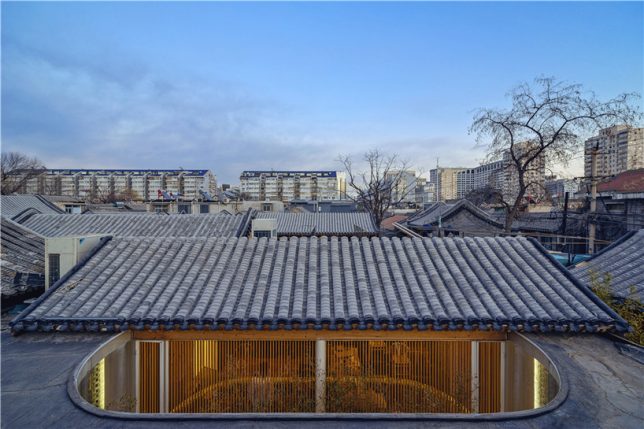
Passing through historic Beijing neighborhoods, seeing only the preserved street-facing facade, you’d never know that surprisingly modern structures contrast with aging surfaces within the courtyards just out of sight. Instead of just demolishing the ‘hutong’ courtyard houses found only in this Chinese city, architects are adapting them to modern life, slotting houses, hostels, museums, tea houses, cinemas and more under the existing roofs.

Tea House by Archstudio

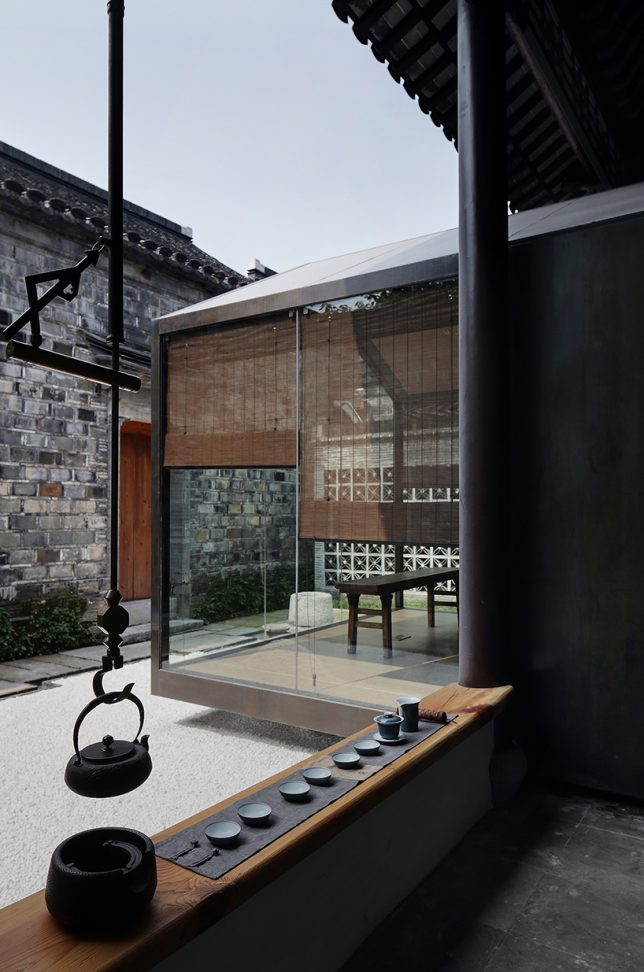
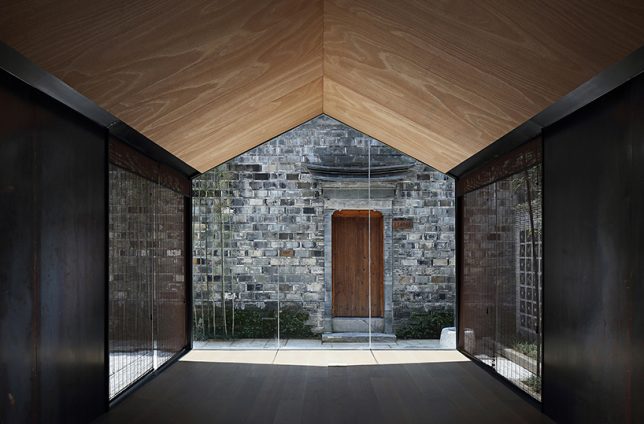
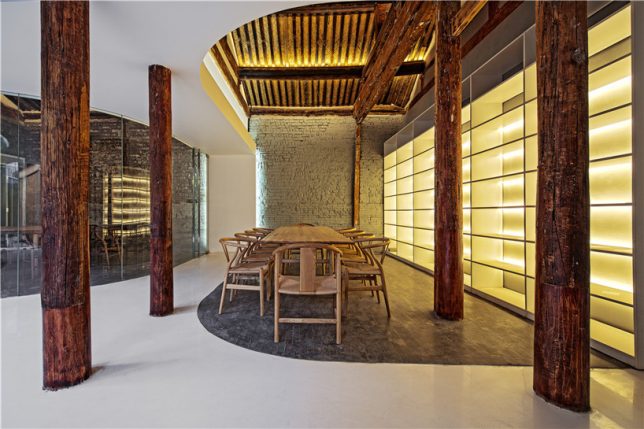
In a truly stunning adaptation, Archstudio has completed a tea house and cafe within an existing hutong house, enclosing it from above with new roofs while leaving atriums open for bamboo and other greenery. The intervention connects the site’s five existing structures with a glazed corridor following the path of the original courtyard, forming three tea houses with their own unique views.

Twisting Courtyard by Archstudio

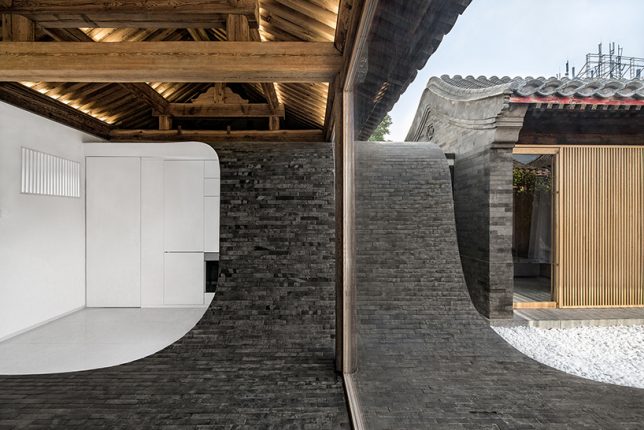
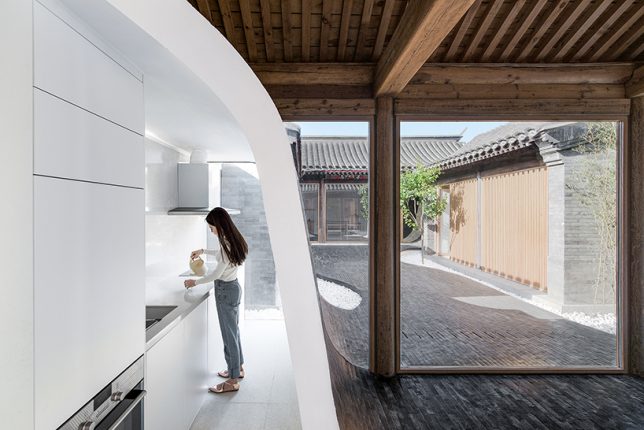
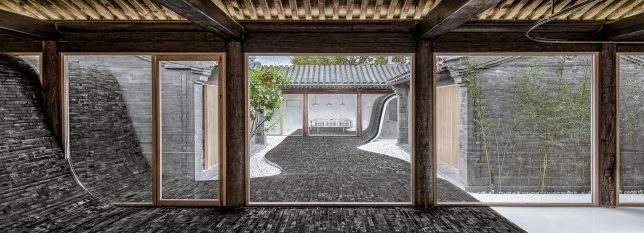
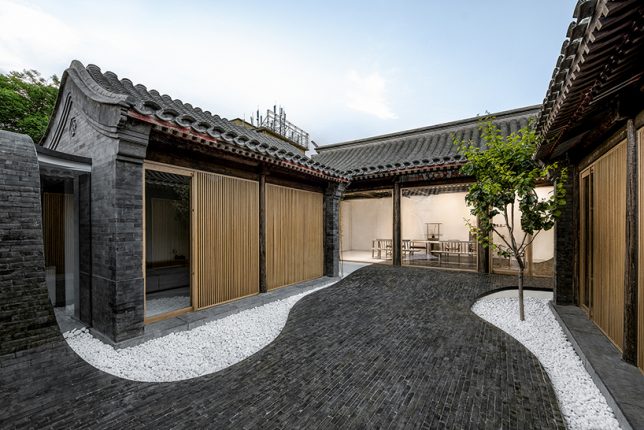
A river of glossy grey bricks streams through the courtyard of a Siheyuan house in the Paizihutong area of Beijing, upgrading the historic architecture with spaces that meet modern requirements of living. Archstudio‘s stunning pathway arches over the new volumes and even continues right into the dining room as part of the floor.

Mini Hostel Inside Hutong by ZAO / standardarchitecture

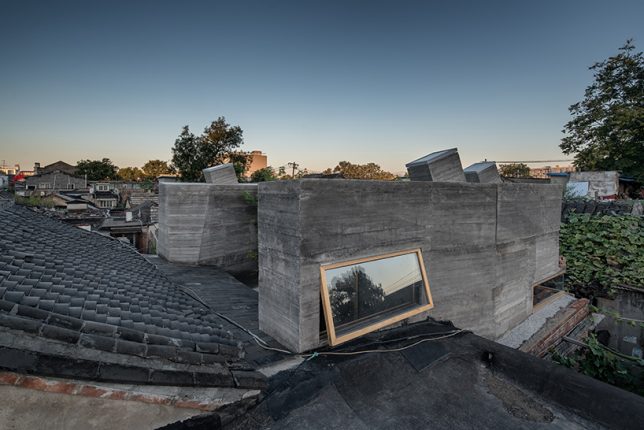
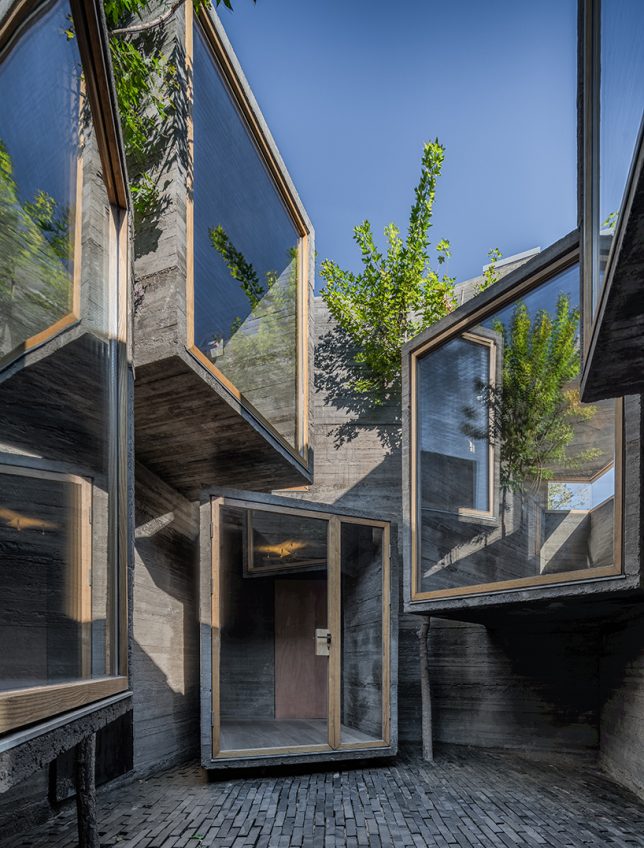
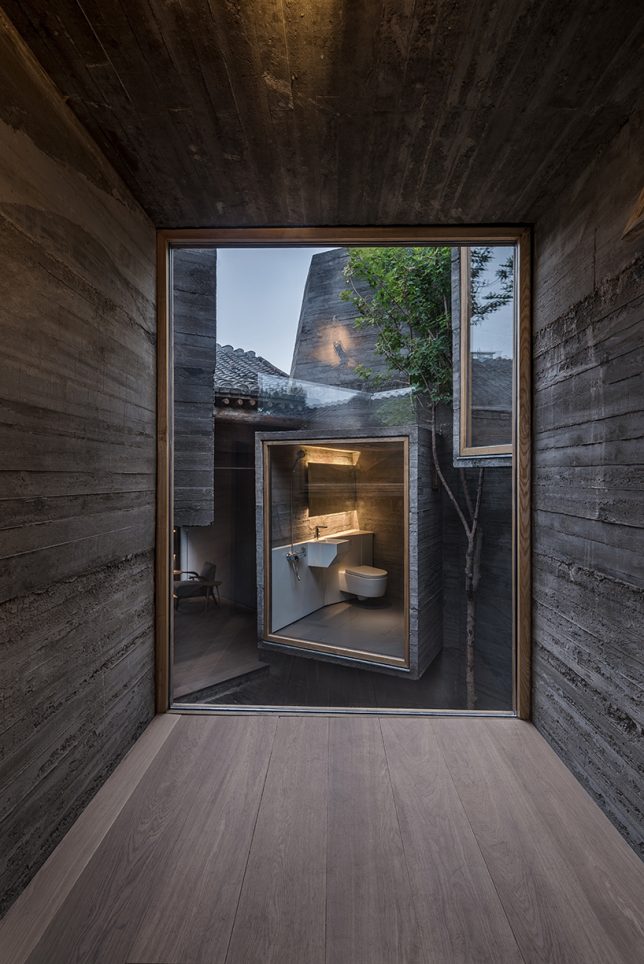
The firm ZAO / standard architecture inserted a small hostel inside a renovated Beijing hutong, exploring the potential of small-scale accommodations that slot right into the city’s existing architecture instead of displacing it. The glazed facades of volumes made of board-formed concrete project into the courtyard, facing each other (in some cases, with views of toilets, much to the horror of many Westerners looking at these images.) “The result is an architectural operation that brings back the courtyard as generator of the program, as it activates the building by creating a direct relationship with its urban context.”

Lai Yard House by Minggu Design

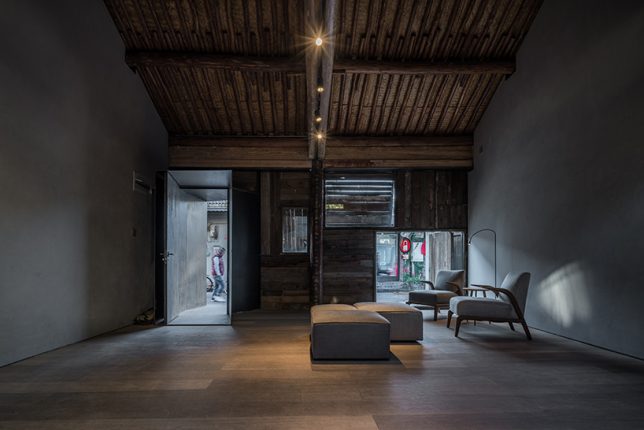
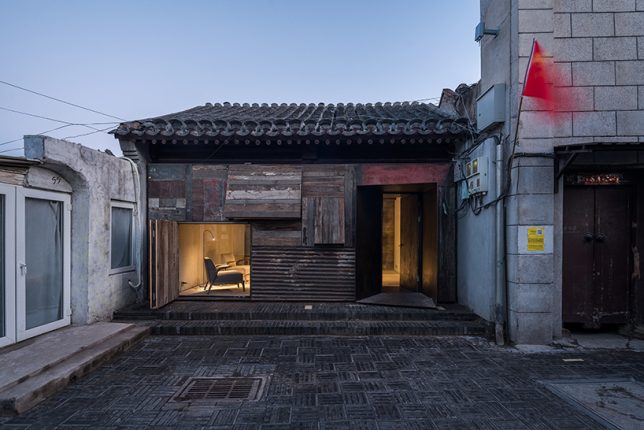
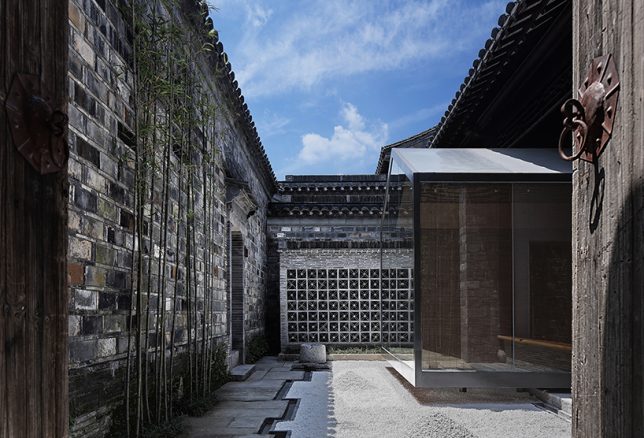
Tucked away behind weathered brick facades near the ancient city wall of Beijing, this courtyard home was crumbling. Minggu Design protects and preserves the original Chinese architecture while enhancing and adapting it for the 21st century, inserting volumes made of wood and glass to complement the surroundings without overpowering them. They used the new volumes to intentionally block and filter light to the original interior, creating a tranquil cave-like feel.

Next Page – Click Below to Read More:
Preserving Architectural Gems 8 Beijing Hutong Plug Ins Update Historic Shells

Share on Facebook


[ By SA Rogers in Architecture & Houses & Residential. ]

[ WebUrbanist | Archives | Galleries | Privacy | TOS ]


WebUrbanist

 
Comments Off on Preserving Architectural Gems: 8 Beijing Hutong Plug-Ins Update Historic Shells

Posted in Creativity


Sample gallery update: Sony FE 100-400mm F4.5-5.6 GM OSS

14 Oct

The Sony FE 100-400mm F4.5-5.6 GM OSS is a powerful piece of kit, despite its less-than-fast aperture. More importantly, it is sharp throughout its versatile zoom range.

We’ve beefed up of our initial sample gallery with some additional photos of bison, bears, prong horned antelope and drift cars. These join our original samples of models, beach scenes and horseback riders. Now how’s that for versatility?

See our Sony 100-400mm F4.5-5.6 GM OSS sample gallery$ (document).ready(function() { SampleGalleryStripV2({“galleryId”:”4598193995″}) })

Sample photoSample photoSample photoSample photoSample photo

Articles: Digital Photography Review (dpreview.com)
 
Comments Off on Sample gallery update: Sony FE 100-400mm F4.5-5.6 GM OSS

Posted in Uncategorized


Pixelmator 3.7 update adds High Sierra and HEIF support

07 Oct

Pixelmator has released version 3.7 Mount Whitney of its comprehensive image editing app for Mac. The update brings support for macOS High Sierra and the new HEIF (High Efficiency Image File Format) image format that was introduced with the iPhone 8 series and iPhone X.

In addition, Pixelmator can now directly be launched from the Photos app and any edits you make within the more powerful editor will be saved to the original image in the Photos library as well. The option to edit with Pixelmator will appear in the Photos Image menu as soon as the app has been installed or updated to the latest version.

“People love using Pixelmator on the Mac, and one of the biggest reasons is its extensive integration with macOS,” said Saulius Dailide, one of the founders of the Pixelmator Team. “And with Pixelmator 3.7 Mount Whitney, we think users are really going to love the much more seamless experience of launching Pixelmator right from the Photos app and automatically saving changes back to the same image in the Photos library.”

The update also includes improvements to the Repair Tool to make it faster and more accurate, as well as improved support for PSD images. The updated Pixelmator can be downloaded from the App Store for $ 30.

Articles: Digital Photography Review (dpreview.com)

 
Comments Off on Pixelmator 3.7 update adds High Sierra and HEIF support

Posted in Uncategorized


Instagram celebrates 800M users with update that takes on comment trolls

29 Sep
Photo: Instagram

Instagram officially hit 800 million users this week, but the Facebook-owned company has no interest in resting on its laurels. In fact, alongside its “hey, we added another 100M users… no big deal” announcement, the company continued its crusade against comment trolls by launching the most powerful commenting controls the app has seen yet.

The numbers bit was only mentioned briefly in Instagram’s news release. “Our community has grown to 800 million, with 500 million using it every day,” writes Instagram. “It’s more important than ever to strengthen our commitment to safety and kindness.”

And so the company has added some interesting new comment controls. Namely: filtering who can comment on your posts if you have a public account, and the ability to block individual accounts from commenting on your pictures. The controls look like this in your Settings:

In addition to the updated commenting controls—which is just the latest in a series of ‘safety and kindness’ updates the company has released—Instagram also added anonymous reporting of Live Video to their mental health resources. If you are viewing a live broadcast that has you worried about the poster, you can anonymously report the post, which will show the person “a message offering help with options to talk to a helpline, reach out to a friend or get other tips and support.”

To learn more about these updates or see them in action for yourself, head over to the Instagram blog or update your iOS and Android apps to the latest version.

Articles: Digital Photography Review (dpreview.com)

 
Comments Off on Instagram celebrates 800M users with update that takes on comment trolls

Posted in Uncategorized


Sony a9 firmware update 1.10 ‘improves image quality and overall stability’

28 Sep

Sony has released firmware version 1.10 for the Sony a9, bringing improved image quality to the camera alongside a bug fix that addresses a problem with Raw images disappearing when SDXC and microSDXC cards were transferred from the camera to ‘certain smartphones.’ The update also adds the Eye AF function for some A-mount lenses when they’re used with the LA-EA3 mount adapter.

Firmware Version 1.10 for the Sony a9 is available to download from Sony’s website.

The full firmware change log is below:

Benefits and improvements from the latest update

  • Supports “Eye AF” function for A-mount lenses via the LA-EA3 mount adapter *1
  • Fixes an issue where RAW files may disappear when SDXC or microSDXC memory cards are used in certain smartphones *2
  • Improves the image quality and overall stability of the camera

*1: This function is only for A-mount lenses which can adapt to 8 or 10 fps (maximum) tracking AF-C shooting. See here for details.

*2: Raw data recorded by the ILCE-9 with firmware Ver. 1.00 or 1.01 could disappear. Please backup your raw data files, even if you’re updating the system software to Ver. 1.10.

Articles: Digital Photography Review (dpreview.com)
 
Comments Off on Sony a9 firmware update 1.10 ‘improves image quality and overall stability’

Posted in Uncategorized


Affinity Photo for iPad adds extremely useful drag-and-drop feature with iOS 11 update

22 Sep

One of the useful features added to the iPad with the update to iOS 11 this week was drag-and-drop between the operating system’s “Files” app and other applications on the tablet. And popular photo editor Affinity Photo has already updated its iPad app to take advantage of this really handy feature.

Now, if you want to edit a photograph in the Affinity Photo app, all you have to do is drag it from the files app into Affinity… that’s it. No need to get the image onto your iPad in some other, more convoluted way—as long as it’s accessible from your Files app (read: in a cloud-connected folder on your Apple computer) you can drag it into the app.

What’s more, you can drag multiple files in at once for HDR merging, panorama creation, and focus stacking. Here’s the description direct from Serif, the makers of Affinity Photo:

Thanks to iOS 11’s new Files app you can now drag and drop multiple images straight into Affinity Photo for iPad and start editing. This is tremendously useful when working with HDR merge, image stacking and panoramas and will provide an instant boost to your workflow. And if you ever receive images, or even PSD files, via email, you can now open and edit that file – with all layers intact – by simply dragging it in.

Affinity Photo made a big splash with their iPad release, calling it “the first full blown, truly professional photo editing tool to make its way onto the Apple tablet.” As Serif builds more and more functionality into the app, they’re hoping to close the gap between mobile and desktop editing. This represents a big step in that direction.

Learn more about Affinity Photo for iPad by clicking here. And if you’re more of a desktop editor sort of person, don’t forget to check out our review of Affinity Photo 1.5.2 posted this week!

Full Review: Affinity Photo 1.5.2 for Desktop

Articles: Digital Photography Review (dpreview.com)

 
Comments Off on Affinity Photo for iPad adds extremely useful drag-and-drop feature with iOS 11 update

Posted in Uncategorized


Adobe update brings Nikon D850 support to Camera RAW and DNG Converter

07 Sep

Adobe has released updates for its Camera Raw and DNG Converter modules, and the new versions bring support for the new Nikon D850 DSLR’s Raw files as well as a range of new Nikon lenses:

  • AF-P DX NIKKOR 10-20mm f/4.5-5.6G VR
  • AF-P NIKKOR 70-300mm f/4.5-5.6E ED VR
  • AF-S Fisheye NIKKOR 8-15mm f/3.5-4.5E ED
  • AF-S NIKKOR 28mm f/1.4E ED

Additionally, the Camera Raw update fixes a few bugs, including a malfunction that resulted in a magenta color cast on some mRaw and sRaw images captured with the Canon EOS 6D Mark II.

Adobe’s Camera Raw 9.12.1 can be downloaded now. Lightroom users have to wait a little longer for D850 support, but Adobe says an equivalent update will be available soon. Until then, Lightroom users can (and should) use Adobe’s free DNG Converter for Mac or Windows to process their images.

Articles: Digital Photography Review (dpreview.com)
 
Comments Off on Adobe update brings Nikon D850 support to Camera RAW and DNG Converter

Posted in Uncategorized