RSS
 

Posts Tagged ‘Ultimate’

Indoor Photography: Ultimate Guide to Kids Portrait

22 May

One of the things I have specialized in over the years is getting natural, great expressions from kids in photos. It’s not the easiest thing, and I’ll tell you why. Children are naturally curious, interested creatures. They move. They are used to interacting with people by looking at them in the eye, not down a scary round black hole, and Continue Reading

The post Indoor Photography: Ultimate Guide to Kids Portrait appeared first on Photodoto.


Photodoto

 
Comments Off on Indoor Photography: Ultimate Guide to Kids Portrait

Posted in Photography


The Ultimate On-Location Storage Solution – ioSafe Rugged Portable SSD Review

26 Apr

That’s a big call really, isn’t it? “Ultimate on-location storage” what does that even mean, and do you need it? Well, dear reader, read on and we’ll get to the bottom of this relatively new, bomb proof storage device from ioSafe.com

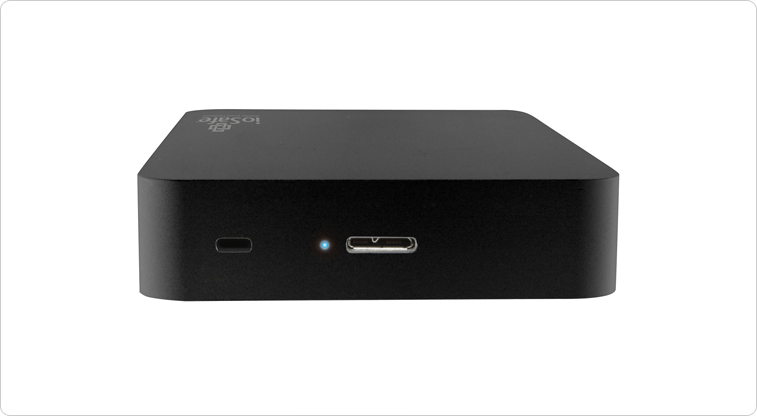
The aptly named Rugged Portable is an external solid state drive that connects to your computer via USB 3.0 to store all of your files – in my case, raw images photographed on location. We have the 1TB version on a trial and that’s going to be (much) more than enough for most photography adventures.

slideshow_rugged-portable_3

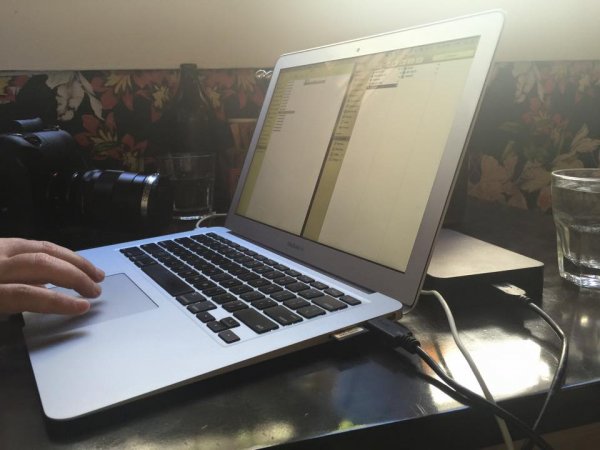
Transfer speeds via USB 3.0 are usually more than enough under the two circumstances I’ve used the drive. The first being to copy from my 32GB Sandisk Extreme Pro CF card via a Lexar USB3 card reader, through the Macbook Air and out the other side into the compact ioSafe drive. I also use a couple of Thunderbolt drives at home, and the noted difference between Thunderbolt and USB3 transfer speeds isn’t actually all that noticeable under real world conditions.

The second scenario was while shooting for an agency that’s recently hired me to be the photographer for a series of shoots. When tethered, and shooting on location, I find myself importing the images to my WD Passport Pro and running a second copy off to the ioSafe – Why? This client takes my CR2 files at the end of each shoot and the designer handles the processing and editing, so I unplug the WD and hand it to the producer and he takes it away with him until next shoot, the ioSafe comes with me. You’re still sitting there scratching your forehead?

Six of the shoots I’ve done so far for this client, four of them have been of scenarios I can’t recreate for one reason or another. If those images are lost by me between location (sometimes on set for two days, away from home and the comfort of backing up to my Promise R8 – yes, I love storage) and the client has a mishap – well, frankly, we’re stuffed. Obviously this is a worst case scenario, but these are the ones that we like to avoid!

s123

Sure, you find a way to work around it – you’re a professional, and that’s why I think it’s nice to not have to “get around it” and to take as much risk out of your shoot days as possible.

When I say “if those images are lost by me” I’m hoping to never have a catastrophic failure that involves my gear melting down, drowning or being driven over, but human error involves dropping drives, spilling a glass of wine on your laptop – the list goes on.

I can see this drive being the perfect storage and transport for destination wedding photographers, commercial photographers travelling to shoot, pretty much anyone that really cares about their, or their clients’ images, between shoot and final delivery.

The ioSafe Rugged portable has some pretty impressive statistics and while I’ve not tested these personally* I know the ioSafe crew are pretty serious about their gear and have a data recovery guarantee attached to their products (more on that after the stats).

slideshow_rugged-portable_2

  • Crush Protection up to 5,000 lbs.
  • Drop Protection up to 10 feet
  • Immersion protection up to 30′ for three days
  • USB 3.0 SuperSpeed (like Superman, you know)
  • Data Recovery Service up to $ 5,000/TB
  • World’s best warranty
  • Mac or PC

Like I said, pretty impressive… But then, it’s not really impressive unless I test some of this stuff, right? (This was an afterthought and, now *I have tried some of them!)

Enlisting the services of Filmmaker and Educator, Lee Herbet of Capturing Passion We’re going to try show you what makes the ioSafe Rugged Portable the little beast that it is.

So, for some examples! In most of these examples I was either tethered shooting to the drive (crush test) or it was at least plugged in and powered up (water and drop tests)

1. Crush test

I’m on set, shooting the OutdoorTech van (Thanks to Blonde Robot!) when one of the directors glides in silently in his Tesla S… Clearly the Tesla has a great rear facing camera, but this one doesn’t have a front facing camera and well, you can see how that played out!

2. Submersion test

We’re back shooting some images for a water conservation company here in Melbourne, thankfully not into 30′ of water, but you get the idea!

3. Drop test

I’d forgotten to simply use my CamRanger with the 7.3m (24′) tall Kupo LookOut stand while shooting a lifestyle image… Watching this back almost reminds me of a Mr Bean sketch!

So, even though the shooting situations above were staged, the drive really did get run over, dropped, and drowned multiple times to make these short films. The footage was also saved onto the drive and the films edited together on location at my favourite cafe right after we wrapped the final filming. You can even see the drive data light flashing in the Tesla video as I was shooting to it just before it was run over!

In closing , do you need the ultimate on-location storage solution? Only your business requirements can answer that question for you, but if you’re after an easily portable SSD external drive for your photography, that will look danger in the face and laugh – this is it.

This drive leaves me nothing to complain about and so I give it five gold stars.

Thanks for reading! Hope you enjoyed my take on the ioSafe Rugged Portable!  –Simon

googletag.cmd.push(function() {
tablet_slots.push( googletag.defineSlot( “/1005424/_dPSv4_tab-all-article-bottom_(300×250)”, [300, 250], “pb-ad-78623” ).addService( googletag.pubads() ) ); } );

googletag.cmd.push(function() {
mobile_slots.push( googletag.defineSlot( “/1005424/_dPSv4_mob-all-article-bottom_(300×250)”, [300, 250], “pb-ad-78158” ).addService( googletag.pubads() ) ); } );

The post The Ultimate On-Location Storage Solution – ioSafe Rugged Portable SSD Review by Sime appeared first on Digital Photography School.


Digital Photography School

 
Comments Off on The Ultimate On-Location Storage Solution – ioSafe Rugged Portable SSD Review

Posted in Photography


The Ultimate Guide to Natural Light Photography

22 Apr

Dps covers template 363x448

As a photographer, the most powerful tool you have is natural light

It may be free for the taking – but are you making the most of it to create beautiful images?

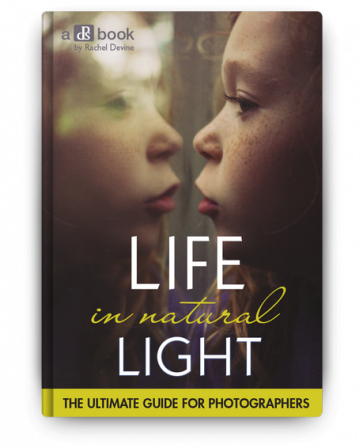
Today I’m pleased to announce the launch of our latest dPS eBook – Life in Natural Light by Rachel Devine.

Rachel is someone I have had come to photograph my family – largely because I love the way that she uses natural light to capture special moments of life – so when our team began talking about who we wanted to write this eBook Rachel was the first person to come to mind.

In this beautifully illustrated eBook Rachel reveals her secrets for finding and using natural light to tell unique visual stories, enhance mood and create quality images.

Knowledge, Advice and Inspiration

I love what Rachel and our team have done in producing this eBook. You’re going to come away from reading it with a few really important things:

  • a comprehensive understanding of the different types of natural light (because it’s something that is always changing)
  • practical advice on how to spot, control and harness the power of natural light
  • inspiration to get out and shoot having seen Rachel (and other photographers) beautiful images

What more could you want – theory, advice and inspiration that will transform your approach to this important topic!

NewImage

Our Early Bird Offer to dPS Readers

To celebrate the launch of Life in Natural Light we’ve put together a fantastic little bundle together for you. You’ll not only get this great eBook but bundled with it comes:

  • 16 Lightroom presets for you to use, optimized for natural light and custom-created by Rachel herself
  • A natural light printable worksheet, to use as a quick reference in the field

Normally this bundle would retail for $ 29.99 USD but for a limited time you can pick it up for just $ 19.99 USD.

Learn more about Life in Natural Light and grab your copy today here.

googletag.cmd.push(function() {
tablet_slots.push( googletag.defineSlot( “/1005424/_dPSv4_tab-all-article-bottom_(300×250)”, [300, 250], “pb-ad-78623” ).addService( googletag.pubads() ) ); } );

googletag.cmd.push(function() {
mobile_slots.push( googletag.defineSlot( “/1005424/_dPSv4_mob-all-article-bottom_(300×250)”, [300, 250], “pb-ad-78158” ).addService( googletag.pubads() ) ); } );

The post The Ultimate Guide to Natural Light Photography by Darren Rowse appeared first on Digital Photography School.


Digital Photography School

 
Comments Off on The Ultimate Guide to Natural Light Photography

Posted in Photography


The Ultimate Guide on How To Photograph Special Events

25 Mar

Weddings, birthday parties, anniversary dinners, christenings, product launches, retirement parties – these are special occasions and people always want professionally taken photographs to remember them by. This means that if you can perfect your technique and build a good portfolio of event images, you will always be in demand! The Do’s and Don’ts of Special Event Photography The important thing Continue Reading

The post The Ultimate Guide on How To Photograph Special Events appeared first on Photodoto.


Photodoto

 
Comments Off on The Ultimate Guide on How To Photograph Special Events

Posted in Photography


The Ultimate Guide to Buying a Tripod

03 Mar

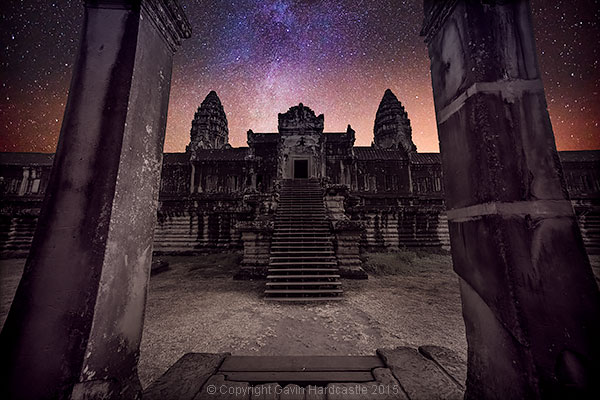
You need a tripod for long exposures

Picture the scene – Bangkok airport and I’m settling into seat 16H on my short Thai Airways flight to Siem Reap, Cambodia. The lovely hostess hands me a hot, scented towel as I shout ”Bollocks” while slapping myself firmly on the forehead.

She gives me a justified look of disdain while I apologize for my outburst and then start begging her to contact Lost & Found as soon as possible. You see, I’d stupidly left my gorgeous carbon fibre, ball head tripod, in one of those plastic trays into which all airports now force you to empty your worldly goods before being forced through the X-Ray machine.

I’d somehow managed to wander through Bangkok airport, grab a snack, check my email and then board the plane without even realizing I’d lost one of my most essential pieces of equipment. I blame it on the terror filled drive through downtown Bangkok the night before while trying to find our hotel, it was a late night.

I realize I will never see that beloved tripod again.

Night Photography requires a sturdy tripod

So I touch down in Siem Reap, Cambodia and the first thing I do is go shopping for a tripod. Siem Reap has seen some major development over the years but it’s still a galactic black hole when it comes to tripod shopping.

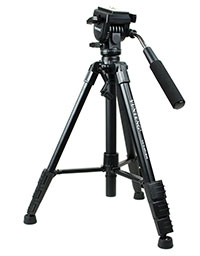
The best I could find was a $ 45 Yunteng tripod with a plastic video panning tripod head that has one of those long handles that poke you in the eye every time you try to look through the viewfinder.

It was like going back in time to the very first tripod I’d ever bought. The next four days of shooting were an exercise in rage management as it took me five times longer to set up my shots. If it hadn’t been for my ever present tuk-tuk driver and his calming influence, I would have bent that tripod over my knee and tossed it under the wheels of a bus for good measure.

No wonder so many beginner photographers quit at the tripod using stage.

A good tripod makes ALL the difference

When buying a tripod, if you go for an El Cheapo one, two things will happen:

  1. You’ll spend so much time messing around getting your camera in position that by the time you’re ready to take the shot, you’ve already lost the will to live.
  2. You’ll realize that the $ 45 you spent could have gone towards a proper tripod that you now know you’ll have to buy anyway.

I realize that for total beginners, spending around $ 400 on a tripod seems like a major financial commitment but I’ve seen so many of my workshop students struggle in frustration with shoddy tripods that it breaks my heart. When I lend them one of mine, it’s like a ray of sunshine for them. At that point they realize their cheap tripod is now junk.

Long exposure - Why You Need a Good Tripod

Speed is important

You might think that if you’re using a tripod to hold your camera in place, that means you’ve got plenty of time to frame your shot. Sometimes that’s true but more often than not, the scene changes quickly, especially when you’re dealing with nature. Weather and wildlife won’t wait for you to get your tripod set up.

Things to consider when buying a tripod and tripod head

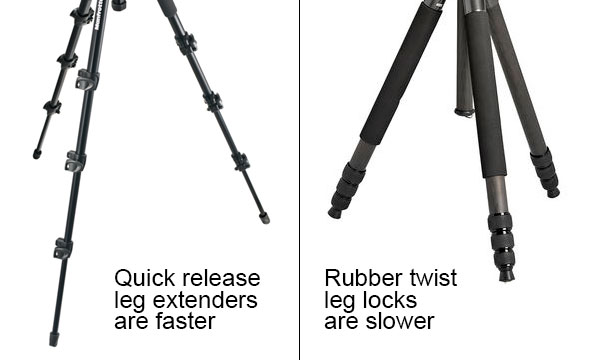
1 – How fast do the legs telescope?

I can’t stand those rubber twist leg locks that you have to loosen and then tighten. I much prefer quick release grips that flick open and quickly drop those tripod legs. Securing the extended legs requires a quick push of the thumb and you’re done. If your tripod has four telescopic extenders with threaded grips you’ll still be setting up your shot while I’m at the next shooting location.

Tripod Comparison

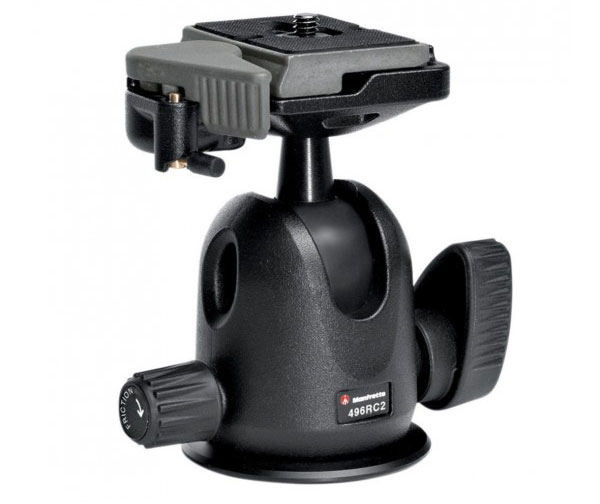
2 – How fast does the ball head adjust?

Once your tripod is in place and secure, it’s time to position your camera. For me, the best ball heads are those that only require one lever to loosen and tighten. That means that with just two turns of the lever I can position my camera in exactly the right position.

It’s also important to get a ball head that allows you to quickly switch between landscape and portrait aspect. A lot of cheapo tripods have those flippable mounts that you have to loosen first then tighten once in place. These are usually abysmal as you struggle to get just the right position and then the flimsy flippable part wobbles from the impact of just your breathing.

Ball Head Tripod

Manfrotto 496RC2 ball head


3 – Easy quick release

The thing that infuriated me the most with my temporary $ 45 Yunteng tripod was the quick release clip which mounts the camera on to the tripod head. I longed for my well oiled Manfrotto head with its trusty quick release clip.

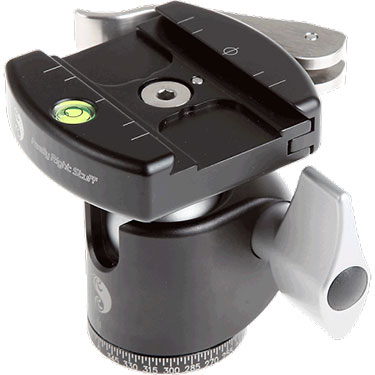
Mounting the camera on the tripod head should be quick and easy. When shopping for a tripod, get the store clerk to demonstrate and then try it out yourself multiple times until you feel if it’s right for you. Some of the smoothest looking quick release plates I’ve seen are made by Really Right Stuff.

Really Right Stuff Quick Release Plates

4 – How heavy should my tripod be?

This is a personal choice based on your exact needs, and how much you can carry. There’s always a trade-off between portability and sturdiness. Heavier tripods will laugh in the face of a strong wind, while super lightweight carbon fibre tripods will vibrate. You can always attach a rock filled bag to the central stem of your tripod to give it more stability in high winds.

5 – How big should my tripod be?

Again, this depends on your travel plans. Since my recent loss at Bangkok airport, I’m now considering buying a smaller tripod that will actually fit into my camera bag. A smaller tripod won’t be anywhere near as sturdy, but for the Siem Reap shoot it’s not as if I had to face high winds and extreme weather, so smaller would have been okay.

Very tall photographers will most likely have to shop for tripods that cater to their height. Sure, you can always extend your tripod’s central column, but that’s always a last resort as you’ll find it induces major wobble from just your hand contact with the camera.

6 – How much should I spend?

Here’s another important thing to consider. If like me, you’re a bit of a Gormclops, don’t buy the best that you can afford. I abuse my tripods by shooting in the ocean, rivers, deserts and mountains. If I’m lucky, I’ll get two years out of a tripod (assuming I don’t leave it in the airport) so it just doesn’t make sense for me to spend big money when I can get a very capable tripod for under $ 400, that already comes with a good ball head.

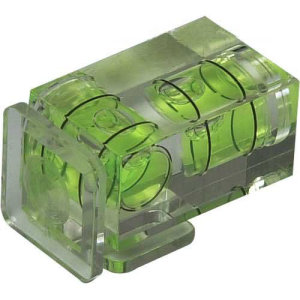
7 – Do I need a bubble level?Camera Bubble Level

Although not essential, it’s nice to have an accurate bubble level on the tripod stand itself, and one on the tripod head. If you’re lucky enough to have a digital level inside your camera (like my Sony A7R) you probably won’t use a bubble level much. If you have neither, you can always attach a bubble level to your cameras hot shoe attachment as pictured here (see photo right).

Why do I even need a tripod?

If you want tack sharp images (see my article on how to get super sharp landscape images) with the best possible image quality, accept that a tripod will become a part of your anatomy. For long exposures, a tripod is essential. If you shoot weddings, portraits, action and events, a tripod may just get in your way.

Which brands should I buy?

I’m not going to recommend one brand over another. I advise that you try out as many tripods and heads as you can. It’s fine to read reviews but you need to get hands on to decide which tripod and head combination works best for your needs. A specialist camera store should have a much wider choice of consumer and pro level tripods to choose from.

Enough Yunteng Bashing

Cheap Yunteng TripodTo be fair to Yunteng, I got the sturdiest tripod I believe it’s possible to find for a measly $ 45. It didn’t fall apart, was light, and in all honesty the tripod head was made for video, not stills. I got exactly what I paid for. I’ll keep it in my studio as a demonstration tool for showing people the difference between a $ 45 tripod and a $ 400 tripod.

What features do you look for in a tripod? Do you have any horror stories or recommendations for our readers?

googletag.cmd.push(function() {
tablet_slots.push( googletag.defineSlot( “/1005424/_dPSv4_tab-all-article-bottom_(300×250)”, [300, 250], “pb-ad-78623” ).addService( googletag.pubads() ) ); } );

googletag.cmd.push(function() {
mobile_slots.push( googletag.defineSlot( “/1005424/_dPSv4_mob-all-article-bottom_(300×250)”, [300, 250], “pb-ad-78158” ).addService( googletag.pubads() ) ); } );

The post The Ultimate Guide to Buying a Tripod by Gavin Hardcastle appeared first on Digital Photography School.


Digital Photography School

 
Comments Off on The Ultimate Guide to Buying a Tripod

Posted in Photography


Gear Guide: The Ultimate Authority on What to Put in Camera Bag

27 Feb

I remember my first time in a Real Professional Camera Store, Samy’s Camera, in Los Angeles. I had money to burn in my pocket so that I could buy the right equipment to be a Professional Photographer, but instead of being a kid in a candy store, I was a vegetarian in a hunting store. Nothing looked familiar. There were Continue Reading

The post Gear Guide: The Ultimate Authority on What to Put in Camera Bag appeared first on Photodoto.


Photodoto

 
Comments Off on Gear Guide: The Ultimate Authority on What to Put in Camera Bag

Posted in Photography


The Ultimate Guide to Depth of Field in Photography

15 Dec

Depth of field basically means how much of your picture, from foreground to background is sharp. So there you have it, see you next week, bye, byeeeeee….Oh, are you still here? That wasn’t enough? Ok, so depth of field depends on several things, all centering arount the f stop of your camera, one of a triumvirate of things that allow Continue Reading

The post The Ultimate Guide to Depth of Field in Photography appeared first on Photodoto.


Photodoto

 
Comments Off on The Ultimate Guide to Depth of Field in Photography

Posted in Photography


ACDSee Ultimate 8 introduces layer-based editing

11 Dec

ACD Systems has announced ACDSee Ultimate 8, bringing for the first time layer-based editing to its Digital Asset Management and image manipulation software. It offers the same image adjustment capabilities provided by ACDSee Pro 8 with the added ability to create and manipulate layers, as well as support for 32-bit and 64-bit transparency. Read more

Articles: Digital Photography Review (dpreview.com)

 
Comments Off on ACDSee Ultimate 8 introduces layer-based editing

Posted in Uncategorized


How to Photograph Lightning – the Ultimate Guide

07 Oct

If someone told me I could only take pictures of one thing for the rest of my life – I’d think about it for awhile, and then choose lightning. Luckily I live in reality and no one will ever say that to me, but it does speak to how passionate I am about photographing this stuff.

I’m a storm chaser at heart, so I love everything about weather. It would be difficult if I couldn’t also capture awesome dust storms, supercells, flash floods and whatever else might happen out there. But lightning – I love lightning.
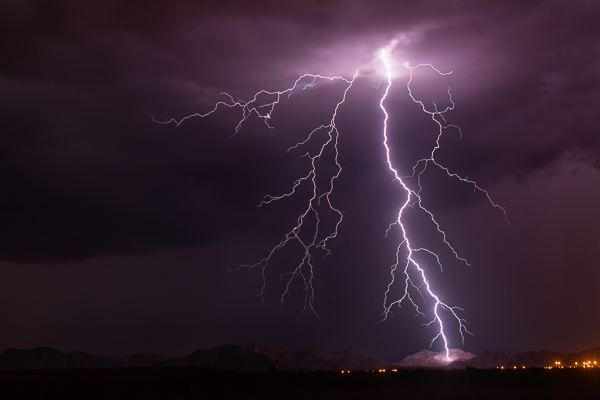
MountainSide

“MountainSide” – Buckeye, Arizona – 50mm, ISO 100, f/8.0, 20 sec

The Adrenaline Rush

What is it about lightning? I’ve lived in Arizona my entire life and I grew up loving our summer monsoon season. One of my early memories as a kid was sitting on our back porch with my dad and being blinded by a strike hitting the field behind our house. I still remember being blinded for a few seconds. It was that close and that intense.

Arizona is a fantastic venue to capture lightning. We get a lot of high-based storms, which means you tend to see more of the strike. Our landscape is beautiful, from deserts and cacti, to rolling grasslands and the Grand Canyon. I once met a guy in Tucson who was spending two whole weeks in Arizona solely to photograph lightning, and he was from Germany!

Trying to capture lightning is an adrenaline rush. It’s addicting. You can look at the back of your camera and know you just caught an epic bolt, but still not be satisfied, or maybe that’s just me. It’s never enough. I want more. More and more.
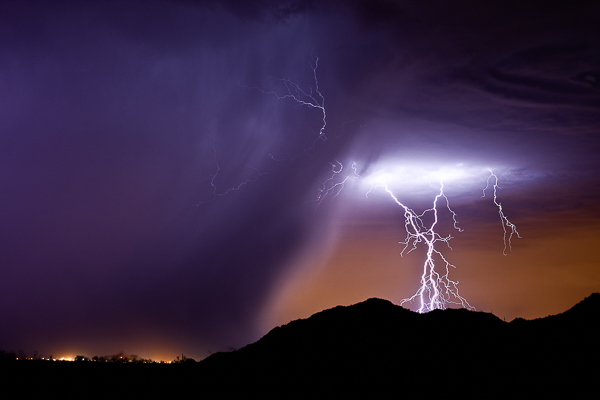
PurpleRain

“Purple Rain” – Highway 347, AZ 50mm, ISO 200, f/6.3, 25 sec

Lightning is freaky. You want to get close, but not too close. The closer the better – sometimes. Suddenly it gets quiet and you realize a storm just built up right over your head and a strike from nowhere makes you double-check your shorts. I am usually out in the middle of nowhere, late at night, and there is something crazy spooky about seeing an entire landscape get lit up in the blink of an eye.

What makes lightning fun to photograph is the uniqueness of it all. No two bolts are the same. You never know what you’ll end up with. Plus, if you are all alone out there, no one else can have the same image as you do.

Finding the Storms

This is in reality the hardest part of photographing lightning. You may worry about your settings and lenses and all that, but if you do this for a while, that all becomes second nature. Finding the storms is the difficult task. You may live in a part of the United States, or even the world, where lightning just doesn’t happen much, if at all. But if it does, then you have to learn the patterns and watch the forecasts to be prepared.

The best way to do that here in the U.S. is to bookmark the webpage of your local National Weather Service, which you can find on NOAA.gov. Their pages have links to radars where you can track the storms. If you want to really get intense, grab a copy of RadarScope (iOS or Android) to have it on your Smartphone anytime you want.

If you don’t have lightning in your area, you may want to invest in a storm chasing tour, or vacation somewhere like Arizona during the summer.
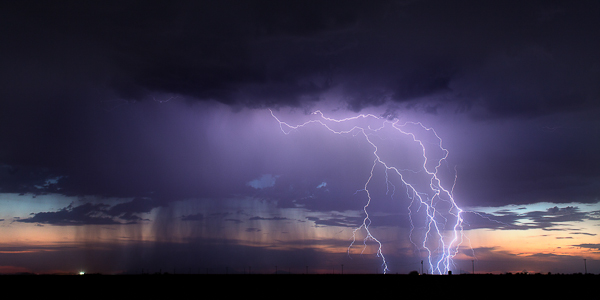
BUckeye

“Buckeye” – Buckeye, AZ – 50mm, ISO 160, f/10, 8 sec

Tools You Need

Okay, these next few sections are what you really care about anyways, so let’s get to it. Tools, meaning things you need to capture lightning.

The fact is, I started out with a little point and shoot that took three shots per second. I actually caught a crazy strike with it on my third or fourth time out, and that’s what really got me hooked. So you can literally capture lighting with basic cameras if you want to depend on luck. There are even apps for your Smartphone.

But if you want to eliminate as much luck as you can AND capture mind-blowing, jaw dropping images – you’ll likely want to upgrade your tools. You don’t have to go crazy though. Here’s the basic list of what you need:

  • A DSLR, SLR or any camera that lets you control the length of your exposure.
  • Lenses of course. Varying focal ranges are a must, although I’m a fan of primes.
  • A tripod – the sturdier the better.
  • A wireless shutter release or intervalometer.

That’s really the essentials. You don’t need the most expensive equipment either. Basic DSLRs are a good starting point. My first upgrade from the point and shoot was a Canon Rebel XSi. It did the job for about a year, but I knew I wanted to go full frame eventually.
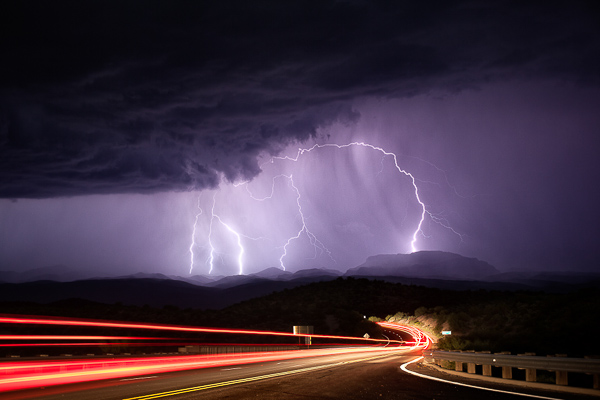
Mammoth

Mammoth, AZ – 50mm, ISO 200, f/6.3, 25 sec

I use Canon products, specifically a couple of 5D Mark III’s and a Mark II as a backup. The lenses I carry on a storm chase:

  • Rokinon 14mm f/2.8 (mostly for time-lapse photograph, but also for big landscape shots)
  • Canon 16-35mm f/2.8
  • Canon 17-40mm f/4.0
  • Canon 35mm f/1.4
  • Canon 50mm f/1.2
  • Canon 135mm f/2.0

Your tripod just needs to sturdy and heavy duty. When you are shooting during a thunderstorm there will usually be wind issues. I’ve had tripods get blown right over by a strong gust of wind. I haven’t spent as much on tripods as I do on camera gear and time-lapse tools, but I use Manfrotto legs and heads. If you can afford it, upgrade to a tripod that has independent legs and a steadier base, that will allow you to shoot with a wider stance.

Finally, you will need some kind of external shutter release. It can be anywhere from your basic wired cable release, all the way up to a wireless intervalometer. I personally like the wireless intervalometers because you can control your camera from inside the car where you are safer than standing outside during a lightning storm. I also love the wireless ones because the cabled ones can get tangled in your tripod legs if you are packing up in a hurry. They are are just easier to use.

A Little About Lightning Triggers

Another external control for lightning photography is a lightning trigger. The brilliance of one of these triggers is that it senses the flash of lightning and automatically fires the shutter on your camera. You can comfortably put it on your camera, day or night, and sit back in your car and let the trigger do all the work.
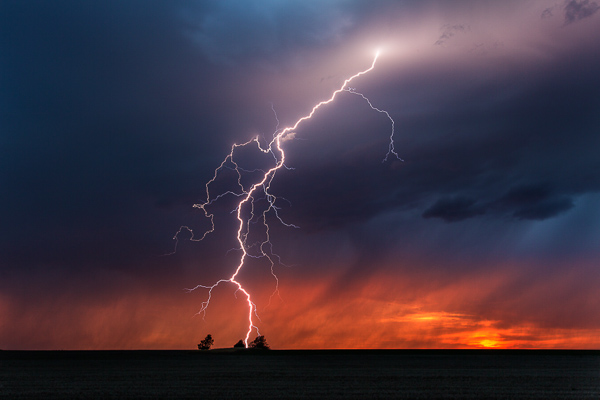
Kansas

Scott City, KS – 33mm, ISO 100, f/16, 2 sec, lightning trigger

The tough part about lightning triggers is finding one that is reliable. I’ve had three different ones and it took until I bought one of the most expensive (The Lightning Trigger IV) for me to feel like I found one that works. I’ve had a few of the $ 100-200 variety and they don’t always trigger from a flash of lightning. That’s kind of the point right? So to me, if you can save up for a good one, it’s worth the price instead of spending $ 100 two or three times trying to find one that works.

My opinion on lightning triggers is that they are good during the day, but become less useful the darker it gets. Most photographers like to use a trigger because it helps for shooting daytime lightning, and it also saves your shutter. During the day, you could either take a ton of photos in a row and hope to get lucky, or you could use a trigger. The triggers works then. Great invention.
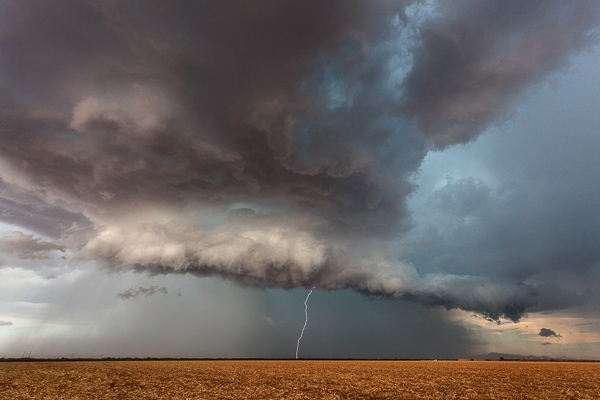
RedRock

Red Rock, AZ – 17mm, ISO 400, f/8.0, 1/160th, lightning trigger

There is also an argument that it can save your shutter at night too. But whenever I’m out shooting lightning, there is enough flashing going on that my trigger is going to keep firing over and over anyways. The anatomy of a lightning bolt is that there are parts of it that could be missed if you wait for a trigger to fire your shutter. I’d much rather increase my odds of a capturing the entire lightning bolt by doing 15-25 one second exposures over and over. Once the sun goes down and I can start getting two or three second exposures, I take off the trigger and use the intervalometer. But that’s just me!
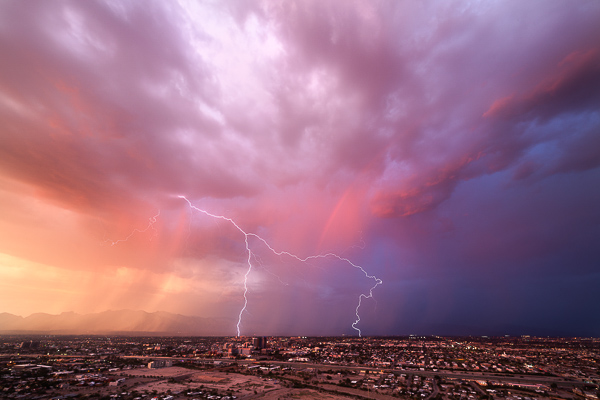
TucsonSunset

Tucson, AZ – 14mm, ISO 50, f/16, 2 sec, time-lapse capture

During the day, since I love to do time-lapse, I’ll actually get lucky enough to capture bolts just from that, without a trigger. Taking shots every one or two seconds allows you to record a sweet time-lapse and also hopefully snag a few lightning strikes. This has happened to me countless times. I’ve even captured a few with an even longer interval on the time-lapse. You might give it a try if you are interested in time-lapse at all.

Camera Settings

People ask me all the time “What are good settings for taking lightning photos?” and the answer is that it varies just like anything else in photography. But there are some good guidelines to get you started.

For daytime lightning, you want to do your best to to have as slow of an exposure as you can, which might mean f/16-f/22 and maybe a neutral density filter. I personally don’t like ND filters for this kind of photography because when I’ve used them in the past, they tend to wash out the lightning a little, but it’s something to at least try. You might slap an ND filter on, increase the ISO to 200, and hope that helps the bolt show up a bit more intensely. Daytime lightning is tough regardless. The best results are usually when it’s really dark with heavy clouds, without much sunlight. The strikes are going to show up a lot better against a dark background.
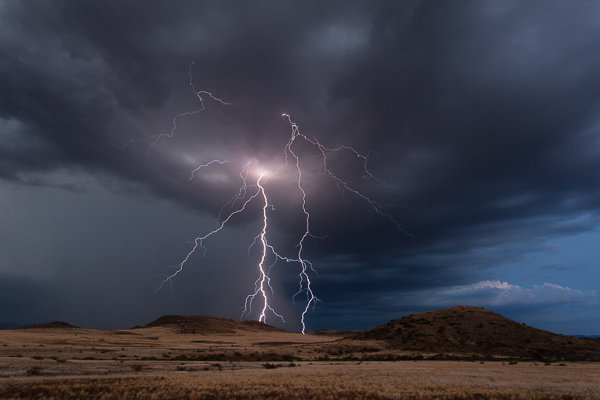
CampVerde

Camp Verde, AZ – 23mm, ISO 100, f/18, 6 sec

Nighttime is a whole different ballgame. There are lots of things that can alter your settings. Are you in the city? Complete and utter darkness? Is there a full moon? Are the bolts coming in fast and furious, or spaced minutes apart? Is the lightning a only a few miles, or 25 or more mile away?

Here are some situations and common settings to use as the sky darkens on a night out chasing storms:

  • Dusk/sunset: f/10-16, 2-10 seconds, ISO 200. You might raise your ISO even more because the sky still has some light in it and you want the lightning to really stand out.
  • Blue hour – as it gets darker, you will open up your aperture and maybe increase your shutter speed.
  • Once it gets dark, your ISO becomes more important. The lightning flash against a dark sky means you don’t need as high of an ISO or you risk blowing out your bolt.
  • After dark in the city – narrower aperture yields better results with city lights, so you might be shooting at f/10-16 even after dark. The shutter speed would depend on how bright the lights are; same with the ISO. Usually in the city I like 10-15 second exposures.
  • After dark, away from light – wider apertures – typically f/5.6-f/8. You’ll want to drop your ISO to 100 to make sure you don’t have blown out shots. If it’s really dark, you may want longer exposures, 20-30 seconds.
  • After dark, but lots of ambient light, for example, a full moon – shorter exposures to reduce motion in the clouds if you don’t want that.
  • Close lightning – narrower aperture, low ISO.
  • Far away – varied aperture, maybe higher ISO so the bolts show up better.

The bottom line is none of this is set in stone. You have to get out there and practice to learn the best settings for you and what you like.
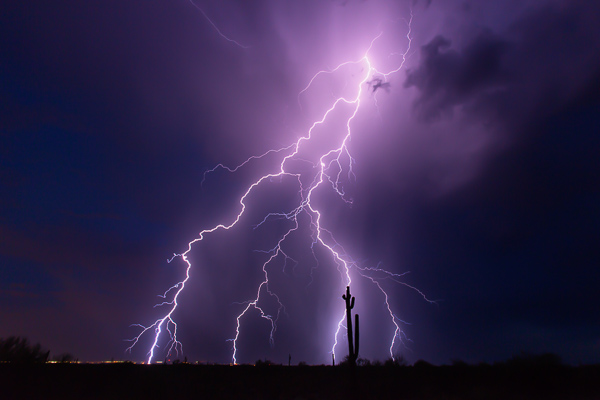
SaguaroBolt

“Saguaro Bolt” – Wickenburg, AZ – 16mm, ISO 200, f/11, 10 sec

The Biggest Things to Watch for:

•Don’t blow out your lightning. Sometimes bolts are so bright that there is nothing you can do about it. But when you realize the strikes are so intense that you are blowing stuff out, narrow your aperture or drop the ISO.
•Don’t let your lightning be too dark. Ah the other side of the coin. If your aperture is too narrow and your ISO too low, that distant lightning may not be so bright and vivid. It will require a lot of post-production, and might result in excess noise if you have to increase your exposure to make it look good. You are also probably not going to get a lot of the surrounding clouds and landscapes unless the bolt is very bright. You want to make sure you still have a good exposure so you get details in the clouds and landscape if you can.
•Cloud ghosting. If you are taking really long exposures for lightning (25 seconds or longer), you will risk seeing ghosting in your clouds as they get illuminated by different strikes over the course of your shot.

Focusing

I could have included focusing in the above section, but I find it so important that I wanted to put extra emphasis on it. The biggest, most common mistake I see in lightning photography is out of focus images (close second is blown-out lightning). This seems to be the toughest thing to learn how to do correctly.

I include myself in that! Even this past summer I was excited about some lightning images only to get home and realize they were out of focus. We all mess this up.
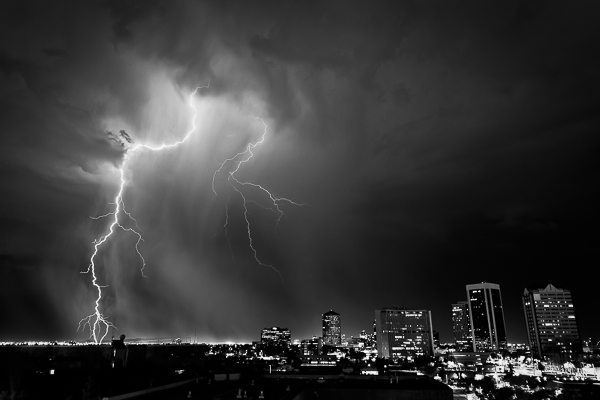
DowntownPhoenix

Phoenix, AZ, ISO 200, 26mm, f/8.0, 15 sec

I think the biggest reason for this is that ofter we rely on the “infinity” setting on our lenses. While some lenses have a hard stop for infinity (I am definitely not well versed in many lenses other than Canon), most of them don’t. Even if it does have a hard stop, is that actually perfect?

The best way to focus at night:

  • Autofocus on distant city lights if you can. I find this to be the most reliable way at night. Sometimes the moon is out which is another good way.
  • If there aren’t enough lights to focus on, then Live View is your next best method. Use Live View, zoom in (on the screen only not with your lens) to anything you can – even if it’s a single light on the horizon, and manually focus on it.
  • If all else fails, use infinity. But once you get a lighting strike on camera, check to see if it’s in focus. If not, adjust.

Remember, the wider your aperture (like f/5.6), the tougher the focusing. For example, you could focus on lights that are only a mile away, but the bolt lands five miles away and it might be slightly soft. A narrower aperture really does help with this issue. Once for me, it was so completely dark, I chose to focus on an incoming truck’s lights about a half mile down the road. Turns out, the lightning 10 miles away was out of focus. I cried – a little.
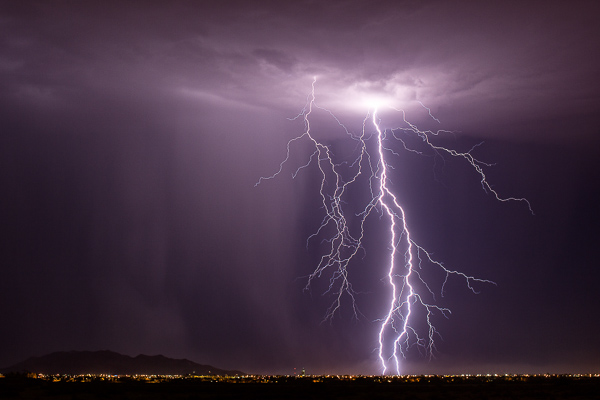
CasaGrande

Casa Grande, AZ – 50mm, ISO 125, f/9.0, 25 sec

Another tip, which I’ve never done myself, is that when you find that perfect infinity spot at say f/8-f/10, put a little scratch on your lens with an X-Acto knife, or a thin line with a paint pen, and just line it up whenever you need it.

Last but definitely not least – if you don’t have back button focus set up on your camera, then you will need to set your lens to manual focus. You don’t want to go through all the work of focusing on distant lights with Live View, only to take your first shot and have your camera try and focus in the dark! Your absolute best solution here to is look up back button focus on dPS. From landscape to wedding and portrait photographers, this is a must.

Practice, Stay Safe and Have Fun!

All my advice is based on my experience. You may find different opinions or thoughts elsewhere, or you might even have your own methods. That’s okay. Figuring out what works best for you is how photography works in general.

The best advice I can give you though, is to practice. You may not have much lightning where you are, so perhaps plan a trip somewhere (like Arizona) where you can spend a few weeks just shooting lightning every chance you get.
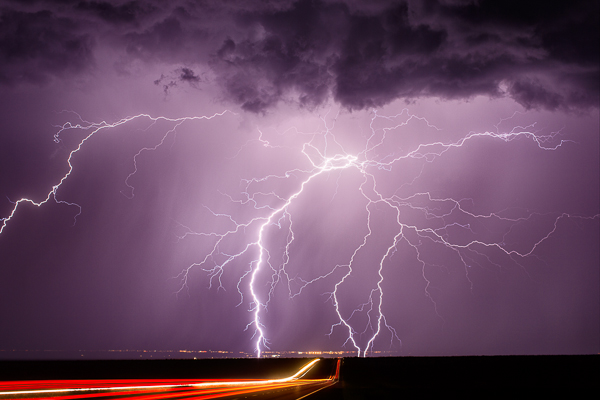
Whetstone - (Highway 90 near Whetstone, AZ 50mm, ISO 100, f/5.6, 25 sec)

Whetstone – (Highway 90 near Whetstone, AZ 50mm, ISO 100, f/5.6, 25 sec)

Like anything in life, practice makes you better. You can read this article and totally have a good idea of what to do, but actually being out there, in the moment, is a different story. I’ve done this enough that I can pull up to a spot and pretty much know my settings before I pull the camera out of the bag. But there are still times when I’m not quite sure and need to take a few practice shots. Not all situations are the same, so you will slowly learn the right settings for each scene.

Please stay safe! In the last three months, I’ve had lightning strikes hit within 75 feet of me. Yikes. It’s scary for sure. Do this knowing the closer you get, the more risk you run of getting hit. Two storm chasers have been struck by lightning this year. It’s a real danger.

But have fun. There is nothing like capturing an amazing strike on camera. I wish you the best of luck.

The post How to Photograph Lightning – the Ultimate Guide by Mike Olbinski appeared first on Digital Photography School.


Digital Photography School
 
Comments Off on How to Photograph Lightning – the Ultimate Guide

Posted in Photography


Ultimate Photo Playlist: Songs That Really Click

25 Sep

Photos aren’t just a treat for the eyes. They can also be music to your ears!

We’ve put together the Ultimate Photo Playlist, over 70 songs about photos and all of the emotions they stir up– ranging from happy feet to heartbroken.

Whether you’re a photographer or simply an admirer of the art, somewhere on this list is a song (or two or three or many more!) for you.

Now get ready because these songs are guaranteed to get you in the mood…for photography!

Turn Up the Volume (…)
Read the rest of Ultimate Photo Playlist: Songs That Really Click (1,043 words)


© Taylor for Photojojo, 2014. |
Permalink |
No comment |
Add to
del.icio.us

Post tags:


Photojojo

 
Comments Off on Ultimate Photo Playlist: Songs That Really Click

Posted in Equipment