RSS
 

Posts Tagged ‘Tips’

Tips for Posing Large Families and Groups

30 Aug

Portrait sessions can vary in many ways, one being the size of the group you are photographing. Don’t be afraid, these tips for posing large families and groups will help you to create the perfect large group portrait no matter the location or the number of people.

Tips for Posing Large Families and Groups - family posed on the grass

What is considered a large group?

Large group portraits typically begin with six or more people. Large groups can include children or be made up of adults, it all depends on the type of session you are photographing.

It can also reach up to 20 people, especially if you are photographing a bridal party or a family with smaller family units all mixed together.

Tips for Posing Large Families and Groups - large family in front of trees

Posing rule for any type of grouping

The most useful posing rule for large groups is to use the triangle method.

This is where you pose people, either standing or sitting, or a mixture of both, and if you draw imaginary lines connecting their heads, they would create triangles. This method is the best so that you don’t pose people’s heads one on top of another (totem pole-like), creating an awkward photograph.

Tips for Posing Large Families and Groups - use triangles in posing

Use the triangle method to pose large groups.

This method works for any type of grouping with three or more people. However, for large groups of 10 or more, this posing rule is perfect so that everyone in the photo can be seen. It ensures nobody’s head is directly behind another person’s.

Large Families

Large families can range from nuclear families where there are more than five people or extended portraits where more than one nuclear family is going to be in the portrait.

Tips for Posing Large Families and Groups - family of 5 with young kids

The key is to pose the families in different combinations in the same spot so that you can offer your client more poses without having to move them too much.

Always pose the parents in the middle and then pose the rest of the family out from there. The parents are a great focal point in any portrait and from there, you can lead the eyes to the children or other families.

Tips for Posing Large Families and Groups - family in white and jeans

For example, for a portrait of a family of five, begin by placing the parents in the center of your photo first. Then, pose the taller children next to each parent. Smaller children can be put between the taller child and parent, creating the triangle.

Afterward, you can seat the family in the same order as when they were standing. If there are really small children, they can stand and hug another family member from behind. Be mindful of where their heads are positioned so that you create triangles and can see each family member in the portrait.

Tips for Posing Large Families and Groups - family standing and sitting

Pose the family sitting or standing.

In the same spot, you can then have the family stand up and separate a little. This gives them a little more space but still keeps them at arm’s length. Ask them to interact with each other in between posing for the camera.

Don’t forget the triangles in this pose as well! It can look a little off if you pose two family members who are the same height together. Try and move the family members from one side to the other to create more variety.

Tips for Posing Large Families and Groups - extended family standing

Give the family some space while posing them standing.

For larger families, walking is a good way to get more natural photos of everyone. Pose nuclear families together.

For example, if you have a family of 16 with grandparents, pose the grandparents in the center, then group the families on either side keeping the children with their parents.

Tips for Posing Large Families and Groups - extended family on the beach

Keep in mind that if it looks a little awkward, it probably will look that way in the photo as well. Taking more time and moving people around will ensure that you get the right posing even before taking the photograph.

Lastly, try posing some people away from the center to give the photo more depth. Facing everyone toward the center is a good starting point. However, with large groups, it’s best to try different poses so that you can offer your clients an assortment of different options.

Connect People

There is nothing more awkward than people standing together with their arms at their sides. With families, especially large groups, try and have your clients connect with each other.

You can do this by grouping the main people (the parents or grandparents) in the center facing each other hugging, and then group smaller families where each family member is touching another person. This shows connection within small family units in the large family photo and shows warmth.

Tips for Posing Large Families and Groups - family hugging b/w

Resting hands on shoulders, holding hands, hugging and tucking fingers behind, resting a hand on someone’s arm, or having someone lean on another’s shoulders are all good examples of connection.

Connecting people in a photo also gets rid of this most often heard question, “What do I do with my hands?”

Tips for Posing Large Families and Groups - family with 4 kids

For the people that you pose on the edges of the family portrait, be mindful that they look in toward the center so that they don’t seem out of place. If they are male and there are no children present, have them put one hand in their pocket. If they are female, make sure they aren’t standing too short or they will look out of place.

Chairs and Stools

If you are photographing at a venue, say a wedding reception, you may have the chance to use chairs or stools for posing.

In this case, try and place them throughout the photo so that they don’t line up perfectly. You’ll want to space them out according to the number of people in the portrait, always keeping in mind the triangle rule.

Tips for Posing Large Families and Groups - family photo

Chairs tend to work better than stools because the stool height can create really big valleys in your triangle posing if the person is too tall or too short in relation to those around them in the portrait.

Natural Posing

Once you have taken the best-posed portraits of the large group, have them loosen up a bit by asking them to do a group huddle or squeeze. This will get some laughs out of your clients and allow them to let their posed bodies rest for a bit.

Tips for Posing Large Families and Groups - family hugging

Asking the family to take a break can offer some great natural posing. This man had his whole family together after many years and was overcome by joy.

Ask your group to walk around, talk to each other, and just be. Look out for the children in particular, as they’ll usually act the most natural.

This collection of natural posing will often make for the most emotive portraits because they will portray the family just as they are. Even better if they are in a location that is fun or open where they can enjoy a walk or play games.

Photograph Family Units Separately

When you photograph families with grandparents or more than one family unit, make sure to photograph each family separately and together. Pose each family together in the larger portrait first, then, if you have time, mix them up a bit and have some fun.

Tips for Posing Large Families and Groups

Ask them to play, run, walk, do a group hug, or anything that will create authentic smiles and expressions from the oldest to the youngest.

Tips for Posing Large Families and Groups - individual portraits

Take time to get portraits of the adults as well. Either in couples or individually.

This also helps to break up a session with little children because they can get bored quickly.

Tips for Posing Large Families and Groups - individual photos of kids

Photograph children individually.

Try different combinations with the families, for example:

  • Grandparents with the grandchildren
  • Grandchildren together
  • All of the children of the parents together with and without the parents
  • Each couple in the family alone
  • Individuals portraits of each child
  • All the men together
  • All the women together
  • Generational photos
  • Cousins together
  • Brothers and sisters with and without in-laws
  • Each grandparent alone and together

Tips for Posing Large Families and Groups - different group posing options

Not all of those may apply to each large family portrait, but they can help you to add to the collection of poses that you’ll deliver to your clients.

Tips for Posing Large Families and Groups - family and kids photos

Take photos of the whole family together and then take photos of just the children.

Tips for Posing Large Families and Groups - 4 generations photo

Make sure to get generational photographs like this one of the 4 generations of men in the family.

Wrapping up

Before you wrap up the session, ask your clients if there is any portrait or pose that they specifically want. Some large families may bring a prop for everyone to use like shirts. There may also be a combination that you missed or didn’t think of that they would like to get.

Tips for Posing Large Families and Groups

Asking, “Is there anything else you’d like me to photograph before we leave?” can also be a great way to end the session once you feel you have gotten all of the best photos.

Giving your clients the chance to make sure they get all of the portraits they want is key for you to do a complete job with their photographs.

In conclusion

Posing large families can seem like a big challenge, however, using the triangle posing method can help tremendously in getting different combinations and poses. This will give your clients an assortment of poses and keep the whole experience fun and light which will make them want to get more portraits taken in the future!

The post Tips for Posing Large Families and Groups appeared first on Digital Photography School.


Digital Photography School

 
Comments Off on Tips for Posing Large Families and Groups

Posted in Photography


8 Tips to Help Find the Subject for Your Composition

29 Aug

Do you find it difficult to take photos which hold people’s attention? In our digital societies where image sharing is prolific, it is challenging to have people really take time to look at your prized photos. Image composition is key here.

So I want to give you eight tips on how to create pictures that will grab hold your viewer’s attention. People will want to stop and look rather than keep scrolling past your images.

Mask at a Chiang Mai Market - 8 Tips to Help Find the Subject for Your Composition

A good composition should have a clear main subject. It might be as plain as a landscape or a person’s face, or it might be something very small in the frame. If the composition is good the main subject will stand out like a sore thumb.

We all have a unique view of the world. Each of us takes in the world around us in different ways. If you have ever been on a group photo walk and taken part in a shared image review afterward, you will know this. Each photographer will have walked the same street, and the number of photographers that participated, there will be that same variety of pictures.

girl with Kayan Neck Rings  - 8 Tips to Help Find the Subject for Your Composition

1. Choose a subject you can relate to

What catches your eye? Why does it appeal to you? You should be asking yourself these things when you are taking pictures. If you choose subjects that you feel a connection with you will create more interesting photos. This is simply because you are interested in the subject yourself.

So your initial choice of subject should be something that you can connect with. My subject of the portrait below is a woman my wife and I chat with at the local market. We connect with her. I wrote about her and her late husband in a recent article.

Because I have this lovely friendship with her it is easier for me to make lovely pictures of her. I know she will happily pose for me. I also know I will get a more interesting photo of her when she is that bit more relaxed and not looking directly at me. In this photo, she was chatting with my wife who was standing beside me.

Sticky Rice Vendor - 8 Tips to Help Find the Subject for Your Composition

2. Isolate the subject

About the most obvious way to have your main subject stand out in your photos is to isolate it.

My favorite two ways to isolate my subject is to use a narrow depth of field or a dark background. By using either of these techniques your main subject will be unmistakable.

Choosing a wide enough aperture and having your subject far enough from the background will allow you to have your background blurred and your subject sharp. If you are using a camera with a small sensor or a smartphone with only one lens, this may not be possible.

When you have a dark background your subject will stand out, especially when there is more light on the subject than the background. To achieve this look find a spot where the background is in the shade and your subject has more light on it/them.

Kayaw portrait - composition

3. Choose your lens carefully

Your choice of lens can affect how you compose the image and how your main subject will be seen. Sometimes a wide-angle lens is better than a telephoto. Other times you will need a longer lens.

Getting close to your subject with a wide lens has a different effect than if you use a long lens and position yourself further away. If you are not sure about how this works the best way to learn is to experiment.

Try taking a series of photos of the same subject with various lenses or zoom settings and see in which photos your main subject looks the best.

Chaing Mai Fresh Market Vendor - composition

4. Frame your subject

Set up your subject how you want to see them. Move around your subject and study them from different angles. Watch closely how the background changes in relation to what’s behind them. Find an angle where your subject looks best.

Limit what you include in your frame. Fill your frame only with what is relevant to the photo you are making. If you can see anything in the frame which does not balance with or enhance your subject keep making changes until you can no longer see those things.

5. Exploit the foreground

Make use of something in the foreground of your composition to draw the viewer’s eye to your subject. This technique will add depth to your composition.

Use an object which is in front of your main subject, either in focus or out of focus. This can help bring the viewer’s eye to concentrate more on your subject.

Kayaw Ethnic Minority Girl by Kevin Landwer-Johan

6. Use leading lines and diagonals

Composing your photo so there are strong lines leading to your main subject will enhance it. The viewer’s eye will be lead along the lines to rest on your chosen subject. This is a very simple, very effective technique.

Diagonal lines used well in a composition can also be used to draw the viewer’s eye to the main subject.

7. Time it well

Choosing the right time to take your photo can help to bring attention to your main subject. When you are photographing in a busy location good timing is imperative. Having someone walk in front or behind your main subject just as you take your photo would detract from your main subject.

Watch carefully. When I am in a busy place I usually have both eyes open, rather than closing one. This way I can see more of what is happening around me and my subject and it helps me time my photos better.

Bust Chiang Mai Market by Kevin Landwer-Johan

8. Crop imaginatively

Don’t always stick to the rules of composition. Stepping outside the box can help highlight your main subject in unusual ways.

In this photo of the gold elephant statue against the gold wall of the chedi, everything tended to blend together. The harsh light was not helpful. Cropping tight to the elephant and only including half of it draws your attention there. The negative space balances the composition.

Temple Gold Elephant by Kevin Landwer-Johan

Conclusion

Try these tips sometimes. Be mindful of your main subject and whatever else is in your frame. If there are distractions, use one or more of these techniques to draw attention to your main subject and have it tell the story you want.

Having your primary subject stand out will make your photo easy for people to look at and relate to. But more than just having your subject stand out, you need to frame it so that it lets viewers see the subject and scene how you see it.

The post 8 Tips to Help Find the Subject for Your Composition appeared first on Digital Photography School.


Digital Photography School

 
Comments Off on 8 Tips to Help Find the Subject for Your Composition

Posted in Photography


Tips for Doing Drone Photography and How it Improve All Your Images

28 Aug

In this article, I’ll share with you some of my experiences doing drone photography in my first month with my new flying camera. You’ll see how learning to use and fly a drone can help you improve all your photography as well.

Getting into drone photography

A filmmaker friend of mine brought his DJI Mavic Pro (a small drone with a built-in 12-megapixel camera) to our house several months ago. I told him that I’d been thinking about all the photos I could take if I had a drone. He insisted that I try his out, so I did.

Bad move. I probably raved about it far more than was wise. My family took my enthusiasm seriously. Thus, for a combined Father’s Day/Birthday/Christmas present (since these flying cameras don’t come cheap), they got me a DJI Mavic Pro. I then owned a drone. And had no idea what to do with it.

You may be in the same situation if you’ve recently purchased a drone or are considering doing so. If you’re still determining which one to get, check out this helpful overview. Or take a look at these tips and reasons why you might want a drone.

Lessons Learned from Drone photography 2

What we’ll focus on here are the issues no one tells you about when you do finally get a drone. Learn how to speed up the learning curve and some surprising discoveries about how using a drone can make you an overall better photographer.

Take time to learn the basics

How long it will take you to learn to fly your drone depends in part on the drone you get. With the DJI Mavic Pro, I spent time reading the manual (somewhat helpful), watching the DJI videos (more helpful) and then watching other people’s YouTube videos (super helpful).

Even if you’re a “forget the instructions, let’s get going” type of person, spend time watching some of these videos. It will be worth the effort since not everything about your drone, especially from a photography perspective, will be intuitive. Besides, you can do it while your batteries are charging.

Lessons Learned from Drone photography 3

On most drones, the controller connects to your smartphone. Your phone’s screen becomes your remote viewfinder. Let’s state what may seem obvious but isn’t if you’ve never owned a drone.

You need a smartphone to fly most drones for photography purposes.

It took me three days of trying to get the detested DJI app (just read the app reviews and you’ll see what I mean) to work only to find that it was incompatible with my older phone. I switched to my wife’s phone and voila, everything suddenly worked.

If your drone doesn’t connect immediately once you download the app, it’s likely the app/phone combo. My advice is to focus on solving the phone/app connection first.

Starting to fly

Lessons Learned from Drone photography 17

The first time I actually flew the drone, I freaked out seeing it go up so high. The second time, not so much. The third time, I stopped looking at the aircraft (which, DJI reminds you repeatedly, is the proper name for the device, not a drone. Drones shoot missiles and spy on terrorists. Aircraft are, well, aircraft, I guess, even if this one can fold up and fit in a purse).

Instead, I just watched the screen. That is much easier. In short, while you want to have your drone in visual range at all times so you’re aware of hazards (that’s actually the law in most areas), concentrate mostly on your screen and you’ll gain confidence in flying it faster.

Learning how to make photos

I posted my first drone shots on Instagram and found some nice folks out there who liked them and have inspired me with their own drone photos. After looking at their photos (I’m only concentrating on photos initially, videos will come later), it gave me additional ideas on how to use my aircraft as a photography tool.

Here are some of the lessons learned in my first month of flying:

Lessons Learned from Drone photography 6

Learn to fly before you learn to shoot

This means finding a really open space and learning the controls well so don’t have to consciously think about every lever and button and what it does. You’ll have plenty of time for making photos later. Get the feel of the aircraft now.

Visualize before you take off

On the Mavic Pro, you get about 26 minutes of flying time on each battery (so definitely consider buying extras). Because of that, try to visualize your shots before you take off so you’re not spending that precious 26 minutes of battery life just flying around aimlessly.

You must realize, however, that when you first start working with a drone, everything will look different from above. Don’t worry. As you get more experienced, you’ll learn how to “read” a scene better and you’ll spend less time searching and more time setting up the shots you want.

Lessons Learned from Drone photography 13

Shoot RAW

Consider photographing in RAW (the camera’s native format for images as opposed to JPEGs) if you know how to process them in a program light Lightroom. For me, it is too hard to see all the lighting nuances on my phone screen. RAW gives me more latitude than JPEGs for fixing later.

Consider bracketing your shots as well (if your drone has that feature) to allow for even greater flexibility with exposure.

Don’t let the initial images fool you

DJI’s RAW files look pretty bad right out of the camera. But pump up the Blacks (for contrast) and increase the Vibrancy and the images can be stunning. Overall, the camera and the Mavic Pro aircraft are surprisingly good.

Lessons Learned from Drone photography 11

Learn the focus and metering buttons

Switching between the focus and metering buttons is easy once you locate them on the controller. Both are very useful since you get strong contrasts from the air.

At first, I blew out a lot of highlights. Once I learned to meter on the right areas of the scene, my photos improved dramatically. Start by sticking with the auto functions of the camera but quickly learn and use the other focus and metering functions available.

Consider getting a polarizer

Lessons Learned from Drone photography

A polarizing filter reduces glare but you can’t just twist it like a circular polarizer on your DSLR (it’s a bit out of reach when the drone is 300 feet above you). You can only adjust it by changing the angle of the aircraft which isn’t always helpful when composing a particular shot.

But the polarizer does protect the lens and makes the sky pop in your images. My next purchase will be some ND (Neutral Density) filters to knock down even more of the light and glare. Because you’re shooting from above, you’ll experience new angles of light that you don’t usually get with traditional photography.

Pay attention to the weather

Wind and moisture are big limiters in some areas. I recently returned from a trip to England (yes, most airlines allow drones on board as long as your batteries are in your carry-on) and was only able to fly the aircraft three times in 10 days.

Lessons Learned from Drone photography 8

Mostly, it was either rainy (moisture will ruin your battery) or too windy. But I did learn that I can fly in more wind than I initially thought, up to about eight mph of wind. I have gotten the high wind warning on the controller (which warns you about wind, if you’re in a restricted area or are too close to an object), but otherwise, no problems. But use your own discretion as one bad gust could ruin your day and your aircraft.

Don’t fly too high

Overhead shots can become more intriguing when you limit your altitude. As the photo above of the couple reveals (shot at a height of about 12 feet/three meters), you can get great images with a drone that no one but you will even know were shot with a drone.

Lessons Learned from Drone photography 10

Play with the color

Because sunlight is hitting the subject from a different angle than you’re used to, that will affect the color of your photos in surprising ways. Some familiar objects such as trees will be more vibrant when shot from above than from the side.

Just be prepared to experiment a good deal in your editing software with color.

Compensate for parallax

Lessons Learned from Drone photography 5

There’s a parallax phenomenon that takes time to understand. Compare the photos of two bridges above and below. In the first, I wasn’t directly over the bridge and the photo isn’t as good as the second one where I took the time to turn the drone sideways while rotating it at the same time to get the shot lined up perfectly.

Lessons Learned from Drone photography 7

It seems simple until you try it. But with practice, you’ll learn little tricks on how to maneuver your drone to get the shot you want. And the image stabilization, at least in my Mavic Pro, worked better than expected. Thus, if you can line up the shot, you’ll likely get a good image.

Start with photographs

As noted, I’ve held off on shooting more than quick snippets of video. Why? Because with still photography, the aircraft is essentially a floating platform that I can nudge into position. If my turns are awkward, it doesn’t matter.

But when you’re shooting video, flying is everything (or a whole lot). You want your aircraft’s movements to flow smoothly. In my first month of periodic flying, I just wasn’t experienced enough for video. But I did ask my friend Randy (who’s had a drone about as long as I have) about his experience with video.

Lessons Learned from Drone photography 18

He noted that a) videos are smoother when you lower the frame per second rate, and b) it’s far better to keep the focus on a single element rather than panning around to capture everything at once.

Learn how to avoid obstacles

In the early stages, you’ll likely be a bit freaked out by trees or other objects that seem to reach out toward your drone. Personally, I haven’t yet gotten close enough for the aircraft to employ its obstacle avoidance procedures.

Randy tested the sensors out by flying his aircraft directly at him. He figured that unlike flying into a tree, he could move out of the way if the sensors failed. As it turns out, they worked great. The aircraft stopped a few feet before him.

You still want to fly carefully, but it is nice to know you have the sensors working for you.

Recognize the limitations of where you can fly

Lessons Learned from Drone photography 12

There are restrictions where you can fly your drone (no national parks, no crowded areas, no flying near airports, etc.) but there are still vast regions you can explore by air that you can’t when tied to the ground. Also, scenes that look boring from the ground (a wheat field, for example), take on new possibilities when viewed from above. You just have to rethink what makes for a great image.

Try direct overhead photos

Shots taken directly overhead will likely be more intriguing to you when you first start. Remember when Instagram was first getting going? Everyone took photos of their feet because they were more enamored with the filters on Instagram than in taking great photos.

You’ll likely soon grow to improve and get better shots at angles, but as a beginner, the direct overhead shot is fun because it is a completely new way of seeing things. And don’t rule them out even as you get better. You’ll still find scenes where the direct overhead shot tells the best story.

Lessons Learned from Drone photography 15

Compare, for example, the two shots of the wrecked fishing boat above and below. Which is better? It’s all a matter of taste, but now you have options.

Lessons Learned from Drone photography 16

Learn to shoot at angles

Angled images are tougher to shoot at just the right height, distance and direction than direct overhead ones. But they don’t scream “DRONE SHOT” the way some higher-altitude-direct-overhead photos do.

Also, a benefit of angled shots is that you can isolate your subject from distracting foreground or background items. For example, in the shot of the ruined church above, using a drone allowed me to avoid several unwanted foreground elements.

Lessons Learned from Drone photography 9

Photograph like a designer

Back to direct overhead shots, another benefit is that they can help you think differently about photography. You may, in fact, start perceiving the world more from a design perspective, being more aware of line, texture, patterns, and colors.

You’ll see shapes, arrangements and interesting connections you wouldn’t otherwise just because you’re viewing scenes from different heights and angles. Check out these 11 drone tips for inspiring examples of using design principles in your photography.

Lessons Learned from Drone photography 14

The added benefits of photographing with a drone

For most photographers, a good quality drone is a luxury, not a necessity. But its greatest value isn’t just in allowing you to take photos you cannot without it. It’s helping you to make better photos even when you’re not using it simply because it will cause you to rethink how you see a scene and thus make a photo.

When I was in college, I played on the school’s tennis team. Part of the training included a class on how to teach others to play the game. For the month that the class lasted, each participant had to play using his or her non-dominant hand. Not easy.

Shooting with the drone/aircraft is similar. Because it is initially so unfamiliar, it will rewire how your brain thinks about the subject you’re photographing and how to compose the image the best way. Without a drone, your photography will likely be two-dimensional and you’ll probably continue shooting in the same way as you always have.

With a drone, you have to factor in height and different angle possibilities. That, in turn, will affect your more terrestrial shots as well since you’ll see more possibilities than you did before.

It may take time to master drone photography. But along the way, you’ll likely capture some surprising and astounding images. And best of all, you may become a better overall photographer as a result.

The post Tips for Doing Drone Photography and How it Improve All Your Images appeared first on Digital Photography School.


Digital Photography School

 
Comments Off on Tips for Doing Drone Photography and How it Improve All Your Images

Posted in Photography


Five Tips for Creative Pet Photography

24 Aug
pet photography creative black dog profile

Creative Pet Photography

How do you capture beautiful and unique photographs of your pets? While social media is littered with average snapshots of dogs and cats, it is possible to take your pet photography to the next level. In fact, it’s very simple.

In this tutorial, you’ll learn five ways to create incredible, unique photographs of your pets. These tips will allow you to capture unforgettable images of your beloved cat or dog, while at the same time preserving priceless memories.

husky dog - Creative Pet Photography

Tip #1: Get down to your pet’s level

When doing pet photography, it’s important that your camera is eye-level with your pet.

All too often, pet photographers shoot from an upright position, looking down. While this can sometimes work (we’ll discuss one example in Tip #3 below), it generally results in an unflattering pet portrait. This is because the ground makes for an unpleasant background.

Instead, crouch, kneel or lie down in front of your pet.

dog - Creative Pet Photography

I got down on my knees to photograph this dog (named Cookie Monster).

Notice the way the background changes from hard ground to a softer bokeh. You might even get a beautiful image of your pet’s head lying in the grass.

This is exactly what you want. It will make people stop and look twice. It will make your pet pop off the page.

So, when photographing your pet, get down low.

husky dog Creative Pet Photography

I photographed this husky mix, Penny, from a low angle.

Tip #2: Use a wide-angle lens

You can capture beautiful images of your pet no matter your equipment. However, it’s pretty standard to use a portrait lens, somewhere in the 50-85mm range, to photograph pets.

If you want a unique image, switch it up and pull out your wide-angle lens.

wide-angle Creative Pet Photography

With such a lens, the opportunities are endless. You can take an environmental portrait, one that shows off your pet in a stunning environment.

Or you can show your pet from a more intimate perspective by getting in close.

Regardless, you won’t go wrong using a wide-angle lens. You’ll capture beautiful pet portraits that will make your friends jealous.

Tip #3: Use the cute pose

The cute pose is my name for the pose that dogs often show. You know the one: in a sitting position, big eyes, looking up. The sort of pose that makes your heart melt.

cute pose - Creative Pet Photography

Lincoln exhibiting the cute pose.

How do you actually capture the cute pose?

I like to hold a treat just above my camera and tell my dog to sit. That way, he strikes the pose without any other prompting. His head points up to follow the treat. His eyes plead.

If you want a special image of your pet, the cute pose is an excellent way to go.

cute dog Creative Pet Photography

Tip #4: Get close

Do you want intimate pet portraits? I know I do.

One of my favorite ways to do this is to get close.

dog eye - Creative Pet Photography

I focused on the eye of this beautiful dog.

Many pet photographers often aim to capture the whole of their pet. But for a different image, try zooming in, getting close. Focus on a small part of your pet: their head, eyes, nose, or teeth.

The resulting image will be both intimate and unique. You’ll capture the details of your beautiful pet. And you’ll make more artistic, aesthetically pleasing images.

dog nose - Creative Pet Photography

I wanted to focus on the colorful fur of this dog, Hamilton.

To create intimacy in your pet photography, get close.

Tip #5: Capture the tongue

My final tip for unique pet photography is one of my favorites: capture your pet’s tongue in action.

People often strive to create static, formal images of their pets. These are nice, but sometimes you want to loosen up a little. You want to portray not just the physical features of your pet, but their personality.

That’s where the tongue comes in.

dog tongue - Creative Pet Photography

This involves a lot of waiting and watching. Some pets do more with their tongue than others. I like to wait for my dog to yawn. When his mouth is open, tongue lolling out, that’s when I press the shutter.

If you can capture your dog or cat with their tongue out, I guarantee you’ll love the resulting image. First of all, you’ll feel a connection to your pet, one that a formal portrait doesn’t really provide.

Second, viewers will feel a connection to your pet. They’ll start to understand his or her quirks better. They’ll start to appreciate your pet the way that you do.

licking tongue - Creative Pet Photography

To sum up: To capture unique images of your pets, make sure you photograph their tongue.

Conclusion

With so many photographs of pets in the world, it may seem impossible to distinguish yourself from the pack. It may feel like you’re getting the same photographs over and over again. Like you’re capturing photographs that aren’t intimate, photographs that don’t really give a window into the life of your pet.

However, if you follow the five tips above, your images will look beautiful, and they’ll also be more unique.

dog panting Creative Pet Photography

Capturing these unique pet portraits is simple.

  1. Start by getting low.
  2. Then whip out that wide-angle lens.
  3. Next, experiment with the cute pose.
  4. Fourth, get close. Really, really close.
  5. Finally, capture your pet’s personality by showing their tongue.

Once you get more experienced, you can mix and match different tips. You might photograph your dog in the cute pose with her tongue out. You might get low while using a wide-angle lens.

The possibilities for unique and stunning pet portraits are endless. So just get out there with your best friend, and start shooting. Do you have any other tips for unique pet portraits? Please share them in the comments below.

dog with blue collar - Creative Pet Photography

The post Five Tips for Creative Pet Photography appeared first on Digital Photography School.


Digital Photography School

 
Comments Off on Five Tips for Creative Pet Photography

Posted in Photography


6 Quick Tips for Low Light Smartphone Photography

18 Aug

The team over at COOPH consistently come up with some great video tips. In this one, get 6 tips doing some creative low light smartphone photography.

Low Light Smartphone Photography Tips

Summary of the tips:

  1. Backlit portraits
  2. Light painting portraits
  3. Dark object photography
  4. Side-lit portraits
  5. Ghostly exposures
  6. Nighttime cityscapes

?
We have articles here on dPS covering those topics in more detail if you want to try them out with your smartphone or your regular DSLR or mirrorless camera.

  • The dPS Ultimate Guide to Taking Portraits and Photographing People
  • How to Create a Dynamic Light Painting Portrait
  • Five Essentials of Doing Dark Food Photography
  • Why You Should Make Dark Images
  • 6 Portrait Lighting Patterns Every Photographer Should Know
  • How to Take Unique Double Exposures Without Using Photoshop
  • How to Create a Luminous Look for Your Photographs
  • How to Find the Best Possible Time to Shoot Cityscapes at Blue Hour
  • How to do Long Exposure Photography and Light Trails at Night

Want more info on smartphone photography? We got a few on that too:

  • Equipment List for Making Better Smartphone Videos
  • Tips for Better Smartphone Photography
  • 9 More Great Apps You Need for Your Smartphone
  • Review: Struman Lenses for Mobile Phones
  • How to Use a Cell Phone for Dramatic Night Photography
  • 8 Ways to Use Your Smartphone for Photography
  • How to Get Stunning Macro Photos with Your Mobile Phone

Tell us, do you haul your main camera with you everywhere you go? Or do you use what you have on you at the time, your smartphone? Do you have any additional tips for better low light smartphone photography? Let us know in the comments below.

The post 6 Quick Tips for Low Light Smartphone Photography appeared first on Digital Photography School.


Digital Photography School

 
Comments Off on 6 Quick Tips for Low Light Smartphone Photography

Posted in Photography


Tips for Culling Your Photos – How to Throw Away the Worst and Concentrate on the Winners

12 Aug

Can you happily throw away your worst images and concentrate on your winners? Are you confident culling your photos to find the best?

I know many photographers struggle to cull their photos after coming back home from an enjoyable photo session. It can be effortless to create hundreds of images from a photo session you are immersed in. But feeling buried by a mountain of new photos to post-process can be discouraging.

The key to breaking free of this dilemma is to discern which of the photos are worth keeping, which are the best, and which to throw out. To do this you need a method, a good healthy workflow. Possessing a positive attitude will be a considerable help too.

I use Adobe Lightroom to import and cull my images and I will refer to it during this article. The workflow I am sharing can be utilized with any similar software.

woman catching a pumpkin - Tips for Culling Your Photos

Start by Seeing Your Best

Creative people often excel at being negative when it comes to their own creations. How many times have you heard musicians tell you they are not practiced enough to perform? Or friends who paint tell you they don’t have the confidence to complete a canvas they are working on?

It is quite typical of creatives to be too hard on themselves.

When you first load your images from a new photo session be purposefully positive. Don’t let yourself get sucked into negative thoughts. Start looking for the best photos in a series you have made, not the worst.

Take some time to scan through and get an overview of your new pictures. Look for the ones which excite you and mark them. You can use a flag, color or star rating.

Buddhist monk making art - Tips for Culling Your Photos

Take Out the Worst

You will usually have some photos which are clearly not usable. It is best to remove these from your workspace right at the start.

The most common problems not able to be fixed are:

  • Poor focus
  • Bad timing
  • Very poor exposure
  • Unwanted image blur

Bad focus

You cannot fix poor focus in post-production. If you have a photo that is not sharp where it really needs to be, delete it. It is not worth keeping. Some amount of sharpening can be applied but is only somewhat effective on photos which are slightly out of focus.

monk making pressed metal art - Tips for Culling Your Photos

This one gets deleted. It is not focused.

Very poor exposure

Working with RAW files produced by a modern camera, the images need to be really over or underexposed before I throw them out. You must know your camera and your own post-processing skills. Still, if the exposure is way off, delete it.

Unwanted blur

Sometimes we want blur in a photo. That nice silky look waterfall. The bicycle rider passing. The people walking by in the market. When you have motion blur because your subject moved or your camera has moved, delete those images.

Occasionally you can still make something of an image like that. Not by fixing it, but rethinking it and applying some careful post-processing, but not often.

Bad timing

Maybe someone has walked in front of your camera just as you took a photo. Perhaps the bird you were photographing had already flown out of frame. Many things can happen like this that means you have missed the shot or the decisive moment. Delete them.

Pumpkin Store at the Market - Tips for Culling Your Photos

Poor timing makes this photo unusable.

Don’t Want to Delete?

If you are nervous about deleting photos at first, you can just hide them. I use the flags to determine which images I see and which I do not.

In Lightroom when you are in Grid view in the Library Module with the filter bar showing at the top, click on Attributes at the top of the window. If you then click on the black flag to turn it off all the images you apply a black flag to (rejected) will be hidden from view. To quickly apply a black flag to an image, select it and hit the X key to mark it as rejected.

You can bring the hidden black flagged images back into view by turning on the black flag in the Attributes bar.

Once I have am confident I want to delete my flagged images I turn off the other two flags in the Attribute bar. With only the images I have flagged as rejected showing, I select them all and hit the Delete key and delete them from my disk.

NOTE: Lightroom will give you the option of just removing them from the program or deleting from your hard drive as well – I do the latter, but make note they will be gone forever so make sure you have the right images before hitting delete.

Screen Grab for Black Flag - Tips for Culling Your Photos

Use the grid view, Attributes and flags to help your workflow.

Select Similar Images

Now begin to work through to separate out the best of your photos. Many photographers will take multiple frames of whatever they are photographing. This results in too many images that are really similar. To deal with these, it is good to compare them to each other.

Do this by selecting four to six images and hitting the N key. The selected images will be displayed and the others will be hidden from view. You can now begin to compare your similar images. Using this method it is much easier to concentrate on the qualities of the photos and decide which ones are better than others. Look for similarities and differences in each frame.

Maybe your timing is noticeably better in one than the others. Maybe your composition was a little different or more interesting in one over another. Narrowing down your options as you go will help you see the stronger images more easily.

To do this, keep using the X key to flag the photos as rejects (note: do not do this using the comparison N view as it will tag them all at the same time) so they become hidden. Once you have only one photo in view, press the G key to take you back to Grid view. Now you can select more photos and repeat the process. I sometimes keep the best image from my last selection to compare with three or five other images in the series.

lightroom thumbnails - Tips for Culling Your Photos

Select similar images (use ctrl+click) and the N key to view only the images you have selected.

lightroom compare images side by side - Tips for Culling Your Photos

Look for Strengths in Your Photos

Choose photos which are well-exposed and well composed. Look at your backgrounds. Are there unwanted distractions which will be too difficult to remove? If so, use the X key.

Do you have one or two where your exposure is bang on? These will be potential keepers. Using the P key will mark them with a white flag (as a Pick). You could also use colors or star ratings (from 1-5) to mark your favorites.

Focused Monk - Tips for Culling Your Photos

In this frame, the monk was well focused (pun intended)

Find the photos that make you feel good. Narrow down your selection step by step.

By making comparisons with a small selection it should be less vexing than with all your photos showing at once. You will be more confident to come to recognize your best work using this method. If you are more randomly browsing through hundreds of photos at one time you are less likely to find your best photos as easily.

The post Tips for Culling Your Photos – How to Throw Away the Worst and Concentrate on the Winners appeared first on Digital Photography School.


Digital Photography School

 
Comments Off on Tips for Culling Your Photos – How to Throw Away the Worst and Concentrate on the Winners

Posted in Photography


Tips for Using Flash for Beach Portraits

09 Aug

The beach is a beautiful location for any type of portrait session, however, you might find yourself competing with the sun if it sets behind the ocean. For this, you’ll need the use of reflectors and perhaps even a flash unit. Don’t be intimidated by using flash, it can instantly create beautifully lit portraits where you are able to see the sunset and its incredible colors.

Using Flash for Beach Portraits - family portrait on the beach

Use flash to fill in light during beach sessions.

Manual Mode

While TTL flash mode is okay for most scenes, during your beach portraits, you’ll want to have full control over your flash.

In TTL, the flash meters the light and gives enough power to light the scene, resulting in different flash outputs each time you take a photo. In manual mode (on the flash), however, you are able to set the power of the flash and maintain consistent output while you are photographing your client.

portrait of an elderly couple - Using Flash for Beach Portraits

Manual Mode on your flash can help you get the exact amount of light for different times of the day.

This means that in manual flash mode, you have full control over your flash and its output power. During your session, you can switch from different outputs to get the right mix of fill flash and ambient light so that both your client and background are evenly lit.

Using Flash for Beach Portraits - portrait of a couple

TTL Mode

TTL uses the internal meter on the flash to determine how much power it will fire when you take a photo. This also means that the power output can vary from photo to photo, which makes it less consistent than manual mode.

portrait of young family by the water - Using Flash for Beach Portraits

Use TTL to let your flash meter how much light your scene needs.

However, TTL is a great place to start because you can control the flash compensation but don’t necessarily have to worry about setting the exact power output.

For example, you can have your flash in TTL mode and put it at +1/3 to get an extra boost of light out of your flash. Or you can put it at -1 to tone down the power output (and underexpose the flash as compared to the ambient light).

wedding couple on the beach - Using Flash for Beach Portraits

The photo on the right doesn’t have flash fill. The photo on the left does. Use flash to fill in shadows especially during sunset.

It’s also great to use when you need to photograph quickly or don’t have a lot of time to set up your flash. TTL is especially useful during weddings or portraits with children.

Check the manual for your flash to see how to switch quickly from TTL to manual and back. This can be really useful when you have a mix of moving subjects, like children, and posed portraits, like a couple.

When to use your flash at beach sessions

It all depends on how much ambient light you have and if you are going to be competing with the sun, or lighting your subjects during a sunset. Perhaps you’ll need the flash to act as a fill light.

maternity photo on the beach - Using Flash for Beach Portraits

Competing with the sun is where the flash units are most useful. Midday sun can be harsh on a beach and can cause the backgrounds to wash out. First, get your exposure of the background. Then attach your flash onto your camera, or wireless trigger, and set the power to 1/4 power. Take a few test shots and adjust the flash so that you get the right amount of light that you need.

couple's portrait on the beach - Using Flash for Beach Portraits

Use your flash to fill in shadows and compete with the harsh light of the sun.

Using high-speed sync will allow you to operate the flash at a higher shutter speed. This means that you are able to photograph your clients at 1/300th of a second or faster and still have the flash fire and affect the image.

This option is mainly so that the flash acts as a fill light to the already existing light. Perfect for really bright days or if your clients are in a shady area and the beach is brightly lit.

wedding portrait on the beach - Using Flash for Beach Portraits
In the event that it is overcast, the flash acts as a fill light and can get rid of the high contrast that overcast days create. This helps to avoid washout of the background while still lighting your subjects. Overcast days also create shadows on the face (dark eyes) and a little pop of light can really create a difference.

family photo on the dock - Using Flash for Beach Portraits

Flash can be useful for overcast and cloudy days at the beach.

During sunsets, set your camera around 1/250th to 1/400th (set your flash to high-speed sync if you go over the sync-speed of your camera) shutter speed so that you are able to capture the colors of the sunset. Once you have the right settings for the sunset, set your flash to around 1/16th power and adjust your aperture accordingly as you photograph your clients to let in more light or less light until you have the look you are going for.

family in white on the beach - Using Flash for Beach Portraits
NOTE: It’s important to note that if you are using flash while you’re in the water at the beach, watch out for any reflections that the water might make from the light of the flash. This can create weird reflections on your client’s legs or other parts of their bodies.

Differences between flash positions

On-Camera

At beach sessions, especially during sunset and brightly lit scenes, you will have to position your flash straight at your clients so that it lights the whole scene evenly. Angling the flash will not allow enough light to fall onto the body of your clients and can create a division of light in your photograph.

bridal party photo of the ladies - Using Flash for Beach Portraits

Use the flash on the camera to spread light evenly onto all your subjects.

However, this doesn’t mean that you can experiment with the flash at different positions. Trying different angles will also give you a better look at what will work best for the type of session you’re having.

Use a bounce modifier to diffuse the light and light your clients evenly. You might need to increase the power of your flash so that you can get enough light.

couple at sunset - Using Flash for Beach Portraits

On-camera flash can work well when the sun is setting in the background.

Off-camera

Using your flash off-camera at beach sessions can give you more versatility and can create different types of lighting effects.

For example, a couple walking along the shore is lit with the flash perpendicular to the camera can give you perfect lighting on the couple with shadows that fall off into the background.

wedding couple on the beach - Using Flash for Beach Portraits

Off-camera flash at a 45-degree angle from the camera can give you shadows and more drama to the photo.

This creates more drama within the photo. Also allows you to be further away from the clients during the session while keeping the light the same. For this, you’ll need wireless triggers to remotely trigger the flash and a tripod or assistant to help with moving the light where you want.

wedding portraits by the ocean - Using Flash for Beach Portraits

Experiment with different angles and reflections of the water. Use a modifier to change the light and give you more range.

Using your phone flash or flashlight

Flash units and wireless triggers can be a little costly when you’re first starting out so your phone flash or a flashlight can give you that pop of fill light that you need to get a great photo.

couple in white - Using Flash for Beach Portraits
When you use either, the closer you are to your client, the sharper the light will hit them and be less spread throughout. The farther you are, the more dispersed the light is but it’s also less intense. You could use more than one phone flash or flashlight so you get more light.

Practice makes perfect

Practicing using your flash at the beach during different lighting situations can help you to get an idea of where to start when you do have a client session.

Taking the time to practice will help to get familiar with the power output of your flash and what look you like best. Then when you are at a paid session you aren’t taking too much time trying to get it right.


When you’re out practicing, take notes of what power output you used on which photos. Unfortunately, the metadata for flash only lets you know if the flash triggered, not the power output or if you used flash compensation.

With a little time and a lot of practice, you’ll be able to set your flash just by looking at the light.

Large groups like this, the flash is very subtle, however still useful in filling light across the entire frame.

Conclusion

wedding couple

Use flash to fill in on really bright days so the background doesn’t wash out.

Using a flash, whether on the camera or off, can be extremely useful during beach portrait sessions because the light is so harsh and you’ll need some fill light at some point.

At your next session, practice and experiment with different flash power outputs and angles for drama. Use your flash at midday to get rid of shadows or during sunset to be able to capture that beautiful setting sun in the background.

The post Tips for Using Flash for Beach Portraits appeared first on Digital Photography School.


Digital Photography School

 
Comments Off on Tips for Using Flash for Beach Portraits

Posted in Photography


Tips for Taking Better Pictures from a Moving Vehicle

08 Aug

Have you ever been stuck in a car or a bus and seen all this great photographic potential passing you by? Fantastic landscapes, funny signs, unusual animals, and stunning compositions seem to always appear when I’m stuck in the passenger seat of a car. It’s frustrating, especially if the car can’t stop to let you capture the view.

A landscape photographed from a car on a highway. - Tips for Taking Better Pictures from a Moving Vehicle

A fantastically colorful landscape by the highway in the Atlas mountains of Morocco.

The Challenge

For someone who actually doesn’t like the idea of just driving through an area and taking photos of it through the window (maybe because it feels so impersonal), I’ve done a surprising amount of it. Often because it’s a now-or-never situation; the view won’t be there later, or I won’t be returning in the near future.

Sometimes I’m on a highway and can’t stop, or there are so many photos I’d like to take that I feel bad asking the driver to stop over and over again. Also, taking photos from a car or bus can be great for people who have a hard time walking.

A landscape seen through a bus window in Iceland. Tips for Taking Better Pictures from a Moving Vehicle

I couldn’t resist this view seen through a bus window in Iceland.

In a car, bus, or train, there are many contexts in which it’s inappropriate, difficult or impossible to take a photo. Fortunately, there are also many situations in which you don’t have to leave completely empty-handed. It is possible to take photos from a moving vehicle, but it takes a bit of knowledge and planning.

It’s a suboptimal situation but sometimes you just have to find a way to make the best of it. Most likely it’s better than not trying at all! In this article, I hope to give some tips to help make your trips more enjoyable and creative. Let’s begin!

A house seen from a car in the Rif mountains of Morocco. Tips for Taking Better Pictures from a Moving Vehicle

The amazing houses and views in the mountains of northern Morocco were difficult to resist, even though it was a bit tricky to compose well.

When to try and when not to shoot

Safety is paramount

Even though trying is almost always better than not, there definitely are situations where you shouldn’t be taking photos from a moving vehicle. Remember that you’re sitting in a metal box moving through space at high speeds!

It goes without saying that you shouldn’t be doing any photography if you’re the driver. But as a passenger, you also need to be aware of how your photography may pose a danger to you or others. In short: think about safety.

Make sure you don’t block the driver’s line of sight or disturb them in some other way. Communicate with the driver and the other passengers. If you’re on a tour bus, don’t block other the passengers’ view through the window.

A woman on a donkey in rural Morocco. Tips for Taking Better Pictures from a Moving Vehicle

A very old photo I took through a car window. There are clearly some issues in terms of sharpness and composition, but it’s still a lovely memory.

If you’re in a car and planning to open a window, make sure nothing can fly out and be aware that there might be branches or objects by the side of the road that can hit you or your camera. Also be aware of oncoming traffic, and don’t lean out! Only slow down if it won’t disrupt the flow of traffic and if you convince the driver to stop the car for a photo break, make sure it’s in a safe place.

Is it worth it?

Even if everything’s okay in terms of safety, there are a few other things to consider before you start photographing.

Can the car stop for a little while instead of you attempting to take pictures through the window? If not, can the window be opened? Is there enough light for photography? Will doing so mean that you’ll miss out on seeing and enjoying the view?

There may also be places where I wouldn’t recommend photographing through a window. Driving through a city or village pointing a telephoto lens at people could be considered a bit creepy.

A mountain landscape seen from a highway in Morocco. Tips for Taking Better Pictures from a Moving Vehicle

This is how you do it

Enough of the don’ts and the warnings. It’s time to learn how to take great photos in this challenging situation.

Expose right

Not surprisingly, the most challenging part of this kind of photography is dealing with movement. In a moving car, your subject matter might swoop by at very high speeds.

In practical terms, this means using a shutter speed that can freeze that movement, finding an aperture that allows for enough depth of field, and choosing the ISO that makes all of that possible.

A view of rural Morocco. Tips for Taking Better Pictures from a Moving Vehicle

Here, the car was moving quite slowly so I got quite a sharp photo with a relatively wide angle. The dark and rainy weather made exposure a bit challenging, but it also made the sky much more dramatic.

The desired exposure depends a lot on what kind of a photograph you want. To get a sharp landscape photo from a moving vehicle, it’s important to have a fast enough shutter speed.

How fast depends on how fast you’re moving, but faster is generally better. I would suggest using at least 1/400th, but preferably faster. Be aware that the foreground is more likely to reveal signs of movement, whereas photographing something that’s further from the road is more likely to be successful.

Between the mountains and the desert in Morocco. Tips for Taking Better Pictures from a Moving Vehicle

A photo with a lot of depth, taken from a moving car.

If we continue with the example of a landscape photo, it’s also important to have a large enough depth of field to get a sharp capture of the whole view. This means you’ll need to use a small aperture, preferably around f/8.0, also depending on the sweet spot of your lens.

If you have the chance, try different settings, but if you can only take one or two photos, aim for a small aperture. Again, this depends a lot on what kind of photograph you’re aiming for and light levels.

Geological features photographed from a highway in the Atlas mountains of Morocco. Tips for Taking Better Pictures from a Moving Vehicle

I was aiming for a sharp photo of these beautiful geological features rushing past the car in the Moroccan Atlas mountains.

The last element of exposure, ISO, doesn’t make as much of a difference to this kind of photography as shutter speed and aperture do. ISO has the effect it always has, so the lower it is, the better.

Still, with modern DSLRs, using a higher ISO might be the key to allowing you to use the shutter speed and aperture you need while not adding a lot of noise.

An urban landscape near Casablanca, Morocco. Tips for Taking Better Pictures from a Moving Vehicle

It was cloudy and rainy, but by aiming for silhouettes and a dark atmosphere, this industrial view turned out sharp enough.

Plan well

It might seem difficult to plan in these situations, but there are usually some things that can help you create as good a photograph as possible. Even before you take your photo you can observe the light levels outside, which can help you with exposure.

You may also be able to get a good composition by observing the landscape outside and imagine what it might look like behind that curve or beyond that next hill. You can also see when there will be power lines appearing in your photo. I find that one of the most annoying parts of this kind of photography is power lines. They always get in the way!

Also, remember that this is one of those situations where taking a lot of photos is not a bad thing.

Signs and advertisements after a storm. Tips for Taking Better Pictures from a Moving Vehicle

Really annoying power lines! Still, I decided that I wanted to document the aftermath of a pretty bad storm outside Rabat, Morocco.

Optimise

To get as good a photo as possible, you should open the window to avoid unfortunate reflections or dirt in your photo. A closed window will also limit your movement and your options when it comes to composing.

There are many situations in which opening the window isn’t really a great idea, though. Remember that the most important thing is safety. If you can’t open the window, use the viewfinder and possibly a polarizing filter to try to avoid getting reflections and dirt in your photo.

A mountain landscape in Morocco. Tips for Taking Better Pictures from a Moving Vehicle

I didn’t have time to open the window so I photographed this view of houses seemingly pressed between mountains and clouds through the window.

Conclusion

Have you taken photos out of a car, bus, or train? I find the hardest part to be composing the photo.

What do you think? What benefits and challenges have you noticed? Do you have any tips for better photography on the road?

The post Tips for Taking Better Pictures from a Moving Vehicle appeared first on Digital Photography School.


Digital Photography School

 
Comments Off on Tips for Taking Better Pictures from a Moving Vehicle

Posted in Photography


Tips for Processing Night Photography with ON1 Photo RAW 2018.5

07 Aug

For many students, as they start learning photography they want to know how to take photos at night. It is a mystery to them and they often think it is so complicated that they will never be able to do it. That is until they try it and discover just how easy it is. The next step is editing those images and ON1 Photo RAW 2018.5 has a lot of tools and adjustments that are perfect for processing night photography.

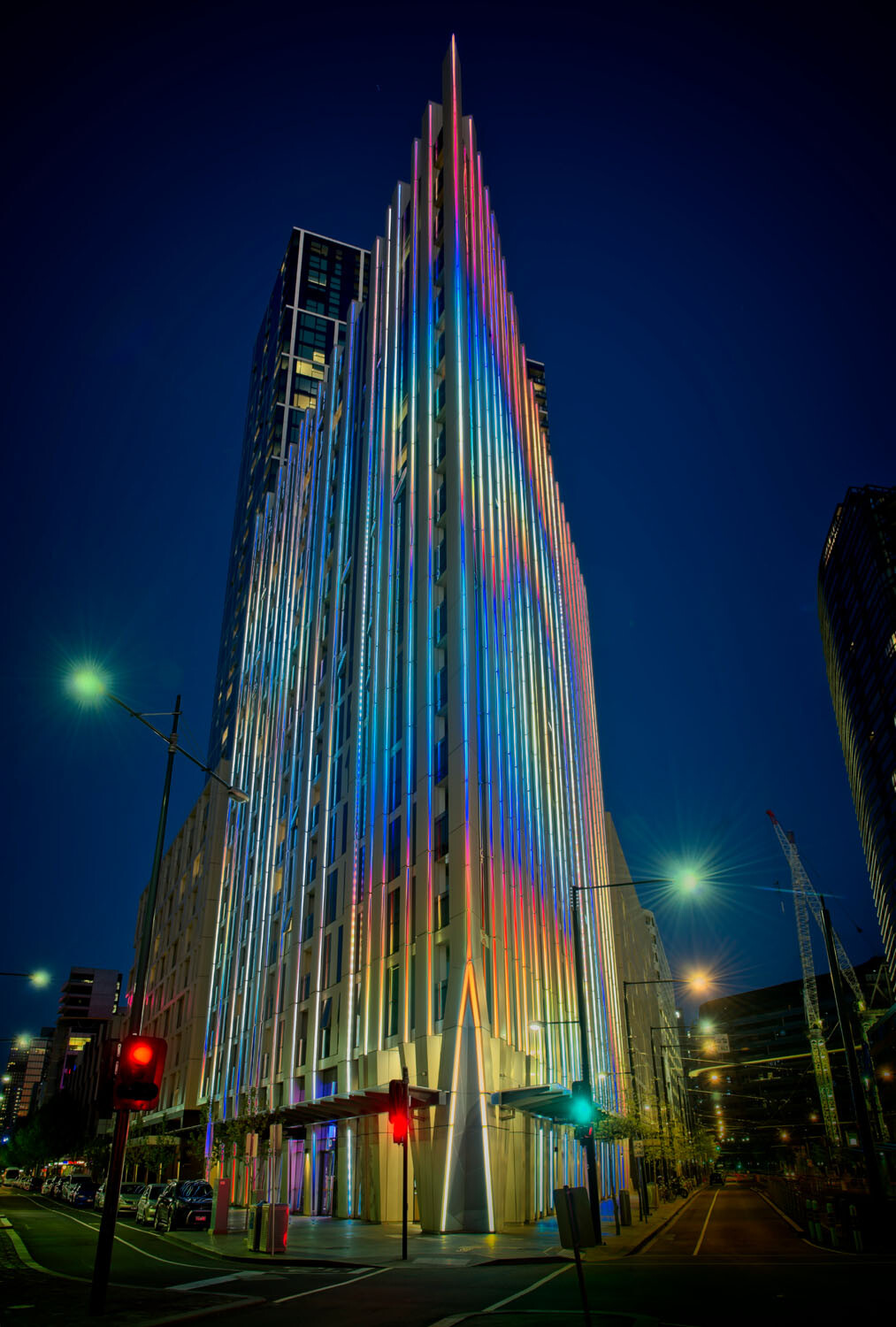
HDR architecture image - Tips for Processing Night Photography with ON1 Photo RAW 2018

An image created using the HDR option in On1 Photo RAW 2018.

Night photography options

First, we should take a look at the different types of night photography that you can do. There is the easiest option of setting your camera up on a tripod and photographing lights somewhere.

The city at night is very popular if you live in an urban area. Perhaps capturing town lights can also be good. You just need something that is making light. HDR has had a lot of bad press, but it really is good for some images, and night shots of cities are perfect for it. ON1 Photo RAW’s HDR processing is one of the best I’ve seen.

When the sun has gone down and there is a lot of traffic you can photograph light trails. Taking longer exposures with your camera on a tripod will make all those lights look like streaks. If you want to make it look like there were a lot, then you can stack the images together, so all the streaks will show in one final image.

One type of night shot that is hugely popular right now, especially in Australia, is astrophotography. Photographing the Milky Way. It is the season for it here and with the low population, you are spoilt for choice where to do them. If you have ever tried doing any astrophotography then you will also be aware that your images have to be processed or they can look at washed out. ON1 Photo RAW 2018.5 has you covered there as well.

Tips for Processing Night Photography with ON1 Photo RAW 2018 - astrophotography milky way image

An astrophotography image processed with ON1 Photo RAW 2018.5

Photographing the City

Night time in the city can be so magical and to be taking photos of it even more so. Processing your images taken at night is much the same as processing any of your images.

Open your image in ON1 Photo RAW and take it into the Develop module. Make the adjustments as you would for other images. Move the sliders around to see what you can get. Take them too far and then bring them back.

sliders in ON1 Photo RAW - Tips for Processing Night Photography with ON1 Photo RAW 2018

When learning it is good to take the sliders too far, see what happens.

If you want to make adjustments to particular areas, then look at local adjustments which is the best place to do that.

However, what if you want to do something to your image to really make it pop?

HDR photography, or High Dynamic Range, can be perfect for this. It is a process that has copped a lot of criticism over the years. People say it is too much, that the images can be ugly. But that really only happens when you don’t use it for the right images, or overdo it.

There are some scenes and images that are perfect for HDR and night photography is one of those times.

HDR Night Photography

When you are to decide which images would work best for HDR, look for ones that have a lot of dark areas, and a lot of bright parts as well. Usually, your camera will struggle with getting an even image of a high contrast scene. It will either make the image too bright or too dark. Night images have those problems. Once you get the lights exposed right, all the shadows become too dark or black.

The best way to do HDR is to take a series of images or bracketed shots. If your camera will allow you to bracket then it will sort out the exposures you need. The most common number of shots is 3 or 5. For this article, five images were taken.

Next, select all of your bracketed images inside the ON1 Photo RAW browse module. You can do that by clicking the first then pressing the shift key followed by clicking on the last image. If you have put the images into a subfolder you can then just use Ctrl/Cmd+A.

Tips for Processing Night Photography with ON1 Photo RAW 2018 - bracketed set of images

Work out which images you want to use.

Once they are selected you should be able to see the HDR button over on the right-hand side of your screen, underneath all the different modes.

select images and HDR button - Tips for Processing Night Photography with ON1 Photo RAW 2018

Select all your images.

ON1 Photo RAW will then merge all your images together. The first time you do it, a window will pop up asking you what look you would like. The options include Natural, Natural Auto, Surreal and Surreal Auto. You can make the changes once the image has been merged to HDR. There are lots of choices with ON1.

Let’s take a look around the HDR working window

Tips for Processing Night Photography with ON1 Photo RAW 2018 - HDR looks

Selecting your HDR look in ON1 Photo RAW.

There are several places where you can set the amount of de-ghosting (remove spots where something moved between brackets) you want the program to do. You can change the HDR look you wanted if you think you made a mistake. You can select which image you think should be the main one.

Go through and change the image to suit the look you are after. I know I say this a lot, but the best way to learn is to play around with the settings.

HDR options - Tips for Processing Night Photography with ON1 Photo RAW 2018

All the different things you can do to your image.

Like most images, you need to experiment to see what you like. Remember that ON1 is non-destructive so you won’t ruin anything. Try everything, it is the best way to learn. Take it all too far and then bring it back.

Lastly, choose where you want your image to go when you are done. You can have it open in Develop, Effects or go back to Browse. The last choice is Cancel. If you want to save it then click Save.

Tips for Processing Night Photography with ON1 Photo RAW 2018

Taking the image further.

Once the image is opened in the Develop module, you can then make more adjustments to as you would normally.

Develop module - Tips for Processing Night Photography with ON1 Photo RAW 2018

Where to go next.

ON1 Photo RAW is one of the best programs for doing HDR. You can make so many changes to it as it is happening and after it is done. Nothing is final.

final HDR - Tips for Processing Night Photography with ON1 Photo RAW 2018

The final HDR image.

Astrophotography

For anyone who has ever done astrophotography, you know that the images always need to be processed.

Here is an image that was taken a couple of years ago. This is the raw file and you can see that it needs a lot of work.

night image Milky Way and lighthouse - Tips for Processing Night Photography with ON1 Photo RAW 2018

Raw image from astrophotography shoot.

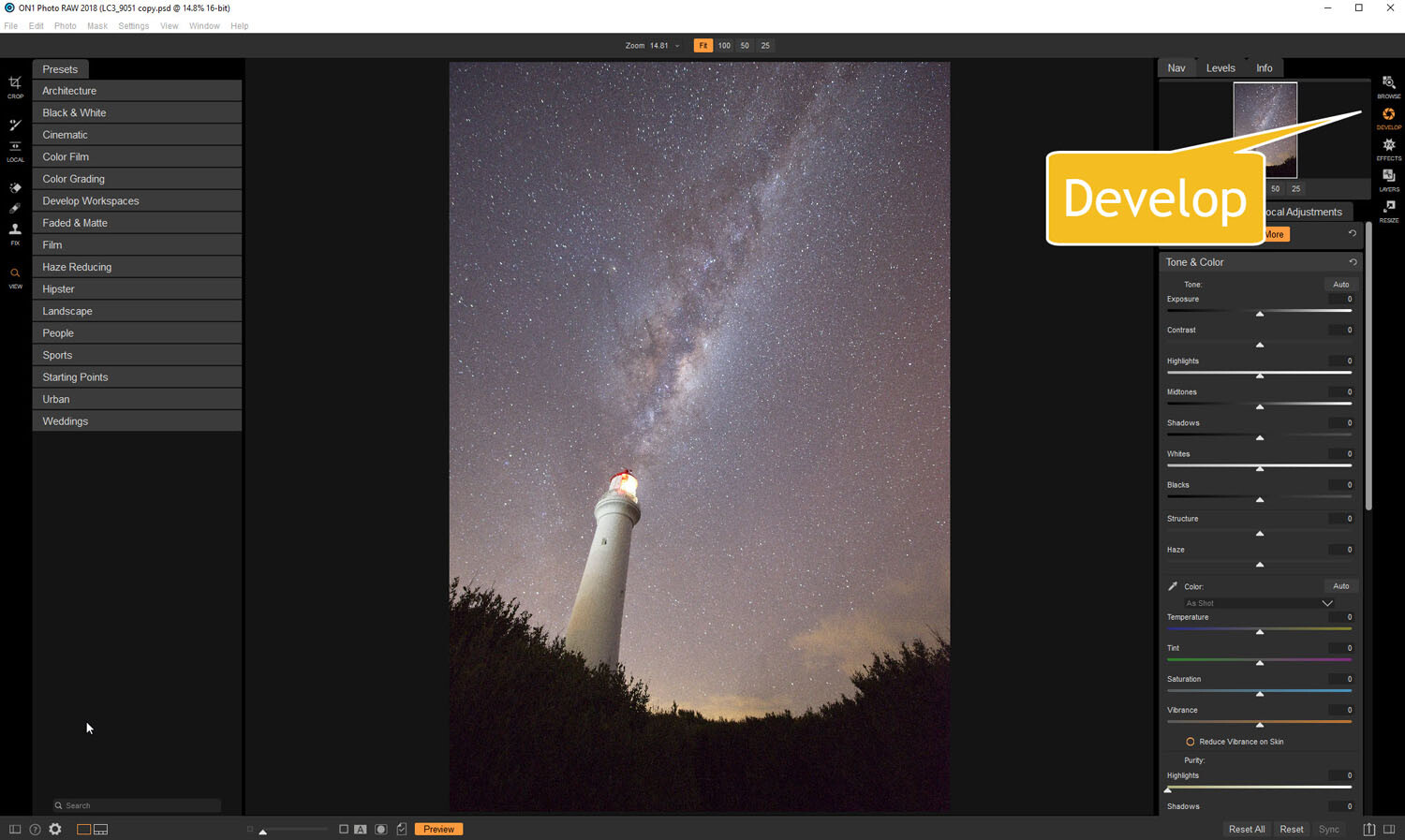
Open the image up in ON1 Photo RAW and go to the Develop module. Everything you need to make the best astrophotography images is all right there.

develop - Tips for Processing Night Photography with ON1 Photo RAW 2018

Open in the Develop module.

Noise reduction

The first thing you want to do is to work on the noise in the image. All astrophotography images have a great deal of noise. You have to increase your ISO quite high in order to get the Milky Way in your image. Usually, it is going to be somewhere between ISO 3200 up to 6400.

The image for this article was taken at f/2.8, for 30 seconds at ISO 6400. It was taken at 14mm using a 14-24mm lens.

In the Develop module go to Details. This is where you can help reduce the noise in your image. Click on the image to zoom in so you can see the noise better.

noise and details section of develop - Tips for Processing Night Photography with ON1 Photo RAW 2018

The first thing to do is to fix the noise in the image.

Under Noise Reduction, you will see a Luminance slider. Move that along until the noise almost disappears. Be careful not to go too far or you might lose all the stars (noise is just white specs so the stars can easily be misinterpreted as noise if you go too far).

This slider smooths out the image and you can lose a lot of detail if you go too far. Bring up the Detail slider to help maintain it. It is about experimenting and seeing what you like as well.

You can also bring up the Sharpening amount as well but be careful. Over sharpened images can look terrible. Go easy with this slider.

noise adjustments - Tips for Processing Night Photography with ON1 Photo RAW 2018

You can see how much was changed.

Tone & Color

It is time to go back to Tone & Color and make more adjustments.

tone and color - Tips for Processing Night Photography with ON1 Photo RAW 2018

Take the image back to Tone & Color to make basic changes.

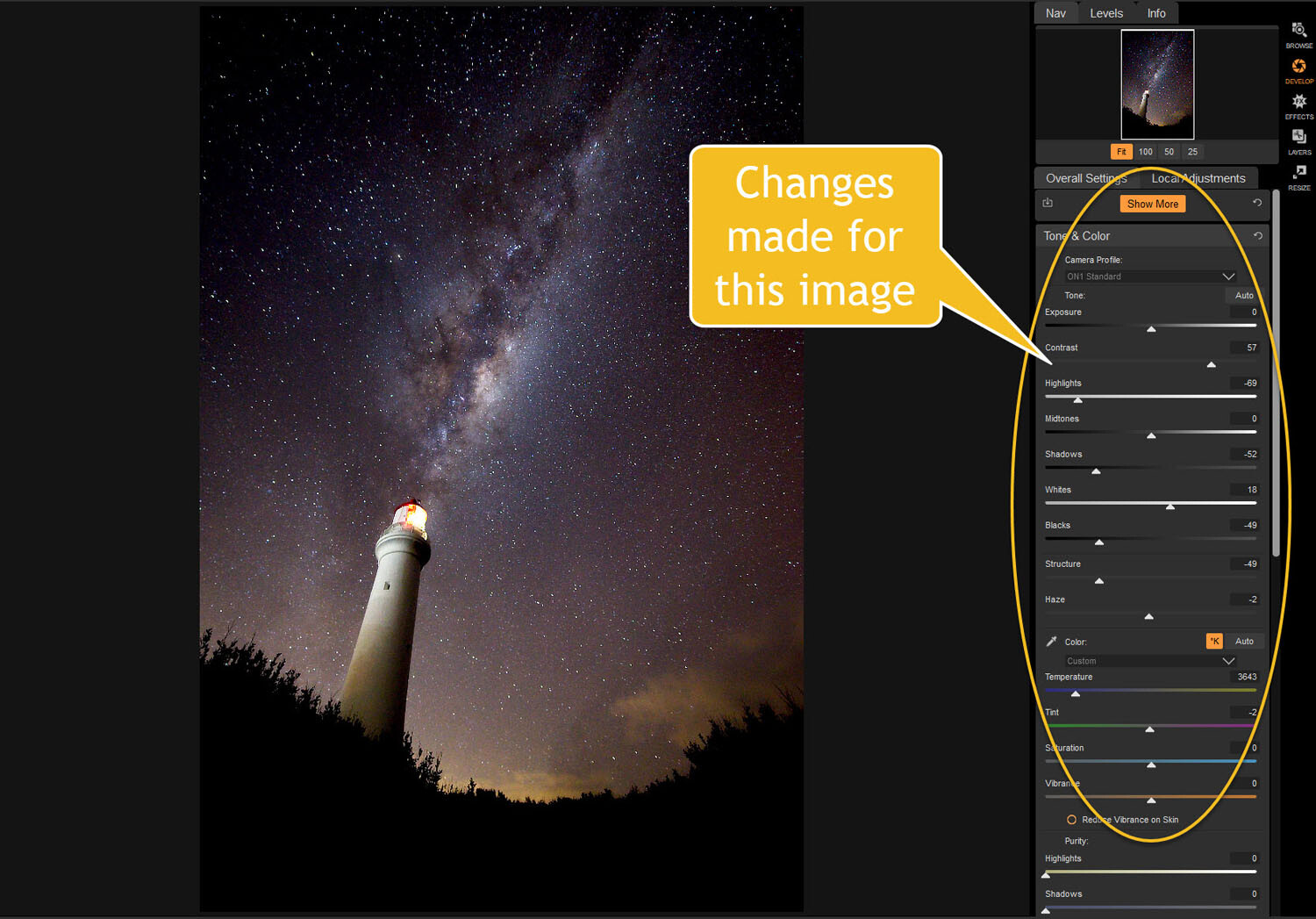
The main things you want to add back into your image are the blacks and lots of contrast. The added contrast will help the stars stand out more from the dark sky. The blacks will allow the darker parts of the sky to appear as you saw them when you shot the image.

The highlights can be brought down to stop the lighthouse from blowing out too much. If you take the shadows down it helps make the darker parts of the sky richer as well. However, be aware that it can also make other parts of the image go black, like the foliage at the bottom of this image.

The whites were brought up a fraction, as this helped to lighten up the Milky Way and make it jump out more.

slider adjustments - Tips for Processing Night Photography with ON1 Photo RAW 2018

Some of the changes that were made in Tone and Color.

Color Adjustments

Most of the changes are made to the image now, but if you look closely there is quite a bit of blue in it. It shouldn’t be there and to remove it you need to go to Show More and then Color Adjustments.

color cast - Tips for Processing Night Photography with ON1 Photo RAW 2018

Taking out the blue cast color in the stars.

A new window for this will open up down below the other adjustment windows.

As it is the blue you want to change, click on that color square. Once it is selected you can move the saturation slider until the blue in the image disappears or is to your liking.

reducing blue saturation - Tips for Processing Night Photography with ON1 Photo RAW 2018

Changing the saturation of the blue.

You can try adding presets to your image as well, though most people with astrophotography just do the basics and leave it there.

You will need to play around with your photos to see what you can do and what is to your tastes. These are just suggestions as to what other photographers do. Experiment, take the sliders too far and then bring them back.

This is the final image.

final image of lighthouse - Tips for Processing Night Photography with ON1 Photo RAW 2018

The final image of the Milky Way over the top of the lighthouse.

Light Trails

In cities, or anywhere there is a lot of traffic, you will see photographers trying to capture the trails of the lights as the cars go past. For most places, the best time to capture this is during peak hour when a lot of vehicles are moving. However, it also needs to be dark.

Unfortunately, there are times of the year where it is impossible to get both at the same time. For instance, in Australia during the summer daylight saving means it doesn’t get dark until after 8 pm. Getting good light trails is reduced because there isn’t enough traffic at that hour.

However, there is a way to make it look like there was more traffic, that is to stack your images. You can also do this for star trails too.

Stacking light trails

Work out which image will be the first one. Take it the Develop module in ON1 Photo RAW and do what you want to process it normally first.

But do not straighten it or do any lens correction on the image. If you do then the other images won’t align up properly, you can do all that after.

original image for light trails - Tips for Processing Night Photography with ON1 Photo RAW 2018

The first image used for the light trails.

Once you have your image ready, go to the Layers module.

layers - Tips for Processing Night Photography with ON1 Photo RAW 2018

Take the image to the Layers mode.

Next, add all the other photos that will make up the final image. The best way to do this is to put all the images into a subfolder. Select the images you want to use, then right-click and go to Add Subfolder.

add subfolder - Tips for Processing Night Photography with ON1 Photo RAW 2018

Putting your images into a subfolder.

A window will pop up once you click Add Subfolder. You can name it as you want, or ON1 will name the folder the same as the filename for the first image. Make sure the box is ticked for Move Selected Items into Subfolder.

add subfolder - Tips for Processing Night Photography with ON1 Photo RAW 2018

Creating the subfolder.

Now you are ready to add all those images as layers to the original photo.

Get your image to the Layers module which is where you will add the images for your light trails. Go up to File in the main menu at the top. Select Add Layer(s) from File.

add images from file - Tips for Processing Night Photography with ON1 Photo RAW 2018

Now it is time to add the layers.

A window will pop up where you can go to the subfolder that you put the images into. Select all the images, Ctrl/Cmd+A, then press Open.

select images - Tips for Processing Night Photography with ON1 Photo RAW 2018

Selecting all the images you want to use.

ON1 Photo RAW will ask you if you want to open them all, say yes. Depending on how many images you are trying to do it can take some time for this to happen. The images used for this demonstration are quite large and took a few minutes.

images added as layers - Tips for Processing Night Photography with ON1 Photo RAW 2018

All the images are added.

Next, you need to blend each layer. You want the lights to shine through from each but not everything else. For each layer, go up to the blending pull-down and select Lighten.

blending options - Tips for Processing Night Photography with ON1 Photo RAW 2018

Blending all the layers with Lighten.

You can now save the image and then you can do more processing if you wish. If the image needs straightening, lens corrections, etc., you can do it in the Develop module.

light trails image - Tips for Processing Night Photography with ON1 Photo RAW 2018

The final image.

Star Trails

If you enjoy doing star trails then you will be able to use this same method for processing and stacking those images using ON1 Photo RAW. Just add them all as layers and use the Blending option Lighten.

Conclusion

There are many things you can do with your night photos in ON1 Photo RAW 2018.5. With things developing constantly you will be able to do more and more with time. The HDR feature is one of the best I’ve seen and I’m sure most of you will enjoy that.

With all software, experimenting is the key. Take what you learn and see what else you can do with it.

Disclaimer: ON1 is a dPS paid partner.

The post Tips for Processing Night Photography with ON1 Photo RAW 2018.5 appeared first on Digital Photography School.


Digital Photography School

 
Comments Off on Tips for Processing Night Photography with ON1 Photo RAW 2018.5

Posted in Photography


6 Tips To Help You Improve Your Documentary Photos

06 Aug

Documentary photos can have a powerful impact on viewers. They can notify people of an issue that they wouldn’t otherwise know about. Documentary images can help focus attention on different cultures that are rarely seen by other people. They can inspire, tell stories, and above all they can take the viewer on a journey that they may not go on themselves.

It’s important to remember that documentary photos differ to the conventional travel photographs. Yes they can overlap sometimes but documentary photos need to tell a story first and foremost. Here are 6 tips to help you improve your documentary photos.

woman burning leaves - Documentary Photos

1. Tell a Story

Before even a single photo has been taken, you need to decide on the story that you want to tell.

Are you trying to capture a specific event or ritual? Do you want to shed light on an environmental issue? Or do you want to document a different aspect of an already well-photographed location by focusing on say the grittier side of it away from the glitz and glamour?

Whatever the story is, your first action should be to write it down in a sentence. That will become your brief and with every photo you take, you should be looking to ensure it meets that requirement.

Not only will this help you to begin to build a shot list of potential things to photograph, but it will also ensure that you are always focused on the subjects you are photographing.

man cooking over a fire - Documentary Photos

2. Brainstorm Shots

Once you have an idea of what your story is about, you can begin to create a shot list based on that headline. So for example, if you want to photograph a traditional festival, some of the things that might be on your shot list could be things like:

  • The performers getting ready
  • Close up of the costumes
  • Head and shoulder portraits of the performers and audience
  • Action shots of the festival in action (for example dancing, singing, etc.)
  • Wide-angle shots capturing the entire event (for example to show the scale)
  • The venue (if it is in a place of special interest)
  • Any traditional foods or drinks served

This will help you plan your shoot and make sure that you cover different aspects of the story you are trying to tell.

Clearly, while you are there you may find that this list changes and other things get added or crossed off. The key is to make sure you capture a variety of shots based on your initial brief.

two men in red costumes - Documentary Photos

3. Planning and Setting Up

It’s not by accident that documentary photographers seem to be in the right place at the right time to capture stunning shots. This is not by accident or luck. There has likely been a lot of planning and research that’s gone into the shoot to ensure that they can maximize their time and capture the best photos. So, do your research before you start shooting.

For example, if you are photographing a parade get to that location a day before and work out the best place to be. Ask the locals if they know anything that might help you. Or if you are planning to photograph a remote tribe, contact local guides that can help you get there and also translate if needed.

Preparation is a huge part of documentary photography and you should spend time making sure you are fully prepared before you start.

parade with a religious float - Documentary Photos

4. Be Ready to Shoot

Once your research is done and you have planned everything, it’s time to execute and capture the photos. There is no magic formula for choosing your camera settings when taking documentary photos, as every scenario is different.

But you can prepare for it in advance by understanding your camera and predicting the scenario that you might face. For example, if you are photographing locals in their home where you are likely to encounter low light conditions, you can safely assume that you will need to raise your ISO level to be able to capture the shot. So, practice at home so that not only can work quickly but also you know your camera’s capabilities at high ISO settings.

Or if you are going to be photographing a dance festival where there will be fast movement practice being able to focus accurately and capture sharp photos. Trying to predict the scenario you are working in will often help ensure that you don’t panic when you are actually there and taking photos for real.

demonstration by doctors and nurses - Documentary Photos

5. Story Over Aesthetics

Arguably this is where documentary photography and travel photography differ.

While often in travel photography you want to try and tell a story, you also need to convey that in a beautiful and aspiring way that will make people want to travel to that destination. But documentary photography is about telling the story first and foremost and if the aesthetics have to suffer to capture it, then so be it.

So, don’t be afraid to break away from convention if it means you will capture the shot that will help tell that story.

protestors in the park - Documentary Photos

6. Edit Ruthlessly

Once you have captured all of the images that you wanted to get, then arguably the really hard work starts.

You need to edit and select the best of those images with which to showcase and tell the entire story. Flick through magazines and you will see that generally, a photo essay is anywhere between  6-10 photos maximum. You need to be ruthless in your culling and only feature photos that contribute to the overall story.

Try to detach yourself and think like a photo editor, not a photographer. The end result should be a collection of photos that are strong enough individually but also work as a collective.

Lightroom browser of images - Documentary Photos

Conclusion

Well done documentary photos can be mesmerizing to view and they tell an incredibly powerful story. It could be argued that they are often more powerful than the words that go along with them. Even the simplest stories can be phenomenal in a series of photos.

But capturing a set of photos that are different and yet can work together as a series and also tell a story is incredibly difficult. Follow these six simple tips and you will be on your way to capturing amazing documentary photos.

Now it’s your turn. Share your amazing documentary photos below.

The post 6 Tips To Help You Improve Your Documentary Photos appeared first on Digital Photography School.


Digital Photography School

 
Comments Off on 6 Tips To Help You Improve Your Documentary Photos

Posted in Photography