RSS
 

Posts Tagged ‘through’

Composition Tips for Drawing the Viewer’s Eye Through Your Photographs

03 Sep

There are many different elements of photography that can affect how the viewer perceives an image. The more you learn to understand how various elements affect an image, the more you can learn to take control of them. Great photography doesn’t happen by chance, it’s crafted and pieced together. If you follow these composition tips they will have you do just that.

joshua tree at night brightness drawing the eye - Composition Tips for Drawing the Viewer's Eye Through Your Photographs

One of the most important elements of photography to understand is how the viewer’s eye is drawn through the image. You may think that when you view a photograph you see the whole picture as one. In one sense this is true, as you can absorb much of an image in a millisecond. At the same time, your eye moves through an image in a way that you’re usually completely unaware of.

The reason why it’s important to understand this concept is that if an image has a natural path for the eye to follow and a strong subject to focus on, it’s far more satisfying. An image that’s too busy and doesn’t have a clear subject isn’t as appealing and the viewer will not linger long.

As the photographer, you can be intentional about how you craft your image so that the viewer’s eye moves through it the way you want.

The Human Eye

Our eyes are bombarded by so many different sights every day that we have to be selective about what we look at and what we ignore. This is usually a subconscious decision that happens as our brains try to filter the information that is passed from our retinas. Much study has been done into what visual elements draw our attention, which is super helpful for those of us that create visual art.

Brightness

Controlling the brightness of various parts of your image is one of the most powerful ways to control the viewer’s eye. You can use this to your advantage in a couple of ways.

Including or adding brightness to areas of an image is a great way to draw the viewer’s eye to that element. The other side of this is to limit brightness or darken areas of an image where you don’t want to draw attention.

sunset over water - Composition Tips for Drawing the Viewer's Eye Through Your Photographs

How you add or subtract brightness to an image will depend a lot on your subject. If you have control of the light you can take control with the way you light the image. Even if you don’t have control of the light you may still be able to manipulate it somehow with neutral density filters or by framing the image differently.

Whatever your subject, you can always control brightness in post-production. Learning to dodge and burn is one of the most valuable skills you can have for controlling light in your photography. Even something as simple as a vignette can have a dramatic effect.

brick wall with birds in a window - Composition Tips for Drawing the Viewer's Eye Through Your Photographs

Contrast

Areas of high-contrast draw the eye more than anything else.

A dull, flat image with no contrast has very little visual appeal. If you really want to draw the attention of your viewers to a certain element of an image, try to find a way to add contrast to the element, or to the area surrounding it.

contrast lines drawing the eye in sand dunes - Composition Tips for Drawing the Viewer's Eye Through Your Photographs

There are many ways to do this. For example, you can overexpose the background to make it contrast with the foreground subject. Alternatively, you can underexpose the foreground to make a silhouette which contrasts with the background.

Again, you can also use post-processing techniques to further control contrast in your image to draw the eye. Adding contrast to areas where you want to draw attention, and removing contrast from areas that you don’t want to distract the viewer can go a long way to drawing the eye.

You can do this using basic tools in Lightroom like the Contrast and Clarity sliders. Control the areas you want to add or subtract contrast from others with the local adjustment tools.

contrast drawing the eye lady on a large sand dune - Composition Tips for Drawing the Viewer's Eye Through Your Photographs

Color

You’re probably aware of how powerful color can be in controlling the mood of an image. The feel of an image with bright colors is very different from an image with muted, desaturated colors.

But what you may not know is that the human eye is strongly attracted to bright colors. Have ever seen the old “selective color” images that convert an image to black and white while leaving one element in color? Fortunately, the trend is long-dead, but it shows how powerful color can be at drawing the eye.

color drawing the eye brightly colored parrots - Composition Tips for Drawing the Viewer's Eye Through Your Photographs

Adding color to an image isn’t always easy. You may be able to color elements of an image with colored gels if using flash.

Subtracting color from an image is often even more important if it’s distracting to the viewer. This is often the case when photographing people. Colorful clothing draws the eye away from the more subtle skin colors of faces. This is why portrait photographers often tell their subjects to wear plain black or white clothing.

Adding and subtracting color in post-production isn’t difficult, but takes practice and restraint. It’s easy to overdo it. You can do a lot with the local adjustment tools and the Vibrance/Saturation sliders in Lightroom. Remember, when it comes to adjusting the color or saturation of a photo, less is more, especially when skin tones are involved.

Sharpness

Have you ever noticed how a blurry image is very unpleasant to look at? Even if it’s only a little bit out of focus, your eye will detect it.

The human eye’s instinct is to adjust focus until what it’s looking at appears sharp. If it can’t find something sharp to rest on, you won’t like what you’re looking at.

sharpness drawing the eye small girl in colorful dress with blurry background - Composition Tips for Drawing the Viewer's Eye Through Your Photographs

You can use this to your advantage in your photography. You probably know that a shallow depth-of-field when photographing portraits creates a very pleasing look. This is because the eye is naturally drawn to the sharp face of the subject while avoiding the other elements that are out of focus. The most obvious way to control focus is using large apertures and a small depth-of-field, but it isn’t the only way.

You could try playing with slower shutter speeds and motion blur. Panning with a moving subject and a slow shutter speed can blur the background while keeping the subject acceptably sharp.

You can also add blur in post-production. Moving the Clarity slider to the left will soften the selected elements that you don’t want to draw attention to. You can also add sharpness to selected areas, but be careful about trying to save an out-of-focus image by increasing sharpness (it doesn’t work!).

sharp rocks in smooth water - Composition Tips for Drawing the Viewer's Eye Through Your Photographs

Take Control

As you learn these composition tips that can guide your viewers, you can start to take control of the process. Adding and subtracting these elements from your images can have a significant effect on how visually pleasing they are. Take some time to think about what you want your viewers to look at and then ask yourself what you can do to make that happen.

Although the way you process your images is very useful, try to think about controlling these elements in-camera first. It isn’t always possible, but taking control over the brightness, contrast, color, and sharpness in-camera will give you better images to work with in post-production. Also, trying to save an image by pushing Lightroom sliders to their extremes usually isn’t a good idea.

As you get more intentional about what you add and subtract from your photography, you’ll start producing more engaging images. Your photography will also become more appealing to the viewer and yourself.

The post Composition Tips for Drawing the Viewer’s Eye Through Your Photographs appeared first on Digital Photography School.


Digital Photography School

 
Comments Off on Composition Tips for Drawing the Viewer’s Eye Through Your Photographs

Posted in Photography


NASA is working on an aerial ‘Fluid Cam’ that can see through ocean waves

27 Apr

We know more about the surface of the moon and Mars combined than we do about our own ocean floor, according to NASA Ames scientist Ved Chirayath, which is why he is developing a camera that can remove the water from our seas to reveal 3D images of what’s below the waves. Using a grant from Earth Science Technology Office, Chirayath is working on a project that uses both hardware and software to see and map the floors below great bodies of water as though the water isn’t there at all.

In the video above, Chirayath explains that it is hard to see the ocean floor due to the waves on the surface, but his Fluid Cam uses software called Fluid Lensing to image objects in up to 10 meters of water.

While he doesn’t explain exactly how this technique works, he does say it requires a camera with a lot of processing power, as the software runs on-board. The camera he shows in the video uses a Leica Elmarit-M 28mm F2.8 lens on front of what is described as a ‘high performance’ camera. We are told it uses a 16-core processor and has 1TB of RAM, and that it outputs data at a rate of 550MB per second.

At the moment, the camera is in the test stage and has been used attached to a drone, but NASA hopes that the technology will be housed in airplanes and satellites in the near future, so wider areas can be mapped and explored.

The project was unveiled on the NASA website as part of the agency’s program to mark Earth Day. For more information, visit this link.

Press Release

New Camera Tech Reveals Underwater Ecosystems from Above

Scuba divers and snorkelers spend vacations visiting exotic coastal locations to see vibrant coral ecosystems. Researchers also don their gear to dive beneath the surface, not for the stunning views, but to study the health of the reefs that are so critical to fisheries, tourism and thriving ocean ecosystems.

But one person can only see so much coral in a dive. What if you wanted to assess coral over an entire region or see how reefs are faring on a global scale?

Enter Ved Chirayath of NASA Ames Research Center in Silicon Valley, California. He has developed a new hardware and software technique called fluid lensing that can see clearly through the moving water to image reefs. Imagine you’re looking at something sitting at the bottom of a swimming pool. If no swimmers are around and the water is still, you can easily see it. But if someone dives in the water and makes waves, that object becomes distorted. You can’t easily distinguish its size or shape.

Ocean waves do the same thing, even in the clearest of tropical waters. Fluid lensing software strips away that distortion so that researchers can easily see corals at centimeter resolution. These image data can be used to discern branching from mounding coral types and healthy coral from those that are sick or dying. They can also be used to identify sandy or rocky material.

So far Fluid Cam, the imaging instrument that carries the fluid lensing software, has flown only on a drone. Someday, this technique could be flown on an orbiting spacecraft to gather image data on the world’s reefs.

That amount of data would be painstaking to sort through to look for specific coral attributes. So Chirayath’s team is cataloging the data they’ve collected and are adding it to a database to train a supercomputer to rapidly sort the data into known types – a process called machine learning. Because of the technology developments in both the tools to collect the data and the machine learning techniques to rapidly assess the data, coral researchers are a step closer to having more Earth observations to help them understand our planet’s reefs.

Articles: Digital Photography Review (dpreview.com)

 
Comments Off on NASA is working on an aerial ‘Fluid Cam’ that can see through ocean waves

Posted in Uncategorized


Film crew arrested for allegedly trying to sneak a ‘fake bomb’ through airport security

24 Jan

A Dutch television film crew was arrested last Thursday at the Newark Liberty International Airport in New Jersey after attempting to take what is being called a ‘fake bomb’ through security. The alleged fake bomb was composed of a PVC pipe, wires, and a motor, according to law enforcement sources speaking to ABC News, though the crew’s production house claims it was actually ‘vacuum compression luggage.’

The arrests involved nine cast and crew members working on an upcoming series called “Staten Island Hustle” for Endemol Shine North America and Left Hook Media, according to a statement released by Endemol Shine.

You can watch the short news report by ABC News and see a picture of the ‘fake bomb’ from the TSA below:

Photo: TSA

In a statement given to NJ Advance Media, the company said the device wasn’t a fake bomb, but rather a prototype for vacuum luggage able to accommodate a larger number of items than ordinary luggage:

Unfortunately, there appears to have been a misunderstanding, and we regret any inconvenience to TSA and other authorities on the ground for complications that may have been caused.

However, TSA officials allege that the crew attempted to sneak the contraption past security officials while secretly recording the incident for a TV episode, and that the vacuum luggage system had all the indicators of being an IED. According to NJ.com, all nine individuals have been charged with conspiracy, creating a false public alarm, and interference with transportation.

Articles: Digital Photography Review (dpreview.com)

 
Comments Off on Film crew arrested for allegedly trying to sneak a ‘fake bomb’ through airport security

Posted in Uncategorized


Tips for Shooting Cityscapes Through a Window at Blue Hour

10 Nov

Shooting cityscape photos from inside a building (such as an observation deck of a tower, hotel room, etc.) pose a different set of challenges that you won’t experience shooting outdoors. Here are a few easy-to-follow tips for shooting the city at blue hour, with a focus on how to eliminate unwanted reflections from the glass.

Japan - Tips for Shooting Through a Glass Window of an Observation Deck at Blue Hour

Shanghai - Tips for Shooting Through a Glass Window of an Observation Deck at Blue Hour

Vietnam - Tips for Shooting Through a Glass Window of an Observation Deck at Blue Hour

The reflection-free shots above of Fukuoka skyline (Japan, top), Shanghai skyline (China, center) and Ho Chi Minh City skyline (Vietnam, bottom) were shot through glass windows of Fukuoka Tower, Shanghai World Financial Center Observatory and Bitexco Financial Tower respectively – following the methods described in this tutorial.

Bring a mini-tripod

In order to shoot at blue hour, a tripod is essential whether you’re shooting indoors or outdoors. But some observation decks don’t allow tripods because they are seen as a hindrance for other visitors. In that case, you may try to bring in a mini-tripod like a Gorillapod, as it’s unlikely to disturb other non-photography visitors.

Even if tripods are allowed, you may as well bring a mini tripod just in case, as it comes in handy when there is no suitable space to set up a regular tripod.

Gorillapod - Tips for Shooting Through a Glass Window of an Observation Deck at Blue Hour

Wipe the glass with a cloth

Glass windows of an observation deck aren’t always clean. Make sure to keep a cloth in your camera bag so that you can wipe an area to shoot through if it’s dirty. Obviously, you can’t wipe the other side of the window, though, so choose an area that has no stains, etc.

How to eliminate reflections off the window

This is the biggest challenge when taking photos through a glass window. The window works much like a mirror and it’s hard to completely prevent reflections (e.g. such as yourself, room lights) from showing up.

Typical tips to follow are shooting in close and as straight as possible to the glass (i.e. leaving a little gap between the glass and the lens so as not to let indoor lights creep in) and using a polarizing filter which helps cut reflections to some extent. Aside from these tips, I’d recommend the following “tools”.

Reflections - Tips for Shooting Through the Glass Window of an Observation Deck at Blue Hour

Ho Chi Minh City skyline (Vietnam) shot through the window of Bitexco Financial Tower. I tried my best by getting the lens really close to the window (almost touching it) and using a polarizing filter, but the room interior and stray lights still got reflected in the glass.

Using a DIY blackout curtain

This might be an old-school method, but I recently came across a photographer doing this on the observation deck of Shanghai World Financial Center (see below). Not advisable to use such a large curtain, though, as it blocks the view for other visitors and you’ll run the risk of being asked to leave by floor staff.

Blackout curtain Tips for Shooting Through the Glass Window of an Observation Deck at Blue Hour

Using a black jacket

I used to rely on this method and it worked relatively well. Set up a tripod very close to the window, and cover the whole rig (camera and tripod) with a black jacket to create a closed-in area around the camera so that no indoor lights get inside the jacket. Make sure to use a “black” jacket to reduce reflections, as a lighter-colored jacket does more harm than good and causes even more reflections.

Using black neck gaiter

This used to be my favourite method, as it doesn’t really catch the unwanted attention of other visitors (compared to using the jacket, etc.). The concept here is the same as using a jacket. To block any stray lights from getting in, wrap the black neck gaiter (neck warmer or scarf) around the lens and push the whole setup (camera and tripod) onto the window to completely shade the front element of the lens.

Jacket neck gaiter - Tips for Shooting Through the Glass Window of an Observation Deck at Blue Hour

Using a black jacket (left) and a black neck gaiter (right) to shade the front element of the lens and cut reflections from the window.

Using a lenskirt

A lenskirt is a tool specifically created to cut out reflections. This is what I’ve been using for the past few years with great success. By attaching a lenskirt to the front of your lens and the pushing suction cups onto the window, it shades the front element of the lens. This helps cut reflections from the window, leaving no chance for any stray light to get in.

With a black neck gaiter, I always had to make sure not to have vignetting (dark corners) by checking through the viewfinder (due to the edges of the neck gaiter getting too close to the lens). But the window-facing end of a lenskirt opens up like a softbox, so there is no worry of any edge vignetting being introduced.

Lenskirt - Tips for Shooting Through the Glass Window of an Observation Deck at Blue Hour

Conclusion

I hope these tips help you take reflection-free cityscape photos through glass windows of an observation deck on your next visit.

Lastly, you may wonder why I didn’t mention a rubber lens hood (which is said to work well for shooting through glass). I’ve tried it before but found it prone to vignetting, especially at a wide angle like 18mm or wider. And, when shooting cityscape photos from high above like an observation deck, you’re very likely to shoot wide, therefore I’ve excluded it from the list.

If you have any other tips or experiences using these suggested tools in this post, please share them in the comments below.

The post Tips for Shooting Cityscapes Through a Window at Blue Hour by Joey J appeared first on Digital Photography School.


Digital Photography School

 
Comments Off on Tips for Shooting Cityscapes Through a Window at Blue Hour

Posted in Photography


How to Find More Creativity Through Using Less Gear

03 Oct

In this article,

A few weeks ago, I was packing for an 8-day photo workshop I was leading in the Alaska Range. It was autumn, which meant we’d be concentrating on the landscape, but there would likely be ample opportunities to photograph wildlife and create macros. That diversity meant that I would need to pack for every opportunity.

How to Find More Creativity Through Using Less Gear

A year ago, or heck, three months ago, that would have meant my bag would have included: two DSLRs, a 500mm f/4 with a 1.4x teleconverter, a 70-200mm f/2.8, a 24-105mm f/4, a 17-40mm, a fixed 14mm, a polarizer, a variable neutral density filter, a big Gitzo tripod to hold that heavy kit, and a monster camera bag to hold it all. The total weight of all my camera gear would probably come in around 50 pounds, maybe more.

So there I was, packing my camera gear for more than a week of shooting the grand landscapes and wildlife of Alaska. I loaded my small daypack, topped it off with a rain jacket and a sweater, threw it over my shoulder and walked out the door. Total camera gear weight was under 8lbs.

How to Find More Creativity Through Using Less Gear

What happened?

I realized that all my gear, lenses, filters, and the enormous DSLR bodies; none of them were actually improving my photography. Plus, I was being hindered by all that stuff. I’d be out shooting and find I was more concerned about selecting the right lens or filter than I was about the actual composition.

And that, right there, is where creative photography goes to die.

How to Find More Creativity Through Using Less Gear

Cutting back and using less gear

So I cut back. I adopted the Lumix mirrorless system and acquired three lenses for the trip: a 12-32mm, a 45-150mm, and a 300mm f/4 (the only sizeable piece of glass in the kit). Since the Lumix system is micro four-thirds, all those lengths are doubled when compared to a full-frame camera. I can cover almost anything from 24-600mm in a kit that weighs a small fraction of my DSLRs. I could, quite literally, fit it all in my pockets.

When in the field, I can switch from one lens to another quickly and without fuss. I learned to keep the most likely lens set on the camera. If wildlife was a possibility, then the 300mm lived on the camera. When we were hiking and I was looking for wide landscapes, then the 12-32mm was the go-to lens. On gray days with patchy sun, the mid-range 45-150mm zoom was always ready.

How to Find More Creativity Through Using Less Gear

Time to be more creative

When I saw a composition,  I would raise my camera and shoot, re-compose, shoot again, and so on for several minutes, while other photographers were still working out the best lens, camera body, or filter for the situation.

I also found I had more time and energy to simply sit on the tundra, look, and wait. I wasn’t fiddling with my gear so I had long moments to experience the places where I was photographing.

Come to think of it, that may actually be why I feel my photography improved so much. I had the time to be creative.

How to Find More Creativity Through Using Less Gear

As any photographer worth their salt knows, making images is not formulaic, it is creative. In order to be creative, we have to be open to the situation, not distracted. And we have to be ready when the light or action is happening. My gear, or lack of it, gave me that time and flexibility.

How to Find More Creativity Through Using Less Gear

Did I ever miss all my equipment?

I’d like to say no, but there were times, that yes, I did miss my old kit. Cutting back my camera gear meant some sacrifices. Occasionally those sacrifices involved a particular focal length or filter that I hadn’t brought along. Once or twice I wished for the clean bokeh of my 500mm f/4 to separate a bird from a tangled background and on one occasion, the 24mm equivalent wasn’t wide enough to capture the expanse of the sky I was after.

How to Find More Creativity Through Using Less Gear

Comparison rears its ugly head

But the sacrifice I remember most clearly (and I feel like an idiot for even mentioning this one) was my vanity. At one point, I was among a good size group of serious photographers not related to the workshop I was leading. There were more 500mm and 600mm f/4s hanging off sturdy carbon tripods than you could shake a stick at. Meanwhile, I stood there, an actual bonafide professional photographer, with a tiny point-and-shoot sized mirrorless camera and a couple of itty-bitty lenses in the pocket of my jacket.

I wanted to justify my compact gear, defend my decision by bragging about how good my kit actually was, even compared to their monstrous cameras – but I didn’t. Instead, I kept my silence, listened to their discussions of lenses, f-stops, and autofocus speeds, and thought instead about my next composition.

How to Find More Creativity Through Using Less Gear

I bring up this somewhat uncomfortable subject because I think that this sense of inadequacy, in the lives of photographers, is very, very real. We want to be taken seriously. And when we are in the field, (when no one can see the images we are actually creating) we are usually judged by the gear we are carrying and using. There is a hierarchy in which those with the biggest, most expensive glass and bodies rise to the top, as though their investment is somehow reflective of their skills or knowledge as photographers.

How to Find More Creativity Through Using Less Gear

Gear doesn’t make you a good photographer

There is a lot of pressure to BE one of those people with the huge camera bag and big lenses. But the reality is that your gear has nothing to do with how good you are as a photographer. Gear helps, it’s even necessary to a certain extent, but its presence or price tag is not reflective of you, the photographer. It’s the images that matter.

In the future, I’m going to try to let my photographs, not my gear, be the source of my pride (or inadequacy).

How to Find More Creativity Through Using Less Gear

Though not the Alaska Range, I continue to embrace the minimal gear mentality. I made this image the night before I wrote this article, on the beach in Homer, Alaska.

The post How to Find More Creativity Through Using Less Gear by David Shaw appeared first on Digital Photography School.


Digital Photography School

 
Comments Off on How to Find More Creativity Through Using Less Gear

Posted in Photography


This Kodak Moments chatbot digs through your old photos and tries to sell you prints

23 Sep

Kodak has created a new Facebook Messenger chatbot called ‘Kodak Moments’ that tries to get users to buy physical products by digging through and resurfacing their old photos.

The AI algorithm works by searching through the mass of images a user has uploaded to Facebook and suggesting ones that may have been forgotten in hopes the user, when suddenly presented with this fond old memory (or Kodak moment… if you will), will order it as a physical print or photo product like a coffee mug.

Facebook users are given the option of either dismissing the chatbot’s suggested image, requesting other images that contain the same people as the first image, or requesting a print or product containing the selected image. All you have to do to join this ‘fun’ game that tries to sell you things is search for Kodak Moments in the Messenger app.

Unfortunately, the chatbot—at least in its current iteration—doesn’t support any sort of filtering options, making it impossible to prevent the bot from digging up photos of old memories better left forgotten. Consider yourself warned.

Joining this Messenger chatbot is a new Kodak Moments app (Android | iOS) that goes a bit further. After being given permission, the app will search through a Facebook or Google account and camera roll to find images it thinks users may want to turn into physical products.

The goal behind the new Kodak Moments technology is (obviously) to increase the company’s print sales while reviving the idea of a ‘Kodak Moment’ and helping customers sort through their possibly massive photo albums. We’ll let you decide if the concept is fun, annoying, or maybe a bit traumatizing.

Articles: Digital Photography Review (dpreview.com)

 
Comments Off on This Kodak Moments chatbot digs through your old photos and tries to sell you prints

Posted in Uncategorized


While Waiting for Hyperloop, Sleep Through Long Drives on Cabin Buses

02 Sep

[ By SA Rogers in Technology & Vehicles & Mods. ]

Someday, we’ll supposedly be able to zoom from one city to the next in no time flat thanks to the Hyperloop, but that day is not today. Elon Musk’s high-speed transit system Hyperloop One has been successfully tested, and promises to cut the 400-mile trip between Los Angeles and San Francisco down to just 30 minutes, but it’ll take it a while to get off the ground. In the meantime, our options are still limited to air travel, personal vehicles, trains and buses. Buses are easily accessible and cheap, but they cost a whole lot of time and discomfort instead.

If you’ve ever taken an inter-city bus trip, you know how it goes. More often than not, you’re crammed in with dozens of other people, breathing stale air, hoping the person coughing next to you won’t get you sick. Even worse, inter-city bus travel is notoriously inefficient, requiring a lot of stops and ultimately taking a lot longer than it would if you were driving a car. Ever wish you could just block out your surroundings and sleep through it without drooling on somebody’s shoulder?

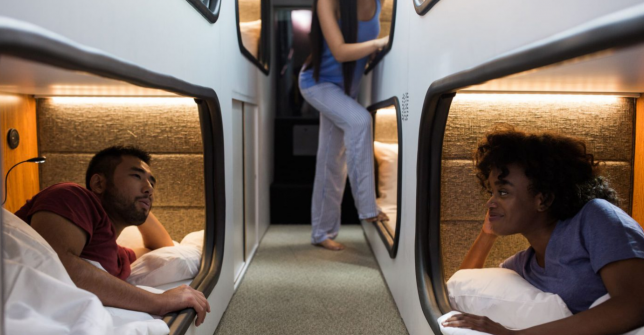
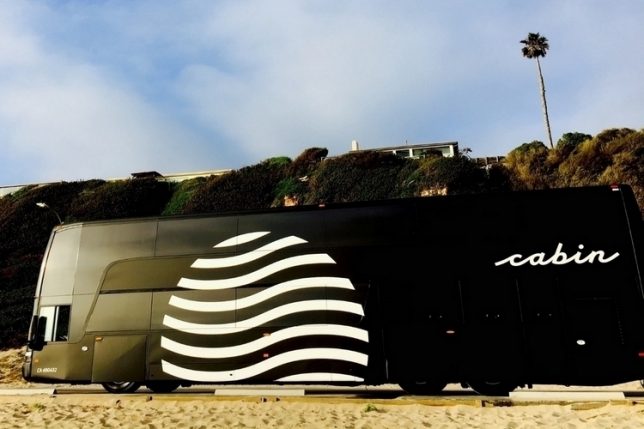
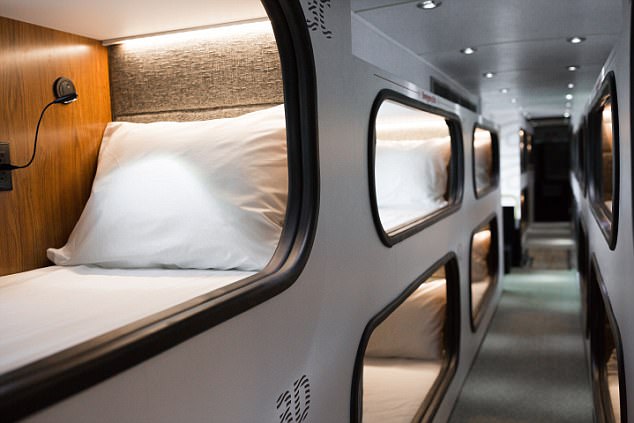
A new service called ‘Cabin’ aims to bridge the gap between bus travel and air travel with comfortable one-person sleeping pods, so you get your own private little area in which to stretch out and lay down during a long drive. The company bills itself as “the dreamiest way to travel between LA and SF,” acting as a hotel on wheels that transports you to your destination while you’re sleeping.

The company worked with hospitality architects to “completely reinvent the bus as we know it,” outfitting each pod with hotel-like amenities like free wi-fi, fresh bedding, complimentary water, tea, coffee, earplugs and even a melatonin supplement to help you fall asleep.

With a round-trip cost of $ 230 to get back and forth between San Francisco and LA, Cabin definitely isn’t the cheapest option; you can take a Bolt bus for just $ 50, and many airlines offer routes between the cities for as low as $ 69 each way. But we all know how much comfort airlines have sacrificed in recent years to keep their costs down, and an air trip with a pod this cozy would cost many times that amount. Plus, there’s no dealing with airports, hidden fees or traffic.

The future of inter-city travel will likely include self-driving vehicles and highway trains, but for now, this seems like a pretty cool option, especially for people who feel particularly stressed about flying. Cabin launched last year as SleepBus, and after a highly successful test run, raise $ 3.3 million to continue, with plans to expand to the East Coast.

Share on Facebook


[ By SA Rogers in Technology & Vehicles & Mods. ]

[ WebUrbanist | Archives | Galleries | Privacy | TOS ]


WebUrbanist

 
Comments Off on While Waiting for Hyperloop, Sleep Through Long Drives on Cabin Buses

Posted in Creativity


RED’s Raven Camera Kit is now sold exclusively through Apple

02 Aug

Cinema camera company RED has teamed up with Apple to offers its ‘affordable’ (relatively) RED Raven Camera Kit exclusively through Apple’s online store. Interested buyers may be able to head over to their local physical Apple retail store to see demonstrations of the camera, as well, though RED says that only ‘select’ locations are offering demos.

The camera kit is described as being a ‘complete handheld camera package’ that includes the RED Raven 4.5K camera BRAIN alongside accessories, storage, a lens, and software.

The Raven 4.5K is notable as RED’s most compact BRAIN offering at 3.5lbs/1.6kg, according to the company, as well as being one of its most affordable models—the entire camera kit is priced at $ 15,000 USD. RED President Jarred Land described the Raven Camera Kit in a statement today as being a “ready-to-shoot professional package.”

With this camera, users are able to shoot REDCODE RAW (R3D) footage at a 4.5K resolution at up to 120fps or 2K footage at up to 240fps.

The RED Raven Camera Kit includes:

  • RED Raven 4.5K camera BRAIN
  • RED DSMC2™ Touch LCD 4.7” Monitor
  • RED DSMC2 Outrigger Handle
  • RED V-Lock I/O Expander
  • RED 120 GB RED MINI-MAG®
  • Two IDX DUO-C98 batteries with VL-2X charger
  • G-Technology ev Series RED MINI-MAG Reader
  • Sigma 18-35mm F1.8 DC HSM | Art
  • Nanuk heavy-duty camera case
  • Final Cut Pro X
  • foolcontrol iOS app for Raven Camera Kit

The RED Raven Camera Kit is available from Apple.com now.

Press Release

RED Digital Cinema’s RED RAVEN Camera Kit Now Available Exclusively Through Apple.com

This Professional Package Includes Everything Cinematographers Need to Start Shooting, Including Lens, Media, Batteries, Software and More

IRVINE, Calif. – RED Digital Cinema® announced today that its RED RAVEN® Camera Kit is now available exclusively through Apple.com and available to demo at select Apple Retail Stores. This complete handheld camera package features a diverse assortment of components from some of the industry’s top brands, including:

  • RED RAVEN 4.5K camera BRAIN
  • RED DSMC2 Touch LCD 4.7″ Monitor
  • RED DSMC2 Outrigger Handle
  • RED V-Lock I/O Expander
  • RED 120 GB RED MINIMAG
  • Two IDX DUO-C98 batteries with VL-2X charger
  • G-Technology ev Series RED MINIMAG Reader
  • Sigma 18-35mm F1.8 DC HSM | Art
  • Nanuk heavy-duty camera case
  • Final Cut Pro X
  • foolcontrol for RAVEN Camera Kit

The RED RAVEN Camera Kit is available for $ 14,999.95. Customers can buy this package or learn more at Apple.com and select Apple Retail Stores.

“We are very excited to work with Apple on the launch of the RED RAVEN Camera Kit, available exclusively through Apple.com,” said Jarred Land, President of RED Digital Cinema. “The RED RAVEN Camera Kit is a ready-to-shoot professional package that gives content creators everything they need to capture their vision with RED’s superior image capture technology.”

The RAVEN 4.5K is RED’s most compact camera BRAIN, weighing in at just 3.5 lbs. This makes it a great choice for a range of applications including documentaries, online content creation, indie filmmaking, and use with drones or gimbals. The RAVEN is equipped with a 4.5K RED DRAGON sensor, and is capable of recording REDCODE RAW (R3D) in 4.5K at up to 120 fps and in 2K at up to 240 fps. RED RAVEN also offers incredible dynamic range, RED’s renowned color science, and is capable of recording REDCODE RAW and Apple ProRes simultaneously—ensuring shooters get the best image quality possible in any format.

The RED RAVEN Camera Kit also includes Final Cut Pro X which features native support for REDCODE RAW video, built-in REDCODE RAW image controls, and the most complete ProRes support of any video editing software. Together with the free RED Apple Workflow software, Final Cut Pro allows professional video editors to work quickly and easily with RED RAVEN footage on MacBook Pro, iMac, and Mac Pro systems.

All RED cameras feature a modular design that empowers customers to dial in their ideal configuration for any production environment. Customers looking to outfit their RAVEN with additional accessories should go to www.red.com.

Articles: Digital Photography Review (dpreview.com)

 
Comments Off on RED’s Raven Camera Kit is now sold exclusively through Apple

Posted in Uncategorized


Through the lens of black women photographers

17 Jun

Photography is storytelling, and the photographer’s perspective can be an important part of the story. The exclusion of diverse perspectives deprives us of valuable insight. In an attempt to address this exclusion and the associated under-representation of black women photographers, Laylah Amatullah Barrayn and her colleagues have self-published “Mfon: Women Photographers of the African Diaspora”.

Read about the first issue of their planned series publication at the New York Times LENS blog or watch their video above to learn more.

Articles: Digital Photography Review (dpreview.com)

 
Comments Off on Through the lens of black women photographers

Posted in Uncategorized


Europeana Photography lets you browse through the first 100 years of photography

30 May
Eadweard Muybridge, Loya: Valley of the Yosemite (The Sentinel), c. 1867 – c. 1872. Rijksmuseum. Public Domain

Europeana Photography is a new online image archive that includes more than 2 million historical photographs from European collections in 34 countries, covering the first 100 years of photography. The gallery includes important images from pioneers in the field of photography, such as Julia Margaret Cameron, Eadweard Muybridge and Louis Daguerre.

The Europeana Photography project is being led by PHOTOCONSORTIUM, the International Consortium for Photographic Heritage and a non-profit which aims to promote and enhance the culture of photography and photographic heritage.

The 2,296,517 photos in the gallery were sourced from photographic archives, agencies and museum collections across Europe and can be filtered by the providing country, institution, and usage license. Many of the images are Public Domain.

 Nicola Perscheid. Grand Canal, Venice, 1929. Museum für Kunst und Gewerbe Hamburg, CC0.

Articles: Digital Photography Review (dpreview.com)

 
Comments Off on Europeana Photography lets you browse through the first 100 years of photography

Posted in Uncategorized