RSS
 

Posts Tagged ‘through’

Strung Along: Twine Guides Visitors Through Abandonments

08 Nov

[ By WebUrbanist in Global & Urbex & Parkour. ]

string tour path planks

Acting as a minimalist and silent tour guide, lengths of black yarn were carefully suspended to direct guests along a route through the broken walls of a deserted series of tightly-packed structures in Beijing.

dezeen_The-Orchid-installation-by-reMIX-Studio_10

remix

Crafted by reMIX Studio, the intervention was part of a pop-up restaurant experience in which the dinner space was placed at the end of a string of rooms in an abandoned building complex.

string dining room ceiling

string pop up restaurant

Reprising the same visual theme, ceiling-suspended lights in this dark dining room were suspended from thin black cord as well.

string broken hutong walls

string abandonment secret route

A modest wood-paneled path was constructed to thread the rubble and refuse of the structure, with parallel and intersecting spiderwebs of twine providing directional indications on the sides and above.

string abandoned path tour

The direct trajectory was designed to take people through both interior and exterior spaces, small homes and their private courtyards. Bursting through walls, the journey exposes both the dwellings themselves and the materials of which they were made, giving visitors a unique perspective on the traditional dense Hutong neighborhoods of the city.

string light dark shadow

string art guide path

Of their work, the studio writes: “We propose a new connective path that reveals the existing building secrets and tunnelling throughout the architectural body it highlights in few observations points the quality and characteristics of the future intervention. The system of new portals is a succession of points of view that … forces the visitors into an unexpected journey; challenging [the] imagination.”

Share on Facebook


[ By WebUrbanist in Global & Urbex & Parkour. ]

[ WebUrbanist | Archives | Galleries | Privacy | TOS ]


WebUrbanist

 
Comments Off on Strung Along: Twine Guides Visitors Through Abandonments

Posted in Creativity


Strung Along: Twine Guides Visitors Through Abandonments

08 Nov

[ By WebUrbanist in Global & Urbex & Parkour. ]

string tour path planks

Acting as a minimalist and silent tour guide, lengths of black yarn were carefully suspended to direct guests along a route through the broken walls of a deserted series of tightly-packed structures in Beijing.

dezeen_The-Orchid-installation-by-reMIX-Studio_10

remix

Crafted by reMIX Studio, the intervention was part of a pop-up restaurant experience in which the dinner space was placed at the end of a string of rooms in an abandoned building complex.

string dining room ceiling

string pop up restaurant

Reprising the same visual theme, ceiling-suspended lights in this dark dining room were suspended from thin black cord as well.

string broken hutong walls

string abandonment secret route

A modest wood-paneled path was constructed to thread the rubble and refuse of the structure, with parallel and intersecting spiderwebs of twine providing directional indications on the sides and above.

string abandoned path tour

The direct trajectory was designed to take people through both interior and exterior spaces, small homes and their private courtyards. Bursting through walls, the journey exposes both the dwellings themselves and the materials of which they were made, giving visitors a unique perspective on the traditional dense Hutong neighborhoods of the city.

string light dark shadow

string art guide path

Of their work, the studio writes: “We propose a new connective path that reveals the existing building secrets and tunnelling throughout the architectural body it highlights in few observations points the quality and characteristics of the future intervention. The system of new portals is a succession of points of view that … forces the visitors into an unexpected journey; challenging [the] imagination.”

Share on Facebook


[ By WebUrbanist in Global & Urbex & Parkour. ]

[ WebUrbanist | Archives | Galleries | Privacy | TOS ]


WebUrbanist

 
Comments Off on Strung Along: Twine Guides Visitors Through Abandonments

Posted in Creativity


Behind the Shot: Erez Marom walks us through his ‘Winter Paradise’

22 Oct

Winter_Paradise.jpg

In the latest “Behind the Shot” article, landscape photographer Erez Marom walks through how he got this Aurora Borealis image in the Mývatn district of northern Iceland. Marom talks about his equipment choice and exposure settings. He also gives a step-by-step look at his post-processing technique. Click through for the full article. 

News: Digital Photography Review (dpreview.com)

 
Comments Off on Behind the Shot: Erez Marom walks us through his ‘Winter Paradise’

Posted in Uncategorized


NYT offers a look ‘hometown’ across the U.S. through the eyes of teens

24 Sep

518022d39eff66dbb4000050-1024.jpg

The New York Times’ Lens Blog asked teenagers across the U.S. to submit photos of their hometowns for a project simply called ‘My Hometown.’ Thousands of teens responded to the call, with submissions coming from 45 states. The resulting collection is a yearbook of sorts, documenting the friends, family and places closest to a small sampling of the country’s young people. Lens Blog has published a selection of 145 Editor’s Choice photos, and the whole collection is available online – searchable by student or state. Take a look at a few standouts.

News: Digital Photography Review (dpreview.com)

 
Comments Off on NYT offers a look ‘hometown’ across the U.S. through the eyes of teens

Posted in Uncategorized


Samurai Girl Composite: Behind the Scenes Post Production Walk Through

29 Aug

by Tom Di Maggio

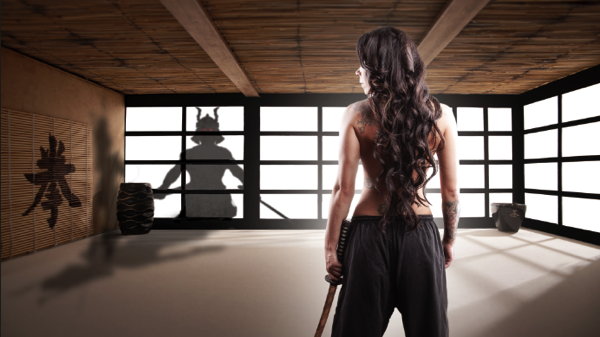
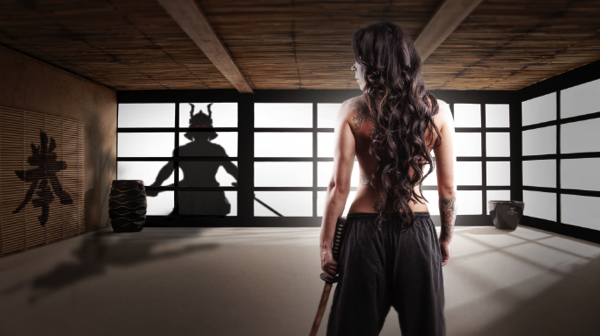
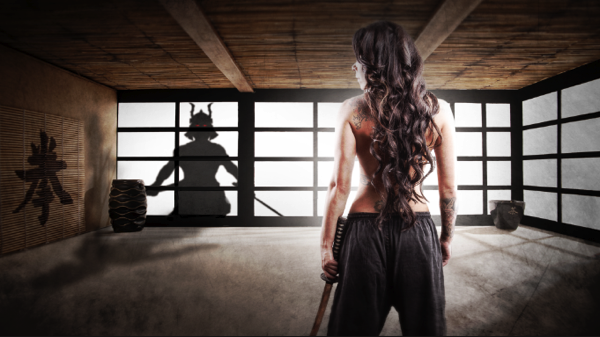
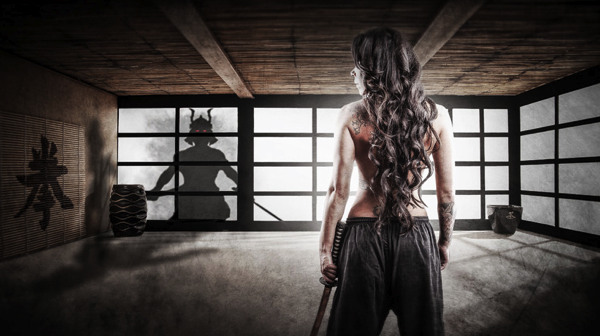
In this article I’ll show you how the “Samurai Girl” picture was done step by step. In addition there is a speed art video at the end of the article that shows the whole process from start to end in a 05:47 minutes Youtube video. It should make the whole process clearer.

Feel free to send me your questions via email at tom@purple-monkey.com

1 Base Image Jessica

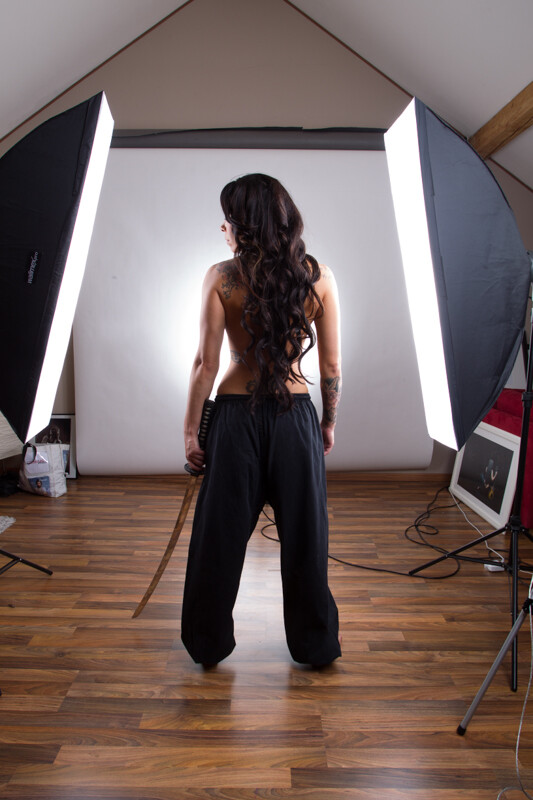
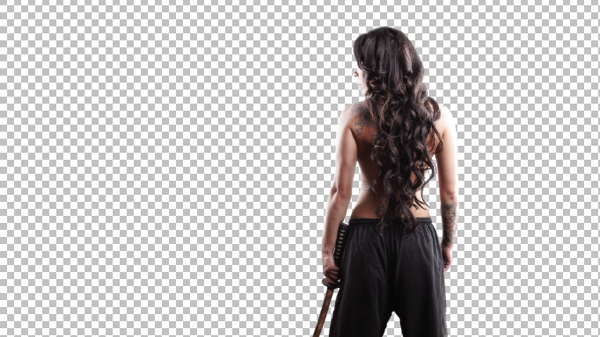
Here is the image as it was shot. Before I start to extract the subject I use a technique to create that look on my models that consists of 6 Layers. I will write a separate tutorial on that topic, as it will deviate too much from the point of this tutorial.

2 Model Liquify copy

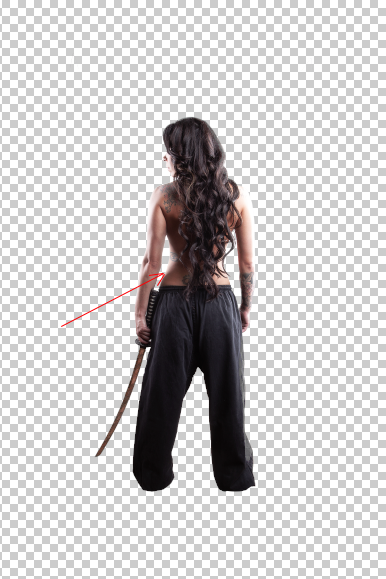
I started with cutting out Jessica from the background. When you know that you are going to extract the subject for a photo manipulation or composite, make sure you shoot them on a background that will create an nice contrast around the edges. It will make your life a lot easier for the extraction process. The method I use to extract my subjects varies a lot depending on the need and the situation. The tools I usually use are the Pen Tool, Brush, Refine Edge, Lasso, Quick Selection and the Blending Option effects. In this case I used a mixture of Pen Tool, Brush and Refine Edges.

3 Mask

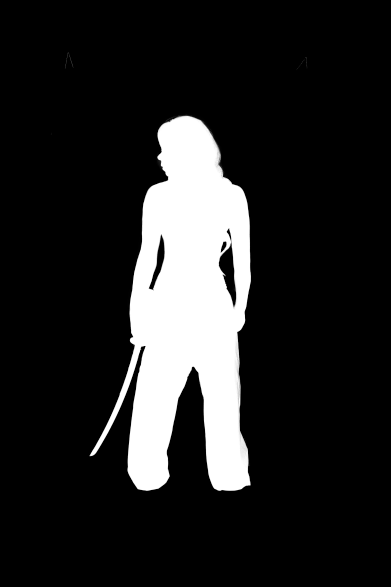
Here is a picture of the finished mask. I like to check the mask for imperfections by “Alt” clicking on the layer mask.. What I also do a lot is to check the mask against a white and a black background. I will usually show you all the imperfections on the mask especially fringing. If the extraction looks good against both backgrounds, then you can be sure that you won’t need many adjustments anymore against your final background.

4 Integrate into Image

I usually work on picture in the 16:9 format. Sometimes I quickly sketch my ideas on a piece of paper or on the iPad. I basically gives me an idea about the composition of the image. As soon as Jessica was extracted from the background I moved her over to the canvas using the move too. I scaled her down and positioned here approximately. I slightly corrected her position once the background was inserted.

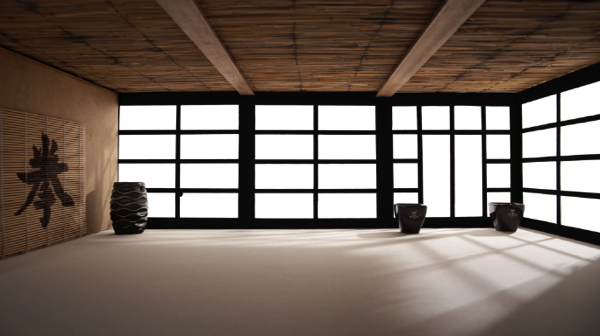
5 Original BG

At this point I also imported my background in order to see what color corrections would be needed to integrate Jessica into it. When I opened the stock image for my background I saw some things that would need modification.

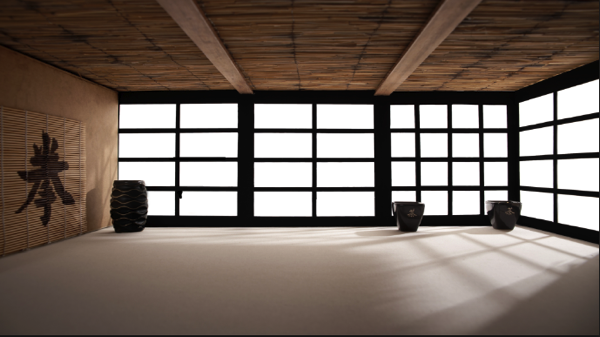
7 Corrected Bg

I didn’t like the doors on the right side as it would look weird when Jessica would be in position. So I just added some horizontal bars to solve that issue.

6 Gradient for Model

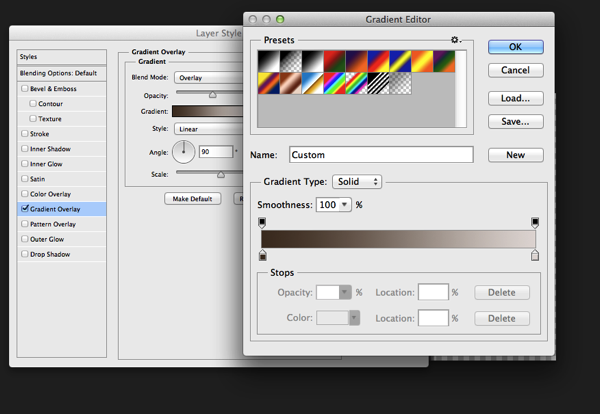
The first step I used to integrate Jessica was a Gradient map. The colors I used for the shadows was a sample of the wooden door frame (very dark brown) and for the highlights I used a sample of the Tatami. I lowered the opacity to about 45% to achieve an acceptable value. It’s important when you use this method that you use colors that are already present in the palette of the image.

8 Samurai

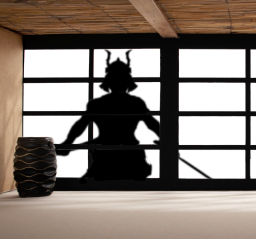
Next step was to integrate the Samurai. I’ve build the Samurai out of several stock photos and used an adjustment layer to darken it to complete black. I used a layer mask to hide the wooden frame of the window.

9 Samurai Eyes

In order to make it more realistic I’ve added a dirty texture on top of the Samurai with a blending mode Overly and I slightly blurred him, since what we actually see is a shadow on the fabric. I then added the eyes with the brush tool and some subtle outer glow effects.

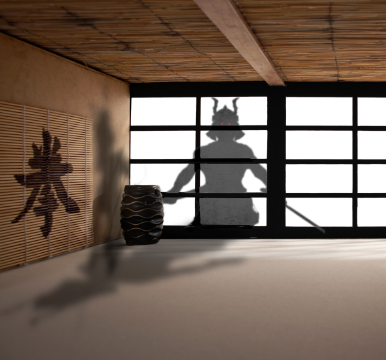
Next step was to create the shadows on the floor and the wall. I duplicate the Samurai Layer and used distort and warp to adjust it’s shape. I also painted the shadows onto the barrel, in the original picture the barrel was brightly lit from the right side. Since the Samurai is standing in front of it, the light source would be blocked.

13 Overlay Color

To blend everything together I use a simple technique that is not well known out there. I merge all the Layers together onto a new Layer ( Shift+Ctrl+Alt+E (PC) or Shift+Command+Option+E (Mac) ) and then use the Blur Average Filter. Switch the blend mode to overlay and reduce the opacity until the color matches. I then used the Tilt-Shift filter to align the average depth of field of Jessica to the background.

14 tilt Shift and Light

Finally I created a new layer on top of it change it’s blending mode to overlay and painted with a soft black brush around the samurai and around Jessica in order to direct the viewers eye through the picture. A last step was to lay a grungy texture in overlay over the whole image and reduce it’s opacity quite a bit.

15 Final

I try to do a maximum in Photoshop in terms of light and shadows. But when I finish an image I always have some fun in Lightroom with some presets or simply play around with the sliders. Some times I end up not using any of it, but most of the time I find some settings that adds value to the overall image. Now there is no secret to this, I just play around with Clarity, Blacks, Temperature, and Contrast until I see it going somewhere. In this case I added some contrast, quite a bit of Clarity and slightly desaturated the image.

16 Final LR

Here’s the video of the whole process dialed up to about 1000%

Check out more of Tom Di Maggio’s work at his websites at TomDiMaggio.com, Purple-Monkey.com” and on Facebook.

Post originally from: Digital Photography Tips.

Check out our more Photography Tips at Photography Tips for Beginners, Portrait Photography Tips and Wedding Photography Tips.

Samurai Girl Composite: Behind the Scenes Post Production Walk Through


Digital Photography School

 
Comments Off on Samurai Girl Composite: Behind the Scenes Post Production Walk Through

Posted in Photography


Keep Track of Your Life Through Photos with the Days App

14 May

You had a journal once.

Then, your little sister found it and told your crush all about your dreams of running away to Disneyland to fulfill your dream of meeting Ariel IRL.

That was embarrassing.

Days is totally not that. It’s a journal (disguised as an iOS app) that you’ll *want* to share with friends.

The goal behind the app is to have you document your life in photos as it happens.

Shoot photos throughout the day, and publish your post of photos the following day in a visually delightful grid of time-stamped pics.

How the heck is this different from Instagram? So many ways. Cool ways, too.

  1. You can’t upload photos. Your photo must be taken at that very moment.
  2. No filters. Just pure, raw, unadulterated snaps.
  3. GIFs! You can make real life, honest-to-blog moving images.
  4. The interface is so adorable, you’ll want to break something.

Documenting your life is so much more fun in photos, and your little sis won’t have any ammo against you. Win.

Photograph Your Days with Days

p.s. WE ARE HIRING A WEB DEVELOPER. If you love photography and San Francisco and codes, APPLY HERE.

p.p.s. WE ARE ALSO HIRING AN EVANGELIST/BIZ DEV HERO. Creative deal-maker types, APPLY HERE.

Related posts:

  1. Simplify Your Life: Send Photos to Different Sites at the Same Time Thanks to returning sponsor MailChimpfor making this week’s Photojojo possible….
  2. Polaroid: R.I.P. in 14 Days 🙁 Orders placed in the Photojojo Shop today will arrive for…
  3. Track the Worldwide Photographic Zeitgeist with Flickrvision Astronauts have it tough. Sure, they get to float in…


Photojojo

 
Comments Off on Keep Track of Your Life Through Photos with the Days App

Posted in Equipment


100 Cameras — How to Improve Kids’ Lives Through Photography

30 Apr
Photo by Brooke Schwab

Photography is a solo sport. It’s just you and your camera out there!

You’ve asked yourself a million times how you can make a difference with your photo skills, and 100 cameras figured it out.

This non-profit gives cameras to kids in developing communities around the world. Which is so great!

The kids are then able to sell their own photos giving them educational resources, healthcare, and lifeline supplies. Even greater!

These new photogs also learn about empowerment — they first-hand experience their own talent and skill positively affecting their communities.

Remember the first time you felt you could make a difference? Suddenly you felt like you could do so much! One empowering experience is all it takes.

BTW! 100 Cameras is actually raising funds to launch 100 Cameras 2.0, which will let anyone start their own photo community. Helping kids with photography? Sounds like a no-brainer!

Help Kids via 100 Cameras

p.s. Attention gadget lovers – we’re hiring for a Buyer aka Treasure Hunter. Apply here.

Related posts:

  1. How Cameras & Toys Change Kids’ Lives We’ve all been there: not having the words to express…
  2. How Shooting Just One Thing Can Improve Your Photography Chops ~Have a cool photo product or site? Reach 270,000 photo…
  3. See Through Your Kids’ Eyes, Wirelessly Upload from Their Camera to a Flickr Stream The little ones in our lives are fascinating people. They…


Photojojo

 
Comments Off on 100 Cameras — How to Improve Kids’ Lives Through Photography

Posted in Equipment


1/2 way through a pour

03 Apr

Check out these visual art images:

1/2 way through a pour
visual art
Image by bettlebrox
Mass Art’s Spring 2009 Iron Pour.

www.eworksfestival.com/index.php?page=events/4_10
The Iron Pour has a strong history at Massachusetts College of Art, beginning as a fundraiser for the Metals Department, it has grown into a celebration of art, music, and performance. Recently, the Iron Corps., the group that organizes the event, has been working in conjunction with Eventworks, who will be kicking off their annual Art Festival. This spring, we will be invoking themes of outer space and the explosive demise of stars and planets . Aside from the spectacular sculptural performances by the Iron Corps. , activities will include face painting, fire dancing, visual shows, and four musical acts throughout the course of the night.

VSP Visual Street Performance 2007 @ Fabrica Braco de Prata, Lisbon, Portugal
visual art
Image by Graffiti Land

 
Comments Off on 1/2 way through a pour

Posted in Photographs


Tentacle-Like Tubular Slide Swirls Through NYC Penthouse

13 Mar

[ By Steph in Architecture & Houses & Residential. ]

Penthouse Slide 1

A silvery steel tentacle swirls through four stories of a bright white renovated 19th-century penthouse in New York City. Architect David Hotson turned the modern space into a playful residence for children and adults alike with the remarkable tubular slide, a floral-printed ‘nest’ accessible by a bridge, vertical climbing surfaces and a swing dangling three stories above the ground.

Penthouse Slide 2

Penthouse Slide 3

The polished stainless steel slide starts in an attic space with a funnel-like entrance, winds down through an interior window and offers an exit on the next floor before spiraling down three more stories. A faceted white staircase offers a more conventional way to get from floor to floor, that’s no less visually stimulating.

Penthouse Slide 4

Penthouse Slide 6

The nearly all-white space is punctuated with neon furniture and artwork, playful details that break up the gallery-like expanses of walls. At the center of the space is a four-story entry hall spanned by glass bridges, bringing daylight down into the living room from the upper floors.

Penthouse Slide 5

Penthouse Slide 7

Taking advantage of a unique space never before used as a residence, Hotson pays tribute to the architectural character of the surrounding cityscape, installing windows that perfectly frame landmarks like Frank Gehry’s residential tower and the Chrysler Building.

Share on Facebook


[ By Steph in Architecture & Houses & Residential. ]

[ WebUrbanist | Archives | Galleries | Privacy | TOS ]


WebUrbanist

 
Comments Off on Tentacle-Like Tubular Slide Swirls Through NYC Penthouse

Posted in Creativity


Weddings Through The Eyes of a “Noob”: Lessons I Learned

23 Feb
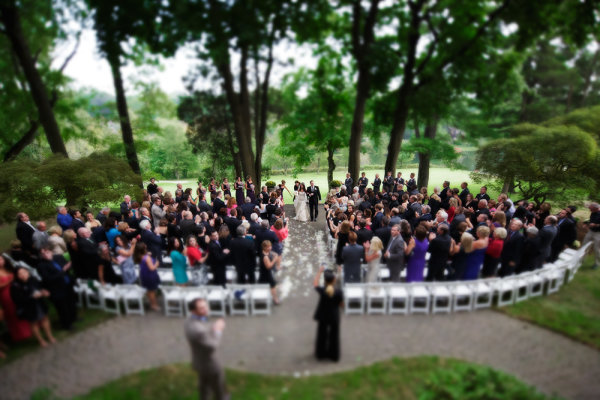
One of the things I'll do is set up a remote camera in the back of the ceremony, elevated if possible.  In this shot, a tilt-shift lens was used to create that miniature look.  EOS 5D Mark III, TS-E 17mm f/4L. Exposure was 1/320, ISO 3200, f/4.

One of the things I’ll do is set up a remote camera in the back of the ceremony, elevated if possible. In this shot, a tilt-shift lens was used to create that miniature look. EOS 5D Mark III, TS-E 17mm f/4L. Exposure was 1/320, ISO 3200, f/4. Photo by Rick Berk/kNot Photography

Throughout the first 20 years of my career in photography, I’d photographed a lot of different things- NHL All-Star games, Major League Baseball, NFL Football. I’d photographed portraits, boudoir, model portfolios. Landscape photography became a passion of mine. One thing I never photographed was a wedding.  When I began my career, I assisted on exactly two weddings. Never did I shoot one.  The two weddings I assisted on went so badly that I never wanted to touch one again.  I thought all weddings were like that. It wasn’t until years later that I understood it was more the photographer I worked for than it was the weddings themselves.

This type of shot is the kind that makes for a nice touch in the overall collection from a wedding.  They complete the set and really show a photographer's attention to detail.  EOS-1D X, EF 100mm f/2.8L IS Macro. ISO 800, 1/200, f/8.

This type of shot is the kind that makes for a nice touch in the overall collection from a wedding. They complete the set and really show a photographer’s attention to detail. EOS-1D X, EF 100mm f/2.8L IS Macro. ISO 800, 1/200, f/8. Photo by Rick Berk/ OneRedTreePhoto.com

For a variety of reasons, I made myself available as a second shooter in 2012, and got my first taste shooting weddings.  That first one was intimidating, but I learned a few things along the way.

This is a must. Depending on the setting it will always change, but at least one formal portrait of the bride is essential.  This shot simply used on camera flash, bounced into a reflector at camera left. EOS-1D X, EF 85mm f/1.2L II. 1/250, f/1.2, ISO 400.

This is a must. Depending on the setting it will always change, but at least one formal portrait of the bride is essential. This shot simply used on camera flash, bounced into a reflector at camera left. EOS-1D X, EF 85mm f/1.2L II. 1/250, f/1.2, ISO 400. Photo by Rick Berk/OneRedTreePhoto.com

1. Prepare and be organized.

Prior to the wedding day, speak to the bride and groom about what shots they absolutely must have. Plan when and where you will be shooting each of the shots. If you’re doing group shots in the park, make sure they know that’s the plan, and when you need them there.  Keep a shot list with you. Don’t promise anything more than that you will try to get these shots, because things could always happen preventing you from getting the shot. But at least this way you know what to try and focus on.  This is also where you manage their expectations so they understand that you can’t possibly get EVERYTHING, but you will try to get what’s most important to them.

2. It’s your job to manage things.

Your bride and groom have a ton on their plates on the wedding day. Photography is the last thing on their mind. But you still need to get the shots and you need to do so as efficiently as possible so as not to hold up the proceedings.  Gentle reminders to the bride and groom about the shots they wanted will help, especially if you can give them a few minutes warning. For instance, “We need to get the family portrait, and we have a window in 5 minutes if we can get you all together,” works fine.  They WILL ask why the shot isn’t there if you don’t get it, and even if they are resistant during the event, they will thank you later.

3. Do what you can without their cooperation.

Yes, there will be some shots you absolutely need to pull the bride and groom away for.  But if you can manage to get shots without interfering in their activities, you’ll be exactly the kind of wedding photographer everyone wants- an invisible one who delivers the goods. Shoot preparation shots, detail shots of the rings, the cake, etc., while you have the free time and nothing else is going on. Getting those kinds of shots out of the way makes it easier to get the really important stuff later.

4. Don’t try to go it alone.

It’s easy to underestimate how much work goes into shooting a wedding. Many times, a photographer’s first taste is when a friend asks them.  It’s an honor to be asked, but it’s also a great responsibility.  Theoretically, this is a once in a lifetime event.  You can’t be everywhere at once.  The weddings I worked as a second shooter, I wasn’t a secondary shooter.  I just wasn’t the guy contracted to do the job.  But I shared responsibility for getting certain shots. For instance, the bride and groom getting ready at different locations. One of us would go to the bride’s, one to the groom’s. We’d meet back at the church, or at another location where we might be doing shots, depending on how the day is planned.  This takes a huge amount of pressure off.  In terms of the ceremony, it ensures that multiple angles are covered so if one of you is blocked, the other might have a chance at getting the shot.

5. Be on the lookout for those special moments.

It can be easy to focus on the primary photos and lose sight of those smaller, special moments that, when captured, make for the best images. Be on the lookout for a tender moment between bride and groom, the bride and her father, or the groom and his mother. Look for moments with friends and relatives that might end up telling a story.  This means your camera is always ready and you are always watching. There is no time to let down your guard.

6. Approach it like any other shoot.
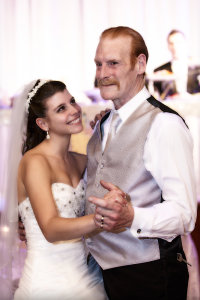
There are a lot of little moments that make up a wedding day. Near the end of the father-daughter dance, the bride looked up and had this beautiful expression of admiration for her father. When her mother saw the image, tears came to her eyes.  As a photographer, those are the moments I live for.

There are a lot of little moments that make up a wedding day. Near the end of the father-daughter dance, the bride looked up and had this beautiful expression of admiration for her father. When her mother saw the image, tears came to her eyes. As a photographer, those are the moments I live for. Photo by Rick Berk/OneRedTreePhoto.com

One common theme I’ve heard from all photographers thinking of diving into the wedding pool is that they build it up so much that they become intimidated by it. You were hired for your expertise, so approach it like anything else. Look for creative shots you can use to illustrate the day, to give a storybook feel to the images, and to capture the emotion. If you need the bride and groom and other family members in a certain spot, direct them as you would a portrait shoot. Don’t be afraid to ask for them to do something for you if you think that by doing so, you can provide them with a shot that will make them remember the day fondly for the rest of their lives.

7. Use ALL of what you have.

In my bag at most weddings I keep a 24-70mm lens and 70-200mm lens.  These are my workhorse lenses. But I try to offer variety and for me this means using different lenses for different shots.  I have a 100mm macro for ring and detail shots, but also for portraits.  I use a fisheye lens for some candids on the dance floor. I’ll use an ultra wide angle like a 16-35mm.  I keep a couple of speedlites with me.  Sometimes I use them on camera, sometimes off, and sometimes I turn it off and just shoot available light.  The point of all this is to provide variety.  Different shots with different looks create more interest when the images are viewed as a collection. Yes, you could get away with using a 24-70 for the entire day, but I like to change things up when I can.

8. Have backup.

This means a backup camera, flash, batteries, memory cards.  Anything that can die, go bad, break, corrupt.  If you are being paid, you are considered professional, and being a professional means that the words “My camera broke” cannot be used as an excuse.

9. Check with the officiant

Each priest, minister, judge, or other officiant I have worked with so far has had a different set of rules where photography during the ceremony is concerned. Prior to the ceremony, introduce yourself, and ask what is permissible and what isn’t as far as you are concerned. Is flash ok during the ceremony? Where would he prefer you NOT be during the ceremony? Laying the ground rules beforehand can make a huge difference in how you cover the event.

10. Have fun!

Weddings are fun, happy occasions. Enjoy it. There’s good music, happy people, and you get to capture the memories. If you are enjoying yourself, it will show in your work.

For 20 years I always swore I wouldn’t touch a wedding.  But having shot three of them now, I find I enjoy the challenge and creativity of capturing these once (or twice) in a lifetime event for the couples I’ve worked with. No, they aren’t for everyone. But with the right attitude and know-how, they can be incredibly satisfying to shoot.

When the dancing started I decided I wanted something different. I mounted a 5D Mark III on a monopod with 14mm lens. a flash was mounted on the camera with the head aimed at the ceiling for bounce. Using a remote release, I got the bride's attention and waited for her reaction, firing when I saw it.

When the dancing started I decided I wanted something different. I mounted a 5D Mark III on a monopod with 14mm lens. a flash was mounted on the camera with the head aimed at the ceiling for bounce. I held the camera out over the dance floor by extending the monopod a few feet. Using a remote release, I got the bride’s attention and waited for her reaction, firing when I saw it. Photo by Rick Berk/kNot Photography
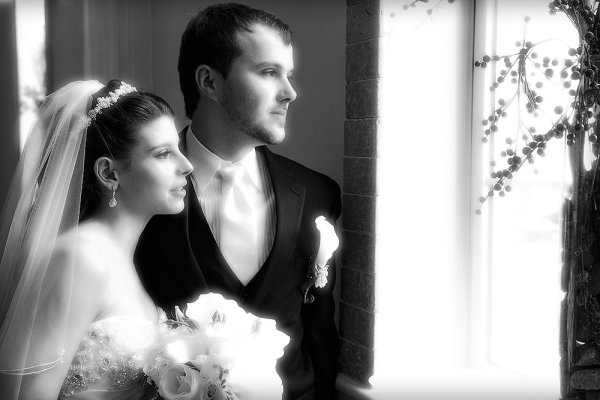
The church had these huge windows with light pouring in.  I knew I wanted to use it but time was tight.  I grabbed the bride and groom quickly and asked them to stand by the window and look out.  I fired off a handful of shots varying the exposure a bit. The black and white conversion added a nice artful touch. EOS-1D X with EF 24-70 f/2.8L II. ISO 1250, 1/100 f/5.6.

The church had these huge windows with light pouring in. I knew I wanted to use it but time was tight. I grabbed the bride and groom quickly and asked them to stand by the window and look out. I fired off a handful of shots varying the exposure a bit. The black and white conversion added a nice artful touch. EOS-1D X with EF 24-70 f/2.8L II. ISO 1250, 1/100 f/5.6. Photo by Rick Berk/OneRedTreePhoto.com

Further Wedding Photography Reading:

  • 21 Tips for Amateur Wedding Photographers
  • 50 Must Have Wedding Photography Shots
  • The One Location Technique for Wedding Photography

Post originally from: Digital Photography Tips.

Check out our more Photography Tips at Photography Tips for Beginners, Portrait Photography Tips and Wedding Photography Tips.

Weddings Through The Eyes of a “Noob”: Lessons I Learned


Digital Photography School

 
Comments Off on Weddings Through The Eyes of a “Noob”: Lessons I Learned

Posted in Photography