RSS
 

Posts Tagged ‘this..’

Is HDR dead? Some dPS Writer’s Thoughts on this Controversial Topic

02 Jun

HDR (High Dynamic Range) photography has been around for quite a few years now. It is a technique that allows you as a photographer to use bracketed images, to capture as much of the dynamic range in a given scene as possible. Dynamic range is the measurable difference between the brightest highlights, and darkest shadows, in a scene that you are photographing.
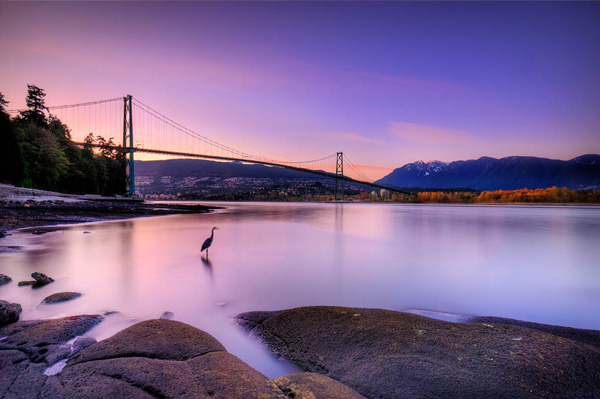
Lions Gate Bridge Vancouver - HDR image

Lions Gate Bridge Vancouver – HDR from three bracketed images.

HDR became a very useful tool a few years ago as digital cameras were initially really bad at exposing the highlights in a scene correctly. Many photographers (myself included) would expose for the highlights in the scene and then pull back detail in the shadows in Photoshop or Lightroom. This technique caused other problems. When editing afterwards in Photoshop, the shadow areas that had been lightened were really noisy, and looked gritty and low quality. HDR came along and solved some of these issues.

HDR was able to blend the highlights in the scene correctly and show details in the shadows. This was great news, and almost overnight, there were many top photographers singing the praises of this new technique. It was really a huge step forward in the digital photography world. There were a few glitches though. If you wanted to do HDR images, you needed to purchase a third party piece of software, Photoshop did not have an HDR tool at first. Secondly, you had to shoot between three and five bracketed shots to get all the detail into the final image. If you did both those things, and you did them well, you were rewarded with a unique looking image.

The other challenge was that the HDR software often made images look overdone. While the dynamic range in the HDR image was good, there were often halos and artifacting in the image. Sometimes the saturation was erratic and the images looked just a little weird. For a time, this HDR look became quite trendy. Trey Ratcliff became one of the leading voices on HDR, and was a proponent of using HDR wherever possible and on any image. He gathered a strong following and HDR became the new thing to do to your images.
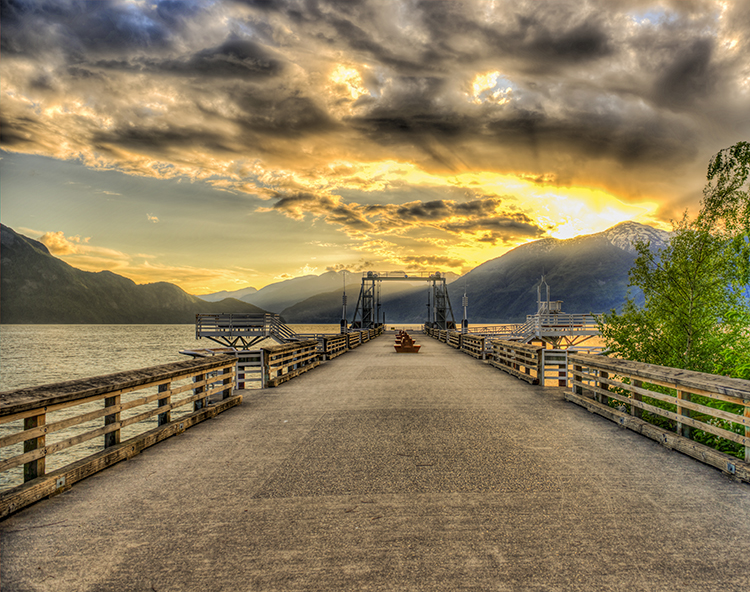
A somewhat overdone HDR image

A somewhat overdone HDR image

Fast forward to today. In recent years, the new camera sensors have improved on their dynamic range ability significantly. Also, improvements in RAW editors and quality means that cameras are now able to capture a lot more information that they did even five years ago, and a good RAW editor can bring back significant detail in the shadows and highlights.

So, the big question is this, is HDR dead or will it make a comeback? To add some insight to this, a few weeks ago, we posed this question to our own dPS writers and here are some of their responses:

What dPS writers have to say about HDR

All I know is, when I shoot my D750 at base ISO I can get more colors, and pull more from the shadows than I ever could on my D7100 with 5 stops of bracketed shots. So yeah…maybe the whole idea of bracketing to get HDR is going the way of the dodo bird. – Simon Ringsmuth
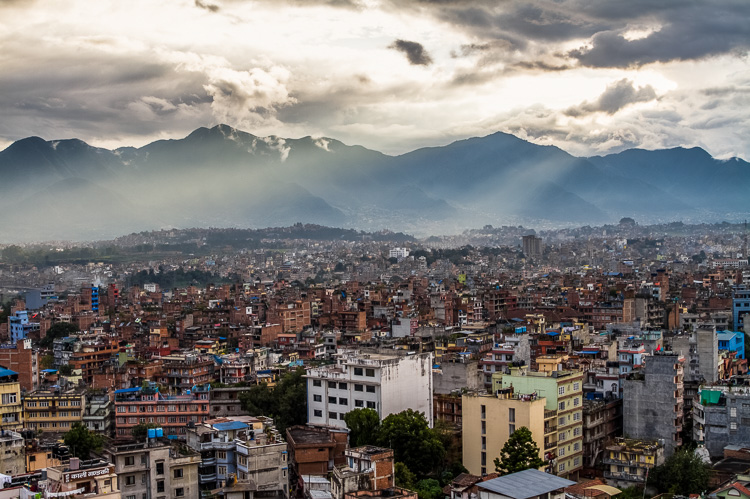
Sun rays wash over Kathmandu, Nepal (HDR by Peter West Carey)

Sun rays wash over Kathmandu, Nepal (HDR by Peter West Carey)

I think the technique has reached a more comfortable point, in that most people can recognize the truly horrible overcooked stuff now, and shy away from it….and more and more photographers are being responsible with it, merely pulling some dynamic range in their images with positive results. Lightroom doesn’t do a great job with the HDR merge, but the one thing it does is limit the super hot, overcooked messes 3rd party software can create. Personally, if I’m bracketing, I use LR to do a very subtle tonal merge. So I think LR will take a bit more of that market, especially as they update and improve the merge tool. So it’s not dead, in my humble opinion, it’s not even reborn. It’s just morphed into something a bit more pleasing, and still relevant. But it’s also true that these sensors are allowing for some really amazing single-file stuff. – Tim Gilbreath

The over processed, halo skies, over saturated look are popular on Instagram! But that’s about it now. HDR has been declining in popularity (at least amongst pro’s) for a while now…medium format users have always had an advantage, though! – Daniel Smith
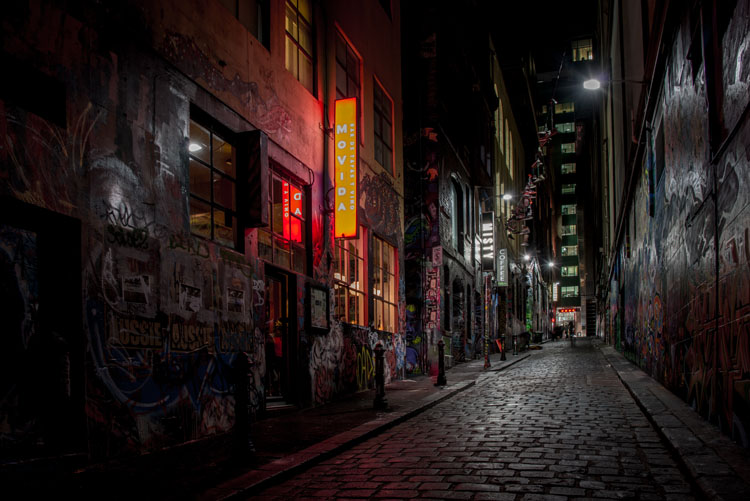
HDR by Leanne Cole

HDR by Leanne Cole

HDR might not be dead, but the newer DSLR (especially the newer full frames) wider dynamic range makes it needed less. I only do HDR when I can’t get the range I am looking to achieve in the final image. LR’s merge to HDR has made creating HDR much easier. I like the natural look to HDR, and not the overcooked look that some are using. Since switching to full frame I don’t do nearly as many HDR images as I once did. – Bruce Wunderlich

It’s becoming less and less important, and in 5 years it won’t be needed, in that dynamic range and presentation out of camera will be the same as what the human eye sees. Beyond some artistic renderings, once you pass what the eye and brain are used to, it jolts people out of the natural experience and into something else, another form of art. I don’t like having to use HDR techniques and am happy that LR’s version works just fine for most of my uses. I just WYSIWIG straight out of the camera. As a side note, the in-camera HDR in the Canon 7D Mark II is not that usable, and I’d rather do it in post-processing. – Peter West Carey

HDR by Peter West Carey

HDR by Peter West Carey

Cameras will continue to improve. We saw the megapixel war, and the ISO range war, and now maybe there will be a dynamic range war. In regards to software I think we’ve seen both simplified solutions (i.e., Lightroom’s built-in option) and more complex solutions (Trey’s Ratcliffs new software – Aurora HDR) try and tackle the job. In the long run, simplified wins in my mind, especially as cameras become more capable. HDR as a style though, may still persist. I’d argue that overall it will continue to mature as a style, and as a result the over processed, over saturated photos, will become fewer and fewer – but there will still be those that enjoy that type of work – so it could still persist. – John Davenport

I really think the HDR war is going to be the new frontier, at least for the next few years. Even on mobile phones it’s going to be all about how much light you can capture (i.e. shooting at high ISO values, or making lenses with wider apertures) but ultimately the focus is going to be on coaxing as much data out of the image as possible. Whether through automated in-camera software processes, which we already see quite a bit, or using software like Lightroom or Aurora HDR, we’re going to see a lot of emphasis not on how many pixels the image has, but what software can do with those pixels to make the best possible image. – Simon Ringsmuth

I rarely do HDR now, but I still love it for night photography. – Leanne Cole
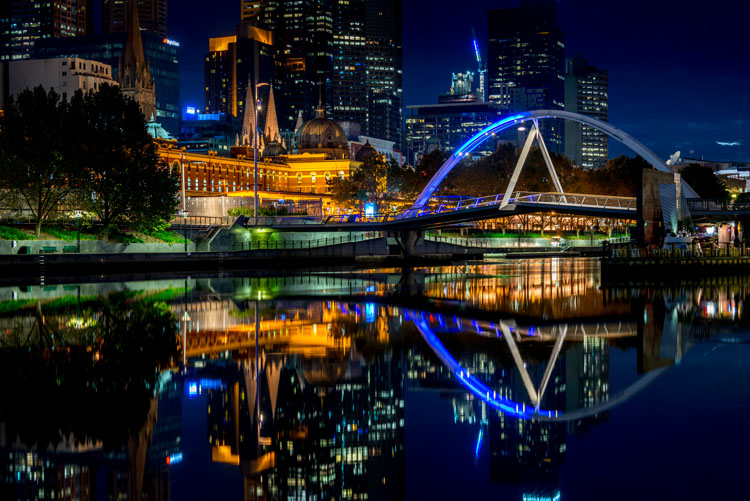
leannecole-Is HDR dead article-1

HDR by Leanne Cole

When we were browsing real estate listings the other day, the listings were FULL of HDR photos of things like…people’s living rooms. We’re not talking million dollar homes, or spectacular views. We’re talking Joe Plumber’s 1000 sq. ft. starter home HDR’ed to high heavens. It looked so absurd! – Meredith Clark

I have the D750 and its dynamic range is phenomenal! However, I have never been a fan of the over processed HDR effect that seemed popular at one time…or maybe still is! – Sarah Hipwell

HDR processing still has its place. While today’s cameras capture a higher dynamic range than older cameras, there are still situations when blending exposures results in greater detail throughout the range. To avoid the “overcooked” look, which thankfully was a fad, I tend to blend my exposures manually rather than use a plugin. – Anne McKinnell
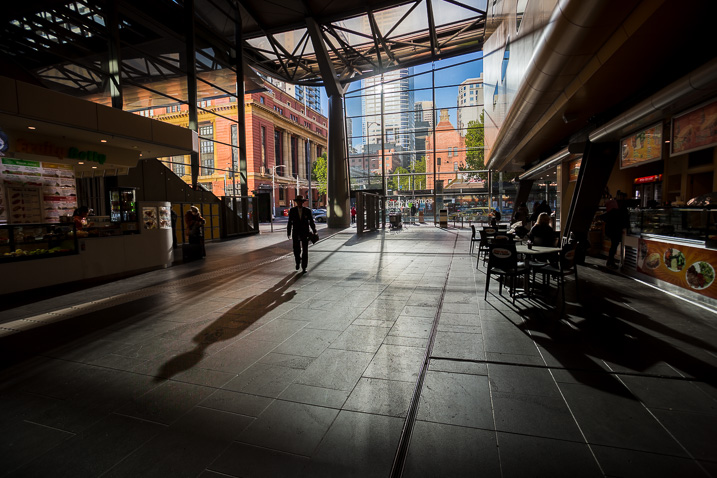
HDR-dead-dps717px-01

HDR of 6 bracketed images, merged and processed in LR – image by Darlene

HDR isn’t new, it’s decades old. Ansel Adams did it with his Zone System and dodging and burning in the darkroom were also a form of HDR (tone control for more detail). Somewhere along the way it became more about a particular style. To me, HDR simply means what the letters stand for – High Dynamic Range – which represents a scene that your camera is unable to capture the entire tonal range due to high contrast. How that is dealt with that is up to each photographer. Do you bracket and blend exposures, do you use layer masking or luminosity masks to open up detail, or do you just let it all fall where it may and go realist? I’ve gone through all the stages of an HDR photographer and now I tend to lean towards more natural, and using LR’s merge to HDR works for me. – dPS Managing Editor Darlene Hildebrandt

What has changed?

With all the new sensors and updated software (Lightroom, Photoshop and standalone products like Aurora HDR and Photomatix) there are plenty of options to create truly amazing HDR images. The other option is to create a well balanced, and well edited photo, from just one image. This requires a bit of know-how with your chosen image editing suite. But with a bit of practice, you can create some amazing images that have just as much detail as any HDR image. Also, your images will look more realistic, and sometimes that may be necessary (for example, you may be shooting for a client who does not like the HDR look).

Below you will see an example where I have compiled an HDR image from 3 bracketed images. The next image is the best shot edited alone in Photoshop CC.
This image was 3 shots processed in HDR software

This image was 3 shots processed in 3rd party HDR software

This image was a one stop underexposed shot, edited in Photoshop CC

This image was a one stop underexposed shot, edited in Photoshop CC

Depending on what your goal is with HDR, you can achieve a lot with the right editing tool. The single image above, that was edited was done from one image, was shot on a Nikon D800 and edited in Photoshop CC. The details on this image are fantastic and you can see it’s pretty close to the HDR image style-wise. The result is not as random as the HDR image, and for the most part, when I use HDR software, I would edit to get the most realistic results, not a punchy, psychedelic look.

The next two images are of Vancouver Convention Centre at blue hour. It shows how much detail can be pulled out of a single image. The first image is the unedited version, the second image is the final shot. The details are pretty close to what you could get with HDR, but without some of the punchy tones.
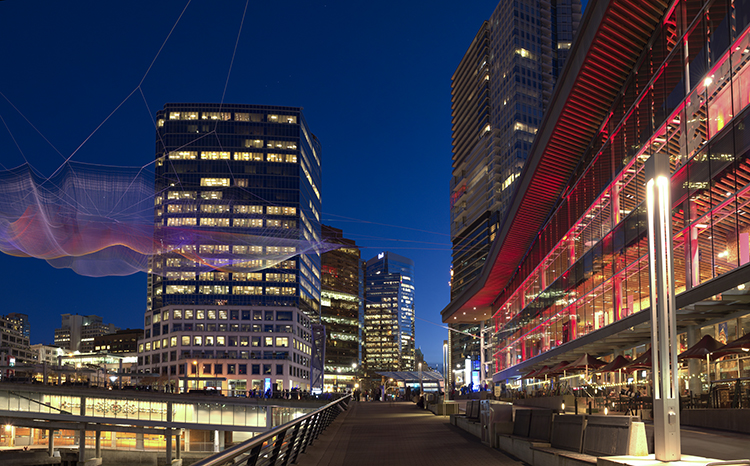
Unedited image shot in Vancouver
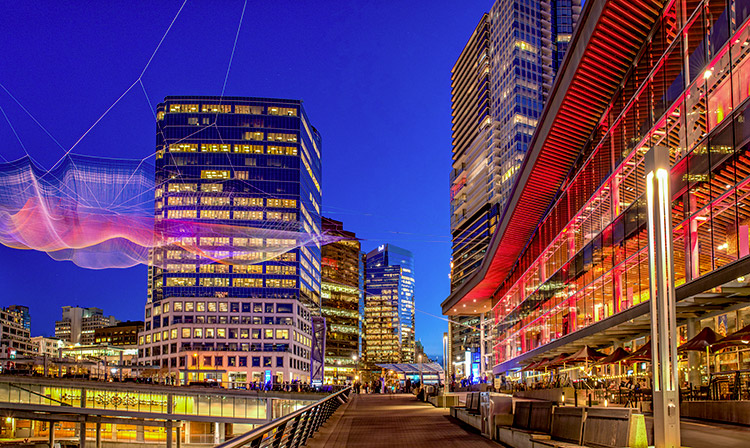
Unedited image shot in Vancouver

Vancouver-after

Edited image, notice how much detail can be pulled out of one shot

So, what do you think? Is HDR dying? do you still use it or do you use it less? When do you use it?

Let us know what your comments and ideas are, we are curious to know.


Editor’s Note: This is one of a series of articles this week that are Open for Discussion. We want to get the conversation going, hear your voice and opinions, and talk about some possibly controversial topics in photography.

Let’s get it started here – do you agree or disagree with the points in the article above? Do you have any others to add? Give us your thoughts below, and watch for more discussion topics each day this week.

See all the recent discussion topics here:

  • 7 Commonly Accepted Photography Beliefs Debunked

googletag.cmd.push(function() {
tablet_slots.push( googletag.defineSlot( “/1005424/_dPSv4_tab-all-article-bottom_(300×250)”, [300, 250], “pb-ad-78623” ).addService( googletag.pubads() ) ); } );

googletag.cmd.push(function() {
mobile_slots.push( googletag.defineSlot( “/1005424/_dPSv4_mob-all-article-bottom_(300×250)”, [300, 250], “pb-ad-78158” ).addService( googletag.pubads() ) ); } );

The post Is HDR dead? Some dPS Writer’s Thoughts on this Controversial Topic by Barry J Brady appeared first on Digital Photography School.

Digital Photography School

 
Comments Off on Is HDR dead? Some dPS Writer’s Thoughts on this Controversial Topic

Posted in Photography


ON1 Photo RAW, a new non-destructive Raw processor, launches this fall

29 Apr

ON1, an Oregon-based photography software developer, has announced a combination non-destructive photo editor and Raw processor: ON1 Photo RAW. The application has been built from the ground up to work with modern computers and high-resolution camera systems. The software can open 50MP images ‘in a fraction of a second on a standard PC or Mac’ according to its maker and performs edits without lag.

ON1 has been developing Photo RAW for the past several years, doing so around its ON1 Browse photo browser to eliminate the need for cataloging and importing photos. Along with lag-free processing, it offers features like tagging, rating, adjustments and photo effects. The photo editor includes integrated masking tools, layers, and brushes; effects and adjustments are applied in a non-destructive manner, says ON1. 

Several usage options are available with ON1 — it can be used as a plugin for Adobe Photoshop and Lightroom, Corel, as a host app for Google Nik Collection, and as an extension for Apple Photos. ON1 says Photo RAW will support PSD, PSB, PND, DNG, TIF, and JPEG file formats.

ON1 Photo RAW is available to pre-order now for ON1 Plus Pro Members; a membership costs $ 149.99/year, and provides a perpetual license for ON1 applications. Members will receive ON1 Photo RAW first when it launches this fall. A non-membership ON1 Photo RAW purchase option will also be available.

Source: ON1


Press release:

Announcing the First New RAW Processor in Years, ON1 Photo RAW

The Future of RAW Photo Editing – Coming this fall – Includes support for over 800 cameras

Portland, OR – April 26, 2016 – ON1, Inc. today announced ON1 Photo RAW, the first all-new RAW processor and non-destructive photo editor to be released in more than a decade. With modern code optimized for today’s super-megapixel cameras and high-performance computer graphics systems, Photo RAW will be the world’s fastest, most flexible, and easiest-to-use RAW processor and photo editor on the market when it is released this fall.

The current class of RAW-based photo editors all have their heritage from the early days of digital photography, when most digital cameras had less than 10 megapixels, and computer processing power was a fraction of that found in modern PCs. When used with today’s popular 42- and 50-megapixel cameras, existing programs can often take seconds to render small portions of a RAW image and perform adjustments. Several years in the making, Photo RAW, with its modern RAW processing engine, is tuned for today’s sensors and graphics chips. It will open 50-megapixel images in a fraction of a second on a standard PC or Mac, and perform edits in real-time, without slider lag or frustrating waits for redraw.

Developed over the last several years, ON1 Photo RAW is built around ON1 Browse, the company’s lightning-fast photo browser, and will not require photographers to import and catalog their photos; an often painful and time-consuming process required before editing can begin. ON1 Browse is an integral part of Photo RAW, offering quick and easy ways to tag, rate, make color and tone adjustments, or add effects to their photos. Without catalogs, professionals will be able to make adjustments to photos and fellow colleagues can access and edit where they left off. This combination of a fast photo browser with instantaneous RAW processing will deliver a fluid, streamlined workflow to process any amount of photos all at once. Select one or 101 photos, make a few develop adjustments and all of the photos update automatically in real time.

ON1 Photo RAW’s instruction-based, non-destructive workflow will also surpass today’s RAW processors in other key ways. In addition to customary re-editable adjustments such as exposure, contrast, color, shadows and highlights, Photo RAW will also offer non-destructive effects and portrait retouching, something not present in any photo editor on the market. The complex filters found in ON1 Effects and ON1 Portrait—including Lens Blur, Skin Retouching, Dynamic Contrast, HDR Look and many more—are all available in Photo RAW’s non-destructive workflow. The controls found throughout ON1 Photo RAW will also respond in real-time by leveraging modern video cards, using the latest versions of OpenGL and OpenCL.

ON1 Photo RAW will include built-in layers, brushes, and advanced masking tools, making it a full RAW processor and complete photo editor in a single app. And, unlike any other photo app, Photo RAW will work the way you want, and where you want. For photographers with established workflows, Photo RAW will work seamlessly as a plug-in for Adobe Lightroom®, Photoshop®, and Corel®; a standalone host app for Google® Nik Collection and other photo editors; or as an extension to Apple® Photos. Common file formats—including JPEG, TIF, PSD, PSB, PND, and DNG—will be supported and will benefit from the speed and performance of the app.

Price and Availability

ON1 Photo RAW will be available this fall. You can pre-order ON1 Photo RAW today by becoming an ON1 Plus Pro Member at $ 149.99/yr. Plus Pro members receive a perpetual license for all ON1 apps (not a subscription) and will be the first to receive the app once it becomes available. If you want to purchase ON1 Photo RAW without becoming an ON1 Plus Pro Member, you can submit your email address on the ON1 Photo RAW web page to get the latest news, videos, beta, and pre-order announcements.

Owners of previous versions of ON1 Photo will have the option to upgrade to ON1 Photo RAW. The upgrade price will be determined at a later date. There will be special pricing for Photo 10 purchasers. Customers will be notified over the course of the next several months providing their upgrade information.

Articles: Digital Photography Review (dpreview.com)

 
Comments Off on ON1 Photo RAW, a new non-destructive Raw processor, launches this fall

Posted in Uncategorized


Nikon SnapBridge now available for Android, iOS to follow this summer

20 Apr

Nikon’s SnapBridge app is now available for Android. First announced as a feature on the Nikon D500, SnapBridge allows photographers with a compatible Nikon digital camera to maintain a connection to a mobile device using Bluetooth low energy. Read more

Articles: Digital Photography Review (dpreview.com)

 
Comments Off on Nikon SnapBridge now available for Android, iOS to follow this summer

Posted in Uncategorized


Marine Miracle: Walk on Water at This Sunken Seaside Pavilion

29 Mar

[ By Steph in Architecture & Public & Institutional. ]

walk on water pavilion 3

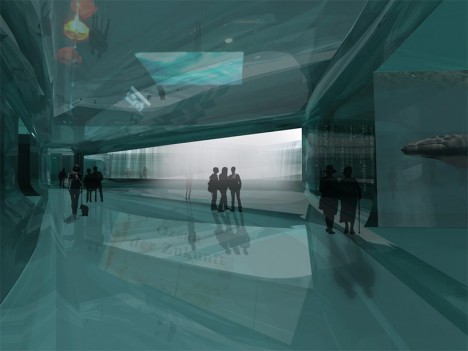
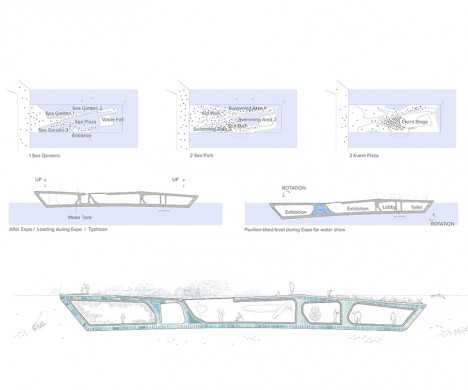
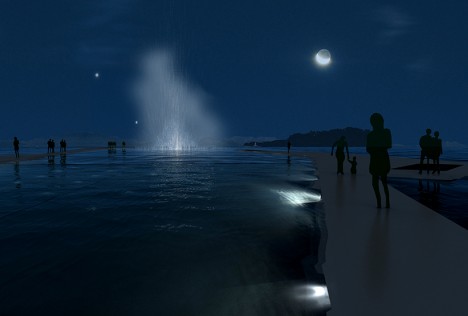
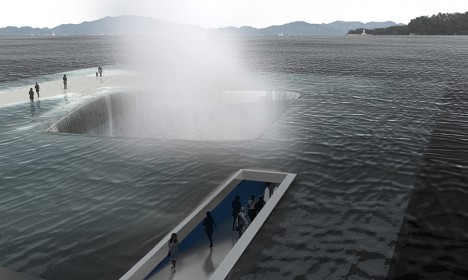
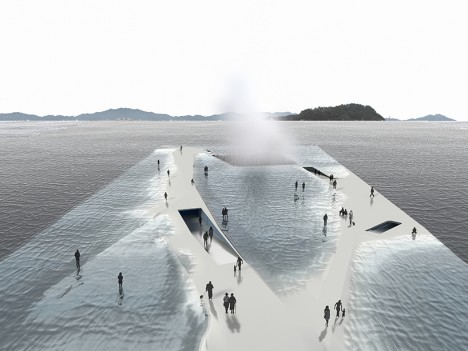
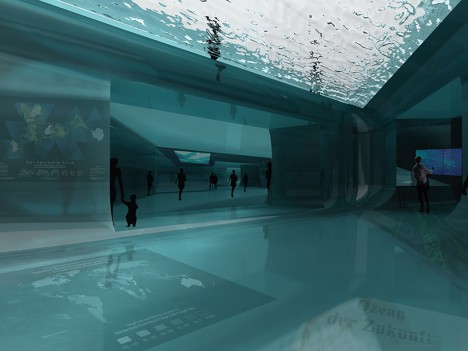
Walk right out onto the surface of the sea or follow a path that takes you into a tranquil space beneath the waves at the ‘Thematic Pavilion,’ a mostly-submerged nautical exhibition space envisioned for South Korea. Daniel Valle Architects intentionally give the structure an uneasy, delicate sense of equilibrium with the water, drawing parallels to the realities many coastal communities could face in the not-so-distant future as sea levels rise. A visitor’s experience changes depending on the state of the water, with paths appearing and disappearing.

walk on water pavilion

walk on water pavilion 2

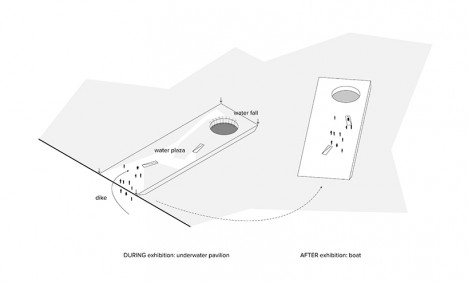
The pavilion features subtle raised areas offering clear paths that remain above the surface even when water levels are high and, presumably, when rocked by the wake of a nearby ship. In much the same fashion as a submarine, a water tank keeps the ship-like structure submerged for exhibitions featuring water-based technologies, and raises it above the surface afterward so it can be used like an ordinary boat.

walk on water pavilion 4

walk on water pavilion 5

The exhibitions themselves range from the dazzlingly visual, like water shows, to the technical, like hydraulics and cooling systems. “The design aims to raise people’s attention on the ocean and coastal environmental crisis,” say the architects. “The design hopes to provoke the deepest impression to the visitors and prepare them for information and critique on all issues related to the oceans and coastlines. The beauty of scene after visiting the exhibition space and returning to the top plaza will contribute to develop an optimistic conclusion.”

walk on water pavilion 7

walk on water pavilion 8

walk on water pavilion 6

While it seems like a lack of railings could lead some people to walk right off the edge, people in other areas of the world don’t seem to require the same kind of safety hand-holding as Americans, so maybe they’d be fine. The renderings look especially cool after dark, with illuminated water spouts shooting up into the sky. Though the proposal wasn’t chosen for the Expo 2012 in Yeosu, it’s an interesting idea that could provide inspiration to other structures blurring the lines between architecture and ship building.

Share on Facebook


[ By Steph in Architecture & Public & Institutional. ]

[ WebUrbanist | Archives | Galleries | Privacy | TOS ]


WebUrbanist

 
Comments Off on Marine Miracle: Walk on Water at This Sunken Seaside Pavilion

Posted in Creativity


New arrival: Tamron SP 85mm F1.8 launches later this week

23 Mar

Tamron has announced pricing and availability for its recently released SP 85mm F1.8 Di VC USD. According to the company, the lens will launch this Thursday, March 24 in Canon and Nikon mounts for $ 749. Tamron also plans to launch a Sony mount lens later this year, but has not provided a launch date at this time.

The 85mm F1.8 lens features an Ultrasonic Silent Drive and full-time manual focus override, and produces, among other things, a ‘balanced bokeh’ for emphasizing a photo’s foreground subject. The SP 85mm model uses both low dispersion and ultra low dispersion glass elements to produce sharp and clear high-fidelity color photos with minimal color fringing, while eBAND and BBAR lens coating technologies reduce ghosting and lens flares to what Tamron says is ‘imperceptible levels.’

Other features include a moisture-resistant body, a water and oil-repellant fluorine coating on the front element and support for the Tamron TAP-in Console. Notably, the Nikon mount version features the electromagnetic diaphragm system that has been a Canon mount standard feature.

Articles: Digital Photography Review (dpreview.com)

 
Comments Off on New arrival: Tamron SP 85mm F1.8 launches later this week

Posted in Uncategorized


Irix 15mm F2.4 ‘Blackstone’ and ‘Firefly’ lenses for DSLRs to launch this spring

22 Mar

$ (document).ready(function() { SampleGalleryV2({“containerId”:”embeddedSampleGallery_6100492303″,”galleryId”:”6100492303″,”isEmbeddedWidget”:true,”standalone”:false,”selectedImageIndex”:0,”startInCommentsView”:false,”isMobile”:false}) });

Switzerland-based company TH Swiss has introduced the Irix 15mm F2.4 lens for DSLR cameras. The manual focus lens features a ‘neutrino’ coating that helps keep ghosting, color aberration and flare under control.

The 15mm F2.4 is designed for full-frame cameras. It offers a minimum focusing distance of 28cm/11in, and the focus ring provides a ‘click’ tactile feedback when focused to infinity. The lens is composed of 15 elements in 11 groups. Three of the elements have a high refractive index (HRI) elements while another two feature extra-low dispersion (ED) glass. A pair of glass aspherical lenses ensure minimal distortions and aberrations while improving image edge brightness and overall image quality, says the company.

The Irix 15mm is offered in two varieties: ‘Blackstone’ and ‘Firefly.’ The Irix Blackstone features a magnesium and aluminum body able to withstand ‘extreme conditions,’ while the Irix Firefly model is, according to the company, the lightest lens in its class. Both versions of the lens will launch this spring in Canon EF, Nikon F and Pentax K mount; price hasn’t been revealed at this time.


Press release:

Meet the Irix 15mm f/2.4. The photographers dream. Built by engineers and perfected by designers.

The new ultra wide-angle, rectilinear manual lens designed for DSLR cameras guarantees exceptional optical performance.

The Irix 15mm f/2.4 lens is designed to deliver the best optical performance and match full frame DSLR cameras demands. Providing a focal length of 15mm, this new lens model is ideal for outdoor and indoor photography whether it is photojournalism, landscapes or architecture.

From 19 to 22 March, during The Photography Show in Birmingham, TH Swiss will be premiering new family of lenses. Visit Irix at Stand No F121.

Innovative technology

Combining capabilities specific to analogue photography with ingenious technology and solutions, the Irix 15mm f/2.4 is the perfect tool for both professionals and hobbyists. The new special features such as focus lock, infinity click and hyperfocal scale set a new level of manual lens functionality. Focus lock enables to lock the focus ring at any time enssuring the chosen settings. Hyperfocal distance scale gives information about the accessible range for depth of field for a given aperture simply and intuitively. When the focusing ring is set in the “infinity” position, there is a noticeable “click” (infinity click), making it easier to find the value without looking.

Extraordinary optical performance

The Irix 15mm f/2.4 meets the most demanding requirements of modern cameras. Thanks to sophisticated optical construction and special neutrino coating, colour aberration, ghosting and flare effects have been reduced to the absolute minimum, so the lens is ready to meet the requirements of the 50+ megapixel sensors of the newest cameras.

The complex optical system consist of 15 elements in 11 groups. Three of the lens elements have a high refractive index and two others have been made from extra-low dispersion glass. The construction also contains two glass aspherical lenses that are responsible for extremely high image quality and improving image brightness at edges, while minimizing distortions and aberrations at the same time.

With a minimum focusing distance of 0.28 metre and 9 rounded shaped aperture blades, the lens stands for supremely smooth out-of-focus areas. Working with a narrow depth of field it allows the user to fully enjoy the bokeh effect.

Resistant to extreme conditions

Irix 15mm f/2.4 lenses are made with extreme precision, allowing them to be used in even the harshest weather conditions. Each lens is equipped with a weather sealed construction that protects the interior against dust and moisture. Thanks to inner seals they are also protected from accidental water splashes.

Prepare for more and create

Despite its short focal length and large aperture, the Irix 15mm f/2.4 is equipped with not only a front filter mount, but also has a rear gelatin filter slot. The design of the lens allows the use of 95 mm screw-in filters at the front in the petal-shape lens hood and gelatin filters at the back of the lens. This ensures unlimited possibilities for image creation.

Personalize your view

For the comfort of our customers Irix has created two versions of the Irix 15mm f/2.4 to meet their personality and individual taste.

Irix Blackstone: classic design meets maximum functionality, achieving the perfect match of innovative technology. The durable aluminium and magnesium body ensures foolproof protection of your lens, even in extreme conditions. Engraved fluorescent markings that reflect the light enable easy operation in all lighting conditions.

Irix Firefly: high quality mechanism in a handy design. Ergonomic focusing ring offers the freedom to capture the most ideal moment, whether it is big city architecture or wildlife scenery. The most lightweight lens in its class. Challenge accepted.

Irix Swiss Design

Irix Swiss Design stands for minimalism in style while maintaining maximum functionality. It is a perfect mixture of European design combined with Korean precision. The same look and feel of all products in the Irix family. The same consistency, product packaging and complementary elements, all perfectly shaped and fitting one another.

Ultimate precision

Each Irix 15mm f/2.4 lens leaving the factory has been properly calibrated. However, the focus calibration function provides the unique opportunity to adjust the focusing scale for a particular model of camera.

Technical data

  • IMAGE SIZE 35mm “Full Frame”
  • FOCAL LENGTH 15 mm
  • FIELD OF VIEW 110? (diagonal)
  • FOCUSING RANGE 0.28 m (0.92 ft) – ?
  • FOCUSING TYPE manual with lock function
  • APERTURE RANGE f/2.4 – f/22
  • APERTURE CONTROL via camera
  • APERTURE SHAPE 9 rounded blades
  • LENS CONSTRUCTION 15 elements in 11 groups 3x HR, 2x ED, 2x ASP
  • FRONT FILTER THREAD 95 x 1.0 mm
  • REAR GELATIN FILTER SLOT 30 x 30 mm
  • AVAILABLE MOUNTS Canon EF, Nikon F, Pentax K
  • DIMENSIONS (DXH) 114 x 100 mm (4.49” x 3.94”)
  • WEIGHT FIREFLY CANON 608 g (1.34 lbs)
  • NIKON 581 g (1.28 lbs)
  • BLACKSTONE CANON 685 g (1.51 lbs)
  • NIKON 653 g (1.44 lbs)

Pricing and availability:

Spring 2016

Articles: Digital Photography Review (dpreview.com)

 
Comments Off on Irix 15mm F2.4 ‘Blackstone’ and ‘Firefly’ lenses for DSLRs to launch this spring

Posted in Uncategorized


Watch This: The Secret(s) to Alexis Cuarezma’s Success

19 Feb

Up for a quick shot of knowledge, with an order of motivation on the side?

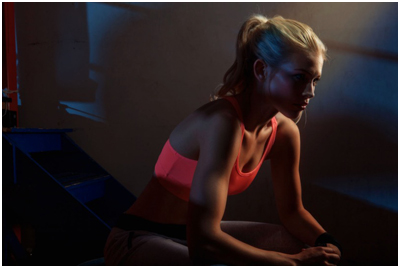
Take a few minutes to watch this interview with photographer Alexis Cuarezma, a sports portrait specialist based in San Francisco and LA.

The short version? Be like water finding downhill. But the video is full of good tips, strong work and solid dose of BTS pics to satisfy your jones for lighting.Read more »
Strobist

 
Comments Off on Watch This: The Secret(s) to Alexis Cuarezma’s Success

Posted in Photography


Super-Deluxe Swim Platform: Rent This DIY Floating Sauna

19 Jan

[ By Steph in Destinations & Sights & Travel. ]

diy sauan 6

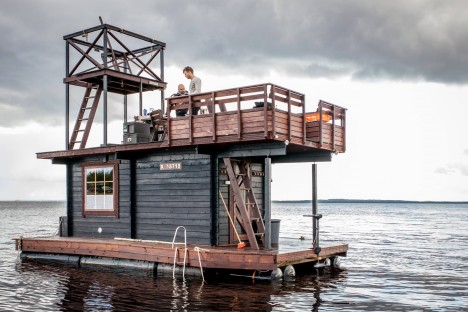
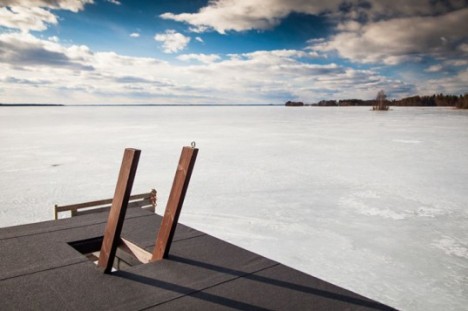
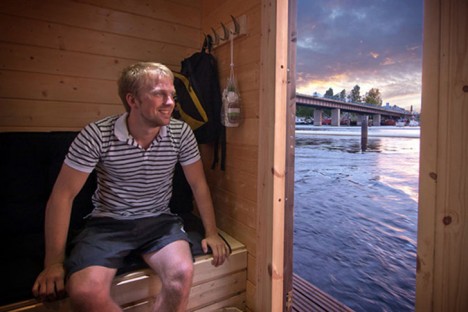
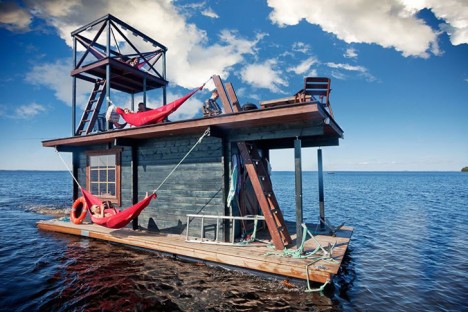
In Finland, where the tradition of sitting in steamy saunas is even more appealing in frigid winter, a group of enterprising DIYers has built their own multi-level floating spa, sun deck and dive platform out of recycled materials. The Saunalatta features a lower deck, a sauna cabin that transforms into sleeping bunks in the summer, and a second-story platform with a lookout, and it’s available for rent at the cost of about $ 410 per day.

diy sauna 2

diy sauna 3

In a nation that boasts roughly one sauna for every three residents – about two million in total – it’s not surprising that Finns come up with some creative variations. Up to fifteen people can cram into the sauna at a time, where the temperature can get as high as 194 degrees Fahrenheit. Then, they jump right into the icy waters of the lake before repeating the ritual.

diy sauna 1

diy sauna 4

diy sauna 5

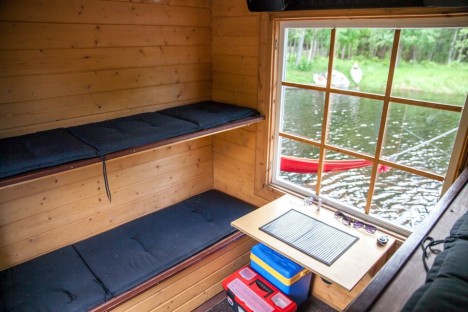
In the summertime, the cabin offers sleeping space for five on simple platforms, with hammocks offering lounge space. On the roof terrace you’ll find a table and chairs, a BBQ and a 19-foot diving tower. Made of recycled and reclaimed materials, the simple shack-style houseboat also has a fridge, heated shower and a sound system wired throughout the vessel.

diy sauna 7

diy sauna 8

diy sauna 10

The Saunalatta Facebook page has lots of wistful-daydream-worthy photos that’ll appeal to water-lovers in either hemisphere, since it’s cozy and warm in the winter and the perfect home base for swimming in the summer, including some fun images of the creators testing out the boat’s durability with a trampoline.

Share on Facebook


[ By Steph in Destinations & Sights & Travel. ]

[ WebUrbanist | Archives | Galleries | Privacy | TOS ]


WebUrbanist

 
Comments Off on Super-Deluxe Swim Platform: Rent This DIY Floating Sauna

Posted in Creativity


Do This Before You Upgrade a Lens for Your New Camera

13 Jan

new-camera-tips-5

So, you just got a new camera! Congratulations! You’re in the right place, DPS is absolutely full of amazing tutorials that will help get you started, and point you in the right direction. As for me, if there’s one thing that I could say to someone who has just purchased, or received a new camera, this is it:

If this is your first DSRL or mirrorless camera with interchangeable lenses, don’t buy any new lenses or gear for at least a month.

I know, I know. You’ve probably heard that the kit lens is terrible. You’ve probably already been given a list of things that are “must-buys” in order to take amazing photos. You may have even tested out your brand new camera, and been disappointed that your images don’t quite look like you’d hoped they would after you upgraded.

I understand, because I’ve been there. However, waiting to upgrade for at least a few months (get that you need like batteries and memory cards, but hold off on any major purchases like lenses) may actually benefit your photography in the long run. To explain why, let me tell you a little about me and my story.

New-Camera-Tips-1

I received my first DSLR, a Canon Rebel XS, in 2009. I’d done black and white film photography for years, so photography itself wasn’t new to me, but my old fully manual Pentax camera didn’t have things like white balance, or the ability to choose metering modes, and neither did my point-and-shoot digital camera at the time (at least not that I knew of), so there was definitely a big learning curve for me as I transitioned to a digital SLR.

The image above was one of the first that I took with my new camera, and I remember being so frustrated. I hated how yellow it was. I hated the fact that it didn’t really look any better than the images I took with my point-and-shoot camera, and it might have even looked worse! It didn’t take much complaining on my end before well-meaning friends and family members started suggesting different lenses, flashes, and other gear that would help me achieve the look that I was hoping to achieve.

Although I was confident that I’d need to upgrade lenses if I wanted to take my photography to a new level, my husband and I were still pretty newly married and money was tight, so I just kept on with my Rebel XS and Kit lens. I was really frustrated about not being able to upgrade at the time, but the truth was that I didn’t need a lot of new gear, I really just needed to learn how to utilize the gear that I already had.

new-Camera-Tips3

I was pretty sure that I was more interested in photographing landscapes and abstract items than I was photographing people. So, I’d take my camera to work with me and go on photo walks during lunch breaks, taking photos of whatever was around. I discovered how white balance worked, and started to chip away at learning a little more about how my camera functioned. The images still weren’t perfect, as you can see by the examples above and below, but I felt like I was making progress in terms of the overall aesthetic of the photos, and I was really starting to have fun. I was still itching to upgrade, but am forever grateful that we just couldn’t afford it at the time, because it turned out that the type of photography that I thought I was interested in, wasn’t actually my passion after all.

New-Camera-Tips-2

Over the course of the next year, I started taking photos of my nieces and nephew just for fun, and much to my surprise, discovered that I loved taking candid photos of kids. I had experience with portrait photography in high school and college, but thought I didn’t like it. As it turns out, most of my portrait experience had been in a studio setting with a professor who was very, very passionate about Rembrandt Lighting. I didn’t enjoy that kind of photography, but I discovered that I loved sitting in the grass in the backyard, and taking photos as my nieces and nephew played. I loved taking pictures while singing funny songs, and telling little jokes to see if I could make them laugh. Around the same time, I took a few senior portraits for some family friends, and discovered that it wasn’t just kids I enjoyed photographing. I loved taking pictures of people, and I especially loved taking portraits of people.

I also really loved portraits that had a nice blurry background, which was hard (but not impossible) to achieve with my kit lens. I began to look into how I could achieve that effect more easily, and quickly came across Canon’s Nifty Fifty Lens (50mm f/1.8). I purchased that lens shortly before my first daughter was born. It stayed pretty permanently attached to my camera body for the next several years.

New-Camera-Tips-4

My love for portraits has only intensified, and though I have made a number of upgrades to my gear since 2010, I’m glad that it took me about a year to make my first purchase. Being forced to wait allowed me time to discover which type of photography I was really interested in. Had I upgraded right away, I probably would have purchased a lens that would be collecting dust in the back of my closet, because I would have gotten something targeted towards landscapes or macro, rather than something more appropriate for portraits. It’s not the end of the world to own a lens that you don’t use all that often, but it’s also something that can be avoided with just a little patience!

new-camera-tips-6

Waiting to upgrade also forced me to really learn to use the camera that I had, which was actually a great camera, kit lens and all! Still need a little extra convincing that the kit lens isn’t terrible? Check out this Flickr Group called Kit Lens Losers. There are some incredible images in there, all taken with the standard kit lens. You CAN take great images, right out of the box. I promise.

When it did finally come time to upgrade to a new lens, I did so knowing that the upgrade was necessary in order to achieve something (better bokeh and the ability to shoot wide open), that my previous setup limited. The lens was important in helping me achieve the aesthetic that I like in photography, but it was only one piece of the puzzle. Learning about white balance, metering modes, shooting in RAW, and a whole slew of other camera settings were just as important as a new lens in terms of the overall affect on my photography.

I’m not saying that you need to have a perfect understanding of your camera before you upgrade, but I firmly believe that we’re never done learning when it comes to photography. What I am suggesting is that if you spend some time really getting to know your camera and what it is capable of before you upgrade, you’ll be able to ensure that you’re spending your money intentionally, in ways that will allow you to continue to grow in your photography – and that’s always a good thing.

new-camera-tips-7

Have you upgraded you gear? If so, what was your first purchase? If you haven’t, please share what has made you decide to wait.

googletag.cmd.push(function() {
tablet_slots.push( googletag.defineSlot( “/1005424/_dPSv4_tab-all-article-bottom_(300×250)”, [300, 250], “pb-ad-78623” ).addService( googletag.pubads() ) ); } );

googletag.cmd.push(function() {
mobile_slots.push( googletag.defineSlot( “/1005424/_dPSv4_mob-all-article-bottom_(300×250)”, [300, 250], “pb-ad-78158” ).addService( googletag.pubads() ) ); } );

The post Do This Before You Upgrade a Lens for Your New Camera by Meredith Clark appeared first on Digital Photography School.


Digital Photography School

 
Comments Off on Do This Before You Upgrade a Lens for Your New Camera

Posted in Photography


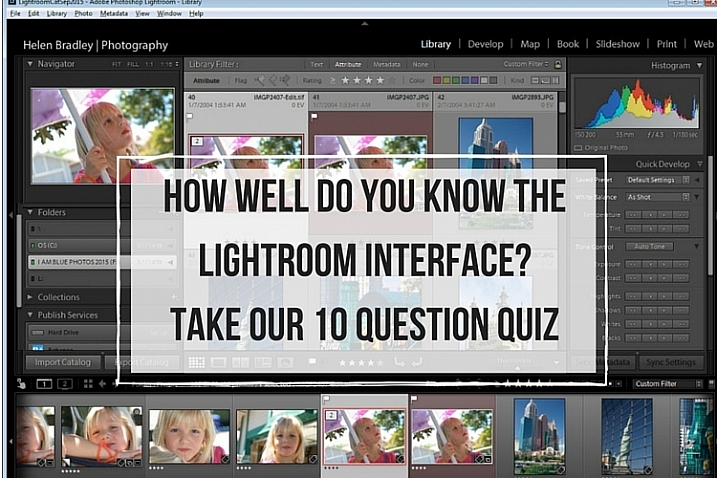
How well do you know the Lightroom interface? Take this quiz and find out

03 Jan

lightroom interface quiz lead image

When you’re new to Lightroom there are lots of things about the Lightroom interface that contribute to its steep learning curve. Most Lightroom users can tell you a story or two of being caught by items appearing, or disappearing, without warning. With experience these are minor inconveniences, but when you are new to Lightroom, they can be overwhelming. So, just how much do you know about the Lightroom interface? Take this quiz and find out:

Question #1

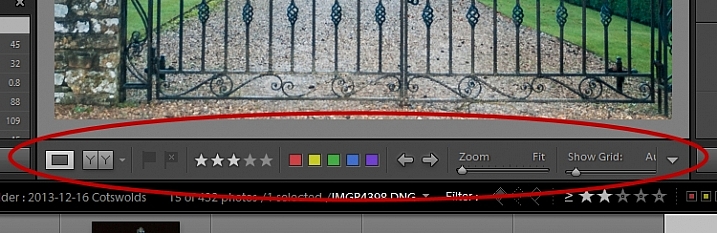
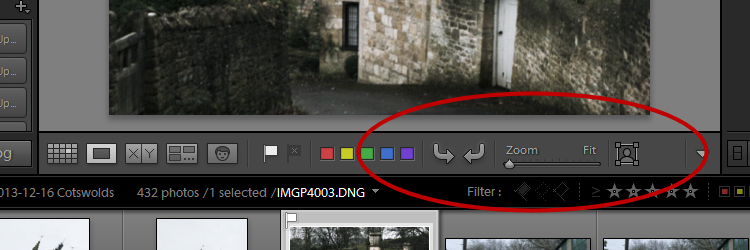
What is this and how do you get it back if it disappears?
Lightroom Interface Quiz - image for question 1

Answer:

That is the Toolbar, and you can display or hide it by pressing the letter T on your keyboard. You can also choose View > Hide Toolbar or View > Show Toolbar depending on whether it is currently visible or not. There is a toolbar in every module in Lightroom.

Question #2

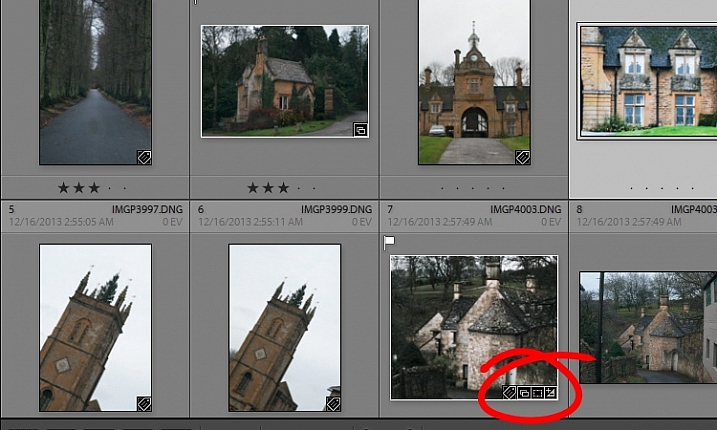
When you used Lightroom recently, you recall seeing small indicators like this in the bottom right corner of some of your images. What are they and how do you get them back if they’re not showing in grid view?

Lightroom Interface Quiz - image for question 2

Answer:

These are Thumbnail Badges, and they indicate whether or not an image has been cropped, has develop presets, keywords added, and so on. In the Library module pressing the letter J will toggle through a number of options for your grid view, two of which include thumbnail badges.

Question #3

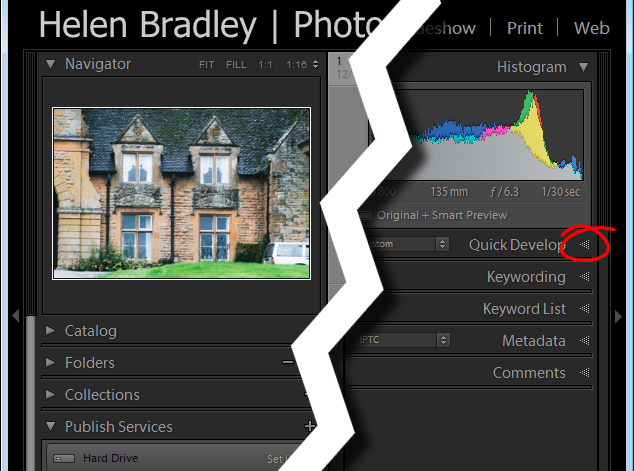
Most panels show filled in triangles like the one on the left (below), but one of the panels has a triangles like the one on the right (also below). Why is it different?

Lightroom interface quiz - image for question 3

Answer:

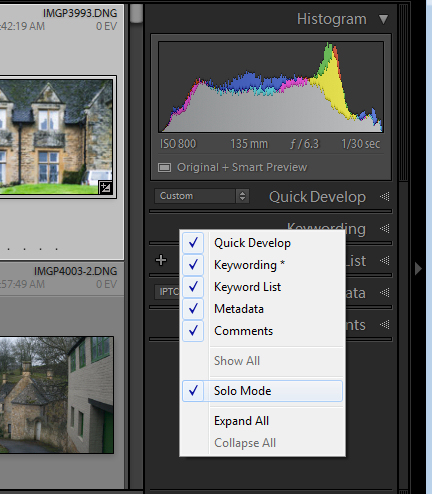
The second panel on the right is set to what is called Solo Mode. When this option is enabled, and you click to open any of the panels, all other panels will close automatically (essentially leaving only one opened at a time). The Navigator and the Histogram are exceptions to this rule and they operate independently of Solo Mode. To enable or disable Solo Mode, right click on the name of any panel (the actual word not the triangle) and choose Solo Mode from the options given (see below).

Lightroom interface quiz - image for question 3

Question #4

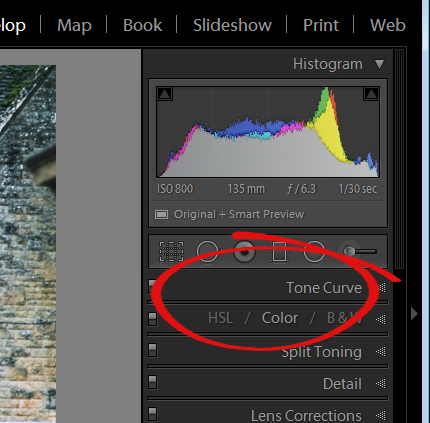
This is the Develop module and the Basic panel is missing. What has happened and how do you get it back?

Lightroom interface quiz - image for question 4

Answer:

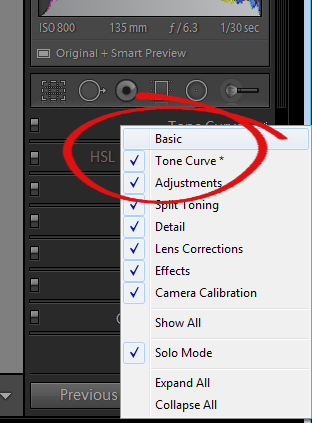
Any panel can be enabled or disabled in Lightroom. If you’re missing a panel, right click another panel in that same sidebar to display the panel list. Any panel name without a checkmark isn’t visible, so to make it visible, just click the panel name.

Lightroom interface quiz - image for question 4

Question #5

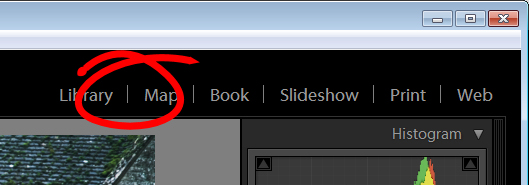
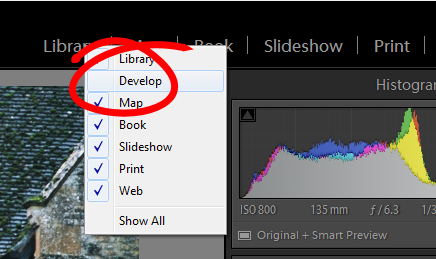
This is the list of Lightroom modules. A module is missing, what is it and how do you get it back?

Lightroom interface quiz - image for question 5

Answer:

The Develop module is missing. You get it back the same way as you would a missing panel, right click any of the module names to show a list of modules. Any that do not have checkmarks beside them are not visible. Select that one to display it.

Lightroom interface quiz - image for question 5

Question #6

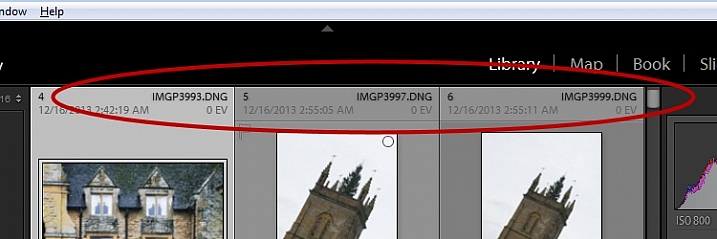
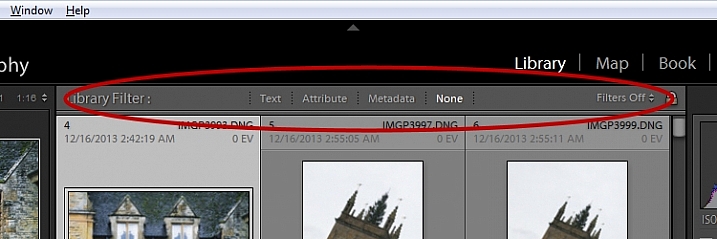
There used to be a panel here in Lightroom just above the thumbnails in grid view in the Library module. It’s disappeared. What is it, and how would you get it back?

Lightroom interface quiz - image for question 6

Answer:

This is the Filter bar, and you can display or hide it by pressing the Backslash key (\). You can also display or hide it by choosing View > Show Filter Bar.

Lightroom interface quiz - image for question 6

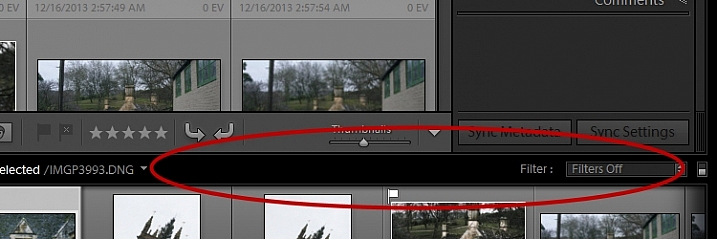
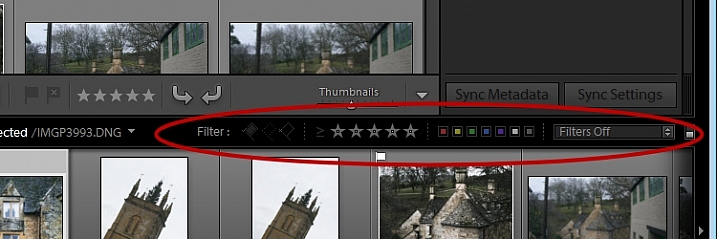
Question #7

Here just above the filmstrip you recall that at one stage you saw Star, Flag and Color options, but they now seem to be missing. How do you get them back?

Lightroom interface quiz - image for question 7

Answer:

Click the word Filter and the filters will reappear. Click Filter again and they will disappear.

Lightroom interface quiz - image for question 7

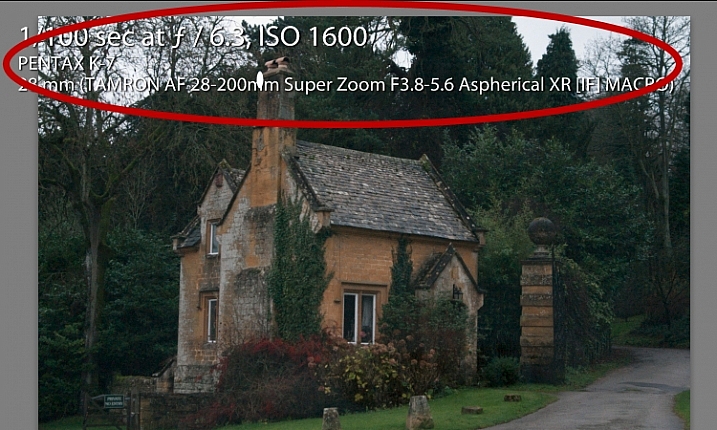
Question #8

What is this called and how can you get rid of it or choose what information is showing?

Lightroom interface quiz - image for question 8

Answer:

This is the Loupe Info Overlay and you can display and hide it by pressing the I key on your keyboard. There are three states for this: Info Overlay 1, Info Overlay 2, and turning it off entirely. To edit what information is displayed click CMD+J (Control+J on a PC) or go to:  View > View Options.

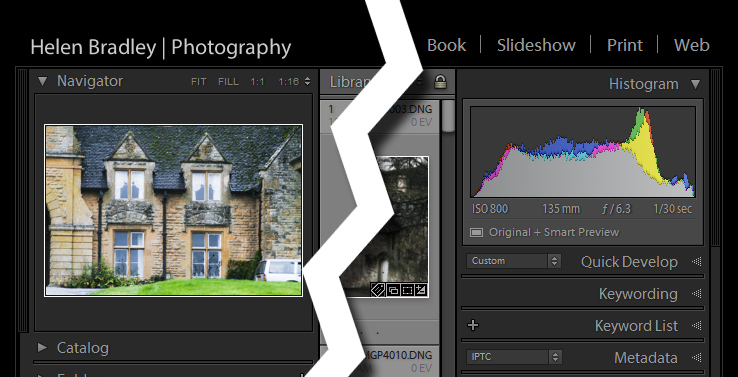
Question #9

This is the right hand corner of the Lightroom screen and the controls for Maximize, Minimize and Close are all missing, as are all the Lightroom menus on the left of the window. How do you get them back?

Lightroom interface quiz - image for question 9

Answer:

To redisplay the Lightroom menu and the Windows controls press Shift + F. This is a toggle switch which displays and hides full screen mode. There are three states for full screen mode so press Shift + F repeatedly until the Lightroom menu and the Window controls reappear.

Question #10

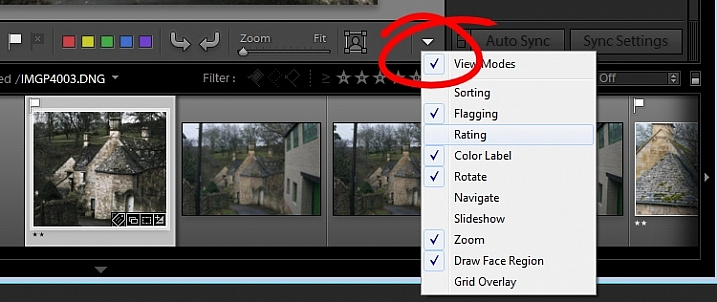
Here, in the Develop module, you don’t see any stars on the toolbar when you are viewing this image at full size. The stars only appear on the toolbar when you are in Grid view. Where did they go and how can you get them back?

Lightroom interface quiz - image for question 10

Answer:

The toolbar in the Develop module has two states, one for the Grid View, and one for the Loupe (single image) View. To display and hide the various options on either toolbar, switch to that view, and click the arrow in the far right of the toolbar to display the options available in that view. Click any unchecked option to display it on that toolbar, likewise you can click any checked options that you want to hide.

Lightroom interface quiz - image for question 10

If you got 10 out of 10 on this quiz, well done! You have a good understanding of the basics of the Lightroom interface.

If you missed any of these questions, hopefully you’ve learned something about using Lightroom that you did not know before.

googletag.cmd.push(function() {
tablet_slots.push( googletag.defineSlot( “/1005424/_dPSv4_tab-all-article-bottom_(300×250)”, [300, 250], “pb-ad-78623” ).addService( googletag.pubads() ) ); } );

googletag.cmd.push(function() {
mobile_slots.push( googletag.defineSlot( “/1005424/_dPSv4_mob-all-article-bottom_(300×250)”, [300, 250], “pb-ad-78158” ).addService( googletag.pubads() ) ); } );

The post How well do you know the Lightroom interface? Take this quiz and find out by Helen Bradley appeared first on Digital Photography School.

Digital Photography School

 
Comments Off on How well do you know the Lightroom interface? Take this quiz and find out

Posted in Photography