Avatron, the developer of Air Display, has today released a new iPad app. Air Stylus extends your computer screen to your iPad display and, in combination with a pressure-sensitive pen, turns the latter into a graphics tablet that works with a range of imaging applications including Adobe Photoshop and Apple’s Aperture. Read more
Microsoft has announced the latest member of its Surface tablet family, the Surface 3 Pro, at a press event in New York. According to Microsoft, the new model is designed to be a replacement for both your iPad and laptop. With 5MP front and rear cameras, the Pro 3 doesn’t look like a particularly competent capture device but its specifications make it look like a decent option for image editing on the go. Learn more
After a few interesting Android smartphones Chinese manufacturer Xiaomi has now launched its first tablet. Like its phone counterparts, the Xiaomi Mi Pad has impressive specs at a very reasonable price point. It has a 7.9-inch, 2,048 x 1,536 pixel resolution screen and is powered by a NVIDIA Tegra K1 quad core processor. Learn more
Lenovo has launched a 10-inch version of its ThinkPad tablet. Running Windows 8.1, the ThinkPad 10 is aimed at professionals and business users. The use of the optional ThinkPad Tablet Dock allows you to turn the tablet into a full-blown workstation. In terms of imaging, the ThinkPad 10 comes with an 8MP rear camera and a 2MP front-equivalent. Lenovo promises 10 hours of battery life. Learn more
[ By WebUrbanist in Gaming & Computing & Technology. ]
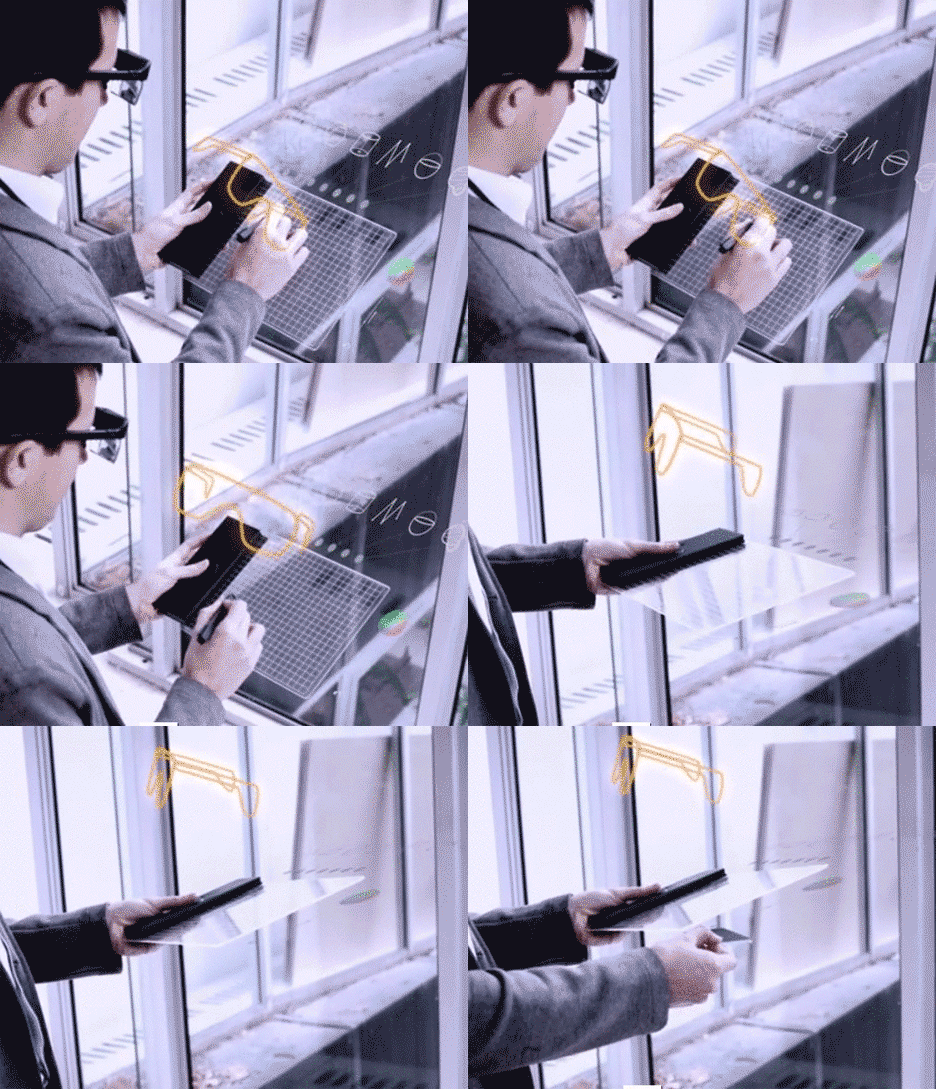
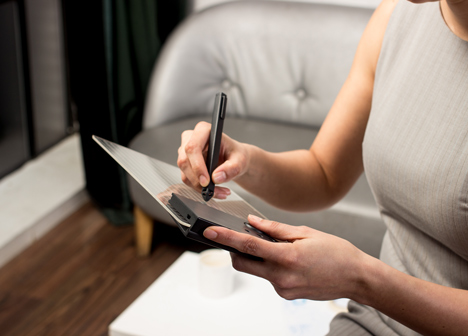
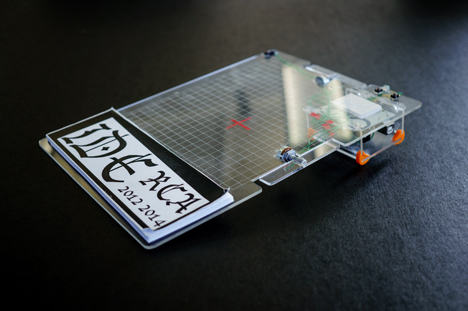
Using a handheld stylus and tablet set combined with an existing augmented reality headset, this invention allows users to sketch in three dimensions and see the results of their work unfold in realtime.
Created by a group of students from the Royal College of Art, the interface is made to be as intuitive as a sketchpad or 2D drawing tablet – anyone should be able to pick it up and simply start doodling. It can be connected to various visualization devices, including the virtual reality simulator Oculcus Rift.
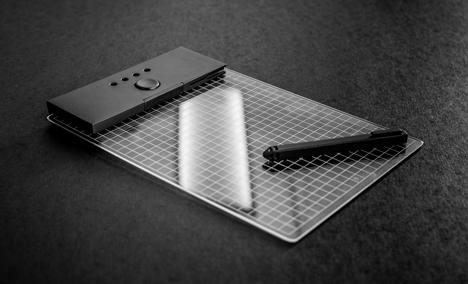
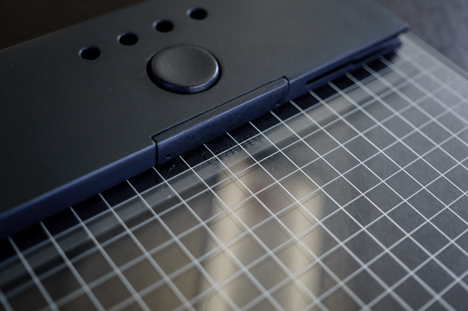
Per Dezeen, “As the user draws above the clear acrylic sketchpad, radio signals are used to track the movements of the stylus from coordinates on the pad. These are sent to an Arduino board – an open source prototyping device containing a micro controller – which is contained in a black panel that forms one edge of the pad.”
A combination of gestures and buttons allows users to tilt their drawings to work on them from various angles and shift the planes being worked on as well. Critically, though, the basic tool set is familiar in its function and thus user-friendly – a pad and pen, essentially, with expanded functionality.
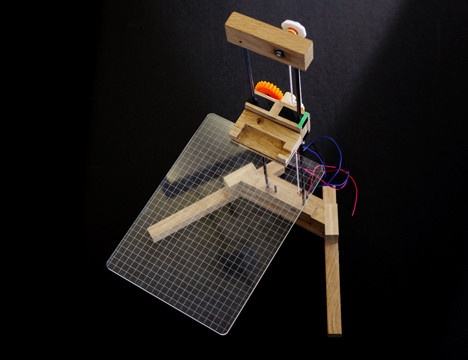
A great deal of physical modeling and prototyping went into the design of the device including physical stands that allowed Gravity’s creators to simulate the kinds of conditions they sought to replicate in digital space. In turn, the three-dimensional drawings created via the device can be input into 3D printers, completing the circuit.
Want More? Click for Great Related Content on WebUrbanist:
Imagine no more: now you can scan items right out of a physical catalog and watch them pop up in your own bedroom, kitchen, living or dining room at home, …
Click Here to Read More »»
More Real Than Reality: 7 Artsy Augmented Reality Projects
Technology is taking over nearly every part of our lives, not that we’re complaining. These augmented reality projects add another layer to the everyday world.
Click Here to Read More »»
Augmented 3D Printing: Architectural Model Overlay App
Augmented reality meets architectural modeling in a remarkable best-of-both-worlds hybridization for architecture designers, builders and clients.
Click Here to Read More »»
[ By WebUrbanist in Gaming & Computing & Technology. ]
Google debuted the second iteration of its popular Nexus 7 tablet yesterday at a San Francisco press conference, inciting excitement amongst fans of the Android device and plenty of comparisons to Apple’s iPad mini. Of course we’re most interested in how this second-gen device might fit into a photographer’s workflow. Click through for our opinion on connect.dpreview.com.
Adobe product manager Tom Hogarty yesterday offered a tantalizing sneak peek into future Lightroom functionality. On Scott Kelby’s web show, The Grid, Hogarty demoed an iOS app that allows a wide range of raw file edits on the iPad that can sync back to your Lightroom catalog. You can watch it in action on connect.dpreview.com.
If taking a photo with a nearly 10-inch tablet didn’t look silly enough, you can now pair your iPad with a telephoto lens to expand tablet photography horizons. Regardless of the awkward appearance of the iPad as a camera, shooting with the tablet has grown in popularity. The new 10x zoom accessory for the iPad 3 and 4 and 12x zoom for the iPad Mini is a further proof. Read more about the lens at connect.dpreview.com.
Your iPad is your Sunday Times. Your game console. Your encyclopedia. The guardian of your deepest, darkest secrets. (Better put a password on that!)
And now, it’s your new studio light!
It’s true. Your tablet is powerful enough to illuminate your subject in almost any photo situation.
This guide will show you how a tablet can super charge your shots with creative backdrops, custom light shapes, and pop art colors.
Just when you thought your tablet reached peak awesomeness, it suddenly got so much awesomer.
Turn Your Tablet Into a Studio Light
p.s. Our Phoneography 101 course for both Android and iPhone students is starting April 1st! The last days to enroll are coming up quick, so make sure to enroll today!
Why It’s Cool:
Studio lights and softboxes are big, cumbersome, and cost a bundle!
By comparison, your tablet is like a cheetah vs a hippo. It’s quick, versatile, and light on its feet.
Download backdrops for free and create customized shapes and reflections that will make your photos stand out from the crowd.
The Ingredients:
Tablet
Phone, compact camera, or DSLR
iOS: Softbox Lite (Free)
Android: Softlight (Free)
Shape It Up
With a little help from your tablet you can add shiny shapes to your reflective subjects.
For this shot you will need a something reflective like a camera lens or a wine glass.
Download a simple shape like a star or a triangle or select a shape on your lighting app.
Setup your tablet at an angle so that it bounces off your subject and into the cameras lens.
It takes some experimentation to get the angle just right so if you are using a DSLR try turning on live view on your rear LCD screen.
This should make it easier to see the reflections.
Glitz Up Your Portrait:
For a playful sparkle in the eye and dramatic portrait lighting, look no farther than your tablet!
A tripod is helpful if you are doing a self portrait and you will need to shoot this pic in a dark environment.
Select a shape on your tablet and setup your camera with a short timer.
Focus the camera on your face and shuffle just slightly to the right.
Hold your tablet out in front of you and up to the left and let the magic happen.
Open That Aperture:
This technique will leave you with a softly glowing background like the embers of a camp fire.
First, pick a subject with some depth to it like a large leaf or a clump of berries.
Put a circular pattern on your tablet that complements your subjects color.
Get up close and open your aperture as wide as possible.
This shot works great with a DSLR and a macro lens but is more difficult with a phone’s camera which produces very little shallow depth of field.
Double Glow:
If you have two tablets you can make a light tepee for bright and shiny macro closeups.
Place your tablets with their screens turned inward so they make a roof over your subject.
Hold the tablets together at the top with your fingers or use a little tape.
Now shoot your subject down the corridor of your glowing cyber tunnel.
Make a Silhouette
Like the iPod commercials of yesteryear you can use your tablet to create cool silhouette style photos.
Put a solid color on your screen and place your subject halfway between your camera and tablet.
If you have a DSLR change your light metering to spot and aim your focus point at the tablets glowing screen.
You may want to focus manually since the room will need to be pretty dark.
Shine Up Your Food Shots:
Give your food shots that extra sparkle by zapping your snack with a tablet softbox.
Place your food items against a black backdrop in a dark room.
Set a long exposure, maybe 25 seconds, f/11, ISO 200.
Start your exposure and paint your food with your tablet making sure the screen is facing away from your camera.
This trick work great with a phone too!
Pick a Backdrop
A matching background will do wonders to enhance your macro shots.
Simply download a backdrop and place your subject on top of your tablets screen.
If you are shooting with a DSLR use a small aperture, maybe f/22.
Phones will work great for this shot as they already have a wide depth of field.
You can avoid glare by shooting your tablets screen at a sharp angle instead of straight on.
Incorporate Movement
Create ghostly effects in your photos by moving your tablet through the background of your shot.
To achieve this pic you will need a completely dark environment so decide on your camera settings before you turn out the lights.
First set your camera for a long exposure maybe 20-30 seconds and pick out a pattern on your tablet.
Mount your camera on a tripod, focus on your subject, and then switch your camera to manual focus so auto focus doesn’t kick in with the lights off.
Hit the lights, press the shutter button, and move your tablet through the back of your shot while the shutter is open.
You can use a phone set to a white screen to paint in your subject with light.
Shine a Spotlight
A circular shape is a great way to highlight your subject with dramatic lighting.
First select a shape from your softbox app or download a picture from the internet.
Place your subject on top of your tablet so that it’s illuminated from beneath.
Setting your camera to center weighted light metering will allow you to just capture light from your spotlit subject and keep out background light.
If the object you’re shooting is clear, you get a cool glowing effect all the way up to the top.
Take it further
Shoot one subject lit with a variety of colors. Then combine the images into a photo square with Photoshop or Pic Stitch.
Jesse Rosten takes it to a whole nother level with an all iPad photo shoot.
Make 3D light paintings with your iPad using apps like Holographium.
Thanks to the members of the Softbox Pro Flickr group for their photo inspiration!
Related posts:
Turn Your Laptop into a Photo Light Box Could you pick your laptop out of a lineup? We’ll…
DIY: Make Crazy Detailed Light Paintings with Photo Light Stencils Extra photos for bloggers: 1, 2, 3 Ever tried painting…
You Only Need 5 Things to Make Your Own Home Studio Extra photos for bloggers: 1, 2 Photography doesn’t have to…
Graphics tablet maker Wacom has announced on Facebook it will launch a mobile multi-touch tablet this summer. While it has not posted any details about this device, Wacom’s social media post says it will include a pressure-sensitive pen, multi-touch options, an HD display and ‘other valuable features that you haven’t seen in other tablets’.





 Studio lights and softboxes are big, cumbersome, and cost a bundle!
 With a little help from your tablet you can add shiny shapes to your reflective subjects.
 For a playful sparkle in the eye and dramatic portrait lighting, look no farther than your tablet!
 This technique will leave you with a softly glowing background like the embers of a camp fire.
  If you have two tablets you can make a light tepee for bright and shiny macro closeups.
 Like the iPod commercials of yesteryear you can use your tablet to create cool silhouette style photos.
  Give your food shots that extra sparkle by zapping your snack with a tablet softbox.
 A matching background will do wonders to enhance your macro shots.
  Create ghostly effects in your photos by moving your tablet through the background of your shot.
 A circular shape is a great way to highlight your subject with dramatic lighting.

You must be logged in to post a comment.