RSS
 

Posts Tagged ‘Sync’

How to Make Beautiful Portraits Using Flash and High-Speed Sync

04 Nov

The scene: Outdoors with full sunlight. The gear: Your camera, lens, and flash. The problem: You find that your flash only works at 1/200th or below so you need to be at f/16 or f/22 to get the shot. Everything is in focus, including all the cars and other distractions in the background. Those dust spots you keep meaning to clean are also perfectly visible. Why won’t it work with a higher shutter speed so you can have a wider aperture? Well, it’s all down to the issue of sync speed, more specifically using flash and high-speed sync.

A typical portrait shot with off camera flash. To overpower the sun and stay below the camera’s sync speed, you’re forced to use a narrow aperture. Here we’re at f20 just to stop the backlight overpowering the hair and stop the sky blowing out. The resulting aperture means that everything is pretty much in focus, leaving the background looking cluttered. This shot is for example only, you should generally make a point of choosing clutter free backgrounds

A typical portrait shot with off-camera flash. 

To overpower the sun and stay below the camera’s sync speed, you’re forced to use a narrow aperture. Here I’m at f/20 just to stop the backlight overpowering the hair and the sky from blowing out. The resulting aperture means that everything is pretty much in focus, leaving the background looking cluttered. This shot is for example only, you should generally make a point of choosing clutter-free backgrounds

Sync Speed

Sync Speed is the fastest shutter speed where the camera exposes the whole frame at once. When you fire any shot below this speed, the first shutter curtain opens fully, revealing the entire sensor to light. At the end of the exposure time, the second shutter curtain moves across the frame to finish the capture. Both curtains then reset together (this means you get no light leaking in).

Generally, the sync speed varies between 1/125th and 1/250th, depending on your camera. You’ll find some quoted sync speeds are not indicated correctly. For instance, the Canon 5D series are rated at 1/200th but often show a black band at the bottom of the screen at this speed when it’s used with flash.

When you go above the sync speed, the second curtain starts to move before the first one has completed its journey. As your shutter speed gets shorter and shorter, the gap between these curtains narrows to a tiny slit. Despite this, all parts of the sensor receive light, and a full exposure is made. On a bright day, with a prime lens, you can easily shoot at 1/8000th at f/1.4 and have a perfect exposure. All parts of the frame still receive light, because it’s continuous throughout the exposure.

The Sync Speed Problem

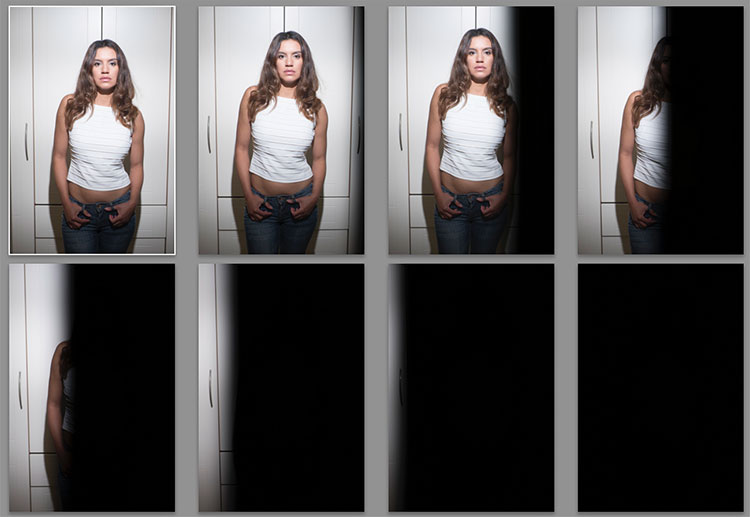
It’s when you introduce flash that you start to have problems. You see, when a flash is fired (usually when the first curtain is opened) all the light from it comes out in a very short space of time (in order of milliseconds). When you go above (faster than) the sync speed, the position of the curtains doesn’t reveal the entire frame at the time the flash fires. The means the shutter curtain blocks part of the flash and prevents it from reaching the sensor. Any ambient light will expose normally, but the flash gets hidden in part of the frame. As your shutter speed gets faster and faster, more and more of the flash is blocked until it’s no longer visible in the shot.
portraits with flash and high-speed sync

Here’s a set of images taken at 1/3 stop increments with a flash. Shot on the Fuji X-T2, the first is at 1/250th, the native sync speed of the camera. In order (left to right, top to bottom) 1/250th, 1/320th, 1/400th, 1/500th, 1/630th, 1/800th, 1/1000th, and 1/1250th. Even 1/320 is useable if the subject being lit is away from the edge.

Everything in Focus

Normally when you use flash outside in daylight, you end up having everything in focus. Remember the Sunny f/16 Rule? If your subject is in direct sunlight during the day, you can set your aperture to f/16 and your shutter speed will be one over your ISO value. So if your ISO is set to 100, your shutter speed would be 1/100sth (and f/16). As another example, if your ISO is 200, then the shutter speed would be 1/200th. To get a richer sky, you’d really need to be at f/22, making it a tough job for your flash. Because you can’t get faster than 1/250 (sync speed), you have to increase the aperture to expose the shot correctly.

portraits with flash and high-speed sync

Shooting at f/20, 1/160 to get a richer sky for this band promo shot. It’s quite an old shot, so there were few options for reducing the aperture at the time. Even the hills in the background are in clear focus. The beach isn’t exactly pretty either.

portraits with flash and high-speed sync

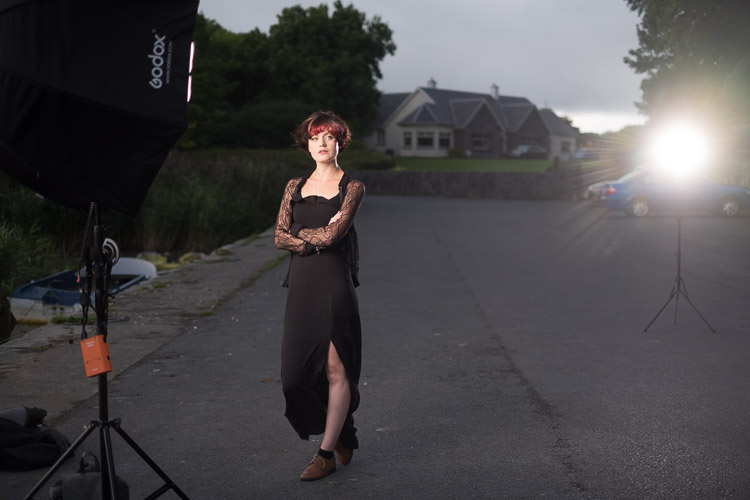
A behind the scenes shot – two flashes on full power.

Softer light

Most speedlights at full power, bare bulb, in close, can give you just enough power to look natural at these settings. Bare flash is not flattering, though it can add character. If you want softer, more flattering, light, you need more power. Most modifiers that give soft light will take two stops of power compared to the bare flash. That’s a lot of power. You could use a more powerful light, like the Godox AD360, the Elinchrom Quadra, or the Profoto B1. Alternatively, you could use a bracket that takes multiple speedlights. Either option allows you to get soft, flattering, light while outdoors.

portraits with flash and high-speed sync

A higher power option is the Godox AD360. This is coupled with the Godox 120cm Octa for softer light. This is shot at f/2.8, ISO200 and 1/125th. Because it’s after sunset, you can easily get wider apertures. just one of the options you have for the shallow depth of field look.

This solves the soft light issue, but it doesn’t solve your aperture issue. For creamy bokeh (the soft out of focus background look), you need to get our aperture down. If you’re shooting in the early morning or late evening, you can do this easily, but during the day it’s an issue.

The Solution: High-Speed Sync

You’ll need to find a way to get around the issue of sync speed for daytime shooting. Fortunately, there is a solution. It’s not perfect, but it does work. It’s called High-Speed Sync, also known as Focal Plane Sync. High-Speed Sync (HSS) works in a unique way. Instead of firing the flash at the start of the shot, HSS pulses the flash throughout the whole exposure, trying to simulate the effects of a continuous light.
portraits with flash and high-speed sync

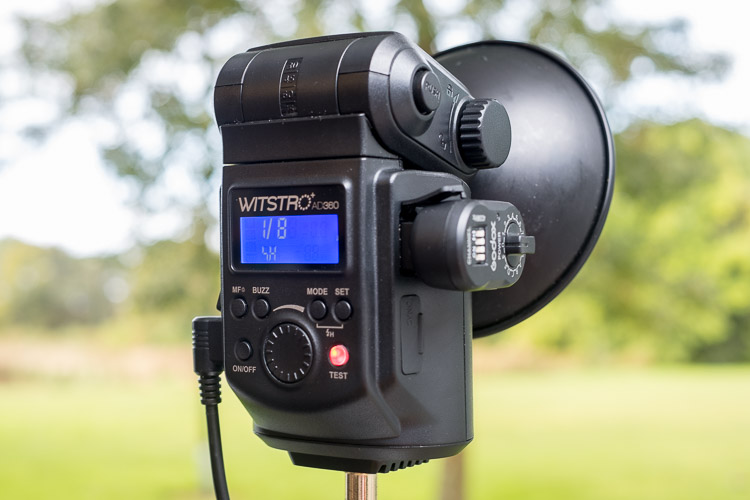
The AD360 set to High-Speed Sync. Usually, there’s a single button hold, or a double button combination to turn HSS on.

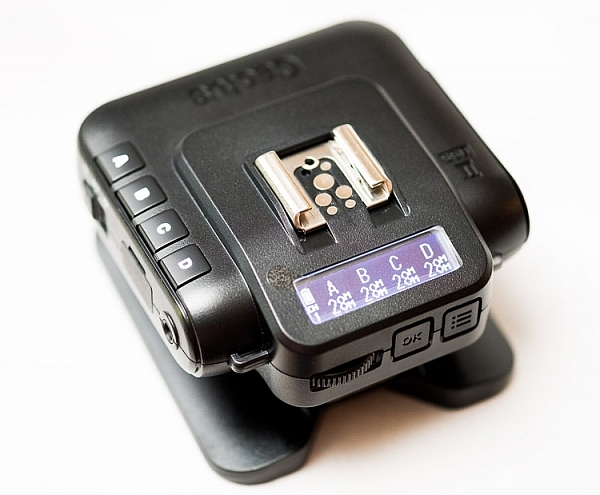
It works well, but it comes at the expense of power, and heat. HSS works the flash really hard. After a few shots, the flash may even shut down for cooling. For HSS to work, you need the camera to transmit HSS to flash, and for the flash have HSS built-in. All major brands allow it, though Fuji only just introduced it. Cactus Image makes a trigger called the V6II which allows you to use any HSS flash with any camera. Read my review of the Cactus V6II trigger here.
portraits with flash and high-speed sync

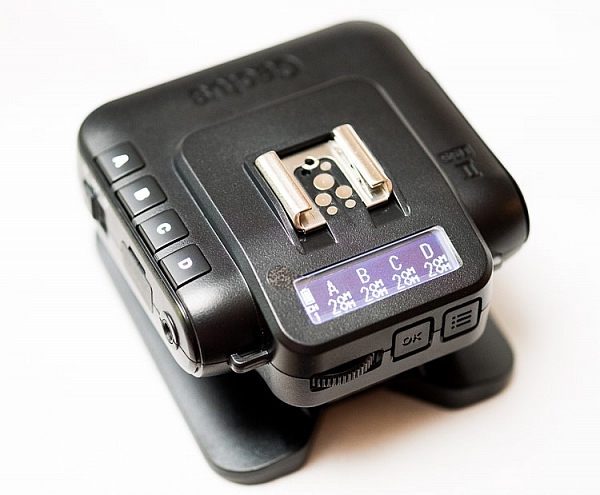
The Cactus Image V6II allows power and zoom control over a wide range of speedlights, as well as offering High-Speed Sync abilities.

The Look of HSS

You can use HSS to go over the sync speed barrier, so settings like 1/4000th at f/1.4 are achievable with flash. You get the complete control of the light using flash, but with the wide aperture you usually associate with natural light photographs. Yes, please!

Photographers like Dylan Patrick use this technique to create cinematic portraits. By shooting wide shots with shallow depth of field, you really have the option to create images that look like they were stills from the silver screen.

Settings for High-Speed Sync

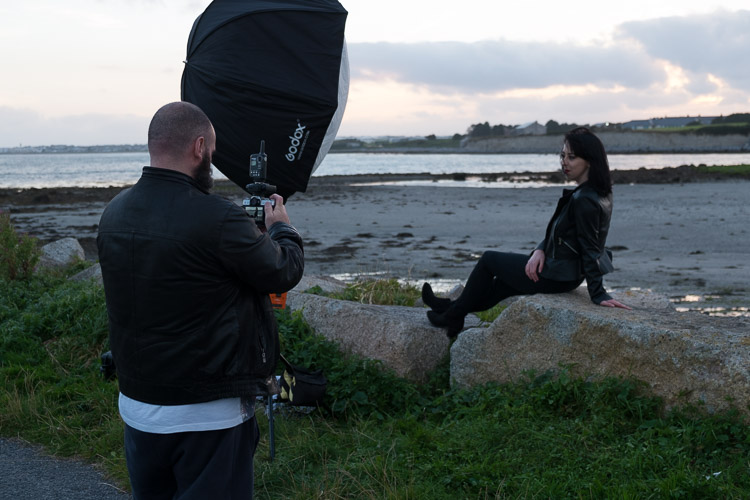
Let’s look at a typical setup and settings for a shoot using HSS. This shoot happened to be done on an evening, but I really wanted shallow focus. The camera was set to f/1.4 for super shallow depth of field. To get the clouds properly exposed, I had to drop the shutter speed to 1/4000th. To get the flash (an AD360) to work I had to set it to HSS. Using a Cactus V6II trigger, I could easily get my Fuji X-T10 to shoot with HSS.

portraits with flash and high-speed sync

An evening HSS photo shot at 1/4000th, ISO200, f/1.4. Notice the shallow depth of field in the image.
portraits with flash and high-speed sync

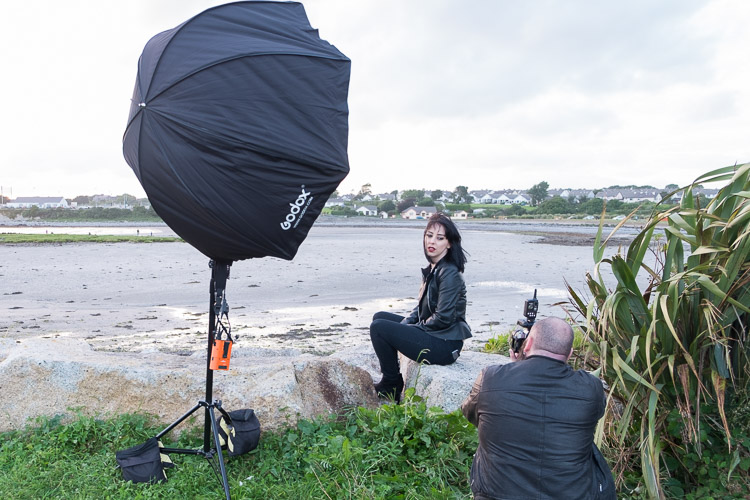
The BTS, an AD360 with 120cm Octa, shot by my assistant Ola.

If you use Canon, the Cells II trigger provides HSS with the AD360. It would also work speedlights like the v850.

portraits with flash and high-speed sync

Using HSS on the AD360, I captured this shot at about 3:00 in the afternoon with the sun high in the sky. Shot with an 85mm lens at 1/2000th at f/2.5, ISO100 on a Canon 5DIII. The sun acts as a second light in the shot. Again the background is nicely out of focus.

Another High-Speed Sync portrait example.

portraits with flash and high-speed sync

1/1000th, f/4, ISO800. An issue with shooting outdoors on overcast days is your shutter speeds can be low enough to cause camera shake. By bumping up the ISO, you can get a faster shutter speed, keeping you safe from camera shake. Using HSS then lets the flash do the work. I’ve shot to keep the flash looking as natural as possible here.

The Alternative

High-Speed Sync isn’t the only way, you’ve got other options. The first has been mentioned. Shoot at the beginning or end of the day. You can get great sky color and you’re not fighting strong sunlight. Of course, if you’re doing any work, even as favors, you often have to work to the subjects schedule rather than your own. So, you may have to shoot at midday to suit them. That leads to the next option.
portraits with flash and high-speed sync

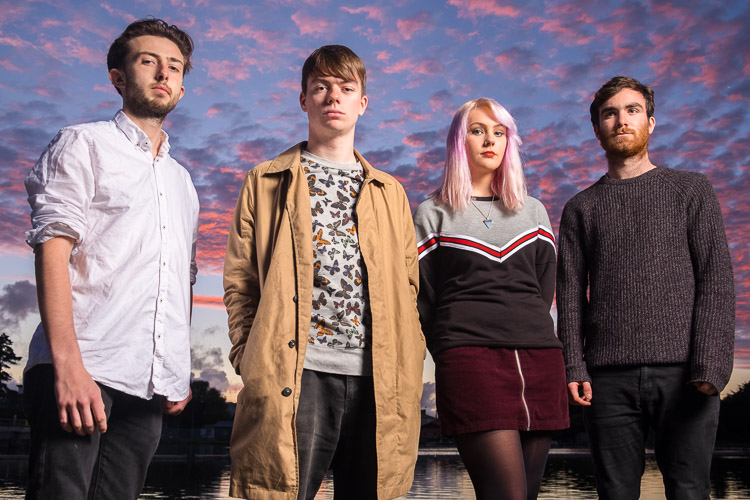
A shot of the band Drown for The Thin Air magazine. The evening light makes the shot. I needed a higher aperture to get the whole band in focus, so opted not to use HSS here.

Using Neutral Density Filter

If you shoot landscape photography, you will be familiar with Neutral Density (ND) filters. This filter allows you to slow the shutter speed down to get nice silky water. Neutral means that it adds no color, while the density part refers to blocking light. You can get them in a range of values from 1 stop to 16 stops.

For portraits, these allow you to drop the aperture down instead of shutter speed. So a 4 stop ND would take you from f/16 to f/4. The drawback is that as you block light, focusing can become harder. Another potential issue is that not all ND filters are actually neutral. Some tend to have a color cast. I have a Firecrest 10-stop for landscapes, which is neutral, but the older 4-stop I have from the same company is slightly pink.

portraits with flash and high-speed sync

Without the ND filter applied, the entire scene is in focus. ISO 200, f/16, 1/250th.

portraits with flash and high-speed sync

With the 4-stop ND filter applied, the background can be rendered out of focus. The flash is still at the same power as the shot above without the filter. The filter does have a color cast, which is hard to remove completely. ISO 200, f/4, 1/250th.

Conclusion

I hope this gives you some options and ideas for how you can make portraits outdoors even when the sun is bright, by using flash and high-speed sync. Please put your questions and comments below, and share your high-speed sync portraits as well.

googletag.cmd.push(function() {
tablet_slots.push( googletag.defineSlot( “/1005424/_dPSv4_tab-all-article-bottom_(300×250)”, [300, 250], “pb-ad-78623” ).addService( googletag.pubads() ) ); } );

googletag.cmd.push(function() {
mobile_slots.push( googletag.defineSlot( “/1005424/_dPSv4_mob-all-article-bottom_(300×250)”, [300, 250], “pb-ad-78158” ).addService( googletag.pubads() ) ); } );

The post How to Make Beautiful Portraits Using Flash and High-Speed Sync by Sean McCormack appeared first on Digital Photography School.
Digital Photography School

 
Comments Off on How to Make Beautiful Portraits Using Flash and High-Speed Sync

Posted in Photography


Overview and Test of the New Cactus V6II Wireless Flash Trigger for High-Speed Sync

28 Oct

Cactus Image recently launched a new version of their radio trigger for speedlights and strobes, the Cactus V6II. In this review, I’ll go over the features of this trigger, how to use it, and do some example photo shoots to test it.

Features of the Cactus V6II Wireless Flash Transceiver

This is a 16 channel system with 4 groups. That means 16 systems can run concurrently, and each photographer could have four sets of flashes of which they can control the power (and zoom for the RF-60/TTL Flashes). It runs off two AA batteries, mini-USB 2.0, or a 5v DC input. Like most modern flash triggers, it runs at 2.4Ghz, which helps it work reliably up to 100 meters. It supports High-Speed Sync up to 1/8000 sec (if your camera goes that high).

The mini-USB port also allows you to update the firmware on the device, giving it a certain amount of future proofing. The main difference between the V6 and the V6II is that the latter allows you to use High-Speed Sync across a range of cameras and flashes, including that of the Fuji X series (which lacks the ability normally). The V6II HSS is based on the use of camera and flash profiles. This allows both Cactus and the photographer to make profiles for flashes they may not already have in the system.

Cactus Wireless Flash Transceiver V6 II - box

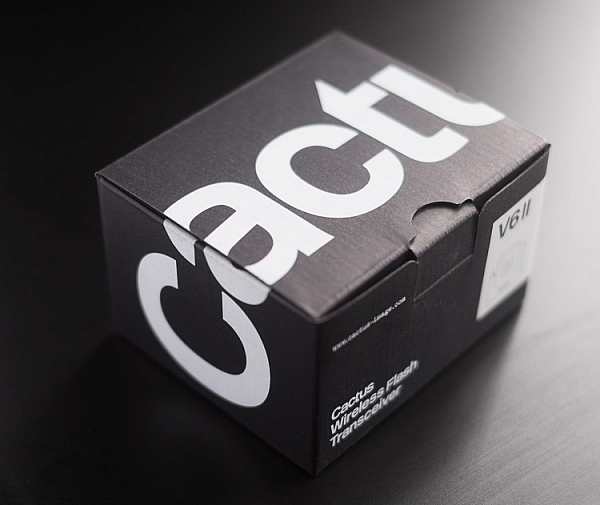
The Cactus V6II transceiver box.

This means there’s practically universal support for any flash you may have. The exception is flashes that have a high sync voltage. The units are cross compatible between systems, so you can use Pentax cameras with Olympus flashes, etc.

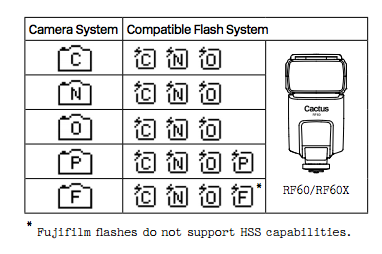
Camera and flash compatibility list for the v6II

Camera and flash compatibility list for the v6II

There are two High-Speed Sync modes; Normal and Power. Normal High-Speed Sync works up to 1/8000th of a second and uses a pulsing flash fire. Power Sync uses the full power flash as a normal fire, but allows you to exceed the normal sync-speed of the camera.

Getting started with the Cactus V6II

The trigger comes in a nicely designed box, containing the user manual, the trigger, and a hotshoe foot. Unlike other hotshoe feet, this one doesn’t have a screw thread for a lighting stand. It’s not an issue as I wasn’t expecting one anyway. The unit can be configured as either a transmitter or a receiver by selecting Tx or Rx from the power switch.

When it is on-camera as a transmitter, you have the four groups visible on the camera left-hand side. Marked A, B, C and D, pressing one toggles it on and off. This way you can select a specific group of flashes to change settings on. This works especially great with Cactus’ own flash, the RF60. Using the dial on the back you can change the power of the flashes on the group, or by pressing in the dial, swap to the lens zoom setting and change that instead.

The unboxed Cactus V6II

The unboxed Cactus V6II

On the right hand side at the front is the test button. You can press it to test that the signal is going to either the RF60, or to another V6II set to receiver mode. One other useful feature is that there’s a hotshoe on the trigger, where you can add your existing trigger system, or another flash. Using your current triggers will allow the High-Speed Sync signal to pass through the V6II and into your flash system.

Setting up

My main portable system is based around Godox v850 flashes (more precisely, the Neweer versions rebranded as the TT850 – it’s the same flash). I also have the more powerful AD360, which responds to the same trigger (the older FT-16), so I find it a really useful system. All of the flashes are High-Speed Sync capable and have profiles in the trigger. I don’t actually use the built-in profiles for High-Speed Sync with Fuji cameras.

The Gear Setup for HSS

Using the older triggers, I set up the flash as normal. Once it’s all working I take the trigger off the camera and put the Cactus V6II on instead (switched to Tx mode). Next I put the old (FT-16) transmitter on top of the hotshoe on the V6II. Finally I set the flash to HSS mode by pressing a two button combination on the back. Each system has its own way of turning on HSS. Yes, this does mean you only need one Cactus V6II trigger with this system to get HSS working.

To get started, press the Menu button on the back right of the V6II unit. Turn the dial to Camera and Flash Setup. Set Camera to Auto, then set Flash to the brand that you use. Next use the Auto Profile for your Flash. For Fuji, you have an additional step, where you make the trigger learn the HSS response of the flash. For the AD360, I set the Flash to Nikon and the Profile to Auto (Nikon).

The Beta Test

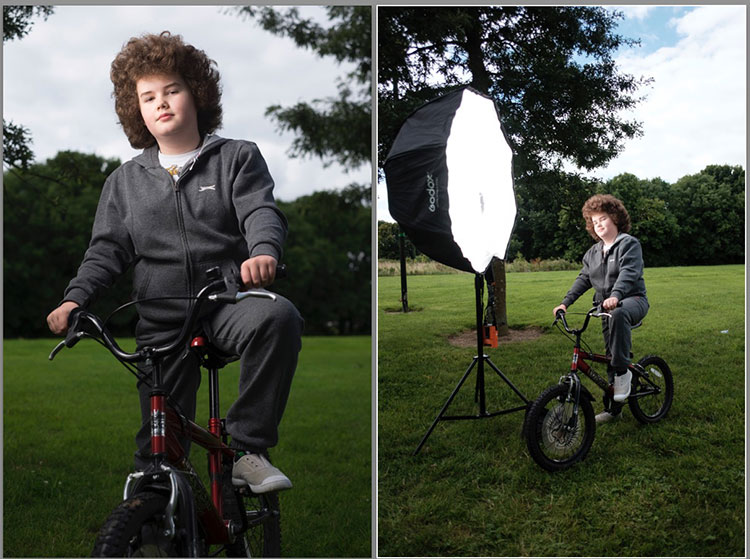
So I set it all up, and with my trusty Godox 120cm Octabox on the Ad360, I sweet-talked my son into posing on his bike. That’s roughly three minutes of attention span before boredom hits. I’ve included some behind the scenes shots as well. The exposure was 1/4000th, f/2.8, ISO 200 with a 35mm f/1.4 lens. Even the nearby trees are out of focus. I absolutely love the bokeh in my first shoot with the trigger.

Cactus image v6ii review matt

Test Shoot #1

Testing means dragging out a range of people to shoot with. It also means working around their schedule. So this next shoot happened a little later than I would’ve liked, but I still got some good shots.

Once the trigger is set up, your main issue is dealing with power. Normally with manual flash, only the aperture has an effect on the apparent power of the flash. Below sync-speed, you can change the shutter speed to your heart’s content, and it won’t affect the flash. Not so with High-Speed Sync. Any change of shutter speed changes the flash power. The faster the shutter speed, the more flash power you need. It’s a new experience if you’ve gotten used to normal manual flash. Each stop increase in shutter speed requires about a stop of increase in the flash power.

Here’s the first setup and the resulting image.

Cactus image v6ii review sunset 1

Behind the scenes shot showing the Godox AD360 flash with Godox 120cm Octabox. Taken by Ola.

The shot with HSS. The background is beautifully out of focus. ISO200 f1.8 1/4000sec 35mm on Fuji X-T10

The shot with HSS. The background is beautifully out of focus. ISO 200, f/1.8, 1/4000th, 35mm on Fuji X-T10.

I still managed to blow out the sun slightly, but the flash was at full power, so I couldn’t change the aperture to compensate. The octabox was just out of frame too. Normally, I shoot vertical portraits but for articles, horizontal looks better, so I just recovered this highlights in Lightroom.

Test Shoot #2

For the second shoot, I had more time, better planning, and less wind! Due to the model’s availability, it was later than I’d have like, but still had enough light to get shots using HSS (out of want rather than need!).

Here I’ve used my typical short lit Godox Octa setup for this using the Fujifilm X-T10 with a 35mm f/1.4 lens. I wanted to create tension and go for a cinematic feel to the image. The grass at the bottom is well out of focus and gives a slightly ethereal feel to the shot. The black clothes and the model peering out of frame seem to reference things in the past as if a loved one has passed.

cactus-v6ii-review-emma-1

ISO 200, f/1.4, 1/1600

For the second shot, I wanted to bring in an additional element – a back light. I could’ve used one of the 850’s, but instead, I opted for the Cactus RF-60 flash. This has the receiver built-in and communicates directly with the Cactus V6II receiver. I set this to Group B and zoomed the flash to 105mm to allow it to throw the light further. Once in HSS mode, it triggered every time along with the AD360. I also went for the 50-140mm lens to get further back and compress the background more.

ISO200 f2.8 1/500sec. Shot with the 50-1400 f2.8 lens

ISO 200, f/2.8, 1/500th. Shot with the 50-140mm f/2.8 lens.

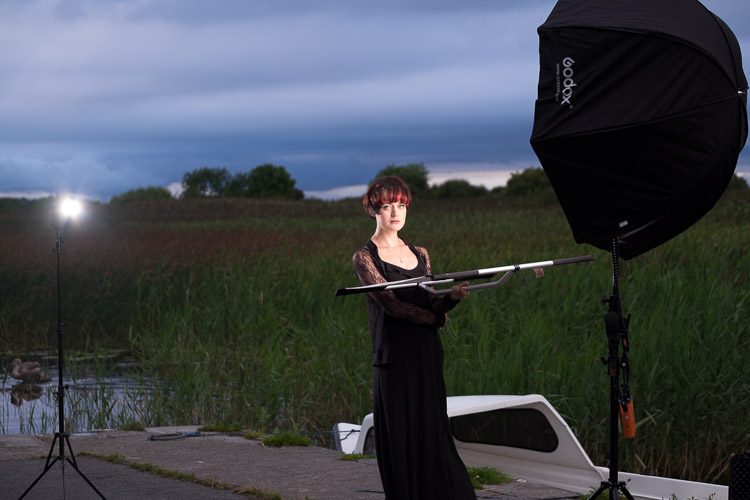
Here’s how the gear looked behind the scenes:

Cactus image v6ii review emma 3

Headshot variation

For the final look, I went for a headshot, so the Octa was moved to give her a soft loop light. I got the model to hold a reflector (in this case a California Sunbounce silver-white mini, using the silver side for contrast). It’s very similar to the last setup with the Cactus RF-60 acting as a kicker.

cactus-image-v6ii-review-emma-3

ISO 200, f/2.8, 1/500th.

Here’s the setup shot:

Cactus image v6ii review emma 5

By swapping the side the Octa is on, so the kicker and the key are on the same side, you get a very different look for only a few minutes work.

cactus-image-v6ii-review-emma-5

Cross Platform Test: Fuji Camera – Canon Flashes

Using a second Cactus V6II trigger, I added a Canon 580EXII Speedlite to the setup to use with the Fuji camera. In this case, I set the flash up as Canon with an Auto Canon Flash Profile. Again with the flash set to HSS, I went through the learning process for HSS, and the flash worked perfectly with the Fujifilm in HSS mode. The 580EXII was set to ETTL, and I could control both the flash power and the flash from the V6II transceiver on the camera.

I still have my Canon 5D MarkIII (not for much longer), so I did a quick test with that as a system check. Again I used the Canon 580EXII Speedlite on ETTL, set to HSS. Because both transceivers were set to Auto, switching the units off and back on began a new detection cycle, successfully recognizing both flash and camera as Canon. After one or two test fires, it all worked perfectly. No pretty models for this demo, but something close to my heart instead.

Shooting the X-T2 using a Canon 5DIII. The 580EXII flash was set up off camera, with the trigger set to auto detect camera, and the receiver set to auto detect flash. Set to ETTL mode, both power and zoom can be controlled from the trigger. The flash was bounced into the ceiling. ISO200 1/500sec f1.8.

Shooting the Fuji X-T2 using a Canon 5D MarkIII. The Canon 580EXII flash was set up off-camera, with the trigger set to auto-detect the camera, and the receiver set to auto-detect the flash. Set to ETTL mode, both the power and zoom of the flash can be controlled from the trigger. The flash was bounced into the ceiling. ISO 200, 1/500th, f/1.8.

Firmware Updates for the V6II

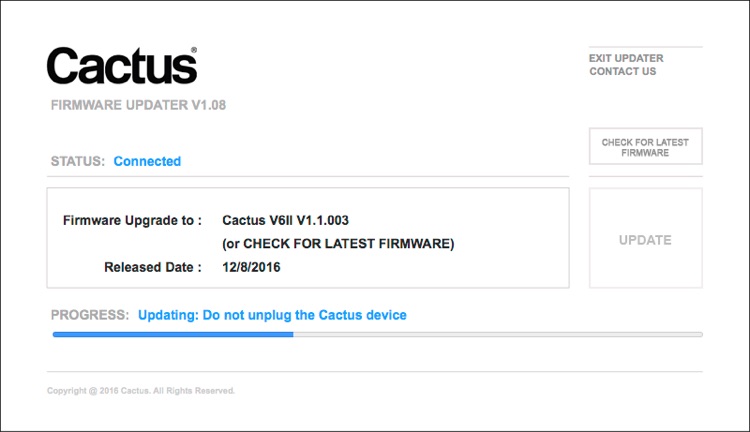
Another feature of this trigger is you can update the firmware as new features and profiles are added. During my testing period, two firmware updates became available. I also had the chance to test a beta version of the new Fuji X-T2, another testament to Cactus’ support for their product. For the public updates, I simply downloaded the updater app, ran it, and followed the instructions.

Cactus Firmware Updater

Cactus Firmware Updater

Pros of the Cactus V6II Triggers

  • Gives you High-Speed Sync ability across a range of camera systems and flashes.
  • Firmware upgradeable.
  • Works directly with the Cactus RF-60 flash.
  • Good range of channels and groups.
  • Power Sync allows additional sync speed options for non-HSS flashes.
  • Can work with only one transmitter and your existing triggers.

Cons of the Cactus V6II Triggers

  • Clunky – the shape isn’t as elegant as many others with a hotshoe passthrough.
  • One of the units I had suffered from a really tight battery clip. It’s more an annoyance than a real con as the batteries last a really long time. The clip on the other unit was perfect.
  • For Fuji users, there’s more work to get it going. For everyone else, no problem.

Verdict

I’m delighted with the Cactus V6II wireless flash trigger. It really works.

During the short time I’ve had the trigger, I’ve used it on a few magazine shoots, as well as the fun shoots I did to test it. It’s been great. Their support has been fabulous, and there’s a lot of information on their community page.

Would I recommend these triggers? Absolutely. They bring a new dimension to shooting portraits outdoors that can change your style completely.

googletag.cmd.push(function() {
tablet_slots.push( googletag.defineSlot( “/1005424/_dPSv4_tab-all-article-bottom_(300×250)”, [300, 250], “pb-ad-78623” ).addService( googletag.pubads() ) ); } );

googletag.cmd.push(function() {
mobile_slots.push( googletag.defineSlot( “/1005424/_dPSv4_mob-all-article-bottom_(300×250)”, [300, 250], “pb-ad-78158” ).addService( googletag.pubads() ) ); } );

The post Overview and Test of the New Cactus V6II Wireless Flash Trigger for High-Speed Sync by Sean McCormack appeared first on Digital Photography School.

Digital Photography School

 
Comments Off on Overview and Test of the New Cactus V6II Wireless Flash Trigger for High-Speed Sync

Posted in Photography


Elinchrom adds Sony compatibility to its high speed sync Skyport Plus HS wireless controller

11 Aug

Lighting manufacturer Elinchrom has introduced a version of its high speed sync Skyport remote flash trigger and controller that is compatible with Sony cameras. The new Skyport Plus HS transmitter allows Sony camera users to synchronize their shutter with Elinchrom flash heads using speeds of up to 1/8000sec. The system has been in use for some time for Canon and Nikon users, but now Elinchrom has added Sony to the list of camera brands with which the transmitter works.

Elinchrom’s high speed sync system is called Hi-Sync and varies from hotshoe style flash units in the way it produces light for short shutter speeds. While HSS modes in speedlights tend to use pulsing flash that gradually covers the camera sensor as the shutter slit passes by, Hi-Sync just uses a relatively long-duration burst. The company has introduced a system it calls OverDrive Sync that allows the user to calibrate the timing of the burst to the opening and closing of the individual camera’s shutter to ensure the two events coincide. This ODS system also allows a certain degree of exposure manipulation as photographers can tailor their shutter to different segments of the flash output curve.

The Skyport Plus HS 2.4GHz radio transmitter has a range of 200m/656ft when used without obstruction between the camera and the head, and 60m/196ft when used indoors. It system offers 20 channels for normal shooting and 20 more for high speed shooting, which can be arranged in 4 groups, and an AF illuminator to assist in low light conditions.

The Elinchrom Skyport Plus HS costs $ 249.95 USD / €249 EUR / £199 GBP.

For more information see the Elinchrom website.

Sony camera compatibility

 A7  A7 ll  A7r  A7r ll  A7s
 A7s ll A33 A37 A55 A57
A77 A77 ll A99 A100 A230
A290 A330 A350 A380 A390
A450 A500 A550 A560 A580
A700 A850 A6000 RX1 NEX-7K

Press release:

Elinchrom expands the family of EL-Skyport Plus HS transmitters to Sony users !

Since the launch of the Skyport Plus HS for Canon and Nikon, Sony users have been patiently awaiting their dedicated Transmitter. As promised, the most advanced Skyport ever is now available to Sony users. This will give them the ability to control and visualize power settings for all their compatible Elinchrom lights and the capability to shoot at speeds up to 1/8000s in Hi-Sync mode.

Visual Feedback Interface
The Large LCD display of the Skyport HS features two-way control via a visual feedback interface that lets you see the exact power up to 10 compatible Elinchrom lights in your setup right on the transmitter.

Users can control the modelling lamp and power of each flash unit directly from the Skyport transmitter, which instantly shows the updated settings.

This provides unsurpassed levels of “two-way communication and control” for every light in your setup, right from your camera.

Hi-Sync opens up the world of flash photography
Elinchrom Hi-Sync technology lets you go beyond the X-Sync of your camera. Photographers can simply switch to Hi-Sync mode and access sync speeds up to 1/8000s to freeze motion, overpower the sun, darken backgrounds or use a wider aperture. The ODS (Over Drive Sync) enables users to fine tune the Skyport Plus HS transmitter’s trigger signal to optimize exposure at high shutter speeds while gaining up to 2 more f-stops of light.

Even more
The Skyport HS has 20 frequency channels that can be used for either Normal or Speed mode. The transmitter attaches easily and securely to the hotshoe with its one-touch quick-lock mechanism, and is powered by 2x AA batteries. Users can also enjoy a range of up to 656ft (200m) outdoors, and up to 196ft (60m) indoors.

The Skyport HS continues the Elinchrom commitment to quality
Providing photographers with tools to enhance their shooting experience whilst also showing how Elinchrom is looking firmly ahead to the future. The Skyport HS represents a seamless extension of the EL-Skyport family since it is also compatible with the three previous generations of Elinchrom flash units (those using the EL-Skyport Transceiver RX module for Style RX, Digital RX, and Ranger RX systems, and those with integrated EL-Skyport modules for the BRX, D-Lite RX, ELC Pro HD, and ELB series.)

Other camera systems are currently being evaluated for future release.

EL-Skyport Plus HS Features
* Large LCD with unique, real-time display of remote flash power settings
* Easy access buttons and rotation ring for fast setup and control
* 20 Channels, 4 Groups for Normal and Speed Sync Modes
* Hi-Sync, up to 1/8000sec with Sony, Canon and Nikon cameras
* Extended working range up to 656ft (200m)
* AF Illuminator and sure-lock mounting foot
* USB port for future-proof upgrades

The EL-Skyport Transmitter Plus HS is now available for Sony, Canon and Nikon cameras.
EL19371 – EL-Skyport Transmitter Plus HS for Sony
EL19366 – EL-Skyport Transmitter Plus HS for Canon
EL19367 – EL-Skyport Transmitter Plus HS for Nikon
Street Price: $ 249.95 USD / €249 EUR / £199 GBP

Specifications
Frequency Band : 2.4 GHz
Channels : 40; (20 in Normal mode – green / 20 in Speed mode – red)
Groups : 4: 1, 2, 3, 4
Flash synchronization :
Normal: limited to the native X-sync of your camera
Hi-Sync mode: up to a 1/8000 sec.*
2nd curtain sync: only Canon
Range : Up to 200m (656’) for triggering
AF Assist Beam : Yes
Connection :
Foot for Sony hotshoe (19371) Canon hotshoe (19366) and Nikon hotshoe (19367)
Mini-USB for firmware updates
2.5 mm remote release
Power source : 2x AA batteries
Indicators and Controls :
LCD screen display:
Sync mode, group, channel, ODS activation, Hi-Sync activation, shutter mode, remaining battery power, flash unit name, flash unit ID, flash unit power level, flash unit modelling level.
Buttons:
Group selection, test, rotation ring to change values, confirmation, on/off and refresh.
There are also 4 buttons with variable functionality:
Power +/-, Modelling lamp off/prop/free, Individual unit selection and setup on the dashboard. Menu up, menu down and exit in the setup menu.
Dimensions : 84.1 x 68.3 x 58.5 mm (3.3 x 2.7 x 2.3”)
Weight : 120 g ( 0.27 lbs.) without batteries

Articles: Digital Photography Review (dpreview.com)

 
Comments Off on Elinchrom adds Sony compatibility to its high speed sync Skyport Plus HS wireless controller

Posted in Uncategorized


Cactus promises 1/8000sec flash sync with V6 II transceiver, new version for Sony users

28 Jun

Hong Kong-based flash and flash trigger manufacturer Cactus has upgraded its V6 wireless transceiver system to allow flash sync speeds of up to 1/8000sec. The company, claiming its transceivers can apply TTL control to multiple brands of flash at the same time, says that the V6 ll will be compatible with units from Canon, Nikon, Olympus, Panasonic and Pentax. Cactus also plans to bring high speed flash to Fujifilm X cameras even though Fuji doesn’t support the feature with its own flash units. Cactus has, at the same time, announced a V6 lls for Sony users with the same capabilities, but offers a Sony-compatible hotshoe foot.

The Cactus V6 ll offers an LED AF-assist light and remote control of the flash’s power output and zoom head position, as well as the features of the previous version. Also new is the ability to detect the on-camera flash in the network and to assign an automatic profile to that flash on start-up. This should make the system easier to work with.

The Cactus V6 ll will be available from July priced at $ 95. The Sony version is scheduled for an August release. For more information and a list of pre-installed flash profiles visit the Cactus website.


Press release:

Go high-speed sync! Cactus launches the V6 II, a newest version of its popular Wireless Flash Transceiver to add cross-brand HSS and the V6 IIs, a dedicated Sony version.

After two years in the making, Cactus V6 II & IIs – the second generation of the World’s First cross-brand wireless flash transceiver, NOW supports high-speed synchronisation (HSS)!

Besides the revolutionary remote power control of Canon, Fujifilm, Nikon, Olympus, Panasonic and Pentax flashes all at the same time, the new models now support HSS / FP mode in the same cross-brand environment.1 This unique function gives photographers flexibility undreamed of. Matching flashes with same camera system for off-camera flash photography is over.

Two High-Speed Sync Modes
1. Normal HSS: Supports shutter speed up to 1/8000s.
2. Power Sync: Boosts flash contribution above camera’s x-sync speed, perfect for extreme conditions where Normal HSS is not powerful enough. 2

Cactus also extends HSS capabilities to Fujifilm cameras despite them not yet
supporting high-speed sync at the time of writing.

AF-assist
Both the V6 II and IIs now has an automatic LED AF-assist light that makes autofocusing in dark environments possible – even in pitched-black!3 Besides the camera-mounted V6 II/IIs, off-camera units will also activate the AF-assist light, which helps focusing even when camera is far from the subject.

V6 IIs for Sony
The dedicated Sony version – V6 IIs, embodies all the desirable functions of its sibling V6 II but with a Sony compatible hot shoe on the transceiver body, ensuring a seamless and secured connection with Sony cameras and flashes. Mounting the V6 IIs on a Sony Alpha camera allows the photographer to shoot above camera’s maximum x-sync speed and control power and zoom of Sony, including those with a Minolta/Sony hot shoe via an adapter, and other V6 II compatible flashes. 4 It is the perfect wireless flash trigger for existing and new users of Sony Alpha cameras, especially those who may still have non-Sony system flashes in their camera bags.

Highly Intelligent
V6 II and IIs can now auto-detect the on-camera portable flashes at device start-up by selecting the system the flash belongs to and assigning an Auto flash profile. Similarly, the V6 II will auto-detect the camera and selects the system accordingly. 5 This simple plug-and-play makes the setting up extremely quick and easy that both amateurs and professionals appreciate.

Expands Flash Compatibility
Remote zoom control now applies to all compatible TTL flashes, gives the photographer much quicker controls. Better still, previously unsupported digital TTL flash models on the V6 are now being supported.

Features at a Glance
1. Cross-brand wireless manual power and zoom control with HSS support of Canon, Fujifilm, Nikon, Olympus, Panasonic, Pentax and Sony flashes;

2. Two cross-brand high-speed sync modes:
•?Normal HSS supports shutter speeds up to 1/8000s;
•?Power Sync boosts flash contribution above camera’s x-sync speed;

3. Multi-master supports up to 20 photographers firing the same set of flashes at their own power settings;

4. AF-assist light assists focusing in low light environment;

5. Flash profile customization ensures accurate power output;

6. Work seamlessly with the RF60 series to support HSS and Power Sync;

7. Other useful features inherited from the V6 including:

  • Lo Power
  • Absolute Power
  • TTL Pass-through
  • Group Sequence
  • Sport Shutter
  • Remote Shutter
  • Relay Mode
  • Delay Mode
  • Firmware Update support

Price and Availability
Cactus V6 II and IIs are currently scheduled to be available in 2016 July and August respectively and both are priced at US$ 95.00 (ex VAT).

Articles: Digital Photography Review (dpreview.com)

 
Comments Off on Cactus promises 1/8000sec flash sync with V6 II transceiver, new version for Sony users

Posted in Uncategorized


High Speed Sync Versus a Neutral Density Filter to Overcome Bright Sunlight in Portraits

11 Sep

ND3

For several years now I have used high speed sync (HSS) in order to light portraits in full sunlight at a wide aperture. If you’re unfamiliar with HSS, it allows you to shoot at shutter speeds that are higher than the native sync speed of your camera (usually 1/200 or 1/250 of a second, read your camera and flash manual to find yours) while still using speedlights. The reason this ability is so enticing is that you can shoot flash-lit images at wide open apertures in full sunlight, allowing for a shallow depth of field. Normally if you were using a flash, your maximum shutter speed would be at 1/200 or slower, meaning that you would need to close your aperture down in order to get a proper exposure in the sun.

ApertureOnly

Raw image shot at f/29

How HSS works is that the flash will begin pulsing light, just before the shutter opens, since the exposure is so short. The problem with this is that much of the output of the light is lost in the pulsing process, meaning that you need more flash units to achieve a decent output. For example, when I am shooting at 1/8000th of a second, I need to combine four flashes, on one stand, in order to light a subject that is about five feet away. And that is without any modifiers, like an umbrella or soft box. The other issue with HSS is that not just any flash and trigger system will do the trick. You need to have gear that will communicate information from the camera to the flash.

A couple systems that can do that are the PocketWizard Flex TT5 and Mini TT1, or the RadioPopper PX system. Since most photographers don’t already own one of these triggers systems, this means starting from scratch, which isn’t cheap. I personally opted for the RadioPopper system, since the PocketWizard Flex system for Canon was super glitchy. The RadioPopper system wasn’t perfect either. Just the amount of batteries alone, for four Canon Speedlites with triggers, including a ST-E2 transmitter for the camera, required 27 batteries. Even though they were mostly all rechargeable (the ST-E2 required the hard to find 2CR5 battery), imagine trying to troubleshoot a misfire. Did the batteries need changed in one of the transceivers or was the speedlite misaligned, obscuring the sensor? Or imagine that one of the speedlites’ batteries may be slightly more drained than another, causing only three of four lights to fire. This made the overall exposure fluctuate with every frame.

HSS1

Raw image unlit

HSS2

Raw image, 1/8000 @ f/2.8

I recently decided to compare HSS against using a variable neutral density (ND) filter. ND filters screw on to your lens and cut down the light that hits the sensor, thus allowing for a wider aperture in bright light. This allowed my shutter speed to stay at or below the sync speed cutoff, allowing the full strength of the Speedlite to light my subject. This meant that I wouldn’t need to transmit ETTL information (sell the RadioPoppers) and it meant that I would need fewer Speedlites (less batteries).

After setting my ISO as low as it would go (50), my shutter speed as high as was allowed (1/200th on the Canon 5D MarkII), and my Speedlites at their full output, I dialled down the variable ND until the ambient light perfectly balanced with the light from the flash.

ND1

Raw image unlit

ND2

Raw image, 1/200 @ f/4

Some people have pointed out that there could be the issue of a color cast with certain brands of ND filters. I have not experienced any issues with the ProMaster brand. However, it’s important to keep in mind that if you are shooting directly in to the sun, there will likely be glare in your image, causing a possible color cast or the image to appear washed out.

Note that this experiment was done using Canon 430EX Speedlites with RadioPopper PX triggers. I’ve since sold them all, opting for the cheaper, sturdier and more powerful LumoPro LP180 with PocketWizard PlusX triggers. Now with one bare bulb flash, and a variable ND filter, I can effectively cut the ambient light while fully lighting a subject at f/1.4 in full sunlight.

The post High Speed Sync Versus a Neutral Density Filter to Overcome Bright Sunlight in Portraits by Nick Fancher appeared first on Digital Photography School.

Digital Photography School

 
Comments Off on High Speed Sync Versus a Neutral Density Filter to Overcome Bright Sunlight in Portraits

Posted in Photography


On Assignment: Speedlights, Sync and Sun

24 Jun

It's a bit of a leap of faith, the first time you head out on an assignment with just an X100s and a couple speedlights. (Ask Zack.) And truth be told, I had a DSLR and a couple lenses with me as backup, just in case.

But I never brought them out. And with the crazy sync speeds offered by the X100s, a pair of speedlights is all you really need to do battle with late afternoon sun as it turns out.

Read more »
Strobist

 
Comments Off on On Assignment: Speedlights, Sync and Sun

Posted in Photography


How To Sync Multiple Camera Time Stamps In Lightroom 4

05 Apr

Syncing the time stamp on multiple cameras is best done ahead of time. Every six months or so I take all of my digital SLR camera bodies and sync the clocks in them. This is important because if you use multiple cameras on a photo shoot like a wedding, you want to be able to sort the photos by the time they were taken so you can give the client a set of photos that are organized from start to finish. If your cameras time stamps are off, this can become very annoying in post because you’ll notice images being out of order. This becomes amplified the more your cameras are out of sync.

Well, none of us are perfect and I certainly don’t claim to be! I recently shot a wedding with my good buddy Cliff Baise and I totally forgot to sync our cameras ahead of time. When I got his images on my computer to start editing everything together I was getting frustrated because I wasn’t seeing ANY of my images in Lightroom. Everything was sorted by time like it always is and I double checked everything. Well, it turns out our cameras were a full hour out of sync with my camera being an hour ahead of Cliff’s. So my images weren’t showing up in the timeline until much later in the wedding. This was pretty nerve racking because I hadn’t run into this problem before. I’ve always synced my own cameras (my wife usually shoots with me and uses my other main camera) so I’ve never had to deal with this before. I thought I was out of luck. So I started rummaging through the menu options in Lightroom and eventually figured out a way to sync the two cameras very quickly and very easily. Here’s how to do it:

Find Images You Know Were Taken At The Same Time

Screen Shot 2013-03-29 at 9.05.11 AM

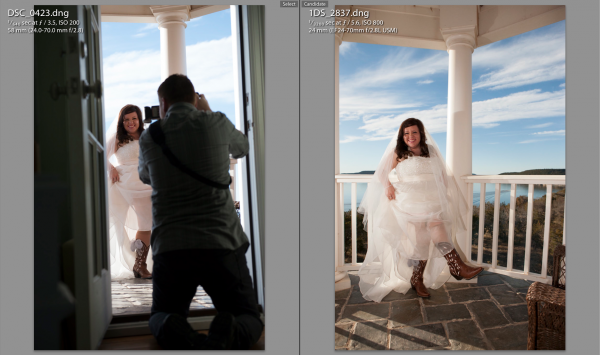
At some point during the day of a wedding or any shoot, it’s likely that the two shooters took a photo at the same exact time (or dang close to it). This doesn’t have to be an exact, down to the mili-second thing…they just need to be close. For this wedding I found a shot that Cliff took of me taking a picture of the bride showing off her boots. Perfect. All I needed to do was find the picture that I took at that moment.

Screen Shot 2013-03-29 at 9.05.24 AMThe first thing you need to do is select the first photo you find by clicking on it in Library Mode. Then, scroll down to the other image from the second camera, hold down command on a Mac (control on PC) and click that one as well. This will select both images at the same time. Now hit the ‘C’ key on your keyboard which will bring up the two images in Compare mode side by side. Once in compare mode you can click back and forth between the two images to see all the EXIF information on the right hand side. Again, this all has to be done in Library Mode, not Develop Mode.

On the right hand side in the EXIF data, you will see the Capture Time. This is how you tell if the images are off at all. Just click back and forth between the two images and watch how the time changes. If they are off by more than a few seconds, it’s time for the next step.

Syncing The Times

This part was a little tricky the first time. Go ahead and write down the exact times of each photo on a piece of paper or type it onto your computer somewhere. Note which time correlates with each image.

Now you need to decide which set of images you want to sync. In all honesty, it doesn’t really matter which one you choose. Nobody cares what time the picture was taken, they just need to be in order of when they were taken. So I just chose to make Cliff’s images match the time of my images. I could have gone the other way around and gotten the same result.

Screen Shot 2013-03-29 at 12.14.44 PMTo sync the time stamps, select all the images from the camera you want to correct. If you have them in separate folders this will be easy. If they are all mixed in to the same folder, you can sort by File Name in Library Mode and then the images will be separated. If all the images from the one camera are in their own folder, just hit Command A on a Mac (Control A on PC). This will select all the photos. If the images are mixed with another camera in the same folder, separate them by file name, then select the first image from the camera you want to correct by clicking on it, then scroll down to the last image from that camera, hold down Shift and click the last image.

Now that you have all the images selected that you want to fix, go up to Metadata in the top menu and scroll down to Edit Capture Time. When the window pops up all you need to to is update the time under the ‘New Time’ section. The original time will be on the top so just plug in the time that you wrote down from the correct camera in the ‘Corrected Time’ section.

Screen Shot 2013-03-29 at 12.16.11 PM

Once this is done, it’s important to just double check everything and make sure you have everything correct. It says at the bottom of the window that the operation cannot be undone so don’t make any mistakes! Once you are sure you have everything right just click Change and you’ll be done! You should now be able to select the images from both cameras in library mode, sort by time and see all of the images in chronological order.

Conclusion

Like I said in the beginning, it’s way easier to do this right the first time by synching the cameras before the shoot. But if you ever forget this like I did, being able to do it in Lightroom is a life saver!


Post originally from: Digital Photography Tips.

Check out our more Photography Tips at Photography Tips for Beginners, Portrait Photography Tips and Wedding Photography Tips.

How To Sync Multiple Camera Time Stamps In Lightroom 4


Digital Photography School

 
Comments Off on How To Sync Multiple Camera Time Stamps In Lightroom 4

Posted in Photography


How To: Freezing Action with Flash Sync – Photographer Atiba Jefferson- In Focus

27 Nov

Tune in every Monday to learn firsthand how to film, edit and shoot like the pros, from your favorite videographers and photographers in skateboarding! Subscribe to Ride: www.youtube.com facebook.com twitter.com instagram @ridechannel
Video Rating: 4 / 5

 
Comments Off on How To: Freezing Action with Flash Sync – Photographer Atiba Jefferson- In Focus

Posted in Photography Videos


Nikon AUTOFP high speed sync – HOW TO CONFIGURE

28 Oct

Gary Fong shows step-by-step how to activate the High Speed Sync functionality on Nikon DSLR’s. High speed sync allows you to shoot flash at speeds up to 1/8000 sec rather than the mechanical shutter speed limit of 1/250 sec. This works only on compatible models listed here: Flashes: Nikon SB-600/700/800/900, Bodies: Nikon D80,D90, D7000, D200, D300, D700, D800, D2, D3, D4

 
Comments Off on Nikon AUTOFP high speed sync – HOW TO CONFIGURE

Posted in Nikon Videos


Nikon Camera, Flash Sync Speed Explained (CLS ROCKS part 3)

05 Aug

Blog dombowerphoto.blogspot.com Video explaining what sync speed is, why it is what it is and how to over come it and why you would want to over come it. very funny part near the end. regards Dom Bower www.dombower.com

Tweet: bit.ly Facebook: on.fb.me The Double Exposure: Canon vs. Nikon video can be found here : bit.ly Double Exposure: Canon vs. Nikon is the result of a project that started with one idea: to make an awesome video by combining the powers of the community at Tweakers.net. After months of hard work the video was released December 13th 2011 and gained over half a million views in less than a week. In this video we show you a small peek behind the scenes. Expect to see a LOT of photography gear, even more geeks and if you look closely you might spot some female beauty as well. Tracks : 1. Junkie XL – Heart of Darkness 2. Porcelain Black ft Lil Wayne – This is What Rock N Roll Looks Like (Pleasurekraft Remix) 3. Stars on 45 – Stars on 45 (Olav Basoski Remix)
Video Rating: 4 / 5