RSS
 

Posts Tagged ‘surfaces’

X-Rite’s i1Photo Pro 3 Plus profiler can calibrate for difficult surfaces, brighter displays

22 Aug

Calibration tool manufacturer X-Rite has announced an updated i1Photo Pro profiler that it says is designed to provide greater accuracy when measuring from heavily textured and high gloss papers. The professional-grade i1Photo Pro 3 spectrophotometer has a larger measuring aperture to compensate for imbalances caused by uneven surfaces and uses a polarizer to cut through reflections on high-gloss papers and on textured surfaces such as canvas.

The profiler is also now able to read from much brighter displays when performing screen calibrations, with a maximum of 5K NITs allowed for. The i1Photo Pro 3, along with the i1Profiler software, can also be used to emulate M0, M1 and M2 conditions after a single scan to demonstrate how images will look under various types of lighting when optical brighteners are present in the target paper.

X-Rite says the device has been developed in response to the broadening of the range of surfaces now being printed on, and the increasing brightness and resolution of backlit displays.

X-Rite has also launched a new calibration table for those really serious about print accuracy. The i1iO Automated Scanning Table allows automated patch reading for reflective and transparent materials, and can work with a thickness of up to 33mm.

The X-Rite i1Photo Pro 3 Pro costs $ 2199/£1750, while the i1iO Automated Scanning Table costs $ 2995/£2400. For more information see the X-Rite website.

Press release:

X-Rite Now Shipping i1Photo Pro 3 Plus

The new i1Photo Pro 3 Plus from X-Rite is an ultra-precise spectral colour measurement solution that is optimised for Colour Perfectionists who print digitally on a wide range of specialised materials and surfaces.

Birmingham, UK, 15th August 2019 – X-Rite Incorporated, the global leader in colour science and technology, is now shipping the new i1Photo Pro 3 Plus, a spectral colour measurement solution specifically designed for professional photographers who print on challenging textured and glossy photo media looking for the most accurate colour in their RGB print workflows. i1Photo Pro 3 Plus combines the new i1Pro 3 Plus spectrophotometer and i1Profiler software to deliver the ultimate professional-level colour management for displays, projectors, scanners, RGB printers and cameras.

Current profiling solutions are limited in their ability to measure textured, rough, or uneven surfaces and cannot accommodate various material thicknesses. Many devices do not have the resolution required to ensure the highest colour quality when printing detailed patterns, metallic effects, or photography images. This leads to costly colour errors and rework, which impacts a photographer’s bottom line.

“The i1Photo Pro3 Plus builds on the success of the i1 Family and removes the variability to create accurate ICC profiles on a broader range of photographic materials,” said Liz Quinlisk, Photo and Video Business Unit Manager, X-Rite. “Photographers will see the immediate value by incorporating the i1Photo Pro 3 Plus into their RGB print workflow, resulting in more accurate, repeatable colour and improved shadow detail, as well as a reduction of waste and an increased return on investment.”

New in the i1Pro3 Plus spectrophotometer:
Larger 8mm aperture supports new materials and substrates used in digital printing.

Polarisation Filter (measurement condition M3) that reduces specular highlights and shadows to provide “better blacks” and richer colours on rough surfaces and glossy media, like canvas prints and fine art photo papers.

High Brightness Measurement up to 5K NITs for ultra-bright displays.

Simultaneously measure M0, M1 and M2 in a single pass to account for optical brighteners so photographers can quickly predict how colours printed on optically brightened substrates will look under different lighting conditions.

New LED illuminant that improves device reliability. The i1Pro3 Plus allows for four measurement conditions (ISO 13655 M0; M1: D50; M2: UV Excluded, M3Polarised).

Transmission scanning support for backlit materials.

Longer scanning ruler to support wider charts.

“We are used to seeing bumpy shadow measurements from unpolarised devices on glossy textured media like canvas. With the new polarisation feature in the i1Pro 3 Plus, our M3 measurements are dramatically smoother in the shadows – perfect in fact,” commented Scott Martin, Founder, Onsight, a leading workflow consultant for print, prepress, design and photography.

New X-Rite iO Table
In addition, X-Rite announces a new i1iO Automated Scanning Table that supports the i1Pro 3 Plus hardware. This hands-free test chart reader offers automated colour profiling on a variety of substrates with reduced risk of colour measurement errors. It is ideal for colour perfectionists who want to speed up and automate the measurement process and eliminate manual strip reading. The new i1iO table can be used with a variety of materials including canvas, textiles, ceramics, corrugated, etc. and supports materials up to 33mm thick, with the optional z-axis spacer. It also supports transparencies and backlit materials.

Additional i1Pro 3 Plus Solutions
In addition to i1Photo Pro 3 Plus, X-Rite is now shipping these new i1Pro 3 Plus solutions:
i1Basic Pro 3 Plus – includes monitor calibration and quality control for monitors and printers
i1Publish Pro 3 Plus – includes CMYK+ printer module and all features of i1Photo Pro 3 Plus

Articles: Digital Photography Review (dpreview.com)

 
Comments Off on X-Rite’s i1Photo Pro 3 Plus profiler can calibrate for difficult surfaces, brighter displays

Posted in Uncategorized


Replica Surfaces are rigid, lightweight photo backdrops that imitate popular surfaces

13 Dec

A pair of crowdfunding campaigns are raising funds for Replica Surfaces, a series of photography backdrops that imitate various surfaces, including wood, concrete and marble. Unlike the real materials, Replica Surfaces backdrops are lightweight at 907g (2lbs), highly portable with a 3mm (0.12in) thickness, and can be assembled upright using small plastic stands.
Replica Surfaces are described as “hyper-realistic” backdrops featuring glare-free, stain-proof surfaces made with three-layer construction. Each backdrop measures 58cm x 58cm (23in x 23in) and is designed to slot into small 3D-printed plastic stands in an L-configuration. The end result is a flat surface and upright backdrop for product photography.

The product’s crowdfunding campaigns are offering six initial designs: white marble, ship-lap, concrete, rose marble, weathered wood, and cement. Replica Surfaces was funded on Kickstarter and Indiegogo; interested buyers can pre-order the boards and stands in various bundles from CrowdOx starting at $ 20.


Disclaimer: Remember to do your research with any crowdfunding project. DPReview does its best to share only the projects that look legitimate and come from reliable creators, but as with any crowdfunded campaign, there’s always the risk of the product or service never coming to fruition.

Articles: Digital Photography Review (dpreview.com)

 
Comments Off on Replica Surfaces are rigid, lightweight photo backdrops that imitate popular surfaces

Posted in Uncategorized


How to Make Use of Foggy Surfaces for Abstract Photography

12 Feb

When I mention that one of my favorite subjects to photograph is foggy surfaces, I get a few weird looks. To the uninitiated, the subject is an unusual one and most likely a boring one too. Photographers in-the-know furrow their brow, recalling the dreaded lens fog plaguing important shoot days and holidays photos.

Nevertheless, diffused glass is a beautiful and extremely diverse tool, great for adding an atmospheric layer to any image.

How to Make Use of Foggy Surfaces in Photography

How to Make Use of Foggy Surfaces in Photography

What is a foggy surface?

First of all, “foggy surfaces” (or fogged) is a term I use to encompass a whole wealth of surfaces that render softly focused images. Office partitions, shower doors, windows – there are hundreds of different sources of glass diffused organically by weather or intentionally by the manufacturer.

Frosted glass is an artificially diffused surface material. Created by sandblasting annealed glass, frosted glass is used to separate environments without sacrificing light. It suggests a sense of openness without sacrificing privacy. These surfaces diffuse and soften subjects to create dense, otherworldly subject matter that investigates form as much as they obscure.

How to Make Use of Foggy Surfaces in Photography

Due to scratches and reflections, this image has an extra layer of depth.

Where to find fogged surfaces

A great source of fogged glass is through your everyday exterior office window. Decorative or plain sheets of frosted glass are used as partitions, making use of natural light. Photographing objects through these types of glass creates beautiful, isolated studies of subjects matter.

Plant leaves pressed against the glass plays with light and form, unusual office chairs take on a new life framed by a foggy canvas. It’s amazing how little it takes to re-imagine form in a whole new way with something as simple as a thin layer of glass.

One of my favorite times for taking photographs is on a rainy day. The heavy atmosphere, the movement, the transformation of color and light – it’s all enticing to me and nothing illustrates this more than the view through a damp, slowly fogging window.

On a cold and wet day, warmer moisture in the air turns into condensation upon contact with cold air. Inside a vehicle, warm air brushes against the coldness of a window and this begin to collect as condensation on the glass. This fogs the window and the pane of glass frames and reflects the environment while housing the subject itself beyond the glass. It’s a bit of a mixture of art and science, and the results are really beautiful if you’re willing to brave the wet conditions.

How to Make Use of Foggy Surfaces in Photography

This photograph was taken through a tram window on a cold and rainy night. Commuter’s coats and the lights in the tram create a surreal landscape of color.

The bad type of fog

Seeking out subjects in the rain as can also lead to “camera fog”. This is a type of fog you want to avoid. Transferring a camera from a warmer environment to a cooler one causes condensation inside the camera too. While a few rounds of camera fog won’t destroy a camera, taking steps to acclimatize your camera will prevent extra wear.

Before heading out for a rainy day photography walk, minimize the issue by putting your camera inside a plastic zip-lock bag until the temperature inside the bag and out have equalized. Depending on the difference in temperatures, you may need to leave your gear in the bag for a few hours to acclimatize. While it’s a bit of a pain, but it’s better to keep the fog outside of the camera!

How to Make Use of Foggy Surfaces in Photography

Fogged glass can create beautiful abstract effects.

How to Make Use of Foggy Surfaces in Photography

Photographing fogged surfaces rely on the light coming through the glass. Different times of the day can render completely different results.

How to photograph fogged surfaces

Photographing fogged surfaces is very similar to photographing transparent surfaces like glass. The strength of the light behind the subject will dictate how your subject will look. As you probably don’t have an opportunity to adjust the backlight, try taking photographs of subjects at different times of the day. The morning may depict an office plant in detail, but the light in the evening will lend more of a silhouette effect.

The result of an image taken through fogged glass also relies heavily on the proximity the subject to the glass itself. However, most subjects will be tucked behind a window or a building security system. Like street photography, this means that you’ll have to make the most of what you have.

From the exterior, closer objects, or even objects leaning against the glass will be the sharpest subjects. Distant subjects like faraway light sources are dispersed into the cloudy shades of the surface. It’s like having your focusing done for you. Try a few different angles and change your distance in relation to the subject.

Try to focus on detail rather than quantity, that way you will have a frame full of information rather than an empty frame of a faraway scene. If possible, try setting up a tripod so you’ll be able to use slower shutter speeds to capture the image. This isn’t ideal in every circumstance, however.

The post How to Make Use of Foggy Surfaces for Abstract Photography by Megan Kennedy appeared first on Digital Photography School.


Digital Photography School

 
Comments Off on How to Make Use of Foggy Surfaces for Abstract Photography

Posted in Photography


Guerrilla Apparel: Pirate Printers Press Clothes to Painted Public Surfaces

07 May

[ By WebUrbanist in Art & Sculpture & Craft. ]

A Berlin street art collective is hitting the streets of Europe again, touring major cities to turn infrastructural patterns into (quite literal) streetwear across the continent. Each of their unique creations is tied to public art and design patterns often overlooked as we walk by (or on top of) them.

Raubdruckerin (AKA Pirate Printer) press apparel to painted street objects featuring a level of relief, soaking up the top layer to create impressions of manhole covers, vents, grates, bike lane symbols and just about anything else with some depth to it.

In German, there is some nuance to their name as well: ‘Rauber’ means both pirate and robber, while “drucken” is both press and print. Effectively, they press and steal patterns (though since their source material is quite literally in the public domain, no one so far seems to mind).

Like graffiti artists or mobile street painters with portable canvasses, their work tends to draw a crowd and has a performative aspect to it by its nature. In turn, they aim to raise awareness of overlooked and everyday design objects.

So far they have made their way through Amsterdam, Athens, Paris and Lisbon. In each location, they press cotton bags and apparel to street surfaces coated in eco-friendly ink, then wash up behind themselves to leave no trace.

Share on Facebook


[ By WebUrbanist in Art & Sculpture & Craft. ]

[ WebUrbanist | Archives | Galleries | Privacy | TOS ]


WebUrbanist

 
Comments Off on Guerrilla Apparel: Pirate Printers Press Clothes to Painted Public Surfaces

Posted in Creativity


Vertigo Wallpaper: Warped 3D Room Illusions Transform Flat Gallery Surfaces

31 Dec

[ By SA Rogers in Art & Installation & Sound. ]

screen-shot-2016-12-30-at-9-51-20-am

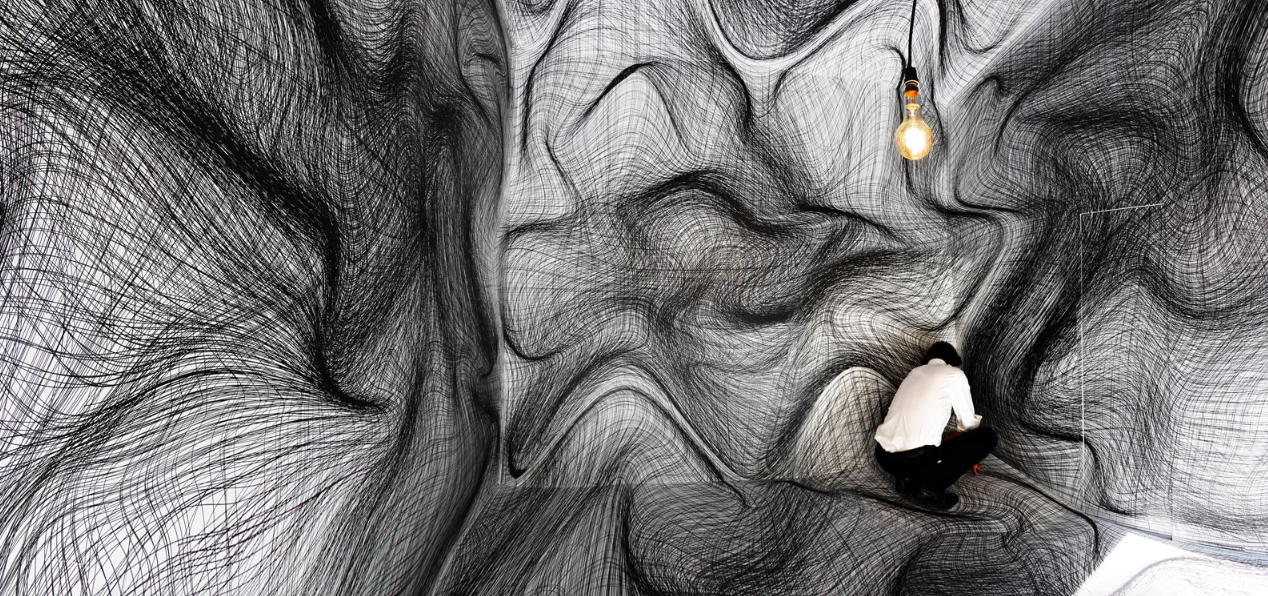
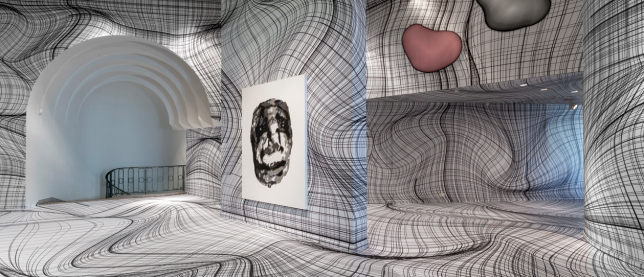
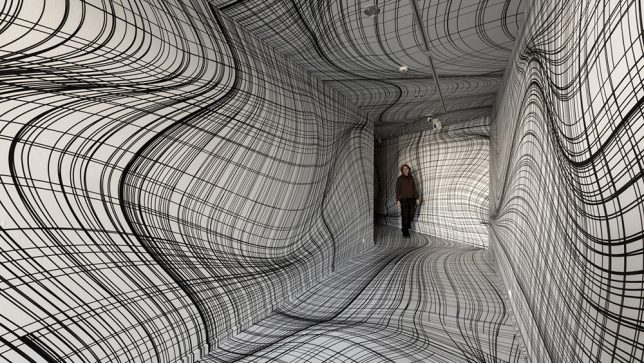
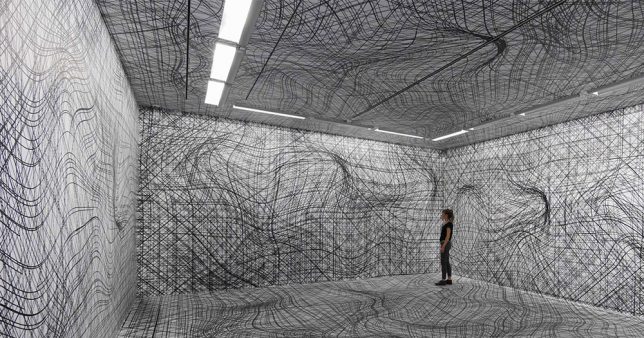
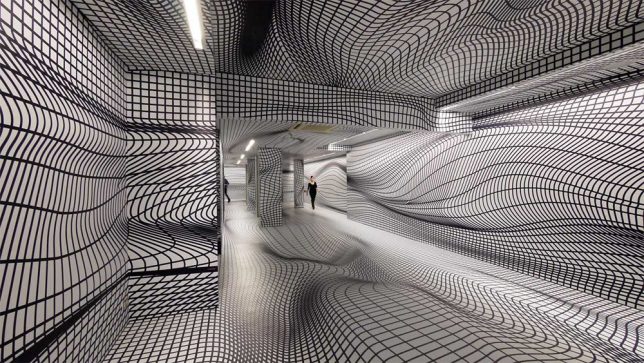
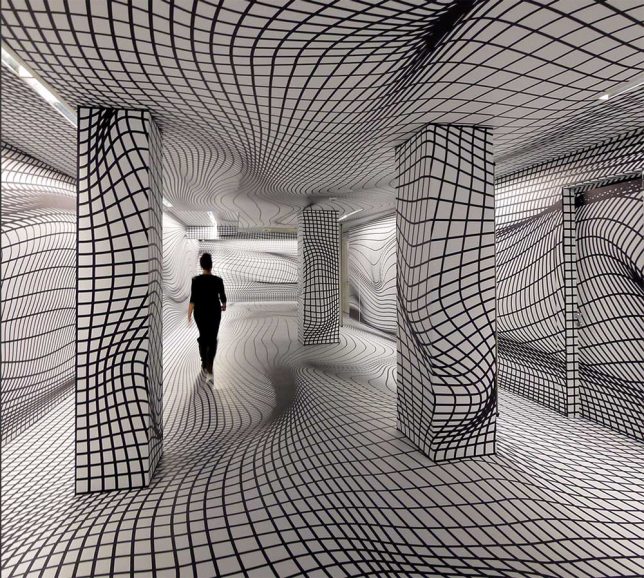
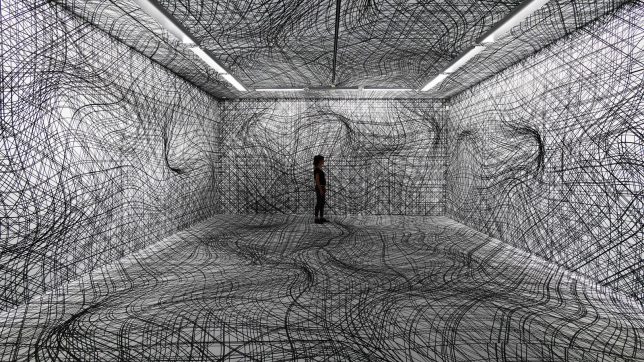
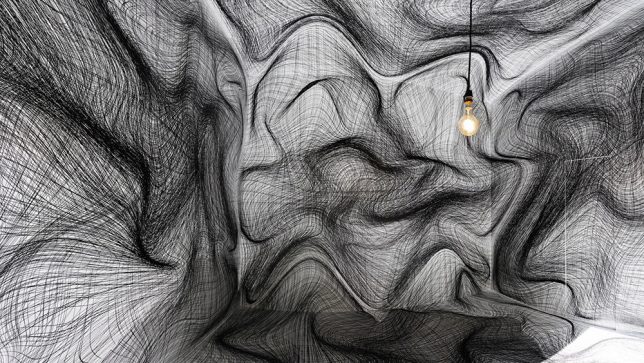
You could be forgiven for cautiously entering one of these rooms full of wavy sketched lines, stepping over obstacles that aren’t really there, uncertain whether parts of the walls are really projecting out toward you. Artist Peter Kogler creates spatial illusions that take over every surface of a gallery, turning it into a ‘virtual maze.’ A master of the large-scale print, he’s spent the last 30 years perfecting his techniques. The ones involving grids of lines pull off the most disorienting effects.

screen-shot-2016-12-30-at-9-50-55-am

vertigo-wallpaper-1

vertigo-wallpaper-2

Pictured here are installations from the last few years, including work displayed at the ING Art Center in Brussels this year, the Sigmund Freud Museum in Vienna in 2015 and the Galerie im Taxiplalais in 2014. His computer-generated works have even adorned the exterior walls of pavilions and museums, and often feature imagery of snakes, ants and pipes.

vertigo-wallpaper-3

vertigo-wallpaper-4

vertigo-wallpaper-6

According to his artist statement, “Kolger has been interested in new, innovative art practices, not only in the field of visual, but also in performative arts, sound and music. He continued his work by shifting the boundaries of artistic expression and developed a very impressive, emotionally and artistically convincing world, whose layered meanings open communication paths to the widest public.”

vertigo-wallpaper-7

vertigo-wallpaper-8

“After several years of research at the beginning of his artistic career, in painting, performance and experimental film, since 1984 Kogler has used computer technology. Heralding the future development of computer-generated art already in the ‘60s, in the spirit of that positivist-optimistic time, Michael Noll wrote: ‘The computer is an active medium the artist can interact with at a new level, liberated from many physical limitations of all former media. The artistic possibilities of this kind of creative medium as the artist’s helping device are truly exciting and challenging.”

Share on Facebook


[ By SA Rogers in Art & Installation & Sound. ]

[ WebUrbanist | Archives | Galleries | Privacy | TOS ]


WebUrbanist

 
Comments Off on Vertigo Wallpaper: Warped 3D Room Illusions Transform Flat Gallery Surfaces

Posted in Creativity


How to Photograph Reflective Surfaces

01 Feb

Photographing reflective surfaces and objects is usually quite challenging, and can easily turn the work of the photographer into a frustrating task.

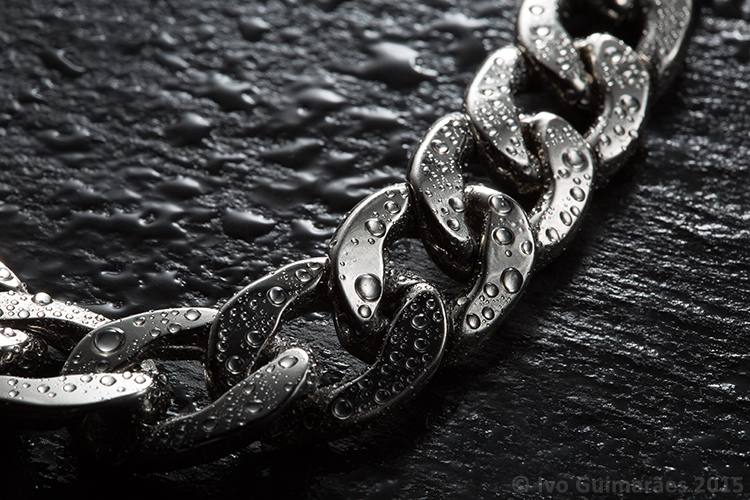
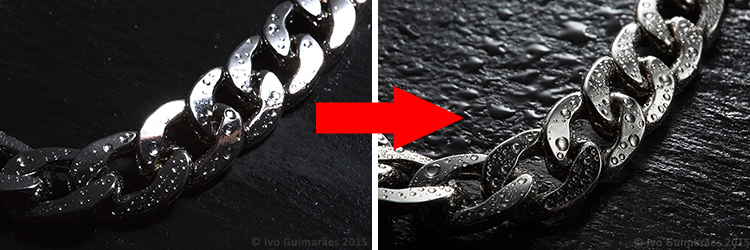
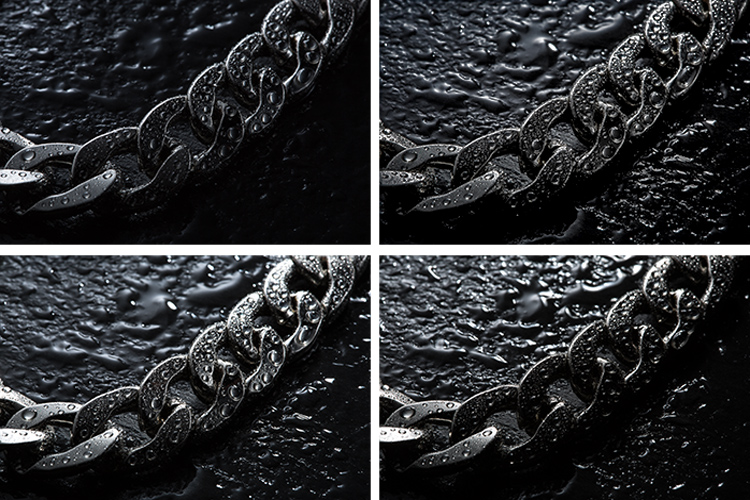
Reflections are a hard to tame beast, but it gets easier to control if you know the rules. So, in this article I will show you how to create a high impact image with controlled reflections, like the one below, with a really simple, but highly effective, technique and using equipment you most certainly already own.

01

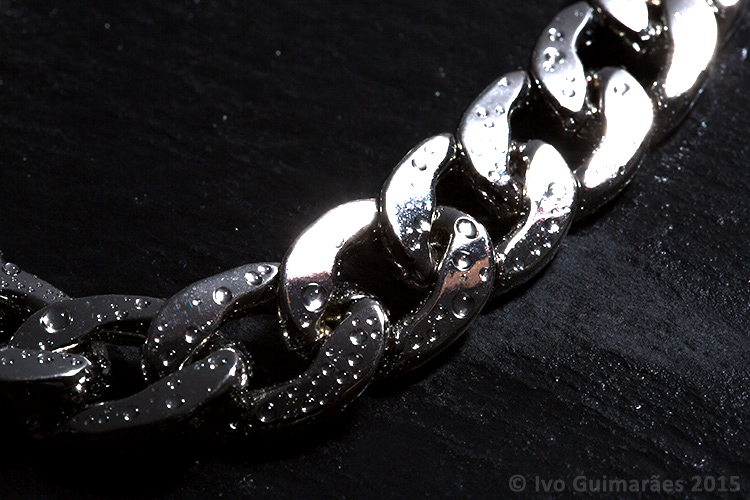
A reflective surface acts like a mirror reflecting light, so if the light source of your image comes from the same direction as the camera, it causes specular highlights resulting in blown out spots without texture, and an overall poor looking image like the following one photographed with the flash mounted on camera.

02

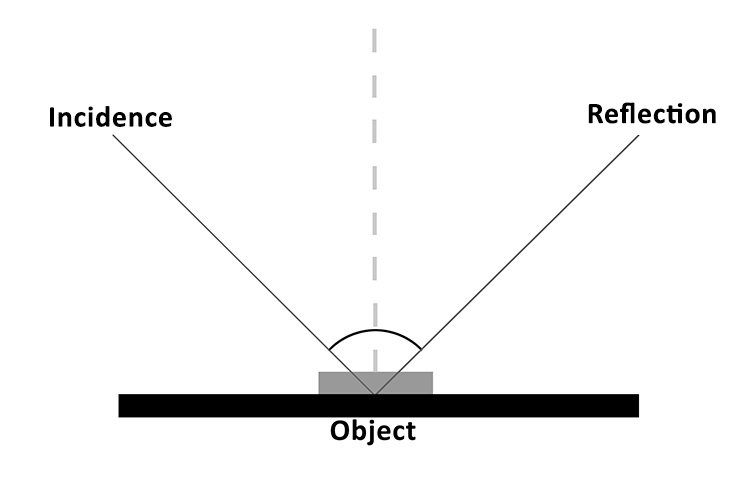
It all comes down to the basic principles of light and the way it behaves, which is in fact very predictable. The law of reflection explains this phenomenon. If you project a ray of light on a flat reflective surface like a mirror, then the angle of incidence equals de angle of reflection, like the following diagram illustrates:

03

So, physics apart, what this really means is that if you are trying to photograph a reflective surface you should never light it from the same angle as the camera, otherwise you will only get light bouncing straight back at you (depending on the angle of the object).

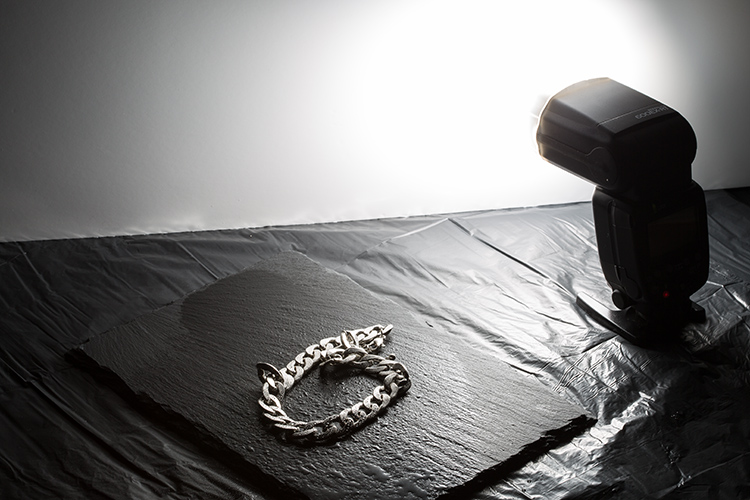
The trick here is to use a big light source, and position it in the same opposite angle of your camera, in relation to the photographed object (behind it).

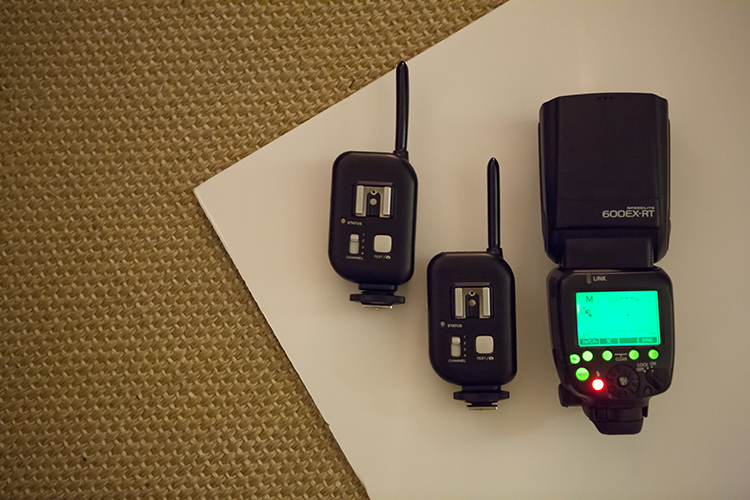
You can do this with a studio flash head and a big softbox, but there is a much simpler and cheaper way of doing it. You just need some white cardboard, a flash, and trigger system to fire it off-camera.

04

Here is how you can use this lighting setup:

05

The light from the flash bounced off the cardboard is a much bigger light source, allowing you to control the reflections on your image, creating gradients that shape the object, and avoiding specular highlights. Notice it also creates texture on the rock background.

06

This simple technique allows you to create a lot of different lighting effects in your image, depending how you position your flash, and angle the cardboard in relation to the photographed object, which also creates texture on the background stone and water drops.

Here are some examples of light variations on this imag,e with just some small adjustments to the cardboard positioning.

07

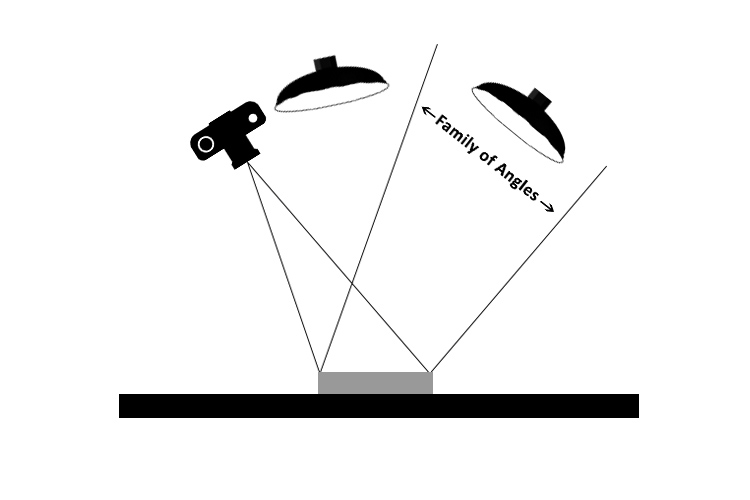
Knowing that light rays will always bounce from a reflective surface, at the same angle at that at which they strike it, makes it possible to determine the best positioning for the camera and the light source, taking into consideration the family of angles as you can see in the next diagram.

08

The light positioned within the family of angles will produce a direct reflection and the light outside of the family of angles will not light a mirror-like subject at all, from the camera’s point of view.

Even though the reflections on these images are not direct, but rather diffused reflections (which makes difficult to calculate the light angle as it is being bounced and dispersed in different directions) the family of angles can give you a good estimate of how to position your light in relation to the camera angle, in order to control the reflections in your image.

All this technical information about light physics may seem overwhelming at first, but it will all make sense when you start playing around with it. So, give it at try, I’m sure you will get great images. Please share any questions and your images of reflective objects in the comments section below.

googletag.cmd.push(function() {
tablet_slots.push( googletag.defineSlot( “/1005424/_dPSv4_tab-all-article-bottom_(300×250)”, [300, 250], “pb-ad-78623” ).addService( googletag.pubads() ) ); } );

googletag.cmd.push(function() {
mobile_slots.push( googletag.defineSlot( “/1005424/_dPSv4_mob-all-article-bottom_(300×250)”, [300, 250], “pb-ad-78158” ).addService( googletag.pubads() ) ); } );

The post How to Photograph Reflective Surfaces by Ivo Guimaraes appeared first on Digital Photography School.


Digital Photography School

 
Comments Off on How to Photograph Reflective Surfaces

Posted in Photography


Brutalist Playgrounds: Sharp Surfaces + Unforgiving Drops

16 Jun

[ By Steph in Art & Installation & Sound. ]

brutalist playgroudn 2

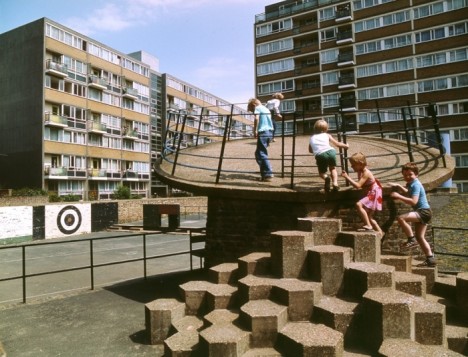
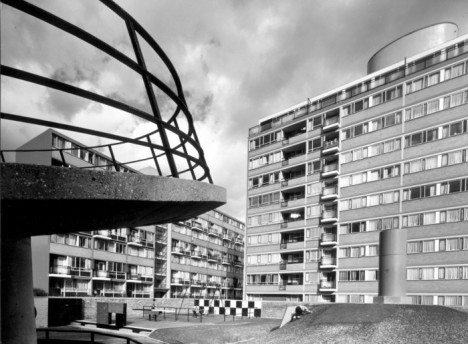
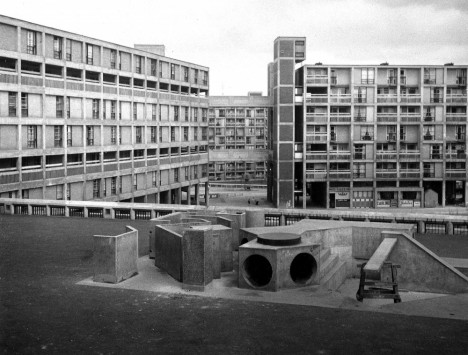
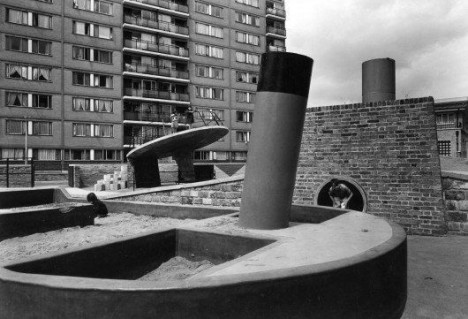
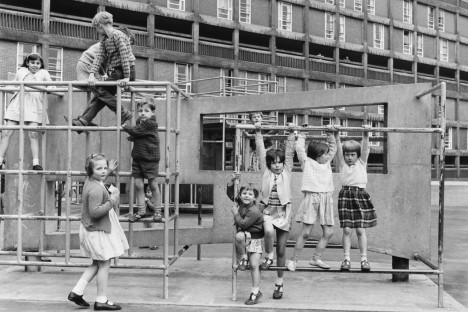
The phrase ‘brutalist playground’ kind of sounds like a joke, emphasizing the great potential for injury that would seem inherent to a sharp, harsh play structure where kids are encouraged to roughhouse. But the very same rawness, heavy materials and stark shapes seen in the architecture that was built in this style after World War II was extended to quite a few playgrounds. Today, there are all sorts of laws about kids’ safety that would nix these designs before they were ever built, but as we all know, the ’70s were a different time.

brutalist playground 7

brutalist playground 6

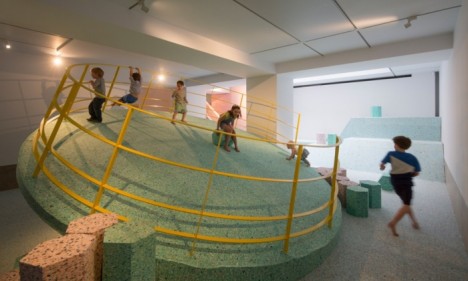
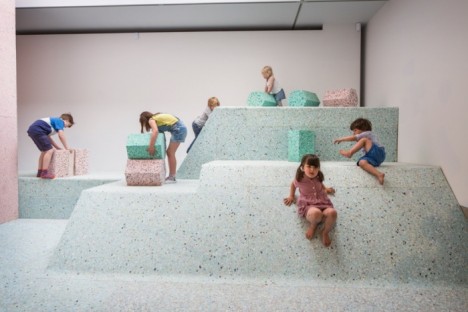
The actual Brutalist playgrounds were demolished long ago, but a new installation at RIBA in collaboration with artist Simon Terrill and architecture firm Assemble brings them back in the form of full-scale replicas. Housed within the RIBA headquarters in London, these recreations look just like the real thing.

brutalist playground 8

Being that they’re inside a museum – and meant for kids to actually play on – the replicas were made not of the original concrete, but of foam. The installation “encourages visitors to look at the materiality and visual language of now lost Brutalist landscapes in new ways through an immersive and conceptual landscape.”

brutalist playground 9

“Although the value of brutalist residential buildings today is much debated, this exhibition shifts the focus to the equally important playgrounds found at the feet of these structures, offering a renewed understanding and critique of the architects’ original designs and intentions.”

brutalist playground 5

brutalist playground 4

The installation will be in place through August 2015, and the photographs of the originals are just as fun to look at. Like all Brutalist structures, they’re not exactly inviting. Says Terrill of the Churchill Gardens playground in Pimlico, London (pictured top in 1978,) “Before these postwar playgrounds were built, children would have been playing in the bomb sites left after the war. It’s possible the architects were referencing that in their design.”

Share on Facebook


[ By Steph in Art & Installation & Sound. ]

[ WebUrbanist | Archives | Galleries | Privacy | TOS ]


WebUrbanist

 
Comments Off on Brutalist Playgrounds: Sharp Surfaces + Unforgiving Drops

Posted in Creativity


Massive $33,500 2450mm f/8 NASA lens surfaces on eBay

29 Apr

If $ 180,000 seems a bit steep for the Canon 1200mm f/5.6L lens B&H is currently offering in its used department, then perhaps this $ 33,500 NASA 2540mm f/8 lens on eBay sounds a bit more reasonable. That’s twice the focal length for a fifth of the price! Read more

Articles: Digital Photography Review (dpreview.com)

 
Comments Off on Massive $33,500 2450mm f/8 NASA lens surfaces on eBay

Posted in Uncategorized


Hoverboards are Here! Design Floats Above Metal Surfaces

25 Oct

[ By Steph in Conceptual & Futuristic & Technology. ]

hendo hoverboard main

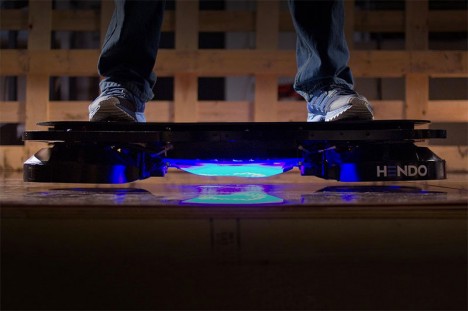
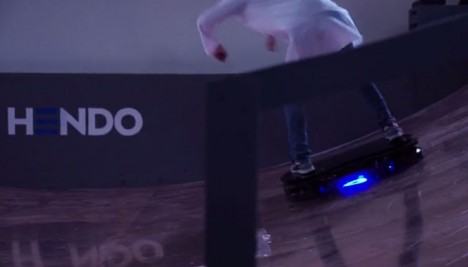
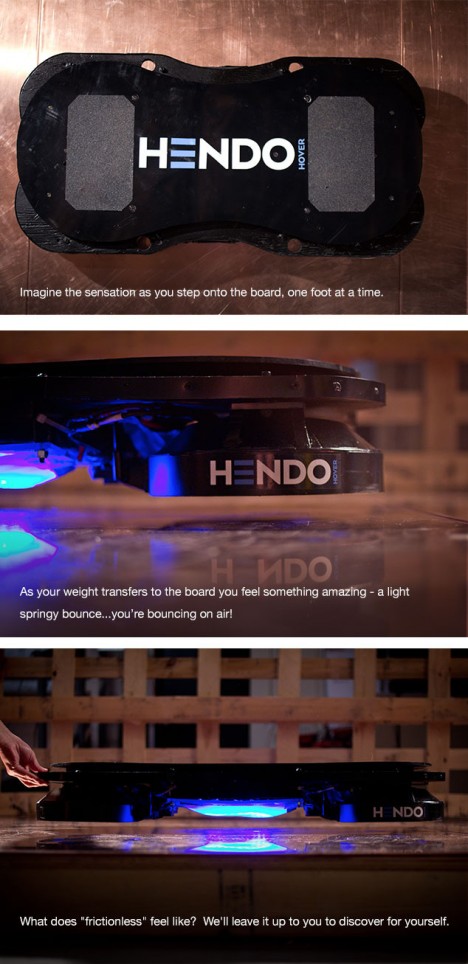
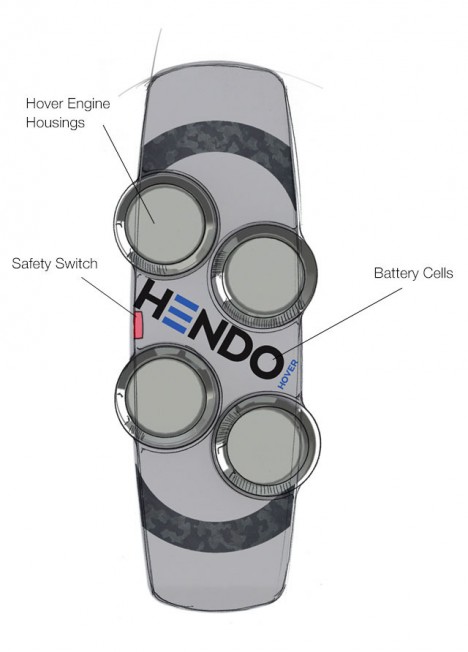
Twenty-five years after ‘Back to the Future’ convinced an entire generation that we’d soon be able to zoom around the city on wheel-less floating skateboards, it looks like we might finally get our wish: a working hoverboard actually exists. The Hendo Hoverboard, currently blazing past its funding goals on Kickstarter, features four disc-shaped hover engines that create a magnetic field to levitate the board off the ground.

Hendo Hoverboard 4

Hendo Hoverboard 5

Naturally, there’s a catch: it only works on certain metallic surfaces. The creators are currently using non-ferromagnetic conductor sheet metal, but are working on new compounds that could increase performance while minimizing cost. The magnetic field created by the board levitates it an inch above the ground, offering an ultra-smooth ride that you just can’t get on wheels.

Hendo Hoverboard 3

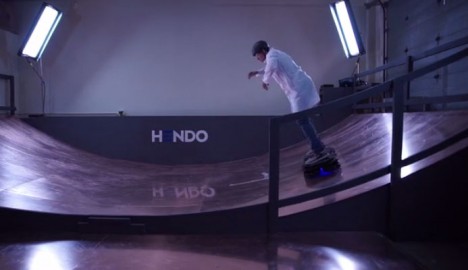
“While one day we expect to have hoverboards that can effortlessly float over any medium (even water!), our current technology requires special types of surfaces,” says Hendo. “Therefore, we need a hoverpark to go with our boards, and have been busy designing a park befitting the awesomeness of our technology.”

hendo hoverboard 7

In addition to snagging a ‘Whitebox’ developer kit that enables you to play around with the technology yourself, Kickstarter rewards include reserving a brick-sized piece of the eventual Hoverpark with your name engraved onto it. The first 10 production Hendo Hoverboards have already been snagged at $ 10,000 each.

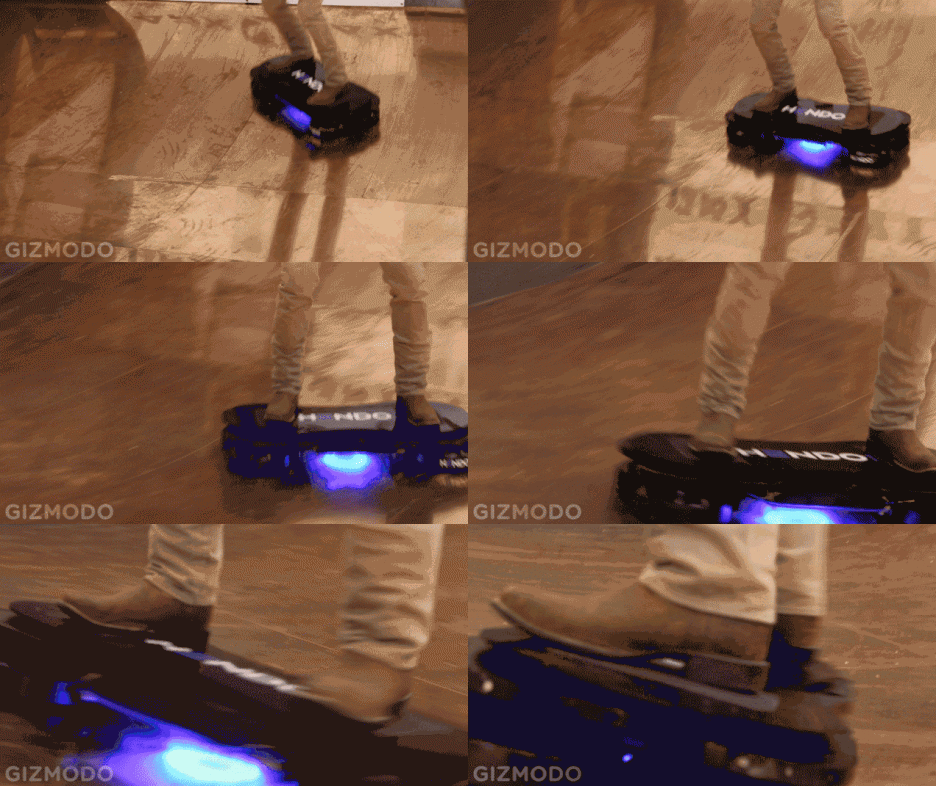
gizmodo hoverboard gif

After all the hoaxes, it’s understandable that people are skeptical – but Gizmodo got to actually give it a try, confirming that it works. Check it out in the video above, and get all the technical details at Kickstarter.

Share on Facebook


[ By Steph in Conceptual & Futuristic & Technology. ]

[ WebUrbanist | Archives | Galleries | Privacy | TOS ]


WebUrbanist

 
Comments Off on Hoverboards are Here! Design Floats Above Metal Surfaces

Posted in Creativity


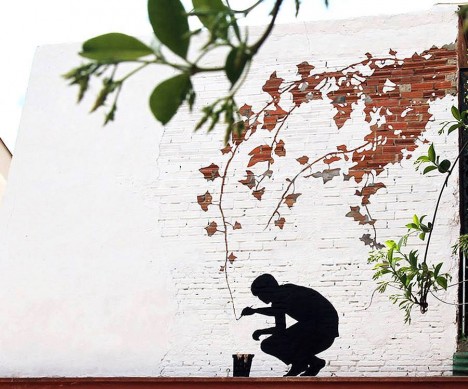
Mirage Muralist: Street Artist Bends Surfaces Using Illusion

12 Sep

[ By WebUrbanist in Art & Street Art & Graffiti. ]

street art subtractive wall

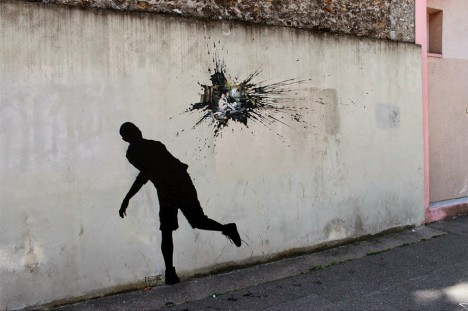
With works often requiring second looks or sanity checks, artist Pejac bends reality in his use of paint and other materials to create sublime art from walls, streets, sidewalks and gutters.

street art splatter paint

street art painting scene

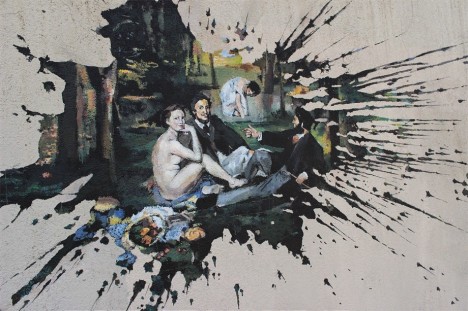
His newest works in Paris, shown above and below, play with our sense of surface and depth, revealing a hidden world beyond the wall in each case. If the close-up scene looks familiar, you may recognize it as The Luncheon on the Grass by Manet.

street door silhouette drawing

street art door illusion

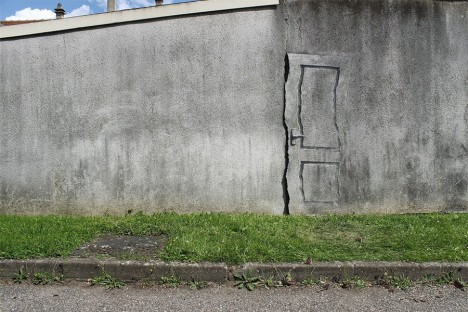
Likewise implying something secret is this silhouette of a door – at a glance, it is hard to tell what part is a real crack in the concrete and which pieces are simply painted on top.

street art world flow

In previous projects, he has also played with the arts of subtraction and illusion in other clever ways – letting the world, for instance, slowly melt, drip and trickle toward the drain.

street art brick removal

street art paint closeup

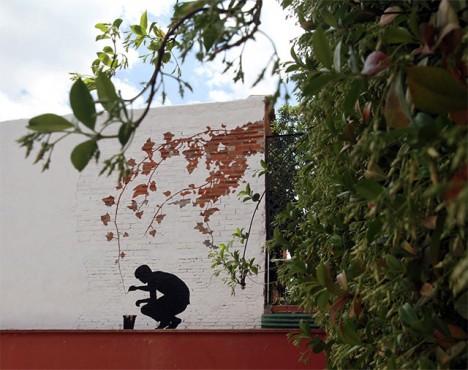
Some of these works are quite time-intensive and incredibly detail-sensitive, like this final piece in which the artist carefully chipped away at the white paint on a brick wall to selectively reveal the red surface below it.

Share on Facebook


[ By WebUrbanist in Art & Street Art & Graffiti. ]

[ WebUrbanist | Archives | Galleries | Privacy | TOS ]


WebUrbanist

 
Comments Off on Mirage Muralist: Street Artist Bends Surfaces Using Illusion

Posted in Creativity