RSS
 

Posts Tagged ‘Spot’

Find the Perfect Parking Spot Before You Even Leave Home

18 May

[ By Delana in Conceptual & Futuristic & Technology. ]
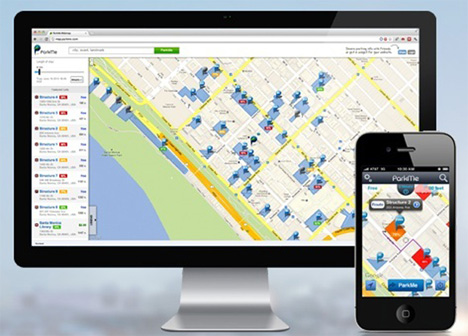
parkme app

There are countless maps and other direction-finding methods for your smartphone that can help you get to where you want to go – but once you get there, you still have to worry about parking. This, of course, is one of the most frustrating aspects of going anywhere in a mid-to-large-size city. In fact, some 30 to 50 percent of urban congestion is caused just by people driving around looking for parking spots. But never fear – an app called ParkMe is here to provide real-time parking availability information in cities and countries all around the world.
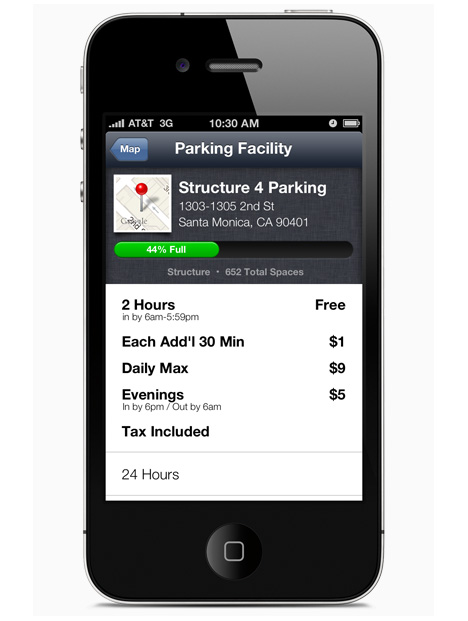
parking facility availability

The smartphone app works by utilizing data from a number of sources. Parking facility operators can update the app with their capacity and availability. Businesses can use a widget to provide real-time availability near their establishments, which is a win-win for them and their customers. Payment options are listed so you’ll know ahead of time if you need to have cash available.
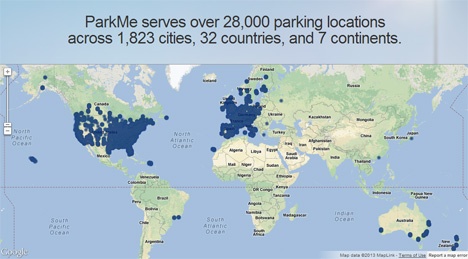
parkme app locations

Not all of the 1800 cities featured on ParkMe have real-time data available; only a handful of cities in the US offer that level of seamless parking integration. But the app does tell you where you’re most likely to find parking near your destination and how much you’ll have to pay for the privilege of leaving your car there. If you enter the amount of time you’ll need to park, the app will even tell you what your total cost will be.

parkme mobile and computer

Overall, the app will reduce traffic congestion in cities by helping people find a place to park in advance. If  you could figure out your exact route, down to the entrance to the lot you’ll leave your car in, before you even leave your house – imagine how much easier it would be to get to your destination and get your fun outing started.

Share on Facebook


[ By Delana in Conceptual & Futuristic & Technology. ]

[ WebUrbanist | Archives | Galleries | Privacy | TOS ]


WebUrbanist

 
Comments Off on Find the Perfect Parking Spot Before You Even Leave Home

Posted in Creativity


Fine Tune Your Exposures With Spot Metering

09 Apr

The metering systems of today’s digital cameras are light years beyond cameras of just 10 to 15 years ago. What this means is that in many situations, the camera’s meter, left to its own devices, is going to do an excellent job at getting a good exposure. While evaluative (or matrix) metering and center-weighted average metering take into account the entire scene, albeit in different ways, spot metering mode provides a tool for metering only the part of the scene you as the photographer consider most important.

I used spot metering on this image  due to the sun setting over her shoulder, making the sun and sand exceptionally bright behind her. By metering on the model's shoulder, I was able to maintain detail in the shadow areas, without hurting the drama of the lighting.

I used spot metering on this image due to the sun setting over her shoulder, making the sun and sand exceptionally bright behind her. By metering on the model’s shoulder, I was able to maintain detail in the shadow areas, without hurting the drama of the lighting.

Spot metering is especially helpful when the subject is much brighter or darker than the background, and the subject does not make up a majority of the image.   Most cameras, when set to spot metering, are set to measure an area of the image as small as 1.5% of the total image area.  This varies from camera to camera, so check your manual for the exact specification.  In addition, while most consumer cameras use the center of the image for spot metering, usually defined by a circle in the viewfinder, others allow for tying spot metering to the active AF point, which then ties your choice of focus point to the meter.

When I saw this shot I immediately knew what I wanted.  I did not want to completely lose the detail in the dress, but I did want a near-silhouette effect to add to the mood of the image.  Using the spot meter, I metered off the sky, and then dialed in +1/3 of exposure compensation to bring back some dress detail.

When I saw this shot I immediately knew what I wanted. I did not want to completely lose the detail in the dress, but I did want a near-silhouette effect to add to the mood of the image. Using the spot meter, I metered off the sky, and then dialed in +1/3 of exposure compensation to bring back some dress detail.

Generally, if you’re spot metering, and your camera’s spot meter is at the center of the image area, you will have to use Exposure Lock as well. This is because if the meter only works at the center of the image, and the area you’re metering is NOT the center of the image, you will need to recompose after metering.  Exposure Lock ensures that your exposure is locked in once you have metered the scene, before you recompose the shot. Exposure lock is generally activated by pressing a button on your camera while metering.  It will then hold the exposure you locked in, at least until you release the shutter button.  Some cameras will hold the metered reading until you deactivate Exposure Lock. On Canon cameras, Exposure Lock is achieved by pressing the (*) button.  On Nikons, exposure can be locked by pressing AE-L.

When you’re dealing with a high contrast situation, such as a bright background with a dimly lit subject, or a dark background with a brightly lit subject, switching your metering mode to Spot Metering can be an easy way of ensuring that your exposure is exactly where you want it.

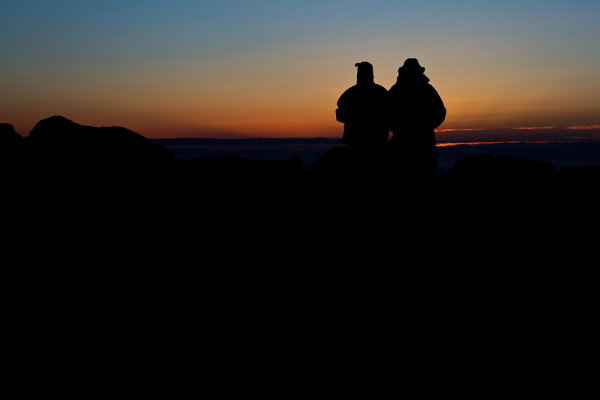
I was shooting the sunrise on Cadillac Mountain in Acadia National Park when I spied this couple sitting on a rock.  I moved around behind them, and spot-metered on the sky. Because the meter tries to make the metered area a mid-tone, I knew it would silhouette my subjects perfectly.

I was shooting the sunrise on Cadillac Mountain in Acadia National Park when I spied this couple sitting on a rock. I moved around behind them, and spot-metered on the sky. Because the meter tries to make the metered area a mid-tone, I knew it would silhouette my subjects perfectly.

Post originally from: Digital Photography Tips.

Check out our more Photography Tips at Photography Tips for Beginners, Portrait Photography Tips and Wedding Photography Tips.

Fine Tune Your Exposures With Spot Metering


Digital Photography School

 
Comments Off on Fine Tune Your Exposures With Spot Metering

Posted in Photography


NIKON D5100 REVIEW WITH NIKON 18-70mm LENS by G’s Spot

17 Jan

A quick review of the nikon d5100 with pros and cons with the 18-70mm lens as opposed to the kit lens 18-55mm.
Video Rating: 4 / 5


Man With a Camera – Blind Spot

26 Nov

International superstar and iconic tough guy Charles Bronson stars in this gritty, action-packed TV series. Bronson portrays Mike Kovac, a New York City freelance photographer who specializes in getting difficult shots other lensmen cannot. Assisting law enforcement and insurance agencies, he invariable winds up acting as a private eye and gets himself into plenty of trouble!

 
Comments Off on Man With a Camera – Blind Spot

Posted in Photography Videos


Autodesk Flame: 3D stereo TV spot for BSkyB by MPC

26 Sep

MPC’s visual effects supervisor Matthew Unwin and stereographer Chris Vincze discuss the challenges of working on stereoscopic television projects and the market dynamics of 3D stereo TV and cinema. Learn more about Autodesk Flame Premium.

Stereoscopic 3D 4K time lapse movie shot with twin GH1. To view this video in a 4k resolution, select “Original” in the video quality pulldown menu.

 
6 Comments

Posted in 3D Videos


I AM NIKON — Making of TV Spot COOLPIX Spring 2011

06 Jul

Come and see behind the scenes on the latest I AM Nikon TV advert shoot in sunny Buenos Aires.
Video Rating: 5 / 5

Brought to you by www.digitalrev.com. The Nikon D5000 offers a 2.7-inch vari-angle LCD as well as a comprehensive set of automatic features to give you excellent results without the complexities of traditional DSLRs.
Video Rating: 4 / 5


Spot healing brush tool in Photoshop

02 Nov

Hey! Got a request from Andrea asking to see alittle of how to easily remove unwanted elements from ur pictures so I made this tutorial real quick. Im just using one of my own pics from a few years back removing a boat and some snow to show how cool this tool can be. Will go more into depth on this abit later on but for a first meeting with the healign spot brush tool this could give u something to start with. Hope u enjoy it, thanks for watching! 🙂
Video Rating: 4 / 5

Jane Conner-ziser and Jack Davis join Bert this week to guest host from Photoshop World in Las Vegas. Learn how to Dodge and Burn for skin retouching, then see how to paint with the Pattern Stamp Tool!


Retouching Skin – Spot Healing Brush

17 Apr

Retouching skin can quickly become a tricky task. There are few absolutes when it comes to making faces and bodies look good — but everyone knows instantly when it’s done wrong. In clips from our latest webinar, master retoucher, Jason Hoppe, delves into retouching skin in Photoshop. This clip looks at the Photoshop Spot Healing Brush, or as Jason calls it, the Neosporin Brush. Click on a blemish, and like magic, it’s gone!
Video Rating: 4 / 5