RSS
 

Posts Tagged ‘Sony’

Add Functionality and Battery Life to Your Sony A7 with the MOZA Cage

05 Dec

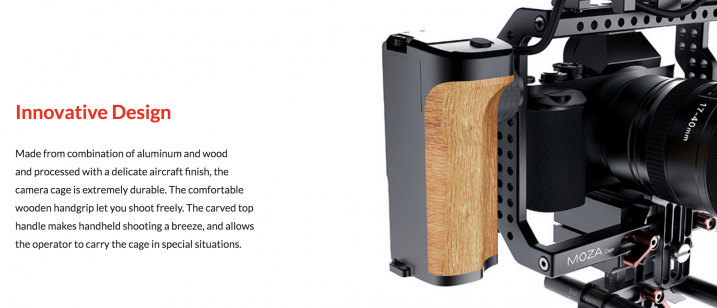
MOZA sent me their recently released MOZA Cage for review, and while I’m slowly and inevitably getting into more filmmaking with my Sony a7R Mk2, I’m still a photographer first. I thought to myself, “How can I review this cage as a photographer.” After taking delivery, however, I found it quite easy! There are a few unique things you can do with this cage that make it perfect for certain types of photography, not just as a tool for filmmakers.

MOZA Cage Handheld Camera Gimbal Stabilizer

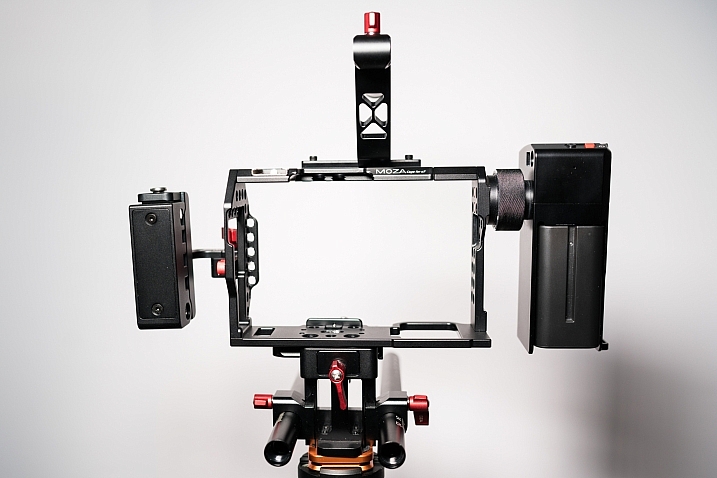
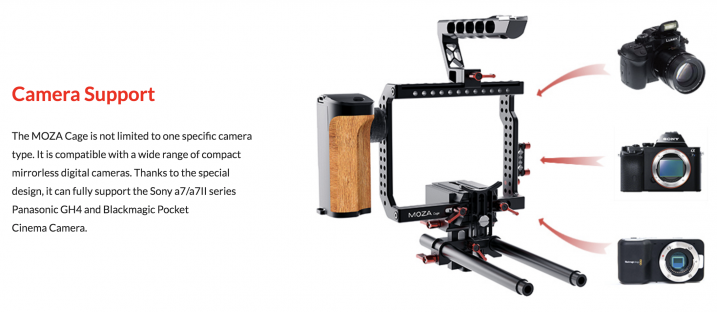
If you’ve never heard of the term Cage used in conjunction with cameras, in very basic terms a cage is just that. It’s a cage that you screw your camera into, and it provides you with multiple handle options, cable routing options, attachment options (think LED panel lights / microphones, etc.). Cages can range from very basic and a couple of hundred dollars, up to fully featured monsters that will see you shelling out more than a grand (USD).

But this one, the MOZA Cage is a mid-priced cage with many features of much higher end products. What stood out to me after I unboxed the cage was the build quality. Everything is really well made and works well, and after using the product for a few weeks on multiple shoots, it has given me no problems.

moza-cage-review-simon-pollock

Still photography uses

When shooting video, it’s great to have a cage to help you hold your rig more steady. It’s helpful to attach a small shotgun mic or LED panel if you’re a run and gun interview shooter, or someone shooting an event, etc. But, that doesn’t really apply to us so much here on dPS, as we’re all about the still photos.

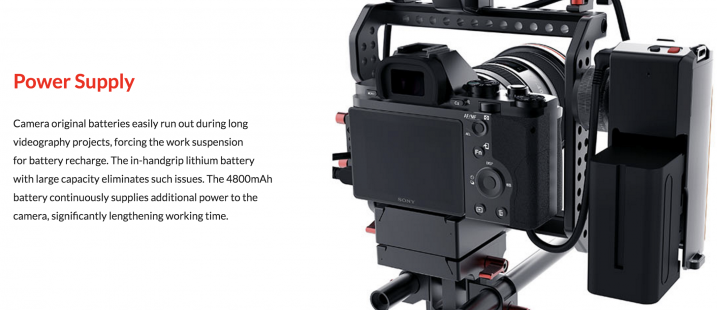
What appealed to me in the stills department is that the MOZA Cage has a sweet wooden handle grip included. And inside that grip is a 4800MaH battery that is used to power your camera! By way of comparison, the included NP-FW50 batteries in my Sony A7 or a6300 are 1020mAh. So, we’re talking about a unit that will power your camera for a lot longer than usual! (I won’t mention the Sony battery performance, except to say that I’d like more please, more batteries!) 

gudsen-moza-battery-gimbal-cage-review-gtvone

Longer battery life

So what does having more battery power do? It gives us the ability to shoot for longer. Obviously shooting film is the first thought, but I used the cage for time-lapse as well as some regular photography and it worked great. The wooden handle on the MOZA rotates so you can hold the camera down low to the ground by the top handle, while you have your screen tilted up to show you what you’re shooting.

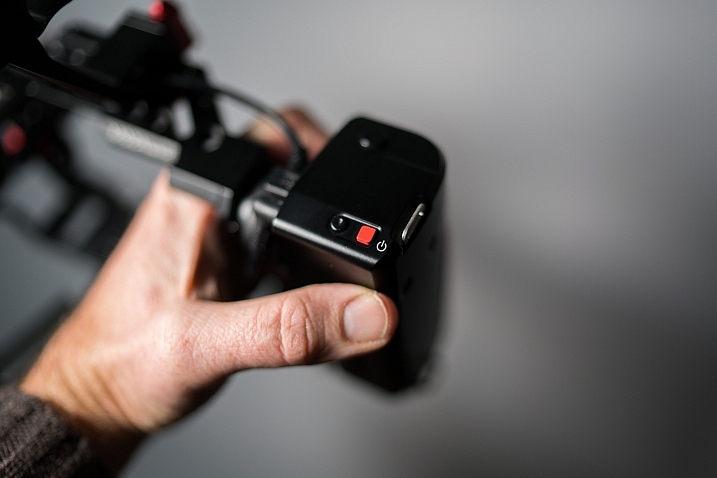
The next little added bonus is that the MOZA Cage includes a shutter release in the handle, as well as a video stop/start. That shutter release worked really well for shooting from within the cage at weird angles and doing it with no contorted weird ergonomic photographer’s stance! (You know the ones haha)

simon_pollock_reviews_moza_cage_on_digitalPS

Benefits

The cage does have limited use for photographers. But if you’re thinking of trying your hand at shooting some video of your kids, or maybe doing behind the scenes on your next epic production, this cage could really increase your production value. It will give you many more options from a camera handling perspective, as well as those benefits listed for alternate photography uses. The MOZA Cage is $ 499 which, for what you get, is a great price.

simon-pollock_moza_cage_reviews

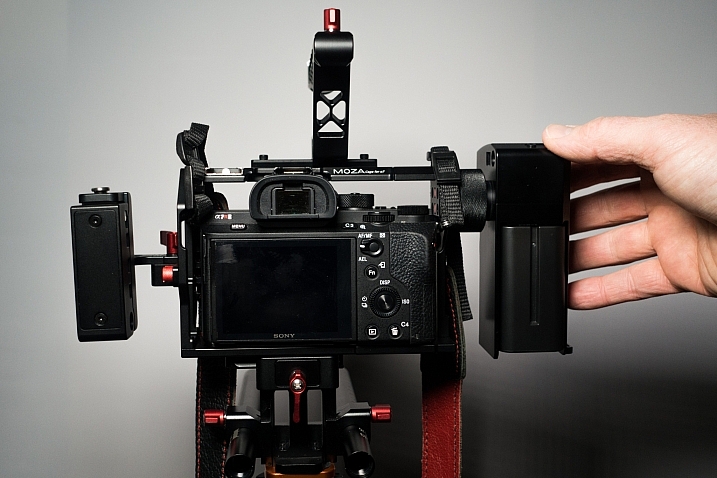
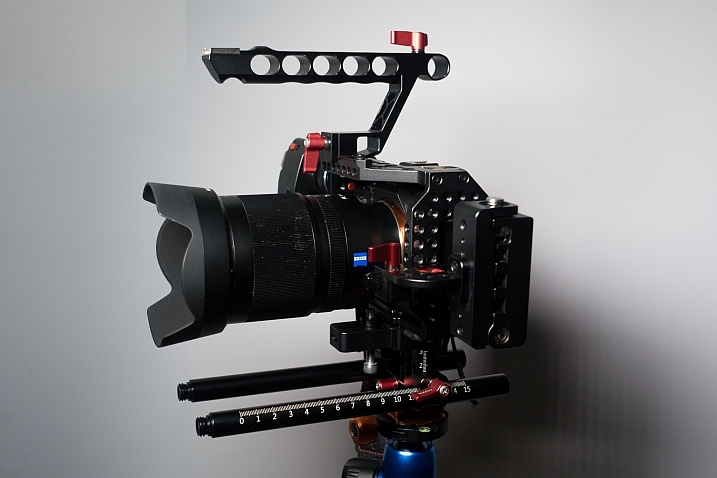
Sony a7RMk2 in situ, ready to go shoot!

simon-pollock-moza-cage-naked

The MOZA Cage, Naked

simon-moza-cage-review

The Sony a7RMk2 rigged into the MOZA Cage

simon-pollock-reviews-photo-gear

Buttons on the MOZA handle unit

If you’re still shaking your head and muttering “Cage, what’s he talkin’ ’bout…cage!” Here’s a quick overview and a look at how you might set up your camera in a cage, be it this one or any other style cage.

Summary

In summary, I don’t really have anything negative to say about the MOZA Cage! From a photography/video convergence point of view, it’s a great mid-level tool that will work very well for you, from a pure photographic perspective. For alternate uses like long events, time-lapse and simply awkward shots down low (I found it particularly handy for these!) it works very well. The build quality, price and customer service were all very good (I did a secret squirrel customer service call with a question… yes, a little sneaky, but we need to know these things!)

Find out more or purchase the cage on Amazon.

googletag.cmd.push(function() {
tablet_slots.push( googletag.defineSlot( “/1005424/_dPSv4_tab-all-article-bottom_(300×250)”, [300, 250], “pb-ad-78623” ).addService( googletag.pubads() ) ); } );

googletag.cmd.push(function() {
mobile_slots.push( googletag.defineSlot( “/1005424/_dPSv4_mob-all-article-bottom_(300×250)”, [300, 250], “pb-ad-78158” ).addService( googletag.pubads() ) ); } );

The post Add Functionality and Battery Life to Your Sony A7 with the MOZA Cage by Sime appeared first on Digital Photography School.


Digital Photography School

 
Comments Off on Add Functionality and Battery Life to Your Sony A7 with the MOZA Cage

Posted in Photography


Meizu Pro 6 Plus features 12MP Sony sensor and LED ring flash

01 Dec

Chinese smartphone maker Meizu has today unveiled the Pro 6 Plus, a high-end model with metal housing and large 5.7″ pressure-sensitive AMOLED screen with Quad-HD resolution. The Sony Exmor IMX386 sensor in the camera module has been deployed in some previous Meizu models but at 1/2.9″ and a pixel-pitch of 1.25µm it is a touch smaller than the 12MP Sony chips used in some of the other current high-end devices.

The camera also features optical image stabilization, a lens with F2.0 aperture and laser-assisted autofocus. The front-facing camera is surrounded by 10 dual-tone LEDs forming a ring flash, and comes with a 5MP sensor and F2.0 lens.

The Android OS is powered by the same Exynos 8890 chipset that can be found in the Samsung Galaxy S7 and 4GB of RAM. Buyers can choose between 64 and 128GB storage versions. The Pro 6 Plus also features a fingerprint reader that doubles as a heart-rate monitor and a dedicated audio chip. Power is supplied by a 3,400mAh battery that is charged via a USB Type-C port with fast charging. 

The new model will be available in Champagne Gold, Deep Ash and Moonlight Silver. The 64GB version will set you back approximately $ 435 while the 128GB requires an investment of $ 480. No detail on availability outside China has been provided yet. 

Articles: Digital Photography Review (dpreview.com)

 
Comments Off on Meizu Pro 6 Plus features 12MP Sony sensor and LED ring flash

Posted in Uncategorized


Video: Shooting Dog Portraits with the Sony a6300

28 Nov

Here at DPReview, we love dogs. They’re great. But they’re notoriously hard to photograph. Even the best-trained are unpredictable and fast-moving, and when they’re not running around they’re unable to sit still.

In this video, DPReview’s Sam Spencer takes one of our favorite cameras – the Sony a6300 – to shoot some of our favorite pups. During a busy day of shooting, we gave both the animals and the a6300 a good workout, culminating in a studio portrait session for the lucky dogs at the Motley Zoo animal rescue center, in Seattle.


This is sponsored content, created in partnership with Sony. What does this mean?

Articles: Digital Photography Review (dpreview.com)

 
Comments Off on Video: Shooting Dog Portraits with the Sony a6300

Posted in Uncategorized


Five reasons to buy the Sony RX100 V (and four reasons to reconsider)

27 Nov

Introduction

The Sony RX100 V is the world’s most advanced pocketable camera with a 1″-type sensor, and it’s also the most expensive. With a spec sheet that is unmatched in its segment (and in some cases, in the entire market), the RX100 V is going to be looked at by a great many folks, and is indeed going to be a great camera for a wide variety of photographers. But there are also photographers for whom the RX100 V is probably not your best choice – so we’ve put together some reasons you might want to pick one up, and also reasons you might want to save those pennies for something else. Let’s dive in.

Reason to buy: You need to capture very fast things

The 24 fps burst rate lets you capture just the right moment. Photo by Rishi Sanyal

You might be interested in an RX100 V if you photograph or record very fast-moving things, primarily because of the camera’s ridiculous 24 fps burst speed for stills and 960 fps mode for slow-motion video. But because of the zoom range, you’ll have to be fairly close to the action – our own Barney Britton has been saying the V is the world’s best crash cam. Or maybe you’re a watermelon-exploding enthusiast. Okay, or maybe you want to catch just the right moment of your kid’s break dancing class. Whatever it is, kick the AF into continuous and ‘Wide’ area, the burst rate into 24 fps, and motor away.

Reason to reconsider: Postage-stamp-sized batteries

CIPA-rated to 220 shots, the battery life is, generally speaking, a weak point on the RX100 V.

The Sony RX100 V soldiers on with the same NP-BX1 battery pack that the very first RX100 used, and with the massive increases in processing power and capability that Sony has shoehorned into the body, the claimed battery life is a third less than the original model. What’s more, the RX100 V continues Sony’s tradition of slow battery discharge if the battery is left in the camera, so if you’re only looking to use the camera occasionally, you may find you’re all ready to capture the moment, but the camera isn’t ready for anything but a charge.

And if the RX100 V is already proving difficult to fit into your pocket (I can’t be the only guy wearing skinnier-than-normal jeans these days), you might be loathe to carry another battery or two as well.

Reason to buy: You need a B video cam that can run and gun or be built up as needed

You could conceivably use the HDMI out on the RX100 V to build a rig up, or just use it as a run-and-gun pocket video cam.

The RX100 V is probably not the best choice out there for a primary video cam for most people (though this is not always going to be true), but with 4K video, focus peaking, zebra, log gamma and oversampled 4K, the only thing you’ll be missing is better audio – and there’s always an external solution for that.

Don’t discount that you can also do clean HDMI out, and then combined with said external audio solution, have a pretty powerful package, even if it takes some work to get there.

Reason to reconsider: You have big hands

If Sasquatch was after a camera, it wouldn’t likely be the RX100-series (a big, double-grip DSLR might be a better bet). The RX100 V comes, out of the box, with no grip, a slippery casing, and buttons smaller than the sensors of point and shoots of yester-decade. Although a touchscreen isn’t always the answer, we feel that being able to utilize such a big block of space on the rear of the camera as a control point is something Sony will have to do sooner or later to improve usability as the features keep coming. 

Reason to buy: You want the best point-and-shoot there is

The RX100 V’s 315 on-sensor phase-detect AF points cover 65% of the frame.

With AF-C in wide mode and rapid continuous shooting in Raw + JPEG, the only thing between you and something you want to photograph is the RX100 V’s startup time, which isn’t too bad (unless you’ve just changed the battery).

Sony’s told us that plenty of folks buying their RX100 cameras are actually mid-to-high end DSLR owners. And while there’s an argument that that demographic may want maximum control all the time, there’s also something to be said for leaving the big camera at home and just focusing on a moment in front of you as it unfolds instead of prepping settings and always watching, and always re-prepping, and repeat.

Reason to reconsider: You just don’t need it

Stock up on storage if you plan on using those 24 fps bursts.

I will confess – the allure of 24 fps burst shooting while at the Sony launch event for the RX100 V was somewhat tempered by the 128GB memory card I used, as well as the total picture count at the end of the night – near 3,000. That ended up being more than I would shoot with any other camera, simply because I could. One thing’s for sure – there’s no arguing that 24 fps will help you catch just the right moment in the middle of whatever is happening in front of you. But there’s also no arguing that it will just be overkill for many people, and many people’s hard drives. Even dropping the burst rate to 10 fps ended up being enough for me.

Reason to buy: You want the best image quality in the smallest pocketable package

You already have a cell phone with you all the time anyway, and it probably takes decent pictures. Well, the RX100 V will at least fit into a coat pocket (or cargo pants…those are still around, right?) and take photos that will blow any smartphone out of the water.

True, ‘digital bokeh’ simulations are catching on, and will actually offer more blur artificially than the RX100 V can manage optically. But they still can’t match the dynamic range, sharpness and sophisticated JPEG performance in low light that the RX100 V offers. Digital bokeh or not, physics is still physics, and the 1″-type sensor will collect way more total light than any current cell phone.

(There’s also one smaller 1″-type sensor camera on the market, the Canon G9 X, which is capable of good stills quality – but with a necessarily slower lens and less processing power to keep the whole package more compact.)

Reason to reconsider: You just need more zoom

The 24-70mm equivalent zoom lens on the RX100 V may be quite bright, but it may be too short for many people. If you’re hoping to shoot your kids’ soccer matches from the sidelines, there are way better options out there (the Panasonic ZS/TZ100 comes to mind).

Sure, the 24-70mm focal length is an absolute staple for professional wedding and press photographers, but you also often see those very same photographers carrying another huge camera with a 70-200mm equivalent zoom, just to cover absolutely everything. You can get by for a great many things with the RX100 V, but if you’re planning on getting one single camera to do it all, from travel photography to portraits to landscapes, there is probably a better option out there for you.

Reason to buy: You absolutely must have a viewfinder

All RX100 models since the Mark III have had a built-in, pop-up electronic viewfinder.

The RX100 V (and Mark III/IV) are the only truly pocketable 1″-type sensor compact cameras with a decent built-in viewfinder. Panasonic’s ZS100/TZ100 is also a fairly compact camera, but its field-sequential EVF is pretty lackluster. If you do lots of shooting in bright light outdoors, or just find that framing your masterpiece with fingerprint smudges and facial oils overlaying it is unacceptable, the RX100 V’s pop-up viewfinder is worth a peek.

Articles: Digital Photography Review (dpreview.com)

 
Comments Off on Five reasons to buy the Sony RX100 V (and four reasons to reconsider)

Posted in Uncategorized


Sony Xperia XZ camera review

25 Nov

$ (document).ready(function() { SampleGalleryV2({“containerId”:”embeddedSampleGallery_3336540306″,”galleryId”:”3336540306″,”isEmbeddedWidget”:true,”standalone”:false,”selectedImageIndex”:0,”startInCommentsView”:false,”isMobile”:false}) });

The Xperia XZ is the top-of-the-line model in Sony’s Xperia X series and comes with some of the latest technologies implemented in its camera module. A Sony IMX300 1/2.3” 23MP image sensor with on-sensor phase detection is accompanied by a laser that measures distance to its subject to improve AF speed and accuracy in low light. Also on board is an RGBC-IR sensor that measures the color values of a scene in order to fine-tune the white balance system. The hybrid AF-system is also predictive and can track subjects in motion.

The Sony G lens comes with a 24mm equivalent focal length and an F2.0 aperture. In video mode, the camera can record footage in 4K resolution and the Xperia XZ is also the first device on which Sony has implemented 5-axis electronic video stabilization. At the front there is a 13MP 1/3″ sensor with F2.0 aperture and 1080p video – specifications that would have been worthy of a main camera not too long ago.

Processor and other components match the high-end characteristics of the camera and all the technology is wrapped up in an 8.1mm thin metal body that is water and dust tight (IP65/68). The Sony is also one of only a few smartphones to come with a dedicated camera button, making it an interesting option for any photography-oriented user.

Key Photographic / Video Specifications

  • Sony IMX300 1/2.3” 23MP BSI CMOS sensor
  • 24mm equivalent focal length
  • F2.0 aperture
  • AF with on-sensor phase detection and laser-assistance
  • Subject tracking
  • RGBC-IR sensor
  • Manual control over shooting parameters
  • 4K video at 30 fps
  • 5-axis electronic video stabilization
  • 13MP front camera, F2.0, 22mm equivalent focal length

Other Specifications

  • 5.2-inch 1080p IPS screen 
  • Qualcomm Snapdragon 820 chipset
  • 3GB RAM
  • 32/64GB storage
  • MicroSD support
  • 2,900mAh battery
  • Environmental protection  (IP65/68)
  • Fingerprint reader

DPReview smartphone reviews are written with the needs of photographers in mind. We focus on camera features, performance, and image quality.

Articles: Digital Photography Review (dpreview.com)

 
Comments Off on Sony Xperia XZ camera review

Posted in Uncategorized


Sony a7 II firmware version 3.30 now available

23 Nov

Sony has released firmware version 3.30 for the Sony a7 II camera. The update is a very small one, improving the amount of light at the edge of images taken when using the flash.

The features and improvements added by the previous update, version 3.20, remain:

  • Adds support for the Radio-controlled Lighting System
  • New lenses are supported.
  • Phase-detection AF is supported
  • The lens name will be correctly recorded in the EXIF
  • The AF can be used in movie recording mode with the SEL85F14GM
  • Adds the 14-bit uncompressed RAW format option
  • Adds Phase-detection AF support for A-mount Lens Adaptor LA-EA3 (LA-EA1)
  • Adds a MOVIE button custom key settings that can be assigned for the movie recording function
  • Improves camera function and provides picture improvement for the new lenses (SEL35F14Z, SEL24240, SEL28F20, SEL90M28G)
  • Provides enhanced image stabilization system in half-pressing the shutter, in Focus Magnifier, in movie recording, and other functions

The Sony a7 II version 3.30 firmware can be downloaded now from Sony’s website.

Articles: Digital Photography Review (dpreview.com)

 
Comments Off on Sony a7 II firmware version 3.30 now available

Posted in Uncategorized


Godox launches mini radio flash unit for Sony mirrorless cameras

23 Nov

Flash and accessory manufacturer Godox has announced a new small flash unit that it says is designed to go with the Sony mirrorless range of cameras. The Godox TT350S features 2.4GHz radio control and TTL exposure metering, and offers a guide number of 36m@ISO 100. The company says that the unit is compatible with the Sony a7R II, a7R, as well as the a58 and a77ll SLT cameras. Some RX models are also able to pair with the unit.

The radio controlled system allows the TT350S to work alongside other Godox radio flash units and studio heads, and the flash can operate as a master or slave in multiple-head set-ups. Three groups are programmed into the control system along with 16 channels, while the maximum working range is said to be 30m. High speed sync is provided via an HSS mode that can work with shutter speeds of up to 1/8000 sec, and the unit can be switched from TTL to manual operation to make use of 22 output levels from 1/128th power. An automatically zooming head covers focal lengths of 24-105mm, and a hinge allows the head to tilt but not to swivel.

The TT350S is powered by two AA batteries which the company claims should be good for 210 full power bursts. There is no official pricing yet, but one UK ebay seller is offering pre-orders for £73 and says delivery is expected early January.

For more information about the TT350S visit the Godox website.

Articles: Digital Photography Review (dpreview.com)

 
Comments Off on Godox launches mini radio flash unit for Sony mirrorless cameras

Posted in Uncategorized


Action-packed: Sony a6500 First Impressions

22 Nov

Sony a6500 First Impressions

by Dan Bracaglia

ISO 200, 1/3200 sec at F4. Shot using the 70-200mm F2.8 G Master lens. JPEG edited to taste in Adobe Lightroom.

I spent two and a half days shooting in Austin, Texas with the Sony a6500 on a Sony-sponsored press trip. This was the first time most journalists, including myself, had got a chance to put hands on the camera, let alone shoot with it. One of my favorite things about these trips is getting to talk to other writers to see how their experiences with the camera compare. While specific opinions on the a6500 varied, there was one aspect of the camera everyone seemed to agree on: the touchscreen on the a6500 is a letdown.

Of course the addition of a touchscreen is not the only thing the a6500 has going for it, the camera also receives 5-axis in-body image stabilization, new menus, a deeper buffer and front-end LSI (which stands for Large Scale Integration – basically an additional chip providing more processing power). Not to mention it retains the 425-point on-sensor PDAF system, the same viewfinder, the same video specification and the same 8 fps burst rate (with Sony’s implementation of live view) as its mid-range sibling, the a6300 (11 fps with no live view).

Usability and speed

ISO 6400, 1/1000 sec at F2.2. Shot using the 85mm F1.4 G Master lens. JPEG edited to taste in Adobe Lightroom.

We spent the first day shooting all sorts of fast action subjects, including basketball. I’ve shot a lot of college basketball games in my life (close 100) but this was the first time shooting a game using a mirrorless camera. And you know what? I really enjoyed it! I mainly stuck to the ‘wide’ AF area, though occasionally switched to the ‘Flexible Spot-M’ option. In both cases my hit rate was just as good as when using a sports-oriented DSLR: nearly all my shots were in focus! 

I found the responsiveness of the shutter, from the time I pressed it, to the time the photo was taken, near instantaneous. And following the action at 8 fps was no problem, I didn’t notice any EVF lag (I switched the EVF refresh rate from it default of 60 fps to 120 fps).

“My hit rate was just as good as when using a sports-oriented DSLR.”

In the two days with the camera, Sony managed to cram in not only an opportunity to shoot basketball, but the chance to also shoot skateboarding, tennis, rodeo, lacrosse, live music and flying disk dogs. In each scenario, I walked away impressed with the hit rate. Simply put, for action photography the a6500’s AF system, fast burst rate and a deep buffer make it a very tempting/capable choice.

This image was part of a 50+ photo burst. ISO 6400, 1/3200 sec at F4. Shot using the 85mm F1.4 G Master lens. JPEG edited to taste in Adobe Lightroom.

Furthermore, while shooting long bursts, I almost never encountered a ‘Writing to memory card, unable to operate’ error screen, which is a breath of fresh air having used the a6300. Even after shooting a burst of 50 or so Raw+JPEG files, I was able to hit the playback button and see the most recent image to clear the buffer. The a6500 also features a buffer countdown in the upper left corner so that users know how many images are left before it’s fully cleared.

New Menu

Sony makes some of the most technically capable cameras on the market but the user experience has always been a bit rough around the edges. Of course many folks, by dedicating the time to learn and work around Sony’s peculiarities, they are able to tolerate any U.I. shortcomings and get the most out of these cameras. But for the rest of us, picking up a Sony for the first time can feel confusing, frustrating and uninspiring.

Menu heads are now color-coded and there is a dedicated video menu.

The a6500, with its new menu system and faster processing is a major step in the right direction for overall usability. Menu heads are color-coded and there is now a separate video menu. But there is no ‘My Menu’ style option for customizing a menu page, something offered by most other camera makers. To some degree, we’d have just preferred a customizable menu over Sony’s reorganization, to collate most-used menu items that still remain unassignable to the camera’s Fn menu.

On a positive note, I encountered far fewer error screens than I’m used to when shooting with a Sony. Still, I did occasionally hit one. And there is nothing worse than trying to dial in a setting only to encounter an ‘Invalid operation,’ screen. Hey Sony, instead of tossing up an error, why not make a suggestion so that users know what settings to change to avoid more error messages (and include direct access to the setting that needs changing)?

The touchscreen

I had super high hopes going into this shooting experience that the a6500’s touchscreen was going to be awesome. It’s not. I owned an LG Dare cellphone in 2008 and the a6500’s touch implementation reminds me of that. It’s unresponsive when tapping and laggy when dragging one’s finger. Not only that, the touchscreen cannot be used for anything other than moving AF points and flipping through images in playback. How silly is that? Numerous times I found myself hitting the Fn.menu button and then tapping one of the icons on the screen, only for nothing to happen.

Furthermore, the a6500 is a premium camera with a premium price point, but only one top plate control dial. A touchscreen is the perfect answer to a lack of physical control points, but by limiting its use, Sony shot themselves in the foot.

“The touchscreen on the a6500 is the one feature of this camera that does not feel up to par with everything else.”

Still, its encouraging to see touch capability make its way into this line of camera. No doubt Sony knows how to make a decent touchscreen: it manufactures smartphones for crying out loud, so here’s hoping the next generation actually nails the touchscreen. Because the touchscreen on the a6500 is the one feature of this camera that does not feel up to par with everything else.

It’s not completely without merit though. I quite enjoyed using the flip-out screen at the skatepark we visited to get super low angles and the touchscreen allowed me to easily choose my point of focus. Still, the focus squares can be difficult to see in very bright or very dim light.

ISO 640, 1/1600 sec at F5.6. Shot using the Somny 10-18mm F4 lens. JPEG edited to taste in Adobe Lightroom.

Using the touchscreen as an AF touchpad was also a disappointing experience. The responsiveness is not fast enough, the points are hard to see and there is a noticeable delay when dragging one’s finger around (pretty much the same experience as just using the touchscreen).

There are three touchpad area modes: ‘Whole Screen,’ ‘Right 1/2 Area’ and ‘Right 1/4 Area.’ The ‘area’ refers to which portion of the screen will activate touchpad AF and are meant to help avoid accidentally changing one’s AF point with say, your nose. When using ‘Right 1/2 Area’ for instance, only the upper half of the right side of the screen will engage the touchpad. And when using ‘Right 1/4 area’ only the upper quarter of the right side of the screen will engage the touchpad. Honestly, I was hard put to tell the difference between ‘Whole Screen’ and ‘Right 1/2 Area.’ Also when I put the camera in ‘Right 1/4 Area’ I found it nearly impossible to get the touchscreen to work at all!

I also found it pretty difficult, though possible, to use touchpad AF when shooting through my left eye. There is an option to turn the touchpad off when shooting vertically, so as to not change one’s AF point with their nose. But seeing how unresponsive the touchscreen is, I never ran into this issue. I guess that’s one plus of the lack of responsiveness. Users can choose whether to just use the touchscreen, just the touchpad, both or neither.

Using the Touchscreen during video capture

Like all Sonys, the ‘Lock-on AF’ area modes are greyed-out when shooting video. And as such, there is no intuitive way to tap-to-track when recording video. You can track (though not tap) by assigning a button to toggle ‘Center Lock-on AF’ on and off. But shooting video this way is pretty annoying as you must wait until your subject is dead center to begin tracking. Also the ‘Center Lock-on AF’ option seems to use an older tracking algorithm.

In the ‘Wide’ AF area mode, if you tap the screen, it turns on something called ‘Spot AF,’ which just maintains focus on the chosen point. Based on this video by cinema5D, I’m convinced there is some way to use touch-to-track in video mode. I have a hunch that if you turn ‘Spot AF’ off in the menu and tap the screen, it may engage tracking. I’ll have to wait until we get the camera into the office to confirm this, but either way, engaging tap-to-track in video mode is far from intuitive and the exclusion of lock-on AF area modes in video is inexcusable at this point.

Image Stabilization

ISO 3200 1/2 sec at F4.5. Shot using the 24mm F1.8 Zeiss lens. JPEG edited to taste in Adobe Lightroom.

It’s exciting to see image stabilization make its way into Sony’s APS-C mirrorless line. Initial impressions using image stabilization to shoot stills are positive. The above image was shot at 1/2 sec using the 24mm F1.8 lens. Ordinarily I could probably hold a shot steady, with no IS, down to about 1/30, maybe on a good day, 1/25 sec. So right there we’re seeing a nearly 4-stop advantage using IS at a normal-ish equiv. focal length.

Using IS while recording video made it easier to shoot hand-held at wide to normal focal lengths, like in the clip above. However at longer focal lengths the IS system is very jumpy. You can see an example of that in the clip below.

Having just finished testing video IS on both the Panasonic FZ2500 and Panasonic G85, I’m not all the impressed with the Sony’s video IS performance. Of course both the cameras mentioned use smaller sensor, which in theory should be easier to move around. But more to the point, those cameras offer something the a6500 does not: an option to combine mechanical IS with electronic (digital) IS. Although digital IS tends to slightly crop (and then upscale) footage and therefore costs some image quality, it can lead to impressively glidecam-esque footage.

Physical Improvements over the a6300

The a6500 (left) features two top plate custom keys and toothier dials compared to the a6300. The battery door on the a6500 (left) has also been redesigned. It seems less flimsy than that on the a6300. The camera also gains a deeper grip.

The a6500 gains some very minor physical improvements over the more basic model, including an additional top plate custom function (C2) button. The C1 button has moved to the top shelf, and is now eminently more usable than the one that provided almost no haptic feedback on the a6300. A comfier grip, more similar to that offered on the a7 II models. The control and mode dial also have a nicer tooth to them and the bottom battery door has been redesigned and now feels more secure.

The Takeaway

Make no mistake, the Sony a6500 is a very good camera. It’s lightweight, fast and capable. Still, I can’t help but think Sony may have benefited holding off on the release to spend more time refining it. After all, it is the company’s top tier APS-C mirrorless offering (this despite one top plate control dial). Because some aspects of the camera operation just feel unrefined.

For instance, when shooting 4K video, the screen automatically dims. There is no way to use the ‘Sunny Weather’ option: it’s simply greyed out. This makes the a6500 nearly impossible to use in bright sunlight while shooting 4K video with the LCD. And I’m told the reason is to mitigate overheating, which seems like a thoughtless fix to a known issue, and one that creates a new issue entirely. 

I always close with a rock and roll shot: ISO 1600, 1/800 sec at F2.2. Shot using the 85mm F1.4 G Master lens. JPEG edited to taste in Adobe Lightroom.

The image stabilization is useful when shooting stills, but initial impressions in video mode have us less impressed. The new LSI processor goes a long way to making the a6500 a more usable camera than the a6300. The buffer depth, while we have yet to fully max it out, is impressive. And the camera does not lock users out of settings while the buffer clears. The new menus are also a step in the right direction. Still, there is room for improvement in terms of organization of items and adding a customizable page.

Two days shooting with it proved to me that the a6500 is the most usable Sony APS-C camera on the market and certainly a refinement over the mid-level a6300. I was impressed at how capable it is for sports and action (almost no noticeable EVF lag) and it can certainly capture some lovely-looking 4K video (just watch out for rolling shutter). But the touchscreen, one of the main things you get for the extra $ 400 over the a6300, is simply not good enough. And for that reason I didn’t love the a6500, but I did like it.

Articles: Digital Photography Review (dpreview.com)
 
Comments Off on Action-packed: Sony a6500 First Impressions

Posted in Uncategorized


Fotodiox introduces full automatic Nikon to Sony E adapter

22 Nov

Accessory manufacturer Fotodiox has introduced a new adapter that allows Nikon lenses to operate with a full range of automatic functions when hosted on a modern Sony E-mount camera body. The Fusion Smart AF Adapter accepts Nikon G AF-I and AF-S and provides connections between the lens and a Sony compact system camera body so that the user can enjoy autofocus as well as the ability to automatically stop down the lens and to trigger vibration reduction in lenses that have it. The adapter uses power from the camera to drive the lens, and EXIF data is passed back from the lens to be recorded in the image file created by the camera.

The company says that the adapter works best with Sony’s latest bodies that feature phase detection autofocusing systems, such as the a7R II. The adapter works with bodies that use contrast detection but the AF is a lot slower.

As Nikon uses a physical lever to close the iris of its lenses Fotodiox has used a motor within the adapter to handle that function so lenses that have no aperture ring don’t have to used wide open all the time. This also means that metering works without the user having to manually stop the lens down and that the camera’s semi-automatic exposure modes to operate.

The Fotodiox Fusion Smart Adapter costs $ 370. For more information visit the Fotodiox website.

Press release

Fotodiox Pro Announces Nikon to Sony FUSION Adapter for Full Function Control

Fotodiox Pro, creator and distributor of several lines of specialty solutions for videography, cinematography and photography, has announced their new Nikon to Sony FUSION Lens Adapter. Available now on Fotodioxpro.com, the Nikon to Sony FUSION Adapter allows photographers to mount Nikon lenses onto Sony cameras and maintain electronic communication between the two, delivering decades of legendary Nikon imaging expertise to the hands of full frame or APS-C Sony E-Mount camera users.

“The Nikon to Sony FUSION Adapter is truly the first of its kind, and we couldn’t be more excited to share it with our customers,” said Bohus Blahut, marketing director for Fotodiox Pro. “What makes it such a breakthrough is the presence of FUSION Drive – a built-in motor that physically moves the lens’ internal aperture control lever. Nikon lenses are notorious for maintaining mechanical aperture control while many other functions are electronic, but FUSION Drive, which we built for the very first time for this Nikon to Sony FUSION Adapter, solves that issue.”

By installing the Nikon to Sony FUSION Adapter on a full frame or APS-C Sony E-Mount camera, Nikon AF-I and AF-S lenses gain auto-focus, full aperture control for Auto / Aperture Priority / Program AE modes, EXIF data transmission (on compatible models) and image stabilization (on compatible models). The Nikon to Sony FUSION Adapter is also compatible with fully manual vintage Nikon F lenses as a manual adapter.

Photographers are advised that the FUSION Adapter is designed to work best with newer Sony cameras that have “Phase Detection Auto Focus”, such as Sony a7, a7II, a7rII, a6000, a6300 and a6500 cameras. The Nikon to Sony FUSION Adapter’s performance will be significantly slower with older Sony cameras that rely solely on “Contrast Detection Auto Focus”.

Articles: Digital Photography Review (dpreview.com)
 
Comments Off on Fotodiox introduces full automatic Nikon to Sony E adapter

Posted in Uncategorized


Woof! Sony a6500 sample images are here

18 Nov

Having just wrapped up an action packed two days of photographing Austin with the new Sony a6500, I’ve barely had time to sleep, let alone look through my images (Note: it was a Sony sponsored press trip). One thing’s for sure, this camera is fast and seriously capable! It didn’t take much use to realize it operates like a more refined version of the a6300, though retains some pain points.

Also, spoiler alert: the touchscreen is a huge let down – it’s simply not very responsive. More on that soon. For now, here’s some samples from the camera, all JPEGs straight out of camera. Once we get Raw support I’ll update the gallery with some conversions. 

Articles: Digital Photography Review (dpreview.com)
 
Comments Off on Woof! Sony a6500 sample images are here

Posted in Uncategorized