The LxMeter from Italian manufacturer Optivelox has introduced an accessory that turns your smartphone into a light meter. It’s similar to the Lumu light meter, but provides flash meter functionality and is capable of working with Android devices via a dedicated app. Read more
Tag: Smartphone
-
How to Use Your Tablet or SmartPhone as a Light Source for Photography
In the early 90s I was just a kid, and I remember watching a VHS tape about photography lighting with the great Dean Collins. I was truly amazed with the way things were arranged in the studio and how he placed the light. This was magic to me, and Dean Collins was the magician.
I watched it over and over, trying to find the little tricks behind everything he was doing. Since that day, every time I see a picture, I try to understand how it was done and how the light was placed, the quality of the light, the reflections, and the shadows it casts. What I’ve learned along the way is that a lot of the commercial images you see are done with some really simple lighting setups, and not in the big studios with the big production sets that you might imagine.
The next image is an example.
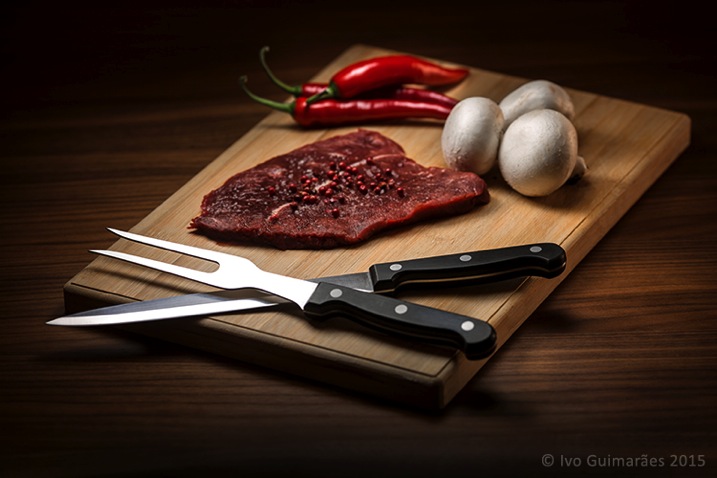
This image might look like a complicated and high-end lighting setup, but in fact, the only light sources used here were simply a tablet and a smartphone.
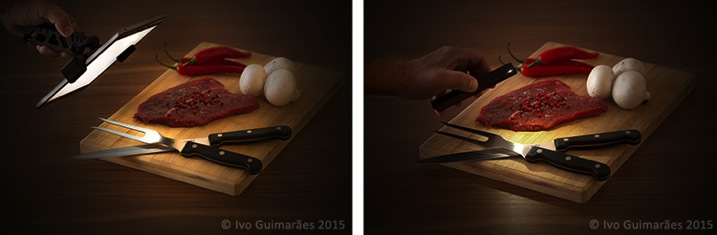
This is a typical light painting image, where the camera is placed on a tripod and the image shot at ISO 50, f/5.6 and a 4 second exposure time. I used the lowest ISO so I could make the image as clean and noiseless as possible. F/5.6 was the chosen aperture to give me the depth of field effect I was looking for, and after a couple of test shots, I realized that 4 seconds was the correct exposure time for the light I was using. It also gave me a comfortable time-frame in which I could move the light around and create the desired effect. An infrared remote shutter release was used to avoid touching the camera and keep it as steady as possible.
Light painting is a technique I use a lot in my work. I used to do it mostly with small lanterns and led light panels, but I realized that a tablet screen light and a smartphone camera led light are fantastic tools to use as light sources in this type of images. There are a few apps that can help to control what shows up on the screen, and transform your device into a mean light-painting machine, but you don’t really need them.
What I’ve done is to create my own masks in Photoshop which I have in my iPad Mini Retina’s camera roll to use when I need. Here are some examples of masks I’ve created.

These masks control the shape and colour on the screen, and the brightness can be easily controlled in the device’s screen definitions.
I took some readings with a colour meter. The iPad screen is around 5,500k and the iPhone camera LED light is around 6,500k, so it’s easy to adjust your camera to match the light source’s colour temperature or use different colours on the device’s monitor to create colour effects in the image.
The light from these screens is usually soft; you can make it even softer with some tracing paper in front of the screen and you can control the spread of light with some black card flags.
In this case I was holding the device by hand and moving it around, but you can buy cheap tablet and phone holders with ¼” thread connectors that can be mounted onto tripods, magic arms or even handles that make it easier to hold.
This particular image could have been done with only one exposure, but I decided to take it a bit further with a composition of three images with three different types of light.
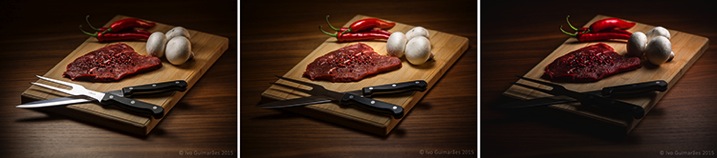
The first image (above) was created with perfect light on the knife and fork, with the iPad positioned at an angle, and with a white screen for a nice light reflection.
The second image (below) has the perfect light on the steak, chilies and mushrooms, with a circular faded mask on the iPad screen.
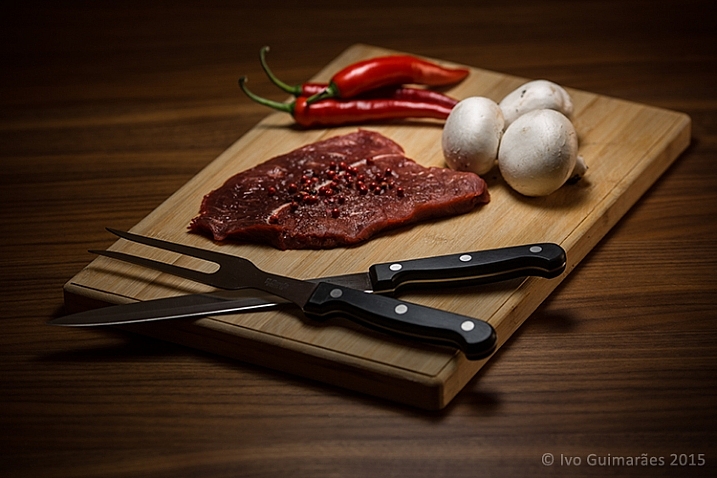
The third image (below) gives a vignette effect and some dramatic light with the LED camera light of the iPhone which is a much harder (smaller) light and therefore casts harder shadows.
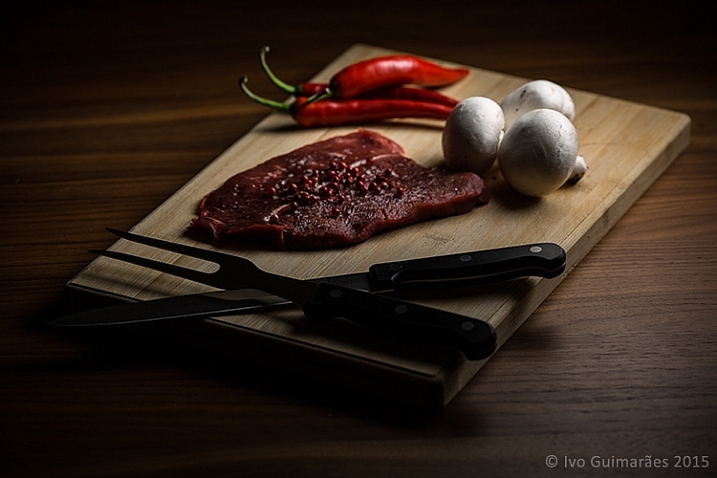
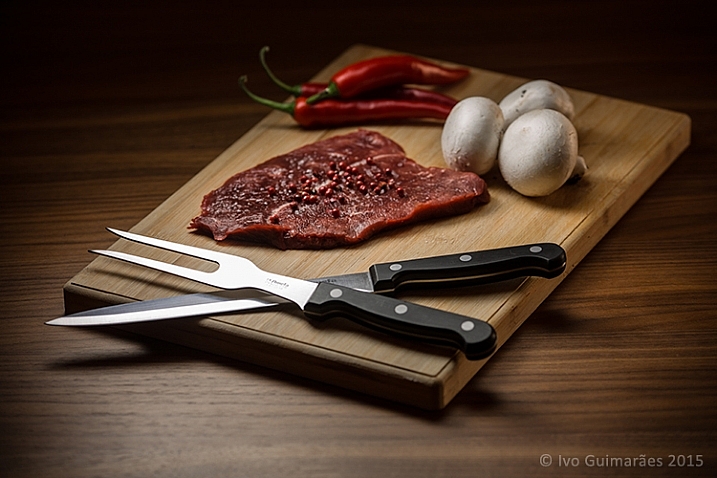
Now it’s just a matter of composing the final image in Photoshop using the best that each of these images has to offer.
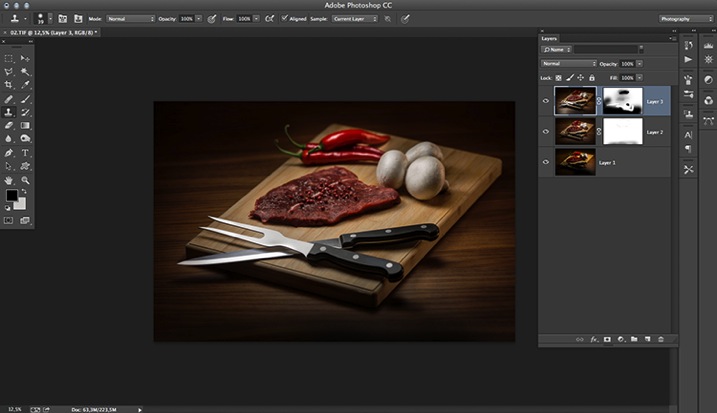
The idea here is to stack the three images and use layer masks to show the good light spots and hide the bad ones. Here is a closer look at the layers with associated masks for each one.
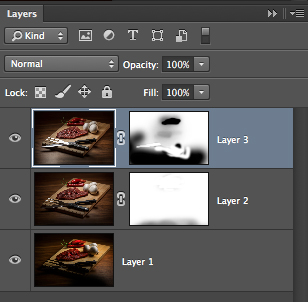
These lighting and composition techniques are not exactly new. This was done long before Photoshop and digital photography were around. Film with multiple exposures or darkroom masking techniques were used with similar effects a long time ago. Nowadays, things are just a lot easier with the digital advent, but the fact is that the basics and references are still there, and understanding this puts you on the right path to be a better photographer.
Have you tried this technique before? Give it a go and post any comments or questions you have below.
googletag.cmd.push(function() {
tablet_slots.push( googletag.defineSlot( “/1005424/_dPSv4_tab-all-article-bottom_(300×250)”, [300, 250], “pb-ad-78623” ).addService( googletag.pubads() ) ); } );googletag.cmd.push(function() {
mobile_slots.push( googletag.defineSlot( “/1005424/_dPSv4_mob-all-article-bottom_(300×250)”, [300, 250], “pb-ad-78158” ).addService( googletag.pubads() ) ); } );The post How to Use Your Tablet or SmartPhone as a Light Source for Photography by Ivo Guimaraes appeared first on Digital Photography School.
-
QromaScan uses your smartphone to digitize prints
Though digital photography has been around for quite some time now, most of us still have a few boxes of prints from the pre-digital era lying around. Digitizing them can be expensive if you use a professional service, or time-consuming if you decide to go the DIY way. QromaScan wants to solve this dilemma, by utilizing your smartphone camera and a foldable lightbox. Read more
-
DPReview recommends: Best smartphone cameras
In many users’ pockets consumer-level digital compact cameras have been replaced by smartphones. The cameras of the latter don’t usually have zoom lenses or xenon flashes but image sensor technology has been rapidly improving, making smartphones important photographic tools for many. We’ve made a list in no particular order our current favorite smartphone cameras for those who are looking to buy their first smartphone or upgrade their current device. Read more
-
Flasher smartphone flash launched on Kickstarter
A poor built-in LED-flash is still one of the smartphone camera’s most glaring weaknesses. We’ve seen a number of accessory makers addressing the problem with different external light solutions. The latest one comes from Vision global which has launched a Kickstarter campaign to fund mass production of its Flasher accessory. Read more
-
Kodak announces IM5 Android smartphone
Before CES there were rumors that we would see a Kodak-branded mobile device at the show, but those who were expecting an innovative, imaging-centric gadget have been disappointed. The Kodak IM5 has arrived and appears to be nothing more than a nondescript, mid-tier Android smartphone with Kodak branding. Read more
-
Asus announces Zenfone Zoom smartphone with 3x optical zoom
At its CES press conference in Las Vegas Asus has announced the ZenFone Zoom, a smartphone with 3x optical zoom lens that is only 12mm thin. The ZenFone Zoom runs Android 5.0 and features a 5.5-inch 1080p IPS screen and up to 128GB of built-in storage. Read more
-
CamsFormer is a programmable smartphone trigger for DSLRs
The feature-rich CamsFormer, currently looking for funding through Kickstarter, is a device that plugs into your camera or flash and is controlled wirelessly from a smartphone or tablet. It can trigger up to two cameras and allows you to remotely view and change a range of shooting parameters on your camera. Read more
-
Lumu smartphone light meter app updated with reflective mode
Even for photographers who would not even think about taking pictures with a smartphone camera, with the right accessories your phone can be a very useful photographic tool. The Lumu light meter is a great example – it plugs into the headphone socket of a smartphone and, with the help of the dedicated Lumu app, turns your smartphone into a fully-fledged light meter that can help enhance your understanding of a scene’s lighting situation. Click through to read more
-
Lume Cube is a high-power external lightsource for your smartphone or GoPro
Just announced by a company of the same name, the Lume Cube is an off-camera lighting option that can be used with a smartphone or GoPro Hero action camera. Thanks to its silicone shell it is water resistant and a 1/4-inch thread makes it mountable on a tripod or other camera support. Additionally, it can be attached to most surfaces magnetically or using a suction-cup. Lume Cube is controlled via an Android or iOS smartphone app. Read more