RSS
 

Posts Tagged ‘small’

Flexible Interiors: 13 Shape-Shifting Small Apartments

04 Mar

[ By Steph in Design & Fixtures & Interiors. ]

Transforming Interiors Main
Transforming furniture and living pod systems help make the most of a small space, but when entire rooms shape-shift in unexpected ways, the results can be astonishing. These compact apartment designs feature walls that slide and unfold, beds that descend from the ceiling, and interiors that can literally be turned upside down to change the function of built-in elements.

Yo! Home by Simon Woodroffe

Transforming Interiors Yo Home 1

Transforming Interiors Yo Home 2

An 80-square-meter space about the size of a one-bedroom apartment is transformed into a much larger-feeling home with 12 moving parts, including a bed platform that comes down from the ceiling just above the couches in the living room. By pulling something down, raising something from the floor or pressing a button to produce some other unexpected action, the small space expands to include a second bedroom, a full-sized kitchen, an office, a cinema, a dining room, a wine cellar and more.

Fluid Shapeshifting Berlin Apartments
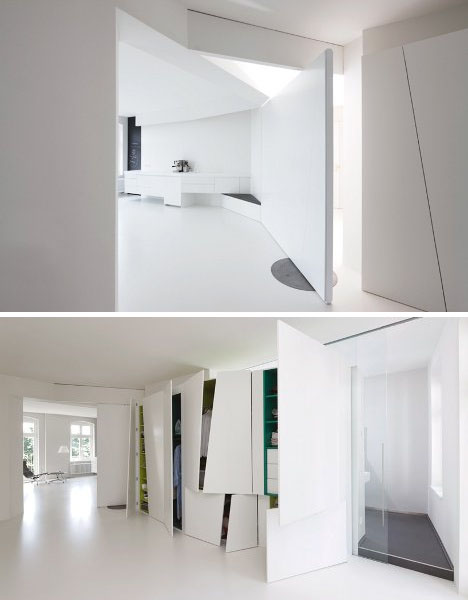
Transforming Interiors Shapeshifting Berlin

Two apartments in Berlin feature exceptionally fluid layouts thanks to pivoting and sliding walls. Frankfurt architecture firm reinhartjung created all-white interiors that help the various elements seamlessly transform to define new spaces in various shapes.

LifeEdited Apartment Packed with Transforming Elements

Transforming Interiors LifeEdited

Transforming Interiors LifeEdited 2

The result of a design competition by Treehugger founder Grant Hill, who actually lives in the winning proposal, the Life Edited apartment is an experiment in compact living that aims to help you “design your life to include more money, health and happiness with less stuff, space and energy.” Virtually everything in this apartment slides, unfolds or transforms in some way to pack as much as possible into a tiny New York apartment. Within this cube, 8 functional spaces can be created, even accommodating large dinner parties.

Pop-Up Interactive Apartment

Transforming Interiors Pop Up Apartment

The Pop-Up Interactive Apartment features a series of polypropylene panels that slide, fold and transform in other ways to change the space for different functions. These flexible dividers enable the 538-square-foot space to be partitioned for dining, sleeping, working and playing.

24 Rooms in One Apartment

Transforming Interiors 21 Rooms in 1 -2

Transforming Interiors 21 Rooms in 1

How do you turn a 350-square-foot studio into a fully functional apartment with the luxuries of a larger space? A Hong Kong designer has experimented with the limits of small space living by squeezing 24 rooms into one tiny cube. A system of sliding walls reveal seemingly endless utilities.

Next Page – Click Below to Read More:
Flexible Interiors 13 Shape Shifting Small Apartments

Share on Facebook


[ By Steph in Design & Fixtures & Interiors. ]

[ WebUrbanist | Archives | Galleries | Privacy | TOS ]


WebUrbanist

 
Comments Off on Flexible Interiors: 13 Shape-Shifting Small Apartments

Posted in Creativity


Drop-Leaf Desk: Small Side Table Converts into Work Surface

22 Jan

[ By WebUrbanist in Design & Furniture & Decor. ]

small space modular desk

Designed as carefully as it is hand-crafted, this Tablet Desk has a deceptively streamlined look that hides a series of modular features and space-saving strategies, all made with technology in mind.

small desk close up

small desk in context

If setting aside a whole room for a home office is simply not an option, this dual-purpose wooden desk and end table lets you put work aside with relative ease, then flip out extra surface area supported with magnetized wooden legs.

small desk magnet legs

small digital work surface

Both the original two-toned and the newer 2.0 version from UK design studio Bee9 combine efficient storage and work space with minimal materials. Each also has a small-as-possible physical footprint, all oriented toward digital-first and future-proof use cases.

small desk hidden cords

small desk tablet area

Modular panels and other moving components acknowledge that users will have wants and needs that cannot be universally anticipated, including ways to route cords (and places to keep them out of the way) and vertical surfaces against which to lean tablets or other devices.

The making-of video above shows the initial Tablet Design being carefully constructed – watching it reveals some of the subtle detailing and much of the behind-the-scenes effort required to integrate all of the necessary functionality.

small desk modular panels

small desk open design

From the designers: “Deceptively simple and endlessly adaptable, the Bee9 tablet desk is designed to redefine where you can put a desk. Frugal in its use of material and space, the desk [plus] side table makes optimum use of limited space.”

Share on Facebook


[ By WebUrbanist in Design & Furniture & Decor. ]

[ WebUrbanist | Archives | Galleries | Privacy | TOS ]


WebUrbanist

 
Comments Off on Drop-Leaf Desk: Small Side Table Converts into Work Surface

Posted in Creativity


Small cameras, large zoom: Canon’s new PowerShot ELPH 340 and SX600

06 Jan

PowerShot_ELPH-340-HS_Purple_02.png

CES 2014: Canon has unveiled two new low-cost cameras that pack big zoom lenses into compact bodies. The PowerShot ELPH 340 HS (known as the Ixus 265 HS in Europe) is slim and stylish, and sports a 25-200mm equiv. lens, 16 megapixel CMOS sensor, and 3-inch LCD. The SX600 is just a bit larger than the ELPH, but gains an 18X, 25-450mm equiv. lens along with 1080/60p video recording. Both cameras have Wi-Fi with NFC, which Canon says is easier to use than on previous models, plus numerous scene modes and special effects.

News: Digital Photography Review (dpreview.com)

 
Comments Off on Small cameras, large zoom: Canon’s new PowerShot ELPH 340 and SX600

Posted in Uncategorized


It’s a Small World – the World of Macro Photography

13 Dec

Macro photography is like a secret world. You can capture ordinary objects in a way that the human eye cannot see them, and create captivating images.

Many people immediately think flowers and bugs at the mention of the word macro, but there are so many other great options. This is meant to inspire you to get out there and look at the world a little closer. Find interesting subjects right under your nose – hey, maybe you can even photograph your dog’s nose!

Here’s a few ideas for you including some flowers and bugs:

By @Doug88888

By @Doug88888

By Tasumi1968

By @Doug88888

By @Doug88888

By cobalt123

By tony babcock

By Becky

By Ben Kreunen

By Mahmoudreza Shirinsokhan

By Johann Coetzer

By Brian Wolfe

By Randy Pertiet

By Jonathan Cohen

By Eduardo Millo

By syvwlch

By Martin Heigan

By maury.mccown

By Johan J.Ingles-Le Nobel

By Guy Sie

By Nick Fedele

By Chris Moody

By Brent Pearson

By Paul clarke

By Nick Fedele

By seeks2dream

By Antonio D’Emanuele

By mcdarius

By Mike McCune

By Bram Cymet

By Chechi Peinado

By Vanessa Pike-Russell

By MEMANG RIZALIS ENT.

For more reading on Macro Photography check out these articles:

  • How to focus stack macro images using Photoshop
  • How to photograph snowflakes with a DSLR
  • Tips for near-macro photography with a telephoto lens
  • Fun with macro photography

The post It’s a Small World – the World of Macro Photography by Darlene Hildebrandt appeared first on Digital Photography School.


Digital Photography School

 
Comments Off on It’s a Small World – the World of Macro Photography

Posted in Photography


Small World Pictures

13 Oct

One of my favourite threads in the dPS forums from the last few months is one titled ‘It’s a Small World‘ that features some of our members creative photos of… small worlds. Here’s some by Jeff Smith who started the thread. He shares how he took them over on the forum post.

Image by Jeff Smith

Image by Jeff Smith

Image by Jeff Smith

Image by Jeff Smith

Image by Jeff Smith

Image by Jeff Smith

Image by Jeff Smith

Image by Jeff Smith

Image by Jeff Smith

Image by Jeff Smith

Image by Madvypa

Image by Madvypa

Have you ever taken any small world photos? If so – we’d love to see them in comments below!

Post originally from: Digital Photography Tips.

Check out our more Photography Tips at Photography Tips for Beginners, Portrait Photography Tips and Wedding Photography Tips.

Small World Pictures

The post Small World Pictures by Darren Rowse appeared first on Digital Photography School.


Digital Photography School

 
Comments Off on Small World Pictures

Posted in Photography


Our Fujifilm X-M1 review: big photo quality in a small package?

17 Sep

X-M1_Black_Front_16-50mm.png

We’ve completed our review of the Fujifilm X-M1, which is the company’s lowest-priced X-Trans-based mirrorless camera. It takes the sensor from the X-E1 and X-Pro1 and puts it in a simpler, more portable body. Fujifilm also added a tilting 3-inch LCD and Wi-Fi, which puts the X-M1 on much the same level as mirrorless cameras like the Panasonic Lumix GF6 and Sony NEX-5T. For a detailed look at the X-M1, follow the link.

News: Digital Photography Review (dpreview.com)

 
Comments Off on Our Fujifilm X-M1 review: big photo quality in a small package?

Posted in Uncategorized


Small Space Design: 15 Fold-Up, All-In-One Bathrooms

29 Jul

[ By Steph in Design & Fixtures & Interiors. ]

Compact Bathrooms Main
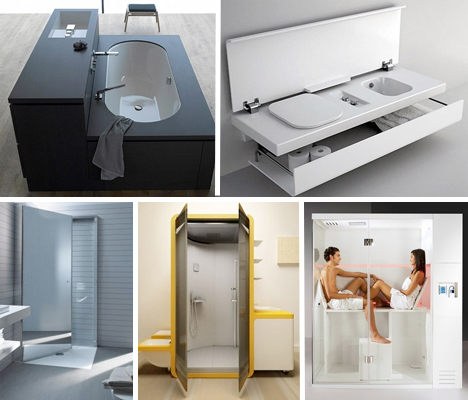
Making the most of limited living space requires modular solutions that can be moved around and altered at will, and that includes bathroom fixtures. Smart, compact modular or all-in-one bathroom solutions add extra luxuries to tiny rooms, rather than taking them away, making room for tubs, saunas, spacious vanities and storage along with necessities like toilets and sinks. Here are 15 intriguing space-saving bathroom concepts.

Fold-Up Bathtub

Compact Bathrooms Fold Up Tub 1

Compact Bathrooms Fold Up Tub 2

Few people in small urban apartments are lucky enough to have a bathtub. But that kind of relaxing amenity would be more possible if more bathtub designs resembled this one. Designer Dominik Chojnacki envisions a fold-up tub that nestles up against the wall when not in use. Too bad it doesn’t double as a shower for ultimate adaptability.

‘Oneself’ For the Person Who Lives Alone

Compact Bathrooms Oneself

In a one-room apartment where privacy isn’t a problem, perhaps something like this would work (though it would be better if it was at least partially walled off): a gridded wall that opens to reveal a sink, toilet and shower along with storage for towels and other items.

Super-Compact Flight Concept

Compact Bathrooms Flight Concept 1

Compact Bathrooms Flight Concept 2

This modular all-in-one bathroom concept combines a shower, sink, tub and vanity in one compact unit. A portion of the ‘Flight’ cabinet folds down to become an elevated bathtub.

Bathroom on a Wall

Compact Bathrooms FluidWall

Here’s another concept that hides bathroom fixtures in a wall so they’re out of the way when not in use. Each panel of the Fluid Wall has identical hidden mounting points so various components can be swapped out as desired by the user including sinks, toilets, shelves and storage.

Space-Saving Tulip Shower

Compact Bathrooms Tulip Shower 2

Compact Bathrooms Tulip Shower 1

The Tulip Shower is an actual dual-usage, fold-up fixture that serves as a shower when standing or a tub when laying down. It looks sort of like a futuristic space pod full of high-powered massagers and underwater jets. The back surface of the shower provides a space to lean against when you’re lounging in the tub.

Next Page:
Small Space Design 15 Fold Up All In One Bathrooms

Share on Facebook


[ By Steph in Design & Fixtures & Interiors. ]

[ WebUrbanist | Archives | Galleries | Privacy | TOS ]


WebUrbanist

 
Comments Off on Small Space Design: 15 Fold-Up, All-In-One Bathrooms

Posted in Creativity


Small Worlds: Strange & Shocking Miniature City Scenes

17 May

[ By WebUrbanist in Art & Sculpture & Craft. ]

surreal model architecture

There is no unifying theme to these surreal depictions of urban architecture and landscapes, save perhaps their imaginative improbability and singular creator, Frank Kunert, a German photographer and his bemused sense of wonder.

surreal crafted city scenes

Each is at once clearly a model yet quite lifelike, lovingly crafted, painted and photographed. Some show impossibilities seemingly for shock value alone, while others contain a subtle message – some commentary on politics, religion, television or other aspects of everyday life.

surreal architecture model images

The resulting scenes question function, accessibility and the role of architecture, exterior and interior design in shaping both public and private experience.

surreal structural montage scapes

It is also worth noting, too, that none of them are post-edited – they are created sans Photoshop and shot with an analog camera. The process and product are closely related, and each creative choice is made carefully by hand.

Share on Facebook


[ By WebUrbanist in Art & Sculpture & Craft. ]

[ WebUrbanist | Archives | Galleries | Privacy | TOS ]


WebUrbanist

 
Comments Off on Small Worlds: Strange & Shocking Miniature City Scenes

Posted in Creativity


No Canvas Too Small for Intricate Masterpieces by Hasan Kale

02 May

[ By Steph in Art & Drawing & Digital. ]

Miniature Art Hasan Kale 1

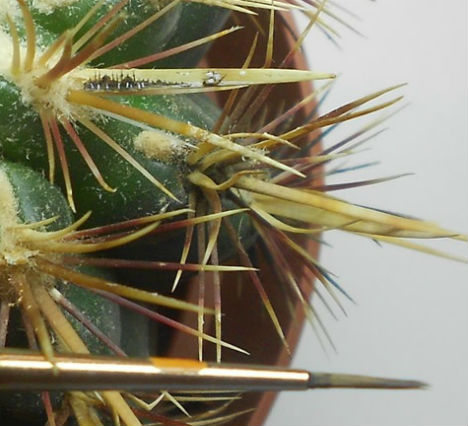
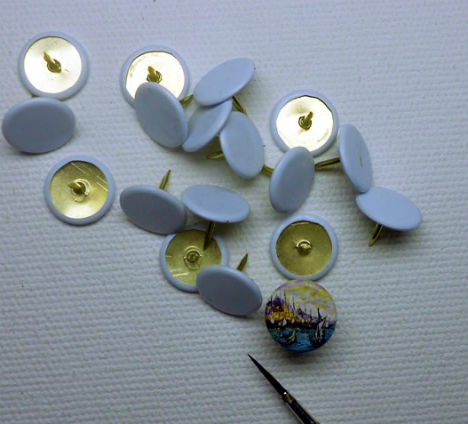
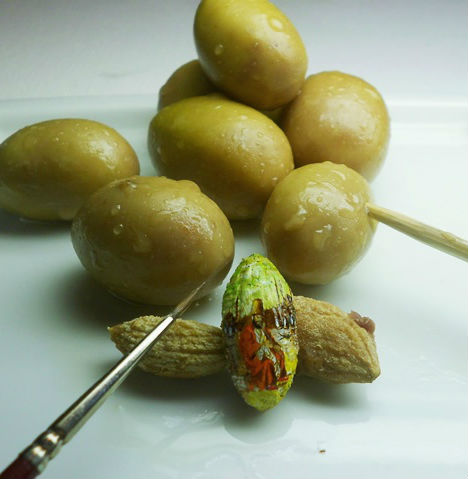
Insect wings, grape seeds, cactus needles and thumbtacks are among the tiny objects that become canvases for stunningly detailed works of art by miniaturist Hasan Kale. The Turkish artist works on an incredibly small scale, often painting scenes from his native Istanbul, complete with reflections of the city’s characteristic architecture on rippling bodies of water and microscopic seagulls.

Miniature Art Hasan Kale 2

Miniature Art Hasan Kale 4

Kale’s works are so small, he doesn’t even need a palette – he mixes the minuscule amounts of paints required for each piece right on his own finger. The 53-year-old painter has been creating tiny works like these since the 1980s.

Miniature Art Hasan Kale 3

Miniature Art Hasan Kale 5

Using extremely fine paintbrushes, Kale faithfully renders these scenes with a remarkably steady hand. Many of the paintings are ephemeral, painted on perishable items like breadsticks.

Miniature Art Hasan Kale 7

Miniature Art Hasan Kale 8

Miniature Art Hasan Kale 9

Kale adds many more photos of his work on a regular basis at his Facebook page.

Share on Facebook


[ By Steph in Art & Drawing & Digital. ]

[ WebUrbanist | Archives | Galleries | Privacy | TOS ]


WebUrbanist

 
Comments Off on No Canvas Too Small for Intricate Masterpieces by Hasan Kale

Posted in Creativity


3 Small But Important Lightroom 5 Beta Changes You Might Have Missed

17 Apr

Adobe announced the availability of Lightroom 5 Beta at Adobe Labs today and by all means, go grab a free copy and play. I’ve been using Lightroom since version 1 and have been impressed with every upgrading to the program, gladly plopping down my money for a new version as I have found the enhancements in subsequent revisions well worth the funds. And Lightroom 5 seems to be on the same track, based on my findings while playing with the beta this last week.

Adobe has a number of fine new features in this revision and they are sure not to be missed. They include

  • A Smart Preview feature which mobile photographers will love as it creates a smaller, editable version of their monstrously sized RAW image that is easily portable on a laptop and can be synced when the originals, possibly stored on an external drive or NAS back at home, become available.
  • Radial Gradient which allows for selecting oval or circular shaped areas for specific effects.
  • Upright, which attempts to correct crocked images or fine tune vertical lines. (My experience with this tool has been less than stellar on simple horizon shots at sea. More on this in a minute.)
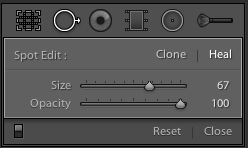
  • Advanced Healing Brush. This one, I like a lot and it is very helpful. Now your “Spot Removal Tool” can be used as a brush to wipe out items that are not in the shape of a circle. This helps a lot and means I spend even less time in Photoshop CS6.

That’s the obvious stuff that Abode packs into their press kit and you probably have seen those items demonstrated on other sites. What I want to show you are three things I found to be helpful in little, but repetitive ways for how I use Lightroom.

(Click any image for a larger version)

Invert Mask

Shot4Thank you! I’ve been wanting this feature for the longest time to save time. But it’s not quite right.
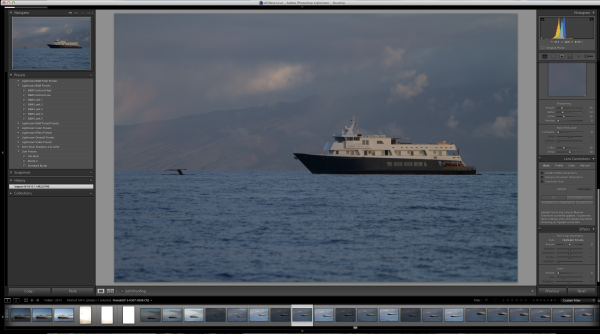
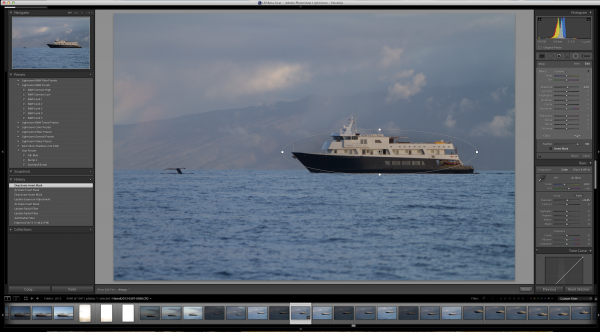
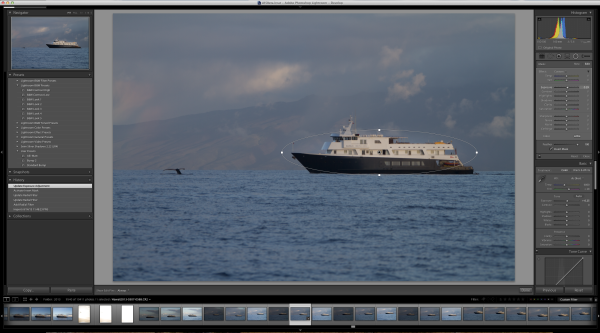
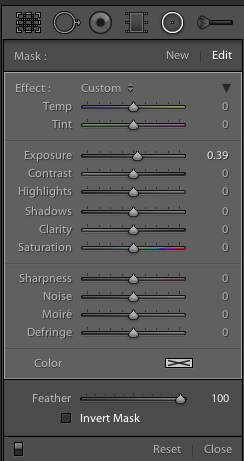
Invert Mask is currently only available with the new Radial Gradient feature. See it at the right? It works well and I’d like to see if appear in the Gradient Tool (especially when creating a new gradient…it would be great to great one just the opposite of the one I am using at the moment) and in the Adjustment Brush.

Here’s a simple rundown of how the tool works.

Starting with this image of one of my client’s boats, the Un-Cruise Adventures Safari Explorer off the shore of Maui, Hawaii, I want to see which direction works best: highlight the boat and darken the surrounding seas or slightly darken the boat and bring up the seas, in order to add contrast to the main subject.

Shot1

I select the new Radial Gradient tool and draw an oval over the boat (Dear Adobe, please make this tool work like the Ellipse Tool in Photoshop for consistency. Specifically, please allow me to grab a “corner” of the ellipse and drag it down instead of starting with the middle of the ellipse. Consistency would really help. Thanks.).

Shot2

Because I have chosen only to increase the exposure by .39, Lightroom masked the boat and increased the exposure for the rest of the image. But if I want to swap that and mask the entire picture except for the boat, it’s just a simple click of the “Invert Mask” check box.

Shot3

Subtle, but useful to me.

Now please, Adobe, add that ability to the Gradient Tool and to the Adjustment Brush especially.

Visualize Spot Healing

I’d like to think my sensor was perfectly clean before leading a recent tour to Bhutan. As a matter of fact, it was extremely clean before I left. But, as life goes, things don’t stay clean.

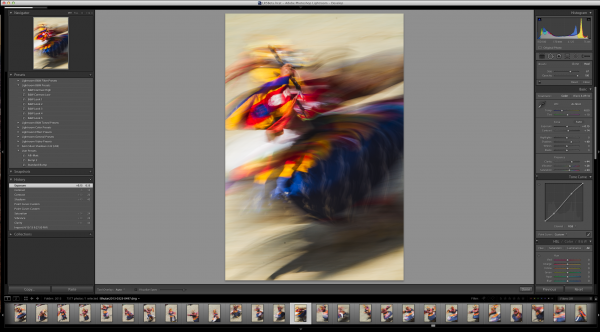
Take this image of a masked dancer at the Paro Tsechu.

Viz1

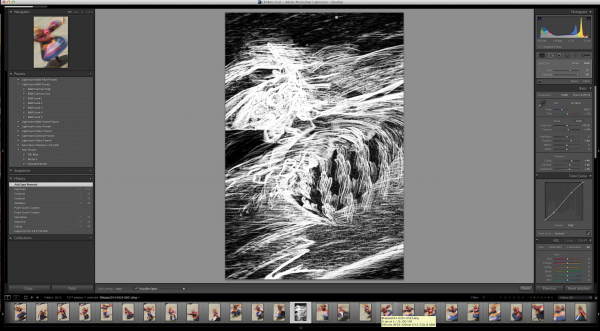
I wanted some blur (obviously) and used a small aperture to achieve a slow shutter speed. In this case, f/25 and 1/6th of a second. Closing down that aperture makes dust on the sensor more obvious, but this image has a lot going on making it hard to find all the dust.

Viz1-2


Viz2


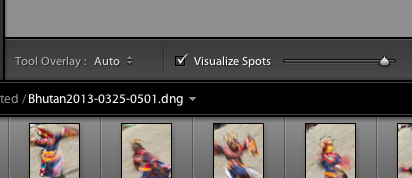
If I click on the “Visualize Spots” check box after clicking the Spot Removal Tool, the slider to the right of it comes alive and I can now more easily see spots. This is a technique used in Photoshop for a while and it works best where edge contrast can be spotted, so in areas without a lot going on.

Viz11

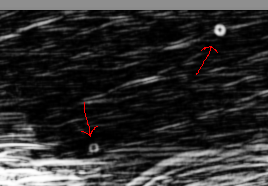
In this image, I found three additional spots, two of which would have been easy to miss without the tool.

Viz4

Remove Chromatic Aberration Check Box

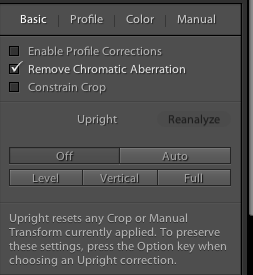
This one is really small, but helpful. With the addition of the “Upright” feature to the Lens Correction panel, Adobe made it easier to get to the Chromatic Aberration removal check box.

Rem1

It’s a small thing, but I often use the check box for “Enable Profile Corrections” for my lens and then want to remove chromatic aberration on only select images, but many. The placement of the box here, as well as on the “Color” tab, helps.

Upright Is Not That Functional For Me

Maybe I’m doing something wrong, but I doubt it. This is one of Adobe’s touted JDI (Just Do It) features and it seems to work well on the demos, but not in real life. If it did, it would be cool. I can get the feature to work part of the time, but no where near even 25% of the time reliably.

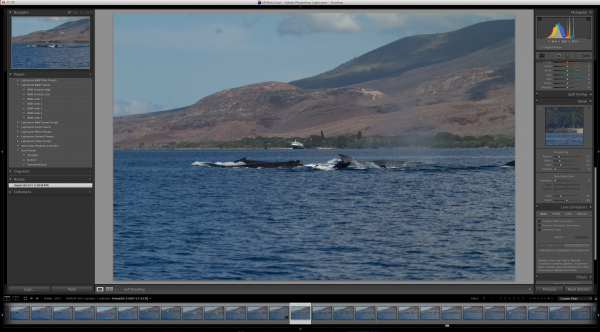
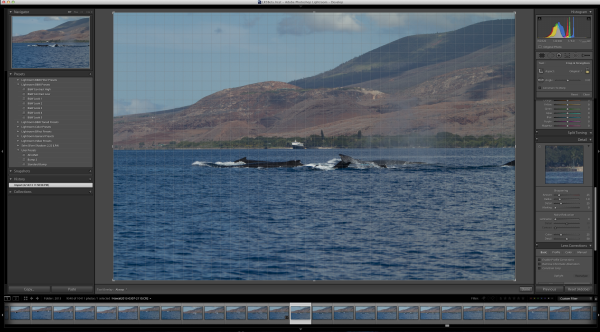
The feature is supposed to level a scene and make diverging or converging vertical lines straight. It can be helpful when it works. But something as simple as a horizon, an obvious one, in this example is not being leveled.  Here’s the initial image out of the camera.

Level1

Now to show that the horizon is not level using the Crop Overlay.

Level2

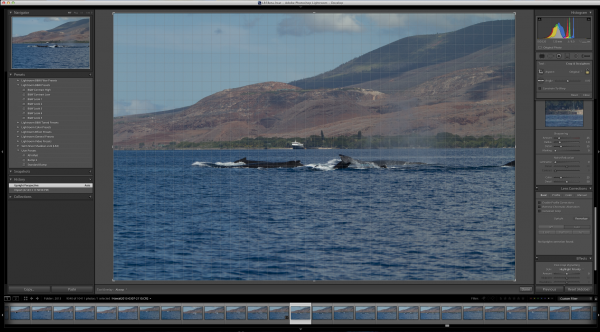
And now using the tool in Auto mode.

Level3

I tried in Level and Full modes to no avail. The program clearly states “No Upright Correction Found”. This is supposed to be a boon for landscape photographers, but even with a clear horizon like this, it failed.

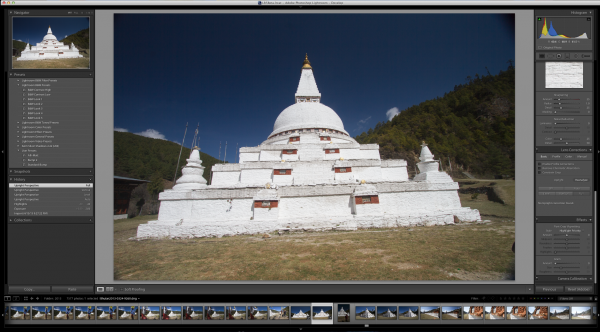
I tried another obvious shot from Bhutan.

Level4

Now how can it say, in all four modes (Auto, Level, Vertical and Full) that no data can be found?

I’m not saying it doesn’t work, I’m saying it’s wonky and not yet reliable.

But this is beta software and that is why they put it out, to find the kinks that mean the most for their users.

Give it a try, Lightroom 5 Beta is quite useful with all the upgrades instituted.


Post originally from: Digital Photography Tips.

Check out our more Photography Tips at Photography Tips for Beginners, Portrait Photography Tips and Wedding Photography Tips.

3 Small But Important Lightroom 5 Beta Changes You Might Have Missed


Digital Photography School

 
Comments Off on 3 Small But Important Lightroom 5 Beta Changes You Might Have Missed

Posted in Photography