RSS
 

Posts Tagged ‘Selfie’

Adobe Research tackles selfie photography with new AI-powered tech

07 Apr

Adobe Research, the company’s research and development division, has released a look at a new technology that tweaks selfies to improve how they look. The technology, which is presented in a new Adobe video, is designed to improve mobile portrait photography by enabling users to adjust the photo’s perspective, depth of field, and more.

Adobe describes its new technology as ‘the potential future of selfie photography,’ demonstrating how it can be used to replicate a more flattering focal distance, adjust the position of the subject’s head within the image, adjust the depth of field using automatic portrait masking and apply styles found in other portraits, such as images found in a Google Image search.

This technology is powered by Adobe Sensei, an artificial intelligence and deep-learning framework the company introduced at Adobe MAX 2016 last November. The selfie technology isn’t available to consumers at this time, but instead serves to highlight Adobe’s latest developments and to introduce photographers to the kind of tools they may have access to in the future.

Articles: Digital Photography Review (dpreview.com)

 
Comments Off on Adobe Research tackles selfie photography with new AI-powered tech

Posted in Uncategorized


Fujifilm Instax Mini 9 launches with selfie mirror and close-up lens attachment

29 Mar

Fujifilm has announced the Instax Mini 9, a new instant camera that has launched in five colors: Lime Green, Flamingo Pink, Smoky White, Ice Blue, and Cobalt Blue. The Instax Mini 9 builds upon the company’s Instax Mini 8, bringing with it a selfie mirror as well as a new close-up lens attachment enabling photographers to snap photos as close as 35cm / 14in.

Fujifilm says the ‘popular’ features from the previous model are rolled over into the Instax Mini 9, including auto exposure. The camera chooses the optimal brightness setting for any given snapshot, highlighting the chosen setting by illuminating one of four lights corresponding the following settings: Indoors, Cloudy, Sunny (overcast), and Sunny (bright). The user then manually switches the dial to that setting.

Other features include a 0.37x viewfinder with target spot, an automatic film feeding system, flash with an effective range from 0.6m to 2.7m, and support for two ordinary AA batteries. A pair of AA batteries can power the camera through approximately 10 Instax Mini film packs before needing replaced.

The Instax Mini 9 will launch in the U.S. and Canada next month for $ 69.95 USD and $ 99.99 CAD, and then in the U.K. in May for £77.99.

Articles: Digital Photography Review (dpreview.com)

 
Comments Off on Fujifilm Instax Mini 9 launches with selfie mirror and close-up lens attachment

Posted in Uncategorized


OPPO launches F3 Plus with dual selfie cameras

24 Mar

Chinese smartphone maker OPPO has launched its latest upper mid-range model, the F3 Plus, and while the new device unfortunately doesn’t come with OPPO’s recently displayed 5x zoom camera unit, it does offer an unusual imaging feature: a dual-front camera.

The front unit features a 16MP main camera with 1/3″ sensor and F2.0 aperture for standard selfies. It is accompanied by an 8MP module with 1/4″ sensor and a super-wide-angle lens with 120 degree angle of view for group selfies. Thanks to built-in facial recognition, the camera app can notify users to switch to the wide angle camera if there are more than three people in the frame.

The rear camera is more conventional but offers capable-looking specifications. A 16MP 1/2.8″ Sony IMX398 sensor is paired with a fast F1.7 aperture and optical image stabilization. Dual PDAF doubles the ‘focus pixels’ on the image sensor for up to 40% faster focus times in low light. 

In the processor department you’ll find Qualcomm’s Snapdragon 653 octa-core offering, backed by 4GB RAM and 64GB of internal storage. A dual-slot card tray can hold two Nano SIM cards or one Nano SIM card and a microSD card, expanding memory to up to 256GB. OPPO claims the beefy 4,000 mAh battery allows for a standby time of more than 284 hours. It also features the company’s own VOOC fast charging technology which can get you up to 2 hours of talk time with 5 minutes of charging.

At the front you’ll find a 6″ 1080p IPS LCD display that is covered by 2.5D Corning Gorilla Glass 5. The F3 Plus features a metal unibody and comes in black or gold. It will be available from April 1st in a number of Asian regions. No information on pricing or global availability has been released yet. 

Press Release:

{/PressRelease}

OPPO Launches F3 Plus, Kickstarting the ‘Group Selfie’ Trend with A First-ever 120° Wide-angle Front Camera

March 23, 2017 – OPPO unveiled today the F3 Plus, the latest model of its Selfie Expert series. The F3 Plus sports the brand’s first dual front selfie camera including a first-of-its-kind 120° wide-angle group selfie camera. Priced at XX, the F3 Plus will go on sale from April 1st in India, Vietnam, Indonesia, Philippines and Myanmar. 

OPPO’s F3 Plus’ dual front camera will answer urban dwellers’ pursuit of snapping perfect selfie photos with a 16-megapixel camera and group selfie photos with a 120° wide-angle camera. The rear camera is co-developed with Sony, equipped with a customized IMX398 sensor for serious photography. The F3 Plus is a high-end smartphone that is efficient, long-lasting, secure and beautiful, addressing today’s highly-demanding mobile-first world.

“OPPO is an industry leader in the Selfie Revolution with the recent ‘Selfie Expert’ F-series. Our brand has been growing rapidly across Southeast Asia and other regions around the world. We became the No.2 smartphone brand in India in 2016. The F3 Plus marks the beginning of a new ‘Group Selfie’ trend, and reinforce our position as the Selfie Expert,” said Sky Li, OPPO Vice President and Managing Director of International Mobile Business. 

“The F3 Plus was created for urban warriors, selfie photo aficionados and lifestyle mavens who want with the need to capturing flawless selfie photos, and our groundbreaking dual front camera smartphone will deliver the photos they seek. The F3 Plus is also packed with outstanding performance, premium design and amazing battery life,” Sky Li added. 

Remarkable Wide-Angle & Dual Front Selfie Camera Define the Next Expert-Class Photography

OPPO’s devotion to perfecting the selfie camera technology began at the very start of their business nine years ago, when no other manufacturer focused on the selfie snapping capturing trend. For example, in 2012, the N1 model pioneered the world’s first rotating camera. In 2016, the F1 Plus was the first-ever device to sport a 16 megapixel front camera. Taking one step further, the revolutionary dual selfie front camera will take the standards of camera hardware and selfie photography to new heights.

Set to be the next ultimate ‘Selfie Expert’, the F3 Plus features dual front selfie camera. The 16-megapixel front camera builds upon the technology offered by the previous ‘Selfie Expert’ F1s. At the core of this camera is a 1/3-inch sensor, which increases light exposure and clarity of images. The large f/2.0 aperture allows for great depth-of-field effects – clear foreground focus matched with the perfect amount of background blurriness.

In becoming the ‘Group Selfie’ secret weapon, the first-in-the-market, specialized 120-degree wide-angle 8-megapixel camera captures a much wider view, up to 105 percent more than a regular 80-degree lens. This allows even more people to enter the frame with minimized lens distortion, thanks to the 6P camera lens. The camera also features a ¼-inch sensor.

This group selfie camera is a reflection of OPPO’s ‘user-oriented’ philosophy. With the built-in Smart Facial Recognition, the F3 Plus will notify users to switch to ‘Group Selfie’ mode if there are more than three people in the frame. Users can snap their Group Selfie at ease, without compromising image stability when taking the selfie with one hand. 

The outstanding rear camera offers professional high-quality photography performance with fast focusing speed, noise reduction and advanced low-light performance. Powering the 16-megapixel rear camera is a brand-new 1/2.8-inch IMX398 sensor. This sensor is jointly developed by OPPO and Sony, which features Dual PDAF – dual phase detection autofocus technology. This new technology doubles the sensor’s pixel array area where the photodiodes are embedded, necessary for phase detection autofocus. This makes for 40 percent faster focusing speeds even in low light. Paired with the large f/1.7 aperture, the resulting images are clear and breathtaking.

There are other innovative technologies packed into the F3 Plus to help users capture picture-perfect, flawless selfies. OPPO’s pioneering beautification editing software, Beautify 4.0, will allow users to choose from various beautification modes, ensuring images presenting the favorable effects. 

A Flawless Smartphone Experience

The OPPO F3 Plus is fast, utilizing an octa-core processor backed by 4GB RAM and 64GB ROM. It also offers a dual-slot card tray that can hold two Nano 4G SIM cards or one Nano SIM card with a microSD card, expanding memory to up to 256GB. OPPO’s leading optimized ColorOS 3.0 system ensures superb speed with reduced energy consumption and flawless performance with built-in Privacy Protection feature and the Avast-based virus scanner. 

Extended daily usage is another of the device’s core features. The 4,000 mAh built-in battery gives the F3 Plus a standby time of more than 284 hours[1]. Through OPPO’s proprietary and industry leading rapid VOOC Flash Charge Solution, the battery will charge four times faster than standard batteries. can get up to 2 hours of talk time with just 5 minutes of charging. 

Privacy protection and security is also a top priority. F3 Plus’ Lightning-Fast Touch Access is undoubtedly one of the quickest in the market. The home-button fingerprint reader in the F3 Plus unlocks the phone in a mere 0.2s. The fingerprint reader is even more versatile with the fingerprint-activated calling and app launch functions. 

Users can enjoy the flexibility to multi-task and ‘work hard, snap hard’, all on one smartphone – seamlessly, securely, with a long battery life.

[1] This number is for reference only and may differ depending on individual user usage / conditions.

Stunning Design and Exquisite Craftsmanship

Created with OPPO’s belief in design excellence, the F3 Plus is constructed with a metal unibody and carefully crafted for a better sense of hand-gripping, resulting in a sleek and thin smartphone that is a wonder to hold. The 6-inch, 2.5D Corning Gorilla Glass 5 screen features a pre-applied protective screen coating, giving it an elegant, classy and premium look while retaining unmatched durability. 

The “Six-String” ultra-fine antenna is a design rethink by OPPO, removing the ubiquitous, thick pair of white antenna lines seen in previous smartphone models, and gives the back shell a stunning look. 

Amazing Colors & Competitive Pricing

The F3 Plus comes in Black and Gold. The suggested retail price is $ XXX. It will be made available first in India, Vietnam, Indonesia, Philippines and Myanmar. Launches in the Middle East and North Africa will follow. 

The F3 is also announced today, featuring the dual selfie front camera and 5.5-inch screen display. It is expected to be available in May 2017.

{/PressRelease}

Articles: Digital Photography Review (dpreview.com)

 
Comments Off on OPPO launches F3 Plus with dual selfie cameras

Posted in Uncategorized


Hands-on with AirSelfie, a mini selfie drone that’s on sale now

03 Mar

Hands-on with AirSelfie

Remember AirSelfie? Start your ‘getting off the ground jokes,’ because the mini-drone camera is now on sale to the general public. The company behind the Kickstarter project is in the process of servicing its initial backers.

The device is designed to allow individuals and groups to take self-portraits from a greater distance than an out-stretched arm or selfie-stick will allow. As it has a very short range (20m/66ft) and limited flying time, AirSelfie is technically not classified as a drone. Thus it stands beyond the legislation and licensing laws that complicate flying larger camera drones – meaning that anyone can use one.

Hands-on with AirSelfie

Fitted with a lens with an angle of view (69°) that corresponds with what you’d expect from a 30mm on a 135 body, the camera is capable of capturing far more scenery and the subject’s surroundings from its maximum flying distance from the controller, and the 5MP sensor is good for 1080p HD video at 30fps as well as for stills. A 4GB memory card is built-in to store images, which can be transferred either through the built-in 2.4GHz Wi-Fi to a smartphone or via USB directly to a computer.

Hands-on with AirSelfie

The AirSelfie is controlled through a smartphone app that’s available for Apple and Android devices, and a self-timer allows users to put the phone out of sight before the picture is taken. As the device weighs only 61g it could be susceptible to being blown off course outside, but an undercarriage camera is designed to keep it hovering over the same spot while sonar helps to maintain a consistent height. The sonar also informs the device when it is coming into land so that the fans are slowed and switched off automatically – which makes it safer to catch!

Hands-on with AirSelfie

The four fans are driven by 7.4v brushless motors and powered by a 260mAh lithium polymer battery. On a full charge users can enjoy up to three minutes of flight, but an accessory power bank can deliver 50% charge in just ten minutes, and a full charge in 40 minutes.

Hands-on with AirSelfie

When not in use the AirSelfie can be housed in the back of a charging phone case designed for specific models.

Hands-on with AirSelfie

The company says it has used an anti-vibration construction inside the AirSelfie to reduce the impact of the rotating blades on the quality of image that can be created, but it isn’t clear yet what ISO or shutter speed range the device has to help it avoid camera shake.
The gadget seems very well made and is metal casing appears reasonably robust, while the rotor blades are protected from crash damage as they are positioned within the casing. The noise created will be acceptable outside and at parties, but this isn’t the kind of drone that can be deployed to capture a romantic moment in a restaurant without annoying the other guests.

Hands-on with AirSelfie

Orders for the AirSelfie will be delivered in May/June and it costs £220/€259 with the phone cover and £229/€269 with the power bank instead. For more information see the AirSelfie website.

Articles: Digital Photography Review (dpreview.com)

 
Comments Off on Hands-on with AirSelfie, a mini selfie drone that’s on sale now

Posted in Uncategorized


Meitu: harmless selfie app du jour or data mining scheme?

21 Jan

Meitu is an Android and iOS app made by China-based developer Xiamen Meitu Technology Co., Ltd. The app adds cartoonish embellishments and facial feature distortion reminiscent of Japanese anime to selfies, and for some reason, became widely popular with Western users this week. Meitu is by no means new – it’s been around since 2008. But if you went to sleep last night blissfully unaware of its existence, chances are you saw someone’s Meitu selfie somewhere on the internet when you woke up.

Meitu brings a couple of things to the table. First, you can use the app as it’s intended and apply effects to your own selfies. Take a selfie, add a silly filter, post to Facebook and everyone has a good laugh about it. But Meitu’s effects can also be applied to other photos – cue much merriment and silliness on the internet. You can even keep feeding it the same image and re-applying filters until it no longer recognizes a human in the picture, which raises all sorts of existential questions.

But as quickly as it came into the spotlight, spoil sports put the brakes on when they looked closely at the app’s code. CNET published an article cautioning users against downloading the app, citing privacy concerns. Twitter user and self-described ‘security pessimist’ @FourOctets posted an alarming message that the app was sending each user’s unique phone identification number to a server in China. Jonathan Zdziarski, a security researcher, also tweeted some of his findings after combing through the iOS version of the app.

It all sounds pretty alarming, but Zdziarski doesn’t actually see anything particularly malicious about Meitu. Or at least, nothing unique.

Another Twitter user theorizes that the app’s maker is just complying with new Chinese laws.

So what do you think? Is Meitu nothing more than a data-mining scam? Or are you comforted by the fact that all of your other apps are spying on you anyway, so what’s the difference? Let us know in the comments.

Articles: Digital Photography Review (dpreview.com)

 
Comments Off on Meitu: harmless selfie app du jour or data mining scheme?

Posted in Uncategorized


Make-up bracketing and selfie boutiques help shoot Casio to record levels of profit

16 Dec

Casio’s TR series of Exilim compacts has propelled the Japanese company to record profitability this year after the cameras caught a firm grasp of the massive Chinese selfie market. According to a report from Nikkei Asian Review, Casio is on-track to make a $ 403 million profit this year, and a good part of that has come from the sale of its unusually shaped EX-TR compact cameras that the company has designed to appeal to female selfie shooters.

Just after the launch of the first TR – the Exilim TRYX EX-TR100 – in 2011, Casio’s photography business was in such trouble that it pulled distribution in the majority of territories it operated in. At the time Casio concentrated on the ‘cool’ looks of the camera and its ART modes that created HDR and painting-effect images, but since 2013 the TR cameras have proved such a hit with the Chinese that its imaging division expects to make a ¥4.2bn (about $ 34.5 million) operating profit. That comes after four years of losses, up to 2012. 

The secret of the camera’s success has been a combination of a growing fashion-conscious design and the product’s suitability for shooting selfies. With a hinged frame the TR models can support themselves standing upright so are ideal for placing on a table facing the subject. They also have a number of ways to trip the shutter including squeezing the frame, using a ‘selfie pad’ on the side of the body, using a count-down-display self-timer, by the camera detecting the subject putting his/her hand in a certain part of the frame and by touching the 3″ LCD. The 921,600-dot LCD also acts as a digital mirror so the subject can check hair and make-up before the picture is taken – as the camera lens and the LCD face in the same direction. 

It has become common to feature digital retouch shooting modes in compact cameras, but Casio’s Exilim TR models go a step further with make-up modes that offer up to 12 levels of skin smoothness as well as skin tone adjustments to suit the way you want to look. A step beyond that even is make-up mode bracketing that provides three images with smoothness levels either side of the setting you chose yourself. In the latest model, the EX-TR70, make-up mode is now available when shooting movies too. 

For those not sure of their best side, pose bracketing gives you five chances to look good as the camera’s voice guidance counts down three-two-one between pictures so you have the opportunity to ruffle your hair, bend a knee or pout a little bit more. 

All of the EX-TR models use a lens with an angle of view equivalent to a 21mm on a 35mm system. Such a focal length would seem excessively wide for general purpose photography, but when holding a camera at a short-arm’s length it has proved perfect for getting you and your friend in the frame. Instead of a flash the cameras are equipped with an LED light that’s positioned very close to the lens axis to create soft and shadowless lighting – and the LED is round to form an attractive circular catch-light in the eyes. Genius. 

The cameras have proved so popular in China that Casio has opened three stores that sell only TR series models. The stores are designed like make-up boutiques, to set the products apart from other cameras in the market. At up to ¥100,000 (about $ 800) a pop these are not low-cost novelties priced for the mass market, so clearly Casio has been doing something very right indeed. 

For more information on the Casio Exilim TR series see the Casio digital camera website.

Articles: Digital Photography Review (dpreview.com)

 
Comments Off on Make-up bracketing and selfie boutiques help shoot Casio to record levels of profit

Posted in Uncategorized


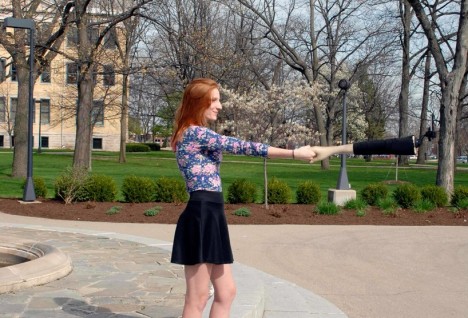
Artists create imaginary-friend Selfie Arm for lone travelers

02 May

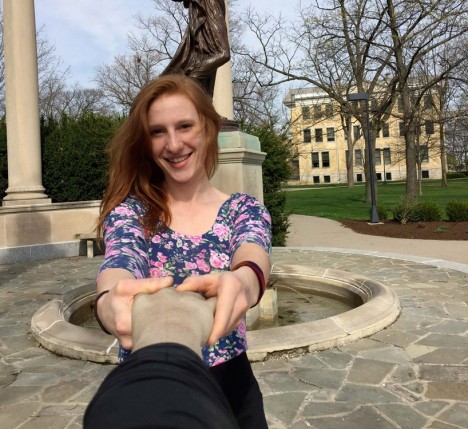
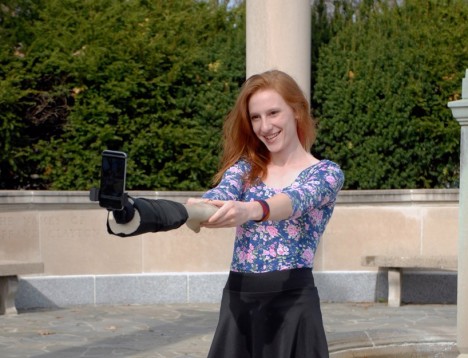
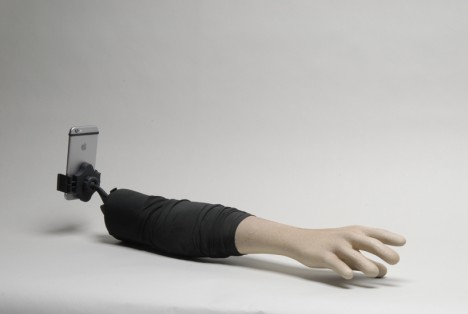
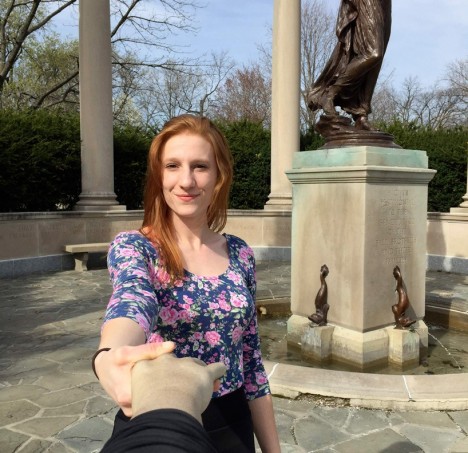
US artists Justin Crowe and Aric Snee have created a selfie stick designed to enable lone travelers to shoot selfies that appear to have been taken by a traveling companion. The Selfie Arm is a false arm and hand with a smartphone bracket attached just beyond the elbow. Read more

Articles: Digital Photography Review (dpreview.com)

 
Comments Off on Artists create imaginary-friend Selfie Arm for lone travelers

Posted in Uncategorized


Lending a Hand: Selfie Arm Lets You Fake Your Friends

02 May

[ By Steph in Design & Products & Packaging. ]

selfie arm 5

Never mind that given its skin tone, this arm-shaped selfie stick kind of makes it look like you’re dragging a corpse around. Mounting your cell phone onto the end of it to shamelessly selfie away in public places might make you look ridiculous to bystanders while you’re doing it, but at least in the finished photos, you appear to be having a great time with a living companion.

selfie arm 4

selfie arm 3

Artists Aric Snee and Justin Crowe collaborated on the ‘Selfie Arm,’ which is exactly what it sounds like. Poking fun at the self-photography phenomenon and examining the relationships between humans and technology, the device is thoroughly tongue-in-cheek. Ten limited edition, signed copies of the prototype will be made.

selfie arm 2

selfie arm 1

Lightweight and portable thanks to its fiberglass construction, the Selfie Arm also makes for a conversation-starting accessory if you walk around with it poking out of your bag, so maybe it can actually help you meet a human companion who will take photos for you – no fake severed limbs required.

Share on Facebook


[ By Steph in Design & Products & Packaging. ]

[ WebUrbanist | Archives | Galleries | Privacy | TOS ]


WebUrbanist

 
Comments Off on Lending a Hand: Selfie Arm Lets You Fake Your Friends

Posted in Creativity


How to Shoot a Star Trails Selfie

20 Apr

How I shot the star trails selfie

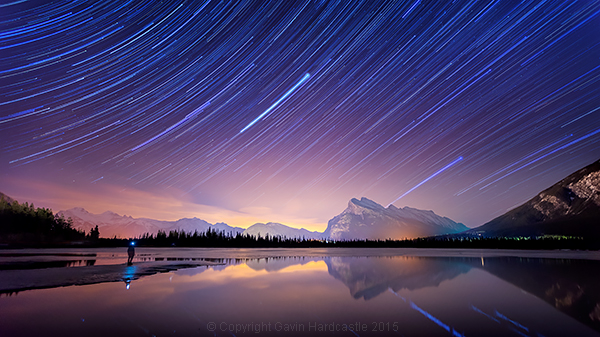
There are times when planning and patience can result in a killer shot. This nighttime star trails selfie (above) that I captured in the Canadian Rockies was one of those times. I’d planned to shoot star trails over Mount Rundle and the town of Banff, Alberta while hopefully capturing reflections in Vermillion Lake, surrounded by melting ice.

My initial vision was for a completely cloudless sky, but the small yet persistent low clouds ended up adding an ethereal quality to the shot I hadn’t expected.

When I looked back at my first 30 second exposure, I knew right away that this shot had some potential. All I had to do was set things up properly and then play the waiting game.

I’d like to share with you exactly how I shot and processed this image so that you too can try your hand at star trails, and maybe even a selfie like I did.

Required Gear

  • A digital camera with and intervalometer app
  • A sturdy tripod

Capturing the Shot

Step 1 – Location and conditions

In this case, my location was already set because I wanted Mount Rundle to be central in the composition. I needed a relatively clear night with good visibility of the stars. If it had been cloudy, I would have just stayed home. When planning a location, check the weather forecast and figure out which direction you’ll be facing to get an idea of the direction of the star trails. For more info on the movement of the earth and the direction of star trails read this article.

I was shooting the sunset earlier that evening so I had a good idea of how things were going to turn out. Here’s the bonus shot I captured while waiting for the stars to arrive.

Vermillion Lakes, Banff - Mirror World by Gavin Hardcastle

Step 2 – Composing the shot

Whenever I shoot star trails it’s important to remember that I’ll need roughly 60-70% of the frame dedicated to a sky that probably isn’t doing much. I can’t see the star trails until I’ve finished processing your images and that means I have to imagine the trails and frame the composition accordingly.

Step 3 – Setting aperture, exposure and ISO

Night photography demands that we use much higher ISO settings than we would during daylight hours. It’s how we increase the cameras sensitivity to light. With this shot I was able to get away with ISO 2000 because there was a lot of light pollution from the towns of Banff and Canmore.

Using an aperture of f/2.8 meant that my lens was pulling in as much light as it could and with a 30 second exposure. I was happy with the brightness of the image, especially the stars.

Here’s one of the RAW frames before processing. Even with the haze and light pollution from Banff I could see that the stars were plenty bright enough to capture trails. You can even see a couple of amorous geese in the shot just in the reflection of Mount Rundle.
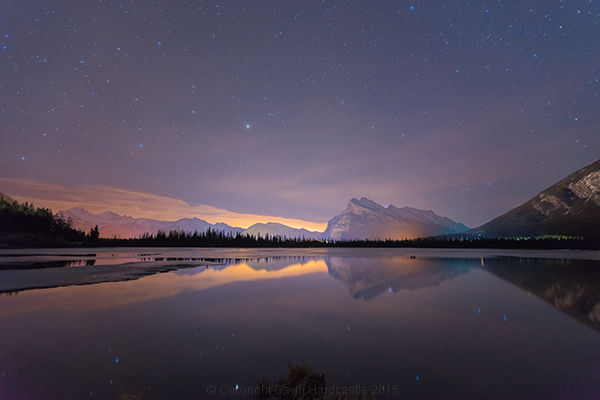
Star Trails RAW frame

Step 4 – Setting up my timelapse intervalometer

I shoot with the Sony A7R camera which has a cool timelapse app. This basically works the same way as a hardware intervalometer which you can get for pretty much any DSLR. It works by taking continuous shots at an interval that I set. I tell the app/intervalometer to take 120 exposures, and that I want them all to be 30 seconds long. I don’t want any gap between shots so that means the camera immediately takes one shot after another with no rest period.

When doing this, I make sure to switch off the cameras built-in noise reduction as this can mess up the timing of the intervalometer. In-camera noise reduction can take a long time to process so I don’t want my cameras memory buffer locked up and busy when it’s supposed to be taking the next exposure.

I’ll also want to use the fastest memory card I can afford.
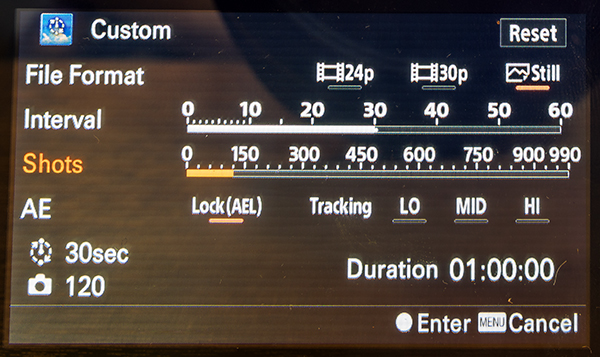
Sony Play Timelapse App

The Sony Timelapse App

Canon DSLR users will be delighted to learn that Magic Lantern has an intervalometer for timelapse shooting.

Step 5 – Final check and off we go

Before I commence shooting a lengthy timelapse I’ll do a final check of focus, make sure I’ve got plenty of battery power left, lots of memory, and that the tripod is stable and not likely to move during shooting. I’ve learned the hard way that these things can ruin an otherwise perfectly executed timelapse.

Step 6 – Begin shooting and ……. pose

Once you’ve started your timelapse you’ve now got to come to terms with your boredom. I didn’t plan to do a selfie, I actually wandered into the frame of my shot because I was just looking around at stuff. If you do plan on doing a selfie, just be sure to stand in place long enough for at least one of the exposures to capture you. To be on the safe side, try and stay in position for a full minute.

It might even be really cool if you stand in multiple positions to make it look like a crowd of identical models.
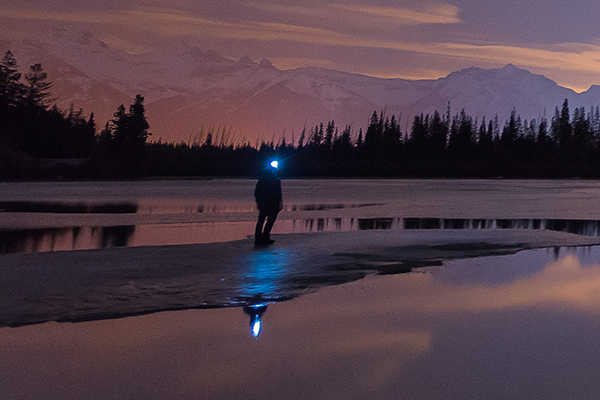
Posing for a selfie in Banff

Top Tip for shooting Star Trails or Timelapse

I highly recommend bringing a second camera so that you can carry on shooting while your A camera is tied up shooting the star trails. Not only does this alleviate crushing boredom, but it’s also great practice. You do practice right?

Step 7 – Check your shots before leaving

Once my timelapse has finished, I check the images on the camera before packing up and leaving. I have my camera set to play my images as I spin the jog wheel, kind of like a flip book animation. It’s great for checking how the movement of the stars worked out and I’m always amazed at the things the camera picked up that I didn’t see. I had lots of frisky geese swimming in and out of my shots as they went about their noisy geese business.

If I spot a disaster in the playback (let’s say a bug camped out on my lens) it’s time to start all over again. After an hour or so of waiting, I’ll be loath to start again, but sometimes you’ve just got to grin and bear it if you want that killer shot.

Processing the Shots

To process star trail images with this shooting technique, I used Adobe Bridge, Camera RAW and Photoshop.
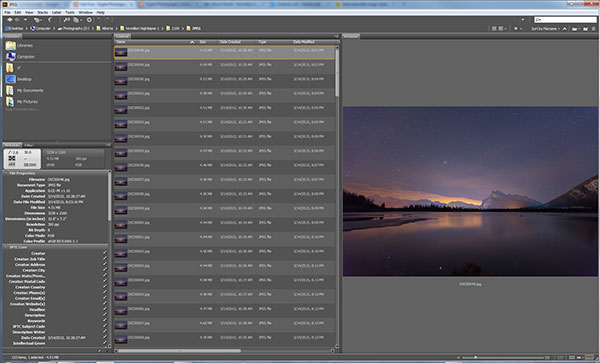
Adobe Bridge lets us quickly preview our star trails timelapse.

Adobe Bridge lets us quickly preview our star trails timelapse. Just hold down the bottom cursor key to flip through all of the frames and watch a rough animation.

Step 1 – Tweak the RAW files

In Adobe Bridge, I’ll select all 120 of my images, then right click and choose Open in Camera RAW. This loads the images into Adobe Camera RAW where I can reduce the noise, change the white balance and make any colour tweaks that I want. Here’s a list of what I tweaked.

  • Added sharpening
  • Changed White Balance to Auto
  • Added slight noise reduction
  • Increased Contrast
  • Boosted Shadows and Blacks
  • Increased Clarity and Vibrance
  • Reduced Highlights and Whites
  • Used Straighten Tool to fix horizon line

When I’m finished tweaking, I hit Select All, then click Synchronize so that the tweaks I made to my first RAW file get applied to all 120 images. Next I hit the Done button to take me back to Adobe Bridge where I can now see those ACR tweaks applied to all 120 image thumbnails.
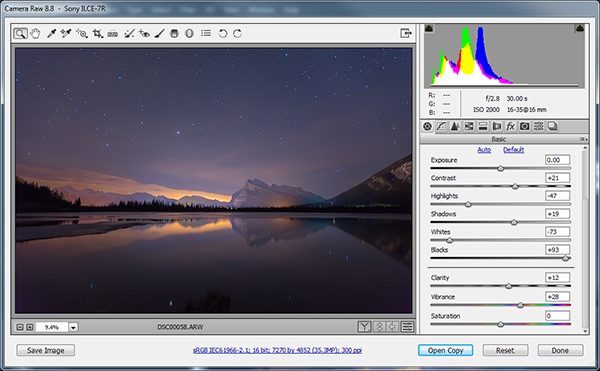
Adobe Camera Raw for processing star trails in Photoshop

I used Adobe Camera to make image corrections and then apply the same corrections to ALL of the frames.

Step 2 – Save as low resolution JPGs

This next step requires a lot of computer resources. My current PC only has 16 GB of RAM so I knew I’d have to make some low resolution versions of my RAW files in order to be able to load all 120 images into Photoshop layers. If I ever print this image, I’ll need to reprocess this image at full resolution which will require some major processing, but for web use I know I can get away with using smaller resolution JPEGS to create my final image.

To do this, I select all of my newly tweaked RAW files in Adobe Bridge once again. I then right click and choose Open in Camera RAW. I hit Select All, then choose Save Images in the bottom left. This opens a dialog box where I can specify a location, file format and most importantly, image resolution and size.

I choose JPEG and then specify a resolution of 72 pixels per inch and tell it to resize my images to a much smaller resolution that I know Photoshop can handle but will still look great for web use. Finally I click Save and go make some coffee while I wait for all 120 images to process.
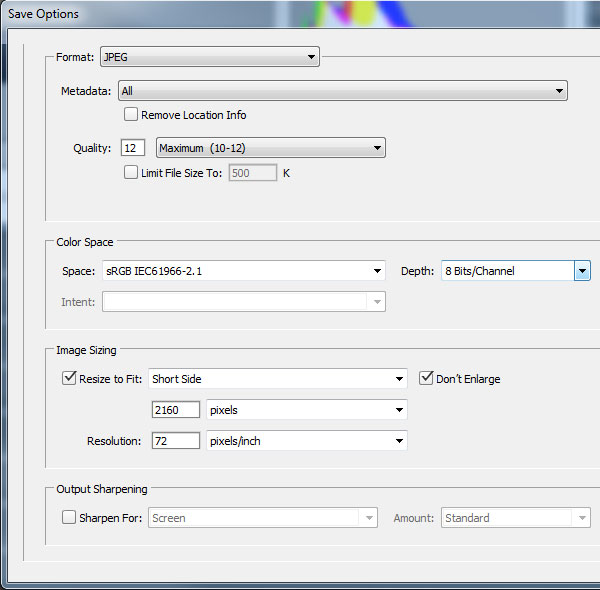
Adobe Camera Raw Save Options

Step 3 – Load the JPEGs into Photoshop layers

Back in Adobe Bridge I navigate to where I saved my low resolution JPEGs. It’s best to export these to a separate folder to keep things to tidy. Once again, I select all my JPEGs and then choose Tools > Photoshop > Load Files into Photoshop Layers.

This will take even longer than it took to export the JPEG’s so I’ll go downstairs and watch an episode of House of Cards.

Step 4 – Can you feel the magic?

This is where the magic happens and I finally get to see my star trails. With all of the 120 images loaded into Photoshop Layers, I go to the Layers panel to select ALL of my layers. This can be done by clicking on the top layer so that it’s highlighted in light blue, holding down shift and then clicking on the bottom layer – I need to scroll down to see all 120 layers.

With my 120 layers selected, I now change the Layer Blend Mode to Lighten and BAM – Star Trails!

Note: You could also use a free program like StarStax to put the trails together if you don’t have Photoshop.
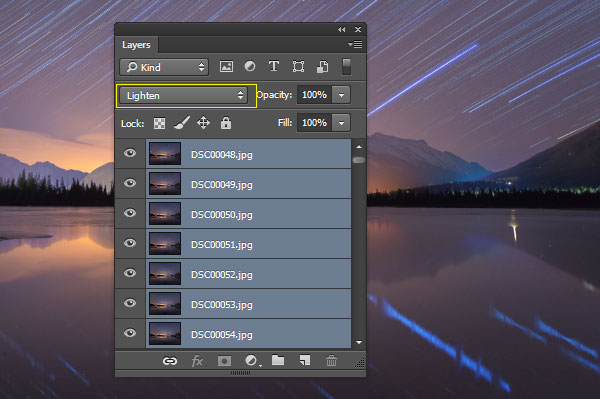
Make Star Trails with the Lighten Blend Mode

From this point on I can process the image with some final tweaks in Photoshop. To do that I’ll merge all layers down to one by pressing ctrl+E. Then I can change contrast, colour balance, crop, add a vignette and whatever else I think suites the composition.

My finished star trails selfie is done and ready to share with the world. I hope you like it.

How I shot and Processed a Star Trails Selfie

Why don’t you give it a try?

There is a much easier but somewhat less controlled method of getting a shot like this. Follow steps one to three and then simply use a remote shutter release while your camera is set to Bulb mode and take a very long exposure. You could leave the shutter open for an hour or two to capture the same effect. Just be careful that your lens doesn’t fog up while the camera heats up.

You won’t have the same pinpoint control over each exposure with this simpler method, but it’s a great way to get into shooting star trails if you don’t have the time to go through all of these post processing steps.

Editor’s note: caution – long exposures of this nature will cause your sensor to heat up potentially causing damage to it like stuck pixels or worse. Please do so at your own risk. 

If you prefer the more long winded method that I used, you’ll get the maximum image quality possible and if you do decide to do some selfie modelling, you can pick the exact exposure that captures you at your best. In my case, it was the back of my head.

googletag.cmd.push(function() {
tablet_slots.push( googletag.defineSlot( “/1005424/_dPSv4_tab-all-article-bottom_(300×250)”, [300, 250], “pb-ad-78623” ).addService( googletag.pubads() ) ); } );

googletag.cmd.push(function() {
mobile_slots.push( googletag.defineSlot( “/1005424/_dPSv4_mob-all-article-bottom_(300×250)”, [300, 250], “pb-ad-78158” ).addService( googletag.pubads() ) ); } );

The post How to Shoot a Star Trails Selfie by Gavin Hardcastle appeared first on Digital Photography School.


Digital Photography School

 
Comments Off on How to Shoot a Star Trails Selfie

Posted in Photography


Casio launches EX-MR1 selfie camera with lens behind a mirror

05 Dec

Casio has taken the selfie camera a logical step forward with a new design. The Casio Exilim EX-MR1 uses a lens behind a large mirror so that shooters can check their appearance as they take a picture. The camera, which the company seems to be targeting at women, is a 14MP compact camera with an extra wide angle 4x zoom that starts at 21mm equivalent – a focal length Casio says is optimal for taking self-portraits. Read more

Articles: Digital Photography Review (dpreview.com)

 
Comments Off on Casio launches EX-MR1 selfie camera with lens behind a mirror

Posted in Uncategorized