RSS
 

Posts Tagged ‘Search’

Why Aren’t Search Engines Making Better Use of Their Social Networks for Image Search?

06 Jun

One thing I’ve noticed more and more over the past few years is what a poor job traditional image search engines do vs. social networks.

By using social information around photos (likes, faves, comments, +1s, etc.), social networks typically produce much superior image search results than traditional image search.

Take this search of Coachella 2013 for example.
Screen Shot 2013-06-05 at 10.45.53 AM
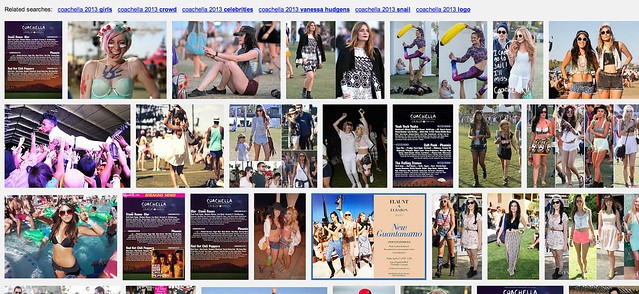
Yahoo Image Search: “Coachella 2013″

Screen Shot 2013-06-05 at 10.46.24 AM
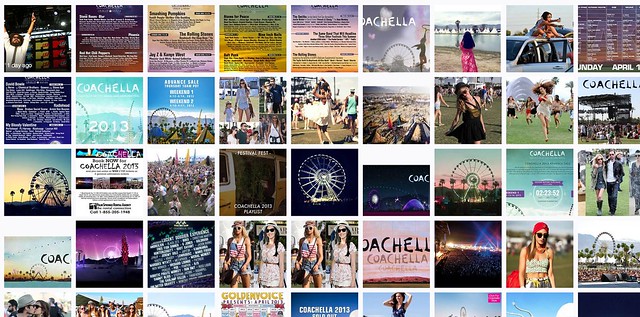
Google Image Search: “Coachella 2013″

Screen Shot 2013-06-05 at 10.47.28 AM
Flickr Image Search: “Coachella 2013″

The first image comes from Yahoo (or is it Microsoft these days, I can’t keep it all straight). It’s not very good. It shows too many images of just the lineup vs. actual fun interesting photos of the event itself.

Google’s image search results are better, but still not as good as many of the images I find on social networks.

Now I may be biased (as I shot this particular event) but I think Flickr’s search results are *far* better than either Google or Yahoo Image search.

I’m working on a project right now to photograph the 100 largest American cities. When I’m researching things to photograph in these cities I almost always go first to Flickr (because it’s the largest database of highly organized quality photos on the web). I will also look at Google+ too, sometimes. Google+ doesn’t have as many high quality images in the total database as Flickr, yet, but I find some pretty good stuff there sometimes still. Most of Flickr’s advantage here over Google+ just has to do with the fact that they are older and have more images indexed.

Lately I’ve also played around with graph search on Facebook for images — I haven’t been very impressed there at all though.

The one place I hardly ever go is to the actual Google or Yahoo image search engines — because the results are so inferior.

Here’s what I don’t get: *why* are the results at Yahoo and Google Image search inferior? Google and Yahoo have access to proprietary internal social data around photos in their social networks, why isn’t that coming through better in the signal for high quality images.

On my example search using Coachella 2013, not a single Flickr photo appears on Yahoo’s first page image search and not a single Google+ image appears on Google’s first page image search.

Shouldn’t these search engines be better mining organically and socially ranked superior content? It’s not that these engines don’t index it, they do, it’s just not ranking well.

Beyond just better image search, Google and Yahoo *should* have another significant incentive to better include their social images into image search.

All things being equal, assuming you could improve image search results, wouldn’t you want to drive more traffic to your own internal social network, rather than to some unrelated destination — and wouldn’t you want to reward the best photographers on your social network with more traffic vs. some random SEO rigged site somewhere?

Why aren’t image search engines doing a better job with social?

Another added benefit to driving image search traffic to your social network, is that the presentation there is usually better, more uniform and consistent. When I’m tempted to go further on an image from Yahoo or Google, I may end up at some odd sized photo, in some odd format. With a G+ or Flickr result I get a strong consistent image experience that I’m familiar with.

As an unrelated topic dealing with image search on Flickr — the best social image search on the web today — Flickr needs to give us the ability to block certain users from our search results. Many popular photographers will pollute image search on Flickr by falsely tagging things that are not in their popular photos, just to try to garner traffic.

Take this search on Flickr for dog for example. So many of the first page results are not photos of dogs at all. Flickr should allow us to block certain users from our search results in order to better refine them. When we block people from our search results, this should also be a signal to Flickr that this user should rank much worse in search. If users get the message that they will be penalized for purposely mistagging their photos, they will be less likely to try and game the system this way, resulting in better image search on Flickr for all of us.


Thomas Hawk Digital Connection

 
Comments Off on Why Aren’t Search Engines Making Better Use of Their Social Networks for Image Search?

Posted in Photography


TMNT: Search Story

12 Feb

Yup
Video Rating: 5 / 5

just watch the video. this goes out to all defused bandmates!!! jr naig, alain garcia, jastin autor, jun mateo, jay mateo. apir to all of us guys!!!
Video Rating: 0 / 5

 
Comments Off on TMNT: Search Story

Posted in Nikon Videos


Google updates Image Search with preview panel

29 Jan

shared:google.png

Google has rolled out an updated version of its Image Search feature with faster browsing speeds and a redesigned UI. Users can now view larger versions of images in a preview window with an option to flip through images using arrow keys, and limited metadata, including the pixel dimensions of the original file, is displayed alongside the thumbnail. Click through for more information and a link to Google’s blog post.

News: Digital Photography Review (dpreview.com)

 
Comments Off on Google updates Image Search with preview panel

Posted in Uncategorized


Search For “The Afghan Girl” HQ (3/4)

11 Nov

The search for the mysterious “Afghan Girl,” whose haunting, green-eyed gaze captivated the world in a NATIONAL GEOGRAPHIC magazine cover photograph, takes EXPLORER on a world-wide journey in an attempt to solve the case of a missing person. In January 2002, photographer Steve McCurry, who took the 1984 photograph and has been searching for the girl ever since, traveled to Pakistan with a National Geographic EXPLORER team to search one last time. The refugee camp where the original encounter took place was about to be demolished. War in Afghanistan continues. The plight of refugees there and in Pakistan is worsening. Has the “Afghan Girl” survived? With a lot of detective work and a little luck, the EXPLORER team, together with McCurry, finds a woman who could be the “Afghan Girl.” How can they confirm that this is the same person as the child photographed nearly 20 years ago? National Geographic uses several methods, including state of the art iris recognition, the FBI facial recognition techniques and the technology used by the National Center for Missing and Exploited Children. Sigourney Weaver narrates. Please don’t take this down, I’m only upoading because people need to see the whole story =) I do not own this movie, it is a product of National Geographic and Steve Mccurry Photography.
Video Rating: 4 / 5

LIKE us on FACEBOOK: www.facebook.com FOLLOW us on TWITTER: @DevotionProj CHECK out the WEBSITE: www.thedevotionproject.org This is the first short film created for THE DEVOTION PROJECT, an ongoing series of films documenting LGBT couples and the love they share. This film premiered at Newfest NY Gay & Lesbian Film Festival in July 2011, where it took home the Audience Award for Best Short. It’s also won the Jury Award for Best Short Doc at Outfest in Los Angeles and at Polarifest/the Austin Gay & Lesbian International Film Festival. In addition, Rosie O’Donnell featured the film on her show on the OWN Network in November 2011. The other films in the series, “Say Only Yes”, “Listen from the Heart”, “My Person” and “Build Your Wings” are also available on this channel. Featuring William I. Campbell and John V. Hilton. Produced and Directed by Antony Osso, Director of Photography Martina Radwan, Editor Erica Freed Marker, Sound Mix by Chad Birmingham, Stills Photographer/Camera Assistant Nephi Niven, Music by Paul Hsu. Post Production Services provided by Post Factory NY. Copyright 2011 Antony Osso.
Video Rating: 4 / 5

 
Comments Off on Search For “The Afghan Girl” HQ (3/4)

Posted in Photography Videos


Hacking Flickr: How to Build Your Own Personal Version of Flickr’s Explore Using Advanced Search

16 Oct

One of the things that I dislike about Flickr’s Explore algorithm is that it shows me so many photos that I’m not interested in. It seems like every time I go there I end up with a hodgepodge of photos that I dislike — overwatermarked, overcooked, etc. I’ve always been interested in is a version of Explore that would filter out everyone on Flickr except for my contacts. Over the years I’ve managed both my contacts and friends/family list to my own personal taste as a consumer of photography.

The most popular way to view your contacts’ photos of course is on the “Photos From Your Contacts” page. This page shows you the last 1 or 5 (you choose) photos by your contacts or friends/family (again you choose). So you basically have four different ways to view your contacts’ photos, but all four are by recency only.

Sometimes you might want to look at photos by your contacts in ways other than recency. Over the years I’ve added a ton of people as contacts — so many in fact that there is just no way that I can keep up with every single photo every single contact posts every single day. So instead of the recency view I’ve been looking for other ways that I can look at my contacts’ photos.

After playing around with Flickr’s advanced search page this weekend, I figured out how I can view my contacts’ photos by interestingness instead of only recency. This is helpful if you want to see what are the best (most popular) photos by your contacts over past period of times. Flickr’s interestingness algorithm gives every photo on flickr a hidden internal score. This score is based on lots of factors including how many favorites a photo gets, how many comments a photo gets, tags, where it’s posted on the web outside of Flickr, etc. The basic premise though is that the more activity a photo receives the more interesting a photo might be.

Advanced search on Flickr lets you customize your search criteria and seems to even work with empty search queries (which seem to return all photos). You can customize the search page to only search using your contacts photos and you can customize it by past time periods. So if you want to run through all of your contacts’ photos by the last day, week, month, etc. and have them ranked by the most popular photos to see if you’ve missed any great photos you can do that using this page.

The way Flickr returns photos in search is a little clunky and is not as elegant as the justified view for photos on your contacts most recent photo page, but I bet search results on Flickr end up with a justified view at some point in the future as well. A photo wall that you can favorite from is a much superior/engaging layout after all.

Anyways, these links below should work for you as well and allow you to see the most popular photos by your contacts and friends/family over previous time periods. If you command/click (Mac) on a thumbnail it will open it in another window and then you can just tab through these windows to fave/comment/view larger any of the photos you have an interest in.

Most Interesting Photos by Your Contacts September 2012
Most Interesting Photos by Your Friends/Family September 2012
Most Interesting Photos by Your Contacts August 2012
Most Interesting Photos by Your Friends/Family August 2012
Most Interesting Photos by Your Contacts July 2012
Most Interesting Photos by Your Friends/Family July 2012

Most Interesting Photos by Your Friends/Family YTD
Most Interesting Photos by Your Contacts YTD

For some reason, some searches using empty queries on flickr for earlier time spans (like all of 2011) produced no photos for me, so something must have changed with how Flickr handles empty queries after 2011.

I’m not sure how long you’ve been able to search empty queries from the advanced search page. I tried to go use the wayback machine at the Internet archive to see what this page looked like in the past but apparently Flickr is blocking the internet archive from indexing this page (and other pages as well, including one specific group, which seemed odd).


Thomas Hawk Digital Connection

 
Comments Off on Hacking Flickr: How to Build Your Own Personal Version of Flickr’s Explore Using Advanced Search

Posted in Photography


[MODIFIED] Search Engine – Why Did A Particular Site Appear in a Search?

12 Aug

A few reasons why a result from a search engine may not have anything to do with what you are looking for.

Ever perform a web page search, visit a resulting site, and find absolutely nothing on the page relevant to your search query?

First, use your browser’s find tool to search the page for the keyword(s) in question – press Ctrl+F, or Command+F if you are on a Macintosh. You should then be able to see if the page references your search word or phrase directly….

Read more at MalekTips.
New Computer and Technology Help and Tips – MalekTips.Com

 
Comments Off on [MODIFIED] Search Engine – Why Did A Particular Site Appear in a Search?

Posted in Technology


[MODIFIED] Google Image Search – Search For Icons or Other Specific Image File Types

03 Aug

Query Google for icons, BMP, GIF, JPG, PNG, or SVG files on the Internet.

With Google’s Image Search you can find images found on websites across the Internet. Several types of filters are available, allowing you to limit your searches to faces, photos, clip art, or line drawings.

However, what if your needs require you to search for icons, or certain types of images such as BMPs, GIFs, JPGs, PNGs, or SVGs? Just add the following to the end of your search query:…

Read more at MalekTips.
New Computer and Technology Help and Tips – MalekTips.Com

 
Comments Off on [MODIFIED] Google Image Search – Search For Icons or Other Specific Image File Types

Posted in Technology


[MODIFIED] Google Search Engine – Automatically Open Results in a New Tab or Window

02 Aug

Save time browsing Google results by opening websites in a new tab or window, keeping the search results visible.

As mentioned in a previous MalekTip, if you open Google results in a new browser tab or window, you can more easily return to your search results without having to use the “Back” button or re-enter your search query. However, this requires you remembering to manually do so every time. If you wish, you can have Google automatically perform this task for you:

(Note this tip was updated on 7/29/2012, and Google’s interface is subject to change.)…

Read more at MalekTips.
New Computer and Technology Help and Tips – MalekTips.Com

 
Comments Off on [MODIFIED] Google Search Engine – Automatically Open Results in a New Tab or Window

Posted in Technology


[MODIFIED] Google Search Engine – Look for Stock Quotes and Charts

01 Aug

Search for stock quotes, charts, and related company news and information using the Google search engine.

To search for stock quotes using Google, you don’t have to search for the phrase “stock quotes” or “online stock quotes” if you know the company’s stock exchange abbreviation. Just enter the symbol directly into Google’s search box, such as:

* AAPL – Apple…

Read more at MalekTips.
New Computer and Technology Help and Tips – MalekTips.Com

 
Comments Off on [MODIFIED] Google Search Engine – Look for Stock Quotes and Charts

Posted in Technology


[MODIFIED] Google Search Engine – Google Talking Like Elmer Fudd

31 Jul

Make Google look like your favorite cartoon character wrote it.

Here’s a “Stupid Google Tip”.

Want to make Google look like it was written by a fan favorite cartoon character, Elmer Fudd? If you want to look for “that wascally wabbit”:…

Read more at MalekTips.
New Computer and Technology Help and Tips – MalekTips.Com

 
Comments Off on [MODIFIED] Google Search Engine – Google Talking Like Elmer Fudd

Posted in Technology