Yesterday Flickr opened up their new photo page preview to the world. I opted in to the new photo page this morning and here are my initial thoughts on it. Overall I like it.
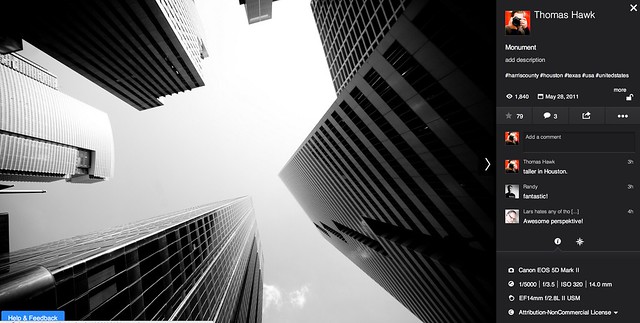
1. Photos are bigger. The bigger the photo the better. Flickr eliminated top menu items on the page. They also eliminated the hint area to encourage people to scroll below the fold. By moving the top and bottom non-photo information to the side of the photo, this allows bigger photos.
2. You no longer have to scroll to see a lot of the important information around a photo. Having a lot of the information that people care about to the side of the photo, makes it easier to get to this information. You know, sort of like how Google+ does it. 
3. I’ve got mixed feelings on the new hashtags. I do like the fact that Flickr has added #tags to all Flickr tags… I think. This is the new methodology for tags in social media (i.e. Twitter, Instagram, Facebook, Google+ and everybody else in the world), so it would make sense that people would be more familiar with this concept, especially new users.
On the other hand, hashtags don’t really work very well for multi word tags and descriptions (the space between words gets stripped out). So “Saved by the Deleteme Uncensored Group” on the old Flickr photo page now becomes #savedbythedeletemeuncensoredgroup, which looks like a big mess. A lot of Flickr users would tag phrases and thoughts in the tag section of their photos and these are now pretty much unreadable.
Also Flickr now hides a lot of tags underneath a “more” button. This to me would seem to discourage users from using lots of descriptive tags, which I think are important for organizational and search reasons on Flickr. I don’t think any tags should be hidden under a “more” button. All tags should be shown on the photo page.
Groups and others who relied on multi word tags for photo games, may not like the new tagging structure.
4. A lot of the full functionality of the new photo page is being developed. This new photo page is by no means the final product. I think it’s good that Flickr lets people opt in and opt back out, to try it out. It’s a little bit of perpetual beta in a way and I like that Flickr is willing to put itself out there without having everything at 100%. Move fast and break things (as they say over at Facebook).
5. The new Flickr photo page is an under-developed preview, this means that there are quite a few things that still need to be done (some of which are planned and in the works by Flickr).
We need to be able to generate html code to blog images off site still (it’s coming). We need to be able to see all sizes of our photos and download our photos (it’s coming). We need to be able to click on favorites and see who has favorited an image. We need to be able to click on a date an image was taken and have it take us to the calendar archive view for that day of our photos. You can’t edit a comment on a photo after you make it (you can only delete your comment and start over). HTML formated links seem to be borked in photo descriptions.
Lots of little things still need to be added in to the photo page. It’s missing a lot of functionality still. The design looks good though and I hope they implement all these little things quickly.
6. My favorite thing about the new photo page is that it really highlights your sets. Sets are one of my favorite things on Flickr. I’ve made over 1,800 sets on Flickr. With the new photo page, Flickr now shows other thumbnails of photos from the same set and not just a link to the set. I think this will drive more views to people’s sets on Flickr, which is a great thing. [Note: this seemed to be working earlier today, but now it seems like this feature is not showing on my photos]
7. According to Neil Howard, the new Flickr photo page doesn’t support secure SSL browsing. SSL is the “https://” that makes a connection encrypted which is used by a lot of people.
8. I do like the new feedback forum that Flickr is also pushing with this preview. It has a way to vote answers up or down. This seems like an interesting way for staff to pay attention to the things that need to be fixed the most. The forum is already full of the “who moved my cheese” cheeshead bellyaching that comes with every Flickr change, but there is some useful criticism and feedback there that seems to bubble up to the top at the same time.
One other thing worth noting with these new bigger photos. A lot of photographers have told me over the years that they only load small, low res images on social media sites like Flickr. They think that these smaller photos are “good enough” and fret about having their larger images “stolen.”
I’ve always uploaded my full high res originals to the Flickr. As display sizes keep getting bigger and bigger, some of the people who have uploaded low res, small photos are going to see their photos begin to look bad in the larger size formats. On the other hand, those of us who always upload high res photos, our photos will still look good at these larger sizes. Especially as more and more photos are being consumed on things like the Flickr app on AppleTV, people ARE actually looking at your photos in much larger format than what you may have initially considered. Everything with photos on today’s web is going BIGGER — just something to think about.
It is pretty cool that Flickr gives everyone a full terabyte of high res original sized images for free — which means virtually unlimited free storage for your high res photos on Flickr. Google and Facebook should do that too.
These are my initial thoughts. Now I’m actually going to revert back to the old photo page (so that I can get the html code to blog the image in this post) and then revert back to the new page and keep testing it out.
What do you think of the new Flickr Photo Page? Do you like it? Love it? Hate it? And why?
More from The Verge here.
Thomas Hawk Digital Connection