RSS
 

Posts Tagged ‘REVIEW’

2017 in review: a look back at March

22 Dec
Among the many things reported on in March of 2017 was this probably-not-delicious, plump-breasted pigeon. With a camera. The pigeon is probably not named Speckled Jim.

We’re looking back on the photographic world in 2017, and we kicked off March with a look at the CP+ trade show that had taken place the previous month in Yokohama, Japan. One of my favorite snippets of show coverage was a cameo made by the Michel Pigeon Camera. Yes, it is exactly what it sounds like, and no, it (and the pigeon) thankfully wasn’t included in a late-February roundup of things we’d found at CP+ that had been cut in half.

Overall camera news was a little on the slow side, as we’d expect for the month following a major photography trade show. Olympus finally drove the nails into the coffin of the legacy Four Thirds system, and CIPA – the standards organization behind claims that your camera’s battery doesn’t last long enough – reported that compact digital camera sales were lower than ever before.

The industry said a solemn goodbye to Popular Photography magazine and PopPhoto.com

And of course, the industry also said a solemn goodbye to Popular Photography magazine and PopPhoto.com, an institution that was shuttered after eighty years in the business. One of our own, Dan Bracagalia, got his career started at the publication, so the announcement hit very close to home for all of us at DPReview.

On the lighter side, we had our first chance to shoot with the Fujifilm GFX 50S since it was announced at Photokina the previous autumn, and by-and-large, we were very impressed with what it’s capable of. We tagged along with a couple of photojournalists with the Seattle Post-Intelligencer, and we also went into some detail on the concept of subject tracking with autofocus systems, why it matters to us, and why it should matter to you.

Last, and almost certainly least, there was the announcement of a miniature drone called the AirSelfie. Because you can do absolutely spectacular, breathtaking, magnificent things with drones, and of course, that should include taking selfies.

Tune in tomorrow to see how April of 2017 shaped up.

Click here to see all March 2017 content


Photo Gear News tells you how to pronounce ‘Bokeh’

Finally, we know.

Farewell to Popular Photography

Popular Photography magazine will be very sorely missed. The magazine was heavily focused on photographic technique, and helped make the craft more accessible to the public. Our own Dan Bracaglia got his start there, and we deeply lament the loss of another publication in our industry.

Read the full article here

Walking the streets of Japan with the Fujifilm GFX 50S

Dan was fortunate enough to get access to a Fujifilm GFX 50S and accompanying 63mm F2.8 lens after the conclusion of the CP+ show. He shared some of his first impressions, as well as some really lovely images.

Click to read our writeup

Go behind the scenes with Seattle photojournalists

Get a glimpse into the world of professional local photojournalism with the Seattle Post-Intelligencer’s Grant Hindsley and Genna Martin.

Read the full article

Articles: Digital Photography Review (dpreview.com)

 
Comments Off on 2017 in review: a look back at March

Posted in Uncategorized


2017 in review: a look back at January

22 Dec
Perhaps the biggest product to be launched in January was the Panasonic Lumix DC-GH5, which offered amazing 4K video capabilities and a solid stills photography feature set.

A lot of things happened this year, both in the photography industry and the world in general. And like every year, 2017 seems to have flown by. As December draws to a close, we wanted to take stock. Over the next 12 days, we’ll be looking back at the major product launches and photography events which took place in each month of the year, starting today with January.

2017 kicked off with the annual Consumer Electronics Show (CES) in Las Vegas. Traditionally a showcase for new consumer audio/visual technologies, in recent years CES has also seen the launch of several major cameras. This year, the biggest announcements were the Fujifilm X100F and Panasonic’s flagship ‘hybrid’ camera, the Lumix DC-GH5.

Meanwhile, Ricoh released the Pentax KP, which inherited a lot of features from the flagship K-1, in a smaller-format body. Leica’s M10 – also released in January – was a flagship of a very different kind.

The USA got a new president in January and Pete Souza, the outgoing White House photographer, was there to capture Obama’s last day

In local news, the USA got a new president in January (not sure if you heard). Pete Souza, the outgoing White House photographer, was there to capture Obama’s last day. Cue much wailing and gnashing of hashtags. On the other side of the (same) country, a bunch of Canadian filmmakers pleaded guilty to trampling all over Grand Prismatic spring in the Yellowstone National Park. Silly billies.

In even more local news, and speaking of silly billies, our writer Carey Rose took one of our favorite lenses of 2016, the Olympus M.Zuiko 25mm F1.2 Pro to Thailand, to see what it would be like to shoot his entire trip at a single focal length.

Tomorrow – February! Because that’s how this is going to work.

See all January 2017 content


CES 2017: Full show coverage

The CES show in Las Vegas back in January was the usual combination of the weird and wonderful, showcasing everything from a fish-finding underwater drone to Panasonic’s flagship DC-GH5. DPReview was all over it.

Complete CES 2017 show report content

Ultimate travel kit – Thailand with Olympus’ E-M1 II & 25mm prime lens

Thailand has incredible landscapes, delicious food and warm and friendly locals. DPR staffer Carey Rose came to realize that documenting a trip like this equipped with only a 50mm equivalent lens was a lot more difficult than he anticipated.

Read the full article

Filmmakers who walked on Grand Prismatic in Yellowstone get jail time and fines

Last year, four Canadian filmmakers were arrested after photos and a video were published showing them walking on off-limits geothermal features in Yellowstone National Park. Three of them pleaded guilty and will receive fines, community service and a little jail time.

Read the full article

Pete Souza captures Obama’s last day in the White House

Pete Souza, the official photographer for President Obama, posted a series of photos on his Instagram account showing the Obamas’ final departure from The White House.

Read the full article

Articles: Digital Photography Review (dpreview.com)

 
Comments Off on 2017 in review: a look back at January

Posted in Uncategorized


2017 in review: a look back at February

21 Dec
Nikon announced the demise of its DL compacts on the eve of Valentine’s Day, because love is pain.

We learned a lot of fun facts in February: people don’t really like looking at selfies, it’s possible to make a camera out of drinking straws, and Google’s AI-powered image detail enhancement technology is getting creepy good.

February is also when we tend to see winners revealed from year-end photo competitions. True to form, we were not disappointed by the top images in SkyPixel’s aerial photo competition and the 2017 Underwater Photographer of the year. But one photo will probably be remembered before all others – the photo of a slain Russian ambassador was announced as the winner of the 60th World Press Photo award.

Their impressive spec sheets got our hearts all a-flutter, but thanks to unexpectedly high production costs, they were never to be

In gear news, Nikon fans woke up to the equivalent of a break-up text the day before Valentine’s Day – the company was ditching its previously-announced-but-never-realized DL compact cameras. The DLs were meant to be a series of enticing-looking 1″ sensor compacts. Their impressive spec sheets got our hearts all a-flutter, but thanks to unexpectedly high production costs, they were never to be.

It wasn’t all bad news though – CP+ would cheer us all up later in the month with announcements of lovely new lenses like the Sigma 14mm F1.8 Art. It was also the first opportunity for us to do some shooting with the Fujifilm GFX 50S, which was announced at Photokina in late 2016.

See all February content


2016 Challenge of Challenges winners announced

In February, we announced the winner of our annual Challenge of Challenges competition. DPR member cand1d’s image of a glowing sunset in Bagan, Myanmar took top honors in the 2016 Challenge of Challenges competition. The photo is one of almost 1000 challenge-winning entries from the year, which we whittled down to a more manageable shortlist of 25 before DPReview readers voted on a final winner.

See the 2016 Challenge of Challenges Winners

Sigma 14mm F1.8 DG HSM Art samples

The Sigma 14mm F1.8 DG HSM Art made its debut at CP+, and it got the low light shooters on our staff all excited. We jumped all over the chance to take a pre-production version of the lens out for a spin in Yokohama during the show, and later updated our gallery with many more samples from a production-ready unit.

See our Sigma 14mm F1.8 sample gallery

Things we found at CP+ 2017 which had been cut in half

It’s not a photo tradeshow until you’ve seen a lot of things cut in half, and CP+ 2017 was no exception. Take a look at what’s going on inside of some very nice gear.

See all of the things we found at CP+ which had been cut in half

CP+ 2017: Full show coverage

DPReview was at the CP+ show in February, over in Yokohama Japan. As usual, it was a great show for new gear, weird sights, and plenty of hot vending machine coffee.

Read our full CP+ coverage

Articles: Digital Photography Review (dpreview.com)

 
Comments Off on 2017 in review: a look back at February

Posted in Uncategorized


Canon PowerShot G9 X Mark II Review

14 Dec

The PowerShot G9 X Mark II is an ultra-compact camera that features a larger-than-average 1″-type CMOS sensor. It serves as the entry-level model in Canon’s Gx-X series, and has an MSRP of $ 529. Being the entry-level model, Canon has given the camera a touchscreen-based interface that’s will be familiar to smartphone owners who are looking to trade up to something better.

The main problems with the original G9 X were performance related. Continuous shooting was slow, especially when using Raw or continuous autofocus, the menus were sluggish and the battery didn’t last for long.

The G9 X Mark II took care of most of the performance problems, due mostly to its new DIGIC 7 processor. The burst rate is faster, buffer larger and interface snappier. While improved, battery life still isn’t great, though an ‘Eco mode’ gives you another 80 shots above the industry-standard CIPA estimate of 235. Canon also added in-camera Raw processing, Bluetooth capability and improved image stabilization for video shooting.

Key Features

  • 20.1MP 1″-type BSI CMOS sensor
  • DIGIC 7 processor
  • 28-84mm equivalent F2-4.9 lens
  • Built-in neutral density filter
  • 3″ touchscreen LCD
  • Up to 8.2 fps burst shooting
  • 1080/60p video capture
  • In-camera Raw conversion
  • Wi-Fi with NFC and Bluetooth

The G9 X II’S 20MP sensor is found on all of Canon’s 1″-type compacts, and is likely the same one found on Sony’s RX100 III. The DIGIC 7 processor is what took care of the original G9 X’s performance issues, and it makes a world of difference. As before, there’s a built-in 3-stop ND filter, with on/off/auto settings. While essentially all cameras now have Wi-Fi, the Bluetooth feature is a nice extra, as it allows for very quick re-pairing between camera and smartphone.

Compared to…

The camera that is most similar to the G9 X Mark II is Sony’s original RX100. It has an older sensor than the G9 X II, but it’s closer in price than its successor, the RX100 II. We’re throwing in the slightly more expensive Panasonic LX10, as well as the G9 X II’s step-up model, the G7 X II, into the chart below.

Canon G9 X II Canon G9 X Sony RX100 Canon G7 X II Panasonic LX10
MSRP $ 529 $ 529 $ 449 $ 699 $ 699
Sensor 20MP BSI-CMOS 20MP CMOS 20MP BSI-CMOS
Lens (equiv) 28-84mm 28-100mm 24-100mm 24-72mm
Max aperture F2.0-4.9 F1.8-4.9 F1.8-2.8 F1.4-2.8
LCD 3″ fixed 3″ tilting
Touchscreen Yes Yes No Yes Yes
Burst rate

8.1 fps (AF-S)
5.3 fps (AF-C)

6 fps (AF-S)
4.3 fps (AF-C)

10 fps (AF-S)
2.5 fps (AF-C)

8 fps (AF-S)
5.4 fps (AF-C)
10 fps (AF-S)
6 fps (AF-C)
Video 1080/60p UHD 4K/30p
Wi-Fi Yes, with NFC+BT Yes, with NFC No Yes, with NFC Yes
Battery life 235 shots 220 shots 330 shots 265 shots 260 shots
Dimensions
(W x H x D)
98 x 58 x 31 mm 98 x 58 x 31 mm 102 x 58 x 36 mm 106 x 61 x 42 mm 106 x 60 x 42 mm
Weight 206 g 209 g 240 g 319 g 310 g

Look at the spec comparisons, there doesn’t appear to be much of a difference between the G9 X Mark II and its predecessor. Same sensor, same lens, same display. That’s because most of the changes are under the hood, which boost its burst rate, battery life (barely) and reduces overall sluggishness.

The G9 X II gets mixed results in terms of spec compared to its peers, though again, it’s an entry-level model. On one hand, it’s the smallest and lightest in the group, with a fast burst rate and Wi-Fi with all the trimmings. Its lens is the real weakness: it’s slow (more on that below) and has a focal range that doesn’t have a lot of reach. While better than on the original model, battery life on the G9 X II is poor, so bring along a spare battery if you’re out for the day.

Lens comparison

Just like ‘equivalent focal length’ that we use throughout the site, equivalent apertures allow you to compare image quality potential across cameras with different sensor sizes by taking sensor size into account. The equivalent aperture figure gives a clear idea of how two lenses compare in terms of depth-of-field. It’s also related to diffraction, which reduces sharpness as the aperture is stopped down. In other words, the higher the F-number, the softer the images will be.

Finally, equivalent aperture also gives an idea of low-light performance, since it also describes how much light is available across the sensor’s area. However, differences in sensor performance mean this can only be used as a guide, rather than an absolute measure.

LensEquivalentApertures([“Equivalent focal length (mm)”,”Sony RX100″,”Sony RX100 III”,”Canon G7 X II”,”Panasonic LX10″,”Canon G9 X II”], [[24,null,””,4.90909090909091,”Sony RX100 III at 24mm: F4.9″,4.90909090909091,”Canon G7 X II at 24mm: F4.9″,3.8181818181818183,”Panasonic LX10 at 24mm: F3.8″,null,””],[25,null,””,5.454545454545455,”Sony RX100 III at 25mm: F5.5″,null,””,4.0909090909090917,”Panasonic LX10 at 25mm: F4.1″,null,””],[26,null,””,6.0000000000000009,”Sony RX100 III at 26mm: F6.0″,null,””,4.90909090909091,”Panasonic LX10 at 26mm: F4.9″,null,””],[27,null,””,null,””,null,””,5.454545454545455,”Panasonic LX10 at 27mm: F5.5″,null,””],[28,4.90909090909091,”Sony RX100 at 28mm: F4.9″,6.8181818181818183,”Sony RX100 III at 28mm: F6.8″,null,””,6.0000000000000009,”Panasonic LX10 at 28mm: F6.0″,5.454545454545455,”Canon G9 X II at 28mm: F5.5″],[29,null,””,null,””,null,””,6.8181818181818183,”Panasonic LX10 at 29mm: F6.8″,null,””],[31,null,””,null,””,null,””,7.6363636363636367,”Panasonic LX10 at 31mm: F7.6″,6.8181818181818183,”Canon G9 X II at 31mm: F6.8″],[32,null,””,7.6363636363636367,”Sony RX100 III at 32mm: F7.6″,6.0000000000000009,”Canon G7 X II at 32mm: F6.0″,null,””,null,””],[33,null,””,null,””,null,””,null,””,7.6363636363636367,”Canon G9 X II at 33mm: F7.6″],[34,7.6363636363636367,”Sony RX100 at 34mm: F7.6″,null,””,null,””,null,””,null,””],[37,null,””,null,””,null,””,null,””,8.7272727272727284,”Canon G9 X II at 37mm: F8.7″],[39,null,””,null,””,6.8181818181818183,”Canon G7 X II at 39mm: F6.8″,null,””,9.5454545454545467,”Canon G9 X II at 39mm: F9.5″],[43,8.7272727272727284,”Sony RX100 at 43mm: F8.7″,null,””,null,””,null,””,null,””],[46,null,””,null,””,null,””,null,””,10.90909090909091,”Canon G9 X II at 46mm: F10.9″],[53,9.5454545454545467,”Sony RX100 at 53mm: F9.5″,null,””,null,””,null,””,12.272727272727273,”Canon G9 X II at 53mm: F12.3″],[54,null,””,null,””,7.6363636363636367,”Canon G7 X II at 54mm: F7.6″,null,””,null,””],[65,null,””,null,””,null,””,null,””,13.363636363636365,”Canon G9 X II at 65mm: F13.4″],[66,10.90909090909091,”Sony RX100 at 66mm: F10.9″,null,””,null,””,null,””,null,””],[70,null,””,7.6363636363636367,”Sony RX100 III at 70mm: F7.6″,null,””,null,””,null,””],[72,null,””,null,””,null,””,7.6363636363636367,”Panasonic LX10 at 72mm: F7.6″,null,””],[81,12.272727272727273,”Sony RX100 at 81mm: F12.3″,null,””,null,””,null,””,null,””],[84,null,””,null,””,null,””,null,””,13.363636363636365,”Canon G9 X II at 84mm: F13.4″],[94,13.363636363636365,”Sony RX100 at 94mm: F13.4″,null,””,null,””,null,””,null,””],[100,13.363636363636365,”Sony RX100 at 100mm: F13.4″,null,””,7.6363636363636367,”Canon G7 X II at 100mm: F7.6″,null,””,null,””]])

That pink line represents the G9 X II and, as you can see, it quickly ascends to the top of graph. Once you hit around 35mm, the equivalent aperture is ~F7.6 equivalent, which is getting into diffraction territory. At its worst the G9 X II is about a stop slower than the RX100, which most likely gives the latter a slight image quality advantage. The step-up model from the G9 X II, the G7 X II, is roughly 1.5 stops faster. This loss of low light capability and potential for control over depth-of-field is the price you pay to keep the camera so pocketable.

Articles: Digital Photography Review (dpreview.com)

 
Comments Off on Canon PowerShot G9 X Mark II Review

Posted in Uncategorized


Review of the Breakthrough Photography X4 CPL Circular Polarizing Filter

13 Dec

Make no mistake, this is, in fact, a review of the X4 Circular Polarizer from Breakthrough Photography. That being said, the entire subject requires a little bit of photographic geekiness in order to grasp the full understanding of the product being reviewed. So, if you absolutely don’t want to add any more brain wrinkles feel free to skip the next couple of paragraphs. If you do skip…shame on you.

Geeky stuff about polarizers

Polarizers – we’ve all heard of them and the majority of us photographers have used them extensively from one time or another. How do they work? And more importantly, how do you know when you’ve found a good one?

These are all great questions and oddly enough these things aren’t always well known by even some experienced shooters. Polarizers are just filters. These filters work to sift out polarized light which commonly occurs in our photographs from reflections and glare. The noticeable byproduct of this filtration is the reduction of said reflections and glare as well as the deepening of colors and most noticeably, the darkening of the sky.

Review of the Breakthrough Photography X4 CPL Circular Polarizing Filter

Polarizers come in two flavors: linear and circular. It’s somewhat of a weird concept as all polarizers are in fact linear…but not all linear polarizers are circular. That might sound slightly cryptic but that is not the intention.

At their most basic definition, the way polarizers work is to filter our non-linear rays of light. Circular polarizers further enhance this effect by adding what’s called a quarter-wave plate to the camera side of the linear polarizer. The quarter wave plate serves to essentially convert the incoming light into a helix and the polarization effect can then be dialed-in to whatever degree is needed. This is of great benefit because the majority of SLR and DSLR cameras are sensitive to polarization and linear polarized light can cause internal camera metering to malfunction.

The X4 CPL Circular Polarizing Filter

Now that you’ve had a crash course in how circular polarizers work, it’s time to talk about the X4 CPL Circular Polarizing Filter by Breakthrough Photography. This will be my fourth time evaluating filters by the folks at Breakthrough. With each piece of gear I have been consistently impressed with the build and optical quality to such an extent to where I find it difficult to list any faults. The X4 CPL is no different.

Breakthrough Photography currently markets this polarizer as being the “world’s most advanced circular polarizer” so I put the X4 CPL Circular Polarizing Filter to the test to see just how this claim holds up in real-world shooting.

Build Quality

The construction of theX4 CPL Circular Polarizing Filter is blackened brass, much like their line of X4 ND filters. The filter housing is robust and feels extremely sturdy. Deep traction grooves are cut around the bezel and provide for a solid grip even with gloved or wet hands.

Review of the Breakthrough Photography X4 CPL Circular Polarizing Filter

An interesting property of brass is that unlike other metals such as aluminum it is non-galling. This means that it is less likely to bind and become stuck when stacking multiple filters. The filter bezel turns quite smoothly when engaging or disengaging the polarization effect.

The optical element is made from SCHOTT Superwhite B270® optical glass. Each side of the glass is then treated with eight layers of Breakthrough Photography’s proprietary nanotec® and MRC (multi-resistant coatings) optical coatings which cause dirt and moisture to essentially slide right off of the glass itself.

X4 CPL Circular Polarizing Filter

Overall, the build quality of theX4 CPL Circular Polarizing Filter is exceptional and it looks great to boot. The company also backs the filter with a 25-year guarantee.

Optical Performance

Of course, the real question about the X4 CPL concerns its optical quality, which in turn will greatly impact the final quality of your finished photographs. When it comes to photography filters, the sharpness, vignetting, and color cast, are the three main points of interest for most photographers.

While it’s great to talk about all these points actual test images speak louder than words. So have a look at the sample images as you read my thoughts on the results and judge for yourself.

Sharpness

In terms of sharpness, the X4 CPL exceeds all expectations. No image degradation was observed even at the maximum strength filtration.

X4 CPL Circular Polarizing Filter

To left is the image without the X4 CPL applied. The image at the right is with the X4 CPL. Both zoomed to 1:1 for comparison.

Images remained crisp and detail was not lost due to the addition of the filter.

Color Cast and Vignetting

A common problem seen with polarizers and most filters, in general, is the unwanted color casting sometimes encountered. The color cast happens due to the coloration of the optical glass and often worsens in lower quality filter systems.

X4 CPL Circular Polarizing Filter

An image with a high color cast from an ND filter. Low-quality polarizers can carry the same effects.

The images produced by the X4 CPL seem to be completely free of this discoloration just as they are advertised. No discernible color cast was observed in any of the test images I made using the filter.

X4 CPL Circular Polarizing Filter

The same is true for vignetting. Darkening of the corners of the photos was not observed even at the strongest filtration setting.

X4 CPL Circular Polarizing Filter

Final Thoughts on the X4 CPL

There’s a certain feeling of uneasy optimism which begins to surface whenever I come across gear which does not seem to have any obvious weak points.”Have I missed something? Is this really that good?”

Having reviewed multiple pieces of kit from Breakthrough Photography I can say that they have consistently produced insanely high-quality photographic gear that is innovative, sturdy, and relatively cost-effective. I use quite a few of their filters in my own personal photography work and have put them into environments from Death Valley to the coast of the Atlantic Ocean and everywhere in between (or least it seems).

The X4 CPL has thus far given no reason for me to believe that its quality would not serve any serious photographer’s needs for years to come. The build quality is heavy-duty and the image quality, especially sharpness, is outstanding. It retails for $ 129-159 USD (depending on filter size) at the time of this review. Find out more details about the X4 CPL here, or shop Amazon for the size you need here.

Rating 5/5 stars – my first ever! 

The post Review of the Breakthrough Photography X4 CPL Circular Polarizing Filter by Adam Welch appeared first on Digital Photography School.


Digital Photography School

 
Comments Off on Review of the Breakthrough Photography X4 CPL Circular Polarizing Filter

Posted in Photography


Review of K&F Concept KF-885 Speedlight

11 Dec

A few weeks back I received the K&F Concept KF-885 Speedlight to test out and review. Now before I get into the review for this flash, I have to say that I have been a Canon photographer ever since I started my business in 2010. Even before I was photographing for clients, I always gravitated towards Canon gear just because I have consistently had great results with this brand. My very first film camera Canon AE-1 is still in my gear bag and continues to give me stellar results!

I completely understand and acknowledge that branded gear does tend to be expensive and is not in everyone’s budget, especially for those just starting out on their photographic journey. Having said that, there are some great companies with comparable gear in terms of quality and performance. In fact, sometimes, the quality and results are even better than their branded counterparts. This just goes to show that the skill and experience of the user makes a good photograph and not necessarily the gear you use.

Review of K&F Concept KF-885 Speedlight

For this review, I used the K&F Concept KF-885 Speedlight on a couple of different assignments – for wedding reception photos and an outdoor portrait session. I have to say that I was very happy with the results from this flash.

amzn_assoc_tracking_id = “dpsgeneral-20”;
amzn_assoc_ad_mode = “manual”;
amzn_assoc_ad_type = “smart”;
amzn_assoc_marketplace = “amazon”;
amzn_assoc_region = “US”;
amzn_assoc_design = “enhanced_links”;
amzn_assoc_asins = “B06XZ64NZ2”;
amzn_assoc_placement = “adunit”;
amzn_assoc_linkid = “8a9afca3804c68dbc0d0558847ad1c7d”;

I have used my Canon external flash for the past four years and found the K&F Concept flash very comparable to the Canon 600 EX-RT version in terms of performance, look, and feel. Definitely worth looking into if you are in the market for an external flash for your photography needs.

#1 – Specs, Look and Feel of the KF-885

the K&F Concept KF-885 Speedlight looks very similar to the Canon 600EX-RT external flash. In fact, when I compared the two side by side, they looked almost identical in terms of size, weight, and the accessories that were included in the package.

The KF-885 flash has a slightly bigger monitor display compared to the Canon but having used the Canon brand, I had no trouble figuring out the menu options. In fact, I almost felt that the K&F Concept flash menu options were simpler and easier to figure out. The flash also comes with a built-in reflect board and a built-in wide diffuser to enlarge the shooting range.

K&F Concept KF-885 Speedlight

The flash on the left is from K&C Concept and the flash on the right is from Canon. They both come with a flash case, a base stand, and a plain white diffuser cap.

K&F Concept KF-885 Speedlight

The flash on the left is from K&C Concept and the flash on the right is from Canon. As you can see, they are almost identical in size and weight.

K&F Concept KF-885 Speedlight

The flash on the left is from K&C Concept and the flash on the right is from Canon. The two flashes look almost identical to each other.

K&F Concept KF-885 Speedlight

The flash on the left is from K&C Concept and the flash on the right is from Canon. The cosmetic difference is in the shoe mount for the flash. The K&C Concept one has a circular dial to tighten the flash to the camera shoe mount whereas the Canon one has a lever that is moved from left to right to lock in the flash to the camera body.

#2 Display Screen and Menu Options

The K&F Concept KF-885 speedlight has similar menu options to the Canon external flash. The On/Off button turns the flash on and off. The Mode button is to select auto and manual controls, multi-modes, and wireless modes (master/slave mode operation).

The circular set of five buttons is used to adjust the power of the flash when used in manual mode. The flash head also has a vertical rotation angle of 7-90 degrees and horizontal rotation angle of 0-180 degrees.

K&F Concept KF-885 Speedlight

#3 Usage

Being used to my Canon 600 EX-RT flash in manual and ETTL mode, I was able to quickly adjust to the K&C Concept KF-885. I also used both flashes for a couple of photos by setting the Canon flash as the master and the K&C Concept flash as the slave. The two flashes communicated with each other and I was able to use setups of both on-camera and off-camera flashes seamlessly.

K&F Concept KF-885 Speedlight

An indoor wedding portrait session made easy with the K&C Concept KF-885 External Flash

K&F Concept KF-885 Speedlight

The K&C Concept Flash handled poorly lit wedding reception areas quite beautifully.

K&F Concept KF-885 Speedlight

Summary

Overall, I was very impressed with the K&F Concept KF-885 Speedlight. At a price point of $ 86, that is significantly less than its branded counterpart. This is a great option for someone who is looking to add an external flash to their gear kit but doesn’t want to spend a lot of money.

amzn_assoc_tracking_id = “dpsgeneral-20”;
amzn_assoc_ad_mode = “manual”;
amzn_assoc_ad_type = “smart”;
amzn_assoc_marketplace = “amazon”;
amzn_assoc_region = “US”;
amzn_assoc_design = “enhanced_links”;
amzn_assoc_asins = “B06XZ64NZ2”;
amzn_assoc_placement = “adunit”;
amzn_assoc_linkid = “8a9afca3804c68dbc0d0558847ad1c7d”;

The post Review of K&F Concept KF-885 Speedlight by Karthika Gupta appeared first on Digital Photography School.


Digital Photography School

 
Comments Off on Review of K&F Concept KF-885 Speedlight

Posted in Photography


Review of the Lensbaby Velvet 85

04 Dec

Lensbaby has been producing lenses that create interesting effects since 2004. During that time people have been experimenting and trying out different ways of using them. In the spring of 2015, they introduced the Velvet 56 to the joy of many photographers, especially those doing macro. This year, their newest lens in the line-up was released, the Lensbaby Velvet 85.

leannecole-review-lensbaby-velvet85-

The Lensbaby Velvet 85

The Velvet 85 promises to be a great lens for portraiture creating impressionist-like portraits of people. It does indeed do that, but you can use it for so much more. It is a great lens for photographers who like images with mood and which concentrate more on the subject with a lot of bokeh.

First Impressions

The lens is very well made and when you hold it in your hand you can feel the coolness of the metal it is made from. It is not an overly heavy lens, but it’s also not light. It is bigger than the Velvet 56, which is to be expected, though not a lot heavier. They are both very well made, high-quality lenses.

Using the Lensbaby Velvet 85

Like most lenses that are available on the market today, the Velvet 85 can be used for many different types of photography. I use it mainly for macro photography and find it really good. However, you can also use it for portraiture, city photography, and landscapes. It doesn’t work the same as other lenses as you get a really soft-focus effect with it, but for most people, that is exactly why they buy it.

Review of the Lensbaby Velvet 85

A macro image that was taken with the Lensbaby Velvet 85.

Manual Lens

The lens is completely manual and you cannot use your camera to control it, as you can with other lenses. You need to change the aperture and focus it yourself. You will not be able to see what aperture you used when you download the images to your computer either.

Manual Focus

Focusing is also manual and you need to adjust it as you take your photos. It does turn a long way and you have to twist the focusing ring a lot. Some cameras can tell you when the image is in focus, for example, Nikon does. When you are at that spot of good clarification, then the round dot in the viewfinder appears. However, as you get used to the lens you will need to rely on that less.

Review of the Lensbaby Velvet 85

Opening up the aperture gives you images with a lot of soft-focus.

For macro photography, most people tend to use manual focus anyway and it is easier with this lens. You can focus where you want and then move yourself and the camera to a spot where the image will be in focus.

For landscape photography, you can set it to infinity and you should get images that are sharp, depending on your aperture. For objects in between macro and infinity, you will have to practice and see it goes. That is probably the area I found the hardest, though as I did it more, it became easier.

Controlling the Lens

With many lenses now you can change the aperture with the camera, however, the Velvet 85 is more like a vintage lens from older style cameras. It does not communicate with your camera and you need to control the aperture yourself. To change it there is an aperture ring on the lens which you turn to adjust it to the setting you want.

Aperture

Unlike other sorts of dedicated macro lenses, the Velvet 85 doesn’t use aperture in the same way. You can take photos of flowers at f/2.8 and get a fairly decent image. If you tried doing that with, say a Nikon macro lens, you will find the photo would almost be an abstract version of the flower with very little in focus.

The aperture starts at f/1.8 on the Velvet 85 and goes up to f/16. At the latter, you will get the greatest depth of field and if using the lens for landscape photography it is a good one to choose. If you are taking macro images of flowers then the wider end is much better.

Review of the Lensbaby Velvet 85

Using a smaller aperture such as f/11 gives less soft-focus and you get more of a natural looking image.

One thing the lens is really good for is the soft-focus effect that is possible. You can control how much of it you want by using different apertures. The wider it is the more of the effect appears, and the opposite happens as you close it down.

Interesting effects

If you like to get different effects with your lens then the Velvet 85 will be fantastic for you. You can get interesting results for portraits, though I don’t do them if you go to the Lensbaby website you can see some good examples. If you want to give your clients images that are not the same as what others are doing then you should consider adding this lens to your kit. Click here for images.

Bokeh Effect

Without a doubt one of the most special and addictive aspects of the Velvet lenses, and perhaps more so with the 85, is the blurring you can do with it. You won’t find any other lenses available that will give you the same effects. You can play around with the aperture to change how much blur you achieve in your images.

Review of the Lensbaby Velvet 85

Creating a bokeh effect with a poppy flower and bee.

Whether you are photographing a landscape or a macro image you can use the aperture and blurring effect to highlight your subject. The Velvet 85 is fantastic for this. You can change the aperture to different widths and that will determine how much blur you will get. From that, you can decide what level of blurring you want in your image.

Tilt-Shift Effect

This was a popular effect a few years ago, though, there is no reason it can’t be again. This is where you use blurring effects to make objects in your image look like they are miniature or toy-like. By controlling the aperture and giving the images a lot more of the blur you can get images that look as though your subject is miniature. The lens does not do it all, but it gives you a good starting point.

Review of the Lensbaby Velvet 85

The soft-focus is a good start to creating tilt-shift images.

Moody Images

Using blurring effects is a great tool for giving your images a moody feel. You can apply it to most types of photography and get those sorts of images that people love. You can use it for most types of photography, try it out if you can.

Review of the Lensbaby Velvet 85

Playing with the aperture you can create a mood in your image.

Comparing the Velvet 85 with the Velvet 56

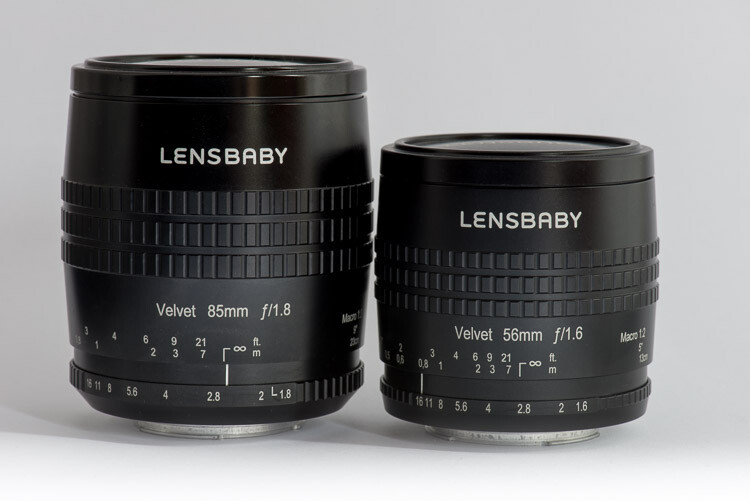
There is an obvious difference between the size of the two lenses, which you can see in the image below. However, you will find the same with most fixed or prime lenses.

Review of the Lensbaby Velvet 85

The Lensbaby Velvet 85 next to the Velvet 56.

If you change the focus to point so that you can get as close as you can to what you are photographing, they both seem to capture the same image.

Review of the Lensbaby Velvet 85

How close you can get with each lens, the Velvet 85 on the left and the Velvet 56 on the right.

However, if you are trying to photograph something from a fixed point, then the Velvet 85 will allow you to get closer images. This is great if you are taking photos in a location like a garden, you can photograph those flowers that are at the back and harder to get to.

Review of the Lensbaby Velvet 85

Standing in the same place, the difference can be seen with the Velvet 85 on the left, and the Velvet 56 on the right.

If I had to choose between the two lenses, I think I would want the Velvet 85. The longer reach is appealing, and the soft-focus effect is really interesting. There isn’t a great deal of difference in the price, so it would be my choice.

Adding the lens to your kit

It is not an overly expensive lens, Lensbaby sells the Velvet 85 for $ 499. It is available for most cameras on the market today. You can get a full list on the website.

If you are looking for a lens that is capable of macro photography, then this is a good alternative to the more expensive macro lenses that many companies make. It would also suit a portrait photographer, however, don’t forget street photography and landscape. It is a versatile lens which you will enjoy, but don’t expect to get the same results that you’d achieve with normal lenses.


The post Review of the Lensbaby Velvet 85 by Leanne Cole appeared first on Digital Photography School.


Digital Photography School

 
Comments Off on Review of the Lensbaby Velvet 85

Posted in Photography


Review: Interfit Honey Badger Studio Strobe and Universal Remote

29 Nov

Right now is a great time to be a studio photographer. Never before has there been such a multitude of options available to you in terms of photographic lighting. It seems that the recent surge in new photographers has lit a fire in the industries that create photographic gear. Lighting is a sector that has seen a huge influx of new options and new innovations.

Interfit has been one of those companies that constantly add to the mix for a while now. Not only do they make affordable studio strobes and continuous lights, they also make a ton of lighting modifiers and an indescribable amount of other studio accessories. If you need something for your studio, chances are that Interfit makes it.

Review: Interfit Honey Badger and Interfit Universal Remote

Stylish design is usually absent from studio lighting, but the Interfit Honey Badger aims to remedy that.

The newest light in Interfit’s range is the Honey Badger. A small, mid-powered studio strobe that fits into the low-middle pricing range. the light itself is in a stylish, bright yellow casing which adds a bit of a flourish to the monolight (the sort of product which is usually lacking in any sort of aesthetic design). I had chance to spend some time with and review the Honey Badger as well as the Interfit Universal Remote. Here are my thoughts.

amzn_assoc_tracking_id = “dpsgeneral-20”;
amzn_assoc_ad_mode = “manual”;
amzn_assoc_ad_type = “smart”;
amzn_assoc_marketplace = “amazon”;
amzn_assoc_region = “US”;
amzn_assoc_design = “enhanced_links”;
amzn_assoc_asins = “B075GVFXR7”;
amzn_assoc_placement = “adunit”;
amzn_assoc_linkid = “e644907a41a59013d380e1b2156daf51”;

What Exactly is a Honey Badger?

If you’re not familiar with the light’s namesake, a honey badger is a medium-sized mammal found in Africa and Asia. At first glance, they’re adorable. However, honey badgers are infamous for being unstoppable murder machines that maim, mutilate and maul everything in their path. You’ll often find them near the top of lists of the world’s most dangerous animals.

Knowing that you can probably figure out what Interfit are going for with their branding. You have a small, stylish light that’s cute to look at, but packs a punch when set loose in the studio.

So did they achieve that? The short answer is – yes, quite well.

The Strobe

As per the Interfit website, the specifications for the Honey Badger are as follows:

Review: Interfit Honey Badger and Interfit Universal Remote

The biggest takeaways here are the seven stops of power range up to 320ws (which is pretty decent for a strobe in this price range), the S-mount, and the built-in receiver.

No HSS or TTL

Before I get into anything else, let’s address the elephant in the room. Announcements of new studio strobes these days always seem to include the wonderful features of High-Speed Sync (HSS) and Through the Lens metering (TTL), both relatively new features in the world of studio strobes as they have been previously limited to flashguns (speedlights). The Honey Badger does not have these features. Then again, its price point reflects their absence.

Price

The Honey Badger sells in the US for $ 299.99 and the UK for £259.99, putting it squarely in the low-middle range of the market. For this price range, it packs a decent punch and pulls its weight easily.

The Interfit Universal Remote is sold separately at a more than reasonable $ 79.99 USD and £39.99 UK.

Built-in Receiver

What the Honey Badger does include, which surprised me a little, is a built-in receiver. This means that you can fire the strobe with a transmitter on your camera without having to worry about extra receivers, errant sync cables, and dead batteries. Interfit sells a Universal Manual Remote (covered by this review) that works with the Honey Badger and a selection of other Interfit lights.

Power

Review: Interfit Honey Badger and Interfit Universal Remote

While 320ws is a long way from the power output you can get from some strobes, it is more than enough in most everyday situations. As long as you bring your lights in close to your subject like I do, you should have no problem obtaining apertures of f/8 and f/11 for portraits and f/16 and beyond for tabletop set-ups.

If you’re working out of a home studio or another small space, the power output of the Honey Badger is likely going to be enough for you.

Size

Review: Interfit Honey Badger and Interfit Universal Remote

As far as strobes go, the Honey Badger is quite small and highly portable.

The size of the Honey Badger was far more noticeable than the color when I first took it out of the box. This light is small. For comparison, above is a photo of it next to a Bowens light with similar specifications and a Canon 580 EX II Speedlite.

I can speculate on both the advantages and the disadvantages of the size of the Honey Badger.

I have no way of testing it, but I imagine that fitting three or four of these lights into a carry-on sized Pelican case would be pretty easy. If you’re a traveling photographer, being able to easily transport that many studio strobes might be a huge bonus.

When I attached one of my own modifiers, a large Interfit Strip-box, the small size of the strobe and the narrowness of the strip-box allowed me to point the light straight down. This isn’t usually possible without a boom arm and it got me pretty excited about the possibilities. (That said, one of the kits that Interfit offer with the Honey Badger includes a stand with a boom arm.)

Review: Interfit Honey Badger and Interfit Universal Remote

The shape of the Honey Badger may allow you more configurations with some modifiers.

On the other hand, we live in a world where appearances matter. Between the size and the color, the Honey Badger does look a little bit like a toy. Throughout the rest of this review, I will try to assure you that the Honey Badger does perform well, but if you have clients that like to see big productions with big lights everywhere, they may be less than impressed.

The Softbox

Review: Interfit Honey Badger and Interfit Universal Remote

The Honey Badger kit I tested included a 24” popup softbox. It’s a small softbox; I can’t say much more than that about it. In fact, it’s identical to a Neewer branded one that I bought a few months ago for use with my speedlights. The only difference is the Interfit branding. It is of good quality, fits snugly on the Honey Badger and has no apparent effect on the color temperature of the light that passes through it.

If your intent is to shoot portraits, especially in a fixed studio environment, you’re going to want a bigger light modifier. The softbox is useful and you will be able to get results from it, but you will want to find something much larger.

If you purchase this kit, be forewarned. The softbox comes in a pouch much smaller than its actual size. When it comes out of that bag, it opens itself with quite a lot of force. Don’t do what I did and please, please hold it away from your face.

S-Mount

Review: Interfit Honey Badger and Interfit Universal Remote

With a Bowens S-mount, the Honey Badger gives you access to a vast range of modifiers.

The fact that the Honey Badger has a Bowens S-Mount on it is a major advantage in my opinion. There is a vast range of modifiers available that fit the S-mount, ranging from cheap imports to high quality, but far more pricey, proprietary modifiers from brands like Interfit and Bowens. I may be a bit biased as I am a Bowens user, but if I were to invest in the Honey Badger system, that S-mount would make my life so much easier.

As an aside, Bowens has gone out of business. That doesn’t mean you should forsake the S-mount. As mentioned, there are hundreds of products and dozens of other lighting systems that use the S-mount. Bowens might be going, but modifiers that fit the S-mount are going to be around for a long while yet.

White Balance

The Honey Badger has a color temperature of 5600k. This means it’s a touch warmer than the flash White Balance setting in Lightroom. If you like warmer tones in your images, this is not a problem. However, if you would prefer a more neutral look, remember that you will need to dial your White Balance back a hundred degrees. Bear in mind, if you’re using cheaper modifiers, they tend to have a significant effect on your color temperature which renders this point moot anyway.

Diffusion Dome

Review: Interfit Honey Badger and Interfit Universal Remote

The frosted diffusion dome covering the flashbulb gives an extra layer of diffusion behind your modifier.

Unlike most strobes, the Honey Badger has a frosted dome over the flashbulb. This adds a tiny amount of diffusion to the bare bulb. In most cases, you’re never going to want to shoot with a bare strobe, but I tried it anyway. The light is as hard as you would expect, but it is possible to use it to creative effect.

Modeling light

When I first turned the Honey Badger on, I didn’t expect an LED modeling light. This is a plus as it means that your subjects aren’t going to boil under hot lights. In fact, I used the Honey Badger nearly constantly in four studio sessions and it never even got warm, never mind overheating.

The Interfit Universal Remote

Review: Interfit Honey Badger and Interfit Universal Remote

The Interfit Universal Remote allows you to control the Honey Badger (and other Interfit strobes) from the top of your camera.

I will admit that using the Universal Remote to control the Honey Badger from the top of the camera is an absolute pleasure. I tend to work in confined spaces anyway, but not having to actually walk to the light to change the power output was fantastic. The remote is easy to use as well, and all the functions are labelled clearly. When I’m next in the market for new strobes, this remote may very well play into my considerations. I imagine a scenario where I don’t have to dodge behind a subject to the back of a studio to change the power output on a pair of rim lights. I can dream right?!

That said, the remote was the only problem I had while testing the Honey Badger. For the first 20 minutes or so, I couldn’t figure out why the modeling light was turning itself off. I was convinced there was a problem with the light itself, but it turns out that for whatever reason, on the unit I tested, the modeling light shuts off any time you change the power output via the Universal Remote. I don’t know why this would be and I am unaware if it was a problem isolated to the unit I used, but it did not do the same when you change the power output on the actual strobe.

With a price tag of $ 79.99 USD (£39.99), if you are interested in the Honey Badger, or other Interfit lights, this remote is a no brainer.

The Test

For the first test, I set up the Honey Badger straight out of the box with everything included (24” softbox and the Universal Remote). I had the whole thing set up in no time and once the batteries went into the remote, all the channel settings were sorted out in seconds. (It really is that easy.)

Pop-up Softbox

Review: Interfit Honey Badger and Interfit Universal Remote

To start with, I placed the light at 45 degrees in a basic Rembrandt setup. Because the softbox is so small, I brought it in really close to the subject (about a foot away).

Review: Interfit Honey Badger and Interfit Universal Remote

Review: Interfit Honey Badger and Interfit Universal Remote

From here, I moved the soft box away a short and distance and further to the subject’s left. I wanted to take advantage of the harder light from the smaller softbox and try to create some images with deep, defined shadows.

Review: Interfit Honey Badger and Interfit Universal Remote

Strip-Box

Review: Interfit Honey Badger and Interfit Universal Remote

I happen to own a large Interfit strip softbox (which I adore), so that was the next modifier to go on the Honey Badger. At first, I was overcome with glee as I realized I could point it straight down thanks to the Honey Badger’s small size; however, I chose not to keep it that way as it’s not the most flattering light for human subjects.

Instead, I put it straight in front of my subject, slightly above and pointed straight at her nose for a basic butterfly lighting set-up.

Review: Interfit Honey Badger and Interfit Universal Remote

Review: Interfit Honey Badger and Interfit Universal Remote

Bare-bulb

Review: Interfit Honey Badger and Interfit Universal Remote

As mentioned, I felt inclined to see what the light from Honey Badger looked like as a bare bulb. The diffusion dome got the better of my curiosity. In my opinion, it’s perfectly usable. You won’t want to use it a lot, however, but the hard light might suit some high fashion portraits quite well.

Review: Interfit Honey Badger and Interfit Universal Remote


7’ Parabolic Umbrella with Diffusion

Review: Interfit Honey Badger and Interfit Universal Remote

This is where I started to see some possible limitations with the Honey Badger. I wanted to see if the Honey Badger could cope with a giant parabolic umbrella. The answer is yes, but not without extra pieces of equipment. The light itself does have a hole for an umbrella, but I wasn’t willing to see if it would hold that much weight. Instead, I placed a Bowens umbrella reflector on it and attached the modifier.

Because the light is so small, I had to bring the umbrella really close to the light before it would support the umbrella’s weight. With the light so close to the umbrella, it was not able to use the full surface area of the modifier. The 7’ umbrella effectively became a 4.5’ umbrella. This is not the end of the world, but it was annoying. There are plenty of options for umbrella holders and mounts on the market that would solve this problem, I just don’t happen to own any of them.

Review: Interfit Honey Badger and Interfit Universal Remote

Beauty Dish with Grid & Diffusion Sock

The final variation I tried was using a 24″ beauty dish with both a grid and a diffusion sock. For this setup, the light was placed about 10 feet in front of the subject for a harder light and to reduce the speed of the light fall off so that more light hit the background.

Extra images

Below are other photos taken using the Interfit Honey Badger and the included pop-up softbox.


Pros and Cons

Having used it for a while, I can tell you that the Honey Badger has more pros than it does cons (and a few of the cons are hyperbolic).

Pros of the Honey Badger

  • Reasonably priced
  • Small
  • Reasonably powered
  • Bright LED modeling light
  • Bowens S-mount
  • Fast recycling times (I never had to wait for it)
  • Built-in receiver
  • The Universal Remote works like a charm
  • Doesn’t overheat easily
  • Good build quality
  • Stylish in appearance

Cons

  • The light might be too small in some situations
  • 24” softbox is too small for many studio situations, albeit perfectly functional
  • Modeling light turns itself off (on the unit I tested) when the power is adjusted via the Universal Remote
  • No HSS or TTL
  • May have issues supporting the weight of large modifiers like an 8’ Octabox

Overall

In the end, I enjoyed using the Honey Badger. It is a good quality, competent light that would suit any photographer working a studio environment, especially for those setting up a home studio. The Universal Remote really adds to the experience as well, making power adjustments from the top of the camera a breeze.

amzn_assoc_tracking_id = “dpsgeneral-20”;
amzn_assoc_ad_mode = “manual”;
amzn_assoc_ad_type = “smart”;
amzn_assoc_marketplace = “amazon”;
amzn_assoc_region = “US”;
amzn_assoc_design = “enhanced_links”;
amzn_assoc_asins = “B075GVFXR7”;
amzn_assoc_placement = “adunit”;
amzn_assoc_linkid = “e644907a41a59013d380e1b2156daf51”;

If you’re looking for HSS or TTL functionality, or a light with a self-contained battery, no, the Honey Badger is not for you. For anything else, the Honey Badger is absolutely worth your consideration.

Disclaimer: Interfit provided the product on loan to our dPS author so he could test and do this review. However, all reviews on dPS are 100% the author’s unbiased opinion. 

The post Review: Interfit Honey Badger Studio Strobe and Universal Remote by John McIntire appeared first on Digital Photography School.


Digital Photography School

 
Comments Off on Review: Interfit Honey Badger Studio Strobe and Universal Remote

Posted in Photography


OnePlus 5T first impressions review

28 Nov

The brand new OnePlus 5T is the Chinese manufacturer’s latest flagship model. Like its predecessors, offers high-end specifications, materials and design at a price point that is noticeably lower than the more established competition.

The 5T is in most respects pretty much identical to its predecessor, the OnePlus 5. However, there are two important changes: the AMOLED display now comes with an 18:9 aspect ratio, covering the entire front of the device, and the dual-camera has done away with the tele-module and replaced it with a secondary sensor that has been optimized for low light performance.

The camera switches to this sensor when light levels drop below 10 Lux and merges four pixels into one for improved image quality. Despite the lack of a tele lens, OnePlus says the new dual-camera setup offers a similar zoom performance to the OnePlus.

We’ve had the OnePlus 5T in our hands for a few days now and used its camera in a wide range of light conditions. Here are our first impressions.

Key specifications:

  • Dual-camera
  • Main camera: Sony IMX 398 1/2.8″ 16MP sensor, F1.7,
  • Secondary camera: Sony IMX 376K 1/2.78″ 20MP sensor, F1.7
  • 27.22mm equivalent focal length
  • Dual-LED flash
  • 4K video at 30 fps
  • 720p slow-motion at 120 fps
  • Manual mode and Raw capture
  • 16MP / F2.0 front camera
  • 6″ 1080p AMOLED display, 18:9 aspect ratio
  • Qualcomm Snapdragon 835 chipset
  • 64/128GB storage, 6/8GB RAM
  • 3,300 mAh battery

Image quality

In bright light the 5T captures images with pleasant colors. Auto HDR kicks in for high-contrast scenes, ensuring decent dynamic range and good highlight detail. Lens sharpness is good across the frame but if you zoom in to a 100% view, low-contrast detail, such as distant foliage or other fine textures, can look a little mushy. There’s also more luminance noise in the sky than we would like at base ISO.

ISO 125, 1/490 sec

When shooting against the light the 5T occasionally captures slightly too dark exposures to protect the highlights, but despite some shadow noise the shot below looks quite pleasant. Occasionally low-contrast detail in the shadows can be very mushy, though.

ISO 250, 1/1525 sec

The 5T camera deals much better with higher-contrast scenes, even when overall light levels are lower. The shot below was captured at ISO 640 indoors and shows very good edge definition. There is some luminance noise but it is very finely grained and not too intrusive. Overall detail is still good, despite shooting in low light.

ISO 640, 1/50 sec

Noise reduction and smearing of fine detail are more noticeable in this ISO 1000 shot but overall detail is still good considering the light conditions. However, skin tones on the subject are a little warm and just a touch underexposed. It appears the camera was aiming to protect highlights in the brighter background. Overall, the 5T does pretty well in this scene, though.

ISO 1000, 1/33 sec

Detail becomes noticeably softer in night shots, as the one below, but exposure is very good and noise well controlled. The OnePlus 5T tends to do a good job in static night scenes.

ISO 3200, 1/17 sec

The camera app doesn’t tell you when it switches to the more low-light efficient secondary sensor with its ‘Intelligent Pixel Technology’. But a look at the EXIF data reveals that images taken in very low light have a 20MP resolution, as opposed to the 16MP of the main camera. This also indicates that, if there is some pixel-binning going on, the images are then upscaled to full sensor resolution again.

Looking at the two samples below, the mode is capable of achieving good exposure and color in low light situations. However, level of detail is very low and images have an almost pixelated appearance when viewed at a 100% magnification.

We have also noticed that two images taken in quick succession can look quite different in terms of both exposure and detail rendition. If you click through to the full-size versions of the samples below you’ll see that the image on the left is pretty grainy, while the one on the right has an almost water-color like smeared look. The levels of detail are equally low on both images, though.

ISO 2000, 1/20 sec ISO 5000, 1/17 sec

Zoom

OnePlus says that, despite the omission of a dedicated tele camera, the 5T’s 2x zoom produces similar image quality to the OnePlus 5. Looking at the sample scene below, this is true. Viewed at a 100% magnification the 2x zoom image shows noticeably lower levels of detail than the standard image, but the tele-lens on the OnePlus 5 did not produce much better results. Zoom images are not ideal for display at larger sizes but look nice at typical social media or web use resolution.

ISO 250, 1/553 sec
ISO 160, 1/504 sec

The same is true for zoom images captured in low light. The 2x zoom image below was taken in a dimly lit club. Fine detail is not great but the shot is perfectly usable at web size and the zoom function allowed me to get the framing I wanted, even when shooting from the back of the crowd.

ISO 1600, 1/20 sec

Bokeh

OnePlus says the 5T’s bokeh mode has been improved over the version used by its predecessor and our initial tests confirm that. There are still some minor artifacts around foreground subjects but overall subject separation from the background is pretty good, even in lower light and with human subjects.

In addition, the amount blur applied to the background is not too strong, resulting in a fairly natural bokeh rendition.

ISO 320, 1/464 sec, Depth mode

Video

We also shot a few videos with the OnePlus 5T and the results are pretty good, with decent detail, nice color and good exposure. Stabilization is pretty good when hand-holding the camera, but things get a little shaky while panning, as you can see in the clip below.

The video mode delivers decent image quality in this artificially lit indoor shot. Video stabilization keeps things nice and steady during handheld recording.

You can also record video using the 2x zoom settings. The results in the low light clip below aren’t quite broadcast quality but definitely usable, with good stabilization.

Conclusion

With its new 18:9 display and powerful processing components the OnePlus 5T is a great smartphone in general use. However, there’s a lot to like about its camera as well. Images show good exposure and color across all light levels, the bokeh mode captures images that look more natural than on many competitors and the zoom function produces usable results, even in very low light.

Like on the 5T’s predecessor, pixel level image quality is a bit of a weakness, though. The Auto HDR function produces some ghosting artifacts and mushy textures, and we also found more luminance noise in base ISO images than we’d like to see.

Low light image quality is decent but not up with the very best, and with the current software version OnePlus’ ‘Intelligent Pixel Technology’ doesn’t really offer any noticeable low light benefits over a fine-tuned conventional camera.

That said, OnePlus is known as a manufacturer that is frequently pushing software updates and improving the performance of its products. If the engineers are able to fine-tune image processing and video stabilization a touch more, the OnePlus could easily jump up a few spots in the smartphone image quality rankings.

Sample Gallery

There are 10 images in our OnePlus 5T samples gallery. Please do not reproduce any of these images on a website or any newsletter / magazine without prior permission (see our copyright page). We make the originals available for private users to download to their own machines for personal examination or printing (in conjunction with this review), we do so in good faith, please don’t abuse it.

Unless otherwise noted images taken with no particular settings at full resolution.

$ (document).ready(function() { SampleGalleryV2({“containerId”:”embeddedSampleGallery_6913569890″,”galleryId”:”6913569890″,”isEmbeddedWidget”:true,”standalone”:false,”selectedImageIndex”:0,”startInCommentsView”:false,”isMobile”:false}) });

You can also still have a look at our OnePlus 5 review gallery from June.

$ (document).ready(function() { SampleGalleryV2({“containerId”:”embeddedSampleGallery_6343385400″,”galleryId”:”6343385400″,”isEmbeddedWidget”:true,”standalone”:false,”selectedImageIndex”:0,”startInCommentsView”:false,”isMobile”:false}) });
Articles: Digital Photography Review (dpreview.com)

 
Comments Off on OnePlus 5T first impressions review

Posted in Uncategorized


Review of the Aputure Light Storm COB 120D Studio LED

28 Nov

The team at Aputure via Kayell Australia (thanks) sent me the Aputure Light Storm COB 120D LED studio light to try out and that’s exactly what I’ve been doing! I had planned a day’s worth of food shooting, but that wasn’t to be after the client delayed the session. So I went about doing what I like to do and photographed myself holding a coffee in preparation for a portrait series I’m working on called “In My Shed” which is literally just that, but more on that later… Back to the light, and what a light it is!

Review of the Aputure Light Storm COB 120D Studio LED

amzn_assoc_tracking_id = “dpsgeneral-20”;
amzn_assoc_ad_mode = “manual”;
amzn_assoc_ad_type = “smart”;
amzn_assoc_marketplace = “amazon”;
amzn_assoc_region = “US”;
amzn_assoc_design = “enhanced_links”;
amzn_assoc_asins = “B06X8ZTH8V”;
amzn_assoc_placement = “adunit”;
amzn_assoc_linkid = “5dc437b7454aa9fb3426a0b4d88dee09”;

What’s in the box of the Aputure Light Storm

The Aputure Light Storm is an LED light with only one light source, as opposed to a panel with lots of little LEDs on it. The COB stands for “chip on board” which is basically multiple little versions of those LED’s you’re used to seeing, but all mounted on a board with a blob of phosphor flowed on top of them.

The phosphor is the bit that gives the LED light its color temperature (The D or the T) The version I have is called the 120D, the D is for Daylight. This means it’s closely daylight balanced, as opposed to the other model, the 120T which is more closely tungsten balanced. If you’re super interested in how they’re made, search on YouTube, it’s pretty interesting. Anyways…

Review of the Aputure Light Storm COB 120D Studio LED

I must admit, when I first started talking about the C120D with some industry peers, the initial feedback I got was, “It isn’t built very well.” and, “It won’t be bright enough for what you need to do!” but I pressed ahead despite those second-hand reservations and I’m very glad I did.

The unboxing part is always exciting for me, new gear and all that, and this little fellow was no different. The Aputure Light Storm COB 120D kit comes with its own semi-rigid case complete with a small reflector, power supply, cables and a remote control with a working distance of 100 meters. Everything you need to be up and running with some stunning light in less than five minutes is included.

Review of the Aputure Light Storm COB 120D Studio LED

Stunning light

So, I say stunning light, and I guess, like almost everything in photography, that’s a subjective statement. But I really love the light this unit produces, in the situations I’ve used it. I held off working on this article as I wanted to get some good use in with the light as I’d originally planned for this review.  That was to use it as my key light for food photography.

I prefer to use a big soft window for food photography, but sometimes you don’t have that option, so you need to create your light. I typically use a Jinbei HD600 which is a portable studio flash. It’s a great unit, but I wanted to try out a constant light source and see how that worked for what I was shooting.

Let’s kick it off with your dinner and dessert. Thanks to Trackside Noodle Bar for letting me use these images! There are images that they’re going to use in their marketing and menus. Entree and dessert for you, mains we’ll have a little bit later

Review of the Aputure Light Storm COB 120D Studio LED

Review of the Aputure Light Storm COB 120D Studio LED

No surprises with continuous lighting

I think the best bit, given I’m not a full-time photographer and I don’t shoot as often as some of you, is that using LED lights means that I see exactly what I’m going to get.

So you light your scene and adjust it, and you can see the adjustments immediately as the light source is always on. You can do the same when you use strobes or flash, but you need to make an exposure to check (I’m shooting a Sony a7rmk2 and so I see what I get on the screen at the back).

I find it super easy to set up my plate of food, use the light’s remote to back off the power if I need to do so, and click – job done.

Review of the Aputure Light Storm COB 120D Studio LED

When I came to the main course, I wanted a bit of light coming back in from the left of the plate. So a really simple bounce card (aka white square of card that can stand on its own) sitting out of shot on the left and I was good to go. You can see my hand-drawn “artist’s” impression of my setup, below.

Review of the Aputure Light Storm COB 120D Studio LED

Or, as a real photo, without my awesome drawing skills!

Review of the Aputure Light Storm COB 120D Studio LED

Self-portrait time

A funny thing happened on this journey. As I mentioned at the start, I did a little self-portraiture in my shed for a project I’m working on. I shared the image with Aputure and it’s now in their catalog! So, that was kind of cool…

For this portrait, I had the light set up outside the shed window, the camera on a tripod being controlled via my iPhone which if you look really closely, you might spot on the window ledge (Sony’s Playmemories app). I could adjust the light power from inside the shed using the controller. The light was running on a vLock battery, I used the Core SWX Slim which meant I could take the light anywhere, I also used a Bowens S Mounted 90cm deep para reflector.

Review of the Aputure Light Storm COB 120D Studio LED

Review of the Aputure Light Storm COB 120D Studio LED

Summary

The summary, after working with this light for a couple of months is that it’s a great unit! Well built, plenty bright, easy to transport. I only have one minor negative point, and it’s that the controls have to be so big, but then the light itself is quite compact, so I guess all the controls and battery mount have to go somewhere! Like I said, minor.

The Aputure Light Storm COB 120D LED studio light is a fantastic addition to my regular portrait and food photography kit. This is a five-star review of a well deserving product! Let there be light.

amzn_assoc_tracking_id = “dpsgeneral-20”;
amzn_assoc_ad_mode = “manual”;
amzn_assoc_ad_type = “smart”;
amzn_assoc_marketplace = “amazon”;
amzn_assoc_region = “US”;
amzn_assoc_design = “enhanced_links”;
amzn_assoc_asins = “B06X8ZTH8V”;
amzn_assoc_placement = “adunit”;
amzn_assoc_linkid = “5dc437b7454aa9fb3426a0b4d88dee09”;

Disclaimer: this product was provided to the author for review, but all reviews on dPS are 100% unbiased opinions of the author. 

The post Review of the Aputure Light Storm COB 120D Studio LED by Sime appeared first on Digital Photography School.


Digital Photography School

 
Comments Off on Review of the Aputure Light Storm COB 120D Studio LED

Posted in Photography