RSS
 

Posts Tagged ‘REVIEW’

Review of the Godox AD200 Pocket Flash

02 Apr

Can you think of the ideal camera flash which can fit in your pocket, has almost 3-times output or regular speedlights, and also features a modeling light? The Godox AD200 is one such pocket flash (not if you are wearing skinny fit jeans) which meets all three of those expectations. That is why this flash has been my personal favorite outdoor fashion shoot light source.

To give you a quick overview of some of the features of the Godox AD200 flash, it features TTL, HSS (high-speed sync) up to 1/8000th of a second, 60 guide number, multi-stroboscopic flash feature and second-curtain sync.

If these specifications make you interested in this Godox flash, let me share my personal views and experiences after using it for more than six months now.

Review of the Godox AD200 Pocket Flash

Built Quality and Physical Overview

When you hold the Godox AD200 flash in your hand your first reaction might be that it is too heavy, as it weighs about 1 kg (2 lbs). Although it is heavier than any flagship flash than you might have used to date, at the end of this review you may realize that it is still worth carrying along to a shoot.

The built quality seems and feels durable and strong, almost a par with Canon and Nikon speedlights.

Talking about the physical overview, the front side of Godox AD200 has an interchangeable flash head mount. This allows you to mount the standard Fresnel flash head or the bare bulb flash head.

The only difference between this flash as compared to a speedlight is that the head of the AD200 cannot be rotated. And, the AD200 cannot be mounted on a camera, it can only be used as an off-camera flash. This could be a concern for some, but actually, this flash is not built to be used on-camera anyway.

The standard Fresnel head

The Fresnel flash head is ideal for situations when you are shooting without a light modifier and want to use it as any other speedlight. But an additional feature that the AD200 has is two LED strips on this head, which can use used as a modeling or continuous light. The continuous light could help the camera to focus in low-light conditions, instantly.

Bare bulb

The bare bulb flash head is ideal when while using this Godox flash with a light modifier, as the bulb is omnidirectional. I would choose to avoid using this head otherwise, as it is fragile and could easily be damaged shooting without a light modifier.

Controls

On the back side of the flash rests an AV display panel which is big enough for you to clearly see the various icons being displayed. There are five buttons dedicated to respective functions, a dial to adjust the flash exposure and the infrared sensor panel. The placement of the buttons, dial, and the screen is exactly what you as a photographer would desire in a flash.

On one side of this pocket flash, you will spot the Lithium battery slot, an unlock switch to change the flash head and a rubber cover which covers the 3.5mm sync cord jack and wireless control port. On the other side sits the ON/OFF switch, mini USB port, and a 1/4″ tripod/stand mounting hole.

Review of the Godox AD200 Pocket Flash

Highlighted Features and Performance

TTL (Through-the-lens)

This pocket flash by Godox features TTL metering, a technology which allows the flash to sync with the camera and automatically set the flash exposure based on the camera exposure. Using a flash in TTL mode is exactly the same as using the camera in automatic mode. The camera exposure helps the flash to set its own output value accordingly to correctly expose the frame or the subject.

The TTL mode performance on the Godox AD200 is precise in a majority of situations and it works perfectly in sync with the camera exposure to properly expose the subject. I rarely came across any instances where I got an underexposed or overexposed photo when shooting in TTL mode. Even if I did encounter exposure issues, I used the FEC (flash exposure compensation) feature to overcome it.

HSS (High-Speed Sync)

The Godox AD200 can sync up to 1/8000th while using its HSS functionality. This is ideal for situations where you want to freeze a fast-moving subject or shoot at an outdoor location where you need to control the light.

Review of the Godox AD200 Pocket Flash

Rear-Curtain Sync

Using the rear-curtain (or second-curtain) sync feature of the Godox AD200, you can shoot some really creative and cool photos with long exposures.

Ideally, when you shoot using a flash, the light gets fired from the flash the moment the shutter opens. So if you are shooting a long exposure photo of two seconds, the flash will fire the moment you press the shutter release button and whatever happens after that does not get exposed properly.

But by using the second-curtain sync feature, you can instead make the flash fire right before the shutter closes. Considering the above example, the flash will now fire just before the 2-second exposure is completed and the shutter closes.

Using this feature might sound confusing, but trust me, once you practice you may fall in love with it.

Flash Exposure Compensation

Assume flash exposure compensation to be exactly like the exposure compensation feature of your DSLR camera. If you feel that you are not getting the desired exposure in your photo while using the flash in TTL, or if you plan to try something different, you can adjust the flash exposure compensation.

This amazing feature lets you reduce or increase the flash output as per your desire, all you have to do is adjust the exposure value to your requirements. This is basically like shooting in aperture priority or shutter priority mode, without getting into manual mode.

Review of the Godox AD200 Pocket Flash

Flash Output

The AD200 has a guide number of 60 and the flash output that you get is almost three times of what any flagship speedlight can provide. I was able to expose my subject correctly while shooting outdoors in bright daylight conditions, and believe me when I say that the flash is powerful enough to overpower the background light.

Imagine using three speedlights at a time and on the other hand using just one Godox AD200 flash. The light output shall be almost same. For me, it has performed amazingly well even in low light conditions as I used the built-in LED light to ensure that the focus and flash exposure were correct.

Godox AD200 Flash Recycle Time

The recycle time also plays an important role while deciding on the perfect flash, so here are some tests that I conducted to figure out the recycle time of this flash at various powers.

The recycle time on this flash at full power is quite impressive:

  • While using the flash at 1/1 (full) power, the recycle time that I got was just less than 2 seconds.
  • While using the flash at 1/2 power, the recycle time that I get was almost half a second.

I mostly use a flash when I’m shooting fashion and portraits, and with this swift recycle time I hardly miss any shots. Even if you plan to buy this flash for wedding, action, or event photography, I am sure you will thank me later.

Review of the Godox AD200 Pocket Flash

Would I recommend this?

At $ 299, this pocket flash by Godox looks like an ideal choice for a fashion, wedding, event, or even sports photographer. This flash has almost all the features that you, as a hobbyist or as a professional photographer, would require to get the desired results, with almost three times the power of a regular speedlight.

I have been using this portable flash for almost 6 months now, and I do not have any major complaint about this beauty, except for the display panel which could be better for outdoor visibility.

The best part about the Godox AD200 is that there is a universal model of this pocket flash. This means that you can pair this flash with the compatible trigger (Canon, Nikon or Sony) and use it as an off-camera light source. So if you own multiple brand cameras, this is another reason you should consider investing your $ 299 in this Godox flash.

The post Review of the Godox AD200 Pocket Flash appeared first on Digital Photography School.


Digital Photography School

 
Comments Off on Review of the Godox AD200 Pocket Flash

Posted in Photography


Review: The Petzi Treat Cam is a camera with an integrated pet feeder

02 Apr

Most of the cameras we test at DPReview fall into predicable categories like DSLRs, mirrorless, and compact enthusiast models. However, we feel a sense of obligation to bring you industry-leading technical reviews of other imaging products as well.

With that in mind, we present our review of the Petzi Treat Cam, a camera with an integrated pet treat dispenser. Unlike most cameras, which are designed to take with you, the Treat Cam is meant to be left at home. Once you’re in the field you can check in on Rover or Fluffy using the camera’s smartphone app, give out treats, take photos and even talk to your pets. What’s not to love?

We tried to reproduce the Treat Cam’s unique feature set using a mirrorless camera, a bowl of pet treats, and a DPReview editor. It didn’t end well.

Key features:

  • Fixed-lens camera with autofocus
  • Support for video live streaming
  • Built-in treat dispenser
  • Speaker for talking to your pets from afar
  • Night mode with IR light
  • Smartphone app with remote operation
  • Social media network for pets

The Treat Cam has a different form factor than most cameras we review, owing to the fact that it includes an integrated storage reservoir for treats. It lacks the ergonomic niceties found on other cameras though, strictly speaking, the Petzi isn’t really designed for handheld use. (OK, it’s totally not intended for handheld use, but that didn’t prevent us from trying.)

Although the Petzi Treat Cam excels at some tasks, it’s not the best camera for hand-held use.

Setting up the Treat Cam is a breeze. Create an account on the Petzi network, pair your phone with the camera using the Petzi app and – Shazam! – you’re connected. Pop off the plastic cover, fill it with treats and you’re ready for action. You can now leave your pets at home to scratch the furniture unabated, knowing you can check in on them anywhere, any time.

Back home, the Treat Cam plays a chime to alert your pets that you’ve dropped in for a visit. Whether your pets actually care that you’ve made the effort is another matter entirely. In my early attempts to drop in on my cats from half a world away, I was usually met with a view of an empty room, because they were no doubt busy scratching the furniture elsewhere in the house.

Stick with it, and you’ll be rewarded. Treat Cam has a built-in speaker so you can talk to your pets, or plead with them to please stop scratching the furniture. Unfortunately, there’s no corresponding microphone on the camera, so you won’t be able to hear them. You can also take photos to share with your friends or with your friends’ pets (more on this later).

The Treat Cam lets you check in on your pets while away from home.

Of course, the most important feature is the Treat Launcher. And launch, it does. This thing shoots treats like little projectiles, halfway across the room, and if you’ve loaded up the camera with extra small treats it becomes a little pet treat shotgun. Good stuff.

Finally, there’s a ‘night mode’, which activates an infrared light and switches to black and white, making the Treat Cam more usable in low light settings.

Treat Cam has a built-in speaker so you can talk to your pets, or plead with them to please stop scratching the furniture.

The entire process is a learning experience for both you and your pets. Over time, my cats learned to recognize the Treat Cam’s chime and now show up quickly when I connect. I’d like to believe they’re showing up for the engaging conversation.

Image quality

Of course, this is DPReview and we know what all you pet-owning photographers really care about image quality, so we took the Treat Cam into the studio and shot our test scene.

The Petzi Treat Cam has modest resolution and exhibits some barrel distortion, but it’s also the only camera we’ve tested that can fire pet treats back at the test scene. As always, tradeoffs.

A quick glance at the image reveals a fair amount of barrel distortion. OK, there’s a lot of barrel distortion, but this isn’t exactly an architectural camera we’re talking about. In practice, the chart reveals more distortion than you’re likely to see in real world photos. Unless, of course, your pets are shaped like squares or wearing a test chart.

The Treat Cam loses a few points when it comes to image quality, and resolution is not particularly high. We tried to determine the camera’s exact resolution, but after a bit of testing discovered that it always matches the resolution of our phone screen. Yep – the app is basically taking a screen shot and saving it to your camera roll.

It occurred to us that we could probably calculate the exact resolution with a bit of additional analysis, but to be honest it was a lot more fun to shoot M&Ms out of the camera and we got sidetracked doing that instead.

Social network

Your dogs or cats may not be on Facebook, but that doesn’t mean they can’t do social media. Your pets can create their own profiles on the Petzi network (likely, with your assistance), post pictures, and even follow your friends’ pets. My cats have been friends with Jeff Keller’s cats for a few months, and we’d like to believe it’s having a positive impact on their social experience.

With the Petzi app, your pets can follow other pets. Or, at least you can pretend they do.

Of course, social networks are social networks, and you can’t force anyone to like you. Wenmei Hill’s dogs have yet to accept my cats’ friend requests, and I think they’re starting to feel a bit miffed.

If you don’t want to use the Petzi network, it’s easy enough to share photos on human-powered networks like Facebook and Twitter as well.

Compared to…

The Petzi is the first camera with an integrated pet feeder we’ve reviewed and our options for comparison were limited, so we decided to compare it to the medium format Fujifilm GFX 50S. Because why not.

Petzi Treat Cam Fujifilm GFX 50S

Price

$ 170 $ 6500
Camera type Fixed lens Mirrorless
Pixel count Not specified 50MP
Touchscreen control Yes

Yes

Still photos Yes Yes
Video Yes (live streaming) Yes (1080/30p)
Integrated pet feeder Yes No
Smartphone app Yes Yes
Dedicated social network Yes No
Tripod mount Yes (wall mount) Yes
Shots per charge Requires power cord 400
Weight 1814 g (not including treats) 740 g

As this table shows, it’s possible to make any camera look impressive by choosing the right things to compare, and the Treat Cam doesn’t disappoint. Although the GFX 50S has an impressive 50MP resolution, it costs $ 6500, lacks a dedicated social network, and most importantly, does not include an integrated pet feeder.

The Petzi Treat Cam next to the Fujifilm GFX 50S for scale.

As with any choice, this one comes down to what’s most important to you: high resolution, dynamic range and precision optics, or the ability to bond with your pets from half a world away by shooting dog biscuits from your phone. Without making any judgements, its a deeply personal decision.

Who’s it for?

If you’re a frequent traveler with pets at home, a product like the Petzi Treat Cam is a no-brainer. It’s an easy way to drop in on your pets and give them treats while you’re away. However, thanks to our extensive field tests we can provide some pragmatic advice to potential buyers.

The treat cam works pretty well with dogs right out of the box, probably because that little Petzi chime gets them excited every time it goes off, even if they don’t know why. Dogs are pretty easy that way.

Night mode is useful if it’s dark when you call home.

Cats don’t respond quite as quickly to the Petzi, possibly due to the fact that they’re so busy scratching the furniture while you’re gone. However, once they make the association between the chime and chicken treats that appear out of thin air they’re pretty good at coming over to say hi as well.

We had less success with fish, hamsters, tropical birds, snakes, iguanas and flying squirrels, but your mileage may vary. Let us know if you have any luck with these.

Our take

What we liked What we would improve
  • Easy setup and configuration
  • Large treat reservoir
  • Ability to visit pets from anywhere in the world
  • Improved camera resolution
  • Two-way audio
What our pets liked

What our pets would improve

  • Treat dispenser is sometimes a bit too generous
  • Getting treats when their person is away from home
  • An even more generous treat dispenser
  • Ability to dispense treats on their own

The final word

The Petzi Treat Cam is the first integrated pet feeder camera we’ve reviewed, and we’re generally impressed. Sure, you might give up certain features found in higher end cameras, such as resolution and image quality, but as we all know, specs aren’t everything. After all, if you’ve ever tried to feed your pet over the Internet using a DSLR (and let’s be honest, who hasn’t) you’ll know exactly what we’re talking about. And for that reason, the Petzi earns a solid ‘Paws Up’ award from the DPReview team.


In case it isn’t obvious at this point, we’d like to make it clear that we’re partaking in the great tradition of April Fool’s silliness with this review. Our pets took it very seriously, though. They don’t really get jokes.

Articles: Digital Photography Review (dpreview.com)

 
Comments Off on Review: The Petzi Treat Cam is a camera with an integrated pet feeder

Posted in Uncategorized


Alien Skin Exposure X3 review

20 Mar

Alien Skin Exposure X3 3.5
$ 149 | www.alienskin.com/exposure/ | Buy Now

This review is based on use of Exposure X3 and a beta version of Exposure X3 Complete Workflow Update for Mac.

Introduction

We’ve reached the point with image editing software that most basic features are covered. Correcting for exposure, saturation, and other settings are the expected baseline, which means applications need something more to differentiate themselves.

Some, like Skylum’s Luminar or Serif’s Affinity Photo (see Review: Affinity Photo 1.5.2 for desktop), are competing on price, along with the fact that they don’t require subscription plans.

Add to the mix Alien Skin Software’s Exposure X3. It’s competitive on price—$ 149 on its own, or $ 199 for a bundle that includes a couple of the company’s utilities, with no subscription—but it also includes several unique features that demonstrate the company is willing to tailor the software experience to how its customers use the product.

Differentiation in organizing

Like Adobe’s Lightroom family of products, Exposure X3 is both an image editor and an organizer for managing your photo library. You can preview thumbnails, rate and flag photos, assign keywords, and fill in basic IPTC metadata such as Title, Caption, Copyright, and contact information.

People who capture many images at a time and need fast turnaround will appreciate Exposure X3’s ability to import from multiple connected memory cards at once. You can rename files at import, specify custom destinations (and create presets for folder structures), and apply keywords and metadata during the ingest process. What it doesn’t do, surprisingly, is let you preview thumbnails of what’s coming in to cull shots before they’re copied to disk. It also doesn’t let you specify how to treat Raw + JPEG image pairs; you get both shots as separate images.

Import photos from multiple sources in the same batch.

Reviewing photos is aided by Exposure X3’s Quad and Six layout views, especially when you have several photos from the same capture burst where the subject is similar in each one. Four or six adjacent images in your library are displayed in a grid so you can compare differences between them, such as the expression on a person’s face. (There are also options to compare two or three images at a time.) If one stands out, you can pin it to the screen and compare it to others. The views are synchronized, so zooming in on one zooms them all at the same location in the image.

Compare four similar images at a time in the Quad view.

An important distinction about Exposure X3’s asset management features is that they’re directory-based, not catalog based. Applications such as Lightroom and Apple’s Photos keep track of where your photos are located on disk—sometimes all within the same library file or folder, set up by the software—and store metadata and edits about the images in a central catalog.

The advantage to this approach is that, as long as you continue to use that application to manage everything, all that data is more easily accessed by the software. You don’t need to worry about managing files, because the application does it for you. On the other hand, it means the metadata and edits don’t live with the image files. If you move an original Raw file on disk to a new location, for example, any edits you made would not go along with it. And in the case of Lightroom, moving the file in the Finder or Windows Explorer confuses Lightroom because it’s lost track of the image.

Exposure X3 doesn’t use standard XMP files, as many applications do

Exposure X3 takes a different tack. It reads images from the folders in which they’re stored, and writes edits to a separate sidecar file that lives in the same directory as the image file. When you view a photo in Exposure X3, the software also reads the information in the sidecar file and displays the edits noted there.

However, Exposure X3 doesn’t use standard XMP files, as many applications do. Within every directory of images, it creates a folder hierarchy, “Alien Skin > Exposure X3,” that contains metadata files ending in “.exposurex3” created for every image you edit. Those files use the same structure as XMP files, but can also include editing instructions that only Exposure X3 understands.

Some directory viewing software is just a visual way to traverse the folders on your disk, but Exposure X3 does use some centralized know-how to help you organize photos. The Collections feature lets you create virtual albums to group related photos that may exist in separate directories, such as shots from a single client captured over several photo shoots. Adding photos to a collection doesn’t move the files on disk.

Differentiation in editing

Before Alien Skin released Exposure as a stand-alone application, it was known for its presets that simulated the looks of film stocks and other effects. Those are all there in Exposure X3, and the results are quite good.

Exposure X3’s many presets simulate the looks of old photo processes, favorite film stocks, and more.

Want to preview how a preset will look before you apply it? Mousing over the preset thumbnails reveals the effect on your image, but you can also “audition” up to four presets at a time by selecting an image and dragging the presets you want to open slots.

Compare presets to the same image before applying your pick.

In addition to the basic editing adjustments (tone, color, and so forth), Exposure X3 also includes controls for controlling grain and creating vignettes that introduce variation such as distortion and lump size for more organic results. An IR panel introduces the soft hazy signature look of infrared photos with sliders to control color contrast and the degree of halation (light spread). A Bokeh panel includes a multitude of controls for adding selective focus. Exposure X3.5 brings the Color tools into the present with the addition of granular Hue, Saturation, and Luminance controls, as well as white balance controls listed in Kelvin units and with camera Raw presets.

One feature I stumbled upon is the software’s batch editing feature, which resulted in me accidentally making the same adjustments to several shots at once. Instead of making edits to one photo and then copying them to other images, you simply select all the images you want to change in the grid view or the filmstrip at the bottom of the screen. As you make edits to one, the adjustments are applied to all of the others.

When you make any adjustment, as with Lightroom, the effect is applied to the entire image. Unlike Lightroom, Exposure X3 supports multiple layers, enabling you to isolate adjustments on their own layers. In fact, local adjustments such as brush strokes or radial or linear gradients automatically appear as new layers. Each layer has an automatic mask that hides the adjustments until you expose them with the brush or gradient tools.

If your images are stored in a shared location, such as a Dropbox folder, someone else running Exposure X3 can view the photos

The Portrait Touch Up preset demonstrates this: when you apply it, Exposure X3 creates three layers designed to whiten teeth, smooth skin, and enhance a subject’s iris. Paint over the affected areas to reveal the effects. You can’t apply blend modes between layers, as some applications allow, but you can choose an opacity level for each layer.

Remember earlier when I mentioned that Exposure X3 stores metadata in its own sidecar files? All of the editing information is also stored in the same place, creating an interesting collaborative possibility. If your images are stored in a shared location, such as a Dropbox folder, someone else running Exposure X3 can view the photos. The adjustment data exists in the text-only sidecar files that are updated on both machines as they’re changed.

You’ll want to make sure you’re not both editing at the same time, which can overwrite edits, but it allows you to work on an image together over the phone or in alternating sessions without having to send file revisions back and forth.

Performance

Working with layers and local adjustments in Exposure X3 is a bit of a mixed bag. When editing Raw .RAF files from my FujiFilm X-T1, there was noticeable lag when using the brush, which meant I became accustomed to painting an area and waiting a beat for the result to appear before moving on. The lag was more pronounced when viewing an image at 1:1 zoom; an onscreen Rendering progress indicator showed up often. Even when reviewing images, I saw pauses as the software processed my Raw files.

This was a surprise, because I came to Exposure X3 with the expectation that it tended to do a better job handling the Raw files from Fuji’s X-Trans sensors. The update from version 3.0.6 to 3.5 did improve performance somewhat, but the lag is still noticeable.

I became accustomed to painting an area and waiting a beat for the result to appear before moving on

I also loaded some Nikon .NEF Raw files from a D90, as well as Sony .ARW Raw files from a Sony a7R III. Performance was just fine on the former, and a little slow on the latter’s significantly larger (86 MB) image files. But the X-T1’s images, which max out at 16.3MP (compared to the larger 24.3MP files from the Fujifilm X-T2, which I didn’t have to test) still performed the slowest.

For context, I tested Exposure X3 on a late-2016 MacBook Pro with Touch Bar, outfitted with 16GB of RAM (the maximum the machine can handle) and the Radeon Pro 460 graphics processor with 4GB memory (the top-line GPU upgrade when the computer was offered). This isn’t the most powerful Mac available, but it isn’t a slouch, either.

With the caveat that I’m not a software engineer, I suspect one possibility for the lackluster editing performance is that Exposure X3 doesn’t seem to be making use of the high-performance GPU. (You can check this by opening Activity Monitor, switching to the Energy tab, and looking at the Requires High Perf GPU column.)

I was also surprised that the Shadows control seems subpar. Yes, it brightens shadow areas, but it does so by flattening the entire image more than you’d expect; it feels like using a blunt instrument instead of a surgical one.

It’s a reminder that even basic features need attention, as well as the differentiating ones.

Pros and Cons

Pros:

  • Import from multiple sources at the same time
  • Edits and metadata are stored in local files, not a central database
  • Quad layout reviewing
  • High-quality presets
  • Ability to audition presets
  • Fixed price, no subscription

Cons:

  • Frequent rendering lag using Fujifilm Raw files
  • Shadows control is heavy-handed
  • No thumbnail preview during import
  • Raw+JPEG pairs are treated as separate images

Good for:

Photographers looking for non-subscription software that does more than basic editors.

Not good for:

The impatient.

Articles: Digital Photography Review (dpreview.com)

 
Comments Off on Alien Skin Exposure X3 review

Posted in Uncategorized


Fujifilm X-H1 Review

16 Mar

The Fujifilm X-H1 is the company’s range-topping APS-C camera and its most video-capable camera to date. It’s based around the same 24MP sensor as the X-T2 but adds in-body image stabilization as well as a more comprehensive set of video options.

The X-H1 looks like a fractionally larger X-T2 but with the sloped viewfinder ‘prism’ and top-panel LCD that hint at the styling of the GFX 50S. Fujifilm has also clearly been listening to critics of the X-T series and have made the camera’s grip and buttons significantly larger, particularly the AE-L and newly-added AF-On buttons.

Key specifications

  • 24MP X-Trans APS-C sensor
  • 5-axis in-body image stabilization (rated at 5EV)*
  • 3.69M-dot OLED viewfinder
  • Touch sensitive rear LCD with two-axis tilt
  • DCI and UHD 4K capture at up to 200 Mbps
  • Slow motion 1080 (from 120 and 100 fps)
  • Internal F-Log capture
  • 24-bit audio capture
  • Eterna/Cinema Film Simulation mode
  • Timecode
  • Reduced blackout in continuous shooting
  • Twin UHS-II-compatible card slots
  • Anti-flicker shooting mode
  • Wi-Fi with Bluetooth for constant connection

The company says it’s made further improvements to its AF system and says the new camera will be able to focus in lower light and with smaller apertures.

Despite being based around the same sensor and processor, the X-H1 promises significantly improved video performance, with the range of shooting options extended to include DCI as well as UHD 4K shooting, bitrates up to 200 Mbps and the ability to record F-Log footage internally.

Other additions include the movie style ‘Eterna’ Film Simulation and an anti-flicker option for shooting under artificial lights.

Interestingly, although rated at 5EV, Fujifilm says the stabilization can hit 5.5EV of effectiveness if paired with non-IS lenses. The explanation for this is that the unstabilized lenses tend to be primes and are generally relatively wide focal lengths, both of which mean they’re more likely to project a larger image circle than the sensor requires. This gives the sensor more room to move around, providing greater stabilization.

Enhanced video

The X-T2 is already a very credible video performer: offering good levels of detail capture and Log output over HDMI if needed. The X-H1 takes this a step further. In addition to being able to shoot UHD 4K at up to 30p it can also shoot the wider aspect ratio DCI 4K format at 23.98 and 24p. Enhanced compression options allow capture at up to 200 Mbps and it can also capture F-Log footage internally.

Like the X-T2, the H1 uses a 1.17x crop region of its sensor to capture its UHD and DCI 4K video. This means using roughly 1.4x more pixels than necessary, in each dimension, to produce its UHD footage. This oversampling leads to higher levels of detail capture than would be possible by simply using a 3840 x 2160 region. If the X-T2 is anything to go by, it should look good and have pretty well-controlled rolling shutter.

It seems most of the camera’s additional size relates to the addition of the stabilization unit, but thermal management has also been improved, allowing the camera to shoot 4K for 15 minutes, rather than the 10 of the X-T2. However, as with the X-T2, there’s an optional battery grip that lets the camera cycle between drawing power from each of three batteries. Presumably this avoids too much heat building up in the same place, since it extends the camera’s 4K shooting duration out to the traditional 29 minutes, 59 seconds stipulated by import duty regulations.

On top of this comes the ability for the camera to retain a raft of settings separately for stills and video. This means you don’t have to significantly reconfigure the camera every time you switch from stills to video shooting or back.

Parameters treated independently for movie shooting
  • Film Simulation
  • Dynamic Range mode
  • White Balance
  • Highlight Tone
  • Shadow Tone
  • Color (saturation)
  • Sharpness (sharpening)
  • Noise reduction
  • Peripheral light correction (vignetting )
  • Focus area
  • Focus mode
  • AF-C Custom Settings
  • Pre-AF
  • Face/Eye Detection
  • MF Assist
  • Focus Check

The obvious things that can’t be set independently for stills and movie shooting are the exposure settings, since these are primarily defined by dedicated control dials. If you plan to swap back and forth between stills and video shooting, the camera’s new ‘Movie Silent Control’ mode is one way around this.

Movie Silent Control disables the aperture ring, shutter speed dial and ISO dial, passing control to a touchscreen, joystick and four-way controller-based interface. This means discrete stills and video settings can be maintained, since the dedicated control points no longer have any affect in video mode.

However you choose to control exposure in movie mode, you’ll quickly find that the X-H1 offers shutter speeds equivalent to 360, 180 and 90 degree shutter angles for 24, 30 and 60p video capture, with the options for 1/24th, 1/48th, 1/96th, 120th and 1/240th becoming available.

Like its sibling, the X-H1 offers a series of focus peaking options (color and intensity) but no zebra warnings for setting exposure, beyond the ‘Live View Highlight Warning’ option that indicates an unspecified and unspecifiable brightness.

The X-H1 also brings Fujifilm’s DR modes to movie capture for the first time, allowing you to capture more highlight information, if you can tolerate higher ISO settings. Meanwhile the ‘Eterna/Cinema’ Film simulation is designed to give ‘soft,’ low-saturation footage with low contrast but distinct shadows. Fujifilm says it can be used as an end-point in itself or to give yourself a degree of latitude for color grading.

Users of Fujifilm’s MK lenses (launched in X-mount alongside the X-H1) will appreciate the ability to view aperture as T-stops, rather than F-numbers. It’s unclear at this point whether this option will be available with adapted and third-party lenses identified this way.

Dynamic Range Priority

Fujifilm was one of the first brands to exploit the ISO-invariant properties of the sensors it uses through its Dynamic Range modes (The DR modes offer multiple ways of delivering ISO settings using different amounts of hardware amplification to capture additional highlight information).

The X-H1 takes this further with a ‘Dynamic Range Priority’ mode. This uses the existing DR modes in combination with the camera’s ability to adjust the Highlight and Shadow aspects of its tone curves. There are four settings: Weak, Strong, Auto and Off. The ‘Weak’ setting is DR200% mode with highlights and shadows softened by 1 step (since it’s based on DR200%, is only available from ISO 400 upwards), while ‘Strong’ is DR400% with Highlights and Shadows set to -2. Strong is only available from ISO 800 or higher.

New shutter mechanism

Along with in-body stabilization, the X-H1 gains a new, quieter shutter mechanism. In addition to being quieter, it also allows the camera to offer Electronic First Curtain (EFC) shutter mode. In this mode the sensor being activated starts the exposure but a physical shutter is still used to end it, so that you significantly reduce the risk of shutter shock without increasing the risk of rolling shutter.

Various combinations of EFC, mechanical and fully electronic shutter are available, to allow the use of each mode for the shutter speeds where it gives its greatest advantage.

Compared with its peers

The X-H1 is the latest high-end crop sensor camera to offer both stills and video shooting but each one provides a different set of features:

Fujifilm X-H1 Fujifilm X-T2 Sony a6500 Panasonic GH5
US MSRP
(body only)
$ 1900 $ 1600 $ 1400 $ 2000
Pixel count 24MP 24MP 24MP 20MP
Sensor size APS-C APS-C APS-C Four Thirds
Image Stablization 5-axis, 5.5EV Lens only 5-axis, 5EV 5-axis, 5EV
Maximum shooting rate 14 fps with e-shutter, 8 fps mechanical (11 with grip)

14 fps with e-shutter, 8 fps mechanical (11 with grip)

11 fps 9 fps (11 with S-AF)
AF Joystick? 8-way 8-way No 4-way
Touchscreen Yes No Yes Yes
Screen articulation Two-axis tilt Two-axis tilt Tilt Fully articulated
EVF 3.69M dots 2.36M dots 2.36M dots 3.69M dots
Viewfinder magnification 0.75x 0.77x 0.70x 0.76x
Video Bit depth 8 8 8 10
Max bitrate
(Mbps)
200 100 100 400 (150 in 8-bit mode
Mic / Headphone sockets? Yes / On VPB-XH1 accessory grip Yes / On VPB-XT2 accessory grip Yes / No Yes / Yes
Log capture? Yes HDMI out only Yes HLG (V-Log L Via paid upgrade)
HDMI Micro Micro Micro Full size
USB 3.0 Micro Type B 3.0 Micro Type B 2.0 Micro Type B 3.1 Type C
Shots per charge (CIPA rating) 310 340 310 410
Weight (with card and battery) 673g 507g 453g 725g

Pricing and availability

The X-H1 is available with an MSRP of $ 1899 body only and $ 2199 bundled with the VPB-XH1 vertical grip.

Review Publication History
February 15 Introduction, body and handling, first impressions and samples
March 15 In Use…, Autofocus, Image Stabilization, Image Quality,
Dynamic Range, Video and Conclusion added

*Fujifilm says the camera will give up to 5.5EV of stabilization when paired with non-stabilized XF lenses. As with all CIPA ratings, the performance is likely to be lower with very wide or long lenses.

Articles: Digital Photography Review (dpreview.com)

 
Comments Off on Fujifilm X-H1 Review

Posted in Uncategorized


Canon EOS M50 first impressions review

26 Feb

Introduction

The Canon EOS M50 is an entry-level mirrorless camera sporting an electronic viewfinder, fully articulating touchscreen, single control dial and 24MP APS-C sensor – the same used by its M-series siblings. It has Canon’s latest DIGIC 8 processor and offers expanded Dual Pixel AF coverage, 4K/24p video capture (1.6x crop) as well as Wi-Fi, Bluetooth and NFC.

In a lot of ways it’s a beefier, viewfinder-sporting M100, the brand’s most affordable M-mount offering. And it will likely appeal to the same crowd: beginners and/or those stepping up from a smartphone as their primary photography device. Unlike the M100, the M50 has Canon’s Guide Modes, like those found on the SL2 and T7i. But what’s really exciting about the M50 is that it’s an indicator of what’s down the road for the rest of the M and Rebel series.

Key Features:

  • 24MP APS-C CMOS sensor
  • Dual Pixel autofocus for stills and video
  • DIGIC 8 processor
  • 2.36M-dot OLED EVF
  • 1.04M-dot vari-angle LCD
  • 7.4 fps burst in AF-C (10 fps in AF-S)
  • 4K/24p UHD video (1.6 x crop)
  • 1080/60p and 720/120p HD video
  • Wi-Fi and NFC with Bluetooth
  • 235 shot-per-charge battery live (via CIPA)

One year ago, we met with Canon executives in Yokohama, Japan – you can read the full interview here. At the time, they promised the brand’s main strategic focus going forward would be connectivity and video. The M50 is a clear indication that Canon is making good on that promise. This is the first Canon camera that will automatically send photos to your smartphone after each shot and the first M-series to offer 4K. But before you get too excited about that latter bit, it’s worth noting that 4K comes with a heavy 1.6x crop, and Dual Pixel AF is not available in 4K (contrast detection AF is available).

Dual Pixel AF can be used in all other video modes, including 1080/60p. It still covers 80% x 80% of the sensor but now with 99 selectable points (up from 49 on previous M cameras). And with certain lenses (18-150mm, 28mm macro and 55-200mm) that coverage increases to 88% x 100% with 143 points.

The M50 is the first Canon to use the new CR3 Raw format, which has an updated compression option called C-Raw (compressed full resolution, rather than the downsized ‘Small’ and ‘Medium’ Raw formats).

Other new features include an Eye Detection mode, only available in AF-S, as well as a new silent scene mode. It also has a new gyro sensor that communicates movement to the lens-based IS system for better shake compensation, as well as dual Sensing IS (using data from the image sensor to compensate for shake when shooting stills or video).

Compared to…

Though the M50 is an entry-level camera, it’s priced a bit higher than a lot of other entry-level offerings. Below we’ve compared it to some of its Canon peers as well as similar-priced mirrorless cameras.

Canon
M50
Canon M100 Canon M6 Panasonic G85 Sony a6300 Fujifilm X-T20
MSRP w/lens

$ 900 $ 600 $ 900 $ 1000 $ 1150 $ 1000
Resolution 24MP 24MP 24MP 16MP 24MP 24MP
Sensor size APS-C APS-C APS-C Four Thirds APS-C APS-C
Stabilization Lens IS + digital Lens IS Lens IS Sensor + lens IS Lens IS Lens IS
EVF 2.36M-dot No No 2.36M-dot equiv (field sequential) 2.36M-dot 2.36M-dot
AF system (live view) Dual Pixel Dual Pixel Dual Pixel Depth from Defocus Hybrid AF w/425 PDAF points Hybrid AF w/91PDAF points
LCD 3″ fully-articulating 3″ tilting 3″ tilting 3″ fully-articulating 3″ tilting 3″ tilting
Number of control dials 1 top 1 top 2 top, 1 rear 2 top 1 top, 1 rear 2 top + shutter speed, exp. comp. dial
Touchscreen Yes Yes Yes Yes No Yes
Burst speed (AF locked) 10 fps 6.1 fps 9 fps 9 fps 11 fps 14 fps
Video 4K/24p 1080/60p 1080/60p 4K/30p 4K/30p 4K/30p
Wireless Wi-Fi + NFC + BT Wi-Fi + NFC + BT Wi-Fi + NFC + BT WiFi WiFi + NFC WiFi
Battery life 235 shots 295 shots 295 shots 320 shots 400 shots 350 shots
Dimensions (mm)

116x88x59

108x67x35 112x68x45 128x89x74 120x67x49 118x83x41
Weight 351 g 302 g 343 g 453 g 404 g 383 g

As you can see, it stacks up quite nicely compared to other offerings at this price point, though battery life is the one area it falls behind a bit.

Pricing and availability

The Canon EOS M50 will be available in April for $ 780 body-only in either black or white. It also ships in a variety of kits, including with the EF-M 15-45mm for $ 900, as well as with both the EF-M 15-45mm and EF-M 55-200mm for $ 1250.

Articles: Digital Photography Review (dpreview.com)

 
Comments Off on Canon EOS M50 first impressions review

Posted in Uncategorized


Fujifilm X-H1 First Impressions Review

15 Feb

The Fujifilm X-H1 is the company’s range-topping APS-C camera and its most video-capable camera to date. It’s based around the same 24MP sensor as the X-T2 but adds in-body image stabilization as well as a more comprehensive set of video options.

The X-H1 looks like a fractionally larger X-T2 but with the sloped viewfinder ‘prism’ and top-panel LCD that hint at the styling of the GFX 50S. Fujifilm has also clearly been listening to critics of the X-T series and have made the camera’s grip and buttons significantly larger, particularly the AE-L and newly-added AF-On buttons.

Key specifications

  • 24MP X-Trans APS-C sensor
  • 5-axis in-body image stabilization (rated at 5EV)*
  • 3.69M-dot OLED viewfinder
  • Touch sensitive rear LCD with two-axis tilt
  • DCI and UHD 4K capture at up to 200 Mbps
  • Slow motion 1080 (from 120 and 100 fps)
  • Internal F-Log capture
  • 24-bit audio capture
  • Eterna/Cinema Film Simulation mode
  • Timecode
  • No-blackout continuous shooting
  • Twin UHS-II-compatible card slots
  • Anti-flicker shooting mode
  • Wi-Fi with Bluetooth for constant connection

The company says it’s made further improvements to its AF system and says the new camera will be able to focus in lower light and with smaller apertures.

Despite being based around the same sensor and processor, the X-H1 promises significantly improved video performance, with the range of shooting options extended to include DCI as well as UHD 4K shooting, bitrates up to 200 Mbps and the ability to record F-Log footage internally.

Other additions include the movie style ‘Eterna’ Film Simulation and an anti-flicker option for shooting under artificial lights.

Interestingly, although rated at 5EV, Fujifilm says the stabilization can hit 5.5EV of effectiveness if paired with non-IS lenses. The explanation for this is that the unstabilized lenses tend to be primes and are generally relatively wide focal lengths, both of which mean they’re more likely to project a larger image circle than the sensor requires. This gives the sensor more room to move around, providing greater stabilization.

Enhanced video

The X-T2 is already a very credible video performer: offering good levels of detail capture and Log output over HDMI if needed. The X-H1 takes this a step further. In addition to being able to shoot UHD 4K at up to 30p it can also shoot the wider aspect ratio DCI 4K format at 23.98 and 24p. Enhanced compression options allow capture at up to 200 Mbps and it can also capture F-Log footage internally.

Like the X-T2, the H1 uses a 1.17x crop region of its sensor to capture its UHD and DCI 4K video. This means using roughly 1.4x more pixels than necessary, in each dimension, to produce its UHD footage. This oversampling leads to higher levels of detail capture than would be possible by simply using a 3840 x 2160 region. If the X-T2 is anything to go by, it should look good and have pretty well-controlled rolling shutter.

It seems most of the camera’s additional size relates to the addition of the stabilization unit, since the X-H1 is still limited to 15 minutes of 4K shooting. However, as with the X-T2, there’s an optional battery grip that lets the camera cycle between drawing power from each of three batteries. Presumably this avoids too much heat building up in the same place, since it extends the camera’s 4K shooting duration out to the traditional 29 minutes, 59 seconds stipulated by import duty regulations.

On top of this comes the ability for the camera to retain a raft of settings separately for stills and video. This means you don’t have to significantly reconfigure the camera every time you switch from stills to video shooting or back.

Parameters treated independently for movie shooting
  • Film Simulation
  • Dynamic Range mode
  • White Balance
  • Highlight Tone
  • Shadow Tone
  • Color (saturation)
  • Sharpness (sharpening)
  • Noise reduction
  • Peripheral light correction (vignetting )
  • Focus area
  • Focus mode
  • AF-C Custom Settings
  • Pre-AF
  • Face/Eye Detection
  • MF Assist
  • Focus Check

The obvious things that can’t be set independently for stills and movie shooting are the exposure settings, since these are primarily defined by dedicated control dials. If you plan to swap back and forth between stills and video shooting, the camera’s new ‘Movie Silent Control’ mode is one way around this.

Movie Silent Control disables the aperture ring, shutter speed dial and ISO dial, passing control to a touchscreen, joystick and four-way controller-based interface. This means discrete stills and video settings can be maintained, since the dedicated control points no longer have any affect in video mode.

However you choose to control exposure in movie mode, you’ll quickly find that the X-H1 offers shutter speeds equivalent to 360, 180 and 90 degree shutter angles for 24, 30 and 60p video capture, with the options for 1/24th, 1/48th, 1/96th, 120th and 1/240th becoming available.

Like its sibling, the X-H1 offers a series of focus peaking options (color and intensity) but no zebra warnings for setting exposure, beyond the ‘Live View Highlight Warning’ option that indicates an unspecified and unspecifiable brightness.

The X-H1 also brings Fujifilm’s DR modes to movie capture for the first time, allowing you to capture more highlight information, if you can tolerate higher ISO settings. Meanwhile the ‘Eterna/Cinema’ Film simulation is designed to give ‘soft,’ low-saturation footage with low contrast but distinct shadows. Fujifilm says it can be used as an end-point in itself or to give yourself a degree of latitude for color grading.

Users of Fujifilm’s MK lenses (launched in X-mount alongside the X-H1) will appreciate the ability to view aperture as T-stops, rather than F-numbers. It’s unclear at this point whether this option will be available with adapted and third-party lenses identified this way.

Dynamic Range Priority

Fujifilm was one of the first brands to exploit the ISO-invariant properties of the sensors it uses through its Dynamic Range modes (The DR modes offer multiple ways of delivering ISO settings using different amounts of hardware amplification to capture additional highlight information).

The X-H1 takes this further with a ‘Dynamic Range Priority’ mode. This uses the existing DR modes in combination with the camera’s ability to adjust the Highlight and Shadow aspects of its tone curves. There are four settings: Weak, Strong, Auto and Off. The ‘Weak’ setting is DR200% mode with highlights and shadows softened by 1 step (since it’s baed on DR200%, is only available from ISO 400 upwards), while ‘Strong’ is DR400% with Highlights and Shadows set to -2. Strong is only available from ISO 800 or higher.

New shutter mechanism

Along with in-body stabilization, the X-H1 gains a new, quieter shutter mechanism. In addition to being quieter, it also allows the camera to offer Electronic First Curtain (EFC) shutter mode. In this mode the sensor being activated starts the exposure but a physical shutter is still used to end it, so that you avoid any risk of shutter shock but without any risk of rolling shutter.

Various combinations of EFC, mechanical and fully electronic shutter are available, to allow the use of each mode for the shutter speeds where it gives its greatest advantage.

Compared with its peers

The X-H1 is the latest high-end crop sensor camera to offer both stills and video shooting but each one provides a different set of features:

Fujifilm X-H1 Fujifilm X-T2 Sony a6500 Panasonic GH5
US MSRP
(body only)
$ 1900 $ 1600 $ 1400 $ 2000
Pixel count 24MP 24MP 24MP 20MP
Sensor size APS-C APS-C APS-C Four Thirds
Image Stablization 5-axis, 5.5EV Lens only 5-axis, 5EV 5-axis, 5EV
Maximum shooting rate 14 fps with e-shutter, 8 fps mechanical (11 with grip)

14 fps with e-shutter, 8 fps mechanical (11 with grip)

11 fps 9 fps (11 with S-AF)
AF Joystick? 8-way 8-way No 4-way
Touchscreen Yes No Yes Yes
Screen articulation Two-axis tilt Two-axis tilt Tilt Fully articulated
EVF 3.69M dots 2.36M dots 2.36M dots 3.69M dots
Viewfinder magnification 0.75x 0.77x 0.70x 0.76x
Video Bit depth 8 8 8 10
Max bitrate
(Mbps)
200 100 100 400 (150 in 8-bit mode
Mic / Headphone sockets? Yes / On VPB-XH1 accessory grip Yes / On VPB-XT2 accessory grip Yes / No Yes / Yes
Log capture? Yes HDMI out only Yes HLG (V-Log L Via paid upgrade)
HDMI Micro Micro Micro Full size
USB 3.0 Micro Type B 3.0 Micro Type B 2.0 Micro Type B 3.1 Type C
Shots per charge (CIPA rating) 310 340 310 410
Weight (with card and battery) 673g 507g 453g 725g

Pricing and availability

The X-H1 will be available from March 1st at an MSRP of $ 1899 body only and $ 2199 bundled with the VPB-XH1 vertical grip.


*Fujifilm says the camera will give up to 5.5EV of stabilization when paired with non-stabilized XF lenses.

Articles: Digital Photography Review (dpreview.com)

 
Comments Off on Fujifilm X-H1 First Impressions Review

Posted in Uncategorized


Panasonic Lumix DC-ZS200/TZ200: First Impressions Review

13 Feb

Meet the Panasonic Lumix DC-ZS200 / TZ200: the world’s furthest reaching pocketable 1″ -type camera. It sits beside the near-identical-looking ZS100 as the longer reaching model, providing a 24-360mm equiv. F3.3-6.4 zoom range compared to the 25-250mm equiv. F2.8-5.9 lens of the ZS100.

What’s cool about the ZS200 is its greater zoom range is achieved while barely increasing the size of the body (it’s 1mm thicker and 1mm taller than the ZS100), though the lens is nearly a half stop slower at the wide end, compared to its older sibling.

Both cameras use a 20.1MP 1″ -type sensor but the ZS200 gains a higher resolution 2.33M dot equiv. electronic viewfinder compared to the 1.7M dot LVF on the ZS100 (still field sequential, more on that later). Panasonic has also added low power Bluetooth connectivity, in addition to Wi-Fi. It also gains a 3cm macro mode (available on the wide end only), Panasonic’s L. Monochrome Photo Style, and a new highspeed 1080/120p video mode.

Key Features:

  • 20.1MP 1″-type BSI CMOS sensor
  • F3.3-6.4 24-360mm equiv. zoom lens
  • 2.33M dot LVF with 0.53x equiv. magnification
  • 10 fps burst (AF-S), 6 fps burst (AF-C)
  • 5-axis in-body stablization
  • UHD 4K/24/25/30p video
  • 3″ touch LCD
  • Depth from Defocus AF
  • Wi-Fi and low power Bluetooth
  • 4K Photo
  • USB charging

To put it simply the ZS200 seems to take the excellent pedigree of the ZS100 (one of our picks for best travel camera), makes some slight improvements and adds a longer, slightly slower lens. Combined, these two cameras fill a gap in the 1″ -type compact camera market, providing significant telephoto reach beyond that of other pocket friendly models, such as the Sony RX100 series.

Compared to its peers

Speaking of the RX100 series, here’s how the ZS200 stacks up in terms of specification to its peers.

Panasonic DC-ZS200 Panasonic DMC-ZS100 Sony DSC- RX100 V Sony DSC-RX100 IV Canon G7 X Mark II
MSRP $ 800 $ 700 $ 999 $ 899 $ 699
Lens range (equiv.) 24-360mm 25-350mm 24-70mm 24-70mm 24-100mm
Aperture range F3.3-6.4 F2.8-5.9 F1.8-2.8 F1.8-2.8 F1.8-2.8
Autofocus Contrast detection Contrast detection Phase detection Contrast detection Contrast detection
Viewfinder 2.3M-dot (field sequential) 1.7M-dot (field sequential) 2.36M-dot 2.36M-dot No
Rear screen Fixed Fixed Tilt up/down Tilt up/down Tilt up/down
Touch sensitive? Yes Yes No No Yes
Video capability

4K/30p
1080/120p

4K/30p
1080/60p
4K/30p
1080/120p
4K/30p
1080/120p
1080/60p
Burst Shooting 10 fps 10 fps 24 fps 16 fps 8 fps
Wifi, Bluetooth, NFC Yes, Yes, No Yes, No, No Yes, No, Yes Yes, No, Yes Yes, No, Yes
Battery life (CIPA) 370 300 220 280 265

As you can see, the ZS200 matches up or beats its peers in some areas, like offering touch sensitivity and ample video capture options. But it also gets beat in others areas like maximum aperture range and burst speed. Though one thing worth calling out is the ZS200 features the best battery life of the bunch, something we look forward to confirming in real world testing.

We’ll also include an equivalent aperture vs equivalent focal length graph, comparing the ZS200 to its peers, as soon as we get a final version of the camera back in our office.

Pricing and availability

Available mid-March, the ZS200 can be yours for $ 800 in either black, or silver/gunmetal, shown here.

Articles: Digital Photography Review (dpreview.com)

 
Comments Off on Panasonic Lumix DC-ZS200/TZ200: First Impressions Review

Posted in Uncategorized


Panasonic Lumix DC-GX9 First Impressions Review and Sample Gallery

13 Feb

The Panasonic Lumix DC-GX9 is a rangefinder-style Micro Four Thirds camera whose most recognizable feature is its tilting electronic viewfinder. The GX9 provides a healthy serving of new features and performance improvements over its predecessor, the GX8.

The most notable changes include the removal of the low-pass filter on the GX9’s 20MP sensor, 5-axis in-body image stabilization (up from 4-axis), slightly faster burst shooting and Bluetooth connectivity. The shutter unit has also been redesigned, with Panasonic claiming a 90% reduction in ‘shutter shock’ compared to the GX8. There’s also a built-in flash – something the GX8 lacked – as well as some tweaks to image processing.

Panasonic appears to have rearranged their lineup a bit, with the GX9 serving more as a midrange model than its predecessors, sitting alongside the DSLR-style DMC-G85. The price has come down to $ 999 with a kit lens, compared to $ 1199 for the GX8’s body alone. Alongside the price drop, some features found on the GX8 are now gone, such as weather-sealing. The EVF is smaller and battery life has dropped by about 25%, as well.

The GX9’s closest peers are the Fujifilm X-E3 and Sony’s a6300, both of which have 24MP APS-C sensors, hybrid autofocus systems (which the GX9 lacks) and 4K video capture.

* The 12-32mm lens pictured above is not the kit lens, which is the Panasonic Lumix G 12-60mm F3.5-5.6 OIS.

Key Specifications

  • 20.3MP Four Thirds sensor with no low-pass filter
  • ‘Dual IS’ 5-axis in-body image stabilization
  • Depth from Defocus contrast-detect AF
  • Tilting 2.76M-dot electronic viewfinder
  • 3″ 1.24M-dot touchscreen display
  • 6 fps burst shooting with continuous AF
  • 4K UHD video capture at 30p
  • Built-in flash
  • Redesigned shutter mechanism with electromagnetic drive
  • New L. Monochrome D and Grain Effect color modes
  • Wi-Fi + Bluetooth

All-in-all that’s a pretty nice feature set, with the removal of the low-pass filter promising better resolution and the new shutter reducing the shutter shock which plagued its predecessor. Panasonic also added some new tricks to its 4K Photo mode that we’ll touch on later.

Compared to…

Now let’s take a look at how the GX9 not only compares to its predecessor but also how it stacks up against Fuji’s X-E3 and Sony’s a6300.

Panasonic GX9 Panasonic GX8 Fujifilm X-E3 Sony a6300
MSRP $ 999 (w/12-60mm lens) $ 1199 (body only) $ 1299 (w/18-55mm lens) $ 999 (w/16-50mm lens)
Sensor 20MP Four Thirds (no OLPF) 20MP Four Thirds 24MP X-Trans APS-C 24MP APS-C
Image stabilization 5-axis (Dual IS) 4-axis (Dual IS) Lens only Lens only
ISO range (full) 100-25600 100-51200
AF system Contrast-detect (DFD) Hybrid Hybrid
AF joystick No Yes No
Burst rate (C-AF) 6 fps 8 fps
LCD 1.24M-dot tilting 3″ touchscreen 1.04M-dot fully articulating 3″ touchscreen 1.04M-dot fixed 3″ touchscreen 921k-dot tilting 3″ touchscreen
Viewfinder 2.76M-dot LCoS (tilting) 2.36M-dot OLED (tilting) 2.36M-dot OLED (fixed)
Viewfinder magnification 0.7x equiv. 0.77x equiv. 0.62x equiv. 0.71x equiv.
Built-in flash Yes No Yes
Video 4K UHD @ 30p
Wi-Fi Yes, w/BT Yes Yes, w/BT Yes, w/NFC
Weather-sealed No Yes No Yes
Battery life 260 shots 340 shots 350 shots
Dimensions 124 x 72 x 47mm 133 x 78 x 63mm 121 x 74 x 43mm 120 x 67 x 49mm
Weight (CIPA) 450 g 487 g 337 g 404 g
The GX9 (left) is noticeably smaller than the GX8.

You can see that the differences between the GX9 and GX8 are a mixed bag. The GX9 loses the low-pass filter, get an extra axis (rotation) of image stabilization and adds Bluetooth and a flash. However, its viewfinder is smaller, body no longer weather-sealed and battery life has taken a turn for the worse. Speaking of viewfinders, Panasonic has gone back to a field sequential panel (a different technology than traditional LCD or OLED,) which some people may find distracting due to ‘color tearing’. The LCD is now tilting versus fully articulating, which some people may find as an upgrade, and others will not.

The 20MP Live MOS sensor on the GX8 is as high resolution as you’ll find on a Micro Four Thirds camera, though larger APS-C sensors perform a bit better at high sensitivities. Both the X-E3 and a6300 have hybrid (contrast + phase detect) autofocus systems, though Panasonic’s DFD system has performed quite well despite lacking phase-detection. The GX8 has higher resolution LCDs and an EVF that’s quite a bit bigger than the X-E3’s. Both the X-E3 and a6300 have faster burst rates and 35% higher battery life.

Accessories

Two accessories for the DC-GX9 really caught our eye, and would likely be placed in the shopping cart next to the camera if we bought one.

The GX9 shown with its optional DMW-HGR2 grip.

The GX9 doesn’t have a huge grip and we found ourselves really liking the available DMW-HGR2 grip. The grip protrudes quite a bit, so smaller hands might find it a bit too substantial, but those of us in the DPReview office who tried it had no complaints. The one downside is that it must be removed in order to access the battery and memory card compartment.

GX9 with optional DMW-EC5 eyecup.

If you find yourself shooting outdoors with the EVF then the DMC-EC5 eyecup is a must. Without the eyecup this reviewer found himself using his left hand to keep light out of the viewfinder, rather than bracing the camera for stability, and for $ 19, buying it is a no-brainer. Getting at the diopter correction knob can be a bit challenging with it attached, though.

Pricing and Availability

The DC-GX9 will begin shipping in early March at a price of $ 999 with the Panasonic Lumix G 12-60mm F3.5-5.6 OIS lens. (Keep in mind that the GX8 launched at $ 1199, body only.) Other regions will likely have other kits available.

Color choices include black or silver.

Articles: Digital Photography Review (dpreview.com)

 
Comments Off on Panasonic Lumix DC-GX9 First Impressions Review and Sample Gallery

Posted in Uncategorized


Review: Google Pixel 2 is the best smartphone for stills photographers

12 Feb

DPReview smartphone reviews are written with the needs of photographers in mind. We focus on camera features, performance, and image quality.

The Pixel 2 and its larger sibling, the Pixel 2 XL represent Google’s latest flagship phones. Both offer a single 12.2MP F1.8 main camera and an 8MP F2.4 ‘selfie’ camera. From a photographer’s perspective that might not sound like anything special – after all, the iPhone X offers dual rear cameras – yet thanks to behind-the-scenes processing, the Pixel 2 is capable of some of the most detailed photos we’ve ever seen from a smartphone.

It also features a background blurring effect (portrait mode), DNG Raw capture (with use of a third party app), 4K/30p video and optical image stabilization. Plus, all Pixel 2 owners get free Google Photo storage for photos and videos shot on the device through the end of 2020. After that point users will still get free storage but files saved will be high-quality compressed versions (full-res storage will still be available for a price).

Priced at $ 650, the Pixel 2 is not cheap, but it is 2/3rds the price of the iPhone X.

The Pixel 2 offers excellent image quality thanks to a combination of hardware and software processing .
ISO 82 | 1/23000 sec| F1.8

As smartphone cameras progress, we’re seeing a cultural split from traditional camera companies, who rely mostly on hardware and optics to achieve good image quality, just as they did with their film cameras. Instead, smartphone manufacturers are relying more on computational photography and artificial intelligence to produce a photo that is detailed and well-toned, right ‘out of camera’. With just one button press – no need to set the exposure or dynamic range compensation or AF mode yourself.

Google’s secret sauce is in what the company calls ‘HDR+’, which judges exposure intelligently and uses multi-imaging techniques for every shot. So has computational photography, à la Pixel 2 come far enough to replace the pocket cam? How about the mirrorless camera or DSLR?

Aside from the excellent camera, the Pixel 2 is a fairly ordinary smartphone.

Key photographic / Video specs

  • 12.2MP rear camera (1/2.55″ | 1.40 ?m pixels)
  • F1.8 max aperture
  • 4K/30p video
  • 1080/120p, 720/240p slow motion video
  • Optical image stablization
  • Dual Pixel AF with phase detect
  • DNG Raw capture and manual control with 3rd party apps
  • 8MP front camera (F2.4 max ap.)

Other specs

  • Android 8.0 operating system (Oreo)
  • 5 in 1920×1080 AMOLED (441ppi) display (95% DCI-P3)
  • Qualcomm Snapdragon 835 processor
  • 4GB Ram
  • 64 or 128GB internal storage
  • Unlimited cloud photo/video storage with Google Photos
  • 2750 mAh battery
  • $ 650

Articles: Digital Photography Review (dpreview.com)

 
Comments Off on Review: Google Pixel 2 is the best smartphone for stills photographers

Posted in Uncategorized


Review of the Venus Laowa 15mm F/4 Wide Angle Lens for Landscape Photographers

07 Feb

The choice of camera lens always represents a crucial moment for every photographer. But it is not always easy to find the lens that fits our actual needs, as too often we get seduced by features that we don’t really need, and are therefore just useful in raising the price.

Have you chosen a stabilized lens and you always use the camera on a tripod? You exclusively take landscape photos in the daylight but have chosen to rely on a f/2.8 lens. Sound familiar?

Especially if you are at the beginning of your journey through the world of photography, your budget won’t likely be particularly high and you may want to maximize your investment by choosing something that can be really useful to you now.

Review of the Venus Laowa 15mm F/4 Wide Angle 1:1 Macro Lens for Landscape Photographers

This is why today I want to tell you about the Venus Laowa 15mm f/4 Lens (with macro), an entry-level lens that every landscape photographer should take into consideration.

Why? Let’s see it together.

Review of the Laowa 15mm F/4 Lens for Landscape Photographers

Construction features

The Venus Laowa 15mm f/4 Macro is a lens that has been on the market since 2015. Although it certainly does not stand out for its cosmetic appearance, it comes with features that really make this a unique lens in the world. So much so that it can simultaneously seduce landscape photographers, lovers of macro photography, and architectural photographers.

Here are its main features, that I’m going to examine with you:

  • Focal length: 15 mm
  • Angle of view: 110.4°
  • Maximum Magnification: 1:1
  • Maximum Aperture: f/4
  • Shift function: +/- 6 mm
  • Minimum Focusing Distance: 12.2 cm
  • Filter Thread: 77 mm
  • Mounts: Canon, Nikon, Sony A, Pentax K, Sony E

Exactly, you’ve read it right. The Venus Laowa 15mm f/4 is a Macro 1:1 lens with an angle of view of 110° and a shift function that allows a translation equal to +/- 6mm.

The optical scheme is composed of 12 elements in 9 groups, including 3 high refractive index elements and one low dispersion element, and on paper that holds great promise for excellent performances in terms of sharpness.

And in case that wasn’t enough, add the fact that this lens is compatible with most of the mounts currently available on the market.

One last point, and it’s absolutely not a negative one, is the price. While I’m writing, the list price of the Venus Laowa 15mm f/4 Wide Angle 1:1 Macro is only $ 499.

Review of the Venus Laowa 15mm F/4 Wide Angle 1:1 Macro Lens for Landscape Photographers

Using this lens for landscape photography

When evaluating a lens, we’re always going to start from the analysis of its MTF charts, and then we carry out an almost infinite series of laboratory tests so as to bench-test it, from a perspective that is more theoretical than practical.

Of course, these tests are absolutely fundamental and I encourage you to look at them. But I also think that you are likely more interested in the real-world behavior of the lens. Knowing that certain optical limits of the lens will be then invisible in the real world, and what you are more concerned about is understanding whether the lens has the features that are really essential to you or not.

Review of the Venus Laowa 15mm F/4 Wide Angle 1:1 Macro Lens for Landscape Photographers

While there are many online reviews available regarding the use of this lens for macro and architectural photography, I haven’t found much regarding its use for landscape photography. So, my purpose here is to examine this lens from the point of view of the landscape photographer, omitting other features that are not fundamental for us hunters of sunrises and sunsets.

So let’s start to analyze the features seen in the previous chapter, now with a more critical eye.

Features

The fact that this is a prime lens and not a zoom gives us great hope with regard to quality, as the optical scheme will be optimized for a single focal length.

Review of the Venus Laowa 15mm F/4 Wide Angle 1:1 Macro Lens for Landscape Photographers

We are not afraid at all of the maximum aperture available, which is f/4. As good landscape photographers, we’ll be normally working around f/11, where sharpness will also be clearly higher.

The lens does not have stabilization or autofocus. While this may make you turn your nose up at first sight, surely you will soon realize that you really don’t care about those things. As you likely use the camera on a tripod you should turn off stabilization anyway, and you may choose to adjust the focus based on hyperfocal distance, making use of the hyperfocal marks available on the lens body.

Review of the Venus Laowa 15mm F/4 Wide Angle 1:1 Macro Lens for Landscape Photographers

So, those are two fewer functions that you don’t need, and their absence has certainly had a positive impact on the market price of the lens.

Using Filters with the Laowa 15mm Lens

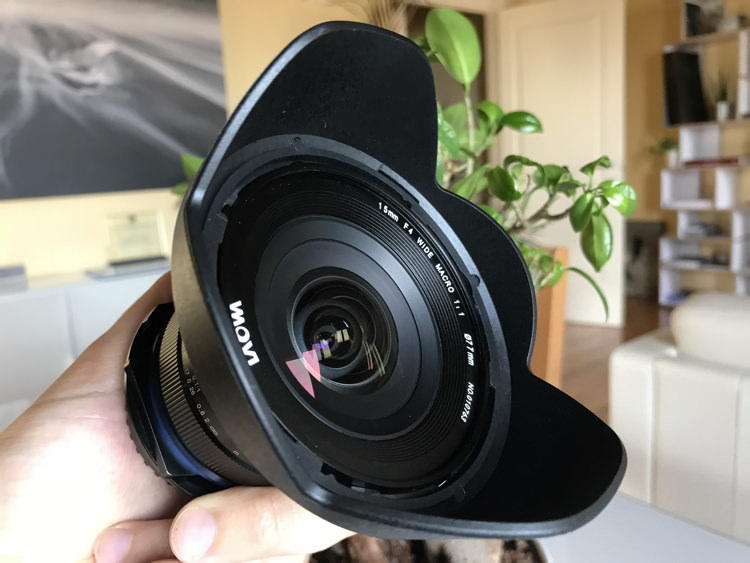
With regard to the focal length, this clearly is not the first 15mm lens available on the market. But it is the only one with a feature that has convinced me to test this lens in action – the 77 mm filter thread.

Review of the Venus Laowa 15mm F/4 Wide Angle 1:1 Macro Lens for Landscape Photographers - filter thread 77mm

The 77mm filter size is very handy!

Normally all wide-angle and ultra wide-angle lenses (usually 15mm is considered the boundary between those two worlds) have a front optical element that is particularly curved. They often come with a built-in lens hood that makes it impossible to mount filters, unless we resort to particular solutions. Ultra wide-angle lenses whose front lens is not so curved and without a built-in lens hood, usually come with a large diameter and it’s therefore impossible to find filter threads smaller than 95 mm.

Thanks to the absence of a built-in lens hood (it does have a bayonet one) and to the 77 mm filter thread, the Venus Laowa 15mm f/4 lens opens the door to using a tool that I deem absolutely essential for every landscape photographer – drop-in filters.

Review of the Venus Laowa 15mm F/4 Wide Angle 1:1 Macro Lens for Landscape Photographers

As I was saying above, with a lens that has a built-in lens hood or a 95 mm filter thread it is possible to use systems that can hold 150 mm filters. But with a 77 mm filter thread, you will be able to use the same system that you use on any other lens equipped with a filter thread up to 82 mm. In a word, it is priceless.

Shift Function

The last of the features coming with this multi-purpose lens is the shift function. Thanks to a lever mechanism positioned next to the lens mount, it is possible to shift the lens by +/- 6mm. Even if this function might not seem very interesting for landscape photography at first sight (after all a rock is always a rock), it turns out to be useful in case there are human artifacts, like buildings, within the frame.

Review of the Venus Laowa 15mm F/4 Wide Angle 1:1 Macro Lens for Landscape Photographers

Shift lever.

Review of the Venus Laowa 15mm F/4 Wide Angle 1:1 Macro Lens for Landscape Photographers

The lens in shifted position.

The lens in action

If this lens appears very promising on paper, despite a very moderate price, let’s see its actual real-world behavior.

I have tested the Venus Laowa 15mm f/4 lens with my trusty Nikon D810, a full-frame camera body.

Testing the filter mount

Since this is fundamentally the reason why I decided to try this lens, again thanks to the existing 77 mm filter thread, I quickly mounted my loyal Nisi V5 Filter Holder, which holds 100mm filters. Even if it is possible to mount the holder, the fear of vignetting is too high, considering that we’re talking about a 15mm lens after all.

Review of the Venus Laowa 15mm F/4 lens

Review of the Venus Laowa 15mm F/4 lens


Although the Nisi filter holder is guaranteed to be vignette-free up to a 16mm focal length, once mounted on the Venus Laowa 15mm the result was doubtlessly amazing. Vignetting was practically invisible, as you’re going to see below, and it’s possible to quickly remove it in post-production by activating the lens correction profile.

A little dream of mine was substantially coming true. The dream of using an ultra wide-angle lens, and adding up to three 100mm filters and a polarizer without vignetting!

Review of the Venus Laowa 15mm F/4 lens

Review of the Venus Laowa 15mm F/4 lens

Review of the Venus Laowa 15mm F/4 lens

Review of the Venus Laowa 15mm F/4 lens

The lens barrel

On the lens body (which is sturdy metal, not plastic) you find the focus and aperture rings, whose operations are smooth and precise.

On the aperture ring, I would have preferred a locking system or a snap selection so as to make sure that I never lose the desired aperture. But actually, I haven’t encountered any problems during real-world use of the lens.

The focusing ring is really precise, as well as the existing focusing marks, which allow you to focus using the hyperfocal distance in no time. Just for the sake of being fussy, I would have placed the metric indications of distance upside down, or a vertical line next to each distance, just to be really precise. But you simply have to check the photo you’ve just taken, so as to make sure you have got the desired focus.

Review of the Venus Laowa 15mm F/4 lens

Review of the Venus Laowa 15mm F/4 lens

Although the manufacturer does not formally advertise this lens as weather sealed, most of my tests have been carried out in the rain (just for a change!). I protected the lens using only an umbrella or makeshift means, and no problems were detected.

Results

When I examine the images, the results were really comforting.

Sharpness

Shooting at both f/8 and f/11, the image definition is really excellent in the center of the frame. Obviously, the image becomes softer the closer you get to the edges, but doubtlessly the result is much more than acceptable. If you try to use higher apertures, you can naturally start to see that optical phenomenon called diffraction. But, as good landscape photographers, we know that we can go past f/16 only for situations of extreme necessity.

Definition Center - Review of the Venus Laowa 15mm F/4 lens

Centre image sharpness.

Definition Center Low - Review of the Venus Laowa 15mm F/4 lens

Lower center of the image sharpness.

Definition Corner - Review of the Venus Laowa 15mm F/4 lens

Corner of the image sharpness.

Aberration and vignetting

There are no particular problems with regards to chromatic aberration with this lens. I mean, some chromatic aberration is there, but nothing that can’t easily be solved using the automatic chromatic aberration removal included in any post-production software.

Chromatic Aberration With - Review of the Venus Laowa 15mm F/4 Wide Angle lens

Chromatic aberration showing before correction.

Chromatic Aberration corrected - Review of the Venus Laowa 15mm F/4 Wide Angle lens

After the chromatic aberration has been corrected in post-production.

As for vignetting, as I said above, the problem is almost non-existent when using the 100mm Nisi filter holder. For me personally, this fact alone is worth the purchase price of this lens.

Distortion

It is worthwhile to talk a little about distortion. It is predictable that a 15 mm lens will have barrel distortion. To landscape photographers, this is not a great concern. As I said before, a little distortion on a rock will not invalidate your image, as an irregular rock will always remain an irregular rock. Unfortunately, though, barrel distortion will invalidate the only real line included in your landscape – the horizon.

Review of the Venus Laowa 15mm F/4 lens

The distortion caused by this lens to the horizon is of the “mustache” type, which doubtlessly is the most annoying kind. If when we take a first look at the live view this problem may give us some concern,

If this problem gives you some concern when you first notice it in Live View, as soon as you import the image into any post-production software the correction becomes really easy and immediate.

Unfortunately, at the present time, there is no automatic correction profile for this lens included in Adobe software (Lightroom and Photoshop). But the Venus Laowa technical support is very efficient and within a few hours, they emailed the correction profile that I needed. Once installed, one click was enough to do the job and the image automatically recovered from both distortion (completely removing the mustache horizon) and peripheral shading.

Distortion Original - Review of the Venus Laowa 15mm F/4 lens

Original

Distortion Corrected - Review of the Venus Laowa 15mm F/4 lens

Corrected

Conclusion

The Venus Laowa 15mm f/4 lens has really turned out to be a surprise, exceeding my expectations. Although it comes with a very moderate price, this lens really provides remarkable results in terms of image quality.

Once the lens distortion is corrected, the only thing that still needs attention is edge softness which is absolutely within acceptable values for an entry-level lens.

Construction quality is really remarkable and you can notice that as soon as you take the lens into your hands. Lastly, the possibility of using a 100mm filter holder makes this lens really priceless.

If you are a landscape photographer who is looking for an ultra wide-angle lens with a very advantageous quality to price ratio, then the Venus Laowa 15mm f/4 lens is undoubtedly what you are seeking.

Review of the Venus Laowa 15mm F/4 Wide Angle 1:1 Macro Lens for Landscape Photographers


PROS

  • Price
  • Ability to use a 100mm filter holder
  • Excellent sharpness in the center of the frame
  • Low chromatic aberration when not used at macro distances
  • Lens shift function
  • Lightweight and small

CONS

  • Manual focusing
  • Slight edge softness
  • Barrel distortion (but it can be solved in post-production without any problems)
  • Cosmetic appearance

The post Review of the Venus Laowa 15mm F/4 Wide Angle Lens for Landscape Photographers by Francesco Gola appeared first on Digital Photography School.


Digital Photography School

 
Comments Off on Review of the Venus Laowa 15mm F/4 Wide Angle Lens for Landscape Photographers

Posted in Photography