RSS
 

Posts Tagged ‘REVIEW’

Nikon Coolpix P1000 First impressions review

11 Oct

Four years ago, the typical superzoom ‘bridge’ camera had a zoom power of around 50x. Over the years that number has slowly risen, before leveling out at 65x. And then came the Nikon Coolpix P900, whose 83x, 24-2000mm equiv. lens suddenly took zoom ranges from ‘really long’ to ‘absurd’.

Nikon’s new Coolpix P1000 has moved the zoom needle to ‘ludicrous,’ with an equivalent focal length of 24-3000mm. That’s right, 3000mm. This is a lens so long that we were able to fill the frame with a 1 meter (3.3 foot) tall monkey that’s 2.3 kilometers (1.4 miles) away.

This does come at a cost, though. For one thing, the P1000 is huge and its lens is challenged by a slow maximum aperture (and thus diffraction) and image quality can be compromised by the same thermal and atmospheric issues that are typical of images taken at extreme focal lengths with any super telephoto lens.

Besides the lens, the P1000 features a 16MP 1/2.3″ BSI-CMOS sensor, a fully articulating LCD and high-res EVF, Raw support and the ability to capture 4K video.

Key features

  • 16MP, 1/2.3″ BSI-CMOS sensor
  • 24-3000mm equiv. F2.8-8 lens
  • ‘Dual Detect’ optical image stabilization
  • 3.2″, 921k-dot fully articulating LCD
  • 2.36M-dot OLED electronic viewfinder with eye sensor
  • Raw support
  • UHD 4K/30p video capture
  • Microphone input
  • Hot shoe
  • Wi-Fi + Bluetooth (SnapBridge)
  • 250 shots per charge (CIPA standard)

The P1000 has a spec sheet almost as long as its lens. From Raw support to a high-res EVF, the camera has just about everything you’d want in a bridge camera, save for decent battery life and a touchscreen (a glaring omission). Image stabilization is a requirement on superzoom cameras, and Nikon’s ‘Dual Detect VR’ reduces shake by up to 5 stops, according to Nikon. Being 2018, it’s no surprise that Wi-FI and Bluetooth are also onboard.


What’s new and how it compares

The Coolpix P1000 really is all about that lens.

Read more

Shooting experience

Find out what it’s like to use the P1000 at the Woodland Park Zoo in Seattle.

Read more

Sample gallery

View a variety of sample images from the Coolpix P1000.

Read more

Articles: Digital Photography Review (dpreview.com)

 
Comments Off on Nikon Coolpix P1000 First impressions review

Posted in Uncategorized


Review: Evecase Canvas DSLR Backpack

10 Oct

Awesome highlights of this wild career: taking photographs, hanging out with cool clients, and producing stunning imagery.

The not-so-fun part: transporting all the cameras, lenses and bits and bobs we need from point A to point B.

If you’re like me, you know that being able to carry all of our must-haves comfortably can make or break the work day. I’m always looking for better ways to lug my gear. So when I came across the Evecase Canvas DSLR Backpack I had to try it out.

The Evecase Canvas DSLR Backpack


Before we get into my opinion of this strappy carrying device, let’s take a moment to discuss what this backpack is about. According to Evecase it “features a customizable interior which can hold camera bod and 2-5 lenses, a laptop compartment that holds a 14-inch laptop, Chromebook or tablet, plenty of pockets, pouches and spaces for jackets, books, a tripod and other accessories. Rain or shine, wet or dry, the removable rain cover will give your backpack the best protection. Fashionable canvas design with discreet look that won’t stand out as camera backpack.

According to Evecase, the highlights include an easy-to-access camera compartment, discreet instant laptop access, and extended top storage. There are a slew of accessory pockets, tripod holder straps, stowaway side pockets and ergonomic shoulder straps.

Appearance

I won’t lie. The appearance of this canvas backpack is what piqued my interest in the first place. I always gravitate towards cases that don’t scream “Expensive camera equipment stored in here”, and this backpack is certainly inconspicuous enough.

This product is 15 x 12.5 x 7 inches , with the camera compartment being 9.6 x 11 x 4 inches.

The canvas fabric material has a subtle texture to it and is a rather pretty grey. The material is waterproof and weatherproof. (Well, generally. But it also comes with a waterproof case.) It looks like something you’d take on a camping trip or backpacking across Europe. The details are all black, and the color scheme can easily match whatever your style is. Much of my carrying devices and storage units are grey. (I like having all of my products match one another.)

The front of the backpack features a multitude of pockets and flaps, with bottle or beverage pockets that can be stowed away discreetly when not in use. The inside is lined with a light, slate grey that has a bit of a blue tint to it.

The backpack has a bit of weight when empty, but not enough to concern me.

Build Quality

The build quality is where other people’s reviews on this product get a little shifty. I’ve read many claims of it ripping at the seams or being rather fragile. But having used this Evecase product rigorously for more than a month, I haven’t experienced it myself.

The photography I do involves a lot of wear and tear on whatever I have with me. I photograph canine sports, exotic animals and live concerts. My daily dose of damage can include anything from animals biting my bags to a rowdy crowd unintentionally tearing at my stuff. After being put through the wringer for more than 30 days, this bag has managed to survive with almost no visible damage.

Even when it’s fully packed, I haven’t experience any ripping, tearing, or deformity of the compartments due to the weight. I even took it for a spin at the beach (being from California and all), and neither sand nor salty water caused much of an issue. Based on my experiences alone, I’d consider the build quality on this backpack to be great.

That being said, as with any product you own a bit of TLC goes a very long way in ensuring its longevity. I have weekly cleaning where I perform cleaning and basic maintenance on of my work gear. And backpacks, cases and other carrying devices are no exception.

Comfort

The main criteria for whether or not a backpack, sling, or any carrying device stays is comfort. After dueling against several alternatives, the Evecase Canvas DSLR Backpack is definitely staying.

I’ve worn this backpack fully stocked with supplies for around six hours, and suffered no significant discomfort or additional pain normally associated with carrying weight for such a long time. This being said, I feel the size of this backpack and where it suits my height (5’ 5”) brilliantly. Taller people may have an issue simply there’s no real way to adjust where this backpack sits. It would also be nice to have have more padding on the shoulder straps. I think I’ll  eventually mod the straps and add more padding, but if it came with some initially it would be even more rad. 

As for ease of access, I like the solid build of the camera compartment. I can easily balance the backpack on my knee as a table to help switch lenses or attach something to my rig. There’s a wonderful side pocket I can pull my laptop out of if I don’t feel like opening the top and reaching the computer from there. All of the small bits and bobs I might need are also easily accessible due to the various pockets on the front of the backpack, and the beverage pockets are also within a comfortable reach.

Storage

This backpack features plenty of storage for everything I could possibly need. Of my kit, at maximum, I can fit:

  • either:
    • three lenses (Canon 16-35mm F/2.8L USM II, Canon 50mm f/1.2L USM, and Canon 24-70mm F/2.8L USM II) and a camera body (Canon EOS 5D Mark IV)
    • two camera bodies (Canon EOS 5D Mark IV and Canon EOS 5D Mark II) and two lenses (Canon 50mm f/1.2L USM and Canon 24-70mm F/2.8L USM II)
  • my 13.5” laptop with its case on and a laptop charger
  • two variable ND filters
  • camera batteries
  • chargers
  • cards
  • lens cleaning kit
  • roll of tape
  • scissors
  • notebook
  • pens
  • contract / liability waivers / model release forms / non-disclosure documents
  • card reader
  • metal case of business cards
  • tripod
  • cellophane gel kit
  • my personal belongings (cell phone, portable cell battery, wallet, car keys, jacket, deodorant, makeup)
  • two water bottles
  • snacks.

That being said, a couple of the pockets in the front are a bit odd in the sense that I would have gone for something different. The size of the two small pockets in front of the camera compartment are a bit strange. The dividers inside them are a bit too large for some of the smaller electronics I’d put there, but too small for anything larger. I’d prefer them to mimic the one long pocket at the top of the backpack, as I currently have to dig deep into the dividers to pull out the small components I need to use. A couple of the flaps could make excellent pockets for paperwork or business cards, but instead they sit there as decorative elements.

Padding

The backpack features an acceptable amount of padding in both the camera and laptop sections. The camera section had significantly more padding than the laptop slot, and so I often store my laptop in its compartment with a secondary case already on it. Fortunately a secondary case fits just fine. The camera compartment includes your run-of-the-mill customizable dividers, so you can arrange that area to suit your needs.

Pros

  • Aesthetic and style
  • Not bulky
  • Comfortable straps
  • Plenty of storage space
  • Easy camera and laptop access
  • Waterproof case is a nice touch

Cons

  • Lack of confident padding in the laptop compartment
  • Some of the outer pockets are odd
  • Needs a better way of hiding tripod straps when not in use
  • Needs more buttons to the main compartment to customize size better
  • Forget about putting in a DSLR with the grip attached
  • Needs more padding on shoulder straps if you pack heavy

In conclusion, for between $ 40 and $ 60 on Amazon.com this backpack gives you a decent bang for your buck. I quite like it, and still get tremendous use out of it.

The post Review: Evecase Canvas DSLR Backpack appeared first on Digital Photography School.


Digital Photography School

 
Comments Off on Review: Evecase Canvas DSLR Backpack

Posted in Photography


DPReview TV: Canon EOS R review

07 Oct

Chris and Jordan have been shooting the EOS R for some time now, starting with the launch in Hawaii. Find out what they think of its still photo capabilities and its unique controls, and tune in for probably the first-ever video performance analysis from a swimming pool.

Get new episodes of DPReview TV every week by subscribing to our YouTube channel!

Articles: Digital Photography Review (dpreview.com)

 
Comments Off on DPReview TV: Canon EOS R review

Posted in Uncategorized


Canon EOS R First Impressions Review

04 Oct

The Canon EOS R is the first full frame mirrorless camera to use the new RF mount. It’s built around the same 30 megapixel Dual Pixel CMOS sensor as 2016’s EOS 5D Mark IV but is designed for a new series of RF lenses. Canon says the shorter RF lens mount will allow them to design better or smaller lenses than they can for the existing EF mount.

Being the first RF-mount camera, it’s not surprising that the EOS R occupies a unique new position in Canon’s lineup. In essence, you’re getting image and video quality from the 5D Mark IV at around the price point of the 6D Mark II with a healthy dose of control philosophy from both of those cameras as well as the EOS M series.

Key Specifications:

  • 30MP full frame Dual Pixel CMOS sensor
  • 3.69M dot OLED viewfinder
  • Fully articulated rear LCD
  • Autofocus rated down to -6EV (with F1.2 lens)
  • Up to 8 fps shooting (5 fps with continuous AF, 3 fps ‘Tracking Priority mode’)
  • UHD 4K 30p video from a 1.83x crop of the sensor
  • Canon Log (10-bit 4:2:2 over HDMI or 8-bit 4:2:0 internal)
  • USB charging (only using optional Canon charger)
Converted from Raw using ACR 11 and the Camera ‘Standard’ profile.
ISO 100 | 1/100 sec | F1.2 | Canon RF 50mm F1.2L
Photo by Wenmei Hill

The EOS R was announced less than two weeks after Nikon’s Z7, which itself is Nikon’s first full-frame mirrorless camera and is also designed around a new mount. Where Nikon makes a big deal about how immediately familiar the Z7 will be to existing Nikon shooters, Canon is incorporating some more radical ergonomic innovations on the EOS R – it handles unlike any existing Canon camera. Let’s take a closer look at what exactly those innovations are and how they work.

The Canon EOS R will be available from October 2018 at a cost of around $ 2,299 or $ 3,399 with the RF 24-105mm F4L IS lens.


What’s new and how it compares

The EOS R comes with a lot more than just a new mount. Read about the new features included on the EOS R.

Read more

Body and handling

The EOS R is Canon’s lightest full-frame camera, but remains weather sealed and has a full-size grip. Read about all of the EOS R’s ergonomic updates here.

Read more

First impressions

The EOS R comes with some surprising ergonomic updates that aren’t to everyone’s tastes, but its still capable of great image quality.

Read more

Sample gallery

View a variety of sample images from our final production EOS R.

Read more

Articles: Digital Photography Review (dpreview.com)

 
Comments Off on Canon EOS R First Impressions Review

Posted in Uncategorized


DPReview TV: Fujifilm X-T3 review

04 Oct

This week, Chris and Jordan share their assessment of a final-production Fujifilm X-T3 from the National Music Centre in Calgary. Find out what they think of Fujifilm’s latest X-Trans addition – and get a glimpse of the world’s largest analog synthesizer as a bonus.

Subscribe to our YouTube channel to get new episodes of DPReview TV every week.

Subscribe to our YouTube channel

Articles: Digital Photography Review (dpreview.com)

 
Comments Off on DPReview TV: Fujifilm X-T3 review

Posted in Uncategorized


Review: Peak Design Travel Backpack

03 Oct

Back in 2015, when my wife and I were looking for a bag she could carry her laptop and other work-related items in, we stumbled across a Kickstarter project for the Everyday Messenger from Peak Design. It wasn’t the cheapest option, but it looked like it would stand up to the wear and tear of daily use. And it looked like the company had put a lot of thought into making a solid bag that would meet her needs.

After a bit of research, and comparing it with other bags, we bought one. It was our first experience with Peak Design products. But it certainly wasn’t our last.

Photo of Peak Design's Travel Backpack

Photo courtesy of Peak Design

My wife, who is not a photographer, still uses it every day. In fact, we were so impressed with it that I bought their follow-up product – the Everyday Backpack – for myself.

I take it on my bicycle commute to work every day. I also use it to carry my camera gear when I shoot photos for clients. Its quality, usefulness, and thoughtful design touches are impressive, and illustrate how Peak Design made these products to suit photographers as well as everyday people.

When I found out Peak Design was expanding its offerings from everyday-style bags to a line of products that focus on travel, I was intrigued. The Messenger and Backpack bags have served my wife and I well over the years, and I was eager to see whether the Travel Backpack could live up to the legacy created by their other products.

Travel Backpack filled with camera gear.

The Travel Backpack isn’t specifically focused on photographers, but Peak Design has clearly kept photographers in mind with this bag.

Testing the Traveler

To thoroughly test the Travel Backpack I used it to carry everything I needed for a five-day, 1800-mile road trip up and down the midwest United States to see friends and family. I stuffed it to the brim with:

  • my camera
  • shorts, socks, shirts, and pants
  • my personal care items
  • a Nintendo 2DS XL
  • a host of chargers
  • an iPad for watching Netflix in hotel rooms.

It was tossed around in my car, loaded and unloaded multiple times, and hoisted up and down so many flights of stairs that I lost count.

It performed flawlessly.

I was immediately impressed at the level of design and consideration that went into the Travel Backpack. They’ve made dozens of tweaks and flourishes to every aspect of this bag that separate it from most run-of-the-mill carrying companions. It’s the attention to detail you’d expect with a bag of this caliber and price. The fabric is thick, the fasteners and clips are sturdy, and the zippers are easily accessible. It’s got pretty much everything I wanted in a travel container, as well as some things I didn’t even realize I was looking for.

Photo courtesy of Peak Design

When I returned my wife, who’d recently attended a work conference on the East Coast, said she wished she’d had the Travel Backpack instead of her usual carry-on suitcase. And I’d say the same would hold true for just about anyone. We have a nice set of luggage that works just fine, but having used the Travel Backpack I’d rather take it over our other travel gear.

Pockets, Pockets Everywhere

The Travel Backpack is big enough to hold everything from cameras and clothes to shoes and shower items, yet small enough to fit in an airplane carry-on cargo hold. Pockets abound in the Travel Backpack, with every nook, cranny, corner and flap having a cavity or pouch tucked away for all manner of trinkets, tchotchkes, memory cards and power cables.

The well-padded shoulder straps can be tucked away beneath thick flaps that snap shut with a satisfying magnetic click. When the bag is zipped up and read to be tossed into a trunk or overhead airplane bin, additional pockets on the sides let you get to your essentials at a moment’s notice.

Photo courtesy of Peak Design

Of course, all those extra are useless if you can’t get to them easily. Thankfully the Travel Backpack gives you plenty of ways to get to your cargo. The back of the unit (the part that you actually carry on your shoulders) unzips and folds back to reveal the entire contents of the pack, leaving nothing hidden or tucked away behind recessed side panels. In a nod to the Everyday Backpack, the sides unzip so can grab something quickly without having to open up the entire bag. And the front zipper lets you access a separate portion of the bag, which can be useful for stowing laptops, tablets, notebooks and other thin items.

One of the hallmarks of the Travel Backpack is how you can tweak and change it to suit your needs. Want more space? Gussets on the front unzip so you can stow significantly more cargo. Need less space? You can squeeze the bag down to a more manageable size by collapsing the top with two convenient snaps. Don’t need  the shoulder straps? Tuck them away behind the magnetic flaps to keep them out of your way.

A tall thin pocket runs from top to bottom on the inner back flap for stowing super thin items, with another pocket inside it. Or you can keep the pockets closed with the Velcro attachments and ignore them altogether.

Whatever you want to bring, there’s probably a pocket to hold it. Photo courtesy of Peak Design.

If you simply want a massive, cavernous, well-designed duffel bag, unzip the divider separating the small front portion from the spacious main portion to create a single massive chamber that can hold just about anything.

This illustrates the many ways the Travel Backpack would be great for just about anyone on the go.

Sweating the Details

Peak Design has incorporated a number of small details in this bag that make it ideal for travelers. Interlocking external zipper straps discourage unscrupulous tourists from swiping your gear. Attachment points on the inside give you convenient locations to strap down your items so they don’t move around. Handles on the top, bottom, sides and back let you carry the Travel Backpack in whatever way suits your needs. And the entire product is just the right size to fit neatly into an airplane overhead bin.

Photo courtesy of Peak Design

The all-round build quality is astounding, just as I’d expect after owning two other Peak Design bags for several years. And no, I’m not being paid to say this. I was a K-12 teacher for five years, and completely wore out several bags inthat time. Let’s just say I can tell a cheaply made bag when I see one, and the Travel Backpack is anything but.

The outer shell is made from thick Kodra fabric, which feels tough and sturdy while still having a degree of flexibility that lets the bag squish and stretch as needed. The main zipper is thick and chunky, and all zippers are hidden beneath long thin flaps that, presumably, providing a degree of weatherproofing and  a sense of security. A casual observer probably wouldn’t even see them.

Even though I wasn’t exactly gentle with the Travel Backpack on my road trip, five days isn’t nearly enough time to assess long-term durability. For that I look to my Everyday Backpack and Everyday Messenger which, after years of near-daily use, barely show any signs of wear and tear. I’d expect no less from the Travel Backpack. Admittedly some of the inner pouches and flaps don’t have the same degree of thickness, but it’s nothing I’m worried about. Peak Design products have a lifetime warranty, so if anything did fail it would be taken care of by the manufacturer. It’s nice to see a company willing to stand behind their products like this.

Photo courtesy of Peak Design

While the Travel Backpack itself is highly useful, customizable and durable, it really excels when paired with accessories such as the Tech Pouch, Wash Pouch, Camera Cube and Packing Cubes. These are optional, but highly recommended if you have specific use-case scenarios in mind, such as carrying cameras and lenses with your clothes and toothbrushes. These accessories are designed to fit inside the Travel Backpack and, in the case of the Camera Cube, include mounting points and special hardware to ensure minimal movement and shuffling around.

If you want to use the Travel Backpack for carrying camera gear, you will definitely want to get the optional Camera Cube. Photo courtesy of Peak Design

The Camera Cube is specifically designed to fit the needs of people who carry cameras and lenses. It comes in three sizes – small, medium and large – with each one using Velcro dividers to create spaces to hold your gear. While other bags use similar systems, the flex-fold dividers used by Peak Design can be folded and reconfigured to a greater degree than I’m used to seeing.

Apart from the Camera Cube, my favorite packing accessory was the Tech Pouch. It help every electronic item I brought with me (other than my iPad), and neatly stowed all my cables, chargers and game cartridges too. It stands upright when open, revealing the entire contents and giving you instant access to anything inside. The Wash Pouch is fine for holding toiletries for a single person, but if you’re traveling with a companion don’t expect everything to fit in a single pouch.

The Camera Cube is secured in place by sturdy anchors you can detach. But they’re a bit tricky to operate, and constantly inserting and removing the Camera Cube can be frustrating, especially if you have larger fingers.

More of a curiosity are the Packing Cubes, which hold clean and dirty clothes. They do a good job, but I’m not sure they’re worth the price when you can do essentially the same thing with a plastic bag. But to be fair, plastic bags aren’t made of lightweight breathable fabric, nor do they have zippers to close them up tight.

Travelers, Photographers, and Photographers Who Travel

At this point you might be asking what all of this has to do with photography. After all, Peak Design has been designing straps and clips and cases and bags for photographers since the company was founded.

But the Travel Backpack is unique in their lineup. While it’s certainly useful for photographers, particularly with the Camera Cube, it’s designed to fit the needs of anyone who finds themselves on the road and need a durable, versatile, customizable solution to carry their stuff.

The 45L Travel Backpack compared to my 35L Everyday Backpack, with a DSLR and 70-200 lens for scale.

If this sounds like you, and you regularly carry cameras, lenses, filters, spare batteries, small tripods and other items, you’ll be pleased with the Travel Backpack providing you also buy the Camera Cube. But if you need a bag specifically designed to carry camera gear to gigs, or just a versatile all-in-one carrying solution, the Travel Backpack may not be for you. For those situations you might want something smaller, such as the Everyday Backpack or another bag that isn’t quite so bulky.

And therein lies the rub. While the Travel Backpack is an outstanding product, it’s hard to unequivocally recommend this bag because its usefulness depends on your expectations and how you use its many features. If you’re frequently on the move and need to transport a lot of camera gear, clothes, electronics, or even everyday items then the Peak Design Travel Backpack will definitely suit your needs. It surpasses almost every other small suitcase, backpack and carry-on luggage – and then some. I can’t think of a scenario where the Travel Backpack wouldn’t be ideal if your goal  involves traveling.

Photo courtesy of Peak Design

As a daily multipurpose bag for schlepping cameras, lenses, lighting, clothes, documents, laptops or anything else of that nature, another product would more likely suit your needs. It’s sheer size precludes it from being a solid solution for students. And even though the top snaps to reduce its overall size, it’s still too big for photographers who need to transport a few cameras and lenses around town. But if you have a lot of camera gear the Travel Backpack, combined with a large-sized Camera Cube (which almost takes up the backpack’s entire available packing space), could be the solution you need.

Another issue is the price, and I’d be the first to admit the Travel Backpack isn’t the cheapest option on the market. The MSRP for the backpack alone is $ 300, and that doesn’t include any pouches, camera cubes or even a rain fly, all of which can drive up the cost significantly. If you’re used to carrying your clothes and camera items around in a $ 30 duffel bag, you might balk at the idea of spending ten times as much for something that, in some ways, isn’t much different.

Snaps at the top allow the bag to shrink in size, but it’s still pretty large and cumbersome for everyday usage.

But when you see how the Travel Backpack is so much more than a duffel bag, along with the quality of the materials, the care and attention to detail, and the way it’s designed specifically to meet the needs of busy people on the go, you might think twice. When I think about the ways my Everyday Backpack and my wife’s Everyday Messenger have come through for us over the years while showing hardly any signs of wear, and compare it to our many bags that have disintegrated, broken or fallen apart, the price of a Peak Design product starts to make more sense.

I’m a big fan of the Travel Backpack, and I hope you can see why. If you’re frequently on the road or in the air, this bag will suit your needs impeccably, especially when used in tandem with the Camera Cube, Tech Pouch, Wash Pouch and Packing Cubes. I have a closet full of duffels and suitcases to carry things on trips. But if I had to pick one bag for my travel needs, it would certainly be this one.

Durability: 5/5

Flexibility: 5/5

Cost: 4/5

Overall Rating: 5/5


The post Review: Peak Design Travel Backpack appeared first on Digital Photography School.


Digital Photography School

 
Comments Off on Review: Peak Design Travel Backpack

Posted in Photography


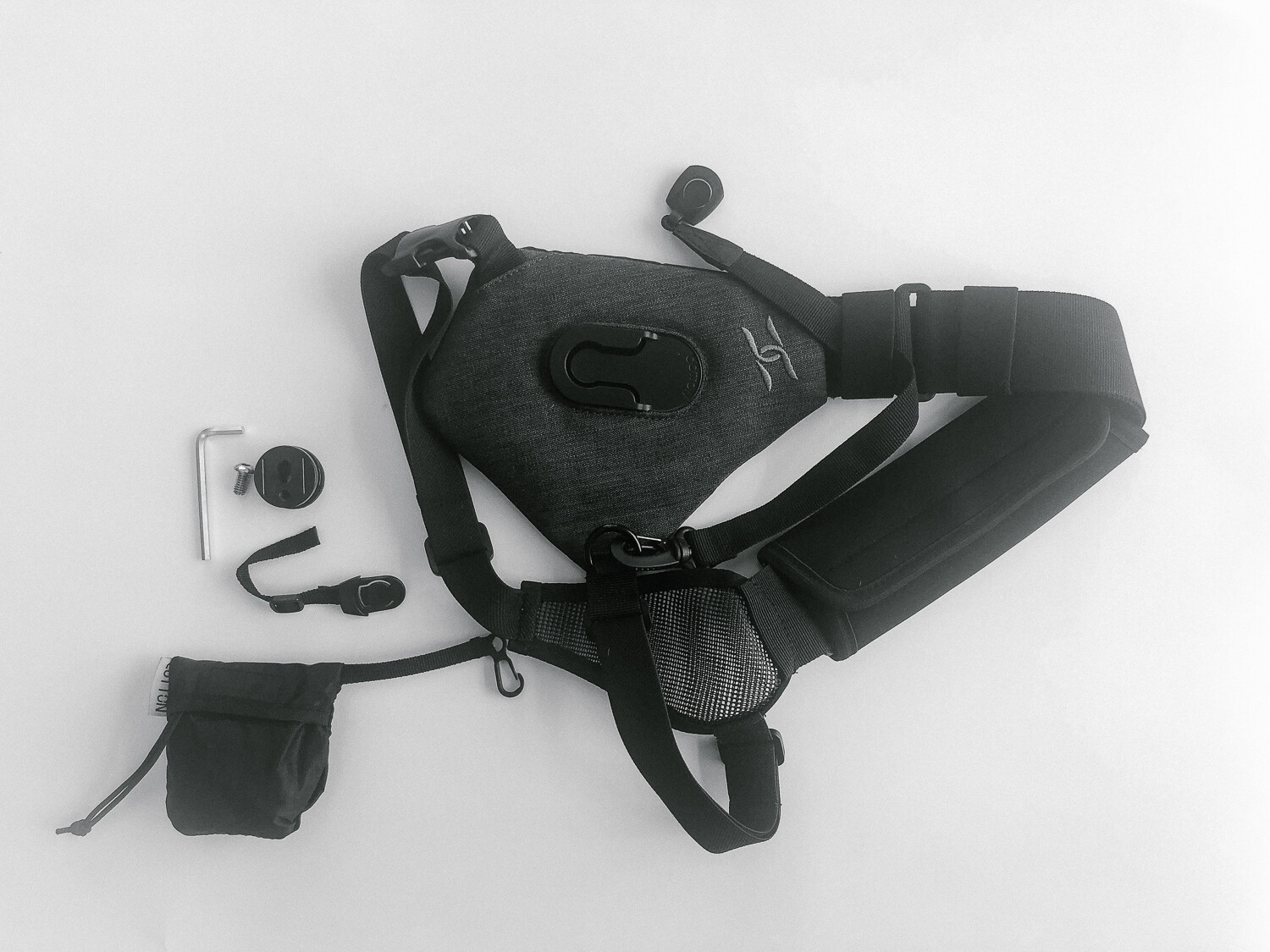
Review of the SKOUT Handsfree Camera Carrying System by Cotton Carrier

01 Oct

If you want an alternative to using the regular camera strap for hiking or walking around town type of activities, then this review is just the thing for you! Read on to find out about the SKOUT Handsfree Camera Carrying System and whether it will suit your needs.

Review of the SKOUT Handsfree Camera Carrying System

A couple of weeks ago, I had the opportunity to review the SKOUT handsfree camera carrying system by Cotton Carrier during a backcountry camping family trip in Colorado’s Rocky Mountain National Park over a period of five days.

To say I was impressed with the performance and comfort of the SKOUT would really be an understatement. I was super impressed with the way Cotton Carrier’s handsfree system worked. It actually held up really well over 30 miles of hard terrain for the duration of the entire trip.

If you have ever been hiking in the mountains, especially the backcountry, you know that total weight and back comfort are very high on the list of priorities for any hiker. I have broken down my review of the Cotton Carrier in terms of the following factors.

Review of the SKOUT Handsfree Camera Carrying System

The first day of the hike was without the SKOUT carrier and just using the camera strap around my neck. I was uncomfortable and the strap was so annoying to hold especially after 2-3 hours of a tough incline hike.

Review of the SKOUT Handsfree Camera Carrying System

A much happier me with the SKOUT sling on a day hike. Being handsfree was the best part.

#1 – Ease of use

The SKOUT design is a one-size fit all solution for almost any camera and lens attachment. I used it with my Canon 5D MKIII and 16-35mm L lens as well as the 24-70mm L lens. The first setup with the 16-35mm lens was definitely lighter than with the 24-70mm lens. But with both lenses, the sling held up really well.

The side-strap provided the support needed and balanced the weight effectively. Since I was already carrying a heavy camping pack on both my shoulders, the side strap ensured the camera was well balanced on my back. I was really impressed with the SKOUT’s patented “Twist & Lock” mount that attaches and detaches the camera from the anodized aluminum hub with a simple twist.

I have to admit I was a little nervous the first few minutes after attaching the camera to the SKOUT, being completely handsfree. But my body and my back quickly adjusted to the freedom and I loved not having to constantly pull up the camera strap from my shoulders while walking and hiking in the rough terrain.

Hidden inside the system is an internal stash pocket that fits a phone or a few credit cards. There’s also a rain cover/ weather guard so the gear stays safe and dry in less than ideal environments. I actually ended up using this a couple of times during my hike when we got caught is a mild downpour in the moutnains.

#2 Comfort

Attaching the SKOUT was fairly simple. After wrapping it over one shoulder, there is a single strap that wraps around the torso and snaps into place on the front, securing the entire system. The shoulder strap is really padded well, so even heavier camera systems don’t put too much stress on the body.

Review of the SKOUT Handsfree Camera Carrying System

The bracket attaches right where you would attach your tripod insert.

Review of the SKOUT Handsfree Camera Carrying System

The bracket then connects to the sling body with a twist and turn and it is quite secure.

Review of the SKOUT Handsfree Camera Carrying System

The crossbody sling with the camera attached to it along with the rain cover.

The cotton fabric is very breathable. I was hiking for almost 5-6 hours every day on some pretty rough terrain. Yet the shoulder and body straps were soft and did not rub against my back. The padding on the shoulder straps is thick and really does support the camera weight across your shoulder nicely.

#3 Durability

Like I mentioned earlier, I used the SKOUT camera sling system over a span of 10 days in the mountains of Colorado. I used it on backcountry hiking days as well as day hikes in Rocky Mountain National Park.

After the first few minutes of figuring out how to attach the camera and secure the system in place, I really forgot it was even on my body. I absolutely enjoyed being handsfree and having the camera readily available to snap a photo when I saw a beautiful landscape or wildlife.

No more taking the camera out of the daypack and risking missing the moment. The straps, the clasp, and even the camera attachment held up really well to some rough use during my trip.

Here is a video of the SKOUT handsfree camera system in use during my trip.

?

Conclusion

All in all, I would definitely rate this product a 9/10 and highly recommend it for anyone looking to do photography on a trail or during a backcountry hiking/camping trip.

It is easy to use, comfortable to wear for extended periods of time and seems reliable even after some rough use in the outdoors.

The post Review of the SKOUT Handsfree Camera Carrying System by Cotton Carrier appeared first on Digital Photography School.


Digital Photography School

 
Comments Off on Review of the SKOUT Handsfree Camera Carrying System by Cotton Carrier

Posted in Photography


Review: Peak Design Everyday Backpack 20L

24 Sep

If you’re on the hunt for a stylish camera backpack, look no further than the Peak Design Everyday Backpack. Peak Design is well known for supplying photography accessories that not only look good but function extraordinarily well. The Everyday Backpack is no exception.

Despite being designed for photographers, the Everyday Backpack doesn’t look like a camera bag. This acts as both a deterrent to potential thieves, but also makes the backpack great for use even if you’re not intending to fill it with camera gear.

There are many reasons to use the Everyday Backpack, but unfortunately, it’s far from perfect. In fact, there are some quirks that could make an unideal bag for you. Read on for my take on what’s great about this bag, and what needs to be improved.

Peak Design Everyday Backpack Camera Laptop Bag - woman with backpack on

Why the Everyday Backpack?

First off, here’s how this backpack ended up in my camera bag collection. I’ve spent 7 years carrying my camera gear in a Think Tank Retrospective Messenger Bag and hauling a separate laptop bag. It was a lot to carry, and I wanted to consolidate my gear into a single bag. A backpack was key to balance weight, but most backpacks are too bulky.

Until recently, the InCase DSLR Pro Backpack had been my camera and laptop backpack of choice. It’s incredibly comfortable and spacious and was great when I was shooting primarily with Canon DSLRs. But when I switched to Sony mirrorless cameras, I wanted a smaller backpack. Enter Peak Design!

Here’s a quick video overview.

?

Pros

Stylish Design

True to its name, this backpack is full of stylish design touches that truly stand out. Composed of several different materials including leather handles, anodized aluminum clips, and weather-resistant fabric, there is lots of visual appeal to the Everyday Backpack.

During my one month of traveling with this backpack from California to Florida, I’ve had multiple people stop me on the street just to inquire about the bag.

Peak Design Everyday Backpack Camera Laptop Bag

Sturdy, weather-resistant material

The Everyday Backpack is composed mainly of a weatherproof nylon canvas shell. It’s a nicely textured fabric, and it’s available in four different colors (black, tan, ash and charcoal). The two zippered side pockets are also reinforced with weatherproofing material, preventing liquid from entering. As a result, this bag is reasonably weatherproof without having to put a protective coat on it.

Flexible dividers for safely stowing gear

Inside the backpack are three of Peak Design’s FlexFold Dividers. These unique dividers aren’t flimsy like the ones you find in most camera bags. Instead, the FlexFold dividers are quite rigid, giving you peace of mind that your gear is being protected and not rattling around when being transported. Best of all, these dividers can also fold down to secure your gear and give you an added layer of space for stowing extras such as a small monopod or tripod.

Peak Design Everyday Backpack Camera Laptop Bag

Side zippers for easy access to gear

Unlike conventional backpacks that only give you access from the top, the Everyday Backpack gives you three points of entry. You can access your stuff from the top via the MagLatch flap, or from the two zippered side flaps.

This helps you better organize your gear and find it without having to rummage through the entire bag.

Peak Design Everyday Backpack Camera Laptop Bag

Lots of pockets for stowing gear

Besides the main compartment, the Everyday Backpack has several extra internal spaces. Each side flap is lined with a spacious internal pocket for storing small accessories like batteries and memory cards. Within the MagLatch flap, there’s also a small magnetized pocket that’s the perfect size for sticking your keys or wallet (be careful you don’t demagnetize your bank cards though!) for quick access.

On the outside, there’s a separate laptop compartment and two expandable side pockets. Finally, the back panel slightly detaches to allow for the backpack to slide easily onto a luggage handle, but I like using this area to secure bulky items like a reflector.

Peak Design Everyday Backpack Camera Laptop Bag

Discrete carrying straps

Thankfully, the Everyday Backpack comes with straps to help you carry heavy loads or bulky items. Specifically, there is a chest strap, waist strap, and tripod straps. All the straps are quite thin and easily tuck into the bag’s external pockets when not in use.

In practice, the chest strap does come in handy, but the waist straps are too thin and not padded, making them uncomfortable. The tripod straps are quite sturdy and reliable, but I find very few instances when I want to add the weight of a bulky tripod to this bag. More on that below.

Peak Design Everyday Backpack Camera Laptop Bag

Zippered pocket inside the side panels, very handy for small items.

Cons

All in all, the Peak Design backpack looks great and functions really well. But there are some problems that arise mainly when the bag is packed to capacity.

No wiggle room for extra gear

If you’re like me, your camera bag is often stuffed to the seams with gear. Most camera bags are built with expandable sections so you can add a few extra items to your bag. This is not the case with the Peak Design bag. It’s designed to snugly hold a set amount of gear.

From then on, there’s really no room to throw in extras. This is due mainly to the fact that the bag’s material is really rigid, probably to add support and protection to your gear but at the expense of flexibility.

The backpack is really uncomfortable when too heavy

At the expense of looking pretty, the Everyday Backpack fails at one basic thing: making the back panel and backpack straps consistently comfortable. Both the back panel padding and straps are rigid and they cut into your back and shoulders when the bag is heavy.

This isn’t a problem if the bag isn’t weighed down with tons of gear. But it’s unwearable for long periods of time when filled with too much gear.

Compromise – use this backpack with a belt pack

Since the backpack is comfortable when not packed to the brim, my compromise has been to use the backpack in conjunction with the Think Tank waist pack. The belt pack is typically what I’ll wear during shoots anyway, so I stick my extra lenses and flash in the belt pack.

My camera body, laptop, and computer accessories go into the Peak Design bag. I simply carry them both to shoots. So far it’s been a much more comfortable way to carry my gear without feeling too bulky or weighed down.

Peak Design Everyday Backpack Camera Laptop Bag

Zippers tend to slide open if not secured

Another problem that results from the backpack being too full is that the side zippers tend to slide open. Luckily, Peak Design did supply a solution. All zippers are equipped with little black loops that can connect to each other and prevent accidental spills.

Peak Design Everyday Backpack Camera Laptop Bag

Not possible to lock or secure bag when not in use

One of the key points of the Everyday Backpack is the “revolutionary closure system” called the MagLatch. According to Peak Design, it is the only bag closure system that is “no-lock, one-handed, quiet, and secure.”

In practice, the MagLatch is a unique way to quickly access to the top section of the backpack. But the fact that the MagLatch doesn’t lock makes the bag questionably secure. I wouldn’t leave this bag unattended since there’s nothing to prevent a thief from reaching in.

Peak Design Everyday Backpack Camera Laptop Bag

Expensive

At $ 259.00 a pop, there’s no denying that this a pricey purchase. Compared to the myriad of comparable camera laptop backpacks out there, this backpack might seem too expensive. However, the Peak Design Everyday Backpack truly has a standout design and high-quality design touches that could justify the price.

In Conclusion

The Peak Design Everyday backpack is a truly stylish bag with some great features. I use the backpack often when carrying mirrorless camera gear around and absolutely love it. But if you plan to carry heavy camera gear or stuff this bag to capacity, consider another backpack such as the Incase DSLR Pro Pack for a more comfortable experience.

The post Review: Peak Design Everyday Backpack 20L appeared first on Digital Photography School.


Digital Photography School

 
Comments Off on Review: Peak Design Everyday Backpack 20L

Posted in Photography


Review: Peak Design Everyday Sling 10L, a solid but pricey pack

13 Sep

Peak Design Everyday Sling 10L
$ 149.95 | PeakDesign.com

Peak Design’s Everyday Sling 10L.

It seems almost impossible to talk about camera carrying options without mentioning Peak Design. I use the brand’s Everyday Backpack to carry all my gear when shooting events like multi-day music festivals. But when carrying everything isn’t necessary, the Peak Design 10L Sling has become one of my favorite bags.

It combines the sensibilities of traditional camera shoulder bag with the stylish and sleek design elements that Peak Design has become known for. The 10L comes in at $ 149.95 and is available in three color options including Ash, Charcoal and Black (we reviewed Black). There’s also a $ 99.95 5L option which I’ll come back to later.

Specifications

  • Interior volume: 10L
  • Exterior dimensions: 16 x 9 x 5.5in / 40 x 23 x 14cm
  • Tablet/laptop sleeve size: 12.5 x 8.65 x 0.75in / 32 x 22 x 2cm
  • Weight: 1.5lbs / 680g

Compared to other bags

It’s worth noting that the price tag – as with other Peak Design products – is on the high side. Ruggard, for instance, sells a similarly-sized bag for about $ 55. In fact, before I got the sling, I was using an older model of this Ruggard bag and it served me extremely well for several years with few issues. That being said, comparatively, Peak Design’s bag offers a much more rugged construction and MUCH more weather resistance. It also looks a lot nicer in my opinion.

Compared to the similarly-priced MindShift Exposure bags, Peak Design’s sling looks distinctly less like a camera pack and more just like a cool bag. Options like ThinkTank’s Retrospective series feel a bit flimsier and less protective than the Peak Design Sling, while their style-focused Signature series cost quite a bit more for the same size. And both of those options weigh nearly twice as much as the Peak Design.

Design and construction

A look inside the Pea Design Sling.

Like every Peak Design product, this bag feels very sturdy. The weatherproof 400D nylon canvas exterior is protective and easy to clean. The two outer zippers have weather sealing and all the exterior hardware is made of anodized aluminum offering strength while maintaining a light weight. The interior ‘poly-spun mixed twill’ material is soft to the touch. And the high density EVA foam Flex-Fold dividers we’ve come to know and love continue to feel protective and secure, while offering versatility.

These Flex-Fold dividers are similar to those included in other Peak Design packs. The bag ships with 2 dividers which open up like origami, allowing for multilevel storage.

In use

When it comes to usability Peak Design has made their reputation around listening to the needs of those photographers buying and using their gear. This bag exemplifies the company’s approach. It can fit many varieties of camera and lens combinations comfortably and ultimately that’s what you’re buying here: a sling that you can mold and adapt to whatever system makes sense for you.

It can fit many varieties of camera and lens combinations comfortably… and can mold and adapt to whatever system makes sense for you

For me, I usually carry a full-frame DSLR body with 2-3 lenses. I can pack the Everyday Sling 10L with a Nikon D750, 28-70mm zoom, 35mm F2 prime and 50mm F1.4 prime and still have some room left over for additional pieces. The Peak Design website shows the bag with a full-frame body and 70-200mm zoom, but in my experience a lens that large on a body doesn’t fit very well.

The bag also includes two anchor points for Peak Design’s Capture Clip system, though that system makes a lot more sense attached to the shoulder strap of a backpack than it does on the side of a sling.

Here’s a look at one of my setups (Clockwise from top left): 20mm prime lens, Nikon D750 w/ 28-70 2.8 attached, Nikkormat FTN with 24mm Prime, memory card case, Moleskine notebook.

Accessory-space-wise, you’ve got an interior zipper pocket on the inside of the “lid” that can fit cards, hard drives, filters or spare batteries. While this pocket is spacious, it’s still limited mainly by the fact that you need to be able to zip close the lid, so you can’t really pack it with a ton of stuff.

…getting the zipper around the corners of the lid flap can be a little tough/awkward

Speaking of the zipper, one of my few complaints with this bag is that getting the zipper around the corners of the lid flap can be a little tough/awkward. This might be due to the way I’m wearing the pack at my side – it also might loosen up and be easier to close over time.

For more accessory space, there is a front zipper pocket (see below). According to Peak Design’s website this pocket “holds jackets, snacks, and other everyday carry.” I think jackets is a bit of a stretch but I’m sure if you had the right jacket and the elbow grease you could get it in there, but you’d suddenly have a much bulkier bag. Still, this pocket is really useful to separate your non-camera oriented things such as wallets, passports, pens, chapstick, snacks, etc.

One of my favorite parts of this bag is that it can fit very snugly on my back. I’m fairly skinny but tightening the strap allows me to wear it flush against my body regardless of how much weight I have in it. That being said I can also loosen the strap quite a bit and wear it more like a messenger bag at my side.

A ‘quick adjuster handle’ (see below) allows you to make the transition between these two modes – it works really well but does feel a bit flimsy. It doesn’t really “hard” lock the strap and though I haven’t had any issues with it yet, if there was something that was going to break on this bag, I’d expect it to be this piece. For more permanent strap adjustments you simply adjust the strap tail where it meets the bag.

The ‘quick adjuster handle’ makes it very easy to change the length of the strap, but we worry about its longevity.

There are also two adjustable straps on the front of the bag that can be loosened too to cradle a tripod/other items or cinched to compress the outer accessory pocket. I wouldn’t recommend using the straps to carry a tripod though as it really limits the comfort of the bag.

What’s the bottom line

The rugged exterior of this bag is durable and weather resistant.

This bag does have two things missing that I’d love to see in future iterations. First, a quick releasing option for the lid. Most Peak Design bags offer a MagLatch for easy and fast access to your gear, a nice alternative to constant unzipping and re-zipping. Secondly, I’d love to see some kind of metal carabiner attachment options on the sides of the bag (near the Capture Clip anchor points). The main reason for this is that there isn’t really a good place on this bag to carry any sort of water bottle and something as simple as a carabiner-ready loop would make solving that problem very easy.

This bag really does a great job at filling the needs of everyday shooters and travelers while maintaining style and comfort

This bag really does a great job at fulfilling the needs of everyday shooters and travelers while maintaining style and comfort. I find that when I’m going out with the intentions of shooting, this bag is my first choice. The only time I choose the Everyday Backpack instead is on days that I need to bring a wider range of options to a shoot (such as a full day wedding shoot requiring multiple lenses, flash, etc.).

If you shoot mirrorless the 5L Everyday Sling may be a good option as well though, I wouldn’t recommend it as a primary shooting bag if you’re using any full-frame DSLR or similar sized camera (My Hasselblad fits great in the 10L!)

What we like

  • Comfortable
  • Lightweight
  • Compact
  • Customizable and expandable
  • Stylish

What we don’t:

  • A little pricey
  • Zippers can be tough to close
  • Quick adjuster handle a little flimsy

Articles: Digital Photography Review (dpreview.com)

 
Comments Off on Review: Peak Design Everyday Sling 10L, a solid but pricey pack

Posted in Uncategorized


Light Review: The PiXAPRO CITI600 Portable Strobe (Godox Wistro AD600BM)

12 Sep

In this review, I’ll put the PiXAPRO CITI600 portable strobe (also called the Godox Wistro AD600BM) through the paces and give you my thoughts on it.

Despite the innovations to all manner of photography equipment, studio strobes haven’t changed much in the past few decades. Sure, a handful of features get added here and there every once in a while, but for the most part, you know exactly what you’re getting: a powerful light source with a very short duration that is plugged into an electrical outlet.

But this has changed in the past few years. Manufacturers have begun to incorporate features like batteries, TTL (through the lens metering) compatibility and high-speed sync into their strobes. These features make the humble studio strobe more useful and more versatile than ever.

Light Review: The PiXAPRO CITI600 Portable Strobe (Godox Wistro AD600BM)

The PiXAPRO CITI600 is the Godox Wistro AD600BM rebranded for the UK market.

The PiXAPRO CITI600 does all of these things. The CITI600 is a battery powered strobe whose features include high-speed sync and TTL metering (through the use of a separate camera mounted trigger).

Rebranded

Pixapro is Godox rebranded for the UK market. The CITI600 is the same product as the Godox Wistro AD600BM. The only difference is that the battery can be safely charged via a 220v power outlet.

High-Speed Sync

Light Review: The PiXAPRO CITI600 Portable Strobe (Godox Wistro AD600BM) - outdoor portrait

High-speed sync allows you to better control how your ambient and strobe lighting mix together.

If you own a speedlight, you are probably already familiar with high-speed sync (HSS). In short, HSS allows you to sync your flash with your camera at significantly faster shutter speeds than normal.

Doing so provides you with the means to overpower the sun on bright days, easing the effects of harsh lighting. It also allows you to darken backgrounds and use larger apertures to obtain a shallow depth of field in situations that you would normally be relegated to small apertures such as f/11 and f/16.

Because of the small size and limited power of speedlights, HSS has always been a bit of a specialist technique. However, put that functionality into a high powered strobe with a large modifier mounted to it and those limitations disappear. This opens up a world of new possibilities for you.

Battery Powered

outdoor portrait setup - Light Review: The PiXAPRO CITI600 Portable Strobe (Godox Wistro AD600BM)

No cords and no generators make the Citi600 as portable as possible. If you’re willing to carry it, you can have a high powered strobe wherever you want.

Even without HSS, it has always been possible to use studio strobes to great effect outdoors. The limitations, however, made it impossible for most photographers. Because strobes are electrically powered, to take them on location, you need external battery packs or generators.

Both of these things were/are expensive and difficult to lug around. With the inclusion of a high capacity battery in a strobe, these concerns disappear and your strobe can now go virtually anywhere a speedlight can.

TTL

Light Review: The PiXAPRO CITI600 Portable Strobe (Godox Wistro AD600BM)

TTL metering makes mixing ambient light and artificial life much, much easier.

Through the lens metering (TTL) allows your camera to take a meter reading and relay that information to your strobe, making it much easier to mix flash with ambient lighting. It’s not perfect and won’t likely ever be, but in a pinch, TTL metering can make getting a good exposure quick and easy.

For example, if you are on location and you know that you want a dark background with a well-exposed subject, you could set your camera’s exposure to underexpose the ambient by two stops and fire the strobe at whatever the meter is reading. Fine tuning the strobe’s exposure can be as simple as dialing in a few stops of exposure compensation on your trigger.

PiXAPRO CITI600 – Godox Wistro AD600BM

Light Review: The PiXAPRO CITI600 Portable Strobe (Godox Wistro AD600BM)

Combined, these three features take the already versatile studio strobe to a whole new plane of utility and the PiXAPRO CITI600 with the ST-IV trigger does a fantastic job of it. In the months that I’ve owned mine, I can attest that the HSS functionality works perfectly without flaw.

On top of that, there are a few other things worth discussing.

Specs

As you’d expect from a modern, feature-laden strobe, the spec sheet for the CITI600 (Godox Wistro AD600BM) is rather impressive. There’s no need to bore you with the full specs, but some notable highlights include:

  • A guide number (GN) of 87m @ ISO 100
  • A color temperature of 5600k
  • HSS up to 1/8000th of a second
  • 100m range with the ST-IV trigger

ST-IV Trigger

Light Review: The PiXAPRO CITI600 Portable Strobe (Godox Wistro AD600BM) - flash trigger

The ST-IV trigger gives you complete wireless control over the Citi600 from the top of your camera.

For the trigger, I opted for the hotshoe mounted ST-IV (Xpro-C for Canon as it is called in the USA – $ 69.00). This trigger offers access to the full functionality of the CITI600 in an extremely easy to use interface with an LED display.

Controls

Light Review: The PiXAPRO CITI600 Portable Strobe (Godox Wistro AD600BM)

All of the controls on the CIti600 are clearly marked and very user-friendly.

On both the PiXAPRO CITI600 (Godox Wistro AD600BM) and the ST-IV (Xpro) trigger, the controls are intuitive, clearly labeled and easy to use. Dialing in exposure compensation is simply a matter of turning the dial on either device. Most of the functionality can be accessed by a single button push.

It is also worth pointing out that while the controls are easy to use, all of the displays are clearly labeled and easy to read.

Battery Capacity

PiXAPRO claims that a single charge of the battery will provide 500 flashes at full power. I can’t confirm these exact numbers, but I’ve had the strobe out on a number of occasions where it was in use for several hours at a time. Never once did I have to turn the strobe to full power. The battery indicator never even got to halfway.

It may be possible to drain the battery in a full day, but every indication seems to suggest that this battery is not going to run out on you.

Supposing that you do somehow burn through the battery in a single session, Pixapro does sell spares and at $ 180.00. That is more than reasonable for the amount of power that they provide.

Duration

Light Review: The PiXAPRO CITI600 Portable Strobe (Godox Wistro AD600BM) - LED display

The display on the CITI600 is large and easy to read with all relevant information clearly represented.

This one’s a bit new to me, but it may be a useful feature for you. For whatever settings you have dialed in, the display on the CITI600 tells you exactly how fast the flash duration will be, up to 1/10,000th of a second.

Do you absolutely need to freeze the movement in your frame? Just choose a setting that will give you the desired flash duration and you should be good to go.

Mount

Coming from the Bowens system, all of my modifiers are S-mount. The fact that S-mount is an option on the CITI600 just makes life so much easier. If you’re unsure about it, there are tons of affordable modifiers available for the S-mount. You will never be lacking in choice should you buy into the S-mount system.

Modeling Light

The Citi600’s modeling light is a fairly powerful LED. This has several advantages.

The LED draws less power than your traditional modeling bulb, meaning that there is less strain on your battery. LEDs also do not get anywhere near as hot as tungsten bulbs. For your subjects, this means more comfort as they’re less likely to get too warm under the heat of the lights. It also means that certain modifiers and gels pose much less of a fire risk.

It is also entirely possible to light a scene with just the modeling light. You probably won’t want to do this for a portrait session, but for table top setups and the like, you can use the CITI600 as a continuous light and put even less strain on the battery.

I will add that using the modelling light on location during daylight hours will not usually work due to light levels.

Build Quality

Light Review: The PiXAPRO CITI600 Portable Strobe (Godox Wistro AD600BM) - lighting setup outdoors

The PiXAPRO CITI600 is well built and feels solid. Although it is significantly less expensive than similarly featured strobes from companies like Elinchrom, every aspect of the CITI600 feels like it is built to last.

Price Point

If you think all of this sounds great, than there is one surprise for you. The PiXAPRO CITI600 comes with a price tag of around $ 600.00 making it significantly cheaper than similar offerings from Elinchrom, Broncolor, or Profoto.

In Use

Light Review: The PiXAPRO CITI600 Portable Strobe (Godox Wistro AD600BM)

It can be awkward to carry the CITI600 with a large modifier about on location. But if you can be bothered, it is more than worth the effort.

Honestly, the PiXAPRO CITI600 works like a dream. I’ve had it out over the past few months as often as I can because it’s just so simple and fun to use. Sure, lugging it around on location with a five foot Octabox can be tricky, but the extra effort is beyond worth it.

Here are a few examples of images achieved with the PiXAPRO CITI600 (Godox Wistro AD600BM).

Light Review: The PiXAPRO CITI600 Portable Strobe (Godox Wistro AD600BM)

Light Review: The PiXAPRO CITI600 Portable Strobe (Godox Wistro AD600BM)

Light Review: The PiXAPRO CITI600 Portable Strobe (Godox Wistro AD600BM)

All in All

Since the demise of Bowens, I have been looking for a new system to eventually buy into. Without a doubt, that is going to be Pixapro/Godox.

The PiXAPRO CITI600 (Godox Wistro AD600BM) is as close to perfect as you can get from my perspective. This portable strobe is high in functionality and easy to use. That’s before you even consider the HSS, TTL and the fact that it is battery powered. Basically, it’s everything you could possibly want with a much lower price tag than you should reasonably expect.

The post Light Review: The PiXAPRO CITI600 Portable Strobe (Godox Wistro AD600BM) appeared first on Digital Photography School.


Digital Photography School

 
Comments Off on Light Review: The PiXAPRO CITI600 Portable Strobe (Godox Wistro AD600BM)

Posted in Photography